b2ap3_thumbnail_world_backup_day_4_400.jpg

Got Big Plans for World Backup Day? You Should

b2ap3_thumbnail_world_backup_day_4_400.jpgInternet users today are a little spooked, and for good reason. Stories of major hacks seem to perpetually be in the headlines. A hack attack can lead to stolen or compromised data, which is why backing up data is a crucial piece of every business continuity plan. For this purpose, World Backup Day 2015, March 31st, is an important day.

The goal of World Backup Day is to have everyone in the world back up their data. In fact, there’s even an official website for WBD where you can take a data backup pledge and then share it on social media. “I solemnly swear to backup my important documents and precious memories on March 31st.” Ultimately, the point of WBD is to get everyone to consider how often they back up their data so that they will implement measures to do it more frequently.

One important aspect about WBD is that it highlights the need to back up all of your data. Business owners in particular need to take this message to heart because they have a tendency to spread out important business-related files across their personal devices, like their home PC and smartphone. This is a dangerous move, due to the fact that a business owner may have an efficient data backup solution for their company’s network, but not for their personal data. If something were to happen to their personal device that compromises its data, and the only copy of a business-related file was on the lost or stolen device, then the company would experience a major setback. This is why it’s crucial for all of your data to be backed up, not just the data on your company’s server units.

In honor of World Backup Day, here are two recommended backup solutions for your personal data backup needs.

An External Hard Drive
One popular consumer backup solution is the external hard drive. These drives can be found at virtually every electronics store and at an affordable cost of around $100 for a whopping one terabyte of storage space. 1TB should be plenty for the average computer user’s personal needs; it’s enough space for approximately 750,000 MP3s or photos, or 230 movies.

The Cloud
The versatility of the cloud provides consumers with a host of computing options, including data backup. Popular consumer cloud backup solutions include Google Drive, Microsoft OneDrive, Apple’s iCloud, and much more. All of these services are offered at affordable rates. The cloud is proving to be the preferred backup solution to the external hard drive because it allows users to automatically backup and sync all of their devices, which is much more convenient than having to take time and connect a device with a hard drive.

However, one aspect about consumer cloud solutions is that, while they’re great for personal computing needs, they fall short when it comes to serving the data needs of businesses. NuTech Services’s cloud computing solution is designed to fit the computing needs of enterprises like your own. Plus, we can take the time to safely integrate your company’s cloud solution with your personal devices.

Backup and Disaster Recovery from NuTech Services
There is no greater way to honor World Backup Day than getting the ultimate data backup and recovery solution for your business, BDR. NuTech Services’s BDR solution can be customized to specifically meet the needs of your business, and it’s easy to manage. In fact, BDR automatically backs up your data, meaning that you won’t have to oversee the process or even remember to do it. Essentially, if enough businesses implement BDR, then World Backup Day would no longer be a thing, since no one would ever need a data backup reminder. As sad as that would be to no longer have a WBD, it would be worth it if it meant that all of the world’s data would be secure.

So, what are your plans for World Backup Day? If you’ve got BDR, then this day is cause for celebration because you’ll feel good about your data being secure. To celebrate World Backup Day with NuTech Services’s BDR and cloud computing solutions, give us a call at 810.230.9455.


b2ap3_thumbnail_software_re-engineering_400.jpg

A New Plan Might Make Software Reverse-Engineering Far More Difficult for Hackers

b2ap3_thumbnail_software_re-engineering_400.jpgHackers make life difficult for even the most innocent Internet user, and it’s all thanks to a nasty little trick called reverse-engineering. This is when a hacker picks apart the code that makes up a program, then scans it for vulnerabilities or exploitations. A new type of security measure is being developed to protect against the reverse-engineering of software.

When malware is eliminated from a machine, the same process occurs. The anti-malware software digs into the code of the malware and uses its vulnerabilities against it. However, what would happen if the PC could be protected from malware in the first place and prevent the reverse-engineering of the system? At the recent Singapore SyScan conference, security researcher Jacob Torrey presented his idea for what he called a Hardened Anti-Reverse Engineering System (HARES).

What’s so special about this particular concept? Well, HARES will attempt to encrypt the software code until the exact moment the processor needs to execute the code, meaning that the code can’t be analyzed for decryption while the code is being executed. According to WIRED:

The result is a tough-to-crack protection from any hacker who would pirate the software, suss out security flaws that could compromise users, and even in some cases understand its basic functions.

Of course, any tool that can be used for the good of cybersecurity could also potentially be turned toward evil purposes. HARES might not be meant to create malware that can’t be decrypted, but you can bet that some genius hacker will find a way to make it a reality; and that could compromise any unsuspecting system.

As it stands now, HARES can be tricked a number of ways. Whenever a program uses an encryption protocol like this, a decryption key must be installed into the computer’s CPU. This lets it decode the application when it must be opened. However, an experienced hacker might be able to intercept this key and use it to decrypt the application and examine the program’s commands.

Another way that hackers might try to take advantage of HARES is through debugging features found within some hardware. This allows for the analysis of commands made between the chip and the motherboard. Granted, in order to use such a tactic, hackers would need a spectacularly expensive tool, which they probably can’t afford. The only way this method might see use is on the national-state level.

In the face of new potential security threats like this, it’s important that you optimize your business’s security protocol. A Unified Threat Management (UTM) solution from NuTech Services can help your business stay protected from the latest threats and vulnerabilities. It comes complete with an advanced firewall solution, antivirus, spam-blocking, and content-filtering solutions designed to keep you safe from whatever lurks in the shadows of the Internet. We’ll work with you to make sure it fits the needs and budget of your business. Give us a call at 810.230.9455 to learn more.

What are your thoughts on this potential new development in software encryption? Let us know in the comments.

b2ap3_thumbnail_presentation_power_400.jpg

Tip of the Week: 5 Ways to Put the Power Back In Your PowerPoint Presentations

b2ap3_thumbnail_presentation_power_400.jpgPresentations are a necessary, albeit time-consuming, responsibility that you have as a business owner. Thankfully, there are simple tools like Microsoft PowerPoint available to help make your job a little easier. Unfortunately, it’s very easy to make a boring or less-than-great presentation, which can hamper the audience’s ability to let the message sink in. Here are five ways to make sure that your next PowerPoint is as effective as possible.

pp tips 1.jpg

Minimal Text Means a More Effective Message
When making a presentation, some users will find that it’s very easy to load their PowerPoint presentations full of text. This is one of the most common ways that PowerPoint presentations fall short when it comes to value. The slideshow text shouldn’t be used as a substitution for your own voice. It’s difficult for an audience to read the text on a slideshow and listen to you speak at the same time, so use a minimal amount of text whenever possible; and whatever you do, do not read directly from the slides.

spock giving directions

Use Quality, High Definition Graphics
During the construction phase of your presentation, it’s important that you keep the quality of images in mind. Just because the presentation looks great on your monitor doesn’t mean that it will look fine when blown-up on a big screen. Low or normal quality graphics might look blurry when applied to a large screen, so it’s important to always use high quality graphics whenever you can. Try to avoid using generic Microsoft Office clip art graphics and stock photos, if possible.

Don’t Use Animated Transitions
It’s true that the occasional slide transition can help ease the monotony of simply clicking the button and advancing to the next slide, but animating every single image and bullet point is a little overkill. You want the audience to be able to concentrate on you and your presentation. If they’re too busy staring at words whipping all over the screen, you run the risk of losing their attention, which is counterproductive to your goals and intentions.

Use a Single Clear and Consistent Font
pp tips 3othing is more unprofessional than a PowerPoint presentation that can’t seem to decide which font it likes the most. If your slideshows use multiple different fonts, you’ve likely fallen victim to this common mistake. Use one font and make sure every slide uses only that one. Your slideshow should utilize a basic font like Arial that can be seen uniformly across the entire presentation area. Fancy letters aren’t necessarily good for your presentation, either, so avoid those as often as possible.

Use a Uniform Color Scheme
Inconsistent colors can be one of the worst ways to destroy a presentation. Just because your presentation can have all of the colors of the rainbow doesn’t mean that it needs to. The less complex your color scheme is, the better for your viewers. Try using your company’s logo as a jump-off point, and be sure to use the templates provided by Microsoft Office. Unlike the clip art, the templates are actually very sharp and simple to use.

All of this winds down to one overarching tip that should always be followed when constructing the PowerPoint slideshow. You should always design it with the end user in mind. The audience is the one who has to view it, so make it easy on the eyes and use it to augment your presentation in a professional manner. After all, you’re the one they want to see, not the PowerPoint.

Do you have any particularly helpful tips you’d like to share concerning PowerPoint? Let us know in the comments, and be sure to call NuTech Services at 810.230.9455 for more tips on how to make the most out of MS Office.

b2ap3_thumbnail_information_is_made_of_data_400.jpg

Does Your Business Understand the Difference Between Data and Information?

b2ap3_thumbnail_information_is_made_of_data_400.jpgIT requires several factors in order to function properly. First of all, it can’t exist without information, and this information can’t exist without data. Technology is what creates data so that your company can take advantage of changes in the industry and business environment. It might seem like a lot to take in, but understanding the flow of data is necessary for a business owner. Otherwise, you won’t be able to take advantage of it to jumpstart sales and profitability.

Granted, the difference between data and information is a bit difficult to understand in technical terms. Most businesses use these terms as if they are one and the same. While this is an acceptable practice in the industry, and it makes more sense to rationalize the two for marketing purposes, there’s still a significant difference between the two of them that should be understood by those who utilize technology.

In technical terms, data looks like a bunch of 1s and 0s in rapid succession. Naturally, this doesn’t make any sense to a human reading it; but to a machine that can interpret it, the data is able to take tangible form and compile the information we know and love that helps business owners make the best decisions for their organization.

This means that the process your business takes to collect data is exceedingly important. If the information isn’t accurate, there’s a chance that it can affect decisions when moving your business forward. The process of turning data into information is complicated, and there’s plenty of room for error. If even one part of this process is disrupted or weakened, the end result will reflect this.

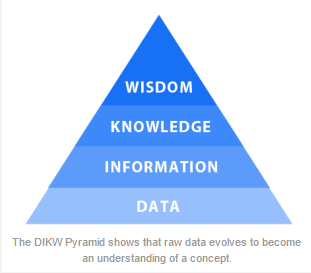
The DIKW Pyramid makes it much easier to analyze and understand the process through which data is transformed.

dikw pyramid

Business 2 Community provides us with a salad metaphor to describe the DIKW pyramid levels:

Data: I have one item. The data displays a 1, not a zero.
Information: It’s a tomato. Now, we understand the item and its characteristics.
Knowledge: A tomato is a fruit. We can identify patterns in the information and apply them to the item.
Wisdom: Tomato is never added to a fruit salad. There is an underlying, commonly understood principle that governs the item’s purpose.

B2C explains further by claiming that “bad data costs time and effort, gives false impressions, results in poor forecasts, and devalues everything else in the continuum.” Therefore, it’s necessary that the data your business collects allows for accurate and efficient analysis. Otherwise, your choices won’t be of the highest quality possible, and they could affect the functionality of your business in the future.

On the other side of the coin, if your technology is operating at maximum efficiency, and your communications are properly planned and managed, the chances of your data being affected by leaks or corruption is significantly reduced. As shown by the DIKW pyramid, data is the foundation for a business. Without it, you cannot hope to continue. NuTech Services can help your business ensure that your data is safe and available when you need it with our Backup and Disaster Recovery solution. Give us a call at 810.230.9455 to learn more.

b2ap3_thumbnail_authentication_security_400.jpg

Tip of the Week: How to Integrate 2-Step Verification with Your Google Account

b2ap3_thumbnail_authentication_security_400.jpgIt seems like you can’t go a week without hearing about some new security vulnerability or massive data breach. Naturally, this leads the average computer user to feel nervous, especially when dealing with sensitive information. With only a password standing between you and your account, hackers can easily access it if you’re careless. Two-factor authentication is the key to maximizing your online security.

Most online accounts allow you to set up some form of two-factor authentication, but today we’re going to concentrate on how to set it up on your Google account.

How It Works
Google calls their two-factor authentication service, “2-Step Verification.” Basically, Google will require that you use more than one form of login credential before allowing access to your account. This generally comes in the form of an SMS message sent to your phone, a voice call, and more. Google can even provide you with a security key that you plug into your PC’s USB port as a two-factor authentication tool.

The plus side of this is that it makes it extremely difficult for hackers to access your account if the only credential they have is your password. This means that the hacker needs to work twice as hard and steal your actual hardware if they want to get into your account. This brings the chances of you getting hacked down to almost zero.

Besides that point, however, there’s quite literally no reason not to integrate two-factor authentication for any and all of your online accounts. Not only is it easy, but the benefits greatly outweigh the costs, if any. The prominent security threats and vulnerabilities that are prevalent throughout the business world should speak for themselves. Without two-factor authentication, you’re missing out on a vital, albeit basic, way of keeping your sensitive data safe.

How to Set Up Google’s 2-Step Verification
In order to set up your Google 2-Step verification, all you need to do to get started is log into your Google account, then go to this URL.

Click on Start setup >> and Google can walk you through the rest. You’ll have to provide Google with your phone number so they can send you text messages when you attempt to log in. This means that you should probably have your phone on you, or at least nearby, when you begin the setup procedure.

Google’s 2-Step Verification can do a lot more than simple text messages, too. For instance, it allows you to use your landline phone system (if you still have one of those in your office) and receive automated voice calls from Google which contain your verification code. You can even print off a set of one-time codes for later use, if you’re planning on traveling a lot.

Again, most online accounts allow for two-factor authentication, so remember that it’s important and necessary to take all of the security precautions you can in the hostile environment that is online computing. You want only the best security to keep your data and your business safe from hackers, thieves, and scam artists. If you need help setting up two-factor authentication, NuTech Services can help your business integrate the best solutions possible. Just give us a call at 810.230.9455 to learn more.

b2ap3_thumbnail_printer_server_mula_400.jpg

Don’t Let the Printer Make a Mess of Your Network

b2ap3_thumbnail_printer_server_mula_400.jpgWhen a print job doesn’t go exactly how you need it to, it’s normal to call your printer some choice words, which may include one of the many colorful synonyms for excrement. Perhaps this stems from a printing network and a toilet having a lot in common. How’s that you ask? Let’s clear the air and find out.

One major similarity between printers and toilets is that they both utilize connected systems. All of your printers are connected to your office’s server units, which in turn connect to your workstations and various devices. Likewise, all of your building’s toilets are connected by a series of pipes leading to one main pipe that exits your building. Just as multiple computers share the same printer, so too do multiple toilets share the same drain. In each example, both the printing signals and the flushed waste all go to one place.

What’s also true of each system is that they’re both susceptible to being overwhelmed. You’re familiar with what happens when your plumbing takes on more than it can it handle; the pipes back up and the contents of the toilet runneth over upon thy floor. At the risk of grossing out our readers, we will refrain from describing what this plumbing problem looks like.

It’s the engineer’s responsibility to design the plumbing system to handle the demands of every toilet–even if they all flush at the exact same time. In fact, for large structures housing hundreds of toilets, like sports stadiums, there’s a ceremony called a “super flush” that takes place before the stadium is opened. In a super flush event, the stadium’s plumbing systems are put to the ultimate test as hundreds of fans simultaneously flush every toilet.

As wacky as this sounds, a super flush has become a celebrated sports tradition. In 2011, Florida Atlantic University hosted a super flush to christen their new stadium. As seen from this video, the event meant sweet relief for the University’s administration as over 100 volunteers reported for duty and successfully flushed all 365 stalls. Go Owls!

Can your company’s network handle a virtual super flush? More commonly referred to as a virtual peak flow test, this is when a network is tested in order to find out how much traffic it can handle. This is a necessary and standard procedure when setting up any network. If your network can’t handle peak traffic, it will fail and cause downtime at the worst possible time, similar to a stadium’s plumbing failing during a playoff game.

Did you know that printing data sent over the network takes up significantly more bandwidth than the average office task? Unless you’ve got plenty of bandwidth to work with, it will be disastrous if every employee in your company clicked “print” at the same time. A network overload like this will cause print jobs to back up, along with your normal network traffic, causing a crash. You would need much more than a mop to clean up a mess like this.

To ease this burden from your network’s server units, NuTech Services offers a print server solution. This solution acts as a dedicated server to handle all of your company’s printing traffic, bypassing the need to run a print job through your regular server units that handle your company’s mission-critical, day-to-day operations.

A print server from NuTech Services will ease a lot of pressure off your company’s server units, which will free up bandwidth for work-related tasks so they can function at high flow speeds. Plus, it will make your printer operate smoother so that you’ll have less reason to get mad and call it something you’ll later regret.

Give your network the relief it’s begging for by calling NuTech Services at 810.230.9455.

b2ap3_thumbnail_use_your_selfie_stick_400.jpg

The Top 3 Technologies for Serious Selfie Takers

b2ap3_thumbnail_use_your_selfie_stick_400.jpgGot a smartphone? Then you’ve probably snapped a selfie before, or, depending on the expectations of your social circles, you may have taken a few hundred of them… in one day. Today, selfies are all the rage and people are coming up with creative ways to take them, like these three exciting selfie technologies.

Before we reveal our three favorite selfie technologies, we should first do a little backtracking and provide a definition. After all, it’s a rather new trend. But in all actuality, the selfie has been with us for quite a while; it used to be called, “No one else wants to take my picture.” For an official definition of the word selfie, let’s turn to the Oxford Online Dictionary (yep, it’s a real word): A photograph that one has taken of oneself, typically with a smartphone or webcam and shared via social media.

The Selfie Sombrero

selfie sombraro

One of the hottest accessories in fashion today is the selfie sombrero. It’s a hat tasked by Acer to assist users with “creating the perfect social media moment.” To achieve this, a glittery-pink sombrero has room for an Acer Iconia A1-840 to hang from its brim. “The world’s first Selfie-Hat” can then be adjusted to allow the user to experiment with angles and lighting. As a bonus, when you’re not taking selfies with your sombrero, it comes with a smaller sombrero for your tablet. 

The Selfie Brush

selfie brush
Good hair is a must for any successful selfie. This is exactly why the Selfie Brush was created. This is another example of a technology that combines a mobile device with an everyday item, like a hair brush. The Selfie Brush utilizes the flat side of the brush, which until now, has been wasted space. The Selfie Brush even comes with a small mirror so you can make sure your hair is perfect before you snap and share your pic. Granted, you might get a few weird looks for taking phone calls with your hair brush, but you can just tell onlookers that you’re a superspy–with fabulous hair.

The Selfie Stick

Finally, we come to the selfie stick. It’s a technology that may be a little more practical than the previous two techs. However, it will still get you some odd looks if you use it. The appeal of the selfie stick is that it allows the user to take a picture of themselves from a distance further than what their arms can reach. This allows you to snap a panoramic selfie without having to pass your camera on to another person. A typical selfie stick extends up to 39 inches and it works in conjunction with your camera’s timer. In fact, you may have even seen the selfie stick in action at your local tourist attractions.

What are your feelings about selfies? Are you on a quest to achieve the perfect selfie, or do you find the whole concept to be too narcissistic for your liking? Despite your feelings about selfies, it’s a trend that appears to be here to stay. This means that humans are guaranteed to come up with even more creative ways to take and share their favorite moments.

selfie danger

b2ap3_thumbnail_advanced_malware_400.jpg

Understanding How Advanced Malware Can Harm Your Business

b2ap3_thumbnail_advanced_malware_400.jpgThere are a lot of different threats out there: Viruses, malware, spyware, adware, the list goes on. While all of these threats are certainly problematic, some are more dangerous than others. In particular, advanced malware can be exceptionally devastating if they manage to inflict damage on your technology.

However, what makes advanced malware so much different from the garden variety? Processor magazine explores how small business and larger enterprises can protect themselves from these advanced threats. As defined by Robert Clyde, international vice president of ISACA, “The nature of advanced malware is that it’s targeted, it’s stealthy, it’s evasive, and it’s adaptive.” These traits combined make for an incredibly sly malware that’s difficult to detect and even harder to prevent.

Unlike ordinary malware, which is generally meant to disrupt whatever it affects and start all sorts of generic chaos, advanced malware usually has a specific goal to accomplish, and is aimed at specific targets. It’s more likely that these advanced threats are after specific information and are specifically designed to complete this task in the most effective way possible. These types of threats can also be considered “Advanced Persistent Threats,” a term used to describe malware which accomplishes its goal over an extended period of time rather than upon execution.

These types of threats are often complex and require a different approach than the standard malware. In fact, some infections can get worse if they’re detected, and they can hop from system to system in order to avoid detection. This makes locating and eliminating the threat difficult at best.

When such a threat knocks at your company’s door, the best way to handle it is with a four-front assault called our Unified Threat Management (UTM) solution. With a powerful firewall at your disposal, your business has a dedicated bouncer to analyze data moving to and from your network. This prevents malicious entities from infiltrating (or leaving) your system when you’re on the hunt for them.

The next phase is when the enterprise-level antivirus solution kicks in. This eliminates threats that are detected on the network. If you suspect that there is a malicious entity lurking on your network, we can locate it with our remote monitoring service and eliminate it before it causes any noticeable damage. We also offer companies a free IT network assessment to locate threats and confirm your suspicions.

There are other preventative methods for keeping advanced malware from getting into your network. An advanced persistent threat might take the form of a spear-phishing tactic, where a hacker will target you specifically for your login credentials or sensitive information. Another preventative way is the spam blocking solution which is part of NuTech Services’s UTM. This keeps spam from even reaching your inbox, making spear-phishing attempts obsolete.

Finally, our web-blocking solution keeps your employees from navigating to insecure or otherwise threatening websites. A skilled hacker might try to gather information using a fake website, or by hiding attachments within permalinks. Our web-blocking solution has the power to keep your business secure while online.

If you’re concerned with how to protect your business’s data from both the garden-variety and advanced malware threats, give NuTech Services a call at 810.230.9455. We’ll help your business find the best solution to your security woes.

b2ap3_thumbnail_nfc_payment_400.jpg

Biohacking: Integration of Smart Technology with the Human Body

b2ap3_thumbnail_nfc_payment_400.jpgWearable technology is still emerging, but a much different type of smart tech is coming soon. At the Kaspersky Labs Security Analyst Summit, the question of whether or not embedding technology in the human body is a viable concept was discussed in detail. This is supposedly the future of smart technology.

Hannes Sjoblad, a member of a Swedish group called BioNyfiken (warning: unless you speak Swedish, you might have trouble on this website), has implanted NFC (Near Field Communication) chips into his own hands in an attempt to back what he calls “biohacking.” This is the process of embedding technology into the human body to perform certain functions. This technology is still in development, but if it’s successful, we can expect to see “cyborg-like” results.

Sound too weird to be true? It’s a squeamish trend that’s happening all around the world. For proof, here’s a real video of YouTuber Mike James getting an xNT NFC chip implanted into his hand (skip the video if you don’t like needles).

According to ZDNet, over 300 Swedish citizens have volunteered to have these NFC chips implanted in their hands, specifically between the thumb and the forefinger. This project began as a crowdfunding campaign on Indiegogo, and has quickly turned into a topic of interest. Sjoblad himself uses this chip for a number of things. He says he can use it to unlock his house doors, bike lock, and even for his shop memberships and business cards. How’s that for smart technology?

Sjoblad was quick to defend his organization’s ideas by explaining that cyborgs “are already among us,” in the form of people with pacemakers, insulin pumps, and other medical technologies. He also explains that this technology is rapidly becoming more affordable as time goes on, not unlike other technologies like computers and smartphones. In terms of privacy, we already have smartphones that are capable of sharing personal data; therefore, these NFC chips shouldn’t be a cause for concern.

Sjoblad hopes that embedded NFC chips will improve the way that humans perform day-to-day activities normally achieved through use of smartphones, without having to use the device itself. Devices “clutter up” these daily routines and complicate things. Even wearables are considered “clutter.” Sjoblad’s goal is to eliminate these devices and simplify tasks using his NFC chips.

You can imagine the possibilities for this type of technology in the future. One of the most notable possibilities is two-factor authentication. Imagine keeping your computer locked until you and your unique NFC chip are within range. Or, imagine accessing a bank account without fear that someone else has access to it. Whether or not this type of technology will become readily available for the public is another topic altogether, but there’s a very real possibility that this kind of authentication can change the way we use our technology.

What are your thoughts on turning NFC chips and the human body itself into an authentication tool? Let us know in the comments.

Bonus technology: Want to take advantage of NFC tech without the use of needles? Try the NFC Ring.

b2ap3_thumbnail_maximum_productivity_400.jpg

Tip of the Week: Achieve Maximum Productivity for Your Team with These 5 Technologies

b2ap3_thumbnail_maximum_productivity_400.jpgYou pay your employees to come to the office and perform their daily duties, but how much of that time is actually being spent working? Every wasted minute cuts into your daily profits, which can waste countless minutes. If you want to get the most out of your team, there are several technology strategies that the modern business can take advantage of to maximize productivity.

Surveillance Cameras
Depending on your productivity problem, there are varied levels of solutions which you might integrate. When the boss rarely makes rounds around the office, your team might be encouraged to “loaf around,” which is the act of wasting time. If you can’t leave the room for even a minute without your team goofing off, surveillance cameras might be the best way to set them straight.

max productivity1.jpg

This might be a worst-case scenario, but believe it or not, some offices need to take advantage of these kinds of solutions to maintain order. Surveillance systems are now much more cost-effective than in the past, so integrating one into your IT strategy is more affordable than it sounds. With a camera installed in the office, employees will understand that any loafing that’s performed in the office will be recorded, and incriminating evidence can and will be used against them when it comes time for a review. Some cameras can even allow you to watch a live feed of your office on your mobile device, which is ideal for the traveling business owner.

Automatic Door Locks
One of the more common ways that employees tend to waste time is through their breaks. When it comes to extra time spent on breaks, every wasted minute can really add up. If every employee slacks off a few minutes here and there, it can add up quickly and cut into your company’s bottom line. Automatic locks on your organization’s doors can encourage your team to stop wasting time and get back to work.

max productivity2.jpg

After all, you aren’t paying them to be late and irresponsible. With automatic locks, you can set them to lock the door right at 8:00 a.m., or whenever your office opens. If they don’t make it to work on time, they’ll be forced to either endure the embarrassment of needing someone to let them in, or lose a day’s pay. They’ll quickly get the point. This might seem like an extreme measure, but it’s one that might be necessary. Just like surveillance cameras, these locks can be controlled remotely from your mobile devices if need be.

Content Filtering
Your employees sit in front of a workstation all day in order to work, not browse the Internet searching for memes or wasting time on social media. Unfortunately, even the best employees can be susceptible to the allure of sites like Facebook, YouTube, BuzzFeed, and so on. Content filtering can be used to keep your team off of these websites, which can keep them on task. In fact, companies that have integrated a content filtering solution have seen productivity increase as much as 23 percent.

Unified Threat Management
Content filtering is one of the many functions of NuTech Services’s Unified Threat Management (UTM) solution. In addition to content filtering, the UTM provides users with an enterprise-level firewall, antivirus, and spam-blocking solutions. You can view how your team is taking advantage of your business’s network, including if they are streaming movies or playing games. By blocking these countless distractions, your team will have no choice but to focus on the task at hand.

Functioning Workstations
This isn’t something you might immediately think of when it comes to workplace productivity. Sometimes the reason that your team might not get as much done as possible is because their technology isn’t working properly. A workstation that is bogged down and in need of maintenance can be a significantly difficult hurdle to jump for the average employee.

max productivity3.jpg

You don’t even want to think about the costs associated with hardware failure. It’s more efficient to simply make sure that all of your business’s technology operates in its intended fashion. NuTech Services can monitor and maintain your systems to make sure that all of the latest patches and updates are applied, which can increase both productivity and security.

With these five technologies, you’ll be able to help your team understand the value of productivity. For more information, give NuTech Services a call at 810.230.9455.

b2ap3_thumbnail_email_overload_400.jpg

Study: Checking Your Inbox Can Increase Your Stress Level

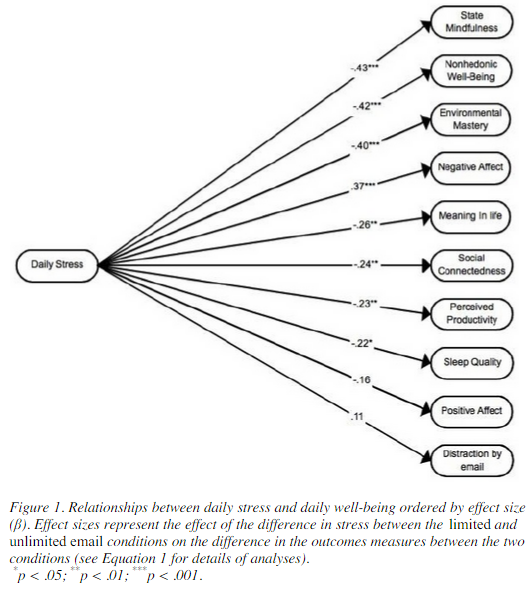
b2ap3_thumbnail_email_overload_400.jpgIf you’re one of those people who are always checking their inbox, you might be dealing with a lot of unnecessary stress in the workplace. A study has linked constantly checking your email inbox to higher stress levels. While this might not come off as much of a surprise, researchers at the University of British Columbia have managed to put a number to the maximum amount of times you should be checking your email to minimize stress.

According to their test, the maximum number of times you should be checking your email for minimum stress levels is three times. The study involved 124 adult workers over a seven-day testing period, in which they were only able to check their email three times a day. Then, the following week, workers were encouraged to check their email inbox whenever they got a spare moment. This is generally how most workers are in the office. At the end of each workday, the test subjects were asked to fill out a short questionnaire about their current stress levels.

stress levels

When encouraged to check their email as often as possible, the average worker checked their email 15 times throughout the day. Unsurprisingly, the primary reason checking email is so stressful for the average worker is that they have to constantly shift from urgent work tasks, to checking email, to personal matters. It’s no wonder that workers get so stressed out, especially when some email recipients expect immediate answers. This might be why, at first, workers were somewhat hesitant to only respond to their emails three times a day. In fact, according to Mashable, 92 percent of workers in the United States use email for inter-office communication, and as many as 183 billion emails are sent out on a daily basis. This root of email stress lies in the need to stay connected at the workplace.

Ideally, according to the study, workers should only have about three periods of email correspondence throughout the workday. To accomplish this, set aside a block of time at the beginning, middle, and end of your day to respond to emails that demand your attention. You might notice a significant decrease in stress. Unfortunately, not all business professionals can manage this with their busy schedules. If this is the case with you, here are some tips which might help you understand that your email inbox isn’t as important as it seems:

  • If it’s especially important, you’ll receive a phone call or instant message about the issue at hand. If you have something urgent which needs to get done, try making a phone call yourself, and save the time you might have wasted drafting the perfect email message.
  • You can’t afford to continuously respond to emails all day long. Continuously halting more important tasks isn’t ideal for productivity, concentration, or quality of work.
  • If it’s not marked as important, it’s probably not important.

If you can manage to move away from checking your email constantly, great. However, you still want to make sure that the messages you are receiving are real, legitimate messages. Spam is a problem which makes checking email slightly more stressful due to its potentially-disastrous nature and its reputation for being a time-waster. With an enterprise-level spam blocking solution from NuTech Services, you can mitigate the spam received during the workday and free up more time for important tasks.

If you’re ready to stop wasting time and dealing with unnecessary stress concerning your email inbox, give NuTech Services a call at 810.230.9455. We’ll work with you to manage your technology in the most efficient way possible.

b2ap3_thumbnail_smartphone_security_400.jpg

Tip of the Week: 7 Common Methods to Protect Your Smartphone

b2ap3_thumbnail_smartphone_security_400.jpgThose who believe that smartphones are secure from threats are in for a rude awakening. Modern businesses need to apply adequate security practices to maximize the protection of mobile devices, or risk everything.

If a hacker were to somehow access a corporate mobile device, they could potentially compromise sensitive information. Would your business be able to recover from such an attack? You want to keep this situation from happening in the first place, instead of just hoping it doesn’t happen. Here are some ways you can keep your business’s sensitive data away from those who might try to steal it from your smartphone.

Integrate a Lock Code
Naturally, the best way to keep strangers from accessing information on your phone is to set up a lock screen. There are a number of different lock screen options that you can select from, including entering a PIN number, dragging a specific pattern across the screen, and entering a full-fledged password. The type of authentication techniques available vary according to the device.

Try Data Encryption
Most of the time, you can encrypt your smartphone or tablet pretty easily. This means that the device’s data will be inaccessible to anyone who doesn’t have the decryption key, or password. This is a surefire way to make stealing your data more difficult than it’s worth to most amateur hackers.

Disable Website Tracking in Your Browser
Websites are known to collect information from you while you browse, and they use this information to deliver advertisements to you based on what you look at. It’s not beyond the realm of possibility to leak confidential information to the Internet. Your mobile browser should give you the Do Not Track option, which leaves it up to the website whether or not they will collect information from you. Most websites will listen to your preference, but this doesn’t always work.

If the Caller is Unknown, Don’t Answer the Call
We’ve all experienced the irritation of answering calls from unknown numbers and listening to automated messages. However, in the rare moment that there’s actually someone else on the other end of the line, they are probably one of two things: A cold-caller trying to sell you something you don’t need, or a hacker who’s trying to trick you. These hackers often pose as representatives from organizations (like banks, charities, etc) and try to convince you to give up information regarding your account. Naturally, it’s best to avoid answering the phone if you don’t know the identity of whoever is on the other end. Besides, if it’s really important, they’ll leave a message or callback information, which you can cross-reference with information you find on the Internet.

Use GPS Tracking to Locate Your Lost Device
Most modern smartphones, like those made by Android and Apple, come equipped with GPS tracking features that can be accessed online if you have misplaced your device. This can be helpful if someone has located your device, or if it’s simply inside the sofa. If someone has found it and hasn’t found a way to contact you, you can locate it with GPS. Problem solved. Although, it should be mentioned that the GPS tracking only really works if the device is turned on, so it’s not without its limits.

Keep Just Enough Contact Information in Your Device
Once in a blue moon, you’ll meet a genuinely good person who wants to return devices that they’ve found lying around. If this is the case, they won’t know how to return it to you if you don’t give them a way to do so. Often, a simple name and alternative telephone number will be enough to help them get ahold of you. It’s important to not leave too much information in the device, or you could risk giving hackers everything they need to steal your identity.

Keep Your Device within Arms-Reach
Finally, the easiest way to keep your device safe is to keep it on your person at all times (or at least within sight). This is especially important if you often work remotely from public places, like coffee shops, diners, etc. This is the best way to keep the common thief from gaining access to your device.

For those who don’t want to take any risks, a mobile device management solution from NuTech Services is the most comprehensive solution out there to keep your business’s mobile device safe and secure. We can whitelist and blacklist applications to let only specific ones gain access to confidential corporate information, and we can even integrate content filtering and spam blocking to help your team stay as safe as possible, even while out of the office. Last but not least, we can remotely wipe devices in a worst-case scenario.

For more information about how NuTech Services can keep your mobile devices secure from hackers, give us a call at 810.230.9455.

b2ap3_thumbnail_coca_cola_spill_400.jpg

Why Coca-Cola’s #MakeItHappy Commercial Fails to Make IT Happy

b2ap3_thumbnail_coca_cola_spill_400.jpgOne of the most memorable Super Bowl XLIX commercials yet again came from Coca-Cola. In classic Coca-Cola fashion (pun intended), they premiered an inspirational video with the message, “Let’s all make the World Wide Web a better place, #MakeItHappy.” We can’t contest to Coke’s feel-good message, but as an IT Company, we must object to one horrifying aspect of this commercial.

To find out what’s got us so hot over here at NuTech Services, watch the commercial for yourself:

There. Right there at 0:16. Did you see it? We’re given an inside look at an absolutely gorgeous data center that seems to house most of the Internet, and who’s in charge of upkeeping this infrastructure? Apparently, it’s some wanna-be technician who thinks it’s okay to bring an open container in a data center container.

In the real world, no self-respecting data center would ever allow this. And not to be too picky, but we feel the need to point out that the volume in a data center of this size would be so loud that the tech wouldn’t be able to hear every beep and boink like he’s on the deck of the Starship Enterprise. In reality, the technician would need ear protection to dampen the noise coming from the thousands of server fans. But we digress.

Adding insult to injury is Coke’s absurd idea that spilling its soft drink inside a server will somehow cause “the happiness found in every bottle” to digitize and transform the Internet into a place of rainbows and participation ribbons. Granted, we’re just as sick of all the negativity on the web as the next user, and this snarky article probably isn’t doing much to #MakeItHappy; however, in all of our years of computer repair and seeing lots of computers fall victim to various spills, it’s our experience that not once has a spilled-drink scenario caused happiness.

In fact, we’ve seen the complete opposite to be the case as users of soaked computers become distraught and frustrated, expressing monitor-smashing and hate-filled-texting-like symptoms, similar to the behavior displayed at the intro of Coke’s commercial. Don’t take our word for it, see for yourself the look on the face of YouTuber Gail as she pleads with the Internet for help after destroying her laptop from having Coca-Cola “spilled all in it.”

It’s safe to say that Gail, aka “Southernstateofmind1,” isn’t happy from her Coca-Cola mishap. In fact, she’s “on the verge of tears,” and dem’ ain’t happy tears either.

After digging a little deeper on YouTube we come to TechRax’s channel and his pointless experiment of dousing a new iPhone 5 with Coca-Cola–shield your eyes, Apple enthusiasts.

Somehow, the iPhone survives its Coke bath. It could be due to the superb engineering on behalf of Apple, but we think it has more to do with the power of Bob Marley’s good vibes. We’re betting that your company’s server units couldn’t survive a Coke spill as well as this iPhone, as pointed out by these four YouTube users commenting on the Coca-Cola commercial.

  • TrevorSpace Animations: Whoever made this commercial clearly doesn’t know how computers work.
  • 0yisaicai0: But seriously though, coming from one who works in a security firm, I cringed a bit when that bottle tipped over. That’s serious network damages, right there.
  • TECGaming: I tried this with my servers, it totally just fried them. Thanks a lot Coke for not brightening my day but costing me 25 Grand on my server.
  • Data Cave (an actual data center company) shares our sentiments: Coke’s Super Bowl commercial definitely had a great message overall, but not exactly the best message for having drinks inside of a data center. Server rooms are Coke-free zones!

We wholeheartedly agree with Data Cave on this one, and any techie that brings a drink into a server room should be #Fired.

Woops. I Really Did Spill Coke on My Computer. What Do I Do Next?
The accidental spilling of drinks on computers is a common occurrence. Hundreds of PCs are needlessly damaged every day due to user negligence and a case of the clumsies. Sometimes a user gets lucky and can salvage their equipment, like with the iPhone user. Unfortunately, Gail’s scenario is more often the case with electronic circuitry being fried and the soaked equipment needing serious repair.

First thing’s first; if you spill liquid on your computer, power off your machine. One thing Coke got right is that a beverage in contact with electrical equipment produces sparks and a sizzly noise. Once the wet machine is turned off, dampen the outside of it with a dry cloth and be sure not to move it too much, or else risk the liquid seeping further into the machine.

If, and only if, you have the technical skills to open the case and dry your equipment out with a cloth and hair dryer, do so. Otherwise, we highly recommend that you take it to a professional so you don’t risk disrupting the insides and worsening the damage. Professional IT technicians will be able to accurately assess the damage and determine if it’s salvageable or not.

Our experience with spilled drinks informs us that there’s only one scenario where Coke spilled inside a server leads to happiness, and that’s after the fact when it’s remembered that the data is backed up and can easily be recovered, thanks to having a solution like our Backup and Disaster Recovery tool in place. #BePreparedForAnything

At the end of the day, we recommend that Coca-Cola stick to making feel-good commercials about singing songs and polar bears and leave the technical stuff to the IT professionals at NuTech Services.