b2ap3_thumbnail_big_data_rainforest_400.jpg

Big Data is Saving the Biodiversity of Tropical Rainforests

b2ap3_thumbnail_big_data_rainforest_400.jpgWhen you think about Big Data, thoughts typically turn to how businesses use the technology to collect and analyze massive amounts of information for the purpose of making sweet profit. Although, there’s much more to Big Data than making money; scientists are using the technology to help save the rainforest.

We shouldn’t have to convince you of the importance of the rainforest. It’s estimated that rainforests are responsible for producing 40 percent of the Earth’s oxygen. Therefore, anything that’s done to help preserve the rainforests is helping to preserve all life on the planet. This is why groups like Conservation International (CI) exist.

CI is on a mission to preserve the natural biodiversity of the rainforest. Such a mammoth task can only be accomplished if the scientists of CI first understand the environment of which they have pledged themselves to protect. This requires collecting and processing a vast amount of information directly from the rainforest itself, which is where Big Data comes in.

Making the job of CI difficult is the sheer vastness of the rainforest. In fact, the Amazon rainforest alone covers 2,123,562 square miles. How can a small team of scientists possibly monitor such a large area? Their approach is to turn the ecosystem of the rainforest into an IT system, consisting of more than 1,000 cameras designed to monitor and record information, like activity from animals and even poachers, as well as the effects of climate change and land usage.

According to Sandy Adnelman, chief scientist at CI, this process can be likened to a check up for the planet. For example, when you get a physical from your doctor, they check your body’s most crucial parts and systems. In the same way, scientists like Adnelman are strategically monitoring the most important parts of the rainforest.

To give you an idea of just how helpful Big Data technology is for these scientists, it’s important to remember that the previous way of collecting footage was done manually. CIO explains:

Because the camera traps are located in some of the more remote locations on earth, there’s no infrastructure. Teams have to manually collect the data from the traps and upload it, at which point CI scientists run a series of scripts and models to identify the various species appearing in the images. They then blend that data with climate measurements (precipitation, temperature, humidity, solar radiation, etc.), data on trees (growth, survival, deforestation, etc.) and land use data from public sources to create a model of the health of the animal populations at the sites and how they are changing over time.

The previous process was a huge undertaking that took up vast amounts of the scientists’ time. For these Planeteers, this was a point of frustration because, when it comes to saving the rainforest, time is of the essence. Thanks to Big Data analytics, scientists can now process and analyze the collected rainforest data up to nine times faster than the previous method. Additionally, the results are far more accurate. This allows scientist to make better use of their time and monitor more foliage.

In the same way that Big Data helps improve operations for these scientists, it can improve the workflow of your business. If you’ve got a process that involves collecting and crunching large amounts of information, and it’s eating away at your budget and resources, then check with NuTech Services for a Big Data solution that will make operations easier. In the same way, if you feel like your business would benefit from knowing more information about your target market, we can find a Big Data solution for this too.

Call us today at 810.230.9455 to upgrade the ecosystem of your company’s IT system.

b2ap3_thumbnail_internet_of_things_security_400.jpg

The Internet of Things is the Next Big Thing, Are You Ready?

b2ap3_thumbnail_internet_of_things_security_400.jpgWhat comes to mind when you think about the Internet of Things? Tech enthusiasts around the world see hordes of connected devices taking advantage of mobile technologies to augment everyday life; but the realist sees a horde of devices that pose a considerable threat to network security. How can your business ensure maximum security in the face of such a phenomenon?

As explained by Gartner’s IT glossary, “The Internet of Things (IoT) is the network of physical objects that contain embedded technology to communicate and sense or interact with their internal states or the external environment.” This means that the more devices connecting to the Internet, the more likely security is to take a hit. This is further augmented by the fact that most IoT devices are designed to communicate with each other, increasing the risk of data leakage.

Modern businesses need to prepare their networks for the Internet of Things before data loss and compromisation come into the picture. Your organization should take an active, proactive role in its network security, especially when it comes to sensitive corporate information. The Internet of Things transfers and receives data in a vastly different manner from previously established protocol, making protecting this data a daunting task. This means that your business needs to take a comprehensive approach when it comes to network security.

According to Brian Partridge of 451 Research, there are a couple of variables that are common throughout the vast amount of different IoT device, like a mobile device, a network, and a cloud service. Furthermore, there are three challenges posed by the Internet of Things that plague IT professionals:

  • Confidentiality Challenge: Limiting access to data on a user-by-user basis. For example, the average employee doesn’t need access to your financial records.
  • Integrity Challenge: Making sure that data is sent and received securely, without being altered, detected, or stolen while in transit. In other words, making sure that your data isn’t vulnerable to attack while it’s moving from one system to another.
  • Authentication Challenge: Making sure that received data is coming from a legitimate source.

In order to fulfill your duties as a business owner, you need to keep your organization’s data secure. Call NuTech Services for any concerns you might have about the Internet of Things. We can discuss ways to optimize network security so you can worry less about external threats, and concentrate more on running your business. Give us a call at 810.230.9455 to learn more.

b2ap3_thumbnail_android_clock_400.jpg

Tip of the Week: How to Prevent Lollipop’s Bug From Breaking Your Alarm Clock

b2ap3_thumbnail_android_clock_400.jpgIf you own an Android device, you’re no-doubt aware that Google issued an upgrade to Android’s OS not too long ago. This update, dubbed Android 5.0 Lollipop, presents several aesthetic upgrades to devices which were running a previous Android OS. However, there were also some functionality changes, a few of which were less than desired; like the unexpected changes to Android’s alarm clock.

Don’t Put This Tip “On Snooze”
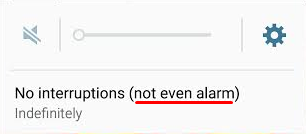
Before the Lollipop upgrade, Android’s alarm clock application worked in silent mode. This was exceptionally useful, especially if you wanted to turn your phone’s sound off overnight to get a good night’s rest. However, in Lollipop, Silent mode is called Mute mode, where all sounds from calls, texts, and other notifications are silenced… including alarms.

alarm 1

You don’t need us to tell you that this new functionality change can affect your ability to get to work on time in the morning. Thankfully, there’s a pretty simple fix to this problem, even if it’s not the most obvious solution.

Since Lollipop doesn’t allow alarms to go off in Mute mode, there’s an extra hoop you have to jump through in order to get them to work properly. You can set your phone to only go off for what are called Priority Interruptions. Because alarms are always considered priority interruptions, you shouldn’t have to worry about the alarm being silenced.

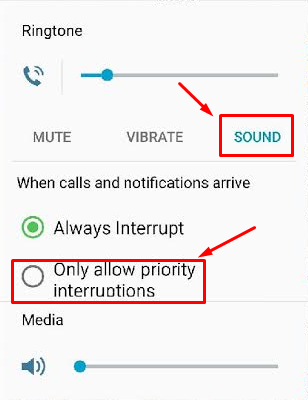
To activate Priority Interruptions, turn up your volume to Sound or Vibrate. Next, select Only allow priority interruptions.

alarm 2

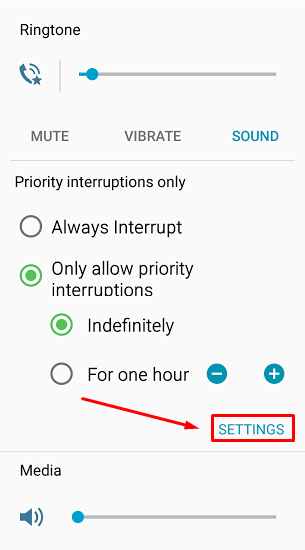
Doing this opens a menu beneath your selection. Then, click Settings.

alarm 3

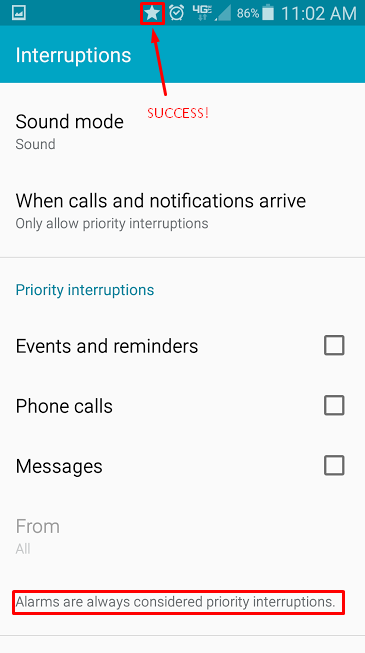
This lets you view the Priority Interruptions settings. Don’t be fooled by the Silent choice here; Priority Interruptions only work in Sound or Vibrate mode. If you really want a Silent mode similar to the previous version of Android, you can uncheck messages, phone calls, and reminders in Sound mode. This lets it basically act the same as it used to, more or less.

alarm 4

If you’re successful in setting your Priority Interruptions, a star will appear next to your alarm clock symbol at the top of your screen. Afterwards, it’s best to make a test alarm to make sure that it goes off as planned. It’d be a shame to go through all of this trouble just to miss your alarm. Of course, if all else fails, you could always get a dedicated alarm clock from your local department store; or, get a pet. Whichever works for you.

Be sure to subscribe to NuTech Services’s tech blog for great tips every week.

b2ap3_thumbnail_ssd_better_or_worse_400.jpg

Your Solid State Drive May Outlive You

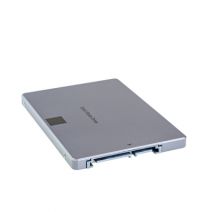
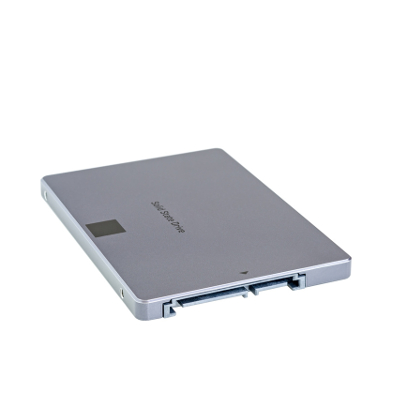
b2ap3_thumbnail_ssd_better_or_worse_400.jpgWhen shopping for a new computer, you’re faced with a choice; go with a traditional hard drive (HDD), or a solid state drive (SSD). The benefits of an SSD are many, but are they enough to justify the extra expense?

To accurately answer this question, you first need to consider your computing needs. If you’re on a tight budget and looking to buy a workstation that can run basic productivity applications like Microsoft Excel and your preferred customer relationship management product, then you shouldn’t need the extra performance provided by an SSD, and an HDD will suit your needs.

SSDs are preferred for tasks that use a lot of resources, like rendering video and high-end graphics. In the past, a business that didn’t need this extra power might have overlooked SSD, concluding that it’s simply not worth the money. However, there’s another benefit to SSDs that should appeal to virtually every business owner, SSD lifespan.

In the IT world, it’s common knowledge that the average lifespan of an HDD is five years. Plus, thanks to the small and moving parts associated with an HDD, it’s not a matter of if, but when it will fail. According to a recent study by Backblaze, which analyzed the lifespan of more than 41,000 drives used in their data centers, the lifespan of an HDD drops down to four years if it’s seeing constant use, like in a server unit.

Therefore, if the only reason you’re buying a new computer is to get you through a couple of years, then HDD should work out fine. However, if you’re looking to get maximum ROI out of your equipment and have it last as long as possible, then the lifespan of an SSD makes it well worth the extra expense. This begs the question, “Just how long do SSDs last?”

Due to SSDs being a comparatively newer technology, the IT world still doesn’t have a concrete answer. One reason for this is due to the fact that one doesn’t judge SSD lifespan based on actual hours in use, but rather, how many reads and writes the drive performs. To that end, TechReport did a stress test and saw more than 700TB of data read and written to a single SSD before it failed. Lifehacker has put this ridiculous number into perspective:

These drives usually come with a three to five year warranty, and manufacturers assume you’ll write 20GB-40GB per day in data. That means to get to that 700TB, you’d have to do 40GB every day for 17,500 days, or about 50 years.

50 years! That’s ten times the expected lifespan of an HDD. Even though an SSD will cost you more money, it won’t cost you more than ten times the amount of an HDD. Especially with the technology becoming more affordable as time goes on. Plus, concerning the TechReport stress test, a 700TB SSD lifespan is on the low end. ArsTechnica explains how TechReport found some SSDs to last much, much longer:

The other three SSDs are still working and have made it past 1PB of writes, and TechReport’s torture test remains ongoing. However long the drives do end up lasting, it’s definitely long enough to put to rest a lot of fears about current-generation SSD lifetime limits.

In your quest for a new computer, findings like this should really help clear things up. SSDs are clearly the superior drive in virtually every way, including additional areas like power consumption and durability. The many benefits of SSD make it worth the extra money for businesses looking to turn their computer purchase into an investment.

NuTech Services is here to help you make important technology decisions like this so that you can get the most out of your IT investments. Additionally, we’ve got the tools it takes to protect and maintain your IT equipment so that it will perform optimally and last you as long as possible. To learn more about how NuTech Services can help your business get the most out of its technology, give us a call at 810.230.9455.

b2ap3_thumbnail_google_chrome_400.jpg

Tip of the Week: Load Cached Pages in Google Chrome for Offline Browsing

b2ap3_thumbnail_google_chrome_400.jpgYou might have experienced the frustration of reading an article online and having the Internet connection cut out on you. This is one of the most common problems while working with a shoddy WiFi connection. If this happens to you, you can view your browser’s cached pages in order to finish up what you were reading; so long as you’re not trying to view pages like Facebook, which update periodically throughout the day.

Here’s how you can view Google Chrome’s cached pages, even while offline.

What Exactly is Caching?
You might have heard the term in passing, but do you understand how the cache works? It’s basically a component that stores data when you visit a website. This allows that data to be loaded faster the next time you visit the page. The idea is to reduce bandwidth and processing power required to view the material.

How to Load Cached Chrome Pages
By taking advantage of the cache, you can read web content that you’ve previously accessed, even while offline. Chrome doesn’t automatically enable this feature, but there is an experimental add on that you can use from the mad scientists at Google. Type chrome://flags into the search bar.

flags

After reading Google’s disclaimer, locate the feature called Show Saved Copy Button. If you aren’t using the latest version of Chrome, try looking for Enable Offline Load Stale Button.

show button

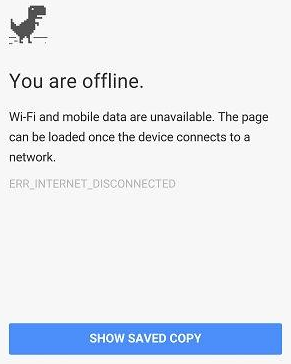
Select Enable from the dropdown menu, which will prompt you to restart Chrome. When you next visit an offline web page, you’ll see a button that says Show Saved Copy. If you’ve previously visited the page, you’ll be able to load the cached copy of the website’s content.

offline

Keep in mind that due to the nature of website caching, you won’t be able to see any updates made to the page since you last visited it. This is the one true downfall of offline viewing. However, this is useful if you’re trying to finish reading an article where you don’t have Internet access.

Stay tuned next week for more productivity tips from NuTech Services.

b2ap3_thumbnail_windows_tablets_productivity2_400.jpg

Microsoft Takes a Business-Centric Approach With Its Mobile Strategy, Part II

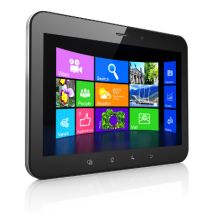
b2ap3_thumbnail_windows_tablets_productivity2_400.jpgIn our last blog article, we looked at Microsoft’s mobile computing strategy for businesses. In part II, we want to follow up by looking at some specific mobile technology from Microsoft, including a preview of its newest mobile computing venture, Windows 10.

Driving Microsoft’s mobile computing strategy are three factors; integration, security, and simplicity. Microsoft’s long history of developing enterprise-level software comes through with its latest mobile offerings. This advantage is sure to increase Microsoft’s mobile market share, especially since the devices offered by its primary competitor, Apple, are designed with the consumer in mind.

For example, if one thinks about the typical tablet device, there’s a natural aversion to using it for everyday business tasks, like typing and sharing files. Also, the security of mobile devices has been a concern for business owners (a trend known as BYOD). Microsoft is looking to change this perception of tablets and mobile devices with its latest offerings, and hopefully turn more businesses on to the world of mobile computing with Microsoft.

In regards to Microsoft’s current mobile offering, its Windows 8.1 tablets, the devices provide a level of security that’s unmatched by its competitors. This is due in part because the software, Windows 8.1, was designed as an OS for workstations too, which require a high degree of security. Protections that come with Windows 8.1 tablets include comprehensive device encryption and a tamper-resistant booting process that prevents unauthorized access and low-level malware infections.

There are several advantages to Microsoft’s approach of using the same OS for both its desktop computers and its tablets. Users who go back and forth between the two machines prefer it because it’s one less software and interface to familiarize themselves with. Although, it’s important to point out that not every Microsoft tablet on today’s market is equipped with Windows 8.1. Microsoft’s lower-end tablets have their own mobile OS (Windows 8 RT), that, while similar to its desktop counterpart, is still a different OS entirely.

Consumers should know which Windows OS to look for in a tablet before making a blind purchase. As we’ll cover with Microsoft’s upcoming release of its next OS, Windows 10, they’re looking to change this dynamic and have the same software run across all mobile devices. Time will tell if Microsoft will be able to follow through on this ambition. If you recall, this was the same expectation the tech world had on the eve of Windows 8’s release.

Top 3 Mobile Devices Running Windows 8.1
If you’re looking to take advantage of a tablet that utilizes all of the benefits offered by Windows 8.1, then we recommend one of these three tablet devices:

  • Microsoft Surface Pro 3: Microsoft’s primarily known as a software company, but with products like its Surface Pro 3, it’s shown the world that’s it’s capable of putting out quality hardware too. Boasting a 12.6” screen, the Surface Pro 3 has enough resources to do essentially everything that a laptop can do. Fans of the Surface models take note that Microsoft has renovated and improved the type cover for its latest version.
  • ASUS Transformer Book: ASUS tablets come equipped with the full version of Windows 8.1. ASUS’s top model is the Transformer Book T2000, which has an 11.6” display and comes with a keyboard.
  • Samsung XE500: Samsung is known as the world’s leading mobile device manufacturer. Its most attractive tablet offering is the XE500 model. Boasting of an 11.6” display and an attachable keyboard, it also comes with a Livescribe Smartpen stylus.

Windows 10: Microsoft’s True All-In-One Strategy
Microsoft’s next big thing is Windows 10. This OS promises to really enhance Microsoft’s mobile strategy since the same version of the OS will be available on both desktop and mobile platforms (much like we see now with select Windows 8.1 tablets). This all-in-one feature of Windows 10 will make it easier for a business to adopt a mobile strategy.

Microsoft’s release date for Windows 10 is July 29, 2015. Current Windows users should have already been notified by Microsoft about reserving their copy of Windows 10. What kind of features and upgrades are we looking at for Windows 10? Concerning the mobile side of the new OS, International Business Times provides us with seven things to look for:

  • Clutter-free interface.
  • A new settings menu that will allow you to access your preferences universally across all your Windows 10 devices.
  • A new Internet browser, Edge, will be featured across all Windows 10-based devices and be able to organize your bookmarks, history, and RSS feeds across all your devices.
  • All-in-one messaging and calling that will feature an integrated message center by drawing all your text messages, Skype messages, and from any other third party message apps.
  • A floating keyboard with well-laid buttons and voice-typing ability.
  • Universal apps will allow you to use the same version of apps across your Windows devices.
  • Free to upgrade for licensed Windows users.

In the past, adopting a solid mobile strategy seemed difficult and an unsure move for companies that aren’t experts in mobile trends like BYOD. However, with Microsoft’s mobile computing offerings like its current line of Windows 8.1 tablets, and Windows 10, going mobile has never been easier for small and large businesses alike. To have a conversation about how your company can take advantage of these mobile technologies and more, reach out to NuTech Services at 810.230.9455.

b2ap3_thumbnail_windows_tablet_productivity1_400.jpg

Microsoft Takes a Business-Centric Approach With Its Mobile Strategy, Part I

b2ap3_thumbnail_windows_tablet_productivity1_400.jpgJust like the personal computer before it, smartphones have become essential pieces of technology that are practically required in order to complete mission-critical tasks. However, the primary advantage that these devices have over the popular PC is that they’re vastly more mobile and designed for use on the go. Are users able to increase productivity by using Windows tablets?

Unlike Apple, who produces hardware with exclusive software installed on it, Microsoft rarely produces actual Windows-based hardware. As a matter of fact, one of Microsoft’s best marketing strategies was to concentrate almost exclusively on producing software solutions, like operating systems and productivity applications. These pieces of software are then partnered with hardware manufacturers like Dell, Lenovo, and HP, who are deemed original equipment manufacturers (OEMs) for the purpose of profiting off of the software distribution. Thanks to this ingenuity, over 95 percent of all desktop and laptop PCs use the Windows operating system.

Other software manufacturers, like Google and Apple, have found success in the mobile market, with Android and iOS respectively. This prompted Microsoft’s 2012 entry into the mobile race with their Surface line of tablets. Using the metro user interface similar to the one found in Windows 8, the original idea was to enhance mobile work capabilities. But, as everyone in the business world knows, nothing goes as smoothly as we might expect it to. Windows 8 RT was incapable of supporting legacy software, and there was a significant lack of mobile applications that could be run on the original Surface tablet. The two combined were basically a death blow to the fledgeling tablet series, which made mobile users consider devices other than the new Windows-based tablets.

This all changed when Microsoft released their first tablet with a full version of the Windows 8 operating system: the Surface Pro. Because it ran a complete version of Windows 8, any piece of software that would run on a Windows PC could, in theory, be used on the tablet, so long as the software meets the specifications of the device. Since that fateful day, Microsoft and its partners have continued to release tablets that have these capabilities. Despite the lack of applications, this got users interested in the new line of Windows Surface tablets, and provided Microsoft a niche in the competitive mobile computing market.

It took yet another update to make the Surface tablets viable for business. The first service pack, titled Windows 8.1, enhanced the integrity of Windows 8 on tablets with increased security and networking capabilities. The update added BYOD enhancements, improvements to device mobility (VPN, mobile hotspot integration), and security improvements (remote management, enhanced encryption). All of these options are practically essential in today’s business environment, so this update made business owners finally take notice in the mobile Windows 8.1 platform.

After years of toil and hard work, Microsoft’s Surface tablets have finally caught up with the application development and security features that made Android and iOS so popular in the mobile sector. Yet, due to Microsoft dragging their heels on these imperative features, many OEMs haven’t developed or pushed mobile devices that run Windows 8.1. Despite its current lack of popularity, Windows 8.1 tablets hold a unique advantage in terms of building a modern office.

In part two, we will provide specific examples and suggest devices that can work to securely increase your company’s mobility; but in the meantime, why not share some of your thoughts in the comments?

b2ap3_thumbnail_fossils_scanning_400.jpg

3D Scanners Give Scientist a Glimpse of the Real Jurassic World

b2ap3_thumbnail_fossils_scanning_400.jpgWho remembers seeing Jurassic Park in theaters in 1993? By now, the dinosaur flick is ancient history, but with Jurassic World hitting theaters today, you might have huge lizards on the brain. What does this have to do with technology? Well, researchers in Kenya are using 3D scanning and printing to preserve fossils, so the real ones can be safely removed from hazardous weather conditions in the Turkana Basin.

According to CNet, 3D scanners and printers have been used in many different industries for several purposes. They can be used for construction, making prosthetic limbs, and even recreating crime scenes for forensic specialists. However, one of the more innovative features is using 3D printing technology to create 3D models of fossils. These replicas can be subject to study while the real deals are kept safe and preserved in a museum, where they belong. The scanners in question were created by Artec, the company responsible for the Shapify 3D-printed selfies.

As you might expect, the climate of Kenya, where the fossils were located, isn’t exactly hospitable to relics that are millions of years old. The Turkana Basin is particularly well known for its harsh climate. With sunlight that’s powerful enough to give most electronics a run for their money, the laptops that would normally receive the 3D scans from these handheld scanners were rendered useless. To make matters worse, there wasn’t a nearby power source, limiting the amount of time the researchers could spend with the fossils in any given sitting. With the help of two 3D specialists, the team was able to make the batteries last for a whole two days.

Over the course of two weeks, the excavation team was able to uncover and replicate a crocodile skull, a full crocodile skeleton, a huge tortoise, and an extinct species of elephant. As you might expect, the harsh conditions heavily damaged the fossils, so it was up to the team to get them to safety as quickly as possible. By replicating the fossils with 3D technology, the scientists were able to study the fossils more in-depth without risking their integrity due to the undesirable environmental conditions.

Just like anyone who wants to change the face of the industry, these brave scientists decided to do something differently in order to find a better way to accomplish their goals. People like these innovators are always working toward optimizing the way in which professionals perform their daily functions. This is why NuTech Services provides quality managed IT services. We want to help businesses like yourself better accomplish your goals through the wondrous power of technology.

If your business is ready to let go of your fossil-like technology, give us a call at 810.230.9455. We can help you dust off your business practices so you can get back in the game.

b2ap3_thumbnail_workers_engaged_400.jpg

Tip of the Week: Keep Your Employees By Keeping them Engaged

b2ap3_thumbnail_workers_engaged_400.jpgAs far as you’re concerned, managing a business is a highly engaging job. However, your staff might feel differently about their jobs. According to a recent study by Deloitte Global Human Capital Trends, only 13 percent of employees are legitimately engaged in their work. A disengaged worker is a serious problem for any workplace.

Obviously, a disengaged worker will give a subpar performance, or, “half-assing it,” if you will. However, if they are still able to meet quotas, then this disengagement problem won’t be felt immediately, but it will cost you in potential revenue. In that, a bored worker won’t “give the job their all” and make you profits that go beyond your expectations.

The study goes on to point out that a disengaged worker can be more harmful to a company than you might expect; more than 25 percent of disengaged workers will negatively affect their co-workers. In other words, their negativity will spread, causing more of your workers to disengage with their jobs. If left unchecked, these poor attitudes will eventually bring the morale of your office crashing down, like the Hindenberg.

For your consideration, here are more sobering statistics from the study:

  • 86 percent of companies suffer from an inadequate leadership pipeline.
  • 79 percent have retention and engagement troubles (i.e. high turnover rate).
  • 75 percent have significant trouble attracting the employees they need.

Judging by these numbers, it becomes obvious that employers carry the bulk of the responsibility when it comes to motivating their workforce. By not taking proactive measures to engage your employees (instead, assuming that “If I love my job, then my employees must love theirs,”), then you may one day find yourself blindsided when a poor attitude spreads and the majority of your staff are disengaged. This makes the office a rather drab place to conduct business.

What Causes a Worker to Lose Interest?
While every person has their own reasons for “checking out” from their job, one common reason is that the job fails to provide the worker with personal meaning and fulfillment that they were perhaps looking for when they first applied. You know the story; a bright-eyed job applicant interviews with high hopes. You hire them, expecting that enthusiasm to channel into their job performance; but, at the end of the year, their work has become sloppy and they’ve caught a poor attitude from your other miserable, disengaged workers. If this is a familiar scenario for your office, then it’s on you to motivate your team by rekindling the spark that originally caused them to want to apply for the job.

Another theory about what causes workers to disengage with their job isn’t that they’re doing too little, but rather, they’re doing too much. In fact, two-thirds of all employees in the U.S. feel like they’re doing too much work for too little pay. This grim statistic factors into another reality about the US workforce, which boasts a 26 percent worker turnover rate. It stands to reason that a worker who is fully engaged with what they do, and isn’t burnt out from being overworked, will stick around longer and churn out a higher-quality product.

What You Can Do about It
As stated earlier, if you’ve got a handful of disengaged workers, you will want to take action to engage them. Otherwise, dissension will spread amongst your ranks. Therefore, the problem of employee disengagement boils down to leadership. A skilled leader will be able to spot a worker that’s “checked out” and do what it takes to engage them and maximize their potential.

To that end, here are six tips from Forbes on what “Wise Leaders Can Do to Engage Their Employees.”

  • Stop unknowingly creating tension by expecting them to behave a certain way, rather than allowing them to be their authentic selves.
  • Detect the most positive capabilities in people.
  • Stop micromanaging and start empowering them to discover their full potential.
  • Put employees in a position of influence and allow them to discover their own potential.
  • Share your success to build their momentum.
  • Be consistent and have their backs.

As an IT company, we want to add to this list the importance of providing your staff with working technology. Using slow and unreliable computers is a sure-fire way to frustrate your team, causing them to disengage. If they have to fight with their technology to do their jobs, they will care less and less about their jobs. In fact, they may even take your lack of provision to mean that you, as their leader, don’t care, and a disengaged attitude is excusable.

NuTech Services is here to help you on the technology side of motivating your staff. If you know of any additional ways to motivate your workers, share them with us in the comments.

b2ap3_thumbnail_smartphone_addiction_dangerous_400.jpg

7 Signs of Smartphone Addiction and 4 Things You Can Do About It

b2ap3_thumbnail_smartphone_addiction_dangerous_400.jpgThere’s no doubt that smartphones are one of the greatest achievements in modern technology. Compared to computers from several years ago, the average smartphone is vastly more powerful. Coupled with mobility, the smartphone is a productivity machine that helps you get more done in your day. Despite these advantages, you might be a little too attached to your device.

Telltale Signs of an Addiction
If you truly can’t tell if you’re addicted to your smartphone, try asking yourself these questions:

  • Do you always keep your smartphone on your person? This isn’t always a bad thing, but when it’s always in your pocket, you feel compelled to pull it out and respond to texts, emails, or even phone calls while in the office. This can be distracting, and detrimental to your productivity.
  • Do you find yourself placing your smartphone on the table when eating a meal? Besides being rude and inconsiderate to your company or waiter, this shows that you can’t go a simple half-hour session without checking your phone once.
  • How many times a day do you check your phone? We realize that there might be a reason you check your phone, but if it’s simply to “check the time,” that’s what watches are for. Continuously checking your phone when you aren’t expecting a call is either a result of boredom, or a smartphone addiction.
  • Where do you place your smartphone when you sleep? If it’s on the nightstand or under your pillow, you might be in trouble. This might be because you use your phone as an alarm clock. If your phone goes off in the middle of the night and wakes you up, it can cut into your sleep cycle and reduce the quality of rest you receive. This, in turn, can be bad for both your health and concentration in the workplace.
  • Do you bring your smartphone into the bathroom with you? Plenty of people bring their phones into the bathroom with them and take the opportunity to catch up on emails, reply to text messages, or check social media. Besides clearly being a sign of addiction, this can be a primary reason for the spread of germs in the office. You might wash your hands, but we doubt you wash your smartphone.
  • Do you get angry at your smartphone when it goes off? The average smartphone user has a ton of different applications on their device, each with notifications that go off periodically throughout the day, or signal the arrival of a new message. If you feel compelled to check these constantly, you might (understandably) get angry or flustered.
  • Do texts, emails, and other messages seem to take the place of real-life conversation? That’s because they are. The beauty of a smartphone is that you can communicate with people across the world in the blink of an eye, but when you use it as a substitute for real-world interaction, you can say with confidence that something needs to change.

What Can You Do?
One of the better life choices you can make is to cut down on your smartphone use, especially if you feel like it’s taking the place of your social life and familial relationships. Here are some solutions that might help you get over your mobile dependency:

  • Don’t buy the latest smartphone. The latest technology is sure to have the most features, and as such, you’re sure to waste more time on one of them, than another, slightly older model.
  • Limit your application consumption. When your phone is filled with applications, they can be bothersome. Most people only take advantage of somewhere between 5-10 apps every day, so why use more than that when you don’t need to?
  • Separate yourself from the phone. Instead of leaving it in your pocket, keep it in another room, a bag, or a purse. Use other devices for purposes that can accomplish the same thing, like an alarm clock or a watch.
  • Just ignore it. While ignoring your phone might seem difficult, it’s the best choice in most cases, so long as it’s not an urgent call that you’re expecting. Always take real human interaction over a text or phone call.

Of these seven questions, how many do identify with? Let us know in the comments just how addicted you are to your smartphone.

b2ap3_thumbnail_black_market_hacker_400.jpg

Where Hackers Go to Shop for Malware

b2ap3_thumbnail_black_market_hacker_400.jpgYou might recall how the Silk Road, an illegal online drug market, was recently shut down. Similar to the Silk Road, there’s another distributor of sensitive information out there; this one dealing with zero-day vulnerabilities. These types of cyber threats sell for top-dollar, and hackers are willing to pay in order to access your network.

As reported by WIRED magazine, this new marketplace calls itself TheRealDeal Market. Thanks to the anonymity of the Darknet, TheRealDeal market is capable of using software like Tor to cover its tracks, and Bitcoin to keep transactions anonymous. WIRED goes into detail about the niche which differentiates TheRealDeal from other vulnerability markets: high-quality code, stolen credentials, and hacking tools that are exceptionally difficult to get a hold of. This essentially equates TheRealDeal to a high-end code market that provides a “reliable” mode of acquisition for cybercriminals.

Of course, there’s no telling whether any of these supposed exploits being sold are “the real deal.” According to WIRED:

Any of the listings could instead be attempts to scam gullible buyers. The $17,000 iCloud vulnerability in particular, which claims to offer access to virtually all of a user’s sensitive mobile data including emails and photos, seems like an unusually good bargain. For comparison, zero-day salesmen told me in 2012 that a working iOS exploit could sell for as much as $250,000. The next year The New York Times reported that one had sold to a government for a half million dollars.

In other words, it might really be too good to be true for some hackers, and the site might even be trying to pull them into a hoax (scamming the scammers). Despite this, TheRealDeal apparently has some sort of fraud protection service, though it’s unclear how it operates. Plus, TheRealDeal is surprisingly sophisticated, especially considering the plethora of other illicit activities that the market is known for, including the selling of contraband, illegal substances, and stolen identities.

The level of professionalism seen here is disturbing, but if nothing else, it shows that hackers are both organized and resourceful. Unfortunately, by strategically offering rare code to well-funded hackers, TheRealDeal is making malicious code more readily available to the rest of the world, which means that hacking attacks will grow more common in the near future.

Thankfully, you don’t have to worry if your business is prepared for the worst. By taking advantage of comprehensive security features, like those offered with NuTech Services’s UTM (Unified Threat Management) solution, your business can reap the benefits of enterprise-level security measures. To fortify your business’s network from the latest threats and security vulnerabilities, give us a call at PHONENUMER today.

b2ap3_thumbnail_excel_sheets_400.jpg

Tip of the Week: Freeze an Excel Row for Easier Spreadsheet Navigation

b2ap3_thumbnail_excel_sheets_400.jpgMany office workers feel like they live in Microsoft Excel, spending hours using spreadsheets to enter data and crunch numbers. By taking advantage of tools like Excel’s freeze feature, workers can make the most of their time by navigating a spreadsheet more efficiently.

Once a spreadsheet grows to be larger than the screen, it can become tricky to navigate. It can be maddening to try and cross-reference a certain row or column on one side of the spreadsheet with another that’s offscreen.

Excel’s freeze feature resolves this pain point by freezing a selected row or column into place, allowing you to scroll off screen while having your needed row or column locked into place. When you think about it, this Excel feature is kind of like a grown-up version of freeze tag.

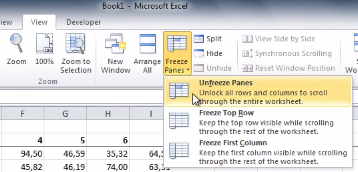
To freeze a row or column in Excel, select the cell that’s in the first column and row that you don’t want to be frozen. Next, go to the View tab and click Freeze Panes. A drop down menu will appear. From here, click on the first option, Freeze Panes.

lock panes one

With your selected rows now frozen in place, you will be able to scroll up, down, and sideways in your spreadsheet without having your needed columns or rows move off screen. When you’re ready to unfreeze your rows and columns, simply select any row or column and then go to the View tab. Now go to Freeze Panes > Unfreeze Panes.

lock-panes-two

This is just one of the many Microsoft Office features that make navigating a project easier. Be sure to check back next week for more time-saving technology tips.

b2ap3_thumbnail_battery_misconception_400.jpg

Don’t Fall for these 4 Smartphone Battery Myths

b2ap3_thumbnail_battery_misconception_400.jpgMobile technology has become so integrated into society that some people can’t even leave their smartphone at home for a few moments. As a business owner, you in particular know the value that mobile technology brings to your industry. You should know that there are plenty of common misconceptions surrounding how to get the most power from your mobile battery.

According to TechRepublic, there are several common misconceptions surrounding the smartphone battery. Some of these ideas might sound familiar, while others might sound like whoever came up with them was a bit off their rocker.

Batteries Don’t Have Memory
Unlike your cat or dog, you can’t train a battery to perform certain tasks based off of memory. There isn’t a way to teach your battery how to get the most out of its charge. It’s perfectly fine to charge your battery at any percentage. After all, a full battery is a happy battery, right? Plus, it helps you get the most out of it in one sitting.

Despite this, it’s generally a good idea to keep your battery charged somewhere between 40 and 80 percent overnight. Most smartphones today know when the battery is full and won’t try to overcharge the battery. This can help you get the most out of your battery and improve its longevity.

Off-Brand Chargers Don’t Damage Your Battery
Contrary to popular belief, off-brand chargers won’t do permanent damage to your battery. While it’s true that off-brand chargers don’t provide as good of a charge as the original charger provided by the manufacturer, they don’t cause permanent damage. It might be the most economical solution to your charging woes, but it should be noted that the quality of the charge will surely suffer. The reason is that these chargers aren’t made specifically for the device.

Use Your Phone While It Charges
It’s natural for people to think that using a device while it’s charging will decrease the quality of the charge. However, contrary to popular belief, using your phone while it’s charging doesn’t damage the battery or affect the quality of the charge. The only time this happens is if you’re using the worst of the off-brand chargers. Even when you’re not using your phone, it’s likely that it is continuously processing data and syncing to the cloud regardless of whether you are using it, so you have little to lose.

Turn Your Phone Off Once in a While
Just like any other device that uses a lithium-ion battery, you should turn your phone off once in a while. Believe it or not, some people think that it can be bad for a battery to turn it off (which doesn’t make sense at all). The battery might drain while it’s off, but that’s the nature of batteries. Instead of harming the device, an occasional restart is beneficial to the functionality most devices.

Did these misconceptions debunk any of your smartphone knowledge? Let us know in the comments.