
b2ap3_thumbnail_kfc_bucket_tech_400.jpg

Colonel Sanders Might Be a Technology Genius Thanks to KFC’s Bucket/Printer [VIDEO]

b2ap3_thumbnail_kfc_bucket_tech_400.jpgHuman ingenuity never ceases to amaze us. This whole information technology revolution has pushed access to information to levels that any person that lived before the advent of the computer could never have imagined. What’s more, the establishment of the Internet of Things has made it so humans even have remote access to the goods they own. So when we first saw the technological marvel that KFC had in store for the Canadian chicken consumers, we weren’t so shocked as excited that we’ve reached the next step in humanity’s trek into the future.

The marketing geniuses at KFC have recently struggled employing an engaging Colonel Sanders, replacing Saturday Night Live veteran Darrell Hammond, with another SNL vet, Norm Macdonald. No matter whom KFC tabs as the southern gentlemen in white, nothing will compare to their Canadian colleagues’ idea to create a piece of marketing material that is sure to stay with consumers. For the diamond anniversary of KFC in Canada, they have created the KFC Memories Bucket.

What is the KFC Memories Bucket?
KFC Canada has created a chicken bucket that comes equipped with a color printer. The idea is that you buy a bucket of chicken for your friends, family, or (gulp) yourself, and then you take some pictures of you enjoying the meal, and you can print them out right there and then. Nothing describes a good time like taking pictures on your $500 smartphone after you just plowed through a drumstick and a thigh of Col.’s Original Recipe. This video merely cements the practical (and fulfilling) applications of the Memories Bucket

According to the online technology magazine, The Verge, this is just one in several attempts to use technology to drive their marketing initiatives.

The company’s Japanese chapter raffled off a chicken-themed keyboard, mouse, USB stick, and sets of 3D-printed earrings as part of a social media promotion last fall, and its German outpost gave customers a thin, rechargeable Bluetooth keyboard in place of the usual grease-sopping paper sheet this May. The company’s experimentation goes beyond physical products, too. If you have a minute at lunch, you can play ColonelQuest, an 8-bit romp through Colonel Sanders’ life released in May. The Memories Bucket may raise the bar on ridiculous poultry products.

KFC’s Memory Bucket comes with a photo printer in the bottom, that produces Polaroid-style photos. The printer is accessed by bluetooth, making it probably the weirdest thing on the Internet of Things, but at least it executes its practical use (as a vessel for fried chicken) commendably. Can you think of other bizarre technological roll outs from over the years? Join the conversation below in the comments.
b2ap3_thumbnail_security_for_it_400.jpg

Your Inbox Needs a Sheriff with a Strike Plan

b2ap3_thumbnail_security_for_it_400.jpgSpam emails often contain viruses leading to any number of potentially threatening situations for your company’s network. Therefore, it’s essential that your network has a security solution in place that acts as a sort of virtual sheriff, blocking malicious messages from accessing your network, while granting passage to the good guys.

For your company’s spam filtering needs, a Unified Threat Management solution is useful. A UTM is the sheriff your network needs; able to spot and eliminate harmful spam emails with black-belt proficiency. Like any good sheriff, a UTM solution has a strike plan in place to get your sensitive data out of any potentially threatening situations. One helpful way to understand this is to think of this approach as an A-B-C strike plan.

A: Take an Assessment of the Situation
Your email inbox is constantly being bombarded by spam messages. In fact, did you know that more than 60 percent of all the email traffic over the Internet is spam? A good spam filtering solution takes a thorough assessment of your company’s email situation and is ready for anything; in a similar way to how a sheriff would give a potential criminal an ocular patdown, looking for any hidden weapons. With a UTM, every single message (no exceptions) gets stopped, assessed, and its security situation broken down.

B: Garner if the Email is a Security Risk
When an email is given a “patdown,” the UTM sheriff looks for a security risk. What’s that email hiding? It could be something sinister like a virus-filled attachment tucked underneath its pant leg. Or maybe an email is disguised to look like a legitimate message in the same way a criminal tries to conceal their identity. This kind of email trickery is known as spear phishing, and imposter messages like these can easily get past a standard-grade spam solution. As long as your enterprise-level UTM network sheriff is around, your business will be safe.

C: Clear the Message for Passage
After garnering that the message is safe, then, and only then, will it be cleared for passage to your inbox. Otherwise, the malicious message will go straight to your spam folder, and possibly even deleted automatically if that’s the setting you choose.

Ultimately, an end result like this is the highest goal for every spam filtering solution. In addition to a UTM protecting your company’s network security situation, it will also protect your wallet. For example, did you know that it cost the average office worker $712 per year in salaried hours to sort through all the spam themselves that hit their inbox? Therefore, as far as productivity goes, it’s like your UTM is providing your network with a gym partner to spot you, as well as a sheriff to keep you safe.

It doesn’t matter whether you’re using a PC or a MAC, with a UTM solution protecting your network, you’ll gain a sunny disposition regarding your network’s security. Call us at 810.230.9455, we’re always available to take your call!

b2ap3_thumbnail_shortcuts_for_windows_10_400.jpg

Tip of the Week: 10 Handy Windows 10 Keyboard Shortcuts

b2ap3_thumbnail_shortcuts_for_windows_10_400.jpgWith the launch of Windows 10, many users are upgrading and loving every second of it. As always, a new operating system comes with a learning curve, including getting to know the new features and keyboard shortcuts. To get the most out of Windows 10, you can try these ten great hotkey combinations to get through your workday with blazing speed.

[WinKey + S] Activates Cortana
[WinKey + C] Activates Cortana with Speech
Microsoft’s Cortana feature, which was once exclusive to Windows Phone users, is now built into Windows 10 by default. She acts as a personal voice assistant, much like Apple’s Siri. You can use these shortcuts to make more effective use of Cortana.

[WinKey + Ctrl + D] Creates a New Virtual Desktop
[WinKey + Ctrl + F4] Close Virtual Desktop
[WinKey + Ctrl + Left or Right] Switch Between Virtual Desktops
One of the neat new features Windows 10 offers is virtual desktops, which will most likely be used by enterprises to enhance productivity. You can easily use the above keystrokes to navigate through your current virtual desktops, plus open and close them on your local desktop.

[WinKey + Shift + Left or Right] Move Apps from One Monitor to Another
Workers generally use two monitors to get the most done, but if you’re working with several different applications, it can be a bother to continually resize the windows and move them about. To make this process much easier, use the above keystroke while you have a window selected.

[WinKey + K] Activates Connect Feature to Stream to Wireless Displays and Audio Devices
This keystroke is pretty self explanatory, and it will be used often by those who regularly access Connect.

[WinKey + R] Run a Command
Regardless of how many new features there are in Windows 10, the basics still apply. You’ll want to access the Run Command function. This keystroke makes it much easier to do so.

[WinKey + I] Opens Windows 10 Settings
As one of the most customizable operating systems Microsoft has created, Windows 10 offers plenty of great ways you can put the “personal” back in your PC. Use this keystroke to make navigating to your settings easier.

[WinKey + G] Activates the New Xbox Game Bar to Let You Record Games or Take Screenshots
All you gamers out there are going to love this keystroke.

For more ways you can get the most out of Windows 10, keep an eye out for more productivity and technology tips from NuTech Services.

b2ap3_thumbnail_it_maintenance_400.jpg

Overcome IT Performance Issues with These 4 Proven Practices

b2ap3_thumbnail_it_maintenance_400.jpgIs your network running a little sluggish? Computing hardware isn’t perfect and requires a certain level of maintenance in order to keep everything running at capacity. Before you swap out your old server units for new ones, try these maintenance best practices.

Update Your Software
For whatever software you use, it’s best practice to run the most up-to-date version. In addition to providing your system with improved security, software updates will often include fixes to bugs that tend to slow things down (not to mention put you at risk for viruses and other online threats). In order to take full advantage of the benefits of running updated software, it’s best practice to have a solution in place that upgrades your system in a timely fashion. With NuTech Services’s managed IT service, we remotely provide upgrades for your network so that you don’t have to.

Corrective Maintenance
One of the most unpleasant hardware maintenance practices is fixing an issue that’s disabled your system. Performing corrective maintenances like this can be expensive, and breakdowns always seem to happen at the worst possible time. Regardless, fixes like this must be done so your business can function. At NuTech Services, we’ve found that the best way to approach corrective maintenance is to prevent these breakdowns from happening in the first place. This is the route we take with our preventative IT care.

Server Virtualization
Depending on how old your problem-prone server unit is, and depending on if you possess another server unit that runs well and is underutilized, you can migrate the data off your older server unit to your newer, more powerful one. This is a solid practice that will save you money by not having to pay for maintenance on two separate units, as well as free up space. However, it’s important to know what you’re doing before making such a move because over-consolidation with excessive virtual machines on a physical server can lead to deteriorating performance and system instability.

A Hardware Refresh
For network equipment like server units, it’s standard to get three to five years of use out of them before experiencing performance issues that cause you to seriously consider replacing them. Depending on the severity of your issues, you may be able to extend the life and improve the performance of your server with a hardware refresh. This includes installing additional CPUs or RAM, as well as upgrading the storage. It’s a tough call choosing whether or not to go with a hardware refresh or to replace the unit altogether. For this reason, it’s always a good idea to first check with your IT consultant.

Implementing these best practices will minimize performance issues and extend the life of your server units, and NuTech Services is here to assist you with all of these recommendations. Of course, technology isn’t perfect and every piece of hardware will eventually fail. When it does, you’ll have to purchase replacement hardware that meets the needs of your business and NuTech Services can assist you with this too.

For help with all of your company’s technology-related needs, give us a call today at 810.230.9455.

b2ap3_thumbnail_profits_from_the_cloud_400.jpg

Cloud Computing Grows at Staggering Rate While Traditional IT Hangs In There

b2ap3_thumbnail_profits_from_the_cloud_400.jpgIf your organization hasn’t considered the cloud as a viable business solution, stop what you’re doing and check some recent statistics. You might be surprised to learn that cloud spending is the third-biggest IT expenditure. Such popularity shows that businesses are finding the benefits that the cloud has to offer to be substantial, and you too can take advantage of the cloud to more effectively leverage today’s technology.

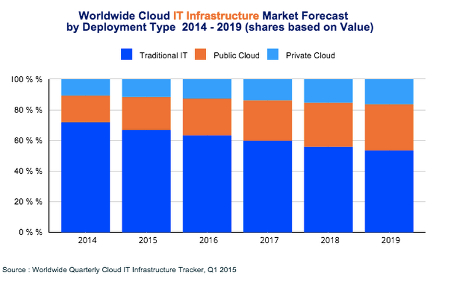
According to the Worldwide Cloud IT Infrastructure tracker for the first quarter of 2015, cloud IT will soon surpass even traditional IT models sometime in the next ten years.

value ib1

There are several noteworthy observations to make concerning this image:

  • Traditional IT is still the main player for 2015, rolling in at just over 65 percent of all deployments.
  • Public cloud IT accounts for around 20 percent of all deployments.
  • Private cloud IT makes up over 10 percent of all deployments.
  • Over the next five years, traditional IT will continue to decrease in usage, while the public cloud will make a significant jump in use. Private clouds will continue to grow, but not as quick of a rate as the public cloud.

On the financial scale, here are some statistics:

  • Spending on cloud IT infrastructures will reach $33.4 billion in 2015 alone.
  • Spending on private cloud infrastructures will grow to $11.7 billion.
  • Public cloud shows projected expenditures and growth of up to $21.7 billion.

As these numbers show, the cloud isn’t something that successful businesses should ignore. It’s not a gimmick or a fad. It’s a legitimate IT infrastructure solution that vastly improves operations and procedures. If you want to take advantage of the future of computing, cloud IT should be a top priority. The benefits greatly outweigh the cost in the long run, and there are a plethora of options to choose from; be it private cloud, public cloud, or even a mix of the two in a hybrid cloud solution.

The cloud has the ability to provide maximum mobility for your business, effectively allowing your employees to access critical systems that they might otherwise only be able to access in-house. This provides more opportunities for productivity, especially while on the road for a business trip or conference. Your team can choose how they want to work, and when, so long as the devices can access the Internet and are approved beforehand.

With the cloud dramatically changing the way we view the deployment of information and applications, we want to hear your thoughts about this revolutionary technology. Contact NuTech Services at 810.230.9455 for more information about how cloud computing can change the way your company works with technology.

b2ap3_thumbnail_facial_recognition_400.jpg

Tip of the Week: “Windows Hello” Unlocks Your PC With Your Face

b2ap3_thumbnail_facial_recognition_400.jpgWhile new Windows 10 features like Cortana and the return of the Start Menu are getting a lot of attention, there’s another cool addition that’s sure to change your Windows experience for the better. Using Windows Hello, you can actually log into your PC… with your face!

This technology isn’t new to Microsoft; a biometric authentication feature has been available with Xbox One’s Kinect since its release. However, unlike Kinect, the camera for Windows Hello promises to only be activated when it’s needed. This is a lesson in privacy that Microsoft learned the hard way after facing sharp criticism for designing Kinect’s camera to be “always on.”

Although, don’t expect to be able to use Windows Hello with your current webcam. Instead, Windows Hello requires a special Intel RealSense 3D camera, priced at less than $100. It’s reported that the newest Windows 10 laptops and PCs are already being shipped with RealSense cameras, and more models are expected to adopt RealSense cameras later this year.

The Advantages of Biometrics Authentication
To sweeten the deal, Windows Hello gives a user the capability to also log in with their iris and fingerprint. Biometrics technology like this being available on a popular platform like Windows 10 is a huge leap forward in transitioning away from passwords, which are becoming a more vulnerable way to protect your information with every passing year. Dustin Ingalls, member of Windows Security Team, explains in a Microsoft promotional video the benefit of using Windows Hello biometric technology:

As a hacker, if I get ahold of your password, I can use that from anywhere. But with [biometrics]… the key is actually bound in hardware to my device. So the only way a hacker can use my identity, is to actually steal the device. When you use Windows Hello, not only does the attacker have to steal my device, but they also have to be able to use my biometrics. Which is super challenging.

Okay, what about a hacker simply using a picture of you to unlock the device?

facial ib1

This is why Windows Hello only works with the RealSense 3D camera, because it’s compatible with Microsoft’s anti-spoofing capabilities which require a slight turn of the head. Time will tell how well Windows Hello can lock out identical twins and 3D-printed miniatures; but, seeing that the RealSense camera is capable of analyzing a person down to their facial hair, we’re sure that it’s still a much safer route than passwords.

Setting Up Windows Hello on Your PC
For those with Windows 10, Windows Hello is easy to setup. Go to settings, enable a PIN, and then stare into the RealSense camera to let it detect your face. Users who wear glasses will want to let the camera capture images of yourself with your glasses both on and off. Once your settings are saved, an animated eye will show up on the lock screen, look at you, and wink after it’s detected that you are really you. Windows Hello will then grant you access to your PC with a welcoming message.

It’s as simple as that. With security innovations like Windows Hello, it’s only a matter of time before we never have to remember a password ever again!

b2ap3_thumbnail_windows_10_email_scam_400.jpg

This Windows 10 Email Scam Isn’t The Upgrade You’re Looking For

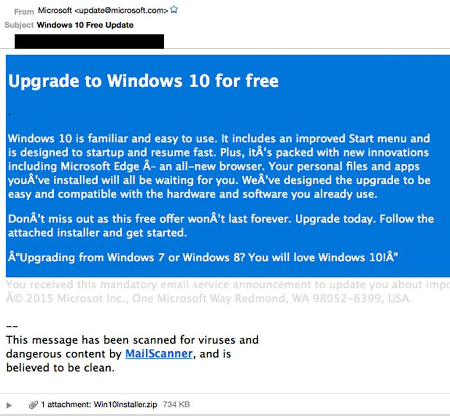
b2ap3_thumbnail_windows_10_email_scam_400.jpgFor those of you who don’t yet have Windows 10, don’t panic. It’s not going anywhere, and you’ll get it soon enough. In the meantime, it’s important that you don’t get impatient and hastily open suspicious emails containing what appears to be a launcher for your Windows 10 download. Hackers are using ransomware to extort money from unsuspecting users who just want their new operating system already.

For some, the fault might lie with Microsoft because of the way they’ve decided to deploy Windows 10. Making people wait even more for a product that already exists is somewhat maddening, and hackers are taking advantage of this impatience to strike. CTB-Locker is a ransomware similar to Cryptolocker, in which it encrypts information locally on your PC, and offers a decryption key in exchange for a hefty price.

This ransomware spreads via email. Victims will receive a message in their inbox which appears to be from Microsoft detailing how they can bypass the wait for Windows 10, and prompts them to download what appears to be a launcher for the new operating system. Once the user downloads the executable file, the malware starts encrypting data on the PC. The user is locked out of their PC until they pay the ransom.

Furthermore, if the user wants to regain access to their files, the ransom must be paid in Bitcoin, a cryptocurrency which is known for its anonymity and difficulty to trace. Adding to the difficulty is that the hackers are using the Tor anonymity network to communicate, which makes catching the clowns behind this act difficult at best. Ransomware is an increasingly popular problem, and according to ZDNet, it can cost users anywhere from $200 to $10,000 for each occurrence, leading to ultimate costs of up to $18 million. That’s a lot of cash that’s been extorted from some 1,000 users in 2015 alone.

windows10scam

Of course, with a good email solution you won’t be receiving this message. A powerful spam blocking solution is capable of keeping spam messages out of your inbox almost indefinitely, meaning that you have little to worry about from the average phishing attack. Still, if a hacker wants to scam you bad enough, they’ll find a way to get through your security measures and attack you directly, in the form of a targeted spear phishing attack.

Therefore, the best way you can protect yourself from threats like CTB-Locker is to keep an eye on your inbox for any suspicious messages, and to never, ever, download attachments from unknown senders. Augment caution with a powerful spam filter and you’ll have all you need to keep phishing attacks at bay. Give NuTech Services a call at 810.230.9455 to learn more.

b2ap3_thumbnail_applications_for_work_400.jpg

3 Mobile Apps Every Modern Office Worker Needs

b2ap3_thumbnail_applications_for_work_400.jpgMobile devices are changing the face of businesses in obvious ways, like employees accessing their work outside of the office. Additionally, there are many not-so-obvious ways that mobile devices and apps have changed work environments. Let’s focus a moment on the little things around the office that have changed since mobile devices took over.

Calendars
Calendar making used to be a profitable industry. Calendars adorned office walls and inspired workers daily to be better people, one disposable page at a time. Also, let’s not forget about how calendars make for that perfect, gender-neutral gift to contribute to any office’s end-of-the year holiday gift exchange. Now, everyone just gives each other gift cards and hilariously-themed calendars collect dust at mall kiosks.

What happened? It turns out that every mobile device comes with its own calendar app. As workers adopted it, software developers integrated calendar apps to the cloud so that workers could sync their calendars for easy scheduling. This mobile trend effectively “did in” the usefulness of the 12-month calendar, but you may still find one or two on the office walls for novelty’s sake.

If you’re not taking advantage of your mobile device’s calendar, check out these links on how to use your calendar’s sync feature.

Notebooks
Another paper casualty of mobile devices is the office worker’s trusty notebook. You used to see notebooks brought into every meeting, and the super serious note-takers would distinguish themselves with leatherbound notebooks, emblazoned with their company’s logo. While office supply stores are bemoaning the demise of notebooks and pens, workers are taking better notes and collaborating in new and exciting ways via cloud-based apps.

There are a variety of mobile note-taking apps on the market, and they each allow you to do much more than scribble ideas and cartoon characters on paper. Mobile apps like Evernote, Microsoft OneNote, and Google Keep allow users to capture screenshots, upload files, record audio, and of course, jot down meeting notes. These notes can be tagged to make them searchable, and stored in the cloud so that every member of your team can access them.

Fax Machines
The adoption of mobile devices should’ve been the final nail in the coffin for the office fax machine. Actually, email should’ve been the technology that killed off the fax machine. Yet, despite advancements in email, cloud computing, mobile devices, and even the leadership baton being passed from one generation to the next… and then to the next, fax machines still have a strong presence in most modern offices.

It’s our hope that the advancements of mobile technology have caused the mighty fax machine to lose some sway over its users. Remember, if you’re altogether tired of dealing with your fax machine, then NuTech Services can provide you with technologies to phase it out, like our fax server solution and a host of digital communication apps for your mobile device.

Why You Need to Adopt Mobile Solutions
Maybe you’re old fashioned and you just like the feel of working with paper, the thrill of turning over a calendar page at the first of the month, and the ear-piercing sound of receiving a fax. That’s all fine and good, but as a modern business owner, it’s in your best interest to adopt mobile solutions for your company. If you don’t, then your mobile-device-loving employees will bring their gadgets into the workplace and do so on their own. The danger of them doing this is that you’ll lose control of how company information is shared and stored, which could lead to a major data breach.

Instead, you need to be proactive about implementing an official mobile solution for your office that everybody can access and use from their approved mobile devices. Due to all the different devices out there, and the different expectations of your employees, getting everybody to use the same mobile solution can prove to be quite challenging. At NuTech Services, we’re here to help equip your business with mobile and cloud-based solutions that meet your company’s needs perfectly. For more information, give us a call at 810.230.9455.

b2ap3_thumbnail_screenshot_pc_400.jpg

Tip of the Week: Taking a Screenshot is Ridiculously Easy

b2ap3_thumbnail_screenshot_pc_400.jpgSometimes explaining issues with your technology to someone over the phone is difficult at best. To help your tech support better understand the issue you’re dealing with, provide screenshots to help with your explanations. All you have to do to take a screenshot is hit a few keys. Here’s how it’s done.

Screenshots in Windows
For a Windows PC, look at the top-most row of keys. How often do you use these? Probably not that often. Well, maybe the Escape key. Either way, look toward the right-hand side of this row and you’ll find the PrtScn key. PrtScn will create a .png file of your entire desktop screen at the time you press it. Unfortunately, you’re not going to see the file immediately; it’s only being stored on your clipboard until you paste it into another program.

To do so, you can use pretty much any common application that allows you to paste images into it. Some of the more basic programs you can use are Microsoft Word, OneNote, Outlook, and even MS Paint. Open your preferred program, hold down Ctrl, and press V to paste the image into the application you are working in. This is also the keyboard shortcut for Paste, which you can keep in mind for later use.

For example, let’s use Microsoft Paint. Now that you have the screenshot pasted into Paint, you can draw on it using Paint’s various features to emphasize what the problem is. You can crop it to the area of interest, paint on arrows, and so on. This helps you better explain to tech support what the problem is.

Afterward, all you have to do is save the file using either a .png or .jpg file extension. To do so, click File > Save As. Give your file a name and you should be all set to send it off for analysis from tech support. If you’d rather not toy with the image, you can paste the image directly into Microsoft Outlook instead.

Forget PrtScn: Try LightShot to Simplify Things
While taking a screenshot using PrtScn isn’t terribly difficult, it can be somewhat time-consuming to tailor your image to specifically show your problem. Instead, we prefer to use a tool called LightShot. It’s an application designed specifically to take screenshots, and best of all, it’s entirely free to use. You can download the app here: https://app.prntscr.com/en/download.html

With LightShot, hitting the PrtScn key does much more than take a screenshot of your entire desktop. Instead, your screen will be greyed out and you can select a specific part of your screen for a screenshot. You can then save your image locally on your PC, or upload it to the cloud for sharing via URL. Once you get used to taking screenshots, you’ll wonder how you ever lived without them. Not only can it be an easy way to share concentrated content, but it can also be a great way to communicate what your specific problems are to IT support.

If IT support issues have you troubled, you’ll be glad to hear that NuTech Services’s remote maintenance and management solution is designed to prevent issues from becoming bigger problems. Give us a call at 810.230.9455 to learn more.

b2ap3_thumbnail_angry_customers_400.jpg

You Can’t Afford to Ignore a Ticked Off Customer

b2ap3_thumbnail_angry_customers_400.jpgHaving confidence in your ability to run your business is an important thing to have, but it doesn’t matter how much confidence you have if your customers beg to differ. After all, without them, your business wouldn’t be where it is today. This is why it’s important to listen to what your customers say, and if it’s not positive, you need to resolve the problem as quickly as possible.

The reason you need to fix problems with upset customers (sooner rather than later) is largely based upon how connected today’s generation is thanks to the Internet. Users can share their experiences in the blink of an eye. If their reviews are good, then great; you just got a repeat customer. However, if they aren’t happy with the services rendered, you can be sure that the Internet will hear about it, and the rest of the world by extension.

How Customers Build Your Business
As a business owner, you share a symbiotic relationship with your customers. They require a service, and you provide them with a quality solution to their predicament. Your organization can’t survive if you have no customers, which means that you need to make sure that they’re satisfied if you want to stay in business.

According to Vision Critical, it takes somewhere between 10-to-12 positive reviews to make up for one negative review. What’s worse is that 80 percent of people won’t buy products or services from a business with negative reviews. If there’s anything that can cause the death of a company, it’s a lack of customers and a lack of business.

Other statistics concerning unhappy customers include:

  • Customers are three times more likely to tell their friends about negative experiences, be it on social media or through word of mouth.
  • Businesses with an average of three stars or more on Google Places get 87 percent of all clickthroughs.
  • Restaurants in the Seattle area reported 5-to-9 percent increases in revenue gained following positive reviews on Yelp.

A Ton of Cash is Lost Due to Unhappy Customers
Because of the extremely competitive nature of business, customers who you can’t satisfy will probably ditch you and find someone who can. You’d be surprised how much profit is lost every year to unhappy clients. Here are some rough statistics that explain how much unhappy customers can cost your business.

  • In the U.S. consumer market alone, there’s around $1,300,000,000,000 on the line. Yes, you read that right: trillion, with a capital “T,” and thirteen figures.
  • 51 percent of customers will switch businesses or service providers due to poor customer experience.
  • 81 percent of customers who switch businesses claim that the company could have prevented them from leaving.
  • Totaled together, that’s approximately $537,030,000,000 lost by unhappy customers every year.

It’s understood that customers who are satisfied with your services will generally contribute more cash (up to 14 times more) than a dissatisfied customer. In most cases, it’s much more lucrative to retain your current customers than acquire new ones. It costs 6-7 times more cash to generate new leads than it does to keep your current customers. If you take care of your clients, they’ll repay your business in kind with their continued loyalty to your brand.

What are some of your favorite ways to show your customers you appreciate them? Let us know in the comments.

b2ap3_thumbnail_manufacturing_robot_mistakes_400.jpg

A Dark Shadow is Cast Over the Good Work Robots Do

b2ap3_thumbnail_manufacturing_robot_mistakes_400.jpgThe point of living in a world where technology takes over everything is that it’s supposed to make life easier. Although, keep in mind that imperfect humans are responsible for creating these technologies. Therefore, technology is flawed, maybe even to the point of putting people in harm’s way. This fundamental truth makes for an uneasy trust between man and machine.

Take for example a tragic incident that occurred last month at a Volkswagen plant in Germany, where a robot was actually responsible for the death of a worker. This robot was designed to piece together cars by moving and manipulating auto parts. According to The Guardian, the error occurred while the robot was being set up by a team of technicians. Due in part to a human error (supposedly), the robot grabbed the worker, instead of an auto part, causing critical injury.

A second example of why we should be suspicious of robots comes from the road. Led by the efforts of Google, several major technology companies are developing and testing self-driving cars. As great as it sounds to sit back and play magnetic travel chess while a robot chauffeurs you around town, the high number of reported fender benders from the testing phase gives us good reason to be a little nervous. Think about it, how do you feel about being on the same road as fast-moving, metal-death traps that are vulnerable to hacking attacks?

Buried deep in the human psyche, connected perhaps with our survival instincts, is a mistrust to give up too much control to something (or someone) that we don’t fully understand. When it comes to machines and computers, just how much do you understand about how they work? Unless you’re a computer programmer or an IT technician, it’s likely that you don’t know enough about these machines to totally erase the fear that robots will one day rise up and enslave us all. This is why science fiction movie franchises are exploring this narrative in fantastic detail, like The Terminator and The Matrix, have connected so deeply with people’s imaginations (and wallets).

Just how safe are you from the technology that you’re dependent upon? While it’s unlikely that you work with battlebots equipped with saw blades and flamethrowers, or that you play traffic roulette with a driverless car, you’ve got a lot riding on your company’s data. In fact, it would take just one major disaster for your system to crash, causing major data loss. This kind of a data loss disaster can potentially ruin a business, and by extension, your livelihood.

A disaster like this can happen at the hands of an incompetent user, an error from an imperfect machine, or even something else entirely, like a random act of nature. One way to gain peace of mind while living under such a looming threat is to learn more about the machines that you trust with so much responsibility, and it’s unlikely that you’ve got the time to analyze and understand the inner workings of your computer network. Alternatively, you can outsource the care and maintenance of your machines to the knowledgeable IT professionals at NuTech Services.

Because, at the end of the day, who do you trust more; man, or machine?

b2ap3_thumbnail_comment_spam_400.jpg

Tip of the Week: How to Take Back Your Website From Comment Spammers

b2ap3_thumbnail_comment_spam_400.jpg“Wow. That was a great article! I make $500 a day working from home and you can too! Click the link below to learn how!” This is an example of comment spam. You may have seen it before. You may have even fallen for it. How does one deal with such an annoyance?

Comment spam is much more than an annoyance. If your company’s website or social media account is filled with comment spam, it gives potential customers the impression that you don’t care about upkeeping your website and it will discourage them from leaving valuable comments of their own.

There are several tools and settings that can help you decrease the amount of comment spam on your website, but none of these tools are perfect, and all of them require a commitment from a real person to oversee the comments and delete the spam. Here are four tools that will help in your battle against spam.

Disable Your Comments
This is a weapon that you have in your arsenal, but like the “nuclear option,” you don’t want to use it unless you absolutely have to. The reason you don’t want to disable your comments is because authentic comments are valuable–even the negative ones.

Comments give the impression that many people view your website as a resource that’s worth visiting. Search engines pick up on comment-generated web traffic and give your website a higher search ranking. Even the negative comments are good because they give you the opportunity to directly respond and set the record straight professionally and publicly. This will communicate to others that your business cares about a customer’s experience. The only reason why a business should disable comments is if they never do any maintenance on their website–ever.

Approve Comments Before Posting
This is a nice setting that makes sure a moderator is first laying their eyes on the comment before it’s posted. This is a sure-fire way to filter out spam–unless the spammer happens to be clever enough to fool you or the person tasked with moderating your website. If you are fooled by a comment spammer by letting one slip by, then take solace in the wisdom of former President George W. Bush, “Fool me once, shame on you. Fool me… you can’t get fooled again.”

The downside about depending on a moderator to filter comments is that it can turn into a cumbersome task. If the content on your website is popular, it can generate a lot of comments that need to be approved. Also, a user knowing that their comment will have to be moderated before it’s posted may discourage them from commenting. Some people simply prefer to see their comments instantly display, like with instant messaging.

Use Recaptcha
Recaptcha is a helpful tool that makes sure actual people are posting. When a user leaves a comment, they will be shown a picture of some numbers (like from the side of a house). They will then be asked to enter the numbers into a form. This will filter out spam bots that automatically spam websites, as well as a percentage of human spammers that aren’t in the mood to fill out a few extra forms in order to post their spam. However, this tool isn’t 100 percent effective because a dedicated human comment spammer will fill in the required Recaptcha numbers.

Block Spammers’ IP Addresses
If you happen to come across a spammer, your website platform should allow you to block the user’s IP address from accessing your website. By looking at some spammer statistics from Imperva, you will see how blocking a comment spammer’s IP address will go a long way toward taking care of the problem:

80 percent of the comment spam originates from less than one-third of the spammers, and a mere 17 percent of comment spammers actually account for a majority of the comment spam traffic. Imperva also found that nearly 60 percent of comment spammers are active for long periods of time.

Vigilance is the Key
You can think of fighting spam like fighting a battle. The key to winning any battle is vigilance. You have to stay on top of your company’s website maintenances; letting a few spam comments slip through due to negligence can cost your business dearly by potentially turning away customers.

Spam has many forms and all of them are harmful. Spam shows up in the inboxes of your employees and drags down productivity, as well as causes wicked computer viruses. Staying on top of your Internet marketing means staying on top of spam. What are some of the most annoying spam comments that you’ve come across? Let us know in the comments… actually, don’t.

b2ap3_thumbnail_call_the_remote_doctor_400.jpg

What If You Never Had to Go to the Doctor’s Office Again?

b2ap3_thumbnail_call_the_remote_doctor_400.jpgRemote technology is so efficient and popular that it’s infiltrating many industries that you’d be surprised to hear about. One such sector is the healthcare department. Some doctors are taking advantage of the leaps and bounds made by technology to help their patients get back on their feet as easily as possible.

As managed service providers, our primary goal is to use remote technology to help users solve their IT crises. Similarly, doctors can use remote technology to diagnose and treat patients, much like how we do with our own systems. UnitedHealthcare, one of the largest health insurance providers in the United States, supports what WIRED magazine calls “telemedicine;” a video visit from a doctor who offers consultation services rather than an in-person appointment. As reported by WIRED:

United says it will cover virtual doctor visits offered through NowClinic, Doctor on Demand, and American Well. These platforms connect patients with thousands of doctors—albeit not the patient’s usual doctor—via video chat. These consultations typically cost $40 to $50 a pop, but now that United is covering these visits, members will only have to pay their usual co-pay, making virtual medicine much more affordable for more people. For now, these virtual visits will be available only to UnitedHealth’s self-funded customers, but the feature will expand to most members by next year.

So, remote technology is helping more people stay healthy simply by allowing them to access a doctor’s consultation whenever they need to. This makes it more convenient for not only the patient, but the doctor, as well. They don’t have to arrange for an on-site diagnosis, and they can avoid any contagious sickness easily enough. It’s simply a much more efficient way of doing things, and allows for more affordable healthcare in general.

In fact, remote technology is such a great tool that any industry can take advantage of it. We at NuTech Services perform most of our maintenance remotely. Managed IT companies use remote technology to ensure that a business’s operations continue to run smoothly. With the assistance of remote technology, NuTech Services can monitor your business’s systems for critical security flaws and administer patches accordingly. This helps us prevent damage that cannot be undone, like a loss of business data or personal information.

The primary reason remote technology is so useful for managed IT service providers is that your business avoids most on-site visits, eliminating the costs associated with them. This frees up a significant amount from your budget, and allows for more effective use of your IT expenses. Every time you opt for remote management and maintenance, you’re saving your business money. In fact, most issues can be resolved without an on-site visit. Granted, some hardware problems cannot be resolved remotely, so you can’t completely eliminate the costs of on-site visits; still, being able to mitigate them is often more than enough to make a difference.

For more information about how we can remotely monitor and maintain your infrastructure to optimize your system’s health, give NuTech Services a call at 810.230.9455.