
b2ap3_thumbnail_cia_hacked_400.jpg

If a Teenager Can Hack the CIA, You Can Be Hacked Too!

b2ap3_thumbnail_cia_hacked_400.jpgWith new threats emerging all of the time, it’s no wonder that cybersecurity is such a major part of any technological endeavor. Your should be using the most powerful security solutions on the market in order to avoid intensive hacks. Despite the emphasis that our society places on security, it takes a high-notoriety hack to truly shake the public into action; for example, what if the Central Intelligence Agency were hacked by a teenager?

Well, that kind of happened. As reported by WIRED, CIA Director John Brennan had his email broken into by the hacker in question. By posing as a Verizon worker, the hacker was able to gain access to Brennan’s AOL email account. The hacker used a targeted spear phishing tactic, where he posed as a worker to trick real Verizon employees into handing over sensitive information about Brennan’s account. Surprisingly, all they needed were the last four digits of Brennan’s bank card.

Then, to add insult to injury, the hacker and his associates changed the password on Brennan’s account, locking him out of it and gaining access to his inbox. Since this was his personal email account, you’d think things wouldn’t be any different from a normal hack; well, the problem here is that Brennan’s inbox contained secret government documents from Brennan’s work email address, which he forwarded to his personal inbox. You don’t need us to tell you that this was a bad move on Brennan’s part. According to WIRED:

After providing the Verizon employee with a fabricated employee Vcode—a unique code that he says Verizon assigns employees—they got the information they were seeking. This included Brennan’s account number, his four-digit PIN, the backup mobile number on the account, Brennan’s AOL email address and the last four digits on his bank card.

“[A]fter getting that info, we called AOL and said we were locked out of our AOL account,” he said. “They asked security questions like the last 4 on [the bank] card and we got that from Verizon so we told them that and they reset the password.” AOL also asked for the name and phone number associated with the account, all of which the hackers had obtained from Verizon.

The most unnerving part of this entire situation is the fact that Brennan wasn’t necessarily at fault for the hack itself. The only thing he did wrong was send sensitive information from his work email to his private email address. The real issue at hand should be the fact that these hackers easily wound up accessing an important government worker’s email address. Simple security questions aren’t going to be enough to stop hackers from accessing your accounts. If they really want to, they can get whatever information they need.

Therefore, taking advantage of several security layers is the best way to protect your accounts. Part of this is practicing a quality password security protocol. You should be using secure passwords with several different types of characters, including upper and lower case letters, numbers, and symbols. Strong passwords help keep hackers from cracking your login credentials.

Another best practice is to integrate two-factor authentication into your account logins. This type of solution requires a secondary credential in addition to your normal username and password, making it much more difficult for hackers to attack your accounts. These credentials are usually sent to your smartphone in the form of a SMS message, an automated voice message, or even to your secondary email account. In other words, hackers need physical access to your device in order to obtain this credential.

You don’t want to be stuck in an embarrassing (or potentially incriminating) situation like the one the CIA Director is in now. Give NuTech Services a call at 810.230.9455 and ask us about how we can improve your business’s network security.
b2ap3_thumbnail_do_you_share_too_much_400.jpg

Tip of the Week: How to Protect Yourself, Your Staff, and Your Kids From Sharing Too Much Online

b2ap3_thumbnail_do_you_share_too_much_400.jpgAttention people of the Internet, October is Cyber Security Month! Make sure that you share this information with everyone on the Internet that you know. In a situation like this, sharing content with everyone to raise awareness of a worthy cause is perfectly fine. Although, what’s not alright is the sharing of your personal information online.

Out of all the different aspects of cyber security that we can hit on, talking about the problem of oversharing is one of the most important because it affects everybody–you, your family, and your employees. The worst place for this problem is on social media, but it extends to anywhere on the Internet where content can be shared and posted. You may know that oversharing personal information can lead to identity theft, but you may not have known that oversharing can also attract cyber bullies and the eyes of your competitors.

Being mindful of what information you share online is the best way to prevent the dangers of oversharing, and the best way to do this is through education. Here are some proven ways that you and others can be intentional about not oversharing:

Your Employees
The alluring thing about social media is that it makes you want to share whatever it is you’re feeling at that very moment. For example, the first thing you see when opening Facebook is the question, “What’s on your mind?” What tends to happen is that, for many workers, their ill feelings about their job are exactly what’s on their mind–and these thoughts find their way to social media. This is a classic example where oversharing can have some dire consequences as far as one’s career goes.

Additionally, an employee who’s used to sharing all the details of their life online may accidentally share company secrets that they’re privy to. What’s worse, their social network may include someone associated with a competitor. This is why you shouldn’t brag about a big sale online until the check has cleared.

Your Teenagers
For teenagers and Millennials, sharing their personal information on social media is second nature. In fact, they’re probably doing it using apps and in ways that you as a parent may not fully understand (there’s much more to social media than Facebook and Twitter). Young people will want to be mindful of revealing too much information to predators, as well as leaving behind a digital footprint that they’ll regret later.

Unfortunately, the Internet is full of people who would like to do harm to your child. This can come in the form of a classmate who acts as the school’s cyberbully, or even predators who are looking to abduct your kid. Young people especially need to be careful online, and this starts with only befriending and sharing information with people online who they know and trust. Also, another way to prevent your kids from oversharing to the wrong people is to monitor their online activity and educate them on what red flags to watch out for.

Additionally, every career-minded young person needs to be mindful of their “digital footprint.” Today, when a potential employer or educational institution investigates a person’s application, they do more than make phone calls to the listed references, they will also perform and Internet search on the applicant’s name and scan their social media profiles. Therefore, you will want to teach your kids to view their online activities from an employer’s perspective.

Here are five tips from Net Nanny on how you can help monitor your kid’s digital footprint:

  1. Check their digital trail by searching for them on Google. View the results from a college or employer’s perspective and make sure it coincides with the application.
  2. Limit profile visibility to friends only.
  3. Make sure profile photo is appropriate.
  4. Remove any past Facebook posts from public view.
  5. Take control of tagging (i.e. don’t allow friends to tag your teen because it is uncontrollable).

Yourself
One of the biggest risks from oversharing comes from having your identity stolen. Obviously, you’re not dumb enough to post your credit card number online for all to see, but you may be surprised to learn that posting seemingly-innocent information about yourself can actually lead to identity theft. Information like:

  • Your mother’s maiden name.
  • Your high school.
  • Where you got married and where you met your spouse.
  • Your favorite hobbies and sports teams.
  • The names of your pets and children.
  • Your home address (including pictures of your home).

Now, you may be thinking, “What’s wrong with posting fun facts like this?” Well, if you’ve ever forgotten your password for an online account, you may recall that you will be asked intimate questions of yourself like these in order to confirm your identity so you can be sent a new password. A hacker that knows both your account’s username and the answers to these questions will be able to access your account. Don’t be fooled by social media “fun quizzes” that ask these questions under the guise of “How well do you know your friend?”

Following these tips, you will decrease the dangers of oversharing. For more tips on what information you shouldn’t share online, check out https://www.staysafeonline.org, and be sure to subscribe to NuTech Services’s blog.

b2ap3_thumbnail_facebook_security_400.jpg

Tip of the Week: 3 Facebook Security Tips to Protect You and Your Friends

b2ap3_thumbnail_facebook_security_400.jpgWith social media playing such an important role in everyone’s day-to-day lives, one has to wonder to what degree this affects the security of online accounts and profiles. Social media might have revolutionized the way we communicate with others, but it’s also revolutionized the way that hackers stalk their victims. How vulnerable are you and the people you love when it comes to your Facebook settings?

Imagine this worst-case scenario. Hackers can impersonate your friends or the people you trust easily enough. If your profiles are set to public, nothing is stopping them from browsing your personal information (phone number, email, address), posts on your wall, pictures, videos, and more. This is all information that helps hackers determine how and when they will target you, or worse, the people you know.

The unique issue with social media attacks is that hackers can take advantage of both digital and physical variables in their favor, making it extra important that you take the proper precautions with your approach to social media. To avoid these unnerving possibilities, try these three tips to lock down your Facebook account.

Use the Privacy Checkup Shortcut
Upon clicking the padlock icon in the top-right corner of Facebook (near your notifications), you’ll notice that there’s a new feature called privacy shortcuts. These allow you to quickly and efficiently access some of Facebook’s best privacy and security features. By clicking on the Privacy Checkup button, a friendly bipedal blue dinosaur will guide you through a short process. You can set your default post status (public, private, etc), the apps that have access to your account, and certain parts of your profile information. You can then choose to view your profile as either one of your friends, or a stranger, to see if the changes you made were to your specifications.

The privacy shortcuts also provide you with opportunities to access other settings, like who can contact you via inbox or friend request, and how you can get someone to leave you alone. At the bottom of the drop-down, you can access even more privacy settings.

Enable Login Notifications
You probably know someone who has had their Facebook account hacked. This happens because people are unaware that their accounts have been compromised. Facebook has a measure dedicated to informing you of when someone logs into your account, and from where. You can receive these notifications either through your Facebook notification bar, email, or text messaging.

Facebook also allows you to see where your account is currently logged in, as well as the last location the device connected from. This includes device, operating system, and physical location, effectively allowing you to eliminate suspicious activity before too much damage is done. Click End Activity, which will give them the boot and give you some time to change your password.

Take Advantage of Two-Factor Authentication
Facebook has two-factor authentication, too, which uses a PIN sent to your smartphone to act as an additional login credential. You can also access the Code Generator application on your mobile phone, which gives you a security code that lets you access your account. This helps keep your account open to you, and only you.

Security is more important than ever, especially when we’re all connected through the Internet. It’s important to always keep the security of both yourself, your friends, and family in mind, by spreading best practices related to security protocol. Share this article on Facebook to get the word out.

b2ap3_thumbnail_cryptolocker_400.jpg

CryptoLocker Strikes Again: This Time, It Hits Gamers Where It Hurts

b2ap3_thumbnail_cryptolocker_400.jpgCan you believe it’s already been two years since Cryptolocker, a particularly nasty strain of ransomware, was released into the online environment? By encrypting files on a victim’s computer, and forcing them to pay a fee for their safe return, Cryptolocker has been a significant threat to both business and personal environments. Now, however, a particular strain of Cryptolocker is making gamers look like cybersecurity rookies.

Cryptolocker has single-handedly changed the cybersecurity scene by ushering in an era of ransomware unlike any seen before. In fact, it will probably remain a key player for many years to come, simply because it’s an unprecedented threat that businesses are still learning to fight against.

By taking advantage of anonymity technologies like cryptocurrency and a network called Tor, authorities are finding it exceptionally difficult to track down and silence. The fact that Cryptolocker continues to evolve is a testament to its tenacity. Since Cryptolocker was taken down two years ago, a new variant called Cryptowall, which is capable of encrypting an entire network infrastructure, has been causing trouble for small businesses. Even now, Cryptolocker continues to adapt and find new targets.

While the business environment is indeed a lucrative market for these kinds of malware due to the importance of a business’s mission-critical data and applications, hackers are always looking to take advantage of all sects of the computing industry. Even innocent gamers are falling prey to Cryptolocker. In fact, according to Bromium Labs, this brand new strain of Cryptolocker is almost exclusively targeting gamers, making them pay for access to games that they’ve already purchased. The malware is distributed through an unidentified WordPress-based site, but the URL that distributes the malicious flash file is always changing, making it difficult to locate. Upon visiting the malicious website, the user downloads the malware unexpectedly.

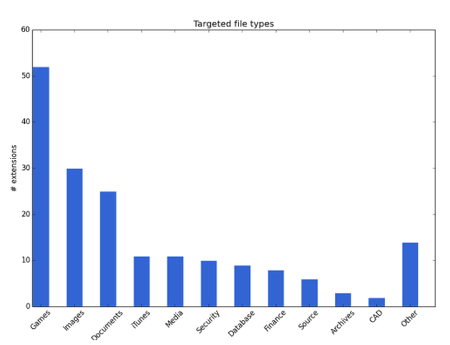
In fact, according to ZDNet, the majority of files targeted by this particular strain of Cryptolocker consists of games.

graph ib 1

So, if there are any gamers in your lives, be sure to tell them to stay cautious. This strain of Cryptolocker is known to hit games that have a massive following, like Minecraft, World of Warcraft, League of Legends, and many other games that are distributed through the PC-gaming platform, Steam. The researchers claim that this malware can also detect company-specific files, like those from EA Sports, Valve, Bethesda, and more. Just think of the effects that this could have on the business sector if this strain decides to target new markets.

If there’s anything that you take away from this article, we hope that it’s the possibility that Cryptolocker could be found in other, more focused strains that might directly affect your business. If your business were to be struck by ransomware, would you be able to recover? Call NuTech Services at 810.230.9455 today to find out how you can protect your PC from the clutches of Cryptolocker, Cryptowall, and other types of ransomware.

b2ap3_thumbnail_security_for_it_400.jpg

Your Inbox Needs a Sheriff with a Strike Plan

b2ap3_thumbnail_security_for_it_400.jpgSpam emails often contain viruses leading to any number of potentially threatening situations for your company’s network. Therefore, it’s essential that your network has a security solution in place that acts as a sort of virtual sheriff, blocking malicious messages from accessing your network, while granting passage to the good guys.

For your company’s spam filtering needs, a Unified Threat Management solution is useful. A UTM is the sheriff your network needs; able to spot and eliminate harmful spam emails with black-belt proficiency. Like any good sheriff, a UTM solution has a strike plan in place to get your sensitive data out of any potentially threatening situations. One helpful way to understand this is to think of this approach as an A-B-C strike plan.

A: Take an Assessment of the Situation
Your email inbox is constantly being bombarded by spam messages. In fact, did you know that more than 60 percent of all the email traffic over the Internet is spam? A good spam filtering solution takes a thorough assessment of your company’s email situation and is ready for anything; in a similar way to how a sheriff would give a potential criminal an ocular patdown, looking for any hidden weapons. With a UTM, every single message (no exceptions) gets stopped, assessed, and its security situation broken down.

B: Garner if the Email is a Security Risk
When an email is given a “patdown,” the UTM sheriff looks for a security risk. What’s that email hiding? It could be something sinister like a virus-filled attachment tucked underneath its pant leg. Or maybe an email is disguised to look like a legitimate message in the same way a criminal tries to conceal their identity. This kind of email trickery is known as spear phishing, and imposter messages like these can easily get past a standard-grade spam solution. As long as your enterprise-level UTM network sheriff is around, your business will be safe.

C: Clear the Message for Passage
After garnering that the message is safe, then, and only then, will it be cleared for passage to your inbox. Otherwise, the malicious message will go straight to your spam folder, and possibly even deleted automatically if that’s the setting you choose.

Ultimately, an end result like this is the highest goal for every spam filtering solution. In addition to a UTM protecting your company’s network security situation, it will also protect your wallet. For example, did you know that it cost the average office worker $712 per year in salaried hours to sort through all the spam themselves that hit their inbox? Therefore, as far as productivity goes, it’s like your UTM is providing your network with a gym partner to spot you, as well as a sheriff to keep you safe.

It doesn’t matter whether you’re using a PC or a MAC, with a UTM solution protecting your network, you’ll gain a sunny disposition regarding your network’s security. Call us at 810.230.9455, we’re always available to take your call!

b2ap3_thumbnail_facial_recognition_400.jpg

Tip of the Week: “Windows Hello” Unlocks Your PC With Your Face

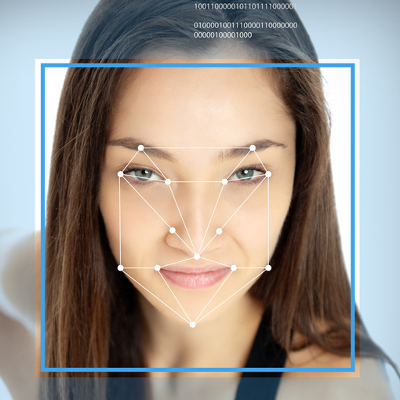
b2ap3_thumbnail_facial_recognition_400.jpgWhile new Windows 10 features like Cortana and the return of the Start Menu are getting a lot of attention, there’s another cool addition that’s sure to change your Windows experience for the better. Using Windows Hello, you can actually log into your PC… with your face!

This technology isn’t new to Microsoft; a biometric authentication feature has been available with Xbox One’s Kinect since its release. However, unlike Kinect, the camera for Windows Hello promises to only be activated when it’s needed. This is a lesson in privacy that Microsoft learned the hard way after facing sharp criticism for designing Kinect’s camera to be “always on.”

Although, don’t expect to be able to use Windows Hello with your current webcam. Instead, Windows Hello requires a special Intel RealSense 3D camera, priced at less than $100. It’s reported that the newest Windows 10 laptops and PCs are already being shipped with RealSense cameras, and more models are expected to adopt RealSense cameras later this year.

The Advantages of Biometrics Authentication
To sweeten the deal, Windows Hello gives a user the capability to also log in with their iris and fingerprint. Biometrics technology like this being available on a popular platform like Windows 10 is a huge leap forward in transitioning away from passwords, which are becoming a more vulnerable way to protect your information with every passing year. Dustin Ingalls, member of Windows Security Team, explains in a Microsoft promotional video the benefit of using Windows Hello biometric technology:

As a hacker, if I get ahold of your password, I can use that from anywhere. But with [biometrics]… the key is actually bound in hardware to my device. So the only way a hacker can use my identity, is to actually steal the device. When you use Windows Hello, not only does the attacker have to steal my device, but they also have to be able to use my biometrics. Which is super challenging.

Okay, what about a hacker simply using a picture of you to unlock the device?

facial ib1

This is why Windows Hello only works with the RealSense 3D camera, because it’s compatible with Microsoft’s anti-spoofing capabilities which require a slight turn of the head. Time will tell how well Windows Hello can lock out identical twins and 3D-printed miniatures; but, seeing that the RealSense camera is capable of analyzing a person down to their facial hair, we’re sure that it’s still a much safer route than passwords.

Setting Up Windows Hello on Your PC
For those with Windows 10, Windows Hello is easy to setup. Go to settings, enable a PIN, and then stare into the RealSense camera to let it detect your face. Users who wear glasses will want to let the camera capture images of yourself with your glasses both on and off. Once your settings are saved, an animated eye will show up on the lock screen, look at you, and wink after it’s detected that you are really you. Windows Hello will then grant you access to your PC with a welcoming message.

It’s as simple as that. With security innovations like Windows Hello, it’s only a matter of time before we never have to remember a password ever again!

b2ap3_thumbnail_mouse_security_400.jpg

Your Computer Can Identify You Based On How You Move Your Mouse

b2ap3_thumbnail_mouse_security_400.jpgAny user of technology knows that it’s important to optimize security on all fronts of your business. The only problem with this is that passwords aren’t as secure as they used to be. Many businesses have moved in the direction of two-factor authentication, which requires a secondary credential in order to access an account. Did you know there’s a security method that uses your mouse’s behavior to authorize your login?

A startup called BioCatch has developed an authentication procedure that analyzes your mouse movements and behavior. Everyone has probably encountered two-factor authentication at some point or another, be it for a bank account login or email inbox access; but we doubt that you’ve ever given mouse two-factor authentication a shot.

According to BioCatch, the way that a PC user uses a mouse can identify who they are. ZDNet explains:

The entire way that we use the human-machine interface embedded within each and every modern computer, browser, or website, is like a unique fingerprint. Lefties will operate a mouse differently to right-handed people, for example, and each user ‘grabs’ an icon at a different point, angle, and so on.

Essentially, BioCatch’s idea looks at the way users move their mouse to build a “character profile,” so to speak. This helps identify whether the user is actually who they say they are. In fact, it’s been estimated that this method of authentication can prevent fraudulent logins up to 80 to 90 percent of the time.

In addition to monitoring your mouse movement, BioCatch’s solution considers other aspects, crammed into four layers of properties:

Layer One: Standard Authentication
Layer one consists of the device, network, IP address, hardware, and location – all traits that physically tie you to your PC. These are the typical authentication properties used when logging into an account. The following layers, however, take a much different approach to authentication.

Layer Two: Physical Profile
Layer two consists of mainly motion-related actions, such as moving objects around the screen, hand-eye coordination, and the mouse pointer (or finger on touch screen devices).

Layer Three: Cognitive Profile
Layer three consists of examining mental abilities, such as response time and connection time. It also looks for suspicious activity that is out of the norm. One example used by ZDnet is online banking – normally, a user would check their balance before doing anything. If a money transfer is their top priority, something might be up.

Layer Four: Invisible Challenges
BioCatch’s final layer of protection is meant to authenticate a user’s identity, but not in the traditional sense. BioCatch purposely puts problems in the way of the user in order to determine who they are. Everyone reacts to potential threats differently, and their response can be used to verify one’s identity.

Will mouse two-factor authentication catch on? We don’t know; but what NuTech Services does count on is the importance of two-factor authentication in general. Users need to have more than just a password protecting their accounts if they want to stay secure. This is especially important for any business-related material. With today’s sophisticated hacking tools and procedures, all it takes is one skilled hacker to crack a password.

To get started with two-factor authentication, give NuTech Services a call at 810.230.9455.

b2ap3_thumbnail_security_checklist_400.jpg

Tip of the Week: Use This Security Checklist to Protect Your Network

b2ap3_thumbnail_security_checklist_400.jpgAs a business professional, you have a responsibility to ensure that your company’s network and data is protected from hacking attacks. It can be difficult to remember to take all of the necessary precautions, but with our help, you can easily outline all of the measures that should be taken to maximize security for corporate data.

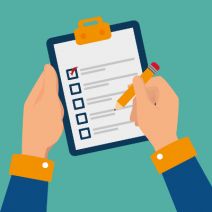
Start by going down this handy checklist:

Are You…

  • … Maximizing Password Security? A password that’s difficult to crack is one of the best (and easiest) assets your business’s network can take advantage of. If threats can’t make it past your password, they can’t do much damage. When changing your password, remember to use strings of complex characters, including both upper and lower case letters, numbers, and symbols.
  • … Using Two-Factor Authentication? When using two-factor authentication, you’re basically making the process of signing into your accounts more difficult by adding another security step to your login process. This means that a hacker must obtain even more information, like your mobile device. This extra step makes it vastly more difficult for a hacker to get into your account.
  • … Updating with the Latest Patches and Updates? The latest patches and security updates help keep your systems up to date and protected from recently discovered vulnerabilities and malware, improving your infrastructure’s overall security and dependability.
  • … Protected by a Firewall? A firewall is your first line of defense from incoming and outgoing threats. It analyzes the traffic moving to and from your network, keeping threats from infiltrating it in the first place, and quarantining them for proper elimination.
  • … Using a Spam-Blocking Solution? Spam is both an annoying waste of time and a potential threat. Spam messages often have viruses and malware attached to them, so it’s best that they stay out of your inbox in the first place. This is what a spam-blocking solution accomplishes. It can save you time and increase your network’s security.
  • … Protected by an Antivirus Solution? When the average consumer thinks about security, this is their go-to solution. An antivirus is designed to detect and destroy threats to a system’s security, effectively preventing catastrophe.
  • … Using a Web Content Filter? If you suspect your employees of having questionable web browsing habits, you can implement a content filtering solution. This solution will keep their time at work free of inappropriate, or simply unsafe, web browsing.
  • … Regularly Scanning Your Network for Threats? If your business isn’t regularly checking your network for undetected threats, you might find that you have some issues to take care of.

While this list might seem long and time-consuming to fill, it doesn’t have to be. NuTech Services has the ability to serve up and manage any security solutions you need to keep your network safe. Just give us a call at 810.230.9455 to learn more.

b2ap3_thumbnail_black_market_hacker_400.jpg

Where Hackers Go to Shop for Malware

b2ap3_thumbnail_black_market_hacker_400.jpgYou might recall how the Silk Road, an illegal online drug market, was recently shut down. Similar to the Silk Road, there’s another distributor of sensitive information out there; this one dealing with zero-day vulnerabilities. These types of cyber threats sell for top-dollar, and hackers are willing to pay in order to access your network.

As reported by WIRED magazine, this new marketplace calls itself TheRealDeal Market. Thanks to the anonymity of the Darknet, TheRealDeal market is capable of using software like Tor to cover its tracks, and Bitcoin to keep transactions anonymous. WIRED goes into detail about the niche which differentiates TheRealDeal from other vulnerability markets: high-quality code, stolen credentials, and hacking tools that are exceptionally difficult to get a hold of. This essentially equates TheRealDeal to a high-end code market that provides a “reliable” mode of acquisition for cybercriminals.

Of course, there’s no telling whether any of these supposed exploits being sold are “the real deal.” According to WIRED:

Any of the listings could instead be attempts to scam gullible buyers. The $17,000 iCloud vulnerability in particular, which claims to offer access to virtually all of a user’s sensitive mobile data including emails and photos, seems like an unusually good bargain. For comparison, zero-day salesmen told me in 2012 that a working iOS exploit could sell for as much as $250,000. The next year The New York Times reported that one had sold to a government for a half million dollars.

In other words, it might really be too good to be true for some hackers, and the site might even be trying to pull them into a hoax (scamming the scammers). Despite this, TheRealDeal apparently has some sort of fraud protection service, though it’s unclear how it operates. Plus, TheRealDeal is surprisingly sophisticated, especially considering the plethora of other illicit activities that the market is known for, including the selling of contraband, illegal substances, and stolen identities.

The level of professionalism seen here is disturbing, but if nothing else, it shows that hackers are both organized and resourceful. Unfortunately, by strategically offering rare code to well-funded hackers, TheRealDeal is making malicious code more readily available to the rest of the world, which means that hacking attacks will grow more common in the near future.

Thankfully, you don’t have to worry if your business is prepared for the worst. By taking advantage of comprehensive security features, like those offered with NuTech Services’s UTM (Unified Threat Management) solution, your business can reap the benefits of enterprise-level security measures. To fortify your business’s network from the latest threats and security vulnerabilities, give us a call at PHONENUMER today.

Social Engineering: Not All Hackers Target Technology

b2ap3_thumbnail_social_engineering_risky_400.jpgThe nature of hacking is to take advantage of weak points and exploit them for some kind of profit. This is usually seen in flaws or vulnerabilities found within the code of a program or operating system, but these flaws can be psychological, too. Hackers are increasingly taking advantage of a concept known as “social engineering” to fool users into handing over sensitive information that can be used against them.

Social engineering hacks are performed against unsuspecting individuals who might be privy to sensitive information within a corporation. These people often have less technical skills and might be more vulnerable to exploitation than others. These attacks often seek out information like passwords, usernames, dates of birth, and other sensitive credentials. The more skilled social engineering hacker can replicate sites to infect systems with malware, or even initiate infected downloads.

The most notorious social engineering method of hacking is called phishing, when emails are sent to a user under the guise of a seemingly harmless institution, like a bank. These messages usually ask the victim to confirm login credentials and other information in a manner that looks legitimate.

Spear phishing attacks are some of the most dangerous hacks out there. These types of phishing threats target specific users with personalized messages that are designed to coerce them into giving up personal or financial information. There have even been accounts reported of hackers posing as the media in order to get access to secure information.

According to HowToGeek.com, this method isn’t limited to being used remotely. Social engineering hackers can also get up close and personal with their attempts:

An attacker could walk into a business, inform the secretary that they’re a repair person, new employee, or fire inspector in an authoritative and convincing tone, and then roam the halls and potentially steal confidential data or plant bugs to perform corporate espionage. This trick depends on the attacker presenting themselves as someone they’re not. If a secretary, doorman, or whoever else is in charge doesn’t ask too many questions or look too closely, the trick will be successful.

How Can You Protect Yourself?
Ultimately, it comes down to educating yourself and your staff on how to identify a social engineering hack from the real deal. Here’s how you can minimize your chances of playing into the hands of a phishing scam.

  • Always be suspicious. Strange messages and phone calls are more than enough reason to be suspicious of the sender. If this is the case, it’s important that you don’t respond until you can confirm the identity of the sender. Contact the organization with the number or email address you have on record to ensure that you’re not being scammed. Some pointers to look for are misspelled words or strange links.
  • Avoid links in emails to websites that gather sensitive information. It’s possible that these links lead to fake sites that are designed to steal your credentials. If you suspect this is the case, try logging into the official site that you accessed outside of your email. You can spot subtle differences in the URL which give it away.
  • Make sure spam and phishing filters are enabled in your email and browser. Some browsers have built-in protection from known phishing sites which should always stay active. One particularly powerful solution is NuTech Services’s Unified Threat Management (UTM) solution. This solution equips your business with everything it needs to keep outside threats from getting into your network, including spam filtering and web content blocking.

When it comes down to it, the only way to maximize your business’s security from phishing attacks is to make sure your team knows how to identify and handle them. For more information on how to keep yourself safe from all manners of threats, give NuTech Services a call at 810.230.9455.

b2ap3_thumbnail_entering_personal_data_online_400.jpg

What Really Happens when Websites Collect Your Personal Data

b2ap3_thumbnail_entering_personal_data_online_400.jpgYou might be aware that some websites collect personal data from you depending on your mobile device’s location, your browsing history, and several other factors. This information is generally used for marketing, but it could have unforeseen effects on the way you browse the Internet. It can be fairly revealing about your personality, or possibly even incriminating. Therefore, you should be aware of how this personal information is gathered from you without you even knowing it.

Here are a few things Forbes magazine suggests you might not know about the gathering of your personal data:

wundermanMarketers Are the New Mom & Pop Store Owners

Remember that man who worked at the old general wares store down the road from you several years ago? He would remember everything about you; your name, your face, your interests, favorite beer, etc. The truth is that he knew most of what you preferred because you visited often and he picked up on patterns in your behavior.

In 1967, Lester Wunderman, the “father of direct marketing,” was able to predict that technology could accomplish this same feat with exponentially larger numbers: “A computer can know and remember as much marketing detail about 200,000,000 customers as did the owner of a crossroads general store about his handful of customers.”

As such, marketers are able to analyze data that computers gather about you and create marketing lists, which includes all types of personal information: religion, political view, marital status, sexual orientation, and more.

Your ZIP Code is Worth a Lot
To a marketer, your ZIP code is an absolute gold mine. You might think nothing of it when you enter your ZIP code at the local grocery store, but you’re giving marketing institutions all of the information they need to find you at a later location for future marketing campaigns. According to a Harvard professor Latanya Sweeney, a company can identify you an alarmingly high 87 percent of the time with only a few of your credentials:

  • ZIP code
  • Date of birth
  • Gender

Even the folks you trust the most with your ZIP code, your local post office, can take advantage of this and sell your information to marketers. The United States Postal Service is continuously validating old addresses and informing marketers when their targets have moved on to another location. According to Forbes, the USPS makes roughly $8 million a year by selling this data.

Facebook: A Goldmine of Information
Everyone’s favorite social media site houses an incredible amount of information about them, and is arguably one of the best marketing tools available on the Internet. Other users can see what pages you have “Liked,” and can even suggest pages or friends to you. Due to this open-minded approach to social media, marketers are generally able to collect this data and use it to formulate the aforementioned lists. Even if you only host the minimal amount of personal data on your Facebook, there’s still a good chance that marketers can put you into a list judging from your liked pages and friends.

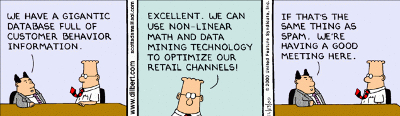
Whether we like it or not, companies and merchants are gathering our information and storing it for later use. Your business likely does something similar; collecting information about your own clients and storing it for later consumption.

dilbert spam

By law, these institutions are allowed to collect this information, but there are others out there who seek out private information, like Social Security numbers, to commit identity fraud or steal your money. This begs the question of whether or not your business’s security solutions are up to snuff and able to protect your stored information from hackers.

When you deal with lots of personal information, like Social Security numbers or credit card numbers, you want to use the best security measures available. NuTech Services can equip your business with a Unified Threat Management solution to keep your data safe from being compromised by hackers. This includes a firewall, spam blocking, and web filtering to keep the threats out, compounded by an antivirus to neutralize threats that get in. For more information about our UTM solution, give us a call at 810.230.9455.

b2ap3_thumbnail_software_re-engineering_400.jpg

A New Plan Might Make Software Reverse-Engineering Far More Difficult for Hackers

b2ap3_thumbnail_software_re-engineering_400.jpgHackers make life difficult for even the most innocent Internet user, and it’s all thanks to a nasty little trick called reverse-engineering. This is when a hacker picks apart the code that makes up a program, then scans it for vulnerabilities or exploitations. A new type of security measure is being developed to protect against the reverse-engineering of software.

When malware is eliminated from a machine, the same process occurs. The anti-malware software digs into the code of the malware and uses its vulnerabilities against it. However, what would happen if the PC could be protected from malware in the first place and prevent the reverse-engineering of the system? At the recent Singapore SyScan conference, security researcher Jacob Torrey presented his idea for what he called a Hardened Anti-Reverse Engineering System (HARES).

What’s so special about this particular concept? Well, HARES will attempt to encrypt the software code until the exact moment the processor needs to execute the code, meaning that the code can’t be analyzed for decryption while the code is being executed. According to WIRED:

The result is a tough-to-crack protection from any hacker who would pirate the software, suss out security flaws that could compromise users, and even in some cases understand its basic functions.

Of course, any tool that can be used for the good of cybersecurity could also potentially be turned toward evil purposes. HARES might not be meant to create malware that can’t be decrypted, but you can bet that some genius hacker will find a way to make it a reality; and that could compromise any unsuspecting system.

As it stands now, HARES can be tricked a number of ways. Whenever a program uses an encryption protocol like this, a decryption key must be installed into the computer’s CPU. This lets it decode the application when it must be opened. However, an experienced hacker might be able to intercept this key and use it to decrypt the application and examine the program’s commands.

Another way that hackers might try to take advantage of HARES is through debugging features found within some hardware. This allows for the analysis of commands made between the chip and the motherboard. Granted, in order to use such a tactic, hackers would need a spectacularly expensive tool, which they probably can’t afford. The only way this method might see use is on the national-state level.

In the face of new potential security threats like this, it’s important that you optimize your business’s security protocol. A Unified Threat Management (UTM) solution from NuTech Services can help your business stay protected from the latest threats and vulnerabilities. It comes complete with an advanced firewall solution, antivirus, spam-blocking, and content-filtering solutions designed to keep you safe from whatever lurks in the shadows of the Internet. We’ll work with you to make sure it fits the needs and budget of your business. Give us a call at 810.230.9455 to learn more.

What are your thoughts on this potential new development in software encryption? Let us know in the comments.

b2ap3_thumbnail_advanced_malware_400.jpg

Understanding How Advanced Malware Can Harm Your Business

b2ap3_thumbnail_advanced_malware_400.jpgThere are a lot of different threats out there: Viruses, malware, spyware, adware, the list goes on. While all of these threats are certainly problematic, some are more dangerous than others. In particular, advanced malware can be exceptionally devastating if they manage to inflict damage on your technology.

However, what makes advanced malware so much different from the garden variety? Processor magazine explores how small business and larger enterprises can protect themselves from these advanced threats. As defined by Robert Clyde, international vice president of ISACA, “The nature of advanced malware is that it’s targeted, it’s stealthy, it’s evasive, and it’s adaptive.” These traits combined make for an incredibly sly malware that’s difficult to detect and even harder to prevent.

Unlike ordinary malware, which is generally meant to disrupt whatever it affects and start all sorts of generic chaos, advanced malware usually has a specific goal to accomplish, and is aimed at specific targets. It’s more likely that these advanced threats are after specific information and are specifically designed to complete this task in the most effective way possible. These types of threats can also be considered “Advanced Persistent Threats,” a term used to describe malware which accomplishes its goal over an extended period of time rather than upon execution.

These types of threats are often complex and require a different approach than the standard malware. In fact, some infections can get worse if they’re detected, and they can hop from system to system in order to avoid detection. This makes locating and eliminating the threat difficult at best.

When such a threat knocks at your company’s door, the best way to handle it is with a four-front assault called our Unified Threat Management (UTM) solution. With a powerful firewall at your disposal, your business has a dedicated bouncer to analyze data moving to and from your network. This prevents malicious entities from infiltrating (or leaving) your system when you’re on the hunt for them.

The next phase is when the enterprise-level antivirus solution kicks in. This eliminates threats that are detected on the network. If you suspect that there is a malicious entity lurking on your network, we can locate it with our remote monitoring service and eliminate it before it causes any noticeable damage. We also offer companies a free IT network assessment to locate threats and confirm your suspicions.

There are other preventative methods for keeping advanced malware from getting into your network. An advanced persistent threat might take the form of a spear-phishing tactic, where a hacker will target you specifically for your login credentials or sensitive information. Another preventative way is the spam blocking solution which is part of NuTech Services’s UTM. This keeps spam from even reaching your inbox, making spear-phishing attempts obsolete.

Finally, our web-blocking solution keeps your employees from navigating to insecure or otherwise threatening websites. A skilled hacker might try to gather information using a fake website, or by hiding attachments within permalinks. Our web-blocking solution has the power to keep your business secure while online.

If you’re concerned with how to protect your business’s data from both the garden-variety and advanced malware threats, give NuTech Services a call at 810.230.9455. We’ll help your business find the best solution to your security woes.

b2ap3_thumbnail_smartphone_security_400.jpg

Tip of the Week: 7 Common Methods to Protect Your Smartphone

b2ap3_thumbnail_smartphone_security_400.jpgThose who believe that smartphones are secure from threats are in for a rude awakening. Modern businesses need to apply adequate security practices to maximize the protection of mobile devices, or risk everything.

If a hacker were to somehow access a corporate mobile device, they could potentially compromise sensitive information. Would your business be able to recover from such an attack? You want to keep this situation from happening in the first place, instead of just hoping it doesn’t happen. Here are some ways you can keep your business’s sensitive data away from those who might try to steal it from your smartphone.

Integrate a Lock Code
Naturally, the best way to keep strangers from accessing information on your phone is to set up a lock screen. There are a number of different lock screen options that you can select from, including entering a PIN number, dragging a specific pattern across the screen, and entering a full-fledged password. The type of authentication techniques available vary according to the device.

Try Data Encryption
Most of the time, you can encrypt your smartphone or tablet pretty easily. This means that the device’s data will be inaccessible to anyone who doesn’t have the decryption key, or password. This is a surefire way to make stealing your data more difficult than it’s worth to most amateur hackers.

Disable Website Tracking in Your Browser
Websites are known to collect information from you while you browse, and they use this information to deliver advertisements to you based on what you look at. It’s not beyond the realm of possibility to leak confidential information to the Internet. Your mobile browser should give you the Do Not Track option, which leaves it up to the website whether or not they will collect information from you. Most websites will listen to your preference, but this doesn’t always work.

If the Caller is Unknown, Don’t Answer the Call
We’ve all experienced the irritation of answering calls from unknown numbers and listening to automated messages. However, in the rare moment that there’s actually someone else on the other end of the line, they are probably one of two things: A cold-caller trying to sell you something you don’t need, or a hacker who’s trying to trick you. These hackers often pose as representatives from organizations (like banks, charities, etc) and try to convince you to give up information regarding your account. Naturally, it’s best to avoid answering the phone if you don’t know the identity of whoever is on the other end. Besides, if it’s really important, they’ll leave a message or callback information, which you can cross-reference with information you find on the Internet.

Use GPS Tracking to Locate Your Lost Device
Most modern smartphones, like those made by Android and Apple, come equipped with GPS tracking features that can be accessed online if you have misplaced your device. This can be helpful if someone has located your device, or if it’s simply inside the sofa. If someone has found it and hasn’t found a way to contact you, you can locate it with GPS. Problem solved. Although, it should be mentioned that the GPS tracking only really works if the device is turned on, so it’s not without its limits.

Keep Just Enough Contact Information in Your Device
Once in a blue moon, you’ll meet a genuinely good person who wants to return devices that they’ve found lying around. If this is the case, they won’t know how to return it to you if you don’t give them a way to do so. Often, a simple name and alternative telephone number will be enough to help them get ahold of you. It’s important to not leave too much information in the device, or you could risk giving hackers everything they need to steal your identity.

Keep Your Device within Arms-Reach
Finally, the easiest way to keep your device safe is to keep it on your person at all times (or at least within sight). This is especially important if you often work remotely from public places, like coffee shops, diners, etc. This is the best way to keep the common thief from gaining access to your device.

For those who don’t want to take any risks, a mobile device management solution from NuTech Services is the most comprehensive solution out there to keep your business’s mobile device safe and secure. We can whitelist and blacklist applications to let only specific ones gain access to confidential corporate information, and we can even integrate content filtering and spam blocking to help your team stay as safe as possible, even while out of the office. Last but not least, we can remotely wipe devices in a worst-case scenario.

For more information about how NuTech Services can keep your mobile devices secure from hackers, give us a call at 810.230.9455.