323927904_data_400.jpg

Why You Need to Keep an Eye on Your Data

323927904_data_400.jpg

When a company operates primarily via the Internet, there seems to be an inherent trust that their audience naturally has. There’s little-to-no doubt that all promises will be kept and that all data shared with them will be fully secured, but is this confidence appropriately placed? While we can’t speak to the promises these companies make, we can weigh in on some common data security practices.

How a Company Acquires Your Data

For a company to get your data, all they really have to do is ask you for it. Think about what happens each time you make a purchase online, or even create an account—you’re handing over your contact information, and usually pairing it to one of your financial resources.

Obviously, you’re subconsciously entrusting them with this information, assuming that they will keep it sufficiently protected and secure.

Here’s the thing: not all companies are totally deserving of this trust. Quite a few companies will make some extra money by bundling their contact lists and selling them off to other companies. This is considered a common enough practice but is fortunately looked upon more and more negatively as data protection is being prioritized more.

Even if this practice goes away, you still have no control over the company’s data security practices. Consider what information of yours could be exposed if that company was to be breached:

  • Your name
  • Your birthday
  • Your credit card information
  • Your contact information

These are all forms of personally identifiable information (PII), and this isn’t even a comprehensive list of the data that these companies will collect. Plus, if they were to suffer a data breach, the onus is still on you.

One of the biggest flaws of the Internet today is the questionable privacy of any activity. Anything you do on the Internet adds to a massive data trail that describes you, from the content you’ve streamed, the messages you’ve sent, everything.

As you might imagine, there’s a lot of value to be had from this kind of data.

How to Protect Yourself by Protecting Your Data

Due to this data’s value, you must do everything you can to protect it. Here are a few good ways to start:

  1. Use good passwords: Password hygiene and resiliency is the part of your online security that you have the most control over, so make sure that you aren’t taking any shortcuts that will undercut their effectiveness in protecting your accounts. Passphrases are often considered a more secure, but easier-to-remember, alternative to the password.
  2. Review the Terms of Service: For each account you’ve created, you need to check the fine print to see how they are using the data you provide.
  3. Track your finances: One of the most effective ways to find out if your security has been undermined is to keep an eye on your financial activities. Find a resource you can trust to give you these insights.
  4. Avoid public Wi-Fi whenever possible: Public Wi-Fi signals are a favorite hunting ground for many cyberattacks. Your data plan is a much safer alternative to these.

NuTech Services has the experience and know-how to keep your business safe from many cyberattacks. To learn more about how we can help, reach out to us at 810.230.9455.
343103339_covid_scam_400.jpg

Don’t Let Scammers Scare You with COVID-19

343103339_covid_scam_400.jpg

The COVID-19 pandemic has resulted in a great number of people working from home. While this is good for the public health, it may unfortunately lead your employees toward a laxer view of cybersecurity. Cybercriminals are sure to take advantage of this if you aren’t careful, so it is important to be particularly aware of your cybersecurity right now.

The Advantage COVID-19 Gives Hackers

To put it bluntly, diversion. With so much attention rightly given to COVID-19 right now, there are many who are remaining in their homes as much as possible to try and prevent the pathogen from propagating. This approach makes the Internet even more important to so many people. Not only are many businesses operating remotely, many rely on support services and other online functions for their in-house processes. Otherwise, people who cannot work remotely are seeking ways to pass the time, turning to social media and other online services for that.

As a result, a huge number of people are online.

This creates the perfect storm for a scammer or hacker to take advantage of, as they now have a larger pool of potential victims. On top of that, the COVID-19 situation also gives them another opportunity to fool people into handing over their access credentials to personal and business accounts.

Between March 9th and April 26th, a total of 1.2 million domains were created that have something to do with COVID-19. 86,600 of these domains lead to malicious websites, 80 percent of which distribute malware to anyone unlucky enough to interact with them.

As far as phishing attacks and spam go, more of these are also popping up. COVID-19-themed scams are popping up in the form of fake emails, spoofed to look like they come from the IRS, the CDC, healthcare organizations, and various other companies.

Preventing the Influence of Scams

With so many scams and threats out there, vigilance is crucial… especially when you and your team may be working remotely. Any of the security best practices that people should be following in the office need to be particularly focused upon when you’re in the home. For instance:

  • Phishing awareness – Phishing can strike through a variety of outlets, from email, instant messaging, social media, and even telephone calls. Being able to spot these attempts is needed if your business is going to remain secure.
  • Maintain password standards – Many people have separate standards for their home passwords and their business passwords. You need to discourage this by reinforcing the importance of good password hygiene in all environments.
  • Back up your data – Data is important, regardless of where it is accessed. Maintaining a backup and securing it with antivirus and firewall is important.

At NuTech Services, we have the professionals with the experience needed to properly secure your network as you continue your operations. To learn more about what we can offer, give us a call at 810.230.9455.

246442495_cybersecurity_400.jpg

Is Your Business Being Attacked From the Inside?

246442495_cybersecurity_400.jpg

With cyberthreats the way that they are, a lot of industry professionals go on and on about the importance of deploying technologies designed to reduce the potential threats that a business has to confront. This technology isn’t cheap and while they absolutely do help you protect your technology and data; today’s hackers know that. Unfortunately for small business owners, that shift has left your staff on the front lines of cybersecurity; a place they really shouldn’t be. Let’s discuss cybersecurity from an employer’s perspective.

Today, there are literally billions of phishing emails sent each day. Inevitably, you are going to confront this problem, and depending on your staff’s preparedness (or intentions), you will either deal with them or they will likely deal with you. 

The first thing that you should know is that you have to train up your staff about phishing and other issues surrounding your organization’s security. They have to understand social engineering tactics used by scammers to infiltrate networks, steal data, and deliver malware. If they are left in the dark about these issues, you will likely see a plethora of cybersecurity problems in your immediate future. It’s good to be lucky, but you’d rather be good.

Once you’ve committed to a cybersecurity training regimen for your staff, you then have to understand that there are three manners of attack that come from inside your network. Let’s take a look at them:

Mistakes 

The first type of attack is brought on by mistakes. Those are instances where you have trained your people and they are committed to help you protect your business’ IT but made a mistake and it has caused problems. Most mistakes are only a mouse click made in error. Mistakes do happen and since there is absolutely no malice behind it, harsh reprimand of that employee, while probably warranted, will surely bring out the water works. You don’t want to alienate your staff (or your entire workforce) so if someone makes a cybersecurity mistake, and it is remediated quickly, there’s no real harm done. You will want to re-train this person and test them, so you know they understand what your policies are. 

Negligence

An employee that continues to make mistakes isn’t just a doofus, they are neglecting their responsibilities. Negligent behavior is at the center of a large percentage of the security breaches seen in business today. It can be characterized by an ambivalence to your business’ stated goals that is shown by repeat offenses that put your network and data in jeopardy. It may start with a simple mistake, but if an employee continues to make careless mistakes, it could really put the business behind the eight ball. Cybersecurity negligence is just like negligence in other aspects of the business and can’t be allowed to continue.

Sabotage

The employer-employee relationship isn’t always easy. In many businesses, there is a direct conflict of interest. Employers are known to overstep boundaries in the name of productivity and employees are known to get fed up with it. People get disgruntled, people are fired, people quit. There are rare occurrences where the relationship gets so bad that current or former employees will use their access to your company’s systems to try and sabotage an element of it, or the entire thing. In the rare cases where this does happen, it can lead to complete destruction of a business. If you have had to let someone go, or they have quit, you will want to immediately remove any and all of their credentials so that they have absolutely no access to your business’ digital resources. If the saboteur still works for you however, there may not be much you can do until their dastardly plan unfolds. It’s important, then, to treat your employees with the same respect as you expect from them. A fair employer won’t run into sabotage very often.

Keeping your technology systems running and working for your company is imperative for today’s businesses. If you would like help with security strategy or with deploying tools call the IT professionals at NuTech Services today at 810.230.9455.

198032116_business_security_400.jpg

Three Facets of Security to Focus On

198032116_business_security_400.jpg

When it comes to a business’ cybersecurity, there is no magic bullet to solve every problem. No miracle cure, no panacea, no Staples “that was easy” button. Instead, you need to deploy various means of protecting your operations. Let’s discuss how your business’ security needs to be shaped in three different environments: your physical infrastructure, your cybersecurity solutions, and your employees’ security habits.

Physical Security

First on our list is the oldest kind of business security, the (sometimes literal) gun behind the counter that helps to dissuade potential attacks. It is only too easy to overlook the fact that data theft can be as simple as someone taking a hard drive, rather than hacking into it. Of course, we aren’t suggesting that all businesses should have an arsenal at the ready. Instead, technology provides assorted alternatives that should be implemented to deter attempted intrusion.

Maintaining your access controls, installing surveillance, and otherwise keeping a closer account of who is present in your business can all be considered ways to improve this security. This not only helps to keep sensitive materials safe from unauthorized access within your business, it will also help protect your investments and assets if your business is vacant for any length of time.

Cybersecurity

Of course, we can’t neglect to mention your business’ cybersecurity protections. With over one billion malicious programs out there (as of this writing) poised to attack, there are far more threats than you could handle without technological assistance. Make sure that you have this assistance protecting every aspect of your business’ technology:

  • Updates and patches serve to resolve security issues inherent in your software solutions.
  • Spam blockers help to filter incoming messages to stop threats from exploiting your email.
  • Firewalls allow you to secure your Internet connections, and web filters prevent your users from accessing risky or time-wasting websites.
  • Password requirements and multi-factor authentication enable you to keep access to various accounts secure against various threats and social engineering efforts.
  • If work is to be done outside of the office, a virtual private network can help protect your data as you communicate with the office outside of the defenses installed in the workplace’s infrastructure.
  • Turn to an external resource to perform a comprehensive security audit. Not only will they be able to determine your weaknesses, they can help you implement the tools to remediate them.

Security Awareness

Finally, it is extremely important to remember that your biggest vulnerability can easily be your employees themselves, as human beings are the most prone to mistakes and are the easiest to fool out of your business’ operational resources. Make sure that you are training your entire team on the security practices and awareness that everyone involved needs to maintain, continuing via evaluations and repeated education as needed.

Emphasize the importance of certain concerns, like:

  • Password Hygiene
  • Data Security Practices
  • Secure Processes
  • Access Control Standards
  • Social Media Use
  • Conformity to Policies

For assistance with all of this, turn to NuTech Services. We have the solutions to support your security efforts, as well as the rest of your operations. To learn more—or to get started—reach out to our team by calling 810.230.9455.

99257205_secure_wifi_400.jpg

How to Safely Use Wireless Internet to Work from Home

99257205_secure_wifi_400.jpg

While remote work has gained an understandable boost in popularity, many business owners and technology specialists may still be concerned about how secure the Wi-Fi connections that workers are using in the home are. To waylay those fears, you need to be sure that your employees are using their networks as securely as they can.

To help, we’ll be going over a few best practices that you and your team can implement to improve the security of your remote work when using a wireless connection.

Password Best Practices are a Must

Whether at home or in the office, everyone who works within your business needs to subscribe to good password standards. For instance:

  • Don’t rely on easy-to-guess passwords, passwords that rely on predictable patterns, or other passwords that might be found on “insecure password” summaries.
  • Use a passphrase, or a combination of unrelated, randomly chosen words, instead of a password. Not only are these more secure, they are often easy to remember.
  • Update your passwords regularly, including your network access password. Don’t give out the password to your network if you can help it.

Optimize and Update

While many are in the habit of postponing updates until the performance of their tools begins to suffer, remote access requires the use of secure and effective solutions. 

Here are a few tips:

  • Each employee needs to have a sufficiently secure suite of solutions to protect the devices they are using, as well as their network as a whole. This should include a firewall, antivirus, and a virtual private network (VPN) connection.
  • Each employee should also take additional steps to protect their solutions, such as adjusting and updating their networking hardware and changing the SSID it is known by.
  • Furthermore, all devices themselves should have the latest security updates and patches installed.

Making sure that your entire team is aware of these guidelines–and abides by them–is crucial to your security, regardless of whether they are operating in-house or remotely. For more assistance with your business’ technology and the security that protects it, reach out to NuTech Services by calling 810.230.9455.

134821701_hackers_security_400.jpeg

Hackers Double Down During Crisis

134821701_hackers_security_400.jpeg

The COVID-19 pandemic has most of the world at home. It has completely disrupted everyday life and has businesses scrapping their normal strategies for work-at-home policies that will at least allow them to maintain some productivity. These strategies, while highly effective, carry with them additional risk. Today, we take a look at some of the risks associated with relying on remote workers.

With many “non-essential” businesses scrambling to find strategies that will keep revenue coming through the door, setting up a remote workforce has become most businesses’ best hope. Unfortunately, with such little notice to dot the Is and cross the Ts, businesses are taking on more risk than many of them are comfortable with. That trepidation is not fruitless, either. In times of crisis, hackers have a tendency to prey on the unprepared. The fact is that workers that are operating where they are not comfortable–or where they’re too comfortable–can mean disaster for their employers.

Security Threats for Remote Workers

Even if it normally is, security isn’t exactly the top priority for businesses faced with this situation. Businesses need to mitigate net-negative cash flow positions. This means they need their staff to continue working. This is stretching business’ cybersecurity strategies thin. Exacerbating things is that with so many people focused on the COVID-19 pandemic, hackers can use it as bait. 

Cybersecurity professionals and other researchers have seen an increase in ransomware attacks, trojans, and spyware as a result of this situation. They’ve also seen COVID-19 being referenced in millions of phishing attacks. Many problems that businesses face in regards to cybersecurity can be directly attributed to the remote worker. Workers at home are typically using their home PC or laptop that has all their personal accounts on it. An infected personal PC is a big problem when you are using the same PC to access work related materials. 

Additionally, hackers are now seeing a lot more success by targeting businesses directly now that security is playing second fiddle.

That is a problem since cyberattacks can decimate your business, tarnish your reputation, and end any positive momentum your business has built up. Since most businesses weren’t prepared in the least for these stay-at-home orders, the ones that are under direct scrutiny from federal, state, and industry mandates are even more exposed.

How to Protect Your Business

While any measures you take at this point to better secure your employees working remotely will be more reactive than they are proactive, it is still important to do so. We suggest that you enact the following measures to begin:

  • Cloud solutions – Rather than introducing an entrance into your business with a remote access solution, using the cloud’s capabilities enables productivity through a much simpler and more secure means than opening a gateway into your business’ infrastructure. As the cloud permits you to store your data and/or host your applications, your employees can be sure to have the resources they need to safely work from home.
  • Company devices – If you provide your team with the device they should use through their day-to-day, your business can continue to operate with the knowledge that all updates and security patches can be maintained. Despite the upfront costs of procuring the technology you will need, making this investment can provide returns to both productivity and security.
  • Employee training – Perhaps most crucially, your employees need to respect how much responsibility will rest on their shoulders in terms of maintaining cybersecurity as they work from home. Making sure they know the recommended best practices for maintaining security, as well as other preventative skills like spotting phishing attacks, will allow you to trust them more to keep your business safe from threats.

While the COVID-19 pandemic will eventually end, smart security practices both in and out of the office never should. To learn more about how we can help keep your business safe, reach out to NuTech Services at 810.230.9455.
303805582_social_engineering_400.jpg

Social Engineering Isn’t Going Away

303805582_social_engineering_400.jpg

When someone starts talking about social engineering, people often get confused. They think we’re talking about cloning. While having two of something you love may not be terrible, the social engineering we routinely cite is much, much worse. Social engineering is the act of using social interactions to get people to make cybersecurity mistakes. Today, we’ll take a look at social engineering and how it can have a negative effect on your business. 

What is Social Engineering?

Think of it like this: online, you have some type of social currency. Your personal information, your data, your interactions, your profiles, they all add up to your online life. If someone were to use that information to trick you into providing them access to your secure online accounts, you would be the victim of a social engineering attack. 

Basically, a hacker uses what amounts to the fundamentals of human psychology to gain unauthorized access to an account. Rather than exploiting a vulnerability within a system’s technology, a social engineer will take advantage of the human resources to gain access through relatively simple psychology.

Successful social engineering can be the result of many different actions. Some include: carelessness by an individual, perceived kindness, reaction to fear, and business as usual. Let’s take a look at these actions and how social engineering schemes work as a result.

Individual Carelessness

When there is a lack of diligence carried out by an individual, there are openings for a social engineering attack. This includes trash thrown out with information on it, keeping login credentials out in the open, and other careless actions. It’s important that you and your staff understand that the best practices of password protection, such as using a password manager, are crucial to maintaining the integrity of your company’s network and infrastructure.

Perceived Kindness

Many people won’t think twice about helping someone that asks for help. Social engineering attackers take advantage of the better angels of our nature, by using people’s helpfulness to gain access to secure computing resources. Any person can fall for this type of attack. This is why we stress that in order to keep your digital and physical resources secure, a critical eye for potential intrusion works. That doesn’t mean you have to be a jerk, but if a situation is presented to you that’s out of the ordinary, take anyone’s helplessness with a grain of salt.

Business as Usual

When we picture a hacker, we all tend to think about them the same way. They are brooding people sitting in a dark room typing away at a computer. In social engineering attacks, this couldn’t be further from the truth. A popular social engineering tactic is to gain physical access to a large business–where there are often a lot of moving parts–and then spend time at the business looking for ways into secure digital environments. This could also include straight hatchet jobs, where your employees would help people outside of your business sabotage your access control systems. 

Reaction to Fear

Finally, fear is one of the best motivators. By striking fast and threatening all types of negative consequences if a worker doesn’t help them get into a secure computing system, this kind of cyberattack can be a major problem. 

NuTech Services Can Help Protect Your Business

If you are looking to secure your network from cyberattacks, including social engineering, the IT professionals at NuTech Services can help. Call us today at 810.230.9455 to learn more about how we can help you with the training you need to keep social engineering from causing problems for you.

cybercriminal_400.jpg

Why It’s Paramount to Keep Security in Mind

cybercriminal_400.jpg

Over the last few years, there has been a meteoric rise in cybercrime, with nothing to indicate that rates will decrease anytime soon. Why would they? Bad actors and cybercriminals can make a pretty penny by attacking businesses, and they are only becoming more equipped and experienced in doing so. 

The past few years have seen some of history’s greatest data breaches. For instance, the most notorious of these attacks, the Equifax breach, Yahoo, and Marriott-Starwood, resulted in a combined total of 3.5 billion accounts breached.

This means, statistically speaking, you would have a pretty good chance of picking a data breach victim of the past few years by randomly selecting two human beings from the entirety of planet Earth’s population.

Crunching the numbers, there has been an increase of security breaches of 67 percent since 2014.

What Does this Mean? Is Anything Secure Anymore?

Interestingly, there is a plus side to these enormous data breaches happening in the public eye, thanks to a few key points:

  • It brings attention to these kinds of crimes – Thanks to disasters like the Equifax breach, more Americans are aware of the impact of cybercrime. This kind of awareness is crucial to encouraging improved security.
  • There is too much data for cybercriminals to practically use. This one can be chalked up to statistics… the more data that a given cache has, the less of a chance that your data is pulled up in an attack.

To clarify, we aren’t trying to sugarcoat the severity of a data breach, but having said that, the past few years’ cybersecurity threats have really given us all an example to consider. With new compliances, regulations, and other mandates being put into play, businesses are certainly considering these threats.

What About Small Businesses?

There is a tendency to overlook small businesses when discussing data breaches. After all, the ones that have struck large targets (like Yahoo, Target, eBay, Sony, and many others) almost always get a headline, along with the attacks that focus on municipalities, like the ones that targeted Albany, New York; Baltimore, Maryland; Wilmer, Texas or Lake City, Florida with ransomware.

What aren’t heard about so much, unfortunately, are the attacks that lead to much smaller companies shutting their doors for good… a side effect of the limited number of victims per attack, and the relatively casual approach that many have towards security. Unfortunately, a Verizon survey shows just how misguided the assumption that a smaller business size will protect it from threats, when 43 percent of businesses breached would be classified as small.

Security Needs to Be a Priority

Fortunately, there are ways that you can reinforce your business’ cybersecurity, especially with the help of NuTech Services and our experienced cybersecurity professionals. Call 810.230.9455 to get in touch with us, so we can help evaluate and fulfill your business’ needs.

malware_175043095_400.jpg

The Three Key Steps to Stop Malware

malware_175043095_400.jpg

Malware is a bad thing. It’s right there in the name, as the prefix mal– comes from the Latin malus, which literally translates to “bad.” So, it only makes sense to try to keep it out of your business. Let’s discuss a few basics to form the foundation of your greater cybersecurity strategy.

Lock. Everything. Down.

Did you know there are entire websites out there, devoted to providing the default factory passwords for different devices? They aren’t on the Dark Web, either – this is on the visible, indexed Internet. Imagine if I were to come in with some idea of what brand of routers you had… if I had the right default credentials with me, I could easily access your router and wreak havoc in your business.

You need to consider every potential access point into your business and ensure it is properly secured. The same goes for any online accounts associated with your business, like cloud storage. Take the time to make sure that everything is secured with a password that meets best practices, and if memories are an issue, use a reputable password manager to simplify the task for your employees.

This also goes for your physical location. Many access control solutions exist that enable you to keep track of who accesses a certain area, and when, with the added benefit of keeping those without authorization out.

Keep Your Antivirus Updated

Many people may assume that, once they’ve installed an antivirus/antimalware solution, they are all set. The trouble is, more malware is being developed all the time, and there’s a good chance it is being developed to help the malicious software get past your antivirus. As it happens, the developers of the antivirus are aware of this, and frequently add new threat definitions to the software to make it more effective.

However, all the threat definitions in the world will do diddly-squat if your antivirus solution isn’t updated to include them. This is why it is important to keep an eye on your network’s health and take the time to check that you have the latest definitions included.

Keep a Backup

Finally, you have the nuclear option against malware… mutually assured destruction, that only you can recover from. That is, as long as you’ve been maintaining a proper backup.

If you should fall victim to a malware infection, completely wiping your devices and quite literally starting from scratch with them is your best hope of getting rid of it. However, in order to keep yourself from crippling your own business while doing so, you need to maintain an ace in the hole. By keeping a backup that passes best practices, you can be sure to have your data if you have to sacrifice your original copy.

NuTech Services can help you do all of this, and more. Reach out to us at 810.230.9455 to learn more.

time_182562237_400.jpg

Windows 7 Has Nearly Ticked Its Last Tock

time_182562237_400.jpg

It won’t be long before Microsoft retires two of its most popular operating systems – but hopefully, you already knew that. Microsoft has made a point of reminding Windows 7 users that they need to upgrade before January 14 – and yet, many users haven’t done so.

By many, we mean about a quarter of them.

With the deadline just a week and a half away, we wanted to reiterate what a solution reaching end of support means, how it would impact you, and what your options are.

The first thing to address is what “end of support” actually means. It doesn’t mean you won’t have the ability to use whatever software it is (in this case, the Windows 7 operating system) after the end of support date. What it means is that Microsoft is no longer doing anything to it – including improving its security and patching issues. As a result, the software will lose its functionality over time. Worse, the computer running the software becomes vulnerable, which makes the entire network vulnerable – not a good thing.

To be fair, there are some ways that you can protect your network while still using these devices. For instance, if you rely on a particular line-of-business application that requires Windows 7, you could theoretically isolate a Windows 7 device to allow you to do so. However, to be completely fair, there isn’t any guarantee that you will be protected from vulnerabilities, short of completely taking problematic systems entirely offline.

Therefore, it only makes sense to explore your other options.

Your Other Options

With the deadline as close as it is, you will need to hustle to put any of these alternatives into action:

Upgrade to Windows 10

Objectively speaking, Windows 10 is better than Windows 7, if only for its improved security. Furthermore, it isn’t one of those solutions that requires insanely higher specifications to run. In fact, the minimum numbers you need to operate Windows 10 are as follows:

  • Processor – 1 GHZ or faster
  • RAM – 1 GB for 32-bit or 2 GB for 64-bit
  • Hard disk space – 16 GB for 32-bit or 20 GB for 64-bit
  • Graphics card – DirectX 9 or later with WDDM 1.0 driver
  • Display – 800 x 600 resolution

Mind you, this is all it takes to run Windows 10, not to run Windows 10 well. To improve your performance, we suggest that you make a few alterations – upgrading to a 2 GHz dual-core processor, increasing your RAM to between 4-and-8 GB, and Increasing your hard drive space to 160 GZB, at least.

Purchase New Hardware

While it will cost you a pretty penny, obtaining new hardware (that comes with Windows 10 installed) may be the easiest option, especially when you take your looming deadline into account. Windows 10 and regular updates to it are all included, but it may take some time to configure everything properly.

Virtualize with a Thin Client

In a similar vein as leveraging Chromebooks instead of Windows, you could use your old hardware as a thin client to virtualize your needed solutions. However, despite the reputation that virtualization has as a solid option for businesses, it may not be a practicable option with the deadline pressing so close.

Alternatively, you could simplify this process using one of Microsoft’s services. Microsoft 365 offers a combination of Windows 10, Office 365, One Drive with an included terabyte of storage, and fully featured security. Available at a predictable monthly flat-rate per user, it gives you a solid alternative for at least your productivity-software-using employees.

Regardless, you need to take action now. Reach out to NuTech Services today for help. We’ll figure out which approach is best for you and help you with your upgrade process. Call us at 810.230.9455 to learn more.

Facebook_285250526_400.jpg

Facebook and Your Privacy (Part 2)

Facebook_285250526_400.jpg

Wait! If you haven’t read part one of our Facebook privacy blog yet, you may want to do that before reading this one. If you’re ready, we’ll be taking an in-depth look at your Facebook settings to make sure that your account and its data are as secure as possible. If we’re being honest, protecting this kind of data hasn’t seemed to be one of the platform’s strong suits – and user privacy has been the star of many lists of concern.

That’s why we wanted to make sure that you knew how to reclaim your personal data and make sure it is protected. We’ll start by protecting the information that you’ve shared.

To do this, you will want to access your Facebook account on a computer. This is going to be a lot to manage, and the mobile app would only be too much trouble to navigate.

Your Security and Privacy Options

From any page on Facebook, look for the menu, which will appear as a little downward-facing arrow. This should be at the top right-hand corner of the page. Click into Settings. This little arrow is your lifeline during this process, you can always find your way back to the beginning with that menu.

Verify the Accuracy of Your General Account Settings

Your first order of business should be to confirm that you still have access to all of the email accounts tied to your Facebook. If an account that you no longer have access to was used, account recovery becomes monumentally more difficult.

Find Out Where You’ve Used Facebook with Security and Login

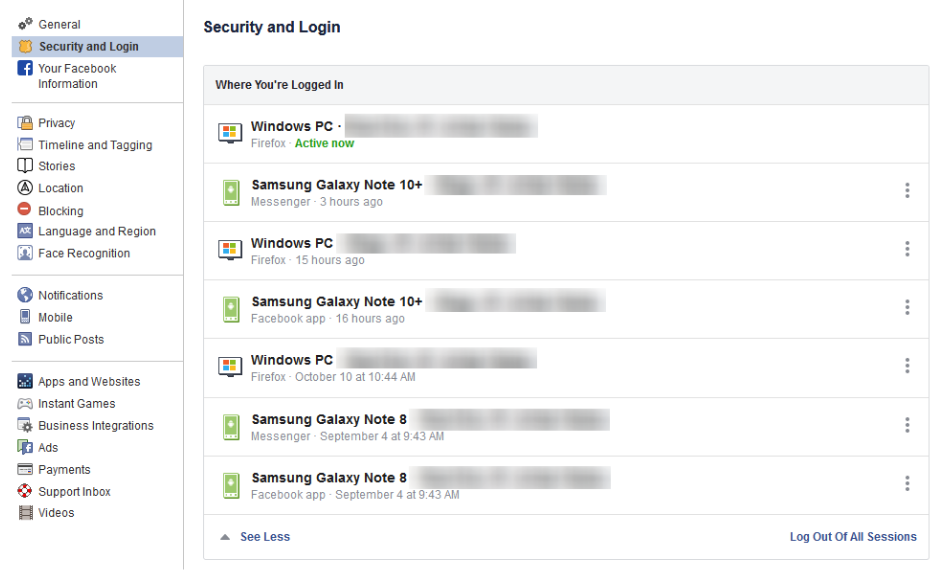
On the right, you should see the Security and Login option. Click it, and Facebook will show you all of the devices where your account is logged in. Fair warning, this can be shocking – especially since it includes where and when you last used that device, and what browser you were using to do so. The longer a user has been engaged with Facebook, the more devices will likely show up here.

If one of these devices is one that you don’t recognize, you will want to change your password immediately – we’ll go over how in a moment. First, you will want to log out of Facebook on any device that you aren’t actively using. This can be done through the three-dot icon menus next to each device listed.

Change Your Password

While we’re on the topic, this is when you will want to make it a point to update your password. It will only take a minute and might just help keep your Facebook friends from being spammed and phished. You can do this using the process provided on the Security and Login page.

Remember, you should never use a password for more than one online account.

Using Two-Factor Authentication

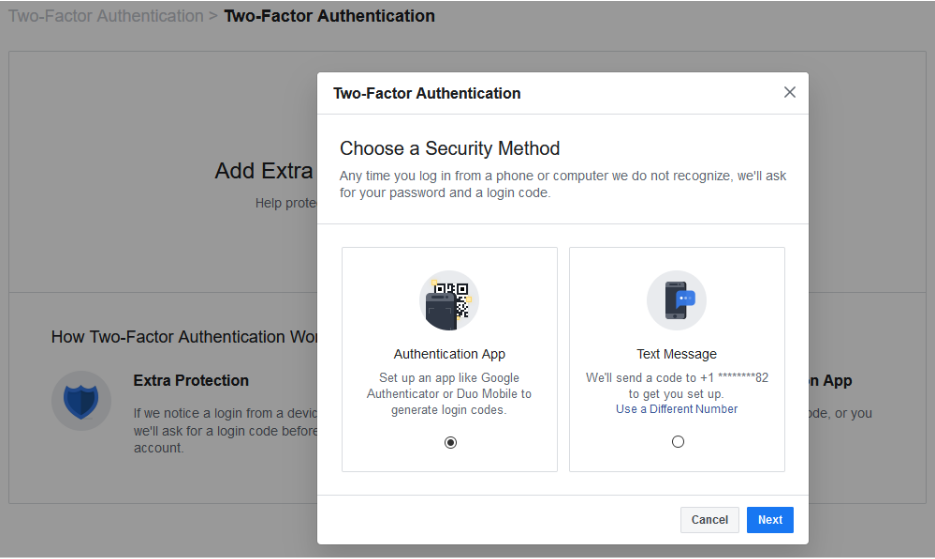
After your password settings, you’ll see the option to set up two-factor authentication (2FA) to help protect your account. To set it up, select Use two-factor authentication and click edit, and Facebook will provide you with the instructions you need to follow. Click Get Started

You have two options to select from as your Security Method, either using an authentication app, or to receive a text message with an additional code. Between the two, the application is the more secure option, although it does mean you need to have access to the mobile device whenever you want to check your Facebook.

Setting up the authentication app option is pretty simple. Open your application (which, if you have a Google account, might as well be Google Authenticator) and, on the computer, select the Authentication App option, as pictured, and click Next

Facebook will display a QR code, which your authenticator app should allow you to scan when you add a new account to it. The app will then give you a six-digit number to provide to Facebook as a Confirmation Code. Simple.

If you decide to use the text message option, Facebook will simply send you a code that you have to provide upon login. It isn’t quite as secure as the app, but it will do. All you have to do to configure this is to confirm an initial code with Facebook, and you’ll be walked through the rest.

Add a Backup

Once you have two-factor authentication enabled, it only makes sense to add an additional means of 2FA as an emergency backup – in this case, whichever method you didn’t choose. Honestly, you might as well set up both, and make use of the Recovery Codes option, to boot.

Under the Add a Backup option on the Two-Factor settings page, there is also a Recovery Codes option. By clicking Setup, Facebook will provide a brief explanation, and the opportunity to Get Codes. Facebook currently gives you a list of 10 single-use 2FA codes. These are one-shot codes, but you can generate a new list whenever you want from the Two-Factor Settings page. Make sure you keep these codes in a safe place.

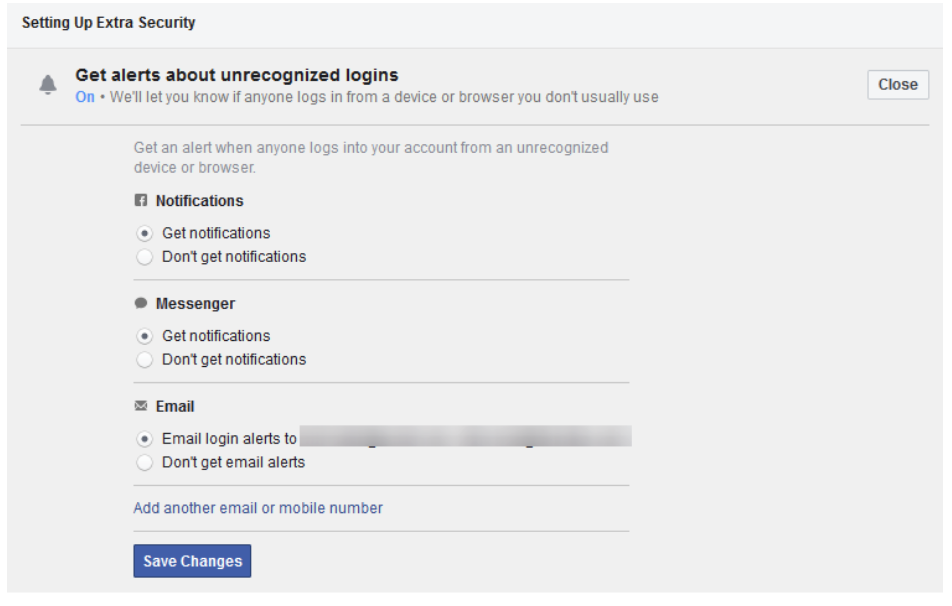
Setting Up Extra Security

Back on the Security and Login page, scroll down to find Setting Up Extra Security. This area lets you opt-in to alerts being sent via email or text, notification, or Facebook Messenger.

You can also Choose 3 to 5 Friends to Contact if you do find yourself locked out of your account. Make sure that these are people you truly trust.

Stay tuned for part three of this series, coming soon.

Privacy_307095170_400.jpg

Facebook and Your Privacy (Part 1)

Privacy_307095170_400.jpg

Two billion users strong, Facebook is one of the Internet’s most popular websites… which has frequently put the tech giant in the spotlight when it comes to how secure the data you’ve entrusted to them (in addition to what they’ve collected) really is. Today, we’ll discuss how you can access the information Facebook has on you.

What Does Facebook Know About Me?

Consider how many opportunities Facebook has to collect information about you: there’s quite a few. For one thing, you literally tell the platform the things you “Like.” Semi-joking aside, there’s also the stuff you post, which advertisements attract your attention, and many other means for them to construct a pretty solid profile on you.

You can see this profile for yourself. In the aftermath of the Cambridge Analytica scandal – where third-party users were granted free reign and access to Facebook user info – Facebook made a promise to be more transparent. This profile is part of that transparency.

Viewing this information is pretty simple, whether you’re on your computer or you’re using the mobile application.

On a desktop or laptop:

  1. Log in to your Facebook account.
  2. Click the down arrow on the top right and go to Settings.
  3. On the left, click Your Facebook Information.
  4. Facebook will present you with five options. Look for Download Your Information.
  5. Click View, Facebook will give you a screen where you can choose the date range and format of the data. Since we want to download everything, we’re going to set the Date Range to All of my data and set Media Quality to High. This will give us a higher quality version of all of our photos and videos in the download.
  6. Click Create File and Facebook will start building the download. This can take a while, but Facebook will give you a notification when your data is ready for download.
  7. Once Facebook gives you the notification, click it and Download your data.

From the Facebook mobile app:

  1. Tap the 3-bar hamburger icon in the top right of the app.
  2. Scroll down and tap Settings & Privacy, and then tap Settings.
  3. Tap Download Your Information.
  4. Leave all of the options checked, and scroll down. Ensure the Date Range is set to All of my data and that Media Quality is set to High.
  5. Tap Create File and Facebook will give you a notification when the data is ready for download.

The “data is ready” notification will probably come after about an hour – it really depends on how long you’ve been a user, and how active you’ve been. Most people will probably have a file that takes up a few gigabytes.

Now that the report is available to you, click on Your Facebook Information.

Access Your Information – Facebook provides you with an itemized and viewable list of your Posts, Photos, and Location history ready for viewing.

Activity Log – Consider this a comprehensive timeline recap – almost a scrapbook, prepared by Facebook.

Deactivation and Deletion – People used to complain that deleting a Facebook account was a difficult process. Not anymore!

So, How Much Does Facebook Know About Me?

When you do review your file, the information they have can be shocking, mainly due to the location-based aspect of it all. You can pull up a given day and find out exactly where you were and what you did. Facebook kept track for you.

Then, you need to consider the Ads. This section will show you all of the advertisers who provided Facebook with a contact list your name appeared on. It isn’t that Facebook gave away this information, advertisers already had it and gave it to Facebook to target you on the platform.

What Does This Mean?

While it completely makes sense that Facebook would know a lot about you, seeing it all laid out (and how much of it didn’t come from your profile) isn’t exactly comforting… Facebook has been too involved in a few major data breaches. Just think – there’s a profile just like the one you retrieved about you, for over a quarter of all of the people in the world.

This rabbit hole goes deeper, too. Make sure you check back soon for part two of three of this Facebook privacy blog series.

You probably had a notion that Facebook had a bunch of your information, but how much information outside of your general profile makes you nervous when they are accused of major data breaches. What’s scarier is that the service is used by over a quarter of the world’s population. 

This is only the tip of the iceberg of the information we will share about this social media giant. Check back for part two of our three-part blog series about Facebook privacy.

crime_192900730_400.jpg

Recent Data Breaches You Should Know

crime_192900730_400.jpg

Imagine for a second what would happen if your business’ data was exposed and stolen. You’d have a really difficult time going forward as your client-base dwindled and you opportunities for growth dried up. The amazing part is that some very successful companies have this type of thing happens all the time. Today, we will look at some of the largest data breaches since September 1.

September

9/5 

Providence Health Plan – 122,000 members of the Providence Health Plan had personal information leaked when an unauthorized party accessed the company’s servers. Information that was stolen included plan member names, addresses, email addresses, dates of birth, Social Security numbers, member ID numbers, and subscriber numbers.

Facebook – Facebook had an unprotected server with over 419 million records accessed.  Users had their Facebook’s user ID and phone number exposed. In some cases, user’s names, genders, and locations were also leaked.

9/16

Dealer Leader, LLC. – 198 million prospective car buyers were left exposed by an unprotected server. The information that was left out there included names, email addresses, phone numbers, addresses, and IPs.

9/27

DoorDash – The popular food delivery app had 4.9 million customers’ information breached by a third-party. The information left exposed included the names, delivery addresses, phone numbers, hashed passwords, order history, and the last four numbers of each’s credit card number. In the same hack, over 100,000 delivery drivers had their driver’s license information leaked. 

9/30

Zynga – The mobile game maker, Zynga, the developer of popular mobile games such as Farmville and Words with Friends has announced that 218 million players had their data exposed after their network was breached by a hacker.  The company had player names, email addresses, login IDs, phone numbers, Facebook IDs and more left exposed.

October

10/17 

Methodist Hospitals of Indiana – The Methodist Hospitals of Indiana fell victim to an email phishing scam and it allowed hackers to steal 68,000 records that included names, addresses, dates of birth, Social Security numbers, driver’s licenses, and more. 

10/21

Autoclerk – Autoclerk, a hotel property management software developer had an open database infiltrated exposing data that included names, dates of birth, home addresses, phone numbers, dates of travel, travel costs, room numbers, and some masked credit card details of hundreds of thousands of guests. 

10/22

Kalispell Regional Healthcare – Over 130,000 Social Security numbers, addresses, medical record numbers, dates of birth, medical histories and treatment information, and names of treating physicians were exposed by hackers.

10/26

Adobe – Data was exposed that included email addresses, usernames, location, Adobe product licenses, account creation dates, and payment statuses. 7.5 million users were affected.

10/27

Network Solutions – The world’s oldest domain name provider has been exposed in a hack. Millions of individuals’ data that included names, addresses, phone numbers, email addresses, and service information was compromised.

November 

11/9 

Texas Health Resources – The Texas-based health care provider reported a data breach where 82,000 patient records were exposed. Included in the breach were names, addresses, email information, health information, and more. 

11/16 

Disney Plus – The brand-spanking-new Disney+ streaming service had new user account information hijacked by hackers. Login credentials wound up on the Dark Web soon after. 

Magic the Gathering – The popular online strategy game has reported that an unsecured website database has exposed 452,000 player records that include names, usernames, and more. 

11/18

State of Louisiana – The State of Louisiana has been a victim of a ransomware attack that took down many state agencies’ servers. Although no data is said to be lost, the state’s crucial computing infrastructure was down for several days as systems were restored from backup.

11/19

Macy’s – Macy’s had their ecommerce site hacked. Hackers embedded malicious code into their checkout page and put a skimming code on the company’s Wallet page. The malware retrieved names, addresses, phone numbers, email addresses, payment card numbers, card security codes, and card expiration dates.

11/22 

T-Mobile – T-Mobile had over a million customers’ information accessed by a hacker. Information accessed included names, billing addresses, phone numbers, rates, and calling features.

Unknown – An unsecured server containing over 622 million email addresses and 50 million phone numbers, and millions of pieces of other information was discovered. It is unknown what organization this data is tied to as the time of writing.

With hundreds of millions of records being exposed each month, it’s hard to feel confident about giving your personal or financial information to anyone in the current threat landscape. If your business needs help trying to be secure, call us today at 810.230.9455.
protect_283536684_400.jpg

Protect Smartphones Like Any Other Computer

protect_283536684_400.jpg

We go into great depth on how to protect your desktop and laptop computers from malware and other malicious threats. In fact, one of the first steps you take anytime you are setting up a new computer is to install antivirus and other security programs. You do this because an unprotected device presents substantial risk. With the way people are using their smartphones today, it’s a solid practice to outfit your mobile device with the security software needed to maintain the security of your data.

Mobile malware is not new. It has been around since people used flip phones, but it doesn’t get the attention that the malware that targets Windows PCs do. This is mainly due to it being a little more rare, but if you are the unfortunate recipient of it, it can cause a lot of the same problems. 

Many people won’t consider it simply because of the way they use their device. A person’s smartphone is with them around the clock and they don’t often use it in the same manner as they would a PC. This doesn’t mean that there aren’t major threats that can users can be exposed to. Let’s take a look at each major mobile OS.

iPhone Malware

One of Apple’s favorite marketing strategies is to point out that iOS is the safest mobile operating system. They actually do a commendable job, but devices running iOS aren’t always completely safe, especially on “jailbroken” devices. By not doing this, which is a way to avoid a lot of iOS’ built-in security restrictions, you will be much more secure. 

Another risk that iOS-run devices run into is called a zero-day hack. The zero-day hack target devices haven’t received a security update after the security update has been released to the public. One major issue that users have with iOS security is that there aren’t a lot of ways to prevent issues. Apple itself does a lot of the heavy lifting. Their platform’s success depends on them keeping their reputation, so having trust in Apple to keep your device secure is not without its merits.

Android Malware

Android is a completely different situation altogether. With more devices comes more malware, and with so many different manufacturers making (and supporting) their various versions of Android, it gets a little dicey.

Android is much more flexible than iOS, which is one of its main benefits, but it can also be problematic when it comes to keeping the device secure. For example, if you want to install an application that’s found outside of Google Play, you can, but any negative situation you get into as a result is on you. It is also possible to jailbreak an Android device, which can override some of the built-in security restrictions.

There have been situations where installing apps off of Google Play have caused problems. Google has had to play games with app developers to keep some serious threats off their store. It just means that users need but it has become clear that it really comes down to the user being careful with what they install. It’s not normal for malware to be attached to Google-sponsored apps, but it has happened, so if you are an Android user, you don’t have to be too careful if all of your software comes from Google.

How to Protect Your Smartphone from Malware

Keep App Downloads to Major App Providers – Both Android and iOS feature their own app stores, Google Play Store and Apple App Store, respectively. Even though Android devices can install applications that aren’t on the Google Play store, modern smartphones make this a little more difficult by making users acknowledge that they are putting their devices at risk by doing so.

If you refuse to jailbreak your phone, and you only install applications that are thoroughly vetted, positively reviewed, and come directly from the Apple App Store or Google Play, you will greatly reduce the risk of infecting your device.

Don’t Get Phished – Many of the most insidious threats today rely on user error. Phishing attacks are an annoying example of this. A user will get a legitimate-looking email from some account they actively use and will be directed to submit login credentials. Unfortunately, the email account is spoofed and on the other end is potential disaster.

Install Anti-malware – You have antivirus software for your PC right, why not get it for your mobile devices? Most providers have Android apps and can go a long way toward protecting your device from harm. 

Enact Policies – If you are a business owner and your employees use their personal devices to do work-related tasks, it’s a solid practice to establish an end-to-end mobile device policy. You can require users to enable security options like device locking and encryption, and since this gets set up on your network, the device (and therefore the user) has to comply with any requirement’s your IT admin requires. 

We have a dedicated plan to help all of our clients maximize their data and network security. If you want to talk more about it call our consultants today at 810.230.9455.
scam_275606311_400.jpg

Former Trend Micro Employee Sold 68,000 Customer Records to Scammers

scam_275606311_400.jpg

Antivirus developer Trend Micro is doing some damage control after an ex-employee stole customer data and sold it to online scammers. These scammers have been calling Trend Micro customers. If you use Trend Micro, it’s best to be wary of any calls you get.

How Does This Happen?

An employee had access to data that they weren’t authorized to have. According to Trend Micro, they were able to “gain access to a customer support database that contained names, email addresses, Trend Micro support ticket numbers, and in some instances telephone numbers. There are no indications that any other information such as financial or credit payment information was involved…”

This employee, who remains unnamed, apparently had planned to steal data, and ended up being able to bypass the internal protections Trend Micro had in place.

Since the data had more than enough information for a scammer to use to trick a user into believing they were calling from Trend Micro (all it really takes is a name and phone number, and knowing that they use the product), this kind of data has a great deal of value to scammers. It gives them an easy way in to steal money from unsuspecting people under the guise of Trend Micro tech support.

Be Wary of Any Unsolicited Tech Support Calls

This isn’t a new problem, and it definitely isn’t only a problem for Trend Micro customers. Fake tech support scammers have been around for years, often preying on older, less-technically-savvy users. They use scare tactics and feign urgency to get their victim to hand over credit card information or allow remote access to the PC. 

More often than not, these calls will come in saying they are “Microsoft Windows Support” or some general computer support. If the scammer thinks they are targeting an individual at a business, they might say they are from the IT department.

It’s important to be wary and educate your employees so they know the proper channels for getting support requests handled. 

The Other Lesson – Don’t Let Employees Access Data They Don’t Need

As a business owner, you need to ask yourself who has a little too much access. Can all employees wander into folders on your network that contain personal or financial information? 

An employee should only have access to the data that they need, although it’s also important to not make it too difficult for an employee to do their job. Establishing the policies for this can be tricky but setting up the permissions on your network just takes a little work with your IT provider.

Enforcing security policies, like controlling who has access to what data, requiring strong passwords, and setting up multi-factor authentication can go a long way in protecting your business and its customers from a rogue employee running off with data. An ounce of prevention is worth a ton of damage control, in this case.

Need help? Our IT experts can work with you to lock down your data. Give us a call at 810.230.9455.
cloudupdate_68996071_400.jpg

Software Patching in the Cloud

cloudupdate_68996071_400.jpg

A lot of computing is done today using cloud computing – basically, making use of the computing power, space, and applications that a provider has on their infrastructure as if they were your own. Doing so can provide a very specific benefit to your security, but, have you ever wondered how the cloud itself is protected? 

With so much computing now done in cloud environments, it is important to address how this approach can benefit security, but still need to be secured.

How Patches Benefit from the Cloud

It isn’t a secret that any kind of software, from applications to entire operating systems, can have holes in it. These security flaws and issues could easily leave a business vulnerable to attack if they aren’t resolved. This is why software developers will issue patches, which are just corrections to these mistakes, for users to install. By applying the patch, the user is protecting themselves from threats that would otherwise exploit that vulnerability – but just on the system where the patch is installed.

Now, consider how many computers some companies use, and all of the different software titles that would be found on each.

Can you imagine going to each one and applying an update, each time a patch was released? Furthermore, you have to consider that more and more devices are mobile nowadays. This means that there is no guarantee that every device is present when someone goes on their patch application marathon. Factors like these frequently lead to incomplete patch deployments, and as a result, holes in organizational security.

However, by utilizing the cloud as you manage your organization’s patches, the device no longer has to be present in order to receive the patch. Instead, the cloud can be used to push it out to all of your devices, so once they connect to the Internet, the patch will be implemented. This means you can keep your employees using the solutions you want them to use, assisting both your productive operations and your security.

How the Cloud Benefits from Patches

However, it is important to take note that all the cloud is, is a computer located somewhere else (often owned by someone else). As a result, it can also be vulnerable to flaws and issues of their own – which is why you need to be sure that your cloud provider is properly maintaining the cloud solution with its own patches. This is especially the case if you are using an internal cloud solution.

NuTech Services can help you keep up on your updates, whether they involve the cloud or not. Reach out to us at 810.230.9455 to learn more about our services.

bug_216065370_400.jpg

Microsoft Releases Rare Bug Fix Off of Regular Patch Schedule

bug_216065370_400.jpg

Most of us like to take matters into our own hands, almost to a point where we might refer to ourselves as control freaks. So, when it comes to letting other people or even our own devices update themselves, we tend to click “remind me later” or “don’t ask me again”. Patches however, are a crucial task in the computing era. Keeping everything up-to-date aids your business in staying one step ahead of lurking threats. Recently, Microsoft announced that it had two major security updates which required emergency patches. 

The two vulnerabilities were patched off of Microsoft’s typical “patch Tuesday” due to the urgency. Most Microsoft patches are released on the second Tuesday of the month. The fact that these two were released ahead of time might seem like an insignificant occurrence, but the reality is this event is a major red flag.

Internet Explorer Zero-Day

The most significant patch was for a zero-day vulnerability that was found in Internet Explorer. It may be hard to believe, but people are indeed still using this antique browser to surf the web. The term zero-day suggests that the vulnerability that was discovered, had already been exploited by ill-minded cybercriminals. 

While not much information has been released on the event, Microsoft did call it a remote code execution exploit that, if accessed, could have given a user control of another user’s account. The attack requires phishing someone who is exploring the internet on Internet Explorer, and luring them onto a malicious website. Once there, an attacker would be able to gain access over the victim. 

Internet Explorer is such a forgotten browser that the event did not spark a lot of controversy. This is largely due to the fact that Internet Explorer makes up just two percent of the active market share. However, for the relatively small amount of users that continue to surf, an event like this is still a huge disaster. 

Microsoft Defender DOS Bug

The second patch that Microsoft expedited was a denial of service vulnerability in Microsoft Defender. The antivirus program comes standard in all Windows 10 PCs, and truly is the core of Windows 10’s sterling security record. 

The bug that was discovered wasn’t necessarily obvious, or easily exploitable. In order to do so, the attacker would need the ability to read, understand, and write code. Doing so would allow them to disable Windows Defender components, giving the attacker access. This would give them free rein to do whatever malicious act they chose to deploy. 

Patches aren’t optional. If you are worried about your business’ vulnerability, speak to one of our experts at NuTech Services. We have the know-how to keep your software up to date. Give us a call at 810.230.9455 today! 

scam_284361147_400.jpg

How Cybercriminals Can Add “Be Scammed” to Your Google Calendar

scam_284361147_400.jpg

Users seem to have a bit of a blind spot when it comes to solutions put out by Google, particularly the risks associated with Gmail. It’s almost odd to say: a security threat leverages Gmail. Unfortunately, it isn’t unheard of, as a phishing scam has been leveraging Gmail and its cooperation with Google Calendar for some time now.

Here, we’ll review the basic experiences that this scam subjects a user to as it sets the trap… and, of course, what your business can do to avoid these threats.

How Users Can Be Scammed

Put yourself in the shoes of a targeted user for a moment: just like any other day, you access your Gmail account and discover what looks like a Google Calendar invite. The invite is apparently for some kind of company-wide meeting (probably to discuss the company’s trajectory, policy changes, or something like that) to take place at the end of the workday. The message includes a link to the complete agenda, which can be accessed once a user confirms their credentials. You do so… and in doing so, fall for a scam.

This scam can be pretty safely categorized as “brilliant in its simplicity,” much like other phishing attacks can be nowadays. By using Google’s own convenience-based features, a fraudulent calendar event can be automatically added to a user’s Google Calendar, notifying the user. Fraudulent links send the user to a faked Google login page, where the user’s credentials are stolen as they attempt to log in. Alternatively, the link just begins installing malware directly to the targeted system. This scam has also proved effective against private users – informing them of some fabulous cash prize they’ve “won” through these fake Calendar entries.

How the Scam Was Uncovered

As it turns out, the details of this scam were reported to Google by an IT security firm in 2017, but Google has not made any steps to resolve it until recently.

The firm stumbled upon this discovery when a coworker’s flight itinerary appeared in an employee’s Google Calendar. From there, the researcher realized the implications of this accidental discovery, and quickly determined that users just don’t anticipate phishing attacks to come in through their Calendar application.

Can This Scam Be Stopped?

Now that Google has acknowledged the issue, a fix is currently being developed as of this writing. Until the point that a successful fix is deployed, you need to make sure your users are protected against this vulnerability.

The first thing they need to do is ensure that no Gmail events are automatically added to their Google Calendar. Under Settings in the Google Calendar application, they need to access their Event settings. From there, they need to deselect the option to Automatically add events to my calendar from their Events from Gmail.

To disable invitations to events from automatically adding themselves to the Google Calendar, a user needs to go through the same process, this time switching the Automatically add invitations option to the much safer “No, only show invitations to which I have responded.”

With any luck, this – combined with a little vigilance from your users – will protect your business from a phishing attack via its schedule. To learn more about how to protect your business against a variety of threats, subscribe to our blog, and give NuTech Services a call at 810.230.9455.
steps_244849832_400.jpg

The Truth About Compliance and Cybersecurity

steps_244849832_400.jpg

To the average person there are some definite blurred lines between IT security and IT compliance. In fact, these lines are so blurry to most people that they would consider them the same thing. They aren’t. How is it possible to create a fully compliant, completely secure computing environment? You start by understanding how to make both possible.

IT Security

Let’s start with IT security because it’s undeniably important if you want to maintain not just IT regulatory compliance, but business on your own terms. IT security, like the act of complying with regulations, is an act of risk mitigation. In the case of IT security, the risks are many and complex. You have the risk of operational issues like downtime. You have the risk of system corruption from hackers and other outside entities who are trying to break through (or in) and get access to your assets. There is also internal risk to physical systems, central computing infrastructure, and every endpoint on the network.  

In IT security, the amount of risk often dictates what kind of action is necessary, since reacting to the problems themselves isn’t a viable option. Thus, when protecting your network from threats, you will likely have to be much more comprehensive about your attention to detail as you would even under the most strictest compliance standards.

IT Compliance

Compliance also is all about minimizing risk, but to stay compliant, it’s more about focusing on following set-in-stone rules than it is about keeping systems secure. Most of the regulations that have been passed down by a government entity, third-party security framework, or customer contract have very specific requirements. This gives network administrators a punch-list of tasks that need to happen to keep their organization’s IT compliant with their various IT mandates. 

Insofar as it works to maintain digital asset security, many regulations are created to ensure that risky behavior is not introduced, while others are very specific about what data needs to be protected, and what systems need protection. In fact, some regulations barely touch the IT infrastructure, only dictating that the business purchase regulation-compliant hardware. 

Where Your Company Stands

Compliance standards typically depend on which vertical market your business does business in, or more specifically, how it uses sensitive information in the course of doing business. That doesn’t speak to your organization’s complete IT security strategy. In order to keep all of your digital (and physical) assets secure, there needs to be a dedicated plan to do it. After all, today the user is the most common breach point. 

With that truth it is important for the business that operates under the watchful eyes of a regulatory body to understand that you may be compliant, but still be at risk. It’s important that aside from meeting all the compliance standards set forth by your industry’s regulatory mandates, you need to put together a cybersecurity strategy that prioritizes the ongoing training of your endpoint operators. 

At NuTech Services, our technicians are experts in modern compliance standards and cybersecurity. Our team can work to simultaneously build an IT infrastructure, the policies to govern that infrastructure, and the endpoint monitoring and protection solution that will keep your business secure from threats, while also being compliant to any mandated regulations your business is under. Call us today at 810.230.9455 to learn more.

AI_292930626_400.jpg

How is Artificial Intelligence Changing the Face of Cybersecurity?

AI_292930626_400.jpg

If you are concerned about your business’ ability to keep its network secure and data protected, you’re not alone. More businesses than ever are utilizing modern strategies to ensure that their networks are safe, their hardware is stable, and that their data stays secure. With the continual shifts we are seeing in the threat landscape it is essential that cybersecurity continues to evolve. Today, we take a look at some of the innovations being made in cybersecurity, and what to expect out of future cybersecurity tools.

Some of the best cybersecurity methods are practices developed over the past few years. This is because social engineering, specifically phishing, has become a major problem. There are billions of phishing emails sent each year, and some of those are so convincing that even people who have had some basic cybersecurity training fall victim to them. To fight this, security firms have started to look to tomorrow’s technologies to help them mitigate risk today. 

Artificial Intelligence – The Future of Cybersecurity 

One of the most effective ways of combating this rise in hacking is to use the most dynamic technology you have access to and make a tool that will help you mitigate the massive risks. One way is to reduce the effectiveness of these hacks. In this case the technology is artificial intelligence.

When we talk about artificial intelligence, we are talking about having a machine that learns as it is continually exposed to threats. This will work to solve common issues at first, but as these systems advance, and are exposed to user behaviors, they will be able to replace access management systems. Since the AI will be constantly monitoring systems, as well as user behaviors, workplace roles, and common actions, it will be able to recognize a person without, the need for password-protected accounts and creating ubiquitously secure endpoints. If the system recognized any deviations, an additional form of authentication such as biometrics would grant or deny access. 

Cost will initially be a factor for businesses, especially small and medium-sized businesses, but as large companies begin to truly trust these platforms, they will have viable endpoint-protection systems for small businesses. 

Cybercrime Accelerates with 5G

5G and beyond will bring a lot of changes to the user experience, of course, but it will also make huge changes to cybersecurity. Before long, the AI systems that are being developed to thwart today’s cyberthreats will become essential systems for the sustainability of mobile computing. Just think about how much cyberthreats have multiplied over the past decade after the jump from 3G to 4G. The jump to 5G isn’t going to any less dramatic.

It will be crucial for cybersecurity professionals to be able to leverage systems that are both ubiquitously available to search through large streams of data while also being capable of learning on the fly in order to ascertain what data is potentially malicious and what data is less so.

Luckily there are still years before these types of systems will be needed. Unfortunately, there are enough threats out there to be a major problem going forward. The IT professionals at NuTech Services can help you protect your hardware and data. Give us a call at 810.230.9455 today!