
b2ap3_thumbnail_auto_driving_cars_400.jpg

Ready or Not, Self-Driving Cars Will Soon Be On the Roads [VIDEO]

b2ap3_thumbnail_auto_driving_cars_400.jpgArtificial intelligence might be quite a ways off, but despite this, the push continues to make driverless cars a regular occurrence on the roads. Just look at how Google has its driverless cars rolling across testing grounds in Mountain View, California, and if they have their way, we might see a lot more of these vehicles hitting the roads in the near future.

According to the National Highway Traffic Safety Administration, Google’s self-driving vehicles can be considered a driver. According to ZDNet, Google wanted to clarify how their driverless cars could meet the Federal Motor Vehicle Safety Standards. In order for Google’s cars to be seen as compliant with the safety standards, all they had to do was change the position of the brake pedal and sensors, after which the vehicles were declared safe enough.

For examples of how one of these automated cars views its surroundings, watch this video:

This declaration is a huge step forward for the artificial intelligence development endeavor, but it presents an intriguing concept. Who’s to blame for an automobile accident stemming from the incompetence of a self-driving vehicle? You can’t necessarily sue a vehicle for causing an accident, unless you want to blame the manufacturer for creating a faulty product. But, what if the manufacturer simply blames the passenger because they failed to properly “set up” the vehicle? How would something like this work?

As you can probably expect, liability is a major concern for any autonomous process. With autonomous technology, though, this is a blurred grey line at best. As the feds claimed in their letter to Google, “If no human occupant of the vehicle can actually drive the vehicle, it is more reasonable to identify the ‘driver’ as whatever (as opposed to whoever) is doing the driving.” If something goes wrong, people want to find out who (or what) is at fault, and having vehicles capable of driving themselves makes it more difficult to do so.

Another huge issue is just how well Google’s autonomous cars fit into the current Federal Motor Vehicle Safety Standards. In particular, the regulations mention specific actions taken by human anatomy which describe how a motor vehicle should be controlled. As reported by WIRED:

The rule regarding the car’s braking system, for example, says it “shall be activated by means of a foot control.” The rules around headlights and turn signals refer to hands. NHTSA can easily change how it interprets those rules, but there’s no reasonable way to define Google’s software—capable as it is—as having body parts. All of which means, the feds “would need to commence a rulemaking to consider how FMVSS No. 135 [the rule governing braking] might be amended in response to ‘changed circumstances,’” the letter says. Getting an exemption to one of these rules is a long and difficult process, Walker Smith says. But “the regular rulemaking process is even more onerous.”

While liability will remain a major problem for autonomous cars, it’s still a significant step in the right direction. What this approval means is that computers can be considered humans, or at least human-like. This acknowledgement means that developers of artificially intelligent entities will have an easier time with their goals; yet, the process will still likely be filled with all sorts of legal maneuvers and such. Though Google has slated its automated cars to be available to the public by 2020, we might have to wait just a little bit longer, even for the most basic form of AI.

Would you trust an autonomous car to get you from point A to point B safely? Let us know in the comments!

b2ap3_thumbnail_byod_comprehensive_400.jpg

5 Ways to Get a Grip on Mobile Devices in Your Office

b2ap3_thumbnail_byod_comprehensive_400.jpg

Did you know that a whopping two-thirds of U.S. adults own a smartphone? This figure is still climbing and the presence of employee-owned smartphones has dramatically changed the face of office. Businesses that aren’t prepared for this major influx of devices are setting themselves up for some major problems.


Employees bringing their devices to work is an IT trend known as BYOD (Bring Your Own Device). In order to make mobile devices in the workplace work for you, you’re going to need to implement a comprehensive BYOD strategy. If you don’t, then your IT network will be a virtual Wild Wild West of sorts as different devices across the entire technology spectrum access your company’s sensitive data. If some of these devices contain malware or data is downloaded to an employee’s device, and the device becomes lost or stolen, you’d be toast. Crises like these can easily be prevented by having a solid BYOD strategy.

To be sure, the benefits of having mobile devices in the workplace make BYOD worth the effort; employees that use their own devices are more innovative, more productive, and are generally happier about their job. To take advantage of these benefits, you’re going to want to cover all of these bases with your company’s BYOD strategy.

  • Identify potential risks: Unsecured devices can easily contain viruses and malware, which can damage your system. Plus, an employee-owned device without privacy protections can pose the problem of hackers stealing the data on the device, which would essentially be stealing your data. By taking into account and protecting your network from every possible risk, you’ll be able to use mobile devices with confidence.
  • Define a clear BYOD policy: As is the case with any policy, the clearer you are, the better. A solid BYOD policy encompasses your entire IT infrastructure, along with every possible access point. Additionally, if you’re able to clarify your IT goals and what you’re looking to achieve with mobile devices, then you can draft a BYOD policy that can maximize these goals.
  • Consider regulations and compliance issues: If confidential information, like medical records, aren’t stored properly and get leaked by way of mobile devices, it can carry a hefty fine from laws like PCI and HIPAA. Concerning data of this sensitive nature, your BYOD policy needs to follow these laws down to the letter.
  • Keep track of used devices: Every device that accesses your network needs to be accounted for. For example, you can’t have random devices logging on, accessing files, and then disappearing with that information. If an employee loses a device with company information on it, or even sells it to a third party, then you would have no idea who would get to see your data.
  • Train your staff: When it comes to BYOD, educating your staff is key. If they’re on board with your BYOD policy and fully understand the ramifications of breaking it, then you will be able to rest assured that all of the devices popping up around the office are helping your organization, not hindering it.

As you can imagine, BYOD policies are not a one-size-fits-all policy for every business. Each business has different needs, IT goals, and security risks. Therefore, in order to get the most comprehensive BYOD strategy for your company, you’re going to want to consult with the IT professionals at NuTech Services. We know what questions to ask and what to look for in your IT network so that your organization can take full advantage of this trend.

Additionally, we have great tools at our disposal, like our mobile device management solution that can help you control what all of the devices are doing on your network, like adding permissions regarding which files these devices can access. To implement an airtight BYOD strategy for your business, call NuTech Services today at 810.230.9455.

b2ap3_thumbnail_radio_narrow_band_400.jpg

A Look at the Glue That Holds the Internet of Things Together

b2ap3_thumbnail_radio_narrow_band_400.jpgWith millions of new and exciting devices connecting to the Internet every day, the Internet of Things is an IT trend that has the potential to dramatically improve society. Yet, the most significant change brought about by the IoT may actually come from devices that aren’t really that exciting.

Even though sexy devices like smartphones, smart cars, and smart homes are getting all the press when it comes to IoT, it’s the forgotten-about, behind-the-scenes devices which drive the IoT forward, like gas meters, water gauges, trash cans, soil moisture sensors, and more. Instead of having these devices be used to download the latest apps and post to social media, they’re primarily tasked with a singular purpose, like collecting and transmitting data so that work can get done more efficiently.

Devices like these actually present a unique technical challenge: how does one connect these devices to the Internet in such a way that little (if any) maintenance is required (like swapping out a device’s battery), and in locations without a reliable Internet connection? Having these devices achieve such requirements is necessary in order to enjoy the desired benefits. Otherwise, implementing small IoT devices on a wide scale wouldn’t be worth it, due to the expense of providing power, device maintenance, and Internet coverage to remote places. For example, installing an Internet-connected gas meter to a log cabin in the middle of the woods would prove most difficult due to poor 3G coverage, and it would be inconvenient to send a technician to service the meter. How then does one equip important IoT devices to hard-to-reach areas?

The answer lies in narrowband Internet of Things technology (NB-IoT), a development that allows for billions of obscure devices to be connected to the Internet, earning it the reputation by experts as “the glue that holds the IoT together.” NetworkComputing explains:

NB-IoT, originally called the cellular Internet of Things, is an emerging industry solution designed to enhance the global deployment of low-power wide area (LPWA) networks. Through licensed operator spectrum, in-band, guard band and standalone deployments, NB-IoT can provide connectivity to devices in hard to reach places without requiring much power to do so.

The ways that NB-IoT technology expands the IoT breaks down barriers and opens up a whole new world of Internet connectivity. Think for a moment about IoT devices in basements deep underground, or even attached to buried pipes, or about those on islands that lie beyond the services of normal infrastructure. NetworkComputing cites further examples:

This is where NB-IoT and LPWA technology come in, because they can provide a long-range mobile connection with low power consumption. This combination of connectivity and low-power needs means a utility company can install connected flow meters around a water distribution network to automatically detect leaks without worrying about whether or not the sensor will work.

This is just one example of how technology can provide organizations with new possibilities of productivity. At NuTech Services, we’re excited about how the IoT has the potential to dramatically change things, and with more than five million devices being added to the Internet every day, you’re going to want to fully leverage the IoT for your business. The best way to do this is to have a technology professional in your corner who has the know-how you need to succeed. Give us a call at 810.230.9455 and let’s discuss ways that technology can expand your business to new horizons.

b2ap3_thumbnail_new_voip_400.jpg

Use Conference Calls? Here are 3 Reasons to Drop Your Phone Company and Go With VoIP

b2ap3_thumbnail_new_voip_400.jpgConference calling has evolved with the years, and it’s a crucial service that’s needed by modern businesses. You probably find yourself in more meetings than you’d like to be in, but compared to the days before Voice over Internet Protocol existed, you have it pretty easy nowadays. In fact, VoIP is such a great tool that every business should look into its advantages.

VoIP is capable of transmitting your voice over the Internet, making it fantastic for communicating with both your internal team, and for your external communications. In fact, VoIP can be a great alternative to meeting face-to-face if your office has limited space available for meetings. Here are three benefits that your business can reap from using VoIP as your primary conference calling system.

VoIP Uses the Internet
Do you remember those days when you would have to conduct meetings over the phone if there wasn’t space available for a real-time meeting? Conference calling used to be, literally, a pain in the neck. Now, though, the Internet makes it infinitely easier to communicate, and VoIP capitalizes on this fact. By using the Internet to transmit voice signals, you can use your connection in a similar manner to traditional telephone systems. The biggest difference is that you won’t have to deal with all of the complex landline cabling that makes adding new extensions and lines so irritating (and expensive).

In general, cable companies tend to package together several services that your business might not necessarily want or need, which means that if you want to use their landline telephony services, you’d have to go all-in on something that you won’t need. With VoIP, you don’t need to worry about this. All VoIP needs is your Internet connection, so you won’t have to worry about unreasonably high charges… including long distance. If you find that you do need more services, VoIP solutions are flexible enough that you can easily add them as required.

This also means that limitations for trunks (the number of physical phone lines you have leaving the building) are a thing of the past. As you grow, your phone system won’t limit your team from making outbound calls.

VoIP Provides Mobility
Traditional phone systems are limiting in nature. You’re limited to your desk or office, and even if you have a cordless phone you can only travel so far from the receiver before it stops working. VoIP solutions utilize a web application or desktop software that transfers your voice over the Internet, so as long as you have access to the web, you can take full advantage of anywhere, anytime access. You can even use your smartphone with your VoIP solution, which makes it feel just like any normal telephone service. Depending on the VoIP solution, you can also just use a headset on your desktop or laptop.

If you choose to integrate VoIP, you could even let your team work remotely. By doing so, you’re opening your business up to untold opportunities for cost savings and increased productivity; not to mention the fact that your employees will be much happier and fulfilled with their daily duties.

VoIP Has Add-Ons
One of the best features that VoIP presents is its versatility with add-ons. VoIP often comes with video conferencing software, which allows users to emulate face-to-face meetings via video chat. By taking full advantage of VoIP and its various add-ons, you can essentially replicate an inter-office communication solution, even if your team is scattered across the country (or the world).

VoIP can change the way your business communicates for the better. NuTech Services has the skills and expertise required to help your business integrate VoIP, from planning the implementation to the setup itself. For more information, give us a call at 810.230.9455.

b2ap3_thumbnail_uninterrupted_power_supply_400.jpg

Here’s the Best Way to Safeguard Your Computers From Power Outages

b2ap3_thumbnail_uninterrupted_power_supply_400.jpgWhen it comes to purchasing the best technology to protect your business, you should consider an Uninterruptible Power Supply (UPS) device. The reasoning is simple; they help your organization avoid data loss, and aid in business continuity. Here’s what you need to know about UPS devices.

What is an Uninterruptible Power Supply?
A UPS device is integral for any organization that prioritizes data redundancy and retainment. As explained by Wikipedia:

An uninterruptible power supply, also uninterruptible power source, UPS or battery/flywheel backup, is an electrical apparatus that provides emergency power to a load when the input power source, typically mains power, fails. A UPS differs from an auxiliary or emergency power system or standby generator in that it will provide near-instantaneous protection from input power interruptions, by supplying energy stored in batteries, supercapacitors, or flywheels. The on-battery runtime of most uninterruptible power sources is relatively short (only a few minutes) but sufficient to start a standby power source or properly shut down the protected equipment.

The easiest way to explain how a UPS works is by providing an example. What would happen if your business were to suddenly lose power due to an electrical storm, flood, or other natural disaster? With no electricity, your machines would forcibly be powered down and rendered inoperable until the power returns. Naturally, this isn’t ideal, but the primary problem that the UPS is designed to address is the loss of data due to workstations and servers not being shut down properly.

To prevent this, the UPS supplies the servers and workstations with enough power to properly save all files in use, and properly shut down the machines. The UPS then sends a message to the server indicating that it’s safe to turn off. Unexpected power outages can lead to data loss and even hardware failure, so a UPS is vital to ensuring the integrity of both your data systems and mission-critical hardware.

What Kind of UPS Should You Get?
Just like any piece of hardware that your business uses, UPS devices come in various models and different price tags. It’s best to consult a technology expert like those at NuTech Services before committing to purchasing new hardware of any kind. In general terms, though, you want a UPS that you can rely on to get the job done right. If you’re looking for a solution that simply offers a safe shutdown procedure on a desktop, it will be a much different kind of UPS than one designed for use by a mission-critical server. This is why it’s important to do your research and consult a professional before making a choice.

Having a data backup and disaster recovery plan is a critical part of ensuring that your business can continue in the face of hardships of all kinds. This includes having a proper data backup solution, which takes regular snapshots of your business’s data, and sends them to a secure off-site data center and the cloud for redundancy. You also need a way to rapidly deploy your backups in a moment’s notice.

NuTech Services has all of the tools your business needs to ensure data redundancy and mitigate the losses suffered by unexpected power outages and hardware failures. To learn more about how we can improve the way you do business, give NuTech Services a call at 810.230.9455.

b2ap3_thumbnail_new_gadgets_of_2016_400.jpg

3 New Gadgets That Will Spice Up the Office in 2016 [VIDEO]

b2ap3_thumbnail_new_gadgets_of_2016_400.jpgTechnology is a staple in the modern office, but with thousands of new devices manufactured each year, it can be difficult to identify what will help your business, and what will ultimately hold it back. While some new gadgets hit the market and fail miserably, others become phenomenal successes. Here are three pieces of upcoming 2016 technology that we believe will help you get the most out of your workday in the near future.

Zcan Mouses
Do you remember the flat-bed scanners that once dominated offices all over the country? You might even still have one sitting inside a closet somewhere, waiting to find purpose in life once more. Or, instead, you might just opt to try out the Zcan mouse, which functions as a two-in-one scanner and mouse. Basically, the Zcan is an ordinary mouse setup, but it comes equipped with scanning capabilities that allow users to capture pictures, documents, notes, and whatever else you might need to scan, and save it locally or share through social media. The Zcan mouse has built-in Evernote integration, so users can keep themselves organized.

Zcan’s latest product, which you can see on display in the above video, is a wireless version of their scanner mouse. This product is great for allowing users to scan on the move, which makes it very valuable for getting work done on the road. The Zcan is currently obtaining funds via Indiegogo, but if you want to learn more about it before it’s released, you can view all you need to know on this website.

Slide N’Joy
How many times have you been disheartened by your laptop’s lack of screen space? If you’re using a typical workstation, it’s likely that you have multiple monitors that you use to get things done. The laptop, unless you feel like lugging around an entirely separate monitor, doesn’t have this luxury. This is why the Slide N’ Joy was created. The Belgium-based Slide N’ Joy was developed with the laptop user in mind, allowing them to immediately achieve more desktop screen space to be productive with. The company is currently active on Kickstarter to gather funding.

The display uses two magnetically-attached screens that connect to your laptop, tripling the amount of display space on your screen. Each is connected with an aluminum hinge, allowing you to share information with others you’re working with, or display them toward yourself for a more private feel. This idea could be a great investment, especially if you’re worried about not having enough space to conduct meetings or work on projects while out and about.

Swiftpoint GThttps://youtu.be/MY6weQACgm4
Mouse technology has continuously evolved to suit the needs of the computer it’s attached to. With more devices than ever before taking advantage of touch screens, the mouse needs a way to communicate with these devices. While using a touch screen has its uses, performing quality work on a mobile device presents new challanges. This is why the Swiftpoint GT is so valuable. It’s a wireless mouse that mimics the controls of a touch screen, making navigating a tablet much easier.

Swiftpoint GT uses two different modes. There’s the traditional point-and-click mode that’s used by your typical mouse, but the other mode allows for use similar to your typical mobile OS. It integrates touchscreen features like zooming and application switching. The mouse is connected via Bluetooth or a USB connection that can be used to charge the mouse. Each 30 second charge is good for an hour of use. In a world dominated by touchscreens, Swiftpoint GT delivers a solution for the mobile professional. Visit their campaign on Kickstarter for more information.

What are some of your favorite new 2016 technologies that you look forward to using? Let us know in the comments.

b2ap3_thumbnail_gmail_logo_400.jpg

Gmail Implements Warning System to Notify Users of Unencrypted Messages

b2ap3_thumbnail_gmail_logo_400.jpgAn email could be just about anything, and you should always approach them with caution. What appears to be a harmless attachment could be a spam message in disguise, with malware or viruses attached. Keeping this kind of security in mind can be difficult for the average business, but if your organization uses Gmail, you’ll be warned of whether or not your received messages are sent over a secured connection.

In other words, Gmail will tell you if there’s a chance that your received messages were tampered with by hackers while in transit. By doing so, Google is hoping to emphasize the importance of improving online security to all users and service providers for webmail. Encryption is necessary in today’s security-minded online society, and Google wants to raise awareness of this important fact. While Gmail already takes advantage of an HTTPS encryption protocol for its own mail service, this is only a small step toward increasing the security of online email services. The HTTPS only encrypts the browser’s connection with the server, rather than all of the traffic to and from senders and receivers.

Basically, email providers need to be using encryption to shield messages while they’re in transit, or risk the possibility of hackers compromising the messages. Many email providers have already started taking advantage of encryption protocol, a trend known as STARTTLS, for their messaging systems, including Google, Comcast, Microsoft, Yahoo, and a few others.

As explained by ZDNet:

A lot of providers don’t support STARTTLS, meaning that any email encrypted by the sender can’t be read when it’s received on the other end. This so-called opportunistic encryption works when both email providers support STARTTLS. If one doesn’t, then the other provider falls back to an unencrypted form.

The most important thing that email providers should take away from this shift in encryption policy is the need to make their user-security a top priority, just like major players like Google and Microsoft do.

While this new encryption protocol by email providers can help you potentially avoid an unsecured email, you don’t want to rely on it to keep all of your important digital assets safe. What your organization needs is a comprehensive security solution that’s designed to maximize network security, without sacrificing ease of use. Even the most basic security solutions, like a firewall and antivirus solution, are effective at limiting a user’s exposure to online threats. Still, you want something with a bit more power, especially when it comes to guaranteeing the security of your business’s assets.

The solution that your business needs is a Unified Threat Management tool, that’s designed to augment common security practices with powerful, enterprise-level measures. A UTM uses a firewall and antivirus, but also provides preventative measures like content filtering and spam blocking. This helps your organization stay productive without sacrificing security. To find out how your business can reap the benefits of a UTM solution, contact NuTech Services at 810.230.9455.

b2ap3_thumbnail_windows_10_rollout_400.jpg

Windows 10 On Pace to Be the Most Popular OS By 2017

b2ap3_thumbnail_windows_10_rollout_400.jpgWith Windows 10 making leaps and bounds in the business environment, Microsoft has created another commercial success for both consumer use and workplace productivity. In recent weeks, Windows 10’s adoption has slowed significantly, but in a few years it’s expected to surpass other Windows operating systems in terms of usability.

Gartner has made a prediction that, by January 2017, Windows 10 will be used by half of all businesses, making it the most widely used Windows version so far. This comes off as a surprise, especially since its adoption rate has seemingly plateaued as of late. Businesses still tend to stick to operating systems that they know and love, like Windows 7, and feel little need to move to something bigger and better. Still, there are some factors that can change Windows 10’s adoption rate for the better.

For example, Windows 7, which is widely considered to be the favored Windows operating system at the present moment, will reach its end of support date in January 2020. While this sounds like it’s far off, it doesn’t change the fact that Microsoft will eventually stop supporting Windows 7, just like it stopped supporting Windows XP. Considering the fact that Windows 8 and 8.1 aren’t very popular, the clear cut winner here is Windows 10.

According to ZDNet:

Gartner said many organizations are planning to begin pilots for Windows 10 in the first half of 2016, and will broaden their deployments later in the year. It expects that at least half of organizations will have started some production deployments by the beginning of 2017, with an eye to completing their migrations in 2019.

Up until fairly recently, Windows 10 was a huge hit, which can be attributed to the free download from Windows 7 and 8.1 for the first year of Windows 10’s existence. This pushed Windows 10’s growth rate far past that of Windows 7 and 8, and while the consumer might see nothing wrong with an immediate upgrade to Windows 10, businesses might see things differently. Basically, businesses that want to adopt Windows 10 won’t do so right away. Instead, they’ll be making plans to do so in the near future.

The lesson that you can learn here is that, while upgrading to the latest Windows operating system has its merits, you should be approaching it in a logical manner. If other businesses are waiting to take advantage of Windows 10, doesn’t it make sense to get a head start on them by leveraging the latest and greatest Windows operating system? Doing so will help you take better advantage of your resources, including your current (and future) technology solutions. Plus, you’ll be able to rest easy knowing that your technology is up to date.

Still, you don’t want to blindly upgrade. You need to make sure that the upgrade isn’t going to complicate your usage of legacy applications. This means that you’ll want to consult a trained technician before upgrading. For help answering any questions you have about Windows 10, give us a call at 810.230.9455.

b2ap3_thumbnail_google_fiber_400.jpg

Google Fiber and the Race to Provide Consumers With the Fastest Internet Possible

b2ap3_thumbnail_google_fiber_400.jpgYour business relies on a steady Internet connection to maintain operations. The inner workings of your cabling infrastructure are what ensure that you constantly have access to both online and offline networks for your organization. Most businesses utilize the services of major cable companies like Time Warner Cable and Comcast to facilitate this need, but some cities around the United States have access to another option: Google Fiber.

Explaining Google Fiber
Originally, Google Fiber was only an experiment that was designed to deliver high-speed Internet and cable television to the Kansas City metropolitan area. Now, it’s a full-fledged Internet service provider, although its locations are limited to only a few cities within the United States.

map ib

As explained by CIO:

And optical fiber is the only choice for connectivity that exceed 1,000 Mbps, aka Gigabit Internet. Optical fiber provides higher bandwidths – download speeds 40 times faster and upload speeds more than 300 times faster than garden variety broadband – and spans much longer distances than electrical cabling. And some companies, such as Bell Labs, Cisco, and Comcast are claiming that their new “fiber optic” services (when eventually installed) will be 10 times faster than Google.

Does It Work?
The common consensus so far is that Google Fiber isn’t much different from other Internet service providers, and it’s a convenient service for those who want to keep their personal lives and businesses connected to the Internet. Unlike big names in the cable industry like Time Warner Cable and Comcast, however, Google Fiber isn’t associated with scandal and lackluster customer service, making it an attractive third-party choice. Businesses in areas where Google Fiber is available often cite that the service is cheap and convenient for their purposes, stating that they appreciate the fast Internet option.

In other cases, some users were dissatisfied with Google’s bundled service offerings, claiming that privacy is a major concern. Google’s systems scan users’ Internet activity in order to customize ads from Google and YouTube, which doesn’t sit well with some privacy advocates. These settings can be altered, but shouldn’t be touched without the knowledge of a trained professional technician.

Your business shouldn’t question whether or not you have reliable access to both your wired and wireless networks, especially for your applications and data stored in the cloud. If you lose access to both information and your software solutions, your business could be crushed by unexpected downtime costs. Therefore, what you require is reliability and scalability; the ability to shift your networking requirements in accordance with your business’s needs.

If you want to ensure reliability for both your wired and wireless technology, NuTech Services’s skillful technicians can help your organization optimize its Internet deployment strategy. For more information, give us a call at 810.230.9455.

b2ap3_thumbnail_workplace_collaboration_400.jpg

Technology Has the Power to Bring the Office Together Like Never Before

b2ap3_thumbnail_workplace_collaboration_400.jpgThe technological landscape of the office has changed significantly over the years. Only a decade ago collaboration could only be accomplished through sitting down in a conference room and discussing issues face to face. Today, however, technology is changing the way that we as a society view collaboration, and thanks to various achievements in software development, it’s easier than ever to work together on team initiatives.

Don’t Be Afraid of New Solutions
We all now the convenience of being able to communicate with the click of a button. Email and conference calling have been great additions to the office collaboration environment, but in recent years there have been more comprehensive and streamlined solutions that are constantly improving the way we work together. For example, video conferencing allows workers to communicate in ways which were previously unheard of, and instant messaging sure beats sending an email for an urgent request.

The important thing to consider when improving the way your office communicates and collaborates is that you should embrace new solutions, but not without completely forgetting the basics. Email is still a vital communication medium that your organization needs, and so is the office telephone line. While certain features of these solutions are better performed by more recent technologies, they are still vital assets.

It Doesn’t Take a Genius
Contrary to popular belief, it doesn’t take a rocket scientist to operate collaboration technology in an easy, efficient manner. Most modern solutions like instant messaging, Voice over Internet Protocol, and more, are all similar to everyday products that are used by the average PC enthusiast. This means that your employees will be relatively familiar with working with your office’s technology solutions, because they use similar services outside the office. For example, your employees might use Facebook messaging or Skype video calls for their personal matters, and they’re used to the simplified interfaces that have come about from innovations in recent times.

Establish Proper Boundaries and Protocol
Granted, some solutions still require a little bit of training, like making sure your employees are using your enterprise-level solutions in ways which are beneficial to their workplace collaboration, and not distracting others or compromising your business’s data security. A big part of this is training your employees on what these solutions should (and shouldn’t) be used for; for example, there’s no reason to use the video conferencing solution when you have a perfectly fine conference room to use at your leisure. Furthermore, your collaboration solutions should only be used for in-house purposes. Your employees shouldn’t be using their work email for personal use. Not only is it unprofessional, but it complicates things significantly if they decide to leave the company.

Overall, your technology collaboration solutions should be designed to allow for maximum productivity and efficiency. For more information about how we can help your business better communicate and collaborate in the workplace, contact NuTech Services at 810.230.9455.

b2ap3_thumbnail_snap_to_mouse_400.jpg

Tip of the Week: Take Advantage of Your Mouse’s “Snap To” Feature

b2ap3_thumbnail_snap_to_mouse_400.jpgComputers are designed to save people significant time when it comes to getting work done, and with a few simple tweaks and adjustments, you can trim even more seconds off a project, which really adds up in terms of gaining productivity. Your PC’s Snap To mouse feature is a classic example of this.

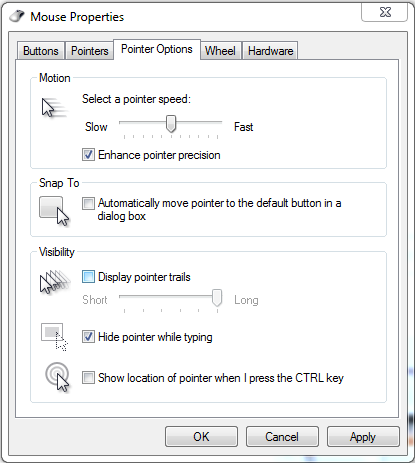
When enabled, Snap To automatically moves your mouse pointer to the dialogue box that pops up. This is the box that typically appears after you delete a file, close a window, or perform any other similar task.

Although, when using Snap To, be careful about what you click on. For example, your pointer may automatically move to the “Ok button” for something that you don’t want to approve; something like, “Are you sure you want to permanently delete this file?” A blunder like this can be avoided if you simply take a moment to read what you click on, instead of rushing yourself and clicking the first thing that pops up.

To enable this feature, go to Control Panel > Mouse Properties. Next, click on the Pointer Options tab and then checkmark the Snap To box that says “Automatically move pointer to the default button in a dialog box.”

snap to

Click OK or Apply when you’re done.

Be warned, this Snap To feature might take a little while to get used to (it’s always surprising to have your mouse pointer move when you’re not expecting it to). Also, in the event that you don’t want to go through these steps and enable Snap To, most dialogue boxes allow you to select the OK button by hitting the Enter key.

At the end of the day, it might seem like this is a rather silly tip because you’re just saving yourself few seconds of not having to move the pointer. However, any worker concerned about productivity understands the importance of saving a few seconds here and there, and how tips like this can save you significant time in the long run. Plus, when on a laptop with a squirrely touchpad, this can save you those few seconds of frustration.

For more productivity tips, subscribe to NuTech Services’s blog and check back every week.

b2ap3_thumbnail_voip_solutions_400.jpg

Office Workers Still Prefer Using a Traditional Phone Over Mobile

b2ap3_thumbnail_voip_solutions_400.jpgTake a moment to look at your desk telephone and contemplate its usefulness. When was the last time you used it for day-to-day operations? Do you even use it anymore, or do you rely on more recent communications solutions like Voice over Internet Protocol, and the smartphone? Some might argue that the telephone is an antiquated technology for the modern office, but recent studies show that despite its disadvantages, it still has an edge in the office environment.

There are a number of reasons why workplace phones haven’t been completely eliminated in favor of the smartphone and VoIP. For one, contrary to popular belief, people still want to separate the workplace from home, but the main reason that office phones are still around is because folks prefer using their office landline to conduct business. A survey from RingCentral, performed in May 2015, studied the ways in which 505 United States workers communicate within the office. The results were somewhat surprising: 65 percent of the workers would rather use their office phone to conduct business while only 30 percent preferred to use mobile devices for calls.

Now, consider the prevalence of the smartphone in today’s workplace environment. You’d be hard-pressed to find anyone who doesn’t use their device for work purposes, like answering phone calls or sending emails. Suddenly, that 30 percent seems kind of strange, especially with millennials and their newfangled technology now taking up a considerable portion of the workforce. Curtis Peterson, the senior vice president of RingCentral, suggests that the younger generation isn’t as comfortable working with telephones as seasoned professionals. In fact, according to another survey from TollFreeForwarding.com, only 6.5 percent of people between the ages of 25 and 34 are comfortable using a telephone, and would rather resort to other methods of communication, like messaging or email.

Still, it seems that the office telephone isn’t going anywhere anytime soon, for the sole purpose that it’s still somewhat preferred as a telephony solution. Therefore, it’s imperative that your business takes full advantage of your voice communications solution, whether it be with your office desk phone, or your Voice over Internet Protocol client. Your business might find that you can be so much more productive with a unified communications solution, including VoIP, instant messaging, and video chat.

Despite the clear popularity advantage that traditional communications have, VoIP has a clear-cut advantage in the fact that it’s much easier to make changes to your service plan. Thus, replacing your classic telephone solution with VoIP is a fantastic way to start cutting unnecessary costs, especially when you consider how cable companies tend to package multiple services together that aren’t necessarily needed. Additionally, it’s difficult to make changes to your traditional telephone infrastructure on a whim, which makes growth challenging at best.

Integrating a VoIP solution can alleviate many of the issues that plague modern businesses by offering scalable and predictable solutions that are effective for managing your business’s communications strategy. For more information, give us a call at 810.230.9455.

b2ap3_thumbnail_internet_under_the_sea_400.jpg

How Fishing Nets May Be the Greatest Security Threat to the Internet [Video]

b2ap3_thumbnail_internet_under_the_sea_400.jpgMany countries around the world have access to the Internet, but have you stopped to consider how this service is deployed and connected to countries on different continents? Well, this is only made possible by the countless miles of wire laid beneath the surface of the ocean, all around the world. In fact, it’s somewhat unnerving to think that international communications depend on the structural integrity of cables submerged at the bottom of the sea.

Like a mighty sea serpent, the Internet’s cables snake around the globe, connecting countries and online infrastructures to ensure global communication. The majority of transoceanic communications, including phone calls, emails, and just about any Internet transmission, is dependent on the well-being of these cables. As reported by WIRED, the first telegraph wire was initially laid across the Atlantic Ocean in 1866, and others soon followed, laid across common trade routes. In the 1950s, the standard for overseas cabling shifted to coaxial cables, which were capable of carrying telephone conversations. Today, the world uses fiber-optic cables that are used to transfer enormous amounts of data relatively quickly.

Here’s a video of how these cables are laid:

And a map of where they’re all located:

As you can expect, these Internet cables have become important staples for how society communicates on an international scale. Still, doesn’t it seem strange that such important pieces of technology are left at the mercy of the ocean? Most people don’t bother to remember that the cables exist until a problem happens and a connection goes down. More often than not, people only take interest in the cables when something goes wrong with them, but it’s a fairly common occurrence for submarines and international powers to take an interest in them.

As reported by WIRED, the following problems are fairly common threats for the Internet cables: seismic activity, various undersea creatures (namely sharks – you know, the scary ones with teeth), and international intervention. By far, though, the most common problem for the undersea cables comes in the form of ship anchors and fishing nets. Between the two, they make up about 60 percent of all cable destruction. This is the primary reason why most sea charts will mark the location of these wires; since, as you can imagine, cutting them has some pretty dire consequences.

Cutting undersea cables would probably make for a great sabotage trick for an international conflict, but such activities haven’t occurred since the previous World War. These days, the cables are typically left untouched and forgotten about, though occasionally the media will make a scene about submarines sniffing around near the cables. What are your thoughts on these undersea cables? Do you think there should be a more efficient manner of deploying information across the world? Let us know in the comments.

b2ap3_thumbnail_smartwatch_technology_400.jpg

Wearable Technology is Trending: Is This Good For the Workplace?

b2ap3_thumbnail_smartwatch_technology_400.jpgYou’ve probably seen the new fancy-schmancy watches that some people wear and wonder to yourself, “What’s so special about them?” Smartwatches like these are considered wearable technology and are typically meant to perform the various functions of a smartphone, minus the phone. Some devices are even used to monitor the body’s physical activity with health apps. They might seem useful now, but what’s the endgame for wearable technology?

What is Wearable Technology?
Technically, just about any device that’s worn on the body (like a headset) can be considered wearable technology. However, most wearable devices that you’ll encounter are designed to do one (or both) of two things: 1) Monitor the body’s physical well-being and track health progress, or 2) provide efficient access to apps that are designed to enhance productivity and efficiency for office employees. While they initially were meant for more of the former, the incredible success of wearable technology inspired developers to improve functionality in other areas.

As explained by CyberTrend:

A 2014 Parks Associates study projected that smart watch sales will reach 121 million units worldwide by 2018. Similar to a smartphone or smart TV, a smart watch can connect a user to the Internet for access to real-time data. Generally, smart watches will offer users some basic features (current weather, music, access to email and texts, etc.), which are also available on smartphones. Depending on the model, some folks can use their smart watches to control their smart TVs, capture pictures, video chat, and run scaled-down versions of common smartphone apps, in addition to using the device as an activity tracker.

While wearable technologies are versatile and can be used for multiple tasks, this doesn’t mean that these devices will be practical in the near future. For example, which would you rather use for your smart technology experience: a smartwatch or your smartphone? Many would probably say the smartphone because it’s vastly more powerful and efficient compared to the smartwatch. A larger screen makes it much more viable to get work done on a smartphone, rather than on a smartwatch.

Another type of wearable gadget consists of smart glasses, like Google’s failed Google Glass product. The main issue here is privacy; having a camera readily available on your glasses is somewhat sketchy and reminiscent of cyber espionage. Thanks to the portability afforded to smart glasses, they were thought to be a threat to both personal privacy and data security, so the idea never really took off.

How Wearables Affect Your Workplace
When workers are using wearable technology in the workplace, you should practice considerable caution. The trend known as Bring Your Own Device (BYOD) coupled with the Internet of Things (IoT) can spell trouble for businesses that aren’t prepared to deal with new devices connecting to their private networks. Any Internet-connected device can be considered a threat to your business if it’s not managed and maintained by your company. This is why it’s so important to keep an eye on devices that your employees are bringing to work with them. One way you can set these fears aside is by implementing a mobile device management solution, which gives you the ability to remotely wipe managed devices, restrict access to information on an app-by-app basis, and so much more.

Don’t let wearables and other Internet of Things devices hold your business back. To find out more information about how NuTech Services can protect your business from these new threats, give us a call at 810.230.9455.

b2ap3_thumbnail_sharepoint_information_400.jpg

SharePoint Brings Dynamic Collaboration to Your Business

b2ap3_thumbnail_sharepoint_information_400.jpgEvery business needs a platform they can use to securely store, organize, share, and access the mission-critical information needed to keep operations running smoothly. SharePoint is Microsoft’s intranet solution for enterprises of all shapes and sizes, and it’s worth looking into for your data needs.

SharePoint is part of the Microsoft Office 365 family, which means that it works seamlessly with all of Microsoft’s productivity applications. Yet, SharePoint isn’t a Microsoft-exclusive product. For example, it easily integrates with popular enterprise software from third parties. The integration of a valuable tool like Yammer, a corporate-style social network, is a great example of this.

Additionally, SharePoint can be accessed by non-Microsoft web browsers like Chrome and Firefox (and of course, it works great with IE and Edge). In fact, this is probably SharePoint’s strongest selling point; the fact that it can be accessed from the web browser of virtually any Internet-connected device. This is possible thanks to SharePoint’s ability to be hosted on the cloud, or on-premises (in your own IT infrastructure).

Another advantage of SharePoint comes from its versatility. As explained by the Microsoft support page, here are four ways that SharePoint can benefit your business.

  • SharePoint Online. A cloud-based service, hosted by Microsoft, for small and large businesses. Instead of installing and deploying SharePoint Server on-premises, organizations can subscribe to an Office 365 plan, or to just the SharePoint Online service. Using SharePoint Online, your employees can create intranet sites for the purpose of sharing documents and files with colleagues and customers.
  • SharePoint Foundation. SharePoint Foundation is available for on-premises deployment. You can use SharePoint Foundation to create a variety of sites that let your team collaborate on documents, lists, calendars, and other mission-critical data.
  • SharePoint Server. Organizations have the option to deploy and manage SharePoint Server on-premises. SharePoint Server also offers additional features and capabilities like Enterprise Content Management, business intelligence, enterprise search, personal sites, and a news feed.
  • OneDrive for Business folder sync. A desktop program that allows you to sync offline versions of your files to a folder on your computer.

The primary benefit of SharePoint is that it allows everyone on your team to share corporate data with each other. SharePoint is essentially the ultimate team collaboration tool for enterprises. Here are just some of the ways it can benefit your operations:

  • Share documents and files with employees and partners.
  • Host internal training guides.
  • Manage and organize projects.
  • Keep commonly updated documents in order.
  • Build and maintain repeatable processes.
  • Use it as a single, central location for everything going on internally.

Do you think that SharePoint is the intranet solution that your company needs? Whatever data-sharing platform you go with will affect operations in a major way. Therefore, you’re going to want to make sure that you consult an IT expert before making such an important decision regarding your company’s mission-critical technology. Give NuTech Services a call at 810.230.9455 to have a discussion about your data-hosting options, and to find out if a solution like SharePoint is right for you!
b2ap3_thumbnail_fax_server_400.jpg

3 Hidden Fax Machine Expenses That Really Add Up

b2ap3_thumbnail_fax_server_400.jpgDo you have a functioning fax machine in your office? The technology is outdated; yet, there it sits, churning out faxes. Before you keep your fax machine around for another decade, you may want to first consider how it’s chipping away at your company’s operating budget.

Here are three ways that the fax machine can cost you more money than you may realize. Thankfully, none of these expenditures come with its replacement, a fax server solution.

The Need for a Dedicated Phone Line
Any business with a fax machine must have a dedicated phone line to go with it. Otherwise, callers won’t be able to get through whenever the fax machine is in use; a situation that could potentially lead to a lost sale. If you use a traditional phone service, then a fee for this phone line shows up on every bill, which can really add up over time. A fax server solution utilizes your Internet connection (something you’re already paying for), allowing you to finally cut the cord on your ancient dedicated fax line.

Paying for Paper and Ink Toner
Like the previous example, paying for paper and ink toner is a small expense that can really add up over the years. For example, did you know that one gallon of HP 02 Black ink adds up to $4,294.58 per gallon? Over the years, think for a moment about how many times you’ve replaced your fax machine’s ink cartridge. And now, try not to think about what else you could’ve done with that money. When implementing a money-saving paperless strategy for your business, a fax server solution is a must.

Fax Machine Upkeep
Fax machines are just like any piece of technology, they’re prone to breaking down. When this happens, you’ve got to contact an IT technician for a repair, and it may cost you more than you’d like due to the fix requiring an on-site visit for a specialty item. Also, don’t forget about the daily maintenance that comes from simply keeping a fax machine operational. Tasks include:

  • Replacing ink cartridges
  • Refilling paper
  • Taking care of paper jams
  • Tending to the sending and receiving of faxes
  • Filing the faxed paperwork

Essentially, all the time that your staff spends doing fax machine upkeep tasks like these equates to time not spent working on more meaningful and profitable projects; AKA, lost productivity.

A fax server solution from NuTech Services will eliminate all of these fax machine expenses for your company. Instead of dealing with ink and paper, you can send and receive digitized faxes in the form of PDF files, all from your email inbox. And don’t forget about finally getting rid of that bulky fax machine! To learn more about how a fax server solution works, along with more ways that it will benefit your business, reach out to NuTech Services at 810.230.9455.

b2ap3_thumbnail_microsoft_office_400.jpg

Microsoft Office 2016 is Here and It’s Got Something For Everyone

b2ap3_thumbnail_microsoft_office_400.jpgIt’s only been a few months since Microsoft introduced Windows 10, but the world’s largest software company is now updating their wildly popular Office productivity suite. Office 2016 takes the fully-featured productivity apps that users are used to and adds in significant improvements, especially to the integrated collaborative capabilities. Applications like Word, Excel, PowerPoint, Outlook and the other apps that make up the Office suite have all seen improvements.

Microsoft Word
Microsoft Word is one of the most utilized word processing programs on the market, and has been for over three decades. Word 2016 has built-in dynamic features that help users collaborate, share, and remain productive, in real time. With integrated features that allow users to edit any kind of text file, including classically-stubborn PDFs. Improvements to Read Mode allow for a reconfiguration of text to provide an easier-to-read interface, while the “Tell me what you want to do…” bar is a great addition for users that want to utilize the software to its maximum benefit. Whether you use a centralized SharePoint interface or simply store your files using OneDrive or a local repository, Microsoft Word will continue to be the go-to program for all of your word processing needs.

Microsoft Excel
Excel is the most useful spreadsheet application on the market with dozens of features that no other major spreadsheet application offers. Like Word, the Excel program has been improved to include dynamic collaborative options, while maintaining the trusted and powerful interface millions of users already know. Some of the more useful new options that Excel 2016 delivers include more access to charts and graphs than ever before, as well as improved pattern recognition. Like the other apps in the suite, Excel adds the “Tell me what you want to do…” box, to help users completely utilize the app’s features.

Microsoft PowerPoint
For anyone that needs to produce the perfect presentation, Microsoft PowerPoint is on the short list of applications dedicated to that purpose. PowerPoint 2016 provides users with a higher degree of access than ever before, allowing users to team up to edit, manage, and create presentations in real time. The new PowerPoint offers improved revision history and better conflict resolution, keeping users on task and efficient.

Microsoft Outlook
Outlook is one of the most utilized email interfaces in the world, and Outlook 2016 makes certain that won’t change in the future. Again the major theme of Office 2016 is collaboration, and Outlook makes it easier than ever to send and receive files and keep messages organized. Outlook, has also integrated the “Tell me what you want to do…” box, giving users a robust interface to assist them with whatever issues arise.

Other improved applications that are a part of the Microsoft Office 2016 suite are:

  • Microsoft OneNote – Office’s note-taking application
  • Microsoft Access – Office’s database management software
  • Microsoft Project – Office’s project management software
  • Microsoft Visio – Office’s diagramming software

Each will get the “Tell me what you want to do…” box integration as well as subtle improvements over their previous versions.

If you are looking for a comprehensive productivity suite, look no further than Microsoft Office 2016 through Microsoft’s Office 365 offering. With Office 365, users get all of these powerful apps complete with OneDrive integration for a simple and affordable monthly rate. Call NuTech Services at 810.230.9455 to get an idea of further benefits Microsoft Office 2016 and Office 365 can offer your organization.

b2ap3_thumbnail_tablets_for_works_400.jpg

Tip of the Week: 3 Essential Bluetooth Devices for Your Smartphone

b2ap3_thumbnail_tablets_for_works_400.jpgIf you’ve ever taken your gadgets on the go for work purposes, you might have found that it’s somewhat difficult to get anything done with the limited computing potential of a smartphone or tablet. However, with the right technology, you can take full advantage of your mobile devices, especially if you’re using Windows 10 with its full Microsoft Office suite (Want to know if Windows 10 is right for your business? Reach out to us before you upgrade).

Being able to perform work remotely is especially important in today’s work environment. This is why it’s preferable to have a tablet or smartphone that one can work on while out of the office. As of 2015, it’s estimated by Pew Research that 64 percent of all American adults own a smartphone. Here are three technologies that you can use to get more productivity out of your mobile devices.

Bluetooth Keyboard
How long was the last message you typed on an on-screen smartphone or tablet keyboard? It’s clear that this isn’t the most efficient way to write out longer emails or documents. While it might be great for a quick text message or email update, you’ll want a more comprehensive solution that helps you spend less time messing around with autocorrect errors. You can give your thumbs a break by purchasing a Bluetooth keyboard. This essentially turns your device into one with laptop-like functionality.

Bluetooth Mouse
Anyone who uses a tablet understands that navigating productivity applications like email and document editors with a touch screen can be frustrating at times. You can remedy this by using a Bluetooth-connected mouse that gives you the feeling of a desktop with an itty bitty screen. It might only be a slight convenience, but whatever helps your productivity, right?

Many tablets today are compatible with Bluetooth mice, which, when combined with a keyboard, give you more of a traditional laptop experience with the mobility of a slim, light tablet.

Bluetooth Headset
One of the core functions of a telephone is to allow you to communicate over long distances with your voice. While you could easily stop whatever you’re working on to make a phone call, it’s unnecessary and takes away from the task at hand. If you’re using a Bluetooth headset, you can use your mobile device for phone calls without interrupting your work process, and without bothering the people around you by putting your phone on speaker mode.

Besides the obvious use of being able to talk on the phone, you can also use a Bluetooth headset to listen to music, view webinars, or listen to podcasts that are designed to help you boost productivity or learn new best practices. If you’re on a plane and have several hours left of your flight, it might not be a bad idea to check in on what’s hot and upcoming in your chosen industry. While some airlines have concerns over the safety of Bluetooth, the FAA has confirmed that Bluetooth will not interfere with critical airplane communication systems (in other words, it depends on your airline).

What are some of your favorite ways to stay productive with your mobile devices? Let us know in the comments, and be sure to subscribe to our blog for more productivity hacks and technology tips.

b2ap3_thumbnail_upgrade_your_it_400.jpg

Think Strategically When Upgrading Your Workstations

b2ap3_thumbnail_upgrade_your_it_400.jpgWith technology growing faster than most businesses can keep up with, organizations have to continuously upgrade their solutions in order to maintain a semblance of modernity. The only issue with this is that many businesses can’t keep up, simply because they don’t have a team that’s dedicated to this important task. What technology upgrades should be made a top priority, and why?

Naturally, the first thing you need to know about workstation and technology updates is that you need to integrate them periodically in order to ensure optimal security for your organization. Most viruses and malware will attempt to take advantage of weaknesses in your infrastructure in order to infiltrate it. These weaknesses in your software and operating systems’ source code will ultimately allow these threats to force their way into your network, putting any contained information at risk.

These flaws are often addressed in software patches and system updates issued by the software developer, but tackling the updates in a timely fashion is a whole other monster. Managing all software updates is easier said than done, especially without a dedicated IT department watching over your technology. Regular maintenance is often pushed to the back burner, and dangerously close to being forgotten by all. Therefore, the best way to make sure that your systems are prepared to handle the threats that are found in today’s computing environment is to make upgrading your technology a priority for your organization.

Software Updates
There are several applications that your organization needs in order to stay functional, so your software updates aren’t limited to just your workstations’ operating systems. The fewer unnecessary security flaws that can be found in your IT infrastructure, the safer your information will be. Furthermore, users who are working with top-notch, optimized technology will be far more productive than they would be if they were using sluggish, bogged down computers. It doesn’t make any sense to let your employees use machines that hold them back from achieving their maximum productivity. In fact, sometimes you might encounter a situation where using a different software will be better for your business strategy. It’s always recommended that you consult with a professional technician before making drastic changes to your business’s software infrastructure.

Antivirus Updates
Your antivirus solution is often a software solution, but it’s worth mentioning on its own for the sole purpose that virus and malware definitions are continuously being updated. If your antivirus and other security software solutions aren’t properly maintained, it’s like you’re basically “leaving your keys in the front door,” so to speak. Your antivirus solution needs to be managed on all workstations, or better yet, centrally controlled from the server to ensure that all users are protected and up to date.

Hardware Updates
Older hardware that’s been around the block a time or two might have proven reliable, but it eventually starts to show signs of its old age. Hardware failure grows more likely, and you run the risk of losing information due to the degradation of your technology. This is why monitoring your systems for faulty tech, and periodically upgrading to more recent models is preferable, if not necessary.

Granted, all of the software and hardware upgrades your business might need may feel overwhelming. This is why NuTech Services offers our remote monitoring and maintenance solution that’s designed to administer patches to your mission-critical systems remotely. This helps your organization ensure that your systems are always up-to-date. We can also monitor your infrastructure for any irregularities that might be caused by hardware malfunctions, hackers, and much more. Give us a call at 810.230.9455 to learn more.

b2ap3_thumbnail_will_you_upgrade_to_windows_10_400.jpg

Tip of the Week: 4 Windows 10 Features that Let You Do More

b2ap3_thumbnail_will_you_upgrade_to_windows_10_400.jpgWith Windows 10’s arrival comes all sorts of great new features, many of which are unprecedented. Here are four new features that you should check out on your Windows 10 device.

Microsoft OneDrive Integration
Microsoft’s cloud storage solution, OneDrive, is a major focus with Windows 10, especially with the cloud growing more important for modern companies. With Windows 10, OneDrive is far more integrated than it was in the past, all to handle your data-sharing needs. Now, rather than being forced to use OneDrive with a Microsoft device, you can access your files with Android and iOS devices. In fact, you can even use OneDrive to access any of the files on your Windows 10 PC remotely, adding even more value to the service.

Battery-Saving Features
One of the cool new features of Windows 10 on a mobile device or laptop is that you don’t have to closely monitor your battery levels like you used to. Windows 10’s new battery saver feature automatically detects when your power level reaches a certain point, and it powers down background applications that aren’t absolutely essential. In theory, it gives you a chance to save your work or plug in your computer, making the chances of an accidental power-down less likely. To enable Battery Saver, go to Start menu > Settings > System > Battery Saver.

Background Scrolling
One annoying issue for Windows users is when they are actively working in an application, then hovering the cursor over another open app that’s on the screen. When you go to scroll up or down, you can’t, because the app isn’t selected. While this is only a small issue, Microsoft still thought it should be addressed. To turn on Background Scrolling, go to Settings > Devices > Mouse and Touchpad.

Customized Start Menu Apps
Windows 10 practically got rid of the Windows 8 Metro interface, but it’s still available in the new Windows 10 Start Menu. Rather than a full screen interface, you have the option to place your most important applications in this easy-access menu. To do this, click the Start Menu and click on All Apps. Scroll to an application you’d like to add, right click it, and select Pin to Start. This puts an application shortcut right in the Start Menu for you. You can then edit the apps in the Start Menu by right-clicking them. You can change their size, or even remove them.

Windows 10 has proven to be an exceptional operating system for both the office and personal computing, and there’s sure to be more great new tricks out there allowing you to be more efficient with it. What are your favorite new features? Let us know in the comments.