b2ap3_thumbnail_smartphones_on_market_400.jpg

The Newest Smartphones From Samsung, Apple, and Microsoft

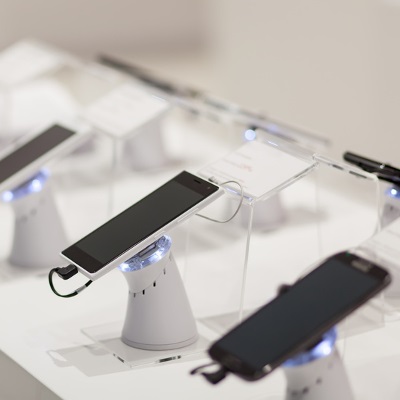
b2ap3_thumbnail_smartphones_on_market_400.jpgSmartphones are firmly established as a staple of modern society. In fact, sales of smartphones grew a whopping 23 percent during the previous year. It’s the nature of mobile devices for consumers to look forward to the latest models. To that end, here’s our preview of this year’s top three smartphones.

Due to the sheer demand of smartphones flooding today’s market, there are way more than three models to choose from. However, for the sake of being concise and relevant, we’ll focus on the flagship device from these three mobile manufacturer; Samsung, Apple, and Microsoft.

Samsung Galaxy Note 5
Samsung has taken the lead as far as smartphone marketshare goes, garnering 24.6 percent of the market in 2014. They’ve achieved this success with their line of s-model phones and Note phablets. All eyes are on Samsung and its latest offering, the Galaxy Note 5.

Galaxy Note 5 Specifications
Display: 5.66-inch Super AMOLED capacitive touchscreen with 1440 x 2560 resolution made from Gorilla Glass 4
Operating System: Google Android v5.1.1 (Lollipop)
Processor: Samsung octa-core Exynos 7420
Memory: 32 GB, 64 GB, and 128 GB models available; 4 GB RAM
Cameras: 16 MP camera with optical image stabilization, 5 MP front-facing camera
Battery: 4,100 mAh
Communication: NFC, Bluetooth v4.1, Wi-Fi, Infrared, microUSB
Other features: Accelerometer, gyro, proximity, compass, barometer, gesture, UV, heart rate, Sp02, integrated s-pen

iPhone 6s
The iPhone has been Apple’s best-selling device for almost 12 years, and the iPhone 6s looks to continue this trend. The latest iPhone will include an all-new A9 processor, designed to exceed in computing power Samsung’s Exynos 7420 processor. It’s also been confirmed that the iPhone 6s will get an upgrade to its body. Presumably, this will make it stronger and more durable, especially in light of how the previous model was ridiculed for bending too easily. Additionally, the iPhone 6s will have a larger display than the iPhone 6.

iPhone 6s Specifications
Display: 4.7-inch Retina display with 750 x 1334 resolution with ion-strengthened glass and a oleophobic coating
Operating System: iOS 9
Processor: Apple A9
Memory: 32 GB, 64 GB, and 128 GB models available; 2 GB RAM
Cameras: 12 MP camera with phase detection focus, 5 MP front-facing camera
Battery: Li-Po 1,810 mAh
Communication: Bluetooth v4.1, Wi-Fi, v 2.0, reversible connector
Other features: Accelerometer, gyro, proximity, compass, barometer

Lumia 940
Microsoft recently acquired Nokia and its line of Lumia smartphones. Despite the fact that the Lumia phones have received great reviews, they’ve never made the kind of sizable impact that Microsoft would have liked. Thanks to the success of the newly-released Windows 10 OS (a system that promises one single interface across every device, including the Lumia smartphones), the time may be ripe for Windows Phone to finally take off.

Lumia 940 Specifications
Display: 5.2-inch display with 1440 x 2560 resolution with Gorilla Glass 4
Operating System: Microsoft Windows 10
Processor: Dual-core 1.82 GHz, Qualcomm MSM8992 Snapdragon 808
Memory: 32 GB, 64 GB models available; 3 GB RAM
Cameras: 20 MP camera with phase detection focus, 5 MP front-facing camera
Battery: Li-Ion 3,000 mAh
Communication: NFC, Bluetooth v4.1, Wi-Fi, microUSB 2.0
Other features: Accelerometer, gyro, proximity, compass, sensor core

These three smartphones are the flagship devices sold by each manufacture, but they’re not the only devices offered by each company. If you like what you see here, but you’re looking for variations in regards to features, check out these alternative models:

  • Samsung Galaxy s6, s6 Edge, s6 Edge+
  • iPhone 6+
  • Lumia 940 XL

Which smartphone is right for you? While you’re sure to have personal preferences toward a particular brand, it’s in your best interest to do your due diligence when shopping for a new phone so you can obtain a model that best meets your needs. Want to know about how mobile technology like this can improve your business? Call us at 810.230.9455 to learn more.
b2ap3_thumbnail_applications_for_work_400.jpg

3 Mobile Apps Every Modern Office Worker Needs

b2ap3_thumbnail_applications_for_work_400.jpgMobile devices are changing the face of businesses in obvious ways, like employees accessing their work outside of the office. Additionally, there are many not-so-obvious ways that mobile devices and apps have changed work environments. Let’s focus a moment on the little things around the office that have changed since mobile devices took over.

Calendars
Calendar making used to be a profitable industry. Calendars adorned office walls and inspired workers daily to be better people, one disposable page at a time. Also, let’s not forget about how calendars make for that perfect, gender-neutral gift to contribute to any office’s end-of-the year holiday gift exchange. Now, everyone just gives each other gift cards and hilariously-themed calendars collect dust at mall kiosks.

What happened? It turns out that every mobile device comes with its own calendar app. As workers adopted it, software developers integrated calendar apps to the cloud so that workers could sync their calendars for easy scheduling. This mobile trend effectively “did in” the usefulness of the 12-month calendar, but you may still find one or two on the office walls for novelty’s sake.

If you’re not taking advantage of your mobile device’s calendar, check out these links on how to use your calendar’s sync feature.

Notebooks
Another paper casualty of mobile devices is the office worker’s trusty notebook. You used to see notebooks brought into every meeting, and the super serious note-takers would distinguish themselves with leatherbound notebooks, emblazoned with their company’s logo. While office supply stores are bemoaning the demise of notebooks and pens, workers are taking better notes and collaborating in new and exciting ways via cloud-based apps.

There are a variety of mobile note-taking apps on the market, and they each allow you to do much more than scribble ideas and cartoon characters on paper. Mobile apps like Evernote, Microsoft OneNote, and Google Keep allow users to capture screenshots, upload files, record audio, and of course, jot down meeting notes. These notes can be tagged to make them searchable, and stored in the cloud so that every member of your team can access them.

Fax Machines
The adoption of mobile devices should’ve been the final nail in the coffin for the office fax machine. Actually, email should’ve been the technology that killed off the fax machine. Yet, despite advancements in email, cloud computing, mobile devices, and even the leadership baton being passed from one generation to the next… and then to the next, fax machines still have a strong presence in most modern offices.

It’s our hope that the advancements of mobile technology have caused the mighty fax machine to lose some sway over its users. Remember, if you’re altogether tired of dealing with your fax machine, then NuTech Services can provide you with technologies to phase it out, like our fax server solution and a host of digital communication apps for your mobile device.

Why You Need to Adopt Mobile Solutions
Maybe you’re old fashioned and you just like the feel of working with paper, the thrill of turning over a calendar page at the first of the month, and the ear-piercing sound of receiving a fax. That’s all fine and good, but as a modern business owner, it’s in your best interest to adopt mobile solutions for your company. If you don’t, then your mobile-device-loving employees will bring their gadgets into the workplace and do so on their own. The danger of them doing this is that you’ll lose control of how company information is shared and stored, which could lead to a major data breach.

Instead, you need to be proactive about implementing an official mobile solution for your office that everybody can access and use from their approved mobile devices. Due to all the different devices out there, and the different expectations of your employees, getting everybody to use the same mobile solution can prove to be quite challenging. At NuTech Services, we’re here to help equip your business with mobile and cloud-based solutions that meet your company’s needs perfectly. For more information, give us a call at 810.230.9455.

b2ap3_thumbnail_screenshot_pc_400.jpg

Tip of the Week: Taking a Screenshot is Ridiculously Easy

b2ap3_thumbnail_screenshot_pc_400.jpgSometimes explaining issues with your technology to someone over the phone is difficult at best. To help your tech support better understand the issue you’re dealing with, provide screenshots to help with your explanations. All you have to do to take a screenshot is hit a few keys. Here’s how it’s done.

Screenshots in Windows
For a Windows PC, look at the top-most row of keys. How often do you use these? Probably not that often. Well, maybe the Escape key. Either way, look toward the right-hand side of this row and you’ll find the PrtScn key. PrtScn will create a .png file of your entire desktop screen at the time you press it. Unfortunately, you’re not going to see the file immediately; it’s only being stored on your clipboard until you paste it into another program.

To do so, you can use pretty much any common application that allows you to paste images into it. Some of the more basic programs you can use are Microsoft Word, OneNote, Outlook, and even MS Paint. Open your preferred program, hold down Ctrl, and press V to paste the image into the application you are working in. This is also the keyboard shortcut for Paste, which you can keep in mind for later use.

For example, let’s use Microsoft Paint. Now that you have the screenshot pasted into Paint, you can draw on it using Paint’s various features to emphasize what the problem is. You can crop it to the area of interest, paint on arrows, and so on. This helps you better explain to tech support what the problem is.

Afterward, all you have to do is save the file using either a .png or .jpg file extension. To do so, click File > Save As. Give your file a name and you should be all set to send it off for analysis from tech support. If you’d rather not toy with the image, you can paste the image directly into Microsoft Outlook instead.

Forget PrtScn: Try LightShot to Simplify Things
While taking a screenshot using PrtScn isn’t terribly difficult, it can be somewhat time-consuming to tailor your image to specifically show your problem. Instead, we prefer to use a tool called LightShot. It’s an application designed specifically to take screenshots, and best of all, it’s entirely free to use. You can download the app here: https://app.prntscr.com/en/download.html

With LightShot, hitting the PrtScn key does much more than take a screenshot of your entire desktop. Instead, your screen will be greyed out and you can select a specific part of your screen for a screenshot. You can then save your image locally on your PC, or upload it to the cloud for sharing via URL. Once you get used to taking screenshots, you’ll wonder how you ever lived without them. Not only can it be an easy way to share concentrated content, but it can also be a great way to communicate what your specific problems are to IT support.

If IT support issues have you troubled, you’ll be glad to hear that NuTech Services’s remote maintenance and management solution is designed to prevent issues from becoming bigger problems. Give us a call at 810.230.9455 to learn more.

b2ap3_thumbnail_manufacturing_robot_mistakes_400.jpg

A Dark Shadow is Cast Over the Good Work Robots Do

b2ap3_thumbnail_manufacturing_robot_mistakes_400.jpgThe point of living in a world where technology takes over everything is that it’s supposed to make life easier. Although, keep in mind that imperfect humans are responsible for creating these technologies. Therefore, technology is flawed, maybe even to the point of putting people in harm’s way. This fundamental truth makes for an uneasy trust between man and machine.

Take for example a tragic incident that occurred last month at a Volkswagen plant in Germany, where a robot was actually responsible for the death of a worker. This robot was designed to piece together cars by moving and manipulating auto parts. According to The Guardian, the error occurred while the robot was being set up by a team of technicians. Due in part to a human error (supposedly), the robot grabbed the worker, instead of an auto part, causing critical injury.

A second example of why we should be suspicious of robots comes from the road. Led by the efforts of Google, several major technology companies are developing and testing self-driving cars. As great as it sounds to sit back and play magnetic travel chess while a robot chauffeurs you around town, the high number of reported fender benders from the testing phase gives us good reason to be a little nervous. Think about it, how do you feel about being on the same road as fast-moving, metal-death traps that are vulnerable to hacking attacks?

Buried deep in the human psyche, connected perhaps with our survival instincts, is a mistrust to give up too much control to something (or someone) that we don’t fully understand. When it comes to machines and computers, just how much do you understand about how they work? Unless you’re a computer programmer or an IT technician, it’s likely that you don’t know enough about these machines to totally erase the fear that robots will one day rise up and enslave us all. This is why science fiction movie franchises are exploring this narrative in fantastic detail, like The Terminator and The Matrix, have connected so deeply with people’s imaginations (and wallets).

Just how safe are you from the technology that you’re dependent upon? While it’s unlikely that you work with battlebots equipped with saw blades and flamethrowers, or that you play traffic roulette with a driverless car, you’ve got a lot riding on your company’s data. In fact, it would take just one major disaster for your system to crash, causing major data loss. This kind of a data loss disaster can potentially ruin a business, and by extension, your livelihood.

A disaster like this can happen at the hands of an incompetent user, an error from an imperfect machine, or even something else entirely, like a random act of nature. One way to gain peace of mind while living under such a looming threat is to learn more about the machines that you trust with so much responsibility, and it’s unlikely that you’ve got the time to analyze and understand the inner workings of your computer network. Alternatively, you can outsource the care and maintenance of your machines to the knowledgeable IT professionals at NuTech Services.

Because, at the end of the day, who do you trust more; man, or machine?

b2ap3_thumbnail_call_the_remote_doctor_400.jpg

What If You Never Had to Go to the Doctor’s Office Again?

b2ap3_thumbnail_call_the_remote_doctor_400.jpgRemote technology is so efficient and popular that it’s infiltrating many industries that you’d be surprised to hear about. One such sector is the healthcare department. Some doctors are taking advantage of the leaps and bounds made by technology to help their patients get back on their feet as easily as possible.

As managed service providers, our primary goal is to use remote technology to help users solve their IT crises. Similarly, doctors can use remote technology to diagnose and treat patients, much like how we do with our own systems. UnitedHealthcare, one of the largest health insurance providers in the United States, supports what WIRED magazine calls “telemedicine;” a video visit from a doctor who offers consultation services rather than an in-person appointment. As reported by WIRED:

United says it will cover virtual doctor visits offered through NowClinic, Doctor on Demand, and American Well. These platforms connect patients with thousands of doctors—albeit not the patient’s usual doctor—via video chat. These consultations typically cost $40 to $50 a pop, but now that United is covering these visits, members will only have to pay their usual co-pay, making virtual medicine much more affordable for more people. For now, these virtual visits will be available only to UnitedHealth’s self-funded customers, but the feature will expand to most members by next year.

So, remote technology is helping more people stay healthy simply by allowing them to access a doctor’s consultation whenever they need to. This makes it more convenient for not only the patient, but the doctor, as well. They don’t have to arrange for an on-site diagnosis, and they can avoid any contagious sickness easily enough. It’s simply a much more efficient way of doing things, and allows for more affordable healthcare in general.

In fact, remote technology is such a great tool that any industry can take advantage of it. We at NuTech Services perform most of our maintenance remotely. Managed IT companies use remote technology to ensure that a business’s operations continue to run smoothly. With the assistance of remote technology, NuTech Services can monitor your business’s systems for critical security flaws and administer patches accordingly. This helps us prevent damage that cannot be undone, like a loss of business data or personal information.

The primary reason remote technology is so useful for managed IT service providers is that your business avoids most on-site visits, eliminating the costs associated with them. This frees up a significant amount from your budget, and allows for more effective use of your IT expenses. Every time you opt for remote management and maintenance, you’re saving your business money. In fact, most issues can be resolved without an on-site visit. Granted, some hardware problems cannot be resolved remotely, so you can’t completely eliminate the costs of on-site visits; still, being able to mitigate them is often more than enough to make a difference.

For more information about how we can remotely monitor and maintain your infrastructure to optimize your system’s health, give NuTech Services a call at 810.230.9455.

b2ap3_thumbnail_leave_your_workspace_400.jpg

Be Sure to Take These 4 Actions Before Leaving Your Desk Unattended

b2ap3_thumbnail_leave_your_workspace_400.jpgWe’ve published several blog articles about enterprise security technologies, but it’s equally important to focus on the other side of the security equation and make sure people know how to properly log off, lock, and walk away from their workspace. To that end, even something as seemingly-mundane as forgetting to lock your computer can leave your network vulnerable, big-time.

Here are four actions every office worker should take before leaving for the day–even if you feel like you can fully trust your co-workers. Not to sound paranoid, but when it comes to crime, the old saying is true: “It’s always the person you least suspect.”

Log Out of Your Web Accounts Before Logging Off Your PC
Before leaving your workstation, it’s best practice to log out of whatever online accounts you have open. It might seem like you’re safe by simply closing your web browser, but if you didn’t take the time to actually log off from your account, your browser may keep your account open; despite the fact that the browser itself is closed. In a situation like this, all a person has to do to “hack” your account is open the browser and go to the active website. Upon doing this, they may find your account open. They will then have complete control to navigate your account as if they were you, which can lead to some pretty hilarious social media posts. They could also change your account settings, revoking your control. Social media isn’t the only culprit here – bank accounts and online email accounts are just as susceptible.

The consequences of not logging out could be more serious if a malicious hacker were to remotely take control of your computer while you were away from it. All they would have to do is open your web browser, look at your history to see what sites you frequent, and then visit these links from your browser. An account that’s still logged in will grant them instant access. In a situation like this, an account that’s been manually logged out of would be more difficult for a hacker to access. For serious threats like this, it’s extremely beneficial to have NuTech Services monitoring your network for any suspicious activity.

Be Sure to Log Off Before Stepping Away From Your PC
For similar reasons as logging out of your account, you will want to log off of your PC before walking away from it. If you don’t, a co-worker could easily access your desktop and mess with it in ways only limited by their computer know-how. What’s more, if you work in an office where strangers have easy access, like customers and delivery personnel, you will want to log off before stepping away from your PC. You never know who is going to walk through your front door and snoop around the place.

Put Away and Lock Up Any Mobile Devices
It may seem harmless to close your laptop and leave it on your desk when it’s time to go home, but for someone in the mood to do some crime, a mobile device left out in the open is an easy target. You may think that your co-workers can be trusted to leave your device unattended, but all it takes is one conniving worker who has it out for you to grab your device, dig in, and set you up for failure. Instead of leaving your device out in the open, lock it up in a drawer or a closet, utilize a laptop lock cable, or just take it home with you if it’s your device.

Lock Up the Office Before You Leave
This may sound like a no-brainer, but you’d be surprised by how many businesses overlook the security of side doors, windows, and other access points around their building. Being fully dependent on security measures like access cards, codes, and keys, isn’t enough to fully protect your assets, especially if several different employees can unlock your office. An employee that isn’t wise to the ways of security may see nothing wrong with loaning their access code to another worker, and if you don’t regularly change your locks, then employees who were let go may still have access to your building (and they may have an ax to grind).

Additionally, it’s good to have a surveillance system in place, especially one that you can access from your mobile device, wherever you may be. Because a smart surveillance system like this would piggyback off your company’s network, NuTech Services can help set it up for you, as well as recommend a system that best suits your security needs.

Are there any additional security measures that you take before calling it a day? Share your tips in the comments.

b2ap3_thumbnail_this_is_autocorrect_400.jpg

The Correct History of Autocorrect

b2ap3_thumbnail_this_is_autocorrect_400.jpgAutocorrect. The world takes it for granted now, but at times, it can be as furious as it is fasting… err, fascinating. It plays such an integral part of our everyday lives, yet how much do you really know about this software?

For example, how many of you actually know how autocorrect came into existence? We bet even less of you know how autocorrect chooses the correct spelling and grammar for each word and phrase out there. Autocorrect was born from a feature that had already existed in Word, which was a glossary of sorts that acted as an auto-expander. With this, you were able to expand existing text with other things, such as a replacer for a company logo.

This method utilized script in the programming, but the pioneer of autocorrect, Dean Hachamovitch (former corporate vice president of Microsoft), realized that the glossary could be used in many more applications. The first word targeted by autocorrect was destined to be teh, a commonly seen word amongst Internet memes and illiterate people worldwide. Hachamovitch crafted a script which would fix this spelling error when you pressed the left arrow key and F3 simultaneously. Perhaps his biggest revelation was when he noticed that English is a very space-oriented language, and that he could trigger the autocorrect to happen upon hitting the spacebar.

Afterward, it was simply a matter of figuring out what the most commonly misspelled words were. Some of NuTech Services’s favorite misspellings are as follows:

  • seperate vs separate
  • affect vs effect
  • its vs it’s
  • misspell vs mispell (nothing is more embarrassing than misspelling mispell)
  • their, they’re, and there
  • recommend vs reccommend
  • could of vs could have

Of course, whether or not a word should be fixed in autocorrect boils down to how often it’s used. Additionally, Microsoft can’t go around recommending obscenities for corrections. Obscenities are labeled as words that aren’t flagged or suggested. Other words are determined by a number of different factors:

  • Keyboard proximity
  • Phonetics
  • Sentence context

What this means is that most words are judged by how popular they are in the context of language and sentence structure. This is also known as the battle between prescriptivism and descriptivism; how words should be used and how they are used in practice. Just because a word is used often doesn’t mean that it is the proper way of using said word.

Has autocorrect made humans lazy? We at NuTech Services don’t think so. If anything, we have to be even more careful about what is typed out, as a single error can be detrimental and embarrassing. Call NuTech Services at 810.230.9455 and we’ll work with you to prevent IT hiccups that could be punishing.

b2ap3_thumbnail_facial_recognition_400.jpg

Forget Passwords: Access Your Phone By Identifying Pics of Familiar Faces

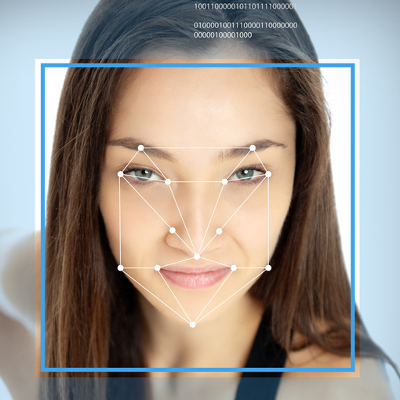
b2ap3_thumbnail_facial_recognition_400.jpgWith all the hacking attacks we’ve seen in the news, it’s painfully obvious that using passwords just isn’t enough to protect our information. We now have more security measures available than ever before. One of the more unique and effective solutions to have surfaced is Facelock, a clever solution that grants access based on how well you can identify images of your friends and family.

What makes Facelock unique is that it taps directly into your personal memories. By displaying a series of images of people that only you know, in a randomly generated order and with faces scattered in different positions, access is not dependent on a code or a string of characters (which hackers have become skilled at bypassing). Instead, for a hacker to be successful, they will have to tap into your memories, a technology that only exists in science fiction.

You might be thinking, “Okay, what if the device is picked up by a close friend who knows all of the same people that I know?” First off, if they truly are a close friend, they wouldn’t be a jerk and hack into your phone. Second, it’s rare for 100 percent of a person’s friends to be the same. After all, even your spouse had a life before they met you, which included many people whom you’ve never been introduced to.

As secure as Facelock is, a hacker who’s familiar with your social circles does have a better chance at accessing your Facelock-enabled device. In a study of Facelock’s effectiveness, 6.6 percent of hackers who knew the victim were able to successfully bypass Faceflock. Hackers who didn’t know their victims had a less than one percent success rate. Overall, when the two groups were combined, the study showed that Facelock had a 97.5 percent success rate. Additionally, the study showed that would-be hackers who didn’t know the people in the images had a difficult time distinguishing multiple pictures of the same person if they didn’t have a prominent facial feature (like a big nose or a large forehead).

The advantage of Facelock is that you never again have to worry about forgetting your password. However, one disadvantage is that it might not work for your business technology because it will require your IT support team to be familiar with the user’s circle of friends. Plus, for someone who knows you very, very well, hacking into your device may be as easy as playing the classic board game “Guess Who,” minus the fun.

Does Facelock seem like the perfect solution to forgetting your password? Would you trust those who are familiar with your circle of family and friends enough to leave them alone with a Facelock-protected smartphone? Let us know in the comments.

b2ap3_thumbnail_vr_ready_to_take_off_400.jpg

4 Game-Changing Virtual Reality Technologies

b2ap3_thumbnail_vr_ready_to_take_off_400.jpgEntertainment has become such a huge part of technology consumption that nobody can think of a smartphone or the Internet without immediately thinking about it. In fact, entertainment has grown so important that some are trying to create machines that integrate virtual realities into the lives of everyday consumers. What is virtual reality, and is it limited to the entertainment industry; or can it be used in the business sector, as well?

What Defines Virtual Reality?
Everyone has a different opinion on virtual reality. Some might think it’s as complicated as we’ve seen it in various films, but in all actuality, it’s not quite as immersive as moving your entire body into a virtual space. You don’t shift through dimensions. Your consciousness doesn’t detach from your body.

As defined by the Merriam-Webster dictionary, virtual reality is:

[…] an artificial environment which is experienced through sensory stimuli (as sights and sounds) provided by a computer and in which one’s actions partially determine what happens in the environment.

So, a virtual reality isn’t necessarily a reality at all; in essence, virtual reality is tricking your mind through sensory shenanigans into believing that what you see and hear is really there.

Oculus Rift
The Oculus Rift is the virtual reality technology that consumers are most likely to be familiar with. It’s manufactured by Oculus VR, which was acquired by Mark Zuckerberg of Facebook for two billion dollars earlier this year. The device in question, the Oculus Rift, is a headset that allows for sight and hearing stimulation via a heads-up display and headphones. Though a consumer version of the Oculus Rift isn’t slated until later in 2015, it’s sure to primarily be used by gamers; making it somewhat obsolete in the business world.

Google Cardboard
Not to be bested by Facebook’s acquisition of the Oculus Rift, Google created Google Cardboard. Cardboard allows you to turn your smartphone into a virtual reality headset. With Google’s cardboard blueprints, you can cut and fold cardboard into the base. While Cardboard is a neat, thrifty way to get a feel for what’s to come, the material available for download is limited to a handful of games and short movies.

Google Glass
Google’s take on a reality augmentation technology was mostly a bust, but in theory, it was a good idea. Google Glass was a pair of glasses that could act similarly to a smartphone, but hands-free. Some of its features included connecting the Internet, simple voice commands, a camera for both photos and videos, and a touchpad on the side which is used to control the device. It was even capable of using other Google applications, like Gmail, Google+, Google Maps, and more.

Unfortunately, Google Glass failed to take off because of its outrageous consumer price, and its stigmatized reputation due to privacy concerns. For the average consumer, Google Glass boasted a whopping $1,500 price tag. According to Forbes magazine, its parts and assembly should have cost less than $80. Furthermore, with a camera disguised as a spiffy pair of specs, Google Glass was at odds with privacy in general. In a world where organizations are increasingly sensitive to the preservation of their business secrets, it’s no wonder that Google Glass wouldn’t fit in with the business world.

Microsoft HoloLens
The development of Microsoft’s HoloLens was largely kept under wraps until earlier this year, when it was announced that it would follow shortly after the arrival of Windows 10 this July. Designed as a reality augmentation device, it takes elements of the real world and integrates virtual elements into them. It’s designed to work around your surroundings, and unlike the Oculus Rift, you still see your surroundings through the heads-up display.

Unlike the other two examples, Microsoft Hololens presents a unique business advantage. The possibilities are expansive. According to Microsoft’s official HoloLens site page, it’s expected to make leaps and bounds in the construction industry, space exploration, education, and more. However, whether or not the HoloLens will prove to be an efficient use of augmented reality is yet to be seen. It has big shoes to fill, and after the failure of Google Glass, consumers might be more skeptical of it.

What are your thoughts on virtual reality and augmentation in the workplace? Do you foresee a world where it can be efficient enough to accept its drawbacks? Let us know in the comments.

b2ap3_thumbnail_ssd_better_or_worse_400.jpg

Your Solid State Drive May Outlive You

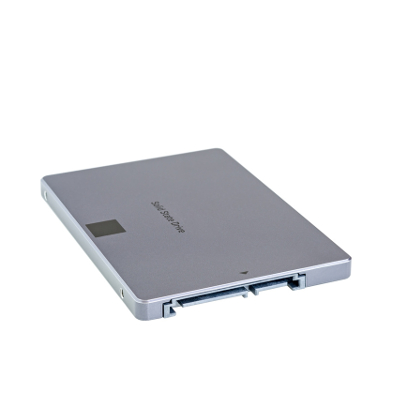
b2ap3_thumbnail_ssd_better_or_worse_400.jpgWhen shopping for a new computer, you’re faced with a choice; go with a traditional hard drive (HDD), or a solid state drive (SSD). The benefits of an SSD are many, but are they enough to justify the extra expense?

To accurately answer this question, you first need to consider your computing needs. If you’re on a tight budget and looking to buy a workstation that can run basic productivity applications like Microsoft Excel and your preferred customer relationship management product, then you shouldn’t need the extra performance provided by an SSD, and an HDD will suit your needs.

SSDs are preferred for tasks that use a lot of resources, like rendering video and high-end graphics. In the past, a business that didn’t need this extra power might have overlooked SSD, concluding that it’s simply not worth the money. However, there’s another benefit to SSDs that should appeal to virtually every business owner, SSD lifespan.

In the IT world, it’s common knowledge that the average lifespan of an HDD is five years. Plus, thanks to the small and moving parts associated with an HDD, it’s not a matter of if, but when it will fail. According to a recent study by Backblaze, which analyzed the lifespan of more than 41,000 drives used in their data centers, the lifespan of an HDD drops down to four years if it’s seeing constant use, like in a server unit.

Therefore, if the only reason you’re buying a new computer is to get you through a couple of years, then HDD should work out fine. However, if you’re looking to get maximum ROI out of your equipment and have it last as long as possible, then the lifespan of an SSD makes it well worth the extra expense. This begs the question, “Just how long do SSDs last?”

Due to SSDs being a comparatively newer technology, the IT world still doesn’t have a concrete answer. One reason for this is due to the fact that one doesn’t judge SSD lifespan based on actual hours in use, but rather, how many reads and writes the drive performs. To that end, TechReport did a stress test and saw more than 700TB of data read and written to a single SSD before it failed. Lifehacker has put this ridiculous number into perspective:

These drives usually come with a three to five year warranty, and manufacturers assume you’ll write 20GB-40GB per day in data. That means to get to that 700TB, you’d have to do 40GB every day for 17,500 days, or about 50 years.

50 years! That’s ten times the expected lifespan of an HDD. Even though an SSD will cost you more money, it won’t cost you more than ten times the amount of an HDD. Especially with the technology becoming more affordable as time goes on. Plus, concerning the TechReport stress test, a 700TB SSD lifespan is on the low end. ArsTechnica explains how TechReport found some SSDs to last much, much longer:

The other three SSDs are still working and have made it past 1PB of writes, and TechReport’s torture test remains ongoing. However long the drives do end up lasting, it’s definitely long enough to put to rest a lot of fears about current-generation SSD lifetime limits.

In your quest for a new computer, findings like this should really help clear things up. SSDs are clearly the superior drive in virtually every way, including additional areas like power consumption and durability. The many benefits of SSD make it worth the extra money for businesses looking to turn their computer purchase into an investment.

NuTech Services is here to help you make important technology decisions like this so that you can get the most out of your IT investments. Additionally, we’ve got the tools it takes to protect and maintain your IT equipment so that it will perform optimally and last you as long as possible. To learn more about how NuTech Services can help your business get the most out of its technology, give us a call at 810.230.9455.

b2ap3_thumbnail_windows_tablets_productivity2_400.jpg

Microsoft Takes a Business-Centric Approach With Its Mobile Strategy, Part II

b2ap3_thumbnail_windows_tablets_productivity2_400.jpgIn our last blog article, we looked at Microsoft’s mobile computing strategy for businesses. In part II, we want to follow up by looking at some specific mobile technology from Microsoft, including a preview of its newest mobile computing venture, Windows 10.

Driving Microsoft’s mobile computing strategy are three factors; integration, security, and simplicity. Microsoft’s long history of developing enterprise-level software comes through with its latest mobile offerings. This advantage is sure to increase Microsoft’s mobile market share, especially since the devices offered by its primary competitor, Apple, are designed with the consumer in mind.

For example, if one thinks about the typical tablet device, there’s a natural aversion to using it for everyday business tasks, like typing and sharing files. Also, the security of mobile devices has been a concern for business owners (a trend known as BYOD). Microsoft is looking to change this perception of tablets and mobile devices with its latest offerings, and hopefully turn more businesses on to the world of mobile computing with Microsoft.

In regards to Microsoft’s current mobile offering, its Windows 8.1 tablets, the devices provide a level of security that’s unmatched by its competitors. This is due in part because the software, Windows 8.1, was designed as an OS for workstations too, which require a high degree of security. Protections that come with Windows 8.1 tablets include comprehensive device encryption and a tamper-resistant booting process that prevents unauthorized access and low-level malware infections.

There are several advantages to Microsoft’s approach of using the same OS for both its desktop computers and its tablets. Users who go back and forth between the two machines prefer it because it’s one less software and interface to familiarize themselves with. Although, it’s important to point out that not every Microsoft tablet on today’s market is equipped with Windows 8.1. Microsoft’s lower-end tablets have their own mobile OS (Windows 8 RT), that, while similar to its desktop counterpart, is still a different OS entirely.

Consumers should know which Windows OS to look for in a tablet before making a blind purchase. As we’ll cover with Microsoft’s upcoming release of its next OS, Windows 10, they’re looking to change this dynamic and have the same software run across all mobile devices. Time will tell if Microsoft will be able to follow through on this ambition. If you recall, this was the same expectation the tech world had on the eve of Windows 8’s release.

Top 3 Mobile Devices Running Windows 8.1
If you’re looking to take advantage of a tablet that utilizes all of the benefits offered by Windows 8.1, then we recommend one of these three tablet devices:

  • Microsoft Surface Pro 3: Microsoft’s primarily known as a software company, but with products like its Surface Pro 3, it’s shown the world that’s it’s capable of putting out quality hardware too. Boasting a 12.6” screen, the Surface Pro 3 has enough resources to do essentially everything that a laptop can do. Fans of the Surface models take note that Microsoft has renovated and improved the type cover for its latest version.
  • ASUS Transformer Book: ASUS tablets come equipped with the full version of Windows 8.1. ASUS’s top model is the Transformer Book T2000, which has an 11.6” display and comes with a keyboard.
  • Samsung XE500: Samsung is known as the world’s leading mobile device manufacturer. Its most attractive tablet offering is the XE500 model. Boasting of an 11.6” display and an attachable keyboard, it also comes with a Livescribe Smartpen stylus.

Windows 10: Microsoft’s True All-In-One Strategy
Microsoft’s next big thing is Windows 10. This OS promises to really enhance Microsoft’s mobile strategy since the same version of the OS will be available on both desktop and mobile platforms (much like we see now with select Windows 8.1 tablets). This all-in-one feature of Windows 10 will make it easier for a business to adopt a mobile strategy.

Microsoft’s release date for Windows 10 is July 29, 2015. Current Windows users should have already been notified by Microsoft about reserving their copy of Windows 10. What kind of features and upgrades are we looking at for Windows 10? Concerning the mobile side of the new OS, International Business Times provides us with seven things to look for:

  • Clutter-free interface.
  • A new settings menu that will allow you to access your preferences universally across all your Windows 10 devices.
  • A new Internet browser, Edge, will be featured across all Windows 10-based devices and be able to organize your bookmarks, history, and RSS feeds across all your devices.
  • All-in-one messaging and calling that will feature an integrated message center by drawing all your text messages, Skype messages, and from any other third party message apps.
  • A floating keyboard with well-laid buttons and voice-typing ability.
  • Universal apps will allow you to use the same version of apps across your Windows devices.
  • Free to upgrade for licensed Windows users.

In the past, adopting a solid mobile strategy seemed difficult and an unsure move for companies that aren’t experts in mobile trends like BYOD. However, with Microsoft’s mobile computing offerings like its current line of Windows 8.1 tablets, and Windows 10, going mobile has never been easier for small and large businesses alike. To have a conversation about how your company can take advantage of these mobile technologies and more, reach out to NuTech Services at 810.230.9455.

b2ap3_thumbnail_windows_tablet_productivity1_400.jpg

Microsoft Takes a Business-Centric Approach With Its Mobile Strategy, Part I

b2ap3_thumbnail_windows_tablet_productivity1_400.jpgJust like the personal computer before it, smartphones have become essential pieces of technology that are practically required in order to complete mission-critical tasks. However, the primary advantage that these devices have over the popular PC is that they’re vastly more mobile and designed for use on the go. Are users able to increase productivity by using Windows tablets?

Unlike Apple, who produces hardware with exclusive software installed on it, Microsoft rarely produces actual Windows-based hardware. As a matter of fact, one of Microsoft’s best marketing strategies was to concentrate almost exclusively on producing software solutions, like operating systems and productivity applications. These pieces of software are then partnered with hardware manufacturers like Dell, Lenovo, and HP, who are deemed original equipment manufacturers (OEMs) for the purpose of profiting off of the software distribution. Thanks to this ingenuity, over 95 percent of all desktop and laptop PCs use the Windows operating system.

Other software manufacturers, like Google and Apple, have found success in the mobile market, with Android and iOS respectively. This prompted Microsoft’s 2012 entry into the mobile race with their Surface line of tablets. Using the metro user interface similar to the one found in Windows 8, the original idea was to enhance mobile work capabilities. But, as everyone in the business world knows, nothing goes as smoothly as we might expect it to. Windows 8 RT was incapable of supporting legacy software, and there was a significant lack of mobile applications that could be run on the original Surface tablet. The two combined were basically a death blow to the fledgeling tablet series, which made mobile users consider devices other than the new Windows-based tablets.

This all changed when Microsoft released their first tablet with a full version of the Windows 8 operating system: the Surface Pro. Because it ran a complete version of Windows 8, any piece of software that would run on a Windows PC could, in theory, be used on the tablet, so long as the software meets the specifications of the device. Since that fateful day, Microsoft and its partners have continued to release tablets that have these capabilities. Despite the lack of applications, this got users interested in the new line of Windows Surface tablets, and provided Microsoft a niche in the competitive mobile computing market.

It took yet another update to make the Surface tablets viable for business. The first service pack, titled Windows 8.1, enhanced the integrity of Windows 8 on tablets with increased security and networking capabilities. The update added BYOD enhancements, improvements to device mobility (VPN, mobile hotspot integration), and security improvements (remote management, enhanced encryption). All of these options are practically essential in today’s business environment, so this update made business owners finally take notice in the mobile Windows 8.1 platform.

After years of toil and hard work, Microsoft’s Surface tablets have finally caught up with the application development and security features that made Android and iOS so popular in the mobile sector. Yet, due to Microsoft dragging their heels on these imperative features, many OEMs haven’t developed or pushed mobile devices that run Windows 8.1. Despite its current lack of popularity, Windows 8.1 tablets hold a unique advantage in terms of building a modern office.

In part two, we will provide specific examples and suggest devices that can work to securely increase your company’s mobility; but in the meantime, why not share some of your thoughts in the comments?

b2ap3_thumbnail_battery_misconception_400.jpg

Don’t Fall for these 4 Smartphone Battery Myths

b2ap3_thumbnail_battery_misconception_400.jpgMobile technology has become so integrated into society that some people can’t even leave their smartphone at home for a few moments. As a business owner, you in particular know the value that mobile technology brings to your industry. You should know that there are plenty of common misconceptions surrounding how to get the most power from your mobile battery.

According to TechRepublic, there are several common misconceptions surrounding the smartphone battery. Some of these ideas might sound familiar, while others might sound like whoever came up with them was a bit off their rocker.

Batteries Don’t Have Memory
Unlike your cat or dog, you can’t train a battery to perform certain tasks based off of memory. There isn’t a way to teach your battery how to get the most out of its charge. It’s perfectly fine to charge your battery at any percentage. After all, a full battery is a happy battery, right? Plus, it helps you get the most out of it in one sitting.

Despite this, it’s generally a good idea to keep your battery charged somewhere between 40 and 80 percent overnight. Most smartphones today know when the battery is full and won’t try to overcharge the battery. This can help you get the most out of your battery and improve its longevity.

Off-Brand Chargers Don’t Damage Your Battery
Contrary to popular belief, off-brand chargers won’t do permanent damage to your battery. While it’s true that off-brand chargers don’t provide as good of a charge as the original charger provided by the manufacturer, they don’t cause permanent damage. It might be the most economical solution to your charging woes, but it should be noted that the quality of the charge will surely suffer. The reason is that these chargers aren’t made specifically for the device.

Use Your Phone While It Charges
It’s natural for people to think that using a device while it’s charging will decrease the quality of the charge. However, contrary to popular belief, using your phone while it’s charging doesn’t damage the battery or affect the quality of the charge. The only time this happens is if you’re using the worst of the off-brand chargers. Even when you’re not using your phone, it’s likely that it is continuously processing data and syncing to the cloud regardless of whether you are using it, so you have little to lose.

Turn Your Phone Off Once in a While
Just like any other device that uses a lithium-ion battery, you should turn your phone off once in a while. Believe it or not, some people think that it can be bad for a battery to turn it off (which doesn’t make sense at all). The battery might drain while it’s off, but that’s the nature of batteries. Instead of harming the device, an occasional restart is beneficial to the functionality most devices.

Did these misconceptions debunk any of your smartphone knowledge? Let us know in the comments.

b2ap3_thumbnail_email_no_more_400.jpg

Experts Believe Email Will Soon Meet Its End

b2ap3_thumbnail_email_no_more_400.jpgWith email being such a prevalent tool used in the modern office, it might seem silly to think that in just a few short years, email might not be as relevant as it used to be. However, many professionals believe that email is limping along on its last leg, waiting to be put out of its misery by a new solution. Will email be around for much longer? Should the average business prepare for a world without it?

The Future of Email Looks Bleak
John Brandon of Inc thinks that email’s time is just about up. He sees a future where email falls out of favor due to the increase in use of other communication alternatives, both formal and informal. He builds an argument from his personal experiences with email over the past few years:

In my own workday, email has become less and less important. There are entire groups of people (public relations, for one) who contact me primarily on social networks first. Friends never send email anymore. They almost always send a text or chat on Facebook. Even a few of my colleagues tend to use apps like Campfire more than email.

social media kills email

He also discusses how email isn’t a reliable method of communication, explaining that many users ignore their email or simply take forever to respond. This is especially true for the younger generation, many of which don’t even have a personal email for use outside of work or school. Finally, when users do receive email, they can be buried under spam, especially if no measures are taken to protect against it.

Yet, Email is Still Necessary in Today’s Work Environments
Improving your business’s communications is imperative to its success, and despite email’s shortcomings, it’s still one of the most used systems to date. Therefore, you want to do everything in your power to optimize its performance.

Modern managed services have given small and medium-sized organizations enterprise-level solutions designed to augment your current business practices and ensure that mission-critical systems continue operating at maximum efficiency.

NuTech Services understands the best ways to bring these practices into your office. If hosting your Exchange server in-house is an issue, we can remedy it by hosting it for you. We have a multitude of solutions designed to improve security by blocking spam and phishing threats. Instead of wasting precious moments of your day picking through your inbox, you can rest assured that the majority of spam will never reach your inbox in the first place.

Technology is imperative to the proper functionality of the modern office, and yours is no different. We wouldn’t necessarily say that email will be rendered obsolete in the future, but it will certainly evolve and adapt to the future technology environment. We change our strategies to match the most recent and up-to-date best practices. Email is still a valuable asset to your business, so why not let us help you make it easier and less demanding on your business? Give us a call at 810.230.9455 today.

b2ap3_thumbnail_hosted_voip_solutions_400.jpg

Which VoIP Solution is Best for Your Business, In-House or Hosted?

b2ap3_thumbnail_hosted_voip_solutions_400.jpgProper communication is an imperative part of doing business, and nothing improves this aspect of your company better than a telecommunication system of some sort. Some businesses rely on their legacy telephone system for interoffice communication, but this can be both difficult and expensive to maintain.

A VoIP solution, or Voice over Internet Protocol, is a great way to lose your old phone system and push your business toward a more modern office setting. It takes advantage of your Internet connection to transmit your voice to the recipient, rather than a landline telephone connection. This helps you avoid long distance telephone bills that might build up over time, blasting a hole in your budget.

VoIP might be convenient and easy to integrate, but you need to carefully consider the demands of such a network before committing to it. One thing to pay particular attention to is your bandwidth. Can it sustain the heavy use that VoIP demands? If it can’t, you might experience connectivity issues and poor call quality, both of which can hamper your ability to contact and communicate with others.

If you’re serious about improving communication systems in your office, you should consider switching to VoIP. There are many different kinds of VoIP systems, but the most common choice you’ll have to make is whether or not you want to host your own VoIP system in-house, or if you’d rather outsource the responsibility to a managed service provider like NuTech Services.

The Difference is Real
By allowing an external party to host your VoIP solution, you’ll receive plenty of benefits. Essentially, you’re taking this responsibility and allowing someone else to do it. This means that the third party is monitoring and maintaining your VoIP server for you, which is one less burden you have to deal with. NuTech Services can host your VoIP server off-site and out of your hair, which means you have less on your plate. This makes hosted VoIP well worth the investment.

Because of this shift in responsibility, you don’t need to worry about a thing. We handle the implementation and work with you every step of the way. However, it’s important to note that any outsourcing endeavor requires a certain level of trust. Unless you’re ready to let go of the reigns, hosted VoIP might not be your cup of tea.

What Should You Look For?
As with any outsourcing project, you want to make sure you find quality professionals who know what they’re doing when looking for someone to host your VoIP. Reliability is an important trait to look for. Without a reliable host, your VoIP system will be down more often than it’s up. You also need to make sure you’ve found someone with a history of excellence, particularly in the managed services industry.

This is where NuTech Services truly excels at providing hosted VoIP services. Our services are flexible enough to provide you with just what you need, and we can meet the standards you require for maximum efficiency. Just give us a call at 810.230.9455 for more information.

b2ap3_thumbnail_tether_your_internet_signal_400.jpg

USB vs Wireless vs Bluetooth: Which is the Best for Tethering?

b2ap3_thumbnail_tether_your_internet_signal_400.jpgUsing your smartphone to tether another device like a laptop to the Internet can come in handy when you need to accomplish a task that can’t be done on your phone (which is becoming increasingly rare these days). Most smartphones present the user with three ways to tether their Internet signal. What are they and which is the best?

Connecting with a WiFi Mobile Hotspot

Advantages
Using your smartphone as a mobile hotspot to broadcast a WiFi signal is the easiest way to connect your WiFi-enabled device to the Internet. Additionally, depending on your phone’s reception, today’s smartphone’s are capable of producing signals that are on par strength-wise with a wireless router. In fact, many smartphones are capable of connecting as many as five devices to the Internet from their mobile hotspot.

Disadvantages
Security is one disadvantage of using your phone to create a mobile hotspot. Your phone’s WiFi signal will be vulnerable to any hacker within range. Be sure to take the same WiFi security measures that you do with your office’s wireless routers. Also, using your phone as a mobile hotspot can quickly drain your battery, so plan your battery usage accordingly and have a charger handy.

Tethering with a USB Cable

Advantages
Battery life isn’t an issue when going with USB. Your phone will receive a charge via your device, so you will only have to worry about the battery of one device instead of two. Additionally, the Internet signal is pushed only through your USB cable, making it a more secure option than a mobile hotspot. Plus, in most cases a wired connection yields a faster signal.

Disadvantages
Having to carry an extra cable around can be a bit of an inconvenience, and so is having to keep your smartphone within arm’s reach. Tethering with USB may also require special software and configurations for each device, so there might be a few more hoops to jump through than using mobile hotspot, but if you’ve got a cable handy and you’re planning to work while sitting in one spot, then it’s probably worth it.

Make an Mobile Internet Connection with Bluetooth

Advantages
Similar to WiFi, you can use your phone’s Bluetooth signal to wirelessly broadcast an Internet signal for your device. Thanks to Bluetooth being specifically designed for mobile needs, it uses less battery power, as well as offers better security thanks to Bluetooth not being as common as WiFi.

Disadvantages
The disadvantage to Bluetooth is that it’s not as easy to configure as WiFi. According to Pocketnow:

It’s a little more involved to set up than WiFi, and a little more involved every time you want to use Bluetooth tethering. If power consumption is a concern, Bluetooth is probably the way to go, if you’re willing to configure it.

So which tethering option is the best? It really depends on your needs.

Do you need help with tethering your mobile devices, or want to securely equip your office with mobile technology like cloud computing? Then call NuTech Services at 810.230.9455.

b2ap3_thumbnail_windows_10_logo_400.jpg

Microsoft Skips Windows 9 While Most of the World Skips Windows 8

b2ap3_thumbnail_windows_10_logo_400.jpgThe release of Windows 10 is fast approaching, and it’s suspected that it will arrive sometime this summer. However, Microsoft’s latest OS release, Windows 8.1, is still being left in the dust by Windows 7 in terms of sheer popularity and usage. What’s the current state of Microsoft’s Windows OS economy?

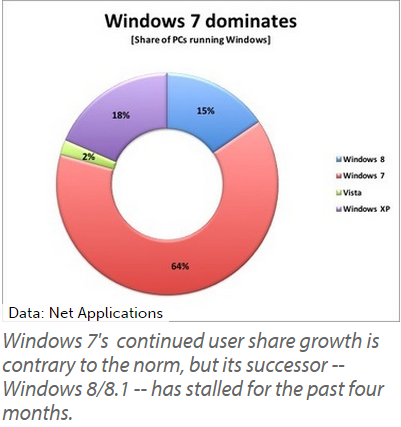
ComputerWorld reports that two-thirds of all PC users are currently running Windows 7, as of last month. Based off of Net Applications’ monthly user share tracking, these are the statistics taken for the month of March 2015 concerning the different operating systems in Microsoft’s repertoire.

windows 7 dominates

  • 64 percent of users use Windows 7.
  • 2 percent of users use Windows Vista.
  • 18 percent of users are still clinging to Windows XP.
  • 15 percent of users are using Windows 8 or 8.1.

Windows 7 is certainly a great operating system that has stood the test of time. Ever since it was released in 2009, it’s been a very popular choice amongst both consumers and business professionals. It was so well-received that it pulled support away from the overwhelmingly popular Windows XP, which lost patch and update support last spring.

rueters error

However, Windows 8 and 8.1, the most recent of the Windows operating systems to be released, have failed to entice the end user into upgrading from Windows 7. If anything, Windows 7 is still growing more popular. As of this past February, 7 has seen a 2.6 percent increase, while Windows 8 and 8.1 have just about reached their limit over the past four months.

Even though Windows 7 still has a few good years left before its end-of-support date in 2020, all good things must come to an end sooner or later. Will Windows 7 follow in the footsteps of its predecessor, Windows XP, and have countless end users forsake upgrading for an unsupported system? If Windows 10 fails to take off, this might happen, leaving many users running without vital support patches and updates. This is why using a supported operating system is so important.

The next OS to hit Microsoft’s chopping block is the server OS, Windows Server 2003. However, the main cause for concern isn’t necessarily over security, but the complications of legacy hardware and software capability with new, modern machines and applications. It’s not always easy to predict what happens to your IT infrastructure when upgrading to a brand new server.

If your office is one of those that haven’t yet made plans to move away from Windows Server 2003, or if you’re running outdated operating systems on your business’s workstations, you should make arrangements immediately to start moving toward a more modern office. You can’t afford to fall behind, and NuTech Services understands this. If you’re having a difficult time juggling your responsibilities as a business owner with incorporating imperative upgrades, we can help you manage and maintain your IT infrastructure. Just give us a call at 810.230.9455 to learn more.

b2ap3_thumbnail_bottlenecking_400.jpg

Bottlenecks: Good for Drinks, Not for Networks

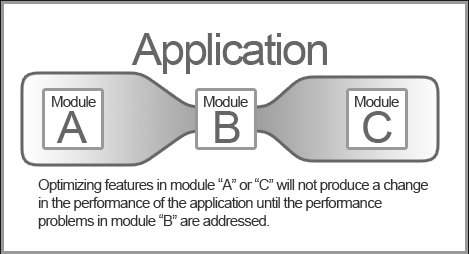
b2ap3_thumbnail_bottlenecking_400.jpgLet’s say that you get new equipment and software for your company’s network, expecting to see a boost in performance. When everything is tested, you see no change in performance, which understandably bums you out. In a situation like this, your network is likely bottlenecking.

Bottlenecking gets its name from the design of a bottle (think wine bottle) where the neck narrows to allow for a smaller amount of fluid to pour from the bottle’s opening than would come out if the opening was just as large as the base, like with a pickle jar. Techquickie defines bottlenecking (also known as a choke point) as, “Holding back the performance that could otherwise be achieved.”

Application in blogWhen you’re experiencing a performance-hampering bottlenecking situation with your company’s network, the challenge is to locate the source of the problem and resolve the issue so that the rest of your network can reach its full potential. This is typically done by upgrading whatever is causing the choke point so that it meets the same performance standards as other components that make up the network.

A classic example of this is when a PC user upgrades one component of their machine, like a video card, hoping to see an overall improvement in performance, but they end up experiencing minimal-to-no-boost because other factors that affect performance (like CPU and RAM) are old and already maxed out. This is a common occurrence with workstations and home computers, and as the technology becomes more complex with more computers and components in the mix, there’s a higher chance of there being bottleneck issues.

Therefore, when you’re dealing with something as complex as a computer network, with multiple workstations, servers, and NAS devices, you’ve substantially increased the risk of experiencing a bottleneck. For example, even if you’re working with top-of-the-line computers and powerful server units, your network routers can be old and outdated, which will prevent your powerful equipment from reaching its full potential; and, vis–à–vis, hold your company back from fully realizing its competitive goals.

Locating the exact cause of a network bottleneck requires a thorough knowledge of every component, which is why calling professionals to troubleshoot your network’s performance issues is often the smartest move. Otherwise, it would be quite easy to place the blame for performance issues on the wrong piece of equipment, replace said piece of equipment, and then, after investing all of that time and effort into the wrong fix, have to go back and try it again.

NuTech Services has the tools it takes to run diagnostics on your company’s network to quickly determine what the exact cause of your bottleneck is. Depending on what the issue is, we may even be able to determine the cause of your bottleneck with our remote tools. This remote approach will save a technician a trip to your office, and save you money on your IT bill.

To schedule NuTech Services to take a look at your network so we can unclog the log jam that’s holding your business back, give us a call at 810.230.9455.

b2ap3_thumbnail_information_is_made_of_data_400.jpg

Does Your Business Understand the Difference Between Data and Information?

b2ap3_thumbnail_information_is_made_of_data_400.jpgIT requires several factors in order to function properly. First of all, it can’t exist without information, and this information can’t exist without data. Technology is what creates data so that your company can take advantage of changes in the industry and business environment. It might seem like a lot to take in, but understanding the flow of data is necessary for a business owner. Otherwise, you won’t be able to take advantage of it to jumpstart sales and profitability.

Granted, the difference between data and information is a bit difficult to understand in technical terms. Most businesses use these terms as if they are one and the same. While this is an acceptable practice in the industry, and it makes more sense to rationalize the two for marketing purposes, there’s still a significant difference between the two of them that should be understood by those who utilize technology.

In technical terms, data looks like a bunch of 1s and 0s in rapid succession. Naturally, this doesn’t make any sense to a human reading it; but to a machine that can interpret it, the data is able to take tangible form and compile the information we know and love that helps business owners make the best decisions for their organization.

This means that the process your business takes to collect data is exceedingly important. If the information isn’t accurate, there’s a chance that it can affect decisions when moving your business forward. The process of turning data into information is complicated, and there’s plenty of room for error. If even one part of this process is disrupted or weakened, the end result will reflect this.

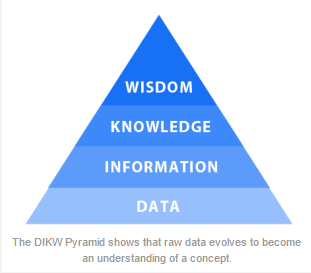
The DIKW Pyramid makes it much easier to analyze and understand the process through which data is transformed.

dikw pyramid

Business 2 Community provides us with a salad metaphor to describe the DIKW pyramid levels:

Data: I have one item. The data displays a 1, not a zero.
Information: It’s a tomato. Now, we understand the item and its characteristics.
Knowledge: A tomato is a fruit. We can identify patterns in the information and apply them to the item.
Wisdom: Tomato is never added to a fruit salad. There is an underlying, commonly understood principle that governs the item’s purpose.

B2C explains further by claiming that “bad data costs time and effort, gives false impressions, results in poor forecasts, and devalues everything else in the continuum.” Therefore, it’s necessary that the data your business collects allows for accurate and efficient analysis. Otherwise, your choices won’t be of the highest quality possible, and they could affect the functionality of your business in the future.

On the other side of the coin, if your technology is operating at maximum efficiency, and your communications are properly planned and managed, the chances of your data being affected by leaks or corruption is significantly reduced. As shown by the DIKW pyramid, data is the foundation for a business. Without it, you cannot hope to continue. NuTech Services can help your business ensure that your data is safe and available when you need it with our Backup and Disaster Recovery solution. Give us a call at 810.230.9455 to learn more.

b2ap3_thumbnail_use_your_selfie_stick_400.jpg

The Top 3 Technologies for Serious Selfie Takers

b2ap3_thumbnail_use_your_selfie_stick_400.jpgGot a smartphone? Then you’ve probably snapped a selfie before, or, depending on the expectations of your social circles, you may have taken a few hundred of them… in one day. Today, selfies are all the rage and people are coming up with creative ways to take them, like these three exciting selfie technologies.

Before we reveal our three favorite selfie technologies, we should first do a little backtracking and provide a definition. After all, it’s a rather new trend. But in all actuality, the selfie has been with us for quite a while; it used to be called, “No one else wants to take my picture.” For an official definition of the word selfie, let’s turn to the Oxford Online Dictionary (yep, it’s a real word): A photograph that one has taken of oneself, typically with a smartphone or webcam and shared via social media.

The Selfie Sombrero

selfie sombraro

One of the hottest accessories in fashion today is the selfie sombrero. It’s a hat tasked by Acer to assist users with “creating the perfect social media moment.” To achieve this, a glittery-pink sombrero has room for an Acer Iconia A1-840 to hang from its brim. “The world’s first Selfie-Hat” can then be adjusted to allow the user to experiment with angles and lighting. As a bonus, when you’re not taking selfies with your sombrero, it comes with a smaller sombrero for your tablet. 

The Selfie Brush

selfie brush
Good hair is a must for any successful selfie. This is exactly why the Selfie Brush was created. This is another example of a technology that combines a mobile device with an everyday item, like a hair brush. The Selfie Brush utilizes the flat side of the brush, which until now, has been wasted space. The Selfie Brush even comes with a small mirror so you can make sure your hair is perfect before you snap and share your pic. Granted, you might get a few weird looks for taking phone calls with your hair brush, but you can just tell onlookers that you’re a superspy–with fabulous hair.
The Selfie Stick

Finally, we come to the selfie stick. It’s a technology that may be a little more practical than the previous two techs. However, it will still get you some odd looks if you use it. The appeal of the selfie stick is that it allows the user to take a picture of themselves from a distance further than what their arms can reach. This allows you to snap a panoramic selfie without having to pass your camera on to another person. A typical selfie stick extends up to 39 inches and it works in conjunction with your camera’s timer. In fact, you may have even seen the selfie stick in action at your local tourist attractions.

What are your feelings about selfies? Are you on a quest to achieve the perfect selfie, or do you find the whole concept to be too narcissistic for your liking? Despite your feelings about selfies, it’s a trend that appears to be here to stay. This means that humans are guaranteed to come up with even more creative ways to take and share their favorite moments.

selfie danger