chrome_70-400.jpg

The New Version of Chrome has Interesting Changes

chrome_70-400.jpg

Chrome 70 has proven to be quite a divisive browser. While a lot of users are excited for the new changes to security, some are also worried about whether Chrome can maintain this security and its user-friendly interface. Here are some of the changes being made to Chrome 70 so you can choose whether this browser update is for you.

Extension Restrictions
One of Chrome’s largest advantages over its competition has to be its library of add-on extensions. Unfortunately, any kind of functionality with these additional “programs” can lead to security concerns. Google has had to slow down the production of extensions to create new requirements for developers to adhere to. One example is how cryptocurrency continues to be a major talking point, prompting extensions to include cryptocurrency mining and cryptojacking in their features. Google is shutting down these supplemental programs, as well as generally holding developers to higher standards than they previously were. It now demands that developer accounts be protected by two-factor authentication, as well as paying closer attention to apps that require lots of permissions or host their code remotely.

Security Measures
Chrome 70 is also packing in all kinds of new security features to keep phishing attacks away from end users. In particular, Chrome is trying to push education of its native password management tools, as well as warn users when the links they are about to access aren’t secure. In essence, this simply states that websites need to be secured if they want visitors, reinforcing the fact that websites need to prioritize security these days.

Login Concerns
While some changes have been accepted with open arms, others… not so much. While Chrome has allowed users to use the browser without logging into the browser, some have noticed that Chrome appears to log a user in, even if they are only using one service out of the many provided. This is primarily an issue because Google could potentially share the user’s data (think browsing history), which is not something that users traditionally take lightly. In the time since then, Google has announced that Chrome isn’t necessarily logging users into Chrome–it’s more of an in-between measure to show a user which of their accounts is currently logged in.

As with any new solution, there will be roadblocks and concerns that users might be faced with during the experimentation phase. What kind of experiences have you had with Chrome 70 so far? Let us know in the comments.

voip_has_value_400.jpg

VoIP Can Bring A Lot of Value

voip_has_value_400.jpg

Business technology can often augment communications and make collaboration easier, but administrators sometimes believe that these added perks come with a considerably higher price tag. When a solution comes around that can save money, like VoIP, business owners should consider it with serious intent to invest, as it can usher in an age of improved operations and efficiency for your employees, as well as a higher bottom line overall.

VoIP Improves Inter-Department Communication
Landline telephones in the office have been dated for quite some time. Even if they were once necessary to get in touch with coworkers and other departments, they are now quite antiquated compared to modern solutions. After all, there’s no guarantee that an employee will be available to take your call, as the workplace is filled with countless tasks that often require their full attention. Sure, you could leave a voicemail, but there’s no guarantee that the employee will see the message until it’s too late to respond. Since Voice over Internet Protocol doesn’t rely on your employees having a traditional handset, and instead has them using more mobile devices, they’re more likely to be available when you need them most.

VoIP Is More Flexible
Some organizations have employees who aren’t always able to work in the office for a variety of reasons. Perhaps they are simply on the move for conferences so often that they are just never in the office, or perhaps you have employees who work remotely from time to time (or even permanently). VoIP lets you stay in touch with these employees in the same way you can with your in-house team. Since VoIP can be used on mobile devices, laptops, and even desktops, it doesn’t matter where your employees work, as long as they have the VoIP application and a headset. In this way, VoIP is much more flexible than any traditional landline.

VoIP Allows for Additional Features
Landline phone services tend to have features built into them, but many of them are decided by the cable company that provides your telephone service. These features are often not what your business wants or even needs. VoIP services give your business all the features needed from traditional landline telephone services, including conference calling and voicemail, but with lots of additional features that add a quality to your business’ ability to communicate. You can take advantage of video conferencing and instant messaging built right into your VoIP solution. By going through a VoIP provider in this way, you save money by only paying for services you will use rather than those your cable provider assumes you want.

To get started with a VoIP solution today, reach out to us at 810.230.9455.

maintain_server_400.jpg

Why (and How) You Need to Maintain Your Servers

maintain_server_400.jpg

It is impossible to understate the importance of a server to today’s businesses. We talk a big game as to how important data is, but we don’t often broach the topic of how important it is to ensure that your server is well-maintained. Below, we discuss how to determine what your servers need for optimal performance, and how you can be sure that they get it.

What Can Cause Problems in Your Server Room?
Of all the potential issues that your servers can face, the smallest ones can create some of the biggest problems – literally. For instance, there’s always the worry of dust.

Dust, and other similarly-sized contaminants, can easily make their way into your server’s components, where they build up and become an insulator. As a result, your equipment can become up to 30ºF warmer – and just like in human beings, a rise in internal temperature to this degree can be lethal.

Other contaminants include things that human beings generate, like skin particles and dander, or even the result of wear on the devices themselves, like belt debris from the climate control systems and metal shavings from the hardware. The worst culprit, however, is actually the soles of your feet. Approximately 80 percent of the most damaging debris can be introduced to your server room this way.

Mitigating Issues through Maintenance and Prevention
Consider what would happen if your server was to suddenly fail. All of the data you had worked to preserve and protect, investing in the infrastructure to house it and the solutions to mitigate external threats to it, would be gone. Therefore, it is important to remember that protecting your servers against inadvertent internal threats is just as critical as protecting them against external attacks. This is accomplished in two overarching ways: first, strict standards of cleanliness, and secondly, avoiding the introduction of contaminants.

Keeping it Clean
The less dust and grime there is in your server room, the easier it will be to keep the room nice and cool for your infrastructure. While the big cleaning jobs should be left to experienced professionals who have a history with cleaning computing equipment, there are some jobs that you should be able to handle.

After all, some cleaning may have to be done on a daily basis, especially if your server room is a high-traffic area. Careful vacuuming will help get rid of that notorious sole-grime that comes in, as well as a considerable amount of other dust. To clean your server components themselves, use an antistatic cloth to gently remove the grime, using compressed air to get into hard-to-reach places.

Avoiding Contamination
If possible, you might also want to make some changes to help reduce the amount of dust and grime that enters your server room in the first place. Installing air filters inside can help, as can (assuming you are able) creating a buffer room between your office and the server room itself, where special mats can be installed to help minimize contamination. Hats and booties can also help reduce the amount of human-borne contaminants entering the area.

Finally, do your best to stay out of the server room if at all possible. Avoid bringing potential contaminants into it, like cardboard, and clean off any tools and equipment before they are brought into the server room.

For more best practices to maintain your business’ crucial technology, reach out to NuTech Services at 810.230.9455!

kyt_accessory_400.jpg

Know Your Tech: Accessory

kyt_accessory_400.jpg

We make a big deal about how important it is to take care of your computers. Whether that be routinely cleaning your PC, weeding through the unnecessary information stored on them, or utilizing a mobile device’s built-in security features to keep mobile malware from making the management of your company–wide mobile solution more difficult. Much of the time, however, your organization’s IT works as designed, creating no issues whatsoever. In those moments you begin to pay more attention to your accessories.

For this week’s tech term, we talk a little bit about accessories. In the past, accessories were mandatory to simply use any computer, but with the advent and prevalent use of smartphones and tablets, that isn’t always the case today. They do, however still make up a huge portion of the cost to businesses and individuals when purchasing a computer. Let’s take a look at the computer accessory market.

When looking to define what a computer accessory is, you’d have no trouble finding multiple definitions. On one hand, many computer accessories attach themselves to a computer, while others are there to provide additional functionality, security, or support. We’ll break them into two different groups: basic and advanced.

Basic Computer Accessories

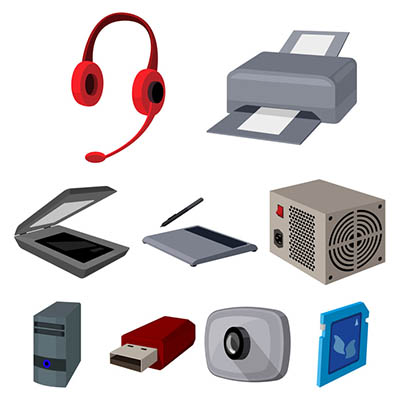
Basic computer accessories are accessories that are typically less expensive, and don’t usually come with their own power supplies, although wireless technology has somewhat changed this. There are all types of simple accessories that include:

  • Cables and Wires
  • Keyboards and Mice
  • Speakers and Microphones
  • Webcams
  • Headsets
  • Flash Drives
  • Adapters
  • Bags and Cases

Advanced Computer Accessories

Advanced computer accessories typically have a higher price tag and come with their own power supply. Also called peripherals, these products typically perform advanced tasks or have more stand-alone value than basic computer accessories. Some include:

  • Printers
  • Scanners
  • Charging Stations
  • Digital Signage
  • External Storage
  • Power Protection

Essentially, every product you can buy beside the computer and the monitors is considered an accessory. Even peripherals that come with their own power supply are technically accessories for a computer (since you can’t use them without a CPU).

NuTech Services’s knowledgeable IT technicians are committed to providing useful technology support services to organizations like yours. To find out how we can help your organization best use its technology call us today at 810.230.9455.

tt_breadcrumb_400.jpg

Know Your Tech: Breadcrumbs

tt_breadcrumb_400.jpg

A trail of breadcrumbs can be a useful thing, whether you’re using it like Hansel and Gretel to find their way back home, or you’re using it in computing to find your way back to a page you were previously on. Today’s tech term is dedicated to the latter.

What is Breadcrumb Navigation?
As per the aforementioned fairy tale, breadcrumb navigation consists of a path leading home. In this case, home is the homepage. With breadcrumb navigation, you can more easily keep track of how you got to the current web page you’re on, as well as the path back to the home page. This path can typically be viewed at the top of the page. Each step includes a link that navigates back to a specific page.

Let’s say that you’re looking at a service page on a website. If the path you took leads back to the home page, you’ll see all of the pages in between in the breadcrumbs menu. For the sake of this example, let’s say the pages in between are the second menu item and the fifth menu item. It would look something like this:

Home > [Menu 2] > [Menu Item 5]

Since these breadcrumbs are links, you can click on any one of them to be brought back to that page. This lets you continue browsing with minimal chance of getting lost on the site trying to backtrack.

More Than Just Websites
You might notice that this navigation style is similar to the ones used in toolbars in file folders or files saved on your desktop. The reason is the same–it makes finding certain files easier at a later date. The location can also be shared with others who need to know where it is.

Breadcrumbs are typically meant for helping users with browsing and organization. Are there any other features out there you can think of that do the same thing? Let us know in the comments.

voip_complex_400.jpg

Can You Afford to Ditch Your Telephone System for VoIP?

voip_complex_400.jpg

Voice over Internet Protocol, or VoIP for short, might at first glance seem complex, but it’s really quite simple when explained properly. Unfortunately, misconceptions surrounding VoIP can become a barrier of entry for businesses considering a VoIP solution. We’re going to disprove some of these misconceptions and prove VoIP can be a valuable investment for just about any business in need of a communications solution.

“VoIP is Too Expensive”
Businesses often think that VoIP is more expensive than your typical telephone bill, but this isn’t necessarily the case. The purpose of VoIP is to actually reduce the costs of your telephone bill by eliminating unnecessary services and the costs associated with them. VoIP does this because it uses your Internet connection rather than a phone connection, meaning that you don’t have to have phone lines all over your office just to give each of your employees phones on their desks. All you need to use a VoIP solution is a headset or handset and a desktop/mobile app hooked up to the Internet.

“VoIP Isn’t Reliable Enough”
In reality, VoIP is only as reliable as your Internet connection. If your Internet connection isn’t reliable, then you have a problem as is, so why not use it as an opportunity to both improve connectivity and communications all in one?

“VoIP is More Trouble Than It’s Worth”
Considering that VoIP would be replacing your current telephone setup, it’s reasonable to suspect that the amount of effort put into this implementation would be considerable. However, that’s simply not the case–VoIP requires minimal setup, as it uses your existing network infrastructure. All you’re doing is connecting your phones to the Internet, which takes no time at all.

“VoIP Doesn’t Sound Good Enough”
VoIP often doesn’t sound any different from your typical phone line connection, and if it doesn’t sound as great as you want it to, chances are it’s (once again) an issue with your Internet connection–not necessarily anything wrong with the VoIP service itself.

“VoIP Isn’t the Right Fit”
VoIP can be the perfect fit for your business precisely due to just how customizable it is to your business’ specific needs. You can mix and match the additional features you desire to save money in the long run. All of the features from any old phone company would be a considerably larger investment, and some VoIP features aren’t even offered by your standard phone company in the first place.

VoIP is simply too good a solution to not implement or at least consider. If you want to hear more about VoIP, our IT professionals would be happy to assist you. To learn more, reach out to us at 810.230.9455.

better_customer_realations_400.jpg

Getting a Better Sense of Customer Relationship Management

better_customer_realations_400.jpg

I’m sure I don’t need to tell you how important it is to have a handle on your clients’ needs. After all, how else are you supposed to offer them the level of service that they need to remain satisfied enough to stay subscribed to what you offer? This endeavor is exactly why a customer relationship management (or CRM) system is so crucial.

What is Customer Relationship Management?
Customer relationship management is effectively how a company can gauge and improve their interactions with their clients, gradually coaxing them toward repeated business transactions. By compiling data from the many points of contact that a prospect or repeat customer has with a business, that business can build a profile that will help inform their next steps.

With data able to be drawn from website and social media activity, live chat and telephone conversations, and a customer’s purchase history, CRM software can heavily assist you by constructing a database of customer information. Some can even automate certain processes, assisting a company’s marketing and sales forces in more effectively communicating with customers from a more informed standpoint, or allowing labor to be saved by leading an incoming caller through a precomposed voice menu to direct them to whom they need to reach.

A CRM can also be used to optimize internal tasks, like the managerial responsibilities of Human Resources, processing analytics, and automating certain workflows. Some CRM solutions have even begun to incorporate artificial intelligence to better predict a customer’s trajectory.

Customer relationship management systems can be hosted on-premise or delivered over the Internet as a cloud-based solution.

Putting a CRM to Use
A CRM can be leveraged in any number of ways for your business to embrace. Social media engagement can be monitored to identify which platform is most used by an audience, monitoring keywords and brand mentions. Otherwise, it can be used to assist in addressing feedback over social media.

Speaking of feedback, a CRM system can also be of use in a business’ contact center, collecting data from service calls to inform a company’s sales and marketing efforts, as we mentioned above. This is especially useful in a business-to-business application, as it can help to optimize a business’ journey through the sales and marketing funnel.

If a CRM system sounds like something that your company should implement, reach out to NuTech Services by calling 810.230.9455.

smartphone_camera_400.jpg

How Much Have Smartphone Cameras Made a Difference?

smartphone_camera_400.jpg

When it comes to selecting a smartphone, most consumers look to the camera as a major deciding point – after all, many popular applications geared toward the everyday user heavily lean on the use of a camera. This utility and, in some ways, reliance have only encouraged rapid advancement to phone-based camera technology since its origins in the Samsung SCH-V200.

The very first smartphone cameras were simply a handheld camera that connected to the phone via a cable. This all changed upon the release of the SCH-V200. While the user still needed a computer to remove the images from their phone via cable connection, and the image quality wasn’t great, the ability alone was enough to start a revolution in what is expected of our technology.

In the years since the SCH-V200, phone-based camera technology has grown in leaps and bounds, arguably being responsible for shaping how we view mobile computing today.

The First Smartphones
While the Samsung SCH-V200 was the first phone that featured a built-in camera, this feature was quickly capitalized on and adopted by many, allowing images to be taken and shared. This technology had some time to develop before the release of the original smartphones in the mid-2000s. Both the iPhone and T-Mobile’s HTC G1 featured rear-facing cameras, and while this feature wasn’t particularly focused on by reviewers, the significance of this pocket-sized technology was very quickly apparent.

The Smartphone’s Development
Later on, mobile phones began to sport front-facing cameras. This assisted in the development of “selfies,” giving a newly immersive experience to sharing points in one’s life. This made the expansion of Internet connectivity and advent of social media an even bigger piece of the smartphone experience, making such cameras a must-have feature.

As a result, more and more features were added that made the camera and its use better. The now-standard LED flash, allowed users to take pictures in low light (a much more difficult task beforehand). Software improvements enabled other camera features to come into their own, autofocus, video capture, and optical image stabilization being feasible thanks to the increased processing power that the chipsets possessed.

The Boost of Social Media and Other Applications
Of course, the first few generations of phones that had a camera were limited in functionality somewhat, the front-facing camera only adding so much. However, once the ability to capture high-definition video came into play, this all changed. The combination of this new feature with the birth of social media (at the time, mostly YouTube) made the camera a much more influential feature for the average consumer.

This concept seems strangely foreign, now that there are easily hundreds of apps that integrate both front and rear-facing cameras for their most basic usage. Returning to YouTube for a moment, a full 300 hours of video are uploaded to the site every minute, most of it probably originating from a smartphone. Since their introduction, smartphones and their cameras have captured images and footage that has been inspiring, outrageous, and socially relevant. An iPhone’s camera was exclusively used to shoot the award-winning, feature-length film titled Tangerine.

How the Camera Saves the Mobile Market
As it happens, the camera has become the primary reason to buy a new mobile device, with application development and processing power both plateauing, and the apparent fact that only Samsung and Apple can consistently manufacture smartphones that see any kind of profit. Yet the cameras on these devices only continue to improve, more high-end smartphones now featuring dual-lens cameras. These cameras provide no small amount of benefit to the user, providing them with more options behind their photography, in addition to:

  • Wide aperture – With more light reaching the camera, more accurate photos can be produced.
  • High Dynamic Range – HDR covers the gamut of image capture quality settings, piecing together a variety of shots to produce the best one possible.
  • Burst Mode – If the subject of a photo is in motion, Burst Mode allows a determinable number of images to be captured so that the best one can be chosen.
  • Portrait Mode – In order to provide an enhanced depth of field, a photo can be taken to automatically sharpen an object in the foreground while blurring the background.

Thanks to the continuing improvements in their cameras and software, the smartphone user is effectively walking around with a complete photography studio in their pocket. How well are you able to use your smartphone’s camera? Leave any hints you have in the comments!

tt_proxy_server_400.jpg

Know Your Tech: Proxy Server

tt_proxy_server_400.jpg

Your server room may be somewhat intimidating to consider. Wires everywhere, mechanical boxes that just sit there, lights blinking intermittently, and the distinct feeling that you probably shouldn’t touch anything – not even a proxy server, whatever that is. However, to help you get to know your tech, the proxy server is exactly what we discuss below!

What Is A Proxy Server?
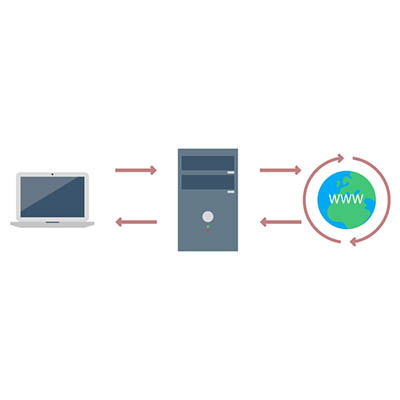
Oversimplifying things, a proxy server is the device that keeps your end users and the websites that they’re accessing separate, but communicating. Making this a little less straightforward, a proxy server can act as many other things as well, adding to its usefulness in your business.

At its core, a proxy server is extremely useful as a kind of gatekeeper for your users’ browsing. Think of it as a kind of a spam filter for your Internet – instead of a user accessing a potentially infected website, the proxy server allows them to access the data, protecting your network much like a web filter and firewall would. The proxy server also caches the data from common web requests, speeding them up, all the while preserving a user’s privacy online.

A Few Benefits of a Proxy Server
There are a few reasons that a business may utilize a proxy server.

Privacy and Security – As we’ve mentioned, proxy servers have a definite use as a means to protect an organization’s privacy and security. This can be accomplished in a few ways. First, a proxy server is capable of altering some of the identifying information contained in the web request. By its doing so, the destination server has no way of knowing where the request came from originally. This keeps browsing habits and personal information protected.

Furthermore, a proxy server is able to encrypt web requests, protecting them from anyone who may try to sneak a peek. Known malware sites can also be blocked through the proxy server. Finally, your company can use a virtual private network (or VPN) in conjunction with the proxy, enabling secure and verified access.

Internet Control – Let’s face it, as great a tool as the Internet is, it can also be a considerable source of distractions. However, a proxy server allows you to both monitor and control the way the Internet is used. If certain websites are proving to be a distraction, the proxy server can block them, instead delivering the user a nice note reminding them to stay on task. Even if the website isn’t blocked, a proxy server can still be used to track how often a website is accessed, allowing you to judge if your employees are really being diligent in their work.

Speeds and Savings – Bandwidth is a very important consideration to make when your business relies on the Internet’s performance in order to function. A proxy server can assist your network performance by caching websites that are frequently visited, cutting the number of requests to that website to one, as opposed to however many employees are attempting to access it.

If you think that your network could benefit from utilizing a proxy server, call us! NuTech Services is the premier managed IT support specialist for Michigan, and we are more than ready to assist you with whatever questions you may have. Give us a call today at 810.230.9455.

look_at_business_tech_400.jpg

Our 2018 Business Technology Overview

look_at_business_tech_400.jpg

Businesses have a lot to think about, especially regarding best practices and upcoming trends in technology. Has your business been doing all it can to keep up? We’ve outlined some of the best IT innovations that we expect to see in 2018 as time goes on.

Security Worries
It should be clear that in today’s business world, security is everything. There are so many threats out there that one organization alone can’t possibly keep up with all of them, much to the chagrin of security companies. Most notable of these is the Internet of Things, a term used to refer to the collective body of mobile devices out there with interconnectivity features. Machine learning and improved methodologies have allowed organizations to better protect themselves from these emerging threats. Predictive technologies powered by machine learning have also greatly enhanced the ability of organizations to take on threats. Alongside new innovations like blockchain technology and the zero-knowledge proofs associated with it, machine learning will likely pave the way toward the future of security.

Big Data
Similarly, in order to make a meaningful impact on your business, you need to collect data that can be used to make educated decisions. There are plenty of sources out there that can help businesses acquire and accumulate data, if you know where to look. If your business utilizes solutions that allow it to collect and organize data, you’ll be able to make predictions about which decisions will most benefit your company over time. It can also help you make decisions based on trends in security, user experience, processes, and efficiency.

Artificial Intelligence
A.I. is the future of many business strategies. Since businesses today collect more information than any before them, A.I. can be the most efficient way to benefit from it. A.I. can help your business and its employees better manage both time and resources, and with this comes greater opportunity for innovation and savings to your bottom line. In essence, A.I. can potentially allow businesses to save time by automating redundant or time-consuming tasks, all while learning from the experience.

Accountability
Artificial intelligence presents an interesting problem that businesses haven’t had to deal with to this moment–accountability. If something goes wrong and an A.I. does something illegal, who’s to blame? Issues like these, and many more, all need to be addressed before innovations can be leveraged to the best of their ability.

What are some of your most anticipated trends for the future of business technology? Let us know in the comments.

virtual_assistant_400.jpg

What Virtual Assistant Is Right for You?

virtual_assistant_400.jpg

Virtual assistants are some of the most common technologies out there, which is kind of a strange thing to say. With mobile devices taking over the personal and professional lives of users, we suppose it’s natural that virtual assistants have flourished in today’s workplace. What are these assistants, and what are they capable of?

Virtual Assistants, Today and Tomorrow
Virtual assistants are programs that let us speak to our devices to perform certain functions. These functions include adding an item to a list, playing music, creating reminders, and so much more. The future could introduce countless other ways to take advantage of virtual assistants, even if it’s a bit of a strange feeling to talk to an inanimate device.

New providers are also appearing, which in turn expands the selection of virtual assistants to consumers. This can create more competition and encourage the development of fresh ideas that can further the quality of future solutions.

Weighing Today’s Assistants
There are five mainstream digital assistants in today’s business world. They include: Google’s Assistant, Microsoft’s Cortana, Amazon’s Alexa, Apple’s Siri, and Samsung’s Bixby.

Alexa
Amazon’s Alexa is pretty high-profile, appearing on Amazon’s flagship devices like its smart speakers, Echo. Other brands use Alexa as well, but it’s most well-known for the Echo speakers. Alexa is used on Amazon’s tablets, as well as in their Amazon Fire TV products and other Internet of Things devices. Alexa is perhaps most well-known for its compatibility with third-party apps, all of which is offered free of charge. Therefore, Alexa is more likely to work with your smart appliances than other solutions out there. Alexa can be downloaded on Android devices, despite reports that it is more limited on these devices compared to Amazon’s.

Google Assistant
Android devices running 6.0 Marshmallow or higher can take advantage of Google Assistant. If you have a Google Home device or similar speaker, you can use Assistant to connect to them. Assistant can be found in headphones, smart displays, and televisions. Assistant is reliable enough that it can be used most of the time, though it is most reliable when it’s used with Google’s services, including Google Calendar and Chromecast.

Bixby
Maybe you’ve never heard of Bixby before. It’s exclusively on Samsung devices like the Family Hub 2.0 refrigerator. Bixby is a three-pronged personal assistant consisting of Bixby Voice (control a device with your voice), Bixby Vision (think Google Lens), and Bixby Home (a Google Feed-like solution). Bixby’s Version 2.0 is open-source, allowing developers the ability to use it in their development plans.

Cortana
Cortana is basically the Microsoft version of Alexa, working with every device that has Windows 10. While Cortana works in a similar way to Alexa, Cortana does have more limited capabilities compared to Alexa’s skills. Even if the user doesn’t have their PC nearby, Cortana can be used on Apple and Android devices. By far Cortana’s most interesting feature is being able to search your settings, documents, and other important data for whatever you’re searching for. The most notable tech demo involving Cortana showcased its ability to compile user-friendly statistics and display them in graphs, highlighting the perks of this virtual assistant.

Siri
Siri was the app that spearheaded development of virtual assistants. Siri is the Apple-exclusive virtual assistant that many users have on their iPhones and other Apple products. The Apple HomePod is a good example of this, but Siri is compatible with many other IoT devices that can give the user unparalleled control over their home just by speaking to their devices.

Which of these virtual assistants is your favorite? Let us know in the comments.

smart_city_snag_400.jpg

Attempts to Make Smart Cities Hit a Snag

smart_city_snag_400.jpg

At this point, the concept of the Internet of Things is a fairly familiar one, but that familiarity is to the Internet of Things on the micro scale–appliances with capabilities enhanced by an available connection to the Internet. There is another, more macro application to the Internet of Things: as a way to collect data in a municipal setting. However, like the IoT we are familiar with, these “smart cities” are host to many familiar problems.

The Concept of a Smart City
Like many technological developments, the idea of a smart city is built on good intentions. Through the use of technology (much of it based in the IoT), a smart city leverages collected data to functionally serve the public, embetter the services of government, and improve the quality of life for its citizenry.

That’s the idea, at least.

Unfortunately, like many of the ‘smart’ devices that the populace can interact with, the systems that these cities leverage tend to be susceptible to attack.

What These Attacks Could Do
In order to understand the potential ramifications of these kinds of attacks, it is important to first have an understanding of the kinds of systems that a smart city is built upon.

The true purpose behind creating a smart city is to make it a better place to live, and to do that, certain systems need to be put in place. These systems are powered by the data they collect. With that data, insights into correlated problems can be leveraged to solve them.

The sensors that these cities use to collect this data monitor a wide variety of factors, ranging from traffic conditions to the weather and even health-related factors like air quality and radiation. The data that is collected is then used, through the power of automation, to decide how to approach infrastructural concerns. For instance, if traffic is moving slowly in an area, these systems would deliver that data to decision-makers, allowing them to make the call to reroute traffic a different way to ease the congestion. This system just makes the decisions, too.

The big problem with this is that now, if these systems don’t have sufficient security measures in place, they leave the city’s infrastructure vulnerable to attack. Unfortunately, in an initial study of three companies who provide these kinds of smart city systems, 17 basic vulnerabilities were present in their products. These vulnerabilities included things like easily guessable passwords, bugs that could allow malware to be introduced, and opportunities for authentication requirements to be side-stepped.

Why This Matters
The harsh reality is that developing smart cities with these kinds of vulnerabilities is the geopolitical equivalent of intentionally wearing a “Kick Me” sign each and every time you went out in public. The United States of America have already learned this the hard way, as electoral systems and the energy grid have been hijacked recently. If appearances aren’t deceiving, actions are being taken to reinforce these vulnerabilities in these IoT devices, but it certainly doesn’t help if careless oversights are being made in the security of major metropolitan areas.

We’re not saying that bringing the Internet of Things to cities is a bad thing, but the security needs to be there. The same goes for businesses. If your business relies on devices that connect to the Internet, like physical security devices, smart appliances, and networking infrastructure, locking down these devices and keeping them patched is critical to keep your operations running without a hitch.

Give NuTech Services a call at 810.230.9455 to learn about the security options we have to offer you.

ar_car_400.jpg

As Augmented Reality Grows, More Applications Appear

ar_car_400.jpg

“Augmented reality” is likely one of those terms that you’ve heard before, but that’s more or less your experience with it. However, A.R. has likely been a bigger influence than you may have imagined – especially with the prevalence of smartphones being what it is. Let’s examine augmented reality and how it might be used later on.

Modern A.R.
As we have inferred already, the smartphone has been instrumental in bringing augmented reality to the masses. In A.R. applications, the camera is used to capture the likeness of the user’s surroundings, while a virtual overlay is added for the user to interact with. This overlay incorporates stimulus from the Internet, the captured surroundings, and the user’s activity all at once.

This technology has been leveraged by developers to try to develop apps, some for fun, and some that are more practical. There have been plenty of examples of each thus far. Augment, the furniture application, allows users to “test-drive” a model in the environment it will be used in, which is much easier than buying said furniture only to return it when it clashes with the base molding. As for entertainment, one only has to look at the success of the Pokémon Go app. There are even browsers, like Argon4, which incorporate A.R.

What May Be Coming Next
Admittedly, not much has been developed completely just yet, but that hasn’t made A.R. any less promising. For example, imagine how much easier tutorials could become for particular tasks if A.R. was leveraged. Any task that can be broken into steps could be developed into an A.R. walkthrough.

Take auto maintenance. Most people spend significant amounts of money keeping their engine tuned up and their vehicle road-worthy by bringing it to an auto shop. While some issues are certainly better resolved by the likes of a professional, some fixes are very doable for a novice – assuming they had a comprehensive, step-by-step guide to show them how to do it right. An augmented reality application could be that guide, teaching these novices how to change their oil or replace a spark plug. We may see these kinds of apps change the way that schools teach their students, allowing lessons to be learned conceptually and practically.

Of course, more is also being developed now:

  • eCommerce: Using digital overlays, real-time and lifelike shopping experiences can be developed, boosting consumer satisfaction.
  • Gaming: Pokémon Go was just the beginning. A.R. has proved that video games and gamification can not only get people out of the house, they can get them interacting with other people, forming stronger communities.
  • Marketing: By incorporating A.R. into the consumer’s experience, marketers can add additional impressions and make their efforts more impactful.

While A.R. may not be everywhere just yet, we wouldn’t be too shocked if it started to pop up in more places sooner than later – and if it doesn’t, we’ll focus on making sure you get the best use out of whatever does. If you’re interested in hearing more about any of the services or technologies that we at NuTech Services are familiar with, give us a call at 810.230.9455.

kyt_sm_400.jpg

Know Your Tech: Social Media

kyt_sm_400.jpg

You see the term “social media” thrown around all the time, but what does it mean for both individual users and whole businesses? Organizations that understand the importance of social media have a unique advantage over other businesses in the same industry, be it a way to attract more consumers or a way to protect against common security threats that find their home on these websites.

What is Social Media?
Social media can be considered any website or service that is used to interact socially with other people. Some common examples include Facebook, Twitter, LinkedIn, and even Instagram. All of these services have common ground in regard to features that allow people to communicate or learn more about one another, whether it’s in the form of a terribly-worded Facebook post or a bite-sized glimpse into someone’s soul via Twitter. LinkedIn allows business professionals to learn more about each other by providing information about their work history or current situation, which can be quite helpful for learning more about a company or a prospective client.

Social media is generally used more for the former, though. It’s likely that your employees have at least one account on a social media platform, so it’s important that your organization understands what it means for the purposes of security.

Security Issues of Social Media
One of the biggest issues regarding social media is that it can provide hackers with a way to get into your organization’s network–or, rather, trick your employees into providing information that could aid them in their attack. Hackers can create fake accounts where they can impersonate people you may know. They then use this process to weasel information from your employees such as usernames or passwords. You need to make sure that your employees are aware of the telltale signs of social media attacks so you know they won’t be an issue for your organization.

Social Media as an Outreach Method
Many organizations have turned to social media as a way to directly interact with consumers. Take, for example, Verizon. If you tweet at their support account, there is a solid chance that they will address any problems you might be having with your mobile service. You can use social media in this regard to directly reach out to customers and get their feedback about your products or services.

How does your business use social media? Let us know in the comments, and be sure to subscribe to our blog.

totw_cloud-sharing_400.jpg

Tip of the Week: Cloud Software for File Sharing

totw_cloud-sharing_400.jpg

Businesses have a lot to gain by personal file storage and sharing, but then again, so does the individual user. After all, even the most ambitious business owner has a personal life and people to share information with. How can you share files with people without leaving them vulnerable to data theft and worse? Here are some options that you can use for your personal file sharing solution.

 While there are a lot of products on the market for this purpose, some of the best are those that can also be utilized for business purposes. Most of these file sharing services take advantage of the cloud so they can be used more readily for collaboration or sharing. Here are some of the most popular storage systems at a consumer level.

Google Drive
Google Drive is an extremely helpful tool that can be used by both businesses and personal users alike. It makes it very easy to share files and collaborate in a cloud-based interface. You can share documents, spreadsheets, images, videos, and just about any other file you want to share with other people. You can control permissions for these files as well, controlling who can do what with it. This includes sharing and editing, among other things.

As far as pricing goes, the average user with a Google account can take advantage of Google Drive free of charge, with the option for increasing storage space for a modest fee.

Microsoft OneDrive
Just like Google Drive, Microsoft’s flagship cloud storage system OneDrive is a great solution that integrates Microsoft office applications with their OneDrive cloud storage. The neat thing about Microsoft OneDrive is that it can sync with your Microsoft Office to always update files that you might have stored locally on the device you’re accessing it from. Just like Drive, OneDrive can be an excellent tool for both a business and individual user, with many different plans available for both power users and casual users alike.

Ultimately, the choice is yours on how to proceed with a cloud service for your personal needs. Let us know which one you decide on in the comments below.

network_complexity_monitor_400.jpg

Increased Network Complexity Necessitates Shifts in Monitoring Strategies

network_complexity_monitor_400.jpg

Businesses of all sizes have come to depend on their IT for productivity. IT administrators that constantly monitor their network and infrastructure reduce downtime, leading to higher resource availability. With the increasingly complex makeup of an organization’s network this becomes quite the task.

What Makes a Network Complex?
First we should mention that computers are complex machines and if you’ve ever tried to fix one without the specific knowledge it takes to do so, you more than likely ended up like everyone else who has tried, and called a professional. The traditional computing network was made up of centralized servers, end points in the form of workstations, and some networking equipment that allowed these machines to communicate with one another. Adding the availability of the Internet to that equation makes the network much more complex, mostly due to the breadth of the Internet as it exponentially increases your business’ exposure to threats.

Expanding that even further with the growing number of endpoints on a network due to the deployment of wireless networks that connect all the smartphones, laptops, and tablets to the network; and, all the other connected devices that are out there today… there is a lot of ground to cover. That’s not even considering virtualized data, cloud platforms, a website, and other higher-bandwidth applications such as video streaming or communications systems.

Network Monitoring Best Practices
Before we start listing ways you can monitor your network and infrastructure more effectively, we should mention that as trained professionals, we recommend entrusting your network monitoring to people who are versed with the makeup of your business’ network and infrastructure. Our managed IT services platform is a perfect complement to a large complex network filled with potential problems.

5 Monitoring Practices to Consider

  1. Pay Attention – This goes without saying, but by keeping the health of your network at the top of your list of priorities and monitoring components in real-time, you can be more proactive in fixing issues before they become downtime-causing problems.
  2. Find an Overreaching Solution – By integrating an end-to-end monitoring strategy, it gives you the power to coordinate efforts and present technicians with one version that they can act upon. Find a solution that handles both wireless and wired networks, virtual and physical environments, databases, and applications and supports all necessary protocols and languages to be able to monitor any device or program.
  3. Optimize Bandwidth – Data flow bottlenecks can absolutely hinder your business’ ability to utilize all the tools effectively. Monitoring bandwidth levels can bring about favorable results.
  4. Prepare to Scale – For the modern business, scalability is key. To ensure that the staff of your business has access to the productivity systems they require, being able to scale up or back–depending on the situation–is essential.
  5. Ensure Your Solution Is Flexible– When you choose a monitoring platform, be sure to choose one that doesn’t have inflexible licensing models as you need it to be able to work across all types of devices and applications.

The IT professionals at NuTech Services are experts and monitoring and managing business networks. Call us today at 810.230.9455 to find out more about how we can help you run a more efficient business with technology.

students_learn_technology_400.jpg

How Technology is Transforming the Way Students Learn

students_learn_technology_400.jpg

To educate the leaders of tomorrow, using technology from the past isn’t going to cut it. While some schools are still using technology from the last century, others are moving forward. Today, we will take a look at classroom technology innovations, and how to get this exciting new technology in the hands of more students.

The Modern Classroom
Like the modern office, the modern classroom is beginning to run on technology; and as a result, it is changing the way teachers need to teach. Teaching strategies that have been the same for decades are being questioned and altered, making the children of today more-or-less guinea pigs in the new way of learning. They are well-equipped for this alteration, however, as they are the first generation of people that have lived in the age of social media and are likely well more advanced at using technology to solve problems than previous generations. So while there are some inherent problems with kids growing up in the age of social media, for education, the concept is a major win.

One strategy modern teachers are using nowadays is called flipped learning. This is where children are asked to watch online lectures, videos, and other materials at home, then do what used to be called homework during class. The classwork isn’t just people sitting quietly at their desks with their five-pound textbook open any longer, it’s now a chance for the children to work collaboratively to solve problems and hone practical skills that can be used throughout their lives. Best yet, flipped learning allows for a more analytical approach to teaching, whereas in the past kids that had trouble with certain concepts would work on problems they didn’t understand at home, away from educators, leading to frustration and higher degrees of failure.

For the school that isn’t ready to flip education completely on its head, there is blended learning, which is a strategic combination of using traditional face-to-face teaching with technology-based assignments to get more out of each lesson plan. So, while there are still in-class lectures, and individual assignments, integrating the use of technology to find answers, present homework, and introduce concepts can go a long way toward getting the children using technology and gaining the skills they are going to need as a member of the future workforce.

What Are Some of the New Technologies?
There are several technologies that are being developed to help students (and people in general) learn more about the world around them. Let’s start in the classroom. One technology that is starting to become common in the classroom is the smartboard. If you haven’t seen one, it is in essence a whiteboard that is hooked up to a computer and has multi-touch capabilities. This provides a more immersive educational experience than the old overhead or slide projector. One feature that a smartboard has is that it can be mirrored to any Internet-connected computer, giving students (or whomever is viewing this content) the chance to follow along when they are out of the classroom or on their personal device within the classroom itself.

Another great tool is the smart table. Smart tables are computer-based, and Wi-Fi connected touchscreen tables that typically have many multi-touch points, some have as many as 80 unique touch points at the same time. Since the technology is more accessible, the smart table is great for younger students that need more hands-on learning.

Another technology that the classroom of tomorrow will almost certainly feature is virtual and augmented reality glasses. These technologies are just in their infancy, but the more applications they begin to create, the more they will be found in schools. AR specifically is a technology that many students can benefit from. Since it is a digital overlay over real life objects, it makes instructional learning more immersive and provides a student practical instruction rather than providing conceptual instruction. It won’t be surprising to see apps developed for tablets and smartphones that will provide step-by-step instructions to students in a wide variety of disciplines.

Securing the Technology
The process of getting students and teachers more connected and modernized isn’t just about acquiring new hardware and software. It’s also critical that teachers and administrators are taught how to use the technology and how to use it safely. Without proper security measures, sensitive information could be at stake, and putting a student’s identity or privacy at risk has deep ramifications. It’s critical that schools consult IT experts who understand IT security before deploying technology that connects to the Internet or the network in general.

How to Get Kids the Technology They Need
One big problem facing a lot of public schools is that they simply don’t have the funding to get enough of the technology into classrooms to make a difference for the students. Most school boards won’t propose major tax increases in order to fund classroom innovation, and it’s unreasonable to expect that educators foot the bill for this technology. For situations like this, teachers have turned to crowdsourcing and social media. The most popular platform used by educators is DonorsChoose.org, which was started by a teacher and can be used by educators to raise funds for school supplies and technology.

Another form of funding can come from social media. Reddit does a gift exchange for teachers. There are people from all around the world looking to help kids get a better education by providing them technology. Another is Digital Wish, where teachers can purchase donated technology and software. The site allows donations that can go into their Digital Wish account to help them purchase the technology they need.

Of course, you can always go the traditional route: writing to your congressman/woman, but a lot of times you’d be better off turning to Adopt a Classroom, a foundation set up for teachers who, on average, spend nearly $600 a year on classroom supplies. Go to adoptaclassroom.org for more information.

The world has seen its technology change quickly and education is going to have to represent where we are in society. Do you know of any technologies that students use nowadays that we didn’t touch on? Leave your thoughts with us in the comments section below and return to our blog for more great technology-based content.

hosted_voip_400.jpg

The 3 F’s of a VoIP Solution

hosted_voip_400.jpg

Communication is pivotal to the success of your business, but it’s hard when you have a telephone system that seems like it was built for an age long past. A modern telephone system that utilizes the cloud is the ideal way to approach collaboration in the workplace. You have some options for this, but the easiest to take advantage of is a cloud-hosted Voice over Internet Protocol solution.


Compared to the traditional telephone system, a VoIP phone solution provides substantially more freedom to go about your business as you see fit, as well as the flexibility to adjust needs on a whim and the functionality you expect from an enterprise-level modern phone system.

Freedom
If all you’ve ever known are corded desk phones with a limited reach, then you don’t know the heightened experience of putting on a wireless headset and taking your business on the road. Traditional telephone systems are limited in scope because you’re tied to your desk or within a certain radius of your handset. VoIP phone systems can be used on any connected device, be it a desktop, a laptop, or even a mobile device. Since it’s a cloud-based application, your business can make use of it wherever and however it pleases.

Flexibility
When you implement a traditional telephone system, chances are you have a specific setup in mind that caters to your current needs. Now imagine that your organization is growing at a staggering rate and you don’t have enough phones for everyone. Knocking down walls, running cables, and changing your physical infrastructure just to add a few phones to your network is an overly complicated and expensive process. A cloud-based VoIP system allows you to add new numbers and users when they are needed. As long as your network can sustain the bandwidth (have the IT professionals at NuTech Services consult your Internet service provider for more information on this), you can add as many users as you need.

Functionality
A traditional telephone system is subject to the whims of phone providers. This in itself isn’t inherently bad, but the fact that so many of them bundle together unnecessary services makes for a frustrating and expensive system. For example, your business certainly doesn’t need 300 channels of cable television in addition to its phone system. Instead of bundling unnecessary services together, a VoIP solution offers you the opportunity to customize the solution to fit your specific needs. This includes additional options like instant messaging and video chat, in addition to all of the tried and true basics like conference calling and voicemail. Basically, you only pay for what you actually want and need, not what the provider thinks you want and need.

Could your organization use hosted VoIP? NuTech Services can help. To learn more, reach out to us at 810.230.9455.

kyt_wizard_400.jpg

Know Your Tech: Wizard

kyt_wizard_400.jpg

At first glance, you might not think about computing when the term “wizard” pops up. However, there is a certain type of program that is used exclusively for the purpose of helping someone install something on their computer.

A Wizard’s Goal
Traditionally, a wizard has been represented by an old man with a beard, robes, and a pointy hat. They might cast spells or have mysterious powers that help guide a young hero on their quest. Ultimately, this is their purpose–to help a hero walk a path that they themselves cannot follow.

Not coincidentally, a wizard program on your computer serves a similar function. Like the mysterious figure Merlin mentoring the legendary King Arthur, or Gandalf the Gray aiding Frodo Baggins in his quest to destroy the One Ring, the wizard software is meant to help the user toward a certain goal. The goal can vary, but it’s usually something like installing or configuring a program on your computer, or perhaps running a scan of your PC.

Qualities of a Wizard
A software wizard will generally break down tasks into a step-by-step process that a user can easily follow. Each step will show up on a separate page. The wizard is designed in such a way that each step must be followed in the correct order before proceeding with the task at hand. Wizards will often use progress bars to show the user how much time they must invest in order to follow the process to completion.

Wizards these days go by different names, or their functionality has been absorbed by other programs on your computer. Some virtual assistants and office assistants work in much the same way, eliminating any need for wizards. However, it’s worth mentioning that wizards are so helpful that many applications and online forms emulate wizards to make things easier for the users–gone, but certainly not forgotten.

Be sure to subscribe for more great tech terms.

iot_power_to_phone_400.jpg

The Internet of Things Gives Great Power to Our Phones

iot_power_to_phone_400.jpg

The Internet of Things is a bit of a paradox in and of itself. It has been leveraged to accomplish great things, but at the same time, it can be used in a way that can create considerable problems. However, innovations have proven that the IoT isn’t going anywhere, anytime soon, especially now that it can use the devices that we carry in our pockets.

Taking the IoT to New Heights
Smartphones are notorious for swiftly becoming obsolete, which means that there is a great opportunity to repurpose them and give them new life as a critical component of an IoT device. Just ask NASA.

The National Aeronautics and Space Administration has long been sending satellites into orbit – despite the intense costs to construct them, let alone get them where they need to go. To help decrease these costs without sacrificing the insight that these satellites provide, NASA started the PhoneSat Project in 2009. Rather than sending a few conventional, expensive satellites into orbit, many nanosatellites can be built from off-the-shelf components and sent into space. These nanosatellites rely on smartphones in order to function.

This initiative has appeared to be very successful, as version 2.4 of PhoneSat, “CubeSat,” reentered the atmosphere on January 31, 2017 after spending more than three years orbiting Earth. These nanosatellites have a relatively tiny price tag of $8000, and have, thus far, proved massively successful.

Bringing the IoT Down to Earth
Of course, the IoT has far more uses that are much more practical to the user who is not affiliated with NASA. Samsung Electronics created a team whose task was to figure out ways of taking older models from the Galaxy line of phones and figuring out how to leverage them as an IoT device. This “Galaxy Upcycling” team created a huge variety of IoT-powered purposes – including a few for the owners of hungry pets. The Smart Fish Tank they developed could feed the fish through a text message, and the Smart Pet Bowl would send the doting pet owner a picture whenever Fido or Fluffy chows down. This project has since been completed, the final product anticipated to be released soon.

Security Concerns
Of course, the same issues plague the IoT powered by a smartphone as have plagued all IoT devices that have come before: namely, security concerns. The IoT is notorious for its devices not having sufficient security installed, and often have no real way to update later. Time will only tell if this will eventually be a fatal flaw for the IoT, or if it will be overcome.

What do you think? Would you consider using an old smartphone to make another object smarter? Tell us why or why not in the comments!