on_premise_phone_system_400.jpg

The Case for Hosting Your Phone Solution In-House

on_premise_phone_system_400.jpg

Traditional communications solutions are all well and good, but they’re quickly growing antiquated and outdated with the inception of more dynamic solutions. Some organizations have found that cloud-hosted VoIP has advantages over an on-premise telephone solution. While there’s a certain degree of truth to this, an on-site system still presents value.

When you host your own VoIP solution, the biggest difference to consider is the fact that you’ll be managing your own hardware. An in-house system is stored in the server room or another dedicated part of your infrastructure. Alternatively, when you use cloud VoIP, the system is stored off-site, hosted and maintained by an outsourced provider.

Keep in mind that when we talk about on-site VoIP systems, we’re not referring to the traditional landline telephone system that many organizations still use. Rather, we’re talking about a virtual phone system that uses your Internet connection rather than a landline cable infrastructure to send and receive calls. Though VoIP is a service that can easily be outsourced to a third-party provider, it’s possible for you to host an in-house system on a dedicated server… assuming you have the staff to properly manage and maintain it.

Regardless, there are still some benefits to consider regarding on-site VoIP hosting rather than going through a cloud provider. Here are a couple of them.

  • Control: In comparison to a hosted solution, your business has greater control over an in-house phone system. You can easily add new users and phone numbers rather than going through support to do so. This also means that you’re in a greater position of responsibility, so it’s important that you have the staff on-site and ready to maintain your system, should you choose to go this route.
  • Use your existing infrastructure: Consider for a moment how much effort went into building your current infrastructure. You already have a network, servers, and other important hardware hooked up to it. What’s a little more in the form of your in-house VoIP system? If you wanted to add VoIP to a cloud infrastructure, you have to go through the hoops of configuration and setup, which is something that you may not have control over with a hosted solution.

If your organization is considering revamping its communications infrastructure, look no further than NuTech Services. We can help your business get the most return on investment from your phone solution. To learn more, reach out to us at 810.230.9455.

prevent_security_issues_400.jpg

Test Your Knowledge of These 3 Common Security Threats

prevent_security_issues_400.jpg

Security is a critical part of running your business, especially in a world where organizations require technology for most any task. In fact, some of the most dangerous threats are known to hide within a company’s network, waiting for any opportunity to strike. With the right preventative measures, you can keep your network safe from catching threats before they hit your network in the first place.

Defining Malware
Malware is short for “malicious software,” which is an overarching phrase referring to malicious code designed to cause problems. Malware often injects code into applications to execute viruses or trojans. One of the most common types of malware is a variant called ransomware, which you’ve probably heard of thanks to a number of high-profile infections. When a machine is infected with ransomware, it encrypts the files on the device until the ransom is paid to the hacker. Aside from this rather dangerous strain, other types of malware can have far-reaching and varied effects.

Defining Rootkits
Like malware, a rootkit is at home on a system. Unlike some types of malware, however, a rootkit is designed to allow a hacker to gain control of a system while remaining undetected for extended periods of time. Rootkits are dangerous thanks to their ability to avoid detection by software that’s supposed to find them, like firewalls and antivirus solutions.

Defining Trojans
Trojans are malicious entities that allow hackers to access a system by misleading the user. Trojans are backdoors that can allow hackers access to a system at a later date, and they are often installed alongside other malware to distract the user from taking preventive action. The trojan can be used for a number of purposes, from data destruction to surveillance or espionage.

The Solution: Preventative Security Measures
Since so many threats are blocked by preventative security measures, it would be foolish not to implement them. There are several ways you can keep threats out of your system, including:

  • Firewall: Firewalls act as a bouncer for your network, keeping threats from entering or leaving your infrastructure. They work best when combined with other preventative measures, like antivirus, content filters, and spam blockers.
  • Antivirus: Antivirus solutions detect and eliminate threats that have made it past your firewall solution. Antivirus offers prompt threat detection, which is important since malware that’s left unchecked could cause untold troubles.
  • Spam blocker: Threats often arrive in your email inbox as spam, and the unknowing employee could accidentally click a malicious link or reveal important credentials. A spam blocker eliminates the vast majority of spam from even hitting your inbox.
  • Content filter: A content filter is helpful for keeping your employees from accessing sites known to host malware, as well as inappropriate or time-wasting sites, like social media.

A Unified Threat Management (UTM) solution is a great way to take advantage of all of the above solutions. It’s widely considered to be the most comprehensive and useful preventative measure available to SMBs. If you want to learn more about UTMs, be sure to give NuTech Services a call at 810.230.9455.

working_remotely_400.jpg

Tip of the Week: 4 Easy Ways to Make Working Remotely Work for You

working_remotely_400.jpg

Working remotely is made much easier thanks to today’s modern technology solutions. Many organizations have at least part of their workforce working remotely, but without the proper support, remote work wouldn’t be possible. With the latest technology and a couple of best practices, the remote worker can be just as productive, if not more so, than the in-house worker.

Here are four ways that you can maximize your productivity while working remotely.

Have a Dedicated Office
In the office, you might have your own cubicle or workspace. However, when you work remotely, the world is your office. As long as you have Wi-Fi, you could turn a restaurant booth into your desk, or a living room into a home office. Yet, this can often lead to counterproductive or distracting circumstances. Rather than let these distractions take over your workday, you should instead invest in a dedicated home office, where you have plenty of space and privacy. This is the place you want to go to if you need to get pressing work done. This also helps you avoid busy public places, like restaurants.

Set Specific Rules for Family and Visitors
Working remotely means that you’ll need a dedicated workspace, and as such, you should keep distractions out of it; this includes family or visitors, who may drop in unannounced. You should set clear boundaries to when they can (and can’t) drop by. Furthermore, you should keep your daily chores to a minimum while you’re working remotely. It might be tempting to do the dishes or clean up a bit so that you don’t have to do it later, but you’re working remotely to do your job, not clean.

Work Until the End of the Day
Sometimes you might get the impression that, since you’re working remotely, you could cut out early at the end of the day and nobody would notice. While you might be right, doing so could become a slippery slope that could affect your daily productivity. Before you know it, fifteen minutes could turn into a half-hour, then an hour, and so on. Be sure that you don’t abuse the privilege.

Implement the Right Technology Solutions
Since your remote workers aren’t in the office, they’ll need the proper technology to do their jobs as if they were in the office. This includes making your infrastructure as accessible as possible, but not without ensuring its security. A virtual private network and Voice over Internet Protocol can help your remote team stay connected to the office. If your business needs assistance making your infrastructure mobile-friendly, NuTech Services can help.

For more information about how to keep your remote workers productive, contact us at 810.230.9455.

windows_10_automatic_update_400.jpg

Some Microsoft Users are Getting Windows 10 Upgrades Against Their Will

windows_10_automatic_update_400.jpg

Windows 10 might be the latest operating system from Microsoft, but despite its great new business-friendly features, many are still hesitant to upgrade. For those who don’t want Windows 10, there are reports of unwanted (and unexpected) Windows 10 updates. Now, here’s the big question: would you want your business’s software upgraded without your consent?

The biggest concern about Windows 10’s automatic installations is that businesses are still in the process of testing their compatibility with the operating system. Many organizations rely on legacy software that may be incompatible with Windows 10, and in a worst-case scenario, an unexpected upgrade could completely shut down operations. Your business could experience crippling downtime and headaches that are easily preventable through proactive maintenance.

ComputerWorld discusses some of the many concerning claims of Windows 10’s automatic updates and installations, with several of them seemingly due to users choosing automatic installation of Windows Updates. Ordinarily this wouldn’t be a problem, but the unique way that Windows 10’s installation launcher is distributed also plays a role in this. There’s another setting that users have checked off where recommended updates are installed as critical updates. Since Windows 10 is a recommended update, it will be set up and installed, for no other reason than the fact that the user’s machine is set to do so by default.

Additionally, a supposed inability to refuse the update also plays a major part in updating to the operating system. Some users are stuck in an upgrade loop which won’t allow them to decline the update. Some are even claiming that Microsoft has tampered with their settings to distribute Windows 10 to as many people as possible, but we’re not going to buy into this train of thought. Instead, we see this as an opportunity to remind you to be prepared for unintended upgrades. Depending on your business’s needs, you might even be able to prevent Windows 10 from installing indefinitely, but you want to consult a professional IT technician before doing so. In general, you should always consult tech professionals before making significant changes to your computing infrastructure.

If you don’t want to update to a new version of Windows, perhaps you should consider why you are having reservations. Do you have legacy applications, or are you simply worried that you’ll be changing operations too much in a short time? Consulting a professional technician is the best way to effectively make a significant change to your business’s infrastructure, and while you’re at it, you can ask about all of the great opportunities that managed IT offers. In particular, virtualization services can be valuable assets to help your organization use legacy applications in the most convenient way possible.

The most important part about upgrading your business’s operating system is to make sure that it happens on your own terms; not accidentally due to Windows 10’s installation settings. Regardless of whether or not you think Windows 10 could automatically install on your infrastructure, you need to prepare for the worst. You will want to take every precaution possible to make sure that Windows 10 won’t leave you without vital operational assets for an extended period of time. It’s recommended that you contact NuTech Services for your IT questions or concerns. Our team can help make your Windows 10 adoption as painless as possible. We can examine your network for potential problems, so you can approach Windows 10 in an educated and informed manner.

For more information, give us a call at 810.230.9455.

b2ap3_thumbnail_new_green_technology_400.jpg

Tip of the Week: 2 Ways Your Business Can Reduce Its Environmental Footprint

b2ap3_thumbnail_new_green_technology_400.jpgTechnology has provided humanity with the ability to make stupendous advances in the way we live our lives. However, it has also given rise to a wasteful society that neglects old technology, tossing it to the side in favor of the latest and greatest gadgets. As you can imagine, considering the rate at which modern technology advances, this trend has proven especially difficult to break, and it’s having extremely negative effects on the environment.

We know what the solution looks like; a bunch of tech nerds talking about how to keep the environment clean. However, this situation isn’t just ironic. It’s also incredibly important to sustain the future of our planet, and to ensure that it continues to thrive for our loved ones in the future. Individually you might not feel like your actions are making a big deal, but if every business were to take green initiatives, it could make a significant difference.

To this end, here are two ways your business can reduce its environmental footprint:

Properly Recycle Unused Devices
With so many devices being manufactured every year, it’s only natural that some older devices get replaced by new ones. Normally, those who don’t know the proper way to dispose of a device will just throw it in the trash without a second thought. However, computers and other devices contain valuable metals and materials that, if not properly recycled, can have disastrous effects on the environment. These devices usually get shipped to developing countries that dismantle and acquire these materials with unsafe and unsanitary practices. This is why it’s so important to make sure that you’re properly recycling your old, dilapidated technology.

Another note on recycling your old technology: be absolutely sure that it’s been wiped of all data before committing to the recycling process. This includes hard drives in desktops, laptops, and storage in mobile devices that at one point contained sensitive information that can’t fall into the wrong hands. Simply deleting the data doesn’t cut it – there’s a chance the data could be recovered. NuTech Services can help with this by thoroughly wiping your unnecessary technology of any important data, and disposing of it in an environmentally friendly manner.

Reduce Printing Costs
One of the greatest ways you can reduce your carbon footprint is by limiting how much paper you waste printing documents out. Your business no-doubt prints several pages worth of documents on a daily basis, but recent innovations in technology have allowed for businesses to limit their printing and decrease their overall printing expenditures.

Limiting your printing costs also has a great benefit for your budget, considering that you don’t have to invest as heavily in paper, ink, and toner. With digital file storage and signature software, you don’t need to print out documents in order to store them in your office’s physical space. This leads to less clutter, and will ultimately lead to a more organized office with fewer resources wasted.

Doing business with the environment in mind has its benefits, but only if you approach it with the necessary knowledge. NuTech Services can help your organization approach green innovations in an organized, efficient manner. To learn more, give us a call at 810.230.9455.

b2ap3_thumbnail_will_you_upgrade_to_windows_10_400.jpg

Tip of the Week: 4 Windows 10 Features that Let You Do More

b2ap3_thumbnail_will_you_upgrade_to_windows_10_400.jpgWith Windows 10’s arrival comes all sorts of great new features, many of which are unprecedented. Here are four new features that you should check out on your Windows 10 device.

Microsoft OneDrive Integration
Microsoft’s cloud storage solution, OneDrive, is a major focus with Windows 10, especially with the cloud growing more important for modern companies. With Windows 10, OneDrive is far more integrated than it was in the past, all to handle your data-sharing needs. Now, rather than being forced to use OneDrive with a Microsoft device, you can access your files with Android and iOS devices. In fact, you can even use OneDrive to access any of the files on your Windows 10 PC remotely, adding even more value to the service.

Battery-Saving Features
One of the cool new features of Windows 10 on a mobile device or laptop is that you don’t have to closely monitor your battery levels like you used to. Windows 10’s new battery saver feature automatically detects when your power level reaches a certain point, and it powers down background applications that aren’t absolutely essential. In theory, it gives you a chance to save your work or plug in your computer, making the chances of an accidental power-down less likely. To enable Battery Saver, go to Start menu > Settings > System > Battery Saver.

Background Scrolling
One annoying issue for Windows users is when they are actively working in an application, then hovering the cursor over another open app that’s on the screen. When you go to scroll up or down, you can’t, because the app isn’t selected. While this is only a small issue, Microsoft still thought it should be addressed. To turn on Background Scrolling, go to Settings > Devices > Mouse and Touchpad.

Customized Start Menu Apps
Windows 10 practically got rid of the Windows 8 Metro interface, but it’s still available in the new Windows 10 Start Menu. Rather than a full screen interface, you have the option to place your most important applications in this easy-access menu. To do this, click the Start Menu and click on All Apps. Scroll to an application you’d like to add, right click it, and select Pin to Start. This puts an application shortcut right in the Start Menu for you. You can then edit the apps in the Start Menu by right-clicking them. You can change their size, or even remove them.

Windows 10 has proven to be an exceptional operating system for both the office and personal computing, and there’s sure to be more great new tricks out there allowing you to be more efficient with it. What are your favorite new features? Let us know in the comments.

b2ap3_thumbnail_technology_innovation_for_business_400.jpg

3 Ways to Make Innovation a Priority For Your Company

b2ap3_thumbnail_technology_innovation_for_business_400.jpgHow difficult is it for your organization to innovate and come up with new ideas? Sometimes it might seem impossible when it feels like all the good ideas are already taken. Normally, advancements in technology are a primary fuel for innovation within a company. If you aren’t feeling inspired, there are several new ways you can approach innovation. Here are three ideas.

If you ever feel that you aren’t making enough of a splash in the market, just remember that you’re not alone. Many organizations often have the same issue when it comes to innovation. Just like inspiration, it comes and goes in cycles. When a business grows, it might lose track of finding better solutions due to their continued success with proven solutions that work. This can hinder their ability to further expand. You’ve heard the saying, “Without risk there is no reward,” and in this case, it’s true.

Innovation and Acquisition
One way you can improve innovation in your company is through acquisition. The downside of innovation via acquisition is that it can be costly and difficult to get used to. There’s the cost of purchasing a company, as well as two different business models that might conflict. You can’t just buy a company and force it to comply with your current strategy right off the bat. Plus, if you’re having trouble with innovation, and you try to impose the same principles upon your purchased company, they’ll also have trouble with innovation, making it even more difficult to get anything done. The innovation will be short-lived or nonexistent, and you’ll be stuck with the same problem you had in the first place, only with a lot less coin in your pocket.

Take, for instance, Dell’s acquisition of certain aspects of IBM servers. This is the proper way to fuel innovation through acquisition. Find the value that you’re looking for in an acquisition, and hold onto it. Protect it and let it transform the way your organization does business. Use your available resources to help the endeavor succeed.

Skunkworks: Groups Focused on Innovation
Another way to enhance innovation is through the concept of skunkworks. This is when you put together a team that specializes in the concept of innovation. By creating a separate firm within your organization dedicated to coming up with game-changing ideas, you clear them to create and implement ideas that aren’t restricted by your corporate policies, effectively allowing the skunkworks group to act as a startup. One example of this is how EMC’s Pivotal Labs functions in order to create new products.

Innovation and Friendly Competition
Sometimes all innovation needs is a gentle push in the right direction from internal competition. In order to foster innovation in this fashion, you can use certain competitions designed to reward workers with bonuses. Or, you can use your local competition to fuel innovation similar to the way Dell does with its annual Innovation Day. It’s a reality show-like program where multiple companies compete for a fully-funded innovation trial. The winning company gets the prize of springboarding into a full-sized company which includes further funding. An incentive like this is sure to motivate your team.

Ultimately, one of the best ways you can boost innovation is by fueling it with technology best practices. NuTech Services can equip your business with the technology to develop new ideas. Give us a call at 810.230.9455 to learn more.

b2ap3_thumbnail_profits_from_the_cloud_400.jpg

Cloud Computing Grows at Staggering Rate While Traditional IT Hangs In There

b2ap3_thumbnail_profits_from_the_cloud_400.jpgIf your organization hasn’t considered the cloud as a viable business solution, stop what you’re doing and check some recent statistics. You might be surprised to learn that cloud spending is the third-biggest IT expenditure. Such popularity shows that businesses are finding the benefits that the cloud has to offer to be substantial, and you too can take advantage of the cloud to more effectively leverage today’s technology.

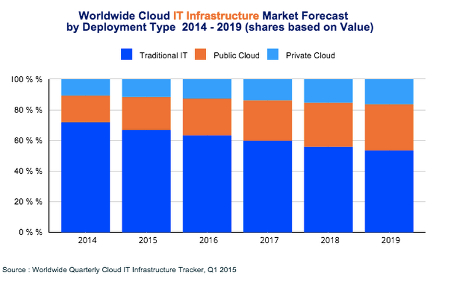
According to the Worldwide Cloud IT Infrastructure tracker for the first quarter of 2015, cloud IT will soon surpass even traditional IT models sometime in the next ten years.

value ib1

There are several noteworthy observations to make concerning this image:

  • Traditional IT is still the main player for 2015, rolling in at just over 65 percent of all deployments.
  • Public cloud IT accounts for around 20 percent of all deployments.
  • Private cloud IT makes up over 10 percent of all deployments.
  • Over the next five years, traditional IT will continue to decrease in usage, while the public cloud will make a significant jump in use. Private clouds will continue to grow, but not as quick of a rate as the public cloud.

On the financial scale, here are some statistics:

  • Spending on cloud IT infrastructures will reach $33.4 billion in 2015 alone.
  • Spending on private cloud infrastructures will grow to $11.7 billion.
  • Public cloud shows projected expenditures and growth of up to $21.7 billion.

As these numbers show, the cloud isn’t something that successful businesses should ignore. It’s not a gimmick or a fad. It’s a legitimate IT infrastructure solution that vastly improves operations and procedures. If you want to take advantage of the future of computing, cloud IT should be a top priority. The benefits greatly outweigh the cost in the long run, and there are a plethora of options to choose from; be it private cloud, public cloud, or even a mix of the two in a hybrid cloud solution.

The cloud has the ability to provide maximum mobility for your business, effectively allowing your employees to access critical systems that they might otherwise only be able to access in-house. This provides more opportunities for productivity, especially while on the road for a business trip or conference. Your team can choose how they want to work, and when, so long as the devices can access the Internet and are approved beforehand.

With the cloud dramatically changing the way we view the deployment of information and applications, we want to hear your thoughts about this revolutionary technology. Contact NuTech Services at 810.230.9455 for more information about how cloud computing can change the way your company works with technology.