virtual_cloud_400.jpg

Why it May Not Be Worth it to Replace Your Server

virtual_cloud_400.jpg

When a business undergoes a hardware refresh, it often comes saddled with unexpected costs and downtime. This is sometimes caused by hardware failure, or from unplanned-for data migration. With the advent of virtualized servers, businesses now have a better way to recover from the woes of server refreshes. Rather than purchase new hardware, it’s more economically viable to go with a virtual server that’s hosted in the cloud.

Server virtualization is a great way to save costs and reduce operational expenses in the long run. Virtual servers can separate the computing resources of a server and allocate them within a cloud-like infrastructure. Server virtualization is great for businesses that have limited budgets and resources, since this is a responsibility that’s simple to outsource to a reliable third party service provider.

Here are three major reasons why you should go with virtual servers for your next IT refresh.

Virtual Environments
One of the biggest reasons to use virtual servers is that you can create multiple computing instances on the same virtual machine. For example, if you’re using a legacy application that’s only functional with a specific operating system, you can run a virtual machine dedicated to that application. This keeps you from investing unnecessary capital into an entirely separate server unit for the exclusive use of one application. Keep in mind that this also helps you limit the cost of operation and maintenance that would be needed for a dedicated server.

Save on Operating Costs
Another major benefit that virtual servers offer is the ability to host less hardware in-house. Servers use a lot of electricity and generate a lot of heat, making air conditioning a top priority for server longevity. High energy costs can put a damper on your budget, and server virtualization offers a remedy. You can consolidate your infrastructure onto one device with multiple virtual machines, rather than create a complex infrastructure of network components. This cuts down on your operational expenses.

Effectively Manage Resources
Virtual machines let service providers or IT administrators manage their workloads more-effectively. You can monitor and adjust workloads in a cloud-based interface in real time, allowing operations to progress unhindered. While it’s possible to have your own internal IT department handle this, it’s better to outsource these responsibilities to save internal time and resources for more important matters.

The next time you need a hardware refresh, be sure to keep your server infrastructure at the top of your mind. To learn more, reach out to us at 810.230.9455.

cloud_computing_400.jpg

3 Significant Ways the Cloud Can Grow Your Business

cloud_computing_400.jpg

Has your business moved to the cloud yet? If not, you’ve got some work to do–it’s only a matter of time before the need for the cloud completely overshadows your organization. Thankfully, it’s only challenging to move to the cloud if you don’t have a group of professional IT technicians helping you.

Here are three ways that the cloud allows your business to do more with less.

Anywhere Access to Applications and Data
If your business is new to the process of cloud computing, one of the best ways you can realize its value is by virtualizing applications and providing access to them over an online environment. You may already be using cloud-based applications in the form of Microsoft Office 365 or Google Apps. These types of data storage and cloud solutions can help your employees stay productive from anywhere they have an Internet connection, which allows them to get more work done and improve efficiency.

You can also host other applications and solutions in the cloud, like a Voice over Internet Protocol system. It’s basically an online phone system, and some of the more dynamic VoIP systems have phone apps that allow your employees to use their company phone number on their smartphone.

Improved Budget
The cloud takes advantage of virtualized machines like servers and desktop infrastructures, which allow you to cut down on the amount of hardware stored on-site. The idea is to reduce workloads in-house and place these mission-critical services in the cloud, located in a virtual environment that can be scaled and managed online. This type of virtualization is important for limiting the amount of on-site technology that needs maintenance, which affords your business more opportunities for cost savings. Additionally, the fewer resource-intensive solutions you have in your office, the more you’ll save on energy bills like electricity and air conditioning.

Simplified Network with Room for Flexibility
A simplified network means that you’re hosting the bare minimum amount of hardware on-site, and that you’ve managed to virtualize the majority of solutions that your business relies on. For example, many businesses don’t take advantage of full-fledged workstations, and instead choose to use thin clients. Thin clients work by calling a desktop infrastructure from the virtualized server, as well as all of the necessary resources to function properly. Thin clients are less expensive and consume less energy, so they’re a viable alternative to the traditional workstation–when backed up by virtualization, of course. Furthermore, cloud-hosted solutions have the flexibility to change and adapt to your business’s specific needs. This helps by allowing you to allocate resources as they’re needed.

To implement a cloud solution that’s right for your business, reach out to NuTech Services at 810.230.9455.

cloud_migration_initiatives_400.jpg

3 Lessons We’ve Learned for a Successful Cloud Migration

cloud_migration_initiatives_400.jpg

If you’ve recently decided to implement cloud computing for your business, then we commend you. You’ve chosen to use a powerful and dynamic solution for your computing needs. However, choosing to use the cloud and actually implementing the cloud are two entirely different monsters. Now that you have your sights set on the cloud, what do you have to do to get your infrastructure ready for migration?

The first thing you need to know is that a cloud migration is much more involved than moving a file from one location to another. We’re talking about your entire data infrastructure getting migrated to a new location in the cloud. This involves a lot of prep work, not unlike moving all of your belongings from your home to a new house. The better prepared you are for the move, the smoother the transition, and the lower the probability that you’ll misplace important items of value.

ITProPortal provides some insight into what migrating properly to the cloud takes: “It involves a complex infrastructure migration process. Good preparation is the key to success. Those organizing the migration process should ensure that all data is ready for the move and that the company network has the necessary capabilities to interact with the cloud.” This is the biggest reason why you want a qualified professional to assess your IT infrastructure before you start your move to the cloud.

Consider these aspects of cloud migration before making the big move:

Sort and Label Your Files
Over the many years you’ve been in business, your organization has collected countless files and documents. It’s crucial that you take the time to determine which files are worth saving and moving. Otherwise, you could waste valuable time and resources moving files that you no longer need, which could drag out the migration process.

Prepare Your Network Infrastructure
Cloud migration may come with changes that need to be made to a network infrastructure. In general, when migrating to the cloud, you need to consider two major additions; setting up a direct Internet breakout in order to distribute traffic across external networks, and multiple firewall instances in order to secure the various Internet connections.

Have a Migration Timetable
Even the most thorough planning for a cloud migration can yield results that take weeks or months to fully realize. Therefore, you need to provide your staff with an accurate timetable for the transition to ensure that their workflow isn’t disrupted. One way to do this is to plan for how user settings are migrated, like profiles, address books, calendars, and so on. To help with this, ITProPortal advises: “Instead of moving all their data to the cloud, more and more companies are opting for a hybrid solution. This means that some users and storage locations stay with Exchange on-premises, while the rest move to the cloud.”

Once all of your data is successfully migrated to the cloud, you’ll want to focus on security, archiving, and data backup to ensure that you’re ready for anything. NuTech Services is happy to help your business with

autoscaling_cloud_solutions_400.jpg

Why True Autoscaling is Out of Reach for the Average SMB

autoscaling_cloud_solutions_400.jpg

Shopping for a cloud solution can be difficult. You’ll be sold on plenty of impressive-sounding features that you may not know anything about. One feature that you may have seen floating around is autoscaling, which sounds great on paper, but may not live up to its expectations. The only problem, though, is how you can identify those that deliver, and those that don’t, before investing in a project.

The idea of autoscaling for your cloud solution seems to be great. Workloads can automatically be adjusted depending on the scale and specific amount of resources they need to perform a task. The idea is that these processes are automated so that you can focus on doing your job. This always-on feature keeps your network monitored, preventing bottlenecks and traffic spikes from derailing operations. Supposedly, cloud autoscaling can handle all of this without any human intervention whatsoever.

Unfortunately, this simply isn’t the case.

The reality of the situation is that autoscaling to this degree requires an immense amount of human oversight and intervention, that the “auto” in autoscaling is hardly a qualifying term. ITProPortal explains, “To create a truly automated and self-healing architecture that scales with little or no human intervention requires custom scripts and templates that can take months for a skilled team to get right, and many organizations have neither the time nor those resources to make it work.”

Instead of investing so much time and effort into making a truly automated system, it’s often best to just have human oversight involved in your cloud solution. This is done best by allowing trusted IT administrators to keep tabs on network traffic and intelligent scaling. Besides, isn’t a human system better than an automated system in the first place?

This type of oversight for a cloud platform is important, especially since network computing can be unpredictable at times. For example, what would happen if your website was hosted in the cloud, and your business was featured in a TV spotlight on the local news? Your website might crash from the unexpected amount of traffic it receives. Any solution connected to the Internet is vulnerable to such a threat, particularly DDoS attacks, which are frequently used by both fledgling hackers and experienced criminals alike. If a network is being monitored with the proper oversight, the needed resources can be allocated and scaled to suit the situation, and (hopefully) prevent the attack.

However, nothing is as simple as it seems, even when people are involved. For a small business, it can be difficult for the IT budget to procure a salary for a dedicated IT technician who can constantly oversee their network. Furthermore, even if you can accommodate an in-house IT technician, you know how busy they can get. ITProPortal explains: “They don’t have time for this either. Couple it with the fact that they are chastised when systems are under-provisioned or fail, that re-starting a system may land it on an unfortunate server filled with noisy neighbors, and that all of this is happening at the scale of dozens or hundreds of servers at a time – and this feels like a great time to just over-provision everything and leave well enough alone.”

The SMB seems to be stuck at an impasse here; with true autoscaling being difficult, if not impossible to achieve, and onboarding new IT technicians being out of scope, the most effective way to achieve a semblance of autoscaling for your cloud solution is to use a managed cloud service. NuTech Services’s managed services provides affordable and accessible IT solutions for small businesses, which can include the oversight you need for your cloud solution.

In the end, you won’t be doing any of the work, so it’ll be just as good as any automated cloud solution could be. To learn more, reach out to us at 810.230.9455.

enterprise_level_mobility_solutions_for_business_400.jpg

How Your Business Can Take Advantage of These 4 Mobility Trends

enterprise_level_mobility_solutions_for_business_400.jpg

In a world where mobility is king, it can be challenging at best to implement new solutions without first taking into account how they can affect your business’s mobility. Especially with the cloud gaining ground, companies have their eyes on mobility and the requisite security, hoping to achieve greater flexibility and profitability by doing so.

The following are mobility trends that have made themselves prevalent throughout the enterprise world. By analyzing them and comparing them to your own organization, you might be able to save yourself some trouble in the future by keeping them in mind when implementing new solutions.

  • Security is a priority: It doesn’t matter what type of devices your business uses, or how you access data. Security is always going to be a top concern, especially for mobile devices that are often connecting to unsecured Wi-Fi networks. Using what’s known as a virtual private network, as well as monitoring access to critical data, can be great ways to limit your company’s exposure to threats while mobile.
  • More focus on the cloud: The cloud allows data and applications to be available from anywhere with an Internet connection via a web browser, improving business mobility and agility. The cloud can allow your business to collaborate and communicate no matter where you or your team are, allowing for unprecedented convenience.
  • The convergence of desktop and mobile: We see more of this every day with Windows 10, an operating system that Microsoft is attempting to implement for all devices in some way, shape, or form. The idea is to make apps and operating systems that work across devices, so as to increase user productivity and flexibility. Think about it; are you more likely to get work done with a watered-down version of an app on a mobile device, or with a full version that contains all of the features you would find on the desktop application?
  • Regulation and oversight are needed: Data control is a must for any organization that wants to use mobile devices to their benefit. You need to make sure that your team can be held accountable for not just their actions, but also for what they do with your data. You should be able to see when files are accessed, and by whom. It’s important that you implement measures that restrict the flow of data as much as possible, so as not to expose sensitive information to those who have no business viewing it.

With so much to think about, how does your business implement mobile technology? If you’re ever concerned with adding new devices or setting up security policies for smartphones, tablets, laptops, or other mobile technology, reach out to NuTech Services at 810.230.9455. We offer several solutions, such as mobile device management, which can help your team best leverage their mobile devices, without putting your organization’s sensitive data at risk.

cloud_services_adoption_400.jpg

The Vast Majority of Business Owners that Try Cloud Services Don’t Look Back

cloud_services_adoption_400.jpg

Your business’s productivity suite, be it Google Apps for Work or Microsoft Office 365, is a critical component for your success. These services, when implemented in the cloud, can be major game-changers, and it’s thanks to the convenience of mobile data and application access that have led to such vigor in the development of the cloud.

In particular, the success of “software as a service,” or SaaS, shows the need to leverage online computing solutions to your advantage. Businesses can use SaaS to pay a flat rate for a productivity suite, or other virtual solution. The software is then accessible through the cloud via an Internet connection, which makes it both flexible enough to add new users, and accessible enough to be used on any device. A study by BetterCloud reveals that 91 percent of Google Apps users claim that SaaS helps them more than traditional desktop applications, while 68 percent of Office 365 users found the same.

SaaS’s success reveals that paying less for more over time can be a valid way to build out your IT infrastructure. Instead of purchasing software outright, businesses are finding that it’s more efficient and economically feasible to pay smaller fees at a monthly rate. Other benefits include using only the most up-to-date versions of business apps, and the ability to access these applications from anywhere with an Internet connection. Considering how it’s both easier and more cost-effective to add users to a cloud-based solution than purchasing new software licenses for all of your employees, the cloud is definitely the way to go.

Despite the many benefits, BetterCloud has found that there are still many significant roadblocks that could railroad your business’s implementation of cloud-based applications. One of them could be your business’s dedication to your old desktop application infrastructure. Even though the cloud is a great new addition to your organization, you may have employees who would prefer to use desktop apps stored locally on their machine. Remember, concepts like cloud computing, document sharing, and collaborative technologies, are still relatively new in the business environment. It will still take time for these concepts to sink in and take root.

Modern technology solutions have given rise to businesses that require mobile, collaborative workplace environments. Simply having the necessary software solutions on your workstation isn’t enough; people want to stay productive even when out of the office. This drive for mobility and constant access to data and applications is what has fueled the cloud frenzy. Therefore, it’s becoming not just a gimmick, but an important commodity in the business world, and one that you can’t ignore forever.

Is your business ready to implement solutions that are designed to help your team improve operations? If so, give NuTech Services a call at 810.230.9455. Our team will assist in the swift deployment of great cloud solutions designed for your organization’s specific needs.

moving_your_office_tech_400.jpg

Moving to a New Office Building? Make Sure Your Technology is Good to Go!

moving_your_office_tech_400.jpg

Moving your office is never an easy task. You have to move furniture, personal objects, and above all else, your technology infrastructure. There’s nothing simple about moving your office’s technology, but it’s still nothing to get worried about. That’s why we’re here to help, from suggesting the optimal network cabling, to the proper deployment of new and improved technology solutions.

For example, let’s take a look at your old (or your current) office. You have a certain number of workstations, one for each of your employees. These workstations need to be connected via cable to your business’s network. Otherwise, your team could go without required software, data, and other important resources. Keep in mind that your cabling infrastructure could quickly grow to be uncontrollable, especially if you don’t approach your cabling procedures in an educated and logical manner.

Another issue that you might encounter comes from equipping everyone with the right communications solutions. The most notable problem is setting up phone lines for everyone who needs them. Adding new lines is far from a simple task, and one which can quickly exceed your budget if it’s not planned out in advance. This also makes adjusting for growth much more difficult, considering you have to add and/or remove lines as needed, making for an expensive investment.

Furthermore, how are you going to move all of your physical files? Chances are that you would much rather make the move without lugging unnecessary items; especially extremely heavy and cumbersome objects like large file cabinets. The problem is that your organization might be torn between keeping the files and getting rid of them, especially if there’s mission-critical data stored somewhere. There may be files you’re required to keep around, plus some that you might not need anymore. It makes sense to take inventory before committing to such a move.

NuTech Services offers several services that are designed to help your business make its move much easier. In fact, our services aren’t just convenient for businesses that are relocating; they’re great for most any SMB that wants to maximize productivity.

  • Voice over Internet Protocol (VoIP): With a VoIP solution, your business can take advantage of your Internet connection to make and receive phone calls. Since the only connection you need is to your Internet, you can skip out on the complex cabling required of traditional telephone systems. You still need to keep an eye on your bandwidth, but if you use a NuTech Services-provided solution, we’ll help you ensure that you get the most out of VoIP with minimal incident.
  • Cloud storage and virtualization: If you’re having trouble providing information to your entire infrastructure, you can use cloud computing and cloud storage to provide access to applications, software, and data required by your employees throughout the workday. Doing this helps you avoid unnecessary cabling and allows for similar data access capabilities. As long as your employees have an Internet connection (say, through a WiFi signal), they’ll be able to connect to the cloud and access information. In other words, they can work from anywhere, leading to more productivity.
  • Electronic records storage: If your organization is having trouble with file storage, NuTech Services can equip your business with a solution that’s designed to help you eliminate unnecessary physical file storage systems in the office. Instead, you can store your files in a digital, compliant space, that’s optimized for your file’s security. Since your files will be stored digitally and protected with data backup, you’ll be able to quickly get back up to speed without the frustration of filing cabinets.

A new office means a second chance to start over, so why not do your IT the right way? For more information about how we can help your office relocation progress more smoothly, give NuTech Services a call at 810.230.9455.

b2ap3_thumbnail_cloud_uses_400.jpg

4 Ways Cloud Computing Can Benefit Any Business

b2ap3_thumbnail_cloud_uses_400.jpgIs your business using the cloud in 2016? If not, you should know that it’s a great tool that’s designed to help your business better manage its data and application deployment. However, the cloud can be used for so much more, and it’s quickly becoming an indispensible tool for SMBs.

Here are four ways that cloud computing is changing the way that small businesses handle their technology.

Data Storage
The cloud is a great way to share data amongst your entire organization, and deploy it on a per user basis. Businesses can store their information in a secure, off-site location, and the cloud allows them to access it through an Internet connection. This eliminates the need to host your data internally, and allows your employees to access information from any approved device through a secure connection, effectively allowing for enhanced productivity when out of the office.

Application Deployment
Your business relies on having various types of applications and software solutions available for use. If you lose access to these programs, you could be facing lost productivity and downtime, which could directly influence your bottom line. If you’re using the cloud to deploy your applications, any Internet-connected device can access the applications you need to keep work moving forward at a respectable pace. This opens up all sorts of opportunities for cost savings, including providing your team with the ability to work from anywhere.

Virtualization
The cloud can be an effective tool for virtualization, which is a great method for cutting costs for your business. By virtualizing physical IT components, you’re abstracting them for use in the cloud. This means that you’re storing them in the cloud. Businesses can virtualize servers, desktop infrastructures, and even entire networks for use in the cloud. Doing so eliminates the physical costs associated with operating equipment, allowing you to dodge unnecessary costs and limit the risk of hardware failure. For example, you can deploy all of your users’ desktops virtually from the cloud so you don’t need to rely heavily on more expensive workstation technology, and can instead use thin clients. Simply log into your company cloud and access all of your applications and data on virtually any Internet connected device.

Backup and Disaster Recovery
A BDR device relies on the cloud to ensure quick and speedy recovery deployment. The BDR takes snapshots of your data, which are sent to both a secure, off-site data center, and the cloud. From there, you can access your data or set a recovery into motion. If you experience hardware failure, the BDR can temporarily take the place of your server, allowing you ample time to find a more permanent solution. The cloud is crucial to the success of a BDR device, simply because the cloud is where the BDR stores an archive of its data.

With so many great uses for the cloud, only one question remains: how will your business use the cloud in 2016? NuTech Services can help you get started. To find out more about your options, give us a call at 810.230.9455.
b2ap3_thumbnail_cloud_computing_lessons_400.jpg

3 Ways Businesses Can Get the Most Out of the Cloud in 2016

b2ap3_thumbnail_cloud_computing_lessons_400.jpgAs the cloud becomes widely adopted by SMBs the world over, companies have come to expect more from their cloud services. If you’re not taking full advantage of cloud computing, then you may be missing out on the many ways that it can help you meet your company’s goals.

According to Forrester Research, there are three goals in particular that the cloud can be leveraged for in order to enhance the operations of SMBs. Consider the following:

  • Decreased administrative burden: One of the biggest advantages of the cloud is its ability to outsource its required maintenance and management to someone outside of your company. Considering how stressed for time most managers are in SMBs, they will appreciate having yet one more responsibility taken off their plate. Think for a moment of all the other, more profitable things that your managers and IT team can do for your business if they’re not being bogged down by managing company files and software solutions.
  • Increased implementation speed: When a business chooses to implement a new solution, they want it ready to go as soon as possible. With the cloud, taking advantage of its many services is as easy as setting up an account for you and your team. Compare this to the effort it takes to install hardware and cables if you want to add a new solution to your in-house IT network.
  • Enhanced security, with minimal expense: Cloud security has improved vastly over the years, along with its affordability. When working with IT professionals like those at NuTech Services, you can protect your cloud offering with as little, or as much, security as you feel you need. This is yet another responsibility that the cloud removes from a manager’s plate.

The one thing that all of these benefits have in common is that they’re part of the public cloud computing option (which is different than the private and hybrid cloud options). While the hybrid and private cloud options have their own sets of benefits, the strength of the public cloud is that it provides organizations the most functionality, while only requiring a minimal amount of maintenance and oversight on behalf of you and your staff.

For the average SMB, the public cloud is the right fit, due to its ease of use. However, don’t let that discourage you from considering other cloud options. For example, a private cloud option is best for a business dealing with sensitive data, like health care records or credit card information. Additionally, the private cloud is good for businesses that have an adequate amount of capital on hand they can use to purchase in-house IT equipment.

At the end of the day, what it comes down to is going with a cloud solution that’s the right fit for your company. After talking with the IT professionals at NuTech Services, you may even decide that the hybrid cloud option is the right fit for your business (which combines the features of both the private and public cloud offerings). Whichever cloud computing option you go with, NuTech Services is here to help with its implementation and maintenance. To go with a cloud computing option that will be utilized to the fullest, give us a call 810.230.9455.
b2ap3_thumbnail_cloud_security_400.jpg

How a Cloud Service Without Role-Based Access Controls is Asking For Trouble

b2ap3_thumbnail_cloud_security_400.jpgCloud computing started out as a trend, but it’s become a staple in the modern business environment. A recent poll of IT and business executives by Harvard Business Review and Verizon shows that 84 percent of respondents have increased their use of cloud services in the past year, 39 percent of which “increased significantly.” The issue that comes from such an increase is the idea of employees accessing information that they aren’t supposed to.

This particular type of security problem is called role-based access control, which is an increasing cause for concern in the cloud environment. Despite role-based access control being a prevalent part of network security, perhaps due to the cloud’s ease of use, user permissions are a problem that often get overlooked in cloud computing.

User permissions are an ordinary part of any traditional in-house IT infrastructure. They’re ordinarily handled by your in-house IT staff or a trusted IT professional. One of the main advantages of an in-house network is that your technicians will generally understand each employee’s role within the organization, especially if the business is small or medium-sized. The issue at hand is the fact that your cloud service provider will be responsible for the security oversight of your cloud network, and it’s more likely than not that they will be unfamiliar with your organization’s personnel infrastructure.

For the record, we aren’t suggesting that outsourced network security is bad. In fact, we highly recommend it; we’re just trying to raise awareness of the fact that cloud computing isn’t a service that can be implemented without security in mind. For example, you’ll want to make sure that your chosen cloud solution provides the level of control that you need, along with security that can be implemented on different levels according to each user’s role within the organization. Doing so will likely require a dedicated administrator within the company, or ensuring that you retain proper relations with the cloud provider so they can cater to your specific role-based control needs.

NetworkComputing explains:

When you have employees with different roles in your company, access control is a key feature that can help ensure basic cloud administrative security. You’ll need to exercise caution to prevent credentials from being compromised, and to ensure menial errors don’t spoil your day. Implementing robust and powerful access control is important to protect company resources.

Furthermore, you’ll want to make sure that any information that’s required for a user’s role will available to them, and only them. For example, in-house IT workers have access to more information than the average worker, much of which is sensitive in nature. Despite this, according to a recent study by Intermedia and Precision Sample, IT workers are 10 percent more likely than non-IT staff to give away their login credentials for superfluous reasons.

The idea behind limiting access to data on a per-user basis is to limit the data’s exposure to potential threats. Much of the time, however, you want to have secondary layers of protection up and running in order to maximize the security of your business. For example, two-factor authentication uses an SMS message or a phone call to deliver a secondary credential for use when accessing an account. These types of precautions can aid in role-based access to information, making it much more difficult for other users to access critical information.

Cloud computing is such a powerful and efficient practice that it’s no surprise it’s grown so rapidly over the past few years. The best way to approach cloud security is by understanding the services you’re taking advantage of, and relying on a trustworthy cloud service provider. NuTech Services can assist your business with all of its cloud computing needs, including the maintenance, upkeep, and management of your cloud data.

For more information about how we can help your business with cloud computing, contact NuTech Services at 810.230.9455.
b2ap3_thumbnail_cloud_backup_and_security_400.jpg

Why the Cloud is the Best Option For Your Data’s Backup Policy

b2ap3_thumbnail_cloud_backup_and_security_400.jpgThe cloud is a great tool that can help your business fully leverage its technology solutions, but one of the most common problems that people associate with the cloud is that they believe it’s not nearly as secure as a private in-house IT network. However, contrary to popular belief, the cloud is a very secure medium for your data storage and deployment, particularly for your data backup needs.

For a demonstration, let’s take a common problem, like the storage of backed-up copies of data, and apply it to the cloud. There are two common ways to store data backups: on tape, which is prone to user error and requires a significant amount of physical space for effective use; and then there’s cloud-based backup. Normally, data backups would take up a ton of space on your in-house network. Furthermore, storing your data backups on the network that you’re backing up is just plain silly. Therefore, it makes the most sense to store your data off-site in a secure data center, or in the cloud.

The Shortcomings of Tape
Though tape backups have been used by businesses for a very long time, they’re an outdated technology that doesn’t appeal to the average small and medium-sized business. Tape can be considered a manual mode of data backup because it relies on human interaction to work properly. This means that it’s the responsibility of your staff to set the backup and make sure that it happens every night. Otherwise, you could potentially lose an entire day’s worth of work. Furthermore, processing a backup is a resource-intensive task that shouldn’t be done during normal work hours. In general, the tape backup process is inefficient and dated at best, especially in light of more modern backup solutions.

The Benefits of Cloud Backup
The benefits of a cloud backup solution are overwhelming when compared to the typical tape backup solution. While tape requires humans to set and perform backups, a cloud-based data backup solution automatically takes snapshots of data that’s been changed since the last backup was taken. This eliminates the chance of user error, and ensures that the backups are taken without a hitch. Unlike tape backups, which effectively take a backup of ALL data on the network, a cloud backup solution only tracks changes made to files. This means that there’s less strain placed on the system during the backup, meaning that data can be backed up multiple times without the severe repercussion of downtime.

The cloud makes storing data both more efficient and more secure, especially for backup and disaster recovery processes. NuTech Services’s backup and disaster recovery (BDR) solution is a device that’s capable of changing the way that your business handles data backups. With our BDR device, your organization can take advantage of multiple backups that are taken periodically throughout the day. Then, thanks to your data’s convenient location in the cloud, the BDR device can rapidly deploy the backed-up copy of your data to your business’s infrastructure. In the event of a hardware failure or similar disaster, the BDR can act as your server, allowing you time to find a more permanent solution to the problem.

For more information about our BDR device, give us a call at 810.230.9455.

b2ap3_thumbnail_implement_cloud_solutions_400.jpg

Study: The Cloud Can Double Small Business Profits

b2ap3_thumbnail_implement_cloud_solutions_400.jpgIf your business has put off embracing cloud computing as a legitimate method for data distribution and application deployment, it might be time to reconsider why you haven’t integrated a cloud solution yet. A recent study from software companies Exact and Pb7 Research shows that the cloud can provide your organization with a significant increase in both profits and net growth, proving once and for all that cloud business is better business.

Specifically, the study shows that the cloud can potentially double small business profits and help them achieve an additional 25 percent revenue growth compared to businesses that don’t take advantage of any cloud solutions. This study, which was published on August 19th, contains findings that are based on 750 interviews with small businesses, all of which have less than 50 employees. 51 percent of all respondents claimed to use at least one form of cloud computing software, while nearly 30 percent of small businesses in the United States admitted to using three or more cloud applications in the workplace.

In other words, most businesses are adapting to the cloud and using it to improve the way they operate. When asked why they chose to implement cloud solutions, businesses gave these top five reasons:

  1. Security: 32%
  2. Lower IT costs: 26%
  3. Low maintenance requirements, less physical infrastructure: 23%
  4. Easy mobile access: 23%
  5. More productivity and efficiency for end-users: 21%

Additionally, when asked to rate certain aspects of the cloud on a scale of 1 (low) through 5 (high), the average results were:

  1. Easy to use: 4.0
  2. Easier to find information: 4.0
  3. Easier to share information: 3.9
  4. Increased productivity: 3.9
  5. Easier to add and remove users: 3.8

While the reasons why cloud users implement the cloud vary, this proves that there are a number of benefits that this type of computing infrastructure can provide. When considering integrating a cloud solution for your business, you need to ensure that your organization can handle this change in protocol. Changing the way you deploy and manage your data and vital technology systems requires the attention of a knowledgeable professional. Contact NuTech Services at 810.230.9455 to learn more.

b2ap3_thumbnail_profits_from_the_cloud_400.jpg

Cloud Computing Grows at Staggering Rate While Traditional IT Hangs In There

b2ap3_thumbnail_profits_from_the_cloud_400.jpgIf your organization hasn’t considered the cloud as a viable business solution, stop what you’re doing and check some recent statistics. You might be surprised to learn that cloud spending is the third-biggest IT expenditure. Such popularity shows that businesses are finding the benefits that the cloud has to offer to be substantial, and you too can take advantage of the cloud to more effectively leverage today’s technology.

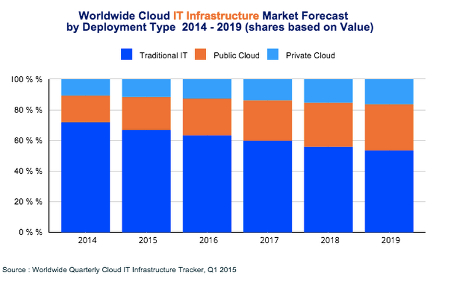
According to the Worldwide Cloud IT Infrastructure tracker for the first quarter of 2015, cloud IT will soon surpass even traditional IT models sometime in the next ten years.

value ib1

There are several noteworthy observations to make concerning this image:

  • Traditional IT is still the main player for 2015, rolling in at just over 65 percent of all deployments.
  • Public cloud IT accounts for around 20 percent of all deployments.
  • Private cloud IT makes up over 10 percent of all deployments.
  • Over the next five years, traditional IT will continue to decrease in usage, while the public cloud will make a significant jump in use. Private clouds will continue to grow, but not as quick of a rate as the public cloud.

On the financial scale, here are some statistics:

  • Spending on cloud IT infrastructures will reach $33.4 billion in 2015 alone.
  • Spending on private cloud infrastructures will grow to $11.7 billion.
  • Public cloud shows projected expenditures and growth of up to $21.7 billion.

As these numbers show, the cloud isn’t something that successful businesses should ignore. It’s not a gimmick or a fad. It’s a legitimate IT infrastructure solution that vastly improves operations and procedures. If you want to take advantage of the future of computing, cloud IT should be a top priority. The benefits greatly outweigh the cost in the long run, and there are a plethora of options to choose from; be it private cloud, public cloud, or even a mix of the two in a hybrid cloud solution.

The cloud has the ability to provide maximum mobility for your business, effectively allowing your employees to access critical systems that they might otherwise only be able to access in-house. This provides more opportunities for productivity, especially while on the road for a business trip or conference. Your team can choose how they want to work, and when, so long as the devices can access the Internet and are approved beforehand.

With the cloud dramatically changing the way we view the deployment of information and applications, we want to hear your thoughts about this revolutionary technology. Contact NuTech Services at 810.230.9455 for more information about how cloud computing can change the way your company works with technology.

b2ap3_thumbnail_cloud_backup_400.jpg

Introducing the 3-2-1 Formula to Effective Data Backup

b2ap3_thumbnail_cloud_backup_400.jpgWhile there are several options your business has for a backup solution, how much thought have you really put into it? As one of the most mission-critical functions of your IT infrastructure, you need to be sure that you’re getting the best solution for your money. More importantly, you need to know that you can rely on your solution to get you through the most trying times, like after a disaster or data theft.

Taking a 3-2-1 approach to your backup policy is a simple way to get comprehensive continuity for your data infrastructure. InfoWorld describes this concept as having three copies overall of your organization’s data, with two of these being in different formats, and one of them being stored off-site. This is difficult, if not impossible, to do with tape backup, which some businesses still run. However, there’s a much easier way to handle data backup in the form of cloud backup.

With cloud backup, your business can take advantage of safety and security that’s on the level of large enterprises. Unlike tape, which is limited due to the time necessary to perform a comprehensive backup, the cloud allows for multiple snapshots of your data taken throughout the workday. This gives you the peace of mind that your information is comprehensive and redundant. The cloud even makes recovery automatic and as easy as can be, making it ideal for both storage and recovery options.

There are two main issues of cloud data backup that most businesses get stuck on: the technical details, and the price of a complete infrastructure overhaul. Many small and medium-sized businesses feel that they can’t afford this solution, or they don’t have the manpower to ensure that all of the mission-critical technology is available. Being able to back up your files on demand is an essential part of today’s online business world, especially with hackers running amok. So, what’s a budget-minded SMB to do?

One solution is to call NuTech Services and let us explain our managed service offerings to you. Our solutions are designed to optimize operations and increase productivity on all fronts. In fact, our Backup and Disaster Recovery solution is one of our most important services, especially today when hacks can happen when you least expect them. It’s designed to take multiple backups of your data throughout the workday, and sending copies to both an off-site data storage, and in the cloud for easy access.

One of the best features of our BDR solution is its practical neutralization of costly downtime. When your server goes down due to a hack or other natural phenomenon, you’ll ordinarily lose access to any data stored on that server. However, a BDR device has the ability to immediately take the place of your server if it goes down for some reason, and it can deploy your backed-up data in a moment’s notice. This keeps your business running, even when your technology isn’t, giving you ample time to find an adequate replacement.

To make backup this easy, all you need to do is call 810.230.9455.

b2ap3_thumbnail_internet_of_things_security_400.jpg

The Internet of Things is the Next Big Thing, Are You Ready?

b2ap3_thumbnail_internet_of_things_security_400.jpgWhat comes to mind when you think about the Internet of Things? Tech enthusiasts around the world see hordes of connected devices taking advantage of mobile technologies to augment everyday life; but the realist sees a horde of devices that pose a considerable threat to network security. How can your business ensure maximum security in the face of such a phenomenon?

As explained by Gartner’s IT glossary, “The Internet of Things (IoT) is the network of physical objects that contain embedded technology to communicate and sense or interact with their internal states or the external environment.” This means that the more devices connecting to the Internet, the more likely security is to take a hit. This is further augmented by the fact that most IoT devices are designed to communicate with each other, increasing the risk of data leakage.

Modern businesses need to prepare their networks for the Internet of Things before data loss and compromisation come into the picture. Your organization should take an active, proactive role in its network security, especially when it comes to sensitive corporate information. The Internet of Things transfers and receives data in a vastly different manner from previously established protocol, making protecting this data a daunting task. This means that your business needs to take a comprehensive approach when it comes to network security.

According to Brian Partridge of 451 Research, there are a couple of variables that are common throughout the vast amount of different IoT device, like a mobile device, a network, and a cloud service. Furthermore, there are three challenges posed by the Internet of Things that plague IT professionals:

  • Confidentiality Challenge: Limiting access to data on a user-by-user basis. For example, the average employee doesn’t need access to your financial records.
  • Integrity Challenge: Making sure that data is sent and received securely, without being altered, detected, or stolen while in transit. In other words, making sure that your data isn’t vulnerable to attack while it’s moving from one system to another.
  • Authentication Challenge: Making sure that received data is coming from a legitimate source.

In order to fulfill your duties as a business owner, you need to keep your organization’s data secure. Call NuTech Services for any concerns you might have about the Internet of Things. We can discuss ways to optimize network security so you can worry less about external threats, and concentrate more on running your business. Give us a call at 810.230.9455 to learn more.

b2ap3_thumbnail_expecations_from_cloud_computing_400.jpg

Is Your Cloud Provider Meeting Your Expectations?

b2ap3_thumbnail_expecations_from_cloud_computing_400.jpgWhen cloud computing was first introduced to the consumer market, the technology required a fair amount of explaining. Today, the cloud is widely utilized by consumers, despite the fact that 51 percent of the public believe that actual clouds are somehow involved. Due to so many people using the cloud, consumers are now approaching computing much differently.

Even though most consumers may not know exactly how the cloud works, they have changed their expectations about computing because of their exposure to it. Namely, consumers expect whatever cloud service they use to be reliable and accessible. When it comes down to it, these expectations about the cloud actually trump all other expectations for computing technology.

Think about it, there was a time when consumers put a lot of stock into getting the most powerful home PC they could afford. Today, the average consumer has multiple devices of varying quality, spread out between their home and office. Thanks to the cloud, users are able to access their needed files on each one of these devices, meaning that the specs of the hardware take a backseat to the reliability of the device’s cloud software.

Additionally, the development of cloud services has gone in the direction of making the technology ultra-convenient for consumers to use. This too has influenced the expectations that consumers have regarding their cloud software, making it so that users expect installs, upgrades, and issues be resolved with just a few clicks. This is quite a leap from the days of purchasing software on CD-ROM and transporting files via USB thumb drive.

One tech blogger who does a good job articulating the high demands of today’s consumers is ZDNet’s David Gewirtz. Speaking on behalf of the consumer, Gewirtz compiles an accurate list of what today’s consumer looks for in a cloud service offering:

  • Some cloud services are free, but we expect premium upgrades.
  • If paid services are involved, we expect to easily and smoothly add or remove services merely with a mouse-click and a credit card.
  • As soon as a service plan’s capacity is reached (or just before), we expect the service to offer us an upgrade, not require us to go hunting to make things work.
  • We also expect fees to be tiered, so that each new tier provides more value than the last, with an incremental fee or jump.
  • Fees are usually all-you-can-eat for a year or smoothly scalable as soon as more capacity is needed.
  • We expect to be able to use the service on any compatible machine.
  • And we generally expect the service to work on pretty much anything.
  • We expect all our service-related data to just be there, wherever we are. How that happens is not our problem.
  • Installation is a click or a login. That’s it. It’s just there. There are no longer installers, updaters, zip files or other things to download and run on the desktop. Just click and run.

Does your company’s current cloud solution meet these expectations? If it doesn’t, then there is likely another cloud solution available that does. NuTech Services can provide you with the cloud services your business needs to succeed. In the same way that the cloud has completely improved utility computing, we feel like revolutionizing your IT infrastructure is a reasonable expectation to ask of your IT company. Call us at 810.230.9455 to learn more.

b2ap3_thumbnail_which_cloud_400.jpg

What Cloud Matches Your Needs: Public, Private, or Hybrid Cloud Solution?

b2ap3_thumbnail_which_cloud_400.jpgThe cloud is an innovation which is changing the way organizations handle the storage of their data and application management; yet, some businesses can’t tell the difference between public, private, or hybrid clouds.

NuTech Services will attempt to explain cloud computing to you in a way which is simple and easy to follow, including the key benefits and disadvantages offered by particular types of cloud-based computing.

One of the biggest misconceptions surrounding the cloud, according to Steven Vaughaun-Nichols of CSC, is that cloud computing is “a bunch of servers.” The clouds themselves aren’t virtual servers, in-and-of themselves. These clouds consist of data stored on virtual machines within secure data centers. He emphasizes that clouds deliver a “user-controlled utility.” Therefore, these cloud solutions are designed to provide users with a certain service that’s treated like any other utility. He cites Appcore, which defines cloud orchestration as “the combination of tools, processes, and architecture that enable virtualized resources to be delivered as a service.”

Just like those fluffy formations in the sky, clouds take on many different forms, depending on what kind of hosting your business prefers.

  • Public clouds: When a business takes advantage of a public cloud, they’re using services provided over a publicly-accessible network, usually by an external third-party vendor. Public clouds are particularly useful for start-ups or smaller business ventures, as they are often affordable and readily accessible. This also means that the responsibility of a self-hosted cloud isn’t placed on your business’s shoulders; however, there’s a notable lack of security and control provided by the public cloud.
  • Private clouds: In direct contrast to the public cloud, the private cloud is generally hosted in-house on a private network. This allows for greater data security through the use of security-augmenting devices and applications.
  • Hybrid clouds: A hybrid cloud solution is like the middle ground between both public and private clouds. An example of a hybrid cloud is one which allows your business to host confidential corporate data on-premises in a private cloud, while taking advantage of a public cloud for the roll out of mission-critical applications (i.e. software as a service).

Hopefully, we’ve helped clear up any confusion you might have as a business owner. If you haven’t yet considered integrating the cloud into your computing infrastructure, we at NuTech Services can be of service. We’ll bring our decades of experience in IT consultation to the table and help you decide which cloud solution is right for your business. Give us a call at 810.230.9455 to learn more.

b2ap3_thumbnail_virtualization_to_the_cloud_400.jpg

The Top 3 Reasons You Shouldn’t Ignore Server Virtualization

b2ap3_thumbnail_virtualization_to_the_cloud_400.jpgIs your business taking advantage of server virtualization? It’s a popular solution that increases efficiency and minimizes risk. Yet, despite the well-known benefits of virtualization, there are still businesses that are hesitant to adopt it. Are you still on the fence about virtualization? Consider these top three reasons why server virtualization may be right for you.

Application Isolation
When your server is virtualized, you’re able to isolate needed applications. Isolating an application on a dedicated server unit is very wasteful and very impractical, both in terms of wasted electricity and computing resources. Yet, “one application per server” is a common way that many SMBs go about hosting their data.

A virtual server is an efficient alternative to this problem of wasting resources. With a virtual server, your applications are assigned in a controlled environment and given just enough resources to efficiently meet your needs. This frees up space and bandwidth on your local server units so they can handle more mission-critical tasks.

Maximum Uptime
Operating a physical server comes with a degree of risk. Threats like hack attacks, hard drive failure, or performing major maintenances can cause unexpected and serious downtime. A virtualized server is a versatile option that can adjust to the stresses and attacks that have a tendency to plague a server.

The best way to deter downtime is to combine server virtualization with a reliable backup solution. This is what your network gets with NuTech Services’s Backup and Disaster Recovery (BDR) solution. If you’re backing up your data with BDR and your network is hit with a downtime-causing disaster, then BDR can act as a virtualized server for your network so your business can continue with its work and only experience minimum downtime.

Cloud Migration is Simplified
Are you considering moving your data and applications to the cloud? If so, then you’re going to have an easier migration process moving data from a virtualized server to the cloud than you will by moving your data to the cloud from an in-house physical server.

Why would you want to migrate your data from a physical or virtualized server to the cloud? All of these data-hosting options come with their own set of unique benefits. Before you commit to a data hosting model, which can include a hybrid option, be sure to talk with the IT professionals at NuTech Services in order to discover what the best technology move is for your business.

These are only three benefits as to why you should consider server virtualization; to be sure, there are many more. To find out if server virtualization is right for your business, give NuTech Services a call at 810.230.9455.