videoConferencing_402800437_400.jpg

4 Useful Video Conferencing Etiquette Tips

videoConferencing_402800437_400.jpg

For the remote worker, video conferencing is an essential tool. Regardless if you are a veteran of using video conferencing or if you are a new remote worker, there are some tips that can help you be a more effective member of a remote team. Let’s go through four today.

Test Your Connection and Hardware Before You Meet

Nothing is more annoying than being in a virtual meeting only to have one of your team members constantly cutting out and dropping their connection. Not only is it annoying, but it can easily cause severe miscommunications or hold up the meeting as people are asked to repeat themselves over and over again. Taking a few brief moments to test your equipment and the stability of your connection will help make your meeting significantly more productive.

Stay on Topic

If there’s been an agenda shared for the meeting (which is something we recommend), do everything you can to stick to it. If something mentioned reminds you of something off-topic that needs to be addressed, make a note of it and follow up afterward.

The same goes if someone happens to join the meeting late. Instead of spending time circling back to bring them up to speed, make sure that someone is prepared to fill them in on what they missed afterward—if it’s something that pertains to them at all. You only have so long to meet, don’t spend that time reiterating what you’ve already covered.

Mute Yourself Unless You’re Speaking

This one is just about being polite, but even if you’re not intentionally making any noise, a live mic can pick up more than you’d expect. Clearing your throat, sneezing, background noise…all of it can distract from the topic at hand, and most of it can be pretty gross to hear if we’re being honest. Why allow the chance of interrupting the meeting when you can eliminate it by muting yourself? Your teammates would much rather have to remind you that you’re muted than listen to the potential alternative.

That being said, you’re still on video, so try and minimize visual distractions as well. If you have a coughing fit, for instance, politely cover your mouth, or even kill your video feed until the moment has passed. Your team would much rather you vanish for a moment than watch you blow your nose, trust us.

Take Notes

Whether or not someone is delegated the responsibility of taking notes during your conference, it is always a good idea to take notes for yourself, as well. This will help you keep track of whatever responsibilities were assigned to you specifically while also giving greater context to what has been discussed.

We Hope This Helps You Make the Most of Your Video Conferences

Reach out for more assistance, including a network audit to ensure that you have what you need to support successful conferencing. Give us a call at 810.230.9455 to get started!

productivity_201344528_400.jpg

Technology Can Fuel a Much More Productive Business

productivity_201344528_400.jpg

Would you describe your business as “productive?” Without setting a specific standard for productivity, you can’t answer this question. A basic way to measure productivity for your business is how effectively your employees use the tools at their disposal in conjunction with each individual’s capacity to get work done. Let’s take a look at some technology built specifically for your employees to be more productive throughout the workday.

The Different Levels of Business Technology

The technology solutions your business implements all have various uses that directly tie into its levels of productivity. Here are three notable categories for any kind of digital transformation you implement for your business:

  • Operational – This includes all business management applications, productivity, and communications. 
  • Supply Chain – This technology improves business through data collection based on your business’ procurement, processing, and distribution processes.
  • Digital Platforms – This technology is implemented to promote or sell goods and services and provides a lot of actionable information. 

Let’s examine how each of these contributes to a productive business environment.

Operational Technology

Your workforce will be more productive if they are using effective technology. You’ll likely have to add new technology to your infrastructure in the process, and with careful planning and consideration, you can use it to improve productivity. Solutions like customer relationship management (CRM) software can help you keep track of tasks, time, progress, and customer interactions, while communication tools like VoIP, email, and video conferencing all go a long way to help your team collaborate. Productivity tools like Microsoft Office and Google Workspace can also provide exceptional productivity apps with built-in communication tools. There are even specialized collaboration suites that you can use to give your team all the tools they need in one effective package.

Supply Chain Technology

Your business’ supply chain will undoubtedly remain an important part of its operations and productivity. Whether your organization provides products or components or not, there is no question that your company is at the mercy of the supply chain—even when it comes to procuring new equipment for your own business’ operational needs. Technology brings transparency to the supply chain, whether it’s through inventory management, Internet of Things devices, shipping and management of goods, etc. These interconnected systems give businesses the ability to be more productive and transparent with their resources.

Digital Platform Technology

Doing business involves an online presence in most, if not all circumstances. Most businesses have implemented online applications that allow their team and their customers to do business more efficiently, whether it’s through a CRM, file sharing, digital collaboration platforms, or even something as simple as a webpage or social media presence. All of these digital platforms give businesses the ability to be more productive, provided they are used appropriately.

How does your business handle technology solutions? Could you use a hand with the management and upkeep of your IT systems? Outsourcing this responsibility is one big way you can improve operations and productivity for your organization. To learn more, contact us today at 810.230.9455.

357669662_remote-team_400.jpg

Solid Practices to Improve Your Remote Team Management

357669662_remote-team_400.jpg

After this prolonged pandemic, remote work has established itself as a key component of many organizations’ operational policies and infrastructures. However, it has added new levels of complexity that make managing a workforce more important than ever. Let’s discuss some ways management can improve the work experience for remote employees.

Establishing Best Practices for Remote Workers

Here are several opportunities you have to make work better and more efficient for your remote workers:

Implement Communication Standards

Clear and open communications are required if you want your remote employees to stay in the loop. You need to establish clear expectations for how often they need to communicate and collaborate with others within your organization, and be sure to encourage them to interact with your staff whenever possible.

Delegate Tasks and Responsibilities

It doesn’t matter whether your team is in-house or remote; the only real difference is where they are working. Naturally, this means that you shouldn’t have different expectations with responsibilities for remote employees compared to in-house ones by virtue of where they are working alone. Be sure to delegate larger tasks that might be challenging to pull off in a remote setting into smaller, more manageable work while providing team members with appropriate processes for how to go about the work.

Provide Appropriate Tools

Thankfully, many businesses have already made adjustments to their infrastructures to accommodate remote work, including the tools needed, like cloud-based software, storage, and mobile devices. We always like to recommend that businesses implement a unified communications and collaboration platform to provide you with one unified tool to aid in communication.

Understand that Overworking and Isolation Are Rampant

There’s a common misconception that people working remotely aren’t getting as much done throughout the workday, but this assumption is flat-out wrong in most cases. Remote workers might be subject to pressure according to the expectation that they need to work harder, and this can lead to negative feelings and burnout. You need to acknowledge this and clear the air to keep your team happy.

Support Your Team However You Can

Your team will need support to stay positive, even under the best circumstances possible. This also applies to your remote staff. Make sure they have access to both support that enables them to do their jobs properly, like IT support, but also emotional and mental health support. Remember, employees who feel well will be more productive, so it’s in your best interest to ensure your team feels supported in all they do.

Receive and Act on Feedback

To make sure you are approaching remote working conditions in an effective way, be sure to collect feedback from your remote workers to see what you are doing well and what can be improved upon. Asking them for their opinions is one of the best ways you can improve your operations. If you are scared they won’t answer honestly, you can use anonymous polling or one-on-one check-ins to get an idea of how you are doing.

Let Us Help You Get the Most Out of Your Remote Operations

To help your remote workers be as effective as possible, we offer technology services and solutions that can help your business flourish under this “new normal.” It doesn’t matter if your employees are in-house or remote—we’ve got solutions for you.

To learn more, reach out to us at 810.230.9455.

VideoConference_272103367_400.jpg

The 5 Essential Features to Seek from a Conferencing Platform

VideoConference_272103367_400.jpg

These days you’d be hard-pressed to find a company that is not equipped to handle video conferencing in some way. The pandemic led many organizations to adopt these platforms, and as a result, these platforms have seen a dramatic increase in functionality and capability. We’d like to discuss some of the best features that your organization can take advantage of with video conferencing solutions.

Features to Seek Out in Your Video Conferencing Platform

VoIP and Chat Functions

When it comes to conferencing, the name of the game is communication. Your conferencing platform should have as many methods of keeping up communication as possible. Some conferencing solutions have Voice over IP telephony service bundled with them, and others might include various other mediums.

Many conferencing platforms also have built-in chat functionality, creating additional opportunities for participants to engage with presenters and other attendees. By knowing which features your solution is already capable of, you can make better decisions about how to get the most out of it moving forward.

HD Video Recording

Video conferences are made much more enjoyable when you can see each other clearly and communicate effectively. It stands to reason that your conferencing platform should allow for HD video. Opting for such a solution will simply make the meeting that much more enjoyable for everyone involved, which will lead to better engagement.

Some meetings should also be recorded so that the material can be reviewed at a later date. To make sure this can happen, we recommend that your video conferencing tool accommodate unlimited recordings of meetings that can be stored in the cloud for later use.

Screen Sharing

One of the most effective things you can do during a meeting is share your screen, especially if you are presenting information to your audience. If you select a video conferencing software which allows you to share your screen, you are basically opening the floodgates to more informative and engaging presentation opportunities.

Reach Out to Us for Assistance with Selecting Your Conferencing Platform

If you’re unsure of which solution is right for your business, NuTech Services can help. To learn more, reach out to us at 810.230.9455.

remoteCollaboration_226672474_400.jpg

Remote Collaboration is More than a 9-to-5 Gig

remoteCollaboration_226672474_400.jpg

Businesses are different than ever before and that means that their employees have to do things differently. What do we mean by this? Well, as companies have been toying with the notion of removing the restraints of traditional work and allowing a larger percentage of their staff to work remotely, it changes the strategies somewhat. Today, we’ll identify a couple of ways remote teams need to lean on their technology and two steps you can take to get significant contributions from collaborative platforms. 

The Role Technology Plays in Remote Collaboration

Nowadays, every business uses some sort of information technology to complete the basic tasks that running a business demands. Whether that be just for payroll or to manage inventory, or if you utilize IT to run your entire business, understanding the value it has to your endeavor and how to get what you need out of it is pretty important. For many businesses, this means rolling out a comprehensive collaboration suite and integrating tools that allow for additional collaboration. 

Unfortunately, the days are long past where each person on your team is satisfied doing the same thing over and over and over again. In fact, most modern workers will be glad to allow computers to do a lot of the more mundane and repetitive work. This is exceedingly evident when you have a remote workforce. Remote workers tend to want to get right down to business, which is why reeling them in to ensure they are doing the things you need them to is important. Most businesses that follow this model need to rethink how they are deploying their technology dollars and ask if they are doing the right things for their business.

What a Business Needs to Do to Get Collaborative Results from Remote Workers

There are plenty of things a business can do to help their remote workers align with their goals. Let’s go through a few of them:

  • Provide equipment – Today computers are expensive and with no two people agreeing on the effectiveness of any individual collaboration tool, it can be problematic for a business to get remote workers on the same page. If you provide the equipment that a remote worker needs to do his/her job, it can standardize some things pretty quickly. Not only can you install the software you are using, you can also have an easier time managing these systems; even if they are being used far from the central office. 
  • Improve communication – Another great tip for the business that is dependent on remote workers is to build your communications platform with the remote worker in mind. Sure you are going to use email and the integrated tools that the system presents, but you can also enhance remote worker collaboration by using communications tools designed specifically for remote collaboration. Collaboration apps do a good job of doing so, but the most valuable is a Voice over Internet Protocol telephone system. VoIP can help you save money and give your remote teams the tools they need to communicate effectively. 
  • Be involved – This may have to be by proxy if you run a larger company, but it is important that remote teams understand that their managers and business leaders are committed to the program they have laid out and will do what needs to be done to reach a satisfactory outcome. 

If your business relies on remote workers, oversaturating their day-to-day tasks with more minutiae isn’t going to work. Having a successful remote team dictates that you find a balance between laissez-faire leadership and micromanagement. 

A Two-Step Process You Can Use to Improve Remote Team Collaboration

When we write about collaboration, we typically do so by telling you about the tools and services that are available. These tools really do make a massive difference and save a whole lot of time and effort for project managers, decision makers, and other administrators. On the other end of this strategy are remote workers; most of which work from the confines of their home. Let’s not pretend that it’s simple to get the best work out of someone who is constantly dealing with personal distractions. This is why it is essential to get your team—the people who are responsible for the success or failure of your projects or service delivery—involved in said project or service delivery strategy early. 

You can do this pretty easily if you follow this two-step process:

Collaborative Vision for Product or Service Delivery

In order to get a remote team invested the way an in-house team would be, you need to communicate and allow feedback. Part of the collaborative process is getting ideas from people who actually work on a job. One of the best ways to do this is to ask your staff the following three questions:

  1. How would you describe what we are trying to accomplish?
  2. What are some of the problems you see with the project as it currently stands? 
  3. How would your approach differ from the one laid out? 

By engaging the worker before the project commences, you not only give them the confidence that their opinion matters, you will get them thinking critically about the project that is being undertaken. Sure, ultimately your staff is going to have to do it the way that is best for your company, but getting the perspective of the people responsible for a successful conclusion to your project could not be more valuable. 

You may want to split your team into groups and ask them to collaborate on individual adjustments they would like to make. This saves time over going through the whole process individually and will get better answers to the questions above. If you bring them back and identify the common issues presented by each group, you will have a pretty good idea of what concerns your team has. This is collaboration at its best. 

Focus on the Problems

Once you have a list of group answers, you can pretty easily identify what problems your production or service delivery staff are considering. Then you can start collaborating on how to fix the would-be problems. For remote teams, you can do all of this with technology. Collaboration apps have been developed that integrate necessary software with a message board and instant messaging applications, making it a great tool for end-to-end collaboration, even if your teams are working from across the country. Integrations for these collaboration apps can include video messaging, collaborative production applications, and more. 

Obviously, without technology, managing remote collaboration can get frustrating quickly. This is where NuTech Services comes in. We can set your business up with collaboration tools that are secure, reliable, and dynamic. If you would like to talk to one of our IT professionals about the technology behind impressive collaboration, give us a call today at 810.230.9455. 

boost_collaboration_435650150_400.jpg

Tip of the Week: 3 Things You Can Do to Boost Collaboration Effectiveness

boost_collaboration_435650150_400.jpg

Business is a collaborative effort, and no one individual putting in all the work will create the same results as a well-oiled group fueled by cooperative collaboration. To help your organization build this type of productive collaboration, we’ve put together three tips you can implement to maximize your team’s willingness and capabilities to work together.

Promote a Culture of Collaboration

Employees can get so preoccupied with their work that they might be unaware of what the rest of the office is caught up with. When teams are siloed and don’t know what is going on elsewhere in the business, it can be a problem in the long term. If you want to promote collaboration in the workplace, you should make sure that collaboration is not only expected, but also encouraged. Creating this culture of collaboration can be challenging, but it can lead to a higher degree of fulfillment, satisfaction, and engagement within your workforce.

Hold Regular Staff Meetings

If your staff see each other every so often, but not regularly, they might be more reluctant to collaborate. Regular staff meetings give your team members a chance to catch up with everyone else on what each department is doing and how they are all working together toward the same goals. If you give your team more opportunities to get engaged and involved in this way, you can facilitate better collaboration moving forward.

Implement Collaborative Technology Solutions

It is hard to encourage collaboration if your team doesn’t have the tools to make it happen in a remote or hybrid environment. Plus, depending on the size of your workforce, it might be hard to gather everyone in one place for a staff meeting. Software tools that allow for meetings and collaboration are more accessible now than they have ever been before. Video conferencing, instant messaging, file sharing, and more are all staples in the collaborative space, and any organization hoping to make it happen without them will be in for a rude awakening.

How does your business handle its collaborative efforts? You can take things up a notch by working with NuTech Services. We can equip your business with all of the best tools to make collaboration easy and less of a pain. To learn more about what we can do for your business, reach out to us at 810.230.9455.

63781945_collaboration_400.jpg

Going Over the Basics of Collaboration Solutions

63781945_collaboration_400.jpg

With businesses depending on technology more now than ever, it stands to reason that the collaboration solutions that are available would improve as demand increases. Today’s business needs a collaboration solution that allows them to communicate, manage tasks, and be a reliable solution for teams separated by more than just a wall. Let’s take a look at the modern collaboration tool and how they provide powerful benefits for the modern business.

What Are Collaboration Solutions?

There used to be the phone, then there was email, then instant messaging; the modern business landscape has been formed from the invention and innovation of tools that allow people to communicate through technology.  With many business leaders searching for working solutions for their company’s inefficiencies, developers have created a set of new tools that work to integrate communication with productivity in new ways.

New collaboration solutions don’t just combine tools, they create complete environments where people can work together to complete a common goal from about anywhere. These new tools are a benefit to any organization whether your workers work side-by-side in an office or if they are separated by hundreds or thousands of miles. This is because solid collaboration tools can help your team build solid practices and relationships. This results in better outcomes. 

The Collaboration App

Technically, there are only three types of collaboration software. They are:

  • Communication – VoIP, email, instant messaging keep people in contact and are relatively easy to use and cost efficient. 
  • Conferencing – Video and audio conferencing takes the standard communication and makes it work for larger groups of people. 
  • Coordination – In order to successfully collaborate with others, everyone needs access to the resources to complete the task/job/project. Having the ability to schedule people, send, receive, and store files, and control access to resources are extremely useful variables when working in a collaborative setting. 

Today, there are apps that provide teams (and whole companies) the means to manage their work, communicate in multiple ways, and even integrate useful tools that will make work move that much faster. These collaboration tools are typically set up like a customizable forum, but each new forum feed has the ability to be a central hub to any particular project. Additionally, by allowing for all types of third-party application integrations, these apps build a completely customizable solution that can allow people to communicate through several different means, have the resources they need on hand, and provide the tools needed to build a culture that revolves around efficient teamwork. 

If you would like to talk to one of our certified IT technicians about collaboration software that can change the way your business functions and gives you the tools your business requires to get where it wants to go, give NuTech Services a call today at 810.230.9455.

33218028_document_management_400.jpg

Why a Document Management System Can Be Advantageous

33218028_document_management_400.jpg

“Paperwork” has long been associated closely with life in the office, but like so many other “classic” workplace elements, it has been replaced by more modern means. In this case, a Document Management System (or DMS) offers a small-to-medium-sized business far more utility than its predecessor, the filing cabinet.

Understanding a Document Management System

Picture, if you will, a magical filing cabinet, imbued with the ability to…

  • Independently organize the files it contains
  • Work with your other business solutions to put these files to their proper use
  • Communicate with a variety of devices
  • Simplify collaboration between you and your coworkers and collaborators
  • Assist you in preparing your business continuity measures
  • Search through your existing files by means of a simple interface
  • Ensure that you remain compliant to industry-based regulations
  • Keep the many files stored in it safe from unauthorized viewers
  • Enable secure access for your remote workers

All this, without being too difficult for the average office worker to use.

What we have described is effectively the Document Management System in a nutshell. More than the average cloud storage solution, the DMS is meant to integrate with your other digital tools to provide more utility than it otherwise would. Cloud-hosted DMS tools also provide you with the means to work on the go while also allowing you to automate the other functions your business requires.

These Features are More Essential Than Ever Before

Now that remote work is more popular than ever and data security is rising in importance each day as a result—not to mention how critical it is that your team can continue collaborating—the precise functions that a DMS supports are more essential than ever.

NuTech Services can help you even further by evaluating your current use of technology and helping you to improve it. To learn more, reach out to us at 810.230.9455 today.

158961356_VoIP_400.jpg

Is 2021 the Year Your Business Embraces VoIP? (It Should Be)

158961356_VoIP_400.jpg

Since its widespread adoption, the telephone has proved to be a hugely beneficial tool for businesses of all kinds… despite the considerable costs that it can incur. Fortunately for your business’ budget, however, there is a far more cost-effective means for you to enjoy the benefits of telephony: VoIP, short for Voice over Internet Protocol. Let’s go over some of the reasons why VoIP is just a better option for any business.

What is VoIP?

At first glance, VoIP is almost indistinguishable from the telephone services you are used to using—in fact, you’ve likely used it before.

Basically, instead of using the network of telephone wires that stretches from your service provider to your location, VoIP uses your broadband connection to transmit your call data to and from the recipient. In doing so, you eliminate the need for a pricy telephone service, instead getting double duty from your Internet.

Like we said, you’ve likely used VoIP technology in some form. Skype, Facetime, and Facebook Messenger all operate as VoIP solutions, albeit more for the personal user than an organization. For the organization, many VoIP platforms are available that provide a hefty list of features and options, leading to greater advantages.

The Advantages of Using VoIP in a Business Setting

The benefits of using VoIP are straightforward for the business:

Cost

This is perhaps the most visible (and, for that matter, impactful) benefits that Voice over Internet Protocol offers. A POTS (Plain Old Telephone System) requires a sizable investment for the infrastructure alone, never mind the additional features that aren’t included by default. Comparatively, VoIP needs very little up-front investment, and these additional features are almost always included.

Simplicity

VoIP is a perfect example of a plug-in-and-play solution, with very little else involved in its setup besides signing into your solution and literally plugging in the device. Similarly, starting up and operating the additional features incorporated into VoIP is a very user-friendly experience as well. This ease of use helps to motivate your team to use the platform’s conferencing capabilities and mobile-friendly softphone, and for your part, adding users is a simple enough task.

Function

Finally, these additional features further support your business’ capacity to communicate effectively. Here’s a general idea of what VoIP solutions will offer:

  • Call forwarding
  • Personalized extensions
  • Call routing
  • Call recording
  • Automated receptionist
  • Call queues
  • Instant messaging
  • Text messaging
  • Find me, follow me
  • Audio and video conferencing
  • Integrated voicemail
  • Line-of-business integration

Depending on the VoIP solution implemented, many more features will likely be available in addition to these.

In short, VoIP makes your business communications better, benefitting both your internal collaboration and your outreach efforts. Find out more about what VoIP can do, and what’s involved in implementing it, by calling our professionals at NuTech Services at 810.230.9455.

97530033_employee_feedback_400.jpg

How Listening to Your Team Can Improve Your Use of Technology

97530033_employee_feedback_400.jpg

Business leadership is an important trait for more than just a business’ leader by title. It is something that should be present at every level, encouraged by the individual at the top. To do so, it helps to ask your team the right questions to put them in a mindset of responsibility for the business’ well-being. Here, we’ve shared some of these questions to get you started.

“What does—and doesn’t—work?”

To motivate your team to take ownership over their responsibilities and invest in your successful operations, you need to communicate that what they say has credence. Your team can be a goldmine of insights if you hear what they have to say. Think about it, they’re the ones that have hands-on experience using the tools that you’ve put in place.

Asking this question also gives you the opportunity to hear any criticisms of the processes and procedures that your team is currently working through. Again, as the people actively following these processes, your staff will likely have the best impression of the most effective way to complete the task at hand. Listening to their feedback will tell you if a solution is proving ineffective or if the team needs more training and support to properly make use of it.

Regardless, your team members are likely to have information that you would find invaluable, so it pays to listen to what they have to say. Who knows, one of them may have a solution to a longstanding problem that just needs to be brought up.

“What can I do to help you succeed?”

This is an important question to ask, again and again, as time goes on. After all, as situations change, the answer to it will change as well. By asking this question, you can use the feedback you collect to improve your employees’ engagement levels that much better. Opening yourself to this kind of input enables your team to enjoy a greater level of access to you.

This question can also help you reinforce the data that you generate by asking the first question we discussed, furthering your efforts to improve your processes.

“What has your team done to further the organization’s goals?”

By asking this question of your team, you can help encourage them to collaborate more with each other and use the communication tools you’ve provided. Asking them what their coworkers have accomplished in tandem to them, helps you make sure that they remain aware of the company’s greater processes and how their efforts contribute to the organization’s success.

In asking it this way, you’re also encouraging this team-based focus to integrate into your company culture. As a result, your team members will begin to think more as a team and work together to accomplish everything on their shared agenda.

“How would you make what we offer our clientele better?”

This is a practical example of what we’ve already discussed—asking those with first-hand knowledge to draw upon their experience to help improve what it is you’re discussing with them. Seeking insights from those who are working directly with your clientele will help you to identify and resolve the biggest impacts influencing your company and services.

“If you were me, what would you do differently?”

This question can provide you with a variety of useful information, from the biggest pain points that your team is experiencing to all the small inconsistencies you may have missed. It also helps you encourage your team to see things from a perspective of leadership.

This is what you want, as it isn’t enough anymore to simply have drones pecking away at assigned tasks. You want to have people who are ready to embrace innovation and are engaged enough to work their way upwards in your organization. Handing the power over to your team, even in the hypothetical, helps to show the employee that their input is appreciated and valued.

Should this feedback ever reference any difficulties due to insufficient technology solutions and resources to complete a task, NuTech Services is here to help. Our services are designed to improve the efficacy and security of your workplace, boosting your productivity.

To learn more, reach out to us at 810.230.9455.

194025563_smart_scheduling_400.jpg

There’s Scheduling, and Then There’s SMART Scheduling

194025563_smart_scheduling_400.jpg

A schedule has long been the tool of choice for businesses to uphold their productivity, despite the challenges that managing everyone’s schedule can often present. Fortunately, today’s cloud solutions provide a means to overcome these challenges. Let’s explore the idea of smart scheduling and how it can make your entire process so much simpler.

Understanding Smart Scheduling

These software solutions are commonly found in industries that are subject to a lot of outside influence and fluctuating demand due to a variety of factors, such as retail. Smart scheduling gives these businesses the capability to schedule their employees more effectively, using automation to simplify the process.

Having said that, the principles of smart scheduling can be applied to all industries if they are viewed as a process, rather than a technology. Not only can all industries apply these principles, they should, as all businesses must deal with numerous factors that impact their operations.

Looking at it in this light, smart scheduling effectively just boils down to consolidating your various circumstances and scheduling to accommodate them accordingly. It’s recognizing that certain times will have different demand levels, that some conditions will impact operations, and making the preparations to deal with them proactively.

Scheduling More Intelligently

Even if you don’t have a dedicated solution lined up for these purposes, there are some ways that you can embrace the concept of smart scheduling. Consider these strategies:

  • Bring Your Information Together—You should consolidate any available information that you have regarding your schedule and your business’ operations to make it easier for you to predict patterns and prepare for them. Understanding what priorities you have, and how much your employees have been available to accomplish, will assist you in scheduling your team more effectively.
  • Communicate—Communication is one of the most important factors when determining your success, and this goes for how much information your schedule provides. Give your employees context into their tasks to help empower their procedures and productivity.
  • Use a Scheduling Platform—Businesses have many options to assist them with their scheduling available, and not all of them need to be inherently “smart.” Finding one that works for your needs will bring considerable benefits to your business and its processes. 

Regardless of the business solutions you need, NuTech Services is here to help you manage them. To learn more, reach out to our team by calling 810.230.9455.

284942330_office_collaboration_400.jpg

How to Set the Tone for Workplace Collaboration

284942330_office_collaboration_400.jpg

Collaboration—one of the more popular workplace buzzwords you hear nowadays, it serves a very important function for any successful business. Therefore, establishing healthy collaborative processes should be considered a priority in any establishment’s operations.

Let’s review what true collaboration is, and how you can lead your company towards more collaborative behaviors in your day-to-day undertakings.

Teamwork and Collaboration Aren’t the Same Thing

First, it is important that we define the difference between these two seemingly synonymous terms. While it is possible to work as a team without collaborating, collaboration requires some element of teamwork to be present.

Consider it this way: by definition, teamwork is the combined action of a group of people. While this could mean that each member of the team is contributing to each step along with their teammates, signifying collaboration, it might instead signify that the task and its requisite responsibilities have been divided up amongst the group.

Teamwork, yes. Collaboration? No.

Other differences between these apparent synonyms:

  • There is a tendency for a team to have a set leader to set the course of whatever project is being worked on, while collaboration thrives in an egalitarian group setting.
  • Teamwork can be effective in completing a business’ short-term goals, while long-term goals are better served by collaborative behaviors.
  • As we hinted at, teamwork requires someone to be in control of the group. Collaboration requires the group’s members to trust one another.

Collaboration Can Benefit Your Business and Your Team

Embracing the cooperative elements of a collaborative work environment can have universal benefits to those involved. For instance:

Your Operations

As the saying goes, two heads are better than one. However, if you have a whole team’s worth of heads, why not make the most of them to help advance your business? With collaboration instilled in your workplace culture, you will find it easier to come up with solutions to your operational challenges. Furthermore, your employees will be more engaged in their work, which itself brings considerable benefits, including increased revenue growth, diminished turnover, fewer accidents, and heightened productivity.

Your Employees

When it comes to the people you’ve hired to work for your business, collaboration can improve their experience as well. In addition to the shared knowledge that can benefit everyone’s quality of work, collaboration can improve the relationships between your employees. This is particularly important, as a study has shown that office friendships are the most important facet of work satisfaction for 70 percent of employees. Fittingly, collaboration leads to increased morale, which positively influences productivity and employee retention alike.

Encouraging Collaboration

So, with so much riding on your office collaboration, it is important that you endorse it in any way you can and actively encourage it amongst your workforce. But how does one do that?

There are a few strategies that you should adopt to accomplish improved collaborative habits.

Unite the Team with a Mission and Establish Expectations

It is important that your team understands how crucial they each are to your company’s success, as this can give meaning to their responsibilities in the context of your company’s shared overarching goal.

This goal is essentially your company’s mission. Once your mission is clarified, it becomes easier to set benchmarks that need to be met and what each team member’s individual role will be in accomplishing it.

Reward Collaboration and Innovation

Naturally, a positive response to collaborative efforts is going to provide no small motivation for your team to adopt them. A similar attitude toward new approaches in the office should also be in place. Risks can often lead to rewards, which means that an employee who is willing to try something new might discover a better method to fuel productivity. At the very least, they’ll confirm that you’re on the right path if your current methodology proves more effective.

Foster your team’s creativity and embrace input.

Support Your Team with Collaborative Tools

Here’s the hard truth: your employees are bound to have varying skill sets. Brian may be a brilliant writer, while Beth may have an affinity for customer service. Allowing your employees to work at those tasks they excel at will only benefit your outcomes. These outcomes can be augmented further using collaboration tools. With more people than ever before working remotely, these tools are more crucial than they have ever been. Make sure that your team is equipped with the technology solutions to collaborate even while distant from one another.

NuTech Services is here to help your business collaborate as effectively as possible, with the tools and resources your team will need at the ready. Learn more about how we can help sustain your effective operations through our managed services by giving us a call at 810.230.9455.

323571630_Hamilton_400.jpg

How to Host a Hamilton Party Online

323571630_Hamilton_400.jpg

Hamilton had risen to be one of the most coveted theater tickets before the pandemic struck, having a low-end price tag of over $600, with a nine month wait. Now that the pandemic is in full swing, however, there is another option that enables you to catch the show.

On July 3rd, the Tony-winning Broadway musical was released on Disney+, meaning that history buffs and theater nerds alike don’t have to Wait for It. Even better, you can now watch Hamilton with all your friends. We Know, it’s pretty cool, especially since you don’t all need to be In the Room Where it Happens. Let’s go over how you can arrange that in this song-title-pun-filled blog.

Making Use of a Disney+ Watch Party

What is a Watch Party? Simple: it’s where you virtually gather with your friends and family to simultaneously stream a movie or show together, despite being in different locations. Many services, like Amazon Video, added this feature to help people make it through social distancing during the global COVID-19 pandemic without telling anyone to “Meet Me Inside.”

Hosting a Hamilton Watch Party

To enjoy this theater production of the life and times of Alexander Hamilton along with your socially distant friends, there are a few things that will be required of all participants.

Disney+

Naturally, everyone who wants to watch will need an individual Disney+ account. Unfortunately, the free trial offer for Disney+ is no longer offered. After all, once the second season of the Mandalorian was announced, they knew they could say “You’ll Be Back” to all their subscribers (we’ll see how the $30 rental for the live-action Mulan impacts this).

Subscribing only requires a quick visit to https://www.disneyplus.com/. You may also want to check online for any promotional codes that may be currently offered.

A Browser Plugin

Everyone also needs to install a Chrome browser plugin. There are some exclusive to Disney+, while others allow you to host watch parties via Netflix, Hulu, YouTube, and Prime Video as well. If you’re hosting, pick the one that works for you and make sure everyone has it installed ahead of time so there aren’t any delays. If you only care about doing a watch party with Disney Plus, you can use the Disney Plus Party plugin. If you want to host watch parties with Netflix, Prime Video, YouTube, and Hulu as well, you can check out Vemos.

These plugins will let you synchronize your video with the rest of the watch party and chat with one another. Add the plugin to the top of your browser and create an account.

Once that’s accomplished, you can start up Disney+ in your Chrome browser and start the movie. Then you can click on your new plugin and select the option to host. You’ll be prompted to name your viewing room. Meanwhile, the rest of your party will need to have installed the plugin, created an account, joined a movie, and entered the name of your room. That Would Be Enough for everyone to participate.

Then, as the host, you have the power to start the movie and have it play to everyone’s device. You can pause it so that people can Take a Break without asking “What’d I Miss?” or you can play the entire production Non-Stop.

Fair warning—some of these group viewing applications are only free for a set number of hours each week. Make sure you pick one long enough to view the whole thing, so nobody starts asking What Comes Next?

With any luck, this will allow you and your friends to watch Hamilton and keep everyone Satisfied.

Want more handy technology tips and tricks? Consider NuTech Services Your Obedient Servant. Each week, we update this blog with more tips and best practices, along with a Hurricane of useful technology information. With our help, you don’t have to feel Helpless when it comes to your business’ IT. We can be your Right Hand Man, just give us a call at 810.230.9455.

Let us know, how did we do with the song title puns? One Last Time, don’t forget to subscribe to our blog!

175553460_cloud_collaboration_400.jpg

The Cloud Can Contribute to Company Collaboration

175553460_cloud_collaboration_400.jpg

Collaboration has always been key to the success of businesses, and with the cloud technologies now available, collaboration is possible in more ways than ever. COVID-19 has made business connectivity more important than ever, so we saw it fitting to recognize some of the cloud’s collaboration options. They come in a few distinct flavors:

Communication Solutions

Many, many solutions devoted to keeping people in touch and in the loop are now commonly hosted in, and delivered through, the cloud. This method only makes sense, as it enables your team to fully collaborate whenever an Internet connection is available. Take extra steps to foster these habits in your organization at every possible opportunity.

Software

As with communication solutions, other kinds of software can become more collaborative when they are hosted in the cloud. This is because the cloud eliminates the need for work to all be done in the same location, or the same time of day. With each team member contributing what they can, when they can, teamwork is just more convenient. There is also the added advantage of an entire team having access to the same tools as one another, another factor that the cloud can guarantee with the ability to push updates out.

Documentation and File Sharing

Notes and other forms of documentation quickly become a workplace asset, as they offer a time capsule of sorts to be referenced later when the data is needed once again. Due to the number of people who may need access to this data at some point, the cloud makes this level of collaboration the most convenient option for your team to make use of as they compile a repository of important information.

Project and Customer Relationship Management

Similarly to a cloud-based notebook, a project management or CRM solution that is accessed via the cloud enables your entire team access to the important data contained within, making cooperative work a much more feasible prospect. With the same information at their disposal, your entire team appears to act as one to your clients and customers. On the same path, cloud-based project management offers the same benefits to your team members as they work together towards a shared goal.

Data Visualization

A final key facet that we must discuss is the use of data to help create predictive models that further streamline your operations. Using a cloud platform to consolidate the data generated and collected by your users, you can aggregate it and call attention to previously unnoticed trends and patterns. A cloud solution is best to use in order to do this, as the data sets involved in these operations are of massive proportions. Doing so enables you to combine the efforts of your entire team into contributing to a single goal.

As the modern work environment has developed, it has done so with an increased focus on collaborative work and cooperation. The cloud is simply the latest result of this development.

For more information on how you can use the cloud as a collaborative asset for your business, give us a call at 810.230.9455.

264920413_remote_work_400.jpg

Tip of the Week: Eight Ways to Optimize Remote Productivity

264920413_remote_work_400.jpg

There are a variety of reasons that you may find yourself working from home at some point or another. Whether there’s something going on at the office, you’re mindfully practicing social isolation, you’re home sick, or it is just an option you want to exercise, you need to be sure that you and the rest of your team are doing so in the best way. Here, we’re sharing a few tips to help you do so.

Set Some Boundaries

Establish a Workspace

One of the first things that you should do when adopting a remote work approach is to give yourself guidelines. It can be immensely helpful to establish a set place to do your work, and equip it appropriately with minimal distractions. As a general rule, it is best if this area is not in the bedroom, or any area in your living space that you typically spend your recreational time. This will help you to keep up your focus throughout the day.

Don’t Overwork

You also need to set some boundaries as far as work time is concerned. While many employers are concerned about their remote employees goofing off and slacking, the opposite is just as common–employees trying to get as much done as possible and overexerting themselves. Make sure you don’t slip into the “just five more minutes” habit and step away when it is time to do so.

Make Sure You’re Dressing as You Dress Down

Finally, there’s the question of how casual you can be while working from home. While pajamas are overwhelmingly frowned upon in the vast majority of offices, there is nothing stopping you from foregoing the shower and working in your bathrobe. While there is nothing wrong with dressing down a little if you’re working from home, you will undoubtedly feel and perform better if you clean yourself up before getting down to business.

Encourage Co-working

Set the Standard

Collaboration is always critical for a business’ success, but it takes on a particular importance when the workforce is working remotely. Therefore, you need to encourage the liberal use of communication in order to keep your team on the same page, and lead by example. Show them the kind of communications you are expecting them to engage in by actively participating in them.

Use Your Available Tools

Modern business solutions are overwhelmingly designed with collaboration in mind, so don’t be shy about encouraging your team to use them, especially as you are leading by example with your communications. Demonstrate when it is best to use instant messaging or email to communicate by using them to keep your team accountable to the business and to each other.

Do Some Proactive Networking

In the same vein as setting the standard, don’t be afraid to take the first step and reach out to the people you’re working with for some non-work-related conversation (within reason, of course). Getting to know everyone on the team, even the ones you don’t work with directly, will help to make the workplace a more collaborative one.

Commit to Working Productively

Customize Your Schedule

In some cases, the benefit in working remotely comes from the fact that the workday isn’t necessarily constrained to the traditional 9-to-5 agenda. If this applies to the tasks typical of your office, encourage your employees to figure out the times that they are able to work most effectively, and allow them to shift their schedules to match. Depending on their circumstances, not every day would necessarily have the same schedule… but if the work gets done, what difference does it make?

Block Out Distractions

FInally, we do have to acknowledge the elephant in the room: the temptation to procrastinate can be strong when an employee is out of the office. While recreational activities should obviously wait until you and your team is done working for the day, it is important to remember that there’s more than one way to waste time. Some people will postpone their tasks by doing “other” important things, like tidying up their house. Resist spending the time you need to commit to work by doing other things. If you really can’t help but procrastinate, find some way to do so in a way that will ultimately help you focus… whether that’s journaling briefly or taking a few moments to quietly meditate.

Of course, in order to put these tips into action, your team needs the tools necessary to work remotely. NuTech Services can help with that, as well as your other IT needs. To learn more, reach out to us at 810.230.9455.

302947168_collaboration_400.jpeg

How to Encourage Collaboration in Your Place of Work

302947168_collaboration_400.jpeg

Collaboration: it is the gold standard of teamwork that so many businesses seek. If your employees aren’t naturally drawn to the idea, however, there are some ways that you can help to sell the concept. Let’s discuss a few of the ways that you can coax your users into collaborative behaviors.

Have Them Socialize Outside of the Office

Let’s look at how kids behave for a moment… if told to partner up, they—almost automatically—gravitate toward their friends, the people they are comfortable spending time with. Your employees will do the same, both in and out of the office.

Collaboration greatly relies on some level of trust and familiarity, which is most effectively developed outside of the professional environment. Encourage your staff to socialize outside of work hours, or even treat them on occasion, on one condition: no shop talk. While your employees may not all be fast friends afterwards, they’ll understand one another much better and be able to work more effectively.

Tell Them What You Want

Speaking of efficacy, make sure your team understands what you expect from them in terms of results. This goes double when collaborative work is involved. A clear understanding of a task makes it easier to determine how to accomplish it, and how their combined efforts can best serve their purpose.

Walk the Walk

If you really want your team to work collaboratively, make the first move and involve yourself in the process. “Rank” or “position” should have no bearing on how able someone is to participate in a collaborative process, and there is no telling who could be struck with inspiration. Actively seek input from your team and demonstrate how you want your employees to work together.

Use Your Resources Wisely

While there’s a time for either, there is a difference between combining your resources to accomplish a given task and having your employees collaborate. The former is great if a lot of a single task needs to be finished quickly, but if a complicated process needs to be completed, it helps more to give the task to a group of people who have different proficiencies. This way, you have a better chance of the necessary skills being present in the group.

Acknowledge Accomplishments

A team that doesn’t feel appreciated is a team that won’t accomplish much. Why would they, if it doesn’t seem to matter whether they excel, or put out a thoroughly mediocre performance? This is especially the case if a single member’s performance is publicly singled out, as though they did all the work.

To encourage your team to perform well as a group, make sure that the entire group receives some recognition of their combined efforts.

Make Collaboration the Easy Option

Regardless of how motivated your team may be to collaborate with one another, it just isn’t going to happen if they don’t have the opportunity or means to effectively do so. While this may have been a more reasonable obstacle in the past, today’s available technology invalidates any excuse your team may have… mostly due to the Internet serving as the greatest collaborative tool the world has ever seen. The easier the collaborative process is, whether you lean on an Internet-based application or an internal resource or both to simplify things, the more likely it is for your employees to work with each other.

We’re Here to Help.

NuTech Services is ready and willing to deliver the solutions you need to promote collaboration among your staff. Give us a call at 810.230.9455 to hear more about your options.

onedrive_286274312_400.jpg

Tip of the Week: How to Control File Sharing in OneDrive

onedrive_286274312_400.jpg

Microsoft’s solutions are fairly common among businesses, so there’s a fair chance that you utilize Microsoft Office 365, which gives you access to Microsoft’s cloud storage solution, OneDrive. Using this, your users are better able to share documents and collaborate on them… but what if you don’t want your users sharing company documents willy-nilly? Today, our tip will cover how to control sharing in OneDrive.

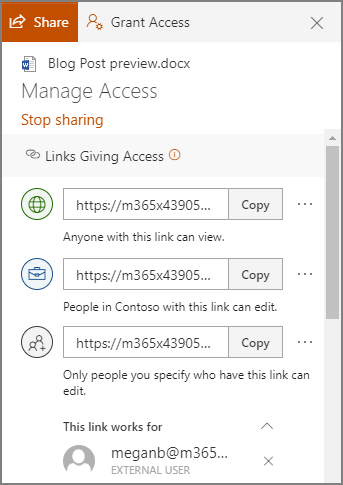
In OneDrive, a user can share a singular file or folder pretty easily. All they have to do is log in, right-click on the file/folder, and click Share.

Sharing this way allows a user to share their content with one of their contacts, send it to an email address, or copy a shareable link and send it along through an instant message or, again, and email. Doing so gives the recipient access to make edits to it by default, but the sender can restrict them to read-only access if desired.

However, you probably don’t want to micromanage your entire team to make sure they are sharing files and folders with people actually authorized to receive them. Fortunately, by using the global settings of OneDrive, you can take control past the file/folder basis to control how a user can share documents.

Controlling a User’s File Sharing in OneDrive

Assuming that you have administrative access over your OneDrive account, sign in by visiting https://admin.microsoft.com/ before proceeding with the following steps:

  •  Look for Admin centers on the left side of your display. Click SharePoint.
  • You should then be directed to the new SharePoint admin center. If you are brought to the old one, you can go to the new on by clicking on Open it now.
  • Again, on the left side of the screen, find Policies and click on Sharing.

Doing so means that you have edited the global settings, applying your changes to all accounts. To manage settings on a case-by-case basis, access Users, Active Users, and select the individual who you are attempting to manage. You should find a OneDrive tab, with adjustable Sharing options.

With privacy and security being so critical for contemporary businesses, you need to make sure you are doing everything you can to maintain control of your company’s information. Our security experts can help – reach out to us at 810.230.9455 to get started.

business-people-and-architects-collaborating-on-TFP643Y_collaboration_400.jpg

Collaboration Tools for SMBs

business-people-and-architects-collaborating-on-TFP643Y_collaboration_400.jpg

Useful collaboration tools can alter a business significantly by enabling cooperation that is impossible without them. How exactly these tools fit into your business is a whole other matter.  Today, we’re going to talk about how you can integrate some pretty great collaboration tools without turning your business upside down. 

Cloud Productivity

One option a business can take is by adding in a cloud productivity suite. Options like Google’s G Suite and Microsoft’s Office 365 can bring a business a lot of value, without the typically massive capital outlay the yearly software license would command. Besides, you probably already need licenses for a word processor and spreadsheet app anyway. Inside the software there are integrated collaboration options that allow your team to work on documents, spreadsheets, and presentations together in real time.

Communication

Efficient collaboration is not possible without strong communications. Today, there are options out there where an organization doesn’t necessarily need to invest huge sums in replacing their normal communications strategy to get the benefits that innovations made in the solutions can bring. By utilizing instant messaging, web-based conferencing, and cloud-based email companies can improve their top-to-bottom communication without taking on a lot of extra cost.

Collaboration Apps

New innovations in communication software are now available that provide advanced collaboration options. Developed like a forum, but with direct communication options, and integrations with third-party applications, collaboration apps like Slack and Microsoft Teams have a lot of options to help drive team productivity forward.

If you are looking for ways to improve your organizational productivity, call the IT experts at NuTech Services today at 810.230.9455. 

159354221_video_call_400.jpg

Five Reasons Video Conferencing is a Great Business Tool

159354221_video_call_400.jpg

Many businesses have turned to video conferencing as a promising communications solution for their workforces to leverage, and for good reason. There are assorted collaborative benefits that a company can enjoy by embracing video conferencing capabilities. Here, we’ll review five of them.

Team Building Benefits

Many modern businesses have employees who don’t always work in the office, instead electing to operate remotely. However, it is important that these employees are still assimilated as a part of your team as a whole. A conferencing solution can allow you to keep your remote employees on the same page as your on-site employees, building camaraderie between coworkers despite any distance between them. The better your team is able to collaborate, the more effective they will be able to be in accomplishing their tasks, as they will have each other as a resource to lean on as needed.

Keep Your Team On-Task

Let’s face it, it can sometimes be hard to be sure that your employees are focused on the task at hand. This is especially true when you can only hear their voice, or see the responses they send back to you. A conferencing solution fixes this difficulty by giving you and your team a visual of each other, keeping everyone involved accountable and engaged.

Increase Your Collaborative Footprint

It wasn’t all that long ago that collaborating with someone a distance away was only possible over the phone or by physically traveling to meet with them. However, collaborative conferencing solutions have taken this distance and shrank it down to effectively nothing. Like the team building benefits we discussed earlier, your team is no longer restricted to one place, or to dealing with exclusively local coworkers, partners, and other resources.

Promote “Face-to-Face” Communication

A sizable portion of communication is non-verbal, which means that your solution needs to account for this balance. More traditional solutions didn’t take this into consideration – or rather, couldn’t. Modern collaboration solutions, on the other hand, allow you to communicate more completely by allowing you to witness these non-verbal cues. 

Conferencing Can Simplify Your Solution Set

Compared to legacy solutions, modern conferencing tools offer a much more comprehensive selection of features. As a result, you can reduce the number of solutions that your operations rely upon, cutting expenses and streamlining your processes. This makes it much easier to find success in communicating with your team, without sinking all of your capital into your solutions.

NuTech Services can assist you in establishing the collaboration solution that fits your needs, as well as any other IT implementation your business requires. Learn more by calling 810.230.9455.

136929883_collabotation_400.jpg

Considerations for Your Business’ Collaboration

136929883_collabotation_400.jpg

With business moving faster than it ever has before, it seems to be a no-brainer that collaboration is something that your business needs to focus on to remain competitive. Fortunately, there are many technologies and strategies that can be leveraged to help your business keep its collaborative and communicative efforts front-and-center.

Hardware

Fortunately, the biggest hurdle to collaboration isn’t usually having the right solutions in the office, it’s primarily making sure that these solutions are being put to use properly.

Consider your Internet setup – is it strong enough to wirelessly provide your entire office with connectivity, or would you be benefitted by implementing additional access points? Do you have the hardware needed to communicate and share data with mobile employees, and most importantly, can you properly secure all of it? Speaking of mobility, you will also want to consider if you want to provide your staff with company-owned mobile devices instead of leveraging a Bring Your Own Device Policy. There are options out there to procure these devices for well below retail rates, as long as these devices are bought in bulk.

Software

Depending on your type of business, you may have more or less to do in order to promote collaboration in your organization. A brick-and-mortar establishment will likely have its resources centralized, which means that employees will need to have access to these resources in order to properly communicate with one another, sharing progress on their work. While a private cloud platform would serve this need quite well, these solutions are typically far too expensive for the average SMB to consider.

These SMBs do have other options. Cloud-hosted software allows a business to leverage just about any computing resources they need, whether its a productivity suite, a business management platform, or a communication tool. Adding to these benefits, these resources can be accessed wherever an Internet connection can be established thanks to an integrated access management system. This same system allows administrators to keep threats out of their network as well.

Policies

Finally, for there to be collaboration, there needs to be the policies in place that “encourage” (enforce) the stress-free sharing of pertinent data with team members. In other words, you need to know that you have a way for your employees to access the data they need to complete their tasks as the need arises.

Having these policies can be to your organization’s advantage. While some of your data needs to be kept on a “need-to-know” basis, giving your employees some guidance to navigate how other data should be shared can help you to keep your business’ data that much more secure. It also doesn’t hurt that digital communications are becoming more of the norm, so it only makes sense to give your employees an outlet to communicate in what is likely their preferred manner.

In short, businesses are communicating in new and exciting ways. Not only should you not want to be left behind, you can’t afford to be. For assistance in expanding your internal collaboration and business communications to fully embrace today’s capabilities, reach out to NuTech Services’s IT professionals at 810.230.9455.