
b2ap3_thumbnail_person_network_400.jpg

Tip of the Week: Sharing Files Between 2 PCs is as Easy as Dragging and Dropping

b2ap3_thumbnail_person_network_400.jpgWhat’s the best way to share files between your different personal devices and computers? It turns out that you can share files over your home’s network, and you don’t have to be an IT technician to do it.

To be sure, there are many different ways to share files between your different devices. You can send an email from one device to another. You can upload the file to a cloud data storage service. You can even use an external data storage device like a USB thumb drive. While all of these methods will do the trick, some are more inconvenient than others (like using a thumb drive), while others (like the first two examples) require an Internet connection and reliance on a third party.

Instead, you might be surprised to learn that you can just as easily (if not more easily) move files over your home network to your different devices by dragging and dropping what you need to a shared folder. This functions similarly to how your computer network at the office is set up with its server units and multiple workstations. However, you don’t need a home server unit to share files across your different devices at home. Instead, if you’ve got two computers connected via your home’s Internet router, then you’re all set to easily share files between the two machines.

Share Files Using My Network Places
To do this, open My Network Places, locate a file associated with the computer that you want to share files with (designated by the PC’s assigned name), and then drag and drop your content into the shared file. To access the shared content with the computer that you just shared it with, locate My Network Places on your other computer and open the file that corresponds with the actions you just took.

Or Create a Windows Homegroup
If for some reason you’re unable to share the files you need between your two computers using My Network Places, then you can set up a Windows Homegroup. To do this, type “homegroup” in the Windows search box and then hit Enter. From here, Windows will let you know if there are any homegroups on your network. If it can’t find one, click Create a homegroup.

Next, select what kind of content and devices that you want to share in this homegroup and then select Next.
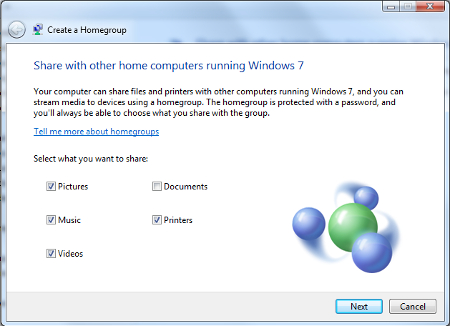
homegroup ib 1

Windows will now generate a password that you will want to use for other computers to access the newly created homegroup. Be sure to record and share this in a secure manner if you’re adding multiple users to the homegroup.

Lastly, using the other computer on your home network, search for “homegroup” in the Windows search bar. This should bring up a dialogue box letting you know that a new homegroup has been added to your network. It will display the name of the computer you’ve originally used to create the homegroup. Now, just click Next > Enter the password > click Next again > and you’ll have both of your computers set up on the homegroup for easy file sharing.

If you need professional assistance with any of your computer networking needs, give NuTech Services a call at 810.230.9455.


b2ap3_thumbnail_tips_to_enhance_productivity_400.jpg

Tip of the Week: Try the 52-17 Rule to Get the Most Productivity Out of Your Workday

b2ap3_thumbnail_tips_to_enhance_productivity_400.jpgThere are countless ways to boost your productivity in the office… at least, that’s what the Internet says. How do you separate the productivity champs from the chumps? It’s simple, really; just look for the tried and true methods that have been backed by thorough research. One such study, performed by Julia Gifford of Draugiem Group, claims that workers can be more productive by not trying to do as much office work as possible.

This is hardly the first productivity strategy proposed by professionals. What makes this different from others? Well, it’s backed up with results. Using the tracking application DeskTime, the researchers at Draugiem Group examined how their best, most productive employees spent their time in the office. Surprisingly, it boiled down to how much time wasn’t being spent doing work.

52 Minutes of Work, 17 Minutes of Rest
While it might seem incredibly inefficient, the results of this study turned out to be a cycle of 52 minutes of hard work, followed by 17 minutes of rest. This is similar to the Pomodoro technique, another relatively well-known process which includes 25-minute work intervals with five-minute breaks, followed by one 15-minute break after the fourth increment. Overall, the 52-17 rule seems to be geared more for those who are confident they can stay focused on a single task for almost a solid hour.

The Importance of Rest
Rest is an absolutely critical part of any function performed by humans; therefore, its importance cannot be overemphasized. In fact, many researchers studying the science behind workplaces find that rest is absolutely imperative to the success of all participants.

Entrepreneur Chris Winfield claims that he cut his work week in half because he took consistent breaks throughout the workday. As you can imagine, finding the right balance between work and rest can be a tricky subject. Meetings and other time-sensitive appointments are difficult to fit into an individual’s schedule. For Winfield, he was able to cut his 40-hour work week down to 16.7 hours (not counting the time he spent in meetings). This is a considerable difference, especially because he was still getting everything done that he wanted to.

The End Result: Increased Flexibility
As you can imagine, scrunching your work week to less than half of the original size opens up several opportunities. The only way this is possible is with proper prioritization of important tasks. By ensuring that high-priority tasks are tackled in the most effective way possible, you’ll be able to approach the rest of your work in a clear, stress-free manner. Winfield claims that his approach changed the way he looked at the work week:

The final piece to my puzzle was moving from a five-day workweek, where I had to stop by 5 p.m., to a seven-day workweek, where I could work when it suited me. This took me from 40 to 45 hours available to get my 40 Pomodoros in, to having 168 hours each week. Since I only need 16.7 hours net, that means I only work 10% of my time. What a difference.

Granted, Winfield didn’t count the 20-to-25 hours of meetings and phone calls toward his total time, yet, he still managed to save his sanity by taking small breaks.

If you aren’t quite sold on either the Pomodoro technique or other work-break increment strategies, there are several other alternatives to look into. For one, you can look into using the latest and greatest technology solutions to improve the overall efficiency of your time spent working. Give us a call at 810.230.9455 to learn more about what productivity solutions can help your business.

b2ap3_thumbnail_caffeine_fix_400.jpg

Too Much Coffee Can Give Your Work Performance The Jitters

b2ap3_thumbnail_caffeine_fix_400.jpgThe road down entrepreneurialism is a long and twisted path, full of pitfalls that can lead you astray. However, there’s one companion who will never forsake you, and that’s your morning cup of coffee. While you might feel like you can’t get anything done without your morning caffeine fix, it can be holding you back from achieving your maximum productivity.

Giving up on caffeine can be a life-changing experience, but some are more reliant on it than others. It might seem like caffeine’s benefits vastly outweigh its negatives, but when it comes down to it, caffeine’s benefits are only temporary, saddled with side-effects.

What Exactly Does Caffeine Do to Your Body?
A study performed by the John Hopkins Medical School has proven that, despite caffeine’s negative side-effects, it has been proven to increase task performance and cognitive ability, but only temporarily. The main issue with caffeine is that there’s no way to reap the benefits of that cup of coffee without experiencing caffeine withdrawal almost immediately afterward. Because of this, the user goes straight for the coffee pot time after time. This eventually links performance to the amount of caffeine ingested, which limits cognitive function when without it.

To make matters worse, caffeine induces an adrenaline rush, not unlike the response you receive from a life-threatening situation. This is what’s known as the “fight or flight” syndrome, which triggers emotional responses to defend the self from harm. Naturally, you can imagine how horribly wrong this can go when responding to critical emails at a time where you lack sleep and are thriving off of caffeine.

By the end of the day, you’ll feel exhausted and ready for bed; but despite how tired you are, you’ll find it difficult to sleep. This is because caffeine has a six-hour half life. According to Inc:

Have a cup of joe at 8 a.m., and you’ll still have 25 percent of the caffeine in your body at 8 p.m. Anything you drink after noon will still be at 50 percent strength at bedtime. Any caffeine in your bloodstream–with the negative effects increasing with the dose–makes it harder to fall asleep.

This makes it extraordinarily difficult to get good, quality sleep, and even harder for the brain to catch up and restore its energy. When you wake up exhausted, you naturally go right for the cup of coffee, leading to even more withdrawal later in the afternoon.

Caffeine’s Side Effects
Caffeine is well known to produce several adverse side effects when users are going through withdrawal, all of which can be harmful to your cognitive ability and health. According to Inc, they are:

  • Irritability
  • Anxiety
  • Headaches
  • Insomnia
  • Sleep deprivation

The side effects of prolonged caffeine use aren’t limited to just these, though. These are simply those that affect the cognitive ability to function, which is arguably the most important part of the workday. It’s well known that caffeine can induce uncomfortable problems like frequent urination and gastrointestinal anomalies, as well.

Caffeine addiction might seem innocent enough, but like any other drug out there, too much can be a bad thing. Millions of people around the world suffer from caffeine addiction, whether they admit to it or not. Cutting yourself off from caffeinated beverages might seem impossible, but it can change your life.

b2ap3_thumbnail_do_you_need_a_consultant_400.jpg

Tip of the Week: How to Know When You Need a Consultant

b2ap3_thumbnail_do_you_need_a_consultant_400.jpgHave you ever felt like you aren’t sure how to proceed, or how to get yourself out of a rut? You surely don’t want your competitors to know about your weak points, but you feel so much pressure that you might think twice about asking for tips of the trade. After all, a hand once in a while can make all of the difference. This is when you might consider outsourcing a consultant.

Before you cave in and let an outside consultant in on your problems, be sure to take these factors into consideration.

What’s the Worst Way to Approach Consultation?

  • Approach consultation as your only option. This, in particular, is something you want to avoid at all costs. Outsourcing your consultation needs to a third party is a valuable asset, but you don’t want to do this as a last resort and become reliant on the opinions of the consultant. It’s important to maintain control of your problems and keep them from spiraling out of control.
  • Confuse your responsibilities with those of your consultant’s. Before engaging in dealings with a consultant and signing your name on the dotted line, make sure that each party’s responsibilities are clearly mapped out. This way, you won’t confuse who is responsible for performing certain tasks, and you can move forward with certainty.
  • Without an end result in mind. Make sure that you always keep your goals in mind when looking for a consultant. This way, they’ll be able to help you get a clear picture of where you want to be, and how to get there.

What’s the Best Way to Approach Consultation?

  • Be as specific as possible. There’s no room for ambiguity in business. You can’t formulate an accurate plan of action without getting into specifics. You can avoid this by remaining open with your consultant and letting them in on your ideas.
  • Find consultants with a similar mindset. One of the best roles that an IT consultant can perform for you is managing a project on your behalf. To this end, it helps that you find a consultant who thinks like you and can best replicate your expectations. Furthermore, they must have proven their expertise in the industry in order to facilitate a proper level of trust. Give them a trial run to see how they perform under pressure.
  • Be sure to take responsibility for your decision. Just like any other choice in life, you can’t take it back once you’ve chosen which consultant you want to hire. This means taking responsibility for whether or not they perform to your expectations, and realizing that even if it’s not your fault, you’re the one who made the choice. Use this experience to make more educated decisions in the future. It can help to hire a consultant who has skills you don’t have. This way, you’re less likely to get stuck in a foreign situation.

NuTech Services knows how stressful and difficult running a business can be. We also know that you have a lot of work ahead of you, and that you can use a hand or two to stay ahead of the competition. We always maximize the communication between ourselves and our clients when we’re providing a consultation, and we want to see you succeed more than anything else.

NuTech Services can perform any function of your normal in-house IT staff, including IT consultation, minus the hefty salary required of hiring a new employee. For more information, give NuTech Services a call at 810.230.9455.

b2ap3_thumbnail_maximum_productivity_400.jpg

Tip of the Week: Achieve Maximum Productivity for Your Team with These 5 Technologies

b2ap3_thumbnail_maximum_productivity_400.jpgYou pay your employees to come to the office and perform their daily duties, but how much of that time is actually being spent working? Every wasted minute cuts into your daily profits, which can waste countless minutes. If you want to get the most out of your team, there are several technology strategies that the modern business can take advantage of to maximize productivity.

Surveillance Cameras
Depending on your productivity problem, there are varied levels of solutions which you might integrate. When the boss rarely makes rounds around the office, your team might be encouraged to “loaf around,” which is the act of wasting time. If you can’t leave the room for even a minute without your team goofing off, surveillance cameras might be the best way to set them straight.

max productivity1.jpg

This might be a worst-case scenario, but believe it or not, some offices need to take advantage of these kinds of solutions to maintain order. Surveillance systems are now much more cost-effective than in the past, so integrating one into your IT strategy is more affordable than it sounds. With a camera installed in the office, employees will understand that any loafing that’s performed in the office will be recorded, and incriminating evidence can and will be used against them when it comes time for a review. Some cameras can even allow you to watch a live feed of your office on your mobile device, which is ideal for the traveling business owner.

Automatic Door Locks
One of the more common ways that employees tend to waste time is through their breaks. When it comes to extra time spent on breaks, every wasted minute can really add up. If every employee slacks off a few minutes here and there, it can add up quickly and cut into your company’s bottom line. Automatic locks on your organization’s doors can encourage your team to stop wasting time and get back to work.

max productivity2.jpg

After all, you aren’t paying them to be late and irresponsible. With automatic locks, you can set them to lock the door right at 8:00 a.m., or whenever your office opens. If they don’t make it to work on time, they’ll be forced to either endure the embarrassment of needing someone to let them in, or lose a day’s pay. They’ll quickly get the point. This might seem like an extreme measure, but it’s one that might be necessary. Just like surveillance cameras, these locks can be controlled remotely from your mobile devices if need be.

Content Filtering
Your employees sit in front of a workstation all day in order to work, not browse the Internet searching for memes or wasting time on social media. Unfortunately, even the best employees can be susceptible to the allure of sites like Facebook, YouTube, BuzzFeed, and so on. Content filtering can be used to keep your team off of these websites, which can keep them on task. In fact, companies that have integrated a content filtering solution have seen productivity increase as much as 23 percent.

Unified Threat Management
Content filtering is one of the many functions of NuTech Services’s Unified Threat Management (UTM) solution. In addition to content filtering, the UTM provides users with an enterprise-level firewall, antivirus, and spam-blocking solutions. You can view how your team is taking advantage of your business’s network, including if they are streaming movies or playing games. By blocking these countless distractions, your team will have no choice but to focus on the task at hand.

Functioning Workstations
This isn’t something you might immediately think of when it comes to workplace productivity. Sometimes the reason that your team might not get as much done as possible is because their technology isn’t working properly. A workstation that is bogged down and in need of maintenance can be a significantly difficult hurdle to jump for the average employee.

max productivity3.jpg

You don’t even want to think about the costs associated with hardware failure. It’s more efficient to simply make sure that all of your business’s technology operates in its intended fashion. NuTech Services can monitor and maintain your systems to make sure that all of the latest patches and updates are applied, which can increase both productivity and security.

With these five technologies, you’ll be able to help your team understand the value of productivity. For more information, give NuTech Services a call at 810.230.9455.