encryption__96008173_400.jpg

Some Places Encryption Should Be Used Frequently

encryption__96008173_400.jpg

Protecting your organization’s data is a major focus of businesses these days, especially as threats grow more powerful and they better learn to penetrate the countless safeguards put into place. Let’s go over how encryption can help you cover all your bases—especially if hackers do manage to get through your security precautions.

What is Encryption?

There are countless codes and ciphers out there, like the famous Caesar cipher where you take the original letters and switch them according to a set number down the alphabet. For example, the Caesar cipher with a shift of nine might look like this:

“Vjwjpnm bnaerlnb jan cqn bdyanvn xycrxw oxa j kdbrwnbb bnntrwp jbbrbcjwln frcq cqnra RC.”

It’s relatively simple to decipher if you have the key, but the problem is that lacking the key means that it just looks like total nonsense. Encryption works in the same way, but on a fundamentally more complicated level. Encryption software takes data, scrambles it through the use of an algorithm, and uses a key provided to unscramble it. The data remains private until the key is used to unscramble it, making it the perfect tool for ensuring data is safe while it’s in storage or in transit.

That jumbled text above, once decrypted, translates to “Managed services are the supreme option for a business seeking assistance with their IT.”

Encryption is a powerful tool that can be used to secure websites, hard drives, or even individual emails. It can also be used wherever you might store data to secure it.

When is Encryption Needed?

Encryption should be used wherever sensitive data is involved, especially if it is sitting in storage or being shared through email.

Want help incorporating encryption into your business’ protections? We’re here.

If your business wants to implement encryption, NuTech Services can help. To learn more, reach out to us at 810.230.9455.

306839884_ransomware_400.jpg

REvil Vanishes, Along With Some Companies’ Hopes to Decrypt Their Data

306839884_ransomware_400.jpg

The Kaseya ransomware attack targeting VSA servers for approximately 1,500 organizations was another notable attack in a recent string of high-profile ransomware attacks, and while most organizations did what most security professionals recommend and did not pay the ransom, others did not listen. Now those who did pay the ransom are having trouble decrypting their data, and REvil is nowhere to be found to help them in this effort.

With REvil, the hackers reportedly responsible for the Kaseya ransomware attack, having shuttered their operations, some organizations who actually paid the ransom are in a tight spot. Following comments from United States President Joe Biden urging Russian officials to take action against REvil, it was reported that dark web sites for REvil’s payment portal, public portal, helpdesk chat, and negotiations portal were all offline. It is unclear what has caused these outages; it could be a government shutdown just as easily as it could not. Either way, our thoughts turn back to those who are impacted most by this outage: those who paid the ransom, but cannot decrypt their data.

Ordinarily, those who need help with decrypting their data after paying the ransom could contact REvil’s helpdesk, but if they are nowhere to be found, and your decryption tools are not working as expected, what is there to do? It is, yet again, a stark reminder that you cannot guarantee that paying the ransom will help you get your data back should you fall victim to a ransomware attack. What good reason is there to trust the goodwill of hackers who extort money from others and create so much trouble for countless organizations and individuals around the world? There cannot possibly be one.

We understand that you may feel you do not have a choice in the matter regarding paying up for ransomware attacks, but at the end of the day, it is simply far too risky to do so. Not only are you paying up for a possibility of decrypting your datanot a guarantee, mind youbut you are also funding future attacks and proving to the world that ransomware works well enough to extort millions of dollars from companies around the world. Show the hackers who is in the driver’s seat by refusing to give in to their demands.

Rather than reacting to ransomware attacks, you should instead take a proactive stance against them. Start with implementing adequate security measures that can detect the many modes of transport that ransomware utilizes, as well as a data backup system that can help to restore your infrastructure in the event of a ransomware infection. Furthermore, you must train your employees on how to identify and respond to potential ransomware threats. If you do all of this, you can minimize the chances that ransomware will significantly influence your organization.

NuTech Services can assist you with the implementation of any new security or data backup solutions, as well as train your team on how to be more mindful about these threats. To learn more, reach out to us at 810.230.9455.

269856299_security_data_400.jpg

You Need to Be Asking These 4 Questions to Maximize Security

269856299_security_data_400.jpg

Today’s business has to prioritize its data security. There are endless examples of businesses that haven’t done enough. Some aren’t around anymore. To help you build a strategy, we’ve put together four questions that need to be asked to give you a chance to outwit and overcome the endless threats your company could run into online.

#1: Is security a priority when we build processes?

Your business has a way that it does what it does. Are those processes created with both physical security and cybersecurity in mind? The amount of threats your business is subject to is literally innumerable. Each day new threats are created and used to try and steal money and data from businesses just like yours. When building your business’ processes, the first consideration that isn’t “can I make money this way” has to be about how to secure your business from outside threats. 

Some ways you can prioritize security is to train your staff on what threats look like when they come in, ensure that you prioritize access control and proper authentication procedures, and really make sure that your entire staff is educated about the importance in keeping you secure. Making sure that all transferred data is encrypted can also help.

#2: Who has access to my files?

When we talk about access control, we talk about limiting access to data. Not all members of your organization need access to the same data, after all. Doing your best to ensure that some of your most sensitive data is protected not just from people outside your organization, but also inside.

By enabling role-based access and adding in a multi-layered authentication procedure, the security of your organization’s data will be much improved. Another good practice is to keep logs and routinely audit both them and the other protections you put in place. 

#3: How can encryption help my business?

Data in transit can be stolen. Data just sitting there in the open can be too. You will want to ensure that all of your most sensitive data is encrypted both when it’s at rest and when it’s being moved from one location to another. 

Today the most popular forms of encryption are the Data Encryption Standard (DES) or the Advanced Encryption Standard (AES). Understanding the particulars of encryption may be complex, but knowing how to use it to better secure your business’ data is not. 

#4: Is my security strategy working?

Obviously, the security that you put on your business isn’t plug and play. It needs to be properly configured to meet your business’ specific situation. The best way to get the most comprehensive security resources to protect your business’ network and data is to have knowledgeable consultants help you find the strategies and solutions that are right for you, implement them, and then routinely test them to ensure that they would stand up under pressure. 

If you would like to start this conversation, call the IT experts at NuTech Services today at 810.230.9455.

132594623_encryption_400.jpg

What is Encryption, Anyways?

132594623_encryption_400.jpg

You hear about encryption being used all the time, almost to the point of it being synonymous with security, but what does it really mean to have encryption on your business’ data and devices? We’ll walk you through how encryption can help you in your day-to-day struggle to secure the integrity of your organization’s communication and infrastructure.

What is Encryption?
Encryption is a security measure meant to thwart any would-be hackers from using your stolen data to further their ambitions. Think about it like this; without encryption, hackers would gain access to your files, plain as day. Encryption provides a measure that keeps hackers from using your organization’s data even if they were to gain access to it. It essentially scrambles data to everyone who doesn’t have the decryption key, rendering it useless.

One particular technology that uses encryption to a considerable degree is a virtual private network, or VPN. A VPN can connect your employees to your infrastructure regardless of their location in a secure way. Think of it like this; the connection between your employee’s device and your network is normally a clear tube that can be observed by anyone ambitious enough to look for it. Rather than leave it as is, encryption makes the tube opaque–enough to obscure what’s inside so it’s not quite clear for any unwanted onlookers.

Why is it Important?
You can imagine the immense importance of encryption in today’s data-oriented business world. If you’re not taking every measure possible to secure your data, you could be making a huge mistake. Encryption in particular is important for assuming the absolute worst. You can never know when your data will be stolen, so it’s best to take preventative measures to ensure that it will cause a minimal amount of damage should it occur. If your encrypted data is stolen, it will simply be unusable without spending far too much effort to get the data into a readable state.

NuTech Services can equip your business with encryption services that you can count on to keep your data as safe as can be. To learn more, reach out to us at 810.230.9455.

email_security_encryption_400.jpg

The Major Points of A Secure Email Solution

email_security_encryption_400.jpg

It’s not out of the ordinary for employees to not know the best practices surrounding email management, but it’s something that any self-respecting employer needs to consider. How are your employees using their email, and are they putting your organization at risk? The best way to address these issues is taking a two-pronged approach involving training employees on proper best practices, as well as taking technical measures to keep the risk of a breach to a minimum.

We’ll go over some of the most viable options for keeping your email communications as secure as possible, including encryption, spam protection, and employee awareness.

Email Encryption
Encryption is extremely important for keeping your data safe from prying eyes. Encryption is easy to understand when it’s explained in terms that aren’t mind-bogglingly complex. Data that’s sent through a connection that isn’t encrypted can be intercepted. When data is sent through an encrypted connection, it’s scrambled so that it can’t be read by those who might steal it while it’s in transit. Only those who hold an encryption key can unscramble it, making it a much more secure method of sending and receiving important data. Some industries, such as healthcare and government organizations, mandate compliance standards that may include encryption to send and receive email.

Spam Protection
Employees are almost certain to encounter email hazards like spam messages and phishing attempts, and if they don’t know how to identify these dangerous messages, they could expose your organization to data breaches. This is because hackers can ask employees for various information, such as passwords, usernames, and other credentials that aid them in infiltrating your carefully laid-out defenses. The best way to keep this from happening is to keep spam and phishing messages from hitting the inbox in the first place with spam protection systems.

Phishing attempts are a bit trickier, as they will need to be handled in a careful and calculated manner. Scammers often personalize messages to optimize their odds of the message being opened or an attachment being downloaded. Therefore, you need to consider employee training to properly defend against it.

Conditioning Your Employees for Security
Your network’s security can’t be complete without taking care of the ones actually using the technology. Since your end users are going to be using the organization’s email, it’s only natural that you prepare them for the act of keeping it secure. You can provide your users with a list of best practices for them to keep in mind while going about their duties. They are the following:

  • Check the sender: Who has sent the message? Is it a suspicious email address that can’t be traced to any of your contacts? Does it come from a strange email domain? If the answer to any of these is in question, you might have a spam message.
  • Identify the intent: Hackers want you to click on their spam messages as quickly as possible. Therefore, they will often try to incite immediate action to prevent you from thinking twice.
  • Check the spelling and grammar: Many hackers come from countries where English isn’t the hacker’s first language, making their messages quite identifiable compared to others. If you receive messages filled with these inconsistencies, you can bet they are either unprofessional or likely a hacker.
  • Don’t open unrequested attachments: Attachments are a big way for hackers to spread threats, as a lot of people don’t think twice before downloading a supposed receipt or statement. Double-check who sent the attachment before downloading it.
  • Don’t click sketchy links: Before clicking on any links in an email, make sure it’s going where you expect it to. You can do this by hovering over the link without clicking on it. If the link goes to a weird URL or an IP address (a string of numbers and periods), it might be a phishing attempt. The destination might look legitimate and ask you to log in, but it will capture your credentials and give access to the bad guys.

Of course, the biggest thing to keep in mind is when in doubt, ask your IT department about the message. For more information on how to keep your organization safe from spam and email threats, reach out to us at 810.230.9455.

term_encryption_400.jpg

Tech Term: Understanding Encryption

term_encryption_400.jpg

With data security becoming paramount for almost everyone, encryption is one of the more important technology terms you will need to know. Since data security has to be a priority–not just for your business–but for you, understanding what encryption is, and how its used can put you in a better position to understand tomorrow’s security solutions. For this week’s tip, we will take you inside cryptography, and more specifically, data and network encryption.

What is Cryptography?
Simply put, cryptography is the art (or science) of writing or solving written or generated codes. Cryptography is the strategy of using a predefined key to convert data into a format that is indecipherable. Since no entity can view the information without the key, the information secured by encryption is able to be stored and transmitted securely. To decode the message, you need a cipher or a key.

A Short History of Cryptography
As long as there has been human communication, there have been secrets. The first known evidence of the use of cryptography was found carved in hieroglyphics on a wall in Egypt, and has subsequently been used throughout human history to send and receive secret messages.

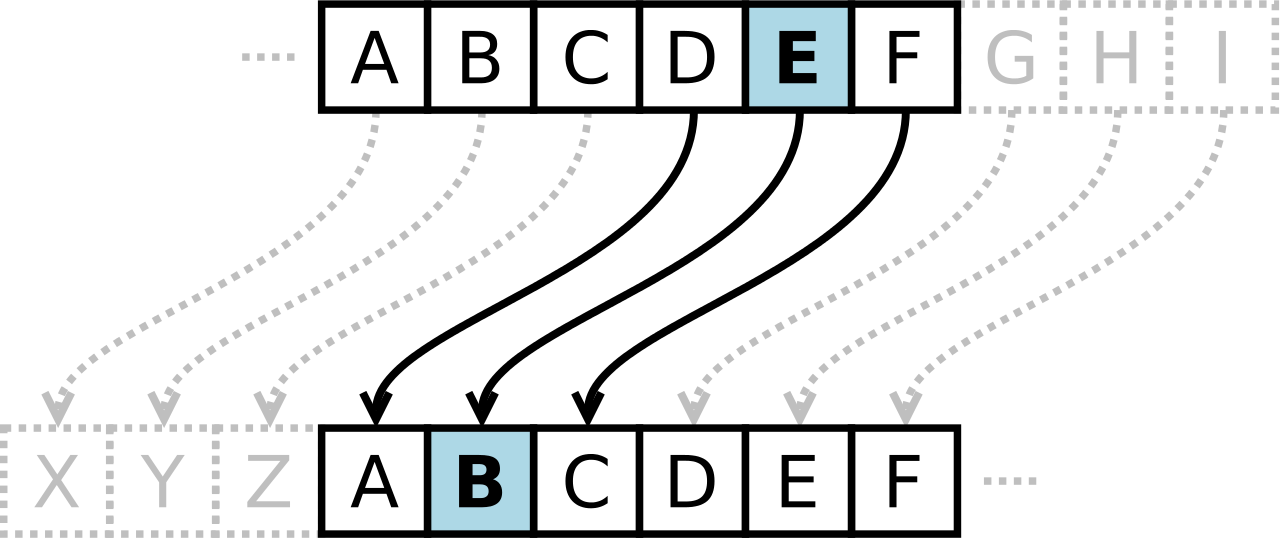
Centuries later, Julius Caesar was known to use a form of substitution cipher that shifts each letter three spots in the alphabet to encode a message. In fact, there are some that still call this type of cipher a Caesar cipher. The Caesar cipher looks like this:
ib cipher 1

It’s clear that this type of cipher is dependent on the secrecy around the system, not a dedicated key to unlock the cipher. Once the system is known, these basic codes become known almost immediately. In fact, most substitution ciphers can be broken with a simple pad and paper.

This changed in the 16th century when Giovan Battista Bellaso came up with an improvement by using a series of interwoven ciphers. The process was misattributed to Blaise de Vigenère, and has since been referred to as the Vigenère cipher.

Despite all the coded messages sent and received over the centuries, cryptography as we know it has only come into fashion over the past century as technological advancements have facilitated more sophisticated methods of encryption. In the early 20th century, Edward Hebern, while sitting in jail for stealing a horse, came up with a method of encryption using an old typewriter fashioned with a rotor. The purpose was to turn what to the user was a simple Caesar cipher into a Vigenère cipher with the use of Hebern’s two-way rotor machine. A user would push a key and the rotor would provide the corresponding substitution key to decrypt the message. b2ap3_thumbnail_ib_cipher_2.png

If this machine started modern encryption, Enigma changed it forever. Shortly after Hebern’s invention, German engineer Arthur Scherbius innovatively built what was essentially a Hebern device with multiple rotors and called it Enigma. For a decade German naval superiority over mainland Europe had as much to do with their ability to send and receive coded messages as it did to their manufacturing might.

Modern Encryption
When we speak of encryption today, we are just talking about the same type of thing that Hebern and Scherbius were doing: cloaking data to provide privacy or security to the parties involved in the correspondence. Today, data is worth more than ever; as a result businesses are spending more on their encryption solutions.

All businesses collect a fair amount of personally identifiable information (PII). This information includes names, birth dates, Social Security numbers, and financial and medical information. The liability companies have today is immense, as they can (and often are) sued if a customer, employee, or vendor’s PII is stolen and leaked or shared.

The modern business uses several types of encryption. Individual file encryption encrypts specific data; volume encryption secures a container where files and folders can be stored; and, full-disk encryption secures all the information on a computer or server. To ensure that the data is protected from theft, encrypting all the information deemed sensitive should be a priority.

In order for your business’ encryption initiatives to be successful, there are some best practices that users need to know. One is password security. Often the key to your encrypted information is a simple password. In order to mitigate risk and keep encryption working for you, there are some password management tips you should adhere to. Following these will keep your encrypted data, and your business safe. They include:

  • Use passwords with eight characters or more.
  • Use different passwords for different files, computers, and systems.
  • Change your passwords frequently.
  • Utilize upper and lowercase letters, numbers, and symbols in your passwords.
  • Don’t use common words or phrases.
  • Don’t use words spelled backwards, common misspellings, or abbreviations.

More Encryption
Other than your standard protection against the loss of data, there are security solutions that allow you to encrypt communications you have with your customers, staff, and vendors. Email encryption has become an essential business tool. Many of today’s enterprise email solutions come with options to encrypt your messages, keeping communications secure.

Another way encryption is leveraged by the modern business is with the use of a virtual private network (VPN). The VPN offers users who are outside of a network to get an encrypted and secure pathway to share and receive files from a centralized server. Remote file exchange is important for many businesses, and the use of VPNs can go a long way toward quelling the risks inherent in this process.

Types of Encryption Finally, understanding what types of encryption there are can help you understand what position your organization is in, in regards to file, server, and communication security. The types of encryption used today include:

  • Triple DES – Designed as a replacement to the single Data Encryption Standard (DES) that doesn’t hold up against the tools modern hackers have. Triple DES uses three individual keys with 56 bits each, which in total adds up to 168 bits, however experts place it closer to 112 bits of key strength.
  • RSA – RSA is a public-key encryption algorithm and is currently the standard for secure transmission of data over the Internet. Since it uses two keys, a public key to encrypt it and a secure private key to decrypt it, it makes it very difficult for hackers to decipher.
  • Blowfish – Designed to replace DES, Blowfish is a symmetric cipher that splits messages into blocks of 64 bits and encrypts them individually. As a result, it is extraordinarily secure and often used in e-commerce platforms and password managers.
  • Twofish – The developer of Blowfish has released Twofish as a faster option that makes it a perfect encryption tool for hardware and software systems.
  • AES – Available in 128-bit, 192-bit, and 256-bit options, the Advanced Encryption Standard is basically uncrackable. Used by governments and other organizations that deal in extraordinarily sensitive information, AES has begun to become the standard in encryption due to its impenetrable record.

Data security is more important today than ever. At NuTech Services, our knowledgeable technicians can help your organization come up with data and network security plan that is sure to keep your data safe, and keep your business running efficiently. To learn more, don’t hesitate to call us today at 810.230.9455.

b2ap3_thumbnail_gmail_logo_400.jpg

Gmail Implements Warning System to Notify Users of Unencrypted Messages

b2ap3_thumbnail_gmail_logo_400.jpgAn email could be just about anything, and you should always approach them with caution. What appears to be a harmless attachment could be a spam message in disguise, with malware or viruses attached. Keeping this kind of security in mind can be difficult for the average business, but if your organization uses Gmail, you’ll be warned of whether or not your received messages are sent over a secured connection.

In other words, Gmail will tell you if there’s a chance that your received messages were tampered with by hackers while in transit. By doing so, Google is hoping to emphasize the importance of improving online security to all users and service providers for webmail. Encryption is necessary in today’s security-minded online society, and Google wants to raise awareness of this important fact. While Gmail already takes advantage of an HTTPS encryption protocol for its own mail service, this is only a small step toward increasing the security of online email services. The HTTPS only encrypts the browser’s connection with the server, rather than all of the traffic to and from senders and receivers.

Basically, email providers need to be using encryption to shield messages while they’re in transit, or risk the possibility of hackers compromising the messages. Many email providers have already started taking advantage of encryption protocol, a trend known as STARTTLS, for their messaging systems, including Google, Comcast, Microsoft, Yahoo, and a few others.

As explained by ZDNet:

A lot of providers don’t support STARTTLS, meaning that any email encrypted by the sender can’t be read when it’s received on the other end. This so-called opportunistic encryption works when both email providers support STARTTLS. If one doesn’t, then the other provider falls back to an unencrypted form.

The most important thing that email providers should take away from this shift in encryption policy is the need to make their user-security a top priority, just like major players like Google and Microsoft do.

While this new encryption protocol by email providers can help you potentially avoid an unsecured email, you don’t want to rely on it to keep all of your important digital assets safe. What your organization needs is a comprehensive security solution that’s designed to maximize network security, without sacrificing ease of use. Even the most basic security solutions, like a firewall and antivirus solution, are effective at limiting a user’s exposure to online threats. Still, you want something with a bit more power, especially when it comes to guaranteeing the security of your business’s assets.

The solution that your business needs is a Unified Threat Management tool, that’s designed to augment common security practices with powerful, enterprise-level measures. A UTM uses a firewall and antivirus, but also provides preventative measures like content filtering and spam blocking. This helps your organization stay productive without sacrificing security. To find out how your business can reap the benefits of a UTM solution, contact NuTech Services at 810.230.9455.