
188604470_data_storage_hard_drives_400.jpg

Storing Data Is More Complex than You Know

188604470_data_storage_hard_drives_400.jpg

We all store data on our computers. Whether you have family photos and text documents on your home computer, or databases and on-premises applications running your entire business, data is typically stored in exactly the same way. If you knew how delicate your data actually was, you’d never let a single file exist in one place ever again. Let’s explore that.

How Do Hard Drives Store Data?

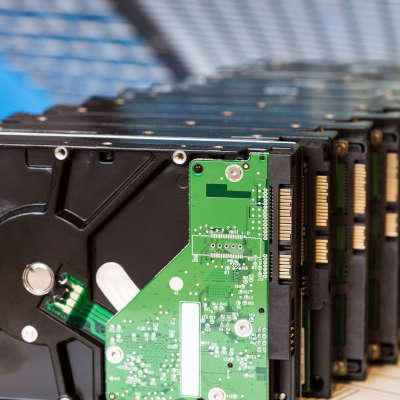
A traditional mechanical hard drive, also known as an HDD, holds your data on small magnetic platters. These platters are layered on top of each other, with a small mechanical arm that rests above them. Think about a record player, with the arm and needle over the record, except you have many, many records stacked on top of each other.

Of course, a record player spins the record between 33 and 78 times per minute. Your hard drive typically spins the platters much faster, most of them clocking in at 7200 rotations per minute.

The platters spin so fast, that it creates a cushion of air that prevents the head of the arm from touching the surface of the platter while it spins. This is critical, because if the head (the needle, to continue with the record analogy) were to even graze the surface of the platter, it would destroy the data on the drive.

These hard drives are mechanical in nature. Just like your car, mechanical systems can and will fail eventually. The little motor in the drive can burn out, the spindle can cease up, and so forth. These issues will very likely make the hard drive inaccessible. Thus, your data is lost. Opening files, saving files, and general computer use (even web surfing) causes the hard drive to read and write data. You are always using it, and depending on its stability to protect your data.

(Of course, there are also SSD drives, which don’t utilize moving mechanical parts. These tend to be a little more shock resistant, but they aren’t immune to failure.)

Yet, we trust these devices every single day. If you have a computer or a laptop, you likely have one or two of these inside it. Your servers tend to have many more. Many of us have external hard drives we use to store data to take around with us. If they are using a mechanical-based hard drive, all of our data is at the mercy of several rapidly moving parts and a cushion of air.

This leads us to ask:

Why Would You Ever Rely on a Single Hard Drive?

If your data is only stored on a single hard drive, consider it at high risk. It only takes one tiny issue to lose it all.

Fortunately, preventing data loss is easier than ever. We help businesses establish thoroughly tested, highly-trusted backup solutions that ensure that no disaster will be able to destroy your data. That includes storing a copy of all of your data on a separate device within the office, and a copy stored securely offsite that you can access at any time. This means even a major disaster like a fire or flood doesn’t cause data loss.

Want to learn more? Give us a call at 810.230.9455.

252595488_new_comp_400.jpg

Getting a New Computer? We Can Help, Part III

252595488_new_comp_400.jpg

Part three of our computer buying guide will be dedicated to storage space. Most modern gadgets have a couple of options for storage space, in addition to external storage, but the amount of space will largely depend on the brand and version of the device. When selecting a computer, be it a desktop or laptop, how much data it can store will be of vital importance.

Data storage has progressed rapidly in the past few decades, ranging from punch cards to floppy disks (and then less-floppy disks), to rewritable compact discs, all the way to the countless storage devices that are used in the workplace today. Your standard floppy diskette measured in at 3.5 inches wide and could contain about 1.44 MB (megabytes) of information. While this was impressive at the time and enabled these disks to hold large text files, they were unable to hold something like an MP3 file on one disk alone.

A CD can contain around 650 MB of data, while a DVD can hold 4.7 GB. A single DVD can hold just as much data as approximately 3,342 3.5-inch floppy disks, just to give you an idea for how much things have changed. Blu-Ray disks can store even more data, up to 10 times as much as a DVD can. For reference, Google’s data storage exceeds 15 exabytes, which would take 26.2 million Blu-Ray disks to fill.

How Your Use Affects Your Storage Needs

First, you’ll need to consider your storage needs before implementing any storage device. For example, if your computer will be plugged into your office’s network, and most of the data is stored in a central location or cloud solution, the device probably doesn’t need so much onboard storage. It will likely only need enough for the operating system and any programs on it that aren’t associated with the cloud, as well as a little breathing room for file storage and other oddities. If your computer is for personal use, gaming, or a home office, you should invest a little extra in your storage. This also applies for video production, as it requires dedicated storage devices for these specific file types.

Comparing HDD and SSD Storage

When examining your options, the devices used will have at least one of the following acronyms: solid state drive (SSD) or hard disk drive (HDD). Some devices have both of these storage options.

Hard Disk Drives (HDD)

Hard disk drives are components in your computer that store data, and they have been used for over three decades. They utilize tiny electric motors, a spinning stack of magnetic platters, and a small arm to read and write data; all housed within a heavy metal construction. They work similarly to record players, though they move far faster. These drives are often called mechanical drives due to their many moving parts.

HDDs can hold large amounts of data, but they are slower and less energy-efficient, for sure. They are also more fragile, and if you’re not careful, you could lose data due to roughing up your device a bit too much. For this express purpose, laptops tend to avoid using HDD storage, both to save battery life and maintain durability. Still, HDDs can be utilized for high-capacity storage options, as they are a cheaper alternative to solid state drives.

Solid State Drives (SSD)

Unlike the hard disk drive, SSDs don’t have any moving parts. All data is recorded electronically. While they are expensive, they are much safer and more reliable to use than an HDD. They also work faster and experience less wear and tear over the years, making them less likely to fail and cause problems with data loss. The biggest issue with SDD stems from limited capacity, and higher storage drives can increase the price considerably. For comparison, a budget HDD with 3 terabytes of storage would set you back less than a single terabyte SSD at the time of this writing.

What Are Your Storage Needs?

For the most part, your computer storage needs will depend on what the computer is being used for. Start by thinking about whether an SSD will be beneficial or not. If you don’t use your PC for much, then perhaps you will only need one that stores 128 or 256 GBs of storage. If your data is stored on the office network, you won’t need much onboard storage.

If your computer is for personal use, you’ll want to invest in between 512 GB and 1 TB. Depending on where you get your computer, it might not influence the cost of the PC at all–at least, nowhere near as much as others like your CPU or RAM might.

A home office desktop without a centralized server or network-attached storage device will likely need additional hard drive storage. Using an SSD to run your operating system will help the operating system run more efficiently, but you could still use an additional HDD for your data.

A gaming PC would benefit from this setup, as there are storage-intensive programs that can quickly fill up even a whole terabyte of storage. The same holds true if you have a lot of media, like photos, videos, or music on your device. Even casual hobbyists might find themselves filling up their device’s storage without meaning to.

In the End…

An SSD is a mostly-superior option for your primary drive, no matter what kind of device you’re using. However, just to be safe, it’s helpful to have an additional hard drive for data storage to ensure that you don’t run out of space for storage. Finally, try to avoid the cheapest option, as there is no good reason to put data at risk–and don’t forget to take data backups!

For help with acquiring your next computer, reach out to NuTech Services at 810.230.9455.