
b2ap3_thumbnail_expecations_from_cloud_computing_400.jpg

Is Your Cloud Provider Meeting Your Expectations?

b2ap3_thumbnail_expecations_from_cloud_computing_400.jpgWhen cloud computing was first introduced to the consumer market, the technology required a fair amount of explaining. Today, the cloud is widely utilized by consumers, despite the fact that 51 percent of the public believe that actual clouds are somehow involved. Due to so many people using the cloud, consumers are now approaching computing much differently.

Even though most consumers may not know exactly how the cloud works, they have changed their expectations about computing because of their exposure to it. Namely, consumers expect whatever cloud service they use to be reliable and accessible. When it comes down to it, these expectations about the cloud actually trump all other expectations for computing technology.

Think about it, there was a time when consumers put a lot of stock into getting the most powerful home PC they could afford. Today, the average consumer has multiple devices of varying quality, spread out between their home and office. Thanks to the cloud, users are able to access their needed files on each one of these devices, meaning that the specs of the hardware take a backseat to the reliability of the device’s cloud software.

Additionally, the development of cloud services has gone in the direction of making the technology ultra-convenient for consumers to use. This too has influenced the expectations that consumers have regarding their cloud software, making it so that users expect installs, upgrades, and issues be resolved with just a few clicks. This is quite a leap from the days of purchasing software on CD-ROM and transporting files via USB thumb drive.

One tech blogger who does a good job articulating the high demands of today’s consumers is ZDNet’s David Gewirtz. Speaking on behalf of the consumer, Gewirtz compiles an accurate list of what today’s consumer looks for in a cloud service offering:

  • Some cloud services are free, but we expect premium upgrades.
  • If paid services are involved, we expect to easily and smoothly add or remove services merely with a mouse-click and a credit card.
  • As soon as a service plan’s capacity is reached (or just before), we expect the service to offer us an upgrade, not require us to go hunting to make things work.
  • We also expect fees to be tiered, so that each new tier provides more value than the last, with an incremental fee or jump.
  • Fees are usually all-you-can-eat for a year or smoothly scalable as soon as more capacity is needed.
  • We expect to be able to use the service on any compatible machine.
  • And we generally expect the service to work on pretty much anything.
  • We expect all our service-related data to just be there, wherever we are. How that happens is not our problem.
  • Installation is a click or a login. That’s it. It’s just there. There are no longer installers, updaters, zip files or other things to download and run on the desktop. Just click and run.

Does your company’s current cloud solution meet these expectations? If it doesn’t, then there is likely another cloud solution available that does. NuTech Services can provide you with the cloud services your business needs to succeed. In the same way that the cloud has completely improved utility computing, we feel like revolutionizing your IT infrastructure is a reasonable expectation to ask of your IT company. Call us at 810.230.9455 to learn more.

b2ap3_thumbnail_drive_for_business_400.jpg

Tip of the Week: See What’s Taking Up All of Your Google Drive Storage

b2ap3_thumbnail_drive_for_business_400.jpgHeavy users of Google Drive may experience the issue of running low on storage space. The easiest way to resolve this problem is to give Google money and upgrade your account. Before taking this step, there are a few tricks you can do to free up Google Drive space by locating and getting rid of unneeded files.

One reason why it’s possible to miscalculate how much storage space is being used by your Google Drive account is due to the fact that the 15GB every Google user gets isn’t a full 15GB of storage space. Of this 15GB of Drive space, Google allots this space for its various services, like Gmail and Google+.

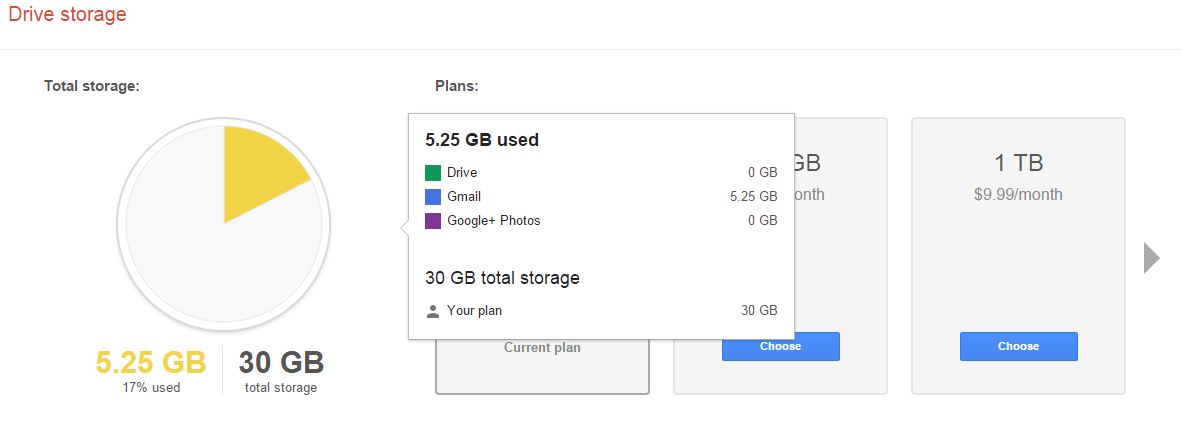
To find out exactly what’s taking up space in your Drive account, go to your Drive’s storage page. This will provide you with a handy-dandy pie chart that lays everything out for you.

drive_in_blog_1.jpg

This chart displays how much storage space is being used and what the space is being used for. From here, you can spot the unneeded files that are taking up space. For example, the email attachments in Gmail end up in your Drive account, as well as all of your photos from Google+. You might want to sift through your Drive and delete these files if you don’t need them.

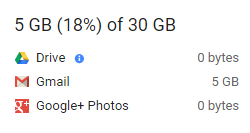
On your Drive storage page, you will find below the graph a section displaying specific information about space usage. Be sure to reference this if you’re on the hunt to free up space.

drive_in_blog_2.jpg

As is the nature of computer data, you will notice that the bulk of your space is likely to be taken up by media-rich files, like photos, music, and videos. Users of Google Apps that take advantage of Docs, Sheets, Slides, etc., will notice that these files don’t take up nearly the amount of space as does the large media files.

Therefore, if you’re looking to purge your Drive account and free up the most space possible, it’s best practice to start deleting the largest files first. To figure this out, go to the lower left-hand side of the screen in Drive, right above the link that says “Buy more storage.” From here, you’ll see your current storage use. Hover over it and a box will appear with more specific numbers. Click Drive.

drive_in_blog_3.jpg

This sorts your files by Quota used. From here, you can most efficiently manage your files.

Keep in mind that if you delete email files all willy-nilly, you may end up deleting something important that you’ll regret. Therefore, it’s best practice to archive your emails with a secure email solution. NuTech Services can provide this for you.

Got an Android device? If your device is linked to your Google Drive, then it may be adding some rather large files to your storage, especially if you use your Drive account to back up your Android device’s photos and videos. One way that you take control of this is to adjust the size of pictures stored from your device to Drive. To do this, go to Settings > Auto Backup > Photo Size, then select Standard size. Keep in mind that there may be instances when you don’t want Google to change the size of your images, so keep this file path in mind.

By following these steps, you will free up space on your Google Drive account and not have to upgrade. To learn more data storage tips and best practices, call NuTech Services at 810.230.9455.

b2ap3_thumbnail_hosted_voip_solutions_400.jpg

Which VoIP Solution is Best for Your Business, In-House or Hosted?

b2ap3_thumbnail_hosted_voip_solutions_400.jpgProper communication is an imperative part of doing business, and nothing improves this aspect of your company better than a telecommunication system of some sort. Some businesses rely on their legacy telephone system for interoffice communication, but this can be both difficult and expensive to maintain.

A VoIP solution, or Voice over Internet Protocol, is a great way to lose your old phone system and push your business toward a more modern office setting. It takes advantage of your Internet connection to transmit your voice to the recipient, rather than a landline telephone connection. This helps you avoid long distance telephone bills that might build up over time, blasting a hole in your budget.

VoIP might be convenient and easy to integrate, but you need to carefully consider the demands of such a network before committing to it. One thing to pay particular attention to is your bandwidth. Can it sustain the heavy use that VoIP demands? If it can’t, you might experience connectivity issues and poor call quality, both of which can hamper your ability to contact and communicate with others.

If you’re serious about improving communication systems in your office, you should consider switching to VoIP. There are many different kinds of VoIP systems, but the most common choice you’ll have to make is whether or not you want to host your own VoIP system in-house, or if you’d rather outsource the responsibility to a managed service provider like NuTech Services.

The Difference is Real
By allowing an external party to host your VoIP solution, you’ll receive plenty of benefits. Essentially, you’re taking this responsibility and allowing someone else to do it. This means that the third party is monitoring and maintaining your VoIP server for you, which is one less burden you have to deal with. NuTech Services can host your VoIP server off-site and out of your hair, which means you have less on your plate. This makes hosted VoIP well worth the investment.

Because of this shift in responsibility, you don’t need to worry about a thing. We handle the implementation and work with you every step of the way. However, it’s important to note that any outsourcing endeavor requires a certain level of trust. Unless you’re ready to let go of the reigns, hosted VoIP might not be your cup of tea.

What Should You Look For?
As with any outsourcing project, you want to make sure you find quality professionals who know what they’re doing when looking for someone to host your VoIP. Reliability is an important trait to look for. Without a reliable host, your VoIP system will be down more often than it’s up. You also need to make sure you’ve found someone with a history of excellence, particularly in the managed services industry.

This is where NuTech Services truly excels at providing hosted VoIP services. Our services are flexible enough to provide you with just what you need, and we can meet the standards you require for maximum efficiency. Just give us a call at 810.230.9455 for more information.