smb_mobile_400.jpg

Tip of the Week: Every Mobile Device Policy Needs to Cover These 3 Areas

smb_mobile_400.jpg

Smartphones, laptops, tablets, and other mobile technology are practically necessities in today’s modern workplace; especially if you want to keep productivity flowing at all times. However, implementing mobile devices into your workplace infrastructure is more complicated than it sounds, especially if you want to preserve security. Here are three topics to consider when implementing mobile devices in the workplace.

Data Security
One of the key concerns that any business using mobile devices needs to account for is security. When you add new devices to your business’s network, you’re adding endpoints that could potentially fall victim to hacking attacks. The more devices that are connected to a network, the more patches and updates that need to be installed in order to maintain security. Basically, adding new devices means more work, and more work can lead to cut corners, which inevitably leads to compromised devices.

A mobile device management solution is capable of securing all of your organization’s devices, be they smartphones or laptops. It’s the easiest way to manage access to mission-critical data, whitelist and blacklist apps, and remotely wipe devices that have been compromised.

Connectivity
When you’re taking mobile devices out of the office, you need to consider how your employees (and yourself) are going to connect to sensitive corporate data. While you could just connect to your cloud solution through a public Wi-Fi connection, this is discouraged, as public Wi-Fi can often be compromised. You never know who else could be on the network, watching your every move.

In instances like these, a virtual private network (VPN) is a valuable tool. With a VPN, you can access your network’s data over an encrypted connection, meaning that as long as you are connected to a wireless network, the data sent to and from your device will be secured so that any onlookers won’t be able to do anything with your data. The data sent to your device is encrypted and then decrypted upon arrival, so if any hackers try to steal it in transit, they’ll only get a jumbled batch of letters and numbers.

Cloud Access
Of course, you’ll need access to your organization’s data, especially when you’re out of the office and using several different devices. To do so, you need a cloud solution that allows your business to share and collaborate on files in real time, across multiple platforms. Most importantly, you want to ensure that your team can open crucial data that’s needed to keep operations moving forward, even when out of the office. A dynamic cloud solution–either public, private, or hybrid–is the key to solving this pain point. Depending on your business’s specific needs, you’ll want one that prioritizes the functionality and security your business requires.

For all of your business’s mobile device security needs, you can contact NuTech Services. We’ll work with you to ensure that your devices aren’t putting your business’s data at risk. To learn more, reach out to us at 810.230.9455.

workplace_flexibility_400.jpg

Tip of the Week: 4 Tools that Provide Your Employees With Greater Flexibility

workplace_flexibility_400.jpg

Flexibility is an important part of the modern work environment, especially as technology has made it much easier to work anytime, anywhere. Employees understand that this flexibility exists in many industries, and they want to reap the benefits of a flexible work environment. However, it’s not that easy; there are quite a few pitfalls that can easily take a stab at your business’s productivity.

On the plus side, flexible work hours allow your team to flourish as people, rather than employees. Your employees no-doubt have families and personal interests of their own that they would like to devote time to. However, the biggest argument for workplace flexibility comes in the form of mobile technology becoming practically omnipresent in today’s environment. In the context of society, mobility is, more or less, a primary concern. Everyone carries a smartphone with them in order to stay up-to-date on email, and to receive important phone calls or to dial into a conference call.

Then there’s the problem of achieving a work-life balance. If an employee is constantly tethered to the office, even while at home, it can feel somewhat invasive to that employee’s domestic life, which can lead to dissatisfaction, and in some cases, disruption. Nobody likes to receive a phone call in the middle of the night, or at the dinner table, about something that can easily be handled the following morning.

Whether or not you want to implement a flexible workplace environment is ultimately up to you, but if you do choose to go all-in on this investment, you’ll need the proper technology solutions to ensure maximum communication and productivity.

  • Voice over Internet Protocol: A VoIP phone system uses your Internet connection to send your voice to the call’s recipient. It’s basically like a traditional phone system without the complex wiring. VoIP systems also come equipped with your standard phone line functions, like transferring, conference calling, etc, and some even have video conferencing technology.
  • Virtual Private Network: A VPN encrypts data that’s sent to and from your business’s infrastructure. They’re great for keeping sensitive data secure from hackers who would steal information while it’s in transit. The reason you’ll want this is because hackers may be lurking on public Wi-Fi connections, just waiting for someone like you to access the network.
  • Cloud Computing: Your business’s data and applications are available to those who are hooked up to your on-site network, but what about those who choose to work remotely? Cloud computing lets you host information and applications in an online environment, where anyone who has access to an Internet connection can utilize it. 
  • Mobile Device Management: If your team is using their own devices to access your company’s sensitive information, you need to make sure that they comply with your BYOD policy. A mobile device management solution can be used to limit access to data on a per user and per device basis, as well as allowing you to remotely wipe devices that are potentially compromised.

If your business is ready and willing to invest in a flexible, modern workforce and workplace, NuTech Services can help. Our solutions are designed to give you maximum control over your data, while allowing your team to work anytime, anywhere. To learn more, give us a call at 810.230.9455.

b2ap3_thumbnail_alter_screen_brightness_400.jpg

Tip of the Week: Do Your Eyes Hurt? Try Adjusting Your Screen’s Brightness

b2ap3_thumbnail_alter_screen_brightness_400.jpgComputer monitors have been getting bigger and brighter for years; improving on picture quality, responsiveness, and energy efficiency. However, working in a dark room in front of a bright screen can lead to eye strain and even headaches. You can avoid these side effects by lowering the brightness on your screen. Furthermore, lowering your screen’s brightness can save you precious battery life on your laptop, so it’s worth keeping these tips in mind for that fact alone.

Adjust Screen Brightness on Your Laptop
Turning down the screen brightness on your laptop is simple, however, the process might be a little different depending on the make and model of your device.

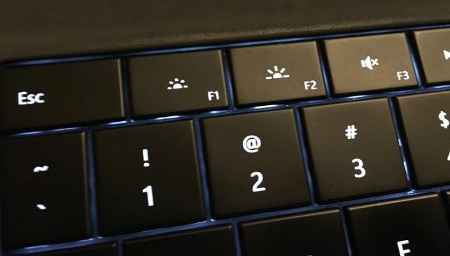
Check out the line of F keys at the top of your keyboard; do any of them have a little icon that looks like a light bulb, a sun, or any other light source? Once you’ve found them, the one with more light around it increases your brightness, while the one with less light around it decreases the brightness. You may need to find your Fn or Function key, and hold it down to trigger the brightness options as well.

ib key

If you don’t see the brightness keys, it’s possible your laptop doesn’t have them, or has buttons on the front or side that control the brightness.

Manually Adjust Screen Brightness in Windows 10
Keep in mind that the aforementioned tip only applies to laptops. Therefore, if you want to decrease the brightness of your desktop PC, there are a few ways to do this. For one, you can click on the battery icon in Windows 10’s notification area, which lets you adjust the brightness. If you want to use the Settings app to do the same thing, that’s also an option. All you have to do is open Settings from the Start menu, select System, and choose Display. Then, it’s just a matter of adjusting the slider to what you want the brightness to be.

You can also click the search icon on your and simply type brightness settings“.

If you’re using Windows 7 or 8, you can adjust your screen’s brightness by going through the Control Panel. Select Hardware and Sound, and select Power Options. A Screen brightness slider will be available at the bottom of the Power Plans window.

Automatically Adjust Brightness When Your Battery’s Low
You can set your Windows 10 PC’s brightness to automatically adjust in relation to your remaining battery life. Open Settings > System > Battery save, and select Battery saver settings. Make sure that the Lower screen brightness while in battery saver is checked, and you can use the adjustable bar to choose the percentage at which the screen will dim. By default, it will be set at 20 percent battery remaining.

Bonus Tip: Don’t Forget Your Monitor Settings
Although in our opinion, it’s usually more difficult to navigate through the monitor settings with the buttons on the front or the side of your computer monitor, but in extreme cases, it doesn’t hurt to check them if your eyes are experiencing fatigue. Most monitors have several different settings, including brightness, contrast, and color adjustments that you can tweak to make it easier on the eyes. We wish we could give you some tips for this, but virtually every monitor and manufacturer have slightly different configurations.

By effectively managing your screen’s brightness, you can help keep your eyes focused and in less pain. Plus, your battery will last longer, which is a win-win situation for both your work and your device.

For more great tips and tricks, subscribe to NuTech Services’s blog.

b2ap3_thumbnail_byod_comprehensive_400.jpg

5 Ways to Get a Grip on Mobile Devices in Your Office

b2ap3_thumbnail_byod_comprehensive_400.jpg

Did you know that a whopping two-thirds of U.S. adults own a smartphone? This figure is still climbing and the presence of employee-owned smartphones has dramatically changed the face of office. Businesses that aren’t prepared for this major influx of devices are setting themselves up for some major problems.


Employees bringing their devices to work is an IT trend known as BYOD (Bring Your Own Device). In order to make mobile devices in the workplace work for you, you’re going to need to implement a comprehensive BYOD strategy. If you don’t, then your IT network will be a virtual Wild Wild West of sorts as different devices across the entire technology spectrum access your company’s sensitive data. If some of these devices contain malware or data is downloaded to an employee’s device, and the device becomes lost or stolen, you’d be toast. Crises like these can easily be prevented by having a solid BYOD strategy.

To be sure, the benefits of having mobile devices in the workplace make BYOD worth the effort; employees that use their own devices are more innovative, more productive, and are generally happier about their job. To take advantage of these benefits, you’re going to want to cover all of these bases with your company’s BYOD strategy.

  • Identify potential risks: Unsecured devices can easily contain viruses and malware, which can damage your system. Plus, an employee-owned device without privacy protections can pose the problem of hackers stealing the data on the device, which would essentially be stealing your data. By taking into account and protecting your network from every possible risk, you’ll be able to use mobile devices with confidence.
  • Define a clear BYOD policy: As is the case with any policy, the clearer you are, the better. A solid BYOD policy encompasses your entire IT infrastructure, along with every possible access point. Additionally, if you’re able to clarify your IT goals and what you’re looking to achieve with mobile devices, then you can draft a BYOD policy that can maximize these goals.
  • Consider regulations and compliance issues: If confidential information, like medical records, aren’t stored properly and get leaked by way of mobile devices, it can carry a hefty fine from laws like PCI and HIPAA. Concerning data of this sensitive nature, your BYOD policy needs to follow these laws down to the letter.
  • Keep track of used devices: Every device that accesses your network needs to be accounted for. For example, you can’t have random devices logging on, accessing files, and then disappearing with that information. If an employee loses a device with company information on it, or even sells it to a third party, then you would have no idea who would get to see your data.
  • Train your staff: When it comes to BYOD, educating your staff is key. If they’re on board with your BYOD policy and fully understand the ramifications of breaking it, then you will be able to rest assured that all of the devices popping up around the office are helping your organization, not hindering it.

As you can imagine, BYOD policies are not a one-size-fits-all policy for every business. Each business has different needs, IT goals, and security risks. Therefore, in order to get the most comprehensive BYOD strategy for your company, you’re going to want to consult with the IT professionals at NuTech Services. We know what questions to ask and what to look for in your IT network so that your organization can take full advantage of this trend.

Additionally, we have great tools at our disposal, like our mobile device management solution that can help you control what all of the devices are doing on your network, like adding permissions regarding which files these devices can access. To implement an airtight BYOD strategy for your business, call NuTech Services today at 810.230.9455.

b2ap3_thumbnail_man_in_the_middle_sphero_400.jpg

Man-In-the-Middle Attacks Find App Users Off Guard

b2ap3_thumbnail_man_in_the_middle_sphero_400.jpgThe Internet of Things is practically omnipresent in today’s environment, and many commercial products not only connect to the Internet, but they also come with an app. Due to this type of integration growing more popular, the world is starting to see Internet-connected products that really don’t have much to gain from their connectivity.

One such device is BB-8, a Star Wars-based droid toy built by Sphero. The toy isn’t much different from your typical Sphero toy, with the primary difference being that it’s painted after the insanely popular BB-8 droid from Star Wars Episode VII: The Force Awakens. It’s an app-controlled robotic ball that’s marketed to children who want to control their very own droid.

While this toy might seem to be irrelevant, it’s been reported that there’s an exploit which can hack into a BB-8 via its wireless communication systems. By injecting code into the smartphone controlling the droid, hackers can essentially control BB-8 through the phone, since it acts like a remote for the toy. This kind of hack is called a man-in-the-middle attack. In BB-8’s case, the hack is of little consequence, but man-in-the-middle attacks can be dangerous if targeting valuable information.

What Are Man-in-the-Middle Attacks?
In order to understand how a man-in-the-middle attacks works, let’s compare it to a traditional game that you may have played when you were a kid: “telephone.” One person sends a message and the recipient listens to it, but in the process of delivering the message, someone adds or omits an important part of the message. Just imagine that instead of the sentence, “Jane runs through the forest,” that the message that’s interrupted and manipulated is a customer’s credit card number.

Wireless systems have made it much easier to perform man-in-the-middle attacks, simply because wireless communications are subject to plenty of risk while in transit. This is why it’s especially important that your business implements security measures that can protect your data while it’s moving from one system to the next, be it from a smartphone to an in-house device, or an essential file from a PC to your server. You need to make sure that these commands are sent securely, and as accurately as the sender intended. Remote monitoring and management solutions can help your business by offering intrusion detection, along with several other protocols that work together to provide a comprehensive network security solution.

Attacks Require More Powerful Solutions
Wireless technology is extremely convenient at times, so much so that cumbersome, wired systems are waning in popularity. Despite this huge advantage, people still have to determine whether or not their wireless systems are secure from external threats. If their system security is subpar, there are plenty of solutions available that are capable of shoring up weaknesses for both mobile devices and PCs working on a wireless network. Unfortunately, all it takes is one seemingly inconsequential piece of technology to leave your entire network exposed.

This is where NuTech Services comes in. Our professional technicians can help your business improve its protection from Internet of Things threats. We can do this by performing a thorough analysis of your current IT infrastructure, your projected growth, and the current needs of your business. Together, we can keep your technology from going over to the dark side. To learn more, give us a call at 810.230.9455.

b2ap3_thumbnail_tablets_for_works_400.jpg

Tip of the Week: 3 Essential Bluetooth Devices for Your Smartphone

b2ap3_thumbnail_tablets_for_works_400.jpgIf you’ve ever taken your gadgets on the go for work purposes, you might have found that it’s somewhat difficult to get anything done with the limited computing potential of a smartphone or tablet. However, with the right technology, you can take full advantage of your mobile devices, especially if you’re using Windows 10 with its full Microsoft Office suite (Want to know if Windows 10 is right for your business? Reach out to us before you upgrade).

Being able to perform work remotely is especially important in today’s work environment. This is why it’s preferable to have a tablet or smartphone that one can work on while out of the office. As of 2015, it’s estimated by Pew Research that 64 percent of all American adults own a smartphone. Here are three technologies that you can use to get more productivity out of your mobile devices.

Bluetooth Keyboard
How long was the last message you typed on an on-screen smartphone or tablet keyboard? It’s clear that this isn’t the most efficient way to write out longer emails or documents. While it might be great for a quick text message or email update, you’ll want a more comprehensive solution that helps you spend less time messing around with autocorrect errors. You can give your thumbs a break by purchasing a Bluetooth keyboard. This essentially turns your device into one with laptop-like functionality.

Bluetooth Mouse
Anyone who uses a tablet understands that navigating productivity applications like email and document editors with a touch screen can be frustrating at times. You can remedy this by using a Bluetooth-connected mouse that gives you the feeling of a desktop with an itty bitty screen. It might only be a slight convenience, but whatever helps your productivity, right?

Many tablets today are compatible with Bluetooth mice, which, when combined with a keyboard, give you more of a traditional laptop experience with the mobility of a slim, light tablet.

Bluetooth Headset
One of the core functions of a telephone is to allow you to communicate over long distances with your voice. While you could easily stop whatever you’re working on to make a phone call, it’s unnecessary and takes away from the task at hand. If you’re using a Bluetooth headset, you can use your mobile device for phone calls without interrupting your work process, and without bothering the people around you by putting your phone on speaker mode.

Besides the obvious use of being able to talk on the phone, you can also use a Bluetooth headset to listen to music, view webinars, or listen to podcasts that are designed to help you boost productivity or learn new best practices. If you’re on a plane and have several hours left of your flight, it might not be a bad idea to check in on what’s hot and upcoming in your chosen industry. While some airlines have concerns over the safety of Bluetooth, the FAA has confirmed that Bluetooth will not interfere with critical airplane communication systems (in other words, it depends on your airline).

What are some of your favorite ways to stay productive with your mobile devices? Let us know in the comments, and be sure to subscribe to our blog for more productivity hacks and technology tips.

b2ap3_thumbnail_lost_devices_can_be_a_major_problem_400.jpg

Tip of the Week: My Company Device Has Been Lost or Stolen, Now What?

b2ap3_thumbnail_lost_devices_can_be_a_major_problem_400.jpgMobile devices are one of the hottest items for thieves to target. According to reports from Consumer Reports and LoJack, 2013 saw the theft of two million laptops and three million handsets. What this means for you is that having your mobile device stolen is probably a lot more likely than you would think.

The loss of a mobile device means much more than just losing a piece of pricy technology (which can be replaced). It also means the loss of the data stored on the device, and easy access to all the accounts associated with the device if the thief doubles as a hacker (which could lead to identity theft). Not having access to one’s data is why, in a recent survey by IDG Research, 50 percent of phone-theft victims said they would pay a ransom of $500 just to get their phone back, while another one-third would pay $1,000.

Obviously, having your mobile device lost or stolen is a big deal, especially if the device contains corporate data. If you happen to find yourself in this predicament, what are you going to do next? Let’s assume for a moment that you didn’t have the foresight to install any of the great security apps on your device, allowing you to track down the phone’s location or remotely shut it down. Without the assistance of any preventive security solutions, a thief will only have a lockscreen standing between them and your data.

Here are four steps that will let you control the damage caused by a lost or stolen mobile device.

Contact Your Mobile Service Provider
Contacting your phone’s service provider about the theft is a good move because, depending on the make and model of your phone and the details of your service contract, your service provider may be able to remotely access your smartphone and “brick it” (render it useless). At the very least, notifying your service provider will prevent the thief from making calls using your account. Also, it’s important that you quickly contact your mobile service provider about the missing device. Otherwise, the thief will be able to bypass this “bricking” feature by removing the SIM card and still have access to the data stored on your device.

Change All of Your Passwords
If the thief happens to gain access to your smartphone or laptop, they’ll easily be able to open all accounts associated with the device. We don’t have to tell you how devastating this can be, especially if your bank account or corporate network were to be accessed. One of the best ways to keep a thief like this out of your accounts is to login to all of them and change the passwords. You’ll want to do this sooner than later so that the thief doesn’t have enough time to figure out your passwords.

Report the Theft to the Authorities
While it’s unlikely that reporting the theft of your mobile device will lead to a full-scale investigation, it will give them information they can use to spot patterns, which might be enough to eventually get your device back. You never know.

Notify Everybody Affected
The toughest part comes next: notifying everyone that the device is gone. It can be embarrassing to contact everybody about your negligence, but you may be actually legally obligated to do it. The reason why it’s so important to do this is because the data connected to the lost device could lead to stolen identities. As humbling as it will be to write that email to your clients, they will appreciate the fact that you’re taking proactive measures to protect their sensitive information. To help smooth things over, paying for a year’s worth of identity theft insurance will go a long way.

By taking these four steps, you should have a good grasp on damage control. Moving forward, the best way to protect yourself and your business from this all-too-common event of mobile device theft is to reach out to NuTech Services at 810.230.9455. Call us to learn more about proactive mobile security solutions designed to give you a fighting chance.

b2ap3_thumbnail_call_the_remote_doctor_400.jpg

What If You Never Had to Go to the Doctor’s Office Again?

b2ap3_thumbnail_call_the_remote_doctor_400.jpgRemote technology is so efficient and popular that it’s infiltrating many industries that you’d be surprised to hear about. One such sector is the healthcare department. Some doctors are taking advantage of the leaps and bounds made by technology to help their patients get back on their feet as easily as possible.

As managed service providers, our primary goal is to use remote technology to help users solve their IT crises. Similarly, doctors can use remote technology to diagnose and treat patients, much like how we do with our own systems. UnitedHealthcare, one of the largest health insurance providers in the United States, supports what WIRED magazine calls “telemedicine;” a video visit from a doctor who offers consultation services rather than an in-person appointment. As reported by WIRED:

United says it will cover virtual doctor visits offered through NowClinic, Doctor on Demand, and American Well. These platforms connect patients with thousands of doctors—albeit not the patient’s usual doctor—via video chat. These consultations typically cost $40 to $50 a pop, but now that United is covering these visits, members will only have to pay their usual co-pay, making virtual medicine much more affordable for more people. For now, these virtual visits will be available only to UnitedHealth’s self-funded customers, but the feature will expand to most members by next year.

So, remote technology is helping more people stay healthy simply by allowing them to access a doctor’s consultation whenever they need to. This makes it more convenient for not only the patient, but the doctor, as well. They don’t have to arrange for an on-site diagnosis, and they can avoid any contagious sickness easily enough. It’s simply a much more efficient way of doing things, and allows for more affordable healthcare in general.

In fact, remote technology is such a great tool that any industry can take advantage of it. We at NuTech Services perform most of our maintenance remotely. Managed IT companies use remote technology to ensure that a business’s operations continue to run smoothly. With the assistance of remote technology, NuTech Services can monitor your business’s systems for critical security flaws and administer patches accordingly. This helps us prevent damage that cannot be undone, like a loss of business data or personal information.

The primary reason remote technology is so useful for managed IT service providers is that your business avoids most on-site visits, eliminating the costs associated with them. This frees up a significant amount from your budget, and allows for more effective use of your IT expenses. Every time you opt for remote management and maintenance, you’re saving your business money. In fact, most issues can be resolved without an on-site visit. Granted, some hardware problems cannot be resolved remotely, so you can’t completely eliminate the costs of on-site visits; still, being able to mitigate them is often more than enough to make a difference.

For more information about how we can remotely monitor and maintain your infrastructure to optimize your system’s health, give NuTech Services a call at 810.230.9455.

b2ap3_thumbnail_battery_misconception_400.jpg

Don’t Fall for these 4 Smartphone Battery Myths

b2ap3_thumbnail_battery_misconception_400.jpgMobile technology has become so integrated into society that some people can’t even leave their smartphone at home for a few moments. As a business owner, you in particular know the value that mobile technology brings to your industry. You should know that there are plenty of common misconceptions surrounding how to get the most power from your mobile battery.

According to TechRepublic, there are several common misconceptions surrounding the smartphone battery. Some of these ideas might sound familiar, while others might sound like whoever came up with them was a bit off their rocker.

Batteries Don’t Have Memory
Unlike your cat or dog, you can’t train a battery to perform certain tasks based off of memory. There isn’t a way to teach your battery how to get the most out of its charge. It’s perfectly fine to charge your battery at any percentage. After all, a full battery is a happy battery, right? Plus, it helps you get the most out of it in one sitting.

Despite this, it’s generally a good idea to keep your battery charged somewhere between 40 and 80 percent overnight. Most smartphones today know when the battery is full and won’t try to overcharge the battery. This can help you get the most out of your battery and improve its longevity.

Off-Brand Chargers Don’t Damage Your Battery
Contrary to popular belief, off-brand chargers won’t do permanent damage to your battery. While it’s true that off-brand chargers don’t provide as good of a charge as the original charger provided by the manufacturer, they don’t cause permanent damage. It might be the most economical solution to your charging woes, but it should be noted that the quality of the charge will surely suffer. The reason is that these chargers aren’t made specifically for the device.

Use Your Phone While It Charges
It’s natural for people to think that using a device while it’s charging will decrease the quality of the charge. However, contrary to popular belief, using your phone while it’s charging doesn’t damage the battery or affect the quality of the charge. The only time this happens is if you’re using the worst of the off-brand chargers. Even when you’re not using your phone, it’s likely that it is continuously processing data and syncing to the cloud regardless of whether you are using it, so you have little to lose.

Turn Your Phone Off Once in a While
Just like any other device that uses a lithium-ion battery, you should turn your phone off once in a while. Believe it or not, some people think that it can be bad for a battery to turn it off (which doesn’t make sense at all). The battery might drain while it’s off, but that’s the nature of batteries. Instead of harming the device, an occasional restart is beneficial to the functionality most devices.

Did these misconceptions debunk any of your smartphone knowledge? Let us know in the comments.

b2ap3_thumbnail_mobile_data_is_expensive_400.jpg

Tip of the Week: 4 Ways to Cut Down On Your Mobile Data Usage

b2ap3_thumbnail_mobile_data_is_expensive_400.jpgAs the world pushes toward a more mobile era, so too does the workplace embrace Bring Your Own Device (BYOD) with open arms. As such, workers will need some type of network connection in order to access mission-critical corporate data. Therefore, if they can’t connect to a WiFi network, they’ll default to their cell provider’s mobile data plan.

Unfortunately, too much strain put on this asset can quickly drain, or even surpass, your maximum monthly data expenditure. Therefore, reducing your mobile data usage can be a great way to cut down on your expenses and potentially improve battery life. Here are four ways to get started.

5six in blog1Monitor Your Current Data Usage
Before jumping too deep into how to limit your data usage, you first need to identify whether or not you’re using too much data. Chances are that if you aren’t having difficulty staying within your monthly data usage, you don’t need to make many changes to the way you use your device. However, if you find yourself constantly violating your maximum data limit, you’ll know you need to change the way you’re using your device.

Use WiFi Whenever Possible
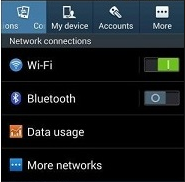
A simple way to lower your use of mobile data is to stop using it whenever WiFi is available. Rather than using up your mobile data plan, you can simply take advantage of any wireless networks in range. While this is convenient, you don’t want to connect to any sketchy wireless hotspots in your vicinity. There’s always the chance that a network can be littered with threats. Therefore, the best way to keep your device secure is to only access connections with passwords and encryption, and to make sure your autoconnect feature is turned off.

Limit Your Media Consumption While Mobile

Though it makes life infinitely more enjoyable to stream music and video entertainment on the go, it can also be putting an enormous strain on your mobile data plan. Instead of streaming music through your 3G or 4G connection, try playing music stored locally on your device. This can prevent your device from consuming too much data too quickly.

Limit Which Apps Update in the Background
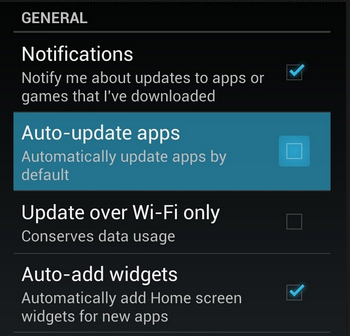
Unless you’ve explicitly configured your device otherwise, your applications will automatically update in the background while you’re going about your daily routine. Unfortunately, this can eat up a ton of data. To prevent this, you can set your device to update automatically when connected to WiFi, or to manually perform the updates yourself.

5six in blog2

If you find that even these four tips can’t stem the flow of your data problem, it might be time to cave in and get an upgrade. This should only be considered as a last resort, since it can help you avoid the overage fees associated with monthly data plans. All it takes is a little awareness of how much data you’re truly using in order to self-police yourself into staying within the confines of your monthly data plan.

b2ap3_thumbnail_your_byod_policy_400.jpg

Are Mobile Devices Helping or Hampering Your Team’s Productivity?

b2ap3_thumbnail_your_byod_policy_400.jpgMobile devices have become such a popular computing medium that they’ve infiltrated the workplace. While the business owner might feel that these mobile devices can help employees gain more regular access to corporate data for more working hours, these same devices could potentially eat up those work hours with time wasted on mobile gaming or other recreational apps. What’s the truth about BYOD? Let’s find out.

Your employees have smartphones that are chock-full of productivity-boosting applications that have the potential to streamline the way they work throughout the day. However, these devices also come installed with other consumer-popular applications like YouTube, Facebook, Netflix, Twitter, and more, that are notorious for destroying productivity.

Let’s not forget the games that are compatible with smartphones, either. These devices are able to run certain games similar to those found on popular handheld gaming systems like the Nintendo 3DS. Obviously, playing these kinds of games while on the job doesn’t make the ideal worker, and as an employer, you’d quickly ban your team from engaging in such fruitless activities. Therefore, the smartphone should also be fairly limited in use in order to facilitate proper operations during the workday.

For example, let’s take a look at a report by Evolving Workforce Research:

Nearly 60 percent of employees feel work would be more enjoyable if they had a say in the technologies they used, while 60 percent feel they would be more productive with better IT resources (like BYOD).

Mobile device manufacturers love to use these kinds of statistics in order to show you, the business owner, how great mobile devices are for productivity. However, if you take a closer look at this quote, it states that 60 percent of employees feel they would be more productive. That’s like saying that you feel so great you believe you can fly; an over exaggeration that isn’t true.

Therefore, having a productivity-increasing device isn’t the same as using it for its intended purpose. It’s sort of like buying a nice new piece of fitness equipment, like a treadmill, and letting it sit in the corner collecting dust. Just because an employee has a sweet new smartphone, doesn’t mean that the only thing they’ll use that phone for at work is to be productive.

Of course, the opposite can be true as well. An employee can be more productive with BYOD, as displayed by this study from Cisco:

BYOD-ers save an average of 37 minutes per week with BYOD as it is currently implemented in their companies. The United States leads by far in terms of current productivity gains per BYOD user, with 81 minutes per week, followed by the United Kingdom at 51 minutes. In both of these countries, BYOD-ers posted impressive gains by working more efficiently and being more available to their colleagues and managers.

This study shows that there’s some proof that BYOD can be useful for employee productivity. BYOD can potentially save some time during the course of the workday. But, of course, the question that’s hovering over every employee’s head is whether or not they want to use their extra time for work, or to waste time on their phone.

One particular aspect of BYOD that business owners must always consider is the fact that more devices accessing your business’s network means that there are more avenues for threats to sneak into your systems. Security should be a top priority when using BYOD for anything, and if you don’t have security on your mind, productivity in-turn suffers due to vulnerabilities, threats, and hacks.

BYOD generally requires more measures that must be taken compared to companies who don’t allow it. Ultimately, it’s up to you as the business owner whether or not you want to allow your team to bring devices to the workplace. If you do, make sure your network is ready to deal with them.

If your business is on the fence about BYOD, contact NuTech Services at 810.230.9455. We can help you determine whether or not it’s worth the risk for your business, and how you can integrate corporate BYOD policies that maximize security.