204234710_best_practice_400.jpg

The Latest Password Best Practices from the National Institute of Standards and Technology

204234710_best_practice_400.jpg

Passwords are the first line of defense your accounts have against the myriad of threats out there. It’s imperative that you follow industry best practices when creating them so as to maximize security. Thankfully, the latest guidelines from the National Institute of Standards and Technology, or NIST, make creating secure passwords easy.

What is the NIST?

The NIST has been the go-to authority on password creation standards for quite some time, and while they constantly change their advised practices, it is to keep up with the endlessly-shifting nature of cybersecurity. Their most recent update to password best practices can be seen in the below guidelines.

New Guidelines

Several corporations currently use the NIST guidelines and all Federal agencies are expected to adhere to them as well. Here are the latest steps in creating a secure password.

1. Length is More Important than Complexity

Password complexity has been one of the pillars of password security for years, but these days, the guidelines disagree. NIST suggests that the longer the password, the harder it is to decrypt. In fact, according to the NIST, organizations that require new passwords to be complex with numbers, symbols, upper and lower-case letters, etc, actually make the password less secure.

There are two major reasons for this determination. The first is that users often make their passwords far too complicated and forget them, leading to the eventual addition of something like an exclamation point or a 1 at the end of the password. This doesn’t make the password much more complex. Furthermore, users might be tempted to use the same complex password for multiple accounts, which is certainly not going to help their cause.

2. Eliminate Password Resets

Most businesses require that their staff reset their passwords every so often, whether it’s every month or every few months. The strategy is supposed to ensure that even compromised passwords can only be used for so long, locking would-be hackers out after the password has been changed. NIST suggests that this practice is actually counterproductive to account security.

Their reasoning is that, if people have to set passwords up too frequently, they won’t be as careful when creating them. Furthermore, when people do change their passwords, they are more likely to use the same pattern to remember them. If a previous password has been compromised, there is a good chance that this pattern can give the attacker clues into what the current password is.

3. Don’t Hurt Security by Eliminating Ease of Use

A big concern that many network administrators have is that, if they remove options such as showing a password while the user types it in or allowing copy/paste, it is more likely that the password will be compromised. The truth is that ease of use does not compromise security; it turns out that making it easier for people to properly authenticate themselves is better for security than restricting them.

4. No More Password Hints

Some systems allow for password hints where the user can assign a question and a designated answer to access the account, should they forget the password. This system in itself is flawed and the very reason why many organizations have been hacked. Thanks to social media websites and the Internet as a whole, it’s not impossible to imagine a hacker using websites or other resources to look up information on a particular user to gain access to an account. And you know what they say; once it’s on the Internet, it’s there to stay.

5. Limit Password Attempts

Placing a limit on password attempts is beneficial for your organization’s network security in just about every circumstance imaginable. Password remembrance is usually one of two things; either the user will remember the password or they will have it stored somewhere. Locking users out of their account for a short period of time can be a great way to dissuade would-be hackers from trying to guess a user’s password.

6. Use Multi-Factor Authentication

At NuTech Services, we like to reinforce with our clients that multi-factor or two-factor authentication is imperative for every account possible. The NIST recommends that users be able to demonstrate at least two of these three authentication measures before a successful login. They are the following:

  1. “Something you know” (like a password)
  2. “Something you have” (like a mobile device)
  3. “Something you are” (like a face or a fingerprint)

If at least two of these criteria are met, then chances are you are supposed to be on the network. Plus, consider how hard it would be for a hacker to gain access to more than one of the above. It just makes sense.

If you don’t make password security a priority for your business, you might come to regret it later, and no one wants to be the one responsible for a data breach. If you need a hand with implementing a password management system or other security best practices, reach out to us at 810.230.9455.
nist_password_400.jpg

Understanding the New NIST Guidelines for Password Security

nist_password_400.jpg

The National Institute for Standards and Technology (NIST) has released Special Publication 800-63B, titled Digital Identity Guidelines. The document outlines major changes to the ways password security should be approached and leaves a lot of what network administrators and software developers have implemented recently to be wrong Today, we’ll take a look at the publication, and try to make sense of the sudden change of course.

NIST is a non-regulatory federal agency that works under the umbrella of the U.S. Department of Commerce. Its mission is to promote U.S. innovation and competitiveness by advancing a uniform measurement standard. Many NIST guidelines become the foundation for best practices in data security. As a result, any publication they produce having to do with cyber or network security should be considered.

A Look at SP 800-63B
The newest password guidelines are a swift about-face in strategy as compared to previous NIST suggestions. Instead of a strategy of ensuring that all passwords meet some type of arbitrary complexity requirements, the new strategy is to create passwords that are easier and more intuitive. Here are some of the highlights:

  • Passwords should be compared to dictionaries and commonly-used passwords
  • Eliminate or reduce complexity rules for passwords
  • All printable characters allowed, including spaces
  • Expiration of passwords no longer based on time password has been in use
  • Maximum length increased to 64 characters.

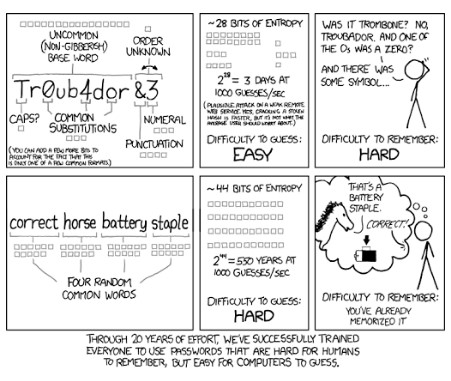
Basically, the new guidelines recommend longer passphrases to the complex passwords as they are hard for people to remember, and even with complexity rules in place, it was becoming increasingly easy for algorithms to crack passwords (seen in the comic strip below).

ib nist cartoon 1

As stated before, NIST is not a regulatory organization, but federal agencies and contractors use NIST’s information in order to set up secure computing environments in which to display, store, and share sensitive unclassified information.

In making these changes to password strategy, NIST is now considering the fact that many industry professionals knew: a password you can’t remember may be secure, but if it’s so secure that you have to rely on third-party software to utilize it, it’s not really that effective at mitigating risk. NIST now looks at the passphrase strategy, along with two-factor authentication as the go-to risk management strategy. SMS-based two-factor authentication was not mentioned in the final report but has come under scrutiny as it has contributed to multiple hacks in recent times.

The NIST also explicitly commands that network administrators be mindful to forbid commonly used passwords; effectively creating a blacklist of passwords. The new guidelines also suggest that users shouldn’t be using the password hints or knowledge-based authentication options; a common practice among banking and FinTech applications to this day. We’ll see if there is a strategic alteration in these companies’ practices as the new NIST guidelines become best practices.

If you are looking for more information about best password practices and data security, the IT experts at NuTech Services are here to help. Call us today at 810.230.9455 to have your password strategy assessed by the professionals.

Comic by XKCD.

password_strength_400.jpg

Tip of the Week: A Secure 2018 Relies on Powerful Passwords

password_strength_400.jpg

Password security is one of the most important parts of using an online account. It seems that the average user runs into the paradox of password security by using either complex, hard-to-remember passwords, or simple and less-secure passwords that put their accounts at risk. Even if the user is aware of the benefits that come from using a secure password, chances are that they will sideline security in favor of ease of access.

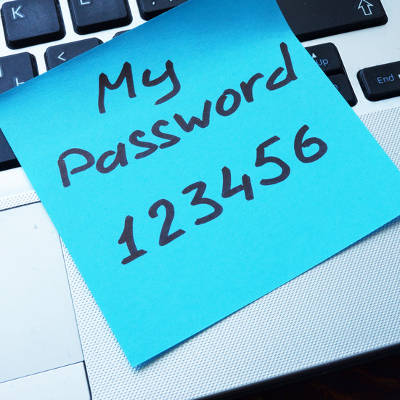
According to a list of the worst passwords in 2017 compiled by Splashdata, some of the worst passwords included “password” and “123456.” These two have topped the list since at least 2010, when Splashdata made their debut survey. Other passwords included in the top five include “12345678,” “qwerty,” and “12345.” Even “starwars” made the list at #16. For further reference, you can view the list of the worst passwords in 2017 here.

Best practices for password security are relatively well-known, especially considering how many experts study this particular field. Here are some tips from the guidelines recommended by the United States Computer Emergency Readiness Team, or US-CERT. In fact, US-CERT was created by the Department of Homeland Security for the specific purpose of preserving online security against threats.

Some sites or applications force users to use these best practices when creating a password, so do yourself a favor and keep these in mind:

  1. Use different passwords on different systems and accounts.
  2. Don’t use passwords that are based on personal information that can be easily accessed or guessed.
  3. Use a combination of capital and lowercase letters, numbers, and special characters.
  4. Don’t use words that can be found in any dictionary of any language.
  5. Develop mnemonics (or spoken memory tricks) such as passphrases for remembering complex passwords.
  6. Consider using a password manager program to keep track of your passwords.

NuTech Services is of the firm mind that you should never underestimate the importance of network security best practices–particularly password security. To learn more about how you can secure your business, reach out to us at 810.230.9455.
ebay_password_innovation_400.jpg

These Innovative Technologies are Helping eBay Move Beyond Passwords

ebay_password_innovation_400.jpg

Technology continues to grow more advanced, and with it comes major pain points that need to be resolved. Today’s modern businesses will need to adapt by implementing new solutions for both themselves and their customers or clients. In this fashion, eBay has begun to implement an assortment of new features to assist with the customer experience.

The first of these features is called “One Time Password,” which is an initiative that’s attempting to take the “two” out of two-factor authentication. Rather than requiring users to remember a password, eBay wants to send you a confirmation code via SMS that can keep the user logged in indefinitely. The goal is to keep users logged in regardless of how the code was used–allowing those who logged in via a mobile device or desktop more flexibility with their logins.

eBay is also working to allow account authentication through the use of the Touch ID sensor that’s found on more recent Apple devices. The goal is to eliminate the need to remember a password in the first place so that users of Apple products will be able to more efficiently use eBay’s services.

Of course, these services are bound to bring about questions regarding eBay’s motivation for creating such features. Senior Director for Identity and Member Communication Product Management Dave Comer stated: “One Time Password and Touch ID Authentication eliminate the need to remember your password when you want access to the eBay Marketplace… We all use so many applications that require passwords and login information that it is impossible for users to remember them all. We want to eliminate the friction entirely.”

eBay’s reasoning might make sense, but does the security hold up on its end of the bargain? Consider how easy it would be to accidentally leave eBay open on an unlocked workstation. Users could fall victim to either lighthearted pranks or financially motivated crimes. Passwords might make things more difficult for the user, but this difficulty is for their benefit. Complex passwords are more difficult to guess, which makes things more difficult for hackers.

In addition to these advancements, eBay plans on increased functionality with Android Wear devices. Users will soon be able to receive notifications on their wearable devices that show them items they may be interested in purchasing. Users will also be able to read and respond to messages through their smart device.

Yet, this presents a similar security problem. Wearable devices have consistently shown that they are less secure than other mobile devices, and much less so than desktop solutions. Unless eBay is implementing other serious security measures, these new features may not be worth the risk.

For the small and medium-sized business, eBay’s technological advancements should resonate. SMBs should be using two-factor authentication whenever possible, such as security systems which utilize a user’s smartphone to deliver an access code when logging into a network. This way, hackers will have a much harder time accessing an account–even if they’ve somehow managed to get a hold of legitimate credentials. Plus, new physical security solutions like pin pads and smart door locks can now be unlocked directly with an employee’s smartphone.

If your business is ready to tackle network security, NuTech Services can help. To learn more, reach out to us at 810.230.9455.

netflix_password_sharing_no_no_400.jpg

Warning: It’s Now a Crime to Share Your Netflix Password

netflix_password_sharing_no_no_400.jpg

“What’re you in for?” a prison inmate asks. “I shared my Netflix password with my sister,” you say. This conversation might be absurd, but according to a recent ruling in accordance with the Computer Fraud and Abuse Act, it’s one that could actually happen. Now, sharing your Netflix password to let someone catch up on their favorite TV show can be considered a federal offense.

In a two-to-one ruling, three judges from the Ninth Circuit of the United States Court of Appeals declared that password sharing is a federal crime. The case in question included a former employee of Korn Ferry, David Nosal, who was headhunting his former colleagues with the intention of obtaining valid user credentials to steal data from Korn Ferry.

As expected, this landed Nosal in court, and he was charged with hacking in violation of the Computer Fraud and Abuse Act (CFAA). The CFAA has an extraordinarily wide reach, and allows the Justice Department to go after anyone who does something as meager as violating the Terms of Service agreement issued to the user of any end product (like, say, an online streaming service).

Though Nosal managed to get off the hook for his 2011 charges, he was convicted of his 2013 charges due to a ruling by a federal jury. His sentence was set for one year and one day, and earned him a felony. Yet, the one dissenting judge feels that this kind of sentence is harsh; Judge Stephen Reinhardt, who sees the larger implications of such a ruling:

“This case is about password sharing. People frequently share their passwords, notwithstanding the fact that websites and employers have policies prohibiting it. In my view, the Computer Fraud and Abuse Act (“CFAA”) does not make the millions of people who engage in this ubiquitous, useful, and generally harmless conduct into unwitting federal criminals.”

What this precedent sets is that even “generally harmless conduct,” like sharing your passwords for subscription-based streaming services like Netflix or HBO Go, can be penalized under law. Netflix only allows its service to be used in one “household,” on six different devices, with streaming capabilities on two devices at a time. The new ruling gives Netflix a reason to crack down on those who are sharing passwords without first asking them for permission to do so.

This particular interpretation of the CFAA makes it more important than ever to keep your passwords safe and secure from anyone besides yourself. After all, the more people who have access to a password, the more likely it is that the password will fall into the hands of hackers. Therefore, you should practice proper password security and keep sensitive information away from everyone who has no business accessing it.

For more trending tech news, tips, and tricks, be sure to subscribe to our blog.

password_security_400.jpg

Mark Zuckerberg’s Recent Password Blunder is an All-Too-Common Problem

password_security_400.jpg

In a recent hack attack, Twitter had 33 million user login credentials stolen. This is unfortunate, but not surprising; an incident like this routinely makes the headlines. Although, what is surprising is what this hack reveals about people’s poor password security habits.

An analysis of the millions of stolen credentials by security company LeakedSource shows a troubling practice; the most-used passwords are also super easy to guess. In fact, the number one password (connected to more than 120,000 accounts) is “12345.”

Fans of the 1987 Mel Brooks film Spaceballs can see the irony here. In one of the movie’s most quoted scenes, the evil-yet-lovable Dark Helmet is blackmailing King Roland to turn over the password protecting Druidia’s precious atmosphere. Eventually, King Roland caves and reveals the super-secret, super-important password to be, you guessed it, “12345.”

To which Dark Helmet replies, “That’s the stupidest combination I’ve ever heard in my life! That’s the kind of thing an idiot would have on his luggage!”

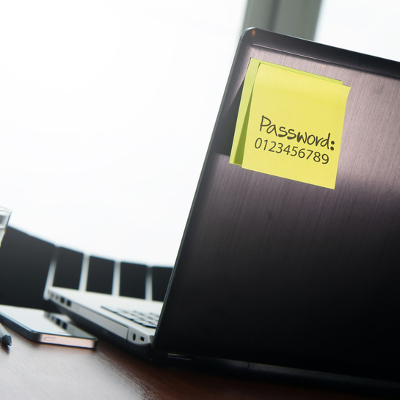
The report from LeakedSource goes on to reveal that the other, most-used passwords are also ridiculously easy to guess; “123456789,” “qwerty,” and “password.”

The fact that Spaceballs came out almost 30 years ago is evidence that using overly simple passwords has been a problem for quite a while, and, as long as there will be passwords, this will continue to be a major issue. Fortunately, the solution is stupidly simple; make sure to use complex passwords with random characters.

Although, using complex passwords is only part of the security equation. For websites and services offering two-factor authentication, like Twitter, you’ll want to take advantage of it. This way, even if a hacker made off with your super-complex password, they’ll still need access to your email account or smartphone in order to log in.

One additional password blunder that’s all too common and easy to avoid is using the same password for multiple accounts. In a major hacking situation like Twitter experienced, even a novice hacker could connect the dots and use the stolen password to try and log into different accounts belonging to the victim.

What kind of a King Roland-like idiot would use the same, super-simple password across multiple online accounts? Well, Facebook’s CEO Mark Zuckerberg for one.

On June 6th, Mark Zuckerberg lost control of his Twitter and Pinterest accounts after a hacker used the same password to access both of them. The super-complex password that stood between a hacker and the King of Social Media, “dadada.” Admittedly, this is a step up from “12345,” but not by much.

To make matters worse, Zuckerberg had used this password before. This highlights yet another best practice when it comes to password security; be sure to routinely change your password, and when you change it, make sure to not use a password that you’ve used before.

Being smart about your passwords will go a long way in protecting your online identity. For your business, it’s wise to take as many security precautions as possible in order to protect your network from hackers looking to steal your company’s sensitive information. To learn more about how NuTech Services can keep you safe, call us at 810.230.9455.