digital_house_400.jpg

5 Security Analogies to Help You Better Understand Hacking

digital_house_400.jpg

How often do you read a blog article about network security only to be blown away by all of the overly complicated and confusing jargon of the industry? We know that it’s not necessarily your specialty, but it’s still important that you understand how network security works for your organization. While the complicated details should be left to IT professionals, we can help you better understand the general idea of security by comparing it to a locked door.

Brute Force Attacks
Let’s say that a robber wants to break into your home. He will try to go through a door, but he might not have the keys required to get in. In this case, he will have to use everything at his disposal to get in. He might try to kick the door down or smash a window. In other words, he’s getting into your house by brute force.

Brute force in computing can consist of a hacker trying to use as many passwords as possible in a short period of time to get in. There are programs that can randomly generate countless passwords in seconds, making this method of attack quite devastating when it’s effective.

Social Engineering
Let’s say that you have a new neighbor on your street. They ask you over for dinner and you get to know them. You feel like you are getting along with them quite well–well enough to trust them to water your plants while you’re out of the state on vacation for a few weeks. You give them a key, but when you come home, all of the plants are dead and you’re missing some furniture or technology. Yup, they’ve robbed you–you’re sure of it.

Social engineering takes a calculated approach to hacking and data theft. Hackers will make personalized attempts to steal your passwords and information by taking on the identity of someone you think you can trust with this information, like an “old friend” or “your elderly grandmother.”

Security Exploits
Robbers may try to find weak points in your front door. Maybe the door doesn’t quite lock all the way due to a defect in the manufacturing process. In this case, the robber may research what the weak points of the door are so that they can know the best and most efficient way of getting past your defenses.

Security exploits are weaknesses in software on your computer that allow hackers to sneak into your system and get into all sorts of trouble. These can range from weaknesses in the way that sensitive information is handled, to particular lines of code that create problems for your organization. Ultimately, it only takes a single crack in your defenses–a security exploit–to allow a hacker into your infrastructure.

Trojan Horse
Someone might knock on your door and tell you that something within your household is in need of repair. Maybe they know that you have a leaky faucet that needs to be addressed, or they know that you have some concerns about your furnace. They are then invited into your home and go about their business. You may then notice that you’re missing important items afterward, hinting that the off-the-street good Samaritan was, in reality, a scammer.

Trojans work like this in many ways. Just like the Greek horse of old, a Trojan sneaks onto your system and plants a backdoor, allowing for secret re-entry at a later date. Often times, a Trojan will use a larger data breach to mask its presence, and then continue to steal information in small doses as time goes on.

Two-Factor Authentication
Two locks are better than one in most circumstances. For example, you can have one lock on the doorknob and another on the deadbolt, which keeps the door fastened in place even if the door is forced open near the doorknob. Basically, having two types of locks makes it twice as hard to get to anything of value.

Two-factor authentication can be used to provide this secondary credential to your digital assets, including online accounts or network logins. A secondary code can be sent to an email address or mobile device, which allows your employees to access important information only when both of these are present.

Does your organization need help with network security? NuTech Services can help. To learn more, reach out to us at 810.230.9455.

social_engineer_earth_400.jpg

Would Your Users be Tricked by Social Engineering?

social_engineer_earth_400.jpg

The term social engineering may not seem nearly as intimidating as other cybersecurity terms like ransomware or denial of service. Don’t be deceived! Some of the biggest threats to your company’s data and network security use social engineering to manipulate targets into taking a specific action – like disclosing personal information that can be stolen and exploited.

Often overlooked by the media in favor of major data breach events, there are few types of social engineering hacks that have the capability to devastate a business.

  1. Vishing: Given the fact that the number of people who fall for phishing attacks and other email scams has declined significantly, it was only a matter of time before hackers found an alternative avenue to exploit their targets. After abandoning it a few years ago in favor to digital scams, vishing – a fraudulent voice call that seeks personal information – have once again returned as a favorite among hackers and thieves.
  2. HTTPS: SSL certificates used to ensure that a website was legitimate and secure enough to protect your personal information. Websites that have ‘https’ no longer signifies security, as hackers have begun using websites that give away SSL certificates for free and using them to lull victims into a false sense of security. To make sure a website is secure, you’ll want to look for indication of an extended validation SSL (EV-SSL) which are not offered for free! EV-SSLs are signified with a green bar.
  3. Website Copy-Cats: Scammers have become very skilled at making spoof websites that look and feel just like the authentic website but are actually littered with all typesof malware. For example, after the Equifax data loss event in June 2017, Equifax set up a website to help their clients who had their information compromised with the URL: equifaxsecurity2017.com. A spoof of that website, with the domain securityequifax2017.com, was so convincing – it even tricked Equifax themselves! A few things to keep an eye out for when trying to determine if a website is legitimate, include:
    1. Make sure the URL is correct.
    2. Avoid giving out information unless a site has an EV-SSL.
    3. Look for seals of trust from other IT security websites.
    4. Beware of misspellings, typos and broken English.
  4. Every Word Password Theft: There are a lot of hacking tools that will scan through databases – including every word in the dictionary. These tools significantly increase the likelihood that a password that includes an actual word will be cracked and exploited. The best practices are ones that mix numbers, letters and symbols that make no sense.

When it comes to digital threats, for every exploit or hack that is prevented, a few, more advanced ones are developed. The best way to keep your business, and it’s data, safe is to take proactive measures and execute safe internet practices all times – and that goes for your employees, as well! Would you like to learn more about how you can stay ahead of hackers? Call us at NuTech Services.

net_security_tips_400.jpg

Tip of the Week: Ways to Be Active and Proactive With Your Network Security

net_security_tips_400.jpg

Security troubles have many causes, but the only way to protect your business from any of them is to implement a comprehensive enterprise-level security solution. There are two other ways that you can work to protect your business, implementing software patches, and avoiding social engineering attempts.

Applying Software Patches
It should be clear that software patches are designed to fix security problems and improve the functionality of the software, but some organizations simply don’t have time to implement them manually, or they simply don’t understand the purpose for them. Part of the problem is that sometimes the developers aren’t necessarily clear that patches are available, while other times those within your organization may not even know how to administer them. Regardless of the reason, there are usually problems on a network that will go unattended for extended periods of time.

Most hackers only want to take advantage of the issues they can detect. Thus, there could be countless threats out there designed to target countless unpatched vulnerabilities on your network that not even the hackers can know about. It makes sense for a hacker to use just one exploit to target a handful of vulnerabilities. Therefore, it’s important to make sure that all software that you use is updated and patched.

Additionally, your systems shouldn’t be running unused programs. The more software you have, the more ways hackers can take advantage of your organization’s network vulnerabilities. Moreover, you might even be wasting revenue on renewing software licenses that you don’t even need, so it’s best perform a network audit from time to time to get the worthless software off your infrastructure.

Dodging Social Engineering Attempts
Social engineering is broadly categorized as any method that takes advantage of unprepared users or those who are ignorant of solid network security practices. Examples include a phone call or email message claiming that the network has been breached by a foreign entity and that “tech support” needs to remote into the computer and resolve the issue. There are other, more subtle methods as well, such as targeted spear phishing attacks that go after specific users with personal information that convince them that the hacker is someone in authority.

These types of attacks vary in sophistication, but they can range anywhere from an employee receiving a message claiming that they’ve won a prize, to the intruder physically following your employees into the office and stealing sensitive data manually. In instances like these, a little bit of employee training can go a long way. Teach them to look for anything suspicious, and inform them that vigilance is incredibly important in the workplace.

These two security improvements barely scratch the surface of what your organization should be focusing on for network security. If you want to fully protect your business to the best of your ability, give us a call at 810.230.9455.

innocent_mistakes_400.jpg

How an End User Might Accidentally Undermine Your Security: 10 Innocent Mistakes

innocent_mistakes_400.jpg

If you’re like every other small business out there, you know that the more employees you hire, the more technology that you have to procure. However, when you have more end-users, you provide more avenues for threats to slip into your network infrastructure unnoticed. When all it takes is one simple mistake from a single end-user, how can you minimize the chances of falling victim to an untimely hacking attack?

We’ve put together ten honest mistakes that any end-user can make, and how they can be prevented.

  • Clicking on malicious links: With so much information on the Internet, it’s easy for an employee to search through countless pages without any regard to the sites and links that they’re clicking on. You need to emphasize the importance of safe browsing, including double-checking the destination of a link before clicking on it. You can do so by hovering over the link and looking in the bottom-left corner of your browser.
  • Using weak passwords: Employees frequently use passwords that aren’t strong enough to keep hackers out. Often times, they’ll simply use something of personal significance, like the name of their pet or a specific date. This isn’t the right way to approach password security. Instead, users should attempt to put together passwords that are private, randomized strings of numbers, letters, and symbols.
  • Ignoring mobile security: Even if your company has the latest and greatest security solutions installed on its desktops, you should also be thinking of your mobile devices, like smartphones and tablets. It’s arguably more important that your mobile devices have solid security solutions implemented on them, as they are often on the road, connecting to potentially dangerous hotspots. You need to make sure that security is a top priority in your Bring Your Own Device (BYOD) policy.
  • Accessing sensitive data through unsecured connections: If your employees are using the local café’s free wireless Internet to get some work done on their lunch break, it could be a dangerous gambit. Public Wi-Fi hotspots are notorious for being cesspools of online threats. Implementing a virtual private network (VPN) can be a handy investment that can encrypt data while it’s in transit, mitigating this risk somewhat.
  • Losing unencrypted devices: It’s not unheard of for an employee to use company devices in public places. If they accidentally leave their smartphone on the bus, or their tablet on a park bench, there’s always the risk that it can be stolen. Unless you practice proper encryption protocol, any information available on the device can be accessed by the person who finds it, be it a good samaritan or a tech-savvy thief.
  • Implementing unapproved solutions: Some employees simply prefer to use solutions that aren’t provided by the company to get their work done. The problem here is that the employee is moving forward without consulting IT about it, and that your data is being used in a solution that you can’t control. Plus, if the employee is using free or open-source software, these often come bundled with unwanted malware that can put your data in even greater peril.
  • Targeted business email scams: Phishing and spear-phishing attacks are growing more common. One example of this is an HR employee checking their inbox to find what looks like a job application or employment inquiry. All of the right information is there and nothing appears out of the ordinary; that is, until a malicious link contained within it starts to download malware or other nasty threats to your infrastructure. Other types of phishing attacks will ask end-users to confirm personally identifiable information or sensitive account credentials. Educating your team on how best to identify phony email messages is imperative to keeping your network secure.
  • Personal email use: It’s one thing to check your personal email account while at work, but another entirely to use your personal email account to perform work purposes. As the recent debacle with Hillary Clinton shows, people don’t take kindly to sensitive information being leaked via an unsecured email server that their organization has no control over. Add in the fact that personal email accounts are often not as secure as those in a professional productivity suite, and you have a recipe for disaster. You need to reinforce that your team should keep their work and personal email separate.
  • Leaving workstations unattended: Besides the fact that some tech-savvy employees are practical jokers, it’s a security risk to leave a workstation unlocked and unattended for long periods of time. Imagine if someone from outside of your organization walked into your office and accessed confidential files without authorization; that’s on the employee who got up and left the device unattended. Encourage your employees to always log off of their workstations, or at least lock them, before stepping away from their computer.
  • Using external storage devices: Your organization should only be using IT-provided USB devices and external storage. Otherwise, anyone with a random flash drive can connect it to your network, unleashing a horde of who-knows-what into your infrastructure.

User error is a primary cause for concern among businesses, but it can be mostly avoided by providing your staff with the training required to do their jobs properly. For more information about IT best practices, give us a call at 810.230.9455.

b2ap3_thumbnail_malware_lock_up_400.jpg

Alert: How Hackers are Scamming Users With Fake IT Support Hotline

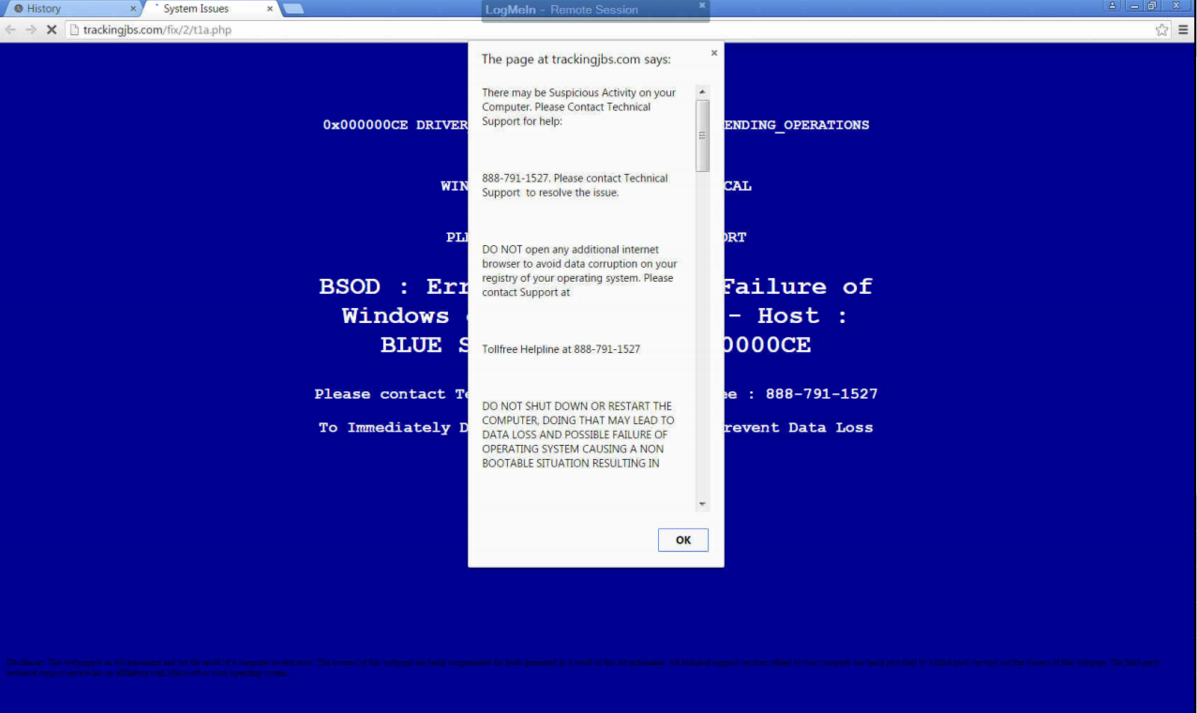
b2ap3_thumbnail_malware_lock_up_400.jpgThere’s a wicked string of malware on the Internet that locks users out of their browser and directs them to call a phone number. That phone number reaches hackers who have set up a subterfuge as an IT support company. If this happens to you, even if you are in the middle of something important, do not call the phone number.

This particular piece of malware startles the user by blocking their progress within their web browser, suggesting them to contact a fake tech support hotline to “fix” their computer. It will show a screen that’s similar to the Windows fatal system error blue screen, along with a fake technical support message that pops up, informing the user of the “problem.” As you can see by the provided screenshot, this blue screen of death is deceptive because it’s only displayed within the browser, instead of taking up the entire screen like Microsoft’s real blue screen of death.

blue screen

Whatever you do, DON’T CALL THE PROVIDED PHONE NUMBER. The blog Delete Malware explains: “If you call [the number] they won’t actually remove adware from your computer. They will hijack your computer and steal all of your bank information and passwords. They are crooks, don’t call them!”

Fortunately, this error isn’t as critical as what it seems. In fact, this is a common tactic of social engineering: make the problem seem much worse than it is, causing the victim to flip out and do something rash–like call the fake IT support phone number.

What then are you supposed to do? You can make the issue go away simply by closing the browser via task manager (Ctrl + Alt + Delete), or rebooting the PC. However, it’s still annoying to deal with because you’ll lose any unsaved data, along with any progress made to whatever project you’re working on. Plus, rebooting your system won’t technically solve the problem; the malware will still be embedded in your system, waiting for another chance to strike.

Therefore, to get down to the root of this problem, you’re going to want to isolate and properly delete the malicious file. For this level of real IT support, you’re going to want to call the trained professionals at NuTech Services. We’ve got the tools needed to find and eliminate such threats, and even block them from hitting your system in the first place with a Unified Threat Management solution.

Lastly, we’d like to point out that the perpetrators of this hack are relying on the fact that the user doesn’t know who to call for IT support in a crisis situation. It’s reasons like this why you and your staff need to be familiar with who to call in an emergency IT situation, like NuTech Services at 810.230.9455. When it comes to taking care of IT issues, we’re the real deal, and we take offense that hackers these days are posing as trustworthy IT technicians in order to get at a user’s personal data. It’s an unsettling trend that will only be brought down by companies being vigilant about their network security.

To that end, NuTech Services can help. Call us today to find out how we can protect you from the worst of the web.

Social Engineering: Not All Hackers Target Technology

b2ap3_thumbnail_social_engineering_risky_400.jpgThe nature of hacking is to take advantage of weak points and exploit them for some kind of profit. This is usually seen in flaws or vulnerabilities found within the code of a program or operating system, but these flaws can be psychological, too. Hackers are increasingly taking advantage of a concept known as “social engineering” to fool users into handing over sensitive information that can be used against them.

Social engineering hacks are performed against unsuspecting individuals who might be privy to sensitive information within a corporation. These people often have less technical skills and might be more vulnerable to exploitation than others. These attacks often seek out information like passwords, usernames, dates of birth, and other sensitive credentials. The more skilled social engineering hacker can replicate sites to infect systems with malware, or even initiate infected downloads.

The most notorious social engineering method of hacking is called phishing, when emails are sent to a user under the guise of a seemingly harmless institution, like a bank. These messages usually ask the victim to confirm login credentials and other information in a manner that looks legitimate.

Spear phishing attacks are some of the most dangerous hacks out there. These types of phishing threats target specific users with personalized messages that are designed to coerce them into giving up personal or financial information. There have even been accounts reported of hackers posing as the media in order to get access to secure information.

According to HowToGeek.com, this method isn’t limited to being used remotely. Social engineering hackers can also get up close and personal with their attempts:

An attacker could walk into a business, inform the secretary that they’re a repair person, new employee, or fire inspector in an authoritative and convincing tone, and then roam the halls and potentially steal confidential data or plant bugs to perform corporate espionage. This trick depends on the attacker presenting themselves as someone they’re not. If a secretary, doorman, or whoever else is in charge doesn’t ask too many questions or look too closely, the trick will be successful.

How Can You Protect Yourself?
Ultimately, it comes down to educating yourself and your staff on how to identify a social engineering hack from the real deal. Here’s how you can minimize your chances of playing into the hands of a phishing scam.

  • Always be suspicious. Strange messages and phone calls are more than enough reason to be suspicious of the sender. If this is the case, it’s important that you don’t respond until you can confirm the identity of the sender. Contact the organization with the number or email address you have on record to ensure that you’re not being scammed. Some pointers to look for are misspelled words or strange links.
  • Avoid links in emails to websites that gather sensitive information. It’s possible that these links lead to fake sites that are designed to steal your credentials. If you suspect this is the case, try logging into the official site that you accessed outside of your email. You can spot subtle differences in the URL which give it away.
  • Make sure spam and phishing filters are enabled in your email and browser. Some browsers have built-in protection from known phishing sites which should always stay active. One particularly powerful solution is NuTech Services’s Unified Threat Management (UTM) solution. This solution equips your business with everything it needs to keep outside threats from getting into your network, including spam filtering and web content blocking.

When it comes down to it, the only way to maximize your business’s security from phishing attacks is to make sure your team knows how to identify and handle them. For more information on how to keep yourself safe from all manners of threats, give NuTech Services a call at 810.230.9455.