Tip of the Week: Improve LinkedIn Privacy

Tip of the Week: Improve LinkedIn Privacy

Tip of the Week: Improve LinkedIn Privacy

Have you ever received an email notification that someone has checked out your LinkedIn profile? While you might be flattered in the moment, you might then suddenly notice that LinkedIn is doing the same thing to you, telling others when you have looked at their profile. While this isn’t always a bad thing, and can even be good for networking, you might want to adjust this setting so that your privacy can be maintained a bit better.

Adjusting Your Privacy Settings on LinkedIn

The first step is to navigate to the LinkedIn website, which you can find here. After this, you should click on your profile icon in the topmost bar (near the right corner of your screen). You then want to click on Settings & Privacy.

You should see several options in the left column, but the one you want to click on is Visibility. Afterwards, select Profile Viewing Options.

When you select Private Mode from the list, you will see a couple of different options, both of which have some merit, depending on how private you want to get with your account. The first option is Someone At [Insert Workplace Here], while the other hides your identity entirely. It’s up to you how thorough you want to be with this setting.

It’s worth mentioning that people will see that someone viewed their profile no matter what you do; you just have more power over how you look to someone when you view their profile. If you want your company’s name to appear still, then go with the former option. If you would rather have complete anonymity, then go with the latter.

There is one caveat to this setting adjustment, and it’s a big one: when you appear private to others, they will appear private to you, meaning you won’t know who is viewing your profile, although you might get a couple of hints based on where they work. Still, it’s a setting that you might consider adjusting, so now you know how to do it!

Privacy on social media is kind of an odd thing; you don’t want to overshare, but you also don’t want to be a complete stranger. It’s up to you to determine how and why you use social media. We just urge you to always use caution when interacting with anyone you don’t know, as you never know who could be on the other end of the account.

What are some tips and tricks you would like to see us cover in the future?

SM_phishing_AdobeStock_314622420_400.jpg

Social Media Conditions People to Let Their Guard Down

SM_phishing_AdobeStock_314622420_400.jpg

How often do you check social media only to find your news feed clogged with your friends and family sharing the results of quizzes like, “Which Star Wars character are you,” or “What’s your superhero name based on your birthday.” While these quizzes might seem harmless on the surface, they often hide a far more sinister agenda, one which uses the personally identifiable information provided to them for nefarious purposes.

If your friends and family aren’t careful, these quizzes could be giving their hosts access to all the information they need to hijack someone’s social media profile.

“Your New Last Name is the Thing You Ate Last!”

The major concern we have about these quizzes is that they might appear to be lighthearted on the surface, but that the questions line up suspiciously close to the security questions that one might use to protect an account. For example, your bank and credit card accounts use security questions to keep them secure, so what happens if you give up this information to an online quiz?

That’s right—the hacker might use the information you willingly provided to hijack your account. All the hacker has to do is click that Forgot Your Password prompt and boom, they’re in.

This is because these security systems can’t always tell who is typing in the answers; all they do is check to make sure that the answer matches the one provided in the past. From the bank’s perspective, you’re just another customer who forgot their password and is using their recovery question to gain access to your account.

When you look at online quizzes and questions they might ask, they line up quite closely with the recovery questions that are often associated with resetting passwords, like your first pet’s name, your mother’s maiden name, the model of your first car, and so on. When you share the answers to these questions, you effectively give someone on the Internet everything they need for easy access to your accounts.

This Is How Social Engineering Attacks Work

Even the most unlikely suspects could be considered social engineering attacks, especially on social media. It’s important that you give your team the tools and knowledge they need to identify these threats so as to avoid them. The same hallmarks of phishing attacks are present here, too: misspelled addresses, alarming subject lines, unprompted attachments, etc.

Cyberthreats are everywhere, so you can never be too careful. Remain ever-vigilant and be sure to train your employees on how to identify and respond to threats. To talk to an IT expert on training your staff and securing your business, reach out to us at 810.230.9455.

292632933_social_media_msp_400.jpg

How SMBs Use Social Media

292632933_social_media_msp_400.jpg

Social media companies are some of the most powerful entities in today’s world. Their ability to connect people with others of like mind or specific wants and needs often goes overlooked because much of the experience of operating online in today’s climate is adversarial. With the average user spending roughly two hours and 24 minutes per day on social media and messaging apps, companies can use that exposure to promote themselves. Let’s take a look at how small and medium-sized businesses use social media to their advantage.

Very Small Businesses and Self-Funded Startups

For the very small business—that is the mom-and-pop shop and the sole proprietorship—social media can be the major marketing outlet for your business. In fact, many bootstrapped startups and extremely small businesses will use Facebook as their exclusive hub for marketing outreach. Since these businesses often don’t have the capital to commit to large content-driven marketing initiatives, social media gives them a way to get their brand out there at a modest cost.

For the new entrepreneur looking to build their business from the ground up, Facebook is a very good tool. Not only does it give small businesses the opportunity to get their brand out there, it also provides them with the ability to interact with potential customers and share their culture. Other social media platforms can work for these companies too, but without the strategies and services that larger businesses use, there will always be kind of a soft cap on how effective social media can be for the really small business.

Established Small Businesses and Well-Funded Startups

As a company’s marketing budget swells, so do the possibilities, especially with social media. The established small business typically has the revenue to afford at least a middling marketing strategy and will use it to create a marketing hub, create content, and further press the issue as far as getting their brand out to the world. At this level, many businesses look to purchase the services of a marketing agency. Like managed services, a marketing agency handles a lot of the marketing for your business, so that the people in a business can focus on doing what it does best. 

Startups that are well financed function a bit different but also use agency options. They are typically trying to develop products and services and use the agency right along with the development of their offerings. This strategy, while unsustainable over time, can produce faster results if and when a product or service that will produce acceptable returns is created. 

Both rely on social media in many of the same ways smaller businesses do, but don’t necessarily run their marketing efforts through it. As mentioned previously, these businesses typically have an established web presence (or at least the means to get one quickly), and use Facebook to extend their reach. At this level, tutorial videos, webinars, and other marketing efforts are well established and using Facebook, YouTube, Twitter, and Instagram to share their experience, their culture, and their testimony from satisfied customers. 

Medium-Sized Businesses

The mid-market business is a large business, make no mistake about it. The accepted size of mid-market businesses is over 500 workers. For those businesses that operate with under five, that seems a million miles away. The mid-market business is typically well-established and their brands are known. They have teams of people (internal or outsourced) that actively use analytics (business intelligence, business analytics, etc.) to develop their advertising, marketing, and public relations strategies; all of which they need. In the mid-market, companies use social media as they feel they need to use it rather than something they must do. Most businesses will have a presence on all the major social media outlets, and many of them use social media to fuel their human resources needs. Since their social media budgets are in the five and six figures, they can take advantage of all the services these social media companies offer for businesses. 

What Social Media Platforms are Out There That Have Services for Businesses?

The easy answer to this is all of them. These are some of the richest and most influential companies on the planet at the moment, and they got to this point because people shop. Whether it’s for simply brand exposure, or whether it’s used for full-on advertising, the following social media outlets work for businesses:

  • Facebook – 1.6 billion daily active users – Facebook is the largest social media firm by leaps and bounds, and it also owns Facebook Messenger, WhatsApp, and Instagram. Facebook is currently used by over 90 percent of marketers today.
  • YouTube – 149 million individual daily users – YouTube is a great resource for the growing business. Not only is it the second largest search engine in the world, the video-sharing giant provides access to homespun content that can really take a business’ brand to the next level. 
  • WhatsApp – 1 billion daily active users – With so much of the world relying on WhatsApp, it can really be a benefit for those companies looking outside their own borders for business. 
  • Instagram – 600 million daily active users – The photo-sharing website, Instagram has been a big player in the marketing scheme for the past couple of years. Many brands look to build a campaign using influencers who direct business to specific companies. 
  • Twitter – 134 million “monetizeable” daily active users – Twitter is extremely popular, and can be a great way for individuals inside your business to promote content and deliver their knowledge to others.
  • LinkedIn – 303 million monthly active users – LinkedIn is a professional networking platform that many human resources professionals use when recruiting new talent. 

Other social media platforms that are actively used by marketers include: Reddit, Tumblr, Pinterest, Snapchat and more. 

Technology is rapidly changing the world we live in, and it is definitely changing commerce. Does your business use any of these social media platforms? Which ones do you find useful? Leave your thoughts in the comments section below and return to our blog regularly for more great technology content. 

Facebook_285250526_400.jpg

Facebook and Your Privacy (Part 2)

Facebook_285250526_400.jpg

Wait! If you haven’t read part one of our Facebook privacy blog yet, you may want to do that before reading this one. If you’re ready, we’ll be taking an in-depth look at your Facebook settings to make sure that your account and its data are as secure as possible. If we’re being honest, protecting this kind of data hasn’t seemed to be one of the platform’s strong suits – and user privacy has been the star of many lists of concern.

That’s why we wanted to make sure that you knew how to reclaim your personal data and make sure it is protected. We’ll start by protecting the information that you’ve shared.

To do this, you will want to access your Facebook account on a computer. This is going to be a lot to manage, and the mobile app would only be too much trouble to navigate.

Your Security and Privacy Options

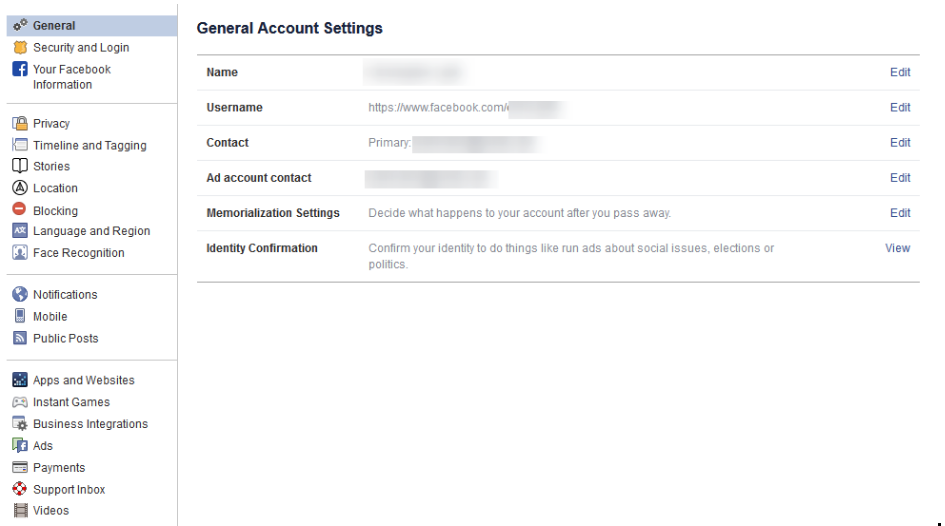
From any page on Facebook, look for the menu, which will appear as a little downward-facing arrow. This should be at the top right-hand corner of the page. Click into Settings. This little arrow is your lifeline during this process, you can always find your way back to the beginning with that menu.
Verify the Accuracy of Your General Account Settings

Your first order of business should be to confirm that you still have access to all of the email accounts tied to your Facebook. If an account that you no longer have access to was used, account recovery becomes monumentally more difficult.

Find Out Where You’ve Used Facebook with Security and Login

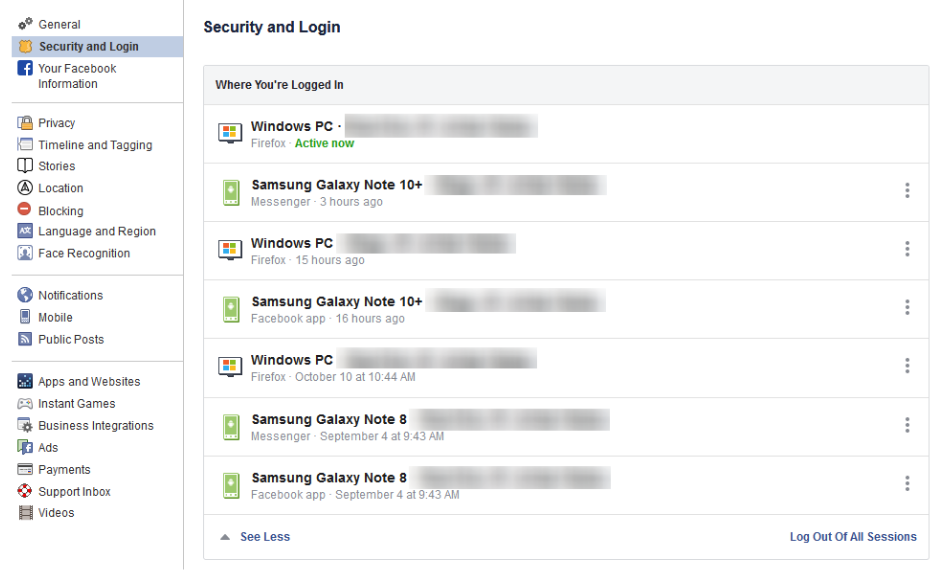
On the right, you should see the Security and Login option. Click it, and Facebook will show you all of the devices where your account is logged in. Fair warning, this can be shocking – especially since it includes where and when you last used that device, and what browser you were using to do so. The longer a user has been engaged with Facebook, the more devices will likely show up here.

If one of these devices is one that you don’t recognize, you will want to change your password immediately – we’ll go over how in a moment. First, you will want to log out of Facebook on any device that you aren’t actively using. This can be done through the three-dot icon menus next to each device listed.
Change Your Password

While we’re on the topic, this is when you will want to make it a point to update your password. It will only take a minute and might just help keep your Facebook friends from being spammed and phished. You can do this using the process provided on the Security and Login page.

Remember, you should never use a password for more than one online account.

Using Two-Factor Authentication

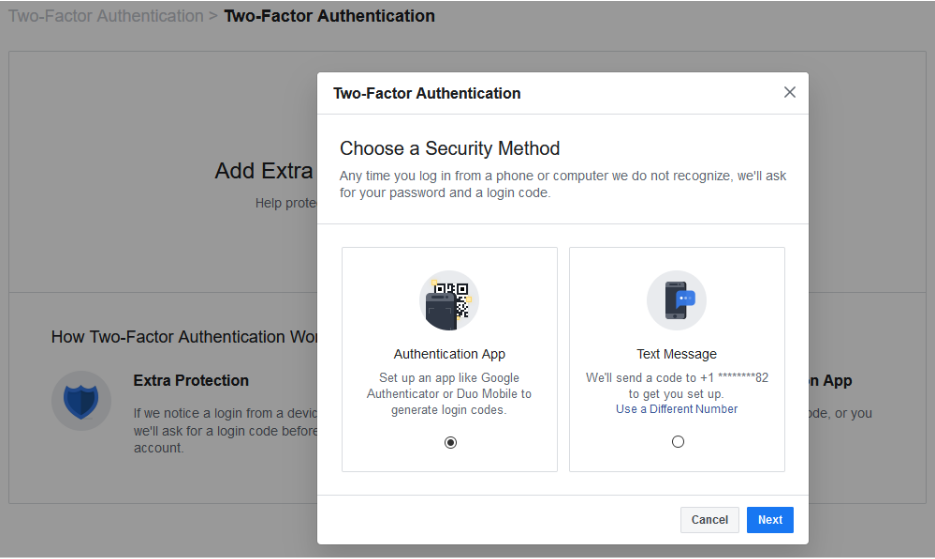
After your password settings, you’ll see the option to set up two-factor authentication (2FA) to help protect your account. To set it up, select Use two-factor authentication and click edit, and Facebook will provide you with the instructions you need to follow. Click Get Started

You have two options to select from as your Security Method, either using an authentication app, or to receive a text message with an additional code. Between the two, the application is the more secure option, although it does mean you need to have access to the mobile device whenever you want to check your Facebook.

Setting up the authentication app option is pretty simple. Open your application (which, if you have a Google account, might as well be Google Authenticator) and, on the computer, select the Authentication App option, as pictured, and click Next

Facebook will display a QR code, which your authenticator app should allow you to scan when you add a new account to it. The app will then give you a six-digit number to provide to Facebook as a Confirmation Code. Simple.

If you decide to use the text message option, Facebook will simply send you a code that you have to provide upon login. It isn’t quite as secure as the app, but it will do. All you have to do to configure this is to confirm an initial code with Facebook, and you’ll be walked through the rest.

Add a Backup

Once you have two-factor authentication enabled, it only makes sense to add an additional means of 2FA as an emergency backup – in this case, whichever method you didn’t choose. Honestly, you might as well set up both, and make use of the Recovery Codes option, to boot.

Under the Add a Backup option on the Two-Factor settings page, there is also a Recovery Codes option. By clicking Setup, Facebook will provide a brief explanation, and the opportunity to Get Codes. Facebook currently gives you a list of 10 single-use 2FA codes. These are one-shot codes, but you can generate a new list whenever you want from the Two-Factor Settings page. Make sure you keep these codes in a safe place.

Setting Up Extra Security

Back on the Security and Login page, scroll down to find Setting Up Extra Security. This area lets you opt-in to alerts being sent via email or text, notification, or Facebook Messenger.
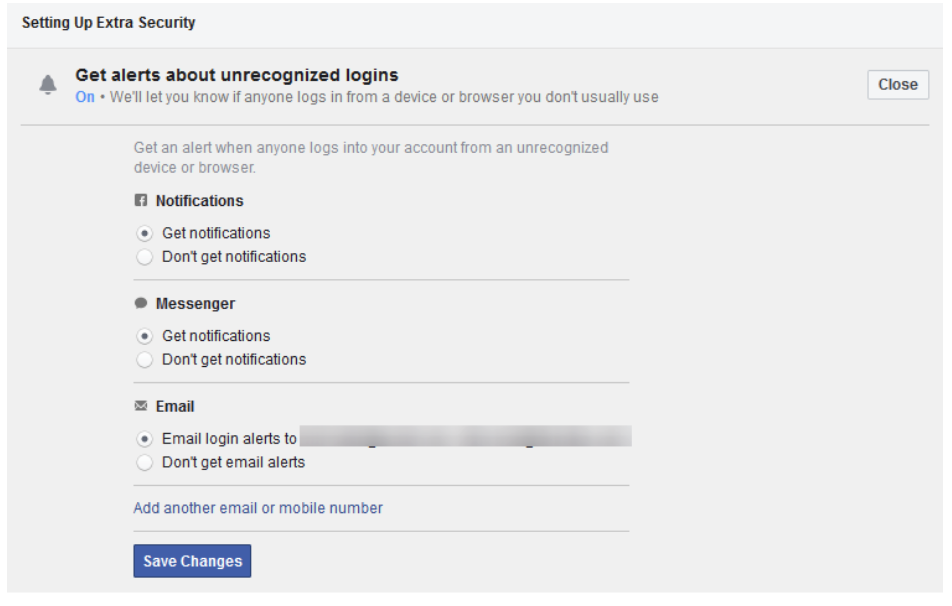
You can also Choose 3 to 5 Friends to Contact if you do find yourself locked out of your account. Make sure that these are people you truly trust.

Stay tuned for part three of this series, coming soon.

Privacy_307095170_400.jpg

Facebook and Your Privacy (Part 1)

Privacy_307095170_400.jpg

Two billion users strong, Facebook is one of the Internet’s most popular websites… which has frequently put the tech giant in the spotlight when it comes to how secure the data you’ve entrusted to them (in addition to what they’ve collected) really is. Today, we’ll discuss how you can access the information Facebook has on you.

What Does Facebook Know About Me?

Consider how many opportunities Facebook has to collect information about you: there’s quite a few. For one thing, you literally tell the platform the things you “Like.” Semi-joking aside, there’s also the stuff you post, which advertisements attract your attention, and many other means for them to construct a pretty solid profile on you.

You can see this profile for yourself. In the aftermath of the Cambridge Analytica scandal – where third-party users were granted free reign and access to Facebook user info – Facebook made a promise to be more transparent. This profile is part of that transparency.

Viewing this information is pretty simple, whether you’re on your computer or you’re using the mobile application.

On a desktop or laptop:

  1. Log in to your Facebook account.
  2. Click the down arrow on the top right and go to Settings.
  3. On the left, click Your Facebook Information.
  4. Facebook will present you with five options. Look for Download Your Information.
  5. Click View, Facebook will give you a screen where you can choose the date range and format of the data. Since we want to download everything, we’re going to set the Date Range to All of my data and set Media Quality to High. This will give us a higher quality version of all of our photos and videos in the download.
  6. Click Create File and Facebook will start building the download. This can take a while, but Facebook will give you a notification when your data is ready for download.
  7. Once Facebook gives you the notification, click it and Download your data.

From the Facebook mobile app:

  1. Tap the 3-bar hamburger icon in the top right of the app.
  2. Scroll down and tap Settings & Privacy, and then tap Settings.
  3. Tap Download Your Information.
  4. Leave all of the options checked, and scroll down. Ensure the Date Range is set to All of my data and that Media Quality is set to High.
  5. Tap Create File and Facebook will give you a notification when the data is ready for download.

The “data is ready” notification will probably come after about an hour – it really depends on how long you’ve been a user, and how active you’ve been. Most people will probably have a file that takes up a few gigabytes.

Now that the report is available to you, click on Your Facebook Information.

Access Your Information – Facebook provides you with an itemized and viewable list of your Posts, Photos, and Location history ready for viewing.

Activity Log – Consider this a comprehensive timeline recap – almost a scrapbook, prepared by Facebook.

Deactivation and Deletion – People used to complain that deleting a Facebook account was a difficult process. Not anymore!

So, How Much Does Facebook Know About Me?

When you do review your file, the information they have can be shocking, mainly due to the location-based aspect of it all. You can pull up a given day and find out exactly where you were and what you did. Facebook kept track for you.

Then, you need to consider the Ads. This section will show you all of the advertisers who provided Facebook with a contact list your name appeared on. It isn’t that Facebook gave away this information, advertisers already had it and gave it to Facebook to target you on the platform.

What Does This Mean?

While it completely makes sense that Facebook would know a lot about you, seeing it all laid out (and how much of it didn’t come from your profile) isn’t exactly comforting… Facebook has been too involved in a few major data breaches. Just think – there’s a profile just like the one you retrieved about you, for over a quarter of all of the people in the world.

This rabbit hole goes deeper, too. Make sure you check back soon for part two of three of this Facebook privacy blog series.

You probably had a notion that Facebook had a bunch of your information, but how much information outside of your general profile makes you nervous when they are accused of major data breaches. What’s scarier is that the service is used by over a quarter of the world’s population. 

This is only the tip of the iceberg of the information we will share about this social media giant. Check back for part two of our three-part blog series about Facebook privacy.

youtube_400.jpg

How to Use YouTube’s Full Capabilities for Your Business

youtube_400.jpg

We all know how to use YouTube… find video, click video, watch video. Simple, right?

Sure – if you want to limit how you can leverage it to your business’ advantage. Here, we’ve assembled a few features that you can use to make YouTube a better resource for your business.

First Up: YouTube’s Keyboard Shortcuts

Whether you’re using YouTube as a research tool or presenting your findings in a meeting, effectively using its built-in shortcuts can make your use of the website much more productive (and, let’s face it, more impressive).

If you’re doing research, jumping back to the beginning of a video will be super handy – and is possible, by pressing the 0 (zero) key. You can also use your arrow keys to fast forward or rewind the video in five-second increments (or ten-second increments, if you hold the Ctrl key at the same time).

If you’re using YouTube as a part of a presentation, you can quickly pause and resume the video by pressing either the spacebar, or the K key. If your audience can’t quite hear what you’re presenting, you can adjust the volume using the up and down arrow keys. The M key will mute the video, and unmute it when you’re ready to hear the video again.

Starting From a Specific Point in the Video

Speaking of using YouTube as a part of your presentation, you may not always want a video to start from the very beginning. YouTube gives you a few options to do so – the easiest being grabbing the altered link to your desired time directly from YouTube.

Let’s look at this video about phishing:

https://www.youtube.com/watch?v=jfnA7UmlZkE

There’s a lot of information in this video. What if you want to focus on one specific aspect, like how phishing can be spotted? This video doesn’t dive into this aspect until just about the one-minute mark. YouTube offers a function that eliminates the need of fast-forwarding to this point. Under the Share option, the menu that appears offers a Start at option. You can select the precise time that you want your video to start. The link that appears will begin your video at the moment you have selected (unless a pesky ad gets in the way):

https://youtu.be/jfnA7UmlZkE?t=63

Search Filters to Improve Your Results

If you’re having trouble finding the right content on YouTube, there are filters that you can whittle down your results by – making it more likely that you will find more videos that fit what you are looking for. You can seek out videos that were uploaded during a specific time frame, that fall within a certain duration, and seek out specific channels, playlists, and other media types – among other filters.

YouTube can be one of the greatest resources available today… as long as you can find and share the information you need. For more ways that technology can improve your business and its processes, subscribe to our blog!

kyt_sm_400.jpg

Know Your Tech: Social Media

kyt_sm_400.jpg

You see the term “social media” thrown around all the time, but what does it mean for both individual users and whole businesses? Organizations that understand the importance of social media have a unique advantage over other businesses in the same industry, be it a way to attract more consumers or a way to protect against common security threats that find their home on these websites.

What is Social Media?
Social media can be considered any website or service that is used to interact socially with other people. Some common examples include Facebook, Twitter, LinkedIn, and even Instagram. All of these services have common ground in regard to features that allow people to communicate or learn more about one another, whether it’s in the form of a terribly-worded Facebook post or a bite-sized glimpse into someone’s soul via Twitter. LinkedIn allows business professionals to learn more about each other by providing information about their work history or current situation, which can be quite helpful for learning more about a company or a prospective client.

Social media is generally used more for the former, though. It’s likely that your employees have at least one account on a social media platform, so it’s important that your organization understands what it means for the purposes of security.

Security Issues of Social Media
One of the biggest issues regarding social media is that it can provide hackers with a way to get into your organization’s network–or, rather, trick your employees into providing information that could aid them in their attack. Hackers can create fake accounts where they can impersonate people you may know. They then use this process to weasel information from your employees such as usernames or passwords. You need to make sure that your employees are aware of the telltale signs of social media attacks so you know they won’t be an issue for your organization.

Social Media as an Outreach Method
Many organizations have turned to social media as a way to directly interact with consumers. Take, for example, Verizon. If you tweet at their support account, there is a solid chance that they will address any problems you might be having with your mobile service. You can use social media in this regard to directly reach out to customers and get their feedback about your products or services.

How does your business use social media? Let us know in the comments, and be sure to subscribe to our blog.

facebook_followers_400.jpg

Tip of the Week: Make Facebook More Private By Enabling the Follow Feature

facebook_followers_400.jpg

While it’s a security best practice to keep strangers off of your Facebook account, you might feel that it’s understandable to accept an unknown request for the sake of networking or otherwise. This isn’t the ideal way to approach Facebook, but you do have a unique opportunity to allow users to view your profile and follow your public posts, without the need to accept a friend request.

This feature is called “follow,” which limits who can send you actual friend requests while still allowing some users to view your public posts. This is important primarily because hackers and scammers will often create fake profiles in an attempt to connect with potential victims. Their target might be sensitive credentials or other important information, so it’s important to avoid friend requests from people who you may not know.

To allow users to follow your profile and prevent users who don’t know who you are from sending friend requests, follow these instructions.

First, log into your Facebook account. If you’re using a desktop, select the down-arrow in the top right corner of Facebook. Once you’ve done so, click on Settings, which will be at the bottom.

Doing so will open up the General Account Settings. In the left column, notice the sub-categories for Facebook’s settings. You want to click on Privacy first.

In the Privacy Settings and Tools page, you’ll see sections that allow you to control who sees what you post on Facebook. The first option you want to find is the Who can contact me? Section. Click the Edit option and change the setting to Friends of friends. By doing so, you’ll be safe from friend requests from all but those who are currently on one of your friends’ rosters, and you’ll be able to send your own invitations in the same way as before.

If you want to give someone the ability to see what you post without accepting a friend request, you can enable public posts. This lets you share what you post, such as articles from your industry or professional development, without sharing personal posts that are meant for only your friends–effectively allowing you to split up your personal and professional posts. Just scroll down to Public Posts in the left column and open up the Public Post Filters and Tools page. Next, in the Who Can Follow Me section, select Public. Now you can select Public to make posts available to Followers, or Friends for posts meant only for your friends.

Granted, even with all of these measures, you still need to practice healthy skepticism when dealing with users on social media platforms. You never know who your latest friend could be, as it’s easy enough to hide behind the facade of an online account and pretend to be someone else. To learn more about how you can protect your business from online threats, reach out to us at 810.230.9455.

employee_misuse_causes_problems_400.jpg

Study Finds Social Media Phishing Scams to Be the Most Dangerous

employee_misuse_causes_problems_400.jpg

Ordinary fishing, where you hope for a simple-minded fish to latch onto your hook, relies on using a proper lure. The same can be said for the virtual method of phishing, where a hacker will use a similar type of “lure” to convince the target to bite. These phishing scams are especially useful for hackers who want to take advantage of social media to find new targets. A recent study has shown that this is a surprisingly effective method of phishing.

A report from phishd by MWR InfoSecurity orchestrated a simulated phishing attack that attempted to target a million users. ITProPortal told of their findings: “Almost a quarter of users clicked a link to be taken to a fake login screen. Out of that number, more than half (54 percent) provided user credentials, and 80 percent downloaded a file.”

This means that about 10 percent of users fell victim to the first two stages of the simulation and gave up their account credentials. Now, compare this rate to how often a normal scam, like spam, accomplishes its goal. While the typical spam message will only have a fraction of a percentage point rate of success, social media provides a substantially larger chance of success to hackers.

James Moore, the Managing Director of phishd by MWR InfoSecurity, states: “More concerning is that out of those targeted with a social media request or a promotional offer, more than 10 percent downloaded a potentially malicious file via their corporate email accounts.” This is especially a problem, as there are so many people who connect their social media accounts to their work accounts–risky business for any organization that wants to avoid a critical data breach.

If anything, this study shows why your business needs to keep data safe. This includes being capable of identifying phishing scams and responding to them properly, but also the implementation of security tools like antivirus, spam blocking, and content filtering. If you’re very concerned about social media phishing, you can go so far as to block social media websites completely on your network. Additional measures such as comprehensive training can help your users identify phishing attacks both in and out of the office, on a variety of platforms. Often times, the lures used by hackers can be so tantalizing that they’re able to bypass your security, so the only thing standing between you and a data breach is the knowledge you’ve imparted to your users.

You can’t trust anyone on the Internet, be it a new friend on social media, a new entry into your address book, or a seemingly-legitimate website. You have to be ready for anything, but this can be a daunting task. Thankfully, you don’t have to endure it alone. With NuTech Services by your side, you’ll be prepared to handle any cyber threat. To learn more about what we can offer your business, reach out to us at 810.230.9455.

facebook_info_download_400.jpg

Tip of the Week: A Step-By-Step Guide to Downloading Your Facebook Information

facebook_info_download_400.jpg

The longer you use Facebook, the more personal content you hand over to the social media empire. Sharing content is what drives the social media experience, but what if you want your content back? Surprisingly, Facebook makes this easy.

The reasons to download your personal content from Facebook can vary. Perhaps you just feel better about having a backup copy of your data stored locally. Or maybe you’re working on a picture collage and want to use several of the images you’ve uploaded to Facebook. Or, as is more often the case, perhaps you’re fed up with Facebook and you want to leave it for good, but before you close your account, you would like to download your data.

Whatever your reason may be for needing to download your personal data, Facebook makes it easy. After all, it’s not like Facebook has any reason to make this process difficult, since they technically own whatever content you upload, whether or not you download it back or even close your account.

To get started, log in to Facebook and go to Settings. Below General Account Settings you will see Download a copy of your Facebook data, click on it. Next, click Start My Archive.

This will allow you to select a place to store your information, just like you would with any Internet download. Whichever folder you select to download your Facebook data into, make sure that’s it’s secure, seeing as it will likely contain sensitive data.

What kind of information is included when you download your archive? Facebook explains, “This includes a lot of the same information available to you in your account and activity log, including your Timeline info, posts you have shared, messages, photos and more. Additionally, it includes information that is not available simply by logging into your account, like the ads you have clicked on, data like the IP addresses that are logged when you log into or out of Facebook, and more.”

Depending on how much you’ve used Facebook in the past, this can be a rather large download. Although, at the end of the day, downloading everything in one fell swoop is much more convenient than going through every single Facebook post, selecting what to and what not to download.

For more useful tips and technology best practices, be sure to subscribe to NuTech Services’s blog for a new tip every week!

social_network_security_400.jpg

Tip of the Week: How to Avoid Oversharing on Social Media

social_network_security_400.jpg

Social media, as wonderful a tool for connecting and communicating as it is, does have its dangers. Fortunately, these risks may be mitigated through careful deliberation and pragmatic posting habits, but only if you know what they are. What follows are some easy habits to encourage a heightened state of security both digitally and in the physical world.


  • Share with Caution: There are some pieces of information that really have no business on a social network, as they could be used to the benefit of identity thieves. One really obvious example is the unique-to-the-individual Social Security Number, but it isn’t totally wise to share your home address or phone number, either. Birthday information and other personal details should only be shared if the site offers private profiles – but even then, think twice and be sure to triple-check your privacy settings frequently, and only add those who you know personally. If all a thief needs to verify that they are you is your date of birth or your dog’s name, you might be opening yourself up.

A side note: Even if you trust your privacy settings and your list of contacts, never post your address and/or a post sharing your agenda until after the fact. Announcing that your home will be empty on social media for a given amount of time is inviting criminal activity into your residence.

  • Limit Employment Details Online: Sites like LinkedIn, while phenomenally helpful with professional networking, can also provide identity thieves with a blueprint of your life thus far to exploit. Unless actively seeking employment for a time, leave just enough to entice those who view your profile to contact you directly to seek more information. Take advantage of privacy settings on those sites as well.
  • Do an Online Audit: The online world is vast. Your information could be in more places than you think. Friends and contacts of yours could post information about your real-time whereabouts that others could exploit, or your information could exist outside of the real-time social media sphere, in cached browsers and the like. Do a quick search for yourself online and remove anything you can. Google Street View will reveal details about your life that can easily implicate your financial situation, a quick request through their “Report a Problem” feature will solve that with a blurred image, rather than your home and belongings.
  • Continue with a Social Audit: How well do you know all of your personal social media contacts? Would you welcome them into your home? Share intimate details about your life with them? Call them friends? If any of the corresponding answers are negative, these people probably don’t need access to your full account and information. Limit access to your info (with certain exceptions, if you must) or ideally remove people from your social media sphere.

Social media can be both a fun personal venture as well as a valuable professional networking resource, but like any other tool, it must be handled with care. For more information, tips, and best practices to apply to your social media habits, read more of our posts or call NuTech Services at 810.230.9455.

b2ap3_thumbnail_do_you_share_too_much_400.jpg

Tip of the Week: How to Protect Yourself, Your Staff, and Your Kids From Sharing Too Much Online

b2ap3_thumbnail_do_you_share_too_much_400.jpgAttention people of the Internet, October is Cyber Security Month! Make sure that you share this information with everyone on the Internet that you know. In a situation like this, sharing content with everyone to raise awareness of a worthy cause is perfectly fine. Although, what’s not alright is the sharing of your personal information online.

Out of all the different aspects of cyber security that we can hit on, talking about the problem of oversharing is one of the most important because it affects everybody–you, your family, and your employees. The worst place for this problem is on social media, but it extends to anywhere on the Internet where content can be shared and posted. You may know that oversharing personal information can lead to identity theft, but you may not have known that oversharing can also attract cyber bullies and the eyes of your competitors.

Being mindful of what information you share online is the best way to prevent the dangers of oversharing, and the best way to do this is through education. Here are some proven ways that you and others can be intentional about not oversharing:

Your Employees
The alluring thing about social media is that it makes you want to share whatever it is you’re feeling at that very moment. For example, the first thing you see when opening Facebook is the question, “What’s on your mind?” What tends to happen is that, for many workers, their ill feelings about their job are exactly what’s on their mind–and these thoughts find their way to social media. This is a classic example where oversharing can have some dire consequences as far as one’s career goes.

Additionally, an employee who’s used to sharing all the details of their life online may accidentally share company secrets that they’re privy to. What’s worse, their social network may include someone associated with a competitor. This is why you shouldn’t brag about a big sale online until the check has cleared.

Your Teenagers
For teenagers and Millennials, sharing their personal information on social media is second nature. In fact, they’re probably doing it using apps and in ways that you as a parent may not fully understand (there’s much more to social media than Facebook and Twitter). Young people will want to be mindful of revealing too much information to predators, as well as leaving behind a digital footprint that they’ll regret later.

Unfortunately, the Internet is full of people who would like to do harm to your child. This can come in the form of a classmate who acts as the school’s cyberbully, or even predators who are looking to abduct your kid. Young people especially need to be careful online, and this starts with only befriending and sharing information with people online who they know and trust. Also, another way to prevent your kids from oversharing to the wrong people is to monitor their online activity and educate them on what red flags to watch out for.

Additionally, every career-minded young person needs to be mindful of their “digital footprint.” Today, when a potential employer or educational institution investigates a person’s application, they do more than make phone calls to the listed references, they will also perform and Internet search on the applicant’s name and scan their social media profiles. Therefore, you will want to teach your kids to view their online activities from an employer’s perspective.

Here are five tips from Net Nanny on how you can help monitor your kid’s digital footprint:

  1. Check their digital trail by searching for them on Google. View the results from a college or employer’s perspective and make sure it coincides with the application.
  2. Limit profile visibility to friends only.
  3. Make sure profile photo is appropriate.
  4. Remove any past Facebook posts from public view.
  5. Take control of tagging (i.e. don’t allow friends to tag your teen because it is uncontrollable).

Yourself
One of the biggest risks from oversharing comes from having your identity stolen. Obviously, you’re not dumb enough to post your credit card number online for all to see, but you may be surprised to learn that posting seemingly-innocent information about yourself can actually lead to identity theft. Information like:

  • Your mother’s maiden name.
  • Your high school.
  • Where you got married and where you met your spouse.
  • Your favorite hobbies and sports teams.
  • The names of your pets and children.
  • Your home address (including pictures of your home).

Now, you may be thinking, “What’s wrong with posting fun facts like this?” Well, if you’ve ever forgotten your password for an online account, you may recall that you will be asked intimate questions of yourself like these in order to confirm your identity so you can be sent a new password. A hacker that knows both your account’s username and the answers to these questions will be able to access your account. Don’t be fooled by social media “fun quizzes” that ask these questions under the guise of “How well do you know your friend?”

Following these tips, you will decrease the dangers of oversharing. For more tips on what information you shouldn’t share online, check out https://www.staysafeonline.org, and be sure to subscribe to NuTech Services’s blog.

b2ap3_thumbnail_angry_customers_400.jpg

You Can’t Afford to Ignore a Ticked Off Customer

b2ap3_thumbnail_angry_customers_400.jpgHaving confidence in your ability to run your business is an important thing to have, but it doesn’t matter how much confidence you have if your customers beg to differ. After all, without them, your business wouldn’t be where it is today. This is why it’s important to listen to what your customers say, and if it’s not positive, you need to resolve the problem as quickly as possible.

The reason you need to fix problems with upset customers (sooner rather than later) is largely based upon how connected today’s generation is thanks to the Internet. Users can share their experiences in the blink of an eye. If their reviews are good, then great; you just got a repeat customer. However, if they aren’t happy with the services rendered, you can be sure that the Internet will hear about it, and the rest of the world by extension.

How Customers Build Your Business
As a business owner, you share a symbiotic relationship with your customers. They require a service, and you provide them with a quality solution to their predicament. Your organization can’t survive if you have no customers, which means that you need to make sure that they’re satisfied if you want to stay in business.

According to Vision Critical, it takes somewhere between 10-to-12 positive reviews to make up for one negative review. What’s worse is that 80 percent of people won’t buy products or services from a business with negative reviews. If there’s anything that can cause the death of a company, it’s a lack of customers and a lack of business.

Other statistics concerning unhappy customers include:

  • Customers are three times more likely to tell their friends about negative experiences, be it on social media or through word of mouth.
  • Businesses with an average of three stars or more on Google Places get 87 percent of all clickthroughs.
  • Restaurants in the Seattle area reported 5-to-9 percent increases in revenue gained following positive reviews on Yelp.

A Ton of Cash is Lost Due to Unhappy Customers
Because of the extremely competitive nature of business, customers who you can’t satisfy will probably ditch you and find someone who can. You’d be surprised how much profit is lost every year to unhappy clients. Here are some rough statistics that explain how much unhappy customers can cost your business.

  • In the U.S. consumer market alone, there’s around $1,300,000,000,000 on the line. Yes, you read that right: trillion, with a capital “T,” and thirteen figures.
  • 51 percent of customers will switch businesses or service providers due to poor customer experience.
  • 81 percent of customers who switch businesses claim that the company could have prevented them from leaving.
  • Totaled together, that’s approximately $537,030,000,000 lost by unhappy customers every year.

It’s understood that customers who are satisfied with your services will generally contribute more cash (up to 14 times more) than a dissatisfied customer. In most cases, it’s much more lucrative to retain your current customers than acquire new ones. It costs 6-7 times more cash to generate new leads than it does to keep your current customers. If you take care of your clients, they’ll repay your business in kind with their continued loyalty to your brand.

What are some of your favorite ways to show your customers you appreciate them? Let us know in the comments.

b2ap3_thumbnail_email_no_more_400.jpg

Experts Believe Email Will Soon Meet Its End

b2ap3_thumbnail_email_no_more_400.jpgWith email being such a prevalent tool used in the modern office, it might seem silly to think that in just a few short years, email might not be as relevant as it used to be. However, many professionals believe that email is limping along on its last leg, waiting to be put out of its misery by a new solution. Will email be around for much longer? Should the average business prepare for a world without it?

The Future of Email Looks Bleak
John Brandon of Inc thinks that email’s time is just about up. He sees a future where email falls out of favor due to the increase in use of other communication alternatives, both formal and informal. He builds an argument from his personal experiences with email over the past few years:

In my own workday, email has become less and less important. There are entire groups of people (public relations, for one) who contact me primarily on social networks first. Friends never send email anymore. They almost always send a text or chat on Facebook. Even a few of my colleagues tend to use apps like Campfire more than email.

social media kills email

He also discusses how email isn’t a reliable method of communication, explaining that many users ignore their email or simply take forever to respond. This is especially true for the younger generation, many of which don’t even have a personal email for use outside of work or school. Finally, when users do receive email, they can be buried under spam, especially if no measures are taken to protect against it.

Yet, Email is Still Necessary in Today’s Work Environments
Improving your business’s communications is imperative to its success, and despite email’s shortcomings, it’s still one of the most used systems to date. Therefore, you want to do everything in your power to optimize its performance.

Modern managed services have given small and medium-sized organizations enterprise-level solutions designed to augment your current business practices and ensure that mission-critical systems continue operating at maximum efficiency.

NuTech Services understands the best ways to bring these practices into your office. If hosting your Exchange server in-house is an issue, we can remedy it by hosting it for you. We have a multitude of solutions designed to improve security by blocking spam and phishing threats. Instead of wasting precious moments of your day picking through your inbox, you can rest assured that the majority of spam will never reach your inbox in the first place.

Technology is imperative to the proper functionality of the modern office, and yours is no different. We wouldn’t necessarily say that email will be rendered obsolete in the future, but it will certainly evolve and adapt to the future technology environment. We change our strategies to match the most recent and up-to-date best practices. Email is still a valuable asset to your business, so why not let us help you make it easier and less demanding on your business? Give us a call at 810.230.9455 today.