key11_466685152_400.jpg

Checking In on Windows 11 Adoption

key11_466685152_400.jpg

Has your business implemented the next iteration of the Windows operating system yet, Windows 11? If not, you’re not alone; adoption has been progressing at a snail’s pace, and according to industry professionals, it’s not going to ramp up for quite some time. Still, recent surveys and polls indicate that Windows 11 adoption is far lower than expected, and there is even some discrepancy between reports.

For example, take a look at the number reported by AdDuplex, which represents an adoption rate of 8.9 percent. Compare this to the number reported by Lansweeper, 0.21 percent, and you’ll see why we say things are slow-going. These types of discrepancies in data reporting are not uncommon, as it largely depends on the sample size and the type of users assessed, but it’s safe to say that Windows 11 adoption will be a trickle rather than an open floodgate.

The main culprit for this lack of adoption seems to be the lack of urgency associated with the update, as well as the rather stringent upgrade requirements for Windows 11. It’s also worth mentioning that Windows 11 is far from the comprehensive update that its predecessor, Windows 10, was.

When the time comes to bring Windows 11 to your office, you’ll have to make sure that you meet the minimum system requirements. As a reminder, the requirements for Windows 11 include the following:

  • 64-bit processors
  • 4 GB of memory
  • 64 GB of storage
  • UEFI Secure Boot
  • Trusted Platform Module (TPM) v2.0

We know that your business might not necessarily be ready to adopt Windows 11 at this very second, and for now, that is totally fine. However, please keep in mind that 2025 will sneak up on us. Before we know it, people will be talking about the Windows 10 end-of-support date and how it will impact the user base. When that time comes, we hope you will keep NuTech Services in mind for all your patch management needs.

Our trusted technicians can help you implement any of the hardware or software upgrades your business needs to stay safe and thrive while implementing a new operating system for your infrastructure. To learn more about what we can do for your business, reach out to us at 810.230.9455.

203898730_safe_website_400.jpeg

Checking a Website’s Safety from Its Google Result

203898730_safe_website_400.jpeg

Google search is synonymous with searching the internet, but that hasn’t stopped them from constantly innovating the service. One of the most recent updates is to give users more context for the content that returns on search results. This works to protect users from potentially clicking on websites that could contain threats. Today, we discuss this innovation and how it will look to the end-user.

Google’s Page Widget

Google rolled out this feature on February 2nd, 2021. They now offer a widget that provides a look at a website before you click on it. You will begin to see three-dot menus appearing next to your search results. When accessed, it will give you the information that clicking on the link will take users to. 

The information includes a blurb about what the website links to, including Wikipedia information, but if that isn’t available it provides Google’s own analysis as the site was last indexed. It also provides information about the website’s security. 

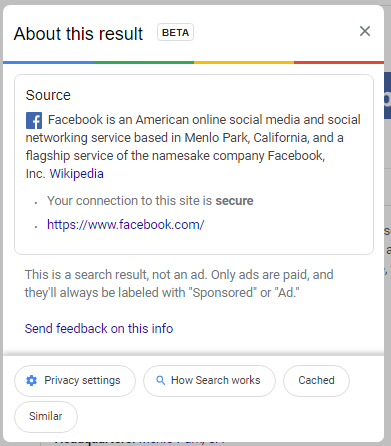
This is what appears when you check the link for Facebook:

In this information, users can see that Google confirms that the website is secured, helps to protect data, and that the link was the result of the user’s search, and not an advertisement. 

As things progress, this utility should be able to help users do a better job of choosing websites that don’t put their data, or your organization’s data, at risk. For more great security information and best practices check back to our blog weekly.

378464120_best_practices_400.jpg

Tip of the Week: Essential Information Technology Practices

378464120_best_practices_400.jpg

Information technology is a critical tool for many businesses today, which means \\it is crucial that your IT is compliant to a few key best practices. Let’s go over these practices so that you have a roadmap to ensure that your operations can remain secure and productive.

Keep Your IT Up-to-Date and Maintained

Here’s the thing: you wouldn’t drive a horse and buggy to the office any more than you would type up a business brief on a typewriter or calculate your business’ budget on an abacus. The reasoning for this is simple: technology has gotten better over time and provided us with improved alternatives to what has been used before. These improvements have also come faster and have been more dramatic in scale.

On the other side of this coin, threats to your business technology have seen similar advancements.

As a result, your operational success depends on you keeping up with these changes. In addition to maintaining the operability of your IT solutions, you also need to prioritize updating and upgrading them when the time comes. These activities will both ensure your team can perform their tasks, and that they are also capable of doing so securely.

Back Up Your Data

With data being so important to a business’ successful and productive operations, you need to have insurance that some circumstance won’t cause you to lose your access to it—especially with so many circumstances potentially leading to that outcome. Infrastructure damage, theft, user error, equipment failure, and more can all lead to data loss at any level.

This is precisely why a backup solution is so important for a business to maintain. With no way of accurately predicting how or when data loss may strike, having some means of preserving your data continuity needs to be considered an essential consideration… arguably above any other. To accomplish this, we recommend that your backup strategy incorporate multiple copies of your data, with a minimum of three copies included. First should be the original copy of your data, second should be an onsite backup, and the rest should be hosted offsite—preferably in the cloud. That way, all your bases are covered, whether you need a quick fix for a deleted file or need to reconstruct your entire infrastructure.

Secure Your Data

Finally, data security must be addressed by all businesses, regardless of their size. Cybercrime nets more profit for its perpetrators than the global trade of illicit drugs does, and an average of 75 records are stolen each second. A bank account is currently available for a few dollars, provided you know where to look.

Businesses are often targeted via phishing attacks, which are only made more effective due to many user accounts having more access than is warranted and internal storage lacking the appropriate security protections. If they manage to fool one of a business’ employees into letting them in, a cybercriminal is given considerable power.

To help counter this, there needs to be a combined effort to both better educate business users as well as reinforce the security measures built into the infrastructure itself. Authentication requirements, role-based permissions, and other means could help prevent some data from being leaked that otherwise could be.

Lean on NuTech Services for assistance in putting these measures—and more—in place.

For our help and more information about your business’ technology, give us a call at 810.230.9455.

time_182562237_400.jpg

Windows 7 Has Nearly Ticked Its Last Tock

time_182562237_400.jpg

It won’t be long before Microsoft retires two of its most popular operating systems – but hopefully, you already knew that. Microsoft has made a point of reminding Windows 7 users that they need to upgrade before January 14 – and yet, many users haven’t done so.

By many, we mean about a quarter of them.

With the deadline just a week and a half away, we wanted to reiterate what a solution reaching end of support means, how it would impact you, and what your options are.

The first thing to address is what “end of support” actually means. It doesn’t mean you won’t have the ability to use whatever software it is (in this case, the Windows 7 operating system) after the end of support date. What it means is that Microsoft is no longer doing anything to it – including improving its security and patching issues. As a result, the software will lose its functionality over time. Worse, the computer running the software becomes vulnerable, which makes the entire network vulnerable – not a good thing.

To be fair, there are some ways that you can protect your network while still using these devices. For instance, if you rely on a particular line-of-business application that requires Windows 7, you could theoretically isolate a Windows 7 device to allow you to do so. However, to be completely fair, there isn’t any guarantee that you will be protected from vulnerabilities, short of completely taking problematic systems entirely offline.

Therefore, it only makes sense to explore your other options.

Your Other Options

With the deadline as close as it is, you will need to hustle to put any of these alternatives into action:

Upgrade to Windows 10

Objectively speaking, Windows 10 is better than Windows 7, if only for its improved security. Furthermore, it isn’t one of those solutions that requires insanely higher specifications to run. In fact, the minimum numbers you need to operate Windows 10 are as follows:

  • Processor – 1 GHZ or faster
  • RAM – 1 GB for 32-bit or 2 GB for 64-bit
  • Hard disk space – 16 GB for 32-bit or 20 GB for 64-bit
  • Graphics card – DirectX 9 or later with WDDM 1.0 driver
  • Display – 800 x 600 resolution

Mind you, this is all it takes to run Windows 10, not to run Windows 10 well. To improve your performance, we suggest that you make a few alterations – upgrading to a 2 GHz dual-core processor, increasing your RAM to between 4-and-8 GB, and Increasing your hard drive space to 160 GZB, at least.

Purchase New Hardware

While it will cost you a pretty penny, obtaining new hardware (that comes with Windows 10 installed) may be the easiest option, especially when you take your looming deadline into account. Windows 10 and regular updates to it are all included, but it may take some time to configure everything properly.

Virtualize with a Thin Client

In a similar vein as leveraging Chromebooks instead of Windows, you could use your old hardware as a thin client to virtualize your needed solutions. However, despite the reputation that virtualization has as a solid option for businesses, it may not be a practicable option with the deadline pressing so close.

Alternatively, you could simplify this process using one of Microsoft’s services. Microsoft 365 offers a combination of Windows 10, Office 365, One Drive with an included terabyte of storage, and fully featured security. Available at a predictable monthly flat-rate per user, it gives you a solid alternative for at least your productivity-software-using employees.

Regardless, you need to take action now. Reach out to NuTech Services today for help. We’ll figure out which approach is best for you and help you with your upgrade process. Call us at 810.230.9455 to learn more.

update_216677339_400.jpg

Why Your Technology Needs Upkeep, Updates, and Upgrades

update_216677339_400.jpg

There is no question that today’s business operations require technology, but even that doesn’t tell the whole story. Not only do businesses need technology, they need to maintain this technology as well. Below, we’ll review the three basic steps to technology maintenance… and how we can help simplify these steps for you.

Upkeep is Simplified Via Network Monitoring

It is a well-established fact that, for a computer network and other IT solutions to continue working effectively, it helps to maintain them. In turn, this requires them to be monitored so that potential and developing issues can be resolved… which means that someone will have to be responsible for that monitoring.

Now, you could hire an additional employee to handle that part, but one person just isn’t going to be able to both maintain your business and see to the other considerations we’ll cover here. A better option would be to hire that employee, supplementing them with an agreement with NuTech Services. We can handle the network monitoring aspect, allowing your internal resource to help you strategize how your strategy will develop – but more on that later.

Updates are Managed Per the Managed Service Agreement

Between performance improvements and heightened security, it isn’t as though software developers stop improving the solutions they release until the official end-of-life date passes. However, while these improvements may be available, do your employees know that they are?

This could be one more thing you don’t have to worry about with NuTech Services on your side. We keep our ears open for industry news and will install updates for our managed service clients… we’ll even do so after hours, so as to not interfere with your operations. 

Upgrades are Strategically Prioritized

It isn’t uncommon for people to turn to an expert opinion for assistance in making a decision. As the IT experts around Michigan, we’ve fielded a lot of questions about improvements to existing technology. As we said before, we can help you come up with a strategy for your technology that allows you to make optimal use of it, and this strategy includes the upgrades you should make. Upgrades keep your business safer, more efficient, and as a result, help you to be more productive.

We can help you decide which upgrades you need to adopt next, referencing your current solutions and needs to inform your strategy. Then, we can handle your vendor relationships on your behalf, possibly getting you a better deal than you would have otherwise.

Reach out to us to learn more about these solutions and services, or any of the others we offer. Call 810.230.9455 today!

168387524_400.jpg

Warning Signs that Your Computer Needs Replacing

168387524_400.jpg

Are the computers in your office beginning to show their age? Do you even know how old they are? For the sake of your productivity, it may be time to replace them for a newer model. We’ll go over some warning signs that your computers may be nearing their retirement age.

How to Tell How Old a Computer Is

When a computer starts to get too old, it can become a problem for productivity. In fact, to help avoid this, some even recommend replacing a work computer every four years… but how do you tell how old a work computer is in the first place?

This isn’t always as cut-and-dried as one would think it should be. Some computers and laptops will have a date right on the case, neat the serial number. If there is no date provided, a quick search for the serial number might give you an idea.

You can also check the components of your computer itself, using the System Information tool. In the Search Windows box, type in “sysinfo.’ From the results, access System Information and in the window that appears, you can find plenty of information to help you date the machine. For instance, if the BIOS of the device has never been upgraded, the date will likely tell you how old the machine is, more or less. Searching for other components can help you to confirm this estimate.

As a result, you can get a better idea of whether your computer’s issues are age-related, or if there’s something else creating problems.

Signs That Say It’s Time to Replace Your Computer

There are quite a few factors that can indicate when your computer is due to be retired. While these indicators can each be a sign that something else is going on with your machine, a combination of a few of them is a fairly reliable signal that you and your device will soon have to say goodbye:

  • The computer is huge. In the interest of space, many modern devices are built to be compact, taking up less space than their predecessors did. While this isn’t a hard and fast rule (powerhouse workstations often take up a lot of space out of necessity), a larger, basic-function workstation or laptop is generally an older one.
  • Startup and shutdown take forever. Again, there are a few different issues that could contribute to lengthy startup and shutdown times. Too many applications may be set to automatically run in the background, or your hard drive might be almost full. However, this is another common symptom of an aging device.
  • You’re encountering hardware and software limitations. If your attempts to upgrade your computer’s hardware and software – especially security software – are stymied by a lack of interoperability or support, it’s probably time to consider replacing it. This is even more so the case if your work-essential solutions can’t be upgraded any further or runs slowly, or loading your applications takes notably long and they can’t efficiently run simultaneously.
  • Your computer is loud. If the fans in your device (whether it’s a desktop or a laptop) run loud, it’s a sign that your computer either needs a good cleaning or needs a good replacing. If the issue persists after a thorough cleaning has taken place, that’s a sign that your hardware is working too hard, a sure sign of age-related issues.

If you feel that your hardware is due to be replaced, reach out to NuTech Services. We have the contacts to help you procure the equipment you need to remain productive and offer the support to keep this equipment going. Call us at 810.230.9455.

37959013_eol_400.jpg

The Time Has Come for SQL Server 2008 and 2008 R2

37959013_eol_400.jpg

Software solutions don’t last forever. While patches and security updates can stave off the inevitable for quite some time, it’s impossible to maintain a specific solution forever. Support is eventually cut off, and businesses are left exposed if they haven’t taken the time to prepare. In the case of Microsoft SQL Server 2008 and 2008 R2, you are running out of time.

Outdated software is an issue that all businesses have to deal with. The fact that so many organizations don’t routinely update their software solutions is pretty telling. For one, many businesses simply don’t have the resources at their disposal to make sure maintenance is performed on a regular basis. Granted, unless a business has taken substantial steps toward upgrading away from software that has reached its end of support date, they will have to suffer the consequences.

What Does “End of Life” Mean?

End of Life, also known as End of Support, is a term that is used to identify software that is not updated or patched after a specific period of time has passed. Certain Microsoft products can utilize the Extended Security Update, but only for a maximum of three years, meaning it’s more efficient and cost-effective to upgrade away from your old systems before they reach the end of support date.

What You Need to Do

How would your business be affected by a potential security breach? Since you won’t be receiving security patches or updates, you’ll need to consider this possibility. Following a major security breach, you’ll be forced to upgrade your systems anyway, so not only will you have those costs, but you’ll have to deal with the fallout of a data breach. It’s never too early to start taking preventative measures and think about the future of your infrastructure, as well as who will be responsible for the management, maintenance, and upgrading of your business technology.

Before Windows SQL Server 2008’s End of Support date arrives, consult this list of upcoming end of support dates and take the necessary steps to upgrade your technology. It’s better to do so now than wait until it’s too late.

We Can Help

Worrying about your business’s IT infrastructure is something that you simply don’t have time for. A managed service provider like NuTech Services can help you achieve affordable and accessible technology support, including the updates and patches needed to maintain network security. We can even help monitor your infrastructure for potential End of Support software that will soon be outdated. To learn more, reach out to us at 810.230.9455.

windows_logo_end_of_life_400.jpg

Save the Date: Microsoft Products End of Life

windows_logo_end_of_life_400.jpg

There are one of two reactions every person gets when they get a save-the-date card in the mail. They either are excited for an event or they realize that the event is going to cost them money. For today’s blog, we give you our version of save the date as some of the most widely used Microsoft products in recent memory are coming up on their end of support date, and for some businesses, this save-the-date might be bad news.

We know that unsupported software can be a complete nightmare. This is especially true if the unsupported software is a critical component of your company’s computing infrastructure. Microsoft has announced that they will be officially ending support for two major operating systems, Windows Server 2008 R2 and Windows 7, on January 14, 2020. Both pieces of software are currently in their extended support periods, meaning that people can pay Microsoft to support the software, but after January 2020, neither piece of software will have any type of support available.

Windows 7
In 2016, all Windows 7 users were given the option to upgrade away from the OS to Microsoft’s newest OS, Windows 10. Users that didn’t take advantage of that offer have since had to pay for it, but if you haven’t upgraded away from Windows 7 by now, you are probably paying for support or not receiving any, both of which are not advantageous. By upgrading today, you will get ahead of what could be a major problem down the road. Waiting until the last minute to implement new versions of the OS is not recommended, since upgrading sometimes comes with hidden problems and legacy software issues that could put your whole organization at risk.

Windows Server 2008 R2
In what will be a larger problem for businesses, support for the already extended Windows Server 2008 R2 is definitely going away. For the last four years, Microsoft has insisted that anyone using Windows server 2008 R2 needs to upgrade, but since it kept offering extended support, businesses kept on using it. Well, Microsoft has announced the end is near for the decade-old server OS.

Newer versions of Windows Server have a lot of new options, especially in the arena of virtual environments. So while it is possible to swap out Server 2008 R2 for another Windows Server OS, the best course of action will be to scrap the old server altogether and upgrade to new infrastructure. Since there are substantial costs that go along with changing servers, companies still using the old software will want to do their best to start upgrading immediately.

At NuTech Services, we can help any-sized business get upgraded, while finding you innovative options to reduce the capital costs of doing so. To find out more, contact us at 810.230.9455.

auto_vote_digital_400.jpg

Security Concerns Have Led To New Voting Machines In Virginia

auto_vote_digital_400.jpg

Regardless of your feelings on the matter, the 2016 United States presidential election was an extremely divisive one–in no small part, due to the suspicion that the outcome of the election may have been significantly influenced by hacked voting machines. This uncertainty has led to some states making strides to ensure that their technology will no longer be responsible for such doubts.

Virginia is one of those states, deciding to remove direct-recording electronic voting machines in favor of those that produce paper documentation. In addition to that, there is now legislation in Virginia that will remove all touch-screen voting devices from circulation by November 7, 2017. This is when the next governor is to be elected, along with various other positions.

According to Politico, Governor McAuliffe has pushed for legislation to provide the necessary budget to replace new voting machines, but this legislation was denied two years ago. Things have changed since then, and now the state has little choice to obtain new machines, as the old ones will no longer be certified for use.

Other states have been recommended to emulate this decision by the Board of Elections, but again–it’s only a recommendation. While paper ballots do seem to be more reliable and authentic as the tangible option, counting them can be a drag. Therefore, it only makes sense that the states would want to expedite the process with technological assistance. Even so, there is the risk that this key democratic data can be manipulated and altered.

You can find a similar scenario much closer to home, in your very own business. If your systems aren’t painstakingly maintained–as many states’ voting machines are not–they can be vulnerable to numerous hacks and other attacks. Do you really want to risk your sensitive data when a solution is so easy to find?

NuTech Services’s technicians can help give you the ability to better prepare for a successful future for your business. One way is by equipping you with a Unified Threat Management tool that helps protect your business from threats before they have a chance to strike. Call 810.230.9455 for more information.

update_to_windows_10_400.jpg

What You Need to Know About Upgrading to Windows 10

update_to_windows_10_400.jpg

It’s been over two years since Microsoft stopped providing Windows XP with security updates and patches. The Windows operating system was known as one of the most popular Windows operating systems ever. Both businesses and consumers were affected by this major update, being forced to migrate to more recent operating systems in order to stay secure. Thankfully, an upgrade to Windows 10 isn’t nearly as difficult as one from XP to Windows 7, largely because of the hardware costs involved.

Budgeting Issues
The first major lesson that can be learned from Windows XP’s end of life is that many businesses felt a financial strain when considering the upgrade from such an old operating system. With Windows 10, this isn’t an issue… yet. Organizations that are currently using Windows 7 or 8.1 as their preferred operating system can still enjoy the free upgrade to Windows 10. This means that they don’t necessarily have to be worried about applying huge strains to their budget. Plus, businesses that ran Windows XP likely had to upgrade their hardware, as well, which was another major expense that caused organizations to dread upgrading and put it off for as long as possible.

In comparison, those who used Windows XP likely upgraded to Windows 7 or 8.1 leading up to and following XP’s end of support date. This means that organizations have a free upgrade to Windows 10 that can be cashed in until July 29th, 2016. Now is as good a time as any to invest in Windows 10, especially considering you already did the hard work of getting away from Windows XP.

Legacy Applications
Moving applications and internal software solutions can be a huge pain, regardless of which operating system you’re moving from, or what you’re moving to. Particularly with XP, organizations needed to perform extensive research into how to make their internal solutions work on more recent operating systems. Thanks to Windows XP’s end of life event, this research has already been done for many organizations.

In theory, a Windows 7 and 8.1 upgrade to Windows 10 will be much easier to pull off than an XP-to-Windows 7 upgrade. Of course, we’re not going to make any promises; each business is different, and will require varying degrees of compatibility with legacy software and applications. It’s important that you perform this research before you make any significant changes to your computing infrastructure, as even the slightest hiccup can cause downtime and hamper the migration process.

With over 300 million devices actively using Windows 10, it’s time to ask yourself when you’ll be implementing Windows 10 on your workstations and mobile devices. It’s important that you do so before the deadline for your free Windows 10 upgrade arrives. The latest technology could be a great benefit for your organization, and you’ll want to take advantage of the free upgrade before it’s gone forever.

To learn more about migration, contact NuTech Services at 810.230.9455.

windows_10_automatic_update_400.jpg

Some Microsoft Users are Getting Windows 10 Upgrades Against Their Will

windows_10_automatic_update_400.jpg

Windows 10 might be the latest operating system from Microsoft, but despite its great new business-friendly features, many are still hesitant to upgrade. For those who don’t want Windows 10, there are reports of unwanted (and unexpected) Windows 10 updates. Now, here’s the big question: would you want your business’s software upgraded without your consent?

The biggest concern about Windows 10’s automatic installations is that businesses are still in the process of testing their compatibility with the operating system. Many organizations rely on legacy software that may be incompatible with Windows 10, and in a worst-case scenario, an unexpected upgrade could completely shut down operations. Your business could experience crippling downtime and headaches that are easily preventable through proactive maintenance.

ComputerWorld discusses some of the many concerning claims of Windows 10’s automatic updates and installations, with several of them seemingly due to users choosing automatic installation of Windows Updates. Ordinarily this wouldn’t be a problem, but the unique way that Windows 10’s installation launcher is distributed also plays a role in this. There’s another setting that users have checked off where recommended updates are installed as critical updates. Since Windows 10 is a recommended update, it will be set up and installed, for no other reason than the fact that the user’s machine is set to do so by default.

Additionally, a supposed inability to refuse the update also plays a major part in updating to the operating system. Some users are stuck in an upgrade loop which won’t allow them to decline the update. Some are even claiming that Microsoft has tampered with their settings to distribute Windows 10 to as many people as possible, but we’re not going to buy into this train of thought. Instead, we see this as an opportunity to remind you to be prepared for unintended upgrades. Depending on your business’s needs, you might even be able to prevent Windows 10 from installing indefinitely, but you want to consult a professional IT technician before doing so. In general, you should always consult tech professionals before making significant changes to your computing infrastructure.

If you don’t want to update to a new version of Windows, perhaps you should consider why you are having reservations. Do you have legacy applications, or are you simply worried that you’ll be changing operations too much in a short time? Consulting a professional technician is the best way to effectively make a significant change to your business’s infrastructure, and while you’re at it, you can ask about all of the great opportunities that managed IT offers. In particular, virtualization services can be valuable assets to help your organization use legacy applications in the most convenient way possible.

The most important part about upgrading your business’s operating system is to make sure that it happens on your own terms; not accidentally due to Windows 10’s installation settings. Regardless of whether or not you think Windows 10 could automatically install on your infrastructure, you need to prepare for the worst. You will want to take every precaution possible to make sure that Windows 10 won’t leave you without vital operational assets for an extended period of time. It’s recommended that you contact NuTech Services for your IT questions or concerns. Our team can help make your Windows 10 adoption as painless as possible. We can examine your network for potential problems, so you can approach Windows 10 in an educated and informed manner.

For more information, give us a call at 810.230.9455.

b2ap3_thumbnail_upgrade_checklist_400.jpg

Tip of the Week: How to Know When Your Technology Needs to Be Replaced

b2ap3_thumbnail_upgrade_checklist_400.jpgYour business takes advantage of several different types of technology every day, but there comes a time when your tech needs to either be upgraded or replaced with better tools. This is part of the natural order of things; no technology solution can (or should) last forever, but if you don’t catch issues before they become major problems, you could be putting your data at the risk of hardware failure, software hiccups, or even hacking attacks.

By keeping these questions in mind, and making common-sense decisions concerning your technology, you’ll never miss a critical upgrade again. By asking yourself these questions before you implement new tech upgrades, you can know with certainty that the solutions you implement will be beneficial for your organization.

Software
When considering changing your business’s software solution strategy, you should make sure to ask yourself the following questions about your organization’s infrastructure:

  • Is your current operating system supported? If your business’s servers and workstations aren’t receiving patches and security updates, you could be exposing your organization’s infrastructure and sensitive data to dangerous online threats like malware, viruses, and more.
  • Do you have any legacy software that’s dependant on specific operating systems? One primary reason that businesses don’t immediately upgrade to the latest tech is that many organizations still use legacy software that might not be compatible with the latest operating systems. When businesses go too long without making an effort to move to new technology solutions, it gradually becomes more difficult. Therefore, you need to ask yourself if there’s any legacy software holding you back, and what other reasons there are for you not being able to get on the latest version.

Upgrading Hardware
If you’re considering upgrading your business’s hardware solutions, consider the following before taking any drastic measures:

  • How old is your hardware? When was the last time your business performed a hardware refresh? If you haven’t recently replaced your equipment, you could be risking your networking infrastructure to a hardware failure, which could result in downtime and data loss. Older technology has been proven to fail more often than the latest tech. Many businesses choose to forsake the hardware refresh to save money, but in reality, this does nothing but prolong the inevitable and put your data on the line.
  • Are any of your workstations or servers operating below specifications? Contrary to popular belief, upgrading to a more recent operating system doesn’t always resolve complications with your business’s technology. If you’re experiencing problems like slow network speeds or other technical difficulties, you could be dealing with issues that may not necessarily need a hardware upgrade to resolve.
  • Has your business been experiencing growth? Fast-growing businesses often have trouble with their technology as the demands placed on their network expand. This makes perfect sense; a network’s hardware naturally must be upgraded as more strain is put on it. Otherwise, the network speed could slow to a halt, and your ability to access data and applications could be affected.

If you’re unsure of whether or not your business should be upgrading its technology, NuTech Services can help. We’re experienced with helping small businesses make conscious decisions about the future of their IT infrastructures. To learn more, give us a call at 810.230.9455.
b2ap3_thumbnail_windows_10_rollout_400.jpg

Windows 10 On Pace to Be the Most Popular OS By 2017

b2ap3_thumbnail_windows_10_rollout_400.jpgWith Windows 10 making leaps and bounds in the business environment, Microsoft has created another commercial success for both consumer use and workplace productivity. In recent weeks, Windows 10’s adoption has slowed significantly, but in a few years it’s expected to surpass other Windows operating systems in terms of usability.

Gartner has made a prediction that, by January 2017, Windows 10 will be used by half of all businesses, making it the most widely used Windows version so far. This comes off as a surprise, especially since its adoption rate has seemingly plateaued as of late. Businesses still tend to stick to operating systems that they know and love, like Windows 7, and feel little need to move to something bigger and better. Still, there are some factors that can change Windows 10’s adoption rate for the better.

For example, Windows 7, which is widely considered to be the favored Windows operating system at the present moment, will reach its end of support date in January 2020. While this sounds like it’s far off, it doesn’t change the fact that Microsoft will eventually stop supporting Windows 7, just like it stopped supporting Windows XP. Considering the fact that Windows 8 and 8.1 aren’t very popular, the clear cut winner here is Windows 10.

According to ZDNet:

Gartner said many organizations are planning to begin pilots for Windows 10 in the first half of 2016, and will broaden their deployments later in the year. It expects that at least half of organizations will have started some production deployments by the beginning of 2017, with an eye to completing their migrations in 2019.

Up until fairly recently, Windows 10 was a huge hit, which can be attributed to the free download from Windows 7 and 8.1 for the first year of Windows 10’s existence. This pushed Windows 10’s growth rate far past that of Windows 7 and 8, and while the consumer might see nothing wrong with an immediate upgrade to Windows 10, businesses might see things differently. Basically, businesses that want to adopt Windows 10 won’t do so right away. Instead, they’ll be making plans to do so in the near future.

The lesson that you can learn here is that, while upgrading to the latest Windows operating system has its merits, you should be approaching it in a logical manner. If other businesses are waiting to take advantage of Windows 10, doesn’t it make sense to get a head start on them by leveraging the latest and greatest Windows operating system? Doing so will help you take better advantage of your resources, including your current (and future) technology solutions. Plus, you’ll be able to rest easy knowing that your technology is up to date.

Still, you don’t want to blindly upgrade. You need to make sure that the upgrade isn’t going to complicate your usage of legacy applications. This means that you’ll want to consult a trained technician before upgrading. For help answering any questions you have about Windows 10, give us a call at 810.230.9455.
b2ap3_thumbnail_upgrade_your_it_400.jpg

Think Strategically When Upgrading Your Workstations

b2ap3_thumbnail_upgrade_your_it_400.jpgWith technology growing faster than most businesses can keep up with, organizations have to continuously upgrade their solutions in order to maintain a semblance of modernity. The only issue with this is that many businesses can’t keep up, simply because they don’t have a team that’s dedicated to this important task. What technology upgrades should be made a top priority, and why?

Naturally, the first thing you need to know about workstation and technology updates is that you need to integrate them periodically in order to ensure optimal security for your organization. Most viruses and malware will attempt to take advantage of weaknesses in your infrastructure in order to infiltrate it. These weaknesses in your software and operating systems’ source code will ultimately allow these threats to force their way into your network, putting any contained information at risk.

These flaws are often addressed in software patches and system updates issued by the software developer, but tackling the updates in a timely fashion is a whole other monster. Managing all software updates is easier said than done, especially without a dedicated IT department watching over your technology. Regular maintenance is often pushed to the back burner, and dangerously close to being forgotten by all. Therefore, the best way to make sure that your systems are prepared to handle the threats that are found in today’s computing environment is to make upgrading your technology a priority for your organization.

Software Updates
There are several applications that your organization needs in order to stay functional, so your software updates aren’t limited to just your workstations’ operating systems. The fewer unnecessary security flaws that can be found in your IT infrastructure, the safer your information will be. Furthermore, users who are working with top-notch, optimized technology will be far more productive than they would be if they were using sluggish, bogged down computers. It doesn’t make any sense to let your employees use machines that hold them back from achieving their maximum productivity. In fact, sometimes you might encounter a situation where using a different software will be better for your business strategy. It’s always recommended that you consult with a professional technician before making drastic changes to your business’s software infrastructure.

Antivirus Updates
Your antivirus solution is often a software solution, but it’s worth mentioning on its own for the sole purpose that virus and malware definitions are continuously being updated. If your antivirus and other security software solutions aren’t properly maintained, it’s like you’re basically “leaving your keys in the front door,” so to speak. Your antivirus solution needs to be managed on all workstations, or better yet, centrally controlled from the server to ensure that all users are protected and up to date.

Hardware Updates
Older hardware that’s been around the block a time or two might have proven reliable, but it eventually starts to show signs of its old age. Hardware failure grows more likely, and you run the risk of losing information due to the degradation of your technology. This is why monitoring your systems for faulty tech, and periodically upgrading to more recent models is preferable, if not necessary.

Granted, all of the software and hardware upgrades your business might need may feel overwhelming. This is why NuTech Services offers our remote monitoring and maintenance solution that’s designed to administer patches to your mission-critical systems remotely. This helps your organization ensure that your systems are always up-to-date. We can also monitor your infrastructure for any irregularities that might be caused by hardware malfunctions, hackers, and much more. Give us a call at 810.230.9455 to learn more.

b2ap3_thumbnail_xp_logo_for_navy_400.jpg

Microsoft Salutes the US Navy for Sticking with Windows XP

b2ap3_thumbnail_xp_logo_for_navy_400.jpgHave you already arranged for your upgrade to Windows 10 on July 29th? If so, good for you. You’ve made a decision that, last year, several Windows XP users went without. However, those who went without upgrading to a more recent operating system are now feeling the effects of having to purchase custom support from Microsoft following Windows XP’s expiration; including the United States Navy.

As reported by ZDNet, the US Navy is planning on spending an estimated $9 million this year on custom support for Windows XP. The problem here is that unsupported software is a major security risk, and custom support is so expensive that small and medium-sized businesses can’t afford it, even under the best circumstances.

Also, $9 million is an obscene amount of money for just about anything, especially when you consider that it’s going toward a system that’s literally getting replaced as soon as possible.

The proposed deal is said to run for a maximum of three years, and offers critical security patches and updates for Windows XP, Office 2003, and Windows Server 2003, the latter of which is set to expire this year on July 14th. The reasoning behind the agreement is that the Navy takes advantage of numerous legacy applications that aren’t compatible with more recent operating systems. This complicates the process of upgrading, and forces them to rely on expensive custom support. The deal is expected to run until July 2016, but just in case, they have plans to continue until 2017. You don’t need us to tell you that it’s a huge expense that could have been avoided.

If your business hasn’t upgraded from Windows XP yet, you’ve taken some very serious risks that could easily be avoided if you simply upgraded your operating system to one that’s supported by Microsoft. Of course, it’s not always so simple, as the navy’s predicament shows. When you run older software like legacy applications, you might encounter compatibility issues.

In fact, some software is so out of date by today’s standards that newer technology completely forsakes it for more recent (and, quite frankly, better) solutions. Some of these applications might be mission-critical, where they’re vital to the day-to-day operations of your business. Furthermore, if you’re not a technology expert, it can be difficult to judge which applications will be obsolete upon your upgrade.

This is why NuTech Services’s technology consultation services are so valuable. We provide the foresight needed to understand which software is compatible with your new operating system. This is especially important, as the Windows Server 2003 expiration date is fast approaching. Give us a call at 810.230.9455 to learn more.

b2ap3_thumbnail_is_your_current_it_still_ok_400.jpg

Tip of the Week: 3 Options to Consider Before Trashing Your Old Technology

b2ap3_thumbnail_is_your_current_it_still_ok_400.jpgIt’s often the case that people excitedly upgrade to new technology without giving much thought about what to do with their old tech. In an upgrade situation like this, you’ve got a few options for dealing with your old technology that are good for the environment, socially responsible, and may even provide you with some cash.

Alternatively, you could just toss your old equipment in the garbage.

tip-recycling-unused-IT.jpg

As convenient as it is to throw something away and not have to think about it, it’s not responsible. Electronic equipment is notorious for containing components made up of toxic chemicals that, if not disposed of properly, will leak into the environment and do some serious damage. Plus, it’s often the case that people will toss aside perfectly-good-and-working technology just because they’ve got a hankering for an upgrade.

Don’t be wasteful with your old technology. Consider these three options instead:

Resell Your Old Equipment for and Repurpose the Funds
Your most profitable scenario involves you selling your old equipment. Though, don’t get your hopes up that you’ll be able to find a buyer for every old piece of tech. As explained by Kyle Bittner of Exit Technologies, “If it’s junk from 1985, it would be a waste of time to pursue reselling the product. If it’s decent stuff from 2004, it’s probably still worth thousands of dollars that could return capital to the budget.”

The Internet provides consumers with several great platforms for users to sell their used equipment, with websites like eBay, Craigslist, Amazon Marketplace, and more. Before posting an ad to sell your old tech, be sure to spend time researching its value so that you’ll get the biggest return on your investment. If you’re not sure if your item is worth selling or not, then ask the IT pros at NuTech Services. We’ve got a good grasp on the market and we’re always happy to give helpful advice.

Donate Your Old Tech and Feel Good about Yourself
Instead of throwing away perfectly good tech, why not donate it to someone or some organization that can use it? If it’s got plenty more miles left on it and you don’t want to go through the hassle of finding a buyer, then it might be easier just to give it away. You might have an employee that would appreciate getting an old workstation for private use, or maybe there’s a nonprofit organization in your community in need of a gently-used server unit.

When donating old equipment, just be sure that you’ve completely wiped the data from the hard drive. Or, better yet, do the recipient of the gift a favor and just go ahead and replace the old hard drive so that they’ll not have to work with a drive that’s old and prone to crashing. Replacing the hard drive will completely eliminate the risk of the next user uncovering sensitive files. NuTech Services can help with both wiping the data completely from your old drive and swapping out the old hard drive for a new one.

Repurpose Your Old Tech and Save Money
Before you say goodbye to your old technology, take a look around your office and see if you can find a place where it can come in handy.

For example, it’s always a good idea to have a backup PC handy, just in case one of your working units were to unexpectedly crash. Plus, you can always repurpose an old workstation into a server with a dedicated task, like hosting your company’s email, handling the printer traffic, or hosting one specific application. Repurposing an old PC like this can free up resources on your network, but reconfiguring the old equipment can be an involved process, so you’ll want to have an IT professional lend a helping hand.

All of these options are far better than just throwing out your old equipment and having it muck up the environment. NuTech Services can help assist you with all of these green options. We can even help recycle your old tech in an environmentally-friendly way that you can feel good about. Call us today at 810.230.9455 to learn more.