Know_Your_Tech_Cache_400.jpg

Know Your Tech: Cache

Know_Your_Tech_Cache_400.jpg

If you hang out around technology professionals for any period of time, chances are that you’ve heard the word “cache” used before. The word, pronounced cash, is usually heard in the phrase, “clear the cache,” but if you don’t know what this phrase means, how can you benefit from it? Since this week’s tech term is “cache,” let’s get into the details.

What is a Cache?
Most words used in computing have meanings outside technology, so it’s natural that cache has appeared elsewhere in language before now. A cache is essentially storage that is hidden away from the general public. Maybe you have a stash of goodies in your desk that are meant for “emergencies,” or perhaps you have a cache of pens hidden away because people keep stealing them from you. Either way, it’s a collection of something that you want to keep out of sight, and it has its uses for computing as well.

A cache can also be a hardware or software function that keeps data stored somewhere hidden away for faster processing in the future. This can be anything from a cache allowing your network’s data to travel faster from point A to point B, to a web browser storing information from certain web pages so that they are loaded faster than they otherwise would be. Simply put, the cache makes computing easier and more efficient–or at least, it’s meant to.

So What Does “Clear the Cache” Mean?
Clearing the cache in a web browser is easy. All it takes is the keyboard shortcut, Ctrl+F5. What this does for your device is that it allows the website to update any information that it has stored in the cache. This includes cookies and other website data that it may have stored. How this comes into play is when a website is updated and its appearance needs to be updated in the cache. If you fail to clear it, you might not be looking at the most up-to-date version of the website. Caches are most effective when they are small, so it helps to clear it once in a while to keep it that way.

Before clearing a network cache, however, you’ll want to first make sure that any drastic changes are handled by a networking professional. NuTech Services would be happy to further explain the process of caching and what it means for your business. To learn more, reach out to us at 810.230.9455.

adults_only_website_400.jpg

“It Redirected Where?” — A Case Study in Security Precautions

adults_only_website_400.jpg

Imagine what it would be like to discover that your website was suddenly redirecting to content that was decidedly more… adult... than what should be representing your business. For a company in Phoenix, Arizona, this was the unfortunate reality after they had let their IT administrator go.

The administrator, Tavis Tso, created a web in which he attempted to snare a client in an extortion scam. After lying to the client, claiming that he didn’t have their credentials to login to their GoDaddy domain registrar account, Tso changed the credentials to the GoDaddy accounts and created a separate Microsoft account that gave him considerable power over his target. His first steps were to block employees from accessing their email accounts and to redirect the company’s home page to a blank webpage. Tso then demanded $10,000 from the company to fix the problem that he had caused.

The company did not comply with his demands.

Once it was clear that the company wasn’t going to cooperate with Tso, the cybercriminal upped the ante. Rather than just redirecting the company’s home page to a blank site, Tso redirected all of the website’s traffic to a pornographic website. This redirect took several days to resolve.

Tso was ultimately sentenced to four years of probation, in addition to $9,145 as restitution for a count of wire fraud. While it is nice that a cybercriminal has been brought to justice, the damage done will be hard to undo, as he had considerable access to his company’s systems.

Would your business be able to recover from an incident like this? A good first step is to ensure your recovery is to reconsider the permissions of the users on your network–and more importantly, the permissions of former users. There is no reason to grant access to your IT where it is not needed, and there is no reason to keep an IT resource on your system once they are no longer part of your organization.

NuTech Services can help you to make these changes, as well as many others that will benefit your IT and your network security. Reach out to us at 810.230.9455 to start a discussion.

b2ap3_thumbnail_google_chrome_400.jpg

Tip of the Week: Load Cached Pages in Google Chrome for Offline Browsing

b2ap3_thumbnail_google_chrome_400.jpgYou might have experienced the frustration of reading an article online and having the Internet connection cut out on you. This is one of the most common problems while working with a shoddy WiFi connection. If this happens to you, you can view your browser’s cached pages in order to finish up what you were reading; so long as you’re not trying to view pages like Facebook, which update periodically throughout the day.

Here’s how you can view Google Chrome’s cached pages, even while offline.

What Exactly is Caching?
You might have heard the term in passing, but do you understand how the cache works? It’s basically a component that stores data when you visit a website. This allows that data to be loaded faster the next time you visit the page. The idea is to reduce bandwidth and processing power required to view the material.

How to Load Cached Chrome Pages
By taking advantage of the cache, you can read web content that you’ve previously accessed, even while offline. Chrome doesn’t automatically enable this feature, but there is an experimental add on that you can use from the mad scientists at Google. Type chrome://flags into the search bar.

flags

After reading Google’s disclaimer, locate the feature called Show Saved Copy Button. If you aren’t using the latest version of Chrome, try looking for Enable Offline Load Stale Button.

show button

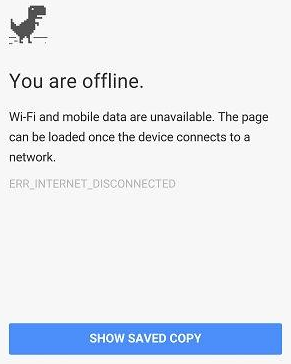
Select Enable from the dropdown menu, which will prompt you to restart Chrome. When you next visit an offline web page, you’ll see a button that says Show Saved Copy. If you’ve previously visited the page, you’ll be able to load the cached copy of the website’s content.

offline

Keep in mind that due to the nature of website caching, you won’t be able to see any updates made to the page since you last visited it. This is the one true downfall of offline viewing. However, this is useful if you’re trying to finish reading an article where you don’t have Internet access.

Stay tuned next week for more productivity tips from NuTech Services.

b2ap3_thumbnail_entering_personal_data_online_400.jpg

What Really Happens when Websites Collect Your Personal Data

b2ap3_thumbnail_entering_personal_data_online_400.jpgYou might be aware that some websites collect personal data from you depending on your mobile device’s location, your browsing history, and several other factors. This information is generally used for marketing, but it could have unforeseen effects on the way you browse the Internet. It can be fairly revealing about your personality, or possibly even incriminating. Therefore, you should be aware of how this personal information is gathered from you without you even knowing it.

Here are a few things Forbes magazine suggests you might not know about the gathering of your personal data:

wundermanMarketers Are the New Mom & Pop Store Owners
Remember that man who worked at the old general wares store down the road from you several years ago? He would remember everything about you; your name, your face, your interests, favorite beer, etc. The truth is that he knew most of what you preferred because you visited often and he picked up on patterns in your behavior.

In 1967, Lester Wunderman, the “father of direct marketing,” was able to predict that technology could accomplish this same feat with exponentially larger numbers: “A computer can know and remember as much marketing detail about 200,000,000 customers as did the owner of a crossroads general store about his handful of customers.”

As such, marketers are able to analyze data that computers gather about you and create marketing lists, which includes all types of personal information: religion, political view, marital status, sexual orientation, and more.

Your ZIP Code is Worth a Lot
To a marketer, your ZIP code is an absolute gold mine. You might think nothing of it when you enter your ZIP code at the local grocery store, but you’re giving marketing institutions all of the information they need to find you at a later location for future marketing campaigns. According to a Harvard professor Latanya Sweeney, a company can identify you an alarmingly high 87 percent of the time with only a few of your credentials:

  • ZIP code
  • Date of birth
  • Gender

Even the folks you trust the most with your ZIP code, your local post office, can take advantage of this and sell your information to marketers. The United States Postal Service is continuously validating old addresses and informing marketers when their targets have moved on to another location. According to Forbes, the USPS makes roughly $8 million a year by selling this data.

Facebook: A Goldmine of Information
Everyone’s favorite social media site houses an incredible amount of information about them, and is arguably one of the best marketing tools available on the Internet. Other users can see what pages you have “Liked,” and can even suggest pages or friends to you. Due to this open-minded approach to social media, marketers are generally able to collect this data and use it to formulate the aforementioned lists. Even if you only host the minimal amount of personal data on your Facebook, there’s still a good chance that marketers can put you into a list judging from your liked pages and friends.

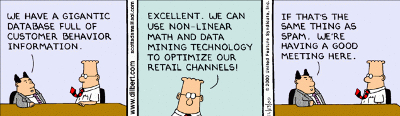
Whether we like it or not, companies and merchants are gathering our information and storing it for later use. Your business likely does something similar; collecting information about your own clients and storing it for later consumption.

dilbert spam

By law, these institutions are allowed to collect this information, but there are others out there who seek out private information, like Social Security numbers, to commit identity fraud or steal your money. This begs the question of whether or not your business’s security solutions are up to snuff and able to protect your stored information from hackers.

When you deal with lots of personal information, like Social Security numbers or credit card numbers, you want to use the best security measures available. NuTech Services can equip your business with a Unified Threat Management solution to keep your data safe from being compromised by hackers. This includes a firewall, spam blocking, and web filtering to keep the threats out, compounded by an antivirus to neutralize threats that get in. For more information about our UTM solution, give us a call at 810.230.9455.