time_182562237_400.jpg

Windows 7 Has Nearly Ticked Its Last Tock

time_182562237_400.jpg

It won’t be long before Microsoft retires two of its most popular operating systems – but hopefully, you already knew that. Microsoft has made a point of reminding Windows 7 users that they need to upgrade before January 14 – and yet, many users haven’t done so.

By many, we mean about a quarter of them.

With the deadline just a week and a half away, we wanted to reiterate what a solution reaching end of support means, how it would impact you, and what your options are.

The first thing to address is what “end of support” actually means. It doesn’t mean you won’t have the ability to use whatever software it is (in this case, the Windows 7 operating system) after the end of support date. What it means is that Microsoft is no longer doing anything to it – including improving its security and patching issues. As a result, the software will lose its functionality over time. Worse, the computer running the software becomes vulnerable, which makes the entire network vulnerable – not a good thing.

To be fair, there are some ways that you can protect your network while still using these devices. For instance, if you rely on a particular line-of-business application that requires Windows 7, you could theoretically isolate a Windows 7 device to allow you to do so. However, to be completely fair, there isn’t any guarantee that you will be protected from vulnerabilities, short of completely taking problematic systems entirely offline.

Therefore, it only makes sense to explore your other options.

Your Other Options

With the deadline as close as it is, you will need to hustle to put any of these alternatives into action:

Upgrade to Windows 10

Objectively speaking, Windows 10 is better than Windows 7, if only for its improved security. Furthermore, it isn’t one of those solutions that requires insanely higher specifications to run. In fact, the minimum numbers you need to operate Windows 10 are as follows:

  • Processor – 1 GHZ or faster
  • RAM – 1 GB for 32-bit or 2 GB for 64-bit
  • Hard disk space – 16 GB for 32-bit or 20 GB for 64-bit
  • Graphics card – DirectX 9 or later with WDDM 1.0 driver
  • Display – 800 x 600 resolution

Mind you, this is all it takes to run Windows 10, not to run Windows 10 well. To improve your performance, we suggest that you make a few alterations – upgrading to a 2 GHz dual-core processor, increasing your RAM to between 4-and-8 GB, and Increasing your hard drive space to 160 GZB, at least.

Purchase New Hardware

While it will cost you a pretty penny, obtaining new hardware (that comes with Windows 10 installed) may be the easiest option, especially when you take your looming deadline into account. Windows 10 and regular updates to it are all included, but it may take some time to configure everything properly.

Virtualize with a Thin Client

In a similar vein as leveraging Chromebooks instead of Windows, you could use your old hardware as a thin client to virtualize your needed solutions. However, despite the reputation that virtualization has as a solid option for businesses, it may not be a practicable option with the deadline pressing so close.

Alternatively, you could simplify this process using one of Microsoft’s services. Microsoft 365 offers a combination of Windows 10, Office 365, One Drive with an included terabyte of storage, and fully featured security. Available at a predictable monthly flat-rate per user, it gives you a solid alternative for at least your productivity-software-using employees.

Regardless, you need to take action now. Reach out to NuTech Services today for help. We’ll figure out which approach is best for you and help you with your upgrade process. Call us at 810.230.9455 to learn more.


51878134_no_support_400.jpg

Windows 7 and Windows Server 2008 R2 is Finally Losing Support

51878134_no_support_400.jpg

Microsoft Windows has been a staple of modern computing, with each title in the series offering more innovative features. When it becomes time to retire one of their OSs, it can be troublesome for businesses. This coming January, two of the most utilized versions of the Windows OS–Windows 7 and Windows Server 2008 R2 will be losing support, effectively ending their viability. Businesses that still use these titles will have to come up with a plan about how they are going to proceed once Microsoft retires that software. 

Support for these two titles ends on January 14, 2020. If your business has neglected to upgrade away from the technology after Microsoft ended mainstream support in 2015, time is finally running out in which to do so. It is important to have a strategy to move to a more up-to-date operating system. By not completing a full migration away from these titles your business will not have the protection it needs to keep your company’s data secure. Vulnerabilities will begin to present themselves pretty quickly and you will see your ability to maintain data security wane. Let’s take a look at these titles, and what needs to happen to successfully remain secure.

Windows 7

Windows 7 is one of Microsoft’s most popular operating systems of all time, and is still used by millions of people from all over the world. In fact, it wasn’t until last December that Windows 10, Micrsosoft’s latest OS, passed Windows 7 in number of users. The software giant has started a major ad campaign to inform people of how to upgrade away from Windows 7 as soon as possible.

The most obvious option is to upgrade your business’ workstations to Windows 10. Windows 10 is constantly supported, offers many features that Windows 7 is incapable of, and features a profile that isn’t significantly heavier so most systems that you have will run Windows 10 effectively.  If you are in a position where you need to move over a lot of workstations, our consultants can help you calculate the best route forward. 

Another option Microsoft provides is called Microsoft 365. This cloud-based service deliberately targets the millions of Windows 7 users as it doesn’t require huge capital costs to move to Windows 10. At NuTech Services, we can help you determine the pricing of a migration either to new onsite infrastructure or a hosted solution. Either way, your business will need to have upgraded before January 14, 2020.

Windows Server 2008 R2

In addition to Windows 7, in January 2020, Microsoft will be retiring the entire Windows Server 2008 R2 suite. If your business utilizes Windows Server 2008 R2 for data and application hosting, you will need to have a plan in place to upgrade prior to the end of support date. Just like Windows 7, Microsoft will stop delivering security patches to Windows Server 2008 R2, meaning that there is a very real possibility that your organization could go without security updates if you fail to upgrade.

Microsoft has since released two new versions of the Windows Server software, as well as implemented a cloud-based option in Azure. It might be able to help you save money with cloud-based server management, but you won’t know for sure if it’s the right call to make without talking to the IT professionals at NuTech Services. Call us today to find out more at 810.230.9455.

windows_logo_end_of_life_400.jpg

Save the Date: Microsoft Products End of Life

windows_logo_end_of_life_400.jpg

There are one of two reactions every person gets when they get a save-the-date card in the mail. They either are excited for an event or they realize that the event is going to cost them money. For today’s blog, we give you our version of save the date as some of the most widely used Microsoft products in recent memory are coming up on their end of support date, and for some businesses, this save-the-date might be bad news.

We know that unsupported software can be a complete nightmare. This is especially true if the unsupported software is a critical component of your company’s computing infrastructure. Microsoft has announced that they will be officially ending support for two major operating systems, Windows Server 2008 R2 and Windows 7, on January 14, 2020. Both pieces of software are currently in their extended support periods, meaning that people can pay Microsoft to support the software, but after January 2020, neither piece of software will have any type of support available.

Windows 7
In 2016, all Windows 7 users were given the option to upgrade away from the OS to Microsoft’s newest OS, Windows 10. Users that didn’t take advantage of that offer have since had to pay for it, but if you haven’t upgraded away from Windows 7 by now, you are probably paying for support or not receiving any, both of which are not advantageous. By upgrading today, you will get ahead of what could be a major problem down the road. Waiting until the last minute to implement new versions of the OS is not recommended, since upgrading sometimes comes with hidden problems and legacy software issues that could put your whole organization at risk.

Windows Server 2008 R2
In what will be a larger problem for businesses, support for the already extended Windows Server 2008 R2 is definitely going away. For the last four years, Microsoft has insisted that anyone using Windows server 2008 R2 needs to upgrade, but since it kept offering extended support, businesses kept on using it. Well, Microsoft has announced the end is near for the decade-old server OS.

Newer versions of Windows Server have a lot of new options, especially in the arena of virtual environments. So while it is possible to swap out Server 2008 R2 for another Windows Server OS, the best course of action will be to scrap the old server altogether and upgrade to new infrastructure. Since there are substantial costs that go along with changing servers, companies still using the old software will want to do their best to start upgrading immediately.

At NuTech Services, we can help any-sized business get upgraded, while finding you innovative options to reduce the capital costs of doing so. To find out more, contact us at 810.230.9455.

windows_server_08_end_of_life_400.jpg

Will These End Of Life Events Affect Your Company’s IT?

windows_server_08_end_of_life_400.jpg

One of the best ways your organization’s network can remain secure is to always use the most recent version of any critical software solutions on your network. Unfortunately, making the jump to a more recent operating system is easier said than done, particularly for small businesses that have limited budgets. The problem of security becomes even more pressing for businesses that need to upgrade multiple servers and workstations, as failing to do so could prove to be fatal for your organization.

Windows software products eventually reach an End of Life event, which is when they stop receiving patches and security updates that keep the software functioning smoothly. These updates generally fix vulnerabilities which could be exploited against your business, as well as operational problems which can keep your organization from running at 100 percent. Using software that’s out of date could result in your organization being put into a dangerous situation. In fact, if you are using out-of-date software, you are putting your network, and all the data on it, at risk.

Just a few months ago, Windows Vista reached its End of Life event. Microsoft no longer supports either Vista or Windows XP, though the two couldn’t be further from each other in terms of popularity and usage. The lack of support for XP just goes to show that even the most popular operating systems eventually have to come to an end of support. The next Windows OS to reach an End of Life event is Windows 7, on January 14th, 2020. Another common server OS that is also reaching its end of life on the same day is Windows Server 2008 R2 Enterprise.

The time is now to evaluate your systems and know which operating systems your organization relies on. Businesses will have to take a considerable jump to the next stage, upgrading their workstations and servers so as not to fall off the support bandwagon. Not all businesses have the time and resources to ensure this happens, though, so it’s best to keep this issue at the top of your mind, as Windows 7 and Windows Server 2008 RN will be rendered obsolete in the near future.

We recommend that you don’t wait until the last minute to implement a solution to your end of life event situation. The reason for this is that the upgrading process could come with hidden troubles that only make themselves known when the process has started. If your legacy applications stop working properly, any processes that rely on them in order to stay functional will cease. This downtime can have considerable effects on your business, so it’s best to keep your implementation as seamless as possible.

You need to think about upgrading your soon-obsolete technology before its end of life event hits. This goes for both Windows 7 and Windows Server 2008 RN. We are purposely informing you of these dates now, so that you have plenty of time to think about how you want to approach this elephant in the room. To learn more about how to upgrade away from your business’s obsolete technology, reach out to us at 810.230.9455.

b2ap3_thumbnail_windows_10_logo_400.jpg

Microsoft Skips Windows 9 While Most of the World Skips Windows 8

b2ap3_thumbnail_windows_10_logo_400.jpgThe release of Windows 10 is fast approaching, and it’s suspected that it will arrive sometime this summer. However, Microsoft’s latest OS release, Windows 8.1, is still being left in the dust by Windows 7 in terms of sheer popularity and usage. What’s the current state of Microsoft’s Windows OS economy?

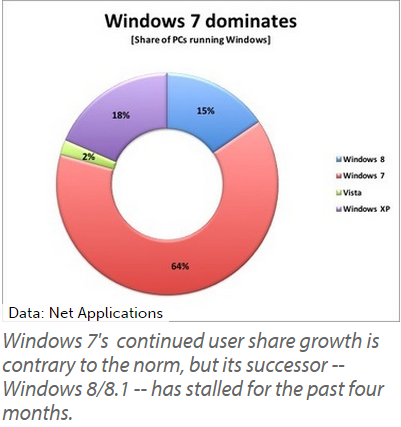
ComputerWorld reports that two-thirds of all PC users are currently running Windows 7, as of last month. Based off of Net Applications’ monthly user share tracking, these are the statistics taken for the month of March 2015 concerning the different operating systems in Microsoft’s repertoire.

windows 7 dominates

  • 64 percent of users use Windows 7.
  • 2 percent of users use Windows Vista.
  • 18 percent of users are still clinging to Windows XP.
  • 15 percent of users are using Windows 8 or 8.1.

Windows 7 is certainly a great operating system that has stood the test of time. Ever since it was released in 2009, it’s been a very popular choice amongst both consumers and business professionals. It was so well-received that it pulled support away from the overwhelmingly popular Windows XP, which lost patch and update support last spring.

rueters error

However, Windows 8 and 8.1, the most recent of the Windows operating systems to be released, have failed to entice the end user into upgrading from Windows 7. If anything, Windows 7 is still growing more popular. As of this past February, 7 has seen a 2.6 percent increase, while Windows 8 and 8.1 have just about reached their limit over the past four months.

Even though Windows 7 still has a few good years left before its end-of-support date in 2020, all good things must come to an end sooner or later. Will Windows 7 follow in the footsteps of its predecessor, Windows XP, and have countless end users forsake upgrading for an unsupported system? If Windows 10 fails to take off, this might happen, leaving many users running without vital support patches and updates. This is why using a supported operating system is so important.

The next OS to hit Microsoft’s chopping block is the server OS, Windows Server 2003. However, the main cause for concern isn’t necessarily over security, but the complications of legacy hardware and software capability with new, modern machines and applications. It’s not always easy to predict what happens to your IT infrastructure when upgrading to a brand new server.

If your office is one of those that haven’t yet made plans to move away from Windows Server 2003, or if you’re running outdated operating systems on your business’s workstations, you should make arrangements immediately to start moving toward a more modern office. You can’t afford to fall behind, and NuTech Services understands this. If you’re having a difficult time juggling your responsibilities as a business owner with incorporating imperative upgrades, we can help you manage and maintain your IT infrastructure. Just give us a call at 810.230.9455 to learn more.