257000469_wellness_400.jpg

Tip of the Week: Are Workplace Wellness Programs Effective? It Depends

257000469_wellness_400.jpg

Workplace wellness programs, despite being an $8 billion industry, are a bit of a quandary for employers – as the jury is still out over whether or not these kinds of programs are effective. For this week’s tip, we’ll examine if a wellness program might be a good fit for you.

Study after study has been performed over the years about the impact of workplace wellness programs, producing various results. Some have indicated health improvements and cost savings, while others haven’t. However, the studies that were performed in the past had a high rate of issues. Whether there was no comparison group, or the chance of personal bias influencing signups, these studies simply didn’t provide reliable data.

Now, however, researchers from the University of Chicago and Harvard have conducted a large-scale study that meets the requirements that such a study is usually beholden to.

The BJ’s Wholesale Club Experiment

This experiment began by selecting 20 of the big-box retailer’s outlet centers to offer an employee wellness program. 140 additional BJ’s locations did not offer any such program. Across the 160 clubs involved, there were almost 33,000 workers employed.

Participants filled out a health risk questionnaire, took health classes, and had basic medical tests performed. After 18 months, their progress was evaluated…and that’s where things got interesting.

Despite the workers who were participating in this program reporting healthier behaviors than they once exhibited, almost all other factors were left unchanged. Blood sugar levels, job performance and attendance, and employer health care spending all were unaffected.

Why This Might Be

There’s a good chance that the results of this study were skewed by the incentives offered to participants. Participants were given gift cards for attending wellness courses, for a total incentive of about $250. According to founder and CEO of Bravo Wellness, Jim Pshock, this may just not have been enough. According to Pshock, any amount less than $400 is only going to be enough to incentivize people to do what they were already going to do anyways. As Pshock put it: “It’s simply too small to get them to do things they weren’t already excited about.”

Another study, published in 2018 by the University of Illinois, essentially debunked the idea of the workplace wellness program, concluding that it neither reduced costs or impacted behaviors – although this study also found that participants of wellness programs were those who were already healthy and motivated. This potentially suggests that the true benefit of these programs isn’t to make their existing workforce healthier, but to attract and retain healthier employees.

There are other potential contributing factors as well. A recent survey indicated that 84 percent of employees saw their wellness programs as “one-size-fits-all,” a concept that doesn’t really work will all of the various factors that contribute to health. Eighty percent of respondents to that same survey claimed that more personalization would contribute to their participation in wellness programs.

Why You Want to Adopt a Workplace Wellness Initiative

Admittedly, we’ve provided a mixed defense for these kinds of activities, but it cannot be denied that anything you can do to promote the health of your employees will only benefit your business – healthy employees tend not to call in sick, after all.

There are other benefits to these programs as well:

  • Reduced Stress – The stress management benefits of healthier behaviors have been well documented. By adopting these healthier behaviors, you and your staff can reduce the stress that comes from the office and approach the source issues more effectively.
  • Community Building – As the boss, you want your entire team to work as, well, a team. Unfortunately, if certain departments don’t work together much, this kind of relationship can be hard to develop. However, many activities that would fall under a workplace wellness initiative can help cross departmental lines, drawing your team closer together.
  • Better Moods – Wellness programs allow employees to try out new activities, which can not only add to their wellbeing, but can also keep them engaged and productive. Plus, studies have indicated that employees who participate in these programs were generally happier with their work situation.

What have you done to cultivate a more health-conscious workplace? Share your strategies in the comments!

218223946_productive_400.jpg

Three Ways to Be More Productive

218223946_productive_400.jpg

Many people can find it challenging to constantly remain productive, which is only understandable. Nobody can be firing on all cylinders all the time. However, this doesn’t mean that there aren’t ways that you can optimize your productivity. Here, we’ll review three general approaches to improve your productivity, with examples describing how to enact each.

1. Prioritization

One of the keys to productive work is to work smarter, not harder. By identifying what is most pressing to accomplish or otherwise needs to happen first, you can inherently increase your productivity.

Ignore Inspiration

For instance, one of the biggest causes of procrastination is taking in a project in its entirety. Seeing the entire scope of an undertaking can be intimidating, which often makes people feel as though they need to be “inspired” before they will be able to accomplish anything.

This is untrue, but can be a difficult impulse to resist. If you catch yourself falling back on this excuse, try focusing specifically on a certain aspect or piece of your greater responsibility. Once this portion is completed, you’ll most likely be motivated to continue. In essence, don’t wait to be inspired… inspire yourself through what you accomplish.

Leverage Prioritization Strategies

Another common cause of procrastination is indecision as to what aspect of a project to tackle first. Again, identifying the most important or pressing activity makes it much easier to make this decision, and there are a few ways that you can do so.

One way is to leverage something called the Eisenhower Matrix. It can be used to sort tasks based on their urgency and importance, advising you on how a task should be approached – if it should be done now, planned for, delegated to someone else, or eliminated. This tool can help you avoid spending time on activities that ultimately don’t matter as much as others, optimizing how you spend the time you have. The Pareto Principle, or the 80/20 Rule, is another means of spending your time more intelligently. By identifying the most important 20 percent of their tasks and minimizing the remaining 80 percent, many people use this principle to spend the most time on their most impactful activities.

Save Distractions for Later

We’ve all experienced that moment where, in the middle of one task, we suddenly have an idea for another. While this new task may be valuable or important, it can also hurt your operations by interrupting the one you’re engaged in at the moment… but again, this thought also needs to be addressed. Many people resolve this dilemma by creating a distraction list. Rather than suspending what they are working on, these people simply take a moment to jot down this idea for further consideration after their task is done. This means that they aren’t jumping between unfinished tasks each time a new idea pops up.

2. Preparation

Once you have your tasks organized properly, you need to ensure that you have properly made preparations to attend to them. Some of these preparations may sound counter-intuitive, but are no less crucial to your efforts.

Make Sure You’re in Order

If you aren’t ready to be productive, you aren’t going to be no matter what you try. Therefore, you need to be taking care of yourself, as well as your technology. You need to be healthy and rested to reach your potential, which means that self-care is a must. This also means that you should be strategic in how you approach your responsibilities. If you know that you tend to have a period of low energy in the late morning, it’s probably beneficial to avoid scheduling intensive tasks for that time. In addition, you need to be sure that you’re up-to-date on how things are done. The more knowledgeable you are, the more efficiently you’ll be able to make decisions, and the faster processes will move along.

Expect to Be Interrupted

The best-laid plans of mice and men often go awry, as they say. This means that you should anticipate other things to interfere with your established work schedule. What if another task pops up, or a task takes longer than anticipated? Taking these kinds of challenges into account will allow you to figure out a solution preemptively, or at least a plan that allows you to adjust and adapt.

Learn from Everything

We’ve all been taught the value of learning from our mistakes – examining situations in which things went wrong, identifying why, and avoiding those circumstances in the future. However, this is only half of what you should do to optimize your productivity. You also need to identify why your successes were successful.

Once you have completed a project or process, take some time to examine it. What about it worked well, and how could that be made better? Was every aspect necessary, or could some of it be eliminated or streamlined? Doing so will allow you to further optimize your procedure to be even more productive the next time.

3. Cheating!

In fairness, these strategies aren’t “cheating” so much as they are methods of working smarter. This way, you can make sure that your tasks are accomplished without expending more resources than they need – including your energy.

Subdivide Your Tasks

Remember the prioritization strategies we discussed above? This is a similar activity, in that you take a larger concept and divvy it up into each step that needs to be completed. Instead of putting them into a matrix or focusing on a specific set of them, the idea here is to simply make your tasks appear more achievable.

Let’s say you have to plan a work event. This alone is a significant responsibility, and can be overwhelming to approach as a whole – where to start? However, you can make your process much more comprehensible by going about it piece-by-piece, effectively expanding your task into a complete to-do list. While this does give you more tasks, they will be much easier to attain and progress with. So, instead of “Plan Party for Greg’s Retirement”, your list might include:

  • Buy decorations
  • Buy card
  • Buy ice cream cake
  • Hide cake in freezer
  • Have team sign card
  • Put up decorations
  • Take out cake
  • Send email to team to gather

More tasks, but much easier to follow nevertheless.

Leverage Shortcuts

There are a great many ways that your technology can offer an easier way of doing things. Naturally, keyboard shortcuts are one example of this, but so is automation. Let’s face it, any time you can save by having your technology handle something is time that you can then spend being productive elsewhere.

Eliminate Inefficiencies

How much time do you spend debating your options for truly inconsequential decisions during the day? Chances are, it’s more than you’d like to admit. The fact of the matter is that many of the choices that we are faced with aren’t all that impactful. Eliminating as many of these choices as possible will allow you to reserve your decision-making skills for the times that you really need them.

Email is another notorious source of lost productivity, simply because people don’t use it as efficiently as they could. It is too common for what should be a very brief and simple correspondence to take far longer than anticipated. Ironically, this is often because the people involved are trying to be brief.

Instead of cutting corners on your next email, invest a few minutes into including more specifics. Don’t just say you want to meet – identify the topics to be discussed. Don’t leave the time of the meeting open-ended, offer a few availabilities. While it takes longer to write, one email written this way will keep you from having to read, write, and send a few more.

Finding Your Groove

Clearly, there are many aspects to consider when you’re trying to be more productive, and some may be more effective for one person over another. A bit of experimentation will help you to land on the approach that works for you.

NuTech Services can help by providing the solutions that enable some of these methods. Reach out by calling 810.230.9455 to learn more about these solutions.

85140760_S_time_400.jpg

Tip of the Week: 3 Ways to Optimize Your Time

85140760_S_time_400.jpg

Time always seems to escape so many of us. What should be easily accomplishable in a morning can easily stretch to the afternoon, for what seems like no reason. The hard truth is, it isn’t time’s fault… it’s our own bad practices. For today’s tip, we’re going over how you can fight these tendencies to optimize your use of the time that is available.

1. Prioritize

One of the biggest time sinks to be found in any business is the simple act of deciding what to work on next. We’ve all been there at some point: having finished one task, we suddenly reference our to-do list and encounter the same problem as a kid has in a candy store… too many options.

Taking a few moments at the start of every day to organize these tasks can greatly improve how you spend your time throughout the rest of the day, and can ultimately lead to far less waffling later on. With a set process laid out, you no longer have to make the decision over what to work on next – it has already been made.

To create this order, look at everything you have to work on and establish how urgent each task is compared to the others. Deadlines are a handy way to help establish this, or if someone else in your organization needs it before they can continue their work. Identifying these qualities and ordering your tasks accordingly from the start is a small time investment, especially when you consider the impact it can have on your productivity later on. Utilizing a communications and collaboration solution can help you establish the organizational priority of each of your tasks with the help of your team.

2. Habitually Limit the Time You Spend on Rote Tasks

There are always those tasks that pop up throughout the day that seem insignificant at the time. Take checking your email, for example… how long does it take to do that? However, checking email and a variety of other tasks can quickly grow from a momentary activity to an extended process.

After all, there’s always the chance that briefly responding to an email could pull you into an extended and time-consuming debate.

Furthermore, some of these tasks carry the expectation that you will immediately drop what you’re doing to take care of whatever’s needed. Emails are notorious for communicating this urgency, whether or not it was intended. Regardless, it puts pressure on the employee to switch their focus, which hurts productivity.

Instead, establish a practice of setting a concrete period out of your day where you will check and respond to your email, or whatever task it is that applies to your situation. Actually schedule this time into your day, using the business management solution that your company has in place to control schedules. Outside of that time, leave that task alone… if an email’s contents are truly that important, you’ll find out about them some other way before long.

3. Delegation and Outsourcing

We get it, business matters and activities tend to be kept close to the chest. After all, if you can’t trust yourself to do something right, who can you trust? Who else has the incentive you do, to do the best job possible?

Frankly? Someone you’ve hired to do a job.

Delegation can be difficult, of course, but only if you don’t trust those around you. However, there are plenty of resources out there, both inside your business and available through outsourcing, that could do exactly the job that needs ro be done. As a result, you can divert your focus to tasks that need it more, trusting the resource to produce.

You may have to put in a bit of time picking the best resources, especially when outsourcing, but the results will be well worth the time.

NuTech Services can help you put these practices into action, with the added effects of the solutions that can be implemented to make these practices easier. Give us a call at 810.230.9455 to further discuss any of the solutions we’ve described here, and for more handy tips that could help you better leverage your time, subscribe to our blog!.

100923125_document_400.jpg

Tip of the Week: Do Yourself a Favor, Document Your Processes

100923125_document_400.jpg

The average business has a lot of internal processes, and these processes are typically pretty concrete: to accomplish this task, follow steps A, B, and C, in that order. However, due to the sheer volume of processes like these, it helps to have these processes documented for the benefit of your future employees… and, if we’re being honest, your future self. For this week’s tip, we’ll go over the proper process for documenting a task.

Let’s face it, if your business operates anything like most do, you have far too many of these processes for anyone to reasonably remember. This means that making sure that your processes are both comprehensively recorded and accessible for your employees to reference is a crucial facet to your productivity.

Fortunately, doing so is relatively simple, as long as you go about it properly.

Step One: Identify What You’re Documenting
The important thing to remember about creating documentation is that, unless the task itself is incredibly granular, making the documentation too specific isn’t going to help anyone. On the flip side, any documentation that is too vague isn’t likely to provide anyone with the value that it should.

You need to store your documentation in a centralized place that all employees can access. It helps even more if there is a system in place to allow you to search the contents of each document, sort them in various ways, and highlight changes and edits made to processes. In other words, utilizing a document management system or a knowledge center of some kind will go a long way in preserving the functionality of your processes. There are plenty of tools and applications out there for this, and we can help you choose the best one for your situation based on your specific needs.

Step Two: DIARI (Do It And Record It)
This step will form the basic shape of your documentation, as it will create a step-by-step guide to completing the task as a whole. You’ll need to go through a run-through of the process you’re trying to document, recording every step you take.

Don’t be shy about including details, either. For instance, if your process will require the same questions to be asked each time it is put into action, include the list of questions in your documentation. If someone is supposed to be contacted specifically, identify them in your documentation and provide their contact information.

From here, you should have a pretty good handle on how the process typically goes down… and the insights to make it even better.

Step Three: Refine, Repeat, Revise
When you were running through your process, were there any steps that would have made more sense to do earlier so you could be better prepared for a later responsibility? Try rearranging the steps in your documentation and trying it again. Did it work better, or worse? Take these observations into account and act accordingly.

Really, once you commit the time to doing it properly, creating invaluable and useful documentation isn’t that difficult of a process. You can even bring multimedia into it, if it’s a good fit, using tools like Steps Recorder on Windows.

For more handy IT tips, make sure you subscribe to our blog!

maintain_server_400.jpg

Why (and How) You Need to Maintain Your Servers

maintain_server_400.jpg

It is impossible to understate the importance of a server to today’s businesses. We talk a big game as to how important data is, but we don’t often broach the topic of how important it is to ensure that your server is well-maintained. Below, we discuss how to determine what your servers need for optimal performance, and how you can be sure that they get it.

What Can Cause Problems in Your Server Room?
Of all the potential issues that your servers can face, the smallest ones can create some of the biggest problems – literally. For instance, there’s always the worry of dust.

Dust, and other similarly-sized contaminants, can easily make their way into your server’s components, where they build up and become an insulator. As a result, your equipment can become up to 30ºF warmer – and just like in human beings, a rise in internal temperature to this degree can be lethal.

Other contaminants include things that human beings generate, like skin particles and dander, or even the result of wear on the devices themselves, like belt debris from the climate control systems and metal shavings from the hardware. The worst culprit, however, is actually the soles of your feet. Approximately 80 percent of the most damaging debris can be introduced to your server room this way.

Mitigating Issues through Maintenance and Prevention
Consider what would happen if your server was to suddenly fail. All of the data you had worked to preserve and protect, investing in the infrastructure to house it and the solutions to mitigate external threats to it, would be gone. Therefore, it is important to remember that protecting your servers against inadvertent internal threats is just as critical as protecting them against external attacks. This is accomplished in two overarching ways: first, strict standards of cleanliness, and secondly, avoiding the introduction of contaminants.

Keeping it Clean
The less dust and grime there is in your server room, the easier it will be to keep the room nice and cool for your infrastructure. While the big cleaning jobs should be left to experienced professionals who have a history with cleaning computing equipment, there are some jobs that you should be able to handle.

After all, some cleaning may have to be done on a daily basis, especially if your server room is a high-traffic area. Careful vacuuming will help get rid of that notorious sole-grime that comes in, as well as a considerable amount of other dust. To clean your server components themselves, use an antistatic cloth to gently remove the grime, using compressed air to get into hard-to-reach places.

Avoiding Contamination
If possible, you might also want to make some changes to help reduce the amount of dust and grime that enters your server room in the first place. Installing air filters inside can help, as can (assuming you are able) creating a buffer room between your office and the server room itself, where special mats can be installed to help minimize contamination. Hats and booties can also help reduce the amount of human-borne contaminants entering the area.

Finally, do your best to stay out of the server room if at all possible. Avoid bringing potential contaminants into it, like cardboard, and clean off any tools and equipment before they are brought into the server room.

For more best practices to maintain your business’ crucial technology, reach out to NuTech Services at 810.230.9455!

windows_tips_400.jpg

Tip of the Week: 5 Windows Tricks

windows_tips_400.jpg

The Windows 10 operating system is the most common operating system for business use, which is what makes it surprising that so few know how to adjust its appearance to suit their preferences. For this week’s tip, we’ll go over a few ways to adjust what you’re seeing and/or looking at for maximum productivity.

Quicker Settings
Your settings are your greatest tool to control your Windows 10 preferences. If you need to change a setting on the fly, you can pull up the menu by pressing CTRL + I or Windows Key + I.

Zoom In/Out
Whether it’s a graphic you want a closer look at or text that’s just a smidge too small (or the opposite cases) the ability to zoom in or out on the entire screen can quickly become a handy trick to know. You have options here: you can either press CTRL + (+) or CTRL + (-) to zoom in or out, or press CTRL + Scroll Wheel to accomplish the same. Pressing CTRL + 0 will reset the screen to normal.

Changing Active Applications
If you’ve really got a good groove flowing as you work, pausing to switch windows with your mouse can really trip you up. With some practice, you can use a keyboard shortcut instead, eliminating this inconvenience. Holding Alt as you press Tab will bring up smaller versions of your active windows, and using the directional keys (while still holding Alt) will allow you to select a different one to work in.

Switching Monitors
Workplaces are seeing more and more multi-monitor setups in use. A shortcut makes it easy to move application windows around and across screens. To move a window to the other monitor, press Windows Key + Shift + Left/Right. Whether you choose left or right depends on which way you want your window to move.

You can use a simpler version of this shortcut to dock an application or browser window to the side of its current monitor, too. All you press for this one is Windows Key + Left/Right.

Shortcuts like these can turn you into a Windows power user in no time at all, with a little practice. Do you have a shortcut that you use frequently enough to make it second nature? Share it with us in the comments!

5_windows_400.jpg

Tip of the Week: 5 Tricks to Using Windows

5_windows_400.jpg

There’s a lot more to the Windows operating system than first meets the eye, especially where handy shortcuts are concerned. Today, we’ll cover five of the shortcuts baked into Windows that may be beneficial to your productivity.

Rename File
Every so often, you will discover that the name of a document isn’t entirely accurate anymore. Naturally, this file name should be changed to accurately reflect its contents. While you could right-click and select ‘rename’ for each one you have to change, it is much faster to simply select the file (or files) that needs a name change, and press F2. If you change the name of multiple files to the same thing, it will even automatically add the number to the end to differentiate them.

Active Window Screenshot
Screenshots can be very useful, but they can also be a pain to capture. Fortunately, there’s a way to easily take a screenshot of just the active window. By pressing Alt + Print Screen, the active window will be captured cleanly.

Problem Steps Recorder
Every so often, you may need to record your steps exactly, whether you’re replicating an issue for IT to check out or outlining a procedure for training purposes. Windows offers the Problem Steps Recorder, which is an easy-to-use action recording program that outlines and illustrates each step you take while the program is observing you. It then generates a step-by-step report to be reviewed. Creating one is especially simple – the hardest part is typing “psr” into the Windows search bar to pull up the program.

Easy Open Applications
The taskbar is extremely useful for storing your most-used programs and files for easy access. Windows has incorporated a shortcut that makes accessing them even easier. First, figure out which number your desired application is in sequence, then press the Windows key + the sequence number to open that application. This also works to maximize and minimize these windows.

Minimize/Maximize
Another way to quickly minimize and maximize your open windows is a little silly, but effective. If you want to minimize all but one of your windows, simply click and hold the window and shake it. All the rest will minimize. The same action will also reverse this, maximizing all of your windows again.

What other neat Windows tricks and shortcuts do you know about? Share them in the comments!

budgeting_bottomline_400.jpg

Budgeting for IT Can Benefit Your Business’ Bottom Line

budgeting_bottomline_400.jpg

Your business depends on a budget to come out in the black at the end of the fiscal year, and the way you invest that budget will have a considerable impact. As you create this budget, your IT needs to be one of your top considerations – after all, it is what effectively powers the modern business. Here, we’ll discuss how diligently incorporating your IT into your budget can help your business be more successful down the line.

How to Approach Your IT Spending
When determining an IT budget, perspective is an important part of the process. It can be tempting to view your IT as just another cost of doing business, but it really is more than that. Your technology (and the state it is in) has ramifications that spread to your entire business, so if it is lacking, everything will be. Employee morale will suffer, your productivity will slow, and your incoming cash flow will falter.

After all, an IT budget needs to account for a lot. There are the costs associated with acquiring and subsequently upgrading your information technology, as well as training your staff to properly leverage these solutions. However, a good IT budget will also account for the odd inconveniences that will require some financial spending to resolve. Furthermore, with your budget in mind as a reference, explore some of your options as far as cost-savings go… are you paying for more resources than you need? Are you leaving money on the table anywhere when those funds could be used more effectively contributing to another goal? While information technology is hugely helpful when leveraged properly, it can become a financial burden if over-invested (or even under-invested) in.

This is how you should actually consider your IT budget: an investment. While some of it will be classified as a business expense, much of your spending will be into endeavors that help your business, either by increasing efficiency or reducing waste. Either way, your IT can be used to put your company in a better financial situation.

Encouraging Financial Well-Being with an IT Budget
If you’re unsure of how to proceed with budgeting your IT, we’ve compiled a handy list of things you should (and shouldn’t) do during the process.

  • Have a set budget for your IT. In order for your business to be able to utilize the caliber of technology solutions it needs for success, you need to put forward the investment into those solutions.
  • Invest in business-enhancing solutions. Whether you’re boosting your internal productivity or fortifying your business against threats that could keep you from conducting business as usual, your IT budget should be spent in ways that directly benefit your operations.
  • Don’t shoot from the hip. Like we alluded to above, if you aren’t investing in your IT solutions correctly, you could find yourself in a worse spot than before. It is crucial that you go about investing in your IT strategically, directing funds to where they are needed and where they will help you to generate more revenue.

Alexa von Tobel, CEO of LearnVest.com, said, “We all have pretty much similar dreams, and at the root of all those dreams is being able to be in control of your money.” We agree, which is why we’re dedicated to providing you with the most value in our IT services without emptying your coffers. To learn more about the easily-budgetable services that we have to offer, reach out to us at 810.230.9455.

_a_b_testing_400.jpg

Know Your Tech: A/B Testing

_a_b_testing_400.jpg

A key component to effectively attracting your audience is to better understand their preferences. Even the most seemingly insignificant change, like changing the color of the buttons on your website, can have a major impact on how effective your materials are. Fortunately, through a process called A/B testing, observing the impact of these changes is somewhat straightforward.

A/B Testing, Defined
Running an A/B test is the process of comparing a single variable to deem which option, Option A or Option B, is the more effective of the two. The key to an effective A/B test is to only change one thing between the two test subjects – otherwise, you have no way of knowing exactly what it was that was the influential change.

A/B tests can be used to make a wide variety of choices, from something as simple as an adjustment to a call-to-action to a different layout to a particular page. In this case, Option A should be the way things currently are to serve as a control for the experiment, while Option B displays your proposed change. Each option is then presented to an equally-sized segment of your audience to deem which of the two is the more effective.

Setting Up an A/B Test
A/B testing can be used to make a vast number of decisions, as long as they are approached one at a time. As we said before, if multiple variables are involved in a single test, that test isn’t going to deliver reliable enough results to make any well-supported decisions. It is also worth mentioning that A/B testing tends to work better when comparing options for relatively minor changes, like calls-to-action or images included in an email or on a landing page, rather than big ones.

The first step will be to decide which variable you intend to test, followed by your determination of a metric to base your observations against. Does this change boost engagement? Increase the time spent on page? Improve your click-through rate?

Once this has been accomplished, you’re ready to state what your control option will be, and what your change will be after that. Your control group should be whatever you currently have in place, so you can accurately judge if a change would be an improvement or not. Then you need to settle on a sample size, or the number of recipients that will be a part of this test.

Not all changes will be accurately measured with a sample size alone. Some changes would be better left running until a statistically significant data sample has been collected. Speaking of statistical significance, you will also need to decide how significant your results have to be before a change is deemed to be worthwhile.

Running An A/B Test
There are two real keys to running a successful A/B test: first, you have to give it enough time to collect the data you’ll need to come to a conclusion, and second, both options need to be tested at the same time to prevent other variables from affecting your data. Of course, if the variable that your A/B test is evaluating is timing, this doesn’t apply so much.

In short, A/B testing is a relatively simple way to make sure that you’re having as large an impact on your audience as possible. Can you think of any times that you’ve done something similar to test out a proposed change? Tell us about it in the comments!

totw_guide_multiple_displays_400.jpg

Tip of the Week: Your Guide to Using Multiple Displays

totw_guide_multiple_displays_400.jpg

Depending on the task you’re trying to work on, it can sometimes seem like there just isn’t enough space on your computer monitor. One of the best solutions is to add another monitor. However, this sometimes requires more that just plugging another display into your system. For this week’s tip, we’ll review the steps to connecting multiple displays to your workstation.

Preparation
Connecting multiple monitors is a process, so before you begin, you should make sure you have all your ducks in a row. First, you need to make sure that your computer is capable of supporting multiple monitors in the first place.

To do so, you need to make sure you have sufficient graphics ports to connect these multiple monitors to. Look at the back of your computer and check for graphics ports, or ones labeled DVI, HDMI, DisplayPort, or VGA. Depending on what you see, your computer may or may not have a discrete graphics card, which dictates whether or not you can most likely use more than two monitors. If you only have a motherboard, two displays are generally your cap, while three or more – in addition to the first two – suggest that you have the separate graphics card.

However, even this doesn’t always mean that you can use more than two displays. Checking for the make and model of your graphics card and running it through a quick Google search with the amount of monitors you’d want to use should tell you if your card can support them.

If not, there is always the possibility of adding an additional graphics card, as long as you have the real estate and a sufficient power supply in your computer to support it. If you do, you will want to be sure that you use the same brand of card as your system currently uses. This will improve your performance and cause much less trouble for you in the long run. In addition to this, you will also need to be sure that you have the appropriate connector cables, and that they will connect properly between your tower and your display.

From there, all you have to do is obtain the additional monitors you want to use, which will be dictated by your budget, your needs and intended use, and your available real estate.

Setup and Configuration
Unfortunately, you still aren’t quite ready to dive back in – you need to tell your computer itself to play nice with all these monitors, too. Fortunately, the Windows operating system makes this fairly simple.

Press Windows + P to pull up a simple menu of your display modes. These modes are as follows:

  • PC screen only – Your primary monitor will be the only one utilized.
  • Duplicate – All monitors will show the same desktop.
  • Extend – The monitors work collaboratively to provide a single, expanded desktop.
  • Second screen only – Your secondary monitor will be the only one utilized.

Generally speaking, you will most likely want to utilize the ‘Extend’ setting.

Once you have done all this, you will want to right-click anywhere on your desktop to pull up your Display settings. Using the diagram provided, mimic the way your screens are set up, each numbered box representing one of them. Clicking Identify will have the screens identify themselves by number. You can also adjust whether your taskbar is displayed on all screens and change up your desktop customization for each.

It doesn’t take much to help boost your productivity at work, which means even the smallest changes can make a big difference. How many monitors do you prefer to use? Tell us in the comments!

is_there_good_stress_400.jpg

4 Reasons Why You Should Quit Stressing Out About Stress

is_there_good_stress_400.jpg

Stress is a natural part of the workplace. It’s almost impossible to make it through the workday without getting stressed out about at least one thing or another, especially when you’re a business owner. In these stress-filled circumstances, it’s important to remember that stress isn’t always a bad thing; it has some redeeming factors that are often lost amongst the cacophony of shuffling papers and constant phone calls.

However, this needs to be mentioned before anything else; stress created for the sole purpose of being stressed cannot possibly become a good motivator. Inc states that “stress that comes from not having enough information or that’s based on an irrational fear is a poor motivator.” Therefore, it makes the most sense to keep stress to a minimum whenever possible, as there’s no good reason to be stressed out all of the time. Remember, stress without control can be dangerous, and you can’t let it take over your life.

That being said, there are some benefits to be gained from the occasional bout of stress. Here are four of them.

Stress Provides a Much-Needed Energy Boost
We often think of stress as a draining factor that can sap energy right out of you, but it’s hard to argue that a sense of urgency comes from being in conflict with something or another. You’ll notice that you’re more aware of your surroundings, and you actually have the energy required to complete your work.

Stress Proves that You Do, In Fact, Care About the Project
If you’re stressed out about a certain project, at first you might hate yourself for it. You might fool yourself into thinking that you don’t care how it turns out, and that you just want to get it done. This is actually the opposite of what’s really happening. If you’re stressing about the project, you care about its outcome. Otherwise, why would you be stressed? Make this connection yourself and you can harness the frustration and channel it into energy.

Stress Teaches You to Enjoy the Times You’re Not Stressed
Imagine working outside in absurdly hot weather, under incredible physical duress and on an empty stomach. You then walk into an air-conditioned home with a delicious meal waiting for you on the dinner table. Working with stress can be absolutely awful, but it will teach you to enjoy the little things in life that much more.

Stress Inspires Quick Action
Stress is something that literally nobody wants to deal with, so naturally, people will move toward a solution in order to absolve themselves of the pain it brings. This doesn’t mean that you should make stress to create that sense of urgency; rather, you should think of the stress as an unfortunate advantage, like falling out of an airplane and into a giant pit of pillows.

Despite its advantages, stress is still something that must be properly managed if you want your team to succeed in their endeavors. One of the main reasons why employees might be stressed in the workplace is thanks to using outdated or dysfunctional hardware and software solutions. Think about it; if you weren’t able to work in multiple browser tabs at once, or open your mission-critical apps, you would probably be in a tight spot, and may actually begin to feel stress.

NuTech Services’s managed IT services can make it so that you never have to feel stressed about your technology or IT budget ever again. To learn more, reach out to us at 810.230.9455.

distracting_-instant_messaging_400.jpg

Tip of the Week: 4 Ways to Make Sure Workplace Instant Messaging Enhances Productivity

distracting_-instant_messaging_400.jpg

Instant messaging has changed the way that individuals communicate with one another, both in their personal lives and in the workplace. Just as email threw a wrench in traditional mail’s plans, instant messaging threatens to jump start a new method of instantaneous communication, one which can be seen as a great benefit, but also an immense annoyance.

As reported by ITProPortal, over half of the respondents to a survey by BetterCloud believe that instant messaging will overtake email in the office; an impressive feat, especially considering how commonplace email is in today’s professional environment. However, this also means that businesses need to improve their instant messaging practices if they want to reap the benefits it provides, and to use instant messaging in such a way that it’s not a major workplace distraction.

If you want to improve your business’s instant messaging practices, try these tips.

Accurately Represent Your Current Online Status
You need to give your team a proper representation of whether you are currently available or not. If you don’t, they could be wasting valuable time trying to reach out to you when, in reality, you’re nowhere near your computer. Make sure that you change your status to indicate that you’re away from your computer, or logged off for the night; that way, your team can know that they would be better off contacting someone else who is available.

If It’s Going to Be a Long Conversation, Try a Different Communication Medium
Long IM conversations can waste time, especially if they aren’t particularly relevant to the task at hand. In this case, it’s better to simply pick up the phone and call the person you need to communicate with or arrange for a face-to-face conversation. This way, the details get ironed out and you don’t waste valuable time getting to the point. Plus, emotions are somewhat difficult to express through instant messaging, while voice chat and in-person meetings are easier to get a feel for.

If You Have a Short, Specific Request, Try to Put It at the Beginning of the Conversation
There’s no point in drawing out a conversation when all you need to do is ask a question. Doing so isn’t just wasting your time; it’s wasting the recipient’s time too. Be courteous and respectful of your colleagues’ time and ask questions as soon as you can.

Take Full Advantage of Your IM System’s Features
Many instant messaging platforms also allow for several other functions. If you fully take advantage of these features, your team can be more productive with your IM solution. For example, if your system allows for voice chat, using it can be a great way to clear up confusion or explain a particularly difficult concept. If you need to rope in another person, try adding them to the conversation when they need to be there. The idea is to play around with what works and what the limits of your IM system are. This way, you can help your team better understand how to take advantage of the features.

By following these best practices, your organization will see a more fruitful use of instant messaging features. What are some of your favorite ways to use instant messaging, and do you have any specific practices that you follow at your organization? We’d love to hear about them. Let us know in the comments, and be sure to subscribe to our blog for more best practices and tech tips.

b2ap3_thumbnail_workplace_collaboration_400.jpg

Technology Has the Power to Bring the Office Together Like Never Before

b2ap3_thumbnail_workplace_collaboration_400.jpgThe technological landscape of the office has changed significantly over the years. Only a decade ago collaboration could only be accomplished through sitting down in a conference room and discussing issues face to face. Today, however, technology is changing the way that we as a society view collaboration, and thanks to various achievements in software development, it’s easier than ever to work together on team initiatives.

Don’t Be Afraid of New Solutions
We all now the convenience of being able to communicate with the click of a button. Email and conference calling have been great additions to the office collaboration environment, but in recent years there have been more comprehensive and streamlined solutions that are constantly improving the way we work together. For example, video conferencing allows workers to communicate in ways which were previously unheard of, and instant messaging sure beats sending an email for an urgent request.

The important thing to consider when improving the way your office communicates and collaborates is that you should embrace new solutions, but not without completely forgetting the basics. Email is still a vital communication medium that your organization needs, and so is the office telephone line. While certain features of these solutions are better performed by more recent technologies, they are still vital assets.

It Doesn’t Take a Genius
Contrary to popular belief, it doesn’t take a rocket scientist to operate collaboration technology in an easy, efficient manner. Most modern solutions like instant messaging, Voice over Internet Protocol, and more, are all similar to everyday products that are used by the average PC enthusiast. This means that your employees will be relatively familiar with working with your office’s technology solutions, because they use similar services outside the office. For example, your employees might use Facebook messaging or Skype video calls for their personal matters, and they’re used to the simplified interfaces that have come about from innovations in recent times.

Establish Proper Boundaries and Protocol
Granted, some solutions still require a little bit of training, like making sure your employees are using your enterprise-level solutions in ways which are beneficial to their workplace collaboration, and not distracting others or compromising your business’s data security. A big part of this is training your employees on what these solutions should (and shouldn’t) be used for; for example, there’s no reason to use the video conferencing solution when you have a perfectly fine conference room to use at your leisure. Furthermore, your collaboration solutions should only be used for in-house purposes. Your employees shouldn’t be using their work email for personal use. Not only is it unprofessional, but it complicates things significantly if they decide to leave the company.

Overall, your technology collaboration solutions should be designed to allow for maximum productivity and efficiency. For more information about how we can help your business better communicate and collaborate in the workplace, contact NuTech Services at 810.230.9455.

b2ap3_thumbnail_smartwatch_technology_400.jpg

Wearable Technology is Trending: Is This Good For the Workplace?

b2ap3_thumbnail_smartwatch_technology_400.jpgYou’ve probably seen the new fancy-schmancy watches that some people wear and wonder to yourself, “What’s so special about them?” Smartwatches like these are considered wearable technology and are typically meant to perform the various functions of a smartphone, minus the phone. Some devices are even used to monitor the body’s physical activity with health apps. They might seem useful now, but what’s the endgame for wearable technology?

What is Wearable Technology?
Technically, just about any device that’s worn on the body (like a headset) can be considered wearable technology. However, most wearable devices that you’ll encounter are designed to do one (or both) of two things: 1) Monitor the body’s physical well-being and track health progress, or 2) provide efficient access to apps that are designed to enhance productivity and efficiency for office employees. While they initially were meant for more of the former, the incredible success of wearable technology inspired developers to improve functionality in other areas.

As explained by CyberTrend:

A 2014 Parks Associates study projected that smart watch sales will reach 121 million units worldwide by 2018. Similar to a smartphone or smart TV, a smart watch can connect a user to the Internet for access to real-time data. Generally, smart watches will offer users some basic features (current weather, music, access to email and texts, etc.), which are also available on smartphones. Depending on the model, some folks can use their smart watches to control their smart TVs, capture pictures, video chat, and run scaled-down versions of common smartphone apps, in addition to using the device as an activity tracker.

While wearable technologies are versatile and can be used for multiple tasks, this doesn’t mean that these devices will be practical in the near future. For example, which would you rather use for your smart technology experience: a smartwatch or your smartphone? Many would probably say the smartphone because it’s vastly more powerful and efficient compared to the smartwatch. A larger screen makes it much more viable to get work done on a smartphone, rather than on a smartwatch.

Another type of wearable gadget consists of smart glasses, like Google’s failed Google Glass product. The main issue here is privacy; having a camera readily available on your glasses is somewhat sketchy and reminiscent of cyber espionage. Thanks to the portability afforded to smart glasses, they were thought to be a threat to both personal privacy and data security, so the idea never really took off.

How Wearables Affect Your Workplace
When workers are using wearable technology in the workplace, you should practice considerable caution. The trend known as Bring Your Own Device (BYOD) coupled with the Internet of Things (IoT) can spell trouble for businesses that aren’t prepared to deal with new devices connecting to their private networks. Any Internet-connected device can be considered a threat to your business if it’s not managed and maintained by your company. This is why it’s so important to keep an eye on devices that your employees are bringing to work with them. One way you can set these fears aside is by implementing a mobile device management solution, which gives you the ability to remotely wipe managed devices, restrict access to information on an app-by-app basis, and so much more.

Don’t let wearables and other Internet of Things devices hold your business back. To find out more information about how NuTech Services can protect your business from these new threats, give us a call at 810.230.9455.

b2ap3_thumbnail_distractions_at_work_400.jpg

Tip of the Week: 3 Ways to Take Back Your Day From Workplace Distractions

b2ap3_thumbnail_distractions_at_work_400.jpgIn today’s competitive workplace environments, productivity is at a premium. Although, thanks to our gadgets, the allure of the Internet, and of course, having to interact with people, working at the modern office isn’t without its fair share of distractions, which hinder productivity. Here are three tips that you can use to tune out the distractions so you can get more work done.

Active “Airplane Mode” On Your Smartphone
When you really need to hunker down and focus, having your smartphone nearby may not be the best move. Unless you’re an extremely disciplined individual, it can be very difficult to ignore the slew of notifications periodically hitting your phone. Yet, it’s likely that you need your phone for what you’re working on, like to access your contacts, calendar, and clock. One way to still access basic apps like these while eliminating the distractions of the Internet is to set your phone to airplane mode. When you’re done with your project, simply turn off airplane mode and any notifications that you missed will promptly appear, as well as voicemail messages.

Bonus productivity tip: If you use your smartphone as your alarm clock, use airplane mode while you sleep in order to avoid being awakened by notifications and even phone calls.

Headphones Keep People at Bay
By putting on a pair of headphones, you’re essentially communicating to the world, “I don’t want to be bothered.” Of course, not everyone will take the hint and you’ll still have a few people tap you on the shoulder to ask a question. Hopefully, the inquires will be essential and they’ll think twice about offering you their opinions regarding what’s trending on social media.

Using your headphones, you might be able to listen to music in order to help you focus better (if you use Spotify, check out their Focus playlists). Although, not every worker has this ability. Therefore, you can also try listening to white noise in order to drown out the noisy distractions in the room. If neither of these options agree with the way you’re wired to work, then you can simply wear the headphones without actually using them for music as a way of communicating to your coworkers that you’re not to be bothered.

Schedule Times For Checking Your Email
If you’re one to keep your inbox open throughout the day, then you’re going to keep one eye on it while trying to be productive. This spells trouble for any project you’re working on because you’ll get slammed with notifications often and at random times. Actually, this applies to other forms of digital communication as well, like social media. Instead, try scheduling times throughout the day to check your email so that you can focus better on the task at hand. You can even take advantage of an email autoresponder tool that lets people know what time you’ll be checking your email. This way, people won’t wonder what’s wrong with you or their computer because they didn’t get an instant response. Remember, if it’s an urgent matter, they can always just pick up the phone and give you a call.

These tips may seem overly simple, but they’ve got the potential to enhance your focus and revolutionize productivity in your office. Try them out and let us know in the comments how they work for you!

b2ap3_thumbnail_leave_your_workspace_400.jpg

Be Sure to Take These 4 Actions Before Leaving Your Desk Unattended

b2ap3_thumbnail_leave_your_workspace_400.jpgWe’ve published several blog articles about enterprise security technologies, but it’s equally important to focus on the other side of the security equation and make sure people know how to properly log off, lock, and walk away from their workspace. To that end, even something as seemingly-mundane as forgetting to lock your computer can leave your network vulnerable, big-time.

Here are four actions every office worker should take before leaving for the day–even if you feel like you can fully trust your co-workers. Not to sound paranoid, but when it comes to crime, the old saying is true: “It’s always the person you least suspect.”

Log Out of Your Web Accounts Before Logging Off Your PC
Before leaving your workstation, it’s best practice to log out of whatever online accounts you have open. It might seem like you’re safe by simply closing your web browser, but if you didn’t take the time to actually log off from your account, your browser may keep your account open; despite the fact that the browser itself is closed. In a situation like this, all a person has to do to “hack” your account is open the browser and go to the active website. Upon doing this, they may find your account open. They will then have complete control to navigate your account as if they were you, which can lead to some pretty hilarious social media posts. They could also change your account settings, revoking your control. Social media isn’t the only culprit here – bank accounts and online email accounts are just as susceptible.

The consequences of not logging out could be more serious if a malicious hacker were to remotely take control of your computer while you were away from it. All they would have to do is open your web browser, look at your history to see what sites you frequent, and then visit these links from your browser. An account that’s still logged in will grant them instant access. In a situation like this, an account that’s been manually logged out of would be more difficult for a hacker to access. For serious threats like this, it’s extremely beneficial to have NuTech Services monitoring your network for any suspicious activity.

Be Sure to Log Off Before Stepping Away From Your PC
For similar reasons as logging out of your account, you will want to log off of your PC before walking away from it. If you don’t, a co-worker could easily access your desktop and mess with it in ways only limited by their computer know-how. What’s more, if you work in an office where strangers have easy access, like customers and delivery personnel, you will want to log off before stepping away from your PC. You never know who is going to walk through your front door and snoop around the place.

Put Away and Lock Up Any Mobile Devices
It may seem harmless to close your laptop and leave it on your desk when it’s time to go home, but for someone in the mood to do some crime, a mobile device left out in the open is an easy target. You may think that your co-workers can be trusted to leave your device unattended, but all it takes is one conniving worker who has it out for you to grab your device, dig in, and set you up for failure. Instead of leaving your device out in the open, lock it up in a drawer or a closet, utilize a laptop lock cable, or just take it home with you if it’s your device.

Lock Up the Office Before You Leave
This may sound like a no-brainer, but you’d be surprised by how many businesses overlook the security of side doors, windows, and other access points around their building. Being fully dependent on security measures like access cards, codes, and keys, isn’t enough to fully protect your assets, especially if several different employees can unlock your office. An employee that isn’t wise to the ways of security may see nothing wrong with loaning their access code to another worker, and if you don’t regularly change your locks, then employees who were let go may still have access to your building (and they may have an ax to grind).

Additionally, it’s good to have a surveillance system in place, especially one that you can access from your mobile device, wherever you may be. Because a smart surveillance system like this would piggyback off your company’s network, NuTech Services can help set it up for you, as well as recommend a system that best suits your security needs.

Are there any additional security measures that you take before calling it a day? Share your tips in the comments.

b2ap3_thumbnail_sow_the_seeds_of_business_400.jpg

“It’s Dead Jim:” When to Walk Away from Your Failing Business

b2ap3_thumbnail_sow_the_seeds_of_business_400.jpgRunning a business can be an exhilarating experience, mainly due to the degree of risk that’s involved. When you’re the one calling the shots, your success is only limited by your ability to lead. Then there’s the chance that things won’t work out and you’ll fail miserably. When your business goes the way of the latter, how do you know when your your company is finished and it’s time to call it quits?

If you’re stuck in a hopeless situation, it’s better for your personal sanity to throw in the towel than it is to try and stick it out and make it work. To discover if you should hang in there or close up shop, ask yourself these three questions.

Do You Enjoy What You’re Doing?
Granted, few people actually love every minute of their job; by its nature, work comes with a level of discomfort. Obviously, you should expect some hardships when running a business. To get more specific, the question we’re asking here is, “Have you reached a point where you hate every minute of being a business owner, even to the point where you can’t find any reason to celebrate?” If you’ve reached the point where you can’t get any satisfaction from something that requires so much from you, it’s time to leave your company and seek out something more fulfilling.

Although, if you truly believe in the mission of your business, then you’ve got what it takes to make it through a hard spell and see a problem through to the end. Digging down deep and tapping into your passion to do what you do, and not letting your dreams just be dreams, is what will carry you through a rough patch and lead you to success. This principle quickly becomes evident after talking to any successful leader in your industry who has been where you are today.

Are You Connecting With Your Market?
You might have a business idea that you’re extremely passionate about and believe in wholeheartedly, but if it’s not connecting with your target market, then it might be time to invest in a different idea. That doesn’t mean you shouldn’t stop doing what you love; it just means that, perhaps it would be wiser to have your passion be a hobby, instead of a business for which your livelihood depends on.

Before you give up on a dream because the market isn’t coming around, try taking a different approach and do what you’re doing in a different market. Or, try taking surveys of your target market to find out what they’re really looking for. Of course, if making a major change like this still fails to yield the results you need to be profitable, then maybe your great idea is only great in your head and you should call it quits.

Is it Meant to Be?
Call it fate, or a deep intuition, or even a bad economy, but sometimes seemingly-good ideas just aren’t meant to be. If it feels like nothing is ever going your way and the universe is out to see you fail, well, then maybe it is. Instead of fighting fate, it may be better to just throw up your hands, accept fate, and give up. Who knows, maybe your business can be sold or acquired and you can walk away with some cash in your pocket.

Of course, by their nature, business owners have a can-do attitude and won’t give up until they’ve tried everything they can in order to make their dreams come true. To that end, NuTech Services can arm you with a host of solutions that will streamline operations and provide answers to many of your most pressing problems. After all, it would be a shame to call it quits because you’re stuck on something that could easily be prevented with the right technology.

To learn how technology can help your business climb out of a rut and get back on the fast track to success, give NuTech Services a call at 810.230.9455.

b2ap3_thumbnail_workers_engaged_400.jpg

Tip of the Week: Keep Your Employees By Keeping them Engaged

b2ap3_thumbnail_workers_engaged_400.jpgAs far as you’re concerned, managing a business is a highly engaging job. However, your staff might feel differently about their jobs. According to a recent study by Deloitte Global Human Capital Trends, only 13 percent of employees are legitimately engaged in their work. A disengaged worker is a serious problem for any workplace.

Obviously, a disengaged worker will give a subpar performance, or, “half-assing it,” if you will. However, if they are still able to meet quotas, then this disengagement problem won’t be felt immediately, but it will cost you in potential revenue. In that, a bored worker won’t “give the job their all” and make you profits that go beyond your expectations.

The study goes on to point out that a disengaged worker can be more harmful to a company than you might expect; more than 25 percent of disengaged workers will negatively affect their co-workers. In other words, their negativity will spread, causing more of your workers to disengage with their jobs. If left unchecked, these poor attitudes will eventually bring the morale of your office crashing down, like the Hindenberg.

For your consideration, here are more sobering statistics from the study:

  • 86 percent of companies suffer from an inadequate leadership pipeline.
  • 79 percent have retention and engagement troubles (i.e. high turnover rate).
  • 75 percent have significant trouble attracting the employees they need.

Judging by these numbers, it becomes obvious that employers carry the bulk of the responsibility when it comes to motivating their workforce. By not taking proactive measures to engage your employees (instead, assuming that “If I love my job, then my employees must love theirs,”), then you may one day find yourself blindsided when a poor attitude spreads and the majority of your staff are disengaged. This makes the office a rather drab place to conduct business.

What Causes a Worker to Lose Interest?
While every person has their own reasons for “checking out” from their job, one common reason is that the job fails to provide the worker with personal meaning and fulfillment that they were perhaps looking for when they first applied. You know the story; a bright-eyed job applicant interviews with high hopes. You hire them, expecting that enthusiasm to channel into their job performance; but, at the end of the year, their work has become sloppy and they’ve caught a poor attitude from your other miserable, disengaged workers. If this is a familiar scenario for your office, then it’s on you to motivate your team by rekindling the spark that originally caused them to want to apply for the job.

Another theory about what causes workers to disengage with their job isn’t that they’re doing too little, but rather, they’re doing too much. In fact, two-thirds of all employees in the U.S. feel like they’re doing too much work for too little pay. This grim statistic factors into another reality about the US workforce, which boasts a 26 percent worker turnover rate. It stands to reason that a worker who is fully engaged with what they do, and isn’t burnt out from being overworked, will stick around longer and churn out a higher-quality product.

What You Can Do about It
As stated earlier, if you’ve got a handful of disengaged workers, you will want to take action to engage them. Otherwise, dissension will spread amongst your ranks. Therefore, the problem of employee disengagement boils down to leadership. A skilled leader will be able to spot a worker that’s “checked out” and do what it takes to engage them and maximize their potential.

To that end, here are six tips from Forbes on what “Wise Leaders Can Do to Engage Their Employees.”

  • Stop unknowingly creating tension by expecting them to behave a certain way, rather than allowing them to be their authentic selves.
  • Detect the most positive capabilities in people.
  • Stop micromanaging and start empowering them to discover their full potential.
  • Put employees in a position of influence and allow them to discover their own potential.
  • Share your success to build their momentum.
  • Be consistent and have their backs.

As an IT company, we want to add to this list the importance of providing your staff with working technology. Using slow and unreliable computers is a sure-fire way to frustrate your team, causing them to disengage. If they have to fight with their technology to do their jobs, they will care less and less about their jobs. In fact, they may even take your lack of provision to mean that you, as their leader, don’t care, and a disengaged attitude is excusable.

NuTech Services is here to help you on the technology side of motivating your staff. If you know of any additional ways to motivate your workers, share them with us in the comments.

b2ap3_thumbnail_no_stress_at_work_400.jpg

Tip of the Week: 5 Ways to Dramatically Reduce Workplace Stress

b2ap3_thumbnail_no_stress_at_work_400.jpg“Work smarter, not harder.” When you’re at your wit’s end, it’s annoying to be told this by a relaxed, know-it-all coworker. However, this productivity axiom holds up. Following this rule will allow you to get much more done, in a much shorter amount of time, and in a much more relaxed manner. Here are five productivity tips to help you “work smarter, not harder.”

Or, don’t follow these tips. Keep doing things the hard way and stress yourself out. The choice is yours.

Make and Stick to a Routine
The alternative to going by an organized schedule is to tackle the most seemingly-urgent task that hits your plate. This haphazard approach is a mega-stressful way to do things because you’ll always be working on the loudest, most drama-filled project.

By keeping to a strict routine, you’ll be able to schedule urgent tasks to more appropriate times. Additionally, you will want to include time to recharge and unwind from the stresses of life into your routine. If you’re not intentional about downtime being a part of your routine, then your day will quickly be overrun by things that stress you out. As a bonus, your routine can be adjusted and tweaked to allow for maximum productivity, which can’t be said for the haphazard approach.

Prioritize Your To-Do List
Having a to-do list in conjunction with a routine can do wonders to minimize stress levels. To get the most out of your to-list, try prioritizing your tasks so that your to-do list isn’t an overwhelming list of stuff that needs to be done. For example, if you assign each task with a priority level, like A, B, or C, then you’ll have a good idea of what to work on, which will minimize your stress level.

Delegate Lower-Priority Tasks
Once you have your to-do list determined and prioritized, you will then be able to appropriately delegate tasks on your list. From your list, you can easily determine what the tasks are that only you can do and which tasks your team can handle. This will minimize stress because you’ll know that you’re working on jobs that absolutely need your attention, while your staff is working on lower-priority tasks. By not delegating in this manner, you might end up giving jobs to your staff based on how “urgent” it seems, instead of based on how qualified they are for the job.

Deadlines Reduce Stress
If you don’t have a clear deadline for a project, then you might sink way more time into it than what you need to, which causes stress. Or, without a deadline, you might procrastinate on a project and never get around to it, which causes stress of a different variety. By not having a clear deadline, you will inevitably end up scrambling to get stuff done last minute, which will produce subpar results, and even headaches.

in blog frustration

With a hard deadline set, you will be able to schedule your work in manageable chunks so that you’re not last-minute panicking all of the time.

Keep Your Work and Personal Life Separate
One of the worst things you can do for your stress level is to bring your work with you to your home. Your home is supposed to be a place where you recharge and unwind from the day’s stressful activities so that you’re rested up to go back to work and take on the next day’s challenges. Granted, there are times when you have to work late hours or answer an urgent email from home, but this shouldn’t be the norm. If you’re intentional about guarding your home life from the stresses of your work life, then you’ll experience less stress and more productivity in your professional life.

Stressed out? By being intentional about how you manage your time, you will see your stress levels plummet, which will lead to a much more relaxed and productive lifestyle. What are some of your favorite productivity tips? Share them with us in the comments.

b2ap3_thumbnail_email_overload_400.jpg

Study: Checking Your Inbox Can Increase Your Stress Level

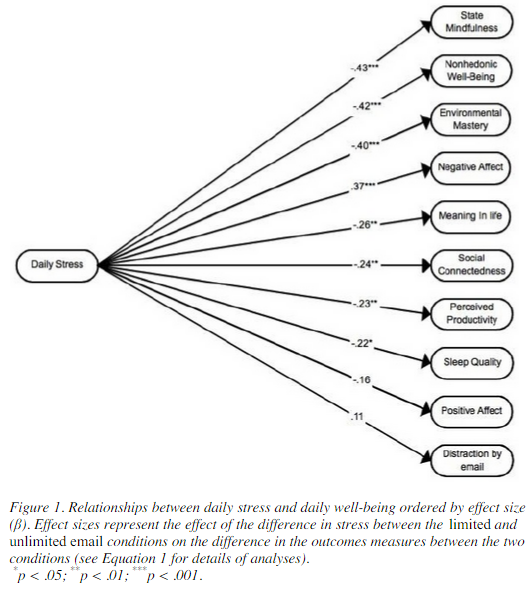
b2ap3_thumbnail_email_overload_400.jpgIf you’re one of those people who are always checking their inbox, you might be dealing with a lot of unnecessary stress in the workplace. A study has linked constantly checking your email inbox to higher stress levels. While this might not come off as much of a surprise, researchers at the University of British Columbia have managed to put a number to the maximum amount of times you should be checking your email to minimize stress.

According to their test, the maximum number of times you should be checking your email for minimum stress levels is three times. The study involved 124 adult workers over a seven-day testing period, in which they were only able to check their email three times a day. Then, the following week, workers were encouraged to check their email inbox whenever they got a spare moment. This is generally how most workers are in the office. At the end of each workday, the test subjects were asked to fill out a short questionnaire about their current stress levels.

stress levels

When encouraged to check their email as often as possible, the average worker checked their email 15 times throughout the day. Unsurprisingly, the primary reason checking email is so stressful for the average worker is that they have to constantly shift from urgent work tasks, to checking email, to personal matters. It’s no wonder that workers get so stressed out, especially when some email recipients expect immediate answers. This might be why, at first, workers were somewhat hesitant to only respond to their emails three times a day. In fact, according to Mashable, 92 percent of workers in the United States use email for inter-office communication, and as many as 183 billion emails are sent out on a daily basis. This root of email stress lies in the need to stay connected at the workplace.

Ideally, according to the study, workers should only have about three periods of email correspondence throughout the workday. To accomplish this, set aside a block of time at the beginning, middle, and end of your day to respond to emails that demand your attention. You might notice a significant decrease in stress. Unfortunately, not all business professionals can manage this with their busy schedules. If this is the case with you, here are some tips which might help you understand that your email inbox isn’t as important as it seems:

  • If it’s especially important, you’ll receive a phone call or instant message about the issue at hand. If you have something urgent which needs to get done, try making a phone call yourself, and save the time you might have wasted drafting the perfect email message.
  • You can’t afford to continuously respond to emails all day long. Continuously halting more important tasks isn’t ideal for productivity, concentration, or quality of work.
  • If it’s not marked as important, it’s probably not important.

If you can manage to move away from checking your email constantly, great. However, you still want to make sure that the messages you are receiving are real, legitimate messages. Spam is a problem which makes checking email slightly more stressful due to its potentially-disastrous nature and its reputation for being a time-waster. With an enterprise-level spam blocking solution from NuTech Services, you can mitigate the spam received during the workday and free up more time for important tasks.

If you’re ready to stop wasting time and dealing with unnecessary stress concerning your email inbox, give NuTech Services a call at 810.230.9455. We’ll work with you to manage your technology in the most efficient way possible.