infrastructure service

Complete Infrastructure Support Services from NuTech Services

Thorough Infrastructure Services

infrastructure service

Building an IT Infrastructure from the Ground Up

Organizational difficulties that businesses have with their IT infrastructure often leave them with difficulties and deficits that hinder overall operational effectiveness. For this reason companies need to have a strategy in place when setting up their business’ computing infrastructure. When searching for the right company to help you set up and manage your IT infrastructure, you have to take into account the company’s competence in keeping your office organized.

Read More

security as a service

Fully Hosted Security as a Service – Leverage the Cloud to Protect Your Network

security as a service

Fully Hosted Security as a Service – Leverage the Cloud to Protect Your Network

Managed and maintained software solutions.

It’s hard to have both security and privacy. Usually one has to be compromised in order to work thoroughly. Furthermore, the immense amount of time and effort it takes to keep security solutions like antivirus, firewalls, and so on, up to date, is overwhelming at best, especially for small and medium-sized businesses with limited technology budgets.

With a Security as a Service offering from NuTech Services, your business can fully leverage enterprise-level technology solutions, without the time and expenses it takes to effectively manage and maintain them yourself. By outsourcing this responsibility to trained IT professionals, you get the peace of mind that you deserve, without the pains of managing and maintaining your security solutions.

Read More

proactive rmm

Remote Monitoring and Maintenance – A Cost Effective Solution to Proactive Network Security

Remote Monitoring and Maintenance – A Cost Effective Solution to Proactive Network Security

proactive rmm

Easily monitor and maintain your organization’s infrastructure.

Have you ever been stuck in a technological bind caused by a flaw in your business’s network security? Organizations who aren’t prepared for the constant upkeep that a computing network demands will quickly find themselves overwhelmed.

Despite the difficulties that come with technology management, maintenance is an absolutely vital role that must be fulfilled in order to get the most from your hardware and software. NuTech Services’s proactive Remote Monitoring and Maintenance solution is designed to remediate these issues for small and medium-sized businesses, and make them more affordable than ever before.

Read More

lenovo

Lenovo Official Reseller – Powerful Technology Solutions from NuTech Services

lenovo

Enhance your office’s productivity with proven technology solutions.

The latest and greatest technology can go a long way toward improving your business’ overall efficiency and profitability. Small and medium-sized organizations often have to upgrade hardware on a regular basis just to stay competitive and reliable in an ever-changing business environment. Certainly the other businesses in your area won’t be caught using anything less than the best, so your organization needs to put your best foot forward and invest in quality technology solutions.

Read More

utm solution

Unified Threat Management – Comprehensive Network Security in a World of Threats

utm solution

Take control of your network security with a UTM

Your business’ online environment is well-known for being host to countless threats that want to steal the data of businesses just like yours. Problems such as viruses, malware, and spyware consistently pose massive threats to not just your own network infrastructure, but to your budget as well. Sensitive information that’s stolen can crush your business under the weight of steep compliance fines, while also ruining your reputation as a trustworthy organization.

Read More

microsoft azure

Microsoft Azure – Enhance Your Organization’s Computing Infrastructure

microsoft azure

Integrate the services and applications you depend on with a scalable cloud platform.

Many modern businesses are searching for ways to enhance the mobility of their business. Integrating technology systems that expand their access to mission-critical data is one poignant way to improve operational agility. With so many cloud solutions on the market, it can be difficult to measure what your business needs in a dedicated cloud computing platform.

Read More

wireless

Expand Your Infrastructure with Wireless Deployment Services

wireless

Expand Your Infrastructure with Wireless Deployment Services

Accomplish more with wireless access technology.

Granting yourself and your users the ability to step away from the desk to meet and collaborate can increase productivity, and when everybody can be on the network with their laptops or tablets, you can get even more done. However, store-bought commercial wireless routers aren’t really designed to handle the traffic your business needs, nor do they have the security in place to keep your activity safe.

Read More

sharepoint

Microsoft SharePoint – Organize Your Projects

sharepoint

Microsoft SharePoint Implementation

End-to-end user productivity software deployment to bring streamlined collaboration to your business.

Microsoft SharePoint is widely used as a powerful business collaboration platform for many of the world’s most successful organizations. It provides a dynamic, cost-effective solution for organizations that are looking to add robust collaborative capabilities to their workflow. At NuTech Services, we can help you increase productivity by creating and deploying solutions that help organizations take advantage of their IT resources. If your organization is searching for a way to align your business’ technological tools with its operational workflow, look no further than our professional SharePoint deployment services.

Read More

windows 10

Introducing Windows 10: Microsoft’s Latest Operating System

windows 10

Introducing Windows 10

Prepare to upgrade today.

As business professionals, it’s imperative that you keep your organization’s technology up to date with the latest operating systems and software patches, as lapses of network security can be devastating. Microsoft is releasing its next operating system, Windows 10, on July 29th, 2015. To entice users to upgrade to their new offering, Microsoft is offering a free upgrade to those who currently use Windows 7 and Windows 8.1.

Read More

Scalable co-managed IT options

Augment Your Current IT Department with NuTech Service IT Professionals

Co-managed IT that works for business

When you don’t have coverage, it’s dangerous to go alone.

You understand that technology is critical to your company’s success, but does your technology get the attention it deserves? If your in-house IT staff is overburdened with support work, they may find it difficult to keep up. This, in turn, puts the average employee in an unenviable position of having to troubleshoot the various common issues that plague the use of their technology.

This is why NuTech’s co-managed IT is an exceptionally useful service, especially for small and medium-sized businesses that may have seen enough growth that you’ve developed the need for more IT support. SMBs often don’t have a budget flexible enough to onboard more trained IT personnel, so it makes more sense to outsource certain elements of your IT maintenance to other trained personnel. Additionally, with our certified technicians, you’ll gain skilled IT professionals to depend on when the time comes to integrate new procedures or resolve tricky issues.

Improve Your Business Operations

Scalable Co-managed IT services give your organization options.

Technology support is a field that requires vast amounts of knowledge that only comes from experience. If your team is busy integrating new changes to your organization’s technology, some of the support might get put off, or go completely unresolved. This is particularly detrimental to your business’ network security. If patches aren’t issued regularly, your systems will quickly grow outdated and be vulnerable to the host of online threats.

Through our powerful remote monitoring and management solution, we can automate necessary security upgrades so when you integrate a co-managed IT situation, like the one NuTech Services offers, you gain the expertise necessary to keep your network secure. With our comprehensive support services, your in-house team benefits from our technicians’ extensive knowledge in managing business technology.

Reliability and Accessibility

Give your team the powerful options NuTech Services offers.

You might recall moments when an employee’s absence is felt around the office due to an increased workload. This can be a major setback, even if they’re only gone for a day. Our co-managed platform makes planning for vacations and paid time off easier.

Co-managed IT provides the availability to dedicated IT professionals that mitigate downtime-causing circumstances, whether your in-house IT staff is absent from the office, or not. In this way, NuTech Services provides your staff powerful support options when their technology is on the fritz.

Cost-Efficient and Predictable

Cut your technology support costs with NuTech’s IT services

You already know that co-managed IT is like hiring new personnel, but it comes without the hefty operational expense that are associated with hiring new staff. Our services are scalable and is delivered at an affordable flat rate, making them ideal for just about any budget.

Unlike your typical break-fix IT, our co-managed IT solutions are designed to help you save money in the long run through preventative measures. We’ll help your business get its technology issues resolved the first time, which in turn saves you more money on costly repair bills or replacement fees.

Get the Support You Need with Co-Managed IT

Call us today to find out what we can do for your company.

NuTech co-managed IT solutions are designed to help your in-house IT staff achieve maximum operations without going all-in on a hefty new salary. You’ll gain access to skilled professionals who are trained to deliver quality service at an affordable rate. For more information about our co-managed IT solutions, give us a call at 810.230.9455.

encrypted email

Email Encryption – Dedicated Message Encryption

encrypted email

Powerful and secure email protection for you, your clients, and your network.

If you are doing business over today’s Internet, security has to be a priority for your organization. For those enterprises that could use a platform that provides an additional layer of security for their emails, NuTech Services offers a full-scale email encryption solution. Our easily-integrated solution could be the difference between a seemingly benign transmission of information and a debacle that could put your business at risk.

Read More

wireless cloud

Mobile Solutions from NuTech Services

wireless cloud

Optimize your workplace for remote access.

Mobility grows increasingly more important in today’s business world, and as such, innovators around the world are striving to integrate only the best mobile IT solutions into their corporate infrastructure. Without being tethered to your desk, your organization can open up several opportunities to optimize operations and facilitate growth.

When we say “mobile solutions,” we’re talking about taking your business on the road without fear of being disconnected from your mission-critical applications and data infrastructure. Furthermore, we want to improve the security of your mobile network access. NuTech Services has several mobile solutions available for the small and medium-sized business, including:

  • Cloud Computing Solutions
  • Mobile Device Management Solutions
  • Secure Mobile Connections

Read More

windows server 2003 end of support

Windows Server 2003: End of Support is Fast Approaching

windows server 2003 end of support

Windows Server 2003: End of Support Date Rapidly Approaching

Is your business prepared?

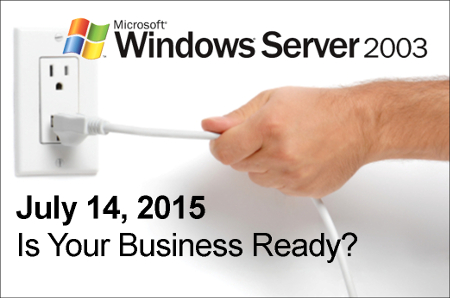
Like all good things, Windows Server 2003 is coming to an end. The popular server operating system from Microsoft’s end-of-support date is July 14, 2015. If you are surprised by how rapidly that date is approaching, that’s because altering a server is a detailed process. We urge your business to seriously consider the ramifications of waiting until the last minute to upgrade.

Read More

Our dynamic intranet solutions

Enhance Productivity with an Intranet Solution

Our dynamic intranet solutions

The Ideal Intranet Solution

Improve Inter-Office Communications and Productivity

Larger enterprises employ a large workforce, and as a result, their internal network can get cluttered pretty quickly. This makes finding specific files somewhat challenging. Unlike the larger corporation, your small or medium-sized business might not have trouble communicating within the office. However, it’s still important to optimize all aspects of your business’s infrastructure, and to this end, an intranet solution is ideal.

Read More

sql server

Improve Your Business’s Data Platform with Microsoft’s SQL Server

sql server

Improve Your Business’s Data Platform with Microsoft’s SQL Server

Reinforce your business’s data processing performance.

Big data is an important part of today’s technology world, and it’s helping businesses around the globe better process and target their respective audiences. Consequently, businesses are taking advantage of the cloud to decipher this mass of raw data.

Read More

b2ap3_thumbnail_windows_media_android_400.jpg

Tip of the Week: Use Windows Media Player to Sync Your PC’s Files to Android

b2ap3_thumbnail_windows_media_android_400.jpgSo you’ve got yourself a new Android device and you want to transfer all of your favorite media from your PC onto the device. How do you go about doing this? While there all several different ways you can transfer your files, one of the easiest ways is to take advantage of a program that’s already installed on your PC: Windows Media Player.

Why WMP is the Practical Choice
It may be that you’ve not before considered WMP as an option to transfer your files onto your Android device. This is because Google, the makers of Android, would prefer oh so much that you use Google Play in conjunction with Google Drive, their cloud storage solution. While you can take the all-Google route to transfer and manage your media, and to be fair, a lot of users do, it might not be the best choice for everyone.

In particular, users that have a vast library of media to transfer and manage may frown on the monthly fees associated with Google Drive. Granted, Google’s rates are extremely reasonable and Drive storage is even free up to 15GB, but $1.99 per month for 100GB and $9.99 for 1TB can add up.

Another disadvantage about using the cloud for your mobile device’s media is that you will be dependant upon an Internet connection to access it. This isn’t an attractive option for people in areas with spotty coverage and users with a limited data plan that will quickly be consumed by accessing large files.

You’ve Got Some Free Options
Without having to download any new software, you’ve already got some free options on your PC that will transfer your files from your PC to your Android device. First off, you can simply connect the Android device to your PC via USB or wireless connection and then drag and drop a file from one device to the other. This is an easy way to transfer a file. You can even select all of your files and transfer them with one big drag and drop. However, users that have a constantly-changing media library will quickly become annoyed at having to go through this process every time they add a new file.

How to Sync Your Media Using Windows Media Player
If you have an ever-changing media library, you’re going to want to take advantage of an application that has a syncing feature, like Windows Media Player. To sync your Android device using WMP, open WMP and connect your device to the PC. If this is the first time connecting the device, then you may have to download and install a driver for it, which Windows will walk you through once a connection is detected.

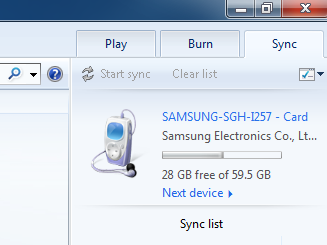
With your device and PC successfully connected to each other and driver installed, go to the sync tab on the right side of the screen where you should see a graphic representing your device.
media android

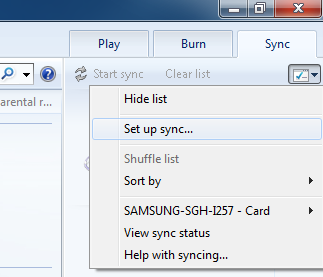
Underneath the Sync tab is a box icon with a green checkmark. Click on it for a drop down menu to appear. From here, select Set up sync…
media android 2

Now you will want to go to the Device Setup menu. The default setting will allow the device and WMP to sync automatically, meaning that any change to either library will instantly be reflected in the corresponding library every time a connection is made. To activate this automatic sync feature, along with any other adjustments you wish to make, select the Finish button in the Device Setup menu.

Upon selecting the Finish button, your computer will jump into action and begin syncing your files. Once the sync is finished, you can disconnect your device and take all of your favorite media with you wherever you go. To access the media on your mobile device, you can use the standard media player on your device, or a host of other third party media players available on the App store.

The media player that someone uses to manage and play their digital content can vary greatly depending on the needs and preferences of the user. You might be more of an iTunes kind of person, or perhaps you’re happy with Google’s offerings. When selecting a media player, don’t forget about your faithful friend Windows Media Player. You may find yourself surprised that it can do exactly what you need it to.

b2ap3_thumbnail_windows_logo_400.jpg

Windows Server 2003 End of Support Date Looms on the Horizon

b2ap3_thumbnail_windows_logo_400.jpgThe next major operating system to get the ax from Microsoft is Windows Server 2003. Slated to have its mainstream support ended on July 14th, businesses that currently use the software need to begin making plans to upgrade their system as soon as possible. With this server operating system no longer being supported by Microsoft, your data will be vulnerable to the latest online threats.

end of support windows server 2003It’s best practice to upgrade your server’s OS (and all of your software for that matter) every time a new version is released–not every twelve years. One reason to upgrade is that the latest software is built to handle the demands of modern businesses, which gives you a competitive edge over companies running older software. Security is another big part of why you should upgrade, and in the case of Windows Server 2003, the need to upgrade by July 14th is urgent because Microsoft ending mainstream support means that they will no longer be providing security updates and patches to protect you from the latest threats.



If you want to dig in your heels and hang on to your precious Windows Server 2003, you have the option to purchase custom support from Microsoft. However, this isn’t a tangible option for the small business. According to Processor magazine, Microsoft is charging upwards of $200,000 for this service. Your business is better off just upgrading to the latest OS for your server, especially if you’re working in a field like health care that requires your technology to be up-to-date in order to comply with strict security standards.

Upgrading from Windows Server 2003 isn’t difficult, but it does require you to take an accurate assessment of your applications to find out if they can transfer to your new system. For example, you may run into some issues when attempting to move older applications that run off a 32-bit operating system to a newer OS. Issues like this can be worked around, but it requires the skills of a knowledgeable professional, which is time and expense that must be factored into the upgrading cost. When upgrading your server to a new OS, it’s best to go about it with a well-thought-out plan so that your upgrading process won’t run into any surprises that will take your server offline any longer than it needs to be.

NuTech Services can work with your business to make the upgrading process as quick, easy, and affordable as possible. We can come up with a time-saving plan that accounts for any discrepancies that might hinder the upgrading process of an older system, and we can migrate your data to a temporary server that your business can operate from while we equip your server with the latest OS. This way, the productivity of your business won’t skip a beat.

It may be that upgrading the software on an older server unit isn’t the most efficient option for your business. A lot has changed in twelve years, and your old server units have likely experienced some wear and tear and require more maintenance. Technologies like server virtualization and cloud computing may be a better data-hosting option for your business than trying to update your old system.

Whatever the best route is for your business, NuTech Services will guide you in it so that your organization isn’t stuck using older software that leaves your data vulnerable and your business inept. Call us today at 810.230.9455 to learn more.

5 Tips for Saving Money on your IT

Saving a little on your technology can go a long ways, but cutting too many corners can lead to additional problems and expensive downtime. Here are a few ways you can cut costs without creating long term issues.

Don’t be Afraid to Replace

Got an older PC that’s causing you a lot of issues? Older technology is typically more expensive to run, and after a while, it’s cheaper to simply buy a new desktop than it is to continue pouring money into something that always seems broken. It’s a great time to buy workstations, and if things are tight you can even buy refurbished desktops to keep costs low.

Enforce Energy Efficiency

If you reduce the amount of energy your technology uses each day, your utility bill from the electric company will decrease as well. Switching to LCD monitors (if you are still using old CRT dinosaurs), and enforcing company-wide policies to turn off monitors or put workstations to sleep at night can make a big difference.

Stop Dealing with Vendors

You hired your employees to work, not sit on the phone with a PC manufacturer because your hard drive crashed. Businesses waste money by paying employees to go around in circles with vendor tech support all the time. IT firms like NuTech Services build relationships with vendors and are able to get things done faster. This means issues get resolved quickly and your employees don’t need to deal with less-than-helpful support.

Stop Paying your Phone Bill

Yes, you heard us right. Cease paying your phone company by switching over to a VoIP solution instead. Small businesses save up to 80% on their telephone communication expenses, so the investment pays for itself quickly. Many VoIP systems allow your users to take their phone and use it anywhere, giving you increased flexibility and functionality.

Get Proactive Monitoring and Maintenance

Nearly all day-to-day IT issues can be completely prevented with just a little bit of maintenance. NuTech Services offers these services to our clients, reducing the amount of downtime they experience. Traditional computer support only fix computer issues when they arise. NuTech Services provides proactive monitoring and maintenance to ensure fewer issues plague your business.

Disaster Recovery and Why it Matters to Michigan Businesses

When you mention the term ‘disaster recovery,’ most people think about the big ground-shattering events like earthquakes, fires, floods, tropical storms, etc. While these natural events are certainly disasters and devastating in their own right, smaller things can constitute as a disaster for your business, and they aren’t seasonal.

Let’s look at the definition of disaster.

dis·as·ter

A calamitous event, especially one occurring suddenly and causing great loss of life, damage, or hardship, as a flood, airplane crash, or business failure.

To NuTech Services, a disaster is anything that involves a major loss of data or major downtime. When one of our clients experience a server malfunction that leaves most employees sitting idle unable to work, that is a disaster.

The Cost of a Disaster

Downtime is a very terrible expense to not try to avoid. Try this simple formula for yourself:

Number of Employees Affected by an IT Outage X Average Employee Hourly Cost (NOT WAGES)
+ Average Company Hourly Income X Percentage of Income Lost Due to the IT Outage

This simple formula will tell you about how expensive every hour of downtime is for your company. The hardest value in the formula is understanding the percentage of income lost. Not all companies might have a figure, but you will want to consider it as you do the math. This doesn’t include the cost of repair, consultation, parts, or any of the remediation required to get things back up and running.

Disaster’s Harbinger

Disaster can strike from any direction. Hard drives can go, data can be corrupted, hardware can fail, and networks can go down, and systems can become infected with viruses and malware. User error can cause disaster, as well as theft and other malevolent activity. While companies should take precautions to safeguard themselves against threats both external and internal, and managed maintenance can prevent a lot of foreboding issues, having a solid disaster recovery plan can mean faster turnaround when there is devastating downtime.

Employing a disaster recovery plan starts with the data – your most important IT asset. Computers can be replaced, hardware can be repurchased and software can be reinstalled. Your data is the culmination of countless hours of work by all of your employees ever. It’s no wonder why most businesses that suffer a major data loss go out of business within the first year. You can lose your credibility, and things go into disarray. Data needs to be backed up.

Your backed up data should be archived regularly offsite. Most importantly, your backup solution needs to be easy to test, and tested regularly. You don’t want to find out your backups are corrupted when it is too late.

The time to put together your company’s disaster recovery solution is now. Contact NuTech Services at 810.230.9455 to talk about solutions for safeguarding your data and your business in the event of a disaster, large or small.