internet_of_things_all_connected_400.jpg

Tip of the Week: The Internet of Things Poses Threats to Your Organization’s Network

internet_of_things_all_connected_400.jpg

The Internet of Things has become one of the central parts of connectivity in a tech-centric world. Despite the incredible convenience that these devices offer to users, they come with considerable security risks that absolutely need to be kept in mind. We’re going to discuss some of the ways you can keep the IoT from being a security hazard while optimizing how much you get out of it.

Does the Device Need Connectivity?
The first question you should ask about your IoT device is if it actually needs to be connected or not. The reason for this is simple; the more connected devices on your company’s network, the more risk will be involved with your network. Certain IoT devices could be leveraged by hackers and other dangerous entities to spy on you, steal your data, or track your current location. If the device is worth the risk, you could potentially take advantage of great services that you might otherwise not get. If it’s not worth it, though, perhaps you’re better off not using the device. If the device is that of an employee, you should ask them to leave it disconnected during the day.

Have You Optimized Security?
In any environment where you’re using an IoT device, you need to make sure that security is at the top of its game. Ensure that all of your firmware is updated, as well as any security patches to fix any major vulnerabilities that might be present on your network have been applied. To make things easier, this process can largely be automated. You should also consider investigating your router to make sure that it’s updated properly as well.

It is also worth mentioning that your router may support guest networking, which means that you can use this capability to protect your business network from the risks of the IoT. By relegating IoT devices to the guest network, you can protect the business side of things from potential issues.

Passwords are a great way to make sure that security is at its maximum. You should never reuse passwords for devices or accounts. If these guidelines are followed, you’ll have easier time keeping your accounts from being compromised.

Make Sure Your Devices Are Maintained and Monitored
Your business should have practices put into place that promote transparency with the ongoing use of Internet of Things devices. For example, you should be monitoring user permissions.

Most of your IoT device issues can be resolved just by asking yourself one simple question: Do you even need the devices in the office? If not, they shouldn’t be there.

If your business needs help with managing devices in the workplace, reach out to NuTech Services at 810.230.9455.

keyboard_gavel_400.jpg

Perpetrators of Three Major Cyber Crimes Have Pled Guilty

keyboard_gavel_400.jpg

Every so often, it’s nice to hear about when the good guys win and cybercriminals get their comeuppance. Three such cybercriminals have entered guilty pleas to charges related to major cybersecurity events.

Mirai
Mirai was a malware strain that creates a botnet out of enslaved Internet of Things devices. By leveraging the resources of these IoT devices, Mirai took down networks and websites. 20 and 21-year-olds Josiah White and Paras Jha have pled guilty for developing and leveraging Mirai.

The duo were co-founders of Protraf Solutions LLC, a company that would mitigate DDoS attacks. Their business model was to sell their solutions to their DDoS victims, or use the DDoS attack the old-fashioned way: as a means of collecting ill-gotten monies from those desperate enough to pay them to stop the attack. Along with 21-year-old Dalton Norman, White and Jha also used Mirai to power a click fraud scheme that net them about 200 Bitcoin, Norman alone netting 30.

Mirai ultimately went on to power one of the biggest attacks the world has ever seen, using IoT devices to take down Dyn, causing many major websites to go down.

Ultimately, the three young malware developers were each charged with click fraud conspiracy, earning each a $250,000 fine and a stay of up to five years in prison. Jha and White plead guilty to conspiracy charges for writing and using Mirai and were each sentenced to an additional 5 years in prison and $250,000 fine, as well as three years of supervised release.

NSA Data
An employee of the National Security Agency, Nghia Hoang Pho, pled guilty on December 17, 2017, to a charge of “willful retention of national defense information.” According to the United States Justice Department, Pho was hired in 2006 as a developer for the Tailored Access Operations unit. The Tailored Access Operations unit, or TAO unit, creates specialized hacking tools that are used to collect data from the information systems used by overseas targets.

Between 2010 and March of 2015, Pho removed classified data and stored it on his home computer, which utilized antivirus software from Kaspersky Lab. Kaspersky Lab is suspected of having been exploited by Russian hackers to steal documents, perhaps including the ones Pho removed and saved at home.

The United States Department of Homeland Security has since issued a directive that bans the use of Kaspersky software in federal agencies. Pho could face up to 10 years in prison and is scheduled for sentencing on April 6.

Yahoo
One of four men who faced indictment in March of 2017 has pled guilty to hacking into Yahoo and exposing the usernames, passwords, and account information for essentially every Yahoo user, with the number of victims counting to about one billion.

22-year-old Karim Baratov, a Canadian, has been charged with working for two members of the Federal Security Service of the Russian Federation. In his work for the FSB, Baratov hacked into 80 accounts, as well as a total of over 11,000 webmail accounts since 2010. Baratov also provided hacking services that enabled access to accounts with Google, Yahoo, and Yandex, via the use of spear-phishing through custom content and a malicious link.

For his activities, Baratov has pled guilty to a total of nine counts. One count, for aggravated identity theft, has a mandatory sentence of two years, while each of the other eight counts could net him 10 years in jail and a fine of $250,000. However, the federal sentencing guidelines established in the United States could reduce the final sentence considerably.

While it is nice to see those responsible for cybercrime paying their dues, it is even better for certain cybercrimes to be prevented in the first place. NuTech Services can help your business with that. Call us at 810.230.9455.

computer_graveyard_ewaste_400.jpg

Upgrading Your Technology? Be Careful of What You Do with the Old

computer_graveyard_ewaste_400.jpg

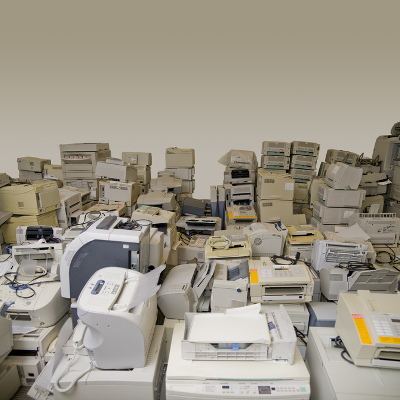
Take a moment to look around you and take in the amount of technology surrounding you. How often do you think this technology is replaced, and what do you think happens to the old tech? There needs to be more thought and effort put into its disposal than just throwing out a hard drive that no longer seems to function. Unfortunately, the amount of e-waste shows that may be the preferred method of disposal.

A discarded device follows the same path as the rest of the contents of your trash bin. Either your discarded piece of technology will find itself in a landfill, or left somewhere in a third-world country. Whichever option, the device is now a complete waste, as the materials used to construct it are now little more than bits of precious metals, glass that has almost certainly been broken by this point, and other bits and pieces.

The statistics surrounding e-waste can be pretty staggering. For example:

  • 2016 alone saw 45 million tons of electronics thrown away.
  • Only 20 percent of e-waste makes it to be documented and recycled.
  • The raw materials in devices that are thrown away value in at about $55 billion, smartphones contributing $9 billion to that total.
  • 76 percent of all e-waste goes unaccounted for.

Of course, as technology advances, there is going to be more and more e-waste produced. However, there is another issue regarding e-waste that your business could be especially affected by if your e-waste isn’t handled properly, and that’s your business’ data security.

Security Concerns
If your devices are discarded with information still on them, that data is at severe risk of being compromised, especially since the devices are no longer in your possession.

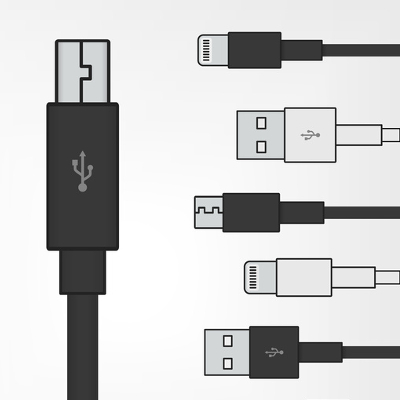
What if you got a new smartphone, and just toss out the new one? Sure, it’s dead now, but all it would take for any data it held to be compromised is someone with a charger cable and a basic knowledge of how to break into a phone. Now, any accounts that you used on the device, both business and personal, are at the mercy of your phone’s new owner. They could access your company’s data in the cloud with a discarded external hard drive.

To avoid this, not only do you need to dispose of your old technology properly, you need to also make sure that any information on them is properly wiped and/or destroyed before you do so. While you could destroy the device yourself, the better option is to reach out to the professionals at NuTech Services. We know how to properly see that your devices are destroyed without the risk of leftover data causing your company grief. We’ll even help you to recycle your device, so there’s less of a chance of it landing in a dump somewhere.

To learn more about proper device disposal, give us a call at 810.230.9455.

gmail_icon_current_400.jpg

Tip of the Week: Filters and Labels Help Organize Your Gmail Inbox

gmail_icon_current_400.jpg

Gmail is an excellent tool for business use, even more than many business owners may realize. Did you know that it even has the capability to keep itself organized? For today’s tip, we’ll go over how to use filters and labels to keep your Gmail inbox organized and easy to use.

An Intro to Labels and Filters
Labels and filters are just a few ways that Gmail can help to keep your messages organized. You can assign rules that are applied to messages as they come in. These rules make a filter, which analyze your incoming messages and ensure that these messages are sent to the right label. These labels allow you to view messages more conveniently, consolidating those that have certain factors in common.

For example, you could create a filter that assigns a particular label to any message that has “Quarterly Reports” in the subject line. That label can then be used to access any and all messages with “Quarterly Reports” in a single, consolidated list.

Creating a Filter
Creating a filter in Gmail is fairly simple.

  • Once in Gmail, click the down arrow in the search bar at the top. This allows you access to greater detail in your search criteria.
  • Fill in the details that you want your filter to pay attention to, whether it is who the email has come from, or if the subject line contains a particular word or phrase.
  • Once your criteria have been established in this window, click in the bottom-right corner of the window, where it says, Create filter with this search.
  • You will be given a list of options, including the option for the message to be automatically ‘starred,’ or marked as important. For our purposes, we are concerned with the option to Apply the label.
  • Next to the ‘Apply the label’ option, there is a drop-down menu labelled Choose label. You have the option to create a new label from here, or select from those you have already made.
  • Once your filter has been properly configured, click the Create Filter button.

Creating a Label
While creating your filter gives you the opportunity to create a label, there are sometimes that you may want to have a label prepared that you can add messages to manually, or to already have one to direct a filter towards. Fortunately, creating a label and adding it to a received message is also fairly simple.

  • In Gmail, click the More option on the left of the screen.
  • From there, click Create new label.
  • Name your label and click Create.

To add this label to a message:

  • Open the appropriate message.
  • At the top, click the Label button. You can also add a label to a group of messages by selecting them before you click the Label button.
  • Select each label to be added. You can also create a new label from this point as well by typing in a new name.

Now you’re ready to take even greater control of your Gmail inbox. For more handy IT tips and tricks, subscribe to the NuTech Services blog!

pyramid_business_intel_400.jpg

Four Major Benefits of Business Intelligence

pyramid_business_intel_400.jpg

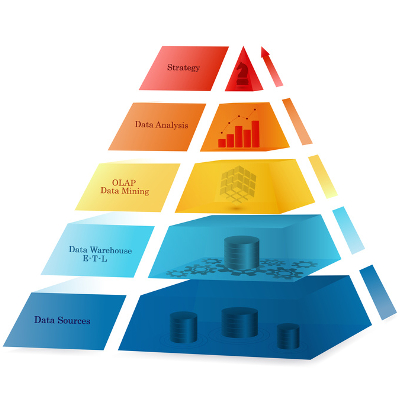
Utilizing the data that you have acquired is a process that is referred to as business intelligence. Regardless of your business’ size, business intelligence solutions can deliver definite benefits. We’ll review a few of these benefits here.

Business Intelligence answers business questions
With the right tools, you can extract and analyze raw data in real-time to inform your business decisions. These tools will also organize this data into a comprehensive and often visual format. This enables any member of a team to potentially make informed decisions as needed, streamlining whatever process that resource is working on.
This data can also be leveraged to improve client profiles and target promising contacts. As a result, profits can be increased through decreasing wasted funds spent on poor fits. On the same token….

Business intelligence provides opportunities to cut costs and time investments
Through the use of metrics and data derived from business intelligence measurements, you can identify where your available funds are most effectively used, and when it may be more effective to allocate them to another effort.

Additionally, business intelligence can enable your business to leverage automation, eliminating the risk of human error while freeing up your staff to work on those tasks that automation isn’t well-suited for.

Business Intelligence delivers valuable insights
Without business intelligence tools, a company could be stuck waiting until the end of a campaign or initiative to discover whether or not it was effective. However, with BI at your disposal, your company can get a head start on tracking satisfaction, profitability, and other key metrics in real time. This allows you to identify and resolve issues in your campaign, so you can take the steps needed to fix them before the campaign is a wash.

Business Intelligence promotes collaboration and cooperation
Another great benefit to business intelligence software is the data sharing and exporting capabilities it usually has. In a business climate that relies on being in-the-know, your team needs to have the ability to access the latest data you have available without issue.

Need help putting business intelligence solutions in place? NuTech Services can help! Give us a call at 810.230.9455 today.

past_due_money_400.jpg

Unpaid Invoices Were a $825 Billion Problem Last Year

past_due_money_400.jpg

Businesses exist to make money. Regardless of what that money is intended for, be it to sustain someone’s lifestyle or to bankroll a cause, a business will cease to be without an incoming cash flow. Unfortunately, unpaid invoices can make that cash flow stutter and slow to a trickle, and many businesses experience this problem as billed money doesn’t come in.

This presents those who rely on a small-to-medium-sized business to make a living, from the CEO to the employees, with another problem. How can they be paid if the business isn’t receiving its payment for services rendered until 30, 60, or even 90 days later? Many industries have begun to make these their typical payment terms.
Resultantly, businesses have found it difficult to continue their operations without the financial inundation from their current clients. You may have encountered this kind of issue yourself.

If so, you are not alone by any stretch. Estimates attribute 5% of the entire national gross domestic product to unpaid invoices, with the average small business waiting to be paid around $84,000. 81% of these invoices are past due by 30 days, which is especially bad when one considers that the average small business only has 27 days of capital saved up and available to them.

All in all, estimates put the total amount owed to small businesses due to unpaid invoices at $825 billion.

Even without taking that sum into consideration, this is a clear issue that many businesses face whenever their invoices are not answered in a timely fashion. If these businesses don’t have any funds to spare beyond what is needed to stay in business (assuming they have even that), how will they ever make the improvements they will need to stay competitive? How many projects have you abandoned halfway because it caused too much financial drain?

While it may seem to make no sense to invest your much-needed capital after we’ve just announced that your company may fail without it, there is a simple way to save your business money as you work to get what you’re due. With managed services from NuTech Services, your capital spending on your technology management can be transferred into a predictable, and budgetable, consistent schedule. We can also provide you with the solutions to help you track who is repaying their debt to you, and who isn’t.

Call 810.230.9455 for more information.

password_strength_400.jpg

Tip of the Week: A Secure 2018 Relies on Powerful Passwords

password_strength_400.jpg

Password security is one of the most important parts of using an online account. It seems that the average user runs into the paradox of password security by using either complex, hard-to-remember passwords, or simple and less-secure passwords that put their accounts at risk. Even if the user is aware of the benefits that come from using a secure password, chances are that they will sideline security in favor of ease of access.

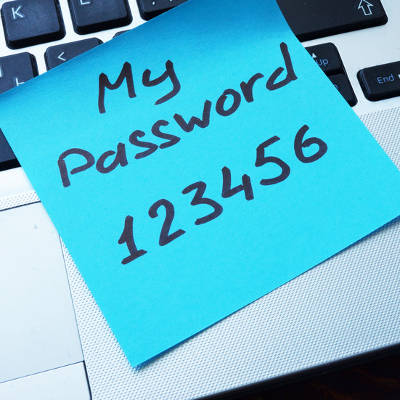
According to a list of the worst passwords in 2017 compiled by Splashdata, some of the worst passwords included “password” and “123456.” These two have topped the list since at least 2010, when Splashdata made their debut survey. Other passwords included in the top five include “12345678,” “qwerty,” and “12345.” Even “starwars” made the list at #16. For further reference, you can view the list of the worst passwords in 2017 here.

Best practices for password security are relatively well-known, especially considering how many experts study this particular field. Here are some tips from the guidelines recommended by the United States Computer Emergency Readiness Team, or US-CERT. In fact, US-CERT was created by the Department of Homeland Security for the specific purpose of preserving online security against threats.

Some sites or applications force users to use these best practices when creating a password, so do yourself a favor and keep these in mind:

  1. Use different passwords on different systems and accounts.
  2. Don’t use passwords that are based on personal information that can be easily accessed or guessed.
  3. Use a combination of capital and lowercase letters, numbers, and special characters.
  4. Don’t use words that can be found in any dictionary of any language.
  5. Develop mnemonics (or spoken memory tricks) such as passphrases for remembering complex passwords.
  6. Consider using a password manager program to keep track of your passwords.

NuTech Services is of the firm mind that you should never underestimate the importance of network security best practices–particularly password security. To learn more about how you can secure your business, reach out to us at 810.230.9455.

meltdown_spectre_four_400.jpg

ALERT: Meltdown/Spectre Hardware Vulnerability Requires Action

meltdown_spectre_four_400.jpg

Just a few months after finding themselves in a firmware fiasco, Intel is making news for all the wrong reasons. This issue had the potential to affect the CPU of a device, causing a severe dip in the performance of the device.

In a blog post by a user going by the name Python Sweetness, an issue was reported, describing “an embargoed security bug impacting apparently all contemporary CPU architectures that implement virtual memory, requiring hardware changes to fully resolve.” This means that, thanks to this bug, the interactions that different programs would have with the CPU would be affected.

Under normal circumstances, a CPU will have two modes that it operates under: kernel, which permits the user to make changes to the computer itself, and user, which is considered a ‘safe’ mode. Python Sweetness discovered a bug that blurred the distinction between the two modes. The bug allowed programs run in user mode to also access kernel mode, possibly allowing malware to access the computer’s hardware.

However, the circumstances have proven to be less dire than they originally appeared. The expectation was that this bug would cause entire processes to shift back and forth between user and kernel mode, hamstringing the speed at which the device would operate. There was also the expectation that this issue would not be able to be resolved without a hardware change.

For PCs with Windows 10 installed and an antivirus that supports the patch, the fix should already be in place. However, to confirm this, go to Settings > Update & Security to see if there are any updates waiting to be installed. If not, check your update history for Security Update for Windows (KB4056892) or check with your antivirus provider to find out when it will be supported, the patch will not install until it sees that the antivirus has been updated to a version that the vendor verifies supports this patch.

Android devices had an update pushed on January 5 to provide some mitigations, with more protections coming in later updates. These patches have already been pushed to Google-branded phones, like the Nexus and Pixel lines, and may have been on other Android devices. It doesn’t hurt to check, and if you haven’t been updated, go online and put pressure on your carrier on a public forum.

Google Chrome should be updated with similar mitigations on January 23, with other browsers updating soon after. To help protect yourself until then, have your IT team activate Site Isolation to minimize the chance of a malicious site accessing data from another browser tab.

Other devices (like NAS devices, smart appliances, networking equipment, media equipment, etc.) may also be at risk, as they are using similar hardware. It’s really important for business owners to have their entire infrastructure reviewed and audited.

These kinds of issues help to demonstrate the value of an MSP’s, or managed service provider’s, services. MSPs like NuTech Services are sure to keep themselves informed on the latest developments in IT security and any resolutions they can pass on to businesses like yours, if they don’t implement them on your behalf.

As a result, you and the rest of your team can go about your business without having to concern yourself with solving issues like these, knowing that you can trust the team who is solving it for you. For more ways that an MSP can help keep your business security and operations optimized, reach out to NuTech Services at 810.230.9455.
mobile_world_400.jpg

Personalities are Key to Successful Networking

mobile_world_400.jpg

Almost everyone has, at one time, worked with someone with whom their personality clashed, whether they did not get along or just didn’t work effectively together. While this is a perfectly natural phenomenon of both nature and nurturing, it is best to put personal differences aside when forming a professional relationship with a coworker.

This was the focus of Networking Like a Pro, a publication by Dr. Ivan Misner and Brian Hilliard. In it, they explore how personalities come into play in the workplace, and how each person’s behaviors influence their interpersonal relationships. While most people display the traits of many personality types, the book makes the assertion that all people fall into four predominant personality types, especially where business is involved. Business networking is strongly influenced by how well your behavioral type meshes with another’s.

So, does this mean that you just won’t be able to network with some people, and with others it will be effortless? Not so.

Misner and Hilliard offer advice on how to best interact with these behavioral types by understanding what really makes them tick. These types are as follows: Go-Getters, Nurturers, Examiners, and Promoters.

Go-Getters
When dealing with a Go-Getter, you have to think–and move–fast. The Go-Getter is determined to get the results they are looking for ASAP, and if the rules need to be bent in order to get them, so be it.

To communicate with a Go-Getter, you need to make the value that you offer them clearly relevant and essential to their goals. More specifically, you need to make them see how you can help speed up their operations without sacrificing the results they strive for. The Go-Getter will also want to hear that they have options to choose from, but would rather hear a pitch than they would a heavily-planned-out script. With a Go-Getter, stick to the highlights, and deliver on your promises.

Nurturers
Where a Go-Getter has more of a “now, if not sooner” attitude, a Nurturer sees the value in taking their time where business matters are concerned, operating with patience. Nurturers are also natural team players, surrounding themselves with supportive allies and willing to offer assistance wherever it is needed. They can be overly tolerant, however, willing to endure a less-than-ideal situation than ready to take a risk to change it.

Honesty is the best policy when working with a Nurturer. To work with them, you will first need to build their trust. You can help this process along by gently guiding them toward a mutually beneficial solution. To accomplish this, you also need to maintain contact with the Nurturer, regularly providing evidence as to how a business relationship with you can provide simplicity and support.

Examiners
A born skeptic, an Examiner will thoroughly examine and evaluate everything that they may work with–including the people. They will unsurprisingly be predisposed to perfectionism, and at the very least, are very thorough. The Examiner is a strong conversationalist, as they use their stores of knowledge and information to their advantage. Efficiency is also a virtue to the Examiner, and so they will move on once their objective has been met, whether that is to the next assignment or to the next event.

As you build a connection with an Examiner, you need to be concise and clear about your position and why it is worth their time to be involved. Lean on facts and evidence to make your point, and only use small talk and stories if they add to the evidence that you are a dependable provider. You need to be sure that you put your best foot forward when interacting with an Examiner, as they will be forming a very strong opinion of you from the get-go.

Promoters
A Promoter is a salesman, usually an extrovert, and a thought leader. They have the drive to spread any good idea they find, more often identifying them instinctively than through research-based evidence. Promoters often attend industry events to network and socialize. They are usually juggling many different projects, and are rarely confrontational.

Communicating with a Promoter requires you to match their speed and align your needs with their priorities. One such priority is their professional image, so you need to make sure that your offer increases their visibility in the industry. As you deal with a Promoter, make sure that you document the finer details of your agreements in writing, and you fulfil your end of the bargain promptly and professionally. Furthermore, you should always give a Promoter plenty of help whenever it is required to prove that you are the best choice for their needs.

These strategies should enable you to network more directly, with the end result being more business relationships that provide mutual benefit. Which of these personality types do you think you most embody? Tell us in the comments!

little_green_android_400.jpg

Tip of the Week: 5 Handy Android Shortcuts

little_green_android_400.jpg

With business becoming more and more mobile, there is a greater need for the devices we use to offer features that allow the user to boost efficiency and avoid downtime. It just so happens that Android devices come with a few little-known ways to accomplish these goals. For this week’s tip, we’ll go over a few ways your phone can be used more efficiently.

Fast Snap
If there are two apps that you use frequently, and often need to switch between as reference, you’ll appreciate this feature. Pressing the overview key (the little square icon) will switch you between the two apps you used most recently. If you are on your device’s home screen, this action will pull up the application you were using last.

Fast Vibrate/Do Not Disturb
We’ve all been in a position where a sudden ringing of a phone would be frowned upon, a situation that’s extremely likely in a business setting. If you find yourself in such an occasion and you realize your phone is still at full volume, you can simply activate the screen and hold the volume down button. This will set the device to vibrate mode.

If vibrate is still too loud, pressing the volume down button once again after the phone has been set to vibrate will activate Do Not Disturb, saving you from having your phone go off at an inopportune time.

Notification Customization
If a particular app is interrupting your workday needlessly, you can tell your Android device under what circumstances that app can provide you with a notification. When the next notification pops up, press and hold the notification until you are offered the opportunity to dictate when the app can ping you through some additional settings.

Freeze Reboot
If you ever find yourself with an inexplicably locked-up and frozen device, you can force it to reboot with the Power and Volume Up buttons. Pressing both down simultaneously for anywhere from 10 to 15 seconds will cause your device to restart. If it doesn’t, that may be a sign that something more serious is happening, or that your phone simply needs a recharge.

Power Button Ends Call
If you’re like most business users, you’re busy from the beginning of the workday to the time you clock out. This is especially true if your work takes you out of the office. To save a few extra moments of time, there’s an easier way to hang up a call on your Android device. Instead of fumbling around to press the end call button on your touchscreen, the power button can be used to end the call.

In your settings, access Accessibility and engage the Power Button Ends Call setting. This enables you to end a call with a much easier gesture that you can successfully pull off without looking.

cortana_additions_400.jpg

Using Cortana Gets Better with Customization

cortana_additions_400.jpg

As Cortana has more and more added to its functionality, it gradually becomes more of a utility to all. Those who prefer to use Google’s applications are now able to use Cortana to augment their use of Gmail, Google Contacts, and Google Calendar. Today, we’ll go through how you can set these programs up to play nice with Cortana.

For Cortana to work with Google apps, these apps must first be identified as a service. Access Cortana and click Notebook, and once the panel appears, access Connected Services and from there, Add service.

At this point, you will only be given an option for Gmail, but that includes Contacts and Calendar as well, in addition to Google Drive. After you next sign on to your Google account, your Connected Services menu will include Gmail as an option.

Privacy and Usage Disclaimers
Be warned, when you give Cortana access to your email and other services, you are opening your personal data to the assistant, and therefore, to Microsoft as well. You should definitely review the disclaimer that appears before connecting these accounts, as it will explain how your data is going to be used. If you have second thoughts after reading this disclaimer, you can be directed to where these integrations can be deactivated.

Since there isn’t any indication, as of yet, as to which of Cortana’s commands will work with these Google services, we are given the opportunity to speculate freely. What functions do you think Cortana will have in regard to Google’s apps? Give us your ideal list in the comments!

mixing_chargers_400.jpg

Can Chargers Be Interchanged Between Devices?

mixing_chargers_400.jpg

One of the major benefits of a laptop is the mobility that it permits–but this is a double-edged sword, as this mobility means that you are relying on the device’s battery life. Of course, if your laptop begins to die, you can always borrow someone else’s charger, right?

Actually, this is a very bad idea, as it puts your device at serious risk. There are a few reasons why this is the case.

Manufacturer Differences
When whichever company produced your laptop did so, it did so in a very specific way. This includes the charger that comes with the laptop. Trying a different manufacturer’s charger with your laptop will almost certainly damage your battery. Best case scenario, your laptop’s battery will reject the charger. You should only ever use a charger that was produced by the device’s manufacturer, even if another charger appears to supply the same amount of power.

On the subject of power…

Different Power Requirements
Like we mentioned before, your laptop’s original charger was specifically manufactured to your laptop’s specifications. As a result, the charger is made to supply exactly how much power your device needs. A charger from a different manufacturer might supply too much or too little power, potentially damaging the battery or the laptop’s other hardware.

Why You Should Avoid Cheap Off-Brand Chargers
If it’s bad to utilize another established brand’s charger, it’s worse to subject your laptop to a knock-off, no-name charger. There is no guarantee that the charger is of a trustworthy quality, as well as no way to tell if its alleged power output is actually what it sends into your device. If you do need to replace your charger, or you just want a spare, invest in the real McCoy. Otherwise, your short-term costs savings may translate into the cost of a new device.

Have you ever found yourself without a charger and tempted to borrow someone else’s? What happened if and when your battery died? Share your experience with us in the comments!

letters_swirl_pink_400.jpg

Tip of the Week: How to Type Accent Marks and Symbols

letters_swirl_pink_400.jpg

When it comes to businesses-to-business relationships, the global impact of the Internet has unlocked quite a few doors. Rather than developing relationships with exclusively businesses in their region, it’s not uncommon for a small manufacturer of model airplanes in Iowa to use the web to find the vendor that can meet all of their needs, even if they’re located in Austria. Doing business internationally means there may be an occasion where you’ll need to communicate in another language. Fortunately, for Windows 10 users, it has never been easier to switch your computer or mobile device’s language.

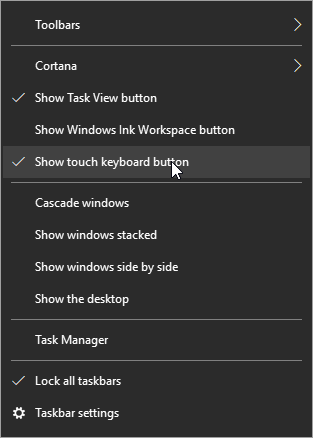
First, hover over the taskbar and right-click. Select show touch keyboard button.

Cortana

You’ll now see a keyboard icon next to your clock and calendar on the right-hand size of your taskbar.

keyboard icon

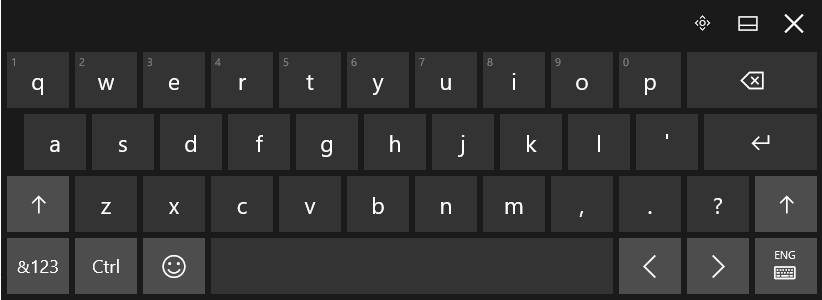
This will bring up a touch keyboard. In the case that you don’t have a touch screen, you can also click on the buttons with your mouse.

Touch Keyboard

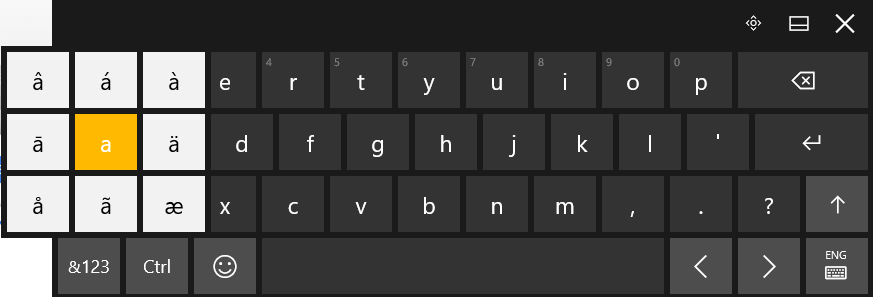
Click and hold the base letter to see all the possible accents for that letter. Click the one that you would like to insert.

keyboard accents

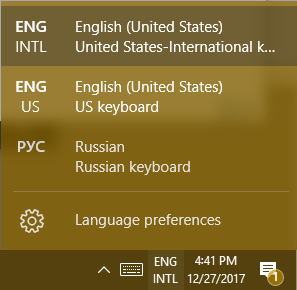
For those who are going to be writing in another language on a regular basis. It’s possible to change the entire layout of your keyboard. Your chosen language can be found to the right of the touch keyboard icon.

EnglishRussianKeyboard

This doesn’t just apply to the touch keyboard. It applies to your physical one, as well.

Hint: If you don’t see the language you’re looking for in the list of available languages, you can add and edit your list by selecting Language preferences.

Using Another Version of Windows?
For those of you who are using Windows 7 or 8.1 (or even Vista or XP), in addition to seriously thinking about upgrading your operating system, you can still use ALT Codes. A numeric list of codes is assigned to the accented letter or symbol in question. While pressing down the ALT key, type the four-digit code on the numeric keypad at the right edge of the keyboard.

Do you have any tips or tricks that use you like use when communicating in another language? Tell us below! Comentario a continuación! Commentaires ci-dessous! Комментарий ниже!

two_factor_authentication_400.jpg

Do You Use 2FA? If So, You’re in the Minority

two_factor_authentication_400.jpg

Two-factor authentication, also known as 2FA, is a very beneficial addition to consider for your cybersecurity. However, a research study unearthed a few surprising takeaways that indicate that 2FA may not be adopted as much as one might expect it to be.

Researchers at Duo Labs, using data compiled by Survey Sampling International, designed a survey that would mimic the patterns that could potentially be seen in different regions concerning the adoption rate of 2FA. The results of this survey were striking, as they revealed that only 28% of those surveyed–designed to match up to the entirety of the US population–had adopted 2FA. Over half of the participants had never even heard of 2FA before the survey was administered.

The researchers were also surprised to find that, of those who knew about 2FA, 54% were voluntary adopters, and only 20.8% had been introduced to 2FA in their work environments. However, reflecting upon the number of applications and services that now prompt users to set up some form of 2FA, this is hardly surprising. Yet despite the relatively high number of voluntary adopters, less than half of these respondents used 2FA wherever they could.

However, there were a few results that showed a bit more hope for the utilization of 2FA. First of all, an analysis of the state of 2FA that compares the authentication options in 2010 to those in 2017, shows that more people are relying on more secure methods. For instance, the use of hard tokens (or a physical device used to confirm the bearer’s identity) decreased by half in the span of time the analysis covered. This indicates an increased awareness in the potential security risks that a hard token presents–all it would take is for one of these tokens to be lost or stolen to render 2FA ineffective.

The real takeaway from the results of this research is an insight into user behavior. Namely, convenience and simplicity were important factors when a user formed an opinion of the different approaches to authentication. This helped to contribute to security tokens being ranked as the most trustworthy form of 2FA by 84% of respondents. While there was an awareness that these tokens had their issues (including the risk of losing them, as referenced above) there was still a demonstrated trust in their reliability.

Despite all this, the sad truth persists that too few people are utilizing 2FA to secure their personal and business devices. With any luck, this will change in the near future, as network security has been thrust further into the public consciousness due to the repeated breaches and attacks that have made headlines as businesses rely more heavily on computing resources.

Do you have 2FA in place to protect your business resources? For help implementing it and other crucial security measures, reach out to NuTech Services at 810.230.9455.