XSBM2UY_staff_training_400.jpg

Have You Provided Your Staff With Enough Training?

XSBM2UY_staff_training_400.jpg

Technology training is something that all employees have to go through at some point in their career, whether they are a CEO learning how to use a new solution, or an end user that uses it every day. However, we know that your employees don’t necessarily have time to sit down for training, as they likely have other responsibilities that must be tended to. How can you make sure technology training is a valuable investment on your part?

Why Your Employees Need Training
The most notable reason to provide training for your employees starts from their first day on the job, when they might need to be educated on how to use the solutions your organization depends on. This might be time-consuming, but it is critical if you want to save time in the long term. Training employees as soon as possible will mean you’re not leaving employees to figure it out for themselves.

Even more experienced employees will need training every now and then. The average employee will only retain about 40 percent of what is covered during their introduction to a topic, making education a critical part of maintaining operational productivity. Since technology is changing often, you should take some time to improve your training processes.

Training Options
There are many different ways to approach employee training, but one common factor among them all is pairing a new employee with an experienced one to teach them a thing or two about the process. On-the-job training is a practical way to make sure that instruction is taught by someone who knows what they are doing, and it can even help develop relationships between your workers.

On the other hand, when a new technology is introduced to the workplace, your entire staff might need to know how to use it. In cases like this, you can use webinars to help employees “self-teach” themselves on how to use it. Avoid holding all of this training in a single session, though, as it’s better to spread it out so as to avoid a situation where your employees are stuck in training for a week at a time. Some organizations have had success in splitting their teams up into internal groups to help employees learn as much as possible.

If Your Team Needs Help…
A help desk solution is a perfect way to supplement what your employees already know with what they need to know. You can provide your staff with access to trained technology professionals who can provide assistance when it’s needed. NuTech Services can help your business get started with technology training and support. To learn more, reach out to us at 810.230.9455.

85639707_microsoft_word_400.jpg

Tip of the Week: Adjusting Microsoft Word to Match Your Style

85639707_microsoft_word_400.jpg

The popularity of Microsoft Word is undeniable, in part because it features preconfigured settings to make it easier for its users. While these settings are useful for most of these users, they might not reflect your business’ use of Word. Fortunately, you can make adjustments to these settings to increase the value that Word can offer your business. Here, we’ve put together some tips to help you make these changes, if you so choose.

Before we get started, we want to make sure that you know to consult with your IT department or provider before you go to make any of these changes. That way, they will be able to undo any mistakes you or your employees might make during the following processes.

Customizing Word’s Rules to Meet Your Preferences

It’s likely that there are some things that you regularly type into Microsoft Word that it may not agree with. Your company’s name might not exactly jive with the grammatical rules that the rest of the language should subscribe to, for instance, or you may prefer to stylize certain terms or phrases differently. Word isn’t going to like this, and is going to try to let you know that a mistake has been made. Of course, it might also just change the word you typed to what it is “supposed” to be.

These corrections can be a pain to repeatedly make, and there’s always the chance that one will be missed. Fortunately, Word offers you the opportunity to “teach” it new rules via a fairly simple process.

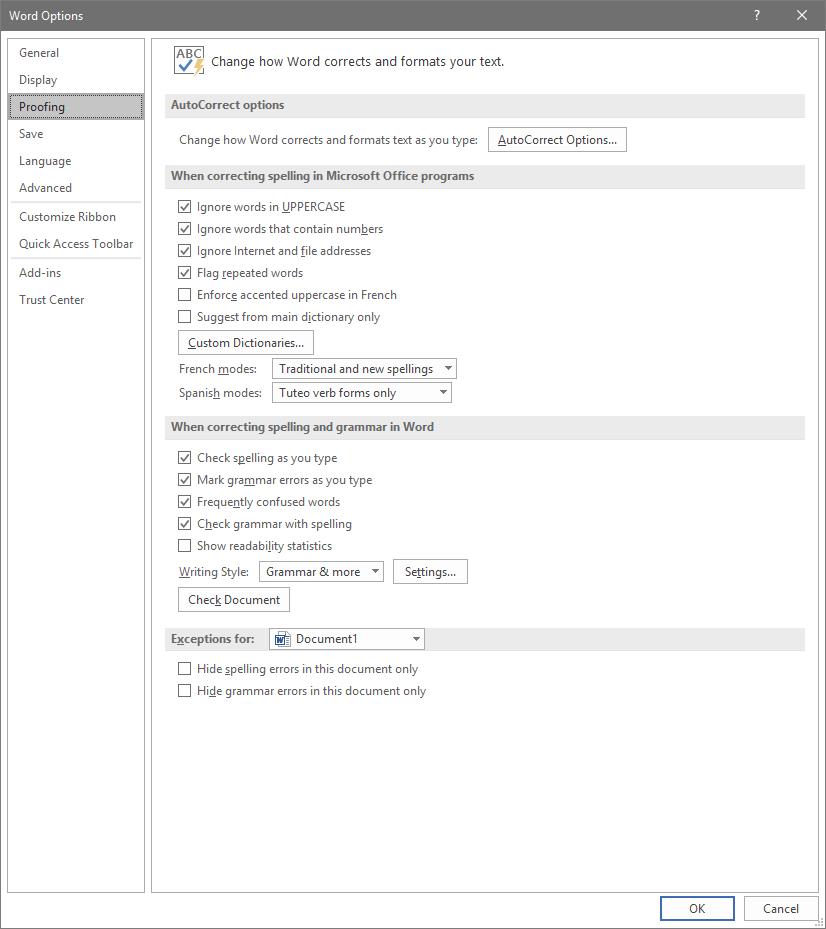
To access these rules, select File, and from there, Options. A new window should pop up with a Proofing option in the list. That page looks like this:

Adjusting AutoCorrect

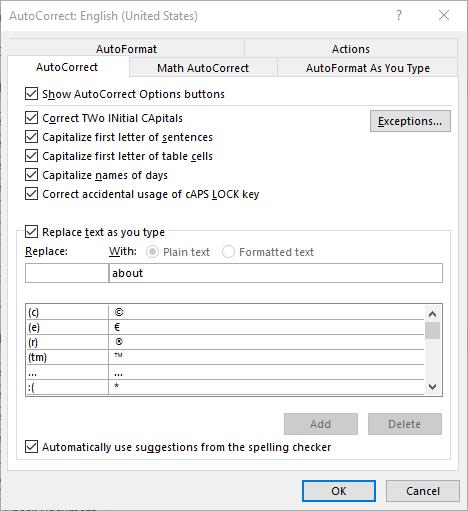
Here, you can alter a variety of proofing options, including your AutoCorrect Options. Clicking that button will present you with another window.

This window allows you to set your AutoCorrect rules, identify any exceptions you might want to make, and review how misspelled text can be automatically revised.

Establishing Grammar Rules

Returning to the Proofing List window, you also have other options that allow you to adjust Word’s corrections. For instance, clicking the Settings… button under When correcting spelling and grammar in Word provides another window. From here, you can control which grammar rules Word will flag or ignore in your copy.

Stop Worrying About Word Changing What You Write

By implementing these changes, you can prevent small annoyances from interrupting you as you work with Microsoft Word. This way, you can accomplish more without having to worry about dealing with automatic corrections again.

For more tips on how to best leverage your solutions to save you valuable time and money, subscribe to our blog!

PEA6LF5_phish_400.jpg

Getting to Know About Phishing Attacks Can Keep Your Business Safe

PEA6LF5_phish_400.jpg

There’s a big reason why phishing is a primary threat to businesses, and it’s because this method gives hackers a relatively risk-free way of gaining access to a network or other resources. Even being aware of the issue is often not enough to prevent it, as hackers are known to get quite aggressive and crafty with their phishing campaigns. If only a fraction of the 57 billion phishing emails that go out every year are taken seriously, hackers make quite a bit of profit off of users.

As a result of this increase in phishing attacks, endpoint security has grown much more focused, but the issue with phishing isn’t necessarily an issue with the strategies surrounding your technology–rather, it’s an issue relating to your organization’s users and their tendency for failure. Now, we know this sounds a little harsh, but it’s been proven time and again that employees need security training on how to handle credentials and other sensitive information. Let’s take a look at a couple different types of attacks you can be exposed to, and what you can do to keep your organization from becoming just another company that has suffered from a data breach.

Deceptive Phishing
Deceptive phishing is one of the most common types of phishing scams, and it aims to fool unsuspecting users into handing over sensitive information. This happens when the hacker sends a message to users that impersonates an actual person or company that the organization has some sort of relationship with. These hackers use deceptive phishing to convince users to hand over information like passwords, usernames, account numbers, etc. Since official credentials are being used to access these accounts, it doesn’t immediately become a security concern.

For the most part, these deceptive phishing messages are either ignored by the users, caught by filtering technology, or disregarded when they’re accessed. Unfortunately, the handful that actually do fool the end user are worth the hundreds-of-thousands that are sent to others. To keep your business from making this fatal mistake, you need to focus on increasing awareness of what makes phishing attacks so much different from your average legitimate email.

Some of the telltale signs of phishing messages include misspelled words, problems with sentence structure, and suspicious attachments or URLs. Always hover your mouse over a link before clicking on it to determine its location, and never download an attachment unless you know who’s sending it. Another thing to look out for is any financial institution or vendor demanding payment or access to your account–there are other, more official methods of outreach for methods such as these; and no bank or similar institution will ever, ever ask you for passwords.

Spear Phishing
Spear phishing attacks are targeted attempts against a specific user. For example, someone who sees a message from a coworker might let their guard down, but this doesn’t necessarily mean the message is safe. It just means that some hacker managed to find a way to mimic the sender in a way that is extremely convincing. Spear phishing attacks will often know the target’s name, title, company, work phone number, and much more–all to seem as authentic as possible so the user will click on a malicious attachment or URL.

Even social media isn’t safe from this trend. LinkedIn, for example, is one of the most common places where spear phishing is leveraged. It might be used for connecting with other business professionals, but it’s not hard for a hacker to imitate a business professional. We aren’t saying that you need to avoid social media like the plague, only that you should approach it with some sensible caution.

Pharming
That being said, more people are learning about these attacks by the day, meaning that some hackers have ceased these types of attacks for fear of their efforts being for naught. Instead, they turn to a practice called pharming, which is using an organization’s DNS server to change the IP address associated with the website name. This gives them a way to direct users to malicious websites to steal their legitimate credentials.

To prevent this from happening, it’s very important that you tell your staff to be sure they are entering their credentials into a secured site. The best way to make sure this happens is to look for the “https” in the hyperlink, as well as a padlock icon next to the address. It also never hurts to have an antivirus solution on each endpoint within your organization.

NuTech Services can help your business stay as secure as possible. To learn more, reach out to us at 810.230.9455.

128887834_fingerprint_400.jpg

Biometric Authentication Becomes More Commonplace

128887834_fingerprint_400.jpg

Biometrics are a common sight in futuristic or science-fiction settings, but they are increasingly entering the real world in practical ways. In fact, similar technologies are being implemented every day for businesses all over the world. Let’s take a look at some of them, as well as what benefits they provide these organizations.

What Are Biometrics?
Biometrics are a method of authentication that uses some sort of physical attribute or qualifier rather than a password or a key code. Some examples include fingerprints, voice patterns, typing rhythms, and so much more. They are easier to use than your typical passwords or key codes, and even better, they can be used in conjunction with traditional security measures and practices.

Let’s take a closer look at what some of these biometrics are, as well as the most practical way to implement them.

Biometric Types
There are two major categories for biometrics: physical identifiers and behavioral identifiers. Physical identifiers are by far the most common:

  • Signatures: Signatures are one of the unique ways you can identify an individual, and you’ve surely seen this biometric used at least once somewhere or another. Whether it’s a transaction or an agreement, a signature can do much to guarantee someone’s authenticity.
  • Fingerprints/Physiological Attributes: This particular biometric is often used to secure smartphones. Fingerprints can be used to determine the identity of the user, as well as various other physiological attributes, like palm scanning, retinal scanning, and facial recognition.
  • Voice: Voice-based authentication is common all over the place these days, whether it’s a personal user issuing commands to a virtual assistant or a business using voice authentication to navigate automated answering systems.
  • DNA: The technology to implement DNA sequencing into authentication is still a ways off, but it’s closer than you might think.

There are other behavioral identifiers that are used for biometric authentication. While these methods are still in development, here are a few examples of them:

  • Typing Patterns: People all write in different ways, and the same goes for typing. Therefore, this can be used to determine the authenticity of the user based on their keystrokes and the pressure applied to the keys.
  • Navigation and Engagement: In a similar fashion, the way that people navigate applications and systems can also determine identity. Mouse movements are quite showing, as well as how we hold devices.

Reliability (and Risks) of Biometrics
Biometrics are proving problematic to an extent, mostly because they can be inconsistent. Voices can vary depending on the user’s health or age, and faces can change based on a clean-shaven (or bearded) face, a haircut, or a pair of glasses. There are ways to work around this system, and with biometric authentication, there is much that needs to be taken into account.

Security is a Major Concern
This kind of data needs to be heavily protected, as it not only exposes sensitive information, but personal information as well. These kinds of credentials are also not easily changed, as they are heavily based on physical traits. For these reasons, biometrics may take some time to be adopted as the norm.

What are your thoughts on biometrics? Let us know in the comments.

187442149_mobile_400.jpg

Tip of the Week: 9.0 Pie Brings with It New Features

187442149_mobile_400.jpg

Over two billion devices in the world run the Android mobile operating system. Most of them that have been purchased in the past year, as well as the ones that have been updated recently, run on the current operating system, Android 9.0 Pie. With this latest mobile operating system, Google has made it clear that they want to be seen as the smartphone software provider. Today, we’ll take you through how you can get the most out of your Android Pie experience.

New Gestures
The latest version of Android OS contains a built-in new gesture navigation system, but it might not be turned on automatically. To turn this on, go to Settings > System > Gestures. Then you must tap on Swipe on Home Button and press the on-screen toggle switch. You will see the change propagate almost immediately–the three-icon setup will change to a singular pill-shaped icon.

Navigation isn’t much different from the other builds, either. Tap the pill icon to bring back the homescreen and long press it to bring up your Google Assistant. You can then swipe up twice or long-swipe from the home icon to bring up your app drawer.

Another change that needed to occur is that Android 9.0 Pie removes the dedicated button for recent applications. Users now need to singular short swipe up from the bottom of the screen to open up a carousel gallery that shows all recently opened apps. You can then navigate by swiping between apps or using the home icon to swipe fast-left or right to move through the apps more quickly. To clear the apps, swipe up on the specific app window. To clear all of the apps, just scroll all the way to the left and tap the Clear All button to exit out of all running applications.

Android 9.0 Pie actually tries to predict what you’re likely to need next. These commands are within the apps. If you find it useful, you can drag these suggestions, found at the top of your app drawer, onto the screen. You can then find the shortcuts offered by each app by long-pressing the specific application’s icon. This includes opening an application in split-screen mode, a considerable improvement from Android 8.0 Oreo.

Device Notes
One extremely useful feature for smartphone users is the ability to open your device using a fingerprint scanner, but an even better one is when you can use the scanner on devices that don’t feature an in-display fingerprint reader to keep your screen from turning off.

The alarm clock in Android 9.0 provides some additional functionality. When your notification panel is open (swipe down from the top), you only need to tap on the clock in the system tray to open your clock app and manage the alarms.

What do you think about Android 9.0? What are your favorite features? Let us know in the comments.

218223946_productive_400.jpg

Three Ways to Be More Productive

218223946_productive_400.jpg

Many people can find it challenging to constantly remain productive, which is only understandable. Nobody can be firing on all cylinders all the time. However, this doesn’t mean that there aren’t ways that you can optimize your productivity. Here, we’ll review three general approaches to improve your productivity, with examples describing how to enact each.

1. Prioritization

One of the keys to productive work is to work smarter, not harder. By identifying what is most pressing to accomplish or otherwise needs to happen first, you can inherently increase your productivity.

Ignore Inspiration

For instance, one of the biggest causes of procrastination is taking in a project in its entirety. Seeing the entire scope of an undertaking can be intimidating, which often makes people feel as though they need to be “inspired” before they will be able to accomplish anything.

This is untrue, but can be a difficult impulse to resist. If you catch yourself falling back on this excuse, try focusing specifically on a certain aspect or piece of your greater responsibility. Once this portion is completed, you’ll most likely be motivated to continue. In essence, don’t wait to be inspired… inspire yourself through what you accomplish.

Leverage Prioritization Strategies

Another common cause of procrastination is indecision as to what aspect of a project to tackle first. Again, identifying the most important or pressing activity makes it much easier to make this decision, and there are a few ways that you can do so.

One way is to leverage something called the Eisenhower Matrix. It can be used to sort tasks based on their urgency and importance, advising you on how a task should be approached – if it should be done now, planned for, delegated to someone else, or eliminated. This tool can help you avoid spending time on activities that ultimately don’t matter as much as others, optimizing how you spend the time you have. The Pareto Principle, or the 80/20 Rule, is another means of spending your time more intelligently. By identifying the most important 20 percent of their tasks and minimizing the remaining 80 percent, many people use this principle to spend the most time on their most impactful activities.

Save Distractions for Later

We’ve all experienced that moment where, in the middle of one task, we suddenly have an idea for another. While this new task may be valuable or important, it can also hurt your operations by interrupting the one you’re engaged in at the moment… but again, this thought also needs to be addressed. Many people resolve this dilemma by creating a distraction list. Rather than suspending what they are working on, these people simply take a moment to jot down this idea for further consideration after their task is done. This means that they aren’t jumping between unfinished tasks each time a new idea pops up.

2. Preparation

Once you have your tasks organized properly, you need to ensure that you have properly made preparations to attend to them. Some of these preparations may sound counter-intuitive, but are no less crucial to your efforts.

Make Sure You’re in Order

If you aren’t ready to be productive, you aren’t going to be no matter what you try. Therefore, you need to be taking care of yourself, as well as your technology. You need to be healthy and rested to reach your potential, which means that self-care is a must. This also means that you should be strategic in how you approach your responsibilities. If you know that you tend to have a period of low energy in the late morning, it’s probably beneficial to avoid scheduling intensive tasks for that time. In addition, you need to be sure that you’re up-to-date on how things are done. The more knowledgeable you are, the more efficiently you’ll be able to make decisions, and the faster processes will move along.

Expect to Be Interrupted

The best-laid plans of mice and men often go awry, as they say. This means that you should anticipate other things to interfere with your established work schedule. What if another task pops up, or a task takes longer than anticipated? Taking these kinds of challenges into account will allow you to figure out a solution preemptively, or at least a plan that allows you to adjust and adapt.

Learn from Everything

We’ve all been taught the value of learning from our mistakes – examining situations in which things went wrong, identifying why, and avoiding those circumstances in the future. However, this is only half of what you should do to optimize your productivity. You also need to identify why your successes were successful.

Once you have completed a project or process, take some time to examine it. What about it worked well, and how could that be made better? Was every aspect necessary, or could some of it be eliminated or streamlined? Doing so will allow you to further optimize your procedure to be even more productive the next time.

3. Cheating!

In fairness, these strategies aren’t “cheating” so much as they are methods of working smarter. This way, you can make sure that your tasks are accomplished without expending more resources than they need – including your energy.

Subdivide Your Tasks

Remember the prioritization strategies we discussed above? This is a similar activity, in that you take a larger concept and divvy it up into each step that needs to be completed. Instead of putting them into a matrix or focusing on a specific set of them, the idea here is to simply make your tasks appear more achievable.

Let’s say you have to plan a work event. This alone is a significant responsibility, and can be overwhelming to approach as a whole – where to start? However, you can make your process much more comprehensible by going about it piece-by-piece, effectively expanding your task into a complete to-do list. While this does give you more tasks, they will be much easier to attain and progress with. So, instead of “Plan Party for Greg’s Retirement”, your list might include:

  • Buy decorations
  • Buy card
  • Buy ice cream cake
  • Hide cake in freezer
  • Have team sign card
  • Put up decorations
  • Take out cake
  • Send email to team to gather

More tasks, but much easier to follow nevertheless.

Leverage Shortcuts

There are a great many ways that your technology can offer an easier way of doing things. Naturally, keyboard shortcuts are one example of this, but so is automation. Let’s face it, any time you can save by having your technology handle something is time that you can then spend being productive elsewhere.

Eliminate Inefficiencies

How much time do you spend debating your options for truly inconsequential decisions during the day? Chances are, it’s more than you’d like to admit. The fact of the matter is that many of the choices that we are faced with aren’t all that impactful. Eliminating as many of these choices as possible will allow you to reserve your decision-making skills for the times that you really need them.

Email is another notorious source of lost productivity, simply because people don’t use it as efficiently as they could. It is too common for what should be a very brief and simple correspondence to take far longer than anticipated. Ironically, this is often because the people involved are trying to be brief.

Instead of cutting corners on your next email, invest a few minutes into including more specifics. Don’t just say you want to meet – identify the topics to be discussed. Don’t leave the time of the meeting open-ended, offer a few availabilities. While it takes longer to write, one email written this way will keep you from having to read, write, and send a few more.

Finding Your Groove

Clearly, there are many aspects to consider when you’re trying to be more productive, and some may be more effective for one person over another. A bit of experimentation will help you to land on the approach that works for you.

NuTech Services can help by providing the solutions that enable some of these methods. Reach out by calling 810.230.9455 to learn more about these solutions.


2.5_245830737_meeting_400.jpg

Get More Out of Your Organization’s Meetings

2.5_245830737_meeting_400.jpg

Meetings rarely go as planned. The issue is that meetings generally aren’t planned as well as they can be, meaning that they run the risk of going on longer than necessary. If you find your meetings could be managed more efficiently, then read on; we’ll discuss three tips that you can use to improve the quality of your meetings.

Go in with a Plan
Have you ever had a meeting where you start with a general idea of what you want to discuss, then somehow wind up on a topic completely unrelated? This isn’t that out of the ordinary, and weekly meetings that are held for the sake of having a meeting could potentially result in these kinds of sessions, where substance is lacking, and focus is at an all-time low. If you have a strict agenda, then you’ll be more likely to cover important topics in a way that is conducive to everyone’s us of time.

Use Better Technology
If you find your meetings lacking in presentation, then you can use some technology to make it more interesting than just a couple of people sitting around a table. You can take advantage of media, slideshows, infographics, and so much more to provide context for the conversation you’re having. If meeting in the office doesn’t work out, you can even implement mobile technology and web conferencing software to keep your team connected from any location with an Internet connection.

Give Employees the Opportunity to Talk
People like to feel like they are involved in meetings, and if you give them the chance to express themselves in an environment that values their feedback, they will often thrive. Open up a portion of your meetings to give employees a chance to voice any concerns or thoughts they might have. You might find that the dialogue created from this could be valuable.

If your business could use some help with improving its meetings, NuTech Services can help. To learn more, reach out to us at 810.230.9455.

2.5_72712129_windows_400.jpg

Tip of the Week: How to Speed Up a Slow Windows 10 Device

2.5_72712129_windows_400.jpg

Windows 10 is a remarkable tool. Having said this, it can sometimes seem to slow to a crawl… not the ideal situation when you’re trying to be productive. That’s why we’re devoting this week’s tip to speeding up Windows 10.

However, as with any changes you are considering to your computer, you should lean on your IT resource to determine if it’s okay to make these adjustments. Better yet, IT may want to make them for you. One way or another, make sure you get the all-okay before switching anything on a work device.

Cleansing of Bloatware
Whether you picked something up during your browsing or the device’s manufacturer installed it during production, your computer can easily collect programs known as bloatware or adware. These programs, while not always harmful per se, can easily eat up system resources for nothing. Ask your IT resource to seek out these programs and eliminate them for you. This alone may result in some considerable boosts to your computing speeds.

Adjust Power Settings
While it may sound like a good idea, the Power saver plan that comes baked-into Windows 10 can actually make your experience as a user more of a pain. This is because this setting cuts your device’s processes to minimum so that energy can be conserved. Furthermore, desktops are plugged in as a rule, leaving little reason to use Power saver anyways. To improve performance on your Windows 10 laptop, stick to the Balanced power option when unplugged, and switch to High when power is available.

Kill Windows Tips and Tricks
Yes, it’s ironic that we’re recommending that you disable Windows Tips and Tricks in a tip-based blog post, but there are a few compelling reasons to do so. Most pertinent to our current conversation, the fact that Windows is analyzing your usage with these capabilities enabled means that your device’s performance is going to suffer.

In order to disable these invasive bits of advice, click the Start button. Under your Settings, access System and from there, Notifications & actions. Under the Notifications section, you will find the option to Get tips, tricks, and suggestions as you use Windows.” Deactivate this option, and you won’t have anything more to worry about.

Finally, the Cliché: Restart Your Device
Yes, this suggestion has become a joke in and of itself, as the IT field’s go-to question. However, there’s a really good reason for this: restarting a device can often solve its issues. This is because it clears out the use of the computer’s resources, wiping unneeded memory usage and stopping equally unneeded background processes. Restarting your workstation effectively gives it a fresh slate, allowing it to run much better than it did when it was bogged down.

Let us know if there are any other tips you want us to share in the comments, and don’t forget to subscribe!

2.5_208604445_professional_400.jpg

Here Is Some IT That Works for Professional Services

2.5_208604445_professional_400.jpg

All businesses need consultation from time to time. After all, nobody can be an expert in everything. These professional services, including those provided by lawyers, financial consultants, accountants, advertisers, and marketing specialists are all important to the success of any organization, but just like any other business, these companies have IT needs.

Today, we’ll be discussing some of the best IT solutions for professional services.

Software as a Service
The cloud has brought about a revolution in the way professional service firms think about and manage their software applications. Software as a Service, or SaaS for short, is the delivery of software through the cloud for a monthly fee. SaaS is usually billed per user, and it includes solutions such as Office 365 and G Suite. Software developers have created solutions that can be deployed through the cloud, providing many industries with cloud-based software that is built specifically for their needs.

Mobile Solutions
Mobility can open up a lot of doors for any business. For a professional services firm, there is more to consider, though. Many of these professional service providers need to consider federal, state, and industry requirements that demand additional layers of security for sending and receiving data. Therefore, the benefit of adding mobility to an infrastructure needs to be approached with considerable caution, as data security must be prioritized.

One of the best solutions to this dilemma is a virtual private network, or VPN. A VPN provides a layer of encryption around your communications between mobile devices and the central network infrastructure for your organization. This added security protects data while it’s in transit. It’s also a great solution for a business that wants to limit its use of paper records in favor of a more digital solution.

Document Management
Having access to information gives professionals the ability to stay connected to clients and other resources as needed, whether they are in the office or not. A document management system is the ideal way to digitally store and access files in a database; and trust us when we say it is much easier to find a document in a database compared to digging it out of a filing cabinet.

Professional technicians can scan an organization’s paper files through the use of a special software to deposit them inside a database in the form of PDF files. This database and a Relational database management system give an end user the ability to search the DMS for keywords found in the documents. All of this is accessible to users through an Internet connection, making it both accessible and convenient.

Through combining DMS with a VPN and SaaS offerings, professional services companies can achieve unprecedented security and data access. To learn more about how your organization can take advantage of these tools, reach out to us at 810.230.9455.

ofice_threat_400.jpg

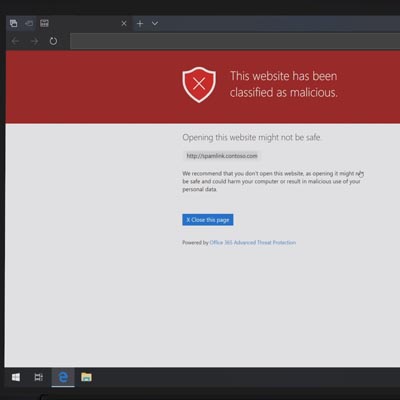
Microsoft Launches Office 365 Advanced Threat Protection

ofice_threat_400.jpg

Microsoft has been at the forefront of security through their numerous operating systems for decades. As the security of computing systems and communication gets more important, and with threats to that security growing exponentially, the world’s leading software company has made it a point to introduce a new security platform to help people in many walks of life keep their endeavors secure. Today we’ll look at the new security & compliance services that are bundled with the Microsoft 365 cloud platform.

Microsoft’s Dedication to Security

Microsoft has as good of a handle on the nature of cybersecurity as any other major software company. The sustainability of their business and the effectiveness of their products are dependent on it. If their security software didn’t work well, there is no way they could sustain their place as the world’s most important software company, right?

One problem they are running into is that their security is SO effective, that hackers had to shift the ways they tried to infiltrate networks and steal data. The establishment of phishing is a social engineering term for duping a victim into downloading software that’s only purpose is to gain access to their personal data, which leads to data and identity theft, and in the case of business computing, access to much more.

Businesses Have Trouble with Security

Today’s business has to deal with a lot of different security issues. First, they are responsible for having the technology protections connected to each part of their computing infrastructure. This can be as simple as having the router-supplied firewall and an antimalware program loaded on their server. It’s likely, however, that the average business will need more coverage over their network to secure it, and the data stored behind those security platforms.

Next, and maybe most crucially, it is the business’ responsibility to train its staff on what kind of issues to look out for. Today, most malware infections and other infiltrations are the result of a mistake made by a person that has credentials and access to data. If your organization doesn’t properly train your staff on how to eliminate these threats, there is a fair chance that your network will be inundated with some type of malware at some point.

Microsoft 365 Security and Compliance

Microsoft, acknowledging the need for an enterprise product that combines the power of their Windows 10 operating system, the productivity options presented from Office 365, and powerful security and compliance controls, has launched Microsoft Office 365. The cloud-based solution presents the core computing resources that any business could use in a product that is available right now from NuTech Services.

Our knowledgeable technicians can help you find the right security platform for any of your business’ computing needs. Call us today at 810.230.9455.

85140760_S_time_400.jpg

Tip of the Week: 3 Ways to Optimize Your Time

85140760_S_time_400.jpg

Time always seems to escape so many of us. What should be easily accomplishable in a morning can easily stretch to the afternoon, for what seems like no reason. The hard truth is, it isn’t time’s fault… it’s our own bad practices. For today’s tip, we’re going over how you can fight these tendencies to optimize your use of the time that is available.

1. Prioritize

One of the biggest time sinks to be found in any business is the simple act of deciding what to work on next. We’ve all been there at some point: having finished one task, we suddenly reference our to-do list and encounter the same problem as a kid has in a candy store… too many options.

Taking a few moments at the start of every day to organize these tasks can greatly improve how you spend your time throughout the rest of the day, and can ultimately lead to far less waffling later on. With a set process laid out, you no longer have to make the decision over what to work on next – it has already been made.

To create this order, look at everything you have to work on and establish how urgent each task is compared to the others. Deadlines are a handy way to help establish this, or if someone else in your organization needs it before they can continue their work. Identifying these qualities and ordering your tasks accordingly from the start is a small time investment, especially when you consider the impact it can have on your productivity later on. Utilizing a communications and collaboration solution can help you establish the organizational priority of each of your tasks with the help of your team.

2. Habitually Limit the Time You Spend on Rote Tasks

There are always those tasks that pop up throughout the day that seem insignificant at the time. Take checking your email, for example… how long does it take to do that? However, checking email and a variety of other tasks can quickly grow from a momentary activity to an extended process.

After all, there’s always the chance that briefly responding to an email could pull you into an extended and time-consuming debate.

Furthermore, some of these tasks carry the expectation that you will immediately drop what you’re doing to take care of whatever’s needed. Emails are notorious for communicating this urgency, whether or not it was intended. Regardless, it puts pressure on the employee to switch their focus, which hurts productivity.

Instead, establish a practice of setting a concrete period out of your day where you will check and respond to your email, or whatever task it is that applies to your situation. Actually schedule this time into your day, using the business management solution that your company has in place to control schedules. Outside of that time, leave that task alone… if an email’s contents are truly that important, you’ll find out about them some other way before long.

3. Delegation and Outsourcing

We get it, business matters and activities tend to be kept close to the chest. After all, if you can’t trust yourself to do something right, who can you trust? Who else has the incentive you do, to do the best job possible?

Frankly? Someone you’ve hired to do a job.

Delegation can be difficult, of course, but only if you don’t trust those around you. However, there are plenty of resources out there, both inside your business and available through outsourcing, that could do exactly the job that needs ro be done. As a result, you can divert your focus to tasks that need it more, trusting the resource to produce.

You may have to put in a bit of time picking the best resources, especially when outsourcing, but the results will be well worth the time.

NuTech Services can help you put these practices into action, with the added effects of the solutions that can be implemented to make these practices easier. Give us a call at 810.230.9455 to further discuss any of the solutions we’ve described here, and for more handy tips that could help you better leverage your time, subscribe to our blog!.

sql_server_400.jpg

Microsoft SQL Server 2008 Will Soon Reach EOL

sql_server_400.jpg

It is little wonder that, with millions of businesses relying on their secure servers for a variety of computing needs, that Microsoft reigns supreme in profitability. In order to maintain this status, Microsoft must make sure that their software is properly cared for and supported – or retired if these titles are no longer practical to maintain. SQL Server 2008 and SQL Server 2008 R2 are soon due for the chopping block, with an official retirement date of July 9, 2019.

If your business is still leveraging these titles, the clock is ticking. In order to avoid the considerable difficulties that losing support brings, you need to update your solutions very soon.

What Does SQL Server 2008 Do?

Microsoft SQL Server 2008 functions as a relational database management system (RDBMS), which means it is used to securely manage how a business’ data is stored, retrieved, and accessed. Not just a little data, either… a lot of data.

This only makes sense – why would you need a database in the first place, after all? Simple – to store a lot of data that you have (or expect to have), which also means you need a means of managing this data that is capable of integrating with the applications you use. An RDBMS can provide that means.

As SQL Server 2008 has been Microsoft’s database management software solution, and with Microsoft’s solutions supporting most of the world’s enterprise servers, this retirement has the potential to affect a lot of businesses. If yours has been utilizing either version of SQL Server 2008, you need to upgrade soon, or your business may be put in a tight spot.

The Progression of this EOL

As July 9 approaches, these versions of SQL Server 2008 draw closer to losing support. While mainstream support was actually ended in July of 2014, these solutions will finally be fully put to rest precisely five years later. Once this happens, any organization that did not upgrade would be vulnerable effectively immediately, at risk of security breaches and data loss. Furthermore, a business that experiences these issues then has to cope with the damage to its reputation, an after-effect that often leads the business’ failure.

What You Can Do

You have to work fast to upgrade your database management system. NuTech Services can help. We can introduce you to solutions that are far superior to the ones available in 2008, with improved integrations and intelligent systems. Sure, you could host a new RDBMS locally, but you could also leverage cloud-based database management, potentially bringing even greater speeds to your business.

Regardless of what you choose to replace it with, you need to ensure that your SQL Server is migrated by July 8, 2019. This is the only way to be sure that one of your business’ most crucial assets is protected by the adequate level of data protection and security. Again, we can help you equip your business for success. All you have to do is call us at 810.230.9455.

233765387_Cryptomining_400.jpg

Cryptomining Becoming a Big Issue for Businesses

233765387_Cryptomining_400.jpg

Cryptojacking is one of the upcoming threats that your business should have on its radar in the upcoming years. This process involves a malicious entity installed cryptomining malware on a device without the user’s permission. What this provides the hacker with is a steady stream of income at the expense of the victim’s device. What can you do to keep your business’ devices from falling prey to this?

Your Computer Can Make You Money?
Certainly you’ve heard of cryptocurrency, which is a type of currency that is “mined” from a computer. The most common cryptocurrency is Bitcoin. Bitcoin is generated by computers that crunch through numbers. Some organizations have warehouses full of high-end servers that are constantly mining for Bitcoin. The average computer can’t really handle this task, but with enough of them, hackers can start to receive a considerable sum.

Why Is This Dangerous?
Cryptomining is dangerous particularly because of how intensive the process is. It can take a toll on the average device if it’s left unchecked. As previously stated, it takes an exceptionally powerful machine to effectively mine cryptocurrency. This causes the device to experience an abnormal amount of wear and tear. Over time, you’ll notice that your device will start to decrease in efficiency and slow down.

Other ways that this might affect a business is through the immediate costs associated with cryptomining affecting your hardware. You might notice an abnormally high electricity bill from a server being influenced by cryptomining, or a cloud-based service working too slowly. Either way, the end result is a negative effect for either your employees or your customers.

How You Can Protect Your Business
If you’re looking for cryptomining on your network, be sure to keep an eye out for suspicious network activity. Since the malware will be sending information over a connection, you’ll be able to identify suspicious activity during times when there shouldn’t be as much activity on your network. In this particular case, the data being sent is small, making it difficult to detect for businesses that transmit a lot of data.

Security professionals are turning toward machine learning to detect and eliminate cryptomining troubles on networks. Machine learning can analyze a network’s traffic for the telltale signs of cryptomining software. Another method is to use a SIEM solution that gives network administrators the power to discover consistent or repetitive issues from potential malware.

To keep your business safe from the looming threat of cryptojacking, you should implement measures to ensure all common methods of attack are covered, including spam, antivirus, content filters, and firewalls. To learn more, reach out to us at 810.230.9455.