159524597_innovate_400.jpg

4 Emerging Technologies Being Used for Business

159524597_innovate_400.jpg

Technology plays an important part in managing any modern business, especially with the elevated importance of information in a data-driven world. Today’s blog is dedicated to four emerging technologies that are changing the way that organizations approach operations.

Artificial Intelligence
AI might be primitive in a lot of ways at the moment, but this doesn’t mean that it’s not growing in popularity. Machines can get smarter the way that humans do when they perform the same function several times, but unlike humans, machines don’t have various emotions to hold them back. Here are a few ways that a business can leverage AI to its advantage:

  • Processing large amounts of data
  • Personalizing customer experiences
  • Operational automation
  • Security
  • Predicting demand
  • And more

Businesses might have expensive operational issues that demand AI-integrated solutions to handle them, thus expanding the market and allowing for rapid adoption. Automation in particular is being adopted at an alarming rate, and this is driving the demand for artificial intelligence.

Blockchain
Blockchain has been making headlines in the news, fueled by the cryptocurrency fads that have utilized the technology. Blockchain creates a public ledger that is distributed rather than centralized, with each block storing all of the data that is relevant to a transaction. Once this data is captured, it can’t be altered without changing all data that has come afterward. This presents considerable data security benefits.

Some businesses hope to use this increased security to their benefit using a more distributed system. The more people who utilize the blockchain, the more we learn about it, meaning more tools are created to help organizations leverage the blockchain. Here are some of the ways that organizations can utilize the blockchain:

  • Managing supply chains
  • Identity management
  • Recordkeeping & archiving
  • Data security
  • And more

Blockchain is so popular that even Oracle’s head of blockchain development claims that half of businesses will find a use for blockchain in the next three years.

5G
The past 40 years have shown that wireless technology has a lot of opportunity to improve. Wireless broadband will see an increase from the 4G used today to 5G. In fact, it could potentially change the world. Data speeds could reach as high as 1GB/second or higher, giving many businesses access to the following benefits:

  • Faster speeds
  • Reduced Latency
  • Greater Capacity
  • Improved Battery Life
  • And more

Innovation will drive businesses to adopt faster technologies than ever before, and Qualcomm has found that 5G will become a “general purpose technology” in the near future, used so much that it will be akin to electricity or vehicles.

Virtual Reality
The consensus is that virtual reality is pretty neat, but not practical in the business environment. Unfortunately, this is far from the actual reality of the situation, as hardware and software advances have given organizations the means to use virtual reality in ways previously unheard of. VR is great for immersing users in virtual environments that can be used for practically any purpose, including training simulations, talent management, product design, and shared experience.

What are some other emerging technologies that you think will be helpful for businesses in the near future? Let us know in the comments.

RUKC9G5_manufacturer_400.jpg

Manufacturers Are Really Leaning on IT

RUKC9G5_manufacturer_400.jpg

One industry that most people wouldn’t necessarily consider to be IT-rich is manufacturing. With automation becoming a major point of emphasis for many businesses, IT has taken on a larger role for today’s small and medium-sized manufacturers. Today, we will take a long look at what the manufacturer’s IT needs are, and what solutions they use to help steer their company forward.

The Manufacturer’s Puzzle

Making products can be a bit of a puzzle. You have to fit the right parts together to create the product. Each of those parts comes from somewhere. Some you need to create yourself, but most of the time there are companies that manufacturers acquire the resources from. The process is called procurement.

Procurement is the first of many puzzles that a manufacturer has to solve. Essentially, the products they create have a purpose. Many small and medium-sized manufacturers tend to make the products that make up larger products (that other manufacturers build). As a result, their revenue typically comes from supplying other manufacturers with pieces that will make up the products they are manufacturing. To streamline the procurement process, many companies have started relying on automated systems to tell them when they need to re-up.

Once the resources have been acquired, now it’s time to make the products. Of course, the costliest part of any manufacturing company is the actual manufacturing of the products. This is mainly because the capital costs of purchasing the machinery needed to manufacture goods, coupled with the operational costs of payroll and downtime caused by machinery malfunction (and the subsequent maintenance required), adds up to a significant investment. Companies today are searching for new ways around these costs. Enhancements in automation have made it possible for the smaller manufacturer to trim their production costs, while keeping their output static.

The last piece of the puzzle for the manufacturer is the distribution of the products to consumers. In many cases the consumers in this scenario are retail businesses. They need the costs to be low enough to be able to offer them to their customers with a markup.  Problems with distribution, like problems in the procurement stages, can be devastating to the manufacturer’s ability to create a positive revenue stream.

Where IT Fits

The entire process can be aided by information technology, but manufacturers tend to look at things in stages…like their workflow. Typically, organizations that have leveraged automation through the use of software systems, find that they are able to have more transparency and less overall inefficiency than organizations that don’t. Some software platforms that modern manufacturers are using include:

  • Customer Relationship Management – This software helps a company streamline their customer service. It’s used to manage leads, opportunities, and customers.
  • Supply Chain Management – This software helps a company control their entire supply chain from procurement to distribution.
  • Inventory Management – Manages stock and standardizes and automates replenishment.
  • Asset Tracking – Using sensors, every product and resource can be tracked to provide efficiency.

These solutions and more can be found in what is called an Enterprise Resource Planning software. While ERP software is comprehensive and offers organizations a lot of benefits, smaller manufacturers may not need the immersive control that many ERP systems provide. Finding the right software to meet your needs is important to ensure that your business can be as effective as it can be.

The IT professionals at NuTech Services can help you find the software you need to gain full control over all of your business’ processes. Call us today to learn more at 810.230.9455.

48319365_word_400.jpg

Tip of the Week: How to Customize Your Microsoft Word Tools

48319365_word_400.jpg

It’s probably pretty fair to say that Microsoft Word has become the poster child for word processing programs – and for good reason: its tools and capabilities are very well-suited for the user’s needs. Did you know that you can even adjust Word so that it better fits your use of it? For this week’s tip, we’ll go over a few ways to do so.

Customizing the Quick Access Toolbar

The Quick Access Toolbar can be found at the top left of the window, with default options like Save, Undo, and Redo. It’s pretty easy to spot, isn’t it? This is one of the reasons that adjusting it to your preferences can be so helpful.

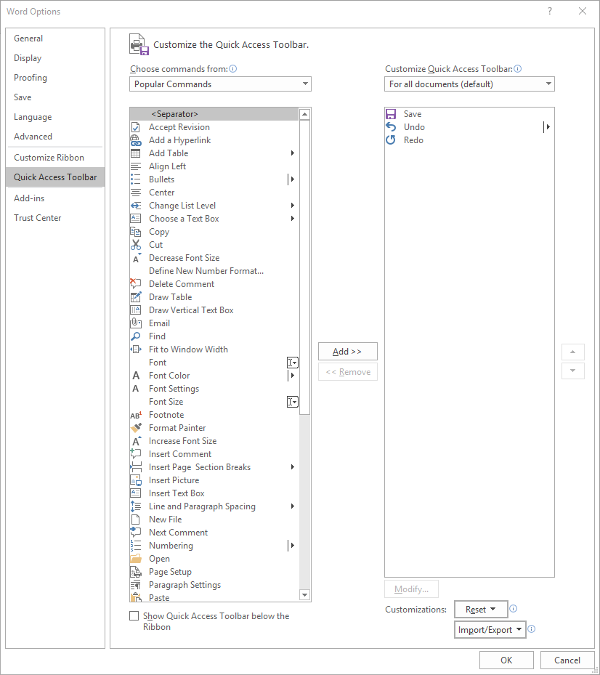
Making these changes is fairly simple. Your first step is to access the Quick Access Toolbar’s options. Under File. select Options, and in the window that appears, click Quick Access Toolbar in the sidebar menu. It should look like this:

From here, you can see that the typical Save, Undo, and Redo options are in the Quick Access Toolbar – which is all well and good, but you can easily use keyboard shortcuts to accomplish the same things.

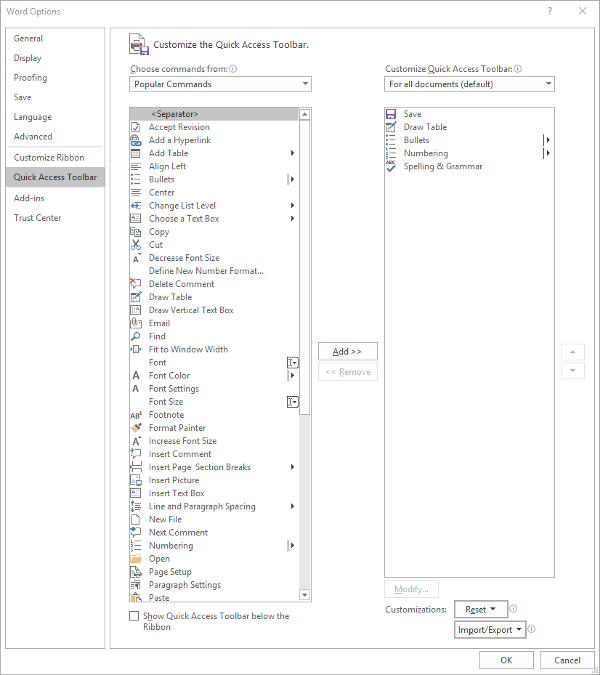
You might find a different assortment of tools more handy to keep in your Quick Access Toolbar. Altering them is simple enough from this menu, all you have to do is select the item and click the appropriate button, Add>> or <<Remove. The list on the left defaults to Popular Commands, but there are plenty of options to choose from, based on your needs. For now, we’ll stick to Popular Commands.

Let’s assume you use Word to put a lot of data into context, so you use a lot of lists and tables… and it needs to be spelled correctly. You can easily change your Quick Access Toolbar to meet these preferences.

Once you’ve done so, just click OK and your changes will be saved. You can always revert to the default settings by using the Reset option as well.

Customizing the Ribbon

The Ribbon in Word is where you find your options like Home, Insert, and the rest. Depending on your usage, you may not have much of a need for some of these options. Let’s assume that you don’t have any purpose for the Mailings tab, or the Draw tab, for that matter.

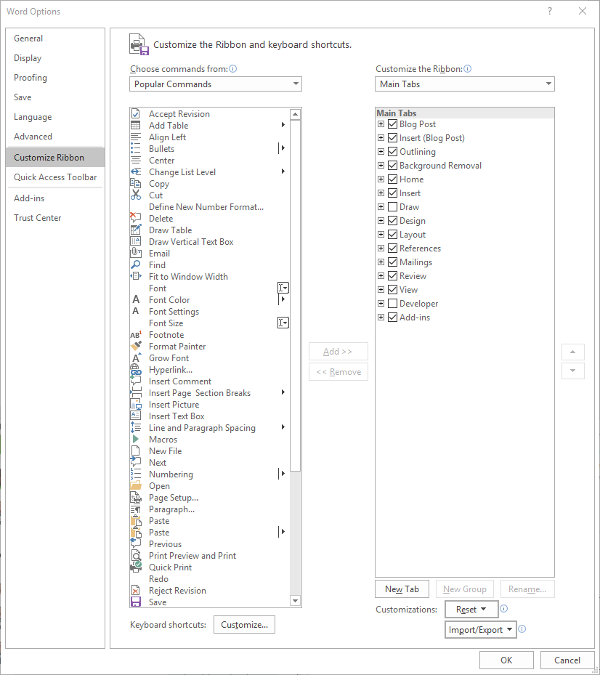
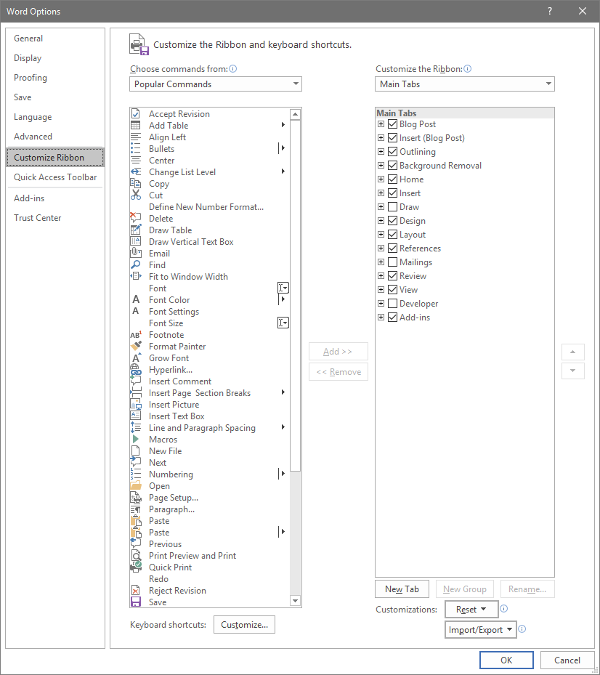
Again accessing File and Options, this time we’re looking for Customize Ribbon, which looks like this:

Just as we did with the Quick Access Toolbar above, you can adjust what is displayed in the Ribbon. Since we’ve established that – in this example – we have no purpose for either the Mailings or Draw tabs, we can uncheck them to remove them from the Ribbon display.

Customizing the Status Bar

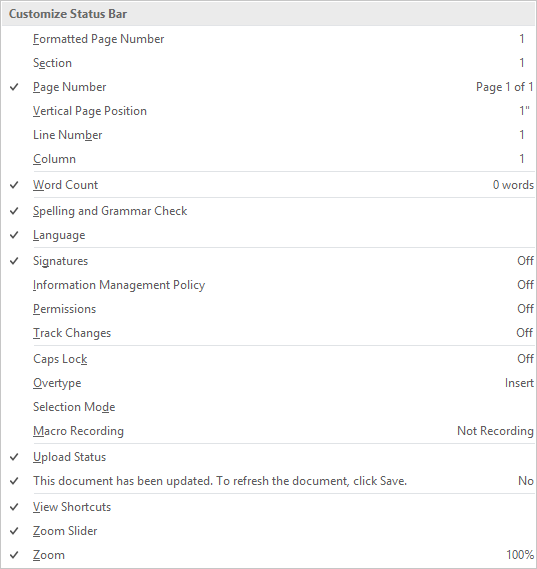
At the very bottom of the window is the Status Bar, which can be altered to provide other valuable information based on what you have prioritized. Doing so is very simple: just right-click on the Status Bar, and select (or deselect) the options.

There you have it- three ways to customize Microsoft Word to better suit your purposes. For more technology tips, make sure you subscribe to our blog!

P9UGYQ5_byod_400.jpg

Is Your BYOD Strategy About to Backfire?

P9UGYQ5_byod_400.jpg

Bring Your Own Device, or BYOD, has become a very popular option for businesses seeking to save a bit of their budget on obtaining and maintaining devices for their employees. While this is an economically commendable practice, it has the potential to generate risks for your business if left unchecked. Let’s discuss the pros and cons of BYOD, and how you can make it work for your business.

How Can BYOD Manifest Issues?

Unfortunately, for all its benefits, there is no shortage of drawbacks to BYOD – at least, if it is implemented without conscious deliberation and preparation. Here, we’ve listed a few such drawbacks:

Business and Personal Data Often Mix, but Shouldn’t

Do you really expect an employee to have a personal device that isn’t for personal use? If this device is used for work purposes as well, it can become very easy to combine this data and put some of it at risk. What if an employee who brought their own device in then left the company, the device in question full of your company’s sensitive data? Without some kind of policy in place to eliminate this risk, BYOD is simply too risky to allow.

Your Business Will Be Vulnerable to More Risks

Unfortunately, a poorly-strategized BYOD policy opens your business up to a variety of issues that could have severe and lasting ramifications.

This is mainly due to the many risks that mobile devices inherently have in terms of data leakage, malware infection, and other vulnerabilities. If your employees aren’t vigilant in keeping their devices updated and secured, your network will be subject to the same vulnerabilities. Malware infections can also be introduced via an employee not treating their device as carefully as they should be. If malware is installed on their device, it can easily be spread to your network – free to wreak havoc and steal data.

Your Infrastructure Will Likely Need Reworking

This one is admittedly less of an issue as it is an inconvenience. Simply put, adding an influx of devices and ensuring that your IT remains compliant to any policies can be a huge investment of time – and if not done correctly the first time, this investment will only grow.

How to Prevent These Issues Via Policies

As we briefly mentioned above, any BYOD initiative you introduce to your company needs to be controlled through a stringent use policy. This policy needs to clearly describe how an employee is to use their device during work hours, as well as the prerequisites that your employees need to abide by and agree to in order to use their own device. We recommend the following:

Mobile Device Management and Endpoint Protection

This technology helps to keep any company data isolated from any personal data on the device, which means that it allows you to control your data without intruding on an employee’s privacy. As a result, if a device is stolen, you can remotely remove any business data from it to ensure your data is protected.

Another precaution to enact is endpoint protection software. This software essentially performs a preemptive security scan of any device trying to access the network, identifying if a device has been infected. This means that your network isn’t introduced to whatever malware is present on the device, and the owner is then aware of their security issue as well.

Access Controls

The fact of the matter is that not every employee needs access to every byte of data you have. Therefore, it makes sense to implement role-based access controls. These controls can help keep an employee focused on the data they need for their work duties, and can help you identify where a breach occurred, should one happen. Some access controls can even prevent a device that isn’t up to date from connecting to the network at all. You should also investigate two-factor authentication measures that might assist you in limiting access to those who should have it.

Exit Strategies and Safeguards

Finally, you also have to consider what to do if something happens to one of the devices that has been used for BYOD purposes. First of all, you need to have your employees agree to have a lost device wiped remotely, applying the necessary solutions to each device used. Your employees also need to report a lost or stolen device immediately so these precautions can be put to use.

Finally, should an employee leave your business, you also need to make sure you have already secured the authorization to remove your company’s data from their device. You don’t want someone walking around with access to your data, whether their departure was amicable or not. Including this in your BYOD policy will ensure that anyone who leverages their mobile device is aware of your capability to remove your company data from their device, and will allow them to opt out of BYOD if it makes them uncomfortable.

With these policies backing up your Bring Your Own Device planning, you should be able to make use of a great productivity tool without sacrificing your data security. For assistance in putting BYOD into practice, reach out to NuTech Services at 810.230.9455.

260032592_fold_400.jpg

Smartphone Manufacturers Building Foldable Screen Devices

260032592_fold_400.jpg

Foldable screens are coming… at least, they are relatively soon. Manufacturers are now producing OLED displays that are relatively flexible, and many of them have committed to producing foldable screen devices for 2019.

OLED Foldable Screens
Compared to the traditional light-emitting diode (LED) displays, OLED devices are a step in the right direction. LED technology works by emitting light from the electricity that circulates through it (a process called electroluminescence). The electrons in the semiconductor recombine with electron holes, releasing energy in the form of photons. The color of this light varies depending on how the photons cross the energy gap of the semiconductor.

OLED displays work through an electroluminescent anode that is made of an organic compound situated between two electrodes. The electrodes move and recombine, emitting light through the organic layer. OLED displays deeper black levels that aid in image contrast. These devices can be made much thinner and more flexible than your traditional LED devices.

Over the past five years, manufacturers have made considerable progress toward OLED displays. Some have utilized passive matrix designs or active matrix designs to great effect. The major difference between these two is that PMOLED has control over each line of pixels sequentially, whereas AMOLED displays have a transistor that accesses pixel function directly.

Bendable Displays
The organic compounds in the OLED anode allows for a much easier manipulation compared to other designs, as long as the transistor used to carry the energy is flexible, too. Once this was confirmed to work as intended, scientists had to find a substrate layer that could flex without breaking. This is why glass isn’t used in flexible screens. Some particularly flexible OLED displays contain a plastic substrate that gives them strength and flexibility required to become a foldable device.

Foldable Options
Motorola and Apple have rumored to be producing foldable smartphones in the near future, but there are others that are taking more immediate advantage of this technology. Here are a few of them.

Samsung Galaxy Fold
https://youtu.be/7r_UgNcJtzQ

In just a week, on April 26th, 2019, the Samsung Fold will become the first foldable smartphone to reach the U.S. This device can reach 5G speeds and sports an impressive foldable screen. The screen unfolded reaches 7.3 inches with a dynamic AMOLED display, while it reaches 4.6 inches folded with a super AMOLED display on the front of the phone. The innards are also quite impressive, featuring a 64-bit octa-core processor with 12 GB of RAM, 512 GB of internal storage, and a 4,380 mAh battery.

Huawei Mate X
https://www.youtube.com/watch?v=1_c2KGtZP64

Chinese manufacturer Huawei is providing a foldable smartphone in the form of the Huawei Mate X. The foldable display isn’t actually protected, but it is used in a way that differs considerably from the other options. With a foldable component that wraps around the device, the Mate X has a viewfinder that helps with taking pictures. This means that there is no need for a front-facing camera on this device. Other specs for this device include a Kirin 980 octa-core processor with 8 GB of RAM and 512 GB of onboard storage. This device also has a 4,500 mAh battery with a 55W fast charging standard. This product will be available in the near future, so keep an eye out for it if foldable screens are what you’re looking for in a device.

What do you think about OLED technology? What about foldable screens? Let us know in the comments.

175140280_team_400.jpg

Tip of the Week: How to Encourage a Good Team Dynamic

175140280_team_400.jpg

Collaboration is an invaluable part of any modern business’ success, which means that teamwork is an essential skill for your staff to have. Unfortunately, teamwork isn’t always the easiest thing to achieve in the office. There are, however, ways that you can promote it among your workforce. For this week’s tip, we’ll discuss a few ways how.

Method One: Clarify Roles

One of the first things that you should do is to ensure that everyone knows exactly what their role is with no misunderstandings. This will assist in establishing processes in which certain team members have a clear sense of what they are responsible for, and how that ties into the larger goal.

There are a few direct benefits that this transparency with your team can bring. First, you can give your team ample feedback into their performance and assign them new challenges and objectives to accomplish. Secondly, you can empower your team members to approach these objectives – all benefitting the same end goal – in their own way. By giving them this power over their own process, you encourage them to take ownership over their work and the end result.

I don’t know about you, but I’d rather produce something good if my name was going to be associated with it, if my contributions could be traced back to me.

Method Two: Praise the Team

One of the biggest obstacles to true teamwork is the ego. To avoid creating interpersonal tensions amongst your team through your praise, try praising the team as a unit. While giving one member of your team the spotlight can easily make the other members more jealous than anything else, focusing that spotlight on the team as a whole will help to improve the collaborative efforts of the team. You can always praise that team member in a one-on-one conversation.

There is one caveat to this: while you shouldn’t single out a team member in public, you should make sure that all work done within the team remains transparent. This visibility will help to discourage team members from slacking off and piggybacking on their coworkers, keeping everyone accountable for their share of the work.

Method Three: Encourage Staff Socialization

In order for your workforce to act as a team, they will need to see themselves as a team. This can be accomplished in a few ways.

The real key is to ensure that your staff is frequently spending time as a group.

In an operational sense, team meetings can be invaluable, so long as they also remain productive. Not only can these meetings provide your team with valuable facetime with one another, you can focus on your business’ strategy by analyzing your staff’s status reports side-by-side.

On the more casual side of things, there are a few ways that you can draw your employees closer together. Social activities can help to build camaraderie and friendly relationships. While it might seem corny, ice breakers can be a good way to get your team to open up to one another and, well, break the ice between coworkers. Otherwise, lunches or an after-work meetup for happy hour can help your team see each other as something other than just coworkers, but as friends. Even if nobody finds their “best friend forever”, your team will at least know each other better, allowing them to work together more effectively.

Method Four: Leverage Technology

Finally, if your team is going to act like a team, they’re going to need the tools that enable them to do so. This is what makes collaboration solutions so critical to the modern business. With the right solutions, your team can work cooperatively regardless of where they are, sharing and editing files together.

Of course, not every team member will need to see the same documents, based on their role, which is where the capability to assign network and file access permissions come into play. With these permissions, you can ensure that each team member can locate and access the files they need to be productive and contribute to the greater goals of the group.

NuTech Services can help you implement these technologies to support your other team-building endeavors – as well as the success of your business as a whole. To learn what else we have to offer, give us a call at 810.230.9455.

136929883_collabotation_400.jpg

Considerations for Your Business’ Collaboration

136929883_collabotation_400.jpg

With business moving faster than it ever has before, it seems to be a no-brainer that collaboration is something that your business needs to focus on to remain competitive. Fortunately, there are many technologies and strategies that can be leveraged to help your business keep its collaborative and communicative efforts front-and-center.

Hardware

Fortunately, the biggest hurdle to collaboration isn’t usually having the right solutions in the office, it’s primarily making sure that these solutions are being put to use properly.

Consider your Internet setup – is it strong enough to wirelessly provide your entire office with connectivity, or would you be benefitted by implementing additional access points? Do you have the hardware needed to communicate and share data with mobile employees, and most importantly, can you properly secure all of it? Speaking of mobility, you will also want to consider if you want to provide your staff with company-owned mobile devices instead of leveraging a Bring Your Own Device Policy. There are options out there to procure these devices for well below retail rates, as long as these devices are bought in bulk.

Software

Depending on your type of business, you may have more or less to do in order to promote collaboration in your organization. A brick-and-mortar establishment will likely have its resources centralized, which means that employees will need to have access to these resources in order to properly communicate with one another, sharing progress on their work. While a private cloud platform would serve this need quite well, these solutions are typically far too expensive for the average SMB to consider.

These SMBs do have other options. Cloud-hosted software allows a business to leverage just about any computing resources they need, whether its a productivity suite, a business management platform, or a communication tool. Adding to these benefits, these resources can be accessed wherever an Internet connection can be established thanks to an integrated access management system. This same system allows administrators to keep threats out of their network as well.

Policies

Finally, for there to be collaboration, there needs to be the policies in place that “encourage” (enforce) the stress-free sharing of pertinent data with team members. In other words, you need to know that you have a way for your employees to access the data they need to complete their tasks as the need arises.

Having these policies can be to your organization’s advantage. While some of your data needs to be kept on a “need-to-know” basis, giving your employees some guidance to navigate how other data should be shared can help you to keep your business’ data that much more secure. It also doesn’t hurt that digital communications are becoming more of the norm, so it only makes sense to give your employees an outlet to communicate in what is likely their preferred manner.

In short, businesses are communicating in new and exciting ways. Not only should you not want to be left behind, you can’t afford to be. For assistance in expanding your internal collaboration and business communications to fully embrace today’s capabilities, reach out to NuTech Services’s IT professionals at 810.230.9455.

256955537_college_400.jpg

Higher Education Using Technology to Manage Operations

256955537_college_400.jpg

Have you ever wondered how colleges and universities function at a technological level? With so many students, you might start to think about how these institutions secure data, ensure timely completion of degrees, and closely monitor student retention efforts, all in addition to the normal IT operations that you would see at any business.

The fact of the matter is that universities have a lot of industry-specific technology that goes into making a functional institution of higher education, and that’s without mentioning secure access to student records, maintaining the productivity suites in computer labs, and providing intuitive smart technology for better lectures. We know a guy who’s well-versed in the types of solutions utilized by institutions of higher education, and we think you might find what he has to say to be interesting.

Degree Progress Management
Each student that is matriculated into a degree program has to complete a set of requisite courses. These courses will vary drastically from program to program, but the fact remains that each student must complete these requirements if they hope to graduate with a degree. Some programs have electives (any course the student wants) or selectives (any course from a selected group of classes), which complicates the process of choosing classes and opens up the door for students to take courses that don’t necessarily fulfill their degree requirements.

To minimize the risk of this happening, real-time degree progress can be viewed through programs like DegreeWorks. This program can show students, faculty, and staff advisors how many credits and courses must be completed by a student, as well as which classes fulfill specific requirements. Students can even process “what if” reports, which can show them how their degree progress is affected by something like changing their major.

Student Retention
It’s not a stretch to say that some students enter higher education underprepared for the increased workload. Whether it’s because of students not knowing how to access the proper resources, needing educational supplements like tutors, or simply requiring a support system that the student doesn’t have at home or on-campus, student retention and persistence can be a challenge for many institutions.

In an effort to improve these statistics, student retention software can be used by faculty and staff to assign flags, create to-do lists, and make appointments with students who are in need of assistance or support. In this way, the support structure that many students need to succeed is both accessible and informative for them.

Online Learning
In today’s increasingly-connected world, online learning has become a viable alternative to traditional, or synchronous, learning. When we say “synchronous,” we mean the traditional lecture style of education, in which a student must be physically present in the classroom to participate in discussions. Asynchronous learning, which is significantly less structured and more of an “at your own pace” approach to education, has provided students with limited time and geographic resources an opportunity to learn at their own pace in a less structured environment.

Depending on the institution, the online learning application might be something like BlackBoard, Angel, or Brightspace, rebranded to suit the proprietary needs of the university. Either way, the end result is generally the same. Online learning uses a centralized environment for all of a student’s learning needs, providing access to message boards, learning modules, grade books, open educational resources, and so much more.

Again, we understand that not all of our readers have stakes in the education sector; we just wanted to share some interesting solutions that are used by professionals in this industry. Are there any other industries you want to learn more about? Let us know in the comments and be sure to subscribe for more great technology-related blogs.

youtube_400.jpg

How to Use YouTube’s Full Capabilities for Your Business

youtube_400.jpg

We all know how to use YouTube… find video, click video, watch video. Simple, right?

Sure – if you want to limit how you can leverage it to your business’ advantage. Here, we’ve assembled a few features that you can use to make YouTube a better resource for your business.

First Up: YouTube’s Keyboard Shortcuts

Whether you’re using YouTube as a research tool or presenting your findings in a meeting, effectively using its built-in shortcuts can make your use of the website much more productive (and, let’s face it, more impressive).

If you’re doing research, jumping back to the beginning of a video will be super handy – and is possible, by pressing the 0 (zero) key. You can also use your arrow keys to fast forward or rewind the video in five-second increments (or ten-second increments, if you hold the Ctrl key at the same time).

If you’re using YouTube as a part of a presentation, you can quickly pause and resume the video by pressing either the spacebar, or the K key. If your audience can’t quite hear what you’re presenting, you can adjust the volume using the up and down arrow keys. The M key will mute the video, and unmute it when you’re ready to hear the video again.

Starting From a Specific Point in the Video

Speaking of using YouTube as a part of your presentation, you may not always want a video to start from the very beginning. YouTube gives you a few options to do so – the easiest being grabbing the altered link to your desired time directly from YouTube.

Let’s look at this video about phishing:

https://www.youtube.com/watch?v=jfnA7UmlZkE

There’s a lot of information in this video. What if you want to focus on one specific aspect, like how phishing can be spotted? This video doesn’t dive into this aspect until just about the one-minute mark. YouTube offers a function that eliminates the need of fast-forwarding to this point. Under the Share option, the menu that appears offers a Start at option. You can select the precise time that you want your video to start. The link that appears will begin your video at the moment you have selected (unless a pesky ad gets in the way):

https://youtu.be/jfnA7UmlZkE?t=63

Search Filters to Improve Your Results

If you’re having trouble finding the right content on YouTube, there are filters that you can whittle down your results by – making it more likely that you will find more videos that fit what you are looking for. You can seek out videos that were uploaded during a specific time frame, that fall within a certain duration, and seek out specific channels, playlists, and other media types – among other filters.

YouTube can be one of the greatest resources available today… as long as you can find and share the information you need. For more ways that technology can improve your business and its processes, subscribe to our blog!

210504316_US_400.jpg

United States Citizens Demand Data Privacy… How Will It Impact Your Business?

210504316_US_400.jpg

With over 90 percent of people in the United States feeling as though their data is out of their hands, it should come as little surprise that many are looking towards the European Union’s General Data Protection Regulation as inspiration. However, how close is the United States to passing this kind of legislation… and how will smaller businesses fare if (or when) some is passed?

The GDPR (In a Nutshell)

Under the GDPR – which came into effect on May 25, 2018 – any companies that have collected data on a resident of the European Union are then responsible for protecting that data. Furthermore, the GDPR grants these residents a far higher level of access and control over the data that organizations possess.

How United States Citizens Have Reacted

According to a poll, data privacy has become a bigger priority for 73 percent of respondents, 64 percent stating that they felt the security of their data was worse than it has been in the past. 80 percent want the ability to learn who has purchased their data, while 83 percent want the ability to veto an organization’s ability to sell their data in the first place. 64 percent also stated that they want the ability to have this data deleted.

How the Government Has Reacted

Governing bodies at different levels have had different reactions to these demands. For instance, the state of California has already passed the Consumer Privacy Act (CCPA) – a piece of legislation that the House of Representatives’ Consumer Protection and Commerce Subcommittee isn’t too fond of, as its position is that there needs to be a singular piece of legislation at the federal level to protect data. As of right now, data privacy is addressed in a combination of state laws and some proposed federal laws.

One of these proposed laws, the Data Care Act, spells out that (in addition to promptly alerting end users to security breaches) a service provider cannot legally share a user’s data without the receiving party also being beholden to the same confidentiality standards. Others include the Information Transparency and Personal Data Control Act, which requires transparency and personal control over data, the Consumer Data Protection Act, which could throw executives in prison for abusing data, and the American Data Dissemination Act, which sets a deadline for the government to enact privacy requirements upon businesses.

However, when the Consumer Protection and Commerce subcommittee met to discuss the prospect of a federal privacy law (which it was agreed was necessary), there weren’t any representatives for the average consumer – the ones whose data is really at stake. This reflects the hearings held last year by the Senate, also without consumer representation. Instead, technology companies were invited to participate during both sessions.

Small Business Concerns

That being said, there is very little support among the committee for any regulations that are at all similar to the GDPR. One reason for this: the fear that small businesses will not find themselves able to afford the added cost of compliance.

For instance, there are a variety of potential burdens that such a measure could potentially impose upon small and medium-sized businesses. These burdens include:

  • All-encompassing overhauls that would result in lost business
  • Business failure due to inadequate budgets to make the demanded changes
  • Impeded growth after regulations are put in place
  • Prerequisites becoming too great to start a business in the first place
  • Costs passed down to SMBs from larger companies for technology services

It is worth noting that if your organization does business with people from the EU, you are responsible to adopt the privacy rules of the GDPR.

What do you think? Are laws like these necessary, especially given the cost they could put on small businesses? Have you had any data privacy concerns in the past? Share your thoughts in the comments.

142845438_isp_400.jpg

ISPs Have Finally Started Rolling Out 5G

142845438_isp_400.jpg

If there is one thing that we all know about 5G it is that it’s coming? It’s been coming for years. For a decade, the next biggest thing has been 5G. We’ve routinely heard statements like “When we get 5G…” Many of which came from people that had no idea what the “G” in 5G even means (It literally stands for “generation”). Today, we’ll separate the facts from the fiction to get you up to speed on 5G.

To begin, we have to say that anyone that is talking about 5G as a selling point for any product or service in early 2019, you are looking at a marketing strategy. As the year goes on, however, we will be getting the first 5G networks and devices that can run on them. So, while it is true that some 5G wireless networks will be online in 2019, the lion’s share of networks will be using the same wireless platform that you’ve had for the past decade.

Fourth Generation

In December 2009, 4G wireless broadband networks went online for the first time, with the U.S. finally getting 4G LTE in June of 2010. Much like 5G will be for us, 4G was a revelation for mobile consumers of the time. At the time, 3G networks were doing 200 kilobits-to-five megabits per second and boosting to 4G’s 100 megabits-to-a-gigabit per second is a huge jump. It allowed for cloud computing and streaming media to be possible, and opened up a massive market for mobile applications, and devices that could handle these applications. The effect 4G had on society was massive.

Fifth Generation

Like the 4G networks before it, 5G networks will improve bandwidth speed, reduce latency, and provide a whole new layer of application support. It will effectively bring office Internet speeds to mobile devices. With speeds up to 100 gigabits per second, the 5G connection will be nearly 1,000 times faster than current 4G speeds. This will make any streaming communications seamless and give application developers a whole new construct to work in, improving mobile computing with each new innovation. To put this into perspective, with a solid 5G connection, you could, in theory, download a full movie in a few seconds

This gives people better network stability to ensure that business-critical mobile functions are reliable and has the speeds necessary to provide users the digital tools they need to be productive anywhere they are. The problem many organizations (and individuals) will have is that with this amazing upgrade, when your area gets 5G (Verizon has announced they are launching their 5G the second week in April in Minnesota and Chicago) you will have to get a phone that is capable of working with the new 5G networks. Thus far here is the list:

  • Samsung Galaxy s10 5G
  • LG v50 ThinQ
  • Huawei Mate X
  • ZTE Axon 10 Pro 5G
  • Unnamed OnePlus 5G Smartphone

That’s it. No Apple version. No Eurpoean version. In fact, of these phones, the Galaxy s10 5G is the only one that will be available in the United States at the time of Verizon’s 5G launch in April.

Also, Verizon is also making available a 5G mod for the Moto z3 for $50. The retail price comes in at a cool $349.99 if it isn’t purchased in the promotional period.

Users should also know that if they are lucky enough to get access to a 5G network, they will be forced to pay extra for access to it. The price currently is an additional $120 per year on Verizon, other Telecoms haven’t announced a true 5G pricing strategy, even though most of them have rolled out some products claiming to have 5G capabilities on handsets that only offer 4G LTE speeds. As we stated above, these are marketing ploys.

Do you plan on using 5G when it’s rolled out? Leave your thoughts in the comments section below. If you would like to know more information about the technology behind 5G subscribe to our blog today.

176338853_bandwidh_400.jpg

Tip of the Week: Bandwidth Questions

176338853_bandwidh_400.jpg

Consider the following question: is your business’ Internet connection feeling a bit sluggish lately? If you haven’t examined your bandwidth since you started your business, then there’s a chance that you aren’t being as productive as you could be if you took a closer look at it. We’ll discuss some ways you can make the most of your IT solutions with proper bandwidth.

What is Bandwidth?
In its most basic form, bandwidth is how quickly you can download content from the Internet. Bandwidth is measured in megabits per second, or Mbps. The more bandwidth you have, the faster downloads will run. Some high-speed connections can be measured in Gigabits per second.

How Exactly Does Bandwidth Translate to Download Speed?
If you’re trying to calculate your projected download speed, keep in mind that there are eight bits for every byte. This means that if you’re trying to download eight megabytes of data on a one Mbps connection, it will take about one minute. A 512 megabyte file, on the other hand, would take just over a hour to download on the same connection.

Estimating Your Business’ Needs
In order to reach an appropriate estimate for your business’ bandwidth, you’ll need to use a little math. Take the estimated traffic that you expect each of your processes to take up, as well as the number of users that are engaged in this process. You’ll want to assume that this is during peak operations; otherwise you might not have enough during an important operational period. You can generally rely on the following speeds for bandwidth estimation:

  • 100Kbps and below: Low-end, single-line VoIP phones and e-fax machines. Some more basic computers have processes that use less than 100Kbps, but in the business world, you probably aren’t using them.
  • 100-500Kbps: More computers and laptops fall into this range, as they are more likely to be the ones streaming, downloading, emailing, and browsing than other less intensive devices.
  • 500Kbps-2.0Mbps: Cloud solutions and standard definition video conferencing take up about this much bandwidth. This is the general range for Enterprise Resource Planning solutions, Customer Relationship Management platforms, and Point of Sale devices.
  • 2.0Mbps and more: High-definition conferencing solutions, remote access, heavy cloud access, and other resource-intensive tasks fall under this category.

If you keep peak activities at the top of your mind, use them to add up what your staff will need to stay on task and ahead of schedule. For example, let’s say you have ten users, including yourself. You might be using 450Kbps for correspondence, while six of your employees are using a CRM solution at 2.0Mbps each. The last three are using high-definition video conferencing software for 2.5Mbps each. Add all this up and you can expect to use about 20Mbps at heaviest use, but you want to go a little beyond this to 25Mbps, just to be safe.

What are other tips that you might want us to share? Leave us a comment and let us know.

248960278_college_400.jpg

Colleges Have a Lot of Data to Protect

248960278_college_400.jpg

Colleges and universities are part-time homes to more than 16 million people, and employ over 1.5 million more. Most of them utilize the networks set up by the college’s bevy of IT administrators. If you consider that most people have difficulty keeping viruses and other malware off of their personal computers, opening up networks that facilitate this kind of user demand can be tricky. Today, we ask: can a campus’ network every truly be secure?

Birth of the Internet

The first Internet was born on college campuses. It was built by intellectuals, for academics, without the massive list of considerations that now accompany software development. It spread quickly, of course, and somewhere, pretty early on, it was decided that by being able to support commerce, the Internet could become one of the west’s greatest inventions.

This came to fruition in 1984 when the first catalogue was launched on the Internet. This was followed by the first e-store (at books.com) in 1992, and the first software to be sold online (Ipswitch IMail Server) in 1994. Amazon and eBay launched the following year and the Internet has never been the same.

By then, the academic uses for the Internet had multiplied, as well. By the time Amazon launched, many colleges and universities were offering students access to the Internet as an important part of their continuing education. Boy, was it ever.

Today, you’ll be hard pressed to find a classroom (outside of the poorest school districts in the country) where every classroom isn’t Internet-ready.

College Internet Needs and Cybersecurity

This stands true in university and college circles, as well. Campuses today are almost completely connected. You’ll be hard pressed to find a place on a modern campus that, as long as you have security credentials to do so, you can’t gain access to an Internet connection. In a lot of ways, it is the demand for access that makes network security a major pain point for the modern college. Firstly, having to protect computing networks from a continuously variable amount of mobile devices is difficult. Secondly, the same attacks that plague businesses, are also hindering IT administrator efforts at colleges.

Colleges themselves aren’t doing anyone any favors. According to a 2018 report, none of the top 10 computer science degrees in the United States require a cybersecurity course to graduate. Of the top 50 computer science programs listed by Business Insider only three require some type of cybersecurity course. Moreover, only one school out of 122 reviewed by Business Insider requires the completion of three or more cybersecurity courses, the University of Alabama. Regardless of the metric, it’s clear that learning cybersecurity is not a priority for any school.

Are There Cybersecurity Problems Specific to Colleges?

The short answer is no. That’s why it’s so important to get people thinking about cybersecurity any way they can. No industry can afford to have the skills gap between people that hack and the people looking to stop them grow any wider. This is why, no matter what you do (or plan on doing) for a living it’s important to understand what your responsibilities are and how to get them into a place that can help your organization ward off these threats from outside (and sometimes inside) your network.

Many colleges have turned to companies like Cyber Degrees to help them not only educate the people utilizing the college’s networks to why cybersecurity awareness is important, but also help people understand that with the rise of cybercrime and hacking-induced malware, that cybersecurity has become a major growth industry with many facets. In 2015, the Bureau of Labor Statistics found there were more than 200,000 unfilled cybersecurity jobs in the U.S. With curriculums not prioritizing cybersecurity, and with threats growing rapidly, imagine how many are unfilled today. As demand rises for competent individuals to fill a multitude of jobs in the computer-security industry, colleges need to do a better job prioritizing cybersecurity training.

For the business looking into protecting itself, look no further than the cybersecurity professionals at NuTech Services. Our knowledgeable technicians work with today’s business technology day-in and day-out and know all the industry’s best practices on how to keep you and your staff working productively, while limiting your exposure to risk. Call us today at 810.230.9455 to learn more.