ITAM_234630081_400.jpg

Tip of the Week: Tips to Help Manage Your IT Inventory Better

ITAM_234630081_400.jpg

IT inventory management, also known as IT asset management or ITAM, is an important process for any business to undergo. This is effectively the process of ensuring that all of your information technology resources are accounted for and protected. Here, we’ve assembled some practices that will help make this process much simpler.

First, let’s delve into what ITAM actually covers.

Understanding ITAM

Consider all of the internal resources that your business uses, with the exception of your living, breathing employees. Everything that’s left can be considered an asset. ITAM narrows this down further into specifically the assets that pertain to your comprehensive IT infrastructure. This includes:

  • Hardware (like workstations, servers, printers, etc.)
  • Software (antivirus, productivity titles, etc.)
  • Any Peripherals (Keyboards, computer mice, other devices)

With these assets identified, ITAM assists you in tracking their purpose, how they interact, and other crucial details. This means, as you’ve likely realized, ITAM covers a considerable breadth of your resources, which makes it important that you keep it organized.

How ITAM Helps

A well-organized ITAM can help you save time and hassle by streamlining your processes, simply by keeping the data you need in a manageable and accessible record. As a result, you can make a variety of processes easier through improved data. This data can also help inform you of potential issues, or of the minimum requirements you have to meet to implement change.

Making the Most of ITAM

As promised, here are a few ways that you can optimize your use of IT asset management practices.

  • Make it a proactive process. Managing your technology assets needs to be something that you start before you are required to do so, and that isn’t abandoned after reaching a certain milestone. This will help keep you prepared for a wider range of circumstances.
  • Leverage automation. While Excel used to be an invaluable tool for asset management purposes, there are better options now that don’t require you to contend with spreadsheets that extend into the thousands of rows. Not only are automated solutions easier to manage, they come with a valuable set of added features to make your work life that much easier.
  • Track your assets. This one especially applies to your software. There is often a difference between what an agreement says can be deployed, and what can be deployed practically. Keeping your agreements and receipts helps you pass audits by proving compliance.

NuTech Services can assist you with your IT assets. To learn more, reach out to us at 810.230.9455.

voip_195901151_400.jpg

Is VoIP Really More Cost Effective?

voip_195901151_400.jpg

Every business can use some cost reductions. Most businesses have seen their margins shrink and would love to save some money, especially when it seems like as soon as it’s made it’s heading right back out the door. One way businesses can shave off their operational expenses is by shifting their business’ telephone system to a VoIP system. 

What is Voice over Internet Protocol?

Traditionally, telephones work by sending electricity through the phone wires and phone lines and having it converted back into sound. Today, they have figured out how to do the same process through the Internet. Sounds are sent as data packets over Internet wires and then they are unpacked to make sounds again. VoIP is the product that has come from this innovation. Basically, where you once had to have an expensive business telephone system hardwired to your place of business, you can now do the same for a fraction of the cost by using your company’s bandwidth to send and receive calls.

How Does VoIP Work to Save Me Money?

VoIP presents several options that work to save your business money. They include:

You’re Paying for One Less Thing

Your business telephone system has worked, but the cost is high. Of course, you’ve needed it, but today, VoIP offers just as much in the way of features as a dedicated telephone system, but it does it through your Internet connection; a service that you almost assuredly have and use regularly. 

VoIP is Easier

Since VoIP is delivered via your Internet connection, your staff no longer needs additional infrastructure–such as a wired connection for every phone–to be able to make calls. You can scale your hosted VoIP solution up and back as you need. What’s more, for many solutions you can utilize your staff’s personal devices as reliable work phones through the use of a mobile app. That’s much easier.

VoIP is More Efficient

Most VoIP solutions enable you to provide them with an auto attendant feature that provides directions to callers. This reduces the time that people need to be on the phone. Clients get connected with the person they are calling, while employees won’t need to deal with their phone ringing and causing interruptions.

There are many other benefits to VoIP solution. If you would like to learn more about implementing VoIP and saving money in the process, reach out to NuTech Services at 810.230.9455!

scam_275606311_400.jpg

Former Trend Micro Employee Sold 68,000 Customer Records to Scammers

scam_275606311_400.jpg

Antivirus developer Trend Micro is doing some damage control after an ex-employee stole customer data and sold it to online scammers. These scammers have been calling Trend Micro customers. If you use Trend Micro, it’s best to be wary of any calls you get.

How Does This Happen?

An employee had access to data that they weren’t authorized to have. According to Trend Micro, they were able to “gain access to a customer support database that contained names, email addresses, Trend Micro support ticket numbers, and in some instances telephone numbers. There are no indications that any other information such as financial or credit payment information was involved…”

This employee, who remains unnamed, apparently had planned to steal data, and ended up being able to bypass the internal protections Trend Micro had in place.

Since the data had more than enough information for a scammer to use to trick a user into believing they were calling from Trend Micro (all it really takes is a name and phone number, and knowing that they use the product), this kind of data has a great deal of value to scammers. It gives them an easy way in to steal money from unsuspecting people under the guise of Trend Micro tech support.

Be Wary of Any Unsolicited Tech Support Calls

This isn’t a new problem, and it definitely isn’t only a problem for Trend Micro customers. Fake tech support scammers have been around for years, often preying on older, less-technically-savvy users. They use scare tactics and feign urgency to get their victim to hand over credit card information or allow remote access to the PC. 

More often than not, these calls will come in saying they are “Microsoft Windows Support” or some general computer support. If the scammer thinks they are targeting an individual at a business, they might say they are from the IT department.

It’s important to be wary and educate your employees so they know the proper channels for getting support requests handled. 

The Other Lesson – Don’t Let Employees Access Data They Don’t Need

As a business owner, you need to ask yourself who has a little too much access. Can all employees wander into folders on your network that contain personal or financial information? 

An employee should only have access to the data that they need, although it’s also important to not make it too difficult for an employee to do their job. Establishing the policies for this can be tricky but setting up the permissions on your network just takes a little work with your IT provider.

Enforcing security policies, like controlling who has access to what data, requiring strong passwords, and setting up multi-factor authentication can go a long way in protecting your business and its customers from a rogue employee running off with data. An ounce of prevention is worth a ton of damage control, in this case.

Need help? Our IT experts can work with you to lock down your data. Give us a call at 810.230.9455.

Fiber_226826681_400.jpg

Know Your Tech: Fiber Optics

Fiber_226826681_400.jpg

The Internet is more than a piece of technology, it fuels huge swaths of the modern world. The economic benefits of the Internet are hard to estimate, but Cisco has tried, giving it a $19 trillion valuation, or about 21 percent of the total amount of money that is currently available in the world. So, if you have a resource that is valued at almost a quarter of humanity’s total monetary worth, you try to maximize the use of it.

Fiber optic cable is a network cable that contains small strains of glass fiber. Those glass strains are covered by an insulated casing. They transmit data through light. They are often not much thicker than a human hair. They are made up of the core, which is the pathway for light to travel. The core is surrounded by a layer of glass called cladding that keeps light in via reflection to avoid signal loss and keep transmissions true as the wire bends. 

Since the transmission of light is so fast, data can travel long distances quickly.  These cables provide higher bandwidth and can maintain the integrity of data transmission over long distances. Today, this technology supports much of the world’s Internet, cable television, and telephone systems. Their main benefits include:

  • Higher capacity data – The amount of data that a fiber optic cable can carry exceeds that of traditional copper cable. Fiber cables are rated at 10 Gbps, 40 Gbps, and 100 Gbps. 
  • Longer Distances – Since light travels for much longer distances without losing strength, there is less need for signal boosters. 
  • Less Interference – Copper cables require shielding to protect it from electromagnetic interference, but this shielding doesn’t always work. The physical makeup of fiber optic cables works to avoid this outside interference. 

Most fiber optic cable is installed to run long-distance connections, there are some Internet providers that roll out fiber optics for direct access to customers. They are deployed the following ways:

  • Fiber to the Premises (FTTP) – Fiber that is laid to support the use of media services to residential buildings.
  • Fiber to the Building (FTTB) – Also called Fiber to the Block or Fiber to the Business – This is fiber optic cable that supports commercial buildings.
  • Fiber to the Curb of Node (FTTC/N) – This is fiber cable that is laid to the node, while copper wires complete connections to customers.
  • Direct fiber – Fiber that leaves the central hub and is attached directly to a customer. Some of the most expensive network cabling on the market. 
  • Shared fiber – Much like direct fiber, but at the end it’s split up to other customers. 

Deploying fiber optic cable to your place of business is possible, but it is extraordinarily expensive. Due to the mounting costs associated with it, it may not be an option unless your provider is rolling out new infrastructure. 

If you would like to learn more about the technology your business uses, and what kind of effect it can have on your business, return to our blog regularly. 

business_209758237_400.jpg

IT and Professional Services: A Strategic Relationship

business_209758237_400.jpg

When you think of professional services, you may think about smart people doing important things that took them years to learn how to do. You may not, however, consider them the kind of people that lean on their technology to make their businesses work. This is because for the longest time, technology wasn’t a major part of the professional services landscape. 

Times have changed.

Today, the professional services industry is experiencing somewhat of a makeover. The effort-based expectations of the past are being replaced with outcome-driven expectations, leaving many professionals looking to technologies to help their businesses manage this shift in expectations. Typically, businesses begin their quest for efficiency by automating mundane portions of the business. This creates cost savings and promotes speed. The problem this model presents for professional services firms is that they don’t have many parts of their business that can be automated.

Since the front office and the back office of many professional services firms have some form of disconnect, and much of the work dictates that a person handles the intricacies of that work, automation isn’t really an option. That doesn’t mean there aren’t ways for professional services to utilize new technology to promote faster, more accurate, and more efficient operations. One way that professional services companies can improve is by making a digital transformation.

What Is a Digital Transformation?

The digital transformation refers to shift from analogue systems to digital ones. Over the past twenty years many analogue systems have been retired to make way for digital ones. This includes cloud-hosted solutions for time and resource management, productivity and collaboration, and even for the archival of information. The added efficiency a professional services firm can gain from committing to digital systems–especially in the processes listed above–is sure to quicken the pace of your business’ operations. Let’s take a look at the technologies some of the most utilized professional services companies are beginning to use. 

Medical Practices

Medical practices have been improving their IT under mandate for almost a decade. How has the digital improvement gone? A study from 2018 showed that 60 percent of practices that have upgraded their information systems have had a positive experience, while 23.5 percent had (what they’re calling) positive-to-mixed results. Only eight percent reported having a negative experience implementing technology. It took healthcare officials at every level working together to achieve digital transformations that help fuel electronic health records and other technologies used to help curtail cost redundancies and promote the delivery of comprehensive care.

Law Practices

There are a lot of lawyers that like to continue to do things the way they always have. After all, it is one of the oldest professions and there is a standard of decorum that many lawyers adhere to. In many ways the legal profession remains unchanged. That doesn’t mean that they aren’t using technology. The profession as a whole may not benefit from automation as much as other professionals, but it still does benefit through other solutions like document management, mobile management, and other digital systems often utilized with remote workforces. 

Most professional services firms are, like most other businesses, using information systems to improve operations and be the best firm that they can be. If you are working in the professional services market and would like to learn more about how your firm would go about making a digital transformation, call the professional service experts at NuTech Services today at 810.230.9455.

monitoring_297482576_400.jpg

Considering How to Monitor Your Employees

monitoring_297482576_400.jpg

Do you know what drives me crazy? It’s the fact that, of all the lists of things you can do to improve your business and boost your productivity and optimize something or other… it seems there’s not much to be said about how your employees factor in.

Which seems a little ridiculous to me, if I’m being honest. Your staff is one of your biggest investments. On top of that, it is important to remember that, since your employees are human beings, pushing them to do more might actually result in them accomplishing less.

In my experience, the best way to help an employee accomplish their best is to track their performance and evaluate their next steps. Is this always foolproof? No – but as I said, in my experience, it is the best way.

Understanding Employees

Before we go any further, it is important that I make something clear: we are proceeding with the understanding and acceptance that your employees are like any others: flawed human beings, capable of a lot and likewise distracted by a lot. Either way, holding them to the same standards as we would some automated alternative is unfair, as I am sure you would agree.

However, and somewhat unfortunately, this often isn’t the impression that employees get from management. Some common complaints from employees are:

  • Their workplace lacks communication.
  • They have no job security.
  • They aren’t paid what they’re worth.
  • Credit isn’t given for their hard work.
  • Favoritism is alive and well in the workplace.
  • Management constantly has them under a microscope.
  • They have to deal with managers who are incompetent.
  • There’s just too much work to do.

Now, put in a list like this, these don’t look too great, and you may want to shrug them off and assume that they aren’t happening in your company… they almost certainly are.

Having said that, I want you to think back to when you once worked for someone else. How did you feel going in every day? Now look at that list again – some of those line items may have helped motivate you to go into business for yourself.

Let’s face it – entrepreneurship isn’t something that people are really “born to do”…it is a decision that people make, usually after paying their dues and working for other people and seeing ways that they would do things differently (or in their minds, better). Some staff members love working for certain people, and other staff members don’t, occasionally acting on it.

The point of all this: people are people, and as such, there is no single equation for dealing with employees well.

This means that, no matter what you do and what style of management you use, not all employees are going to be a good fit at your company. This means that, along the line, someone was going to feel displeased about their work situation.

Remember, while you should still be doing everything you can to make the work environment as amiable as possible for your employees, some just aren’t going to be a good fit, and may need to be addressed in other ways.

Is It Ethical to Monitor Your Employees? Or… Legal?

At the end of the day, it is important that you realize while payroll can be your greatest investment, it can also be your worst. This means that you need to keep track of how your employees are performing and spending their time in the office, which leads you to the prospect of actually tracking your employees in the workplace.

This opens up a few more questions, starting with the data you are actually collecting. What is it that you are trying to track? Should you keep it simple, monitoring attendance or the number of hours an employee actually spends in the office? Are there different performance indicators that you like to keep updated metrics concerning? Do you want to monitor keystrokes, making sure that they are working diligently throughout the day, or their browsing histories to make sure they aren’t putting your company in jeopardy by visiting sites they shouldn’t be?

This is where things can get a little murky as far as business ethics are concerned. How much do you really need to know, and how much will you collect as collateral data?

As it stands today, employee monitoring software is in high demand, the market growing as more businesses decide to protect themselves against theft by an employee. The consensus seems to be swaying toward the opinion that you can’t trust your employees not to take advantage of you, either by stealing data and other resources, or dishonestly reporting their time.

There is also a lot of license given to businesses in terms of what can legally be done to protect their own assets, especially where an employee’s privacy is concerned. Courts have ruled in some cases that a company can track an employee’s behavior after they have left the confines of the office. Consider the permissions that a user needs to agree to in order to access work-related files on a personal device. There is little to stop the employer from also going through private messages with that access.

So yes, it is currently legal to monitor your employees, which means the decision really falls to you and your conscience. Of course, this may change, or it could just as likely stay the same. Privacy is a contentious subject these days, with no clear indication of how things will turn out when (and if) it is ever settled.

Mindfully Monitoring Employees

One of the hallmarks of employee monitoring is the fact that the monitoring itself is kept about as hidden as the behaviors it is meant to catch. Whether you’re keeping an eye on your surveillance footage, web activity, internal correspondence, or keystrokes, the person being monitored traditionally would only find out if they were told… which isn’t something that companies have traditionally done, either.

I would urge you to actually break from tradition here.

Ethics aside for a moment, it just makes more practical sense to inform your users how their activity is to be monitored. Not only will this transparency help you build and maintain trust amongst your users, but it can also help keep issues from developing in the first place. Think about it – what happens when people realize there’s a patrol car on the highway? They immediately check the speedometer and correct their speed. Transparency has a great way of acting as a deterrent in that way.

You also want to consider the kind of metrics you’re actually collecting before you evaluate your employees based on them. Do the metrics line up with how the employee provides value to the business, and/or the actual value they deliver? Look at it this way – when you’re looking to buy an appliance, like a toaster, you won’t find out how well the toast is browned by measuring the length of the power supply cord. Metrics can be useful tools, but only where they practically apply.

Finally, don’t give up on your employees too quickly. If your monitoring picks up on one of your staff members having a tough time, try addressing the situation as your first option. Sudden downturns in employee productivity are usually caused by something, and that something might be fixable. This isn’t to say that you shouldn’t terminate an employee if you need to, just to consider alternatives before diving into the hiring process again and losing what may still be a valuable resource.

What are your feelings on employee monitoring, and using these kinds of solutions? Share your thoughts in the comments section, and check back in with our blog to learn more about optimizing and securing your business’ technology.

outlook_283484351_400.jpg

Tip of the Week: Helpful Outlook Tips

outlook_283484351_400.jpg

Many businesses turn to Microsoft Outlook as their email client of choice. Did you know that Outlook comes with certain features that make it an even better business option? To help you get the most use out of Outlook, we’re sharing a few of these features as this week’s tip.

Consolidate Your Email with the Clean Up Tool

Businesses will often use email to communicate between groups of people, which is a really useful practice for keeping people apprised and in-the-know of what’s going on. However, these messages can quickly become repetitive, incoherent messes–especially in chains made up of larger groups–as participants reply to them, duplicating the thread within itself. Outlook includes a utility known as the Clean Up tool to fix these problems in your email conversations, and even in entire email folders.

By finding the Clean Up icon in the ribbon at the top of your Outlook window, you can access a drop-down menu. This menu offers to Clean Up Conversation, Clean Up Folder, or Clean Up Folder & Subfolders. Once you’ve confirmed your choice, you can access Clean Up settings, which allow you more granular control over how the tool sorts through your existing conversations.

Schedule Out a Message with Future Delivery

Sometimes you’ll have an opportune moment to send an email, but it isn’t the right time for this email to be received. For instance, if you want to share something with your employees to keep in mind throughout the next day, it doesn’t make sense to distribute it at the end of the day before for it to be forgotten. Outlook allows you to use your opportunity to your full advantage with Future Delivery.

Once you’ve written an email, click on Options, and then Delay Delivery. This opens a Properties box for that specific message, including Delivery Options that include a checkbox labeled “Do not deliver before.” Selecting this option and specifying a time and date will prevent your recipient from receiving your message before that point. Once you’re satisfied, close the Properties box and send the message just like any other.

Taking Advantage of Shortcuts

Keyboard shortcuts are used to simplify access to commonly-used functions in many computer programs and applications, and Outlook is no exception. For instance, Outlook features shortcuts for a wide range of its functionality – covering the basics (like composing a new message by pressing Ctrl+Shift+M), organizational tools (like moving a message with Ctrl+Shift+V) or annotating your messages (like adding flags to important ones with Ctrl+Shift+G).

This is really just the start of Outlook’s capabilities to help your operations. Subscribe to our blog to find out whenever we post other tips or IT blogs.

cloudupdate_68996071_400.jpg

Software Patching in the Cloud

cloudupdate_68996071_400.jpg

A lot of computing is done today using cloud computing – basically, making use of the computing power, space, and applications that a provider has on their infrastructure as if they were your own. Doing so can provide a very specific benefit to your security, but, have you ever wondered how the cloud itself is protected? 

With so much computing now done in cloud environments, it is important to address how this approach can benefit security, but still need to be secured.

How Patches Benefit from the Cloud

It isn’t a secret that any kind of software, from applications to entire operating systems, can have holes in it. These security flaws and issues could easily leave a business vulnerable to attack if they aren’t resolved. This is why software developers will issue patches, which are just corrections to these mistakes, for users to install. By applying the patch, the user is protecting themselves from threats that would otherwise exploit that vulnerability – but just on the system where the patch is installed.

Now, consider how many computers some companies use, and all of the different software titles that would be found on each.

Can you imagine going to each one and applying an update, each time a patch was released? Furthermore, you have to consider that more and more devices are mobile nowadays. This means that there is no guarantee that every device is present when someone goes on their patch application marathon. Factors like these frequently lead to incomplete patch deployments, and as a result, holes in organizational security.

However, by utilizing the cloud as you manage your organization’s patches, the device no longer has to be present in order to receive the patch. Instead, the cloud can be used to push it out to all of your devices, so once they connect to the Internet, the patch will be implemented. This means you can keep your employees using the solutions you want them to use, assisting both your productive operations and your security.

How the Cloud Benefits from Patches

However, it is important to take note that all the cloud is, is a computer located somewhere else (often owned by someone else). As a result, it can also be vulnerable to flaws and issues of their own – which is why you need to be sure that your cloud provider is properly maintaining the cloud solution with its own patches. This is especially the case if you are using an internal cloud solution.

NuTech Services can help you keep up on your updates, whether they involve the cloud or not. Reach out to us at 810.230.9455 to learn more about our services.

backup_203256037_400.jpg

Which Backup Strategy is Best?

backup_203256037_400.jpg

It has reached the point that, if you have a business, you had better have a backup prepared. Otherwise, the digital data that modern businesses like yours rely on is vulnerable to loss. Of course, depending on the age of your business, you may have data that no longer applies to your operations. That’s why we’re going over how to select the data you should continue to back up.

Keeping Your Strategy Simple

One basic strategy to sorting out your data is to backup the files that you can’t feasibly replace otherwise. This simple, yet effective approach could easily save your business… but, why go through the effort of sorting through your data at all?

Seeing as your data is one of – if not the – most important resources that your business has, why not just back up all of it?

This endeavor becomes much easier with the Backup and Disaster Recovery appliance that we offer, as it can easily map out and replicate your data stores. Now, it must be said that not every business generates enough vital data to justify a large investment into a data backup. However, as we mentioned above, today’s threat landscape means that what data you do have needs to be protected.

Your Backup Options

There are several different varieties of data backup for you to consider, keeping in mind what it is you are backing up and when you need those backups to be ready. These backups include:

Full Backups

As you may have gathered, a full backup copies all of your data and configurations and saves them to a single platform, whether that be a NAS (network attached storage) device, a cloud backup, or tape (pro tip: don’t use tape backup).

This has the benefits of offering a comprehensive backup that you need, with quick restoration times for single files or folders. A full restore takes a much longer period of time to complete, and full backups are more expensive due to the greater need of storage space. Any backup strategy will typically start off with a full backup.

Incremental Backups

This kind of backup keeps track of any changes that are made to data, which allows it to be used for data that is continuously updated. The costs of an incremental backup are quite reasonable, making it a good choice (despite not being totally comprehensive) for a business that generates large amounts of data.

Differential Backups

Similarly to incremental backups, a differential backup keeps track of changes that are made between the times that a full backup is run, keeping their backups more up to date.

Mirror Backup

This kind of backup is best for redundancy, as it creates a mirror image of the system that is being backed up. While these backups are the fastest to restore, they also take up the most storage space.

Depending on your business’ particular needs, a backup can be run weekly, daily, or even as frequently as every 15 minutes.

Following the 3-2-1 Rule

The 3-2-1 Rule is a simple way to remember what you need to maintain if you want to keep your data protected enough. Here’s how it breaks down:

  • 3 copies of your data
  • 2 stored on different media types
  • 1 copy offsite

This strategy makes it so your data is both secure, and convenient to you.

To learn more about data backups and best practices concerning them, reach out to NuTech Services at 810.230.9455.

onedrive_286274312_400.jpg

Tip of the Week: How to Control File Sharing in OneDrive

onedrive_286274312_400.jpg

Microsoft’s solutions are fairly common among businesses, so there’s a fair chance that you utilize Microsoft Office 365, which gives you access to Microsoft’s cloud storage solution, OneDrive. Using this, your users are better able to share documents and collaborate on them… but what if you don’t want your users sharing company documents willy-nilly? Today, our tip will cover how to control sharing in OneDrive.

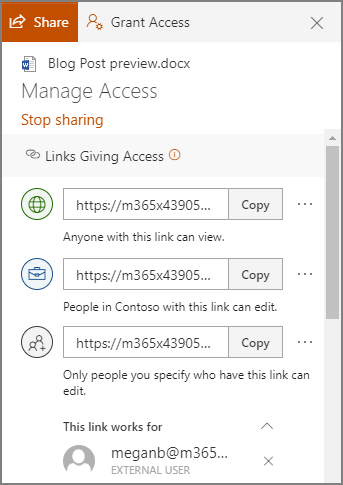
In OneDrive, a user can share a singular file or folder pretty easily. All they have to do is log in, right-click on the file/folder, and click Share.

Sharing this way allows a user to share their content with one of their contacts, send it to an email address, or copy a shareable link and send it along through an instant message or, again, and email. Doing so gives the recipient access to make edits to it by default, but the sender can restrict them to read-only access if desired.

However, you probably don’t want to micromanage your entire team to make sure they are sharing files and folders with people actually authorized to receive them. Fortunately, by using the global settings of OneDrive, you can take control past the file/folder basis to control how a user can share documents.

Controlling a User’s File Sharing in OneDrive

Assuming that you have administrative access over your OneDrive account, sign in by visiting https://admin.microsoft.com/ before proceeding with the following steps:

  •  Look for Admin centers on the left side of your display. Click SharePoint.
  • You should then be directed to the new SharePoint admin center. If you are brought to the old one, you can go to the new on by clicking on Open it now.
  • Again, on the left side of the screen, find Policies and click on Sharing.

Doing so means that you have edited the global settings, applying your changes to all accounts. To manage settings on a case-by-case basis, access Users, Active Users, and select the individual who you are attempting to manage. You should find a OneDrive tab, with adjustable Sharing options.

With privacy and security being so critical for contemporary businesses, you need to make sure you are doing everything you can to maintain control of your company’s information. Our security experts can help – reach out to us at 810.230.9455 to get started.

cloud_190879087_400.jpg

Are Cloud Servers an Option?

cloud_190879087_400.jpg

Servers are the brains of your business insofar that’s where most of the critical information is stored, and a server failure (with no contingency plan in place) could spell the end-times for your business. With that information, you should be looking for the most reliable option that works for you. Today, we’re going to look at the differences between using hosted servers vs. paying for your own in-house server. 

The Decision

It may seem pretty simple, but there really are a lot of variables to consider. How important is uptime to your business? How much capital are you willing to spend? What are you using the server for? These questions (and more) need to be addressed before you decide which way to go with your IT.

Benefits of an In-House Server

The physical server option brings with it some substantial benefits. Firstly, it gives you physical control over your infrastructure, and therefore keeps all data in one central location. It also provides a way for administrators to eliminate third-party access of server resources. Secondly, you have several networking options. It is the only time that the Internet is not necessary, as all inhouse servers can use wired or wireless networking to transmit data over internal network. For the small business, an in-house server can be the most cost effective. 

Detriments of an In-House Server

The biggest detriment of the in-house server is the upfront capital outlay. In order to have an effective IT infrastructure set up, your company will need to fork over thousands of dollars to purchase the hardware. Then, once it’s set up and working, you will need to pay to maintain it, so without a structured IT department or a managed IT service agreement, you won’t have any uptime guarantees. 

Benefits of a Cloud Server

Hosted solutions can be right for your business, but first you have to understand what exactly you are gaining. Firstly, unlike in-house servers, you don’t have to have a pile of cash dedicated to build a cloud server. Moreover, when your business grows, you won’t have to worry too much about scaling the hardware, you can just purchase all the computing that your organization requires. 

Most cloud servers come with all the support that is needed as well as full redundancy, a consideration that has to be made no matter what type of infrastructure you choose to implement.

Detriments of a Cloud Server

The main detriment of the cloud server is that, over time, it will be more expensive than in-house servers.  Another potential deal-break for some organizations is that if they\\ absolutely demand to have control over their hardware, most cloud platforms will not abide. Storage costs can also be substantial, especially for businesses that have a lot of media.

Of course, with the technology as it is today, companies can start with a reliable in-house computing structure and expand into the cloud for more productivity-fueled endeavors. One thing is for sure, to keep your business’ data safe, you need to have solid and consistent management of your servers. 

If your business needs some expert help selecting the computing construct that will help you run your business effectively, don’t hesitate to reach out the IT technicians at NuTech Services at 810.230.9455. 

backup_241210103_400.jpg

To Save Your Business from Disaster, Backup is Crucial

backup_241210103_400.jpg

Businesses generate and collect a huge amount of data – some of it, practically useless, and some, critical to your business and its operations. It is this latter group that makes it so important that you have a comprehensive backup plan ready to go.

While not all of your data may be equally valuable, data loss is a bad thing across the board. This is precisely why NuTech Services offers comprehensive data backup and disaster recovery solutions.

Backing up your data allows you to sidestep the potential catastrophes that would come with the loss of your most critical information. Here, we’ll review a few situations that could put this data at risk to demonstrate how crucial having a backup really is.

Situation: Actual Disaster Event

Just about every business on Earth could potentially be impacted by some kind of weather event. Some deal with hurricanes, some deal with high winds and tornadoes, others with earthquakes and floods… you get the picture. Unfortunately, whichever one impacts your business, there isn’t very much you can do in the moment – which is why it is important to prepare now, so you can reopen again after the fact. Many don’t prepare, and therefore, don’t reopen.

Acting proactively and maintaining a backup allows you to more quickly bounce back after disaster has struck, allowing your business a second chance.

Situation: Data Corruption or Theft

Cybersecurity is a huge topic today, as there are many, many threats out there designed to target businesses. Take ransomware, for example: all it takes for you to lose access to your files is for an employee to click on the wrong thing. Not good.

However, using a BDR (in conjunction with a comprehensive business continuity plan) to keep your files safely backed up enables you to quickly restore data from an onsite backup copy of your data, while keeping another copy offsite for redundant protections and simplified migrations. This keeps you safe from a variety of threats, including ransomware and many other forms of malware. 

Situation: The Classic Office “Whoops!” Moment

The BDR is supremely useful in that it gives you an on-demand resource to pull your data from, on demand, as it is needed. This is particularly handy if a team is collaborating on a project, and somebody accidentally deletes something absolutely critical to the project. With a backup, your progress won’t be lost to bad luck.

A BDR allows you to breathe a little easier about your files and their security. To find out about adopting one for your business, reach out to NuTech Services today. Call 810.230.9455 to get started.

support_181904564_400.jpg

Like IT or Not, You Need to Keep Up

support_181904564_400.jpg

You have to establish your organization as a contender. To do so, you’re going to need to use at least the caliber of tools that your competition is using. According to the 2020 State of IT report that Spiceworks has released, the majority of businesses with fewer than 100 employees have plans to adopt new technology solutions.

Admittedly, it can be easy to roll your eyes at statistics like these. If a method works consistently for a business, why go through the trouble of changing it? Why is it that you have to adjust how you do business, just because someone else has?

Well, there are a few reasons.

First, I want you to consider why we use computers today, rather than typewriters, or send emails and instant messages instead of carrier pigeons. It isn’t that the more traditional alternatives were inherently bad, it’s just that the technology that replaced it is better.

The technology that we all use today is still improving – becoming faster, more powerful, and more capable than what was introduced not all that long ago. 

Technology follows something called an s-curve – gradual improvement as a new method is introduced, sudden acceleration in the improvements that are made, and then it peters out as the technology reaches its limits. At this point, a new technology is presumably introduced, and the process resets.

Each time a new improvement is introduced, you have the opportunity to use a better tool than your competition does… but the same can go the other way, too. If your competition pulls too far ahead of you in its capabilities, your customer service capabilities won’t matter when compared to a service that is just better.

Using up-to-date technology solutions makes your business more efficient. When you’re dealing with a business, how long are you willing to wait to receive your promised services? 

Not only do inefficient services wear down a client’s patience, longer operations are inherently more expensive – so, in a way, you wind up spending more money to deliver a less satisfactory product or service.

Not good – but again, easily fixable with more recent solutions, like automation. Automation makes operations a lot quicker by eliminating rote processes, accomplishing this as your employees work on other things. 

Finally, you have to consider your business’ security. When so many cyberattacks are now run almost completely self-sufficiently, the protections that your business relies on will have to work far faster than any human being could.

On the other side of the coin, an increasing amount of cyberattacks are relying on human fallibility in order to take root. When phishing attacks (think the Nigerian Prince scam, but more refined and directed to your users) targeted a reported 76 percent of businesses in 2018, you need to know that you and your employees can spot them. By helping you implement the security solutions you need to protect your business on the digital side of things, and by educating your employees on how to spot threats and issues, NuTech Services can help keep your business safe and competitive.

Our team would be happy to talk to you about implementing the IT solutions your business really does need to remain competitive. We can also remotely maintain it for you, allowing you to go about your business without having to worry about it. Please, reach out to us at 810.230.9455 to learn more.

Innovation_213643261_400.jpg

How IT is Driving Innovative Developments

Innovation_213643261_400.jpg

Any healthy market economy relies on innovation. The simple act of making bright ideas even brighter helps boost economic efficiency and growth, creating a higher standard of living. Business processes are being transformed through information technology. Here, let’s look at how some of these shifts are shaping up.

Innovation Technology

Information technology systems are the foundation of the many processes that a lot of businesses rely on. These systems enable you to store data efficiently, putting it to use and interfacing with it collaboratively – but as these systems are so crucial, they must also be properly monitored and maintained.

After all, without its technology, a business that relies on said technology isn’t going to be able to accomplish much.

This has been a driving force behind innovations to technology – boosting reliability, introducing transformative tools, and advancing both business and society at large. However, since this isn’t particularly easy to put into practice, various industry thought leaders have been actively attempting to transform a variety of considerations, including:

  • Applications
  • Infrastructure architectures
  • Service delivery
  • DevOps
  • Production operations
  • Security
  • Compliance

This has effectively been accomplished by developing solutions to meet assessed needs. As a result, new solutions are being thought up to help expand IT from its role in support to actively promoting key business tasks.

Leveraging Cognitive Computing Investments

Cognitive computing is the processing of business data through a combination of machine learning, artificial intelligence, and other powerful computing resources. With these systems, patterns can be recognized, data mined, and language processed far more efficiently than without. With more information, businesses that leverage cognitive computing can see considerable benefits:

  • Enhanced business agility via quicker decision making
  • Consistent process scaling to meet operational and budgetary demands
  • Improved business performance and efficiency

Using these technologies also allows you to support various other aspects of your operations, both internally (filling out your operational structure) and externally (automating customer retention efforts). By making a business more “intelligent,” these investments can provide a competitive advantage, as well as more diverse means of generating revenues.

Smarter Security

A data breach can be catastrophic for a business – and attacks happen far too often today to be ignored. Quite a few tools have been developed to help block out these threats, as well as improve internal data security initiatives.

Of these tools, many leverage AI and machine learning to adapt a cybersecurity policy to better match the threats a business contends with. However, these systems aren’t impervious to threats, which means that business owners need to identify their potential risks, including:

  • Remote access – With the rise in remote workers and other mobility enhancements that allow data and applications to be accessed from outside the network, the connections that enable this access need to be secured.
  • IoT – The Internet of Things has seen an explosive growth in popularity, but with the unfortunate side effect of bringing insecure endpoints into your business. You need to have a strategy to minimize the risks they present.
  • Regulatory requirements – Some businesses and industries have additional rules that they must abide by passed down by the government. You must ensure you are meeting any conditions that apply to you.
  • Hackers and cybercriminals – While businesses now have access to better tools, so do hackers. This requires you to remain vigilant in your network security.

It is also important to mention that this list is far from comprehensive – there are many more threats out there to resist, avoid, and otherwise defend against. Today’s tools are the most effective way to accomplish this.

To learn more about how you can adopt technology that helps your business succeed, reach out to the IT professionals at NuTech Services.

update_216677339_400.jpg

Why Your Technology Needs Upkeep, Updates, and Upgrades

update_216677339_400.jpg

There is no question that today’s business operations require technology, but even that doesn’t tell the whole story. Not only do businesses need technology, they need to maintain this technology as well. Below, we’ll review the three basic steps to technology maintenance… and how we can help simplify these steps for you.

Upkeep is Simplified Via Network Monitoring

It is a well-established fact that, for a computer network and other IT solutions to continue working effectively, it helps to maintain them. In turn, this requires them to be monitored so that potential and developing issues can be resolved… which means that someone will have to be responsible for that monitoring.

Now, you could hire an additional employee to handle that part, but one person just isn’t going to be able to both maintain your business and see to the other considerations we’ll cover here. A better option would be to hire that employee, supplementing them with an agreement with NuTech Services. We can handle the network monitoring aspect, allowing your internal resource to help you strategize how your strategy will develop – but more on that later.

Updates are Managed Per the Managed Service Agreement

Between performance improvements and heightened security, it isn’t as though software developers stop improving the solutions they release until the official end-of-life date passes. However, while these improvements may be available, do your employees know that they are?

This could be one more thing you don’t have to worry about with NuTech Services on your side. We keep our ears open for industry news and will install updates for our managed service clients… we’ll even do so after hours, so as to not interfere with your operations. 

Upgrades are Strategically Prioritized

It isn’t uncommon for people to turn to an expert opinion for assistance in making a decision. As the IT experts around Michigan, we’ve fielded a lot of questions about improvements to existing technology. As we said before, we can help you come up with a strategy for your technology that allows you to make optimal use of it, and this strategy includes the upgrades you should make. Upgrades keep your business safer, more efficient, and as a result, help you to be more productive.
We can help you decide which upgrades you need to adopt next, referencing your current solutions and needs to inform your strategy. Then, we can handle your vendor relationships on your behalf, possibly getting you a better deal than you would have otherwise.

Reach out to us to learn more about these solutions and services, or any of the others we offer. Call 810.230.9455 today!

to-do_209072166_400.jpg

Tip of the Week: Your Cybersecurity To-Do List

to-do_209072166_400.jpg

It is a well-established and widely-known fact that your employees are some of the biggest threats to your business via the technology that they use each and every day. If your employees aren’t aware of the practices and policies that they need to follow to prevent these threats, you could find yourself in an unpleasant position. Here, we’ll review four categories of cybersecurity basics that everyone in an organization should abide by, and some tips to support each.

Preventing Phishing

Phishing has been becoming more and more of a favorite tactic by hackers, meaning that you and your employees need to look at any messages that come in via your email (or other solutions) with a critical eye. Here are some practices to help you minimize the influence of phishing on your business:

  • Watch for “Urgent” messages (or, for that matter, “URGENT!!!!!!” ones). Many phishers will try to manufacture urgency to make sure you click without taking a moment to consider it may be an attack. Resist this knee-jerk response.
  • Review in detail. Many phishing messages show distinct warning signs, such as blatant spelling or grammar errors (but this may just be the person you’re talking to as well). You can find other, more reliable signs by giving any links or the email address of the sender the “hover” test. Without clicking on anything, hover your cursor over the links and a small pop-up box will appear. This box will show you the address that really sent the email, or the link that you would actually be redirected to. Check to make sure all the details are kosher. For these reasons, it’s recommended that you don’t click on any links in emails. Instead, retype the URL into your web browser.
  • Double-check with the sender. If you have access to another means of communication with the supposed sender of an email, reach out to them using that other means to confirm that they sent it. If they didn’t, it’s a pretty safe bet that the email is fraudulent.
  • When in doubt, assume the worst. If you just aren’t sure how legitimate a given email is, don’t click around in it. Assume that it is a phishing attempt, and report it to your IT provider.

Establishing Safe Browsing Habits

Unfortunately, there are plenty of threats that reside online, and it is only too easy for a user to unwittingly allow them in. Make sure your users abide by the following policies to minimize the threats you’ll potentially need to deal with.

  • Think before you click. Similarly to links found in emails, there are plenty of opportunities online to let in a threat. Consider what you’re clicking on before you do so. (The “hover” trick works well here too… check out the bottom of the window.)
  • Reserve business computers for business purposes. Non-work-related browsing can bring users to websites that can host threats without the user realizing. Discourage your users from surfing the web, downloading content, and doing other things online unless they are work-related.
  • Moderate access. Use firewalls and content filtering to keep unwanted content off of your network, and users from accessing unwanted content, respectively.
  • Trust your IT resource. If you are even the slightest bit unsure about something, whether it’s a program you’ve been prompted to install or making sure your settings are focused on maintaining security, reach out to IT for assistance.

Enforcing Strong Passwords

It seems that everything requires a password these days, which makes it all the more important that you and your users are aware of how to keep them safe – especially in the workplace.

  • Don’t recycle passwords. Once a password has been used and replaced, it is best to not use it again – this is why you’ll often find a “you have used this password too recently” message if you attempt to use it again within a certain timeframe. This is the same reason that passwords should not be used for more than one account – if that password is compromised, you’ve just lost control of multiple accounts.
  • Avoid easily-guessed passwords. As a way to try and come up with a password that is easy to remember, many people will resort to using common elements in their password – pet names, maiden names, birthdays or anniversaries – or use a simple phrase or a string of numbers. The entire point of a password is to make it so that others are unable to access one of your accounts, so making it something that can be guessed is counter-productive.
  • Consider leveraging passphrases instead. Passphrases are not only typically more secure than a password, they also have a tendency to be more memorable. Let me ask you this… which of these two would you find more memorable, “F4njUJ29S5” or “pearquiethigh?” You can also use basic substitution to make you passphrase more secure, turning our example into “pe@rqu!e+h!gh” instead.
  • Use a password manager. One of the main reasons that people reuse passwords so often and neglect to change them is the fact that they are scared of forgetting them. A password manager can help reduce this by securely saving all of your different passwords behind one master password. 

Protecting Your Business’ Data

Finally, there are many threats out there to your business’ data – including any you have on your clients or your employees. You have a responsibility to yourself, as well as these clients and employees, to make sure that this data is as secure as possible.

  • Make sure your business’ data is backed up. There are so, so, so many ways that your business could lose its data. While it may be attacked, it could just as (if not more) easily be lost due to equipment failure, user error, weather conditions… the list goes on and on. If your on-site data is lost, you will want to make sure you have an up-to-date copy squirreled away in the cloud to reference.
  • Protect your assets with access control. You need to be concerned about both the security of your digital files, and of your actual business location. If you’re using multi/two-factor authentication to secure your online resources, or requiring identity confirmation in order to enter certain areas of the business… you need to be doing both.
  • Maintain your security solutions. The thing about security software is that it isn’t something that you can just set up and count on indefinitely. Attackers are always examining these solutions to find vulnerabilities, so it is important that you regularly update and patch the ones you use to keep them safe. Every solution you have should actually be set up with security in mind. A glaring example is your company’s wireless. Not only should that be secured with a password, it should be hidden away from outside users.
  • Keep your payment options compliant. For your sake, and the sake of your clients, you should make sure your business is compliant to whatever regulatory standards that apply to it… including the Payment Card Industry Data Security Standard (PCI DSS).

Following these guidelines is a great start to ensuring your company’s security. NuTech Services can help get you this far, and beyond. Reach out to us at 810.230.9455 to learn more about what we can do.

bug_216065370_400.jpg

Microsoft Releases Rare Bug Fix Off of Regular Patch Schedule

bug_216065370_400.jpg

Most of us like to take matters into our own hands, almost to a point where we might refer to ourselves as control freaks. So, when it comes to letting other people or even our own devices update themselves, we tend to click “remind me later” or “don’t ask me again”. Patches however, are a crucial task in the computing era. Keeping everything up-to-date aids your business in staying one step ahead of lurking threats. Recently, Microsoft announced that it had two major security updates which required emergency patches. 

The two vulnerabilities were patched off of Microsoft’s typical “patch Tuesday” due to the urgency. Most Microsoft patches are released on the second Tuesday of the month. The fact that these two were released ahead of time might seem like an insignificant occurrence, but the reality is this event is a major red flag.

Internet Explorer Zero-Day

The most significant patch was for a zero-day vulnerability that was found in Internet Explorer. It may be hard to believe, but people are indeed still using this antique browser to surf the web. The term zero-day suggests that the vulnerability that was discovered, had already been exploited by ill-minded cybercriminals. 

While not much information has been released on the event, Microsoft did call it a remote code execution exploit that, if accessed, could have given a user control of another user’s account. The attack requires phishing someone who is exploring the internet on Internet Explorer, and luring them onto a malicious website. Once there, an attacker would be able to gain access over the victim. 

Internet Explorer is such a forgotten browser that the event did not spark a lot of controversy. This is largely due to the fact that Internet Explorer makes up just two percent of the active market share. However, for the relatively small amount of users that continue to surf, an event like this is still a huge disaster. 

Microsoft Defender DOS Bug

The second patch that Microsoft expedited was a denial of service vulnerability in Microsoft Defender. The antivirus program comes standard in all Windows 10 PCs, and truly is the core of Windows 10’s sterling security record. 

The bug that was discovered wasn’t necessarily obvious, or easily exploitable. In order to do so, the attacker would need the ability to read, understand, and write code. Doing so would allow them to disable Windows Defender components, giving the attacker access. This would give them free rein to do whatever malicious act they chose to deploy. 

Patches aren’t optional. If you are worried about your business’ vulnerability, speak to one of our experts at NuTech Services. We have the know-how to keep your software up to date. Give us a call at 810.230.9455 today! 

scam_284361147_400.jpg

How Cybercriminals Can Add “Be Scammed” to Your Google Calendar

scam_284361147_400.jpg

Users seem to have a bit of a blind spot when it comes to solutions put out by Google, particularly the risks associated with Gmail. It’s almost odd to say: a security threat leverages Gmail. Unfortunately, it isn’t unheard of, as a phishing scam has been leveraging Gmail and its cooperation with Google Calendar for some time now.

Here, we’ll review the basic experiences that this scam subjects a user to as it sets the trap… and, of course, what your business can do to avoid these threats.

How Users Can Be Scammed

Put yourself in the shoes of a targeted user for a moment: just like any other day, you access your Gmail account and discover what looks like a Google Calendar invite. The invite is apparently for some kind of company-wide meeting (probably to discuss the company’s trajectory, policy changes, or something like that) to take place at the end of the workday. The message includes a link to the complete agenda, which can be accessed once a user confirms their credentials. You do so… and in doing so, fall for a scam.

This scam can be pretty safely categorized as “brilliant in its simplicity,” much like other phishing attacks can be nowadays. By using Google’s own convenience-based features, a fraudulent calendar event can be automatically added to a user’s Google Calendar, notifying the user. Fraudulent links send the user to a faked Google login page, where the user’s credentials are stolen as they attempt to log in. Alternatively, the link just begins installing malware directly to the targeted system. This scam has also proved effective against private users – informing them of some fabulous cash prize they’ve “won” through these fake Calendar entries.

How the Scam Was Uncovered

As it turns out, the details of this scam were reported to Google by an IT security firm in 2017, but Google has not made any steps to resolve it until recently.

The firm stumbled upon this discovery when a coworker’s flight itinerary appeared in an employee’s Google Calendar. From there, the researcher realized the implications of this accidental discovery, and quickly determined that users just don’t anticipate phishing attacks to come in through their Calendar application.

Can This Scam Be Stopped?

Now that Google has acknowledged the issue, a fix is currently being developed as of this writing. Until the point that a successful fix is deployed, you need to make sure your users are protected against this vulnerability.

The first thing they need to do is ensure that no Gmail events are automatically added to their Google Calendar. Under Settings in the Google Calendar application, they need to access their Event settings. From there, they need to deselect the option to Automatically add events to my calendar from their Events from Gmail.

To disable invitations to events from automatically adding themselves to the Google Calendar, a user needs to go through the same process, this time switching the Automatically add invitations option to the much safer “No, only show invitations to which I have responded.”

With any luck, this – combined with a little vigilance from your users – will protect your business from a phishing attack via its schedule. To learn more about how to protect your business against a variety of threats, subscribe to our blog, and give NuTech Services a call at 810.230.9455.

steps_244849832_400.jpg

The Truth About Compliance and Cybersecurity

steps_244849832_400.jpg

To the average person there are some definite blurred lines between IT security and IT compliance. In fact, these lines are so blurry to most people that they would consider them the same thing. They aren’t. How is it possible to create a fully compliant, completely secure computing environment? You start by understanding how to make both possible.

IT Security

Let’s start with IT security because it’s undeniably important if you want to maintain not just IT regulatory compliance, but business on your own terms. IT security, like the act of complying with regulations, is an act of risk mitigation. In the case of IT security, the risks are many and complex. You have the risk of operational issues like downtime. You have the risk of system corruption from hackers and other outside entities who are trying to break through (or in) and get access to your assets. There is also internal risk to physical systems, central computing infrastructure, and every endpoint on the network.  

In IT security, the amount of risk often dictates what kind of action is necessary, since reacting to the problems themselves isn’t a viable option. Thus, when protecting your network from threats, you will likely have to be much more comprehensive about your attention to detail as you would even under the most strictest compliance standards.

IT Compliance

Compliance also is all about minimizing risk, but to stay compliant, it’s more about focusing on following set-in-stone rules than it is about keeping systems secure. Most of the regulations that have been passed down by a government entity, third-party security framework, or customer contract have very specific requirements. This gives network administrators a punch-list of tasks that need to happen to keep their organization’s IT compliant with their various IT mandates. 

Insofar as it works to maintain digital asset security, many regulations are created to ensure that risky behavior is not introduced, while others are very specific about what data needs to be protected, and what systems need protection. In fact, some regulations barely touch the IT infrastructure, only dictating that the business purchase regulation-compliant hardware. 

Where Your Company Stands

Compliance standards typically depend on which vertical market your business does business in, or more specifically, how it uses sensitive information in the course of doing business. That doesn’t speak to your organization’s complete IT security strategy. In order to keep all of your digital (and physical) assets secure, there needs to be a dedicated plan to do it. After all, today the user is the most common breach point. 

With that truth it is important for the business that operates under the watchful eyes of a regulatory body to understand that you may be compliant, but still be at risk. It’s important that aside from meeting all the compliance standards set forth by your industry’s regulatory mandates, you need to put together a cybersecurity strategy that prioritizes the ongoing training of your endpoint operators. 

At NuTech Services, our technicians are experts in modern compliance standards and cybersecurity. Our team can work to simultaneously build an IT infrastructure, the policies to govern that infrastructure, and the endpoint monitoring and protection solution that will keep your business secure from threats, while also being compliant to any mandated regulations your business is under. Call us today at 810.230.9455 to learn more.

AI_292930626_400.jpg

How is Artificial Intelligence Changing the Face of Cybersecurity?

AI_292930626_400.jpg

If you are concerned about your business’ ability to keep its network secure and data protected, you’re not alone. More businesses than ever are utilizing modern strategies to ensure that their networks are safe, their hardware is stable, and that their data stays secure. With the continual shifts we are seeing in the threat landscape it is essential that cybersecurity continues to evolve. Today, we take a look at some of the innovations being made in cybersecurity, and what to expect out of future cybersecurity tools.

Some of the best cybersecurity methods are practices developed over the past few years. This is because social engineering, specifically phishing, has become a major problem. There are billions of phishing emails sent each year, and some of those are so convincing that even people who have had some basic cybersecurity training fall victim to them. To fight this, security firms have started to look to tomorrow’s technologies to help them mitigate risk today. 

Artificial Intelligence – The Future of Cybersecurity 

One of the most effective ways of combating this rise in hacking is to use the most dynamic technology you have access to and make a tool that will help you mitigate the massive risks. One way is to reduce the effectiveness of these hacks. In this case the technology is artificial intelligence.

When we talk about artificial intelligence, we are talking about having a machine that learns as it is continually exposed to threats. This will work to solve common issues at first, but as these systems advance, and are exposed to user behaviors, they will be able to replace access management systems. Since the AI will be constantly monitoring systems, as well as user behaviors, workplace roles, and common actions, it will be able to recognize a person without, the need for password-protected accounts and creating ubiquitously secure endpoints. If the system recognized any deviations, an additional form of authentication such as biometrics would grant or deny access. 

Cost will initially be a factor for businesses, especially small and medium-sized businesses, but as large companies begin to truly trust these platforms, they will have viable endpoint-protection systems for small businesses. 

Cybercrime Accelerates with 5G

5G and beyond will bring a lot of changes to the user experience, of course, but it will also make huge changes to cybersecurity. Before long, the AI systems that are being developed to thwart today’s cyberthreats will become essential systems for the sustainability of mobile computing. Just think about how much cyberthreats have multiplied over the past decade after the jump from 3G to 4G. The jump to 5G isn’t going to any less dramatic.

It will be crucial for cybersecurity professionals to be able to leverage systems that are both ubiquitously available to search through large streams of data while also being capable of learning on the fly in order to ascertain what data is potentially malicious and what data is less so.

Luckily there are still years before these types of systems will be needed. Unfortunately, there are enough threats out there to be a major problem going forward. The IT professionals at NuTech Services can help you protect your hardware and data. Give us a call at 810.230.9455 today!