cloudsolutions_400.jpg

Cloud Services Can Help You Build a Better Business

cloudsolutions_400.jpg

Cloud computing is a major part of most businesses today. In the past, businesses had to pay in-house technicians to research, design, and purchase the infrastructure needed to run an onsite server. This was expensive, especially if a business wasn’t able to get the solution they needed the first time around. Cloud computing has changed things to the point where the costs associated with implementing these solutions has decreased considerably, all while solving the problem and improving operations. We’ll help you take a look at cloud computing as a way to change up and improve the way your business functions.

Uses for the Cloud

No matter what your business needs, there is likely a cloud solution for it. Hosted VoIP and email are great communication tools. Infrastructure and Platform as a Service solutions empower organizations to leverage more flexible computing power. Software as a Service and hosted storage are available for all of your organization’s needs.

In the end, you can get just as much done with cloud infrastructure as you can with onsite hardware.

The cloud allows for functionality and redundancy, no matter what the industry is or the kind of workforce it contains. These services can be utilized as needed and deployed quickly.

The Drawbacks

Cloud computing isn’t perfect. Businesses can create a private cloud system that can create large costs for their bottom line while also maintaining the control, management, and accessibility… but again, a lot of thought needs to be invested into this kind of solution. Environments that are hosted outside of a service provider can be difficult to control, since your organization doesn’t have control over the hardware it’s hosted on.

A major drawback of cloud computing can actually be the cost. Since the IT infrastructure used to run the solutions is managed by the service provider, the price is adjusted accordingly. If your business needs a certain number of cloud licenses, you could see the cost of your solution rise. Plus, if you don’t cancel accounts when employees leave, you could be paying more for services that aren’t being utilized.

Furthermore, imagine if your organization has teams assembled that need to use three or four cloud-based applications to complete a project. Think about all of the money that’s spent just providing access to the appropriate software solutions. If it’s not properly managed, your return on investment could be put in jeopardy.

NuTech Services can help you keep track of your cloud-based resources, whether you’re just hitting the cloud environment, or you have an established presence in the cloud. To learn more about how we can help you manage cloud applications, reach out to us at 810.230.9455.

245500388_phishing_400.jpg

Taking an Exploratory Stab at Spear Phishing

245500388_phishing_400.jpg

Chances are, you’ve heard of “phishing” – a cybercriminal’s scam that steals data, access credentials, and other sensitive information by fooling a user into thinking they are providing this information to someone who is supposed to have access to it. However, there are a few different kinds of phishing, based on how it is carried out. Here, we’ll discuss the realities of spear phishing, and the risks it poses to your business.

What Makes Spear Phishing Different?

As a rule, spear phishing is a much more precise and personalized process. To keep to the “fishing” analogy, a generalized phishing campaign casts a wide net, trying to snare as many victims as possible with their scam. Utilizing vague and generic language, the ‘typical’ phishing attack is made to appear to come from a large organization, informing the user of some need for the user to take action, resulting in the hacker gaining access to the user’s information. This methodology makes the typical phishing attack fairly effective against many people, while simultaneously easier to spot if one knows the warning signs.

By comparison, spear phishing is far more precise. Instead of trying to find value in the quantity of targets snared in a trap, spear phishing takes the opposite tack. Using a highly targeted approach, spear phishing attacks are directed toward a specific individual within an organization.

This specified approach means that the generic messages that many phishing attempts leverage simply won’t be enough to fool the intended target. Instead, the hacker has to play investigator, seeking out as much information as they can about their intended target. Where do they work? What is their position in the company? Who do they frequently communicate with? Once the hacker has collected enough information to create a convincing message, they will typically spoof an email to their target. This email will usually contain some reference to a known contact or some in-progress project to make it more convincing and will request that the recipient download a file via a provided link.

However, while the link will direct to what appears to be a Google Drive or Dropbox login page, it is just another layer to the deception. Entering credentials into this page will give them right to the hacker for their use, breaching the user’s security and putting the entire business at risk in one fell swoop.

What Methods Do Spear Phishers Use?

Due to how spear phishing works, the messages sent by hackers need to be as convincing as possible. Combining extensive research with some practical psychology, a hacker has more ammunition to power their attacks.

As mentioned above, spear phishing is far less generic than the average phishing attempt. By referencing specific people, things, and events that mean something to the target, or appearing to come from an internal authority (a manager, perhaps, or even the CEO), the hacker can create a message that is less likely to be questioned. If the hacker writes their messages without any spelling or grammatical errors, as many spear phishers do, it only becomes more convincing.

These hackers are so reliant upon their target being fooled; many will purchase domains that strongly resemble an official one. For instance, let’s say you owned the domain website-dot-com. If a hacker decided to pose as you to launch a spear phishing attack, they might purchase the domain vvebsite-dot-com. Without close inspection, the switch may not be noticed – especially if the hacker creates a good enough lookalike website.

Am I A Target?

Of course, the research that a hacker has to do to successfully pull off a spear phishing attack is extensive – not only do they have to identify their target, they also have to figure out the best way to scam this target. Generally speaking, a hacker seeking to leverage spear phishing will focus their efforts on anyone in an organization who could potentially access the information that the hacker wants but isn’t high up enough in the organization to question an assignment from above.

Or, in more certain terms, a business’ end users.

In order to minimize the chances that a spear phishing attack will be successful against your company, you need to make sure that everyone subscribes to a few best practices. For example:

  • Pay attention to the finer details of an email. Is the message actually from christine@contactcompany.com, or does the email address actually read kristine@companycontact.com? Did Christine/Kristine include any attachments? As these can be used to spread malware via email, you should avoid clicking on them unless you are certain the message is legitimate.
  • Is the message written to sound overly urgent? Many phishing messages, especially spear phishing messages, will try to push an action by making it seem as though inaction will lead to a critical issue. Another warning sign to look out for: any deviation from standard operating procedures. Don’t be afraid to question a sudden switch from Google Drive to Dropbox – it may just be the question that stops a spear phishing attack.
  • Speaking of questioning things, don’t hesitate to make sure that any messages you suspect may be spear phishing aren’t actually legitimate through some other means of communication. A quick phone call to the alleged sender will be well worth avoiding a data breach.

While spear phishing is a considerable threat to your business, it is far from the only thing you need to worry about. NuTech Services can help your business secure its IT solutions and optimize them for your use. To learn more, subscribe to our blog, and give us a call at 810.230.9455.

260522932_proactive_400.jpg

Tip of the Week: Proactive Maintenance Keeps Tech Running Smoothly

260522932_proactive_400.jpg

Whether they are expected or not, there will always be situations when your business incurs some damage or loss due to natural disasters, downtime, or other issues. You might find that a little preparation could have kept some of the disaster at bay, and it could honestly save you a ton in terms of lost time and resources. In fact, it could save your organization from the brink of disaster.

The Word is Proactive

When something bad happens, you might look back to see what you could have done to prevent the issue from happening in the first place. The word to remember here is “proactive.” Being proactive requires risk assessment, which demands that you analyze the greatest possible threat to your continued existence and prepare for it. In the event that your business’ IT is unable to function as intended, your business would stop functioning. All it takes is a single component failing to leave your employees unable to do their jobs. This is why you need to be as proactive as possible–to ensure that you have plans in place for when your systems inevitably fail.

Proactive IT Maintenance

For the past decade, proactive IT maintenance has been making strides in the office environment. When one of the most important parts of running a business–your IT infrastructure–no longer works as intended, you lose out on profits and shell out for repairs more often. Furthermore, downtime can be a major cost that your business suffers from due to technology malfunctions. If you can keep your hardware operating properly, your network safe from threats, and your business productive, you can eliminate potential problems before they have time to escalate into the expensive kind.

NuTech Services’s proactive IT services provide your business with monitoring and management software. With our expert technicians behind these tools, you can rest easy knowing that we are monitoring each and every critical component of your technology for any telling inefficiencies. This gives you the opportunity to address them before downtime occurs.

Patch Management

Security troubles such as software vulnerabilities can also lead to problems for your business. If you can’t rely on your software tools to get the job done without issue, then you’re doing yourself a disservice. Furthermore, you will need the latest threat definitions and software patches to keep your solutions secure from threats that could derail productivity. A major part of our proactive maintenance platform is deploying patches as they are released, eliminating the chances of known vulnerabilities affecting operations.

For more information on how your organization can be more proactive with its IT maintenance, give NuTech Services a call at 810.230.9455.

efficiency_400.jpg

Efficiency Is More Likely to Produce Business Success

efficiency_400.jpg

Business can be tricky, especially if you’re good at it. It’s important to know when to be comfortable with your position without starting to feel complacent. If you fall into this trap, you’ll be running the risk of hindering your organization’s growth, potentially blocking any future successes.

Operations change over time. It’s likely that your business’ operations don’t even remotely resemble what they were in previous years. For example, mobile technology first became more popular for computing around the year 2013, and “unified communications” was a hot commodity in the business world. Nowadays, productivity and collaboration solutions using mobile devices are some of the most basic solutions out there.

Many organizations fall into the trap of believing their past successes guarantee their future, but this isn’t necessarily the case. The reverse could be true. Here are some questions to ask if you suspect that your organization could be falling into complacency:

  • Are any potential changes or growth opportunities avoided or rebuffed through the use of highly selective facts?
  • Do conversations amongst your team skirt around topics like new markets, possible competition, or other developing business opportunities?
  • Are failures used to postpone new attempts instead of as learning moments?
  • Do meetings frequently end in a holding pattern?

Any of the above questions indicate whether or not a business has gotten too comfortable, preventing them from making sound decisions. Thankfully, once you’ve identified this complacency, it becomes easy to resolve it. Try asking these questions about your business, its policies, and its culture:

  • Is there any way that your processes could be made more efficient?
  • Does your business plan reflect the goals that your business is currently striving for?
  • Is your service offering a good fit for your current audience? What needs will they have in the near future?
  • Are there any technologies that could soon cause a disruption in your market, or could be used as an invaluable tool?
  • How engaged are your employees?

Answering these questions will give you all the ammunition you need to put together a solid understanding of what your business needs to do on both a local and industrial level. Of course, this can be challenging as well, as you might encounter issues that need to be resolved before you can make progress as a business.

NuTech Services can help your business implement IT solutions designed to keep your business running efficiently while still maintaining the status quo. To learn more, reach out to us at 810.230.9455.

BusinessTech_400.jpg

Small and Medium-Sized Businesses are Using Enterprise Technology

BusinessTech_400.jpg

Compared to an enterprise corporation, a small-to-medium-sized business is going to have far fewer resources, especially in terms of its IT. Having said this, an SMB isn’t necessarily without a few quality options. Let’s review the needs that any business needs to have filled, and how they can do so with the right solutions.

Need #1: Security

In order to be successful, a business needs to have the security necessary to protect its resources. The first step to accomplishing that, is to identify any weaknesses in its infrastructure through a preliminary IT evaluation known as an IT risk assessment. This assessment can reveal where a business is the most vulnerable. At that point, these flaws can be mitigated using tools like firewalls, antivirus, and multi-factor authentication – tools that either SMBs or enterprises can (and do) use.

With SMBs increasing their use of cloud services, a large portion of this process should be fulfilled by the cloud provider. However, the business leveraging the cloud provider needs to make sure that the provider they have selected is able to uphold what they have promised as part of their service-level agreement. If this is the case, the SMB could find themselves in the position to leverage enterprise-caliber security solutions, for a cost that fits their budget.

Need #2: Data Storage

While their budgets put enterprise businesses in a much more favorable position to create an infrastructure that can contend with their operational needs, this is not to say that SMBs are left without any options. Any good data storage solution will perform well based on a few benchmarks: how well it works, how often it works, how easily it can be accessed, and how easily its contents can be searched.

The enterprise business has quite a few options to leverage, such as data tiering (where data of differing importance is stored on different servers) and higher-performing data storage solutions. If this is starting to sound expensive, it is – but again, thanks to the cloud, SMBs aren’t left without options, either. With scalable Infrastructure-as-a-Service and Platform-as-a-Service being available for a much more affordable rate, SMBs are able to leverage the advanced tools that would otherwise only be available to corporate-level businesses.

Interested in leveraging some of these capabilities in your business, or want to find out more? Reach out to the professionals at NuTech Services! We have the experience necessary to bring your information technology to the corporate level. Reach out to us at 810.230.9455 to learn more.

92760244_video_400.jpg

Tip of the Week: How to Set your Default Video App in Windows 10

92760244_video_400.jpg

Windows 10 is a great operating system, but it changes up the formula a bit in regard to default applications for certain types of files. Anyone who has been using a computer for any amount of time has their preferred applications for watching videos or listening to music. We’ll show you how to set your default video playback application, as well as how to change certain settings for just about any purpose.

As with any applications on your device, you’ll have a variety of first and third-party applications that can be set as your default apps. Here are the steps to make this happen:

  • Click the Windows icon at the bottom left-hand side of the taskbar.
  • Click on the gear icon to open up your Settings.
  • Select Apps.
  • In the left-hand column, click on Default Apps.
  • In the right-hand side of the Default Apps screen, you can see the various types of files that will be opened by specific apps.

Changing your default video playback settings is also easy to do. From the Video playback option in the Apps section, you can enable streaming content at high dynamic range quality, process video for more enhanced quality, play back video in either a high or low resolution based on preference, and change how video is played based on battery life. You can pick from prioritizing video quality or battery life–whichever you prefer.

Before making any changes to your computer, we recommend speaking with the technology professionals at NuTech Services. This prevents you from making any changes to hardware or software settings that could cause frustrations for you and your staff. To learn more about the services we provide, reach out to us at 810.230.9455.

195538022_cables_400.jpg

Know Your Cables

195538022_cables_400.jpg

One thing that all offices gradually accumulate over time is a surplus of cables. Each device you have is compatible with a specific cable, but identifying them all can be challenging. In today’s blog article, we’ll outline some of the common cable types and what you might need them for.

USB Cable Types

The Universal Serial Bus cable connection is perhaps the most common. Its accessories and peripherals utilize the USB port, which is seen on most devices. However, there are many different types of USB technology, each of which are supported by various connections.

Type A connections support USB 1.0, 2.0, 3.0, and 3.1, with transmit speeds ranging from 1.5 MB/s to 1.25 GB/s. These connections are the most common ones found on at least one end of every USB cable.

Type B connections also support USB 1.0, 2.0, 3.0, and 3.1. These were once used for connecting a printer or similar device to a computer, but they are being slowly phased out.

Mini and Micro both support USB 2.0, with mini USB connections being used for some older devices. Those that don’t use mini USB connections have been replaced by Micro-USB, and even those are being phased out for Type C connections.

Type C connections, also sometimes referred to as USB-C, support USB 3.1, 3.2, and the upcoming USB 4 standard.

It’s likely that the future of USB technology is USB-C taking over, mainly due to the connection type and its backwards-compatibility, enabling much faster data transfers.

Display Cables

VGA Cables

The Video Graphics Array cable is less popular these days due to its analog video signal being replaced by digital. Even so, there is likely to be a VGA port on your video card or display.

DVI Cables

VGA cables were phased out during the turn of the century and replaced by Digital Visual Interface cables. DVI is known for having many different types, all of which have their own capabilities, but they have been replaced by modern display cable types at this point.

DisplayPort Cables

DisplayPort cables were introduced with the intention of replacing both VGA and DVI cables, as they are capable of transmitting both video and audio signals. There are many different kinds of DisplayPort out there, but the important thing to note is that they are compatible with each other. DisplayPort can also be used in conjunction with HDMI and USB if there is an adapter used. These days, DisplayPort is used to attach a monitor to another device.

HDMI Cables

High-Definition Multimedia Interface cables are used to send modern standard digital signals. Five different types of HDMI exist today, but it’s most likely that you’re familiar with Type A. You may have also seen Type C for digital cameras, or Type D for mobile devices.

Networking Cables

SATA

Serial Advanced Technology Attachment cables create a connection between a computer’s motherboard and a storage device. These offer quick data transfer speeds compared to their predecessors, the Integrated Drive Electronics cable.

eSATA

eSATA cables are basically the same as SATA cables, only for external devices rather than internal components. These connections aren’t as common anymore, as USB technology has grown so quickly that it has eclipsed their speed.

Ethernet

A local area network takes advantage of ethernet cables. These cables are those that connect to your modem, router, and computer. They are easy to distinguish from other cables, as they look quite similar to telephone cables from way back when.

We hope that we have cleared up the difference between some of the everyday cables, but honestly, managing them can be a pain. NuTech Services can help your business make heads and tails of the various cables your organization might need to manage. To learn more about what we can do for your business, reach out to us at 810.230.9455.

199393098_rights_400.jpg

What Does Internet Rights Advocacy Mean?

199393098_rights_400.jpg

The Internet is a vast and amazing place. Some have even argued that it is one of people’s best-ever inventions. Some would push it further by actively attempting to outline what rights an Internet user has. Advocacy groups have been popping up, and while it has had a marked effect on public policy in more progressive nations, some nations look on these groups with disdain. Today we will take you through human rights advocacy on the Internet, and what to expect going forward.

Initially, the advocacy of Internet Rights was just that: the right to have access to the Internet. While this isn’t a problem for as many people as it once was, some places still don’t have fair, affordable access to high-speed Internet service. Some nations, despite providing access, have Internet laws that subdue use due to an overlaying censorship. This issue, and the monetization of collected consumer data, are two of the hot-button issues today for Internet Rights advocates.

Lead Up

The Internet is a relatively new technology, especially in the manner it is being used by people today. As a result, there are different views on how these technologies are disseminated, who profits from them, and how non-controlling entities have their rights repressed. As a result, you’ll find from the early days of Internet rights advocacy, the largest voices were from organizations that found the equitable portion of the Internet either unnecessary or repressive to the rights of consumers.

Notice that the access to the Internet was not even on the roadmap. The nature of the early commercial Internet was such that it could be successfully described as libertarian. Through the end of the 1990s, as the first round of dot com investments started to tank, it became obvious that the technology would end up bigger than anyone had anticipated and needed regulation.

In the U.S. many fights have been undertaken in the subsequent 20 years. Many of which were pushed by Internet rights advocates. One of the most famous is:

Reno v. American Civil Liberties Union (1997)

In an attempt to clean up what some people considered indecent content on the Internet (pornography and the like); and more accurately, to keep kids away from this content, Congress passed the Communications Decency Act. The ALCU, which is a well-known civil rights advocate group, filed suit. The provision was eliminated by two federal judges before being heard in front of the Supreme Court, which upheld the lower courts’ rulings. This was a major blow against censorship; paving the way for free expression on the Internet.

While the ALCU isn’t exactly an Internet Rights Advocate, the landmark case ushered in a new world of free speech on the Internet; and, it sets the tone for Internet rights advocates to this day.

Personal Privacy

Today there are many organizations looking to protect people on the Internet. Sometimes their views overlap, sometimes they don’t. One of these groups, the Electronic Frontier Foundation (EFF), is a major player in the fight to keep speech (and content) free from censorship on the Internet, the fight against the surveillance state, and most notably, the ongoing fight for individual privacy.

Businesses of all kinds, as well as government agencies have grown to take significant liberties with people’s personal information. Organizations like the ALCU and the EEF work tirelessly to get the topic of personal data privacy in front of decision makers.

Have you ever wondered how you just had a conversation with your friend via some type of app about fingerless gloves and now your sidebar on every website is now filled with fingerless glove ads? Most users don’t fully understand that organizations that you interact with online keep a profile on you. All of your actions, any personal or financial information that you share, and more is stored in a file that is often packaged and sold off by those organizations to advertising firms.

These advocates, among the other issues they stand up for, are trying to push the issue of personal data privacy. The main point of contention is that companies profit off of the information people provide, and since this information is very clearly personal in nature, it is their belief that individuals are being taken advantage of. This debate has been ratcheted up significantly with the European Union’s General Data Protection Regulation (GDPR) that intends to protect individual information.

While it might be a matter of time before the U.S. gets a data privacy law in the same vein as the GDPR, Internet rights advocates will continue to act in the public’s favor on this issue, and many others.

Net Neutrality & Access to All

One of the biggest fights that Internet rights advocates are undertaking is against the companies that deliver the Internet itself: The Internet service providers (ISP). For those of you who don’t know, over the past several years the U.S. Government created mandates that forced ISPs to provide access to applications and content without favoring any, even if they are the ones that use the most bandwidth.

The theory is that the typical Internet user only does so much on the web. They typically access the same sites and use their Internet connection for the same things. This creates a situation where ISPs, using market adjustments would want to get more money per byte than if users used a variety of sites to do the same. With federal control, they were forced into charging a flat rate.

The net neutrality laws that were instituted in 2015 were repealed in 2017, as controlling bureaucrats argued that there were enough people without fair access to the Internet and the only way to persuade the ISPs to commit to investing in infrastructure that would curb this problem is by repealing the net neutrality laws. Needless to say, this caused quite a stir.

Internet rights advocates were quick to point out investment in Infrastructure is in these ISP’s best interest and giving them the ability to slow down Internet speeds as they see fit is not good for consumers. Unfortunately for most Americans, these ISPs are the companies you have to get your Internet service from if you want speeds that allow you to use it the way you want. Advocates are still trying to do what they can to educate people about the benefits of net neutrality and have set up websites with information and for people to give their support. Organizations like the aforementioned ACLU and EFF,  the American Library Association, and Fight for the Future, Demand Progress, and Free Press Action currently sponsor www.battleforthenet.com, a one-stop site for all things net neutrality.

Advocacy can go a long way toward giving a voice to people who may not think they have one. What Internet-related topics do you find to be problematic? Leave your thoughts in the comments and subscribe to our blog.


201295262_byod_mobile_400.jpg

What You Need to Consider About BYOD

201295262_byod_mobile_400.jpg

One of the biggest buzzwords in business these days is BYOD – Bring Your Own Device – and for good reason. There are plenty of operational benefits that an organization can enjoy by adopting a BYOD policy; but, BYOD isn’t an inherently perfect solution, which means that businesses that leverage it need to do so mindfully.

To begin, let’s briefly review the basic principles of BYOD practices. In essence, rather than providing each employee with a company-supplied device, an employee is allowed to bring in a device that they own and leverage it for work purposes.

Why BYOD Has Become Popular in Workplaces

On the surface, BYOD seems to be the perfect solution – there are even statistics that help to support this position. For instance, companies who embrace BYOD practices save around $350 each year, per employee. Furthermore, using portable devices for work (much like what would be used as part of a Bring Your Own Device practice) has been shown to save employees approximately an hour each day, increasing their productivity by about a third.

This is just the tip of the BYOD-benefits iceberg. There are much more, including:

Access to Better Technology

If you were to list any business’ technology priorities, security and productivity should top the list… but oftentimes, frugality wins the day. Budgetary restrictions and a preference for tried-and-tested solutions frequently means that investments into more recent solutions are often pushed by the wayside. After all, what if the expensive new technology doesn’t work properly? This is frequently why businesses find themselves making due with solutions that really should be replaced. On the other hand, employees likely have no such qualms when they purchase their own devices.

BYOD policies allow a business’ employees to replace their outdated solutions with the reliability of newer, more up-to-date devices… leading to happier, more productive employees.

Reduced Financial Toll on the Business

Like we mentioned, it is fairly common for budgetary concerns to be the driving factor of many business decisions. It isn’t that the company doesn’t want to replace the aging workstations scattered around the office… it just isn’t in the budget. Before Bring Your Own Device emerged, businesses were stuck in a few different money pits. Between providing their employees with devices, maintaining and replacing these devices when they went faulty, and all the other expenses that come from keeping up an IT infrastructure, employers were stuck with a hefty bill.

Nowadays, with many people investing in their own devices and their accessibility, these expenses can largely evaporate. The employer’s investment can be effectively limited to securing access to these devices, allowing funds to be spent on other meaningful initiatives.

Employee Satisfaction

We’ve all experienced the struggle of trying to do work on equipment that just isn’t equipped for what we are trying to do. It can feel like trying to play Yahtzee with loaded dice – it just isn’t going to work, no matter how much effort is put forth. This is the other side of the example that preceded this one. If the aging workstations scattered around the office aren’t replaced due to budgetary concerns, some employees are going to be stuck using them… and they aren’t going to be happy.

As we alluded to as we described the effects that access to improved solutions can bring, an employee who isn’t being hamstrung by their technology is simply going to be more productive and happier with their working situation.

Clearly, BYOD isn’t something that should be dismissed without at least some consideration, but that isn’t to say that it is a perfect solution. There are also potential issues that need to be addressed as a BYOD policy is considered.

The Potential Issues of BYOD

Distractions

For every productivity application available on the Google Play Store, there is at least one application that is decidedly unproductive… at least, in terms of your business and its operations. While you could take steps to prevent these kinds of applications from appearing on devices that you provide, there isn’t much you can do about your employees downloading whatever they want onto their own.

Loss of Control

This is a big issue for businesses, as there are a multitude of ways that their losing control over the devices on their network could impact them. The policies that once prevented vulnerabilities from being leveraged can’t just be installed on an employee’s device without their consent, which many employees may be hesitant to give. This problem becomes even larger if an employee is fired or quits – what happens to the data on their device? How can a company be sure that a current employee isn’t putting sensitive company data at risk? What if the device is lost?

Compliance Shortcomings

Finally, you have to consider how your BYOD implementation will interact with any other compliances or requirements that your business is beholden to. In the past, a shockingly low number of IT leaders and professionals were confident that their BYOD policies met the standards placed by a variety of requirements, including HIPAA and Dodd-Frank.

How Can I Leverage BYOD Securely?

Fortunately, there are a few means of adopting a BYOD approach within your business while mitigating the concerns described above. The simplest way is to simply enforce a use policy, outlining the guidelines that your employees must follow if they wish to use their personal devices for work purposes.

NuTech Services can help you to create and enforce these guidelines, as well as optimize your use of your IT in many other ways. To learn more, reach out to our team by calling 810.230.9455.

234259279_cloud_400.jpg

Determining Your Organization’s Cloud Needs

234259279_cloud_400.jpg

The cloud is one of the most valuable tools available to modern businesses, but the extent to which organizations utilize it will vary depending on their specific needs. For example, some organizations might be fine with the limited control offered by the public cloud, but others might need more dynamic features and control over their data with a private cloud. We’ll help you determine which is right for you, as well as some of the specific considerations needed for a private cloud solution.

Public vs Private

The public cloud is typically used by businesses that don’t have the infrastructure, or the budget to acquire said infrastructure, for hosting cloud-based applications or services. Public cloud solutions are those which are hosted by the provider and accessed remotely through an Internet browser, mobile client, and associated account. They are particularly valuable for businesses that don’t have the means to reliably host their own solutions.

On the other hand, a private cloud solution is used by small businesses that have a means of affording and maintaining the solution. This means administering maintenance to the software and hardware associated with the system, as well as monitoring it for security purposes. Basically, when you go with a private cloud solution, it’s much more involved than a simple public cloud system, so you should be prepared to deal with plenty of issues that wouldn’t be an issue if the solution was hosted elsewhere.

What to Consider

When considering the implementation of a private cloud infrastructure, be sure to consider the following:

  • Security: You’ll have more control over your solution if you host it privately onsite, but you’ll also need to adequately protect it.
  • Access: Will employees have access to your organization’s cloud solution while out of the office? Hint: They better, otherwise there isn’t a reason to have a cloud. Since your cloud-based applications are stored on your in-house infrastructure, you’ll need to make sure accounts are set up properly and protected.
  • Management: Managing a cloud solution is no joke, and since you’re hosting it on your own private server, it comes with all the annoyances and benefits. You can customize your cloud solution to suit your needs, so be sure to understand what you need beforehand so you can leverage it to the best of your ability.
  • Maintenance: Taking care of a cloud solution is also a major responsibility, so expect any in-house IT technicians to have a lot more on their plate than they already do.

NuTech Services can help you mitigate the issues of a private cloud infrastructure by hosting your private cloud on our own servers, thereby removing the burden it places on your organization. To learn more about this cloud strategy, reach out to us at 810.230.9455.

222078067_vr_400.jpg

Virtual Reality has a Limitless Future

222078067_vr_400.jpg

Virtual reality, or VR, is a technology that not many people understand how to make the most of. Most people’s experiences with VR is something that is achieved through a third-party application, be it a smartphone or a full-fledged headset. Most of those who experience VR do so without a first-person perspective, with only 16 percent of about 3,000 people polled by Statistica ever actually trying out a “real” VR headset. We’ll give you an idea of what modern VR technology looks like, as well as what the future holds for this technology.

Modern VR Systems

After nearly 30 years of development, VR has been adopted by a miniscule number of companies. It has, for the most part, made the biggest difference in the entertainment industry, where Samsung and Google have a lot of influence. Sony has also established itself as a major player in the VR gaming industry with its Playstation 4. In terms of business, however, these options aren’t necessarily feasible of beneficial.

Two of the most competitive options in the commercial virtual reality space are the HTC Vive (and Vive Pro) and the Oculus Rift. Oculus is owned by Facebook and has led in VR sales, while the HTC Vive and Vive Pro provides a platform for high-end computing systems that are capable of using VR. These two systems work together to provide high-end VR experiences, even if it’s mostly for gaming.

These VR options give users the ability to bring themselves into a virtual world, thus providing developers with great opportunities to build out software to capitalize on it. The applications built in VR give users the opportunity to explore the earth and space in a way that can immerse them in a simulated reality.

The Immediate Future of VR

The future of VR is leaning more in the direction of reality; unlike great journeys or expeditions to places like the moon or the bottom of the sea, VR will be used to create educational resources and training software.

Some manufacturers have already begun to anticipate this shift, using services like Microsoft’s Mixed Reality (MR) devices with hopes of business integration in 2020 a possibility. While not true virtual reality, this platform integrates virtual elements into reality, providing business professionals with great new options to achieve their goals. It’s safe to say that businesses will find some use for these virtual sandboxes to either improve performance or work out daring new ways to accomplish tasks.

What are your thoughts on VR? Let us know in the comments and be sure to subscribe to our blog.

242775017_key_400.jpg

Tip of the Week: Your Phone Can Work as Your Security Key

242775017_key_400.jpg

If you’re like most people nowadays, your mobile phone is currently well within your reach (and that’s assuming you aren’t reading this blog on it). The fact that most people keep their phone on them at all times has greatly contributed to these devices becoming a part of any given work-related process. One major way is the implementation of two-factor authentication, which we’ll discuss as a part of this week’s tip.

As we begin, it is important that we acknowledge that the Android operating system has been granted FIDO2 certification. In other words, the FIDO (Fast IDentity Online) Alliance has given the Android OS their seal of approval in regard to the authentication standards that the Alliance has set.

What Does This Mean?

In very simple terms, any Android device running 7.0 or higher with the latest Google Chrome update installed can be used as part of a two-factor authentication strategy – more specifically, as a security key. This includes the support that FIDO2 offers for onboard fingerprint scanners as a means of identity authentication. Currently, this authentication standard is only supported by Android, with no indication of Apple devices incorporating it.

In no uncertain terms, this all means that passwords may soon be phased out.

Abandoning Passwords

Passwords have been the standardized form of authenticating one’s identity for quite some time, despite the potential issues that are present with them. How often have we seen just how many ways a determined cybercriminal has to obtain a password? Between insecure databases filled with credentials and unfortunately successful phishing schemes, millions of accounts have been exposed – and that isn’t even taking all the times an insecure password was guessed into account.

The biggest weakness that any password has is the fact that it can be shared at all, that someone other than the owner can use it. Over any other reason, this is why FIDO2 is likely to become as popular as it is expected to be. When was the last time you successfully shared a thumbprint with someone, after all? Furthermore, FIDO2 keeps all of the information that is pulled from its biometrics onboard the device, keeping it safe from being stolen on the Internet.

As an added bonus, FIDO2 won’t allow the user to input their fingerprint’s biometric data into websites that don’t have sufficient security measures in place.

How to Use Your Android Device as a FIDO2 Security Key

In order to leverage your Android device as a security key, you need to make sure that it meets a few benchmarks. First and foremost, you’ll need to be running at least Android 7.0, with the latest version of Chrome installed. You will also need to have Bluetooth activated, and a Google account with two-step verification enabled.

This is somewhat simple to do. Logging into your Google account, access the Security section. Here, you’ll find the option to activate 2-Step Verification. After a short process, your smartphone will work as a security key.

Authenticating Google Sign-Ins with Your Phone

As long as you have enabled both Bluetooth and Location on your mobile device, any Google service you try to access will prompt you to confirm the sign-in attempt via your phone. This process is exceptionally simple – all you have to do is press Yes on your phone and wait. Once you’ve done so, you can confidently access your Google account, securely. As more developers adopt FIDO2, this enhanced security will only appear more often.

What do you think of this new authentication method? Share your impressions in the comments! While you’re there, let us know if there are any other tips you’d like us to cover!

253607738_reputation_400.jpg

How to Mitigate Unhappy Online Opinions

253607738_reputation_400.jpg

As nice as it would be to always please everybody with your business services, it just isn’t going to happen. Sooner or later, you’re going to encounter someone who isn’t pleased, and they’re going to have the capability to do some damage to your reputation. Fortunately, there is a way you can mitigate this damage.

The first thing you need to remember is that, while your unhappy customer or client may not be correct, they are always right. What does this mean? Simple – even if they misinterpreted what they were entitled to through your services, you have the obligation to make them happy. This is not to say that you kowtow to every demand a customer makes, regardless of how ludicrous it is… you just need to make sure they stay happy.

How can you do this? It all boils down to communication.

How to Communicate With an Unhappy Client

Chances are, you’re going to find out that a client was unhappy by reading a review that they leave somewhere online – perhaps on Facebook, or on Google, or on a third-party review website. What they will have to say may upset you. That’s fine. Nobody likes to hear that there is something wrong with one of their endeavors. You have every right to be a little upset – just don’t let that upset seep into your conversation with your unhappy client.

After all, in their eyes, they have every right to be upset as well.

Therefore, once you’ve regained a cooler composure, you need to respond directly and politely to the negative review. While this initial interaction should be public, offer to continue your conversation in a less public way, in an offline forum. If the reviewer accepts, try to come to a mutually beneficial compromise with them. This will help to insulate you from a rash decision.

This brings up another important point – while you may really want to, you should never just remove a negative review. Not only will that make it look like you are hiding something (not good), it also squanders the opportunity to make lemonade out of your reviewer’s lemons. Again, try to make whatever issue your reviewer had right, and ask them to revise their review once things have been settled. If you play your cards right, the result could be a much better review, describing the care you put into fixing their issue.

Reviews Can Be Good, Too!

Whenever they are, you have another opportunity to embrace by responding to them.

I can almost hear you now: “Wait, if a reviewer is happy, doesn’t that mean I’ve done what I had to do?”

In a way, yes. If someone is willing to leave a positive review of your services, you clearly were able to strike a chord with them. However, while responding to a negative review could be somewhat accurately seen as damage control, responding to a positive review has a very different motivation to it.

Look at it this way: anyone who is willing to take the time out of their day to speak highly of you online is an invaluable ally to have. Positive reviews and negative reviews are very different things, especially in that people are generally more inclined to leave negative feedback if they have the opportunity.

Reflecting on this, it only makes sense to take the time and respond to positive reviews as well. A positive review is more or less a confirmation of a successful onboarding process – to keep these contacts engaged, you need to continue communicating with them beyond the point that their invoice is settled.

Are you happy with our services or our content? If so, we’d love to hear about it. Leave us a review or drop us a line in the comments!

190973137_Shrug_400.jpg

Shrug Off Downtime with Managed IT Services

190973137_Shrug_400.jpg

Do you know what can completely kill a business’ momentum? Downtime. Businesses of all types look for a myriad of ways to save themselves the headaches that come from significant downtime. One way that is sure to reduce an organization’s downtime is by having conscientious IT management and support at the ready. One problem with this is that it’s typically costly to hire a team of IT professionals with the experience and knowledge to keep your technology up and running.

Not anymore.
A concept called managed IT services has taken the business world by storm. Experienced technicians work diligently with some of today’s most powerful monitoring software to proactively manage a business’ network and infrastructure, keeping technology working better longer, and reducing downtime to a point where it isn’t the huge problem it traditionally has been.

NuTech Services is a proud managed IT services vendor. With our technicians’ expertise, we are able to offer our clients a massive cache of services that include:

  • Remote and onsite support
  • Around-the-clock monitoring
  • Help desk
  • Server, workstation, and mobile device support
  • Networking support
  • Software patch management
  • Stronger cyber and network security
  • Data backup and recovery
  • Professional technology consulting
  • Periodic business reviews
  • Vendor management
  • And more

It is increasingly rare for many small or medium-sized businesses to hire onsite IT staff. If you don’t have the support your technology needs to function properly, you are looking at variable capital expenses that can, and likely will come to pass at exactly the wrong moment.

NuTech Services’s IT services provide your business with access to dedicated and knowledgeable IT technicians that are well positioned with some of the most powerful technology management software on the market; and, does it for a predictable monthly rate.

If you would like to get rid of your IT headaches for good, and kick downtime to the curb, call us today at 810.230.9455.

smart_compose_400.jpg

Tip of the Week: Enabling Smart Compose on Gmail for Android

smart_compose_400.jpg

As we have opened our lives to technologies like machine learning and artificial intelligence, it would seem that the beneficial predictions made in science fiction are more likely to become fact. Many of these technologies have actually manifested in some of the smallest, but most useful, ways. For this week’s tip, we’ll learn how to leverage Gmail’s predictive Smart Compose feature on Android.

Those familiar with the online version of Gmail will find all of this quite familiar, as Smart Compose has been predicting their next words for some time now. It will seem newer to those more familiar with the Gmail application in macOS and Windows, as it hasn’t been available there until now.

Using Smart Compose on Android Devices

The first thing you’ll have to have in order to use Smart Compose is an active Google account, with the latest version of the Gmail application installed on your chosen device. As you type, Smart Compose will present its predictive text suggestions that a user can either accept, or just keep typing to ignore. While this form of machine learning is pretty basic, it does demonstrate how a device can “learn” how a user is most likely to use it – in this case, what word is likely to come next in the user’s sentence.

Turning Smart Compose Off (and On Again)

Of course, some users may find these suggestions inconvenient or distracting. That’s totally fair, and means that these users should deactivate the Smart Compose feature. Access the Gmail app’s menu by pressing the hamburger icon at the top left. You should see your Settings from there. You will be asked to choose from the accounts that have access to your device. Once you’ve selected the appropriate account, look under General settings to find Smart Compose. Use the toggle switch to activate it or deactivate it as you please.

While Smart Compose may not be quite as impressive as the artificial intelligence that appears in feature films, it has one major advantage over them: it can actually be used to benefit your business. For other ways that you can give your business operations a boost through technology solutions and tips, subscribe to our blog! You can also reach out to us directly by calling 810.230.9455.

159524597_innovate_400.jpg

4 Emerging Technologies Being Used for Business

159524597_innovate_400.jpg

Technology plays an important part in managing any modern business, especially with the elevated importance of information in a data-driven world. Today’s blog is dedicated to four emerging technologies that are changing the way that organizations approach operations.

Artificial Intelligence
AI might be primitive in a lot of ways at the moment, but this doesn’t mean that it’s not growing in popularity. Machines can get smarter the way that humans do when they perform the same function several times, but unlike humans, machines don’t have various emotions to hold them back. Here are a few ways that a business can leverage AI to its advantage:

  • Processing large amounts of data
  • Personalizing customer experiences
  • Operational automation
  • Security
  • Predicting demand
  • And more

Businesses might have expensive operational issues that demand AI-integrated solutions to handle them, thus expanding the market and allowing for rapid adoption. Automation in particular is being adopted at an alarming rate, and this is driving the demand for artificial intelligence.

Blockchain
Blockchain has been making headlines in the news, fueled by the cryptocurrency fads that have utilized the technology. Blockchain creates a public ledger that is distributed rather than centralized, with each block storing all of the data that is relevant to a transaction. Once this data is captured, it can’t be altered without changing all data that has come afterward. This presents considerable data security benefits.

Some businesses hope to use this increased security to their benefit using a more distributed system. The more people who utilize the blockchain, the more we learn about it, meaning more tools are created to help organizations leverage the blockchain. Here are some of the ways that organizations can utilize the blockchain:

  • Managing supply chains
  • Identity management
  • Recordkeeping & archiving
  • Data security
  • And more

Blockchain is so popular that even Oracle’s head of blockchain development claims that half of businesses will find a use for blockchain in the next three years.

5G
The past 40 years have shown that wireless technology has a lot of opportunity to improve. Wireless broadband will see an increase from the 4G used today to 5G. In fact, it could potentially change the world. Data speeds could reach as high as 1GB/second or higher, giving many businesses access to the following benefits:

  • Faster speeds
  • Reduced Latency
  • Greater Capacity
  • Improved Battery Life
  • And more

Innovation will drive businesses to adopt faster technologies than ever before, and Qualcomm has found that 5G will become a “general purpose technology” in the near future, used so much that it will be akin to electricity or vehicles.

Virtual Reality
The consensus is that virtual reality is pretty neat, but not practical in the business environment. Unfortunately, this is far from the actual reality of the situation, as hardware and software advances have given organizations the means to use virtual reality in ways previously unheard of. VR is great for immersing users in virtual environments that can be used for practically any purpose, including training simulations, talent management, product design, and shared experience.

What are some other emerging technologies that you think will be helpful for businesses in the near future? Let us know in the comments.

RUKC9G5_manufacturer_400.jpg

Manufacturers Are Really Leaning on IT

RUKC9G5_manufacturer_400.jpg

One industry that most people wouldn’t necessarily consider to be IT-rich is manufacturing. With automation becoming a major point of emphasis for many businesses, IT has taken on a larger role for today’s small and medium-sized manufacturers. Today, we will take a long look at what the manufacturer’s IT needs are, and what solutions they use to help steer their company forward.

The Manufacturer’s Puzzle

Making products can be a bit of a puzzle. You have to fit the right parts together to create the product. Each of those parts comes from somewhere. Some you need to create yourself, but most of the time there are companies that manufacturers acquire the resources from. The process is called procurement.

Procurement is the first of many puzzles that a manufacturer has to solve. Essentially, the products they create have a purpose. Many small and medium-sized manufacturers tend to make the products that make up larger products (that other manufacturers build). As a result, their revenue typically comes from supplying other manufacturers with pieces that will make up the products they are manufacturing. To streamline the procurement process, many companies have started relying on automated systems to tell them when they need to re-up.

Once the resources have been acquired, now it’s time to make the products. Of course, the costliest part of any manufacturing company is the actual manufacturing of the products. This is mainly because the capital costs of purchasing the machinery needed to manufacture goods, coupled with the operational costs of payroll and downtime caused by machinery malfunction (and the subsequent maintenance required), adds up to a significant investment. Companies today are searching for new ways around these costs. Enhancements in automation have made it possible for the smaller manufacturer to trim their production costs, while keeping their output static.

The last piece of the puzzle for the manufacturer is the distribution of the products to consumers. In many cases the consumers in this scenario are retail businesses. They need the costs to be low enough to be able to offer them to their customers with a markup.  Problems with distribution, like problems in the procurement stages, can be devastating to the manufacturer’s ability to create a positive revenue stream.

Where IT Fits

The entire process can be aided by information technology, but manufacturers tend to look at things in stages…like their workflow. Typically, organizations that have leveraged automation through the use of software systems, find that they are able to have more transparency and less overall inefficiency than organizations that don’t. Some software platforms that modern manufacturers are using include:

  • Customer Relationship Management – This software helps a company streamline their customer service. It’s used to manage leads, opportunities, and customers.
  • Supply Chain Management – This software helps a company control their entire supply chain from procurement to distribution.
  • Inventory Management – Manages stock and standardizes and automates replenishment.
  • Asset Tracking – Using sensors, every product and resource can be tracked to provide efficiency.

These solutions and more can be found in what is called an Enterprise Resource Planning software. While ERP software is comprehensive and offers organizations a lot of benefits, smaller manufacturers may not need the immersive control that many ERP systems provide. Finding the right software to meet your needs is important to ensure that your business can be as effective as it can be.

The IT professionals at NuTech Services can help you find the software you need to gain full control over all of your business’ processes. Call us today to learn more at 810.230.9455.

48319365_word_400.jpg

Tip of the Week: How to Customize Your Microsoft Word Tools

48319365_word_400.jpg

It’s probably pretty fair to say that Microsoft Word has become the poster child for word processing programs – and for good reason: its tools and capabilities are very well-suited for the user’s needs. Did you know that you can even adjust Word so that it better fits your use of it? For this week’s tip, we’ll go over a few ways to do so.

Customizing the Quick Access Toolbar

The Quick Access Toolbar can be found at the top left of the window, with default options like Save, Undo, and Redo. It’s pretty easy to spot, isn’t it? This is one of the reasons that adjusting it to your preferences can be so helpful.

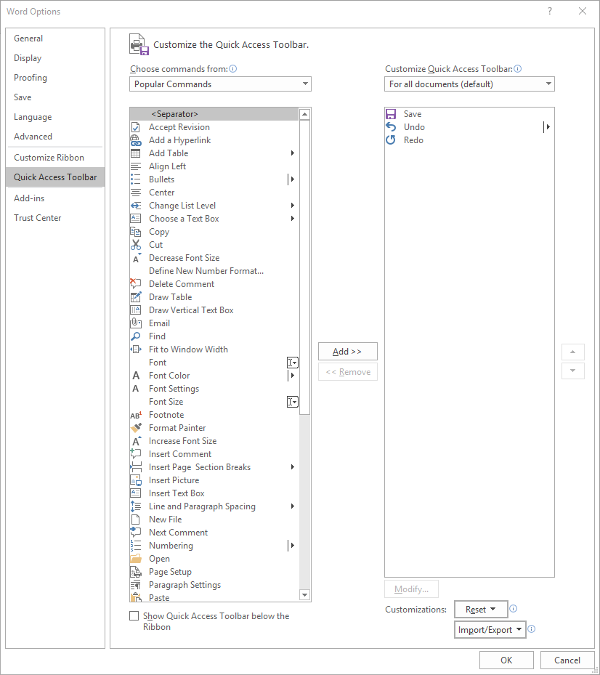
Making these changes is fairly simple. Your first step is to access the Quick Access Toolbar’s options. Under File. select Options, and in the window that appears, click Quick Access Toolbar in the sidebar menu. It should look like this:

From here, you can see that the typical Save, Undo, and Redo options are in the Quick Access Toolbar – which is all well and good, but you can easily use keyboard shortcuts to accomplish the same things.

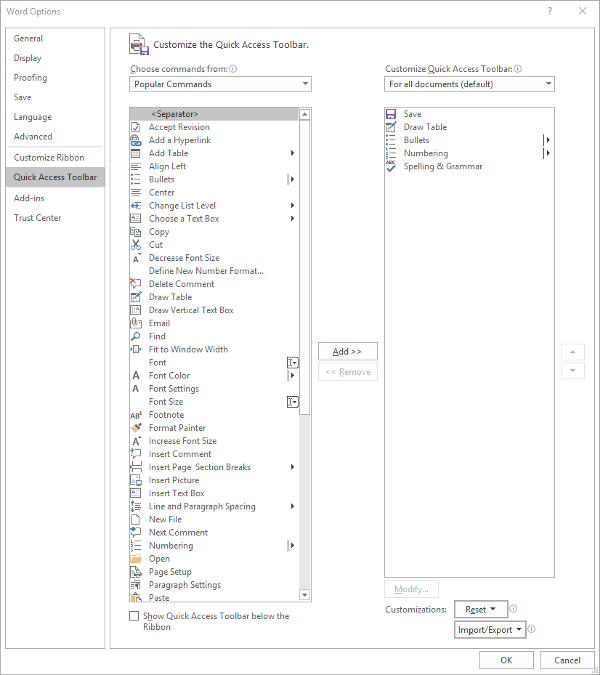
You might find a different assortment of tools more handy to keep in your Quick Access Toolbar. Altering them is simple enough from this menu, all you have to do is select the item and click the appropriate button, Add>> or <<Remove. The list on the left defaults to Popular Commands, but there are plenty of options to choose from, based on your needs. For now, we’ll stick to Popular Commands.

Let’s assume you use Word to put a lot of data into context, so you use a lot of lists and tables… and it needs to be spelled correctly. You can easily change your Quick Access Toolbar to meet these preferences.

Once you’ve done so, just click OK and your changes will be saved. You can always revert to the default settings by using the Reset option as well.

Customizing the Ribbon

The Ribbon in Word is where you find your options like Home, Insert, and the rest. Depending on your usage, you may not have much of a need for some of these options. Let’s assume that you don’t have any purpose for the Mailings tab, or the Draw tab, for that matter.

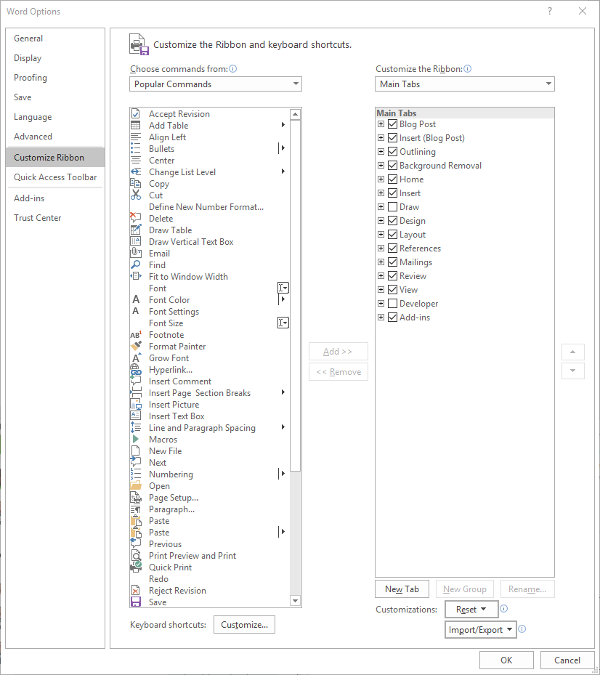
Again accessing File and Options, this time we’re looking for Customize Ribbon, which looks like this:

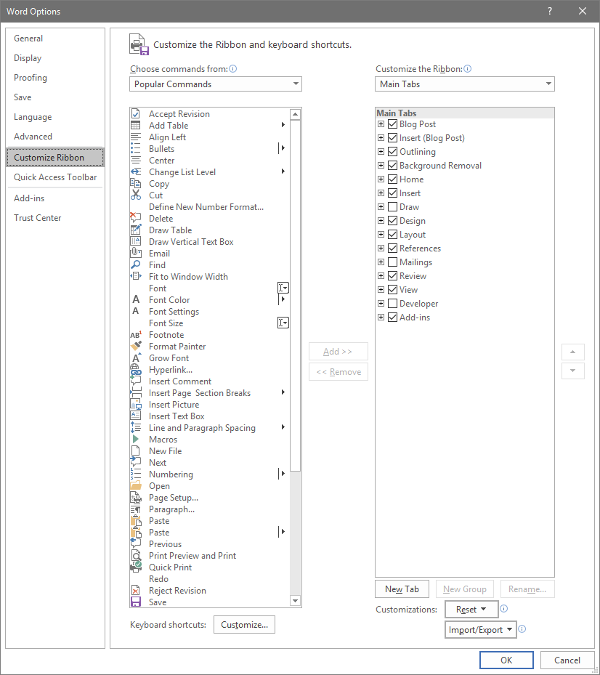
Just as we did with the Quick Access Toolbar above, you can adjust what is displayed in the Ribbon. Since we’ve established that – in this example – we have no purpose for either the Mailings or Draw tabs, we can uncheck them to remove them from the Ribbon display.

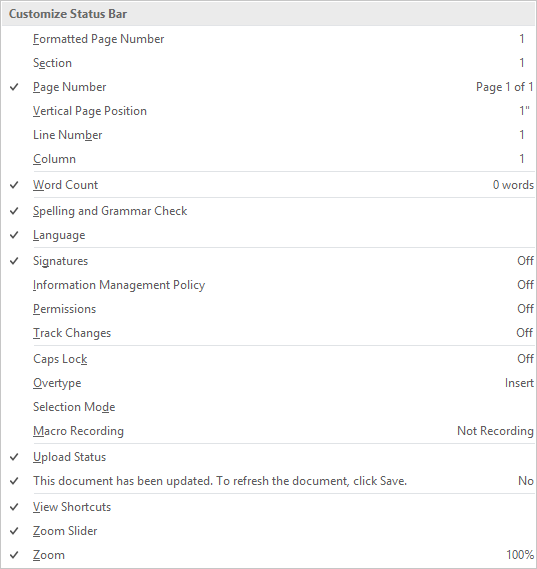
Customizing the Status Bar

At the very bottom of the window is the Status Bar, which can be altered to provide other valuable information based on what you have prioritized. Doing so is very simple: just right-click on the Status Bar, and select (or deselect) the options.

There you have it- three ways to customize Microsoft Word to better suit your purposes. For more technology tips, make sure you subscribe to our blog!

P9UGYQ5_byod_400.jpg

Is Your BYOD Strategy About to Backfire?

P9UGYQ5_byod_400.jpg

Bring Your Own Device, or BYOD, has become a very popular option for businesses seeking to save a bit of their budget on obtaining and maintaining devices for their employees. While this is an economically commendable practice, it has the potential to generate risks for your business if left unchecked. Let’s discuss the pros and cons of BYOD, and how you can make it work for your business.

How Can BYOD Manifest Issues?

Unfortunately, for all its benefits, there is no shortage of drawbacks to BYOD – at least, if it is implemented without conscious deliberation and preparation. Here, we’ve listed a few such drawbacks:

Business and Personal Data Often Mix, but Shouldn’t

Do you really expect an employee to have a personal device that isn’t for personal use? If this device is used for work purposes as well, it can become very easy to combine this data and put some of it at risk. What if an employee who brought their own device in then left the company, the device in question full of your company’s sensitive data? Without some kind of policy in place to eliminate this risk, BYOD is simply too risky to allow.

Your Business Will Be Vulnerable to More Risks

Unfortunately, a poorly-strategized BYOD policy opens your business up to a variety of issues that could have severe and lasting ramifications.

This is mainly due to the many risks that mobile devices inherently have in terms of data leakage, malware infection, and other vulnerabilities. If your employees aren’t vigilant in keeping their devices updated and secured, your network will be subject to the same vulnerabilities. Malware infections can also be introduced via an employee not treating their device as carefully as they should be. If malware is installed on their device, it can easily be spread to your network – free to wreak havoc and steal data.

Your Infrastructure Will Likely Need Reworking

This one is admittedly less of an issue as it is an inconvenience. Simply put, adding an influx of devices and ensuring that your IT remains compliant to any policies can be a huge investment of time – and if not done correctly the first time, this investment will only grow.

How to Prevent These Issues Via Policies

As we briefly mentioned above, any BYOD initiative you introduce to your company needs to be controlled through a stringent use policy. This policy needs to clearly describe how an employee is to use their device during work hours, as well as the prerequisites that your employees need to abide by and agree to in order to use their own device. We recommend the following:

Mobile Device Management and Endpoint Protection

This technology helps to keep any company data isolated from any personal data on the device, which means that it allows you to control your data without intruding on an employee’s privacy. As a result, if a device is stolen, you can remotely remove any business data from it to ensure your data is protected.

Another precaution to enact is endpoint protection software. This software essentially performs a preemptive security scan of any device trying to access the network, identifying if a device has been infected. This means that your network isn’t introduced to whatever malware is present on the device, and the owner is then aware of their security issue as well.

Access Controls

The fact of the matter is that not every employee needs access to every byte of data you have. Therefore, it makes sense to implement role-based access controls. These controls can help keep an employee focused on the data they need for their work duties, and can help you identify where a breach occurred, should one happen. Some access controls can even prevent a device that isn’t up to date from connecting to the network at all. You should also investigate two-factor authentication measures that might assist you in limiting access to those who should have it.

Exit Strategies and Safeguards

Finally, you also have to consider what to do if something happens to one of the devices that has been used for BYOD purposes. First of all, you need to have your employees agree to have a lost device wiped remotely, applying the necessary solutions to each device used. Your employees also need to report a lost or stolen device immediately so these precautions can be put to use.

Finally, should an employee leave your business, you also need to make sure you have already secured the authorization to remove your company’s data from their device. You don’t want someone walking around with access to your data, whether their departure was amicable or not. Including this in your BYOD policy will ensure that anyone who leverages their mobile device is aware of your capability to remove your company data from their device, and will allow them to opt out of BYOD if it makes them uncomfortable.

With these policies backing up your Bring Your Own Device planning, you should be able to make use of a great productivity tool without sacrificing your data security. For assistance in putting BYOD into practice, reach out to NuTech Services at 810.230.9455.

260032592_fold_400.jpg

Smartphone Manufacturers Building Foldable Screen Devices

260032592_fold_400.jpg

Foldable screens are coming… at least, they are relatively soon. Manufacturers are now producing OLED displays that are relatively flexible, and many of them have committed to producing foldable screen devices for 2019.

OLED Foldable Screens
Compared to the traditional light-emitting diode (LED) displays, OLED devices are a step in the right direction. LED technology works by emitting light from the electricity that circulates through it (a process called electroluminescence). The electrons in the semiconductor recombine with electron holes, releasing energy in the form of photons. The color of this light varies depending on how the photons cross the energy gap of the semiconductor.

OLED displays work through an electroluminescent anode that is made of an organic compound situated between two electrodes. The electrodes move and recombine, emitting light through the organic layer. OLED displays deeper black levels that aid in image contrast. These devices can be made much thinner and more flexible than your traditional LED devices.

Over the past five years, manufacturers have made considerable progress toward OLED displays. Some have utilized passive matrix designs or active matrix designs to great effect. The major difference between these two is that PMOLED has control over each line of pixels sequentially, whereas AMOLED displays have a transistor that accesses pixel function directly.

Bendable Displays
The organic compounds in the OLED anode allows for a much easier manipulation compared to other designs, as long as the transistor used to carry the energy is flexible, too. Once this was confirmed to work as intended, scientists had to find a substrate layer that could flex without breaking. This is why glass isn’t used in flexible screens. Some particularly flexible OLED displays contain a plastic substrate that gives them strength and flexibility required to become a foldable device.

Foldable Options
Motorola and Apple have rumored to be producing foldable smartphones in the near future, but there are others that are taking more immediate advantage of this technology. Here are a few of them.

Samsung Galaxy Fold
https://youtu.be/7r_UgNcJtzQ

In just a week, on April 26th, 2019, the Samsung Fold will become the first foldable smartphone to reach the U.S. This device can reach 5G speeds and sports an impressive foldable screen. The screen unfolded reaches 7.3 inches with a dynamic AMOLED display, while it reaches 4.6 inches folded with a super AMOLED display on the front of the phone. The innards are also quite impressive, featuring a 64-bit octa-core processor with 12 GB of RAM, 512 GB of internal storage, and a 4,380 mAh battery.

Huawei Mate X
https://www.youtube.com/watch?v=1_c2KGtZP64

Chinese manufacturer Huawei is providing a foldable smartphone in the form of the Huawei Mate X. The foldable display isn’t actually protected, but it is used in a way that differs considerably from the other options. With a foldable component that wraps around the device, the Mate X has a viewfinder that helps with taking pictures. This means that there is no need for a front-facing camera on this device. Other specs for this device include a Kirin 980 octa-core processor with 8 GB of RAM and 512 GB of onboard storage. This device also has a 4,500 mAh battery with a 55W fast charging standard. This product will be available in the near future, so keep an eye out for it if foldable screens are what you’re looking for in a device.

What do you think about OLED technology? What about foldable screens? Let us know in the comments.