412270538_3_2_1_backup_400.jpg

Taking a Close-Up Look at the 3-2-1 Backup Rule

412270538_3_2_1_backup_400.jpg

Data, at least nowadays, effectively makes the world go ‘round. Data is responsible for powering the operations that a business needs to undergo if it is to survive. This—as you may imagine—makes data incredibly important for businesses of all sizes to protect.

There’s a good chance that you’ve heard of a concept known as the 3-2-1 Rule of data backup. Let’s go over what this means in some more direct detail—and why this strategy is the one we recommend.

Why is a Good Backup Essential?

In a word: survival.

My apologies for sounding so distinctly melodramatic there, but it’s really true: today’s businesses rely on the data they collect, produce, and store in order to remain in operation. Losing this data would spell catastrophe for any organization.

Therefore, the smart business tactic to follow is to ensure that your data remains safe by backing it up—and more than just that, backing it up properly. We frequently recommend that businesses follow the 3-2-1 Rule when it comes to their data backup preparations.

Breaking Down the 3-2-1 Backup Rule

The 3-2-1 Rule boils down to this: your backup should consist of at least three versions of your data, in two different mediums, with at least one copy stored offsite.

Why three versions? Simple—so that you can be sure that, if something is accidentally included with one of your backups that shouldn’t be, you are more likely to have also retained an untouched copy to go back to. (We also recommend that you retain as many as possible, just three a bare minimum, by the way.)

Why two different mediums? Equally simple—the whole idea of a backup is to have another copy of your data to fall back on if it is ever needed. However, keeping all of your backed-up data on the same device as your original copy means that the backup will almost certainly be impacted byl whatever happens to your prime copy.

Why one offsite? For just as simple a reason as the other two tenets: increased redundancy. Let’s say that the worst possible scenario happens, and your business’ location is wiped off the map by some disaster. An off-site backup copy of your data is less likely to be influenced by this event, better ensuring you retain your access to your data.

Understanding the Concept of an “Air Gap”

Let’s discuss another important idea in terms of your data’s safety: air gapping.

An air gap is a basic security measure that helps to protect data from various threats, simply because there is no persistent connection between different points on your network. This kind of broken connection effectively eliminates the risk of many threats short of a physical attack.

Air gapping at least one of your data backups helps to ensure that whatever disaster may befall your local data storage will not also influence the copy you have stored there—although this approach can create other challenges.

NuTech Services is here to help you address these challenges, as we will face any of the obstacles your business and its technology encounters on your behalf. Find out more about what we can do by calling 810.230.9455 today.

280929582_automation_400.jpg

Automation Can Bring a Your Business Serious Value

280929582_automation_400.jpg

Today’s business is always searching for a leg up, and this often means doing what it can to improve their operational efficiency. Companies can approach this in several ways. They can try to cut out redundancies, they can invest in training, or for many businesses, it means leveraging innovative new technological tools that are designed specifically for this purpose. 

Let’s Define Automation

Automation is the process of utilizing technology to take the repetitive and often mundane tasks off of your workers’ plates. This frees them up to focus on revenue-generating activities. Since technology is getting more sophisticated, it can now do more, thereby making your business more efficient. Businesses that successfully automate certain tasks will often see boosts in productivity as their workers are more engaged as they can do what you’ve hired them for in the first place.

Implementing Automation

When looking to utilize automated tools to cut down on human responsibilities, a business has a lot of places to choose from, but typically it is used as a support structure to improve the efficiency of all those little tasks that up until recently humans were responsible for. This has led many people to claim that automation is the main reason people are being cut out of the workplace. Studies show that there is some truth to this theory, but when applying automation to just handle the tasks that no employee wants to do, it benefits both the company and the workforce. 

Let’s take a look at some of the benefits of employing automation in your business:

Improved Customer Support

One of the most important aspects of your business is how you interact with your customers. Unfortunately, it can be expensive. Using automation to cut down the cost of support is a great plan. Using AI-fueled chatbots for online support and automated menus for your phone support can provide a lot of value, while also providing the support and transparency your customers demand. 

Ensured Compliance

You can always depend on your staff to find better ways to do things. They don’t want to waste their time making tasks harder than they need to be. Unfortunately, as they try to be the most productive and efficient, it can cause problems with any compliance regulations that your business operates under. By deploying automated solutions you can ensure that your operations meet compliance standards every single time. This allows your staff to focus on their job and reduces the chances that they may get creative and hurt your business’ chances of meeting compliance standards. 

Enhanced Business Communications

Much of business is a dance. There are so many parts of it moving at once that all it takes is somebody to miss a step for the whole thing to go horribly wrong. Automating scheduled communications can have a lot of benefits. Not only will it keep people that work in your business on point, it can provide customers a sense of value. This can also help prospects get the information they desire while also working for your sales and marketing teams to be able to schedule appointments without conflicts or follow up after a sale or inquiry. 

Automation will be a big part of business going forward, and the experts at NuTech Services can help you leverage the tools that fit your business. Give us a call at 810.230.9455 today to learn more about how automation can benefit your business.

142775337_improve_business_400.jpeg

How to Improve Your Business with Solid IT Practices

142775337_improve_business_400.jpeg

Technology is important to most small businesses today, especially when looking to improve it affordably. That’s why when making technology decisions, you should consider the following solid practices.

Coordinate Uniform Procedures and Processes

Your business should always try to find technology that works for all (or a majority) of your employees. The reason is that data isn’t always interchangeable and will have problems being transferred in some cases. Take Microsoft Word. If you copy and paste text from Microsoft Word to Google Docs (and vice versa) the formatting is affected in the document. This is a small issue, of course, but if your company depends on this type of technology, selecting one that works for your business will standardize things as well as likely be more affordable than using multiple pieces of software to do the same thing. 

This strategy is also solid for managing your internal data. Having consistency with the way your procedures are created and managed gives your team the best chance of collaborating effectively. 

Prioritize Security

Security has to be a point of emphasis for every business. This means physical as well as virtual security. You need to get the tools to protect your business and its employees, but you also need to train your staff on the best practices to keep your business’ assets secure. This means training them in positive password hygiene and how to avoid being phished, while also deploying the tools that will work to reduce their exposure to threatening situations. Only a combination of solid tools and best practices will work with the amount of active threats there are out there. 

Promote Mobile Solutions

Mobility is a growing consideration for most businesses. A lot can be done from outside the business, but in order to get the most out of available mobile technology, you will need to manage mobile access to company resources. For the SMB, the best way to do that is to build a Bring Your Own Device (BYOD) policy that works to give your staff access to the data and resources they need, but also allows you to manage mobile access to ensure that your data and digital assets aren’t in danger of theft or corruption.

If you would like to learn more about some of the best practices you should be adhering to, visit our blog or give our expert technicians a call at 810.230.9455 today.

203898730_safe_website_400.jpeg

Checking a Website’s Safety from Its Google Result

203898730_safe_website_400.jpeg

Google search is synonymous with searching the internet, but that hasn’t stopped them from constantly innovating the service. One of the most recent updates is to give users more context for the content that returns on search results. This works to protect users from potentially clicking on websites that could contain threats. Today, we discuss this innovation and how it will look to the end-user.

Google’s Page Widget

Google rolled out this feature on February 2nd, 2021. They now offer a widget that provides a look at a website before you click on it. You will begin to see three-dot menus appearing next to your search results. When accessed, it will give you the information that clicking on the link will take users to. 

The information includes a blurb about what the website links to, including Wikipedia information, but if that isn’t available it provides Google’s own analysis as the site was last indexed. It also provides information about the website’s security. 

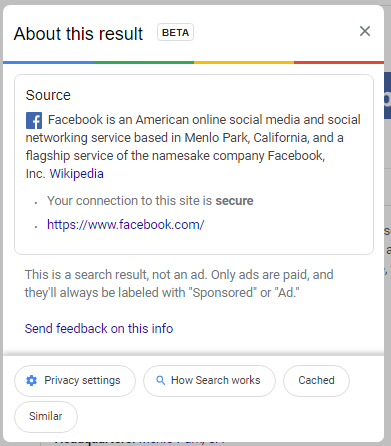
This is what appears when you check the link for Facebook:

In this information, users can see that Google confirms that the website is secured, helps to protect data, and that the link was the result of the user’s search, and not an advertisement. 

As things progress, this utility should be able to help users do a better job of choosing websites that don’t put their data, or your organization’s data, at risk. For more great security information and best practices check back to our blog weekly.

404102483_redudant_400.jpg

Why Redundancy is EVERYTHING for Data Backups

404102483_redudant_400.jpg

With a business’ data being such a priority nowadays, protecting it against all circumstances needs to be appropriately attended to. One fundamental component of this protection is the implementation of a proper backup strategy. Let’s go over the most foundational element of a successful backup, and how we recommend businesses to accomplish it: redundancy.

Redundancy Isn’t Always a Bad Thing

First, we need to address the stigma around the concept of “redundancy” in general. While often associated with waste, redundancy effectively boils down to having more than you need to operate. As a result, redundancy can be seen as either good or bad depending on the circumstances.

For instance, having more supplies and equipment than you need (or can manage) isn’t good, as you likely have spent more than you needed to out of a finite budget, and might experience some challenges in storing these resources. Having excessive funds left in your budget means that you’re underutilizing what you have available. The list could go on and on, in terms of how redundancy could prove to be a detriment.

That being said, there are a few cases where redundancy can—quite literally—be the thing that keeps a business from going under. A redundant data backup is the prime example of this.

What a Redundant Data Backup Looks Like

All in all, a redundant data backup is one that involves multiple copies—just in case something happens to one, you have another copy waiting in the wings to step in.

Let’s consider a scenario, while tweaking a detail here and there to consider why a data backup is so important, particularly those designed to be redundant in nature:

Scenarios

In your business, you have…

  • A. no means of backing up your data.
  • B. a small backup device hosted onsite
  • C. a cloud-based data backup
  • D. both an onsite backup and one hosted in the cloud

As you go about your operations, you happen to be successfully targeted by ransomware via a clever phishing attack. In each of these scenarios, a different outcome is likely.

In Scenario A, your business is up the creek. Without any data backup, a successful ransomware infection is guaranteed to encrypt some—if not all—of your data, which is effectively the same as it being deleted. This is, of course, assuming you follow best practices and refrain from paying up, as this offers no guarantee that your data will be returned to you.

In Scenario B, there’s a good chance that your backup may be encrypted along with the data it is meant to be backing up. I hope I don’t have to go into detail about why this is a bad thing that should be avoided, especially when it effectively destroys your data, as happened in Scenario A.

In Scenario C, a cloud-based backup is one way to address the situation, as the encrypted data can simply be wiped and the backed-up data replicated back from the cloud. 

Scenario D goes a little further, by both ensuring that your data is backed up in the cloud while also providing you with an on-site backup for quick and easy restoration if possible. Ideally, even the cloud provider storing your data has some redundancy in place, keeping your data in multiple locations to mitigate the impact any equipment failures on their end could cause.

This Redundancy is What Makes the 3-2-1 Rule

The 3-2-1 Rule is a concept that we often recommend to businesses, as it is a simple way to ensure that your data will be safe. It boils down to keeping (at least) three copies of your data, including the original, in two types of storage media, one of which being offsite and ideally in the cloud. This strategy is a great way to ensure your business has the access it needs to its essential data, regardless of the circumstances.

While NuTech Services can help you ensure that your backups are redundant. Not only will we help your business survive a data disaster, but we can also help you avoid them in the first place through our comprehensive managed services. To learn more about what we offer, explore the rest of our website and reach out to us at 810.230.9455.

194025563_smart_scheduling_400.jpg

There’s Scheduling, and Then There’s SMART Scheduling

194025563_smart_scheduling_400.jpg

A schedule has long been the tool of choice for businesses to uphold their productivity, despite the challenges that managing everyone’s schedule can often present. Fortunately, today’s cloud solutions provide a means to overcome these challenges. Let’s explore the idea of smart scheduling and how it can make your entire process so much simpler.

Understanding Smart Scheduling

These software solutions are commonly found in industries that are subject to a lot of outside influence and fluctuating demand due to a variety of factors, such as retail. Smart scheduling gives these businesses the capability to schedule their employees more effectively, using automation to simplify the process.

Having said that, the principles of smart scheduling can be applied to all industries if they are viewed as a process, rather than a technology. Not only can all industries apply these principles, they should, as all businesses must deal with numerous factors that impact their operations.

Looking at it in this light, smart scheduling effectively just boils down to consolidating your various circumstances and scheduling to accommodate them accordingly. It’s recognizing that certain times will have different demand levels, that some conditions will impact operations, and making the preparations to deal with them proactively.

Scheduling More Intelligently

Even if you don’t have a dedicated solution lined up for these purposes, there are some ways that you can embrace the concept of smart scheduling. Consider these strategies:

  • Bring Your Information Together—You should consolidate any available information that you have regarding your schedule and your business’ operations to make it easier for you to predict patterns and prepare for them. Understanding what priorities you have, and how much your employees have been available to accomplish, will assist you in scheduling your team more effectively.
  • Communicate—Communication is one of the most important factors when determining your success, and this goes for how much information your schedule provides. Give your employees context into their tasks to help empower their procedures and productivity.
  • Use a Scheduling Platform—Businesses have many options to assist them with their scheduling available, and not all of them need to be inherently “smart.” Finding one that works for your needs will bring considerable benefits to your business and its processes. 

Regardless of the business solutions you need, NuTech Services is here to help you manage them. To learn more, reach out to our team by calling 810.230.9455.

45628250_windows_7_400.jpg

Windows 7 Should Be Long Gone

45628250_windows_7_400.jpg

Windows 7 was the most popular operating system Microsoft ever created. It’s so popular that months after the software giant officially retired their record-breaking OS, some businesses continue to use it. Today, we will take a look at why some businesses haven’t moved off of Windows 7, and what effect it could have on their company.

When we say that some businesses are using Windows 7, what we really mean is that with a remarkable market share that still sits around 23 percent, a lot of businesses have chosen not to upgrade to Windows 10, Microsoft’s latest OS. In fact, as of January, when Microsoft officially did away with support for Windows 7, nearly half (47 percent) of SMBs were still utilizing it. It’s not a good scene. Let’s take a look at why so many haven’t moved off of Windows 7.

Why is Using Windows 7 Bad?

Windows was released in July of 2009. That’s over ten years ago. Microsoft has upgraded their OS several times since then. While its functionality and usability are adequate, the major problem is that it is not supported by Microsoft any longer. Since it carries a long-passed end-of-life date, the OS doesn’t get the security updates and patches of a supported software, and is therefore, a liability. 

As you’d imagine, cybercriminals are not adverse to picking low-hanging fruit; and, if your business still uses Windows 7, it’s definitely time for an upgrade. This is especially true if you have any notions of connecting it to the Internet. 

FBI Says Using Windows 7 is Negligent

The Federal Bureau of Investigation released the following statement to the private companies they work with: “As time passes, Windows 7 becomes more vulnerable to exploitation due to lack of security updates and new vulnerabilities discovered.”

It’s not just the multi-billion dollar corporations that are at risk. If you have exploits built into the software you use, you are far more at risk than if you use clean and actively supported software. Cybercriminals have no problems hacking small businesses that aren’t taking the steps necessary to protect themselves. 

Most legacy software can now be run in the cloud, and with the importance that a business’ data plays nowadays, there are very few reasons that your business should be running Windows 7 or Windows Server 2008 R2.

What Should Windows 7 Users and Businesses Do?

Obviously, you should be upgrading away from unsupported software. Again, Windows 7 is not supported and you will likely get hacked. For a business, this can be a devastating process. You aren’t just going to get spammed, you are going to get hacked and whatever customer data you have stored can get stolen. I’m sure the last thing you want is to explain to your clientele that you accidentally exposed all their PII. 

More than that, you get Windows 10, which is constantly updated with security patches and functionality upgrades. Microsoft stated their intention to use Windows 10 for the foreseeable future. Windows 10 is more secure, has more features, and even law enforcement thinks you should upgrade. 

Managing risk in your business is important and using Windows 7 is the definition of risk. If you would like to talk to someone about getting out from under Windows 7 altogether, what your options are for the legacy apps you use, and how a quick upgrade will exponentially improve your business’ ability to ward of cyberthreats, call the experts at NuTech Services today at 810.230.9455.

284942330_office_collaboration_400.jpg

How to Set the Tone for Workplace Collaboration

284942330_office_collaboration_400.jpg

Collaboration—one of the more popular workplace buzzwords you hear nowadays, it serves a very important function for any successful business. Therefore, establishing healthy collaborative processes should be considered a priority in any establishment’s operations.

Let’s review what true collaboration is, and how you can lead your company towards more collaborative behaviors in your day-to-day undertakings.

Teamwork and Collaboration Aren’t the Same Thing

First, it is important that we define the difference between these two seemingly synonymous terms. While it is possible to work as a team without collaborating, collaboration requires some element of teamwork to be present.

Consider it this way: by definition, teamwork is the combined action of a group of people. While this could mean that each member of the team is contributing to each step along with their teammates, signifying collaboration, it might instead signify that the task and its requisite responsibilities have been divided up amongst the group.

Teamwork, yes. Collaboration? No.

Other differences between these apparent synonyms:

  • There is a tendency for a team to have a set leader to set the course of whatever project is being worked on, while collaboration thrives in an egalitarian group setting.
  • Teamwork can be effective in completing a business’ short-term goals, while long-term goals are better served by collaborative behaviors.
  • As we hinted at, teamwork requires someone to be in control of the group. Collaboration requires the group’s members to trust one another.

Collaboration Can Benefit Your Business and Your Team

Embracing the cooperative elements of a collaborative work environment can have universal benefits to those involved. For instance:

Your Operations

As the saying goes, two heads are better than one. However, if you have a whole team’s worth of heads, why not make the most of them to help advance your business? With collaboration instilled in your workplace culture, you will find it easier to come up with solutions to your operational challenges. Furthermore, your employees will be more engaged in their work, which itself brings considerable benefits, including increased revenue growth, diminished turnover, fewer accidents, and heightened productivity.

Your Employees

When it comes to the people you’ve hired to work for your business, collaboration can improve their experience as well. In addition to the shared knowledge that can benefit everyone’s quality of work, collaboration can improve the relationships between your employees. This is particularly important, as a study has shown that office friendships are the most important facet of work satisfaction for 70 percent of employees. Fittingly, collaboration leads to increased morale, which positively influences productivity and employee retention alike.

Encouraging Collaboration

So, with so much riding on your office collaboration, it is important that you endorse it in any way you can and actively encourage it amongst your workforce. But how does one do that?

There are a few strategies that you should adopt to accomplish improved collaborative habits.

Unite the Team with a Mission and Establish Expectations

It is important that your team understands how crucial they each are to your company’s success, as this can give meaning to their responsibilities in the context of your company’s shared overarching goal.

This goal is essentially your company’s mission. Once your mission is clarified, it becomes easier to set benchmarks that need to be met and what each team member’s individual role will be in accomplishing it.

Reward Collaboration and Innovation

Naturally, a positive response to collaborative efforts is going to provide no small motivation for your team to adopt them. A similar attitude toward new approaches in the office should also be in place. Risks can often lead to rewards, which means that an employee who is willing to try something new might discover a better method to fuel productivity. At the very least, they’ll confirm that you’re on the right path if your current methodology proves more effective.

Foster your team’s creativity and embrace input.

Support Your Team with Collaborative Tools

Here’s the hard truth: your employees are bound to have varying skill sets. Brian may be a brilliant writer, while Beth may have an affinity for customer service. Allowing your employees to work at those tasks they excel at will only benefit your outcomes. These outcomes can be augmented further using collaboration tools. With more people than ever before working remotely, these tools are more crucial than they have ever been. Make sure that your team is equipped with the technology solutions to collaborate even while distant from one another.

NuTech Services is here to help your business collaborate as effectively as possible, with the tools and resources your team will need at the ready. Learn more about how we can help sustain your effective operations through our managed services by giving us a call at 810.230.9455.

57808106_keep_records_400.jpg

Improve Your Business With These Documentation Practices

57808106_keep_records_400.jpg

With the amount of technology that the modern business relies on today, each business needs to maintain comprehensive documentation outlining it. As a managed service provider, we can provide an expert perspective on what needs to be included in this documentation. Let’s get into it.

What Should My Documentation Include?

Basically, your documentation should be a complete inventory of all the technology you have, first divided between your hardware and software solutions.

Hardware

There’s a lot of information regarding your hardware solutions that you will want to keep a record of, as it will make a lot of processes a lot simpler moving forward.

Serial/Model Numbers – These will help you to ensure that the device you are working on is the one you think it is, in addition to simplifying things for your support team.

Purchase Dates – If any of your decisions are going to be based on the age of the device (i.e. whether to repair or replace), knowing how long you have had it will help you to evaluate if you got the value from your investment.

Warranty Information – On a related note, knowing the terms of an item’s warranty can help you make the best decision for your business while taking this into consideration.

Installation Dates – Let’s say that one of your workstations is acting up. If you knew that it was installed the day before an extended brownout hit your office, this information could help you narrow down the issue.

Physical Locations – It is important to know where a device is supposed to be. This makes it easier for the service team to keep it maintained, as well as boosts your security somewhat.

Device Names – Having a name for a specific device, aside from the one the manufacturer assigned, adds another level of differentiation.

IP Addresses – If you need to find something on your network, knowing the IP address will help immensely.

Software

Just as is the case with your hardware, there’s a lot of information about your software to carefully record and track. Make sure you’re establishing the following in your documentation:

Product Licenses – Similarly to the serial number, keeping track of your product licenses ensures you are aware of how many copies of a given title you have available to use.

Purchase Dates – Again, as with your hardware, knowing when you acquired something helps you find out of your purchase is still under warranty, along with other pertinent details.

Install Dates – Once again, if you know when a given software was installed on a system, you’ll know a lot more about it through inference and deduction.

Subscription Details – If you maintain a subscription to a software suite or similar tool, keeping track of your subscription details can ensure your ability to use that title.

Usernames or Registration Emails – Knowing who in your organization is associated with your various software titles can help you log in to a vendor’s website or otherwise receive support later.

Version History – Finally, keeping up with your software’s current version in your documentation can help you keep track of where updates are needed, and where you may be susceptible otherwise. Of course, your documentation should outline the proper update procedures as well.

Why Bother with All This Documentation?

Simplicity. Security. Peace of mind.

Maintaining your technology will be so much easier with these details recorded for future reference, allowing you to get the maximum value for your investments into IT. For assistance in establishing these processes, or for insights about what we track, give us a call! Our professionals can be reached at 810.230.9455.

360087558_protect_your_data_400.jpg

Protect Your Personal Information when Using FinTech

360087558_protect_your_data_400.jpg

For decades you had to go into a bank to complete your transactions. Today, you can do most everything you need to do without stepping into one. Between online banking and now FinTech-fueled mobile apps more people than ever are avoiding the bank. In fact, a study from Bank of America found that 62 percent of people are now using some type of digital banking or financial services. Today, we’re going to give you a few ways you can protect yourself when using mobile banking apps. 

Data theft is a big deal, but there are ways that you can protect yourself and your money when utilizing this technology.  Some are more involved than others, so let’s dive right in.

#1 – Use Official Banking Apps

This might seem like common sense, but there are products out there that aim to simplify your mobile banking experience. If having your account breached and your money or identity stolen sounds simple, I’m selling a round-trip vacation to Mars. Are you interested? The banks know the importance of data and personal security and have rigorously tested to ensure data is encrypted and secure. 

#2 – Use Strong Passwords and MFA

Creating a unique and strong password (or passphrase) is essential to protect any account you have. Financial accounts have a direct line to your money, so using upper and lowercase letters, numbers, and symbols in your password will help secure the account. Furthermore, almost every bank, credit card, or other financial application offers two-factor or multi-factor authentication (or authorization). Utilizing this feature will go further to protect your financial accounts.

#3 – Disable Automatic Login

Another piece of common sense that doesn’t always register with users. If you want to keep people from accessing your bank account, ensuring that any automatic login, authentication autofill feature, or anything of the like is disabled is a solid practice. This will keep people out of your personal information if they happen to be using your account or device. 

#4 – Only Use Secure Connections

Not all Wi-Fi networks are the same. Some are open to anyone and can be hotbeds for data theft. To ensure that you aren’t just handing over your financial account information to someone on the same network, be sure to only access financial applications on your mobile device using your mobile data or via a trusted and secure Wi-Fi connection.

#5 – Learn to Spot and Eliminate Phishing Attacks

Today isn’t like five years ago where hackers tried to actually hack into a network. Today, most networks come with strong enough encryption to keep them out for a couple of decades. The biggest threat to data security are phishing attacks. Knowing how to spot a phishing attack and how to proceed so you don’t become a victim of one, is going to be crucial for the foreseeable future. 

Following these five suggestions is just the tip of the iceberg. If you want to learn more about FinTech-targeted crime and how to keep your financial and personal data to yourself, call our IT security professionals at NuTech Services at 810.230.9455 today.
106325693_employee_handbook_400.jpg

How to Create a Useful Employee Handbook

106325693_employee_handbook_400.jpg

If your procedures and policies aren’t currently documented, they need to be. A written policy and procedure guide can help keep your team up-to-speed on the expectations that you have of them. Consider it a quick and easy reference for your employees to use to answer their questions. In light of this, here’s some tips to keep in mind as you put together your business’ employee handbook.

Tip One: Cover Everything that Your Business Requires

As you’re putting together your handbook, you need to figure out precisely what you want every member of your team to know. This will give your team the advantage of knowing what is expected of them, along with the other information that they will need to know, like:

  • FMLA information
  • Non-discrimination policies
  • Sexual harassment policies
  • Worker’s compensation policies

 You should also include some of your other policies, including:

  • Paid-time off policy
  • Payment times and promotion/review policy
  • Employee behavior expectations
  • Employee dress code
  • Benefit structure
  • Remote work policy
  • Social media and employee device policy

Of course, this should also include your company’s mission, history, and other information pertaining to your company culture to help keep your team all on the same page.

Tip Two: Prioritize Your Layout

To make your handbook as useful to your employees as possible, you need to organize it to have the most applicable and commonly needed information in the beginning. Of course, you also need to ensure that every policy included is explained in detail. Focus on providing a complete summary of your processes with a thorough step-by-step guide.

Tip Three: Keep It Updated

While your company policies need to be firmly established, there also needs to be flexibility to allow these policies to evolve over time. For instance, if a policy were to prove itself insufficient in the face of technological changes, that policy needs to be adjusted. As a result, you need to keep a digital version of your handbook—which will allow your handbook to be kept succinct and clear.

While this may seem to be making a mountain out of a molehill, a quality handbook is an essential resource for your administrative purposes. For assistance in designing your IT policies, reach out to NuTech Services at 810.230.9455.

315663473_remote_work_400.jpg

People Have Been Working From Home Longer than You Think

315663473_remote_work_400.jpg

Working from home isn’t new, but with the COVID-19 pandemic sparking public health fears many businesses decided to move their operations offsite. For much of the past decade remote work was an available strategy for business, but many business owners feared it would give them a lack of control over their workforce, and therefore was largely ignored. This was despite remote work being a strategy people have embraced for a long, long time. Today, we take a look at the history and progression of working from home.  

For Much of History People Worked From Home

In medieval times people predominantly worked at their place of residence. Many people of this era in Europe lived in what are known now as longhouses. They lived a subsistence life, looking after their crops and livestock. Individuals that lived in these communal buildings typically found a way to justify their inclusion by gaining a trade that would help the rest of the people out. In fact, it wasn’t until the mid-18th century where people started going outside their immediate community to go to work; and even then, the people that ran the factories lived and operated out of small buildings adjacent to the main factory.

Office Work In the 20th Century

As industrialization took hold, there was demand for clerical workers and salesmen that necessitated building an office. Inventions such as electric motors, telegraphy (and eventually telephony), and the typewriter facilitated a major change for business. 

Only a few decades later, much of the job market was represented by clerical work. The workers that still worked in production were made to hold fast to management’s new standards for productivity. The standard that kept increasing. Managers of the time began to keep detailed figures of how long a task should take. According to a productivity field guide from 1960, swiveling in your seat should have taken .009 minutes. At this juncture, the cubicle was invented, bringing unparalleled distraction prevention to the modern office.

Technology Helped Encourage Remote Practices

As computing became more commonplace, so did remote working. Factories, the base for the 20th century American economy, started to close as the price of labor started to be prohibitive for business. Service jobs filled the gap and a new level of productivity was established. Major innovations such as the personal computer, home Internet service, and ultimately cloud computing have expanded the availability for a worker to have access to everything he/she needs from anywhere.

What better place than home?

Remote work had been growing pretty rapidly as the COVID-19 pandemic hit. In mid-May, 66 percent of people that could work from home, were working from home. That number is sure to go down as businesses reopen, but it may be that enough has been learned from this situation that employers will offer more flexibility to their staff than they had previously.

Remote work can provide your business some serious benefits. To talk to our professional consultants, call NuTech Services today at 810.230.9455.

331240148_pandemic_profitablity_400.jpeg

Keep the Pandemic from Plundering Your Profitability

331240148_pandemic_profitablity_400.jpeg

As the COVID-19 pandemic rages on, affecting hundreds of thousands of people, and keeping hundreds of millions at home, the beginnings of recessionary fear have begun to hit small businesses. Today, we will go through a few elements that will help you get your business through this (and many other) anxious times. 

The first thing that you need to consider is that this thing won’t last forever. Most businesses, if they had no contingencies in place, or if they were forced to close by mandate, probably have been burning through cash for the past month. Those that haven’t are fortunate. Small business owners need to stay proactive during this period, altering their company’s remote work strategies if need be, and searching for low-interest loans to get them through this difficult process. Let’s get into some of the most useful tips on how to get your business through this disaster.

#1: Know Where You Are

The first tip is probably the most important tip. This situation came upon all of us pretty suddenly, and to be frank, not a lot of business’ disaster recovery programs consider “supervirus” as a likely scenario. Floods, fires, electrical storms, the temp clicking on a spear phishing attack…these situations your business is ready for. Worldwide pandemic is a stretch. Forging ahead, you need to know that you aren’t alone, but how you react will largely determine how you come out the other side of this thing. 

If you are still in operation, you will need to cut as many redundant and unnecessary costs as you can. In times like this, your company needs the flexibility that comes with liquidity. That means eliminating a lot of the extra stuff that you pay for, such as travel (this one is obvious), team outings, company food, and non-essential marketing. This will ensure that you have the financial flexibility to at the very least have a business to reopen when the “all-clear” is given.

Additionally, don’t take on any new investments that don’t immediately relate to getting your business through this situation. There will be millions of businesses looking for additional capital, and there should be enough money and favorable interest rates that most businesses can get the capital they need without putting their whole business in jeopardy.

#2: Maintain Your Relationships

You have spent a long time cultivating and maintaining your business relationships. It is more important now than ever to do what you can to maintain those relationships. This includes your financial institutions, your vendors, and your clients. Regrettably, some businesses won’t make it through this, but the lion’s share will and making sure that your business is on solid footing and there to support your client base will be essential as things begin to normalize. 

#3: Proactively Budget

Chances are that the terms you agreed upon and the support from your clients will shift considerably. You will want to proactively budget for this. You can expect higher interest rates, a lower availability of massive available capital, and shorter terms in which to pay off the money you do borrow. 

As stated above, there should be a lot of available capital through government-sponsored programs, and these loans will carry with them lower interest rates, but if you take the proactive steps to ensure that you budget for the difficult times ahead, your business will undoubtedly be in a better position when we see our way through this mess.

#4: Trust Yourself to Weigh Variables

The COVID-19 outbreak has left the small business owner a lot to take in. One of the most important suggestions we can give is that you trust that the decisions you’ve made up to this point–and that you will make over the crucial next few months–are in the best interests of everyone that depends on your business. If you are forced into making cuts into your human resources, you will want to make sure that they are protected as not to put your business in additional peril from having a tarnished brand.

Making sacrifices is always hard, especially if you were really thriving before the pandemic hit. Take in as much information as you can weigh and have the confidence that you can make the right decisions. This will keep your business, and the people who depend on it, ready to properly adjust to the situations that are thrown at it.

COVID-19 has millions of businesses and hundreds of millions of people uneasy. To get through it you will need help. Contact the knowledgeable consultants at NuTech Services today at 810.230.9455 to let us help your business get through this unprecedented situation.

148461139_healthcare_secure_data_400.jpg

You’d Be Surprised How Insecure Some Healthcare Providers Are

148461139_healthcare_secure_data_400.jpg

The healthcare industry is in a difficult position. Despite the utility that connected devices present to medical providers, the Bluekeep vulnerability makes it seem as though connected devices aren’t a wise solution for many to use… and there’s nobody these organizations can blame but themselves.

What is BlueKeep?

BlueKeep is a malware strain that was first discovered in May 2019, and was patched in short order to prevent it from becoming another situation like EternalBlue. EternalBlue was the exploit that allowed WannaCry to have such a considerable impact, especially on healthcare providers in the UK. Despite this precedent, however, many hospitals neglected to apply the necessary patches–and that isn’t even the worst part.

The worst part is that the three systems that BlueKeep impacts (Windows 7, Windows Server 2008, and Windows Server 2008 R2) share one thing in common: they have all passed their end-of-life date, and therefore no longer receive security updates.

This makes this situation a two-fold disaster. Not only have patches been released to mitigate BlueKeep, the systems affected by BlueKeep should not be in use anyways.

Of course, it only gets worse, and paints an unfortunate portrait of medical IT. A reported 22 percent of BlueKeep-vulnerable devices are yet unpatched. Worse, 45 percent of connected medical devices remain vulnerable, making things like x-rays, anesthesia machines, and other care-driven technology a risk to use.

Are you concerned about your organization’s technology?

Lean on the IT experts at NuTech Services for assistance. We can help any organization ensure that their technology won’t put their operations or their patrons in harm’s way. Learn more about what we can do by calling us at 810.230.9455.

302947168_collaboration_400.jpeg

How to Encourage Collaboration in Your Place of Work

302947168_collaboration_400.jpeg

Collaboration: it is the gold standard of teamwork that so many businesses seek. If your employees aren’t naturally drawn to the idea, however, there are some ways that you can help to sell the concept. Let’s discuss a few of the ways that you can coax your users into collaborative behaviors.

Have Them Socialize Outside of the Office

Let’s look at how kids behave for a moment… if told to partner up, they—almost automatically—gravitate toward their friends, the people they are comfortable spending time with. Your employees will do the same, both in and out of the office.

Collaboration greatly relies on some level of trust and familiarity, which is most effectively developed outside of the professional environment. Encourage your staff to socialize outside of work hours, or even treat them on occasion, on one condition: no shop talk. While your employees may not all be fast friends afterwards, they’ll understand one another much better and be able to work more effectively.

Tell Them What You Want

Speaking of efficacy, make sure your team understands what you expect from them in terms of results. This goes double when collaborative work is involved. A clear understanding of a task makes it easier to determine how to accomplish it, and how their combined efforts can best serve their purpose.

Walk the Walk

If you really want your team to work collaboratively, make the first move and involve yourself in the process. “Rank” or “position” should have no bearing on how able someone is to participate in a collaborative process, and there is no telling who could be struck with inspiration. Actively seek input from your team and demonstrate how you want your employees to work together.

Use Your Resources Wisely

While there’s a time for either, there is a difference between combining your resources to accomplish a given task and having your employees collaborate. The former is great if a lot of a single task needs to be finished quickly, but if a complicated process needs to be completed, it helps more to give the task to a group of people who have different proficiencies. This way, you have a better chance of the necessary skills being present in the group.

Acknowledge Accomplishments

A team that doesn’t feel appreciated is a team that won’t accomplish much. Why would they, if it doesn’t seem to matter whether they excel, or put out a thoroughly mediocre performance? This is especially the case if a single member’s performance is publicly singled out, as though they did all the work.

To encourage your team to perform well as a group, make sure that the entire group receives some recognition of their combined efforts.

Make Collaboration the Easy Option

Regardless of how motivated your team may be to collaborate with one another, it just isn’t going to happen if they don’t have the opportunity or means to effectively do so. While this may have been a more reasonable obstacle in the past, today’s available technology invalidates any excuse your team may have… mostly due to the Internet serving as the greatest collaborative tool the world has ever seen. The easier the collaborative process is, whether you lean on an Internet-based application or an internal resource or both to simplify things, the more likely it is for your employees to work with each other.

We’re Here to Help.

NuTech Services is ready and willing to deliver the solutions you need to promote collaboration among your staff. Give us a call at 810.230.9455 to hear more about your options.

260013401_reset_power_on_off_400.jpg

Is there a Difference Between Restarting and Just Turning It Off?

260013401_reset_power_on_off_400.jpg

In a word, yes. Sure, there’s the obvious difference in that one leaves you with a computer that is turned off while the other results in it being turned on again, but there are other important differences that are present behind the scenes. Let’s go over a few of these differences, and how they impact when you should restart your computer versus when you should shut down completely.

What’s the Difference Between the Shut Down and Restart Processes?

Before Windows 8, there was no difference whatsoever (aside from the obvious fact that Restart would start the device back up). This changed, however, with the introduction of Windows 8, and a new feature: Fast Startup.

Shut Down

Still present in Windows 10, Fast Startup shortens what was once a much longer start process after a user had clicked Shut Down.

While all a user’s files and programs are still shut down, the heart of the operating system is just put into standby mode. Please note that it does power down everything, unlike hibernate and standby. This makes it much easier for Windows to reactivate. However, since not all processes are completely stopped, present issues won’t be affected. Your problem will still be there the next time the workstation is turned on.

Restart

On the other hand, restarting the device actually does put a stop to all processes and resumes operations with a fresh boot on the motherboard level. This is why restarting your computer seems to take so long as compared to manually turning it off and on again.

So, the difference is really in the granularity of the shutdown process. Counterintuitively, “shutting down” a computer leaves more components active than a restart does, which is why restart is the process recommended when troubleshooting an issue.

So, while we may recommend that you “turn your computer off and on again,” or “reboot,” what we really mean is “restart your computer.”

For more assistance in dealing with pesky technology issues, lean on the managed services that NuTech Services provides. Learn more about what we offer by calling 810.230.9455.

team_games_building_400.jpg

Motivate Your Employees with More Playful Work Practices

team_games_building_400.jpg

Workplace engagement has long been a conundrum–how do you maximize the productivity of your business without alienating your team through quotas and ironclad policies? Many businesses have been finding that an effective way to do just that has been to use a concept known as ‘gamification.’  Let’s explore gamification and how it might be useful to you.

Making Sense of Gamification

Many parents have historically used a gamification strategy to convince their young’uns to cooperate better with notoriously less-fun parts of daily life. Take clean-up time, for instance, which many parents will turn into a race between themselves and their children to see who can pick up quicker. Taking an unappealing task and adding game-like elements to motivate people to do it is the concept that forms the foundation of gamification.

This isn’t a new idea, either. Mark Twain knew what he was talking about when he wrote about Tom Sawyer tricking his friends into white-washing a fence for him. By making the activity seem elite and enjoyable, he hoaxed and hoodwinked his friends into completing his chore for him while they all enjoyed proving themselves capable. As was written at the end of that particular chapter:

“If he had been a great and wise philosopher, like the writer of this book, he would now have comprehended that Work consists of whatever a body is obliged to do, and that Play consists of whatever a body is not obliged to do … There are wealthy gentlemen in England who drive four-horse passenger-coaches twenty or thirty miles on a daily line, in the summer, because the privilege costs them considerable money; but if they were offered wages for the service, that would turn it into work and then they would resign.”

If the psychology behind this sounds silly to you, consider the concept of “employee of the month.”

Why Gamification is Effective

Human psychology is a big part of why gamification has been shown to be so impactful in motivating employees. As a species, human beings tend to be strongly motivated by certain desires, namely:

  • Recognition – I want my efforts to be paid attention to.
  • Competition – I want to win.
  • Distinction – I want to be rewarded for my efforts.

While many tasks originally lack the potential for most, if not all, of these desires to be filled, gamification can inject this capability by fulfilling all three of these desires. If an employee were to have the satisfaction of knowing that they performed most admirably, gaining some perks and being looked upon with favor from the higher-ups, it only makes sense that they would continue to strive to that position from that point on. Furthermore, it also helps to motivate your other employees to strive harder, so they may have a chance of receiving the same benefits as well.

Don’t believe me? Just look at Google, where gamification has helped chop down travel expenses by allowing the person with the most budget left over after a business trip to keep the difference.

Adopting Gamification

If you’re now considering a more gamified approach to business-as-usual, you have a great variety of options available to you. Different use cases and different industry types each have their own options to do so, all with the potential to be a great investment.

You can also elect how much you want to put into gamification. Sure, there are solutions out there specifically to gamify common business processes, but you could also come up with your own homespun methods. Maybe an employee who visibly went above and beyond one day would receive an entry into an end-of-year drawing for a desirable prize. You really are only limited by your creativity – or how long you’re willing to spend searching online for ideas.

Just as though you’re the parent trying to convince your employees to pick up their playthings, the key to effective gamification is to turn a rote task into an engaging activity.

Have you ever tried out any gamification methods in your office? Which ones did you find most effective? Share what you did in the comments!

BYOD_94228175_400.jpg

What to Include in a BYOD Policy

BYOD_94228175_400.jpg

A Bring Your Own Device (BYOD) policy is something that many organizations have adopted, for a few good reasons: employee satisfaction, cost savings, and productivity boosts included. However, it’s crucial that you don’t just assume that you can adopt a policy like BYOD without establishing some ground rules that your employees need to abide by.

Here, we’ll go over a few topics that your BYOD rules need to address.

Password Practices and Other Security

It’s hardly a secret that some people utilize lax passwords – especially on their personal devices, where there isn’t an IT department establishing policies to help ensure password strength. According to Pew Research Center, 28 percent of smartphone owners don’t use a screen lock. Obviously, this isn’t something that can be allowed in the business setting.

So, if your employees are going to use their personal devices to access business resources, you need to have a policy that their devices are set to lock after a certain period of inactivity, and require some form of authentication to unlock. Furthermore, the device should further lock down if an incorrect authentication code is input so many times.

Your policy should also include any required security solutions you plan to utilize as part of your mobile monitoring and management toolset. All devices should have antivirus installed, along with mobile device management and unified endpoint management solutions.

Provisioning and Network Security

Provisioning a personal device that is going to be used for company work helps to ensure a few things. Not only does it help to make sure that productivity applications are configured properly, it also helps to boost your security. Furthermore, your network needs to allow your employees’ devices to access the business network – not just a guest network you have set up. Of course, there should be procedures and safeguards in place to ensure that this is done securely.

Tracking, Remote Access, and Data Wiping

Accidents happen, and devices can be lost – and sometimes, stolen. Furthermore, any device that is attached to a company network and has accessed illegal content could possibly leave the company liable – especially if this content was accessed via the company network. Your IT team should have the capability to monitor what websites and content each device included in a BYOD strategy has accessed, as well as to remotely access these devices to help ensure their security should they wind up missing. It also helps if they can implement updates to work solutions and security measures.

If worse comes to worse, it is beneficial to be able to delete all of a device’s data remotely – that way, even if it is stolen, your data won’t be at risk for as long. This also comes in handy if an employee is ever to leave your employ and you want to make sure they no longer have your data (or access to it).

BYOD can offer significant benefits to any organization. To learn more about putting a policy in place at your business, give NuTech Services a call at 810.230.9455.

to-do_209072166_400.jpg

Tip of the Week: Your Cybersecurity To-Do List

to-do_209072166_400.jpg

It is a well-established and widely-known fact that your employees are some of the biggest threats to your business via the technology that they use each and every day. If your employees aren’t aware of the practices and policies that they need to follow to prevent these threats, you could find yourself in an unpleasant position. Here, we’ll review four categories of cybersecurity basics that everyone in an organization should abide by, and some tips to support each.

Preventing Phishing

Phishing has been becoming more and more of a favorite tactic by hackers, meaning that you and your employees need to look at any messages that come in via your email (or other solutions) with a critical eye. Here are some practices to help you minimize the influence of phishing on your business:

  • Watch for “Urgent” messages (or, for that matter, “URGENT!!!!!!” ones). Many phishers will try to manufacture urgency to make sure you click without taking a moment to consider it may be an attack. Resist this knee-jerk response.
  • Review in detail. Many phishing messages show distinct warning signs, such as blatant spelling or grammar errors (but this may just be the person you’re talking to as well). You can find other, more reliable signs by giving any links or the email address of the sender the “hover” test. Without clicking on anything, hover your cursor over the links and a small pop-up box will appear. This box will show you the address that really sent the email, or the link that you would actually be redirected to. Check to make sure all the details are kosher. For these reasons, it’s recommended that you don’t click on any links in emails. Instead, retype the URL into your web browser.
  • Double-check with the sender. If you have access to another means of communication with the supposed sender of an email, reach out to them using that other means to confirm that they sent it. If they didn’t, it’s a pretty safe bet that the email is fraudulent.
  • When in doubt, assume the worst. If you just aren’t sure how legitimate a given email is, don’t click around in it. Assume that it is a phishing attempt, and report it to your IT provider.

Establishing Safe Browsing Habits

Unfortunately, there are plenty of threats that reside online, and it is only too easy for a user to unwittingly allow them in. Make sure your users abide by the following policies to minimize the threats you’ll potentially need to deal with.

  • Think before you click. Similarly to links found in emails, there are plenty of opportunities online to let in a threat. Consider what you’re clicking on before you do so. (The “hover” trick works well here too… check out the bottom of the window.)
  • Reserve business computers for business purposes. Non-work-related browsing can bring users to websites that can host threats without the user realizing. Discourage your users from surfing the web, downloading content, and doing other things online unless they are work-related.
  • Moderate access. Use firewalls and content filtering to keep unwanted content off of your network, and users from accessing unwanted content, respectively.
  • Trust your IT resource. If you are even the slightest bit unsure about something, whether it’s a program you’ve been prompted to install or making sure your settings are focused on maintaining security, reach out to IT for assistance.

Enforcing Strong Passwords

It seems that everything requires a password these days, which makes it all the more important that you and your users are aware of how to keep them safe – especially in the workplace.

  • Don’t recycle passwords. Once a password has been used and replaced, it is best to not use it again – this is why you’ll often find a “you have used this password too recently” message if you attempt to use it again within a certain timeframe. This is the same reason that passwords should not be used for more than one account – if that password is compromised, you’ve just lost control of multiple accounts.
  • Avoid easily-guessed passwords. As a way to try and come up with a password that is easy to remember, many people will resort to using common elements in their password – pet names, maiden names, birthdays or anniversaries – or use a simple phrase or a string of numbers. The entire point of a password is to make it so that others are unable to access one of your accounts, so making it something that can be guessed is counter-productive.
  • Consider leveraging passphrases instead. Passphrases are not only typically more secure than a password, they also have a tendency to be more memorable. Let me ask you this… which of these two would you find more memorable, “F4njUJ29S5” or “pearquiethigh?” You can also use basic substitution to make you passphrase more secure, turning our example into “pe@rqu!e+h!gh” instead.
  • Use a password manager. One of the main reasons that people reuse passwords so often and neglect to change them is the fact that they are scared of forgetting them. A password manager can help reduce this by securely saving all of your different passwords behind one master password. 

Protecting Your Business’ Data

Finally, there are many threats out there to your business’ data – including any you have on your clients or your employees. You have a responsibility to yourself, as well as these clients and employees, to make sure that this data is as secure as possible.

  • Make sure your business’ data is backed up. There are so, so, so many ways that your business could lose its data. While it may be attacked, it could just as (if not more) easily be lost due to equipment failure, user error, weather conditions… the list goes on and on. If your on-site data is lost, you will want to make sure you have an up-to-date copy squirreled away in the cloud to reference.
  • Protect your assets with access control. You need to be concerned about both the security of your digital files, and of your actual business location. If you’re using multi/two-factor authentication to secure your online resources, or requiring identity confirmation in order to enter certain areas of the business… you need to be doing both.
  • Maintain your security solutions. The thing about security software is that it isn’t something that you can just set up and count on indefinitely. Attackers are always examining these solutions to find vulnerabilities, so it is important that you regularly update and patch the ones you use to keep them safe. Every solution you have should actually be set up with security in mind. A glaring example is your company’s wireless. Not only should that be secured with a password, it should be hidden away from outside users.
  • Keep your payment options compliant. For your sake, and the sake of your clients, you should make sure your business is compliant to whatever regulatory standards that apply to it… including the Payment Card Industry Data Security Standard (PCI DSS).

Following these guidelines is a great start to ensuring your company’s security. NuTech Services can help get you this far, and beyond. Reach out to us at 810.230.9455 to learn more about what we can do.

outsource_102117857_400.jpg

There’s Value in Outsourcing Your IT, Part V

outsource_102117857_400.jpg

Information technology continues to play a more significant role in businesses, and as technology changes, so should yours. IT procurement is a critical part of any business’ success, which means that your business can greatly benefit from a managed service provider. They have the know-how to procure all of the best technology. Today, we will discuss how your business can acquire the IT it deserves. 

Businesses Depend on IT

There are a lot of different pieces of technology that go into a business, and like a puzzle they all need to fit together and work. So where do all of these puzzle pieces come from? Let’s examine different types of technology.

Servers and Networking

Here are two scenarios, and the different methods businesses use to handle them:

Walter’s business is growing extremely quickly, but his servers are the same ones he’s been using for years. He realizes he is running low on storage space, and his increasing staff puts pressure on him to upgrade his server. Walter manages to cobb something together, hoping it will suffice for the time being. When Walter attempts to merge his servers into one slightly larger server, he misconfigured a few components resulting in downtime for his entire staff. Not only has he wasted his own time, but now he is experiencing the most expensive segment of downtime he has ever experienced. 

Jesse, on the other side of town, also is experiencing extraordinary growth. Jesse however, makes a simple phone call to his managed service provider. He is connected to a professional, who advises Jesse on server options that will sufficiently support his growing business. His managed service provider not only points him in the right direction, but also comes on site to install this new technology. Jesse knows he isn’t a tech know-it-all, so he leaves deployment of servers to the professionals. His business is ready for increased data storage that same week he decided it was time to expand. 

Workstations

Your business’ employees are only capable of what their technology can handle. When it comes time to upgrade or add additional workstations, there are a few options one can take. Let’s see how our two business owners handle these situations.

Walter, who is an impulse spur of the moment shopper, sees what he believes is a fantastic deal on eBay. He decides that these second-hand computers will be able to handle all of his employee’s programs without issue. However, upon arrival Walter notices that his computers are missing a few components. It turns out that the eBay listing was actually for five home-made computers that the builder was never able to get to operate properly, rather than complete working PCs. Overlooking the description just set him back a large amount of money, and the computer repair shop charges nearly as much as a brand new PC would have. 
Jesse, has a few empty desks he would like to fill with capable computers as well as a few new employees. He reaches out to his managed service provider to discuss which computer might fit the needs of his business. The professionals are able to use their connections to get Jesse a fantastic deal, and most importantly, the purchase of the computers comes with free installation.

Software as a Service

What good would a computer be without the necessary software? Businesses should be utilizing the latest and greatest software. There are a few different approaches a business owner can take to procure the necessary software to boost productivity within the office.

Walter knows that software can be expensive, so he decides to torrent a few versions hoping that he doesn’t get caught. Unfortunately, however, Walter is exposed as a fraud and his business is the center of attention for all things media. His business suffers massively, and he wishes he had spent a fortune on the software instead. 

Jesse too knows how expensive software can be. Unlike Walter, he once again leans on his managed service provider. They offer what is known as software-as-a-service. This service gives you all the latest and greatest software, for a low monthly cost. It’s like renting a tool, as opposed to buying it outright. Not only does this tool come with free installation as well as support, but it doesn’t set Jesse back a large sum of money. He is able to give his employees all of the programs they need to proficiently do their jobs. 

Which Experience Sounds More Enjoyable?

If you had a choice to be Jesse or Walter, which would you choose? Managed services truly offer support for all of your business needs. If you would like to learn more, reach out to our professionals by calling NuTech Services at 810.230.9455 today!