Are you familiar with the protections in place that ensure that your digital communications remain private? What’s keeping an entity like the government from going through your emails? In the United States, the government uses a loophole in an outdated law to access the digital information they want from its citizens. If you’re concerned about privacy, you need to be informed about such laws and loopholes.
For the US government, this loophole is found in the Electronic Communications Privacy Act (ECPA). Key to this discussion is the fact that the law was originally passed in 1986. We don’t have to tell you how different the technological landscape was in 1986, much less digital communications like email. The loophole to ECPA is that it considers any stored electronic communications over 180 days old to be “abandoned,” and thus, law enforcement agencies can access it after the 180-day mark without a warrant. Obviously, the original version of ECPA was passed without having any idea how dependent the world would become on sharing and storing digital communications 30 years into the future.
Recently, legislative action has taken place to try and close this loophole. CompTIA reports:
On April 13th, the House Judiciary Committee unanimously passed an amended version of the Email Privacy Act (H.R. 699)… The Email Privacy Act would put an end to this outdated 180 day rule and require a warrant for law enforcement to access the content of all stored communications. While the current iteration of the bill is not perfect, we were happy to see that it does not contain a carve out to the warrant requirement for civil agencies, nor does it alter ECPA’s emergency exception procedures.
The idea here is to protect users of email and cloud services, along with the service providers themselves. As society continues to become more dependant upon digital communications, having discussions like this and knowing who has access to your data is increasingly important.
Were you aware of this loophole before reading this article? Do you feel this is cause for concern, or do you not care if the government reads your emails? Share your opinion with us in the comments.
Perhaps one reason why Google is so popular is because the company knows how to have fun and not take themselves too seriously. One way that Google shows us their silly side is with Easter eggs they’ve incorporated into their search engine. Here’s a list of ten of our favorites.
To access these Easter eggs, you first have to go to Google.com, and then enter the following in the search form:
Type “Atari breakout” and click Images Doing this will transform your screen of images into a playable game of Super Breakout, complete with music and a score counter.
Type “Askew” This will tilt your screen. Don’t worry, your browser isn’t broken. It will return to normal after you leave the page.
Type “Festivus” Festivus is a made up holiday popularized by the television show Seinfeld. Actually, Googling “Festivus” will tell you preciously what the holiday is and what it’s about, as well as display a fun Festivus pole to the left of the search results. A Festivus pole isn’t anything fancy (it’s just an aluminum pole that stands upright), which is why it’s such a fitting symbol of the holiday.
Type “Google in 1998” Doing this acts as a time machine that will transport your Google search back to the way things were in 1998.
Type “Zerg rush” In another nod to video games, Google transforms the search result into an offensive attack by Google letters, characteristic of the Zerg race from the popular game StarCraft. Only you can stop the assault by clicking multiple times on each letter until it disappears, which will only cause more Zerg-like Google letters to appear. For this egg, you’ll also see a handy score counter on the side.
Type “flip a coin,” or “roll a die” Each of these search results will provide an animated coin or die that will give you a random result once the page has completed loading. It’s handy for decision making when you can’t get ahold of the real thing.
Type “[actor’s name] Bacon Number” This is in relation to the game “Six Degrees of Kevin Bacon,” not the food. As you may recall, this game involves trying to figure out how many films separate the actor from another film that Kevin Bacon has acted in. Admittedly, having Google automate this game kind of takes the fun out of it.
Type “fun facts” This will bring up a random fact card with a bit of trivia to boot. This is a stimulating way to satisfy a moment of curiosity, or turn time with friends into a trivia game.
Type “The answer to the ultimate question of life the universe and everything” (no punctuation) Fans of The Hitchhiker’s Guide to the Galaxy will appreciate this one. The answer, of course, is 42.
Type “Google Pacman” One last Google game for you. Entering this into Google will display a pop-up screen with a playable game of Pac-Man. Google made this as a doodle to celebrate Pac-Man’s 30th anniversary in 2010 (costing the US economy $120 million in lost productivity, or 5 million wasted work hours) and the game has stuck around as fun Easter egg ever since.
These are our top 10 favorite Google Easter eggs, there are actually many more to be found. Can you think of one or two eggs that we didn’t go over? Share them with us in the comments!
If someone asked you to throw your expensive smartphone high up into the air and risk dropping it, just for the fun of it, you would probably say no. However, for the hundreds of thousands of smartphone users who have downloaded an app designed to do just that, they may have fallen for one of the best (or dumbest) technology pranks of all time.
The app we’re referring to is S.M.T.H. (Send Me to Heaven) and it’s found on Google Play. However, unlike Google, Apple isn’t falling for it. Apple actually banned the game from their App Store, claiming that it was “encouraging behavior that could result in damage to the user’s device.”
To Apple’s credit, they’re not wrong, as evidenced by a WIRED interview of the app’s creator, Petr Svarovsky. In the interview, Svarovsky admitted that he had “hoped to have people shatter as many iPhones as possible.” Why would someone want to do such a thing?
Unlike your average mischief-maker who wants to watch the world burn just for the fun of it, Svarosky’s motivation is to get back at people who buy expensive devices as a status symbol. He admitted as much to WIRED, “The original idea was to have very expensive gadgets, which people in certain societies buy just to show off, and to get them to throw it.” One can only imagine the devastation Svarsoky could unleash upon the world if he designed the S.M.T.H. app for smart TVs.
How Does the S.M.T.H. Work? Like all great mobile gaming apps, S.M.T.H. is ridiculously simple. With the app activated, you simply chuck your smartphone into the air and catch it. After it lands safely in your hands, you’ll then check the screen to see how high your throw was. As seen in this tutorial video:
To give you the motivation to keep throwing your smartphone and putting it at further risk, the app registers the throw’s height and uploads the result to leaderboards such as; World Top 10, Week Top 10, Day Top 10, Local Top 10 (national) and Facebook Friends lists.
Safe to say, there has been many phones destroyed because of this game, earning it the infamous title, “the last game your phone will ever play.” However, for those who aren’t all that concerned about breaking their phone, S.M.T.H. actually makes for a fun and competitive gaming experience where you have to get creative in order to break your old record. Take it from these guys using rubber bands to launch their phones and a blanket to catch it:
What do you think about S.M.T.H.? Does it seem like a fun and exhilarating way to do something new with your smartphone? Are you going to give it a try, or perhaps recommend it to a friend as a practical joke? Share with us your thoughts and high score (well, maybe not) in the comments!
Do you remember the good old days of Windows 95? The nostalgia factor might be one reason to bring this up again, but the fact remains that Windows has changed significantly over the past twenty years; so much so that teenagers who were born just twenty years ago, after the introduction of Windows 95, may have no clue what they’re looking at.
You can watch the video here:
Watching these teens react to Windows 95 is borderline painful. Some make comments that it looks “prehistoric,” “dull,” and “ancient,” while others remark on how it looks somewhat like the operating systems that they are familiar with today. While many teens are in total shock over what they see, you can tell that some of the older ones are more appreciative of what they’re looking at, despite agreeing that it’s a very primitive OS for today’s tech-centric world.
Here are some observations from this video:
“How do you turn this thing on?” Many of the teens were confused about how to power-on the PC and power it down. The large power button on the old CRT monitor drew a lot of attention, but the teens spent quite some time looking for the power button on the main component itself.
Windows has grown more refined and personal: Several of the teens who responded in the video mention that it’s a little rough around the edges, but that it still seems somewhat familiar to them due to Microsoft keeping largely the same interface. Today’s Windows operating system holds many of the features that were present in Windows 95, including the Start menu and several icons, like Internet Explorer (now Edge), and the Recycle Bin, but its graphics interface and usability is much better.
“Oh no, there’s no WiFi!” These teens open up Internet Explorer (some of them saying that it’s somehow even worse than it is today), but are shocked that the PC doesn’t have WiFi. It just goes to show that they’ve been spoiled by two decades of technological innovations. People now believe that the worst thing that can happen to them is not having WiFi.
Technology has grown much easier to use: When given an explanation of how DOS systems work, the teens are in shock over how complicated and impossible it sounds to use the technology. One girl even makes a solid statement, “If users of consumer technology, like iPhones or iPads, had to enter in commands to open apps, nobody would use them.” We’ve grown accustomed to simple, easy-to-use technology, to the point where it becomes a chore to use anything less than the most recent operating system.
Either way, it’s incredible to think about just how far technology has come in just a few decades. Where will technology be decades from now? Do you have any fond memories of Windows 95? Let us know in the comments.
IT can be like baseball. When a team is up to bat in a game of baseball, the team at bat is allowed to keep two coaches on the field. They are called the first base coach and the third base coach. While both coaches’ responsibilities mostly have to do with baserunning, the third base coach also takes on the responsibility of relaying “signs” from the manager in the dugout to the batter at the plate.
These signs represent orders or suggestions from the manager, who is in charge of implementing the strategy each pitcher or batter throughout the baseball game. The third base coach is just an intermediary. He relays the orders to the batter, and it’s the batter’s job to execute the direction that’s given. Each team will try incessantly to steal the other team’s signs, as doing so will give them a distinct advantage on the field of play. For instance, if a hitter somehow was tipped off that the pitcher will be throwing a curveball, there is a better chance the player will let the pitch go by because it’s hard to throw a curveball for a strike, and even harder to hit a curveball.
What does this have to do with IT? It suggests just how much your competition gains from having information about your company; the information that only you should have access to. While “sign-stealing” on the diamond is looked on as gamesmanship, stealing information over your business’ network is a crime (or at the very least unethical), and should be thwarted if at all possible. The former scouting director for the St. Louis Cardinals is finding that out the hard way.
Christopher Correa, the former scouting director for the St. Louis Cardinals has plead guilty to five counts of unauthorized access to a private computer for using a former employee’s login information to access a Houston Astros’ secure database that was filled with data that could provide useful information. Correa had accessed both employee emails and the team’s database to gain information, an action that he admitted was, “stupid,” to U.S. District Judge Lynn Hughes.
Correa, who accessed information mainly to gain a competitive advantage over a rival team, was fired from the St. Louis organization after his improprieties came to light. Ironically, Houston, who had been playing in the same division with St. Louis since 1994, moved to the American League before any of these hacks had taken place.
Correa’s former boss, and current Astros General Manager, Jeff Luhnow is likely the “Victim A” from the indictment, and the likely owner of the passwords that Correa used to access the Astros’ system. Luhnow seemingly used the same credentials to sign into the Astros’ environment as he did when he handed over his laptop and password to Correa when he left to take the GM job in Houston in 2011. Luhnow made the following statement:
“I absolutely know about password hygiene and best practices. I’m certainly aware of how important passwords are, as well as the importance of keeping them updated. A lot of my job in baseball, as it was in high tech, is to make sure that intellectual property is protected. I take that seriously and hold myself and those who work for me to a very high standard.”
In this case, however, Luhnow seemed to be lacking somewhat in his conscientious efforts to protect his organization’s intellectual property by using the same credentials he was using while a member of the St. Louis staff five years prior. When someone leaves your company, especially if he or she is leaving for a competitor, it’s important that you get all the credentials that they used to access all data systems. Conversely, when someone joins your company, it’s important to make sure they understand your organization’s cyber security protocols, to keep you from having to deal with data breaches and other situations that may put your business at risk.
Network security, including password management and intrusion detection are essential for every business that doesn’t want to their network hacked by their competition, or by random hackers out to make a quick buck. For more information about the best practices for comprehensive network security, or to talk with a technician about the options we offer to help you protect your network, call us today at 810.230.9455.
Sometimes it’s a pain trying to figure out what you’ll be getting your loved ones during the holiday season. Thankfully, there are some relatively fail-safe options for those who love entertainment, like watching television or going to the movies. A subscription to the right video-streaming service might be able to help you save a trip to your local department store and all of the madness that comes with it.
While there are plenty of video-streaming services to choose from, there are three that stand head and shoulders above the rest. Considering how often some people find themselves binge-watching their favorite TV shows on these popular services, it’s a safe bet that your loved ones will appreciate every moment they use the application.
Here’s a quick rundown of what you can expect from the top three online video-streaming services.
Netflix – Starts at $7.99 a Month Netflix is an exceptionally sought-after service, with well over 65 million subscribers. Though it’s drawn the anger of broadcast television networks, it’s a great alternative, boasting several popular movies and TV shows, as well as some exclusive content. If you want to give Netflix as a gift to someone, you should first make sure that they aren’t already a subscriber. Try mentioning Netflix casually; perhaps ask something like, “Have you checked out that new Netflix original series, Marvel’s Jessica Jones?” Or, if they already have a subscription, you can suggest that you cover the cost of renewal for the existing subscription.
Netflix’s roster shifts periodically, offering new movies or TV shows, while occasionally removing less popular media. This offers a continuous stream of new content to watch; and, to make things better, subscribers have the opportunity to get DVDs mailed to them, if they so desire for an additional fee.
Amazon Prime – $99 a Year Just like Netflix, Amazon Prime is a very popular service, netting around 80 million users at the time of this writing. This means that you should also make sure that your intended recipient isn’t a current subscriber. Prime allows its users to stream entertainment services, like original shows and movies, with an additional benefit; Prime subscribers can rent the latest movies, just like pay-per-view.
Unlike Netflix, however, Amazon Prime comes with a ton of other services that can present more value to your gift’s recipient. Prime offers free, two-day shipping on products from Amazon’s huge web store, which can potentially let subscribers save so much money on shipping that it feels like Prime is paying for itself. Additionally, Prime offers several other membership benefits, including Prime Music, Prime Photos, Prime Pantry, Prime Early Access, Kindle Owner’s Lending Library, and more. Plus, if you actually use Prime to buy physical presents for people, they’ll gift wrap it for a small charge.
Hulu Plus – Starts at $7.99 Hulu Plus is streaming service that focuses on delivering current television shows shortly after they’re broadcasted, but they also have many TV shows and movies available to view. Just like Netflix, though, Hulu Plus is starting to offer its own original content. At the present moment, Hulu Plus has around 9 million subscribers, and now, users can remove ads for an additional cost. There’s a chance that this number will rise, especially with the holiday season on the horizon.
What are some of your favorite ideas for entertainment and holiday gifts? Let us know in the comments.
It’s the time of year when we reflect on scary things. For an IT company, it doesn’t get much scarier than an organization’s network getting slammed with a malicious computer virus. There are a variety of really bad viruses out there, each one with its own unique ability to cause some scary results. The way we see it, each computer virus is kind of like a classic monster.
An Overwrite Virus is The Fly
What an overwrite virus does: Deletes information in the infected files. In this case, the infected files would be rendered totally or partially useless. Additionally, the only way to effectively rid a system of this virus is to delete the file, which would cause the original content to be completely lost.
Why The Fly is an overwrite virus: Before The Fly was a monster, he was a scientist who successfully developed teleportation technology. Unfortunately, during a teleoperation test run involving the scientist, a fly found its way into the teleportation pod, causing his DNA to slowly become overwritten with fly DNA. This turned him into a hideous monster. He was no longer useful as a productive scientist and the only way to stop his reign of terror was to “delete him.”
An Executable Virus is the Wolfman
What an executable virus does: An executable virus is a nonresident computer virus that stores itself in an executable file and infects other files each time the file is run. Until the file is executed, it remains dormant–until a predetermined command activates it. Activating the file could require something simple like opening a specific program, or even a remote activation by a hacker.
Why it’s the Wolfman: The thing about the wolfman is that he’s an average dude during the day, and even during most nights when the moon isn’t full. All the while, he’s out mingling in the real world like a normal person and nobody’s the wiser. Then, the full moon happens, his werewolf side is activated (or “executed”), and he goes on a path of destruction. This is what the an executable virus does; it sits dormant on your PC, waiting to be remotely activated by a force that’s beyond your control.
Botnets are Zombies
What a Botnet does: A botnet is programmed to spread its destructive malware to other systems. This, in turn, creates more bots, and these systems bond together into a botnet. These entities can mask their presence and creep into your system disguised as everyday Internet traffic. It can then proceed to collect as much information as it needs to spam you, steal your company’s data, or overwhelm your system and shut it down with a DDoS attack.
Why it’s a zombie virus: A zombie virus spreads from person to person by completely taking over their body, forcing them to do something that they wouldn’t normally do–eat brains. This, in turn, only serves to spread the virus and create even more zombies that want to devour even more brains. Botnets have the capability to take over your company’s computers in the same zombie-like way.
Ransomware is an Alien Conquest
What Ransomware Does: Once a computer is infected with a ransomware like CryptoLocker, the virus will encrypt the files on the computer. It will then lock the user out of their PC and demand that you pay the hackers money for an encryption key. Additionally, CryptoLocker displays a clock that counts down. If the clock hits 0:00 and the hackers haven’t received their money, then all of the PC’s files will be deleted.
Why Ransomware is Aliens: Ransomware like CryptoLocker is one of the nastiest viruses that we’ve seen, and it actually combines a variety of different viruses. Therefore, we’re going to chalk this one up to aliens. One reason for this association is because there are so many different types of aliens that attack Earth in so many different ways. When it comes to aliens, we see two common themes that coincide with ransomware, 1) The complete takeover of our planet (like the complete takeover of a PC), and 2) the abduction of people (which is similar to the abduction of a user’s data). Even though alien races don’t seem particularly interested in exchanging their human captives for Bitcoins, we feel like we can still make a connection because some hackers have been known to delete a user’s data even after the user has paid the ransom–now that’s scary!
Mutants, werewolves, zombies, and aliens, all of these fictitious monsters are nothing compared to the scare you’ll receive if your business were to be hit with any of these viruses. To prevent scary viruses like this, you need a proven network security solution in place like NuTech Services’s Unified Threat Management appliance, and you need to have a data backup solution that allows you to recover a version of your data before your files were infected. Call NuTech Services today at 810.230.9455 to implement these solutions and take the fear out of computing!
When you store your data in the cloud, you assume it will be safe and that nothing bad will happen to it. But what if the real clouds hovering above your virtual cloud are literally full of lightning? Google experienced this last month when one of its data centers in Belgium fell to the wrath of Zeus.
Maybe the Greek god of lightning was insulted by a video of him uploaded to YouTube? It’s hard to know for sure the cause of the strike, but what we do know is that the charred data center is primarily used to host Google’s Cloud Platform, and on that fateful evening it sustained four consecutive lightning strikes, one after another.
As terrifying as a lightning strike sounds, for Google, the scariest part of the whole ordeal was that five percent of its disks in the center could no longer read or write data, equating to a loss of 0.000001 percent of the center’s total data. Regarding this data, Google issued a statement saying, “In these cases, full recovery is not possible.”
Such a small amount of data lost may not sound like a big deal, but that’s because it wasn’t your data that was lost. When it comes to data, you don’t have to have your entire infrastructure wiped out for your bottom line to be hurt. Instead, all it takes is a fraction of your mission-critical files to be erased for your entire workflow to be thrown off. Therefore, it’s crucial to have a backup and recovery plan in place for all of your files.
One would assume that a giant company like Google with such deep pockets would have taken precautions in order to prevent something like this from happening. To Google’s credit, they do have safeguards in place to protect themselves from regular lighting strikes (a common occurrence for data centers), but nothing could have prepared them for this quadruple-electric whammy.
Despite the obscene chance of this ever happening again (you know what they say, “four consecutive lightning bolts never strike the same data center twice”), Google has assured its users that they’re making upgrades to prevent any future incidents of this nature. Although, we’re sure that even the best efforts of Google will be puny and ineffective compared to what the mighty Zeus can dish out!
Contact NuTech Services at 810.230.9455 for a Backup and Disaster Recovery solution that will protect your company’s data from everything on this side of Mount Olympus.
With the United States’ Presidential election ramping up, it’s hard to go anywhere without seeing Hillary Clinton’s face. The former U.S. secretary of state and first lady, Clinton is making her second attempt at the Presidency. She has gained some negative attention recently in regards to emails she had sent from a personal email address when she was the United States’ top diplomat and it’s opened up some questions about data security at the highest reaches of government.
Every potentially scandalous political situation presents some question of motive, and this particular one is no different. The situation started when The New York Times’ Michael Schmidt broke the story on March 2, 2015. At the time, the reporter recalled, that he didn’t think much of the story. “It was curious and it was interesting,” Schmidt told the Huffington Post, “but it didn’t seem like it was going to be some type of major story.” In fact, the situation was so under the radar that Schmidt left for vacation the day after it ran in print.
Of course, what we know now is that it has snowballed into a political scandal that many Republicans hope derails her campaign. The basics of the story are this: While she was secretary of state under President Obama she used her personal email address to conduct official state business, potentially violating federal requirements that officials’ correspondence be retained as an official record of proceedings. Moreover, Mrs. Clinton did not use a state-issued email address throughout her tenure at the state department. That alone is not the issue, however. The issue is that her staff did not preserve that correspondence, a clear failure to comply with the Federal Records Act.
Many government officials have commented on this issue, with the consensus being that Mrs. Clinton had not been in breach of any law, but that the practice of not using the state-sponsored email address is highly unusual, and deserves further investigation. Of course, Mrs. Clinton is running for the highest office in the land and the scrutiny, especially from the opposite party, has intensified. Clinton agreed to turn over the email server to the FBI; the server that her account was hosted on for the entire time she was secretary of state. The former first lady gave it over willingly, without legal precedent to do so, which suggests that Clinton doesn’t feel as if she did anything criminal. She also does not seem to have a grasp on the best practices of network security.
Since turning over the server August 12, the FBI has begun probing the server to see if, in fact, Mrs. Clinton has violated the law by mishandling classified information. In doing a damage assessment, the FBI has also begun attempting to ascertain if the email address she was using at the time, or the server itself, had been hacked. Clinton herself recently dismissed the chances that the old email server could have been infiltrated by stating that the email address “[…] was set up for President Clinton’s office. And it had numerous safeguards. It was on property guarded by the Secret Service. And there were no security breaches.”
There has been some concern from authorities and the Judge overseeing this situation, Emmet Sullivan, that Clinton or her Colorado-based IT provider had wiped the server in question when the Clintons upgraded their IT and migrated all the information from their old servers to their new ones. The provider that hosted the email server, Platte River Networks, who also turned over the server to the FBI, acquired the server in question in 2013. They have gone on the record to proclaim that there are almost certainly backups of the deleted files on the server.
Since any good IT provider will ensure their clients’ IT is backed up properly, you can bet that the content of that server, with years worth of diplomatic correspondence is someplace. The FBI’s probe will focus on getting the emails back and to ascertain how the email data was protected, whether traces of code that suggest an attempt at infiltration had taken place, and whether or not it is possible to reconstruct the logs of what machines actually accessed the server when Clinton was working for the state department.
Outside of the political realm, the whole issue brings up some interesting topics for the security of an organization’s IT. When you wipe a computer, what are you actually deleting? What kind of information can be accessed after you think everything is off your old technology? When you absolutely have to send secure emails, what solution do you use to ensure that they are received without tampering?
Although your company might not receive the same media scrutiny as a politician, suffering from data theft or hacker infiltration can be a seriously complicated situation that could cost you a lot of time, money, and even your reputation. Making sure your data is in check and your network is secure is becoming even more crucial, even for smaller businesses.
Whether you are dealing in state secrets or not, data security is important for any organization. NuTech Services’s technicians can answer all of your IT security questions, and find your organization the solutions they need to keep downtime to a minimum. Call us at 810.230.9455 to get your pressing IT security questions answered today.
Human ingenuity never ceases to amaze us. This whole information technology revolution has pushed access to information to levels that any person that lived before the advent of the computer could never have imagined. What’s more, the establishment of the Internet of Things has made it so humans even have remote access to the goods they own. So when we first saw the technological marvel that KFC had in store for the Canadian chicken consumers, we weren’t so shocked as excited that we’ve reached the next step in humanity’s trek into the future.
The marketing geniuses at KFC have recently struggled employing an engaging Colonel Sanders, replacing Saturday Night Live veteran Darrell Hammond, with another SNL vet, Norm Macdonald. No matter whom KFC tabs as the southern gentlemen in white, nothing will compare to their Canadian colleagues’ idea to create a piece of marketing material that is sure to stay with consumers. For the diamond anniversary of KFC in Canada, they have created the KFC Memories Bucket.
What is the KFC Memories Bucket? KFC Canada has created a chicken bucket that comes equipped with a color printer. The idea is that you buy a bucket of chicken for your friends, family, or (gulp) yourself, and then you take some pictures of you enjoying the meal, and you can print them out right there and then. Nothing describes a good time like taking pictures on your $500 smartphone after you just plowed through a drumstick and a thigh of Col.’s Original Recipe. This video merely cements the practical (and fulfilling) applications of the Memories Bucket
According to the online technology magazine, The Verge, this is just one in several attempts to use technology to drive their marketing initiatives.
The company’s Japanese chapter raffled off a chicken-themed keyboard, mouse, USB stick, and sets of 3D-printed earrings as part of a social media promotion last fall, and its German outpost gave customers a thin, rechargeable Bluetooth keyboard in place of the usual grease-sopping paper sheet this May. The company’s experimentation goes beyond physical products, too. If you have a minute at lunch, you can play ColonelQuest, an 8-bit romp through Colonel Sanders’ life released in May. The Memories Bucket may raise the bar on ridiculous poultry products.
KFC’s Memory Bucket comes with a photo printer in the bottom, that produces Polaroid-style photos. The printer is accessed by bluetooth, making it probably the weirdest thing on the Internet of Things, but at least it executes its practical use (as a vessel for fried chicken) commendably. Can you think of other bizarre technological roll outs from over the years? Join the conversation below in the comments.
Who remembers seeing Jurassic Park in theaters in 1993? By now, the dinosaur flick is ancient history, but with Jurassic World hitting theaters today, you might have huge lizards on the brain. What does this have to do with technology? Well, researchers in Kenya are using 3D scanning and printing to preserve fossils, so the real ones can be safely removed from hazardous weather conditions in the Turkana Basin.
According to CNet, 3D scanners and printers have been used in many different industries for several purposes. They can be used for construction, making prosthetic limbs, and even recreating crime scenes for forensic specialists. However, one of the more innovative features is using 3D printing technology to create 3D models of fossils. These replicas can be subject to study while the real deals are kept safe and preserved in a museum, where they belong. The scanners in question were created by Artec, the company responsible for the Shapify 3D-printed selfies.
As you might expect, the climate of Kenya, where the fossils were located, isn’t exactly hospitable to relics that are millions of years old. The Turkana Basin is particularly well known for its harsh climate. With sunlight that’s powerful enough to give most electronics a run for their money, the laptops that would normally receive the 3D scans from these handheld scanners were rendered useless. To make matters worse, there wasn’t a nearby power source, limiting the amount of time the researchers could spend with the fossils in any given sitting. With the help of two 3D specialists, the team was able to make the batteries last for a whole two days.
Over the course of two weeks, the excavation team was able to uncover and replicate a crocodile skull, a full crocodile skeleton, a huge tortoise, and an extinct species of elephant. As you might expect, the harsh conditions heavily damaged the fossils, so it was up to the team to get them to safety as quickly as possible. By replicating the fossils with 3D technology, the scientists were able to study the fossils more in-depth without risking their integrity due to the undesirable environmental conditions.
Just like anyone who wants to change the face of the industry, these brave scientists decided to do something differently in order to find a better way to accomplish their goals. People like these innovators are always working toward optimizing the way in which professionals perform their daily functions. This is why NuTech Services provides quality managed IT services. We want to help businesses like yourself better accomplish your goals through the wondrous power of technology.
If your business is ready to let go of your fossil-like technology, give us a call at 810.230.9455. We can help you dust off your business practices so you can get back in the game.
There’s no doubt that smartphones are one of the greatest achievements in modern technology. Compared to computers from several years ago, the average smartphone is vastly more powerful. Coupled with mobility, the smartphone is a productivity machine that helps you get more done in your day. Despite these advantages, you might be a little too attached to your device.
Telltale Signs of an Addiction If you truly can’t tell if you’re addicted to your smartphone, try asking yourself these questions:
Do you always keep your smartphone on your person? This isn’t always a bad thing, but when it’s always in your pocket, you feel compelled to pull it out and respond to texts, emails, or even phone calls while in the office. This can be distracting, and detrimental to your productivity.
Do you find yourself placing your smartphone on the table when eating a meal? Besides being rude and inconsiderate to your company or waiter, this shows that you can’t go a simple half-hour session without checking your phone once.
How many times a day do you check your phone? We realize that there might be a reason you check your phone, but if it’s simply to “check the time,” that’s what watches are for. Continuously checking your phone when you aren’t expecting a call is either a result of boredom, or a smartphone addiction.
Where do you place your smartphone when you sleep? If it’s on the nightstand or under your pillow, you might be in trouble. This might be because you use your phone as an alarm clock. If your phone goes off in the middle of the night and wakes you up, it can cut into your sleep cycle and reduce the quality of rest you receive. This, in turn, can be bad for both your health and concentration in the workplace.
Do you bring your smartphone into the bathroom with you? Plenty of people bring their phones into the bathroom with them and take the opportunity to catch up on emails, reply to text messages, or check social media. Besides clearly being a sign of addiction, this can be a primary reason for the spread of germs in the office. You might wash your hands, but we doubt you wash your smartphone.
Do you get angry at your smartphone when it goes off? The average smartphone user has a ton of different applications on their device, each with notifications that go off periodically throughout the day, or signal the arrival of a new message. If you feel compelled to check these constantly, you might (understandably) get angry or flustered.
Do texts, emails, and other messages seem to take the place of real-life conversation? That’s because they are. The beauty of a smartphone is that you can communicate with people across the world in the blink of an eye, but when you use it as a substitute for real-world interaction, you can say with confidence that something needs to change.
What Can You Do? One of the better life choices you can make is to cut down on your smartphone use, especially if you feel like it’s taking the place of your social life and familial relationships. Here are some solutions that might help you get over your mobile dependency:
Don’t buy the latest smartphone. The latest technology is sure to have the most features, and as such, you’re sure to waste more time on one of them, than another, slightly older model.
Limit your application consumption. When your phone is filled with applications, they can be bothersome. Most people only take advantage of somewhere between 5-10 apps every day, so why use more than that when you don’t need to?
Separate yourself from the phone. Instead of leaving it in your pocket, keep it in another room, a bag, or a purse. Use other devices for purposes that can accomplish the same thing, like an alarm clock or a watch.
Just ignore it. While ignoring your phone might seem difficult, it’s the best choice in most cases, so long as it’s not an urgent call that you’re expecting. Always take real human interaction over a text or phone call.
Of these seven questions, how many do identify with? Let us know in the comments just how addicted you are to your smartphone.
The road down entrepreneurialism is a long and twisted path, full of pitfalls that can lead you astray. However, there’s one companion who will never forsake you, and that’s your morning cup of coffee. While you might feel like you can’t get anything done without your morning caffeine fix, it can be holding you back from achieving your maximum productivity.
Giving up on caffeine can be a life-changing experience, but some are more reliant on it than others. It might seem like caffeine’s benefits vastly outweigh its negatives, but when it comes down to it, caffeine’s benefits are only temporary, saddled with side-effects.
What Exactly Does Caffeine Do to Your Body? A study performed by the John Hopkins Medical School has proven that, despite caffeine’s negative side-effects, it has been proven to increase task performance and cognitive ability, but only temporarily. The main issue with caffeine is that there’s no way to reap the benefits of that cup of coffee without experiencing caffeine withdrawal almost immediately afterward. Because of this, the user goes straight for the coffee pot time after time. This eventually links performance to the amount of caffeine ingested, which limits cognitive function when without it.
To make matters worse, caffeine induces an adrenaline rush, not unlike the response you receive from a life-threatening situation. This is what’s known as the “fight or flight” syndrome, which triggers emotional responses to defend the self from harm. Naturally, you can imagine how horribly wrong this can go when responding to critical emails at a time where you lack sleep and are thriving off of caffeine.
By the end of the day, you’ll feel exhausted and ready for bed; but despite how tired you are, you’ll find it difficult to sleep. This is because caffeine has a six-hour half life. According to Inc:
Have a cup of joe at 8 a.m., and you’ll still have 25 percent of the caffeine in your body at 8 p.m. Anything you drink after noon will still be at 50 percent strength at bedtime. Any caffeine in your bloodstream–with the negative effects increasing with the dose–makes it harder to fall asleep.
This makes it extraordinarily difficult to get good, quality sleep, and even harder for the brain to catch up and restore its energy. When you wake up exhausted, you naturally go right for the cup of coffee, leading to even more withdrawal later in the afternoon.
Caffeine’s Side Effects Caffeine is well known to produce several adverse side effects when users are going through withdrawal, all of which can be harmful to your cognitive ability and health. According to Inc, they are:
Irritability
Anxiety
Headaches
Insomnia
Sleep deprivation
The side effects of prolonged caffeine use aren’t limited to just these, though. These are simply those that affect the cognitive ability to function, which is arguably the most important part of the workday. It’s well known that caffeine can induce uncomfortable problems like frequent urination and gastrointestinal anomalies, as well.
Caffeine addiction might seem innocent enough, but like any other drug out there, too much can be a bad thing. Millions of people around the world suffer from caffeine addiction, whether they admit to it or not. Cutting yourself off from caffeinated beverages might seem impossible, but it can change your life.
It’s been a full 38 years since we were introduced to the Skywalker family in the first Star Wars film, “A New Hope.” The science fiction franchise has become such a cultural phenomenon that it even has its own holiday, celebrated galaxy-wide every May 4th (May the 4th be with you).
As an IT company, we’ve always been fascinated with the futuristic technology seen in Star Wars. After watching any one of the six Star Wars movies, viewers can’t help but walk away from the experience with questions like, “How long until we get cool starships and laser blasters?”
Even though we’re still a long ways away from having pod racing replace Formula One, our society has made some great strides over the past four decades to look more and more like Star Wars. In fact, you might remember that, at the height of the Cold War, the United States went so far as to consider using Star Wars-like space lasers.
The influence of Star Wars can most dramatically be seen in the technology we use every day. Take computers, for example. Every year they become more capable of doing more tasks, especially mobile devices. In fact , if you tried explaining today’s smartphone to someone from 1977, they would probably think it to be straight out of science fiction.
It may be for this very reason why Android nicknamed their product “droid.” In Star Wars, droids act as the ultimate personal device, capable of doing virtually any and all tasks asked of them by their humanoid counterparts. Modern smartphone manufacturers pride themselves with just how many different tasks users can accomplish with their mobile devices, but how close are we to actually having our “droids” be as helpful as the droids from Star Wars?
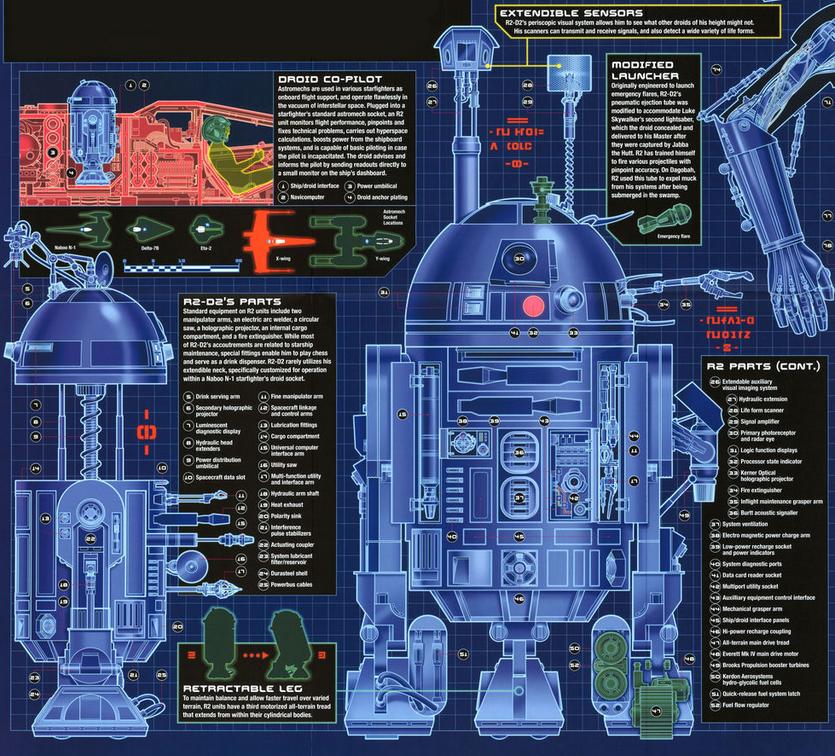
To get to the bottom of this, let’s take an in-depth look at everyone’s favorite Star Wars droid, R2-D2 (sorry C3PO).
Over the span of six movies, R2-D2 has shown much versatility, surprising fans of the franchise with new tricks in each episode (think how much of a game-changer it would have been if R2-D2 could have used his thrusters in the original trilogy). To get an accurate understanding of what all R2 can do, we turn to the Internet’s authority on all things Star Wars, Wookieepedia:
R2-D2 was a diminutive droid, standing 0.96 meters tall. He rolled on three legs, one of which could retract into his body, and had a silver and blue domed head. His white, blue, and silver body housed many arms, sensors, and other apparatuses, many of which were not readily seen by the typical humanoid eye. This often made the droid seem like a box of tricks, unexpectedly pulling out some previously unseen but very much needed device at a critical moment.
Features of the R2-series astromech droid include (bolded are the tasks that we can do on our modern “droid” devices):
Rocket booster
Cable gun
Oil injector
Claw arm
Fusion cutter
Holoprojector / Recorder
Internal comlink
Periscope
Electric pike
Propeller
Hidden lightsaber compartment with ejector
Fire extinguisher / Smoke Screen
Small Saw
Air Cannon
Crashmat
Lariat
Submarine Mode
Collapsible Umbrella
Flea Remover
Distracter
Headdress Detangler
Droid Deactivator
Computer Interface Arm
Charge Arm (electric shock)
Life-form Scanner
Breakdance Mode
Polarity sink
Water pump/hose
Inflatable mattress
Media copy / storage disc drive
Jukebox
Small red “tongue” ribbon
“Confetti-creation device”
Lubricant Application Arm
Motorized, all-terrain treads
Power recharge coupler
As great as the ‘droids are that we carry in our pockets, we’ve still got a long, long way to go before we have personal devices that can do everything that this “extremely well put-together little droid” can do. However, despite this technological shortcoming, it’s still amazing that we’ve come as far as we have over the past 38 years. Who knows, maybe within the next 40 years we’ll finally have lightsabers.
We can’t know for sure what the future of personal technology will look like, but one we do know, if everybody gets their own R2-D2 unit, NuTech Services will be available to provide technical support. May the 4th be with you!
The Internet is full of challenges. YouTube has a multitude of annoying 10 hour-long videos of irritating noises and sounds alone. But, this CollegeHumor video might just top them all. It challenges its viewers to finish a three-minute video, and to make it worse, the video is boring.
It’s a look into the human psyche and the impact that the Internet has had on the way our attention spans work. This video argues that the Internet has made the human mind weak and saturated with entertainment. We surf the Internet for hours on end to put an end to the tedious boredom of everyday life. A decade of a world taken over by the Internet has brought about a generation of weak-willed people who can’t even find the time to finish reading an article.
We Dare You We dare you to finish this article. We know most of you probably won’t. Slate performed a study of how many people actually read their articles, and the results weren’t particularly promising: About 5 percent of people who landed on Slate pages were engaged with the page in some way, but never scrolled down the page. Typically, this means that they didn’t see anything at all about the article, and opted to visit another web page.
Most visitors scroll to at least the 50 percent mark, but that doesn’t mean that they’ve read the article. People could just be skimming and then sharing the information online via Facebook or Twitter. Then, other people can share the article without reading it, too, and it will create a chain reaction of misinformed individuals who can’t pay attention long enough to understand the premise of the article.
Finally, the only way to get most people to scroll through the entire article is to embed pictures or videos into it, which causes readers to scroll through the entire article, then go elsewhere or share/comment on it. These trends use the assumption that the web article is roughly 2000 pixels long (the length of a typical web article, roughly two pages of text or 1,000 words single-spaced).
Still With Us? Good. You’re among the minority of readers. Most of you wouldn’t have read this far. It’s almost as if the seemingly limitless number of screens and tabs that can be open at one time make us feel like we never need to be bored. If something isn’t working for you, all you need to do is search for something else to appease your hunger for content.
The unfortunate side effect of this is that it wastes a lot of time, especially from a business standpoint. Unless you are entirely engulfed in your work, you will be browsing the Internet. Take advantage of productivity-increasing tips from NuTech Services today by calling 810.230.9455. And remember the obnoxious man-in-the-suit’s words; “If you watch this entire video, if you make the choice to sit and be bored for these 180 seconds, you will have finally taken the first step in regaining control over the one truly renewable resource in life: your time.”
Thank you for being one of the few readers to finish this article. Now, don’t waste any more time. Put your time to good use and leave a comment expressing your thoughts.
If you use the Internet, you’re aware of how heavy a presence cats possess. You can hardly navigate the web without seeing a hilarious cat meme, or four. Rather than admit that the human race is obsessed with these furry companions, what if the hairballs are using the Internet themselves and instigating a complete technology takeover? This just might be the case, according to new research.
While the domestic cat is known to chase after anything that even remotely resembles a bird or mouse, it would be foolish to label this spastic behavior as unintelligent. In fact, cats used to be worshipped as gods and deities in ancient times, and for good reason. New research has proven that our feline friends have superior intelligence that dwarfs even that of the brightest intellectuals in history.
Now, the innovative technicians at NuTech Services are putting together what we call a new automated IT solution called the Office Cat Technician (OCT). We’ve reason to believe that the domestic housecat can perform exceptional IT maintenance and tech support.
Cats Have Impeccable Memories IT technicians have countless methods that need to be committed to memory. Troubleshooting tech problems requires an immense knowledge that comes with years of experience, and not everyone can provide this kind of expertise.
Unlike other critters out there, cats have the ability to recall almost their entire life in the blink of an eye. It’s been proven that cats can recall events up to ten years prior, and judging that the past several years have been full of technical innovations and advancements, it’s reasonable to assume that cats have knowledge of all technology built during this time. After all, cats have grown alongside this technology and coexisted with it. This innate ability to command and operate technology is exclusive to the current generation of domestic cats, and their knowledge will only improve with age.
Curious Like a Cat One of the greatest behavioral traits that an IT technician can have is to be curious. This means that they dig deep to find the root of a problem, and to understand how something works down to its base level.
Similarly, cats are well-known for their curiosity. If you’ve ever observed a member of Felis catus, you’re aware of the lengths they’ll go to to observe something new. If you get a house plant, you can be sure that the cat will knock it over in order to get down to the “root of the problem.” When a cat knocks over a glass of water, they’re merely contemplating the concept of gravity, rather than being a complete jerk. You can expect a cat IT technician to be just as curious about technology. They’ll snoop around and dig deep to find the source of your tech problems.
Cats Are Fiercely Territorial The IT technician works tirelessly to make sure that no unauthorized entities enter their domain. This includes keeping the business’s network as secure as possible from outside threats, and restricting access to particular parts of the network. This is a trait seen in cats, as well. They don’t take kindly to foreign creatures entering their territory, and they’ll try to eliminate the threat through intimidation methods, or if need be, force.
Still aren’t convinced that a cuddly kitty can make a big difference for your office? Give NuTech Services a call at 810.230.9455 to find out more about how an Office Cat Technician can assist your business’s operations.
Disclaimer: NuTech Services isn’t liable for any damages caused by the Office Cat Technician solution, including: chewed or frayed cords, destroyed technology, medical bills caused by allergic reactions, smelly carpets, and more.
Happy April Fool’s Day from all of us at NuTech Services!
Computers have become essential to our way of life. You can find them in everyone’s job, home, or even the palm of their hand. With this saturation, the computer has become something that people of only 50 short years ago, couldn’t even imagine. One way this shift has been most evident is in the cinema.
Movies capture the imagination of the most creative people on the planet and deliver those thoughts to audiences through images. Some of the most important social commentaries told today are done through film (or more apt, video). The evolution of computing can be seen if you look back on the roles computers played in movies about, you guessed it, computers. Here are four movies that capture just how different the perceptions of computers are today versus. 50 years ago.
2001: A Space Odyssey (1968) 2001: A Space Odyssey has been listed by many filmmakers and movie critics as the quintessential science fiction film. In fact, directors from Steven Spielberg to James Cameron still consider the film to be groundbreaking in cinema. Stemming from Arthur C. Clarke’s short story, The Sentinel, 2001: A Space Odyssey represents a significant step forward in the way movies represented the dreams of “the future.” Directed by the late Stanley Kubrick, the movie takes audiences from the dawn of man to the outer reaches of space and presents some interesting claims about the future of computing.
The computer in the movie, Hal 9000 was the central computer in the Discovery One spacecraft. The artificially intelligent Hal states that, “The 9000 series is the most reliable computer ever made. No 9000 computer has ever made a mistake or distorted information. We are all, by any practical definition of the words, foolproof and incapable of error.” As the mission continues, it becomes evident that Hal has hatched a nefarious plan to succeed without the aid of his human counterparts, and begins to eliminate them.
Astronaut Dr. Dave Bowman then is forced to risk space exposure to ward against Hal’s nefarious attempt on his life and return to the ship. He then ensure’s Hal’s destruction in one of the most memorable moments ever filmed:
Kubrick and Clarke had hit some aspects of future computing on the head, such as the proliferation of tablet computers, the ability to use video communication over a network, and the use of a computer to control missions into deep space. The reality, however, is that these were all projected technologies at the time. The personal computer did not exist in the mid-to-late 1960s, so while AI seemed like a plausible technology in 1968, in 2015 humanity hasn’t been able to properly program a digitally run system to be truly “intelligent’.
WarGames (1983) About a decade and a half later, the personal computer was a concept many companies were trying to capitalize on. In fact, Compaq, the developer of the first IBM PC clone, set a then-record for business in a single year by a new company. The movie studios were no different in the timing of making movies featuring soon-to-be household devices.
WarGames follows the travails of David Lightman (Matthew Broderick) and his friend Jessica (Ally Sheedy) after David hacks into the NORAD computer looking to play games that, unbeknownst to him, were being used to educate the military supercomputer to think strategically. Along with regular computer games of the times, such as chess, backgammon, and the like, the WOPR (War Operation Plan Response) also had options for “Theaterwide Biotoxic and Chemical Warfare” and “Global Thermonuclear War.” When Lightman sees these he decides to try out the Global Thermonuclear War “game.”
Soon afterwards, Lightman is captured and held for espionage, since his tinkering inside the computer had let to a threat to national security. They decided to hold him until the higher-ups at NORAD can figure out what is going on. Lightman escapes and with help from Jennifer, they go looking for the developer of the software, Dr. Stephen Falken, who had been pronounced dead. They find him at a house in Goose Island, Oregon. David and Jennifer are able to convince him that he needs to go with them to help save the world.
When they get to NORAD, they inform the General in charge (Barry Corbin) that the computer is simulating nuclear war and will launch the nuclear-tipped missiles when it gets the code. In a brilliant move, Lightman and Falken program the computer to play tic-tac-toe which leads it to run the simulations of a no-win scenario in lieu of nuclear war. With the simulations all showing no winner, the WOPR shuts down and asks if they “wouldn’t prefer a nice game of chess.”
In this movie, the personal computer, specifically the IMSAI 8080 microcomputer, plays a key role in the narrative. It is one of the first movies depicting a PC as important and gives credence to what would become a neverending shift in the way society views computers.
The Matrix (1999) A decade and a half later, computers were in many homes and were being used for recreation as well as business. In fact, there was a time toward the end of 1999 when people were unsure whether the “advanced” society that had been built over the previous two decades would come crashing down, literally overnight (Y2K). The Matrix portrayed the computer as simply a vessel to something bigger. By this time broadband Internet was a relatively new technology, and capabilities for what you could do on the web had begun to grow by the day.
The Matrix is the story of Thomas Anderson (Keanu Reeves), also known as the hacker Neo, who is summoned by his computer to “follow the white rabbit.” This leads to him meeting with a woman named Trinity (Carrie-Anne Moss) at a club. She tells him she can show him the truth. He then is taken into custody by men in suits and is interrogated by one of them called Smith (Hugo Weaving). They tell him that they can help him if he’s agrees to cooperate. He rejects their offer and then is bugged and wakes up at home. He then meets with Morpheus (Laurence Fishburne) and is told that he can find out the truth, but he has to make a choice immediately.
It turns out the choice involves living in the real world, or the fake computer world (the only world Mr. Anderson knows). Basically, the world in which Anderson lives in is a digital one rather than the real world, which has been taken over by machines.
He is then released from the Matrix and joins the crew of the Nebuchadnezzar (those who are free from the rule of machines) and is told that he is “the one” (the person prophesized to free humanity from machine slavery). With the use of computers, the band of hackers is able to gain access to the Matrix and learn about the programming behind the platform. They often encounter sentient programs or what the team call “agents” who protect the integrity of the software from outside threats. Neo accepts his role as “the one” in this fight sequence with Agent Smith:
In our reality, the existence of relatively low-cost Internet access, coupled with the rapidly increasing capabilities of the Internet and computing technology, created a perfect storm for the Wachowskis to create a truly memorable, computer-themed film.
The Social Network (2010) The Social Network represents the final shift in the evolution of computers in modern cinema. The film, directed by David Fincher and written by Aaron Sorkin, follows Mark Zuckerberg (Jesse Eisenberg) through his odyssey of creating Facebook. Although the movie is distinctly about Mark and Facebook, it signals a shift in cinema that even the creation of a piece of Internet-based software can be source material for a successful feature motion picture.
The film starts with Mark Zuckerberg as an undergraduate at Harvard. He creates facemash.com which presents a comparison of two girls from the college and asks which one is more attractive. He is caught and brought in front of the administrative board. He then gets approached by Tyler and Cameron Winklevoss (Armie Hammer) who are interested in utilizing his coding skills to build a social networking site for the students at Harvard.
From there, things move quickly. Mark develops thefacebook.com with his friend Eduardo Saverin (Andrew Garfield) as a social networking alternative to the more convoluted peer-to-peer sites that were popular at the time.
Mark then meets with Napster founder Sean Parker (Justin Timberlake) and decides to move from Massachusetts to California and start working on Facebook full-time. After a while, Saverin is basically defrauded, creating the narrative of the movie which is Zuckerberg dealing with lawsuits from the Winklevoss’ and their partner Divya Narendra (Max Minghella) as well as a lawsuit by Saverin. The film wraps up with Facebook being a major success and the lawsuits being resolved.
You can see just how far computers in movies have come, from pure guesswork of the future of computing, through the advent of the PC, the birth of the Internet, to the modern day social media. Computers have gone from machines the size of a refrigerator and the cost of a small house to the palm of your hand (and even smaller). You don’t need status to own a computer nowadays; all you need is a smartphone. Movies have done a great job keeping track of the immense growth computers have made, from a “cool” business gadget to an essential part of a person’s day-to-day life.
Do you know of any other computer-themed movies that you think represent the changes in society over the past 50 years? Do you just have a favorite movie moment dealing with computers? Leave your thoughts or YouTube clips in the comments.











 Netflix – Starts at $7.99 a Month
 Amazon Prime – $99 a Year
 Hulu Plus – Starts at $7.99