5g_take_a_while_400.jpg

5G is Still Going to Take A While

5g_take_a_while_400.jpg

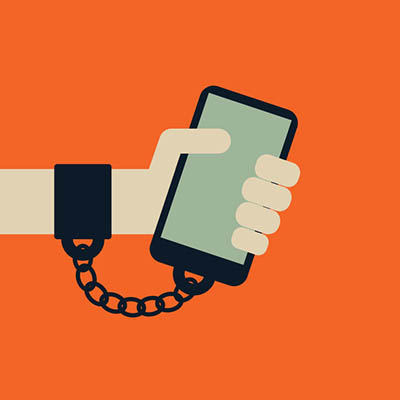
As technology has improved in function and convenience, we seem to demand more and more of it at an increasing pace. Take mobile data as an example: 4G was introduced in 2009, and less than a decade later, there is high demand for 5G. Unfortunately, while 5G has been worked on for some time already, it isn’t likely that it will be commonly available anytime soon.

The technology being touted as the driving force behind 5G has quite a few practical issues, many of which may prove to be too much for the anticipated improvements to offset. Many of these issues are rooted in the proposed use of enhanced mobile broadband (eMBB) via millimeter wave (mmWave) and the inherent issues with this plan.

Range
A big problem comes from the range of mmWave. Currently, 4G signals can reach anywhere between three and thirty miles, while mmWave can only reach a third of a mile – one ninth of its range now, under ideal circumstances. In order for 5G through mmWave to be successful, there would need to be some major infrastructure updates.

This has been addressed in the planning processes, as it is likely that the cell towers we are accustomed to today would instead be replaced by shorter-range femtocells. These femtocells would be approximately the size of a microwave oven, and could be added to existing pieces of infrastructure, like light poles, traffic signs, and even public transportation vehicles like buses. However, these open up the idea of implementing 5G to more complications.

Connectivity
For example, mmWave signals are incredibly easy to block, which is why there would need to be so many femtocells added to the existing infrastructure. When something as simple as an unfortunately positioned traffic sign can block a signal, signals need to be coming from more than one direction.

There is also the matter of bandwidth that needs to be addressed. Consider how much usage each femtocell would see – they just wouldn’t be able to network as efficiently as necessary for proper use. This would mean that the entire network of femtocells would also need to be connected via costly high-speed fiber cabling, which would be an expensive and time-consuming endeavor.

Cloud Confusion
With cloud computing having become such a widely utilized tool, it only makes sense that the femtocell network would be managed via the cloud. By creating a virtual network in the cloud, software-defined networks (SDNs) and network function virtualization (NFV) could be leveraged to manage the 5G network. Trouble is, there are various kinds of SDNs and NFV, with no one standard. The Linux Foundation is working to change this, but this still isn’t an issue that will likely be resolved in the near future.

Regardless, 5G is going to happen – femtocells are inexpensive and, for all their faults, a potentially beneficial way to make it possible. Furthermore, people want better mobile bandwidth. The technology is just going to take some time to develop.

However, if you want to improve your business’ connectivity now, we can help. Give NuTech Services a call at 810.230.9455.
kyt_safe_mode_400.jpg

Know Your Tech: Safe Mode

kyt_safe_mode_400.jpg

If you are trying to identify a specific issue with your PC, it can be difficult to do so due to the fact that there are so many moving parts in an operating system. Still, you want a secure way to find the problem and diagnose it. Thankfully, Safe Mode allows you to take a look at your computer in its most basic form to see what the root of the issue is.

What Safe Mode Does
Chances are that your business’ computers have a lot of extra drivers and features on them that make things a little more difficult for your organization. When you boot up a device in Safe Mode, you make it much easier to diagnose problems since you’re booting it up in its bare minimum state. If the issue persists even in Safe Mode, for example, you know that it’s a problem with the core functions of your PC, whereas the opposite means that it’s a more specific issue with something you’ve installed.

There are two major ways that you can access Safe Mode on your PC. The first is the one that we just outlined. The other can include your network drivers and devices, but this sometimes isn’t what you are looking to do.

Follow these directions to implement Safe Mode on startup.

From the Start Menu:

  • Select the Start button in the bottom-left corner of the screen.
  • Select Settings (the gear icon)
  • Click on Update & Security
  • Go to Recover in the left-hand column
  • Go to Advanced Startup and select Restart Now
  • When the device restarts, select Troubleshoot > Advanced Options > Startup > Settings > Restart
  • Upon startup, hit F4 or the number 4 for Safe Mode. Hit F5 or the number 5 for Safe Mode with Networking

From the Sign-in Screen:

  • Restart your PC. Hold down the Shift key while you’re selecting Restart.
  • When the device restarts, select Troubleshoot > Advanced Options > Startup > Settings > Restart
  • Upon startup, hit F4 or the number 4 for Safe Mode. Hit F5 or the number 5 for Safe Mode with Networking

Have you found this tip helpful? Subscribe to our blog for more great technology tips and tricks.

cryptomining_crime_400.jpg

Cryptomining is Inspiring Cybercrime

cryptomining_crime_400.jpg

Blockchain technology is mainly known for its use with cryptocurrencies. Even though the values of cryptocurrencies have leveled off after the incredible growth it has sustained over the past few months, users are still attempting to use cryptocurrencies to make a little bit of extra cash on the side. Of course, if there is money involved, you can bet that there will also be criminals and shady activity surrounding it.

Criminals love to take advantage of cryptocurrencies due to how much they value anonymity. Unfortunately for hackers, mining cryptocurrency legitimately can be expensive and take a long time. You even need dedicated computer hardware in order to do it, which creates substantial costs, like an increase in your power bill.

Due to how difficult it can be to mine cryptocurrency, a new threat called crypto-jacking has popped up. This type of malware hides on a user’s device and steals its resources for the purposes of mining cryptocurrency. This can lead to devastating results–a higher electric bill, lower device performance as a whole, and more wear and tear on your device’s components. This type of malware only works if the device accesses a compromised website. In the past, this threat would only work if the device remained on the website during the duration of the attack, but hackers have since found ways around this. Some infected websites have gotten so crafty that they can hide a pop-up behind the computer’s task bar, where it can remain for as long as the hacker needs it to.

Crypto-miners are also known for spreading this hidden code to all kinds of websites themselves, as well as through malicious browser extensions. This type of malware is has been found on a broad variety of different websites, like the United States Courts, the United Kingdom’s National Health Service, and the Australian state governments of Victoria and Queensland. It was found in a text-to-speech translation plugin used on these sites. Consequently, the developer of this plugin removed it from all sites as soon as it was discovered.

It’s incredibly important that your business pays attention to these kinds of events and trends, as they could create considerable issues for your organization’s operations. If you’re paying a lot of money for your business’ Internet solution, then hackers are taking advantage of all your bandwidth to pull a fast one on you. Cryptocurrency mining is one of those tasks that takes its toll on even the most powerful hardware, making it likely to shorten your technology’s lifespan. This ultimately costs your business in more ways than one.

Thankfully, there are ways that you can combat these attacks. Some browsers are incorporating anti-cryptocurrency measures, and some antivirus programs are making strides toward straight-up blocking crypto-jacking attempts in the first place. Furthermore, there are some extensions that also block crypto-mining and crypto-jacking scripts entirely.

NuTech Services can help you make sure that your IT solutions are running optimally, as well as securing your organization’s network from potential attacks. To learn more, reach out to us at 810.230.9455.

nist_password_400.jpg

Understanding the New NIST Guidelines for Password Security

nist_password_400.jpg

The National Institute for Standards and Technology (NIST) has released Special Publication 800-63B, titled Digital Identity Guidelines. The document outlines major changes to the ways password security should be approached and leaves a lot of what network administrators and software developers have implemented recently to be wrong Today, we’ll take a look at the publication, and try to make sense of the sudden change of course.

NIST is a non-regulatory federal agency that works under the umbrella of the U.S. Department of Commerce. Its mission is to promote U.S. innovation and competitiveness by advancing a uniform measurement standard. Many NIST guidelines become the foundation for best practices in data security. As a result, any publication they produce having to do with cyber or network security should be considered.

A Look at SP 800-63B
The newest password guidelines are a swift about-face in strategy as compared to previous NIST suggestions. Instead of a strategy of ensuring that all passwords meet some type of arbitrary complexity requirements, the new strategy is to create passwords that are easier and more intuitive. Here are some of the highlights:

  • Passwords should be compared to dictionaries and commonly-used passwords
  • Eliminate or reduce complexity rules for passwords
  • All printable characters allowed, including spaces
  • Expiration of passwords no longer based on time password has been in use
  • Maximum length increased to 64 characters.

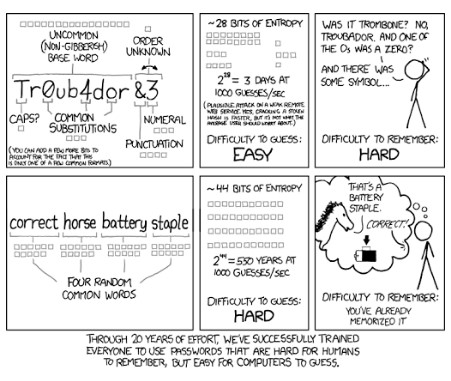
Basically, the new guidelines recommend longer passphrases to the complex passwords as they are hard for people to remember, and even with complexity rules in place, it was becoming increasingly easy for algorithms to crack passwords (seen in the comic strip below).

ib nist cartoon 1

As stated before, NIST is not a regulatory organization, but federal agencies and contractors use NIST’s information in order to set up secure computing environments in which to display, store, and share sensitive unclassified information.

In making these changes to password strategy, NIST is now considering the fact that many industry professionals knew: a password you can’t remember may be secure, but if it’s so secure that you have to rely on third-party software to utilize it, it’s not really that effective at mitigating risk. NIST now looks at the passphrase strategy, along with two-factor authentication as the go-to risk management strategy. SMS-based two-factor authentication was not mentioned in the final report but has come under scrutiny as it has contributed to multiple hacks in recent times.

The NIST also explicitly commands that network administrators be mindful to forbid commonly used passwords; effectively creating a blacklist of passwords. The new guidelines also suggest that users shouldn’t be using the password hints or knowledge-based authentication options; a common practice among banking and FinTech applications to this day. We’ll see if there is a strategic alteration in these companies’ practices as the new NIST guidelines become best practices.

If you are looking for more information about best password practices and data security, the IT experts at NuTech Services are here to help. Call us today at 810.230.9455 to have your password strategy assessed by the professionals.

Comic by XKCD.

kyt_cms_400.jpg

Know Your Tech: CMS

kyt_cms_400.jpg

Marketing is increasingly critical to a business’ success, especially when it comes to the use of content as an impressions generator. This makes it all the more important for your content to be well organized and managed. Here, we’ll go over a few options you have as far as content management systems are concerned, and how they make maintaining your content strategy that much simpler.

What is a Content Management System?
A content management system, or CMS, is an application or program intended to assist you in properly producing, editing, and storing content. A CMS serves as a centralized access point for those with authorization to manage your content strategy, helping you to leverage it more effectively. Each CMS falls into one of two types:

  • Web content management
  • Enterprise content management

Depending on your business’ needs and circumstances, one of these choices will be the superior option for you to leverage.

Web-Based Content Management System (WCMS)
Drupal, Joomla, WordPress
If you’re in business today, chances are pretty good that you have a website, and that you hired a website creator to build it. The WCMS is how all of your content on the website is put together and organized, and because your website is the cornerstone of your online marketing, you need to be sure that this content is equipped with the management features and abilities that will boost its success. The other benefit to leveraging a WCMS is that they are largely user-friendly, which means that learning to manage a website is made into a much simpler process.

Because marketing needs can shift in days, or even hours, organizations like yours may need to make rapid changes to their site. A WCMS allows those changes to be made quickly and easily, keeping your content up-to-date and relevant, while incorporating engagement tools like social media, forms, and discussion boards.

Enterprise Content Management System
HP Distributed Workflow, IBM ECM, Oracle WebCenter Content
While there are a few small differences, the basic function of an enterprise content management system is effectively the same as a web-based one. Not only does it provide an organizational information repository for all of the members of the organization to access, it also provides the same content management capabilities. They are often leveraged by businesses in order to:

  • Manage access to organizational content, improving security
  • Improve collaboration through improved file access and searchability
  • Centralize an organization’s content
  • Build a digital content storage platform through the incorporation of a document management system
  • Improve workflow efficiency by creating and storing templates

Enterprise content management provides both access and control over a business’ information, a must in the competitive market of today, helping to boost their success and profitability.

If you have any questions about the different content management systems and software solutions that may benefit your business, you can always lean on the experts at NuTech Services. Call us at 810.230.9455 for more information.

time_spent_on_sites_400.jpg

How Much Time Do You Spend on These Websites?

time_spent_on_sites_400.jpg

The Internet is massive. It’s simultaneously a never-ending shopping mall, the biggest library that you’ve ever seen, and movie theater. According to a study conducted by MIT, the average American now spends a full day of their week (24 hours) online…and that’s just an average. We all know people who are locked into the Internet from the moment they wake up and stay locked in until they go to sleep. Surprisingly, people only spend their time on a handful of the over 644 million websites that populate the Internet. Today we will take a look at the four most visited sites on the Internet and examine why users spend so much time visiting them.

Google.com
I don’t think anyone would be surprised to find out that Google was the most visited site on the Internet. As the most popular (and best) search engine on the web, it is the most useful site. After all, when you search for something on the Internet (whether you use Google.com or not), it’s referred to as “googling”. This just speaks to its transcendence in the consciousness of Internet users everywhere.

The Google homepage is extraordinarily simple with no advertisements and options to access Google-based products and services and provides a legendary ease of use. Simply type (or speak) your query in the Google bar and wham, you have results. In 2017, nearly 70 percent of all web searches were done using Google.com. Results pages give visitors a lot of options, and do have advertisements, but Google has made certain that the ad space they sell is qualified and is represented on the page much like the non-ad content, as to not distract the user. Some options they give visitors include search query results, access to media, access to contact information, access to immediate information (if available), and suggestions for other queries you may use to get the answers you want. Add it all up and Google has become the most visited site on the Internet because it brings a lot of value to each and every user.

YouTube.com
Consider for a moment that the video streaming service YouTube may just be human’s greatest resource. Who among us hasn’t gone onto YouTube to view a tutorial about something or other? People continuously seek knowledge and today’s person is much more comfortable taking their information in video form than they are through reading. YouTube is a website that shows you just how helpful people can be when they have information they are willing to share.

YouTube’s search engine is technically the second largest of its kind on the Internet, and if you think that figure is impressive, consider one more tidbit: at any given time, half of the Internet is viewing YouTube. Whether you are looking to be educated or entertained, YouTube is a one-stop shop.

For businesses it’s more a mixed bag. There is no doubt that the marketing opportunities provided by YouTube can be a great way to get your message out to potential customers, but the drains that YouTube can have on employee productivity are substantial. In fact, some businesses have suggested that they lose upwards of seven hours per week per employee (or about 18% of total productivity), so if you are going to allow your staff access to YouTube at work (which statistics show you should), make sure that you have a system in place that can work to limit employee access to training materials and other educational channels and not time-wasting channels.

Facebook.com
Over two billion people actively use Facebook. Today, it’s used to run events, sell products and services, and express opinions. Since so many people utilize the service, anything you need to do as far as virtual networking can be done using Facebook.

It has a lot of attractive integrated applications, but no single application has as big of an effect on the use of Facebook as Facebook Messenger. The messaging application sets Facebook apart from all other social networks as it integrates with most computing platforms to provide feature-rich text messaging to other people using the service. Beyond Messenger, there are countless other ways to connect with people on Facebook. Games, discussion groups, and much, much more make Facebook the go-to resource for social networking on the web.

Like YouTube, Facebook can be a big drain on productivity. One study found that Facebook costs U.S.-based businesses upwards of $28 billion a year. That’s about 1.5 percent of all potential productivity lost to political memes, friend’s statuses, and event planning, so be sure to monitor your network for Facebook usage and limit it as necessary.

Reddit.com
Reddit is the largest online forum website and has made it up to the top four because of the amount of time people spend on it. As the self-proclaimed “front page of the Internet”, it has become the site where people spend the most time. There is no other website that has the combination of controversy, information, entertainment, and potential distraction that Reddit has. There are literally thousands of different topics being discussed in forums, called subreddits. Any hobby, platform, opinion, or fact probably has its own subreddit. Since users can search through them, and quickly become engaged, time can melt away pretty quickly.

Of all the sites that a business should consider blocking, Reddit has to be at the top. By allowing it to be accessed by your staff, there is a distinct possibility that you are just tossing money down the drain. So, while it is extremely useful for anyone that wants to learn or discuss variables about issues that are relevant today, Reddit is most certainly an enemy of productivity.

Everyone knows that the Internet is a great resource, but it can also be a huge waste of an organization time–and that is a resource you can’t get back. For more information about instituting a content filter to ensure that your staff is focused on the things they should be while at work call NuTech Services today at 810.230.9455.
deserve_better_manage_docs_400.jpg

You Deserve a Better Way to Manage Your Business Documents

deserve_better_manage_docs_400.jpg

A file cabinet might seem like it’s necessary for operations, but it’s actually not as useful as it used to be in the past. This is primarily due to the implementation of new solutions such as the document management system. By taking advantage of a new digital storage system for your business’ documents, you can optimize operations and ditch that filing cabinet for good.

What is a Document Management System?
In short, a document management system is a software that allows you to scan all of your paper files that have accumulated over the years and store them in a secure digital database. Better yet, this database is accessible from anywhere, as long as the user has permissions to access it. You can think of it as one big electronic filing cabinet. Since it’s hosted in the cloud or on your in-house infrastructure, you can integrate a document management system in whatever way best suits your organization’s needs.

Why You Might Want One
Imagine an office without filing cabinets, paper files, or printing costs. Any room that is being used to hold these bulky objects and any loose paper files can be freed up for other uses. Imagine never having to dig through countless files just to find one particular document again. Any documents you might need can be found just by going to your document management system via your smartphone or desktop. This makes for much more efficient use of your available resources as a whole.

Going Paperless
It’s easier to search for a digital file than it is to dig through a physical file folder. If you go paperless, this is one of the many benefits that you receive from a digital file storage system. Since you’re going paperless, you’ll be spending less on ink, paper, and printer maintenance–all of which totals up to a considerable cost. Since you can save time on accessing, editing, and saving documents, you’ll see improvements in productivity.

Let’s imagine that your organization is hit by a crippling disaster. It wipes out all of your filing cabinets and internal infrastructure. If you keep your document management system in the cloud, all of these files will be saved from the destruction. This keeps your data backed up in a secure location where it can be restored at a later date.

Perhaps one of the most notable ways your organization benefits from paperless technology is that you reduce your carbon footprint. If you waste a lot of paper, you contribute to a lot of environmental problems such as air pollution, water pollution, and deforestation. The United States alone wastes four million tons of office paper every year, so you can do your part to keep the environment clean by going paperless.

Does your business need help implementing such a solution? NuTech Services can help. To learn more, reach out to us at 810.230.9455.
sports_are_training_ground_smart_tech_400.jpg

Sports Are a Training Ground for Smart Technology

sports_are_training_ground_smart_tech_400.jpg

Smart technology and the whole Internet of Things revolution has been underway now for some time. One vertical market that has embraced this shift was that of sports and fitness. Of course, you’ve heard of (and possibly own) a fitness band that is designed to track your steps, your vitals, and some other things to allow you to be the best version of yourself. This technology has been around for years and, while useful, isn’t transforming the face of sports like the technology you are seeing being introduced today. Today, we’ll take a look at how the IoT is transforming the sporting world.

The Games
Sports are important throughout the world. With so many people claiming to be sports fans, and so much money spent on viewing sporting events annually, it stands to reason that one of the biggest technology trends in history hit the sports world (and athletics as a whole). To this point the Internet of Things has been a conceptual strategy in some industries. Not in sports, where athletes, teams, and leagues are using sensors and smart products to help quantify and track elements of an athlete’s performance, while using the immense amount of data that’s produced to formulate plans to make sports safer. The analysis of this data has become big business, and is, in some cases, transforming the games themselves

The National Pastime
One example is happening in baseball. Several years ago, the use of data began to change the way teams value players. Called sabermetrics, it took all the raw data that was collected from the game (and there is an awful large amount of data in every game), plugged it into algorithms that were uses to compare every player to every other player. This provided a map of how to put together a winning team for fewer dollars. Later named “Moneyball”, the strategy began to make its way through the major leagues, into the minor leagues, and beyond. With so much impetus put on the numbers, a lot of teams started finding new algorithmic approaches to try to get an advantage.

When the IoT was in its infancy, the shift toward analysis has only quickened the pace of innovations. Today, so much raw data is taken from a baseball game that all 30 major league teams have come to employ huge analytic departments to sort through and quantify the data. This has not just been used to determine the acquisition (and value) of players, it has been used to determine lineup configuration, defense configuration, pitcher effectiveness, and all in the name of situational advantage.

Once general managers, managers, and players knew what they were looking for, they began to use the newest technologies to track specific parts of a player performance. One way that IoT is working to improve player performance is by introducing technologies like SwingTracker that attaches to the bat and captures a player’s swing in 10,000 separate data points per second, and the mThrow wearable sleeve that pitchers can wear on their arms to measure pitching mechanics. Since millions of dollars are spent on contracts for players, teams are trying to be as diligent as possible as to not waste available capital. Beyond the dollars and cents, these IoT wearables not only help athletes fine-tune their craft, they do it in a way that helps them avoid injury.

Other major sporting leagues including the NFL, MLS, Premier League, NHL, NBA, and PGA all have incorporated IoT devices into the training and reporting strategies trying to both enhance the quality of their product while protecting (as much as they can) their resources (their players).

The Athletes
For the athletes themselves, the IoT has a myriad of potential uses. Today there are smart clothes, including socks, shoes, fabrics, and more designed to help the track and improve performance. Here are some examples of IoT devices that are helping individuals excel in their athletic endeavors:

  • The connected basketball – Ball handling and shooting are two of the most important offensive skills for a basketball player and there are now basketballs on the on the market that can help you improve your ball handling and shooting by incorporating sensors into the ball itself. The corresponding app presents you options to measure your dribbling and shooting.
  • The connected hockey stick – Using tape sensors, a hockey stick can help players measure their shot speed, their blade angle, and a player’s stick work.
  • The connected golf club – Golf has, somewhat ironically, been the one sport that has embraced technology most over the past 50 years. So, it is not really a big surprise that the IoT has already found its way into both clubs, and their grips. Today, there are many options for the tech-savvy golfer to improve their game using IoT technology.
  • Radio Frequency Identification (RFID) for football – By sticking an RFID sensor in a player’s shoulder pad, coaches can now see where the location of a player, the speed, and the direction they’re going. This allows them to put together smarter game plans and improve team performance.

The Internet of Things is changing the world we live in, and it’s not happening slowly. Have you started using IoT-connected devices? Tell us about your IoT experiences today in the comments section below.

usb_c_fast_data_400.jpg

Is USB Type-C the Answer for Fast Data Transfer?

usb_c_fast_data_400.jpg

You might use USB every day for your general technology needs, but do you know the difference between the various kinds of USB? This week’s tech term is dedicated to investigating the different types of Universal Serial Bus (USB) ports, including its history, development, and uses.

The Origins of USB
First developed and implemented in 1996, the USB cable was created with the purpose of connecting devices to a computer in mind. A total of seven leaders in the computing and communications industry–Compaq, DEC, IBM, Intel, Microsoft, NEC, and Nortel–wanted to create a simple solution that could allow several different kinds of devices to connect to a PC.

Essentially, an early USB connection provided a data transfer of about 1.5 Mbps to 12 Mps. While this isn’t as fast as today’s standards, it was quite remarkable for the time. The first major release of USB technology was in September 1998, and it provided users with a 12 Mbps transfer rate on high-speed devices. Apple’s own iMac computer was actually one of the first devices to come with USB built into it, and it success played a major role in the commercialization and popularity of USB. The original USB came in two different connector types: type A, or standard USB, and type B, the more squared-off connector.

Innovations of USB
In August of 2000, USB 2.0 was released. The increase in data transfer was substantial at about 280 Mbps. Additionally, the first mini-USB (types A and B) were also developed. Furthermore, USB 2.0 introduced a new integrated battery charging feature, as well as fast data transfer from the emerging smartphone market. USB 3.0, introduced in November 2008, achieved an impressive 5.0 Gbs transfer rate, and the next decade would only further enhance this. September 2017 brought about the Type-C connector and USB 3.2, resulting in a transfer of around 20 Gbps.

USB Type-C
The USB Type-C uses a 24-pin USB connector system. You can identify it by looking for its rotational-symmetrical connector. We think that this is not just the most identifiable feature, but its most important as well. Nowadays, there is no wrong way to plug in your USB cable. In terms of size, the USB-C connector is larger than the micro-B connector. Just like the typical USB wire, one end has a type-A or type-B connection, while the other end has the new type-C connector.

For your reference, here are three of the best new features for USB Type-C:

  1. It’s designed to be easier to plug in since there is no discernible way that the dongle has to be entered into the device.
  2. Data transfer and power capability are basically twice what they were with USB 3.1.
  3. It’s designed to become a future-proof option for data and power transfer for mobile devices.

Unfortunately, not all devices support one cable, but maybe in the future this will become the new standard. For more information about new developments and the latest technology, subscribe to our blog.

windows_logo_end_of_life_400.jpg

Save the Date: Microsoft Products End of Life

windows_logo_end_of_life_400.jpg

There are one of two reactions every person gets when they get a save-the-date card in the mail. They either are excited for an event or they realize that the event is going to cost them money. For today’s blog, we give you our version of save the date as some of the most widely used Microsoft products in recent memory are coming up on their end of support date, and for some businesses, this save-the-date might be bad news.

We know that unsupported software can be a complete nightmare. This is especially true if the unsupported software is a critical component of your company’s computing infrastructure. Microsoft has announced that they will be officially ending support for two major operating systems, Windows Server 2008 R2 and Windows 7, on January 14, 2020. Both pieces of software are currently in their extended support periods, meaning that people can pay Microsoft to support the software, but after January 2020, neither piece of software will have any type of support available.

Windows 7
In 2016, all Windows 7 users were given the option to upgrade away from the OS to Microsoft’s newest OS, Windows 10. Users that didn’t take advantage of that offer have since had to pay for it, but if you haven’t upgraded away from Windows 7 by now, you are probably paying for support or not receiving any, both of which are not advantageous. By upgrading today, you will get ahead of what could be a major problem down the road. Waiting until the last minute to implement new versions of the OS is not recommended, since upgrading sometimes comes with hidden problems and legacy software issues that could put your whole organization at risk.

Windows Server 2008 R2
In what will be a larger problem for businesses, support for the already extended Windows Server 2008 R2 is definitely going away. For the last four years, Microsoft has insisted that anyone using Windows server 2008 R2 needs to upgrade, but since it kept offering extended support, businesses kept on using it. Well, Microsoft has announced the end is near for the decade-old server OS.

Newer versions of Windows Server have a lot of new options, especially in the arena of virtual environments. So while it is possible to swap out Server 2008 R2 for another Windows Server OS, the best course of action will be to scrap the old server altogether and upgrade to new infrastructure. Since there are substantial costs that go along with changing servers, companies still using the old software will want to do their best to start upgrading immediately.

At NuTech Services, we can help any-sized business get upgraded, while finding you innovative options to reduce the capital costs of doing so. To find out more, contact us at 810.230.9455.

Know_Your_Tech_Cache_400.jpg

Know Your Tech: Cache

Know_Your_Tech_Cache_400.jpg

If you hang out around technology professionals for any period of time, chances are that you’ve heard the word “cache” used before. The word, pronounced cash, is usually heard in the phrase, “clear the cache,” but if you don’t know what this phrase means, how can you benefit from it? Since this week’s tech term is “cache,” let’s get into the details.

What is a Cache?
Most words used in computing have meanings outside technology, so it’s natural that cache has appeared elsewhere in language before now. A cache is essentially storage that is hidden away from the general public. Maybe you have a stash of goodies in your desk that are meant for “emergencies,” or perhaps you have a cache of pens hidden away because people keep stealing them from you. Either way, it’s a collection of something that you want to keep out of sight, and it has its uses for computing as well.

A cache can also be a hardware or software function that keeps data stored somewhere hidden away for faster processing in the future. This can be anything from a cache allowing your network’s data to travel faster from point A to point B, to a web browser storing information from certain web pages so that they are loaded faster than they otherwise would be. Simply put, the cache makes computing easier and more efficient–or at least, it’s meant to.

So What Does “Clear the Cache” Mean?
Clearing the cache in a web browser is easy. All it takes is the keyboard shortcut, Ctrl+F5. What this does for your device is that it allows the website to update any information that it has stored in the cache. This includes cookies and other website data that it may have stored. How this comes into play is when a website is updated and its appearance needs to be updated in the cache. If you fail to clear it, you might not be looking at the most up-to-date version of the website. Caches are most effective when they are small, so it helps to clear it once in a while to keep it that way.

Before clearing a network cache, however, you’ll want to first make sure that any drastic changes are handled by a networking professional. NuTech Services would be happy to further explain the process of caching and what it means for your business. To learn more, reach out to us at 810.230.9455.
may_be-seeing_more_ai_400.jpg

Where You May be Seeing More AI Soon

may_be-seeing_more_ai_400.jpg

The notion of artificial intelligence has played out in fiction, on the silver screen, and on the small screen for decades. Instead of having sentient cyborgs that enslave humanity, people are using A.I for our benefit. Today, we take a look at the A.I. of 2018 and how your business can leverage it for your benefit.

What is Artificial Intelligence
Today’s world is filled with data. All the experiences and thoughts humans have produced over centuries have provided somewhat of a record of what is expected from A.I. After all, if humans are going to replace workers with machines, ensuring they can do the jobs as (or more) efficiently is going to be important. For now, however, A.I. is being utilized in conjunction with people–trying to make our world better by making the applications and services we depend on more intuitive and efficient.

At one time there were the American Titans of Industry. Today we have Titans of Technology, and not one of them isn’t completely fascinated by the practical applications that artificial intelligence (in some fashion) can have for humanity. The thing standing in the way from all this glorious A.I.-fueled innovation, of course, is humanity. It seems every so often there is a report that is written suggesting that millions of workers can now be replaced with machines, and in the interest of shareholder profits, any business that has been able to leverage A.I. and increase its profitability has gone ahead and done so, often against public sentiment.

One study predicted that 47 percent of all jobs could be automated by 2033. That’s only 15 years off. If you’re looking for some current statistics, another report found in 2016 that up to nine percent of all workers are now unnecessary. Yet another suggested that 800+ of the largest businesses in the world, will cut between four and seven percent of their workforce and replace them with more efficient and less costly artificially intelligent machines.

How Your Business Could Use A.I.
You use A.I. every day without even thinking about it. Every time you use Google. Every time you use Uber or Lyft. Every time your email sends an incoming email to spam. Even as people all look forward to an inevitable permanent vacation as a result of A.I., it can be extraordinarily useful for the smaller business. Here are three ways even the smallest of businesses can take advantage of the growing A.I. market.

  • Operations – For small manufacturers or service providers many of the often-redundant parts of the job can now be automated. Since an A.I.-fueled ERP or CRM platform adjusts to the data you enter into it, it increases the level of automation that you can use to make your business more efficient.
  • Marketing – Small businesses rely on very targeted marketing campaigns, and by utilizing A.I.-driven marketing platforms, companies can reduce their marketing costs and target the audience most likely to purchase their products and services.
  • Customer Service – Customer service representatives have a tendency to flame out fairly quickly and actually deteriorate a company’s relationships with its customers. By using A.I. to automate a big portion of the customer service load, customers will get better support, and will tend to become repeat customers.

How has your business been able to utilize artificial intelligence? Do you foresee using A.I. in any capacity going forward? Leave your thoughts below and return to our blog for more great technology-related information.

technology_addiction_very_real_400.jpg

Technology Addiction is a Very Real, Very Scary Thing

technology_addiction_very_real_400.jpg

Technology has become essential to workplace functionality and personal productivity, but while the long hours spent glued to our tech during the workday are a necessity, the time we spend at home with our personal devices is definitely voluntary. However, more and more people – children especially – are finding it harder to let their devices power down.

This is the hallmark of technology addiction, or Internet addiction disorder (IAD). While it isn’t yet officially recognized in the Diagnostic and Statistical Manual of Mental Disorders (DSM), IAD caught the attention of health professionals in the 1990s and 2013 saw the addition of Internet Use Gaming Disorder to the DSM-5.

What Makes IAD a Problem
Many of the features and trends that are widely taken for granted in applications today – autoplay, in-app purchases, and even notifications – are actually undermining our self-control. Instead of being able to set down the device and move on to something else, these tactics have made it so that we feel compelled to compulsively check these devices.

After all, you never know what you may miss if you don’t check right now.

Of course, needing to use technology for work and being addicted to technology are two very different things, but that doesn’t change the fact that children and adults alike have increasingly presented the warning signs of this addiction in their personal lives. That’s right – as much as the attachment to technology has stereotypically been framed as a young person’s problem, it can affect adults just as easily.

In a poll, 66 percent of parents felt that their teens were investing too much time into using their mobile device. No real surprise there, right? However, the same poll measured that 54 percent of children believed that their parents were checking their own devices too frequently as well.

Symptoms of IAD
IAD has a few warning signs and symptoms that present themselves in the behavior and mood of the person affected. Repeatedly checking for incoming text messages or updates and excessive social media use are common behaviors to keep an eye out for in your loved ones, and possibly in yourself.

Those afflicted with IAD also frequently feel euphoric while using their technology, and when they aren’t, often feel restless. IAD sufferers are prone to social withdrawal and experience diminished interest in activities not centered around a gadget. Some schools have even implemented technology fasts, where students have gone without their precious devices for a week. Teachers have noted that these students often exhibit physical symptoms of anxiety while their devices aren’t accessible. Students will reach for a device that isn’t there, all the while shaking and sweating.

How to Reduce Addictive Tactics
Above, we mentioned how many modern applications have features that encourage this kind of pervasive presence and dependence. To avoid these affects, it is probably best that these features are deactivated for non-essential applications.

Notifications are some of the biggest culprits of encouraging persistent use, so if the information isn’t essential to your professional or personal life, you don’t need an app trying to get your attention. Ask yourself: do you really need to be informed that your energy has been refilled in that mobile game you play more than you should? At the very least, using the mute notifications feature will help keep your attention from being pulled away when it shouldn’t be.

Many of the same apps that spam you with notifications are also the ones that encourage users to make those tempting in-app purchases that give the user an edge, or more frequently, extend the amount of time you can use the app before you have to wait again. This is most common in the free versions of these applications, so if you insist on using the app, it is more economical in the long run to just bite the bullet and pay for the app itself.

What piece of technology can you not bear to be without? Share it with us in the comments.

smart_technology_changing_fast_400.jpg

These 3 Industries are Being Fundamentally Changed by Smart Technology

smart_technology_changing_fast_400.jpg

Smart technology has seen explosive growth in recent years, leading to an uptick in startups popping up to capitalize on smart tech and the innovative ways it can be leveraged. With demand for such devices increasing exponentially, it’s little wonder that many industries are diving into this technology. Today, we’ll discuss three of them.

Energy and Conservation
It should come as no surprise that a major driving force behind the use of smart technology is for this technology to use energy and natural resources more intelligently. Of course, it also doesn’t hurt that smart technology allows us to save time and money as well, through the automation of processes that once required a human touch to complete. In addition to making homes ‘smarter’ and more accommodating to the needs of those living in them, smart tech has been proven to be a major player in environmental conservation. Automated devices have been able to track and report on various kinds of environmental data, including waterflow, plant health, migration patterns, and many other variables, allowing us to use this data to improve our treatment of our environment.

Fitness and Health
Ever since the first ‘smart’ shoe – the Micropacer – was introduced in 1984 by Adidas, smart technology and fitness have been close companions. In just the past few years, devices like fitness bands and smartwatches have exploded in popularity, and more innovations have followed fast.

As fitness bands and watches have become more intelligent, the technology that powers them and their functions has improved as well. Now, features like application integration, improved functionality, and quicker response times are available in fabric form. These smart fabrics have led to innovations like smart socks and undergarments, fitness rings, shoe inserts, and other activewear and accessories hitting the market en masse. Using these technologies, everyone from the active exerciser to the casual enthusiast will be able to better measure and optimize their workout regimen, even avoiding injury.

Transportation
All over the world, one of the biggest time sinks is the battle to get from point A to point B. In many places, the commute to work can be stretched due to traffic congestion, and in others, impractical traffic patterns extend the amount of time spent sitting behind the wheel. This is one issue that is actively being worked on through smart technology now, as is evident by the aggressive research and development into driverless transportation. After all, with machine learning and AI behind the wheel, traffic as a whole could become a cohesive network, rather than the mass of individual, autonomous bodies all looking out for number one.

This is a concept that has long been considered as a solution for the persistent issues with mass transportation that have been evident since, well, mass transportation became a common thing. We have never been closer to successfully revolutionizing automated transportation in a way that is practical for widespread application. Pittsburgh, Pennsylvania, and other places have experimented with concepts like Uber’s driverless cars. While this initiative didn’t go quite according to plan, it still demonstrated that this technology is on the cusp of market readiness.

What are your opinions on smart technology? Do you see it being adopted in more aspects of life, or do you see it as being a short-lived interest? Talk about it in the comments section!

nanotubes_nanotechnology_400.jpg

What is Nanotechnology, and How Can it Be Used?

nanotubes_nanotechnology_400.jpg

Technology is seemingly being made smaller and smaller. Just think about the size of the computers from the mid ‘90s until now. Sure, you can still buy huge a gaming PC with a four-foot tower with liquid cooling, or one that is a fish tank (complete with fake fish); but, the computer you use the most fits in the palm of your hand.

Nanotechnology is the smallest “technology” yet. At its core, it’s a manipulation of the smallest elements of matter, measured in nanometers. Consider that your fingernails grow at about a rate of a nanometer per second, or that a single molecule of water is about a quarter of a nanometer across, and it will give you an idea just how small a nanometer is. It is quite literally one-billionth of a meter.

That’s really the start. Nanotechnology deals with anything in that arena that measures between 1 and 100 nanometers, and largely consists of the engineering of structures that function inside or alongside nature’s nanomachine, cells.

How Is This Technology?
It really is a true combination of science, engineering, and technology. To answer the question, engineers are currently at work attempting to create smaller, more powerful microprocessors that could be used to adjust the practical uses of every material of the physical world. You could make structures stronger, cure disease, and alter matter at the subatomic level. If that’s not technology, I don’t know what is.

When semiconductor manufacturers create the latest and greatest processors or microprocessors for use in a myriad of devices, they measure their nodes in nanometers. Today, these manufacturers are working on the five nanometer chip–a feat thought impossible by many – until IBM announced they had developed one. If DNA is only two nanometers across, we may only be a short time until machines will fit everywhere.

Why Don’t People Know About It?
Nanotechnology is in its relative infancy. In 2017, Dr. George Tulevski of IBM spoke to the challenges the field faces going forward. His perspective was that nanotechnology development and research actually has slowed since the 1980s. In the same TED Talk, he opined that the use of carbon nanotubes could potentially improve computing tenfold, but the development of this technology is just in its early stages.

Is This Technology a Good Thing?
With people today only having a limited understanding of the technology, there aren’t a lot of trustworthy opinions on the issue. Intellectia even seem hedged about the applications of nanotechnology. On one hand, theoretically it could do more than any other technology to help the human race. On the other, any technology made from wonder, and with benevolent intentions, can also be manufactured for malevolent use. Like with other contemporary technologies such as artificial intelligence, researchers will have to move slowly and not let potential profits influence their release of products involving nanotechnology.

Do you consider nanotechnology to be interesting? Would you like to see how far this rabbit hole goes, or should we as a people leave well enough alone? Leave your thoughts in our comments section below, and return to read more great technology blogs from NuTech Services.

cables_close_up_connection_400.jpg

Tech Term: Bandwidth

cables_close_up_connection_400.jpg

Here’s a question we want you to take a second to consider…How much do you rely on the Internet? The answer for almost everyone is that it is essential to your current quality of life. Technologies have been developed, industries have been launched, and literally billions of people use it every day, making it one of the predominant inventions in human history. At the heart of this phenomenal technology is bandwidth.

The term bandwidth, in the context of the Internet, is the volume of information per unit of time that a transmission medium can handle. Simply put, the larger the bandwidth your connection has the faster the data can move through the medium. Bandwidth is measured in the amount of data transferred per second, specifically megabits per second (mostly written Mbps or Mb/s). Megabytes, written MB is not typically used in measuring bandwidth as a connection that is advertised as 15 MB is actually 1.875 Mbps since there are eight bits in every byte.

Most Internet Service Providers, or ISPs, will sell packages of a certain megabits, but if you really want to ascertain the bandwidth your computer is running on, your best bet is to use one of the numerous Internet speed test sites like the one at speedtest.net.

The best analogy, and the one that we’ll use, is that of plumbing. It’s said that data is to available bandwidth as water is to the size of a pipe. As bandwidth increases more data can be transferred through it, just as a larger pipe passes more water. Increasing bandwidth, or finding a larger pipe, will allow for even more data/water transfer. For the average user that only uses a couple of apps, a web browser, and doesn’t stream media, a small bandwidth connection will work fine. For tech-savvy families or very small businesses that have multiple devices connected to the Internet at once, they will find they will need more bandwidth to do the things they want to do seamlessly. Larger businesses will need enterprise-level bandwidth of multiple hundred Mbps.

Your Internet connection isn’t the only place where bandwidth comes into play. If you have a website, you will have to pay for a bandwidth level that is commensurate with the traffic and data interaction. In many cases, the more bandwidth you need, the more you will need to pay for hosting.

For more information about technology terms that confuse you, visit our blog, or contact our technology professionals at 810.230.9455.

which_authentication_is_best_400.jpg

Which Authentication Option is Best?

which_authentication_is_best_400.jpg

Smartphones have steadily increased in their capabilities, and as they have done so, they have resultantly gathered more and more data that needs to be secured against potential security threats. Fortunately, there are also more ways to protect your smartphone than ever before. For today’s blog, we’ll take a look of the options you have to secure your devices.

The Password
Passwords are the reigning king of authentication. A well-regarded password is your average user’s go-to; and, if not created with security in mind, can be very problematic. Since users have problem remembering new passwords, even if it’s one that they are able to choose, many users will create obvious passwords that can easily be guessed or hacked.

Conversely, a password (or the passphrase) can be one of the strongest security measures available for your mobile device, as it is important for every mobile user, especially one that has access to business networks, to secure their devices.

The Pattern Lock
The second option we will go over is called a pattern lock. It is the three-by-three swipe-based gesture that unlocks the device. This natural and intuitive lock is very fast, and if all nine dots are used in a pattern, it provides close to 400,000 possible configurations. Pattern lock comes up short in a couple ways. People tend to use shapes that are more easily guessable. It’s also relatively easy to ascertain the password if you watch a user’s hand.

The PIN
The PIN authentication option is a relatively strong one, as the typical four numeral option has over 10,000 different combinations. Android features the ability to support up to 16 digits. That’s 10 quadrillion different combinations. Of course, not many people are going to be able to remember a 16-digit PIN (and how annoying would it be to have to enter that every time you unlock your phone?). Simple pins are the norm, and therefore not very secure.

The Fingerprint Scanner
This authentication method is now becoming standard on most smartphones and has by-in-large been very popular. It’s secure enough to be trustworthy, and very fast. Moreover, many financial applications utilize the fingerprint as a form of authentication, making the option that much more attractive. The only drawbacks are that sometimes manufacturers will put it in an inconvenient spot on the device and that it doesn’t work with gloves.

Using the Face
All newer smartphones have been taking advantage of facial recognition software. This allows a user to gain access by just glancing at the phone. Since this is an operating system-dependent option, most phones will be getting this option. It may not currently be the most secure option, but as the technology advances, this will be the go-to method for all authentication.

Other Security Measures
Many phones now also offer security features that rely on alternative forms of authentication. On-body detection keeps the device unlocked whenever it is being carried – regardless of who is carrying it. Other options such as having your device unlock when a user says “Okay, Google” is more for convenience than privacy or device security.

What’s the Best Option?
Currently, if you are looking for the most secure and accessible option, your best bet is to use the fingerprint scanner on your phone. Back that up with a five-or-six-digit PIN and you’ll be good to go. In the future, expect the facial recognition software to improve precipitously; and, therefore, be the most secure (and popular) option to get into a mobile device.

What form do you use? Leave your favorite security methods in the comments section below.

tech_term_cookies_defined_400.jpg

Tech Term: Cookies Defined

tech_term_cookies_defined_400.jpg

Chances are, if you’ve spent any amount of time around a computer, you’ve heard of browser cookies. What you may not have heard, is what these cookies do. For today’s Tech Term, we’ll explore what cookies are, and what they do.

What are Cookies?
A cookie is a sample of information that a website stores on a user’s computer in text format that only that particular website can access. This information, made up of name-value pairs, informs the website if you have ever visited before and allows it to personalize your experience as a user. These cookies are often removed once the browser window is closed down, but they can be designed to last longer.

Cookies are what enable a website to “remember” that you are logged in and allow you to change particular settings without them reverting back the next time you navigate to a new page. Furthermore, cookies can allow websites to remember your browsing tendencies and suggest things that might interest you, even if you haven’t logged in. This is especially apparent on ecommerce sites that offer you products that might interest you based on the products that you’ve viewed in the past.

Are Cookies Dangerous?
In a word, no. All these pieces of data are viewable only by the website that delivered them. This means that Website A can only see cookies that it has delivered, and its cookies are likewise hidden from Website B. As a result, if Website B was attempting some malicious activities, the information that Website A has stored is safe.

However, some cookies are used for purposes that may be unwelcome to some users. Have you ever been browsing for a particular item on Amazon, and then notice that the other websites you visit are displaying advertisements for related items? This is the result of an advertising cookie taking note of what you have demonstrated interest in, thereby allowing it to customize the advertisement to best fit your interests.

Clearing Cookies
Of course, you can remove the cookies that your browser has accumulated by using the Clear Private Data tool. However, this will also erase any saved login credentials that you do want websites to have saved. The majority of browsers have ways to workaround this by whitelisting some websites as trusted to save cookies.

Are there any other Tech Terms you’d like defined, or do you have more questions about cookies? Reach out to us at 810.230.9455 and let us know!

qr_code_log_in_scan_400.jpg

Using a QR Code to Log In

qr_code_log_in_scan_400.jpg

Passwords are still an incredibly valuable part of security, but it’s becoming quite difficult to maximize network security through passwords alone. Even if you somehow manage to sell the idea of network security to your staff, whether or not they follow through is another thing entirely. It’s critical that you make it as easy as possible for your employees to stay secure, and that’s where scannable QR codes come in.

Why QR Codes?
By using a QR code to connect to your business’ wireless network, you can improve security. There are several benefits to this approach compared to the traditional alphanumeric password. An alphanumeric password can’t be shared as easily as a QR code, and the last thing you want to do is share your specific Internet access credentials. The real kicker is that a QR code makes things much easier on the side of the end-user. Instead of using a touchscreen to plug in a PIN or password, you can simply use the right app on your mobile device to take a picture of a QR code. It’s a great way for businesses to allow guests access to a wireless network without carelessly handing out credentials.

How to Use a QR Code
If you want to use a QR code to access the Internet, you will need to have a system in place that generates a code. You can use any of various websites or applications that create QR codes for whatever network that you want to connect to, as well as its password. You’ll also want to review any terms of service or other policies before making sure that you want to share this information for any reason.

Once you’ve done this, you’ll be able to download the end result. You now have an easy way to access your Internet without creating a security risk for yourself. Do you have any other security concerns that need addressing? NuTech Services wants to help. To learn more, reach out to us at 810.230.9455.
mobile_safe_encrypt_smart_phone_400.jpg

Encryption Helps Keep your Smartphone Secure

mobile_safe_encrypt_smart_phone_400.jpg

These days everyone has a smartphone; and, they can do some pretty incredible things. One place that the average smartphone may seem to be a little loose is in the arena of data security. Today’s smartphones do, in fact, come with encryption by default, so there is some semblance of device security on every device. What does this mean? We’ll break it down.

“Smartphone encryption” describes the state in which the data on the device is scrambled so that people that don’t have the proper security clearance, won’t be able to see the device’s contents. While this is extraordinarily helpful for device security and personal privacy, it has nothing to do with protecting actual data transmission.

Without entering the credentials or biometric data that allows for a device to open, many of the features a device has are not able to be accessed. In fact, most modern smartphones won’t actually connect to a Wi-Fi network without the proper credentials. This is handled differently on the different mobile platforms.

Apple
The iPhone ships with 256 AES encryption. It is not stored on the phone (which could result in more successful hacks), a correct passcode combines with data stored on the Secure Enclave chip to generate a key that unlocks the device. This chip also holds biometric data (fingerprint and facial recognition) that can be used to open the device or use Apple Pay. Any Apple product that is repeatedly unsuccessfully opened will lock, stopping unwanted parties from getting into your iPhone.

Android
Since so many more people use the Android mobile OS, Google did not make device encryption standard until devices that run their Android 6.0 Marshmallow mobile OS. If your new Android device runs 6.0 Marshmallow or better, it now ships with encryption enabled. Since Google’s implementation of encryption depends on the manufacturer, some phones will use a key generation system similar to the iPhone’s, while others will use a more complex system called file-based encryption. File-based encryption allows for varying levels of decryption and provides unauthorized users access to a limited number of the features on the device.

In the News
Over time, there has been a push for mobile OS developers to build in “backdoors” to ensure that law enforcement can get into a device if/when they need to. Companies like Apple, Microsoft, and Google have had to field their fare share of criticism, but strongly defend their position. Apple CEO Tim Cook states the following, “In the physical world, it would be the equivalent of a master key, capable of opening hundreds of millions of locks – from restaurants and banks to store and homes. No reasonable person would find that acceptable.”

Encryption is for your benefit. If you would like more information about modern digital cryptography or any other mobile security, visit our blog.