215056795_VoIP_400.jpg

When Working Remotely, VoIP is an Indispensable Tool

215056795_VoIP_400.jpg

With the widespread support of social distancing that current events have encouraged, remote working options are seeing an understandable surge in popularity. In order to make the most of “telecommuting,” as it is referred to, there are a lot of reasons to use a Voice over Internet Protocol, or VoIP, solution. Let’s go over some.

To start, let’s consider the situation that we find ourselves in.

With COVID-19 still spreading, the general consensus is that spending time around other people is currently a bad thing, making the workplace a less-than-ideal environment in which to spend one’s time. As a result, many people have self-quarantined themselves in their homes. With today’s available technology, however, this does not mean that they cannot get work done, with the cloud offering great opportunities for collaboration and remote work. This plays into VoIP’s benefits quite nicely.

For instance…

VoIP Can Simplify the Remote Process

Consider what your team might require in order to complete their tasks while out of the office. They should have a workstation of some sort, naturally, whether that be a laptop that travels between their home and the office, or a desktop device set to securely access their work resources. However, another piece of equipment that is generally necessary for many employees is an office phone… something that was once a much less portable solution.

Today, VoIP can change that, by allowing you to use the phone through the Internet, not the traditional dedicated phone lines. This means that your employees can continue to make their typical business calls, without the need to be in the office. Using the same business number, an application on their workstation or mobile device can take or make calls (along with a wide variety of additional features) from anywhere that they can establish an Internet connection.

VoIP is a Secure Means of Communication

When your workforce has the opportunity (or, as we’re now experiencing, need) to work from home, they will still need to communicate with one another. However, many residential Internet services lack the inherent security that many business conversations will require. No matter how efficiently you want your business to operate, no productivity is worth sacrificing security for.

VoIP allows you to enjoy the best of both worlds. By combining the cloud-hosted nature of VoIP with the use of a virtual private network (VPN), you can be confident that any conversations held over the VoIP system are private and secure. This is handy, as your employees could find themselves having to share protected data over the phone with their teammates. A VPN will protect their conversations from being listened in on, as the connection will be distorted to any outside observers by the inherent encryption of the VPN.

VoIP Incorporates Other Forms of Collaboration

Namely, video conferencing. Many VoIP platforms offer some kind of video conferencing feature, permitting a face-to-face interaction between callers, regardless of the distance between them. A big concern that is common amongst remote workers is the feeling of isolation that can develop from working alone.

By using the conferencing capabilities that the right platform has to offer, your team can interact with each other in a more personal way. This reinforces the idea that they are a part of a team, keeping up their morale and encouraging them to work collaboratively to accomplish their shared goals.

To learn more about implementing a VoIP solution for your team’s use, reach out to the professionals at NuTech Services by calling 810.230.9455.

297223865_environment_friendly_400.jpg

How to Operate in an Environmentally-Conscious Way

297223865_environment_friendly_400.jpg

There are many reasons that you might want to make your office a little more “green.” As it happens, there are just as many ways that you can put forth the effort to do so. If you’re trying to run a more environmentally-conscious business, we have a selection of a few relatively simple ways to start.

Use Less Power

We’ll get the simplest habit out of the way first: don’t leave things, like lights and peripherals, powered on when they aren’t necessary. Build the habit of switching them off when they aren’t in use. It may help to label your switches to ensure the right lights are turning off at the right time.

Use Up-to-Date Technology

Modern technology solutions are another good way to reduce the amount of power that your hardware and infrastructure require. Public cloud options, like Google Drive and Microsoft Office 365, offer a dual benefit in that they not only enable remote capabilities (more on that shortly), they allow you to scale back your on-site infrastructure needs. As a result, your energy requirements are likewise decreased. The same result can come from keeping your hardware and business infrastructure (like the aforementioned lights) up-to-date, as newer technologies are more energy efficient.

Use Your Printer Less

On the subject of using up-to-date solutions, these solutions also help minimize the need to print very much at all. Using collaborative technology can therefore reduce the amount of paper waste your business produces.

Use Remote Capabilities

Returning briefly to the idea of remote work solutions, enabling your employees to operate from home is another means of reducing the environmental impact your business contributes. Not only will your office require less energy by default, there will be fewer emissions generated thanks to the reduced amount of traffic on the road from commuters.

Use Carpooling Practices

If you do require your staff members to be present in the office, encouraging them to set up carpooling groups is another way that you can help reduce the emissions they produce. After all, one car produces fewer emissions than four would, and it gives your staff time to connect, to boot.

Use Fewer Disposables

The average office has quite a few disposable options that could very well be replaced with reusable ones. Switch the paper and plastic products in the break room for washable, reusable options, down to the coffee filter. Instead of offering sugar packets and individual creamer cups, have communal dispensers that can be refilled. Will it make a huge difference? No, but it is something, and it will ultimately be less costly to your business in the long run.

Use Laptops

As the nature of the work environment has shifted, laptops just make more sense for many employees than the desktop. This is good, because laptops not only help enable remote work, they also require far less energy in comparison.

Use Recycling Resources

Finally, as you make these upgrades to your location, equipment, and processes, make sure you are properly disposing of the elements you are replacing–including your equipment. Due to the environmentally-hazardous components that are used to make them, most modern pieces of technology shouldn’t just be thrown out. Instead (once you’ve made sure that all data has been good and wiped from the device) enlist a reputable professional to ethically recycle your device and its components.

We can help you with many of these initiatives, while improving the general functionality of your business’ technology. To learn more, give NuTech Services a call at 810.230.9455.

team_games_building_400.jpg

Motivate Your Employees with More Playful Work Practices

team_games_building_400.jpg

Workplace engagement has long been a conundrum–how do you maximize the productivity of your business without alienating your team through quotas and ironclad policies? Many businesses have been finding that an effective way to do just that has been to use a concept known as ‘gamification.’  Let’s explore gamification and how it might be useful to you.

Making Sense of Gamification

Many parents have historically used a gamification strategy to convince their young’uns to cooperate better with notoriously less-fun parts of daily life. Take clean-up time, for instance, which many parents will turn into a race between themselves and their children to see who can pick up quicker. Taking an unappealing task and adding game-like elements to motivate people to do it is the concept that forms the foundation of gamification.

This isn’t a new idea, either. Mark Twain knew what he was talking about when he wrote about Tom Sawyer tricking his friends into white-washing a fence for him. By making the activity seem elite and enjoyable, he hoaxed and hoodwinked his friends into completing his chore for him while they all enjoyed proving themselves capable. As was written at the end of that particular chapter:

“If he had been a great and wise philosopher, like the writer of this book, he would now have comprehended that Work consists of whatever a body is obliged to do, and that Play consists of whatever a body is not obliged to do … There are wealthy gentlemen in England who drive four-horse passenger-coaches twenty or thirty miles on a daily line, in the summer, because the privilege costs them considerable money; but if they were offered wages for the service, that would turn it into work and then they would resign.”

If the psychology behind this sounds silly to you, consider the concept of “employee of the month.”

Why Gamification is Effective

Human psychology is a big part of why gamification has been shown to be so impactful in motivating employees. As a species, human beings tend to be strongly motivated by certain desires, namely:

  • Recognition – I want my efforts to be paid attention to.
  • Competition – I want to win.
  • Distinction – I want to be rewarded for my efforts.

While many tasks originally lack the potential for most, if not all, of these desires to be filled, gamification can inject this capability by fulfilling all three of these desires. If an employee were to have the satisfaction of knowing that they performed most admirably, gaining some perks and being looked upon with favor from the higher-ups, it only makes sense that they would continue to strive to that position from that point on. Furthermore, it also helps to motivate your other employees to strive harder, so they may have a chance of receiving the same benefits as well.

Don’t believe me? Just look at Google, where gamification has helped chop down travel expenses by allowing the person with the most budget left over after a business trip to keep the difference.

Adopting Gamification

If you’re now considering a more gamified approach to business-as-usual, you have a great variety of options available to you. Different use cases and different industry types each have their own options to do so, all with the potential to be a great investment.

You can also elect how much you want to put into gamification. Sure, there are solutions out there specifically to gamify common business processes, but you could also come up with your own homespun methods. Maybe an employee who visibly went above and beyond one day would receive an entry into an end-of-year drawing for a desirable prize. You really are only limited by your creativity – or how long you’re willing to spend searching online for ideas.

Just as though you’re the parent trying to convince your employees to pick up their playthings, the key to effective gamification is to turn a rote task into an engaging activity.

Have you ever tried out any gamification methods in your office? Which ones did you find most effective? Share what you did in the comments!

POS-System-_-Restaurant-_-Fotolia_127939065_S_400.jpg

Tip of the Week: How to Keep Your POS from Being a PITA

POS-System-_-Restaurant-_-Fotolia_127939065_S_400.jpg

If your business is in retail, you’re going to need a Point-of-Sale (also known as a POS) system. This is a common device in businesses that directly sell to their clients and customers, as it can do a lot to assist these businesses as they manage their processes. As you seek out a POS system for your business, you’ll likely be looking for (and avoiding) certain features.

The first considerations you need to make are fairly straightforward.

Cost

You really do get what you pay for. Rather than settling for a cheaper system with plans of replacing it later, make sure you select a system that can be upgraded and expanded (yes, there is a difference). That way, you can avoid doubling your costs by eliminating the need to procure more than one system. It also helps to seek out a vendor that can supply all the needs your business has – like additional hardware for your POS, or enhanced software to power it – to simplify your processes.

Integration and Implementation

As mentioned before, your POS system should have the ability to grow as your needs of it do. For instance, while you may want to implement customer pagers at some point, it is probably wiser to focus on the essentials – like receipt printers and cash drawers. However, you will also want to make sure that your POS system has the capability to be upgraded to incorporate more advanced features as your business grows.

Tracking

Although this isn’t too far off from integration, you may want your POS to integrate with your inventory system, your quoting system, your CRM software, or any other business app on your network. Depending on your needs, you might even want your security cameras to pull a feed from your POS system to record purchases.

Support

Let’s face facts… you don’t want to find your POS system experiencing technical difficulties without anyone available to help you resolve them. Whether its complications with the software itself or a hardware issue, you need to be sure that support is always available to you.

When running a business, it is crucial that you have the technology to properly take payments. NuTech Services can help ensure that you are prepared to do business with reliable solutions. Give us a call at 810.230.9455 to get started.

BH67RPE_3trends_400.jpg

Three Technology Trends We’ve Witnessed in 2019

BH67RPE_3trends_400.jpg

Businesses are increasingly adopting more advanced technologies to benefit their operations. We’ve seen a few of these technologies really come into the public eye this year. That’s why we wanted to take some time and review these tools and time-saving solutions with you: to tell you about ways that your business procedures can improve through their implementation.

Blockchain

Perhaps most famously associated with cryptocurrencies, there are various applications in business that blockchain can be of use in. Really, blockchain is of great use in any situation where a record of changes needs to be kept, as the blockchain creates a record of these changes each time a new block is added to the chain – hence the name.

Originally utilized primarily by the financial industries, the utility of the blockchain has expanded to be of considerable use to far more verticals, with no signs of slowing.

AI and Machine Learning

In the past few years, we’ve gone from fearing artificially intelligent machines like HAL 9000 to carrying around a relatively rudimentary version of the sentient computer in our pockets. While our current machines and devices are (thank goodness) far less capable than HAL, they are plenty capable of assisting business processes – largely thanks to machine learning.

Via AI, directed by machine learning, your solutions can carry out predetermined processes and make informed decisions based on the input they receive. As a result, your business can take care of some if its tasks automatically, leaving your team free to focus on other responsibilities.

AR and VR

While augmented reality and virtual reality have been largely associated with entertainment purposes, the business world has started to embrace them for numerous purposes, both in terms of their internal processes and their marketing efforts. Furthermore, with today’s youth being exposed to these kinds of interfaces, they will be more familiar with them when they reach working age (and will be able to use them more productively as a result).

Has your business begun to implement any of these technologies in its workflows – even the most basic varieties? NuTech Services can help you do more. Reach out to us at 810.230.9455 to learn more!

efficiency_400.jpg

Efficiency Is More Likely to Produce Business Success

efficiency_400.jpg

Business can be tricky, especially if you’re good at it. It’s important to know when to be comfortable with your position without starting to feel complacent. If you fall into this trap, you’ll be running the risk of hindering your organization’s growth, potentially blocking any future successes.

Operations change over time. It’s likely that your business’ operations don’t even remotely resemble what they were in previous years. For example, mobile technology first became more popular for computing around the year 2013, and “unified communications” was a hot commodity in the business world. Nowadays, productivity and collaboration solutions using mobile devices are some of the most basic solutions out there.

Many organizations fall into the trap of believing their past successes guarantee their future, but this isn’t necessarily the case. The reverse could be true. Here are some questions to ask if you suspect that your organization could be falling into complacency:

  • Are any potential changes or growth opportunities avoided or rebuffed through the use of highly selective facts?
  • Do conversations amongst your team skirt around topics like new markets, possible competition, or other developing business opportunities?
  • Are failures used to postpone new attempts instead of as learning moments?
  • Do meetings frequently end in a holding pattern?

Any of the above questions indicate whether or not a business has gotten too comfortable, preventing them from making sound decisions. Thankfully, once you’ve identified this complacency, it becomes easy to resolve it. Try asking these questions about your business, its policies, and its culture:

  • Is there any way that your processes could be made more efficient?
  • Does your business plan reflect the goals that your business is currently striving for?
  • Is your service offering a good fit for your current audience? What needs will they have in the near future?
  • Are there any technologies that could soon cause a disruption in your market, or could be used as an invaluable tool?
  • How engaged are your employees?

Answering these questions will give you all the ammunition you need to put together a solid understanding of what your business needs to do on both a local and industrial level. Of course, this can be challenging as well, as you might encounter issues that need to be resolved before you can make progress as a business.

NuTech Services can help your business implement IT solutions designed to keep your business running efficiently while still maintaining the status quo. To learn more, reach out to us at 810.230.9455.

48319365_word_400.jpg

Tip of the Week: How to Customize Your Microsoft Word Tools

48319365_word_400.jpg

It’s probably pretty fair to say that Microsoft Word has become the poster child for word processing programs – and for good reason: its tools and capabilities are very well-suited for the user’s needs. Did you know that you can even adjust Word so that it better fits your use of it? For this week’s tip, we’ll go over a few ways to do so.

Customizing the Quick Access Toolbar

The Quick Access Toolbar can be found at the top left of the window, with default options like Save, Undo, and Redo. It’s pretty easy to spot, isn’t it? This is one of the reasons that adjusting it to your preferences can be so helpful.

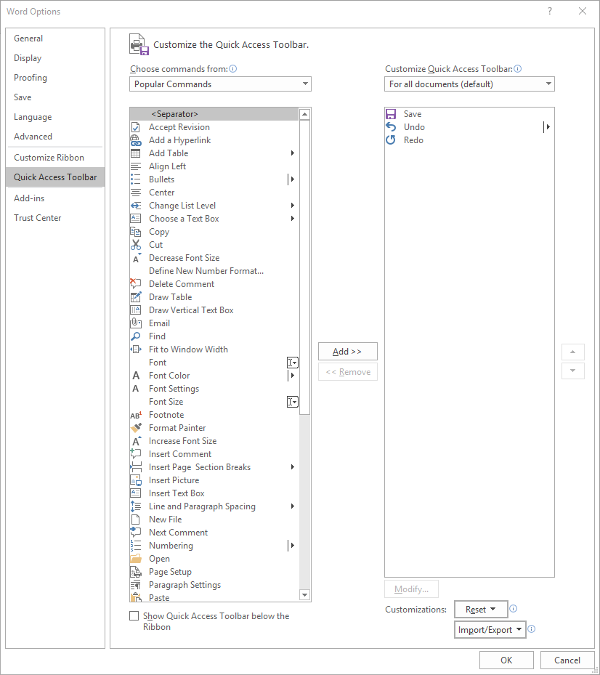
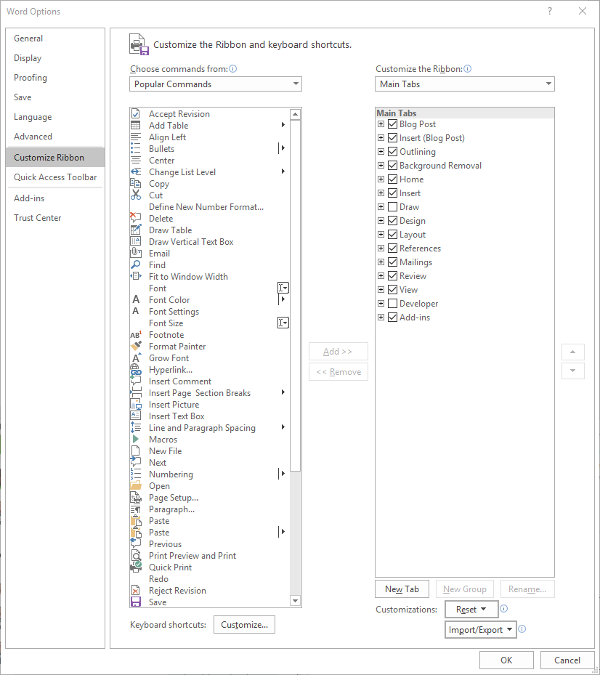
Making these changes is fairly simple. Your first step is to access the Quick Access Toolbar’s options. Under File. select Options, and in the window that appears, click Quick Access Toolbar in the sidebar menu. It should look like this:

From here, you can see that the typical Save, Undo, and Redo options are in the Quick Access Toolbar – which is all well and good, but you can easily use keyboard shortcuts to accomplish the same things.

You might find a different assortment of tools more handy to keep in your Quick Access Toolbar. Altering them is simple enough from this menu, all you have to do is select the item and click the appropriate button, Add>> or <<Remove. The list on the left defaults to Popular Commands, but there are plenty of options to choose from, based on your needs. For now, we’ll stick to Popular Commands.

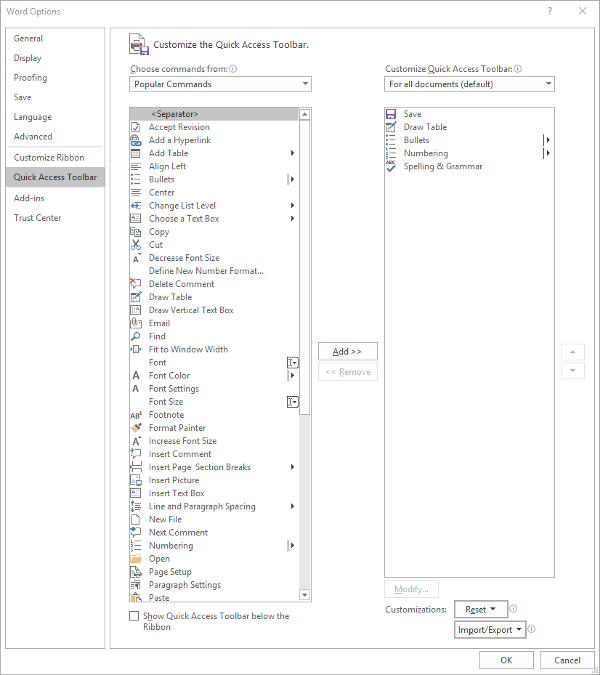
Let’s assume you use Word to put a lot of data into context, so you use a lot of lists and tables… and it needs to be spelled correctly. You can easily change your Quick Access Toolbar to meet these preferences.

Once you’ve done so, just click OK and your changes will be saved. You can always revert to the default settings by using the Reset option as well.

Customizing the Ribbon

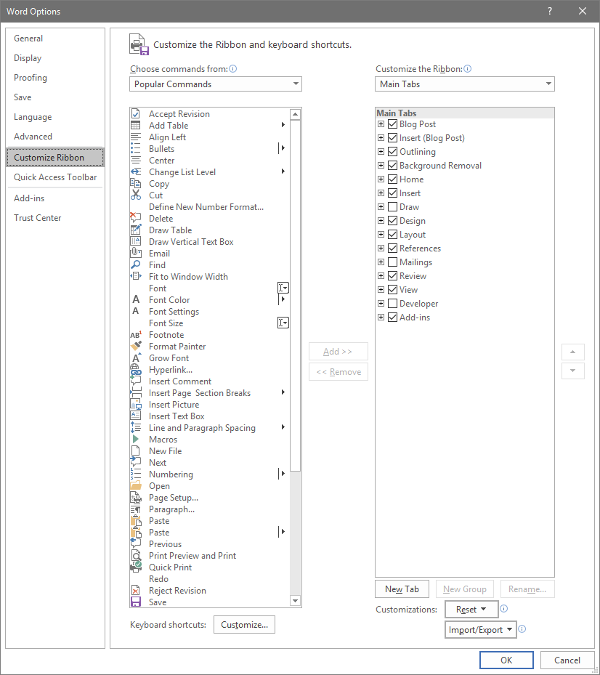
The Ribbon in Word is where you find your options like Home, Insert, and the rest. Depending on your usage, you may not have much of a need for some of these options. Let’s assume that you don’t have any purpose for the Mailings tab, or the Draw tab, for that matter.

Again accessing File and Options, this time we’re looking for Customize Ribbon, which looks like this:

Just as we did with the Quick Access Toolbar above, you can adjust what is displayed in the Ribbon. Since we’ve established that – in this example – we have no purpose for either the Mailings or Draw tabs, we can uncheck them to remove them from the Ribbon display.

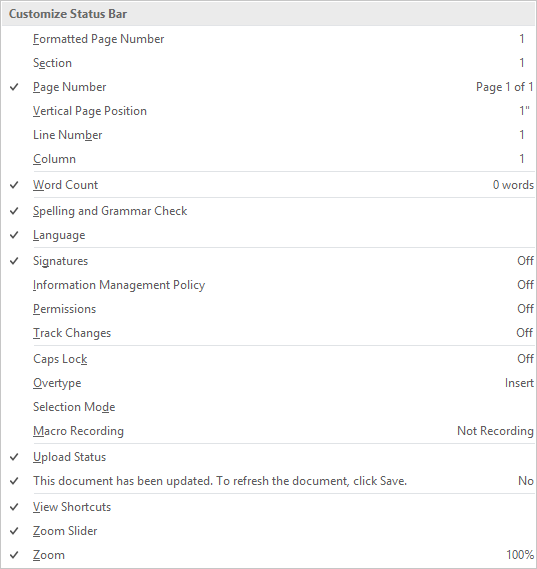
Customizing the Status Bar

At the very bottom of the window is the Status Bar, which can be altered to provide other valuable information based on what you have prioritized. Doing so is very simple: just right-click on the Status Bar, and select (or deselect) the options.

There you have it- three ways to customize Microsoft Word to better suit your purposes. For more technology tips, make sure you subscribe to our blog!

218223946_productive_400.jpg

Three Ways to Be More Productive

218223946_productive_400.jpg

Many people can find it challenging to constantly remain productive, which is only understandable. Nobody can be firing on all cylinders all the time. However, this doesn’t mean that there aren’t ways that you can optimize your productivity. Here, we’ll review three general approaches to improve your productivity, with examples describing how to enact each.

1. Prioritization

One of the keys to productive work is to work smarter, not harder. By identifying what is most pressing to accomplish or otherwise needs to happen first, you can inherently increase your productivity.

Ignore Inspiration

For instance, one of the biggest causes of procrastination is taking in a project in its entirety. Seeing the entire scope of an undertaking can be intimidating, which often makes people feel as though they need to be “inspired” before they will be able to accomplish anything.

This is untrue, but can be a difficult impulse to resist. If you catch yourself falling back on this excuse, try focusing specifically on a certain aspect or piece of your greater responsibility. Once this portion is completed, you’ll most likely be motivated to continue. In essence, don’t wait to be inspired… inspire yourself through what you accomplish.

Leverage Prioritization Strategies

Another common cause of procrastination is indecision as to what aspect of a project to tackle first. Again, identifying the most important or pressing activity makes it much easier to make this decision, and there are a few ways that you can do so.

One way is to leverage something called the Eisenhower Matrix. It can be used to sort tasks based on their urgency and importance, advising you on how a task should be approached – if it should be done now, planned for, delegated to someone else, or eliminated. This tool can help you avoid spending time on activities that ultimately don’t matter as much as others, optimizing how you spend the time you have. The Pareto Principle, or the 80/20 Rule, is another means of spending your time more intelligently. By identifying the most important 20 percent of their tasks and minimizing the remaining 80 percent, many people use this principle to spend the most time on their most impactful activities.

Save Distractions for Later

We’ve all experienced that moment where, in the middle of one task, we suddenly have an idea for another. While this new task may be valuable or important, it can also hurt your operations by interrupting the one you’re engaged in at the moment… but again, this thought also needs to be addressed. Many people resolve this dilemma by creating a distraction list. Rather than suspending what they are working on, these people simply take a moment to jot down this idea for further consideration after their task is done. This means that they aren’t jumping between unfinished tasks each time a new idea pops up.

2. Preparation

Once you have your tasks organized properly, you need to ensure that you have properly made preparations to attend to them. Some of these preparations may sound counter-intuitive, but are no less crucial to your efforts.

Make Sure You’re in Order

If you aren’t ready to be productive, you aren’t going to be no matter what you try. Therefore, you need to be taking care of yourself, as well as your technology. You need to be healthy and rested to reach your potential, which means that self-care is a must. This also means that you should be strategic in how you approach your responsibilities. If you know that you tend to have a period of low energy in the late morning, it’s probably beneficial to avoid scheduling intensive tasks for that time. In addition, you need to be sure that you’re up-to-date on how things are done. The more knowledgeable you are, the more efficiently you’ll be able to make decisions, and the faster processes will move along.

Expect to Be Interrupted

The best-laid plans of mice and men often go awry, as they say. This means that you should anticipate other things to interfere with your established work schedule. What if another task pops up, or a task takes longer than anticipated? Taking these kinds of challenges into account will allow you to figure out a solution preemptively, or at least a plan that allows you to adjust and adapt.

Learn from Everything

We’ve all been taught the value of learning from our mistakes – examining situations in which things went wrong, identifying why, and avoiding those circumstances in the future. However, this is only half of what you should do to optimize your productivity. You also need to identify why your successes were successful.

Once you have completed a project or process, take some time to examine it. What about it worked well, and how could that be made better? Was every aspect necessary, or could some of it be eliminated or streamlined? Doing so will allow you to further optimize your procedure to be even more productive the next time.

3. Cheating!

In fairness, these strategies aren’t “cheating” so much as they are methods of working smarter. This way, you can make sure that your tasks are accomplished without expending more resources than they need – including your energy.

Subdivide Your Tasks

Remember the prioritization strategies we discussed above? This is a similar activity, in that you take a larger concept and divvy it up into each step that needs to be completed. Instead of putting them into a matrix or focusing on a specific set of them, the idea here is to simply make your tasks appear more achievable.

Let’s say you have to plan a work event. This alone is a significant responsibility, and can be overwhelming to approach as a whole – where to start? However, you can make your process much more comprehensible by going about it piece-by-piece, effectively expanding your task into a complete to-do list. While this does give you more tasks, they will be much easier to attain and progress with. So, instead of “Plan Party for Greg’s Retirement”, your list might include:

  • Buy decorations
  • Buy card
  • Buy ice cream cake
  • Hide cake in freezer
  • Have team sign card
  • Put up decorations
  • Take out cake
  • Send email to team to gather

More tasks, but much easier to follow nevertheless.

Leverage Shortcuts

There are a great many ways that your technology can offer an easier way of doing things. Naturally, keyboard shortcuts are one example of this, but so is automation. Let’s face it, any time you can save by having your technology handle something is time that you can then spend being productive elsewhere.

Eliminate Inefficiencies

How much time do you spend debating your options for truly inconsequential decisions during the day? Chances are, it’s more than you’d like to admit. The fact of the matter is that many of the choices that we are faced with aren’t all that impactful. Eliminating as many of these choices as possible will allow you to reserve your decision-making skills for the times that you really need them.

Email is another notorious source of lost productivity, simply because people don’t use it as efficiently as they could. It is too common for what should be a very brief and simple correspondence to take far longer than anticipated. Ironically, this is often because the people involved are trying to be brief.

Instead of cutting corners on your next email, invest a few minutes into including more specifics. Don’t just say you want to meet – identify the topics to be discussed. Don’t leave the time of the meeting open-ended, offer a few availabilities. While it takes longer to write, one email written this way will keep you from having to read, write, and send a few more.

Finding Your Groove

Clearly, there are many aspects to consider when you’re trying to be more productive, and some may be more effective for one person over another. A bit of experimentation will help you to land on the approach that works for you.

NuTech Services can help by providing the solutions that enable some of these methods. Reach out by calling 810.230.9455 to learn more about these solutions.


78169116_S_email_400.jpg

Tip of the Week: Simplifying Your Email with Consolidation

78169116_S_email_400.jpg

How many email accounts do you have? Out of those, how many do you check regularly, and how many different platforms are they on? Too many, and you’re apt to miss something important. That’s why we’re going over how to ensure that your emails are well-organized and accessible from a single source.

One Account, Two Accounts, Three Accounts, Four…
Based on your work responsibilities and how your office is structured, it is quite possible that you need regular access to multiple email accounts. You could have one you use internally, one for communicating with clients, one to reach out to vendors, one to use to sign up for resources… you get the point. When all is said and done, that’s a lot of email messages.

However, you presumably have other work responsibilities beyond just checking your email, so switching between all of them just isn’t a practical option. Well, it just so happens that you won’t need to switch, as the email client you choose will be able to consolidate these multiple accounts for you. Before we get into how, we need to make sure that we’re speaking the same language here.

– An email account is the individual address used to send or receive a message. In your organization, you might have employee1@yourbusiness.com and employee2@yourbusiness.com. Likewise, each employee may have a different account for their different responsibilities – for instance, employee1vendor@yourbusiness.com and employee1internal@yourbusiness.com.

– An email client is the program that allows you to send and receive emails. Gmail and Microsoft Outlook are two perfect examples. If you have multiple clients stored on the same server, they can be used pretty much interchangeably, each client presenting all emails. An email client also has a few features that enable you to better keep track of multiple email accounts, provided you have set it up to do so.

Let’s go over your options now.

Multiple Inboxes
The people who developed the email clients that we use weren’t naive. They understood that a given user isn’t going to be tied down to a single email provider, and certainly not a single account. This is why email clients can support multiple inboxes, assuming they are configured correctly. Multiple inboxes allow a user to access a single client to manage multiple email accounts, streamlining the process greatly and enabling customized organization.

Multiple Email Personalities
On the other hand, some users don’t mind leveraging one inbox, but might still need to utilize more than one address in their correspondence. There is also a method that enables the use of a single, catch-all inbox, but enables the user to select which email address (in this case, known as personalities) their response is sent from.

To do so, you will first need to set up an email account that you do not give out, as it will serve as the catch-all address that all of your emails ultimately accumulate within. Once it has been set up, you need to set all of your other accounts to forward their contents to that mailbox – your internal IT resource should be able to help.

Once your messages are all being sent to the catch-all account, you will be able to respond to these emails from the address that they were originally sent to.

Setting Up Inboxes and Personalities
In order to accomplish either of these tasks for your client of choice, you will need to adjust a few settings.

Gmail
To add another account to your Gmail client, you’ll need to access your Settings, which means you have to click on the gear icon. Once you’re in your Settings, you should see a tab labeled Accounts and Import. Under that tab, there is a Check mail from other accounts section. Click on Add a mail account, and follow the instructions provided.

To add additional personalities to your Gmail account, you’ll need to again navigate to the Accounts and Import tab. There, you will find a section labeled Send Mail As, with the option to Add another email address. This will also allow you to choose your default email address.

Outlook
As it happens, there are too many different versions of Microsoft Outlook and too many variables to allow us to provide a walk-through. Fortunately, Microsoft does offer some documentation that instructs users how to manage their “connected accounts.” Of course, you can also call 810.230.9455 for our assistance, as well.

Are there any solutions that you frequently use that you’d like some extra tips for? Tell us which ones in the comments section, and don’t forget to subscribe!

136512642_busy_400.jpg

Being Busy Doesn’t Mean You’re Being Productive

136512642_busy_400.jpg

Productivity is a key facet to our success. However, many offices seem to have an environment that focuses more on keeping busy than it does being productive. While they often intersect, these two statuses are very different. Here’s why.

A Rose by Any Other Name
Frankly, it’s pretty easy to observe that “busy” and “productive” are anything but synonymous. We all know those people who seem to be constantly running around, working on this or that. Are these people busy? Certainly. Are they actually accomplishing anything? Maybe, maybe not.

Look at it this way – you can be ‘busy’ doing anything. However, in order to be ‘productive,’ you need to actually produce something. It doesn’t matter if it’s a completed sales proposal, an email explaining away the confusion around a particularly convoluted subject, or… anything else, really, as long as it helps to advance the business’ goals.

The Inherent Issue in Comparing the Two
Unfortunately, much of our context for determining between busyness and productivity comes from the least objective source there is – our own perception.

Look at it this way: let’s say that you gave a research assignment to two employees, with a deadline of an hour. If you left, only to return and see one employee watching YouTube videos, and the other one typing away, who would you see as being the productive one? In the moment, you would probably say that it was the employee who was still typing, and not the one watching videos on the Internet. However, what if I told you that the employee watching videos was actually watching videos related to the task you had assigned, and the other was working on what would likely be their fourth unpublished novel? Or that the employee watching the videos had long since completed the assignment, and was taking a well-deserved break, while the employee who was still typing was only doing so because they had goofed off for much of the time you were away?

This illustrates two considerations: how much different productivity really is than pure busyness, as well as how similar they have the potential to be. In order to keep from fooling yourself into thinking you’re being productive when you’re really just looking busy, try asking yourself a few questions as you commence.

For example, you can take a look at how you spend your time, and compare it to what your responsibilities really are at their core.

For instance, let’s say that Bill’s job was to ensure that the company remained secure. If Bill was able to complete all of his day’s tasks in the morning, but then spent the rest of his day reading things online, what would that be considered? Well, that depends. If Bill was reading the latest Bowling Enthusiasts Weekly articles at his desk for the rest of the afternoon, that’s hardly productive. However, if Bill was researching improved cybersecurity practices to enact in the company… that’s a pretty productive way to spend the time.

A Few ‘Keeping Busy’ Red Flags
Of course, none of the following activities have to be time-wasters, they just happen to be in most situations, or require a very specific job responsibility to be considered productive. For instance, many job responsibilities don’t actually require the Internet to be used, so any time spent on it is arguably a waste. The same can be said of social media, and especially email.

Of course, there are also many exceptions to this rule. In essence, you have to use your best judgement, evaluating if a given activity is actually the best use of your time or not.

Don’t forget, NuTech Services has plenty of solutions to help you boost your productivity. Reach out to us at 810.230.9455 to learn more!

totw_replicate_relocate_400.jpg

Tip of the Week: How to Replicate and Relocate Text Easily

totw_replicate_relocate_400.jpg

Sometimes, things are written in the wrong place. Fortunately, there are means of moving them if they happened to be written using a computer. These processes are relatively very simple and are so commonly used that the shortcuts are right next to each other on the keyboard. For today’s tip, we’ll review how you can cut, copy, and paste content in effectively any program you use.

Once you have your content selected, whether it’s text or an image, all you have to do is press two keys.

To cut a word or phrase from one place in your content, press Ctrl + X. To copy this content instead, keeping the original and duplicating it elsewhere, press Ctrl + C. Pasting your content is just as simple – with the place you want the content added selected, press Ctrl + V. This will insert your content where you want.

If you happen to be copy-pasting from a website to another document, it may not be a bad idea to paste it without bringing any formatting from the website over. Otherwise, it is apt to look funny on your documents. Pasting without formatting is almost as simple as regular pasting, you just add another keystroke in the middle: Ctrl + Shift + V.

Of course, any of the tasks can be accomplished with the mouse alone. Right clicking on a word, an image, or a group of selected text will bring up a menu that includes all of the above options. However, your cursor is generally more accurate than the mouse, so you may have to undo your efforts (Ctrl + Z) a few times before it’s right.

Real World Example:
Let’s say you want to send a webpage link to someone in an email or instant message. In your web browser, click the address bar (that’s the part with the ‘http://… “). That will highlight the URL. Hold down Ctrl and press C. Then go into your email or instant messenger, click where you want to paste the URL, and hold down Ctrl and press V.

Whichever you use, it’s bound to be more time-efficient than rewriting anything that needs to go in a different spot. Make sure you subscribe to our blog, so you can be alerted whenever we upload more content!

mobile_device_workplace_risk_400.jpg

Are Mobile Devices Putting Your Workplace at Risk?

mobile_device_workplace_risk_400.jpg

How many devices find their way into your office every day? In this age of mobile devices, it’s no surprise for each of your employees to have everything from a smartphone or tablet, to wearable technology like a Fitbit. Depending on the type of device, you’ll want to ensure that you have every opportunity to secure it so that it doesn’t become a security problem later on down the road.

The reasoning for doing so is simple; the more devices on your network, the more opportunities that a hacker has to gain entrance to it. If you don’t maintain who can or cannot access your network with specific devices, you could be leaving the backdoor open to any number of threats out there. Therefore, you need to take a multilayered approach to network security for mobile devices, and it all starts with a Bring Your Own Device strategy.

Bring your Own Device, or BYOD, aims to manage the risk of employees bringing their own devices to the office without sacrificing the privilege of doing so. Some of the major features of BYOD are great ways to augment mobile device security for your organization, so here are a couple of them to consider:

Blacklisting and Whitelisting Apps
The apps downloaded to your device have a lot to do with your business’ security. There are apps out there that are known to cause security discrepancies for your organization, so it makes sense that your business has a way to keep undesired apps off of your devices. By blacklisting and whitelisting apps, you can control your devices to an extent, keeping known threats off of smartphones and tablets.

Remote Wiping
Losing a device is a worst-case scenario for a lot of organizations. Not only do you risk the device falling into the hands of someone who refuses to return it, but you also risk the data on the device being compromised. In any case, you should enable the option to remotely wipe any lost, misplaced, or stolen devices so that they can’t be accessed by malicious actors. This way, you preserve the right to protect company data while still allowing employees to use and access their devices.

Let’s start talking about implementing your BYOD policy. NuTech Services can help your organization implement a solution that’s ideal for your specific needs. To learn more, call us today at 810.230.9455.

discovery_risk_400.jpg

Are You Making Your Business Vulnerable to Project Failure?

discovery_risk_400.jpg

When implementing a new project, expectations run high and deadlines must be met. The temptation is to feel so pressured to get the project finished that the planning phase is rushed. If even a small detail is overlooked and a shortcut is taken in this early stage, it can come back to bite you in a major way–perhaps even derailing the project altogether. This is especially the case for an IT project.

CIO.com provides a working ratio of why such oversight is important for IT projects of any size, especially during the more risk-prone discovery phase. “Discovery is the crux of project risk. Although the discovery and architecture phases of a project may represent only 15 percent of the overall effort, an error or omission early on can cause cost overruns of 150 percent or more.” Have you experienced an issue of this scope in any of your company’s previous projects?

In order to prevent your next IT project from facing a disastrous end like this, you’re going to want to invest the time needed to perform the discovery and architecture phases correctly, the first time. But how can you make sure this happens?

For starters, working closely with your vendors and service provider is a must. If you detect that they’re not thoroughly answering your questions or that they’re trying to rush the project in any way, then you’ll need to speak up about it, before it’s too late. Instead, you need to make sure your vendors are guiding you through each step of the process, and that they’re assertive enough to present you with options and tough choices when it comes to unpleasant tradeoffs.

Secondly, you need to know what it looks like when a project is being rushed or shortchanged. This can be difficult to catch for a busy business owner with only a surface-level knowledge of IT. At NuTech Services, we know what this looks like and we want to pass this information onto you. When in the discovery/architecture phases of your next (or current) IT project, look for a vendor taking these four shortcuts.

  1. The documents prepared for the project are based less on what your company’s specific needs are, and instead are overly influenced by industry jargon and sales propaganda. The idea here is to overwhelm a business owner with features and benefits that sound great, but may not be precisely what the project needs and what real users would actually use. Classic snake oil sales strategy.
  2. Project requirements aren’t prioritized adequately. This shortcut will provide poor guidance when it comes to the step-by-step implantation of the project, and the hard trade offs that are sure to pop up when dealing with a budget and a deadline will hit unexpectedly.
  3. The project requirements are lacking important steps, like transitions in the end-to-end business process. If these gaps are uncovered during the implantation phase instead of the discovery phase, then meeting these unplanned requirements will push back the schedule, and may even change the entire scope of work needing to be done.
  4. The needs of the business evolve dramatically enough over the course of the project that the project proves to be insufficient upon its completion. Keep in mind that technology itself is prone to becoming obsolete by newer solutions. Shortsightedness in both areas can make it frustrating to have to go back and redo the project much sooner than expected.

These four shortcuts can devastate an IT project, or any project for that matter. One way that you can safeguard your business from these risks is to hold consultation sessions all throughout the course of the project–as opposed to leaning heavily on the original project roadmap, which may grow more unreliable as the project progresses from phase to phase. NuTech Services can provide this kind of project oversight for your next IT initiative, as well as spend the time needed in the early phases of the project. This will ensure that no stone is left unturned and every possible circumstance is accounted for.

Give us a call at 810.230.9455 and don’t plan your next IT project without first consulting with the pros.

more_efficient_meetings_400.jpg

Employees Spend Nearly 80% of Their Time Communicating About Work. You Can Change That

more_efficient_meetings_400.jpg

How much time is wasted in your workplace just trying to communicate about potential projects? The notable difference between productivity and stagnation is that one is making you money, while the other is costing you money. Employees spend about 80 percent of their time in meetings, on the phone, or responding to emails, so it falls on the business owner to ensure that communications are as easy as possible so minimal time is wasted.

There are different approaches to this problem. The first place where you can cut down on wasted time is the one that you likely have the most control over: meetings.

Let’s face it; sometimes meetings aren’t as productive as they should be. One way to keep this from happening is to consider how you can make more efficient use of everyone’s time. Start by making a plan and considering what exactly is on the agenda. Ask yourself what the purpose of the meeting is, and if the goal of the meeting could be fulfilled more effectively in another way. If the goal of the meeting can be achieved without collecting your entire workforce into the same room, consider doing so.

Once you have determined that the meeting is the most efficient way to achieve this goal, you want to ensure that you communicate the purpose of the meeting to all of those who must attend. This way, everyone knows what they need to get out of the meeting, and nobody will be confused about why the meeting is being held. This keeps wasted time to a minimum.

By remaining cognizant of what your meetings should accomplish, you’ll inevitably save time and even wrap your meetings up earlier. This can even change the way that employees view meetings. Instead of keeping a meeting going long enough to fill in the space on their schedules, they will see that they can get more done since the goal was achieved earlier than expected.

Another way that you can make your meetings more effective is by creating an outline and then sending the agenda out to everyone at least 24 hours in advance. This way, your workforce knows what they can expect, as well as put together their own notes for quality input throughout the meeting. Another way that you can use this to your advantage is send them something to have read before the meeting starts–in essence, assigning homework. By using these methods, your meetings will be less improvised and more focused.

Once the meeting has ended, you can ask your employees for feedback regarding the process. If you take the time to listen to all participants’ feedback, you can then use it to improve the process and meet goals even more effectively next time. Eventually, it will lead to a chain reaction where meetings go by faster and faster, to the point where you have the process down.

When it comes to streamlining any processes in your office, the right technology can make or break the effort. Technology can help you make your meetings more efficient by utilizing video conferencing or voice chat technologies, so that your team doesn’t have to be in the same place all at once. They can even dial in with their mobile devices from their current location.

This strategic approach to collaboration technology can help your organization thrive, as well as focus on creating more opportunities for profit. To learn more about how there are technology solutions specifically designed to improve collaboration, reach out to us at 810.230.9455.

productivity_dos_and_donts_400.jpg

Tip of the Week: Crank Up the Tunes and Turn Up the Productivity

productivity_dos_and_donts_400.jpg

With the use of portable personal music players and streaming services like Spotify, Google Play Music, and Pandora, unobtrusively listening to music in the workplace has become much easier–but has it also made it easier for employees to be more distracted from their tasks? Additionally, assuming that music does create a boost in productivity, why does it do so?

Research has shown that, depending on what variables are present in the environment and what the employee is engaged in doing, music can either boost or hinder productivity levels.

One such variable was the nature of the task itself, and how much cognitive creativity and focus it demanded of the employee. The process of checking email certainly doesn’t change very much as it progresses, but developing a proposal for a business transaction very well might. In cases where a task is mostly repetitive, studies have shown that listening to background music does show notable benefits to both employee performance during such tasks, and how efficiently the task is completed.

Another hypothesis is that (especially in the increasingly-popular open office spaces) productivity may be boosted simply because the headphones employees use to listen to music also help to drown out the other distracting factors present in the office environment. These other distractions, whether they’re caused by equipment noise or coworker conversations, can break employee focus and disrupt tasks. Naturally, if these distractions are blocked out and overpowered by a consistent environment created by music, the employee will be less likely to shift their attention to the distraction, and instead, be more likely to stay focused on their work.

Despite the boosts to attentiveness that listening to music can provide to someone performing a relatively mundane, basic task, someone trying to focus on a new or complicated process will most likely find that even the most subtle tones can be horribly distracting. These effects can be made worse if the song is unfamiliar to them; worse still if there are lyrics involved. After all, the first instinct many will have when encountering new music (especially music with lyrics), is to focus on the tune as part of their overall critique of the music. In fairness, studies have indicated that tasks involving parts of the brain that don’t deal with verbal language can be benefitted by lyrical compositions–designing and developing software, for instance–but it may be safer to stick with exclusively instrumental pieces.

Of course, every worker is different. Some may not be bothered by lyrics or new music being introduced to them, others may find that these common distractions are uncommonly distracting. As a result, it may not be a bad idea to give your employees a few options to take advantage of until they can lock down how their own auditory secret sauce is composed.

What do you prefer to listen to while you’re working? Share your favorite selections in the comments below!

do_not_completely_unplug_on_your_vacations_400.jpg

Taking a Vacation From Your Technology While On Vacation Can Actually Make Things Worse

do_not_completely_unplug_on_your_vacations_400.jpg

Everyone loves a good vacation, especially if you have the good fortune of having a reliable staff on-hand that can handle the administration of your office while you’re away. Although, it might be tempting to just cut yourself off from technology and enjoy your time off, doing so might cause problems down the line that could easily be prevented by simply checking your email or calling home-base once in a while.

The reasoning for this is simple: you want to make sure that operations are proceeding as intended, even if you’re not there. If you completely check out from the workplace every time you leave, you could return from your vacation to a complete and total disaster that may have been prevented with your intervention or insight. In order to keep this from happening, here are three tips that will help you enjoy your vacation, without completely forgetting about the life’s blood of your existence: your business.

  • Check your email once a day. While you’re in the office, how many times do you check your email every day? While it’s recommended that you check your email once every couple of hours while you’re at the office, you shouldn’t be doing it this often while on vacation. The problem with this practice is that your inbox will quickly fill up and be overwhelming upon your return. Instead, you should check your email as often as you might check your personal email inbox– maybe once a day. Address major questions or problems, and leave the less important inquiries for later. Doing so can make your return to the office easier and less stressful.
  • Set boundaries for your availability. You can’t have your employees calling you left and right with supposed emergencies. Instead of having uncontrolled chaos, you should implement a time where you will be available to discuss issues. It shouldn’t be very long; maybe an hour in the morning or afternoon, depending on how large your role is within your organization. Use this time to check in with the office and see how operations are running. If everything is fine, you can go back to your vacation without a care in the world.
  • Establish a clear chain of command in your absence. People need leadership, and as the business owner, it’s your responsibility to ensure that they have someone they can turn to while you’re out of the office. In general, it’s a good idea to have a clear chain of command even when you are in the office. This helps your team understand who is in charge, and where they need to bring issues to. Doing so can alleviate some of the pressure that you might feel when out of the office; plus, you’ll have more time to relax if you’re certain that your office is in good hands during your absence.

By taking advantage of these three tips, you can make it easier than ever to come back from an extended vacation, without leaving your office grasping for straws. For more great tips, tricks, and technology management best practices, give us a call at 810.230.9455.

internet_pros_cons_400.jpg

3 Ways the Internet is Changing Things, for Better AND for Worse

internet_pros_cons_400.jpg

We’ve all become so adapted to the conveniences of the Internet that it’s difficult to remember what society was like before it. This becomes especially obvious when watching old movies. How odd is it to see characters do pre-Internet activities like go to the library to research information and use a phone book? These are just some of the ways that the Internet has dramatically changed society, for better and perhaps for worse.

Consider these three ways that the Internet has changed how we work and live, and then ask yourself truthfully, “Are we better off?”

Increased Productivity
One advantage the Internet affords us is that we can be productive virtually anywhere that we can connect to it. This includes places that were previously thought to be off limits from the reach of productivity, like at the beach while on vacation, on the road for business, we even hear that some users take their favorite devices into the bathroom with them. Looking at this situation from a purely business standpoint, it makes you as a business owner feel good that your staff is spending every waking moment being as productive as possible. However, looking at it from the standpoint of the human experience, it makes one feel like we’ve lost something when we can’t go but a few minutes without stopping to look at our mobile devices.

Yet, Productivity Decreases
While the Internet affords us more opportunities to access the web and get work done, it can also be a major distraction for the times when we actually sit down to, get work done. For example, at the end of the work day, how many tabs does your web browser have open? If you’re like the average modern office worker, your screen is full of interesting news articles, YouTube videos, multiple instant messaging conversations, and more, much more.

The problem here is that all of these little distractions presented by the Internet actually cut into productivity in a major way. In fact, it’s proven that it takes anywhere from 5-to-15 minutes for a worker to refocus on a single task after they’re pulled away from it. Therefore, having the Internet bombard an employee with distractions all day long actually results in getting less work done. But hey, they can always make up for it at home, or even in the bathroom.

Access Any Information Instantly
So far, the future we were promised is disappointing because it lacks flying cars, laser guns, and hoverboards (we don’t count the “Hoverboards” found in today’s retail stores). However, thanks to the Internet, virtually all of the world’s media and information is just a click away, and can even be carried in your pocket. This is a huge advancement for our civilization; one that would make the Jetsons green with envy.

Yet, all of this instant information is killing our attention spans. Consider these two sobering statistics from List25:

  • 50 percent of Internet users quit waiting for a video to load after 10 seconds.
  • The average shot length in an English-language film has decreased from 12 seconds in 1930 to only about 2 seconds in 2015.

Therefore, while the Internet is satisfying our need for instant gratification, it’s making patience much harder for human beings to come by.

In what ways do these benefits and drawbacks of the Internet play out in your office? Is your staff more productive and more distracted? Is work time cutting into leisure time? Are people so impatient that they resort to Googling a question instead of having an actual discussion about it? Are you taking any measures to control online distractions in the workplace? Of course, these are just some of the ways that the Internet is changing everything, both for better and for worse.

Do you have any points to add to this list? Share with us your thoughts in the comments.

b2ap3_thumbnail_uninterrupted_power_supply_400.jpg

Here’s the Best Way to Safeguard Your Computers From Power Outages

b2ap3_thumbnail_uninterrupted_power_supply_400.jpgWhen it comes to purchasing the best technology to protect your business, you should consider an Uninterruptible Power Supply (UPS) device. The reasoning is simple; they help your organization avoid data loss, and aid in business continuity. Here’s what you need to know about UPS devices.

What is an Uninterruptible Power Supply?
A UPS device is integral for any organization that prioritizes data redundancy and retainment. As explained by Wikipedia:

An uninterruptible power supply, also uninterruptible power source, UPS or battery/flywheel backup, is an electrical apparatus that provides emergency power to a load when the input power source, typically mains power, fails. A UPS differs from an auxiliary or emergency power system or standby generator in that it will provide near-instantaneous protection from input power interruptions, by supplying energy stored in batteries, supercapacitors, or flywheels. The on-battery runtime of most uninterruptible power sources is relatively short (only a few minutes) but sufficient to start a standby power source or properly shut down the protected equipment.

The easiest way to explain how a UPS works is by providing an example. What would happen if your business were to suddenly lose power due to an electrical storm, flood, or other natural disaster? With no electricity, your machines would forcibly be powered down and rendered inoperable until the power returns. Naturally, this isn’t ideal, but the primary problem that the UPS is designed to address is the loss of data due to workstations and servers not being shut down properly.

To prevent this, the UPS supplies the servers and workstations with enough power to properly save all files in use, and properly shut down the machines. The UPS then sends a message to the server indicating that it’s safe to turn off. Unexpected power outages can lead to data loss and even hardware failure, so a UPS is vital to ensuring the integrity of both your data systems and mission-critical hardware.

What Kind of UPS Should You Get?
Just like any piece of hardware that your business uses, UPS devices come in various models and different price tags. It’s best to consult a technology expert like those at NuTech Services before committing to purchasing new hardware of any kind. In general terms, though, you want a UPS that you can rely on to get the job done right. If you’re looking for a solution that simply offers a safe shutdown procedure on a desktop, it will be a much different kind of UPS than one designed for use by a mission-critical server. This is why it’s important to do your research and consult a professional before making a choice.

Having a data backup and disaster recovery plan is a critical part of ensuring that your business can continue in the face of hardships of all kinds. This includes having a proper data backup solution, which takes regular snapshots of your business’s data, and sends them to a secure off-site data center and the cloud for redundancy. You also need a way to rapidly deploy your backups in a moment’s notice.

NuTech Services has all of the tools your business needs to ensure data redundancy and mitigate the losses suffered by unexpected power outages and hardware failures. To learn more about how we can improve the way you do business, give NuTech Services a call at 810.230.9455.

b2ap3_thumbnail_meeting_about_meeting_400.jpg

3 Ways To Buck the Trend of Unproductive Meetings

b2ap3_thumbnail_meeting_about_meeting_400.jpgRunning a business means going to meetings. There’s really no way around it. And while you can’t run a business without meetings, you can run your meetings as efficiently as possible so that they’re not a complete waste of time. Unfortunately, according to a recent study by Blue Jeans Network, the worldwide trends for meetings show that they can hinder productivity more than help it.

The study is an annual report released by Blue Jeans Network, a cloud-based video conferencing company. They analyzed the data from more than five million video meetings in 177 countries, of which more than a third had an in-person component. When compared to similar studies done from previous years, patterns were spotted that showed people are wasting more time in meetings than they should. Here are a few of the more noteworthy findings.

Most Meetings Are Taking Place at the Most Unproductive Time
In separate studies, it’s been proven that different parts of the work day are better for meetings. For example, morning meetings are ideal because that’s when people are most alert, and the worst time for a meeting is in the middle of the afternoon because that’s when office workers tend to feel the most dull-brained. According to the study, the most popular meeting time is mid-afternoon, sometime around 3 p.m.

Solution: Schedule your meetings during the mornings, preferably right after the coffee kicks in.

It’s Normal For Meetings to Start Late
One of the most annoying aspects of meetings is waiting for people to show up. While waiting for Johnny-come-lately to make an appearance, everyone is forced to participate in small talk–and get paid for it. This kills productivity. According to the study, a whopping 81 percent of meetings start late, up 30 percent from the previous year. Inc. describes how tardiness is dangerous because it’s a self-perpetuating problem:

If you arrive five minutes late to a meeting and it hasn’t started yet, you’ll figure you haven’t missed anything, so you’ll likely do the same next time, or maybe show up even later. Meanwhile, the punctual people who’ve sat around waiting for you will figure they have better uses for their time, and next time they’ll come five minutes late as well, or maybe even later.

Solution: Be strict about your meeting times and have consequences for late comers.

Bad Weather Equates to More Meetings
The study shows that Winter, with all of its blusteriness and bitter cold, sees twice as many meetings as other times of the year–when it’s presumably warmer and nicer outside. It’s also the case that, the worse the weather is, the more likely that a meeting will take place. The study shows that “meetings were up by as much as 26 percent during the recent Texas flooding, and an impressive 35 percent during the Boston blizzards last winter.”

Solution: Consistency is key to not wasting too much time during meetings, and to not have unnecessary meetings. By having regularly-scheduled meetings, you will decrease the number of unnecessary meetings that take place, simply because someone feels a strange connection to the weather patterns.

Meetings are kind of a necessary evil, but if you plan them right, you can make them more productive and less, well, evil. In addition to being on time and intentional about how often you meet, you can take advantage of technologies like video conferencing and cloud-based scheduling software that will keep your meetings as productive as possible. To schedule a meeting with NuTech Services about this, give us a call at 810.230.9455.

b2ap3_thumbnail_implement_cloud_solutions_400.jpg

Study: The Cloud Can Double Small Business Profits

b2ap3_thumbnail_implement_cloud_solutions_400.jpgIf your business has put off embracing cloud computing as a legitimate method for data distribution and application deployment, it might be time to reconsider why you haven’t integrated a cloud solution yet. A recent study from software companies Exact and Pb7 Research shows that the cloud can provide your organization with a significant increase in both profits and net growth, proving once and for all that cloud business is better business.

Specifically, the study shows that the cloud can potentially double small business profits and help them achieve an additional 25 percent revenue growth compared to businesses that don’t take advantage of any cloud solutions. This study, which was published on August 19th, contains findings that are based on 750 interviews with small businesses, all of which have less than 50 employees. 51 percent of all respondents claimed to use at least one form of cloud computing software, while nearly 30 percent of small businesses in the United States admitted to using three or more cloud applications in the workplace.


In other words, most businesses are adapting to the cloud and using it to improve the way they operate. When asked why they chose to implement cloud solutions, businesses gave these top five reasons:

  1. Security: 32%
  2. Lower IT costs: 26%
  3. Low maintenance requirements, less physical infrastructure: 23%
  4. Easy mobile access: 23%
  5. More productivity and efficiency for end-users: 21%

Additionally, when asked to rate certain aspects of the cloud on a scale of 1 (low) through 5 (high), the average results were:

  1. Easy to use: 4.0
  2. Easier to find information: 4.0
  3. Easier to share information: 3.9
  4. Increased productivity: 3.9
  5. Easier to add and remove users: 3.8

While the reasons why cloud users implement the cloud vary, this proves that there are a number of benefits that this type of computing infrastructure can provide. When considering integrating a cloud solution for your business, you need to ensure that your organization can handle this change in protocol. Changing the way you deploy and manage your data and vital technology systems requires the attention of a knowledgeable professional. Contact NuTech Services at 810.230.9455 to learn more.