cloud_host_voip_400.jpg

Is Cloud-Hosted VoIP a Good Value?

cloud_host_voip_400.jpg

Since companies have begun offering services in the cloud, organizations of all types have taken advantage of utility computing in hosted environments. One platform that we tend to see quite a lot of is Hosted VoIP. What makes a cloud-hosted business telephone system more attractive to the modern business owner than one they host onsite? Today we’ll take an in-depth look at the two options.

It goes without saying that having a comprehensive communications strategy is critical for the functionality of your business. Many businesses use traditional phone systems, and they pay handsomely for them. VoIP is a great way to utilize the bandwidth you already pay for to facilitate a business phone solution.

A VoIP system works by transferring sounds into data packets and then transferring them in real-time over an Internet connection. The sound is simply unpacking the data packets. The reason so many small businesses are switching to a VoIP system is that it allows an organization to manage their telephone system cost more effectively.

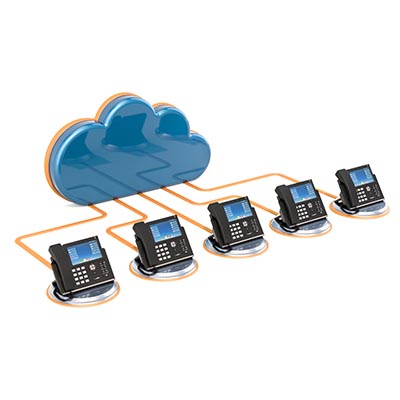
Nowadays there are hosted VoIP options that present companies with a virtual call center of sorts. Essentially, instead of hosting a stand-alone server at your place of business, the telephone system is hosted in the cloud and accessed through a web client.

Before you can consider either VoIP platform, you’ll have to determine what type of control you need over the technology. If you are someone that wants to play with settings and configurations, hosting your own PBX phone server may be the way to go, but if you are someone that doesn’t mind spending a little more per month to have these systems managed for you, a cloud-based VoIP solution should be right for you.

Your average VoIP solution provides your business with a path to cut the often-substantial capital costs of buying, housing, and maintaining an onsite telephony server. Since the provider will absorb the costs of maintenance and the outward reliability of the platform, you can spend less time focusing on managing your telephone system and more time relying on it.

Since VoIP downtime is not an option for the average business, you’ll want to consult with NuTech Services IT professionals to help you find the right solution to fit your business’ needs. Our staff are experts at designing, implementing, and managing computing networks that work for the modern business, so relying on us to help you deploy the right communications platform makes a lot of sense.

For more information about hosted VoIP or any other communication used to improve employee productivity and customer satisfaction, call NuTech Services today at 810.230.9455.

voip_phone_solutions_400.jpg

VoIP and Other Business Phone Options

voip_phone_solutions_400.jpg

Telephones have been around for so long that nobody alive today lived in a time where they weren’t in use. While the general use for the telephone has remained the same, the major difference between older telephone systems and many of the telephone platforms available today is how they are deployed. Businesses have more options for telephone services today than they have ever had before, and with so many options at your disposal, we’re happy to help you weed out the right one for you.

Selecting the Right Type of Phone
It might be tempting to discredit the importance of telephony for your organization, but you should resist this notion. Businesses still rely on the phone to communicate both internally and externally, and eliminating it can create a situation where your clients have one less way of getting in contact with you. Therefore, the importance of the telephone in the office cannot be understated, as your reputation with your patrons hangs in the balance. As you can imagine, there are several different kinds of phones out there, each with their own pros and cons. It’s up to your organization to determine which solution best suits your needs.

Landline
For a long time, the landline was the only kind of telephone solution for businesses. This utilizes the connections provided by a telephone company which consisted of private branch exchange (PBX) hardware in the office. This would give businesses the option to create extensions for employee and office, as well as opportunities for other services like call transferring and directories. Even though these are so familiar, many organizations are ditching landlines in favor of other solutions that are more flexible and efficient. It just so happens that the Internet and all its developments are much better at accommodating the needs of businesses, including new telephone solutions.

Virtual Phones
A virtual phone system can be considered a middle ground between the traditional form of telephony and a Voice over IP system. Incoming calls can be processed through a traditional telephony method, and they are then forwarded to the right employee through a VoIP system. This gives a business with both in-house employees and remote workers the opportunity to unify their communications. Additional features can also be added in for a more dynamic solution.

Voice over Internet Protocol
Voice over IP is a system that aims to cut out the need for traditional telephone solutions entirely. VoIP fully utilizes the Internet connection of your organization’s office to fulfill all of its telephony needs. The right solution can give your business all it needs to be functional on any device from a desktop to a mobile device. There are some different ways to use VoIP, so you’ll want to make sure you select the right method out of the gate to get the best return on your investment.

  • An in-house VoIP system will be an expensive up-front cost, as the equipment needed to host the system can be quite taxing on any normal budget. There will also be a monthly fee for the components needed to make calls, and any maintenance the solution requires must be administered by your in-house staff. The benefit to all of this is that you’ll have complete and total control over your business’ telephone system–something that no other solution can offer.
  • A cloud-hosted VoIP system means that everything is taken care of so your organization can instead focus on remaining productive with your time. This means that there is no need to buy hardware or maintain it on your end. In the event your phone system goes down, the provider is the one responsible–not you–meaning that you’ll be somewhat reliant on others, but the productivity spike can mean all the difference. In the event your Internet goes down, you’ll also be left without service, but again, this isn’t something that’s directly yours to influence.

It’s easy to see why VoIP is such a great solution, but is it right for you? Find out by giving us a call at 810.230.9455.

hr_payroll_cloud_400.jpg

SMB Human Resources and Payroll Find a Home in the Cloud

hr_payroll_cloud_400.jpg

It’s no secret that cloud computing has become a major part of what most small businesses’ operations. One aspect of business administration that many businesses keep in-house is their HR department. Today, we’ll take a look at HR and payroll software, and how moving your business’ human resources department to the cloud is a good solution.

Human Resources may not be the meat and potatoes of any business, but it is exceedingly important. With all the mandates a business has to stay in compliance of, having people whose job it is to deal directly with the staff on behalf of the company makes a lot of sense. Since some SMBs don’t have a dedicated HR department, there are now platforms available that provide those services. But, let’s first start by outlining what kinds of tasks the average small business has to deal with, with a list.

The top six issues a HR department would have to deal with are:

  • Employee retention
  • Health and safety
  • Personnel
  • Payroll
  • Training and compliance
  • Employee management

Software developers have been creating dynamic human resources software, aiming to take the hassle out of a crucial part of your business. Some are pretty advanced, providing human resources directors useful automations that help them control many of the vast responsibilities placed on them. Some useful HR-related software you’ll see includes:

  • Human Resource Information System (HRIS)
  • Applicant Tracking System (ATS)
  • Onboarding
  • Benefits Administration
  • Time and Compensation Management
  • Training Management Performance, and Recognition Management
  • HR Analytics
  • Wellness Management

It seems overwhelming, but most of today’s most popular and utilized tools check most of the boxes as far as including a useful cache of tools that will allow them to manage any small or medium-sized human resources department competently.

While it once was popular to host all the applications a HR department would use on a single computer or on a very small network, today there are a few HR software vendors that provide a completely hosted solution. This means the software is hosted on secure servers that are managed by a provider, and accessible from anywhere there is an Internet connection.

Human Resources as a Service
Some small businesses have begun to completely outsource their human resources, with some success. HR as a service (HRaaS) basically eliminates the need to hire human resources staff, as the service provides resources that allow for a holistic approach to all the important tasks a human resources director would accomplish without the resounding costs associated with traditional human resources strategies.

Not only does a HRaaS platform eliminate a large section of the costs associated with human resources, it standardizes the approach to HR, eliminating the hiccups that often happen with the traditional method. A business will have their HRaaS platform customized for them and would be assigned a HR professional to help keep everything working properly.

Ultimately, it will be up to you to determine how to do human resources right. If your business is searching for a consultant to help you through hard business and technology decisions, reach out to the professional IT technicians at NuTech Services. Call 810.230.9455 to get started building a more efficient business.

cloud_applications_use_400.jpg

What Cloud Applications Are You Using?

cloud_applications_use_400.jpg

Does your business use any cloud-based applications to go about its daily duties? Chances are that with today’s increasingly online business environment, it’s not out of the question for many organizations to have not just parts of their infrastructure in the cloud, but entirely online infrastructures at that. If you’re still considering the cloud as a tool for your business, we’ll provide a primer of sorts to help you make an informed decision.

Applications
Applications, or “apps,” are pieces of software that can be used for specific purposes in the workplace–but you probably already knew that. If used properly, they can streamline specific processes within your organization. Some apps don’t use connectivity, but there are countless others that utilize it to connect all kinds of workers from the professional spectrum together. These kinds of connected apps are generally found in the cloud, and their wide range of use is one of the defining things about them.

The Cloud
You can think of the cloud like a big data center that gives you access to all sorts of software, processing, and storage options through your Internet connection. Computing resources tend to be made available to users through an “as a service” model, in which users secure access to it by paying a monthly fee rather than purchasing a license outright. Apps deployed through the cloud are slightly more expensive as a result, but the flexibility offered by being able to cancel at any time or add new users makes it a valuable opportunity to save money in the long run. Basically, it creates a situation where you transfer your capital costs of purchasing licenses to an operational cost.

Public, Private, Hybrid
There are several different ways that a cloud solution can be constructed. For example, most of the Software as a Service (SaaS) apps are offered as a public cloud solution, which means that the application and any processing or storage associated with it is on shared hardware. It’s made available through the browser or dedicated app, and for this purpose, its costs are generally lower than more private solutions.

In comparison, a private cloud that’s hosted in-house on a network or server unit is much more secure and customizable, as you’re controlling all of the maintenance and management of the system. For this specific reason, however, we recommend private cloud systems only for businesses that have the assets to take care of them; this includes those who outsource IT maintenance or those who have an in-house IT department who can provide the necessary management and oversight of the system.

For the best of both worlds, a hybrid approach can work. After all, some data is more sensitive than other data is, so anytime-anywhere access to it might not be in your business’ best interests. By combining the cost-effective public cloud model with the security of the private cloud, you can maintain adequate accessibility and data security.

Cloud Services
Just like there are many different types of clouds, there are many different cloud services, all for both businesses and individual users. There are generally three major categories that these cloud services are split into:

  • Software as a Service: Software delivery is the name of the game here, including communications (like telephone and email), productivity (Office 365), and even security.
  • Platform as a Service: Development is the main reason to go this route. This lets users create applications, collaborate on projects, and test new software without purchasing or paying for hardware.
  • Infrastructure as a Service: Virtualized environments that can be used for processing, storage, software, and so much more, are what a user gets from Infrastructure as a Service.

To learn more about how the cloud can help your business, reach out to NuTech Services at 810.230.9455.

voip_has_value_400.jpg

VoIP Can Bring A Lot of Value

voip_has_value_400.jpg

Business technology can often augment communications and make collaboration easier, but administrators sometimes believe that these added perks come with a considerably higher price tag. When a solution comes around that can save money, like VoIP, business owners should consider it with serious intent to invest, as it can usher in an age of improved operations and efficiency for your employees, as well as a higher bottom line overall.

VoIP Improves Inter-Department Communication
Landline telephones in the office have been dated for quite some time. Even if they were once necessary to get in touch with coworkers and other departments, they are now quite antiquated compared to modern solutions. After all, there’s no guarantee that an employee will be available to take your call, as the workplace is filled with countless tasks that often require their full attention. Sure, you could leave a voicemail, but there’s no guarantee that the employee will see the message until it’s too late to respond. Since Voice over Internet Protocol doesn’t rely on your employees having a traditional handset, and instead has them using more mobile devices, they’re more likely to be available when you need them most.

VoIP Is More Flexible
Some organizations have employees who aren’t always able to work in the office for a variety of reasons. Perhaps they are simply on the move for conferences so often that they are just never in the office, or perhaps you have employees who work remotely from time to time (or even permanently). VoIP lets you stay in touch with these employees in the same way you can with your in-house team. Since VoIP can be used on mobile devices, laptops, and even desktops, it doesn’t matter where your employees work, as long as they have the VoIP application and a headset. In this way, VoIP is much more flexible than any traditional landline.

VoIP Allows for Additional Features
Landline phone services tend to have features built into them, but many of them are decided by the cable company that provides your telephone service. These features are often not what your business wants or even needs. VoIP services give your business all the features needed from traditional landline telephone services, including conference calling and voicemail, but with lots of additional features that add a quality to your business’ ability to communicate. You can take advantage of video conferencing and instant messaging built right into your VoIP solution. By going through a VoIP provider in this way, you save money by only paying for services you will use rather than those your cable provider assumes you want.

To get started with a VoIP solution today, reach out to us at 810.230.9455.

success_work_remote_400.jpg

Tip of the Week: How to Find Success With Remote Workers

success_work_remote_400.jpg

Thanks to mobile devices and remote access, businesses around the world are freeing their employees from the tethers of their desks and allowing them to work remotely. Some companies have employees that work remotely all of the time, which presents the question of how you keep them connected to the workplace, productive with their time, and part of your business’ culture. This week we’ll go over some tips to help your remote employees be as successful with their time as possible.

Accessible Solutions
Communication technology is important for your in-house workers, but it’s practically essential for your remote workers. Think about the following solutions before you implement any sort of remote work for your business:

  • Virtual private networks: If your employees need to access sensitive information while out of the office, a virtual private network is the best way to do it. A VPN provides an encrypted connection to keep prying eyes away.
  • Voice over Internet Protocol: A phone system makes communication much easier, but it’s a little messy to have employees use their personal phone numbers while they make calls to clients or contacts. Instead, you can have them use VoIP, a software-based phone system that can be used on desktops, mobile devices, or laptops.
  • Remote desktop software: Sometimes you have employees who only work remotely half the time. These employees likely still have computers on-premise, so they can use a remote desktop software to access important data and files on their work computers while out of the office.
  • Cloud-based applications: Applications hosted in the cloud are great for employees both in and out of the office, as they can be accessed on any approved device–not just the workplace’s desktops.

Ensure Proper Documentation
Project management is one of the keys to get the most out of your remote workers, as they aren’t always there to witness all developments on a project as they happen. Breakthrough moments happen all the time in the workplace, and the remote worker doesn’t get to witness these or be aware of them as they occur. This makes proper project management incredibly important, as without documenting all of the progress on a project, tasks could be repeated unknowingly and resources might not be available. Smart project management makes it easier to get work done while staying connected to the workplace.

Be Inclusive
Even if they aren’t in your office, you need to remember that remote employees are still a major part of your team. Since you don’t see them every day, it can be easy to forget they exist. Be sure to check up on them once in a while, as remote workers don’t receive the social aspect of the traditional workplace. They’re sure to appreciate the human interaction, and it will help them feel valued by your organization.

NuTech Services can help your business’ remote employees stay connected to your workplace. To learn more, reach out to us at 810.230.9455.

cloud_apps_400.jpg

5 Useful Cloud Apps for Small Businesses

cloud_apps_400.jpg

The cloud is a great tool that lets businesses take advantage of goods and services in never before seen ways. How does your organization use the cloud? Developers are trying to leverage the cloud to best assist businesses just like yours with their day-to-day functions, all the while improving flexibility and access to important information. Here are five cloud-based applications that your organization can benefit from.

QuickBooks Online
Quickbooks is one of the major accounting and payroll services out there, and Intuit has developed the platform for use in the cloud environment. QuickBooks Online can help your business build out invoices, track sales and expenses, manage accounts, download bank transactions, and schedule your invoices. QuickBooks Online is also compatible with many different devices, and it works well with over 300 other cloud-based applications. This provides your business with a dynamic and affordable solution.

Evernote
Evernote, a note-taking application, is now accessible through the cloud. Following this migration, users have discovered that Evernote is more functional and quick than ever before. Evernote can even save, and archive information found online so that it can be accessed at any time. Evernote has also added encryption to keep stored information safe.

DocuSign
You sign countless documents year after year. If you could get rid of all the meetings and time spent traveling to locations just to sign specific documents, how would you use this extra time? DocuSign makes this dream a reality by providing an application designed for this express purpose. You can remotely sign documents for a myriad of purposes, cutting down the time spent in between getting to a meeting location and signing the actual document.

Slack
Slack is a great communications system that can integrate with other project management and productivity cloud apps. Slack includes many features designed specifically to help your projects finish as quickly as possible, all while including various features, like message boards and instant messaging, so that all users can be kept in the loop on progress.

Asana
Asana is a cloud-based project management software that can be used for collaboration between projects, allowing you to set parameters and milestones that can be worked toward. This gives your team a way to visually gauge how much progress they are making on a project, as well as provides them ways to meet their deadlines, share files, be more productive, and create opportunities for success.

What are some cloud apps that you use to get more work done throughout the day? Let us know in the comments.

cloud_money_costing_you_400.jpg

Is Your Cloud Solution Actually a Money Pit?

cloud_money_costing_you_400.jpg

The cloud has proven to be an extremely useful tool for the modern business. Not only does it provide anywhere-anytime access to applications, processing, storage, et al; it also delivers those products as a service, allowing you to budget for recurring costs rather than major upfront ones. This provides your organization with functional, supported, and secure computing environments that eliminate a lot of the support costs that traditional computing environments require. It sounds like a perfect scenario for small and large businesses alike, but things aren’t always what they seem, as a lot of cloud users have found that they have incurred several hidden costs by using cloud platforms. Today, we take a look at these hidden costs.

A study from Research In Action polled 468 CIOs about their cloud usage and the costs associated with them. Many admitted that cloud investment was one of the largest expenses their organization would have from a technology point of view. The study went on to find that while a majority of CIOs considered the “hidden” costs of this technology, much of the concern is alleviated by the reputation of their vendors. Some of the potential problems they considered include:

  • Having to put forth more effort to properly manage vendors, and their corresponding Service Level Agreements (SLAs).
  • Bottlenecking and the impact poor cloud performance could have on brand perception, productivity, and customer support.
  • The increased cost of solving complex problems inside cloud environments.

Are these concerns justified? Sure, but they are hard to measure. Many businesses just haven’t developed a system to properly quantify the perceived loss in revenue tied to cloud inefficiency. In fact, most companies don’t have updated, automated methods in use to track and manage their cloud performance.

Costs of Scalability
Many organizations also run into cloud cost overruns when dealing with the scale of their cloud platforms. Costs associated with over-provisioning (buying too much), under-provisioning (buying too little), management, and administration of cloud hosted environments present costs that may not look significant up front, but over time can have negative effects on the overall profitability of a business. Understanding the amount of space/processing you’ll need to meet your organization’s needs is almost always going to be a fluid situation, but understanding how they affect your business’ bottom line is crucial to mitigate unwanted monetary responsibilities or cost overruns associated with the cloud platforms you utilize.

Going Too Far
Cloud platforms are nice, but you don’t have to look much further than your personal situation to see how the ease of use these platforms provide can get expensive pretty quick. For the individual, costs add up quick thanks to cloud-based streaming media and other platforms that come in a subscription model. You’ve got Netflix, Spotify, Hulu, and many, many more that are relatively cheap. Microsoft Office 365 is exceptionally useful and affordable, providing unparalleled value for about any computer user. The more you subscribe to, the more costs add up, which is why you’ll want to design, and stick to a dedicated plan to avoid overextending yourself, or your organization.

Utility computing in the cloud, whether it be applications, storage, processing, or some other form, is extraordinarily valuable, but only if you understand how to avoid paying more than you should for your cloud assets. The knowledgeable technicians at NuTech Services can help you come up with cloud deployment strategy, while also helping you avoid cost overruns typically associated with these assets. Call us today at 810.230.9455 to learn more.

voip_is_great_400.jpg

What’s Behind so Many Businesses Switching Their Phone Systems to VoIP?

voip_is_great_400.jpg

The office telephone has been a staple in the business environment for generations, but the extent that each organization uses their telephone will vary. Factors like the number of users, telephone handsets, and wiring required will influence how much use you get from your telephone solution. However, these questions don’t have to be as difficult to ask if you consider the many benefits of a hosted phone system.

We’ll discuss some of the best reasons for using a Voice over Internet Protocol (VoIP), and what it can offer your business.

Fewer Costs
A traditional telephone system is provided by your local telephone company. Sometimes these agreements include services that aren’t needed by your organization, like television or otherwise. This can be frustrating, as all you want is the ability to use a telephone, and instead you’re forced to go all-in on some entertainment package that you won’t use.

VoIP doesn’t demand that you sign up for any extra services. In fact, you actually wind up saving money thanks to VoIP using another service that you’re already paying for–your Internet connection. With VoIP, your voice is transferred over the Internet rather than through the traditional telephone lines. Just keep your bandwidth in mind, as VoIP will likely use up more resources than your other network-connected services.

A Simplified Infrastructure
There’s a reason why you take so much time to plan your cabling infrastructure before implementation, and that’s because it’s not easy to make changes once you’ve set your network up. Of course, this also requires that you anticipate growth, which isn’t always easy. For all you know, your business can grow substantially over your first few years in business. How can you anticipate such growth?

While VoIP can’t predict the future, it can help you adapt to change with one-time setup costs. You won’t have to tear down walls or run new telephone lines just to accommodate new employees. All you have to do is contact your VoIP provider and add new users to your system.

More Flexibility
How many phone numbers do you have? Chances are that, as a business owner, you have your personal cell phone number, as well as your in-house number for company affairs. You wouldn’t be the first professional to think that it would be extremely convenient to have all of your numbers on one single device. Thankfully, VoIP offers a solution for this dilemma, too.

With VoIP, you and your employees have a great way to access your work-related phone numbers and contacts. Since VoIP can be used on desktops, smartphones, and even the traditional telephone handsets, it’s a customizable experience that lets you use your phone solution in the way you prefer. Plus, the extra accessibility allows your employees to be productive off the clock too, which can be great for getting ahead.

No matter how you look at it, VoIP can be a valuable investment for your organization. To get started, reach out to us at 810.230.9455.

cloud_software_deployment_400.jpg

Moving to the Cloud? Be Wary of These Hidden Costs

cloud_software_deployment_400.jpg

Efficient utility software deployment has been a priority for businesses for much of the past three decades, but today’s software developers are beginning to more frequently offer their titles as a service, giving end users the ability to utilize powerful software solutions from anywhere, for what is often a reasonable monthly payment. The dissemination of useful computing resources from the cloud, whether it’s a private cloud server, or a public cloud platform through a reputable cloud provider, can be of great benefit to your business.

In a recent study, it was predicted that 59 percent of the cloud computing workload will be generated from SaaS offerings by 2018. This figure correlates with the trend of more and more businesses hosting their software in the cloud. To successfully move your company to the cloud, it first has to navigate the process of virtualization, while remaining mindful of several other variables. Here are two major factors you must consider if your business is looking to implement a cloud solution.

Integration Considerations
You cannot assume that your company’s mission-critical applications will automatically integrate with every cloud service that’s on the market. Connecting an existing service that you rely on every day with a new cloud service requires testing and special considerations to be made regarding integration requirements. By not first doing your homework about what your new cloud service requires, you’ll put your company at risk of downtime and lost resources from encountering an issue like incompatibility.

The Need for a Reliable Connection
If your business plans on relying on cloud services, you’re going to need a reliable connection. This includes making sure your in-house network has enough bandwidth to support accessing your cloud services at peak hours, as well as a consistent Internet service from your ISP. Often times, companies that make the move to the cloud will upgrade their Internet package before officially switching over, seeing as cloud services are more data-intensive than typical Internet activity. Another component to look into is the connection and uptime of your potential cloud service provider.

Both of these factors must work together flawlessly in order to provide you with a cloud service that enhances the operations of your business. To ensure that your company gets the most out of the cloud and experiences an issue-free adoption of cloud services, give NuTech Services a call at 810.230.9455 for professional IT assistance.

i_choose_the_cloud_400.jpg

Study Finds that 45% of Virtual Machines Would Run More Efficiently in the Cloud

i_choose_the_cloud_400.jpg

By now you’ve surely heard about the benefits of cloud computing, but a new survey by TSO Logic might be just the proof you need to make the leap to the cloud. The survey analyzed 10,000 physical servers and 25,000 virtual machines, and the results are quite revealing!

At the end of the survey, TSO Logic found that 45 percent of virtual machines would run more proficiently if they were managed in the cloud. At 45 percent, this is a pretty significant chunk of servers. The reasons why cloud servers outshone their hardware-based counterparts varies. In 26 percent of the inspected machines, both on-premise and virtual machines suffered from a critical problem called over-provisioning. Basically, this means that the machines were set up in a way which caused them to use more resources than they have to work with.

InformationWeek reported that TSO Logic’s CEO Aaron Rallo came to the following conclusion: “Migrating them to the cloud and right-sizing them there would result in a 36 percent savings over their current operating cost.”

While any amount of savings is welcome in business, a large figure like 36 percent is particularly impressive. The expenses of implementing cloud solutions can be easily covered by the cost savings, and this efficiency only serves to further reduce cost savings. This cloud migration scenario also makes for the perfect time to upgrade older server units as well, since you can save money and reduce the odds of hardware failure with a hardware refresh. InformationWeek reports: “A secondary finding was that merely upgrading systems to the latest generation of servers, whether on premises or in the cloud, would also result in considerable savings. Twenty-five percent of the physical servers surveyed were more than three years old, meaning they dated back into the Intel Nehalem chip era of 2013 and its predecessors.”

Yet, this prompts the question, “Do I really need to take these measures when everything seems to work just fine?” Inefficiencies might not be an immediate problem, but if there are enough of them, they will begin to accumulate and create problems for your organization. Instead, It’s best to use these proactive measures to keep problems from happening in the future. That’s what this study seems to predict, anyway, and it makes sense.

If your business is ready to get the most out of its cloud solutions, reach out to NuTech Services. We can host your servers in the cloud so that you don’t have to worry about their management and maintenance. Furthermore, we can offer a complete and thorough IT assessment so that you know exactly what your organization needs to accomplish with the cloud. To learn more, reach out to us at 810.230.9455.

the_cloud_rundown_400.jpg

Educate Yourself About the Cloud Before Choosing a Cloud Provider

the_cloud_rundown_400.jpg

As a business owner, you’ve probably heard plenty about how the cloud can improve operations and make your life easier. While it’s certainly capable of doing both, it’s important to understand what, exactly, the cloud is. How do you select the proper solution for your organization’s specific needs?

What is the Cloud?
The cloud is a way of computing that allows your business to store and access data in an online environment. To put it simply, you’re using someone else’s computer for the purposes of storing data. This computer or server is managed and secured, either by your business’s IT department or by security professionals within public cloud providers. As long as you have an Internet connection, you can access your data from anywhere at any time, and scale resources to match your particular needs at any given moment. This flexibility is the greatest benefit that the cloud offers businesses.

By using a cloud solution, you can cut your costs and increase mobile productivity substantially. The cloud can also improve internal collaboration across departments through shared storage space. In general, cloud computing is such a solid investment that you’d be hard-pressed to find a business that doesn’t utilize the cloud in some way, shape, or form.

We’ll discuss the three types of cloud solutions in detail so you can make an educated decision regarding your business’s cloud investment.

Public Cloud
The public cloud is a place where the general public can store data within a cloud environment. It’s set up in a way which allows users to access only their own part of the cloud. Of course, this also depends on the provider, but it can be either a free or paid service for however many resources you use. For a good example of how the public cloud works, look at G-Suite (Google’s cloud services), Microsoft Office 365, and Dropbox.

Granted, the public cloud still has its downsides. If you lose your Internet connection or you’re traveling without access to the Internet, you’ll have problems accessing your data. Plus, some providers are known to change the locations of stored data without informing you of the change, which could become problematic. Another major concern is that you won’t have complete and total control over your security standards.

While the services work for their price and are good for consumers, the public cloud might fall short of business expectations. A more customized solution can be found in the private or hybrid cloud.

Private Cloud
When we talk about the private cloud, we usually refer to one of two setups. Sometimes a company has the resources to host their own cloud solution, but in other cases, providers might offer an isolated section of their infrastructure for exclusive use by your organization. The provided solution is based on resource usage, while the private cloud that’s hosted on-site tends to be a bit more costly due to hiring IT staff to maintain it. Either way, the private cloud offers substantial improvements in terms of security, while requiring a bit more loving maintenance.

Hybrid Cloud
The hybrid cloud is a solution designed to utilize qualities of both the public and private cloud to achieve a similar level of service to both. By reaching through an infrastructure’s firewall to access resources, it effectively allows for a similar level of service as a public cloud with exceptionally more powerful security solutions. The hybrid cloud is ideally for use by organizations that need the customization it offers.

Which type of cloud are you interested in? To learn more about your options, give us a call at 810.230.9455.

cloud_computing_400.jpg

3 Significant Ways the Cloud Can Grow Your Business

cloud_computing_400.jpg

Has your business moved to the cloud yet? If not, you’ve got some work to do–it’s only a matter of time before the need for the cloud completely overshadows your organization. Thankfully, it’s only challenging to move to the cloud if you don’t have a group of professional IT technicians helping you.

Here are three ways that the cloud allows your business to do more with less.

Anywhere Access to Applications and Data
If your business is new to the process of cloud computing, one of the best ways you can realize its value is by virtualizing applications and providing access to them over an online environment. You may already be using cloud-based applications in the form of Microsoft Office 365 or Google Apps. These types of data storage and cloud solutions can help your employees stay productive from anywhere they have an Internet connection, which allows them to get more work done and improve efficiency.

You can also host other applications and solutions in the cloud, like a Voice over Internet Protocol system. It’s basically an online phone system, and some of the more dynamic VoIP systems have phone apps that allow your employees to use their company phone number on their smartphone.

Improved Budget
The cloud takes advantage of virtualized machines like servers and desktop infrastructures, which allow you to cut down on the amount of hardware stored on-site. The idea is to reduce workloads in-house and place these mission-critical services in the cloud, located in a virtual environment that can be scaled and managed online. This type of virtualization is important for limiting the amount of on-site technology that needs maintenance, which affords your business more opportunities for cost savings. Additionally, the fewer resource-intensive solutions you have in your office, the more you’ll save on energy bills like electricity and air conditioning.

Simplified Network with Room for Flexibility
A simplified network means that you’re hosting the bare minimum amount of hardware on-site, and that you’ve managed to virtualize the majority of solutions that your business relies on. For example, many businesses don’t take advantage of full-fledged workstations, and instead choose to use thin clients. Thin clients work by calling a desktop infrastructure from the virtualized server, as well as all of the necessary resources to function properly. Thin clients are less expensive and consume less energy, so they’re a viable alternative to the traditional workstation–when backed up by virtualization, of course. Furthermore, cloud-hosted solutions have the flexibility to change and adapt to your business’s specific needs. This helps by allowing you to allocate resources as they’re needed.

To implement a cloud solution that’s right for your business, reach out to NuTech Services at 810.230.9455.

commuting_is_no_fun_400.jpg

Tip of the Week: Take Commuting Out of the Picture and Watch Productivity Soar!

commuting_is_no_fun_400.jpg

Commuting to and from the office is a regular occurrence all over the world. In the United States alone, according to the U.S. Census Bureau, the average commute for the everyday worker is around 25 minutes. Even if this commute is necessary, it could be holding your business back from achieving its full potential.

Think about it this way; if your employees are on the road for an hour every day, that’s an hour that’s not being used for work, and an hour that the employee doesn’t have to themselves. It effectively adds an hour to the workday, but it doesn’t benefit either your business or the employee. This knowledge can be disheartening, but there are plenty of other reasons why a commute can put a damper on your bottom line.

Commuting Eats Away At Your Energy
How much time do you spend sitting in traffic every day on the way to work? This can be exceptionally frustrating and rage-inducing if you live in a metropolitan area. Any positive energy that you had when you left for work in the morning is completely gone by the time you get to the office, and when you start the day on a bad note, it can only get worse. Plus, longer commutes can cause health problems due to increased stress.

Commuting Causes Exhaustion and Sleep Deprivation
Even if the average commute for the United States worker is about 25 minutes, what about those who are on the higher end of the spectrum? If you have workers commuting 45 minutes or more, they could be losing out on precious sleep. When your team isn’t well-rested, mistakes can be made, and on a long commute to the office, they could even be putting their lives at risk.

Some organizations believe that remote workers are a liability and that they cost more than they’re worth, but the reality of the situation is that remote workers aren’t costing you money, and they aren’t decreasing your bottom line. If anything, they’re helping your business; remote workers don’t use your technology or your electricity, which means that you don’t have to provide them with the hardware required for the job, and your energy costs decrease. In an interview with Inc, Sara Sutton Fell, CEO of the job platform Flexjobs, states that 47 percent of her workforce works remotely, and this has saved her organization around $78 million. Even if you’re a small business owner, you can benefit from immense cost savings associated with remote workers.

You have nothing to lose and everything to gain by allowing your team to work remotely. As long as you have the technology solutions to make it a productive environment, your workers and your business can flourish remotely. Not only will your employees be happier and healthier, but this improvement can lead to greater productivity and employee satisfaction that’s crucial to retain talent.

To get started with remote technology solutions, give NuTech Services a call at 810.230.9455.

cloud_services_adoption_400.jpg

The Vast Majority of Business Owners that Try Cloud Services Don’t Look Back

cloud_services_adoption_400.jpg

Your business’s productivity suite, be it Google Apps for Work or Microsoft Office 365, is a critical component for your success. These services, when implemented in the cloud, can be major game-changers, and it’s thanks to the convenience of mobile data and application access that have led to such vigor in the development of the cloud.

In particular, the success of “software as a service,” or SaaS, shows the need to leverage online computing solutions to your advantage. Businesses can use SaaS to pay a flat rate for a productivity suite, or other virtual solution. The software is then accessible through the cloud via an Internet connection, which makes it both flexible enough to add new users, and accessible enough to be used on any device. A study by BetterCloud reveals that 91 percent of Google Apps users claim that SaaS helps them more than traditional desktop applications, while 68 percent of Office 365 users found the same.

SaaS’s success reveals that paying less for more over time can be a valid way to build out your IT infrastructure. Instead of purchasing software outright, businesses are finding that it’s more efficient and economically feasible to pay smaller fees at a monthly rate. Other benefits include using only the most up-to-date versions of business apps, and the ability to access these applications from anywhere with an Internet connection. Considering how it’s both easier and more cost-effective to add users to a cloud-based solution than purchasing new software licenses for all of your employees, the cloud is definitely the way to go.

Despite the many benefits, BetterCloud has found that there are still many significant roadblocks that could railroad your business’s implementation of cloud-based applications. One of them could be your business’s dedication to your old desktop application infrastructure. Even though the cloud is a great new addition to your organization, you may have employees who would prefer to use desktop apps stored locally on their machine. Remember, concepts like cloud computing, document sharing, and collaborative technologies, are still relatively new in the business environment. It will still take time for these concepts to sink in and take root.

Modern technology solutions have given rise to businesses that require mobile, collaborative workplace environments. Simply having the necessary software solutions on your workstation isn’t enough; people want to stay productive even when out of the office. This drive for mobility and constant access to data and applications is what has fueled the cloud frenzy. Therefore, it’s becoming not just a gimmick, but an important commodity in the business world, and one that you can’t ignore forever.

Is your business ready to implement solutions that are designed to help your team improve operations? If so, give NuTech Services a call at 810.230.9455. Our team will assist in the swift deployment of great cloud solutions designed for your organization’s specific needs.

b2ap3_thumbnail_cloud_computing_lessons_400.jpg

3 Ways Businesses Can Get the Most Out of the Cloud in 2016

b2ap3_thumbnail_cloud_computing_lessons_400.jpgAs the cloud becomes widely adopted by SMBs the world over, companies have come to expect more from their cloud services. If you’re not taking full advantage of cloud computing, then you may be missing out on the many ways that it can help you meet your company’s goals.

According to Forrester Research, there are three goals in particular that the cloud can be leveraged for in order to enhance the operations of SMBs. Consider the following:

  • Decreased administrative burden: One of the biggest advantages of the cloud is its ability to outsource its required maintenance and management to someone outside of your company. Considering how stressed for time most managers are in SMBs, they will appreciate having yet one more responsibility taken off their plate. Think for a moment of all the other, more profitable things that your managers and IT team can do for your business if they’re not being bogged down by managing company files and software solutions.
  • Increased implementation speed: When a business chooses to implement a new solution, they want it ready to go as soon as possible. With the cloud, taking advantage of its many services is as easy as setting up an account for you and your team. Compare this to the effort it takes to install hardware and cables if you want to add a new solution to your in-house IT network.
  • Enhanced security, with minimal expense: Cloud security has improved vastly over the years, along with its affordability. When working with IT professionals like those at NuTech Services, you can protect your cloud offering with as little, or as much, security as you feel you need. This is yet another responsibility that the cloud removes from a manager’s plate.

The one thing that all of these benefits have in common is that they’re part of the public cloud computing option (which is different than the private and hybrid cloud options). While the hybrid and private cloud options have their own sets of benefits, the strength of the public cloud is that it provides organizations the most functionality, while only requiring a minimal amount of maintenance and oversight on behalf of you and your staff.

For the average SMB, the public cloud is the right fit, due to its ease of use. However, don’t let that discourage you from considering other cloud options. For example, a private cloud option is best for a business dealing with sensitive data, like health care records or credit card information. Additionally, the private cloud is good for businesses that have an adequate amount of capital on hand they can use to purchase in-house IT equipment.

At the end of the day, what it comes down to is going with a cloud solution that’s the right fit for your company. After talking with the IT professionals at NuTech Services, you may even decide that the hybrid cloud option is the right fit for your business (which combines the features of both the private and public cloud offerings). Whichever cloud computing option you go with, NuTech Services is here to help with its implementation and maintenance. To go with a cloud computing option that will be utilized to the fullest, give us a call 810.230.9455.

b2ap3_thumbnail_virtualization_security_400.jpg

Can a Virtual Infrastructure Be Enough to Guarantee Data Security?

b2ap3_thumbnail_virtualization_security_400.jpgEvery business needs technology in order to function. Yet, if a company’s IT network is overly complicated, then technology will hinder operations, not help it. Enter virtualization, offering business owners a way to simplify their IT infrastructure, as well as make it more secure.

Even though virtualization has been utilized by enterprises for many years, it might not be a solution that everyone’s familiar with. In fact, you might be surprised to learn that, according to a recent report from Cisco, 77 percent of small and medium-sized businesses are using some kind of virtualization, be it for storage, server hosting, or desktop infrastructure.

What exactly is virtualization? Here’s a helpful definition from Gartner:

[…] the abstraction of IT resources that masks the physical nature and boundaries of those resources from resource users. An IT resource can be a server, a client, storage, networks, applications or OSs. Essentially, any IT building block can potentially be abstracted from resource users.

One example of virtualization would be a network that’s hosted in an off-site data center. Companies that take advantage of hosted networks like this don’t have to host this technology in-house. This approach streamlines operations. Additionally, with virtualization, adding new users is as easy as setting up a new account, instead of having to run new cables and upgrade equipment.

Peace of mind is another advantage of virtualization. For example, if your company’s physical location were to be hit with a disaster, like a fire, flood, earthquake, etc., then any virtualized data that’s hosted off-site would be safe and sound. In addition to virtualization safeguarding your data from natural disasters, it protects your data from man-made disasters, like hardware failure and hacking attacks. Although, we feel the need to point out that a virtualized network isn’t impenetrable to hacking, so you’ll still want to utilize a firewall, antivirus, and spam blocking security solution.

So far, we’ve mentioned how virtualization provides companies with simplicity and security, yet we’ve failed to mention the benefit that will appeal to every business owner–cost savings! One outcome of virtualizing your network is not having to pay for the electricity it takes to run servers or pay for those pesky maintenance issues. This literally puts money back into your company’s operating budget.

Is your business taking advantage of virtualization? If not, would you like to? To learn more about the many benefits of having a virtualized network and what it takes for your company to fully utilize this technology, call us today at 810.230.9455.

b2ap3_thumbnail_cloud_security_400.jpg

How a Cloud Service Without Role-Based Access Controls is Asking For Trouble

b2ap3_thumbnail_cloud_security_400.jpgCloud computing started out as a trend, but it’s become a staple in the modern business environment. A recent poll of IT and business executives by Harvard Business Review and Verizon shows that 84 percent of respondents have increased their use of cloud services in the past year, 39 percent of which “increased significantly.” The issue that comes from such an increase is the idea of employees accessing information that they aren’t supposed to.

This particular type of security problem is called role-based access control, which is an increasing cause for concern in the cloud environment. Despite role-based access control being a prevalent part of network security, perhaps due to the cloud’s ease of use, user permissions are a problem that often get overlooked in cloud computing.

User permissions are an ordinary part of any traditional in-house IT infrastructure. They’re ordinarily handled by your in-house IT staff or a trusted IT professional. One of the main advantages of an in-house network is that your technicians will generally understand each employee’s role within the organization, especially if the business is small or medium-sized. The issue at hand is the fact that your cloud service provider will be responsible for the security oversight of your cloud network, and it’s more likely than not that they will be unfamiliar with your organization’s personnel infrastructure.

For the record, we aren’t suggesting that outsourced network security is bad. In fact, we highly recommend it; we’re just trying to raise awareness of the fact that cloud computing isn’t a service that can be implemented without security in mind. For example, you’ll want to make sure that your chosen cloud solution provides the level of control that you need, along with security that can be implemented on different levels according to each user’s role within the organization. Doing so will likely require a dedicated administrator within the company, or ensuring that you retain proper relations with the cloud provider so they can cater to your specific role-based control needs.

NetworkComputing explains:

When you have employees with different roles in your company, access control is a key feature that can help ensure basic cloud administrative security. You’ll need to exercise caution to prevent credentials from being compromised, and to ensure menial errors don’t spoil your day. Implementing robust and powerful access control is important to protect company resources.

Furthermore, you’ll want to make sure that any information that’s required for a user’s role will available to them, and only them. For example, in-house IT workers have access to more information than the average worker, much of which is sensitive in nature. Despite this, according to a recent study by Intermedia and Precision Sample, IT workers are 10 percent more likely than non-IT staff to give away their login credentials for superfluous reasons.

The idea behind limiting access to data on a per-user basis is to limit the data’s exposure to potential threats. Much of the time, however, you want to have secondary layers of protection up and running in order to maximize the security of your business. For example, two-factor authentication uses an SMS message or a phone call to deliver a secondary credential for use when accessing an account. These types of precautions can aid in role-based access to information, making it much more difficult for other users to access critical information.

Cloud computing is such a powerful and efficient practice that it’s no surprise it’s grown so rapidly over the past few years. The best way to approach cloud security is by understanding the services you’re taking advantage of, and relying on a trustworthy cloud service provider. NuTech Services can assist your business with all of its cloud computing needs, including the maintenance, upkeep, and management of your cloud data.

For more information about how we can help your business with cloud computing, contact NuTech Services at 810.230.9455.

b2ap3_thumbnail_cloud_backup_and_security_400.jpg

Why the Cloud is the Best Option For Your Data’s Backup Policy

b2ap3_thumbnail_cloud_backup_and_security_400.jpgThe cloud is a great tool that can help your business fully leverage its technology solutions, but one of the most common problems that people associate with the cloud is that they believe it’s not nearly as secure as a private in-house IT network. However, contrary to popular belief, the cloud is a very secure medium for your data storage and deployment, particularly for your data backup needs.

For a demonstration, let’s take a common problem, like the storage of backed-up copies of data, and apply it to the cloud. There are two common ways to store data backups: on tape, which is prone to user error and requires a significant amount of physical space for effective use; and then there’s cloud-based backup. Normally, data backups would take up a ton of space on your in-house network. Furthermore, storing your data backups on the network that you’re backing up is just plain silly. Therefore, it makes the most sense to store your data off-site in a secure data center, or in the cloud.

The Shortcomings of Tape
Though tape backups have been used by businesses for a very long time, they’re an outdated technology that doesn’t appeal to the average small and medium-sized business. Tape can be considered a manual mode of data backup because it relies on human interaction to work properly. This means that it’s the responsibility of your staff to set the backup and make sure that it happens every night. Otherwise, you could potentially lose an entire day’s worth of work. Furthermore, processing a backup is a resource-intensive task that shouldn’t be done during normal work hours. In general, the tape backup process is inefficient and dated at best, especially in light of more modern backup solutions.

The Benefits of Cloud Backup
The benefits of a cloud backup solution are overwhelming when compared to the typical tape backup solution. While tape requires humans to set and perform backups, a cloud-based data backup solution automatically takes snapshots of data that’s been changed since the last backup was taken. This eliminates the chance of user error, and ensures that the backups are taken without a hitch. Unlike tape backups, which effectively take a backup of ALL data on the network, a cloud backup solution only tracks changes made to files. This means that there’s less strain placed on the system during the backup, meaning that data can be backed up multiple times without the severe repercussion of downtime.

The cloud makes storing data both more efficient and more secure, especially for backup and disaster recovery processes. NuTech Services’s backup and disaster recovery (BDR) solution is a device that’s capable of changing the way that your business handles data backups. With our BDR device, your organization can take advantage of multiple backups that are taken periodically throughout the day. Then, thanks to your data’s convenient location in the cloud, the BDR device can rapidly deploy the backed-up copy of your data to your business’s infrastructure. In the event of a hardware failure or similar disaster, the BDR can act as your server, allowing you time to find a more permanent solution to the problem.

For more information about our BDR device, give us a call at 810.230.9455.
b2ap3_thumbnail_profits_from_the_cloud_400.jpg

Cloud Computing Grows at Staggering Rate While Traditional IT Hangs In There

b2ap3_thumbnail_profits_from_the_cloud_400.jpgIf your organization hasn’t considered the cloud as a viable business solution, stop what you’re doing and check some recent statistics. You might be surprised to learn that cloud spending is the third-biggest IT expenditure. Such popularity shows that businesses are finding the benefits that the cloud has to offer to be substantial, and you too can take advantage of the cloud to more effectively leverage today’s technology.
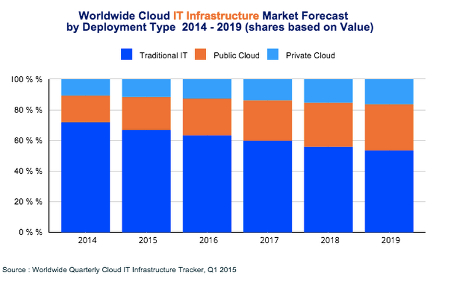
According to the Worldwide Cloud IT Infrastructure tracker for the first quarter of 2015, cloud IT will soon surpass even traditional IT models sometime in the next ten years.

value ib1

There are several noteworthy observations to make concerning this image:

  • Traditional IT is still the main player for 2015, rolling in at just over 65 percent of all deployments.
  • Public cloud IT accounts for around 20 percent of all deployments.
  • Private cloud IT makes up over 10 percent of all deployments.
  • Over the next five years, traditional IT will continue to decrease in usage, while the public cloud will make a significant jump in use. Private clouds will continue to grow, but not as quick of a rate as the public cloud.

On the financial scale, here are some statistics:

  • Spending on cloud IT infrastructures will reach $33.4 billion in 2015 alone.
  • Spending on private cloud infrastructures will grow to $11.7 billion.
  • Public cloud shows projected expenditures and growth of up to $21.7 billion.

As these numbers show, the cloud isn’t something that successful businesses should ignore. It’s not a gimmick or a fad. It’s a legitimate IT infrastructure solution that vastly improves operations and procedures. If you want to take advantage of the future of computing, cloud IT should be a top priority. The benefits greatly outweigh the cost in the long run, and there are a plethora of options to choose from; be it private cloud, public cloud, or even a mix of the two in a hybrid cloud solution.

The cloud has the ability to provide maximum mobility for your business, effectively allowing your employees to access critical systems that they might otherwise only be able to access in-house. This provides more opportunities for productivity, especially while on the road for a business trip or conference. Your team can choose how they want to work, and when, so long as the devices can access the Internet and are approved beforehand.

With the cloud dramatically changing the way we view the deployment of information and applications, we want to hear your thoughts about this revolutionary technology. Contact NuTech Services at 810.230.9455 for more information about how cloud computing can change the way your company works with technology.