248960278_college_400.jpg

Colleges Have a Lot of Data to Protect

248960278_college_400.jpg

Colleges and universities are part-time homes to more than 16 million people, and employ over 1.5 million more. Most of them utilize the networks set up by the college’s bevy of IT administrators. If you consider that most people have difficulty keeping viruses and other malware off of their personal computers, opening up networks that facilitate this kind of user demand can be tricky. Today, we ask: can a campus’ network every truly be secure?

Birth of the Internet

The first Internet was born on college campuses. It was built by intellectuals, for academics, without the massive list of considerations that now accompany software development. It spread quickly, of course, and somewhere, pretty early on, it was decided that by being able to support commerce, the Internet could become one of the west’s greatest inventions.

This came to fruition in 1984 when the first catalogue was launched on the Internet. This was followed by the first e-store (at books.com) in 1992, and the first software to be sold online (Ipswitch IMail Server) in 1994. Amazon and eBay launched the following year and the Internet has never been the same.

By then, the academic uses for the Internet had multiplied, as well. By the time Amazon launched, many colleges and universities were offering students access to the Internet as an important part of their continuing education. Boy, was it ever.

Today, you’ll be hard pressed to find a classroom (outside of the poorest school districts in the country) where every classroom isn’t Internet-ready.

College Internet Needs and Cybersecurity

This stands true in university and college circles, as well. Campuses today are almost completely connected. You’ll be hard pressed to find a place on a modern campus that, as long as you have security credentials to do so, you can’t gain access to an Internet connection. In a lot of ways, it is the demand for access that makes network security a major pain point for the modern college. Firstly, having to protect computing networks from a continuously variable amount of mobile devices is difficult. Secondly, the same attacks that plague businesses, are also hindering IT administrator efforts at colleges.

Colleges themselves aren’t doing anyone any favors. According to a 2018 report, none of the top 10 computer science degrees in the United States require a cybersecurity course to graduate. Of the top 50 computer science programs listed by Business Insider only three require some type of cybersecurity course. Moreover, only one school out of 122 reviewed by Business Insider requires the completion of three or more cybersecurity courses, the University of Alabama. Regardless of the metric, it’s clear that learning cybersecurity is not a priority for any school.

Are There Cybersecurity Problems Specific to Colleges?

The short answer is no. That’s why it’s so important to get people thinking about cybersecurity any way they can. No industry can afford to have the skills gap between people that hack and the people looking to stop them grow any wider. This is why, no matter what you do (or plan on doing) for a living it’s important to understand what your responsibilities are and how to get them into a place that can help your organization ward off these threats from outside (and sometimes inside) your network.

Many colleges have turned to companies like Cyber Degrees to help them not only educate the people utilizing the college’s networks to why cybersecurity awareness is important, but also help people understand that with the rise of cybercrime and hacking-induced malware, that cybersecurity has become a major growth industry with many facets. In 2015, the Bureau of Labor Statistics found there were more than 200,000 unfilled cybersecurity jobs in the U.S. With curriculums not prioritizing cybersecurity, and with threats growing rapidly, imagine how many are unfilled today. As demand rises for competent individuals to fill a multitude of jobs in the computer-security industry, colleges need to do a better job prioritizing cybersecurity training.

For the business looking into protecting itself, look no further than the cybersecurity professionals at NuTech Services. Our knowledgeable technicians work with today’s business technology day-in and day-out and know all the industry’s best practices on how to keep you and your staff working productively, while limiting your exposure to risk. Call us today at 810.230.9455 to learn more.

199842225_net_neutrality_400.jpg

Updating the Whole Net Neutrality Situation

199842225_net_neutrality_400.jpg

Net Neutrality in the United States has been a hot-button issue for almost anyone that uses the Internet. 2018 saw the 2005 principles governing the preservation of an open Internet repealed completely, leaving control over the Internet in the hands of huge companies that deliver Internet services to people. Today, we’ll go back over Net Neutrality and provide an update of what has happened since the Federal Communications Commission repeal of net neutrality laws.

Commercially available Internet services have been available since the early 1990s, but as broadband was being implemented, the Internet, and investment in the medium was strong. In an attempt to keep control of the Internet distributed among the people that utilize the service, and not massive corporations looking to gain control over it, the Federal Communications Commission (FCC) under chair Kathleen Abernathy adopted neutrality principles “to preserve and promote the vibrant and open character of the Internet as the telecommunications marketplace enters the broadband age” in 2005.

For seven years, lawmakers attempted to pass bills in Congress that would secure an open future for the Internet. All of these attempts failed, leaving the future of who would control the Internet up in the air. The fear was that ISPs, which are typically huge multinational conglomerates, would be able to control bandwidth with cost, as they do with their television services. Internet freedom advocates considered the price discrimination that would arise from “local monopolies enshrined in law” to be at the helm of what has proven to be the most remarkable invention in human history, counterproductive for the establishment of an open and useful construct.

Years of litigation followed. Cases such as Verizon Communications Inc. vs. FCC, which ruled that the FCC had no regulatory power over the Internet because it was, in fact, not actually a utility, and thus, governed under Title I of the Communications Act of 1934. Immediately after this ruling, the FCC took steps to reclassify Internet delivery services into a public utility, which are governed under Title II of the Act. In February of 2015, the classifications were officially challenged as voting members agreed that Internet services met the criteria of a utility under Title II of the Communications Act of 1934 and the more recent Telecommunications Act of 1996. In April of 2015 “net neutrality” was upheld by officially declaring Internet services as a utility. The rules officially went into effect the following June.

The “final rule” turned out to be short lived, however. In April of 2017, the FCC proposed to repeal the policies that governed net neutrality, and return control to the corporations that invest in and provide broadband services. The proposed changes were met with heavy consternation, with over 20 million people providing comments during the public discourse phase of the process. It was later found that millions of the comments made in support of net neutrality repeal were made fraudulently by foreign actors. Despite the overwhelming dissention of the mass of people, the FCC repealed the net neutrality policies and followed it with a hefty amount of propaganda material claiming that the decision was “restoring Internet freedom”. The repeal became official in June of 2018.

What Is Going on with Net Neutrality Now?
Almost immediately after the change was made there have been several lawsuits filed and they seem to keep coming. States, advocacy groups, neutrality lobbies, and companies have all started lawsuits against the FCC both for their handling of the situation and for the repeal of net neutrality itself.

One way to ascertain if it has been a benefit is by looking at the claims the FCC made before dismantling the mandate:

  1. Net Neutrality is hindering broadband investment. In 2018 what is known as the Big Four–Verizon, AT&T, Charter, and Comcast–collectively spent less in broadband projects than they did in 2017. It was the first time in three years that investment has dropped.
  2. It doesn’t make sense for ISPs to throttle Internet traffic. The Big Four reportedly slowed internet traffic without telling customers not more than six weeks after the repeal. Sites like YouTube, Netflix, and Amazon Prime were the most targeted. Verizon was especially culpable as it was found to slow data speeds that led to slower EMS response times; a major problem as firefighters were battling massive fires in California.

The issue isn’t totally devoid of common ground, however. Almost everyone believes that ISPs shouldn’t be able to flex their muscles, so to speak. One way this is happening is that there is a push to restore older FCC mandates that prohibited ISPs to enact anticompetitive and harmful practices. Basically, everyone wants a fast, open, and unobstructed Internet, but the disagreement, usually on party lines, is who is responsible for the regulation.

An extreme majority of people support net neutrality. Most people want to return oversight over the Internet to the bureaucracy, as they believe that corporations whose stated purpose is to make profit aren’t the best organizations to manage something as important as access to the Internet, despite being the companies that sell that access. Time will tell who is right.

If you would like to do something about it, go to https://www.battleforthenet.com/ and sign up. Do you believe market forces will keep ISPs honest, and the Internet open? Leave your thoughts in the comments section below.

best_browser_400.jpg

Which Browser is Best for Your Needs?

best_browser_400.jpg

There are a variety of web browsers out there, and that variety is much larger than most people think. While most can list off the main ones: Chrome, Safari, Edge, and Firefox, there are many more to consider. However, the real question remains: which one is best for you?

In a Nutshell: Probably Chrome…
The most used browser today is Chrome, with about 60 percent of the market share going to it. This isn’t an accident, as Chrome has historically prioritized the two things that Internet users want most – options and speed.

Chrome has always been fast, and despite some other browsers reaching comparable speeds, they just can’t match Chrome’s consistency in that arena. It also doesn’t hurt that Chrome has a remarkably simple interface that hides a massive amount of functionality, only supplemented by a huge extensions list.

However, Mozilla’s Firefox option has also exploded in popularity with its release of Quantum, which allows it to give Chrome a run for its money where speed is concerned. With additional security features and other useful elements, Mozilla is another tempting option.

Microsoft’s Edge browser is another option for many, especially if they prioritize the ability to easily share web pages through either email or assorted social networks, or to take notes on web pages and save them. Furthermore, as it was developed by Microsoft, the same company that develops Windows itself, Edge and Windows integrate quite well with each other.

…But It Depends
Of course, if your browsing tends to have a specific purpose or need, there are other browsers that may lend themselves better to your given objective. For instance, Opera has a feature called Opera Turbo, which can help make slow broadband speeds less of an issue.

Another option is Vivaldi, which would be ideal for those who want a customizable browsing experience. This browser lets a user create their own keyboard shortcuts and mouse gestures, as well as provides far more options that effectively allow the user to customize their own browser. Those who are particularly concerned about their online privacy might prefer the inherent features found in the Brave Browser or in the Tor Browser, and those who frequently download things from torrents might prefer Torch Browser.

At the end of the day, your choice will depend on your preferences. NuTech Services can help you weigh your options and make the best choice for you and your business. Give us a call at 810.230.9455 today.

tt_proxy_server_400.jpg

Know Your Tech: Proxy Server

tt_proxy_server_400.jpg

Your server room may be somewhat intimidating to consider. Wires everywhere, mechanical boxes that just sit there, lights blinking intermittently, and the distinct feeling that you probably shouldn’t touch anything – not even a proxy server, whatever that is. However, to help you get to know your tech, the proxy server is exactly what we discuss below!

What Is A Proxy Server?
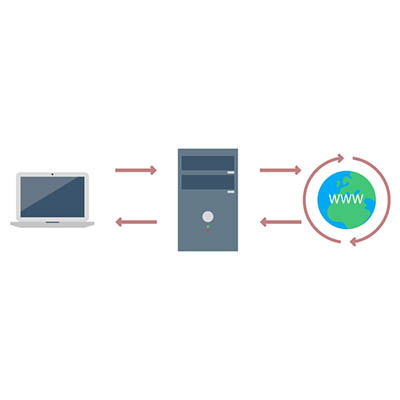
Oversimplifying things, a proxy server is the device that keeps your end users and the websites that they’re accessing separate, but communicating. Making this a little less straightforward, a proxy server can act as many other things as well, adding to its usefulness in your business.

At its core, a proxy server is extremely useful as a kind of gatekeeper for your users’ browsing. Think of it as a kind of a spam filter for your Internet – instead of a user accessing a potentially infected website, the proxy server allows them to access the data, protecting your network much like a web filter and firewall would. The proxy server also caches the data from common web requests, speeding them up, all the while preserving a user’s privacy online.

A Few Benefits of a Proxy Server
There are a few reasons that a business may utilize a proxy server.

Privacy and Security – As we’ve mentioned, proxy servers have a definite use as a means to protect an organization’s privacy and security. This can be accomplished in a few ways. First, a proxy server is capable of altering some of the identifying information contained in the web request. By its doing so, the destination server has no way of knowing where the request came from originally. This keeps browsing habits and personal information protected.

Furthermore, a proxy server is able to encrypt web requests, protecting them from anyone who may try to sneak a peek. Known malware sites can also be blocked through the proxy server. Finally, your company can use a virtual private network (or VPN) in conjunction with the proxy, enabling secure and verified access.

Internet Control – Let’s face it, as great a tool as the Internet is, it can also be a considerable source of distractions. However, a proxy server allows you to both monitor and control the way the Internet is used. If certain websites are proving to be a distraction, the proxy server can block them, instead delivering the user a nice note reminding them to stay on task. Even if the website isn’t blocked, a proxy server can still be used to track how often a website is accessed, allowing you to judge if your employees are really being diligent in their work.

Speeds and Savings – Bandwidth is a very important consideration to make when your business relies on the Internet’s performance in order to function. A proxy server can assist your network performance by caching websites that are frequently visited, cutting the number of requests to that website to one, as opposed to however many employees are attempting to access it.

If you think that your network could benefit from utilizing a proxy server, call us! NuTech Services is the premier managed IT support specialist for Michigan, and we are more than ready to assist you with whatever questions you may have. Give us a call today at 810.230.9455.

technology_addiction_very_real_400.jpg

Technology Addiction is a Very Real, Very Scary Thing

technology_addiction_very_real_400.jpg

Technology has become essential to workplace functionality and personal productivity, but while the long hours spent glued to our tech during the workday are a necessity, the time we spend at home with our personal devices is definitely voluntary. However, more and more people – children especially – are finding it harder to let their devices power down.

This is the hallmark of technology addiction, or Internet addiction disorder (IAD). While it isn’t yet officially recognized in the Diagnostic and Statistical Manual of Mental Disorders (DSM), IAD caught the attention of health professionals in the 1990s and 2013 saw the addition of Internet Use Gaming Disorder to the DSM-5.

What Makes IAD a Problem
Many of the features and trends that are widely taken for granted in applications today – autoplay, in-app purchases, and even notifications – are actually undermining our self-control. Instead of being able to set down the device and move on to something else, these tactics have made it so that we feel compelled to compulsively check these devices.

After all, you never know what you may miss if you don’t check right now.

Of course, needing to use technology for work and being addicted to technology are two very different things, but that doesn’t change the fact that children and adults alike have increasingly presented the warning signs of this addiction in their personal lives. That’s right – as much as the attachment to technology has stereotypically been framed as a young person’s problem, it can affect adults just as easily.

In a poll, 66 percent of parents felt that their teens were investing too much time into using their mobile device. No real surprise there, right? However, the same poll measured that 54 percent of children believed that their parents were checking their own devices too frequently as well.

Symptoms of IAD
IAD has a few warning signs and symptoms that present themselves in the behavior and mood of the person affected. Repeatedly checking for incoming text messages or updates and excessive social media use are common behaviors to keep an eye out for in your loved ones, and possibly in yourself.

Those afflicted with IAD also frequently feel euphoric while using their technology, and when they aren’t, often feel restless. IAD sufferers are prone to social withdrawal and experience diminished interest in activities not centered around a gadget. Some schools have even implemented technology fasts, where students have gone without their precious devices for a week. Teachers have noted that these students often exhibit physical symptoms of anxiety while their devices aren’t accessible. Students will reach for a device that isn’t there, all the while shaking and sweating.

How to Reduce Addictive Tactics
Above, we mentioned how many modern applications have features that encourage this kind of pervasive presence and dependence. To avoid these affects, it is probably best that these features are deactivated for non-essential applications.

Notifications are some of the biggest culprits of encouraging persistent use, so if the information isn’t essential to your professional or personal life, you don’t need an app trying to get your attention. Ask yourself: do you really need to be informed that your energy has been refilled in that mobile game you play more than you should? At the very least, using the mute notifications feature will help keep your attention from being pulled away when it shouldn’t be.

Many of the same apps that spam you with notifications are also the ones that encourage users to make those tempting in-app purchases that give the user an edge, or more frequently, extend the amount of time you can use the app before you have to wait again. This is most common in the free versions of these applications, so if you insist on using the app, it is more economical in the long run to just bite the bullet and pay for the app itself.

What piece of technology can you not bear to be without? Share it with us in the comments.

cables_close_up_connection_400.jpg

Tech Term: Bandwidth

cables_close_up_connection_400.jpg

Here’s a question we want you to take a second to consider…How much do you rely on the Internet? The answer for almost everyone is that it is essential to your current quality of life. Technologies have been developed, industries have been launched, and literally billions of people use it every day, making it one of the predominant inventions in human history. At the heart of this phenomenal technology is bandwidth.

The term bandwidth, in the context of the Internet, is the volume of information per unit of time that a transmission medium can handle. Simply put, the larger the bandwidth your connection has the faster the data can move through the medium. Bandwidth is measured in the amount of data transferred per second, specifically megabits per second (mostly written Mbps or Mb/s). Megabytes, written MB is not typically used in measuring bandwidth as a connection that is advertised as 15 MB is actually 1.875 Mbps since there are eight bits in every byte.

Most Internet Service Providers, or ISPs, will sell packages of a certain megabits, but if you really want to ascertain the bandwidth your computer is running on, your best bet is to use one of the numerous Internet speed test sites like the one at speedtest.net.

The best analogy, and the one that we’ll use, is that of plumbing. It’s said that data is to available bandwidth as water is to the size of a pipe. As bandwidth increases more data can be transferred through it, just as a larger pipe passes more water. Increasing bandwidth, or finding a larger pipe, will allow for even more data/water transfer. For the average user that only uses a couple of apps, a web browser, and doesn’t stream media, a small bandwidth connection will work fine. For tech-savvy families or very small businesses that have multiple devices connected to the Internet at once, they will find they will need more bandwidth to do the things they want to do seamlessly. Larger businesses will need enterprise-level bandwidth of multiple hundred Mbps.

Your Internet connection isn’t the only place where bandwidth comes into play. If you have a website, you will have to pay for a bandwidth level that is commensurate with the traffic and data interaction. In many cases, the more bandwidth you need, the more you will need to pay for hosting.

For more information about technology terms that confuse you, visit our blog, or contact our technology professionals at 810.230.9455.

tech_term_cookies_defined_400.jpg

Tech Term: Cookies Defined

tech_term_cookies_defined_400.jpg

Chances are, if you’ve spent any amount of time around a computer, you’ve heard of browser cookies. What you may not have heard, is what these cookies do. For today’s Tech Term, we’ll explore what cookies are, and what they do.

What are Cookies?
A cookie is a sample of information that a website stores on a user’s computer in text format that only that particular website can access. This information, made up of name-value pairs, informs the website if you have ever visited before and allows it to personalize your experience as a user. These cookies are often removed once the browser window is closed down, but they can be designed to last longer.

Cookies are what enable a website to “remember” that you are logged in and allow you to change particular settings without them reverting back the next time you navigate to a new page. Furthermore, cookies can allow websites to remember your browsing tendencies and suggest things that might interest you, even if you haven’t logged in. This is especially apparent on ecommerce sites that offer you products that might interest you based on the products that you’ve viewed in the past.

Are Cookies Dangerous?
In a word, no. All these pieces of data are viewable only by the website that delivered them. This means that Website A can only see cookies that it has delivered, and its cookies are likewise hidden from Website B. As a result, if Website B was attempting some malicious activities, the information that Website A has stored is safe.

However, some cookies are used for purposes that may be unwelcome to some users. Have you ever been browsing for a particular item on Amazon, and then notice that the other websites you visit are displaying advertisements for related items? This is the result of an advertising cookie taking note of what you have demonstrated interest in, thereby allowing it to customize the advertisement to best fit your interests.

Clearing Cookies
Of course, you can remove the cookies that your browser has accumulated by using the Clear Private Data tool. However, this will also erase any saved login credentials that you do want websites to have saved. The majority of browsers have ways to workaround this by whitelisting some websites as trusted to save cookies.

Are there any other Tech Terms you’d like defined, or do you have more questions about cookies? Reach out to us at 810.230.9455 and let us know!

modem_router_wifi_400.jpg

Tech Term: Modems and Routers Defined

modem_router_wifi_400.jpg

The Internet is an amazing tool, only bolstered by our ability to access it wirelessly – but what do you know about the devices that allow us to access it, namely, modems and routers? Do you know what each does? For today’s tech term, we’ll dive into exactly that.

First, it is important to understand that these devices serve two different purposes, each critical to the end goal. By working together, the modem and the router create a usable network for you to leverage.

What Does a Modem Do?
A modem is what actually connects your local network to your Internet service provider, and therefore, the Internet. It allows information to pass over without any kind of filtering.

What Does a Router Do?
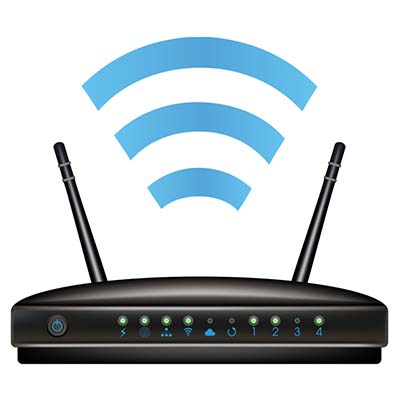
Your router is what bridges the gaps between the devices on your network and the Internet through either a wired or wireless connection. It also features protections like firewalls to thwart potential threats coming in from the Internet.

Despite this, it may not be entirely necessary for you to include a router, especially if you only want a particular device to have Internet access.

Combination Options
There is also the option to consolidate these two devices into a single one, although this doesn’t fit everyone’s needs. Using a modem/router combination limits what you can do with your network, and if your 2-in-1 device dies or is damaged, you lose all of your networking capability. Alternatively, a malfunctioning modem or router can be swapped out and replaced relatively easily, with less of a capital investment.

NuTech Services can assist you in setting up a network that meets your business’ needs optimally. Call us at 810.230.9455 for more information.

blog2_gavel_square_108943691_optimized.jpg

Net Neutrality Still Needs Your Help!

blog2_gavel_square_108943691_optimized.jpg

December 14th is the last day that our government representatives can vote whether or not to continue the Internet’s protection under the net neutrality rules established in 2015. Without these rules in place, your data can be analyzed by your Internet service provider, and they are free to act on that knowledge and manipulate your Internet in support of their own interests.

From the beginning of our democracy, there are a few basic freedoms that all citizens have been given through the First Amendment to our Constitution: freedom of speech, freedom of the press, and freedom of assembly. Rolling back net neutrality rules would allow your Internet service provider to analyze your web activity and adjust what you are able to access to support their agenda–or more realistically, that of the highest bidder–infringing on those rights in order to make themselves a bigger profit.

We recently discussed this in more depth in a post entitled Net Neutrality: Everything Business Owners Need to Know. Make sure you give it a read for more context into this issue.

How this Affects You
Small and medium-size businesses have enough competition to deal with from large corporations as it is. Without these rules, however, ISPs could essentially allow large corporations to pay for prioritization, making their website’s user experience better than yours, encouraging users to go to them instead.

Your competitors could literally pay your service provider to give you an inferior service, slowly sending you out of business.

On a wider scale, the removal of these rules would also allow ISPs to deny access to any website whose agenda wasn’t in line with their own, censor content that they didn’t agree with, or block visitors from accessing a website belonging to a protesting labor union–all of which happened before the net neutrality rules were put in place, and will happen again if they are rolled back.

What You Can Do to Help
Regardless of your industry, this will affect you as a small- or medium-sized business owner. The time to act is now. Visit www.battleforthenet.com to contact your representative today and tell them to stop the FCC from doing considerable harm to the free and open Internet. Send an email, call their offices, make sure they know how opposed you–their constituent–are to this transparent attempt by the telecoms to abuse the Internet for profit.

internet_of_things_issues_400.jpg

How the Convenience of The Internet of Things Can Come Back to Bite Us

internet_of_things_issues_400.jpg

While the Internet of Things has made many common tasks much easier through automation, it has also increased the potency of particular cybersecurity threats. For an excellent example, one only has to turn to the increasing prevalence of botnets that are powered by IoT technology.

An Overview of the IoT, and Why It’s Great For Botnets
If you wear a fitness tracker that automatically syncs to your phone, or have an Internet-connected security camera watching your house, you are utilizing the Internet of Things. Usually labelled as ‘connected’ or ‘smart,’ these devices collect data and process that data via a connection to the Internet.

While these devices have proven to be very useful, there is a major problem with them that seems to be present throughout the IoT: a noticeable lack of security measures. Combining this lack of security precautions with their need to connect to the Internet creates the ideal conditions for a botnet to gather.

A botnet pools the resources of a large network of infected devices to overcome the target’s security through a brute force attack. The attack on Dyn that made dozens of the web’s most popular sites go dark was a botnet, proving that this method of attack is no joke.

A New-ish Face on the Scene
While there is no shortage of botnets already, a new derivative of the infamous Mirai is using the same IP cameras to infect thousands of devices in China. This particular botnet has been named Persirai, and is just one of many that warrant concern.

For example, there is another botnet that Kaspersky Lab has concluded to have infected about 300,000 IoT devices. While this botnet, codenamed Hajime, is still dormant, it could potentially rival Mirai if it were to meet the expectations of security experts and become active.

Keeping Your Business Safe
Luckily, there are a few ways you can help to reduce the impact that a botnet can have on your business. A good rule of thumb is to follow business continuity best practices. As an example, your business data shouldn’t only be kept in one place. An offsite backup solution will allow you data to be preserved if you ever are assaulted by a botnet. It always helps to have a firewall solution in place as well, as they can mitigate some botnet attacks.

If you need help protecting your business against the vulnerabilities that the IoT creates, give us a call at NuTech Services. Call us at 810.230.9455 to get started.

internet_connectivity_speed_400.jpg

Tip of the Week: Resolve a Poor Internet Connection By Following These 3 Steps

internet_connectivity_speed_400.jpg

When the Internet goes down in the modern office, chaos ensues. The only way to subdue the panicked masses is to provide answers and to resolve the issue, ASAP. If you happen to find yourself in such an Internet-less predicament, then be sure to follow these three troubleshooting tips.

Is Everything Plugged In?
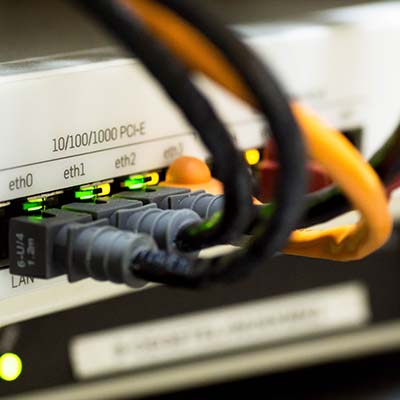
This may seem like a rather trivial thing to check, but sometimes the worst problems happen because the obvious is overlooked. When your Internet connection fails, be sure to check key components of your network like your modem and cables in order to make sure that everything is plugged in. Considering all of the activity that goes on in a work space, it’s important to keep in mind that accidents happen and equipment can get bumped and the wrong devices can get unplugged. Remember, looks can be deceiving and even a loose cable can be the culprit, so giving your cable connections a firm jiggle may prove an easy fix.

Turn Your Technology Off and on Again
It’s rather comical how many technology woes are remedied by simply turning a device off and on again, yet it’s a troubleshooting method that’s wholeheartedly recommended by IT technicians because it routinely does the trick! One piece of equipment you’ll want to restart first is the modem. If that doesn’t do it, then try restarting your wireless router or PC.

Now, before you go and compulsively restart everything, you’re first going to want to pause and apply some logic to the situation by asking some basic questions. For example, if the Internet is out on your workstation but it’s working on another office computer, then you know it’s an issue with your PC and not the network. If your smartphone lost Internet signal but the signal your PC that’s wired into the network is working fine, then you’ll know that you’ve got a problem with your wireless router and not the modem itself.

Call Your Internet Service Provider
If you go through the previous two steps and you’re still experiencing issues with your Internet connection, then the problem may lie with your Internet service provider. While it’s certainly a relief to learn that the problem isn’t your fault, it’s nevertheless annoying to still have to deal with lost productivity. If you do contact your ISP regarding the issue, they should be able to confirm if it’s an issue on their end, and they may even be able to help by giving you an estimate of when the issue will be resolved. This insight will allow you to better manage your downtime by helping you know what to do next, like sending your staff out to lunch early while the Internet is being fixed instead of having everybody sit around with hands in their pockets.

Bonus Tip: Have a Backup Plan
While we’re on the topic of lost productivity, it’s good to remind business owners about having a business continuity plan that includes backup solutions that allow employees to continue working while the Internet is down, like apps that aren’t totally dependent on the Internet and perhaps a way to connect mission-critical devices to a 4G wireless signal.

While it’s common for businesses to lose Internet connection every so often, it shouldn’t happen so frequently that it eats into your bottom line and causes serious problems. If this is the case, then you’ll want IT professionals to take a look at your network. NuTech Services can perform this task for you by discovering the issue and taking the necessary steps to get your network connections working at optimal levels. For assistance troubleshooting any of your company’s technologies, give us a call at 810.230.9455.

secure_web_browsing_400.jpg

The “S” in HTTPS is More Important Than You May Think

secure_web_browsing_400.jpg

It would be an understatement to say that security, particularly encryption, is important while browsing the web. Though it was only recently that encryption became a major pain point for government regulation, encryption has been around for a very long time. The average user can get a taste of online encryption through the average website security certificate.

Hypertext Transfer Protocol, with an S on the end for “security,” is designed to protect a website visitor’s privacy by encrypting information sent from the website to a receiving server. Ordinarily, the connection wouldn’t be private, so data can be accessed while it’s in transit. This is why HTTPS is commonly used on pages that require sensitive credentials, like passwords, usernames, credit card numbers, Social Security numbers, and so on. For example, banking institutions and other accounts that are linked to financial credentials (like any payment pages on websites) need to be using a security certificate to guarantee the user’s security.

One good way of describing online encryption is like a pipe. A normal HTTP connection is like a transparent pipe that you can see through. Hackers can collect data while it’s in transit because the pipe is see-through. Now, imagine the same pipe, only with an opaque hue to it. You can still see the insides, but they’re hidden and jumbled to the point where you can’t get a clear image. This is what it’s like for hackers to see encrypted data; they may have stolen it, but it’s locked down and indecipherable, making it essentially worthless.

The main thing that the average business owner must understand about HTTPS and online encryption is that you need to drill best practices of handling data into your employees as early and as often as possible. Before entering sensitive information into any website, be sure to look for the following abnormalities:

  • A lack of a security certificate: Before you enter any information into a website, make sure that it’s protected by a security certificate. You can verify that a website is secure by clicking on the green padlock icon next to the URL’s name in the address bar. It’s important to keep in mind that, while SSL and TLS might largely seem like the same thing, SSL is an antiquated security protocol that, thanks to vulnerabilities like POODLE (a man-in-the-middle exploit), could be dangerous.
  • Suspicious URLs or domain names: Sometimes hackers will create a site that looks exactly like a banking institution’s website, and use it to steal credentials. They will use sneaky tactics to make you think that what you’re looking at is the real deal, but look for out-of-place letters, numbers, or symbols in the domain before thinking you’re in the clear. Basically, the site that you’re on should be the institution’s official site. If something looks out of the ordinary, contact the organization through the information that you have on file.

For more great tips and tricks on how to stay safe online, be sure to contact NuTech Services at 810.230.9455.

publishing_and_new_tech_400.jpg

The Internet Dramatically Changed the Publishing Industry. What About Your Field of Expertise?

publishing_and_new_tech_400.jpg

It’s well-known that publishers are a major component of an author sharing their work with the world, but recent innovations threaten to disrupt the status quo of the industry. Like many industries, the publishing industry has been changed significantly by the introduction of new technologies that afford writers more liberty when producing their work. What can the business owner learn from these changes?

Traditionally, and still today, the publishing industry relies on manuscripts that are submitted by authors for publication. Once a manuscript has been accepted, the publishing house will provide the personnel and services necessary to polish the work and turn it into something that can make them money. This typically includes editing for quality, designing the book, and marketing it to potential readers.

Unfortunately, the problem that many budding authors run into is the fact that it can take publishing houses several weeks, to several months, to read and accept (or reject) a manuscript. Plus, after waiting so long for an acquisition editor to read a manuscript, it might not even get approved. If it does get approved, the author still has to wait several months to hold their new publication in their hands.

Today’s authors can potentially avoid the headaches that stem from dealing with traditional publishing houses. Thanks to technology like the Internet, authors can now share their work through many different outlets. Social media websites, personal web hosting, online product review sites, and so much more, all allow people to share their work with like-minded individuals.

In particular, self-publishing has taken the brunt of abuse from traditional publishing houses. At first, it might seem to be because they perceive it as a threat, but more often than not, they are just bent out of shape by how “unprofessional” self-publishing looks. When an author goes through the self-publishing process, they’re in charge of editing the manuscript and preparing it for publication, rather than taking advantage of established professionals in the industry. The end result could vary from a polished masterpiece to a mistake-ridden manuscript that becomes a commercial failure.

This brings up an excellent point; if you can use a service to make your job easier, save time, and conserve capital, should you do so? It depends on the level of quality that you can expect. If you’d rather have the work done professionally, outsourcing the service is always an option. For example, in the case of the self-published author, they might hire a freelance editor or editing firm to review their work and make edits, check for usage inconsistencies, and review the narrative. Basically, the concept is that onboarding a professional dedicated to the specific craft can be a great asset.

It’s not much of a stretch to compare this concept to the modern business environment. Outsourcing is a major trend that is more acceptable than ever, especially for technical positions like IT maintenance and technology procurement. Small and medium-sized businesses often don’t have the luxury of having an in-house IT department that they can depend on for their support and maintenance. Therefore, they look to other organizations, like NuTech Services, who can assist them without breaking their budget or looking for new hires.

If you’re having a hard time managing your business’s technology, we’re here to help. With our managed services, we can take care of your hardware, remotely administer patches and security updates, back up your systems, protect your infrastructure from threats, and so much more. Let us help you write the next chapter of your business’s journey to success. For more information, give us a call at 810.230.9455.

internet_pros_cons_400.jpg

3 Ways the Internet is Changing Things, for Better AND for Worse

internet_pros_cons_400.jpg

We’ve all become so adapted to the conveniences of the Internet that it’s difficult to remember what society was like before it. This becomes especially obvious when watching old movies. How odd is it to see characters do pre-Internet activities like go to the library to research information and use a phone book? These are just some of the ways that the Internet has dramatically changed society, for better and perhaps for worse.

Consider these three ways that the Internet has changed how we work and live, and then ask yourself truthfully, “Are we better off?”

Increased Productivity
One advantage the Internet affords us is that we can be productive virtually anywhere that we can connect to it. This includes places that were previously thought to be off limits from the reach of productivity, like at the beach while on vacation, on the road for business, we even hear that some users take their favorite devices into the bathroom with them. Looking at this situation from a purely business standpoint, it makes you as a business owner feel good that your staff is spending every waking moment being as productive as possible. However, looking at it from the standpoint of the human experience, it makes one feel like we’ve lost something when we can’t go but a few minutes without stopping to look at our mobile devices.

Yet, Productivity Decreases
While the Internet affords us more opportunities to access the web and get work done, it can also be a major distraction for the times when we actually sit down to, get work done. For example, at the end of the work day, how many tabs does your web browser have open? If you’re like the average modern office worker, your screen is full of interesting news articles, YouTube videos, multiple instant messaging conversations, and more, much more.

The problem here is that all of these little distractions presented by the Internet actually cut into productivity in a major way. In fact, it’s proven that it takes anywhere from 5-to-15 minutes for a worker to refocus on a single task after they’re pulled away from it. Therefore, having the Internet bombard an employee with distractions all day long actually results in getting less work done. But hey, they can always make up for it at home, or even in the bathroom.

Access Any Information Instantly
So far, the future we were promised is disappointing because it lacks flying cars, laser guns, and hoverboards (we don’t count the “Hoverboards” found in today’s retail stores). However, thanks to the Internet, virtually all of the world’s media and information is just a click away, and can even be carried in your pocket. This is a huge advancement for our civilization; one that would make the Jetsons green with envy.

Yet, all of this instant information is killing our attention spans. Consider these two sobering statistics from List25:

  • 50 percent of Internet users quit waiting for a video to load after 10 seconds.
  • The average shot length in an English-language film has decreased from 12 seconds in 1930 to only about 2 seconds in 2015.

Therefore, while the Internet is satisfying our need for instant gratification, it’s making patience much harder for human beings to come by.

In what ways do these benefits and drawbacks of the Internet play out in your office? Is your staff more productive and more distracted? Is work time cutting into leisure time? Are people so impatient that they resort to Googling a question instead of having an actual discussion about it? Are you taking any measures to control online distractions in the workplace? Of course, these are just some of the ways that the Internet is changing everything, both for better and for worse.

Do you have any points to add to this list? Share with us your thoughts in the comments.

steam_malware_problems_400.jpg

Do You Use Steam for PC Gaming? Watch Out for this New Malware!

steam_malware_problems_400.jpg

Malware has traditionally targeted industries that are exceptionally profitable. For example, hackers like to target retailers for their wealth of financial credentials. One of the most profitable industries, entertainment, is also subject to similar torment, including Steam, the PC gamer’s most valuable tool for gaming binges.


Steam is a web-based distribution platform developed by Valve Corporation, which provides multiplayer gaming, among various other services, to gamers. In a way, it can be compared to cloud computing. With over 140 million active users, Steam is one of the most prominent online gaming retailers out there. In October 2013, it was estimated that 75 percent of all games purchased online were through Steam. If nothing else, Steam is a valid online computing outlet that hackers want to take advantage of.

Over time, gamers’ accounts can accrue a “value” of sorts, be it through a collection of purchased game titles, virtual items, or currency, all of which can potentially be stolen by hackers. These items might seem trivial, but they’re giving rise to a new type of hacker on the Steam scene; those who take advantage of Steam Stealer, a new type of malware that helps both experienced hackers and would-be chumps steal in-game items, currency, and other “valuable” assets from other users. This entrance to cybercrime could be seen as a slippery slope. If users find that they can steal in-game items and other valuables, they might one day decide to see if they can exploit other aspects of their rivals’ accounts, like their real-world wallets.

The most dangerous part of Steam Stealer is how easy and affordable it is to take advantage of. People who have no knowledge of malware can easily use Steam Stealer thanks to its included specializations, user manuals, APIs, and its price tag of $15. Other malware-as-a-service offerings are much more expensive and complicated to get involved with, while Steam Stealer makes it exceptionally easy to get a taste of the cyber crime scene. And once they get a taste of the proverbial slice of the Steam-pie, what’s stopping them from eating the whole thing?

In the end, these hackers won’t be satisfied until they hit the real goldmine: the wealth of financial information stored from purchasing games, and other products, through Steam’s online interface. Steam experiences its fair share of account takeovers (around 77 thousand accounts suffer from this every month), so it’s logical to assume that many hackers are after the lucrative information stored within these accounts.

As is to be expected, the best way to keep Steam safe from hackers is to practice a combination of two-factor authentication, and to remain vigilant for potential phishing scams. Changing passwords regularly also helps to keep your security in top order, and keeping a close eye on URLs can prevent potential account compromisation before it occurs.

Do these tips sound familiar? They are all, more or less, valuable tips to help you stay safe online, whether at work or at play. Just because Steam is a gaming platform doesn’t mean that there aren’t valuable lessons in cybersecurity that can be learned from it. Gamers see their precious inventories as valuable assets that cannot be replaced, much in the same way that a business owner must protect their organization’s network infrastructure and the data stored within.

If you’re concerned about the status of your data security, reach out to us at 810.230.9455. While we might not be able to help secure your Steam library, we can most certainly help with your business’s data security practices.

b2ap3_thumbnail_google_fiber_400.jpg

Google Fiber and the Race to Provide Consumers With the Fastest Internet Possible

b2ap3_thumbnail_google_fiber_400.jpgYour business relies on a steady Internet connection to maintain operations. The inner workings of your cabling infrastructure are what ensure that you constantly have access to both online and offline networks for your organization. Most businesses utilize the services of major cable companies like Time Warner Cable and Comcast to facilitate this need, but some cities around the United States have access to another option: Google Fiber.

Explaining Google Fiber
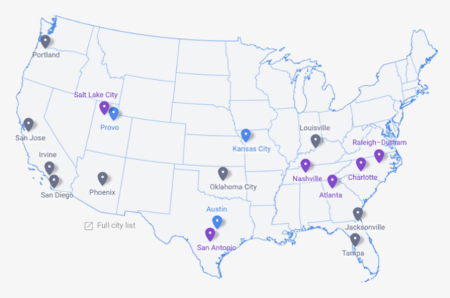
Originally, Google Fiber was only an experiment that was designed to deliver high-speed Internet and cable television to the Kansas City metropolitan area. Now, it’s a full-fledged Internet service provider, although its locations are limited to only a few cities within the United States.

map ib

As explained by CIO:

And optical fiber is the only choice for connectivity that exceed 1,000 Mbps, aka Gigabit Internet. Optical fiber provides higher bandwidths – download speeds 40 times faster and upload speeds more than 300 times faster than garden variety broadband – and spans much longer distances than electrical cabling. And some companies, such as Bell Labs, Cisco, and Comcast are claiming that their new “fiber optic” services (when eventually installed) will be 10 times faster than Google.

Does It Work?
The common consensus so far is that Google Fiber isn’t much different from other Internet service providers, and it’s a convenient service for those who want to keep their personal lives and businesses connected to the Internet. Unlike big names in the cable industry like Time Warner Cable and Comcast, however, Google Fiber isn’t associated with scandal and lackluster customer service, making it an attractive third-party choice. Businesses in areas where Google Fiber is available often cite that the service is cheap and convenient for their purposes, stating that they appreciate the fast Internet option.

In other cases, some users were dissatisfied with Google’s bundled service offerings, claiming that privacy is a major concern. Google’s systems scan users’ Internet activity in order to customize ads from Google and YouTube, which doesn’t sit well with some privacy advocates. These settings can be altered, but shouldn’t be touched without the knowledge of a trained professional technician.

Your business shouldn’t question whether or not you have reliable access to both your wired and wireless networks, especially for your applications and data stored in the cloud. If you lose access to both information and your software solutions, your business could be crushed by unexpected downtime costs. Therefore, what you require is reliability and scalability; the ability to shift your networking requirements in accordance with your business’s needs.

If you want to ensure reliability for both your wired and wireless technology, NuTech Services’s skillful technicians can help your organization optimize its Internet deployment strategy. For more information, give us a call at 810.230.9455.

b2ap3_thumbnail_streaming_media_400.jpg

Netflix, Hulu, or Amazon, Which Video Service Makes the Best Gift?

b2ap3_thumbnail_streaming_media_400.jpgSometimes it’s a pain trying to figure out what you’ll be getting your loved ones during the holiday season. Thankfully, there are some relatively fail-safe options for those who love entertainment, like watching television or going to the movies. A subscription to the right video-streaming service might be able to help you save a trip to your local department store and all of the madness that comes with it.

While there are plenty of video-streaming services to choose from, there are three that stand head and shoulders above the rest. Considering how often some people find themselves binge-watching their favorite TV shows on these popular services, it’s a safe bet that your loved ones will appreciate every moment they use the application.

Here’s a quick rundown of what you can expect from the top three online video-streaming services.

netflixNetflix – Starts at $7.99 a Month
Netflix is an exceptionally sought-after service, with well over 65 million subscribers. Though it’s drawn the anger of broadcast television networks, it’s a great alternative, boasting several popular movies and TV shows, as well as some exclusive content. If you want to give Netflix as a gift to someone, you should first make sure that they aren’t already a subscriber. Try mentioning Netflix casually; perhaps ask something like, “Have you checked out that new Netflix original series, Marvel’s Jessica Jones?” Or, if they already have a subscription, you can suggest that you cover the cost of renewal for the existing subscription.

Netflix’s roster shifts periodically, offering new movies or TV shows, while occasionally removing less popular media. This offers a continuous stream of new content to watch; and, to make things better, subscribers have the opportunity to get DVDs mailed to them, if they so desire for an additional fee.

amazon plusAmazon Prime – $99 a Year
Just like Netflix, Amazon Prime is a very popular service, netting around 80 million users at the time of this writing. This means that you should also make sure that your intended recipient isn’t a current subscriber. Prime allows its users to stream entertainment services, like original shows and movies, with an additional benefit; Prime subscribers can rent the latest movies, just like pay-per-view.

Unlike Netflix, however, Amazon Prime comes with a ton of other services that can present more value to your gift’s recipient. Prime offers free, two-day shipping on products from Amazon’s huge web store, which can potentially let subscribers save so much money on shipping that it feels like Prime is paying for itself. Additionally, Prime offers several other membership benefits, including Prime Music, Prime Photos, Prime Pantry, Prime Early Access, Kindle Owner’s Lending Library, and more. Plus, if you actually use Prime to buy physical presents for people, they’ll gift wrap it for a small charge.

hulu plusHulu Plus – Starts at $7.99
Hulu Plus is streaming service that focuses on delivering current television shows shortly after they’re broadcasted, but they also have many TV shows and movies available to view. Just like Netflix, though, Hulu Plus is starting to offer its own original content. At the present moment, Hulu Plus has around 9 million subscribers, and now, users can remove ads for an additional cost. There’s a chance that this number will rise, especially with the holiday season on the horizon.

What are some of your favorite ideas for entertainment and holiday gifts? Let us know in the comments.

b2ap3_thumbnail_internet_under_the_sea_400.jpg

How Fishing Nets May Be the Greatest Security Threat to the Internet [Video]

b2ap3_thumbnail_internet_under_the_sea_400.jpgMany countries around the world have access to the Internet, but have you stopped to consider how this service is deployed and connected to countries on different continents? Well, this is only made possible by the countless miles of wire laid beneath the surface of the ocean, all around the world. In fact, it’s somewhat unnerving to think that international communications depend on the structural integrity of cables submerged at the bottom of the sea.

Like a mighty sea serpent, the Internet’s cables snake around the globe, connecting countries and online infrastructures to ensure global communication. The majority of transoceanic communications, including phone calls, emails, and just about any Internet transmission, is dependent on the well-being of these cables. As reported by WIRED, the first telegraph wire was initially laid across the Atlantic Ocean in 1866, and others soon followed, laid across common trade routes. In the 1950s, the standard for overseas cabling shifted to coaxial cables, which were capable of carrying telephone conversations. Today, the world uses fiber-optic cables that are used to transfer enormous amounts of data relatively quickly.

Here’s a video of how these cables are laid:

And a map of where they’re all located:

As you can expect, these Internet cables have become important staples for how society communicates on an international scale. Still, doesn’t it seem strange that such important pieces of technology are left at the mercy of the ocean? Most people don’t bother to remember that the cables exist until a problem happens and a connection goes down. More often than not, people only take interest in the cables when something goes wrong with them, but it’s a fairly common occurrence for submarines and international powers to take an interest in them.

As reported by WIRED, the following problems are fairly common threats for the Internet cables: seismic activity, various undersea creatures (namely sharks – you know, the scary ones with teeth), and international intervention. By far, though, the most common problem for the undersea cables comes in the form of ship anchors and fishing nets. Between the two, they make up about 60 percent of all cable destruction. This is the primary reason why most sea charts will mark the location of these wires; since, as you can imagine, cutting them has some pretty dire consequences.

Cutting undersea cables would probably make for a great sabotage trick for an international conflict, but such activities haven’t occurred since the previous World War. These days, the cables are typically left untouched and forgotten about, though occasionally the media will make a scene about submarines sniffing around near the cables. What are your thoughts on these undersea cables? Do you think there should be a more efficient manner of deploying information across the world? Let us know in the comments.

b2ap3_thumbnail_scatterbrain_400.jpg

We Bet that You Can’t Read Every Word of This Article [VIDEO]

b2ap3_thumbnail_scatterbrain_400.jpgThe Internet is full of challenges. YouTube has a multitude of annoying 10 hour-long videos of irritating noises and sounds alone. But, this CollegeHumor video might just top them all. It challenges its viewers to finish a three-minute video, and to make it worse, the video is boring.


It’s a look into the human psyche and the impact that the Internet has had on the way our attention spans work. This video argues that the Internet has made the human mind weak and saturated with entertainment. We surf the Internet for hours on end to put an end to the tedious boredom of everyday life. A decade of a world taken over by the Internet has brought about a generation of weak-willed people who can’t even find the time to finish reading an article.

We Dare You
We dare you to finish this article. We know most of you probably won’t. Slate performed a study of how many people actually read their articles, and the results weren’t particularly promising: About 5 percent of people who landed on Slate pages were engaged with the page in some way, but never scrolled down the page. Typically, this means that they didn’t see anything at all about the article, and opted to visit another web page.

Most visitors scroll to at least the 50 percent mark, but that doesn’t mean that they’ve read the article. People could just be skimming and then sharing the information online via Facebook or Twitter. Then, other people can share the article without reading it, too, and it will create a chain reaction of misinformed individuals who can’t pay attention long enough to understand the premise of the article.

Finally, the only way to get most people to scroll through the entire article is to embed pictures or videos into it, which causes readers to scroll through the entire article, then go elsewhere or share/comment on it. These trends use the assumption that the web article is roughly 2000 pixels long (the length of a typical web article, roughly two pages of text or 1,000 words single-spaced).

Still With Us?
Good. You’re among the minority of readers. Most of you wouldn’t have read this far. It’s almost as if the seemingly limitless number of screens and tabs that can be open at one time make us feel like we never need to be bored. If something isn’t working for you, all you need to do is search for something else to appease your hunger for content.

The unfortunate side effect of this is that it wastes a lot of time, especially from a business standpoint. Unless you are entirely engulfed in your work, you will be browsing the Internet. Take advantage of productivity-increasing tips from NuTech Services today by calling 810.230.9455. And remember the obnoxious man-in-the-suit’s words; “If you watch this entire video, if you make the choice to sit and be bored for these 180 seconds, you will have finally taken the first step in regaining control over the one truly renewable resource in life: your time.”

Thank you for being one of the few readers to finish this article. Now, don’t waste any more time. Put your time to good use and leave a comment expressing your thoughts.