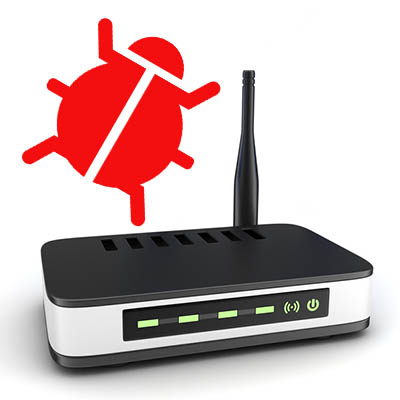
router_can_host_malware_400.jpg

Your Router Can Host Some Pretty Nasty Malware

router_can_host_malware_400.jpg

Hundreds of millions of people use wireless Internet connections every day, and as a result, hackers are taking that as a challenge. They are now starting to develop malware that targets people through their routers. Recently, security researchers at Kaspersky Lab have discovered the malware named Slingshot. The code is designed to spy on PCs through a multi-layer attack that targets MikroTik routers. Today we take a look at Slingshot, and other router-based malware and what you can do about it.

Slingshot
Slingshot works by replacing a library file with a malicious version that downloads more malicious components and then eventually launches a two-front attack on the computers connected to it. The first one runs low-level kernel code that gives an intruder free rein of a system, while the other focuses on the user level and includes code to manage the file system and keep the malware alive.

It is a very intricate attack that calls the nefarious code in from an encrypted virtual file system; managing to do so without crashing the host system, a feat not lost on the security experts at Kaspersky Lab, who deemed it a state-sponsored attack because of the quality of the overall attack and the complexity of its components. Reports suggest that the malware can basically steal whatever it wants, including keyboard strokes, passwords, screenshots, and information about network usage and traffic.

MikroTik has announced that they have patched the vulnerability on versions of their routing firmware, but concerns remain as no one is sure if other router manufacturers have been affected. If that were to come to fruition, Slingshot could be a much larger problem than is currently believed.

Other Instances
Slingshot isn’t the first instance of a router turning on its owner. Traditionally, router security is known to be largely unreliable. Much of this is on the manufacturers, which have been known to build many different products without having a strategy in place to keep them working with up-to-date security. It is also up to the user to keep their router’s firmware up-to-date – something that is very easy to not keep top-of-mind. Plus, some routers make firmware updates time-consuming and difficult.

To attack the network, hackers seek to change the DNS server setting on your router. When you try to connect to a secure website, the malicious DNS server tells you to go to an elaborately constructed phishing site instead. By spoofing the domain and rerouting you to a website that is specifically constructed to take advantage of you, you have very little chance of warding off the attack before it’s too late.

Hackers have also been known to inject all types of user hindrances such trying to perform drive-by downloads, or inundating users with advertisements. Many attacks make use of cross-site request forgery attacks where a malicious actor creates a rogue piece of JavaScript that repeatedly tries to load the router’s web-admin page and change the router’s settings.

What to Do If This Happens to You
The first thing you should do is work to ascertain if your router has been compromised. You can do this in several ways, but the most telling is that your DNS server has been changed. You’ll have to access your router’s web-based setup page. Once in, you have to visit the Internet connection screen. If your DNS setting is set to automatic, you are in the clear. If it’s set to “manual”, however, there will be custom DNS servers entered in the space. Many times, this is the first sign of a problem.

If you have been compromised, ensuring your router is set up to your manufacturer’s specifications will help you mitigate damage. To ward against this happening to you, you should always:

  • Install firmware updates: Making sure your router’s firmware is updated to the latest version will definitely help.
  • Disable remote access: Stop remote access to secure against anyone changing settings on your networking equipment.
  • Turn off UPnP: Plug and play can be very convenient, but your router could be affected through UPnP if there is any malware on the network since it is designed to universally trust all requests.
  • Change credentials: Changing your passwords are a simple way of keeping unwanted entities out of your router.

For more information about network and cybersecurity, the expert technicians at NuTech Services are accessible and ready to help you keep your network and infrastructure secure. For help, call us at 810.230.9455.

Schrdingers_Cat_Lives_Dies_400.jpg

Email Attachments are Schrӧdinger’s New Cat

Schrdingers_Cat_Lives_Dies_400.jpg

Have you ever heard of the physicist Erwin Schrӧdinger? He is most well-known for explaining a paradox related to quantum physics which involves a cat. Even though the theory behind Schrӧdinger’s cat is meant to explain something quite different, it can still be applied to a lot of different concepts. In particular, when explaining email security.

The thought experiment works as follows. The Schrӧdinger’s Cat scenario was created to strike down an interpretation of quantum mechanics that states an object can exist in all states but will revert to just one if it’s observed. As for Schrӧdinger’s experiment, a cat was hypothetically shut in a box with a small amount of radioactive material. This material had about a 50% chance of setting off a geiger counter. In this case, a hammer would smash a container filled with poison, killing the cat. If the Copenhagen interpretation is presumed to be correct, the cat would be both alive and dead until you see which one it really is.

At the time, Schrӧdinger’s cat was designed to challenge the Copenhagen interpretation, but a more modern version of this experiment can be seen in a business email solution. The primary topic associated with this line of thought is email attachments.

Spam and phishing emails are some of the more popular ways that cybercriminals use to spread their influence. The idea of how this ties into Schrӧdinger’s hypothetical cat involves approaching each email as both a normal message and a real threat at the same time. The only issue here is that there’s a lot more at risk with your business’s infrastructure than with a hypothetical scenario (no cats were harmed in the creation of this blog). After all, you don’t want to click on an email attachment unless you’re absolutely sure that it’s not going to cause problems for your organization.

Thankfully, there are ways that your business can protect itself from advanced threats that make their home attached to email messages, especially spam and phishing threats. Preventative measures like antivirus and anti-malware tools are great for keeping threats off of your infrastructure, and spam protection can help remove messages from your inbox before they become a cause for concern.

Your inbox needs to be secure, so why not do it the right way? To get started with network security solutions, call NuTech Services at 810.230.9455 today.

three_phishing_scams_400.jpg

How to Spot Three Forms of Phishing Attacks

three_phishing_scams_400.jpg

One of the crazy things about hackers is that they will do whatever it takes to ensure that they steal as much information and sensitive data as possible. One of the more innovative ways that hackers spread threats is through spam. Unwanted messages have grown from simple annoyances, to the spread of unwanted software and malware, all the way to sophisticated attacks on targeted individuals known as phishing attacks. Do you have ways to secure your business?

Phishing attacks come in various shapes and forms. Here are some of the most common ways that hackers will use elaborate phishing attacks to scam your business, including phone calls, normal emails, and social media.

Phishing Calls
If you receive calls from strange numbers that don’t leave messages, there’s a solid chance that you could be the target of a phishing call. These messages are designed to target specific employees within your organization to coax information out of them. They might try to be from IT support to steal a printer model number, or perhaps they are hoping to steal usernames and passwords. Either way, the point stands that your organization contains lots of information that a scammer finds helpful.

It’s incredibly important that you teach your employees to know the difference between a fake phone call and a real one. Put them through the ringer when they call and try to guarantee their authenticity (or lack thereof). You should always cross-check contact information before giving up any information to anyone. When in doubt, simply don’t give away anything important.

Phishing Emails
While a phishing phone call will be pressuring your staff to make an immediate decision, a phishing email will likely give you more time to decide if you want to hand over information or commit to a decision. Tailor-made and customized phishing messages have risen in popularity with the intention of stealing specific information from a specific user. Often times, phishing emails will convince the user to click on a malicious link or download an attachment.

Implementing a spam filter and employee training exercises can go a long way to secure your company from phishing attacks. However, it’s still important to be able to identify the throwaway signs of spam and phishing. You should look for spelling errors or incorrect grammar, falsified information, and just about anything else that doesn’t necessarily belong. Still, phishing messages have become more elaborate than ever before, so make sure to consult security professionals if you truly can’t tell the difference between a real and fake message.

Phishing Accounts
It’s easy to use social media for bad purposes. Hackers can use them to attack their targets through the identity of someone else. A hacker can take on any identity they want, which makes phishing accounts even more difficult to identify–particularly if they have taken the identity of someone you might know. In general, just try to avoid messages that come out of the blue, and use your previous interactions with the sender to see if they are (or aren’t) who they claim to be.

Overall, just ensure that you approach potential phishing incidents with skepticism. It’s the best way to make sure that your business doesn’t fall to spam and phishing attacks. To learn more about how you can secure your company, reach out to us at 810.230.9455.
ponzi_pyradmid_money400.jpg

Cybercriminals Who Use This Malware Will Get A Nasty Surprise

ponzi_pyradmid_money400.jpg

Do you know what a botnet is and how it works? It’s basically a network of infected computers that can be used to perform Distributed Denial of Service attacks, overloading target networks and forcing them to endure downtime. They can also be used to distribute malware and other threats. What’s worse than this, you ask? Hackers can purchase botnets on the black market to use against their targets, but a new type of botnet strain is changing the way this works.

The black market is no stranger to sketchy sales. Users can pay with Bitcoin for the development of malware and other threats without knowing the first thing about hacking or technology. However, this convenience comes at a price, as any users of the new Cobian botnet now know. The malware involved–njRAT–surfaced in 2015 and includes a lot of terrifying features. Hackers can use a keylogger, webcam control, remote code execution, and even screensharing, just by shelling out some Bitcoins to a fellow hacker.

What these would-be hackers don’t know is that the developers include encrypted code which allows them access to the master control switch of the botnet. In other words, while users are purchasing their own botnets to use for whatever they want, full control of any botnets purchased is held solely by the developer of Cobian.

NakedSecurity describes the way that the botnet masks its presence, as well as how the threat activates when it’s time for its master to take over: “Cobian’s executable payload disguises itself as a Microsoft Excel file. Cobian’s secondary payload then checks to see if the second-level operator is online. If so, then the code that enables the author to acquire master control operates to evade detection. If the second-level operator is offline, the secondary payload acquires the address of the author’s command and control servers from Pastebin.”

It just goes to show that you can never trust a hacker–but you probably already knew that. This story should be a lesson for businesses that don’t suspect they are at threat of a hacking attack. If anyone can access threats like a botnet, you’ll need to step up your defenses to keep your business safe. NuTech Services can help with this task–to learn more, reach out to us at 810.230.9455.
you_face_security_threats_400.jpg

5 Security Threats that Spell Doom for Any Organization

you_face_security_threats_400.jpg

Fact: your business will always be susceptible to various security threats in at least some capacity. It’s up to you to counter these threats before falling victim to them. To help you with this, we’ll go over the top five threats that you need to be prepared for.

Viruses
Viruses are bits of code that plant themselves in your system and cause a myriad of problems. Viruses can cause system slowdown, problems with performance, and can even open the way for data theft or downtime. Security software like antivirus is usually enough to keep simple viruses out of your network, but more dangerous variants may be sneaky enough to dodge discovery and cause damage.

Malware
Also known as “malicious software,” malware infects a system and performs whatever its programmed function is. There are all sorts of variants out there, including spyware to watch the infected PC and capture keystrokes, and ransomware that can lock down files until a fee is paid. Malware complicates operations and can potentially put your business at risk of further data breaches.

Spam
Spam messages are both annoying and dangerous. Spam is the hacker’s preferred way of spreading viruses, malware, ransomware, and phishing scams, among other threats. They can effectively use spam to send out countless instances of the same attack to recipients all over the world. Thankfully, you can prevent the majority of spam simply by implementing a spam blocking solution. This can keep spam out of your inbox in the first place, eliminating the opportunity for user error or otherwise.

Phishing Scams
Hackers and identity thieves will use whatever tools they can to steal information from whole organizations, or specific individuals via targeted attacks. They may take advantage of the people or organizations with whom individuals associate themselves with, masquerading as vendors or close personal friends in order to gain their trust. The end result could be someone you think you know stealing sensitive information, like financial credentials or personally identifiable information. Take the time to understand some of the symptoms of these attacks, like poor spelling in messages or out-of-the-blue outreaches from the sender. Other common giveaway signs are unexpected urgent final notices or calls requiring immediate action. NuTech Services can help your business successfully identify these scams.

CEO Fraud
Whaling is a trend in which CEO fraud occurs by hackers stealing the identity of a C-level employee. For example, a hacker using the identity of a CEO could send legitimate-looking emails to the finance department asking for an immediate wire transfer. In these cases, the one on the receiving end of the message might not think anything of it and go ahead with the transfer. If you receive such a message, take a moment to question the legitimacy of the request by consulting official records regarding email addresses and telephone numbers associated with the message, or simply contact the CEO yourself. 

Does your business want to take network security to the next level? If so, reach out to NuTech Services at 810.230.9455.
police_ransomware_400.jpg

These Police Officers Called for Backup… and it was Infected with Ransomware

police_ransomware_400.jpg

The police exist to serve, protect, and enforce the law, but who can we turn to if even the cops are made victim of a cyberattack? This is the question the residents of Cockrell, Texas have to answer, as their police department fell victim to a ransomware attack known as the Osiris Ransomware.

Before you start to worry too much about this terrible new strain of ransomware, you should know that “Osiris” has been identified as a recent version of the Locky ransomware. The police department likely only referred to it as “Osiris” due to their encrypted files all sporting the extension “.osiris.”

This began as many ransomware attacks do; an on-screen message notified the police that their files had been locked, and would only be unlocked if the department paid up the demanded $4,000. As happens far too often, the ransomware was introduced into their system when a member of the department opened a spoofed email that appeared to be an official department communication. In keeping to best practices, the police’s IT department elected to restore the infected server’s files from a backup.

Unfortunately, the backup they had to restore from was taken after their systems had been infected, meaning that all they had were more locked and infected files.

This caused Cockrell authorities no small amount of trouble, as the encrypted files included years and years of photographic and video evidence to be used to prosecute cases. Time will only tell how much of an impact this will have on legal proceedings.

These events serve as a warning to all who rely on data in order to do their job, including businesses everywhere. It is essential to remember that your security is only as good as the people who are given access to your data. Furthermore, it reinforces the importance of keeping more than just one backup of your system. Backing up incrementally, and storing archived backups off site will usually safeguard a business from having the entire backup corrupted in the event of ransomware like this.

Reach out to us at 810.230.9455 so we can optimize your IT to protect you against ransomware and other critical issues.

rootkits_good_or_bad_400.jpg

Rootkit Hacks are Nasty, But Preventable

rootkits_good_or_bad_400.jpg

The challenge for business owners is that there are so many different types of online threats, it borders on impossible to protect themselves from all of them. All of these threats hold limitless possibility to ruin your organization’s operations, either short-term or long-term. One of the most common threats out there is called a rootkit hack, and it’s one that you certainly don’t want to mess around with.

Defining a Rootkit Hack
Rootkits are malware that sit on a device for extended periods of time, often undetected for weeks, months, or even years. In this sense, they are very similar to trojans, which hide on networks and are capable of dodging security tools like antivirus and firewalls. Rootkits, however, aren’t designed to allow for backdoor access at a later date (though they certainly could be capable of doing so). Instead, a rootkit focuses on giving hackers administrator permissions so they can access systems in a pseudo-”legitimate” manner. The unfortunate side-effect for the user is that everything they are using the infected computer to do is being intercepted and controlled by someone else, placing them at the mercy of the hacker.

What’s even more confusing is that not all rootkits place your business at risk. In fact, many organizations that provide technical support for IT assets use rootkits for remote access and maintenance. The problem is that rootkits allow hackers to steal information, which can lead to a disaster.

How a Rootkit Works
The first step in a rootkit’s exploitation is seizing administrator control. Once the hacker has done so, their options are limitless. They can perform tasks such as deleting important files, installing software (like spyware), changing programs, recording keystrokes, and so much more. Hackers could steal vital information like credentials, access logs, or other important data. Furthermore, rootkits are usually software-based, though hardware-based rootkits accomplish a similar role and are arguably easier to identify. Just look for any piece of technology that looks like it doesn’t belong.

How to Prevent Rootkit Hacks
Protecting yourself from hacking attacks doesn’t have to be hard, but the sheer amount of possibility involved with them can be daunting. Rootkits can make their way into your network through the use of infected downloads, phishing scams, malicious URLs, and countless other ways. Always check to ensure the authenticity of what you’re downloading, and make sure to stay away from potential outlets of malware or other sketchy websites known for spreading malicious software.

By keeping these security discrepancies in mind, and by maximizing your use of best practices, you can effectively keep exposure to threats at a minimum. An enterprise-level security solution also goes a long way toward keeping your business safe, along with a firewall, antivirus tool, web content filter, and spam blocker. These solutions all take preventative measures to limit exposure to threats, taking some of the difficulty out of managing network security.

What To Do
If something seems out of place with your computer, disconnect your PC from the Internet and all internal networks immediately. This prevents remote access control and data leakage from rootkit hacks, but most importantly, you isolate the problem so that it can’t spread. If you don’t know how to get rid of the problem, professional technicians like those at NuTech Services have your back.

To get to the root of all manners of cyber threats, reach out to us at 810.230.9455.

downloading_unwanted_software_400.jpg

How Downloading Free Adware Can Lead to Malicious Crapware

downloading_unwanted_software_400.jpg

One benefit of the Internet is that, if you search hard enough, you’ll likely find a free tool or app for virtually any common computing task. While certainly advantageous, freeware often comes with a hidden price, like having to also download additional, unwanted software, aka, “crapware.” If this freeware isn’t properly managed, it can wreak havoc on your system.

In most cases, the addition of crapware on a PC is obvious, like a browser toolbar suddenly appearing (that’s difficult to remove), or the addition of new antivirus software. Although, in cases where freeware is bundled with malicious crapware or adware, the unwanted applications are designed to be difficult to locate and remove.

How Does this Happen?
In most cases, the addition of crapware on a PC comes from the user being in such a rush to download the freeware that they don’t uncheck the option to also download the adware or crapware that’s bundled with the desired software. Essentially, it boils down to skipping over the fine print. To make matters more annoying, this practice is perfectly legal. After all, by leaving the box checked, the user agrees to the terms and services of downloading the software, which includes the installation of additional software.

In instances such as this, avoiding the spread of crapware can be as simple as making sure that every user on your network knows to uncheck this box when downloading freeware. Or better yet, banning altogether the practice of downloading freeware and unapproved software will almost guarantee that your network won’t become cluttered with unneeded and potentially malicious programs.

Why Does this Happen?
By now, every Internet user should understand that nothing online is truly free–take for example the plethora the free apps that make money by collecting your data and selling it to marketers. Similarly, many of the developers of freeware make money if they can “trick” a user into downloading the bundled adware or crapware. In some cases, developers have been known to make as much as $150 per install.

How Bad is It?
In a recent report by ZDNet, it was revealed that Google issues over 60 million warnings each week to users about the dangers of downloading potentially dangerous software. In fact, Google claims to issue more warnings for unwanted software than they do for malicious threats–three times more to be exact!

To better understand the nature of these software bundles, ZDNet cited a study where it was found “that 59 percent of bundles are flagged by at least one antivirus engine as potentially unwanted, and that some packages are built not to install when the presence of antivirus has been detected.”

You may have encountered a malicious app that originated from a freeware download if you’ve ever encountered a fake “system alert” when using your web browser. With this all-too-common scam, you’re presented with a fake security breach “requiring immediate action.” Often times, the recommended course of action involves the user unnecessarily transferring funds or control of their PC to the scammer.

How Can You Protect Your Business?
In addition to the aforementioned employee training, business owners will want to employ a network security solution that detects and blocks threats associated with downloading malicious software. With a content filter, spam blocker, firewall, and antivirus solution, a Unified Threat Management solution from NuTech Services is up for the task of keeping your business safe. Make sure that your company is protected from the worst of the web by giving us a call today at 810.230.9455.
usbad_idea_400.jpg

Without Protection, Your USB Ports Could Become RIP Ports

usbad_idea_400.jpg

It seems like everything available today can function with a USB connection, be it a thumb drive, device charger, or a desktop device–there are even USB-powered mini fridges meant for a single soda can. Unfortunately, “everything” includes malicious devices and malware.

If a USB drive is infected by malware, you can put your computer and data at risk by merely plugging it in, and there are some malicious USB devices out there that pose some pretty serious threats.

USB Kill 2.0 
Despite being powered by electricity, computers don’t mix well with too much charge, as USBKill.com has capitalized on. Creating a dongle that is capable of siphoning power off of the device it is plugged into, USBKill.com’s proprietary device then releases the energy back into the system as a power surge attack.

Intended for hardware developers to test their devices’ resistances against ‘juice jacking’ (a form of data theft that extracts data as a device is charging), the USB Kill 2.0 permanently damaged–if not destroyed–95% of all devices it was tested with without the company’s proprietary USB protection shield. This shield is what allows the USB Kill 2.0 to be safely used for its intended purpose–to test electrical attack resistance.

What’s more, in some cases when used without the shield, the USB Kill 2.0 wipes data from the device. While this is not what the USB Kill 2.0 is intended to do, this occurs simply because the charge is enough to damage the device’s drive controllers.

Needless to say, a business saboteur could find great use in the $56 USB Kill 2.0 as a method of attack, and there aren’t many effective protections a workplace can implement, besides educating employees to resist the temptation of plugging in any USB device they find.

USB-to-Ethernet Theft
Best practices for workstation security dictate that a system be locked whenever its user steps away, no matter how briefly. However, a security researcher recently discovered a method of extracting data from a locked computer using, you guessed it, a USB-connected device. By disguising itself in a particular way, the target computer adopts the device as the preferred network interface, allowing the hacker to extract data to a rogue computer attached to the cable’s other end in about 13 seconds. The best defense, according to the researcher who uncovered this flaw: don’t leave your workstation logged in and unattended, even with the screen locked.

What a Business Can Do to Protect Itself
Of course, not all USBs are evil carriers of the worst malwares and threats, but by no means should they be used after being found on the street willy-nilly, especially in a workplace setting. In order to protect business workstations and data from threats, simply enforce a requirement to have any USBs fully checked by your IT department before in-office use. Alternatively, consider utilizing a cloud solution as a much safer option to meet your mobile storage needs.

To protect your business from possible saboteurs introducing their USB-based malware, it is also wise to secure exposed ports with locking devices.

While USB devices seem to be the pinnacle of affordable convenience in data storage, they are far more trouble than they are worth, at least in terms of security. There are much safer solutions to implement that feature equal, if not greater mobility than even a flash drive. A cloud solution, for instance, can be accessed from anywhere there is an Internet connection, kept safe in a well-protected, offsite location. New and improved solutions like these make risk-laden devices, such as USB dongles, unnecessary.

For more IT tips, tricks, and solutions, subscribe to our blog.

new_petya_friend_400.jpg

For This Ransomware, “Yes or No” Really Means “Yes or Yes”

new_petya_friend_400.jpg

The ransomware Petya (previously thought to have been eradicated) has unfortunately resurfaced, and it’s brought a friend to the party. Petya was delivered via an email containing an invitation to apply for a job, including the virus in an executable file that was disguised as a PDF job resume. When a hepless user clicked the file, Petya would get to work.

The original version of the ransomware operated by restricting access to the master boot record, allowing access only to a dark web payment portal that may (or may not) fix the problem. Since Petya required administrative privileges to do so, a savvy user could render it useless by denying them. Unfortunately, its developers have come up with an unpleasant way to work around this Achilles heel.

The malware now comes bundled together with a second ransomware program, a more traditionally operating one known as Mischa. Mischa blocks access to files until the user pays a ransom, providing the user with links to TOR payment sites and authentication codes to utilize there as well. The kicker is, Mischa also encrypts executable files, leaving the Windows folder and browser folders untouched. Once the computer has been sufficiently infected, Mischa leaves two files for the user with their payment instructions.

Just as when Petya was originally distributed, an email is delivered containing a file appearing to be a job application, which would ask to run an .exe file. Selecting “yes” will download Petya, and selecting “no” used to foil the attack. Not anymore – now selecting “no” will install Mischa.

The payment site for Mischa works in a very similar manner to Petya’s. After inputting the authentication code, the user is ordered to purchase enough Bitcoins to pay the ransom, currently set to the general equivalence of $875. The user is then provided with the Bitcoin address where they are to send the ransom.

Unlike Petya, there is no known way to recover files affected by Mischa without paying the Bitcoin ransom, but there are tools available online to remove the virus.

However, also to be found online are the rumblings of upcoming copycats of Petya and Mischa. Malwarebytes.com posted a threat analysis of another dual-horned ransomware called Satana. Just like the Petya and Mischa bundle, Satana has the capability to lock the master boot record and the complete file record. The main difference is, while Petya and Mischa would only run one of the two malware options depending on the user’s actions, Satana goes right ahead and runs both, sequentially.

While Malwarebytes reports that Satana is currently flawed and appears to still be in the early stages of development, this news is still unsettling. Imagine how frustrating it would be to have no fighting chance after downloading a virus – and now consider that we could be approaching that point.

However, we will continue to monitor the situation and keep you in the loop with any updates that arise. Keep visiting the NuTech Services blog to check in for the latest news and security updates.

android_malware_400.jpg

Alert: New Malware Can Download 200 Malicious Apps in a Few Short Hours

android_malware_400.jpg

You don’t often hear about mobile operating systems being vulnerable to security threats (desktop vulnerabilities usually hog the spotlight), but when you do, they’re usually major problems that you need to be aware of. One such threat is called “Hummer,” a trojan that has installed unwanted apps and malware to more than a million phones all over the world.

About the Hummer Malware Family
The Hummer family of malware has increased in reach and scope since earlier this year. Cheetah Mobile reports that, at its peak, Hummer infected as many as 1.4 million devices daily. Thought to originate in China, Hummer infected over 63,000 devices daily in China alone. While the number of infections has begun to drop off, there still remain an astounding number of infected devices: about 1,190,000.

As reported by TechRepublic, here are the top five countries that are infected by the Hummer malware family:

  • India: 154,248
  • Indonesia: 92,889
  • Turkey: 63,906
  • China: 63,285
  • Mexico: 59,192

What It Does
The Hummer trojan roots the device that it infects, effectively unlocking the operating system and allowing for administrator privileges. Once it has done this, it begins to install malware and unwanted applications, games, pornographic applications, and other dangerous, if not annoying, programs. Since the Hummer trojan gains root access, traditional antivirus and other preventative measures aren’t capable of eliminating it from your device.

Perhaps the most annoying part of this malware is the fact that you can’t even uninstall the unwanted apps. The trojan will reinstall them continuously, which is both frustrating and cause for concern. Cheetah Mobile ran a test on the Hummer trojan and came to some shocking results: “In several hours, the trojan accessed the network over 10,000 times and downloaded over 200 APKs, consuming 2 GB of network traffic.” In other words, you can bet that you don’t want this trojan installed on your device.

How to Fix It
If you think that wiping your device will get rid of the trojan, think again. Cheetah Mobile claims that even a factory reset won’t remove it from your device. However, Cheetah Mobile’s Killer app is capable of removing the trojan. Alternatively, users can flash their device, but this is a complicated procedure that may not be worth the effort.

Hummer is just one of the many mobile threats out there that users of smartphones and other devices need to worry about. To learn more about how you can secure your organization’s mobile devices from Hummer and other threats, reach out to us at 810.230.9455.
ransomware_petya_400.jpg

Alert: New Petya Ransomware Spreads via Fake Online Resumes

ransomware_petya_400.jpg

Next time you see an unsolicited resume in your email, it’s worth scrutinizing before you just click on it. It could be a nasty new ransomware called Petya.

Petya is a particularly mean-spirited ransomware that hackers use to extort money from their victims. Infection begins with a Windows error, followed by the typical “blue screen of death” reboot, and displays a red skull and crossbones. As the computer restarts, a fraudulent “system check” allows the infection to encrypt the master file table (MFT), so the computer more or less “forgets” where, or even which, files it has.

In addition to doing this, instead of barring access from particular files, Petya locks the user out of their system entirely by overwriting their computer’s master boot record. Once this happens, the computer is rendered useless (you can’t even log in), only displaying a list of demands, an online address to appease those demands in Bitcoin, and finally, a decryption code to regain access to the files.

When the user accesses the payment page, they learn that they have a limited amount of time to purchase their key before the price is doubled–from around an initial cost of .99 Bitcoins, which is equivalent to about $430. While many websites claim that there are commands that will allow the user to skip the lock screen, the MFT will still be encrypted, and the files still useless. Additionally, there’s no guarantee that the decryption key provided upon payment will even solve the problem, potentially leaving the user short $430 and all of their digital files.

Business owners and human resource representatives need to be particularly alert, considering that the preferred method of disbursement for Petya is via email, specifically disguised as what would appear to be a message from someone seeking a job. The message contains a hyperlink that directs to a Dropbox containing a “resume” (an antivirus program-blinding Trojan containing Petya) and a stock photo. With these tactics, Petya had been plaguing German businesses, with no telling when it may spread.

Fortunately, a programmer has come up with a fix to remove Petya without paying any ransom after his father-in-law’s system was targeted. Thanks to some purported carelessness by the authors of this malware, the encryption is crackable. To do so, however, isn’t such a simple task – it requires a second, uninfected hard drive, for starters. So while Petya has been cracked, it is still better to not be a target in the first place.

So how does one avoid such an attack? Mainly vigilance, assisted by NuTech Services’s security solutions that help detect and block questionable sources. Call 810.230.9455 for more information about products to keep your company safe from the cyber pirates flying a digital skull and bones.

steam_malware_problems_400.jpg

Do You Use Steam for PC Gaming? Watch Out for this New Malware!

steam_malware_problems_400.jpg

Malware has traditionally targeted industries that are exceptionally profitable. For example, hackers like to target retailers for their wealth of financial credentials. One of the most profitable industries, entertainment, is also subject to similar torment, including Steam, the PC gamer’s most valuable tool for gaming binges.


Steam is a web-based distribution platform developed by Valve Corporation, which provides multiplayer gaming, among various other services, to gamers. In a way, it can be compared to cloud computing. With over 140 million active users, Steam is one of the most prominent online gaming retailers out there. In October 2013, it was estimated that 75 percent of all games purchased online were through Steam. If nothing else, Steam is a valid online computing outlet that hackers want to take advantage of.

Over time, gamers’ accounts can accrue a “value” of sorts, be it through a collection of purchased game titles, virtual items, or currency, all of which can potentially be stolen by hackers. These items might seem trivial, but they’re giving rise to a new type of hacker on the Steam scene; those who take advantage of Steam Stealer, a new type of malware that helps both experienced hackers and would-be chumps steal in-game items, currency, and other “valuable” assets from other users. This entrance to cybercrime could be seen as a slippery slope. If users find that they can steal in-game items and other valuables, they might one day decide to see if they can exploit other aspects of their rivals’ accounts, like their real-world wallets.

The most dangerous part of Steam Stealer is how easy and affordable it is to take advantage of. People who have no knowledge of malware can easily use Steam Stealer thanks to its included specializations, user manuals, APIs, and its price tag of $15. Other malware-as-a-service offerings are much more expensive and complicated to get involved with, while Steam Stealer makes it exceptionally easy to get a taste of the cyber crime scene. And once they get a taste of the proverbial slice of the Steam-pie, what’s stopping them from eating the whole thing?

In the end, these hackers won’t be satisfied until they hit the real goldmine: the wealth of financial information stored from purchasing games, and other products, through Steam’s online interface. Steam experiences its fair share of account takeovers (around 77 thousand accounts suffer from this every month), so it’s logical to assume that many hackers are after the lucrative information stored within these accounts.

As is to be expected, the best way to keep Steam safe from hackers is to practice a combination of two-factor authentication, and to remain vigilant for potential phishing scams. Changing passwords regularly also helps to keep your security in top order, and keeping a close eye on URLs can prevent potential account compromisation before it occurs.

Do these tips sound familiar? They are all, more or less, valuable tips to help you stay safe online, whether at work or at play. Just because Steam is a gaming platform doesn’t mean that there aren’t valuable lessons in cybersecurity that can be learned from it. Gamers see their precious inventories as valuable assets that cannot be replaced, much in the same way that a business owner must protect their organization’s network infrastructure and the data stored within.

If you’re concerned about the status of your data security, reach out to us at 810.230.9455. While we might not be able to help secure your Steam library, we can most certainly help with your business’s data security practices.

b2ap3_thumbnail_malware_lock_up_400.jpg

Alert: How Hackers are Scamming Users With Fake IT Support Hotline

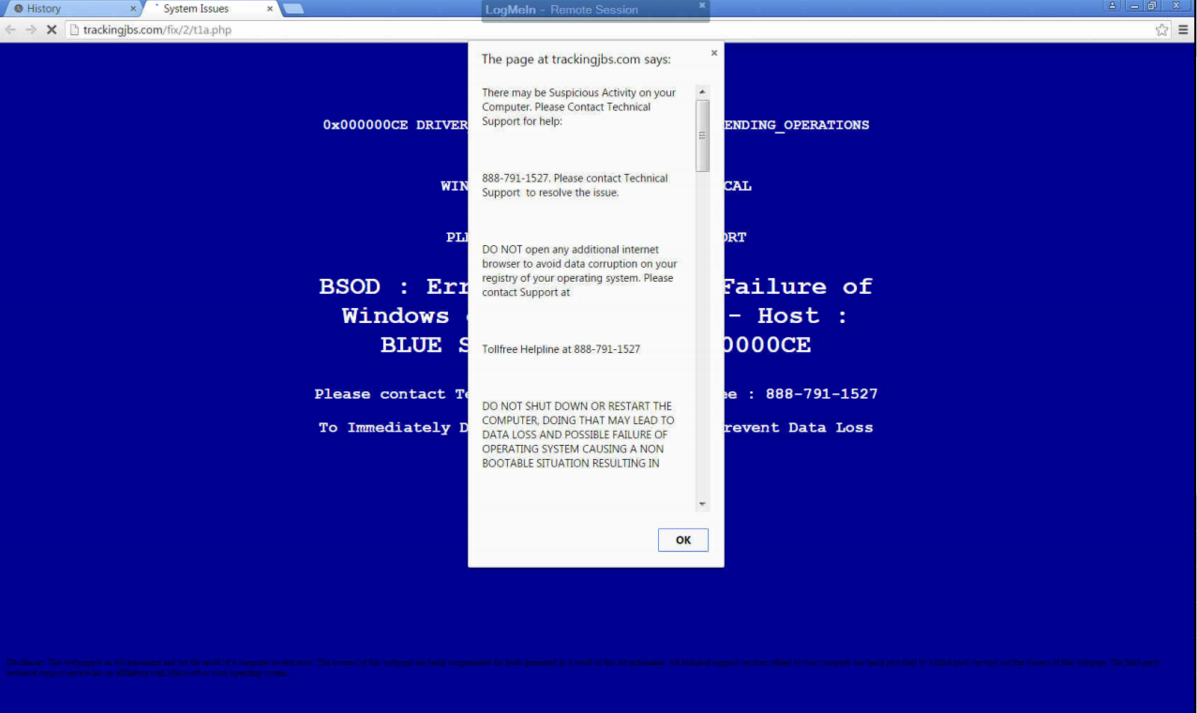
b2ap3_thumbnail_malware_lock_up_400.jpgThere’s a wicked string of malware on the Internet that locks users out of their browser and directs them to call a phone number. That phone number reaches hackers who have set up a subterfuge as an IT support company. If this happens to you, even if you are in the middle of something important, do not call the phone number.

This particular piece of malware startles the user by blocking their progress within their web browser, suggesting them to contact a fake tech support hotline to “fix” their computer. It will show a screen that’s similar to the Windows fatal system error blue screen, along with a fake technical support message that pops up, informing the user of the “problem.” As you can see by the provided screenshot, this blue screen of death is deceptive because it’s only displayed within the browser, instead of taking up the entire screen like Microsoft’s real blue screen of death.

blue screen

Whatever you do, DON’T CALL THE PROVIDED PHONE NUMBER. The blog Delete Malware explains: “If you call [the number] they won’t actually remove adware from your computer. They will hijack your computer and steal all of your bank information and passwords. They are crooks, don’t call them!”

Fortunately, this error isn’t as critical as what it seems. In fact, this is a common tactic of social engineering: make the problem seem much worse than it is, causing the victim to flip out and do something rash–like call the fake IT support phone number.

What then are you supposed to do? You can make the issue go away simply by closing the browser via task manager (Ctrl + Alt + Delete), or rebooting the PC. However, it’s still annoying to deal with because you’ll lose any unsaved data, along with any progress made to whatever project you’re working on. Plus, rebooting your system won’t technically solve the problem; the malware will still be embedded in your system, waiting for another chance to strike.

Therefore, to get down to the root of this problem, you’re going to want to isolate and properly delete the malicious file. For this level of real IT support, you’re going to want to call the trained professionals at NuTech Services. We’ve got the tools needed to find and eliminate such threats, and even block them from hitting your system in the first place with a Unified Threat Management solution.

Lastly, we’d like to point out that the perpetrators of this hack are relying on the fact that the user doesn’t know who to call for IT support in a crisis situation. It’s reasons like this why you and your staff need to be familiar with who to call in an emergency IT situation, like NuTech Services at 810.230.9455. When it comes to taking care of IT issues, we’re the real deal, and we take offense that hackers these days are posing as trustworthy IT technicians in order to get at a user’s personal data. It’s an unsettling trend that will only be brought down by companies being vigilant about their network security.
To that end, NuTech Services can help. Call us today to find out how we can protect you from the worst of the web.

b2ap3_thumbnail_fight_night_it_400.jpg

The Wolfman is an Executable Virus and 3 Other Monster/Malware Comparisons

b2ap3_thumbnail_fight_night_it_400.jpgIt’s the time of year when we reflect on scary things. For an IT company, it doesn’t get much scarier than an organization’s network getting slammed with a malicious computer virus. There are a variety of really bad viruses out there, each one with its own unique ability to cause some scary results. The way we see it, each computer virus is kind of like a classic monster.

An Overwrite Virus is The Fly

  • What an overwrite virus does: Deletes information in the infected files. In this case, the infected files would be rendered totally or partially useless. Additionally, the only way to effectively rid a system of this virus is to delete the file, which would cause the original content to be completely lost.
  • Why The Fly is an overwrite virus: Before The Fly was a monster, he was a scientist who successfully developed teleportation technology. Unfortunately, during a teleoperation test run involving the scientist, a fly found its way into the teleportation pod, causing his DNA to slowly become overwritten with fly DNA. This turned him into a hideous monster. He was no longer useful as a productive scientist and the only way to stop his reign of terror was to “delete him.”

An Executable Virus is the Wolfman

  • What an executable virus does: An executable virus is a nonresident computer virus that stores itself in an executable file and infects other files each time the file is run. Until the file is executed, it remains dormant–until a predetermined command activates it. Activating the file could require something simple like opening a specific program, or even a remote activation by a hacker.
  • Why it’s the Wolfman: The thing about the wolfman is that he’s an average dude during the day, and even during most nights when the moon isn’t full. All the while, he’s out mingling in the real world like a normal person and nobody’s the wiser. Then, the full moon happens, his werewolf side is activated (or “executed”), and he goes on a path of destruction. This is what the an executable virus does; it sits dormant on your PC, waiting to be remotely activated by a force that’s beyond your control.

Botnets are Zombies

  • What a Botnet does: A botnet is programmed to spread its destructive malware to other systems. This, in turn, creates more bots, and these systems bond together into a botnet. These entities can mask their presence and creep into your system disguised as everyday Internet traffic. It can then proceed to collect as much information as it needs to spam you, steal your company’s data, or overwhelm your system and shut it down with a DDoS attack.
  • Why it’s a zombie virus: A zombie virus spreads from person to person by completely taking over their body, forcing them to do something that they wouldn’t normally do–eat brains. This, in turn, only serves to spread the virus and create even more zombies that want to devour even more brains. Botnets have the capability to take over your company’s computers in the same zombie-like way.

Ransomware is an Alien Conquest

  • What Ransomware Does: Once a computer is infected with a ransomware like CryptoLocker, the virus will encrypt the files on the computer. It will then lock the user out of their PC and demand that you pay the hackers money for an encryption key. Additionally, CryptoLocker displays a clock that counts down. If the clock hits 0:00 and the hackers haven’t received their money, then all of the PC’s files will be deleted.
  • Why Ransomware is Aliens: Ransomware like CryptoLocker is one of the nastiest viruses that we’ve seen, and it actually combines a variety of different viruses. Therefore, we’re going to chalk this one up to aliens. One reason for this association is because there are so many different types of aliens that attack Earth in so many different ways. When it comes to aliens, we see two common themes that coincide with ransomware, 1) The complete takeover of our planet (like the complete takeover of a PC), and 2) the abduction of people (which is similar to the abduction of a user’s data). Even though alien races don’t seem particularly interested in exchanging their human captives for Bitcoins, we feel like we can still make a connection because some hackers have been known to delete a user’s data even after the user has paid the ransom–now that’s scary!

Mutants, werewolves, zombies, and aliens, all of these fictitious monsters are nothing compared to the scare you’ll receive if your business were to be hit with any of these viruses. To prevent scary viruses like this, you need a proven network security solution in place like NuTech Services’s Unified Threat Management appliance, and you need to have a data backup solution that allows you to recover a version of your data before your files were infected. Call NuTech Services today at 810.230.9455 to implement these solutions and take the fear out of computing!

b2ap3_thumbnail_cryptolocker_400.jpg

CryptoLocker Strikes Again: This Time, It Hits Gamers Where It Hurts

b2ap3_thumbnail_cryptolocker_400.jpgCan you believe it’s already been two years since Cryptolocker, a particularly nasty strain of ransomware, was released into the online environment? By encrypting files on a victim’s computer, and forcing them to pay a fee for their safe return, Cryptolocker has been a significant threat to both business and personal environments. Now, however, a particular strain of Cryptolocker is making gamers look like cybersecurity rookies.

Cryptolocker has single-handedly changed the cybersecurity scene by ushering in an era of ransomware unlike any seen before. In fact, it will probably remain a key player for many years to come, simply because it’s an unprecedented threat that businesses are still learning to fight against.

By taking advantage of anonymity technologies like cryptocurrency and a network called Tor, authorities are finding it exceptionally difficult to track down and silence. The fact that Cryptolocker continues to evolve is a testament to its tenacity. Since Cryptolocker was taken down two years ago, a new variant called Cryptowall, which is capable of encrypting an entire network infrastructure, has been causing trouble for small businesses. Even now, Cryptolocker continues to adapt and find new targets.

While the business environment is indeed a lucrative market for these kinds of malware due to the importance of a business’s mission-critical data and applications, hackers are always looking to take advantage of all sects of the computing industry. Even innocent gamers are falling prey to Cryptolocker. In fact, according to Bromium Labs, this brand new strain of Cryptolocker is almost exclusively targeting gamers, making them pay for access to games that they’ve already purchased. The malware is distributed through an unidentified WordPress-based site, but the URL that distributes the malicious flash file is always changing, making it difficult to locate. Upon visiting the malicious website, the user downloads the malware unexpectedly.

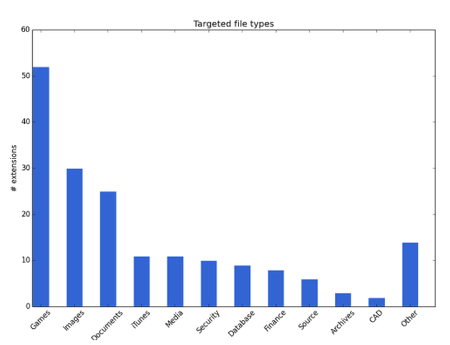
In fact, according to ZDNet, the majority of files targeted by this particular strain of Cryptolocker consists of games.

graph ib 1

So, if there are any gamers in your lives, be sure to tell them to stay cautious. This strain of Cryptolocker is known to hit games that have a massive following, like Minecraft, World of Warcraft, League of Legends, and many other games that are distributed through the PC-gaming platform, Steam. The researchers claim that this malware can also detect company-specific files, like those from EA Sports, Valve, Bethesda, and more. Just think of the effects that this could have on the business sector if this strain decides to target new markets.

If there’s anything that you take away from this article, we hope that it’s the possibility that Cryptolocker could be found in other, more focused strains that might directly affect your business. If your business were to be struck by ransomware, would you be able to recover? Call NuTech Services at 810.230.9455 today to find out how you can protect your PC from the clutches of Cryptolocker, Cryptowall, and other types of ransomware.

b2ap3_thumbnail_black_market_hacker_400.jpg

Where Hackers Go to Shop for Malware

b2ap3_thumbnail_black_market_hacker_400.jpgYou might recall how the Silk Road, an illegal online drug market, was recently shut down. Similar to the Silk Road, there’s another distributor of sensitive information out there; this one dealing with zero-day vulnerabilities. These types of cyber threats sell for top-dollar, and hackers are willing to pay in order to access your network.

As reported by WIRED magazine, this new marketplace calls itself TheRealDeal Market. Thanks to the anonymity of the Darknet, TheRealDeal market is capable of using software like Tor to cover its tracks, and Bitcoin to keep transactions anonymous. WIRED goes into detail about the niche which differentiates TheRealDeal from other vulnerability markets: high-quality code, stolen credentials, and hacking tools that are exceptionally difficult to get a hold of. This essentially equates TheRealDeal to a high-end code market that provides a “reliable” mode of acquisition for cybercriminals.

Of course, there’s no telling whether any of these supposed exploits being sold are “the real deal.” According to WIRED:

Any of the listings could instead be attempts to scam gullible buyers. The $17,000 iCloud vulnerability in particular, which claims to offer access to virtually all of a user’s sensitive mobile data including emails and photos, seems like an unusually good bargain. For comparison, zero-day salesmen told me in 2012 that a working iOS exploit could sell for as much as $250,000. The next year The New York Times reported that one had sold to a government for a half million dollars.

In other words, it might really be too good to be true for some hackers, and the site might even be trying to pull them into a hoax (scamming the scammers). Despite this, TheRealDeal apparently has some sort of fraud protection service, though it’s unclear how it operates. Plus, TheRealDeal is surprisingly sophisticated, especially considering the plethora of other illicit activities that the market is known for, including the selling of contraband, illegal substances, and stolen identities.

The level of professionalism seen here is disturbing, but if nothing else, it shows that hackers are both organized and resourceful. Unfortunately, by strategically offering rare code to well-funded hackers, TheRealDeal is making malicious code more readily available to the rest of the world, which means that hacking attacks will grow more common in the near future.

Thankfully, you don’t have to worry if your business is prepared for the worst. By taking advantage of comprehensive security features, like those offered with NuTech Services’s UTM (Unified Threat Management) solution, your business can reap the benefits of enterprise-level security measures. To fortify your business’s network from the latest threats and security vulnerabilities, give us a call at PHONENUMER today.

b2ap3_thumbnail_advanced_malware_400.jpg

Understanding How Advanced Malware Can Harm Your Business

b2ap3_thumbnail_advanced_malware_400.jpgThere are a lot of different threats out there: Viruses, malware, spyware, adware, the list goes on. While all of these threats are certainly problematic, some are more dangerous than others. In particular, advanced malware can be exceptionally devastating if they manage to inflict damage on your technology.

However, what makes advanced malware so much different from the garden variety? Processor magazine explores how small business and larger enterprises can protect themselves from these advanced threats. As defined by Robert Clyde, international vice president of ISACA, “The nature of advanced malware is that it’s targeted, it’s stealthy, it’s evasive, and it’s adaptive.” These traits combined make for an incredibly sly malware that’s difficult to detect and even harder to prevent.

Unlike ordinary malware, which is generally meant to disrupt whatever it affects and start all sorts of generic chaos, advanced malware usually has a specific goal to accomplish, and is aimed at specific targets. It’s more likely that these advanced threats are after specific information and are specifically designed to complete this task in the most effective way possible. These types of threats can also be considered “Advanced Persistent Threats,” a term used to describe malware which accomplishes its goal over an extended period of time rather than upon execution.

These types of threats are often complex and require a different approach than the standard malware. In fact, some infections can get worse if they’re detected, and they can hop from system to system in order to avoid detection. This makes locating and eliminating the threat difficult at best.

When such a threat knocks at your company’s door, the best way to handle it is with a four-front assault called our Unified Threat Management (UTM) solution. With a powerful firewall at your disposal, your business has a dedicated bouncer to analyze data moving to and from your network. This prevents malicious entities from infiltrating (or leaving) your system when you’re on the hunt for them.

The next phase is when the enterprise-level antivirus solution kicks in. This eliminates threats that are detected on the network. If you suspect that there is a malicious entity lurking on your network, we can locate it with our remote monitoring service and eliminate it before it causes any noticeable damage. We also offer companies a free IT network assessment to locate threats and confirm your suspicions.

There are other preventative methods for keeping advanced malware from getting into your network. An advanced persistent threat might take the form of a spear-phishing tactic, where a hacker will target you specifically for your login credentials or sensitive information. Another preventative way is the spam blocking solution which is part of NuTech Services’s UTM. This keeps spam from even reaching your inbox, making spear-phishing attempts obsolete.

Finally, our web-blocking solution keeps your employees from navigating to insecure or otherwise threatening websites. A skilled hacker might try to gather information using a fake website, or by hiding attachments within permalinks. Our web-blocking solution has the power to keep your business secure while online.

If you’re concerned with how to protect your business’s data from both the garden-variety and advanced malware threats, give NuTech Services a call at 810.230.9455. We’ll help your business find the best solution to your security woes.

b2ap3_thumbnail_watching_from_work_400.jpg

Are Your Employees Watching Porn At Work?

b2ap3_thumbnail_watching_from_work_400.jpgHere’s a statistic that’s going to shock business owners. We hope you’re sitting down for this because we were blown away when we first heard it. Did you know that 70 percent of all online porn access happens during business hours? What does this mean for your company?

One thing that we hope this doesn’t mean is that your employees are using their work-issued computers to access and look at online pornography while on the clock. This would be a deliberate waste of your company’s time and resources, and it’s definitely not what you’re paying them to do. In fact, a guilty employee may even be subject to termination and litigation, depending on how grievous their offense is.

Take for example one of the most extreme and bizarre cases of employee misconduct that we’ve heard of. In 2009, two janitors working for the state of New York were busted for turning an unused room on government property into what police referred to as a “man cave.” In it, they would spend their work days napping, doing and selling drugs, and watching pornography. To make matters worse, the duo was brazen enough to try and bill their man cave time as overtime, which totalled a whopping $28,400.

http://prntscr.com/65uwpg

Egregious situations like this, along with even more-common occurrences like employees spending too much time watching YouTube videos, can be prevented with proper oversight. Does your company have a solution in place that will keep your workers honest? Whether you’re in the habit of walking around the office, looking over your team’s shoulders, or you have a firewall that monitors your employee’s Internet activity, you need to have some kind of deterrent in place that will discourage your staff from wasting company time and resources.

Now, we’re not saying that your employees are looking at porn every time you turn your back, or that they’ve converted your broom closet into a brothel. We’re just making the point that there are plenty of distractions on the Internet, and even honest, hardworking employees will benefit from having a technology in place that minimizes workplace distractions.

The kind of monitoring solution that your business needs is one that allows you to block all online distractions, like YouTube, Facebook, Netflix, etc., and especially pornographic websites. In addition to adult websites being in bad taste for the workplace, they’re notorious for containing some of the worst viruses and malware, and hackers know how to use porn to bait users into clicking malicious links that give them access to your company’s network.

Does your network monitoring solution allow you to monitor what websites your employees visit? Or do you depend on the ol’ walk-around-the-office-and-peer-over-the-shoulder method? You can’t stand behind their backs all day, and this strategy doesn’t make for a healthy work environment. To protect your network and keep your team on task, you need a solution that’s proven to accomplish both of these goals in a proficient manner.

NuTech Services’s Unified Threat Management security solution will let you specify who can access what on the Internet. Our solution encompasses a firewall, antivirus, spam protection, and content filtering to keep your employees productive, and your business safe.

If you want to learn more about how NuTech Services can help protect your business, we encourage you to get in touch with us at 810.230.9455.