card_skimming_69867689_400.jpg

Nothing Good Comes from Card Skimmers

card_skimming_69867689_400.jpg

Card skimming is a very real problem for companies and individuals alike, but there will always be those who are more impacted by these kinds of financial scams—particularly those who rely on prepaid cards provided by the government for food assistance and so on.

Skimming Losses Really Hurt Those Receiving Assistance

It has been confirmed by authorities that those who take advantage of Electronic Benefits Transfer, better known as EBT, which permits those paying for their food purchases through the Supplemental Nutrition Assistance Program, or SNAP, are at greater risk for loss from card skimming.

This is largely due to the way that the SNAP card works. The associated EBT account is debited to reimburse the store for the purchase, making the EBT card the same as a debit card. The card also has a PIN associated with it that allows the user to withdraw money from an ATM.

The issue with EBT cards is that they lack the protections that other payment cards have, like smart chip technology or fraud protections. SNAP funds can be stolen and spent, and without these protections in place, those who need the funds are left in a tight spot.

This shouldn’t come as a surprise to anyone who uses cards for payment—after all, hackers have been stealing card data for as long as they have existed—but they are getting much better at doing so inconspicuously. One way that they do this is through the use of card skimming devices which they hide inside cash machines, or those that are camouflaged to look like they are a part of the machine itself. This puts people at risk of having their card data stolen and duplicated by hackers and scammers, who can then use that information for fraudulent purchases or to sell them online to the highest bidder.

What Can You Do?

Until more states implement improved security measures for EBT cards, like eliminating the magnetic strip and replacing it with the modern security chips that other cards use, most of the security measures taken will depend on the user being more aware of how and where they are using their cards. Be on the lookout for signs that a machine has been tampered with, especially if the devices are found in a place that isn’t out in the open. And, of course, if you see something suspicious, say something so that others don’t become victims, too.

We want to help you be as secure as possible in your use of technology, so for more great tips and tricks, be sure to call us at 810.230.9455.

password_spraying_80058904_400.jpg

Why Is Microsoft Warning Users About Password Spraying?

password_spraying_80058904_400.jpg

As modern warfare has evolved, so too has cyberwarfare. There is always a war occurring in cyberspace, where hackers attempt to outdo security researchers. One such example of hackers—often sponsored by government agencies—attempting to engage in cyberwarfare can be seen in the United States and Israeli technology sectors, which have become the target of password spraying.

Password spraying involves hacking into multiple accounts by spamming commonly used passwords. Considering how frequently people use common passwords, as well as variations of those passwords, on3e can imagine how effective this tactic can be.

In the scenario outlined above, Microsoft has issued a warning that about 250 Microsoft Office 365 customers in the defense technology sectors have been targeted by password spraying tactics. Microsoft calls this group DEV-343, with the DEV in the name representing the fact that the attacks are, at this time, not sponsored by state actors. This group is thought to originate from Iran.

Less than 20 of the targets were actually compromised, but it’s still shocking to see high-profile targets opting for commonly used passwords. Microsoft has also reported that organizations that use multi-factor authentication are at less risk than those that don’t. As reported by Microsoft, security professionals should be wary of suspicious connections enabled by Tor networks: “DEV-0343 conducts extensive password sprays emulating a Firefox browser and using IPs hosted on a Tor proxy network. They are most active between Sunday and Thursday between 7:30 AM and 8:30 PM Iran Time (04:00:00 and 17:00:00 UTC) with significant drop-offs in activity before 7:30 AM and after 8:30 PM Iran Time. They typically target dozens to hundreds of accounts within an organization, depending on the size, and enumerate each account from dozens to thousands of times. On average, between 150 and 1,000+ unique Tor proxy IP addresses are used in attacks against each organization.”

Your business should always be prepared to take a look at traffic on its network—especially if the activity is suspicious in some way, like during off-times when nobody has any reason to be accessing your infrastructure. Passwords are only one part of a cybersecurity strategy, though, and you should be implementing security solutions like multi-factor authentication whenever possible.

NuTech Services can help your business keep itself secure from threats of all kinds. To learn more, reach out to us at 810.230.9455.

unknown_malisious_400.jpg

Obvious Signs You are the Target of a Hacking Attack

unknown_malisious_400.jpg

If a hacker were to find themselves on your network or within one of your accounts, would you be able to detect them and eliminate them? Today we want to share some of our best strategies for how you can identify the warning signs of a hacking attack, as well as how you should respond. This is particularly important for a workforce that is working remotely, so we hope you take these tips to heart.

Monitor Failed Password Attempts

Passwords are a terribly important part of keeping your information secure. Not only do they prevent unauthorized access to accounts and important data, they also inform you of when someone is actively targeting you. This helps to protect your data, especially when you have remote employees accessing your network.

The problem here is that devices with remote desktop protocols enabled on them, like the ones your remote users are likely utilizing, are quite easy for hackers to find and target if they aren’t configured properly. These devices are often targeted by brute force attacks. In these cases, a hacker will bombard a password requirement with every possible option until they discover the correct password.

When remote protocols are properly configured, too many failed password login attempts will lock down the device and send you a notification to inform you of the failed attempts. When this happens, you reach out to the user and confirm that they were simply having problems with their password. If the failed attempts were not from the employee, then you know that the credentials were stolen.

This level of oversight allows you to prevent brute force attacks from becoming an issue, as locked password attempts keep these brute force attacks from being successful.

Keep an Eye on Your Traffic

Experienced hackers can hide their location to keep themselves from being discovered, but many often do not have the ability to do so. Maybe they lack the technical skill or the attack is too broadly distributed for them to cover their tracks. Either way, you can discover if you are the target of an attack by keeping a lookout on where your network traffic is coming from. If anything looks suspicious, then it’s time to investigate.

For example, if your technology infrastructure has never interacted with a server from any given country, but now regularly contacts a domain in that location, then you know that something fishy is going on.

Actively Make Things More Challenging for Cybercriminals

When you make it more difficult for hackers to gain access to your network, they will be less likely to persist and do so. You can make it extraordinarily difficult for hackers to access your network through a variety of methods. For remote desktop protocols, you can customize the configuration rather than using the default settings. Password timeouts and two-factor authentication are also important for network security, as are access controls on your internal resources. All of these tools combine to create a difficult time for your attackers and, thus, a more secure network.

If you would like assistance with your business’ network security, don’t wait any longer. Give us a call! We’ll work with you to ensure that your network is protected against today’s security threats. Learn more by contacting us at 810.230.9455.

251388032_spying_webcam_400.jpg

Tip of the Week: Stop the Spying Webcam

251388032_spying_webcam_400.jpg

Have you ever been using your computer and you realize the operational indicator light next to your webcam is activated, only to realize that you never closed the video conference you were just on? Well, what would happen if you noticed it and you didn’t have that software up and running? If you are not an exhibitionist, it would likely freak you out to know that someone might be looking at you as you use your computer. Today, we will get into what to do to ensure that you aren’t being spied on through your webcam.

#1 – Update All Software

Of course, the best way to be sure that you aren’t being spied on is to update any software that has access to your webcam. You may just find out that there are some surprising pieces of software on your computer or phone that you’ve given access to your webcam. When you keep your software up to date you keep it from having vulnerabilities that hackers can exploit. Keeping the OS you are using updated is the most important.

On a PC, you will want to go to your Settings app and click on Update & Security. On the next page select Windows Update and select Change active hours to tell Microsoft when is the best time to update your Windows OS.

#2 – Keep Your Firewall Updated and Running

You will want to do your best to keep entities out of your personal network just like the technicians at NuTech Services do for your business. One of the best ways is to keep an up-to-date firewall. Here’s how to turn your firewall on:

Go to your Settings app in Windows and click on Update & Security. In the left sidebar click on Firewall & network protection. Once the menu opens, toggle Windows Defender Firewall. Now your firewall is on and will help you keep threats off your network. 

#3 – Make Sure Your Wi-Fi is Secure

People looking to get into your network (or spy on you through your webcam) may target your wireless router instead of your actual computer. If they get in, they can access a lot of things… including your webcam.  This means you need to beef up your router security.

First, rename your wireless network. Rename it something that isn’t easily associated with you and make sure to make a strong password. We recommend a string of at least three random words with no association to one another and replace some letters with numbers and symbols, and change the case. Make it so you can remember it (because anyone that comes to your house will want access to it), but make it secure enough that it is a strong impediment to unauthorized access. 

#4 – Cover Your Webcam

The most pragmatic (and admittedly simplest) way of avoiding the gaze of someone over a hacked webcam is to ensure that when it is not in use that it is covered. If your webcam is covered, any creep or hacker on the other end won’t see a thing.

Keeping your privacy in mind is always a solid practice. If you are looking for more tips and tricks on how to keep your data safe and your accounts private, return to our blog each week.

125307929_internet_400.jpeg

Look How Much the Internet has Changed

125307929_internet_400.jpeg

When the Internet was established, it was a marvel. Now people could move information across the world in a matter of seconds. This is why the term “world wide web” was coined. Nowadays, there are literally billions of users on the Internet and the rules have had to be changed. This has some online services in conflict with government regulations and has an impact on how users are able to use the Internet. Let’s look at a couple of examples. 

Shifting Forces are Dictating Users’ Internet

The Internet has changed a lot due to geopolitical considerations, which admittedly was not the interface that was intended by its creators. With the growth and importance of the Internet today, however, it isn’t a surprise that governments seek to regulate the medium to promote security. Some examples of this include:

  • The United States government has considered blocking TikTok and WeChat, as they are hosted in China.
  • The Indian government has blocked dozens of applications (including these two) for similar reasons and are now looking critically at Twitter.
  • The Australian government was at odds with Facebook over a proposed law, leading to Facebook changing its functionality in the country until an agreement was struck.

These are clear disputes between corporate entities and the countries they do business in. These considerations (and literally thousands more from all over the world) makes “the Internet” different depending on what country you are accessing it from. The recent sweep of nationalism that has been spreading in nations all over the world for the past decade or so is exacerbating these differences. 

Look at What Has Changed

If you consider when Facebook first went global, it brought a swelling of perceived freedom to people that had considered themselves repressed for a long time. Almost immediately, however, some nations including the Democratic People’s Republic of Korea and the People’s Republic of China decided to limit what users in their countries could access. There were other nations that censored the use of the social network, but for the most part Facebook spread around the world fairly rapidly at the turn of the last decade. Today, however, after years of Facebook-cited negative situations, many nations are limiting Facebook and other social media platforms. Now, with leaders of several nations, including the United States, suggesting these companies simply have too much power and influence, you are beginning to see some very public decrees citing Facebook and other social media companies attempting to limit their influence.

The Australian situation is probably the most internetesting of the bunch. Australian government passed a law that’s intent was to require tech firms and platforms like Facebook to pay for the capability to share human-related stories. This has resulted in news organizations, and affiliated companies (including charities) being wrapped up in the situation. The issue was amicably resolved, but it highlights some of the problems with how the Internet is going to be governed going forward. 

The Call for Globalized Regulations

Like any other system that is used throughout the world, there are calls for a standard to be put in place that dictates how the Internet can be used and regulated. Thus far, traction on this has been moving at a snail’s pace. The logistics are difficult with some nations depending more on the Internet than others, and therefore the financial aspect of the situation is going to be a problem in order to get nations to agree on a reasonable standard. 

What are your thoughts? Should there be a worldwide standard to what can and can’t go on on the Internet? Should nations be limited in the amount of control they have over their people’s use of the tool? Leave your thoughts in the comments section below and stop back to our blog for more great commentary.

223474600_audit_tech_400.jpg

Why You Need to Do a Security and Compliance Audit

223474600_audit_tech_400.jpg

Businesses that don’t see after their vulnerabilities are just asking to be breached. That’s the consensus view in the IT industry. It’s disconcerting, then, to consider how many businesses don’t actively assess their IT security, especially considering how much these platforms change from year-to-year. Today, we’ll briefly discuss what a security and compliance audit is, and why we think you need one. 

What is a Security and Compliance Audit?

This is pretty straightforward. There are a constant stream of threats that come at your business and the individuals that work in it. In order to keep your business’ assets safe from theft or corruption, you need to do what you can to protect them. That typically includes implementing security software, training your staff about phishing and other scams, and overall just being vigilant about the way you go about things. Most business owners would say that is all they can do and if that doesn’t protect them nothing will. 

In the same breath, these same people will continuously add to their IT infrastructure, implement new technologies, and deploy alternative platforms if they think they can make a dollar and a cent doing so. The integration of these new systems can create holes in your business’ network, and these holes are what hackers use to breach your network and steal your data or corrupt your whole IT platform. 

Furthermore, as a business’ IT gets more complicated, their compliance concerns get more complicated. Most businesses have certain compliance requirements they need to meet in order to keep doing business effectively, with more expected to pop up as privacy concerns get met with more policy. 

The security and compliance audit is a full-blown assessment of the network and infrastructure designed to find potential holes. The security and compliance audit goes beyond your typical vulnerability scan because the results include a specific assessment of your specific IT profile. At NuTech Services, we suggest getting a security and compliance audit done before you make any significant changes to your IT infrastructure. We also suggest getting a penetration test after any changes are complete to ensure that your platforms meet the security and compliance standards your business operates under.

Square Away Your IT Defenses

Getting a comprehensive security and compliance audit and a subsequent penetration test can be all the difference between a litany of potential troubles. On one hand, you may have vulnerabilities remaining in your IT infrastructure that could be exploited, putting your business in peril. On the other, non-compliance with regulatory standards can cause large fines or worse. If you would like to talk to one of our IT professionals about the possibility of getting your network and infrastructure audited and tested to help you close up any holes in your IT, give us a call today at 810.230.9455. 

188488407_data_privacy_400.jpg

Some Consumers are Aware of Data Privacy, But It’s Not Enough

188488407_data_privacy_400.jpg

With the holidays approaching, and with the global pandemic still underway, online shopping is going to be under even more demand than usual in 2020. With all of these transactions online, it would stand to reason that people would be more keen to follow best security practices than ever before. This week, we take a look at how people are staying secure online and whether or not the need for speed outweighs their security and privacy efforts.

The User Experience and How Security Fits

Let’s face it, the majority of Internet consumers have no idea about data security until something terrible happens. Until they get malware, or get their identity stolen, or their accounts hacked, they assume that there is enough built-in security to facilitate any behavior online. This is not ideal, obviously, but there are a small number of people, around 29 percent, that have enough security awareness to avoid certain websites. 

This actually represents an increase in security awareness, and retailers that are now seeing their sales drop due to security concerns are feeling pressure to improve their security, especially considering that this year online retail sales are expected to climb by nearly 30 percent over 2019.

It is a balancing act. While on one hand, consumers demand a certain level of security while shopping online, they also demand superior usability. A streamlined user experience typically gets in the way of comprehensive security. Think about it this way: a third of users will just delete an application if they experience challenges in usability, including login problems. Therefore, businesses need to weigh what type of authentication measures they use. 

Major Privacy Concerns are Troublesome for Consumers

Another issue that is plaguing online retailers, is how their data is used, stored, and managed. Most consumers are at least cognizant of how important it is to keep their personal and financial information protected and are quick to move past retailers that they deem don’t at least consider their privacy. In fact, 70 percent of consumers view their ability to deny developers of certain apps and websites the right to resell their information as a key consideration of whether or not to use that particular site/app. This goes against user practices, however, as nearly three-quarters of consumers will give over some information for a discount. Some consumers will provide a whole profile for as little as five percent off their purchase.

With this in mind, it is left to the business to figure out how to get the information they seek, while also paying attention to consumer’s growing distrust of online data collection. It’s a tough situation for both parties. Many businesses will try to provide discounts on a user’s birthday, but that is only possible if they actively work to collect that information. Some retailers routinely do business this way, but many are starting to find new ways to get more engagement from their customers. 

Every Business Needs to Be Secure

Every single business can use data to their advantage, but with more people concerned about their online privacy than ever before, it is important to have the security protocols in place to allow them trust enough to do business with you. If you are looking for some help with your business’ security, or would like to learn more about the options available to help you find the happy medium between helping your customers protect their privacy, call the IT security professionals at NuTech Services today at 810.230.9455.

363971145_hackers_ahead_400.jpg

What You Need to Know to Stay Ahead of Hackers in 2020

363971145_hackers_ahead_400.jpg

Let’s face it, it is nearly impossible for the modern business to stay ahead of every cyberthreat. It is just too much to proactively ward against. Today’s best practices will try to keep your network from being breached and your data from being stolen, but they may just allow you to understand how your network was breached and how your data was stolen. Unfortunately, cybersecurity is not foolproof, but let’s look at a few strategies you can use to improve your chances of holding onto your data and keeping unwanted actors out of your network. 

Strategy #1 – Know the Value of Your Assets

By knowing the value of the data you hold, you will be able to properly prioritize how to protect it. Since IT experts have to create cybersecurity strategies based on how much harm can be done to your operational integrity and reputation, it’s good practice to know what assets hackers would be after if they were to breach your network defenses. 

Strategy #2 – Stay Proactive

One of the best ways to protect your network and infrastructure from security threats is to be proactive in your efforts to protect them. You’ll want to develop a response plan that is created with the worst-case scenario in mind. That way as soon as there is a cyberattack, you will know how to react and what strategies to take to mitigate the problem. 

Strategy #3 – Train Your People

One thing is certain, a well-trained staff will do more to protect your network and data than any other solution. The “all-hands-on-deck” strategy to cybersecurity will minimize the frequency and severity of cyberthreats by nearly 50 percent, so ensuring that all of your people know how to spot abnormalities (especially phishing attacks) can save your business a lot of time and money. 

Strategy #4 – Keep Innovating

One thing is certain, cybersecurity is as much about staying out in front in terms of tools and strategies as it is about being hyper-aware of potential problems. Sure, knowing how to react to a data breach or successful phishing attack is important, but the more that you understand how these hackers are coming at your business, and putting tools and strategies in place to thwart those attacks, the more secure your data and resources are going to be going forward.

Cybersecurity is a long game and if you want the best team in Michigan helping you come up with strategies and outfitting your business with the tools it needs to keep hackers at bay, give NuTech Services a call today at 810.230.9455.

Facebook_290074543_400.jpg

Facebook and Your Privacy (Part 3)

Facebook_290074543_400.jpg

Facebook’s servers process a massive amount of data each day… which only makes sense, considering their 2.4 billion active users. Unfortunately, the social network has had some issues over the past few years with data privacy. Whether you use Facebook as a social networking tool for your personal life, your business, or both, you need to know how to best take control of your own privacy on the platform.

While we wish we could show you how to really accomplish true privacy on Facebook, the only way to actually reach that threshold would require you to have never signed up in the first place. This doesn’t mean, of course, that there is nothing that you can do now to protect your information – sharing more cognizantly and keeping it within circles you trust.

A Few of Facebook’s Issues

Like we said, Facebook has seen some pretty egregious security issues during its time. While we aren’t going to go too far into the weeds with these events, a quick summary might help to illustrate how careful users should really be as they use the platform:

  • In 2007, Facebook introduced a feature that would allow companies to track purchases made by users and notify their friends of what they had purchased… without requiring any consent from the user.
  • In 2011, the FTC charged Facebook for allowing private user information to be accessed by third parties, making this private information public without any notification.
  • In 2013, Facebook introduced a Donate button that would allow users to make charitable contributions to such organizations. Unfortunately, a bug in the code allowed the email addresses and phone numbers of over six million users to be leaked.
  • In 2014, Facebook actively experimented upon their users, testing their ability to manipulate their emotional states with the content the user is exposed to. Depressing content was prioritized to see if they could elicit depressed feelings. As it turns out, they can.
  • In 2015, Facebook took action to assuage their users’ concern for their privacy, and rolled back the access that apps had to user data… but one has to wonder, just how much were applications privy to before this rollback?
  • In 2018, Facebook suffered a massive data breach, losing the data of 50 million users. In response, Facebook did nothing… that is, until their reputation started to suffer. It was only then that they responded to the underlying issues.

Unfortunately, concerning events like these happen far too regularly to Facebook. There just seems to be difficulty in keeping their user data secure. This is why you need to pay particular attention to the settings on your own Facebook profile. Let’s go over how your information can most effectively be protected by ensuring these settings are configured properly.

Configuring Your Facebook Privacy Options

On your desktop, log in to your Facebook account. At the top-right of the page, there will be a small down arrow. Click it to access a menu, then click Settings.

You will be brought to another page, with Privacy in your list of options. Click into it.
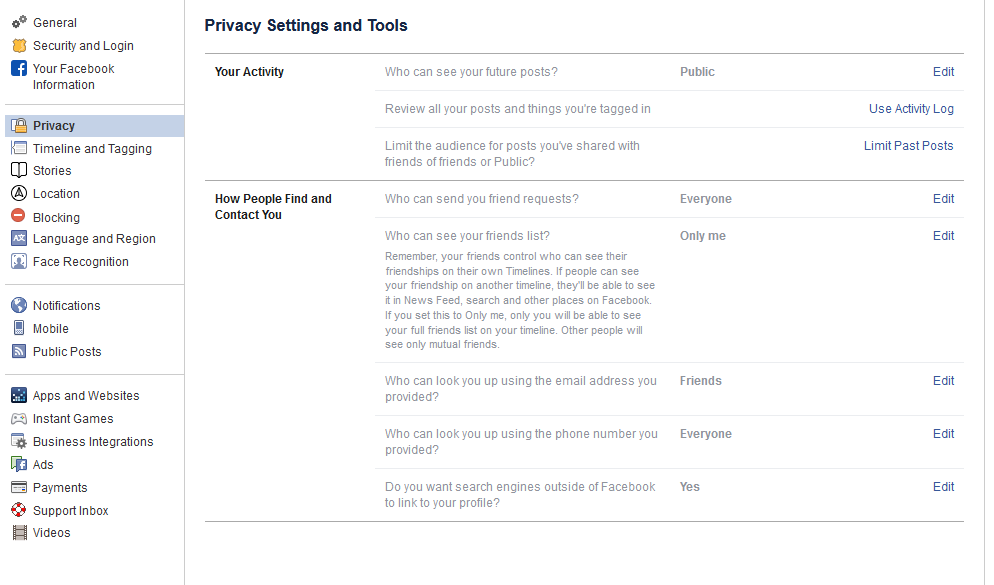
From here, you can set your privacy options that restrict who has access to your information. For example:

Public – Setting your privacy to public is effectively turning off your privacy options. Not only can all other Facebook users potentially see your profile, even people who aren’t signed in could access it. Hypothetically, this means that the search engines could find you are well.

Friends – This setting restricts viewing privileges to only your confirmed Facebook friends.

Friends except… – If there are particular friends or members of a particular group who shouldn’t see certain information, you can prevent them from seeing this on their Facebook.

Only me – This means that (outside of Facebook) you are the only person with access to what you have posted. Just to be safe, we recommend that you still refrain from sharing anything that you wouldn’t be comfortable sharing publicly.

You also have the ability to choose the audience for each individual post. While this may give the impression of improved control over your privacy, the biggest threat to your Facebook security is probably Facebook itself.

Of course, that doesn’t mean that you aren’t given plenty of privacy options to play with. Let’s go over some of them now:

Who can see your future posts? This setting establishes a default privacy setting for the content you post on Facebook in the future. This helps insulate you from sharing content out to those who shouldn’t see it.

Review all your posts and things you’re tagged in. By using the Activity Log, you can review the entirety of your timeline and manage the permission settings of past posts. You can also review posts you have been tagged in from here.

Limit the audience for posts you’ve shared with friends of friends or Public. This is a semi-nuclear option when it comes to locking down what you’ve posted in the past. By clicking Limit Past Posts, you can change all of what you posted publicly or to friends of your friends to only be accessible to those on your Friends list. Fair warning – Facebook doesn’t provide any way to revert this, so you would have to go through your posts by hand to change them back if you so wished.

Who can send you friend requests? Depending on your preference, you have the option of picking between Everyone or Friends of friends. Unlike many of the other settings on this list, leaving this set to Everyone is probably okay.

Who can see your friends list? On the other hand, there is no reason that the rest of the world needs to see who you are connected with on Facebook. Setting this to Only me will keep this information between you and Facebook, nobody else.

Who can look you up using the email address you provided? Do you want someone who has your email to be able to find you on Facebook using it? Most likely not – so restricting this to Friends or Only me is probably in your best interest.

Who can look you up using the phone number you provided? Again, it’s really your call whether or not to allow Facebook users to find you via your phone number, but it really isn’t that necessary. You’re fine setting this to Friends or Only me.

Do you want search engines outside of Facebook to link to your profile? This one really depends on your situation. Facebook can work to prevent the assorted search engines out there, including Google and Bing, from indexing your profile (allowing searchers to find it). Most people will likely want to switch this off, but if your personal brand is part of your business, it makes more sense to turn this option to Yes.

Dictating What Others Can Do On Your Personal Facebook Profile

We all have embarrassing friends, and so you may want to avoid having them be able to freely post content to your wall – for instance, your college buddy Greg seems to have no problem with sharing candids from the good ol’ days… and tagging you in them.

Potential situations like this make it all the better that Facebook gives you control over who can post to your timeline, and who can see this content. You can access your many options to do so by clicking into Timeline and Tagging (which can be found on the left side of your Settings).

Who can post on your timeline? Naturally, you will definitely want to put a limit on this, as there is no reason that a total stranger should be reaching out on your personal profile. This is why it makes sense to only allow your Friends to do so – or, perhaps you alone with the Only me setting.

Who can see what others post on your timeline? This setting will largely depend upon who you have permitted to post on your timeline. If your Friends can post to your timeline, you definitely want your Friends to be the only ones who can see it – assuming you don’t want to maximize your privacy (and hedge your bets) with the Only me setting.

Allow others to share your posts to their stories? Ask yourself: do you want anything you post publicly to be shared by your Friends? If so, leave this one enabled.

Who can see the posts you’re tagged in on your timeline? Tagging can be an incredibly useful thing for someone trying to cultivate an image as an engaged thought leader, but it can also hurt your reputation, never mind your privacy. If people keep tagging you in assorted posts and you’d rather the public at large didn’t see these posts, you can keep these posts to your Friends, or even to Only me.

Review the posts you’re tagged in before the post appears on your timeline?
Alternatively, this is likely the best option for someone looking to be visible via tagged posts, while still remaining in control of which posts that are linked to them. Basically, you can be notified if you are ever tagged in some Facebook content, and can opt whether or not it will appear on your timeline. Fair warning – any mutual friends you have with the person who has tagged you will be able to see the tagged content before you have a chance to review it. Regardless, it is best to keep this setting on.

Review tags people add to your posts before the tags appear on Facebook? Again, this is something you’ll want control over, so set this to on as well.

Managing Your Public Post Settings

Again, from the Settings page, click into the Public Posts option on the left-hand side.

Who Can Follow Me – Rather than adding users as Friends, public figures can provide the option to just be followed by interested people. If you want to give the public at large this option, set this to Public. Otherwise, you can keep your posts among your Friends by setting this to Friends.

Public Post Comments – Or, who can comment on the posts that you’ve shared publicly. It is probably best to keep this restricted to either Friends, or perhaps Friends of Friends.

Public Profile Info – Some facets of your Facebook profile are generally available for anyone to see (like your name and profile picture). Who do you want to be able to comment on your profile picture? Keeping this capability restricted to your Friends or – maybe – Friends of Friends is probably best.

How Much Do You Want Facebook to Know About Where You Are?

Facebook has the capability to track your location history. While this information isn’t shared with your Friends or followers (beyond letting your Friends know that you are nearby), the only real reason we could come up with for Facebook to track this is to be able to target you with ads more effectively. Hopefully, that’s the reason, but even so, it is better to be safe than sorry. After all, Facebook has a history of data security missteps.

Again, starting from the Settings page, click where it says Location on the left-hand side. From there, you can see what Facebook already knows by requesting to View your Location History. However, to disable this, you’ll need to use the mobile application.

Using the Mobile Application to Turn Off Location

From the app, access the 3-bar hamburger icon (found at the top-right), and scroll down until you see Settings & Privacy. From there, you should access Privacy Shortcuts, where you’ll see a new area with various settings and documentation regarding Facebook’s identity controls.

Find Manage your location settings (you shouldn’t have to scroll to find it). Once there, you should:

  • Turn off Location History (found in Location Access)
  • Turn off Use Location (in Location Services)
  • Find and disable Background Location

While you’re at it, you may as well delete your existing Location History.
Again, from within Privacy Shortcuts, select Manage your location settings and then View Your Location History. You will be asked for your password, and then you will see another 3-dot menu in the top-right. From there, you should Delete all location history.

Take note: if you post a photo with your location tagged, or check into some public place, you may be allowing Facebook access to your location data again.

Yes, this is a lot to take in.

Thank you for sticking with us for so long! We hope this helps you to secure your personal privacy on what is known as the social network. To learn more about protecting your privacy and information, geared more toward your business, reach out to NuTech Services at 810.230.9455, and make sure to subscribe to our blog.

Facebook_285250526_400.jpg

Facebook and Your Privacy (Part 2)

Facebook_285250526_400.jpg

Wait! If you haven’t read part one of our Facebook privacy blog yet, you may want to do that before reading this one. If you’re ready, we’ll be taking an in-depth look at your Facebook settings to make sure that your account and its data are as secure as possible. If we’re being honest, protecting this kind of data hasn’t seemed to be one of the platform’s strong suits – and user privacy has been the star of many lists of concern.

That’s why we wanted to make sure that you knew how to reclaim your personal data and make sure it is protected. We’ll start by protecting the information that you’ve shared.

To do this, you will want to access your Facebook account on a computer. This is going to be a lot to manage, and the mobile app would only be too much trouble to navigate.

Your Security and Privacy Options

From any page on Facebook, look for the menu, which will appear as a little downward-facing arrow. This should be at the top right-hand corner of the page. Click into Settings. This little arrow is your lifeline during this process, you can always find your way back to the beginning with that menu.

Verify the Accuracy of Your General Account Settings

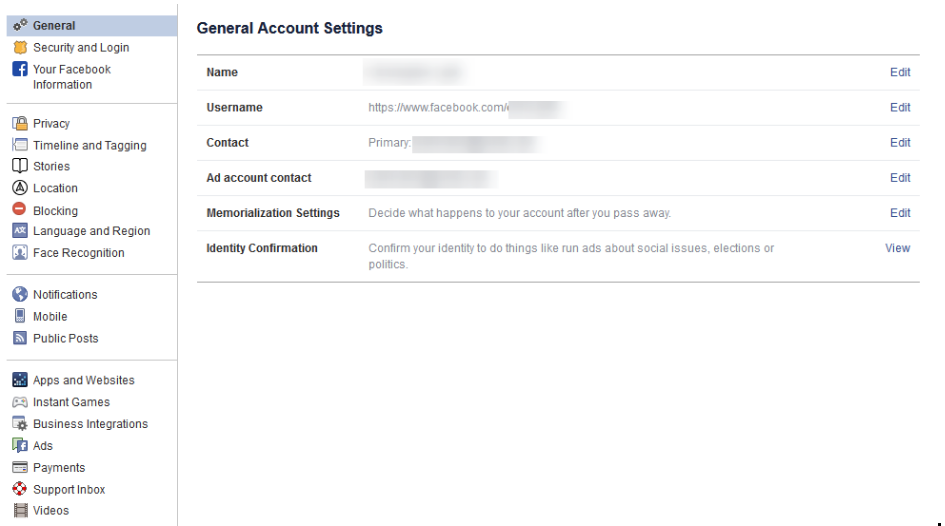
Your first order of business should be to confirm that you still have access to all of the email accounts tied to your Facebook. If an account that you no longer have access to was used, account recovery becomes monumentally more difficult.

Find Out Where You’ve Used Facebook with Security and Login

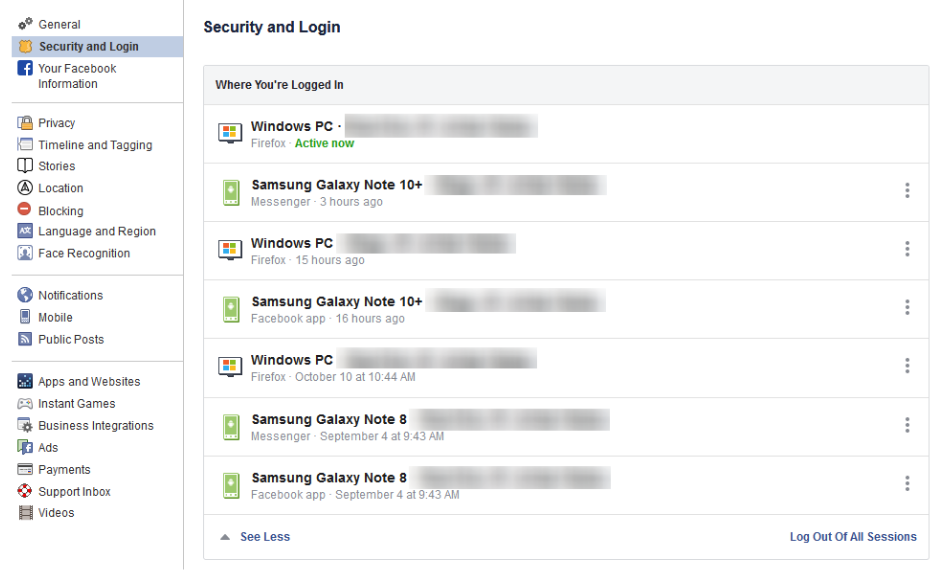
On the right, you should see the Security and Login option. Click it, and Facebook will show you all of the devices where your account is logged in. Fair warning, this can be shocking – especially since it includes where and when you last used that device, and what browser you were using to do so. The longer a user has been engaged with Facebook, the more devices will likely show up here.

If one of these devices is one that you don’t recognize, you will want to change your password immediately – we’ll go over how in a moment. First, you will want to log out of Facebook on any device that you aren’t actively using. This can be done through the three-dot icon menus next to each device listed.

Change Your Password

While we’re on the topic, this is when you will want to make it a point to update your password. It will only take a minute and might just help keep your Facebook friends from being spammed and phished. You can do this using the process provided on the Security and Login page.

Remember, you should never use a password for more than one online account.

Using Two-Factor Authentication

After your password settings, you’ll see the option to set up two-factor authentication (2FA) to help protect your account. To set it up, select Use two-factor authentication and click edit, and Facebook will provide you with the instructions you need to follow. Click Get Started

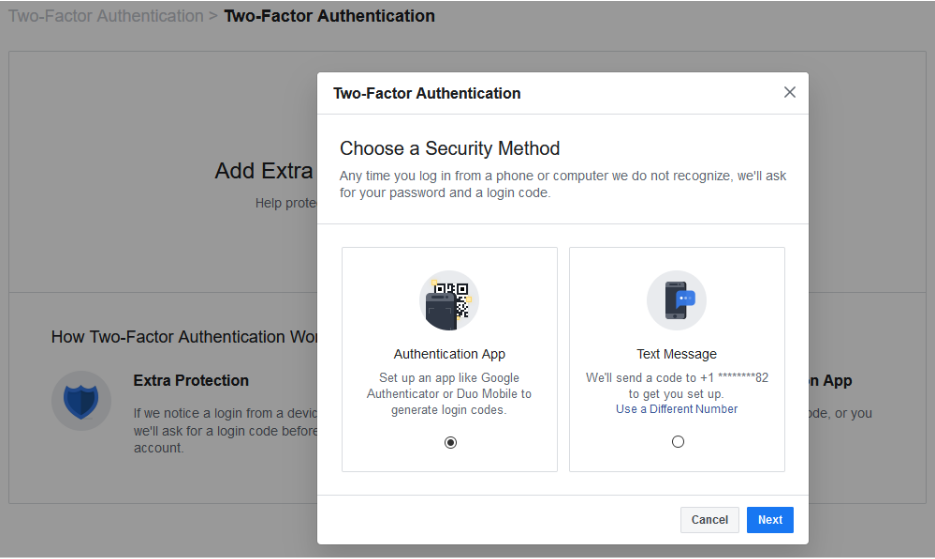
You have two options to select from as your Security Method, either using an authentication app, or to receive a text message with an additional code. Between the two, the application is the more secure option, although it does mean you need to have access to the mobile device whenever you want to check your Facebook.

Setting up the authentication app option is pretty simple. Open your application (which, if you have a Google account, might as well be Google Authenticator) and, on the computer, select the Authentication App option, as pictured, and click Next

Facebook will display a QR code, which your authenticator app should allow you to scan when you add a new account to it. The app will then give you a six-digit number to provide to Facebook as a Confirmation Code. Simple.

If you decide to use the text message option, Facebook will simply send you a code that you have to provide upon login. It isn’t quite as secure as the app, but it will do. All you have to do to configure this is to confirm an initial code with Facebook, and you’ll be walked through the rest.

Add a Backup

Once you have two-factor authentication enabled, it only makes sense to add an additional means of 2FA as an emergency backup – in this case, whichever method you didn’t choose. Honestly, you might as well set up both, and make use of the Recovery Codes option, to boot.

Under the Add a Backup option on the Two-Factor settings page, there is also a Recovery Codes option. By clicking Setup, Facebook will provide a brief explanation, and the opportunity to Get Codes. Facebook currently gives you a list of 10 single-use 2FA codes. These are one-shot codes, but you can generate a new list whenever you want from the Two-Factor Settings page. Make sure you keep these codes in a safe place.

Setting Up Extra Security

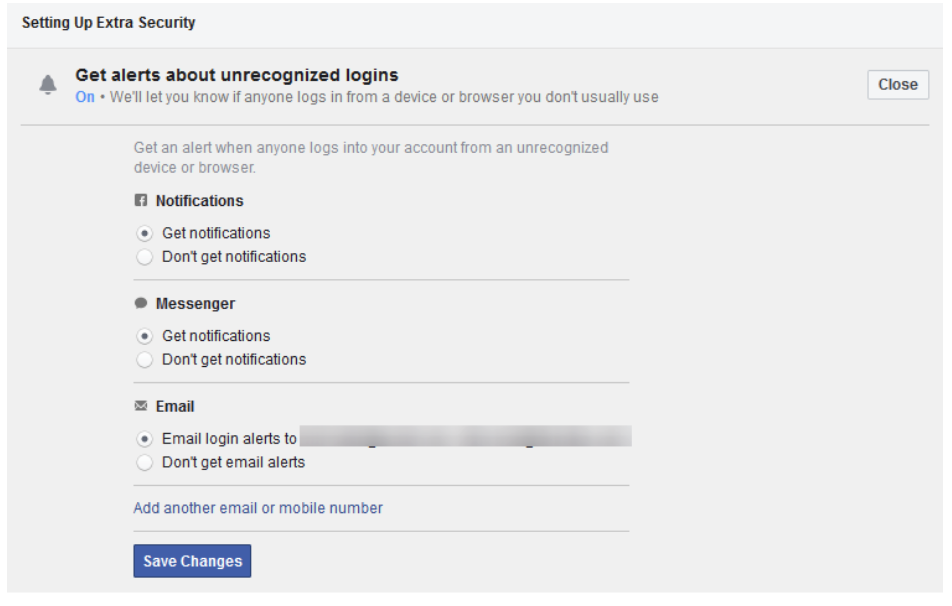
Back on the Security and Login page, scroll down to find Setting Up Extra Security. This area lets you opt-in to alerts being sent via email or text, notification, or Facebook Messenger.

You can also Choose 3 to 5 Friends to Contact if you do find yourself locked out of your account. Make sure that these are people you truly trust.

Stay tuned for part three of this series, coming soon.

Privacy_307095170_400.jpg

Facebook and Your Privacy (Part 1)

Privacy_307095170_400.jpg

Two billion users strong, Facebook is one of the Internet’s most popular websites… which has frequently put the tech giant in the spotlight when it comes to how secure the data you’ve entrusted to them (in addition to what they’ve collected) really is. Today, we’ll discuss how you can access the information Facebook has on you.

What Does Facebook Know About Me?

Consider how many opportunities Facebook has to collect information about you: there’s quite a few. For one thing, you literally tell the platform the things you “Like.” Semi-joking aside, there’s also the stuff you post, which advertisements attract your attention, and many other means for them to construct a pretty solid profile on you.

You can see this profile for yourself. In the aftermath of the Cambridge Analytica scandal – where third-party users were granted free reign and access to Facebook user info – Facebook made a promise to be more transparent. This profile is part of that transparency.

Viewing this information is pretty simple, whether you’re on your computer or you’re using the mobile application.

On a desktop or laptop:

  1. Log in to your Facebook account.
  2. Click the down arrow on the top right and go to Settings.
  3. On the left, click Your Facebook Information.
  4. Facebook will present you with five options. Look for Download Your Information.
  5. Click View, Facebook will give you a screen where you can choose the date range and format of the data. Since we want to download everything, we’re going to set the Date Range to All of my data and set Media Quality to High. This will give us a higher quality version of all of our photos and videos in the download.
  6. Click Create File and Facebook will start building the download. This can take a while, but Facebook will give you a notification when your data is ready for download.
  7. Once Facebook gives you the notification, click it and Download your data.

From the Facebook mobile app:

  1. Tap the 3-bar hamburger icon in the top right of the app.
  2. Scroll down and tap Settings & Privacy, and then tap Settings.
  3. Tap Download Your Information.
  4. Leave all of the options checked, and scroll down. Ensure the Date Range is set to All of my data and that Media Quality is set to High.
  5. Tap Create File and Facebook will give you a notification when the data is ready for download.

The “data is ready” notification will probably come after about an hour – it really depends on how long you’ve been a user, and how active you’ve been. Most people will probably have a file that takes up a few gigabytes.

Now that the report is available to you, click on Your Facebook Information.

Access Your Information – Facebook provides you with an itemized and viewable list of your Posts, Photos, and Location history ready for viewing.

Activity Log – Consider this a comprehensive timeline recap – almost a scrapbook, prepared by Facebook.

Deactivation and Deletion – People used to complain that deleting a Facebook account was a difficult process. Not anymore!

So, How Much Does Facebook Know About Me?

When you do review your file, the information they have can be shocking, mainly due to the location-based aspect of it all. You can pull up a given day and find out exactly where you were and what you did. Facebook kept track for you.

Then, you need to consider the Ads. This section will show you all of the advertisers who provided Facebook with a contact list your name appeared on. It isn’t that Facebook gave away this information, advertisers already had it and gave it to Facebook to target you on the platform.

What Does This Mean?

While it completely makes sense that Facebook would know a lot about you, seeing it all laid out (and how much of it didn’t come from your profile) isn’t exactly comforting… Facebook has been too involved in a few major data breaches. Just think – there’s a profile just like the one you retrieved about you, for over a quarter of all of the people in the world.

This rabbit hole goes deeper, too. Make sure you check back soon for part two of three of this Facebook privacy blog series.

You probably had a notion that Facebook had a bunch of your information, but how much information outside of your general profile makes you nervous when they are accused of major data breaches. What’s scarier is that the service is used by over a quarter of the world’s population. 

This is only the tip of the iceberg of the information we will share about this social media giant. Check back for part two of our three-part blog series about Facebook privacy.

119686351_400.jpg

How You Should Judge Potential Password Management Programs

119686351_400.jpg

Passwords are hard to remember – there’s no denying that. However, there is also no denying how important it is to use different ones for each account, all sufficiently complex, and all the rest. The point is, a lot of people use bad password practices because (to be frank) good password practices are too intimidating. There has to be some kind of acceptable middle ground… right?

Fortunately, there is: password management systems.

What Are Password Management Systems?

A password manager is effectively what it says on the box: it’s a program that keeps track of your passwords for you. While these are available for individual users, we are more concerned with those that are meant for businesses to leverage.

These solutions have a reputation for being complicated and time-intensive to set up. However, this no longer has to be the case, and it is now more important that you find a solution that offers the features that every business needs to prioritize.

What to Look for from a Password Manager

During your search, you will want to make sure your chosen password management system offers the following features:

Security

While this may seem obvious, not all of your password management options will necessarily offer the same protections or follow the same practices. For instance, standalone password managers are inherently more secure than those tied to another solution, like a built-in one in your browser of choice.

These separate solutions usually have additional features to assist your security as you use them. Good password managers will remind you of best practices if too many saved passwords are the same or too weak and will require multi-factor authentication to be accessed in the first place. It also wouldn’t hurt to find one that also notifies you when you’re due to update some of the passwords you have saved.

It should also never save one password: the master password used to access the solution itself. That is still the user’s responsibility.

As far as behind-the-scenes security is concerned, you should find a password manager that is itself protected by a variety of security features, like encryption, role-based access, and secure cloud storage.

Storage Considerations

Determining where your credentials are kept by the password manager is another important detail to keep in mind, largely as an extension of your security considerations. Does your password manager save your passwords to the cloud, or are they kept natively on the device? Either approach has its pros and cons.

If the cloud is leveraged, your credentials will be available to you on any of your devices… but this does put your credentials in the crosshairs if that cloud solution was ever breached. If you keep your credentials stored locally, you won’t risk losing them in a cloud storage breach, but they are still vulnerable. For instance, if that device fails, there go your passwords.

Generally, this won’t have much impact on the solution you choose, as most enable either option, if not a combination of both.

User Friendliness

As difficult as your password manager should make things for cybercriminals, it should make simple for your legitimate users – starting with adding and removing them to the business’ accounts. They should find it easy to change their password as needed, and your password manager should automatically log a user into a website or application. If it senses that there are not currently credentials for that site, it should offer to save them.

NuTech Services has plenty of experience dealing with password security, which means we’re familiar with password managers and maintaining them. If you’d like assistance with selecting, implementing, and utilizing one in your business, let us know! We’re just a call to 810.230.9455 away.

240564851_private_400.jpg

GDPR: One Year In

240564851_private_400.jpg

Data privacy is a serious issue in the world today, and the European Union’s General Data Protection Regulation, or GDPR, is perhaps the greatest example of how these issues are being addressed. Let’s take a look at how GDPR has shaped the computing world over the past year, as well as how events have exposed certain considerations regarding individual data privacy.

The GDPR

Prior to the implementation of GDPR, individual data privacy was mostly left up to the individual. In non-EU circles, this is still mostly the case, but GDPR has made issues related to this much more noticeable, such as the way this personal information can be used for corporate financial gain. GDPR was a response to these organizations failing to properly utilize user data. This included people having their personal information like names, addresses, email addresses, and even medical/financial information being utilized by advertising companies or worse. The largest corporate technology companies were using the data of individuals to turn a massive profit–a practice that seemed to be unfair to consumers.

EU member states have been legislating their own data protection laws prior to the establishment of GDPR. The United States has yet to jump on board this trend, though. With GDPR, organizations are seeing themselves as members of the global economy with strict new guidelines to adhere to. The GDPR is essentially an amalgamation of the laws that had previously existed, requiring all businesses to report certain types of personal data breaches within 72 hours to a supervised authority mandated by EU member nations.

This case was a landmark in that businesses were forced to remain more cognizant of how important data management is for the people who take advantage of their services. Before GDPR, many organizations failed to protect the data of their customers, staff, and vendors. In a way, GDPR forced them to begin thinking about data management, training staff, and investing in security.

One Year In

The results of GDPR have been mixed, to say the least. Over 59,000 personal data breaches have been identified by companies notifying regulators. The sanctions for failing to comply with GDPR mandates carry fines of up to €20 million, or up to 4 percent of total revenue from the previous year (whichever is larger), leading to a more targeted and strategic approach to data security, as well as more prompt reporting of when data breaches occur. To take a look at the results the GDPR had in its first eight months, download the DLA Piper GDPR data breach survey, here.

Overall, the GDPR provided a substantial boost to data breach reporting speed. The mandate gave organizations up to 72 hours to notify breached parties, so there were fewer instances of breaches going years before being revealed to the general public. The GDPR has also resulted in nearly doubling the amount of reported incidents.

The fines resulting in these breaches being reported, however, is considerable to say the least. Fines totaling up to €55,955,871 have been levied against the companies responsible for the 59,000 reported incidents, with most of this being struck against Google. A French GDPR calls this year as more of a transitional phase rather than an indicator of the long-term effectiveness of the measure.

Effects Abroad

U.S. companies that do business in Europe aren’t safe from the measures initiated by GDPR, but organizations have started to change up their approach to data privacy. Many legislators are pushing for similar measures to GDPR, and CEOs like Apple’s Tim Cook have labeled data privacy a “fundamental human right.”

Unfortunately, this viewpoint seems to be in the minority of major American tech company leaders. Still, this hasn’t stopped states like California from implementing its own data privacy law. Other states like Colorado, Massachusetts, and Ohio were inspired to pass their own data privacy laws. Perhaps the federal government will consider acting to fill in the holes left by these data privacy laws.

What are your thoughts on GDPR and data privacy regulations? Let us know in the comments.

M9V8WUL_hacker_400.jpg

Even Small Businesses are Targets for Hackers

M9V8WUL_hacker_400.jpg

Do you ever think of your business as too small of a target to matter to hackers? Some organizations actually do believe this, and that notion is effectively a trap. The thing that all businesses need to keep in mind is that all organizations, regardless of which industry they fall into, as all companies have data that’s valuable to hackers. We’re here to prove it and ensure you know the best way to protect your data.

Profitable Types of Data

Believe it or not, even a small business with a handful of clients has data worth stealing. You’re in business to make money, and by virtue of this fact, you likely collect and store financial information. In fact, you collect a ton of valuable data. The type of data that hackers are looking for.

In addition to all of the financial details you collect, there is also all of the contact information regarding leads, clients, and customers. With so many emails and phone numbers stored on your infrastructure, hackers can have a field day. They will have all the information they need to steal funds, distribute malware, and create unpleasant situations for your business.

The Unpredictability Factor

Not all hackers have any specific goal in mind when they hack you. Sometimes all they want to do is make your life miserable. The unpredictability associated with hackers is one of the most dangerous parts of them, as they can take advantage of any overlooked vulnerabilities to create a problematic situation for you.

The Impact of Security Negligence

If your business falls victim to a hacker, it’s certain to affect your business’ operations. In some cases, it could be subject to compliance fines that could break your budget and put your business at greater risk. Furthermore, you could lose access to important data that makes your business work, threatening its future and all but guaranteeing that recovery can never happen. Therefore, the importance of protecting your network can never be overstated.

NuTech Services can help your business implement the security solutions needed to maximize protection from threats. To learn more about what we can do for your organization, reach out to us at 810.230.9455.

210504316_US_400.jpg

United States Citizens Demand Data Privacy… How Will It Impact Your Business?

210504316_US_400.jpg

With over 90 percent of people in the United States feeling as though their data is out of their hands, it should come as little surprise that many are looking towards the European Union’s General Data Protection Regulation as inspiration. However, how close is the United States to passing this kind of legislation… and how will smaller businesses fare if (or when) some is passed?

The GDPR (In a Nutshell)

Under the GDPR – which came into effect on May 25, 2018 – any companies that have collected data on a resident of the European Union are then responsible for protecting that data. Furthermore, the GDPR grants these residents a far higher level of access and control over the data that organizations possess.

How United States Citizens Have Reacted

According to a poll, data privacy has become a bigger priority for 73 percent of respondents, 64 percent stating that they felt the security of their data was worse than it has been in the past. 80 percent want the ability to learn who has purchased their data, while 83 percent want the ability to veto an organization’s ability to sell their data in the first place. 64 percent also stated that they want the ability to have this data deleted.

How the Government Has Reacted

Governing bodies at different levels have had different reactions to these demands. For instance, the state of California has already passed the Consumer Privacy Act (CCPA) – a piece of legislation that the House of Representatives’ Consumer Protection and Commerce Subcommittee isn’t too fond of, as its position is that there needs to be a singular piece of legislation at the federal level to protect data. As of right now, data privacy is addressed in a combination of state laws and some proposed federal laws.

One of these proposed laws, the Data Care Act, spells out that (in addition to promptly alerting end users to security breaches) a service provider cannot legally share a user’s data without the receiving party also being beholden to the same confidentiality standards. Others include the Information Transparency and Personal Data Control Act, which requires transparency and personal control over data, the Consumer Data Protection Act, which could throw executives in prison for abusing data, and the American Data Dissemination Act, which sets a deadline for the government to enact privacy requirements upon businesses.

However, when the Consumer Protection and Commerce subcommittee met to discuss the prospect of a federal privacy law (which it was agreed was necessary), there weren’t any representatives for the average consumer – the ones whose data is really at stake. This reflects the hearings held last year by the Senate, also without consumer representation. Instead, technology companies were invited to participate during both sessions.

Small Business Concerns

That being said, there is very little support among the committee for any regulations that are at all similar to the GDPR. One reason for this: the fear that small businesses will not find themselves able to afford the added cost of compliance.

For instance, there are a variety of potential burdens that such a measure could potentially impose upon small and medium-sized businesses. These burdens include:

  • All-encompassing overhauls that would result in lost business
  • Business failure due to inadequate budgets to make the demanded changes
  • Impeded growth after regulations are put in place
  • Prerequisites becoming too great to start a business in the first place
  • Costs passed down to SMBs from larger companies for technology services

It is worth noting that if your organization does business with people from the EU, you are responsible to adopt the privacy rules of the GDPR.

What do you think? Are laws like these necessary, especially given the cost they could put on small businesses? Have you had any data privacy concerns in the past? Share your thoughts in the comments.

132594623_encryption_400.jpg

What is Encryption, Anyways?

132594623_encryption_400.jpg

You hear about encryption being used all the time, almost to the point of it being synonymous with security, but what does it really mean to have encryption on your business’ data and devices? We’ll walk you through how encryption can help you in your day-to-day struggle to secure the integrity of your organization’s communication and infrastructure.

What is Encryption?
Encryption is a security measure meant to thwart any would-be hackers from using your stolen data to further their ambitions. Think about it like this; without encryption, hackers would gain access to your files, plain as day. Encryption provides a measure that keeps hackers from using your organization’s data even if they were to gain access to it. It essentially scrambles data to everyone who doesn’t have the decryption key, rendering it useless.

One particular technology that uses encryption to a considerable degree is a virtual private network, or VPN. A VPN can connect your employees to your infrastructure regardless of their location in a secure way. Think of it like this; the connection between your employee’s device and your network is normally a clear tube that can be observed by anyone ambitious enough to look for it. Rather than leave it as is, encryption makes the tube opaque–enough to obscure what’s inside so it’s not quite clear for any unwanted onlookers.

Why is it Important?
You can imagine the immense importance of encryption in today’s data-oriented business world. If you’re not taking every measure possible to secure your data, you could be making a huge mistake. Encryption in particular is important for assuming the absolute worst. You can never know when your data will be stolen, so it’s best to take preventative measures to ensure that it will cause a minimal amount of damage should it occur. If your encrypted data is stolen, it will simply be unusable without spending far too much effort to get the data into a readable state.

NuTech Services can equip your business with encryption services that you can count on to keep your data as safe as can be. To learn more, reach out to us at 810.230.9455.

dirty_little_secret_400.jpg

Don’t Be Fooled When Scammers Threaten to Spill a Dirty Little Secret

dirty_little_secret_400.jpg

What would you do if a stranger claimed to have compromising webcam footage of you and threatened to share it with your contacts? A new, very convincing email scam is making some users very nervous.

The Sextortion Scam
It’s as screwed up as it sounds. A scammer emails you saying that they got access to your passwords, and then started to run amok to see how much trouble they could get you into. They even show you one of your passwords to prove it (the password will likely come from lists found on the dark web from online businesses and services that have been hacked and stolen over the years). Then the scammer admits they’ve been watching what you do on your computer and recording your webcam, and they happened to catch you at a very inopportune time… Well, let’s let the email explain it for us. 

“You don’t know me and you’re thinking why you received this email, right?

Well, I actually placed a malware on the porn website and guess what, you visited this web site to have fun (you know what I mean). While you were watching the video, your web browser acted as a RDP (Remote Desktop) and a keylogger which provided me access to your display screen and webcam. Right after that, my software gathered all your contacts from your Messenger, Facebook account, and email account.

What exactly did I do?

I made a split-screen video. First part recorded the video you were viewing (you’ve got a fine taste haha), and next part recorded your webcam (Yep! It’s you doing nasty things!).

What should you do?

Well, I believe, $1400 is a fair price for our little secret. You’ll make the payment via Bitcoin to the below address (if you don’t know this, search “how to buy bitcoin” in Google).”

The reader is then given the address to a Bitcoin wallet, where they are to send the ransom.

The email continues:

“Important:

You have 24 hours in order to make the payment. (I have an unique pixel within this email message, and right now I know that you have read this email). If I don’t get the payment, I will send your video to all of your contacts including relatives, coworkers, and so forth. Nonetheless, if I do get paid, I will erase the video immidiately [sic]. If you want evidence, reply with “Yes!” and I will send your video recording to your 5 friends. This is a non-negotiable offer, so don’t waste my time and yours by replying to this email.”

This email comes in a few different versions in the wild, but all of them follow the same pattern and end with the same threat… fork over the cash, or everyone will see you in your most private moments.

Is This a Serious Threat?
This is a very real concern for many people, who will be relieved to hear that, no, there is no indication that these threats are for real. The first clue is the fact that the passwords that the email provides are usually a decade old, indicating that they came from some (relatively) ancient database from some long-forgotten hack.

However, in some ways, this is even worse news, because this threat has made a tidy sum of money: as of the 31st of July, the scam had brought in $250,000, as compared to just over $50,000 by the 19th. Clearly, this scam has been plenty effective for the perpetrators, and this won’t deter others from following its example.

Keeping Yourself Safe from an Actual Attack
Granted, this attack is just an unfair wager, but scams like this are more than possible for a criminal who actually means what they say/threaten. As a result, the security lessons we can take away from this particular attack still apply.

The first thing to remember is also the first rule of passwords – change them frequently. Again, this scam has made quite a bit of money based on a total bluff… a bluff that, paid in increments of $1,400, was worth $250,000 and counting. From this, we can infer that quite a few people who received this message had online activities that they wanted to hide, and more critically, that their passwords had remained the same for all those years.

This is an excellent example of why it is so crucial to regularly update your passwords, without repeating them – if an old database is hacked, as happened here, you won’t have to worry if your password is revealed – it won’t be any good anymore.

The second thing to remember? If you aren’t actively using your webcam, keep its lense covered up.

For more best practices to follow, including those that will improve your business’ security, make sure you keep checking back to this blog – and if you want to take more action, reach out to us at 810.230.9455.

qr_code_log_in_scan_400.jpg

Using a QR Code to Log In

qr_code_log_in_scan_400.jpg

Passwords are still an incredibly valuable part of security, but it’s becoming quite difficult to maximize network security through passwords alone. Even if you somehow manage to sell the idea of network security to your staff, whether or not they follow through is another thing entirely. It’s critical that you make it as easy as possible for your employees to stay secure, and that’s where scannable QR codes come in.

Why QR Codes?
By using a QR code to connect to your business’ wireless network, you can improve security. There are several benefits to this approach compared to the traditional alphanumeric password. An alphanumeric password can’t be shared as easily as a QR code, and the last thing you want to do is share your specific Internet access credentials. The real kicker is that a QR code makes things much easier on the side of the end-user. Instead of using a touchscreen to plug in a PIN or password, you can simply use the right app on your mobile device to take a picture of a QR code. It’s a great way for businesses to allow guests access to a wireless network without carelessly handing out credentials.

How to Use a QR Code
If you want to use a QR code to access the Internet, you will need to have a system in place that generates a code. You can use any of various websites or applications that create QR codes for whatever network that you want to connect to, as well as its password. You’ll also want to review any terms of service or other policies before making sure that you want to share this information for any reason.

Once you’ve done this, you’ll be able to download the end result. You now have an easy way to access your Internet without creating a security risk for yourself. Do you have any other security concerns that need addressing? NuTech Services wants to help. To learn more, reach out to us at 810.230.9455.

mobile_safe_encrypt_smart_phone_400.jpg

Encryption Helps Keep your Smartphone Secure

mobile_safe_encrypt_smart_phone_400.jpg

These days everyone has a smartphone; and, they can do some pretty incredible things. One place that the average smartphone may seem to be a little loose is in the arena of data security. Today’s smartphones do, in fact, come with encryption by default, so there is some semblance of device security on every device. What does this mean? We’ll break it down.

“Smartphone encryption” describes the state in which the data on the device is scrambled so that people that don’t have the proper security clearance, won’t be able to see the device’s contents. While this is extraordinarily helpful for device security and personal privacy, it has nothing to do with protecting actual data transmission.

Without entering the credentials or biometric data that allows for a device to open, many of the features a device has are not able to be accessed. In fact, most modern smartphones won’t actually connect to a Wi-Fi network without the proper credentials. This is handled differently on the different mobile platforms.

Apple
The iPhone ships with 256 AES encryption. It is not stored on the phone (which could result in more successful hacks), a correct passcode combines with data stored on the Secure Enclave chip to generate a key that unlocks the device. This chip also holds biometric data (fingerprint and facial recognition) that can be used to open the device or use Apple Pay. Any Apple product that is repeatedly unsuccessfully opened will lock, stopping unwanted parties from getting into your iPhone.

Android
Since so many more people use the Android mobile OS, Google did not make device encryption standard until devices that run their Android 6.0 Marshmallow mobile OS. If your new Android device runs 6.0 Marshmallow or better, it now ships with encryption enabled. Since Google’s implementation of encryption depends on the manufacturer, some phones will use a key generation system similar to the iPhone’s, while others will use a more complex system called file-based encryption. File-based encryption allows for varying levels of decryption and provides unauthorized users access to a limited number of the features on the device.

In the News
Over time, there has been a push for mobile OS developers to build in “backdoors” to ensure that law enforcement can get into a device if/when they need to. Companies like Apple, Microsoft, and Google have had to field their fare share of criticism, but strongly defend their position. Apple CEO Tim Cook states the following, “In the physical world, it would be the equivalent of a master key, capable of opening hundreds of millions of locks – from restaurants and banks to store and homes. No reasonable person would find that acceptable.”

Encryption is for your benefit. If you would like more information about modern digital cryptography or any other mobile security, visit our blog.
identity_theft_Security_400.jpg

Preventing Identity Theft Should be a Priority, But Do You Know How to Handle It?

identity_theft_Security_400.jpg

The more people use technology, the more they have to deal with the negative aspects of doing so. One of the most prevalent problems users experience today is cybercrime that leads to identity theft. What can you do to prevent this from happening to you?
How You Can Work with Identity Thief
There are numerous ways that a potential identity thief can gain access to the information they want. Since businesses often collect a lot of data, would-be identity thieves have both more data to steal, and typically more access points in which to get into the network. Additionally, a lot of companies may say that they have hackers as a top-of-mind threat, but since a comprehensive cybersecurity strategy requires that everyone within an organization buy into it, there are usually some holes left open though a lack of employee diligence; or, worse yet, blatant employee indifference. Since throwing employee regulations out there won’t stop someone who is hell-bent on getting the information, knowing how to protect your business becomes critical.

One-way hackers can get sensitive information is though the trash. You’ve seen it in movies and on television: organizations go through the mail and recreate shredded documents to get sensitive information. That’s why doing what you can to create a paperless office can go a long way toward protecting against the dumpster-diving thieves of the world.

Your Responsibilities if You Allow Your Clients’ Identities to Be Stolen
No matter how diligent you are about your data protection, there can be a time where your network is breached, and your clients’ sensitive information could be stolen. To help your clients out, you’ll want to provide them with the following information:

  • Notified Banks or Creditors – If it was financial information that was stolen it is their responsibility to notify their financial institution and see what services they can offer to help rectify the situation. Most banks have been proactive in the quest to limit identity theft and can walk your clients through what they need to know to ensure that any personal information hackers make off with will be of little consequence. If you do this promptly they can report this breach and ensure that they will be protected. Unauthorized charges within two days of any complaint limits individual liability to a mere $50; a huge savings in some identity theft cases.
  • Credit Reports – Any client that has his/her data potentially stolen has to monitor their credit reports. Setting fraud alerts will help automate this process, although they should still constantly check for warning signs of fraud. If reports come back conclusive for identity theft, considering a credit freeze until everything returns to normal may be a good option.
  • Theft Reports – In the U.S. the Federal Trade Commission (FTC) only has the resources to follow up on larger-scale fraud cases, but they will monitor identity theft cases to identify suspicious patterns that suggest the involvement of organizational wire fraud. The FTC’s website has a form that will file a complaint. Once that is done, it may be best to secure a police report to dot all the i’s and cross all the t’s. This report needs to be sent to all creditors and credit reporting agencies to ensure that you aren’t on the hook for malicious or unauthorized access.
  • Lock It Down – Immediately updating passwords is a great way to lock down your accounts after a potential breach. Furthermore, not only should you report any false use of your Social Security Number, you should also ensure that no additional accounts have been opened in your name.

Identity theft is serious business. NuTech Services’s IT experts can do their best to keep unwanted entities out of your network. For more information about cyber security and data theft, call us today at 810.230.9455.