134821701_hackers_security_400.jpeg

Hackers Double Down During Crisis

134821701_hackers_security_400.jpeg

The COVID-19 pandemic has most of the world at home. It has completely disrupted everyday life and has businesses scrapping their normal strategies for work-at-home policies that will at least allow them to maintain some productivity. These strategies, while highly effective, carry with them additional risk. Today, we take a look at some of the risks associated with relying on remote workers.

With many “non-essential” businesses scrambling to find strategies that will keep revenue coming through the door, setting up a remote workforce has become most businesses’ best hope. Unfortunately, with such little notice to dot the Is and cross the Ts, businesses are taking on more risk than many of them are comfortable with. That trepidation is not fruitless, either. In times of crisis, hackers have a tendency to prey on the unprepared. The fact is that workers that are operating where they are not comfortable–or where they’re too comfortable–can mean disaster for their employers.

Security Threats for Remote Workers

Even if it normally is, security isn’t exactly the top priority for businesses faced with this situation. Businesses need to mitigate net-negative cash flow positions. This means they need their staff to continue working. This is stretching business’ cybersecurity strategies thin. Exacerbating things is that with so many people focused on the COVID-19 pandemic, hackers can use it as bait. 

Cybersecurity professionals and other researchers have seen an increase in ransomware attacks, trojans, and spyware as a result of this situation. They’ve also seen COVID-19 being referenced in millions of phishing attacks. Many problems that businesses face in regards to cybersecurity can be directly attributed to the remote worker. Workers at home are typically using their home PC or laptop that has all their personal accounts on it. An infected personal PC is a big problem when you are using the same PC to access work related materials. 

Additionally, hackers are now seeing a lot more success by targeting businesses directly now that security is playing second fiddle.

That is a problem since cyberattacks can decimate your business, tarnish your reputation, and end any positive momentum your business has built up. Since most businesses weren’t prepared in the least for these stay-at-home orders, the ones that are under direct scrutiny from federal, state, and industry mandates are even more exposed.

How to Protect Your Business

While any measures you take at this point to better secure your employees working remotely will be more reactive than they are proactive, it is still important to do so. We suggest that you enact the following measures to begin:

  • Cloud solutions – Rather than introducing an entrance into your business with a remote access solution, using the cloud’s capabilities enables productivity through a much simpler and more secure means than opening a gateway into your business’ infrastructure. As the cloud permits you to store your data and/or host your applications, your employees can be sure to have the resources they need to safely work from home.
  • Company devices – If you provide your team with the device they should use through their day-to-day, your business can continue to operate with the knowledge that all updates and security patches can be maintained. Despite the upfront costs of procuring the technology you will need, making this investment can provide returns to both productivity and security.
  • Employee training – Perhaps most crucially, your employees need to respect how much responsibility will rest on their shoulders in terms of maintaining cybersecurity as they work from home. Making sure they know the recommended best practices for maintaining security, as well as other preventative skills like spotting phishing attacks, will allow you to trust them more to keep your business safe from threats.

While the COVID-19 pandemic will eventually end, smart security practices both in and out of the office never should. To learn more about how we can help keep your business safe, reach out to NuTech Services at 810.230.9455.

331240148_pandemic_profitablity_400.jpeg

Keep the Pandemic from Plundering Your Profitability

331240148_pandemic_profitablity_400.jpeg

As the COVID-19 pandemic rages on, affecting hundreds of thousands of people, and keeping hundreds of millions at home, the beginnings of recessionary fear have begun to hit small businesses. Today, we will go through a few elements that will help you get your business through this (and many other) anxious times. 

The first thing that you need to consider is that this thing won’t last forever. Most businesses, if they had no contingencies in place, or if they were forced to close by mandate, probably have been burning through cash for the past month. Those that haven’t are fortunate. Small business owners need to stay proactive during this period, altering their company’s remote work strategies if need be, and searching for low-interest loans to get them through this difficult process. Let’s get into some of the most useful tips on how to get your business through this disaster.

#1: Know Where You Are

The first tip is probably the most important tip. This situation came upon all of us pretty suddenly, and to be frank, not a lot of business’ disaster recovery programs consider “supervirus” as a likely scenario. Floods, fires, electrical storms, the temp clicking on a spear phishing attack…these situations your business is ready for. Worldwide pandemic is a stretch. Forging ahead, you need to know that you aren’t alone, but how you react will largely determine how you come out the other side of this thing. 

If you are still in operation, you will need to cut as many redundant and unnecessary costs as you can. In times like this, your company needs the flexibility that comes with liquidity. That means eliminating a lot of the extra stuff that you pay for, such as travel (this one is obvious), team outings, company food, and non-essential marketing. This will ensure that you have the financial flexibility to at the very least have a business to reopen when the “all-clear” is given.

Additionally, don’t take on any new investments that don’t immediately relate to getting your business through this situation. There will be millions of businesses looking for additional capital, and there should be enough money and favorable interest rates that most businesses can get the capital they need without putting their whole business in jeopardy.

#2: Maintain Your Relationships

You have spent a long time cultivating and maintaining your business relationships. It is more important now than ever to do what you can to maintain those relationships. This includes your financial institutions, your vendors, and your clients. Regrettably, some businesses won’t make it through this, but the lion’s share will and making sure that your business is on solid footing and there to support your client base will be essential as things begin to normalize. 

#3: Proactively Budget

Chances are that the terms you agreed upon and the support from your clients will shift considerably. You will want to proactively budget for this. You can expect higher interest rates, a lower availability of massive available capital, and shorter terms in which to pay off the money you do borrow. 

As stated above, there should be a lot of available capital through government-sponsored programs, and these loans will carry with them lower interest rates, but if you take the proactive steps to ensure that you budget for the difficult times ahead, your business will undoubtedly be in a better position when we see our way through this mess.

#4: Trust Yourself to Weigh Variables

The COVID-19 outbreak has left the small business owner a lot to take in. One of the most important suggestions we can give is that you trust that the decisions you’ve made up to this point–and that you will make over the crucial next few months–are in the best interests of everyone that depends on your business. If you are forced into making cuts into your human resources, you will want to make sure that they are protected as not to put your business in additional peril from having a tarnished brand.

Making sacrifices is always hard, especially if you were really thriving before the pandemic hit. Take in as much information as you can weigh and have the confidence that you can make the right decisions. This will keep your business, and the people who depend on it, ready to properly adjust to the situations that are thrown at it.

COVID-19 has millions of businesses and hundreds of millions of people uneasy. To get through it you will need help. Contact the knowledgeable consultants at NuTech Services today at 810.230.9455 to let us help your business get through this unprecedented situation.

264920413_remote_work_400.jpg

Tip of the Week: Eight Ways to Optimize Remote Productivity

264920413_remote_work_400.jpg

There are a variety of reasons that you may find yourself working from home at some point or another. Whether there’s something going on at the office, you’re mindfully practicing social isolation, you’re home sick, or it is just an option you want to exercise, you need to be sure that you and the rest of your team are doing so in the best way. Here, we’re sharing a few tips to help you do so.

Set Some Boundaries

Establish a Workspace

One of the first things that you should do when adopting a remote work approach is to give yourself guidelines. It can be immensely helpful to establish a set place to do your work, and equip it appropriately with minimal distractions. As a general rule, it is best if this area is not in the bedroom, or any area in your living space that you typically spend your recreational time. This will help you to keep up your focus throughout the day.

Don’t Overwork

You also need to set some boundaries as far as work time is concerned. While many employers are concerned about their remote employees goofing off and slacking, the opposite is just as common–employees trying to get as much done as possible and overexerting themselves. Make sure you don’t slip into the “just five more minutes” habit and step away when it is time to do so.

Make Sure You’re Dressing as You Dress Down

Finally, there’s the question of how casual you can be while working from home. While pajamas are overwhelmingly frowned upon in the vast majority of offices, there is nothing stopping you from foregoing the shower and working in your bathrobe. While there is nothing wrong with dressing down a little if you’re working from home, you will undoubtedly feel and perform better if you clean yourself up before getting down to business.

Encourage Co-working

Set the Standard

Collaboration is always critical for a business’ success, but it takes on a particular importance when the workforce is working remotely. Therefore, you need to encourage the liberal use of communication in order to keep your team on the same page, and lead by example. Show them the kind of communications you are expecting them to engage in by actively participating in them.

Use Your Available Tools

Modern business solutions are overwhelmingly designed with collaboration in mind, so don’t be shy about encouraging your team to use them, especially as you are leading by example with your communications. Demonstrate when it is best to use instant messaging or email to communicate by using them to keep your team accountable to the business and to each other.

Do Some Proactive Networking

In the same vein as setting the standard, don’t be afraid to take the first step and reach out to the people you’re working with for some non-work-related conversation (within reason, of course). Getting to know everyone on the team, even the ones you don’t work with directly, will help to make the workplace a more collaborative one.

Commit to Working Productively

Customize Your Schedule

In some cases, the benefit in working remotely comes from the fact that the workday isn’t necessarily constrained to the traditional 9-to-5 agenda. If this applies to the tasks typical of your office, encourage your employees to figure out the times that they are able to work most effectively, and allow them to shift their schedules to match. Depending on their circumstances, not every day would necessarily have the same schedule… but if the work gets done, what difference does it make?

Block Out Distractions

FInally, we do have to acknowledge the elephant in the room: the temptation to procrastinate can be strong when an employee is out of the office. While recreational activities should obviously wait until you and your team is done working for the day, it is important to remember that there’s more than one way to waste time. Some people will postpone their tasks by doing “other” important things, like tidying up their house. Resist spending the time you need to commit to work by doing other things. If you really can’t help but procrastinate, find some way to do so in a way that will ultimately help you focus… whether that’s journaling briefly or taking a few moments to quietly meditate.

Of course, in order to put these tips into action, your team needs the tools necessary to work remotely. NuTech Services can help with that, as well as your other IT needs. To learn more, reach out to us at 810.230.9455.

330590403_productivity_illness_400.jpg

How to Maintain Productivity when Illnesses are Rampant

330590403_productivity_illness_400.jpg

It is never a good situation when a widespread illness strikes. Not only does it impact many individuals on a personal level, the impacts reach to the businesses that employ them as well. As we deal with the current outbreak, it helps to keep in mind that there are various means out there to allow for a business’ productivity to continue… even if its employees shouldn’t be near one another.

Let’s go over a few solutions that can assist your business’ continuity in these testing times.

The Fear of Infection

The primary concern that comes from this specific variety of disaster is generally one of widespread infection, which makes it an uncomfortable prospect for people to congregate anywhere. This is especially true of the workplace, where papers and files were traditionally distributed (and redistributed) as work was done.

Naturally, this is the perfect storm for any illness to spread: materials being passed around, with many people together in a relatively enclosed space. With COVID-19, this is especially problematic, as the CDC believes that it is spread through respiratory droplets and close proximity to others. As a result, it is better to avoid this situation… but how could your business possibly cope with its entire staff being absent, due to either illness or preventative “social distancing?”

Fortunately, the technology exists today that allows you to see the best of both worlds.

Securely and Safely Working Remotely

Many common technologies today can be used to enable your employees to do the same tasks they would do in the office from the relative comfort and security of their own home. Let’s go through some of these technologies and applications and review why they are valuable to a remote work policy.

  • Mobile devices – If your employees are going to work productively from home, they’re going to need access to the proper tools to do it. Supply your staff with laptops or thin clients that permit them to bring their tools out of the office if need be.
  • VPN (Virtual Private Networking) – Of course, once your technology has been taken out of the security of the office, the data that it accesses can be put at risk. Utilizing a virtual private network can help decrease that risk greatly by shielding the data that is in transit.
  • Cloud solutions – Of course, in order to effectively work remotely, your data and applications need to be accessible to your team as they need them. Hosting these resources in the cloud enables your team to access them from wherever an Internet connection can be established on many different types of devices.
  • VoIP (Voice over Internet Protocol) – Communication is absolutely critical to business productivity, especially when it comes to remote resources. Without communication, you can’t expect to accomplish much at all. Certain solutions, like VoIP, allow you and your team, to maintain this communication–again, from wherever an Internet connection can be maintained.

While productivity is crucial to your business’ success, so is the well-being of your employees. Giving them the option to work remotely can help attend to both needs. For assistance with implementing the needed solutions, reach out to NuTech Services at 810.230.9455.

117063408_computer_user_400.jpg

Tip of the Week: Using Microsoft Word Templates

117063408_computer_user_400.jpg

Microsoft Word is an excellent tool for businesses to use for a great assortment of their word processing needs… especially due to the assortment of editable templates available to users. For this week’s tip, we’ll go over how you can customize a Microsoft Word template to meet your preferences.

In actuality, you’ve used a template every time you’ve opened a Microsoft Word document… the Normal template. However, you may want to use a different template to meet your different needs. If that’s the case, you’ll need to adjust some settings as you create your document.

As you select New from the File tab, you will be presented with a few options. One of them will be Blank document, but you also have the opportunity to utilize a huge variety of other templates that can be found in the application and then downloaded. Once you have done so, select your chosen template and your new document will be generated with that template’s contents. These can include:

  • Boilerplate text
  • Styles
  • Images and logos
  • Table of contents
  • Sections that split the document into different parts, with appropriate numbering
  • Table and chart boilerplates

Of course, this isn’t a comprehensive list of your options. Feel free to explore the different templates and their options to see all that these documents can do.

Once you have a few templates downloaded, you can even edit them to better fit your needs. To do so, all you need to do is open the template you want to edit (File>Open>This PC>My Documents>Open) and make your desired changes. Once that’s done, just Save and Close.

Why Bother with Templates at All?

There are a few advantages to using templates that you should see significant benefits from, such as:

  1. Templates can be shared amongst your staff and unify your business’ style.
  2. Templates can be used to make forms much easier (and less expensive) to reproduce.
  3. Templates can reference your other applications to simplify additional tasks.
  4. Templates allow you to quickly reformat your documents if need be.

So, do you think you’ll do any investigating into templates in the future? Why or why not? Let us know in the comments, and let us know what other tips you would find helpful!

302947168_collaboration_400.jpeg

How to Encourage Collaboration in Your Place of Work

302947168_collaboration_400.jpeg

Collaboration: it is the gold standard of teamwork that so many businesses seek. If your employees aren’t naturally drawn to the idea, however, there are some ways that you can help to sell the concept. Let’s discuss a few of the ways that you can coax your users into collaborative behaviors.

Have Them Socialize Outside of the Office

Let’s look at how kids behave for a moment… if told to partner up, they—almost automatically—gravitate toward their friends, the people they are comfortable spending time with. Your employees will do the same, both in and out of the office.

Collaboration greatly relies on some level of trust and familiarity, which is most effectively developed outside of the professional environment. Encourage your staff to socialize outside of work hours, or even treat them on occasion, on one condition: no shop talk. While your employees may not all be fast friends afterwards, they’ll understand one another much better and be able to work more effectively.

Tell Them What You Want

Speaking of efficacy, make sure your team understands what you expect from them in terms of results. This goes double when collaborative work is involved. A clear understanding of a task makes it easier to determine how to accomplish it, and how their combined efforts can best serve their purpose.

Walk the Walk

If you really want your team to work collaboratively, make the first move and involve yourself in the process. “Rank” or “position” should have no bearing on how able someone is to participate in a collaborative process, and there is no telling who could be struck with inspiration. Actively seek input from your team and demonstrate how you want your employees to work together.

Use Your Resources Wisely

While there’s a time for either, there is a difference between combining your resources to accomplish a given task and having your employees collaborate. The former is great if a lot of a single task needs to be finished quickly, but if a complicated process needs to be completed, it helps more to give the task to a group of people who have different proficiencies. This way, you have a better chance of the necessary skills being present in the group.

Acknowledge Accomplishments

A team that doesn’t feel appreciated is a team that won’t accomplish much. Why would they, if it doesn’t seem to matter whether they excel, or put out a thoroughly mediocre performance? This is especially the case if a single member’s performance is publicly singled out, as though they did all the work.

To encourage your team to perform well as a group, make sure that the entire group receives some recognition of their combined efforts.

Make Collaboration the Easy Option

Regardless of how motivated your team may be to collaborate with one another, it just isn’t going to happen if they don’t have the opportunity or means to effectively do so. While this may have been a more reasonable obstacle in the past, today’s available technology invalidates any excuse your team may have… mostly due to the Internet serving as the greatest collaborative tool the world has ever seen. The easier the collaborative process is, whether you lean on an Internet-based application or an internal resource or both to simplify things, the more likely it is for your employees to work with each other.

We’re Here to Help.

NuTech Services is ready and willing to deliver the solutions you need to promote collaboration among your staff. Give us a call at 810.230.9455 to hear more about your options.

315390952_increase_productivity_400.jpeg

Tip of the Week: 5 Ways to Maximize Productivity, According to Experts

315390952_increase_productivity_400.jpeg

In most workspaces and offices, “productivity” is always present on the list of goals. Why settle for one task completed in a set time, when multiple tasks can be completed in the same amount of time without sacrificing the quality of the result? This goal is popular enough for many experts and consultants to have weighed in on. This week, our tip will involve a basic overview of some such strategies so you may consider them.

Two-Hour Solution

Roger Seip, author of Train Your Brain for Success, took a proactive and prepared look at productivity by developing his Two-Hour Solution. The idea is to take two hours to plan out a schedule to follow each week, based on how your plans and goals culminated the week before. Investing this time should allow you to make the most of your available time to accomplish what you want to accomplish.

The reason that this is different than simply going over your calendar each week is the fact that, if guided by the Two-Hour Solution, you’re figuring out how the time you’re spending contributes to your goals. “Green time” is time that helps you generate financial capital, while your “red time” is the time that you spend preparing for green time, without generating any profit. To account for the wrench in the works that would ordinarily throw off your schedule, you also include “flex time” to provide a buffer. What’s left is your “re-creation” time, where you recover from your productive endeavors by doing the things you want to do.

Prioritizing

Steven Covey is an educator and a businessman who came up with a philosophy to living a full life that can also apply to life in the office.

Consider your big priorities, your more flexible responsibilities, and your rote tasks in the workplace as large rocks, smaller stones, and sand, respectively. Your time is a bucket, ready to be filled with these items as you see fit.

Let’s say you decide to start with the “sand,” before trying to cram in the “rocks” and “stones.” Chances are pretty good that you won’t be able to accomplish very much at all, at least nothing of any circumstance. However, if you prioritize the more impactful rocks, then the stones, and fill in the rest of the space with your sand, your bucket—or workday—is then used as productively as possible, and anything you didn’t get to complete isn’t of consequence.

Two-Minute Rule

While there are countless variables that can potentially influence the amount of time a task will take to complete, you eventually get a feeling for the typical duration, right? So, some tasks can predictably take a significant amount of time, while others take almost no time at all to make it through. The idea of the Two-Minute Rule, thought up by productivity consultant David Allen, takes advantage of that difference. His strategy: if a task will take two minutes or less, do it.

If that seems too simple, it kind of is. The philosophy behind the Two-Minute Rule is to build up your motivation to tackle the larger responsibilities by successfully completing smaller tasks. Think about it—every task, regardless of how large it is, can be broken into smaller, more manageable chunks, chunks that can take mere minutes to complete. Once you’ve completed enough of these two-minute tasks, it only makes sense to see the greater responsibility through… and with the progress you’ve already made supporting you, completing it seems that much more feasable. 

The Blastoff Method

Entrepreneur and motivational speaker Mel Robbins devised this practice to help overcome the mental blocks that encourage us to procrastinate rather than doing things that are good for us. Robbins posits that, by hesitating, we put the brain into “protection” mode—by thinking about everything that needs to be done between point A and point B, your brain ultimately prevents you from doing what you need to do. However, if that hesitation can be avoided, your productivity (or, by Robbins’ original theory, your well-being) will see benefits.

Her solution is to close the gap that hesitation creates between your capability to do a task and your perception of that task. Her recommendation is to, quite literally, treat yourself like a rocket and count down to your action. Focus on counting down…5,4,3,2,1… and act immediately, before your thoughts get in the way.

Scientifically, by doing so, you are bypassing a behavioral process and resetting an established habit loop… allowing better, more productive habits to be created instead. Give it a try next time you encounter a task you want to avoid starting.

Create a Time Crunch

We’ll wrap up with another method that Roger Seip came up with. If you really feel you work better on a deadline, add a bit of a hurdle as you are scheduling your “green time” … give yourself less time than you think you’ll need. The pressure can help you to focus. Naturally, you need to avoid any flex time you have assigned for this to work.

What methods do you use to keep yourself focused and productive? Do any of these approaches sound like something you want to try? Let us know in the comments!

For the technology solutions that can also help you improve your practical productivity, talk to us! Give us a call at 810.230.9455 to discuss your options.

147532333_outsourcing_400.jpg

Can Outsourcing Be an Option for Your Business?

147532333_outsourcing_400.jpg

There is a major problem that the owners of most small-to-medium-sized businesses run into: impatience. Their business might not be growing at the rate they like, or they may just have too much work to accomplish in order to grow. Whatever the problem is, outsourcing parts of a business can really bring a whole lot of benefits. Let’s take a look at how outsourcing can help the modern business.

Financial Benefits 

Looking outside your own business to get work done can be intimidating. Can you trust outsourced talent? Will I lose control over my business? Is it really a value? These questions and many more are reasonable to ask, but if there is one sure thing about outsourcing is that there are clear financial benefits. 

The decreased cost of outsourcing is the most well-known feature of the strategy. Obviously, it is extraordinarily expensive to onboard new help, purchase the resources that new hire needs to do the job you need him/her to do, and expand your benefits package (if you offer one) to another person. When you outsource, you may still pay a comparable rate in pay, but you will get someone that has the specific skills you need them for, and you’ll likely save a lot of capital by eliminating the associated costs.

Operational Benefits 

Your organization may see some major operational benefits from choosing to outsource. They include:

Internal Focus

Outsourcing can present a business’ leadership the ability to be more aggressive with their resources. There is a lot to do at the average business, giving regular employees access to trained and reliable resources can free them up to focus on operational issues while speeding up business significantly. 

Access to Skills

Typically, outsourcers come onboard with very specific skills and no long-term employment contract. This gives the organization the flexibility to find the gig-worker that fits the immediate needs of the company rather than committing to one employee over large swaths of time. 

Minimized Risks

In the course of doing business, decision makers are confronted with variable risks. Outsourcing allows many of the risks to be disregarded, although it creates some others. Overall, however, outsourcing will often present a net-positive situation for any business. 

NuTech Services offers high-value outsourced IT services and support for Michigan businesses. If you would like to learn more, call us today at 810.230.9455.

team_games_building_400.jpg

Motivate Your Employees with More Playful Work Practices

team_games_building_400.jpg

Workplace engagement has long been a conundrum–how do you maximize the productivity of your business without alienating your team through quotas and ironclad policies? Many businesses have been finding that an effective way to do just that has been to use a concept known as ‘gamification.’  Let’s explore gamification and how it might be useful to you.

Making Sense of Gamification

Many parents have historically used a gamification strategy to convince their young’uns to cooperate better with notoriously less-fun parts of daily life. Take clean-up time, for instance, which many parents will turn into a race between themselves and their children to see who can pick up quicker. Taking an unappealing task and adding game-like elements to motivate people to do it is the concept that forms the foundation of gamification.

This isn’t a new idea, either. Mark Twain knew what he was talking about when he wrote about Tom Sawyer tricking his friends into white-washing a fence for him. By making the activity seem elite and enjoyable, he hoaxed and hoodwinked his friends into completing his chore for him while they all enjoyed proving themselves capable. As was written at the end of that particular chapter:

“If he had been a great and wise philosopher, like the writer of this book, he would now have comprehended that Work consists of whatever a body is obliged to do, and that Play consists of whatever a body is not obliged to do … There are wealthy gentlemen in England who drive four-horse passenger-coaches twenty or thirty miles on a daily line, in the summer, because the privilege costs them considerable money; but if they were offered wages for the service, that would turn it into work and then they would resign.”

If the psychology behind this sounds silly to you, consider the concept of “employee of the month.”

Why Gamification is Effective

Human psychology is a big part of why gamification has been shown to be so impactful in motivating employees. As a species, human beings tend to be strongly motivated by certain desires, namely:

  • Recognition – I want my efforts to be paid attention to.
  • Competition – I want to win.
  • Distinction – I want to be rewarded for my efforts.

While many tasks originally lack the potential for most, if not all, of these desires to be filled, gamification can inject this capability by fulfilling all three of these desires. If an employee were to have the satisfaction of knowing that they performed most admirably, gaining some perks and being looked upon with favor from the higher-ups, it only makes sense that they would continue to strive to that position from that point on. Furthermore, it also helps to motivate your other employees to strive harder, so they may have a chance of receiving the same benefits as well.

Don’t believe me? Just look at Google, where gamification has helped chop down travel expenses by allowing the person with the most budget left over after a business trip to keep the difference.

Adopting Gamification

If you’re now considering a more gamified approach to business-as-usual, you have a great variety of options available to you. Different use cases and different industry types each have their own options to do so, all with the potential to be a great investment.

You can also elect how much you want to put into gamification. Sure, there are solutions out there specifically to gamify common business processes, but you could also come up with your own homespun methods. Maybe an employee who visibly went above and beyond one day would receive an entry into an end-of-year drawing for a desirable prize. You really are only limited by your creativity – or how long you’re willing to spend searching online for ideas.

Just as though you’re the parent trying to convince your employees to pick up their playthings, the key to effective gamification is to turn a rote task into an engaging activity.

Have you ever tried out any gamification methods in your office? Which ones did you find most effective? Share what you did in the comments!

cloud_269735138_400.jpg

Cloud Services Are the Rideshare of Business Computing

cloud_269735138_400.jpg

When you look at cloud services, it can be easy to wonder how it is so beneficial for businesses. After all, the monthly service charges are attractive, but how do they provide the value outside of cost? To understand how the cloud brings rapid and sustainable ROI, it may help to look at an analogy. 

How the Cloud is Like a Rideshare

Cost Efficiency

Let’s say you are with three people and you need to get someplace and don’t have access to a car. You all could call an Uber or a taxi that would cost you $20 or so. If you are going to the same place, you could all share the cost of a ride for $7 each. You all get to the same place for a fraction of the cost. 

This is a lot like how cloud services work. Since you are paying for access to storage, processing, or application deployment on an outside computer, you are just paying rent for the privilege. This means that you can get the computing resources your business needs at a substantial cost savings. This is because you are often not the only one using these resources. 

Just like you pay less if you split your transportation costs, cloud service companies allow for substantial cost savings by virtualizing computing resources and making them available at attractive rates. 

Reduced Maintenance

The combination of leasing these virtualized computing resources, while taking on a majority of the management of these resources, provides substantial value for businesses and individuals. 

Let’s say that, to continue the rideshare metaphor, you decide to lease a car from a local dealership. One day the car breaks down. You’ve spent a premium amount of money trying to get a reliable ride to work, but if you don’t have access to your car, your investment isn’t cost effective. This is the same experience a business has that purchases hardware and has issues with it. Outsourcing the computing resources (or the management) ensures that you have continuous, reliable access to them. 

Productivity

Finally, just like ordering a shared ride, cloud services allow you maximize productivity. With cloud computing you can even work from anywhere with an Internet connection and utilize your time reliably. Turning to cloud computing resources is a great way to free yourself from the costs of purchasing expensive hardware, while giving you the resources your business needs to get where you want to go.

If you would like more information about cloud services and how they can improve your business, call the It experts at NuTech Services today at 810.230.9455.

PDF_136785362_400.jpg

Tip of the Week: Working with PDF Files

PDF_136785362_400.jpg

Portable Document Format files (better known as PDFs) have become incredibly common as a means to save documents in a constant and consistent format that can be viewed on just about any device. They also allow users to make some simple changes to make it even easier to review the data they contain. Here, we’ll go over a few options for this year’s first tips.

Rotate the Document

It is very easy to accidentally scan a document into your computer so that it doesn’t appear upright on your display. A program like Adobe Acrobat Pro offers an in-menu option that allows you to do just that – in Document, find Rotate Pages. This option will allow you to select the pages that need to be rotated, and how to rotate them. Other programs may feature a toolbar button that allows you to rotate each page.

Fixing your pages, despite taking a few moments of time, is certainly a worthwhile thing to do, as it makes the document easier to read, promoting accuracy and convenience.

Password Protecting the Document

As long as the person or people who need to see a particular PDF have the proper password, protecting the document in question with a password is a generally good idea – especially if it contains “for your eyes only” information. To make these files as secure as possible, make sure that the passwords are distributed through secure means.

In Word, you can save your files as a PDF using the “Save as” function, simply selecting the PDF option as you do so. You will also see a button offering More options, which brings up a second dialogue box where you can find “encrypt document with a password” in that box’s Options button. By selecting encrypt document with a password, you will have the option to provide a password (and confirm it). At that point, anyone opening the PDF will need to enter that password to view it.

Merging PDF Files

It isn’t uncommon for different parts of the same document to be saved as different PDF files, or for multiple copies to be saved with different information filled in. It is usually better to have all of this information consolidated, to make reviewing it much easier. While many free and paid software titles can allow you to do this, you should reach out to us before you select one, as we can help you make the right choice for your needs – you probably don’t want the program’s watermark on your finished document, or find yourself needing to merge more documents than a free program will allow.

If you’ve already acquired Adobe Acrobat, merging your files is fairly simple. After opening the program, access the Tools menu and select Combine files. Doing so will give you the ability to Add Files… and once you have selected all of the files that should create your new PDF, click Combine. Once they are combined, clicking Save as will allow you to store it where it belongs.

Signing a PDF

Many times, a contract that needs to be signed will arrive as a PDF. While many resort to printing these documents out to sign them, there is an easier way – signing them electronically.

This time, the free Adobe Reader software can get the job done, but you should still check with your IT resource before using it.

If Adobe Reader is approved and installed by IT, you can easily sign PDFs electronically. By opening the PDF file with Reader, you have access to a Fill & Sign button. Click it, then Sign and Add signature. You’ll then have access to three options:

  • Type – you simply type your name into the field, and an electronic signature is rendered (which will not look like yours).
  • Draw – you use your mouse to draw out your signature.
  • Image – you use a scanned image of your actual signature that is then saved for future use.

Once you’ve positioned your signature where it should be, click apply and make sure you save your revised PDF.

Always remember to check with your IT team before you download any software! For more IT tips and other useful pieces, make sure you subscribe to our blog!

support_181904564_400.jpg

Like IT or Not, You Need to Keep Up

support_181904564_400.jpg

You have to establish your organization as a contender. To do so, you’re going to need to use at least the caliber of tools that your competition is using. According to the 2020 State of IT report that Spiceworks has released, the majority of businesses with fewer than 100 employees have plans to adopt new technology solutions.

Admittedly, it can be easy to roll your eyes at statistics like these. If a method works consistently for a business, why go through the trouble of changing it? Why is it that you have to adjust how you do business, just because someone else has?

Well, there are a few reasons.

First, I want you to consider why we use computers today, rather than typewriters, or send emails and instant messages instead of carrier pigeons. It isn’t that the more traditional alternatives were inherently bad, it’s just that the technology that replaced it is better.

The technology that we all use today is still improving – becoming faster, more powerful, and more capable than what was introduced not all that long ago. 

Technology follows something called an s-curve – gradual improvement as a new method is introduced, sudden acceleration in the improvements that are made, and then it peters out as the technology reaches its limits. At this point, a new technology is presumably introduced, and the process resets.

Each time a new improvement is introduced, you have the opportunity to use a better tool than your competition does… but the same can go the other way, too. If your competition pulls too far ahead of you in its capabilities, your customer service capabilities won’t matter when compared to a service that is just better.

Using up-to-date technology solutions makes your business more efficient. When you’re dealing with a business, how long are you willing to wait to receive your promised services? 

Not only do inefficient services wear down a client’s patience, longer operations are inherently more expensive – so, in a way, you wind up spending more money to deliver a less satisfactory product or service.

Not good – but again, easily fixable with more recent solutions, like automation. Automation makes operations a lot quicker by eliminating rote processes, accomplishing this as your employees work on other things. 

Finally, you have to consider your business’ security. When so many cyberattacks are now run almost completely self-sufficiently, the protections that your business relies on will have to work far faster than any human being could.

On the other side of the coin, an increasing amount of cyberattacks are relying on human fallibility in order to take root. When phishing attacks (think the Nigerian Prince scam, but more refined and directed to your users) targeted a reported 76 percent of businesses in 2018, you need to know that you and your employees can spot them. By helping you implement the security solutions you need to protect your business on the digital side of things, and by educating your employees on how to spot threats and issues, NuTech Services can help keep your business safe and competitive.

Our team would be happy to talk to you about implementing the IT solutions your business really does need to remain competitive. We can also remotely maintain it for you, allowing you to go about your business without having to worry about it. Please, reach out to us at 810.230.9455 to learn more.

118929227_sprint_400.jpg

Tip of the Week: For Maximum Productivity, Try Sprinting

118929227_sprint_400.jpg

The value of productivity cannot be understated, especially in the workplace. While there are many methods people use to increase theirs, we wanted to share a specific approach with you for our tip: sprinting.

Don’t worry… we don’t expect you to try and work while you’re running as fast as you can. What we mean by “sprinting” is that you commit to focused, intensive work for a period of time, followed by a shorter period of rest.

The Science Behind Sprinting

The human body has certain capabilities, and is subject to certain limits. The way we are designed, we are meant to spend our time either spending or accumulating energy. These cycles are known as ultradian rhythms. Using our brains counts against this energy.

As a result, our focus is limited to somewhere between 90 and 120 minutes. Research indicates that, in order to perform well again after that, you need to take a 20-to-30 minute break so your brain can recover.

A sprinting methodology fits this pattern to a ‘T.’ By narrowing your focus to a single one of your tasks and blocking out distractions, you are better able to commit yourself to your goal. Once you hit the end of your sprint, you spend your recovery time refocusing yourself and preparing for your next foray into intense productivity.

Various authors and researchers have provided anecdotal evidence as to the efficacy of this approach:

  • While writing The Way We’re Working Isn’t Working: The Four Forgotten Needs That Energize Great Performance, Tony Schwartz used 90-minute blocks of time to break up his day, only writing for a daily total of four and a half hours. Six months later, his book was finished.
  • In 1993, performance researcher Anders Ericsson discovered via a study that the most skilled young violinists all followed a similar practice schedule: three 90-minute sessions of morning practice, with breaks in between.
  • In his book, Schwartz tells the story of how Leonardo Da Vinci would put down his paints while working on The Last Supper and daydream for hours at a time. When he was questioned about it, Da Vinci is said to have replied, “The greatest geniuses accomplish more when they work less.”

Why and How to Leverage Sprinting

One of sprinting’s biggest benefits is something that many people are very familiar with: the feeling of being in “the zone.” It’s that time when you are fully committed to your task at hand, and are enjoying yourself as you apply yourself. Psychologists refer to this as “flow.”

One psychologist, Mihaly Csikszentmihalyi, has committed his career to studying flow. As he said in his book, Flow: The Psychology of Optimal Experience, he wrote:

“The best moments usually occur when a person’s body or mind is stretched to its limits in a voluntary effort to accomplish something difficult and worthwhile. Optimal experience is thus something that we make happen.”

To make flow happen, sprinting once again fits quite well. Incorporating these patterns into your daily routine will help you to work more productively and ultimately, be more successful in your work.

What methods have you used to boost your productivity? Share some in the comments!

efficiency_400.jpg

Efficiency Is More Likely to Produce Business Success

efficiency_400.jpg

Business can be tricky, especially if you’re good at it. It’s important to know when to be comfortable with your position without starting to feel complacent. If you fall into this trap, you’ll be running the risk of hindering your organization’s growth, potentially blocking any future successes.

Operations change over time. It’s likely that your business’ operations don’t even remotely resemble what they were in previous years. For example, mobile technology first became more popular for computing around the year 2013, and “unified communications” was a hot commodity in the business world. Nowadays, productivity and collaboration solutions using mobile devices are some of the most basic solutions out there.

Many organizations fall into the trap of believing their past successes guarantee their future, but this isn’t necessarily the case. The reverse could be true. Here are some questions to ask if you suspect that your organization could be falling into complacency:

  • Are any potential changes or growth opportunities avoided or rebuffed through the use of highly selective facts?
  • Do conversations amongst your team skirt around topics like new markets, possible competition, or other developing business opportunities?
  • Are failures used to postpone new attempts instead of as learning moments?
  • Do meetings frequently end in a holding pattern?

Any of the above questions indicate whether or not a business has gotten too comfortable, preventing them from making sound decisions. Thankfully, once you’ve identified this complacency, it becomes easy to resolve it. Try asking these questions about your business, its policies, and its culture:

  • Is there any way that your processes could be made more efficient?
  • Does your business plan reflect the goals that your business is currently striving for?
  • Is your service offering a good fit for your current audience? What needs will they have in the near future?
  • Are there any technologies that could soon cause a disruption in your market, or could be used as an invaluable tool?
  • How engaged are your employees?

Answering these questions will give you all the ammunition you need to put together a solid understanding of what your business needs to do on both a local and industrial level. Of course, this can be challenging as well, as you might encounter issues that need to be resolved before you can make progress as a business.

NuTech Services can help your business implement IT solutions designed to keep your business running efficiently while still maintaining the status quo. To learn more, reach out to us at 810.230.9455.

201295262_byod_mobile_400.jpg

What You Need to Consider About BYOD

201295262_byod_mobile_400.jpg

One of the biggest buzzwords in business these days is BYOD – Bring Your Own Device – and for good reason. There are plenty of operational benefits that an organization can enjoy by adopting a BYOD policy; but, BYOD isn’t an inherently perfect solution, which means that businesses that leverage it need to do so mindfully.

To begin, let’s briefly review the basic principles of BYOD practices. In essence, rather than providing each employee with a company-supplied device, an employee is allowed to bring in a device that they own and leverage it for work purposes.

Why BYOD Has Become Popular in Workplaces

On the surface, BYOD seems to be the perfect solution – there are even statistics that help to support this position. For instance, companies who embrace BYOD practices save around $350 each year, per employee. Furthermore, using portable devices for work (much like what would be used as part of a Bring Your Own Device practice) has been shown to save employees approximately an hour each day, increasing their productivity by about a third.

This is just the tip of the BYOD-benefits iceberg. There are much more, including:

Access to Better Technology

If you were to list any business’ technology priorities, security and productivity should top the list… but oftentimes, frugality wins the day. Budgetary restrictions and a preference for tried-and-tested solutions frequently means that investments into more recent solutions are often pushed by the wayside. After all, what if the expensive new technology doesn’t work properly? This is frequently why businesses find themselves making due with solutions that really should be replaced. On the other hand, employees likely have no such qualms when they purchase their own devices.

BYOD policies allow a business’ employees to replace their outdated solutions with the reliability of newer, more up-to-date devices… leading to happier, more productive employees.

Reduced Financial Toll on the Business

Like we mentioned, it is fairly common for budgetary concerns to be the driving factor of many business decisions. It isn’t that the company doesn’t want to replace the aging workstations scattered around the office… it just isn’t in the budget. Before Bring Your Own Device emerged, businesses were stuck in a few different money pits. Between providing their employees with devices, maintaining and replacing these devices when they went faulty, and all the other expenses that come from keeping up an IT infrastructure, employers were stuck with a hefty bill.

Nowadays, with many people investing in their own devices and their accessibility, these expenses can largely evaporate. The employer’s investment can be effectively limited to securing access to these devices, allowing funds to be spent on other meaningful initiatives.

Employee Satisfaction

We’ve all experienced the struggle of trying to do work on equipment that just isn’t equipped for what we are trying to do. It can feel like trying to play Yahtzee with loaded dice – it just isn’t going to work, no matter how much effort is put forth. This is the other side of the example that preceded this one. If the aging workstations scattered around the office aren’t replaced due to budgetary concerns, some employees are going to be stuck using them… and they aren’t going to be happy.

As we alluded to as we described the effects that access to improved solutions can bring, an employee who isn’t being hamstrung by their technology is simply going to be more productive and happier with their working situation.

Clearly, BYOD isn’t something that should be dismissed without at least some consideration, but that isn’t to say that it is a perfect solution. There are also potential issues that need to be addressed as a BYOD policy is considered.

The Potential Issues of BYOD

Distractions

For every productivity application available on the Google Play Store, there is at least one application that is decidedly unproductive… at least, in terms of your business and its operations. While you could take steps to prevent these kinds of applications from appearing on devices that you provide, there isn’t much you can do about your employees downloading whatever they want onto their own.

Loss of Control

This is a big issue for businesses, as there are a multitude of ways that their losing control over the devices on their network could impact them. The policies that once prevented vulnerabilities from being leveraged can’t just be installed on an employee’s device without their consent, which many employees may be hesitant to give. This problem becomes even larger if an employee is fired or quits – what happens to the data on their device? How can a company be sure that a current employee isn’t putting sensitive company data at risk? What if the device is lost?

Compliance Shortcomings

Finally, you have to consider how your BYOD implementation will interact with any other compliances or requirements that your business is beholden to. In the past, a shockingly low number of IT leaders and professionals were confident that their BYOD policies met the standards placed by a variety of requirements, including HIPAA and Dodd-Frank.

How Can I Leverage BYOD Securely?

Fortunately, there are a few means of adopting a BYOD approach within your business while mitigating the concerns described above. The simplest way is to simply enforce a use policy, outlining the guidelines that your employees must follow if they wish to use their personal devices for work purposes.

NuTech Services can help you to create and enforce these guidelines, as well as optimize your use of your IT in many other ways. To learn more, reach out to our team by calling 810.230.9455.
176338853_bandwidh_400.jpg

Tip of the Week: Bandwidth Questions

176338853_bandwidh_400.jpg

Consider the following question: is your business’ Internet connection feeling a bit sluggish lately? If you haven’t examined your bandwidth since you started your business, then there’s a chance that you aren’t being as productive as you could be if you took a closer look at it. We’ll discuss some ways you can make the most of your IT solutions with proper bandwidth.

What is Bandwidth?
In its most basic form, bandwidth is how quickly you can download content from the Internet. Bandwidth is measured in megabits per second, or Mbps. The more bandwidth you have, the faster downloads will run. Some high-speed connections can be measured in Gigabits per second.

How Exactly Does Bandwidth Translate to Download Speed?
If you’re trying to calculate your projected download speed, keep in mind that there are eight bits for every byte. This means that if you’re trying to download eight megabytes of data on a one Mbps connection, it will take about one minute. A 512 megabyte file, on the other hand, would take just over a hour to download on the same connection.

Estimating Your Business’ Needs
In order to reach an appropriate estimate for your business’ bandwidth, you’ll need to use a little math. Take the estimated traffic that you expect each of your processes to take up, as well as the number of users that are engaged in this process. You’ll want to assume that this is during peak operations; otherwise you might not have enough during an important operational period. You can generally rely on the following speeds for bandwidth estimation:

  • 100Kbps and below: Low-end, single-line VoIP phones and e-fax machines. Some more basic computers have processes that use less than 100Kbps, but in the business world, you probably aren’t using them.
  • 100-500Kbps: More computers and laptops fall into this range, as they are more likely to be the ones streaming, downloading, emailing, and browsing than other less intensive devices.
  • 500Kbps-2.0Mbps: Cloud solutions and standard definition video conferencing take up about this much bandwidth. This is the general range for Enterprise Resource Planning solutions, Customer Relationship Management platforms, and Point of Sale devices.
  • 2.0Mbps and more: High-definition conferencing solutions, remote access, heavy cloud access, and other resource-intensive tasks fall under this category.

If you keep peak activities at the top of your mind, use them to add up what your staff will need to stay on task and ahead of schedule. For example, let’s say you have ten users, including yourself. You might be using 450Kbps for correspondence, while six of your employees are using a CRM solution at 2.0Mbps each. The last three are using high-definition video conferencing software for 2.5Mbps each. Add all this up and you can expect to use about 20Mbps at heaviest use, but you want to go a little beyond this to 25Mbps, just to be safe.

What are other tips that you might want us to share? Leave us a comment and let us know.

85639707_microsoft_word_400.jpg

Tip of the Week: Adjusting Microsoft Word to Match Your Style

85639707_microsoft_word_400.jpg

The popularity of Microsoft Word is undeniable, in part because it features preconfigured settings to make it easier for its users. While these settings are useful for most of these users, they might not reflect your business’ use of Word. Fortunately, you can make adjustments to these settings to increase the value that Word can offer your business. Here, we’ve put together some tips to help you make these changes, if you so choose.

Before we get started, we want to make sure that you know to consult with your IT department or provider before you go to make any of these changes. That way, they will be able to undo any mistakes you or your employees might make during the following processes.

Customizing Word’s Rules to Meet Your Preferences

It’s likely that there are some things that you regularly type into Microsoft Word that it may not agree with. Your company’s name might not exactly jive with the grammatical rules that the rest of the language should subscribe to, for instance, or you may prefer to stylize certain terms or phrases differently. Word isn’t going to like this, and is going to try to let you know that a mistake has been made. Of course, it might also just change the word you typed to what it is “supposed” to be.

These corrections can be a pain to repeatedly make, and there’s always the chance that one will be missed. Fortunately, Word offers you the opportunity to “teach” it new rules via a fairly simple process.

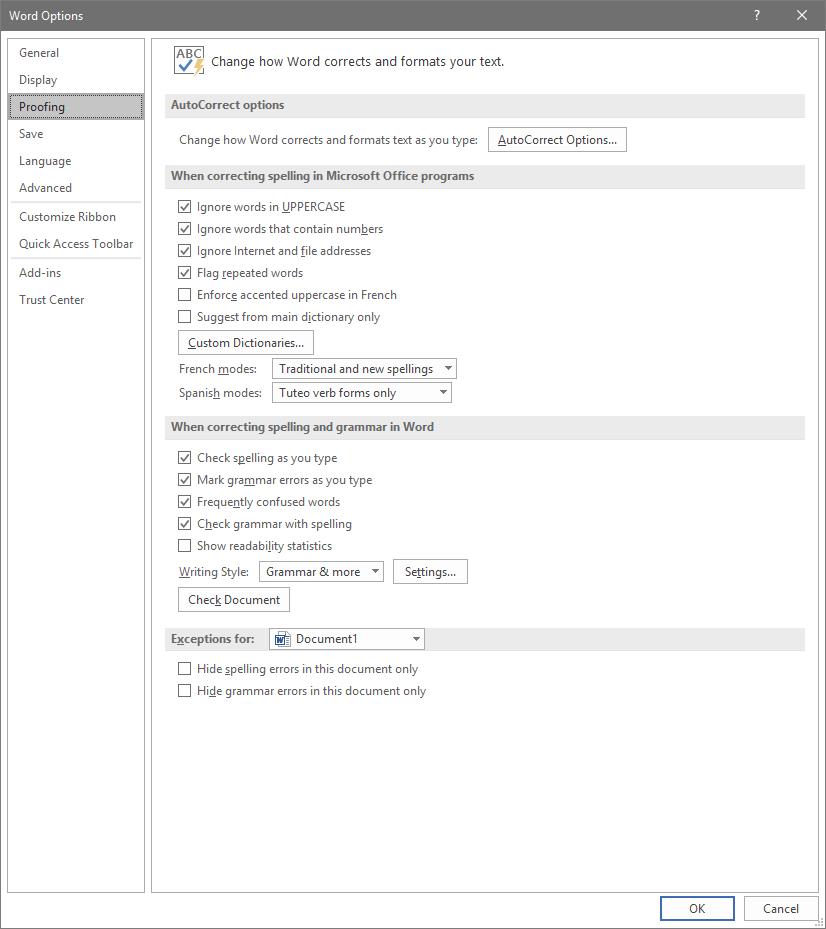
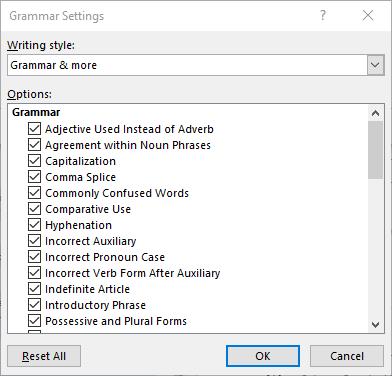
To access these rules, select File, and from there, Options. A new window should pop up with a Proofing option in the list. That page looks like this:

Adjusting AutoCorrect

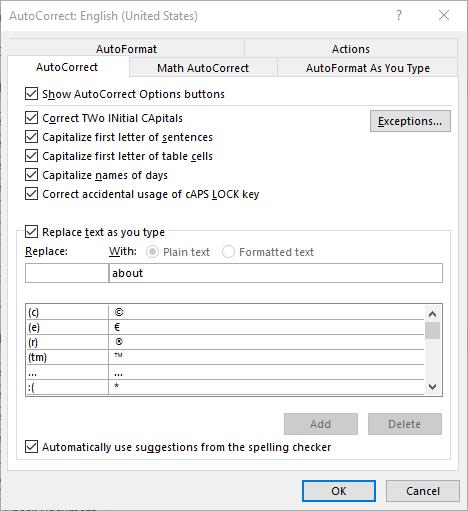
Here, you can alter a variety of proofing options, including your AutoCorrect Options. Clicking that button will present you with another window.

This window allows you to set your AutoCorrect rules, identify any exceptions you might want to make, and review how misspelled text can be automatically revised.

Establishing Grammar Rules

Returning to the Proofing List window, you also have other options that allow you to adjust Word’s corrections. For instance, clicking the Settings… button under When correcting spelling and grammar in Word provides another window. From here, you can control which grammar rules Word will flag or ignore in your copy.

Stop Worrying About Word Changing What You Write

By implementing these changes, you can prevent small annoyances from interrupting you as you work with Microsoft Word. This way, you can accomplish more without having to worry about dealing with automatic corrections again.

For more tips on how to best leverage your solutions to save you valuable time and money, subscribe to our blog!

218223946_productive_400.jpg

Three Ways to Be More Productive

218223946_productive_400.jpg

Many people can find it challenging to constantly remain productive, which is only understandable. Nobody can be firing on all cylinders all the time. However, this doesn’t mean that there aren’t ways that you can optimize your productivity. Here, we’ll review three general approaches to improve your productivity, with examples describing how to enact each.

1. Prioritization

One of the keys to productive work is to work smarter, not harder. By identifying what is most pressing to accomplish or otherwise needs to happen first, you can inherently increase your productivity.

Ignore Inspiration

For instance, one of the biggest causes of procrastination is taking in a project in its entirety. Seeing the entire scope of an undertaking can be intimidating, which often makes people feel as though they need to be “inspired” before they will be able to accomplish anything.

This is untrue, but can be a difficult impulse to resist. If you catch yourself falling back on this excuse, try focusing specifically on a certain aspect or piece of your greater responsibility. Once this portion is completed, you’ll most likely be motivated to continue. In essence, don’t wait to be inspired… inspire yourself through what you accomplish.

Leverage Prioritization Strategies

Another common cause of procrastination is indecision as to what aspect of a project to tackle first. Again, identifying the most important or pressing activity makes it much easier to make this decision, and there are a few ways that you can do so.

One way is to leverage something called the Eisenhower Matrix. It can be used to sort tasks based on their urgency and importance, advising you on how a task should be approached – if it should be done now, planned for, delegated to someone else, or eliminated. This tool can help you avoid spending time on activities that ultimately don’t matter as much as others, optimizing how you spend the time you have. The Pareto Principle, or the 80/20 Rule, is another means of spending your time more intelligently. By identifying the most important 20 percent of their tasks and minimizing the remaining 80 percent, many people use this principle to spend the most time on their most impactful activities.

Save Distractions for Later

We’ve all experienced that moment where, in the middle of one task, we suddenly have an idea for another. While this new task may be valuable or important, it can also hurt your operations by interrupting the one you’re engaged in at the moment… but again, this thought also needs to be addressed. Many people resolve this dilemma by creating a distraction list. Rather than suspending what they are working on, these people simply take a moment to jot down this idea for further consideration after their task is done. This means that they aren’t jumping between unfinished tasks each time a new idea pops up.

2. Preparation

Once you have your tasks organized properly, you need to ensure that you have properly made preparations to attend to them. Some of these preparations may sound counter-intuitive, but are no less crucial to your efforts.

Make Sure You’re in Order

If you aren’t ready to be productive, you aren’t going to be no matter what you try. Therefore, you need to be taking care of yourself, as well as your technology. You need to be healthy and rested to reach your potential, which means that self-care is a must. This also means that you should be strategic in how you approach your responsibilities. If you know that you tend to have a period of low energy in the late morning, it’s probably beneficial to avoid scheduling intensive tasks for that time. In addition, you need to be sure that you’re up-to-date on how things are done. The more knowledgeable you are, the more efficiently you’ll be able to make decisions, and the faster processes will move along.

Expect to Be Interrupted

The best-laid plans of mice and men often go awry, as they say. This means that you should anticipate other things to interfere with your established work schedule. What if another task pops up, or a task takes longer than anticipated? Taking these kinds of challenges into account will allow you to figure out a solution preemptively, or at least a plan that allows you to adjust and adapt.

Learn from Everything

We’ve all been taught the value of learning from our mistakes – examining situations in which things went wrong, identifying why, and avoiding those circumstances in the future. However, this is only half of what you should do to optimize your productivity. You also need to identify why your successes were successful.

Once you have completed a project or process, take some time to examine it. What about it worked well, and how could that be made better? Was every aspect necessary, or could some of it be eliminated or streamlined? Doing so will allow you to further optimize your procedure to be even more productive the next time.

3. Cheating!

In fairness, these strategies aren’t “cheating” so much as they are methods of working smarter. This way, you can make sure that your tasks are accomplished without expending more resources than they need – including your energy.

Subdivide Your Tasks

Remember the prioritization strategies we discussed above? This is a similar activity, in that you take a larger concept and divvy it up into each step that needs to be completed. Instead of putting them into a matrix or focusing on a specific set of them, the idea here is to simply make your tasks appear more achievable.

Let’s say you have to plan a work event. This alone is a significant responsibility, and can be overwhelming to approach as a whole – where to start? However, you can make your process much more comprehensible by going about it piece-by-piece, effectively expanding your task into a complete to-do list. While this does give you more tasks, they will be much easier to attain and progress with. So, instead of “Plan Party for Greg’s Retirement”, your list might include:

  • Buy decorations
  • Buy card
  • Buy ice cream cake
  • Hide cake in freezer
  • Have team sign card
  • Put up decorations
  • Take out cake
  • Send email to team to gather

More tasks, but much easier to follow nevertheless.

Leverage Shortcuts

There are a great many ways that your technology can offer an easier way of doing things. Naturally, keyboard shortcuts are one example of this, but so is automation. Let’s face it, any time you can save by having your technology handle something is time that you can then spend being productive elsewhere.

Eliminate Inefficiencies

How much time do you spend debating your options for truly inconsequential decisions during the day? Chances are, it’s more than you’d like to admit. The fact of the matter is that many of the choices that we are faced with aren’t all that impactful. Eliminating as many of these choices as possible will allow you to reserve your decision-making skills for the times that you really need them.

Email is another notorious source of lost productivity, simply because people don’t use it as efficiently as they could. It is too common for what should be a very brief and simple correspondence to take far longer than anticipated. Ironically, this is often because the people involved are trying to be brief.

Instead of cutting corners on your next email, invest a few minutes into including more specifics. Don’t just say you want to meet – identify the topics to be discussed. Don’t leave the time of the meeting open-ended, offer a few availabilities. While it takes longer to write, one email written this way will keep you from having to read, write, and send a few more.

Finding Your Groove

Clearly, there are many aspects to consider when you’re trying to be more productive, and some may be more effective for one person over another. A bit of experimentation will help you to land on the approach that works for you.

NuTech Services can help by providing the solutions that enable some of these methods. Reach out by calling 810.230.9455 to learn more about these solutions.

85140760_S_time_400.jpg

Tip of the Week: 3 Ways to Optimize Your Time

85140760_S_time_400.jpg

Time always seems to escape so many of us. What should be easily accomplishable in a morning can easily stretch to the afternoon, for what seems like no reason. The hard truth is, it isn’t time’s fault… it’s our own bad practices. For today’s tip, we’re going over how you can fight these tendencies to optimize your use of the time that is available.

1. Prioritize

One of the biggest time sinks to be found in any business is the simple act of deciding what to work on next. We’ve all been there at some point: having finished one task, we suddenly reference our to-do list and encounter the same problem as a kid has in a candy store… too many options.

Taking a few moments at the start of every day to organize these tasks can greatly improve how you spend your time throughout the rest of the day, and can ultimately lead to far less waffling later on. With a set process laid out, you no longer have to make the decision over what to work on next – it has already been made.

To create this order, look at everything you have to work on and establish how urgent each task is compared to the others. Deadlines are a handy way to help establish this, or if someone else in your organization needs it before they can continue their work. Identifying these qualities and ordering your tasks accordingly from the start is a small time investment, especially when you consider the impact it can have on your productivity later on. Utilizing a communications and collaboration solution can help you establish the organizational priority of each of your tasks with the help of your team.

2. Habitually Limit the Time You Spend on Rote Tasks

There are always those tasks that pop up throughout the day that seem insignificant at the time. Take checking your email, for example… how long does it take to do that? However, checking email and a variety of other tasks can quickly grow from a momentary activity to an extended process.

After all, there’s always the chance that briefly responding to an email could pull you into an extended and time-consuming debate.

Furthermore, some of these tasks carry the expectation that you will immediately drop what you’re doing to take care of whatever’s needed. Emails are notorious for communicating this urgency, whether or not it was intended. Regardless, it puts pressure on the employee to switch their focus, which hurts productivity.

Instead, establish a practice of setting a concrete period out of your day where you will check and respond to your email, or whatever task it is that applies to your situation. Actually schedule this time into your day, using the business management solution that your company has in place to control schedules. Outside of that time, leave that task alone… if an email’s contents are truly that important, you’ll find out about them some other way before long.

3. Delegation and Outsourcing

We get it, business matters and activities tend to be kept close to the chest. After all, if you can’t trust yourself to do something right, who can you trust? Who else has the incentive you do, to do the best job possible?

Frankly? Someone you’ve hired to do a job.

Delegation can be difficult, of course, but only if you don’t trust those around you. However, there are plenty of resources out there, both inside your business and available through outsourcing, that could do exactly the job that needs ro be done. As a result, you can divert your focus to tasks that need it more, trusting the resource to produce.

You may have to put in a bit of time picking the best resources, especially when outsourcing, but the results will be well worth the time.

NuTech Services can help you put these practices into action, with the added effects of the solutions that can be implemented to make these practices easier. Give us a call at 810.230.9455 to further discuss any of the solutions we’ve described here, and for more handy tips that could help you better leverage your time, subscribe to our blog!.

60125677_money_msp_400.jpg

I Never Need to Call My Managed IT Provider, Do I Need Them?

60125677_money_msp_400.jpg

Business owners; ever sit down and run through all of your expenses and ask yourself (or your accountant) what you are actually paying for? We’ve been there. Technology expenses like hardware, software licensing, cloud hosting, management and maintenance, support, and service agreements all add up quickly and it makes it easy to question what you can trim to save money without sinking the ship, especially when you rarely need to call your current IT provider.

What Am I Paying For?

If you utilize a managed service provider (MSP) who handles the maintenance and support of your IT infrastructure, it’s likely that you pay a flat monthly, quarterly, or yearly rate to cover the upkeep of your workstations, servers, and network infrastructure. This model has become increasingly common and it makes a lot of sense; it takes a decent amount of maintenance to keep a business network running smoothly, and when it’s handled proactively there are fewer issues in the long run.

One thing to note; we can’t account for every Michigan provider, because everyone has their own way of quoting and billing for their IT service, but typically if you get a monthly flat-rate bill per user or per device then your IT company is providing some level of service on a regular basis. That may or may not be all-inclusive support for end users, cover hardware failures, etc. We’re not really here to nitpick the minutiae of an agreement though, what’s important is that you are getting what you pay for, and perhaps more importantly, that your IT is handled in a way that isn’t setting you up for failure down the road.

All that out of the way, when reviewing your regular technology bills, when you see that line item for maintenance and support, you might look back at how often your team had to call for support or put in a service ticket over the past several months. If your IT has been running smoothly the past few months, you probably have that one big question…

It’s the Pareto Principle

A little tangent here; but you know when it’s time to pay that homeowner’s insurance bill, and you think to yourself, “Man, I didn’t have to use this at all this year. I’d probably feel a little better writing this check if the insurance had to pay for a new roof or to recarpet my basement.” You are not alone, and that’s the same feeling you might get with good IT management.

Back on track, the Pareto Principle, more commonly referred to as the 80/20 rule, states that 80 percent of the effects come from 20 percent of the causes. Basically, it’s an ounce of prevention equals a pound of cure.

That’s exactly how IT works. If you set everything up right, configure it and document it well, and then carefully monitor it, you won’t be running back and forth to keep fixing it. It’s typically much more cost effective to manage and maintain your network than it is to set it and forget it, and only come back when something goes horribly wrong.

If your IT is running smoothly, and your users are productive, and your security is passing every audit with flying colors, then that ongoing management and maintenance is performing exactly how it is supposed to.

It’s not like insurance, where you continue to pay for the peace of mind that when something happens you are covered. Instead, you are paying to prevent something bad from happening in the first place.

We hope this helped explain how most managed IT bills work. If you have questions, or want to know how we can help keep your organizing running smoothly, don’t hesitate to reach out to 810.230.9455.