413692021_forward_400.jpg

You Shouldn’t Let Opportunity Cost Dictate Your Path Forward

413692021_forward_400.jpg

Have you ever felt the anxiety of missing out on something for no real logical reason? This fear, also known as the “fear of missing out,” (or FOMO) is applicable not just in social situations, but in the business and professional world as well. The concept might seem rather juvenile in nature, but it is a very real thing that can influence your actions… and not always in a positive way.

To help reframe this juvenile outlook on the acronym, perhaps a better way of looking at this concept is to call it the “fear of missing opportunities.” In this sense, FOMO could mean losing out on a potential business venture because you were simply too late to jump on board. Maybe your dream client signed on with one of your competitors, or you missed out on investing in a local organization only to find that the organization becomes wildly successful and, much to your chagrin, they remember you turning them down all those years ago.

Now, how does this influence your behavior as a business professional? Maybe you take on any and all opportunities, despite not having nearly enough time or energy to keep up with these obligations. This inevitably leads to burnout, and when you later have to cancel obligations, it disappoints the parties involved. It’s not a good look for you or your company.

There is also the direct opposite of FOMO called the “fear of better options,” which is when you let the possibility of better options get in the way of making important decisions. Maybe you don’t want to commit to something in particular because there is always something bigger and better around the corner.

This “fear of better options” can also influence your decisions when it comes time to purchase technology for your business. What if you purchase technology now, only to find that a better model is going to be released next year? What if you implement the wrong solution? These questions can nag at you in the back of your mind and paralyze you into inaction.

The best way to handle the “fear of missing opportunities” and “fear of better options” is to take a close look at the opportunity cost of said interactions or options. For example, let’s say that you want to do business with a particular client. However, the workload that you pull for that client is not necessarily in line with the compensation that you receive. The client has been loyal for years, so you are afraid that you might be missing out on opportunities. In this case, the numbers don’t lie; if you can make the same amount of money off of other clients by doing less work overall, then you should do it. The opportunity cost of working with one client is simply too great to justify clinging to them.

Applying this once again to technology, maybe you are in the market for a new software solution, and it’s one that promises immense boosts to your productivity. However, there is no real reason or need for you to upgrade–at least, that’s what the logical part of your brain is telling you. But there’s that nagging “what if?” in the back of your mind that makes it hard to resist. You again perform the opportunity cost analysis; is purchasing this now going to have real, long-term effects on your business’ growth? Or could you wait a little while longer and get it when you are in a better position to do so?

NuTech Services wants to help you make these difficult technology-related decisions. There should be no FOMO or FOBO with technology when you work with a managed service provider. We do our market research and help you get the best options that fall within your company’s means. To learn more, reach out to us at 810.230.9455.

115325381_smartphones_400.jpg

A Few Budget Options for Your 2020 Smartphone Search

115325381_smartphones_400.jpg

For the past couple of weeks we’ve taken a look at the 2020 flagship smartphones as well as some innovative new devices that are available now. This week, we will take a look at some of the budget options that are available to consumers. Not everyone has $1,000 to pay for a smartphone, but there are some pretty solid options out there that can provide a sufficient user experience to meet people’s mobile challenges. Let’s take a look at some of the options.

Past Flagship Phones

We should start by mentioning that some of the best options are actually purchasing flagship phones from the past couple of years. Most flagship smartphones from 2018 have the same specs as many of the mid-range phones today so they can be had at a budget price point. These devices tend to not only have comparable specs, they typically have superior build quality, run on better processors, and offer a user experience in line or better than the experience they would get on some budget smartphones. 

Some options to consider are the Samsung Galaxy s9 and s9+, LG’s V50 thinQ, the iPhone X, and the Google Pixel 3 XL. The only drawback of older phones is that they may not get the same amount of software upgrades that a newly-purchased phone would. Either way, you might get the most value out of an older flagship phone. 

Apple iPhone SE

The 2020 version of the iPhone SE still has the body of an iPhone 8, but the internals are upgraded and it presents users that can’t afford the $1,000 iPhone 12 Pro Max to get a new iPhone at a reasonable price point. The new SE runs iOS 13 on the A13 Bionic chipset to offer the user experience Apple users expect out of a budget iPhone. 

Apple iPhone SE (2020)
Body: Aluminum with Gorilla Glass front and back
Display: 4.7-inch Retina IPS LCD (~326 ppi)
OS: iOS 13
Chipset: Apple A13 Bionic 
Memory: 3 GB RAM
Expandable Memory: No
Cameras: Rear – 12 MP (wide); Front – 7 MP
Sounds: Stereo Speakers, No Headphone Jack
Battery (endurance rating): 4,500 mAh (87 hours)
Security: Fingerprint reader
Miscellaneous: Accelerometer, Gyrometer, Proximity, Compass, Siri assistant
Other versions: none

Samsung Galaxy A51

Samsung has 10 separate devices in their A-line. They range from the A01 to the A71, but the Galaxy A51 is priced at the upper end of the budget space. The A51 features a 6.5-inch Super AMOLED display, expandable storage, and a 3.5mm headphone jack. It is a great option if you are looking for a phone that gives you a decent user experience while also turning back the clock a bit. Available in Prism Crush Black, Prism Crush White, Prism Crush Blue, or Prism Crush Pink, the Galaxy A51 can be found on most major carriers and unlocked online.

Samsung Galaxy A51
Body: Plastic with Gorilla Glass 3 front, plastic back
Display: 6.5-inch Super AMOLED (~405 ppi)
OS: Android 10
Chipset: Octa-core Exynos 9611
Memory: 4-8 GB RAM
Expandable Memory: microSDXC
Cameras: Rear – 48 MP (wide), 12 MP (ultrawide, 5 MP (macro, 5 MP (depth); Front – 32 MP (wide)
Sounds: Loudspeaker, 3.5mm headphone jack
Battery (endurance rating): 4,000 mAh (86 hours)
Security: In-display fingerprint reader
Miscellaneous: Accelerometer, Gyrometer, Proximity, Barometer, Compass, Bixby assistant
Other versions: Samsung Galaxy A-series

Google Pixel 4a 5G

A 5G-capable budget smartphone, the Google Pixel 4a 5G features a 6.2-inch OLED display and has specs that are better than its price point would suggest. Its camera experience, specifically, is much better than phones found at this price. Available in Just Black and Clearly White, the Pixel 4a 5G is available in the Google store or from many major service carriers.

Google Pixel 4A 5G
Body: Plastic with Gorilla Glass 3 front and plastic back
Display: 6.2-inch OLED, HDR (~413 ppi)
OS: Android 11
Chipset: Qualcomm Snapdragon 765G
Memory: 6 GB RAM
Expandable Memory: No
Cameras: Rear – 12.2 MP (wide), 16 MP (ultra wide); Front – 8 MP (wide).
Sounds: Stereo Speakers, 3.5mm Headphone Jack
Battery: 3,885 mAh
Security: Fingerprint reader
Miscellaneous: Accelerometer, Gyrometer, Proximity, Barometer, Compass, Google Assistant
Other versions: 4G LTE version

Would you consider buying a budget device to use as your daily smartphone? Let us know in the comments section below.

302491467_foldable_smartphone_400.jpg

Flip and Fold: Innovative New Smartphones

302491467_foldable_smartphone_400.jpg

Last week, we explored the flagship smartphone market. This week we thought we would explore some innovative new devices. There have been some advances in some of the technology used by smartphone manufacturers to create cool new features. Today, we take a look at some of these devices. 

Samsung Galaxy Z Fold2

Samsung’s major contribution into the folding smartphone market is the extraordinarily expensive Galaxy Z Fold2. While the device is impressive with its two full displays and three camera sets, there are some questions about who this device is for. 

Basically the biggest benefit is that the phone opens up to a 7.6-inch tablet. That benefit is substantial, of course, but without dedicated apps for that aspect ratio, it may only be valuable for people who want the best folding smartphone on the market, which this currently is. 

When folded it has a 6.23-inch Super AMOLED screen that functions much like your standard mid-range smartphone would, but when you unfold the Fold2, you get a 7.6-inch Dynamic AMOLED display. The rest of the phone is as you would expect. It features a five-lens camera platform, a 4,500 mAh battery with fast charging, and an in-display fingerprint scanner for security. The Z Fold2 is available in Mystic Bronze, Mystic Black, and a Thom Browne Edition Grey from most major carriers. 

Samsung Galaxy Z Fold2
Body: Aluminum with plastic front andGorilla Glass 6 Back
Display: Folded: 6.23-inch Super AMOLED Unfolded: 7.6-inch Dynamic AMOLED 2X (~373 ppi)
OS: Android 10
Chipset: Qualcomm Snapdragon 865+
Memory: 12 GB RAM
Expandable Memory: No
Cameras: Rear – 12 MP (wide), 12 MP (telephoto) 2x, 12 MP (ultra wide); Front (Folded) – 10 MP (wide); Front (Unfolded) – 10 MP (wide).
Sounds: Stereo Speakers, No Headphone Jack
Battery (endurance rating): 4,500 mAh (87 hours)
Security: Fingerprint reader
Miscellaneous: Accelerometer, Gyrometer, Proximity, Barometer, Compass, Bixby assistant
Other versions: 5G version

Samsung Z Flip and Motorola RAZR 5G

Two devices that are of similar form factor are the Samsung Z Flip and the Motorola RAZR 5G. Like the flip phones of old, each of these devices fit in the palm of your hand and fold virtually in half. The difference, of course, is that today’s version of the flip phone flips into a massively powerful smartphone.

The Samsung Z Flip doesn’t feature a large external display like the RAZR (which we’ll talk about in a minute). It’s 1.1-inch numeric display doesn’t really have a lot of function, but when it’s open, it becomes a 6.7-inch smartphone. Like the other premium devices, it runs on Android 10 on a powerful Qualcomm Snapdragon 865+ processor, with 8 GB of RAM. The Z Flip provides a high-end smartphone experience in a device that folds in half, it’s that simple. 

The Motorola RAZR 5G looks like the iconic Moto RAZR did in the era before smartphones were king. For all of the RAZR’s nostalgia it seems to spec-out significantly lighter than the Z Flip. It features a 6.2-inch P-OLED screen that folds up and a smaller display on the outside of the folded phone. It runs Android 10 on a Qualcomm Snapdragon 765G chip and comes with 8 GB of RAM with 256 GB of onboard storage space. 

Let’s take a look at the complete specs of these devices:

Samsung Galaxy Z Flip
Body: Aluminum with Plastic Front and Glass Back
Display: Folded: 1.1-inch Super AMOLED; Unfolded: 6.7-inch Foldable Dynamic AMOLED (~425 ppi)
OS: Android 10
Chipset: Qualcomm Snapdragon 865+
Memory: 8 GB RAM
Expandable Memory: No
Cameras: Rear – 12 MP (wide), 12 MP (ultrawide). Front – 12 MP (wide)
Sounds: Loudspeaker, No Headphone Jack
Battery (endurance rating): 3,300 mAh 
Security: Fingerprint reader
Miscellaneous: Accelerometer, Gyrometer, Proximity, Barometer, Compass, Bixby assistant, IP68 dust/water resistant
Other versions: No

Motorola RAZR 5G
Body: Aluminum with plastic, Gorilla Glass 5
Display: 6.2-inch P-OLED (~373 ppi)
OS: Android 10
Chipset: Qualcomm Snapdragon 765G
Memory: 18 GB RAM
Expandable Memory: No
Cameras: Rear – 48 MP (wide)
Sounds: Loudspeaker, No Headphone Jack
Battery (endurance rating): 2,800 mAh
Security: Fingerprint reader
Miscellaneous: Accelerometer, Gyrometer, Proximity, Barometer, Compass, Bixby assistant
Other versions: RAZR (2019)

LG Wing

The last device we will look at today is the LG Wing. The Wing is interesting because out of the box it looks like your typical smartphone. When you get it into your hand however, you soon see what the big hub-a-loo is. With a flick of your thumb, you can turn the device’s 6.9-inch screen horizontally to expose a second smaller 3.9-inch screen. You can use both screens independently or simultaneously within the same app that supports the content distribution.

The Wing’s hardware isn’t quite flagship quality, but it is pretty good. The quirky device runs on  Qualcomm Snapdragon 765G and comes with 8 GB of RAM. It is built from solid aluminum and Gorilla Glass 5. With it’s 4,000 mAh battery most solid users will get about a day out of it if they are consistently using the dual displays (why wouldn’t you if you had this phone?) The tri-camera setup includes a 64-megapixel wide angle lens and dual ultrawide angle lenses of different speeds.

The LG Wing is available in Aurora Gray and Illusion Sky and should be available on most carriers by the middle of November 2020. 

LG Wing
Body: Aluminum with Gorilla Glass 5 Front and Back
Display: 6.9-inch Dynamic AMOLED 2x (~511 ppi)
OS: Android 10
Chipset: Qualcomm Snapdragon 765G
Memory: 8 GB RAM
Expandable Memory: Yes (microSDXC)
Cameras: Rear – 64 MP (wide), 13MP (ultra wide), 12 MP (ultra wide) Front – 32 MP (wide)
Sounds: Loudspeaker, No Headphone Jack
Battery (endurance rating): 4,000 mAh (87 hours)
Security: In-screen fingerprint reader
Miscellaneous: Accelerometer, Gyrometer, Proximity,Compass,, IP54 dust/water
Other versions: None

Do you think these devices are cool? Would you consider forking over $1,000 for one this year? Leave your thoughts in the comments section below.

96238327_managed_it_400.jpg

Small Businesses Make Progress with Managed Services

96238327_managed_it_400.jpg

For a lot of businesses, 2020 has seen some major challenges. Many SMBs feel like they are in a snow globe attached to a paint mixer that is always switched on. With all the problems laid out in front of them, many businesses have decided that in order to protect their business that they would subscribe to a strategy of proactivity. Let’s take a look at a couple of ways managed services help keep you ahead.

What is it to be Proactive?

It’s all about preventing issues and risk. Being proactive is simply action taken after a risk assessment. Many times, risk is inherent, so being proactive is just managing situations to keep risk at bay. It goes without saying that taking proactive steps, especially in business, can be some of the most effective strategies to get ahead. Why is this? It comes down to time. 

When a person sees a problem and fixes the problem, the time that is spent fixing the problem is waste, especially when taking proactive action could eliminate the problem in the first place. Managed services are predicated on this very concept. The more you do to keep problems from presenting themselves, the more time there is to be productive. We measure this in uptime.

Downtime, the Business Killer

Your business isn’t Google. It isn’t Google in 2013. That was the year that Google went down for almost five hours. Imagine five hours without Google! It cost the company–in 2013–an estimated $545,000. Now, Google can afford that, but it just illustrates how expensive downtime can be. It can be problematic in several ways, including:

  • Customer frustration – Downtime is extremely problematic for your customer relationships. Not only does extended downtime flood your business with calls and messages, it also fosters distrust. 
  • Staff frustration – For many small businesses, employees wear a couple different caps. One of those caps, that many workers would rather not wear, is that of a customer service representative. If someone on your production team can’t get at the resources they need to do their jobs, you are paying them to either be PR or janitorial staff. Either way, they tend to get impatient pretty quick when they can’t do what they were hired to do.
  • Exorbitant cost – The two previous examples fuel rising costs. If you are paying your employees and they aren’t producing anything tangible, you are losing money, period.

Limiting downtime is a priority for every well-run business, otherwise you are just throwing away money. 

Proactive Services

At NuTech Services, we have a couple proactive solutions that can really benefit your business. They include:

  • Remote monitoring – By remotely monitoring your network and infrastructure, our expert technicians can see if there are inconsistencies, infiltrations, or irregularities that we can take care of before they become problematic. By staying ahead of hardware issues and monitoring for malware and other network-related issues, you avoid the downtime it takes to fix these issues when they come to a head.
  • Cloud computing – Another option is to take your computing infrastructure offsite. Cloud solutions often come with comprehensive management baked into the price so that your employees will have anytime, anywhere access to the data and applications they need. 
  • Patch management – Software vulnerabilities can be exploited by hackers and cause significant devastation on your company’s network. By updating all of your software systems with the latest updates, you mitigate the risk that comes from running older versions of software.

Proactivity doesn’t just happen, you have to make it happen. If you would like to stare down some of the biggest risks to your technology and data, and improve your business’ uptime, call us today at 810.230.9455.

voip_195901151_400.jpg

Is VoIP Really More Cost Effective?

voip_195901151_400.jpg

Every business can use some cost reductions. Most businesses have seen their margins shrink and would love to save some money, especially when it seems like as soon as it’s made it’s heading right back out the door. One way businesses can shave off their operational expenses is by shifting their business’ telephone system to a VoIP system. 

What is Voice over Internet Protocol?

Traditionally, telephones work by sending electricity through the phone wires and phone lines and having it converted back into sound. Today, they have figured out how to do the same process through the Internet. Sounds are sent as data packets over Internet wires and then they are unpacked to make sounds again. VoIP is the product that has come from this innovation. Basically, where you once had to have an expensive business telephone system hardwired to your place of business, you can now do the same for a fraction of the cost by using your company’s bandwidth to send and receive calls.

How Does VoIP Work to Save Me Money?

VoIP presents several options that work to save your business money. They include:

You’re Paying for One Less Thing

Your business telephone system has worked, but the cost is high. Of course, you’ve needed it, but today, VoIP offers just as much in the way of features as a dedicated telephone system, but it does it through your Internet connection; a service that you almost assuredly have and use regularly. 

VoIP is Easier

Since VoIP is delivered via your Internet connection, your staff no longer needs additional infrastructure–such as a wired connection for every phone–to be able to make calls. You can scale your hosted VoIP solution up and back as you need. What’s more, for many solutions you can utilize your staff’s personal devices as reliable work phones through the use of a mobile app. That’s much easier.

VoIP is More Efficient

Most VoIP solutions enable you to provide them with an auto attendant feature that provides directions to callers. This reduces the time that people need to be on the phone. Clients get connected with the person they are calling, while employees won’t need to deal with their phone ringing and causing interruptions.

There are many other benefits to VoIP solution. If you would like to learn more about implementing VoIP and saving money in the process, reach out to NuTech Services at 810.230.9455!

it_consulting_400.jpg

Reduce Setup Costs with IT Consulting

it_consulting_400.jpg

It’s always exciting when the idea of a business becomes real by finding a space to conduct operations. It’s extra exciting when a business has outgrown its space and has to move into a new space. Whatever situation you are encountering, it can be excruciatingly difficult to affordably move into new offices.

NuTech Services can do several things for any business, whether you are a startup or an established company that’s moving or expanding. Our consultants are trained IT professionals; and, as a result, they can work with you to plan an efficient (and connected) use of your available space.

Moving Offices
When your company becomes too big for its britches you have to get some new ones. The problem is that you can’t just move everything over at once over one day; it’s a process. There are things that you can do, however, to make the move less of a headache. They include:

  • Choosing your Internet service provider – Having the necessary bandwidth to meet your business’ needs is crucial to its ability to run efficiently. If your new place of business needs to be rewired it could take up to a couple of months for it to get completed. At NuTech Services, we have good working relationships with several area ISPs, and can make sure that when it’s time to move in to your new building, you’ll have access to the bandwidth you need.
  • Property Assessment – While there won’t be any furniture or technology in place, walking through the property with our team to get a sense of where the technology will go can be helpful. This will simultaneously provide a chance to ascertain what will go where, and to make sure that all connections are in place.
  • Plan the logistics – If you expect your business to remain functional during a move, you need to plan how it is going to happen. Who is moving the hardware? Do the phones need to be connected? Is all the furniture there? There are over a dozen vendors you have to deal with when you are moving to a new location and making sure everything is squared away logistically is essential to a successful transition.

At NuTech Services, we provide the kind of technological expertise and vendor management services that make us a perfect partner for a rapidly growing company. Call us at 810.230.9455 today to talk to one of our knowledgeable consultants about how we can help make your transition easier.

data_backup_no_disaster_400.jpg

How a Data Backup Can Be Used, No Disaster Necessary

data_backup_no_disaster_400.jpg

Data backup may not directly help you boost your productivity, but it is a core component of any responsible business’ continuity plan. Each year, thousands of businesses that don’t take threats into account are forced to close their doors because they didn’t have a contingency plan in place. For every business that plans for the worst there are two that don’t, either because they see the strategy as too cost prohibitive, or because they just don’t understand the amount of threats that could put their business in the position where they would need to close.

There are several aspects of a backup and recovery strategy that business owners (who do see reason to implement one) have to square away. By breaking the strategy into three core parts, your organization can secure a positive ROI from a backup and recovery system that, with any luck, you’ll never have to use.

Data Backup
Deciding on a backup platform is obviously the first step in the process. There are several strategies a small business can use to cover its assets. They could use cloud storage, network attached storage facilities that use hard disk drives or tape backup drives, or even a manual system where people protect the data by backing it up to a hard drive and then take a copy with them when they leave. No matter what platform you choose to utilize, you have to understand that if you look at your data as an asset, it stands to reason that you would want to protect as much data as you can. At NuTech Services, we offer a comprehensive backup and disaster recovery service that utilizes network attached storage that pushes copies to the cloud in real-time. This not only provides the kind of data redundancy every organization needs, it allows our clients to thoroughly plan their data recovery strategies.

Before we go into recovery, we’d be remiss not to mention that some data simply isn’t important. Small businesses often have a lot of data they collect but don’t do anything with, so it just sits on their infrastructure taking up space. Some businesses look to data analytics to cut down on dark data, but for the small business that doesn’t have a backup strategy, it might just be putting the cart before the horse.

Data Recovery
If you are looking for a positive ROI, this is where it begins. A business needs to establish acceptable parameters for the recovery of their data. To do this, an organization is going to have to establish what are known as their recovery point objective (RPO) and recovery time objective (RTO). Before we elaborate, we should say that if you are in a position where you need to restore a large portion of your data–whether it be because of malware, natural disaster, sabotage, or blatant negligence–you absolutely have to have these plans made (and tested).

The recovery point objective defines how much data your business could reasonably afford to lose in order to be able to sustain operational effectiveness. Recovery time objective is the maximum time you believe you can go without your data before your business fails. Each figure isn’t static throughout your business. Some of your data is more important than other data, of course, and has to be weighted this way. Therefore, some systems that hold more crucial data will have different RPOs and RTOs than less critical systems.

How the System Provides a Calculable ROI
This is where you can put it all together. How do you calculate the return on investment on systems that you hope you will never ever use?

  • Establish your organization’s hourly realized revenue. To do this you take the amount of revenue your organization has taken in over the past year and divide it by the total working hours you and your staff have logged for that time.
  • Figure out how much you would stand to lose both with and without a backup and recovery system in place.
  • Multiply the hourly realized revenue with both scenario-specific figures you’ve calculated in step 2 and take the difference. This number represents the total avoided loss, in dollars.
  • Finally, plug that figure into this formula to measure your backup system’s ROI:

ROI = (Avoided loss – Cost of backup and recovery system x 100%)

Without a disaster hitting your business, you may think that backup and recovery strategies are a waste of time and resources, but the ROI is clear.

If your business is looking for a backup and disaster recovery solution that can seriously save your business in the event of a disaster–something no ROI calculator will ever tell you–call the IT professionals at NuTech Services today at 810.230.9455.

business_money_savings_400.jpg

Tip of the Week: Looking to Save Money? Try These 4 Proven Business Tactics

business_money_savings_400.jpg

Unless you have the good fortune to be running a large, well-funded business, you’ll always want to find ways to cut out unnecessary costs and improve the way your organization functions. When you’re cracking down on your budget, you might notice that even making a small change to your spending could yield quite a large return in the form of savings. We’ve compiled four ways that your business can start making more for less.

Be Mindful of Utilities
You might not notice the benefits right away, but we promise that smart monitoring can yield results. Since nobody is in the office at night, you can turn off lights and monitors that nobody will use. While it might be annoying to make the rounds at the end of the day to turn off unnecessary technology, it can save you quite a bit on your next electric bill. Turning down the heat or air conditioning when nobody is in the office accomplishes the same thing. You can use smart lights and thermostats to conserve energy consumption, and over time these investments will pay for themselves. If possible, arrange your office in a way which helps you get the most natural light from windows to cut down on electricity consumption.

Pay for Skills Rather Than Experience
When you create a job opening, do you include all sorts of qualifications, including a minimum amount of experience required? This is usually how it works since businesses typically look for only the best candidates, but the best candidates usually demand top dollar. If you want to save some money during the hiring process, look for workers who have the skills required to perform their tasks rather than industry experience. Experience is something that they will gain while working for you, so you benefit from bringing them onto your team at an entry level salary, using hard work as an incentive to achieve better pay and benefits.

Recycle Your Unneeded Equipment
Have you ever tried to trade in your old technology to vendors? Doing so can often get you a discount that can make it easier to afford new equipment. You might be surprised by how many companies offer these kinds of incentives, so be sure to ask about it next time you reach out to the organizations you procure your hardware from.

Try Outsourcing as Much as Possible
One of the best ways to make up for shortcomings in either the skills department or your budget is outsourcing. These days, if you can think it, you can outsource it. A particularly great way to save money is by outsourcing the maintenance and oversight of your IT infrastructure to NuTech Services. Our trusted IT professionals know how best to help you get the most out of its technology.

We’re confident that these four methods of saving money can help your business achieve more flexibility in your budget. What are some of the best ways your organization has saved on operational costs? Let us know in the comments.

managed_services_agreement_400.jpg

Is Break-Fix IT Breaking Your Budget?

managed_services_agreement_400.jpg

Most modern businesses rely on specific technology solutions to ensure operations can work as intended. This includes servers for data storage, networks for data distribution, and workstations for employee productivity. Of course, you have to wonder if this is wise; after all, what happens when this technology fails?

Break-fix IT used to be the staple for business technology maintenance. Organizations would use their technology solutions until they broke down, and would only utilize IT when it needed to be fixed. At the same time, companies would have to struggle with downtime–any time when technology isn’t working as intended. This can quickly lead to a time sink in which you’re losing out on possible revenue, all while fixing technology issues that could have been prevented in the first place. These big hits to budgets can make operations difficult even after recovering from downtime.

Managed IT services are an option that modern SMBs have in order to bypass the shortcomings of break-fix IT. Instead of only resolving IT issues as they happen, proactive managed IT aims to take preventative measures to keep problems from happening in the first place. This includes most all solutions that are managed and hosted by a third-party provider, with the intention of removing responsibilities from your in-house team. Unlike your in-house team, who may struggle with managing some aspects of your technology, you can rely on a third-party managed service provider to guarantee that your technology gets the attention it needs.

A good comparison would be comparing an automobile to managed IT services. If your car is making weird sounds, like the engine spitting and sputtering, you’ll naturally want to get it checked for major problems. However, due to the cost of vehicle maintenance, you might choose to forego maintenance. After all, your car still runs, so surely the problem can wait a bit. In this case, it’s better to get the problem resolved quickly before a motor problem leaves you stranded on the side of the road, with both a towing fee and the repair costs.

On the other hand, having your own team of mechanics that can repair and maintain your car for a monthly fee is a better investment, as they will perform the tuneups and the maintenance needed to keep your car in good shape. This is what having managed IT services feels like.

Preventative maintenance can help to keep technology solutions from experiencing hardware failure for as long as possible. No technology lasts forever, so the ideal way to minimize the damage done by hardware failure is to plan for it. By implementing preventative solutions like data backup and disaster recovery, you can limit how much damage downtime causes your organization, and you’ll be able to make the transition to new technology much easier.

Does your business use proactive maintenance to mitigate threats to your business? If not, reach out to us at 810.230.9455.

b2ap3_thumbnail_cloud_computing_lessons_400.jpg

3 Ways Businesses Can Get the Most Out of the Cloud in 2016

b2ap3_thumbnail_cloud_computing_lessons_400.jpgAs the cloud becomes widely adopted by SMBs the world over, companies have come to expect more from their cloud services. If you’re not taking full advantage of cloud computing, then you may be missing out on the many ways that it can help you meet your company’s goals.

According to Forrester Research, there are three goals in particular that the cloud can be leveraged for in order to enhance the operations of SMBs. Consider the following:

  • Decreased administrative burden: One of the biggest advantages of the cloud is its ability to outsource its required maintenance and management to someone outside of your company. Considering how stressed for time most managers are in SMBs, they will appreciate having yet one more responsibility taken off their plate. Think for a moment of all the other, more profitable things that your managers and IT team can do for your business if they’re not being bogged down by managing company files and software solutions.
  • Increased implementation speed: When a business chooses to implement a new solution, they want it ready to go as soon as possible. With the cloud, taking advantage of its many services is as easy as setting up an account for you and your team. Compare this to the effort it takes to install hardware and cables if you want to add a new solution to your in-house IT network.
  • Enhanced security, with minimal expense: Cloud security has improved vastly over the years, along with its affordability. When working with IT professionals like those at NuTech Services, you can protect your cloud offering with as little, or as much, security as you feel you need. This is yet another responsibility that the cloud removes from a manager’s plate.

The one thing that all of these benefits have in common is that they’re part of the public cloud computing option (which is different than the private and hybrid cloud options). While the hybrid and private cloud options have their own sets of benefits, the strength of the public cloud is that it provides organizations the most functionality, while only requiring a minimal amount of maintenance and oversight on behalf of you and your staff.

For the average SMB, the public cloud is the right fit, due to its ease of use. However, don’t let that discourage you from considering other cloud options. For example, a private cloud option is best for a business dealing with sensitive data, like health care records or credit card information. Additionally, the private cloud is good for businesses that have an adequate amount of capital on hand they can use to purchase in-house IT equipment.

At the end of the day, what it comes down to is going with a cloud solution that’s the right fit for your company. After talking with the IT professionals at NuTech Services, you may even decide that the hybrid cloud option is the right fit for your business (which combines the features of both the private and public cloud offerings). Whichever cloud computing option you go with, NuTech Services is here to help with its implementation and maintenance. To go with a cloud computing option that will be utilized to the fullest, give us a call 810.230.9455.

b2ap3_thumbnail_implement_cloud_solutions_400.jpg

Study: The Cloud Can Double Small Business Profits

b2ap3_thumbnail_implement_cloud_solutions_400.jpgIf your business has put off embracing cloud computing as a legitimate method for data distribution and application deployment, it might be time to reconsider why you haven’t integrated a cloud solution yet. A recent study from software companies Exact and Pb7 Research shows that the cloud can provide your organization with a significant increase in both profits and net growth, proving once and for all that cloud business is better business.

Specifically, the study shows that the cloud can potentially double small business profits and help them achieve an additional 25 percent revenue growth compared to businesses that don’t take advantage of any cloud solutions. This study, which was published on August 19th, contains findings that are based on 750 interviews with small businesses, all of which have less than 50 employees. 51 percent of all respondents claimed to use at least one form of cloud computing software, while nearly 30 percent of small businesses in the United States admitted to using three or more cloud applications in the workplace.

In other words, most businesses are adapting to the cloud and using it to improve the way they operate. When asked why they chose to implement cloud solutions, businesses gave these top five reasons:

  1. Security: 32%
  2. Lower IT costs: 26%
  3. Low maintenance requirements, less physical infrastructure: 23%
  4. Easy mobile access: 23%
  5. More productivity and efficiency for end-users: 21%

Additionally, when asked to rate certain aspects of the cloud on a scale of 1 (low) through 5 (high), the average results were:

  1. Easy to use: 4.0
  2. Easier to find information: 4.0
  3. Easier to share information: 3.9
  4. Increased productivity: 3.9
  5. Easier to add and remove users: 3.8

While the reasons why cloud users implement the cloud vary, this proves that there are a number of benefits that this type of computing infrastructure can provide. When considering integrating a cloud solution for your business, you need to ensure that your organization can handle this change in protocol. Changing the way you deploy and manage your data and vital technology systems requires the attention of a knowledgeable professional. Contact NuTech Services at 810.230.9455 to learn more.

b2ap3_thumbnail_companys_it_budget_400.jpg

3 Benefits of Outsourced IT That Let You Do More For Less

b2ap3_thumbnail_companys_it_budget_400.jpgCost drives business, this much cannot be denied. When the technology your business relies on fails, you have to get it repaired or replaced quickly in order to keep the resulting downtime from damaging your business. The traditional method of computer repair is much like when your car is in disrepair. When your technology isn’t working properly, your organization reacts to the problem by calling your friendly neighborhood computer repair guy.

The technician will come to your office and try to fix the technology that is broken. When they figure out they can’t fix the problem on the spot, they will give you a quote. The time and materials of summoning these technicians to the office will cost you money, so will the replacement technology, and most notably, the downtime you accrue. Add that to the variable cost of fixing the malfunctioning technology, and your business has a real problem.

At NuTech Services, we offer a proactive IT support platform that utilizes remote monitoring and management software to ensure that the technology that’s attached to your network, and your network itself, is up and working properly. Additionally, our whole IT services platform is billed in one monthly payment.

If you add it up, you are saving money in every aspect of your business. You not only remove the variable costs of keeping your IT running smoothly, you also get proactive support that in many cases gives you the time to replace hardware BEFORE it fails, saving you from the doldrums of company wide downtime.

The fact is that small and medium-sized businesses need to cut their technology support costs if they want to compete with larger organizations. There are a myriad of benefits that come from a managed services provider like NuTech Services handling the administration and support of your technology. Besides the obvious cost savings, two other huge benefits include:

  • Comprehensive Support: A major speedbump SMBs have when shopping for any service that claims to help their business, is the quality of that service. For those that worry that our managed services are too good to be true, we employ certified and trustworthy technicians that are proficient in finding solutions for today’s most challenging business technology problems.
  • Single Point of Contact: As an alternative from having to manage several vendors, our IT service offering provides you with a single point of contact for all of your technology needs. Since we understand the intricacies of your network, we can get issues resolved faster.

Managed IT services can provide you with many other benefits as well. For more information about how our managed IT services can benefit your organization, call us at 810.230.9455 today.

b2ap3_thumbnail_mobile_data_is_expensive_400.jpg

Tip of the Week: 4 Ways to Cut Down On Your Mobile Data Usage

b2ap3_thumbnail_mobile_data_is_expensive_400.jpgAs the world pushes toward a more mobile era, so too does the workplace embrace Bring Your Own Device (BYOD) with open arms. As such, workers will need some type of network connection in order to access mission-critical corporate data. Therefore, if they can’t connect to a WiFi network, they’ll default to their cell provider’s mobile data plan.

Unfortunately, too much strain put on this asset can quickly drain, or even surpass, your maximum monthly data expenditure. Therefore, reducing your mobile data usage can be a great way to cut down on your expenses and potentially improve battery life. Here are four ways to get started.

5six in blog1Monitor Your Current Data Usage
Before jumping too deep into how to limit your data usage, you first need to identify whether or not you’re using too much data. Chances are that if you aren’t having difficulty staying within your monthly data usage, you don’t need to make many changes to the way you use your device. However, if you find yourself constantly violating your maximum data limit, you’ll know you need to change the way you’re using your device.

Use WiFi Whenever Possible
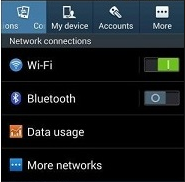
A simple way to lower your use of mobile data is to stop using it whenever WiFi is available. Rather than using up your mobile data plan, you can simply take advantage of any wireless networks in range. While this is convenient, you don’t want to connect to any sketchy wireless hotspots in your vicinity. There’s always the chance that a network can be littered with threats. Therefore, the best way to keep your device secure is to only access connections with passwords and encryption, and to make sure your autoconnect feature is turned off.

Limit Your Media Consumption While Mobile

Though it makes life infinitely more enjoyable to stream music and video entertainment on the go, it can also be putting an enormous strain on your mobile data plan. Instead of streaming music through your 3G or 4G connection, try playing music stored locally on your device. This can prevent your device from consuming too much data too quickly.

Limit Which Apps Update in the Background
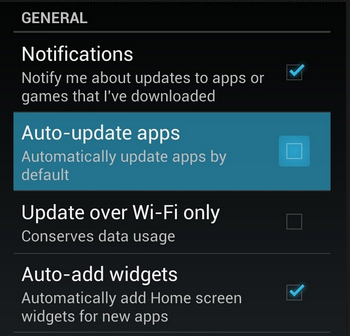
Unless you’ve explicitly configured your device otherwise, your applications will automatically update in the background while you’re going about your daily routine. Unfortunately, this can eat up a ton of data. To prevent this, you can set your device to update automatically when connected to WiFi, or to manually perform the updates yourself.

5six in blog2

If you find that even these four tips can’t stem the flow of your data problem, it might be time to cave in and get an upgrade. This should only be considered as a last resort, since it can help you avoid the overage fees associated with monthly data plans. All it takes is a little awareness of how much data you’re truly using in order to self-police yourself into staying within the confines of your monthly data plan.