totw_laptop_best_400.jpg

Tip of the Week: Is a Laptop the Best Fit for Your Employees?

totw_laptop_best_400.jpg

In today’s working world, not using technology to work on your tasks can be seen as an oddity. Taking this into account, choosing the device that best suits your office’s work style is an important consideration to make. For this week’s tip, we’ll dive into some of the reasons that you may want to standardize laptops in your office.

Reason 1: Mobility
Let’s begin with the most obvious reason laptops are a great option – you aren’t tied to a desk to do your work as you would be with a conventional desktop. Instead, you can just pick it up and take it with you, whether that’s to a meeting on the other side of the office or home for some remote work. I don’t know if you’ve ever seen someone haul an entire desktop workstation around, but if you have, you know that it just isn’t practical to do.

Potentially travelling with a laptop is also much easier. A desktop workstation would need to be carefully stowed in a vehicle, if not shipped to its destination. While it may seem like a hassle at the airport, stowing a laptop in a carry-on is a much more secure and convenient option when all is said and done.

In short, utilizing a laptop makes a lot more sense in an increasingly mobile world than does utilizing its far less mobile cousin, the desktop.

Reason 2: Concision
If the resources are there, one might make the argument that it makes more sense to utilize both a desktop and a laptop – one for the office, and one for home and travel.

Financial considerations aside, there are other issues with this strategy. The major one is the fact that it makes it that much more complicated to ensure that everything you need is where you need it to be, when you need it to be there. There is little that is more professionally frustrating than sitting down to work and realizing that the data you need is on your other device. Hopefully, you have the access to the other device at the time to make the necessary transfer.

While properly utilizing a cloud solution would be another way to approach this difficulty, why use two devices when one will suffice? That way, you can be sure that your employees always have access to the programs and data that they need to be productive.

Reason 3: Consistency
One of the most important considerations for any office technology configuration to take into account is how compatible the many devices it contains are with each other, and the solutions needed to accomplish each day’s tasks. If each employee has a different device, not only is this no longer guaranteed, you have no guarantee that each laptop will have the same shortcuts and features. For instance, if you want to encrypt the data on laptops and allow your staff to sign in with a thumbprint scanner, not all models are equipped with that. Different devices don’t tend to change how complicated it is to manage the devices, but it can vary the experience your users have and limit the policies you can set.

Standardizing your office’s devices becomes much easier when everyone has the same device, which inherently means that everyone has the same capabilities in the office. Of course, if someone needs their device to have more specialized capabilities, they should be the exception. However, for the run-of-the-mill tasks that many are responsible for, the average laptop should suit them just fine.

If you want more help in designing your technology infrastructure and setting it up for prolonged productivity, reach out to NuTech Services. One call to 810.230.9455 is all it takes to start receiving the technology services that you need for success!

focus_prodctive_tech_400.jpg

Focus Your Technology on Producing Efficiency

focus_prodctive_tech_400.jpg

Technology can go a long way toward helping businesses be more productive with their time, but only if the solutions implemented are right and proper for your organization. We’ll discuss three services that you can provide for your business that can maximize productivity with technology solutions.

The Cloud
The cloud has risen in popularity over the years, and it’s because the benefits are simply too incredible for businesses not to adopt the cloud. Many of these benefits are a result of the cloud improving productivity. For example, cloud computing’s flexibility makes it great for use on mobile devices. Users are no longer limited to being in the office, and as long as they can access resources in a secure way, they can get just as much work done while out of the office over the Internet as they could if they were in-house.

Outsourced IT Management
Technology is only worth the investment if you have the time and resources available to properly manage it, as if you fail to take proper care of your technology, it could fail much sooner than you expect it to. The problem is that not all businesses can afford to hire a full-fledged in-house IT department to properly maintain their IT infrastructures. Thankfully, businesses like NuTech Services provide outsourced IT management to businesses with limited budgets who want to turn IT from a capital expense to an operational expense. Even if you have in-house IT resources, you can supplement them with outsourced IT to save time and make opportunities for other employees to get more value out of their employment with your organization.

Collaboration Solutions
There are many solutions out there that are designed to help your organization be more effective at collaboration. Whether it’s Voice over IP, hosted email, or instant messaging applications, your organization can use them to collaborate and share experiences in a way that facilitates cooperation and productivity.

Does your business want to implement technology to focus on improving productivity? NuTech Services can help. To learn more, reach out to us at 810.230.9455.

cloud_host_voip_400.jpg

Is Cloud-Hosted VoIP a Good Value?

cloud_host_voip_400.jpg

Since companies have begun offering services in the cloud, organizations of all types have taken advantage of utility computing in hosted environments. One platform that we tend to see quite a lot of is Hosted VoIP. What makes a cloud-hosted business telephone system more attractive to the modern business owner than one they host onsite? Today we’ll take an in-depth look at the two options.

It goes without saying that having a comprehensive communications strategy is critical for the functionality of your business. Many businesses use traditional phone systems, and they pay handsomely for them. VoIP is a great way to utilize the bandwidth you already pay for to facilitate a business phone solution.

A VoIP system works by transferring sounds into data packets and then transferring them in real-time over an Internet connection. The sound is simply unpacking the data packets. The reason so many small businesses are switching to a VoIP system is that it allows an organization to manage their telephone system cost more effectively.

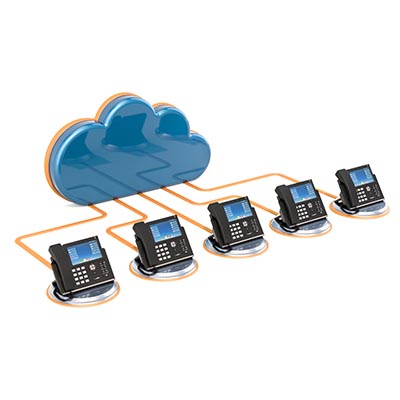
Nowadays there are hosted VoIP options that present companies with a virtual call center of sorts. Essentially, instead of hosting a stand-alone server at your place of business, the telephone system is hosted in the cloud and accessed through a web client.

Before you can consider either VoIP platform, you’ll have to determine what type of control you need over the technology. If you are someone that wants to play with settings and configurations, hosting your own PBX phone server may be the way to go, but if you are someone that doesn’t mind spending a little more per month to have these systems managed for you, a cloud-based VoIP solution should be right for you.

Your average VoIP solution provides your business with a path to cut the often-substantial capital costs of buying, housing, and maintaining an onsite telephony server. Since the provider will absorb the costs of maintenance and the outward reliability of the platform, you can spend less time focusing on managing your telephone system and more time relying on it.

Since VoIP downtime is not an option for the average business, you’ll want to consult with NuTech Services IT professionals to help you find the right solution to fit your business’ needs. Our staff are experts at designing, implementing, and managing computing networks that work for the modern business, so relying on us to help you deploy the right communications platform makes a lot of sense.

For more information about hosted VoIP or any other communication used to improve employee productivity and customer satisfaction, call NuTech Services today at 810.230.9455.

totw_mobile_relationship_400.jpg

Tip of the Week: Use Mobile to Improve Your Work Relationships

totw_mobile_relationship_400.jpg

With more workers opting for mobile solutions than ever before, communications can be tricky to manage for a business. However, is your business’ infrastructure capable of adapting to these new developments in communication technology? You can bet that regardless of where the business takes you, certain applications and devices will always be useful throughout the workday.

An infographic by Newsweaver suggests that businesses rely on smartphones for many reasons. Here are just a few of them:

  • One out of five employees for large organizations are equipped to work away from their desks.
  • As of 2013, three out of five small businesses in the United States have a Bring Your Own Device policy in place.
  • By 2020, four out of five small businesses will have a Bring Your Own Device policy in place.
  • One out of five businesses have found that mobile workstyles have resulted in productivity increases of over 30%.

As a business owner, it’s your responsibility to provide the tools needed for your employees to be productive, whether it’s an application or a mobile device. After all, if you don’t provide your employees with the technology to be successful, they will find other ways to make productivity happen. This could mean them finding their own solutions, opening the floodgates to malware and other data disasters. Any devices used by your business should adhere to its BYOD policy and monitored to ensure they aren’t lost or stolen, along with the data on them.

To this end, we recommend you work with your employees to find the tools they need to be most productive in the workplace. Collect their feedback and apply the knowledge you gain to your business’s current technology situation. Here are some ideas for solutions to consider:

  • Productivity suite software like Microsoft Office and Google’s G Suite
  • Your email client
  • Cloud storage
  • Voice over Internet Protocol for telephony and communication
  • Instant messaging
  • Project management
  • Collaboration suites

NuTech Services can help your business equip itself with all of the best technology solutions for mobile communications and productivity. For more information, reach out to us at 810.230.9455.

top_cybersecurity_threats_400.jpg

Top Cybersecurity Threats Right Now

top_cybersecurity_threats_400.jpg

Bar none, cybersecurity has to be a major consideration for every business owner or manager in business today. The prevalence of people looking to rip your company off has never been higher; and that is the truth for nearly every company that uses the Internet for anything. Today, we take a look at some of the most serious cybersecurity threats that everyone should be cognizant of right now.

Shadow IT
In a lot of ways, productivity is a lot like the thing it produces, money. People will do anything to get more of it. Businesses, have a plan; and, while they also want to maximize productivity and money, they typically don’t put their whole enterprise in jeopardy to get a little bit more of it. Shadow IT is the process in which an employee will download and use a piece of software that hasn’t been tested or passed by a company’s IT administrator to try and get a little more done.

Often times, the employee is just showing initiative, with no real knowledge that by downloading and utilizing a certain off-brand software that they have just put their whole business in danger. This wouldn’t be such a major deal if it was an isolated incident, but studies show that nearly 80 percent of all employees admit to utilizing software that wasn’t selected, tested, and released for use by their IT administrator. These apps may have vulnerabilities that would-be infiltrators can take advantage of. That is why it is important to utilize the software that has been vetted by the company, even if that means losing out on a bit of productivity.

Cryptojacking
There are well over 1,500 different cryptocurrencies, and in 2018 crytojacking, the strategy of using malware to use a target computer’s resources to mine for cryptocurrency was a major problem for businesses. Since this is a computationally complex task, it significantly reduces the computer’s effectiveness and longevity. As a result, cryptojacking has become en vogue for hackers and others looking to mine cryptocurrency without the investment necessary to do it.

Most studies show that the effect of cryptojacking could get way worse in 2019 since the value of cryptocurrency has fallen significantly over the past year. This means more machines mining for crypto are necessary, and thus more attacks. Users are just learning how these attacks are carried out and how to protect their business against them.

Ransomware
While there was a reported reduction in the number of ransomware cases in 2018, it still remains a major concern for any business looking to build a comprehensive network security strategy. Ransomware, of course, is a strain of malware that encrypts parts of or entire computing systems and then demands payment in cryptocurrency in a set amount of time for safe return of the files/access.

Hackers using ransomware have taken to targeting healthcare organizations’ networks for the breadth of the sensitive data they hold on them. They’ve also began to target operational technology systems, since, as with healthcare, costs of restoration of these systems (rather than payment) are prohibitive. This produces a little more urgency to get the problem resolved.

Unsecured Internet of Things
The Internet of Things keeps expanding, but so does the security threats to networks as a result of security-light devices. With more and more devices presenting security problems for businesses and individuals alike, it becomes important to ascertain exactly what devices are present on your network at any given time. Remember, even if a security-less IoT device is connected to a network-attached smartphone, it still offers up a major vulnerability.

While this is a major threat, there has been a push to improve the security of IoT devices as of late. With more security-minded companies developing useful smart products, these concerns will begin to take a back seat. But until that shift has been well documented, you’ll want to be diligent in the manner in which you utilize IoT devices.

Phishing
No business goes very long without getting some type of phishing email. In fact, it is estimated that 156 million phishing emails are sent every day, making it the most used practice by hackers everywhere. The way it works is that since most accounts are secure enough not to be guessed outright, hackers search for ways for people to help them gain access to the accounts they want to get in to. Nearly every successful cyber attack begins with a successful phishing scheme.

A specific example called business email compromise (BEC) which targets specific members of an organization is responsible for over $12 billion in losses across the globe. Once thought to be an email scam that could be mitigated with strong spam filters, today’s phishing scam is taking on a new shape by utilizing text messaging, instant messaging, phone calls, and even the seemingly-benign social media quiz to gain access to business networks.

2019 is lining up to be another stellar year for business technology, and as more tech is used, more threats come with them. If you would like any more information about how to prioritize network security, give our IT experts a call at 810.230.9455 today.

smart_watch_smart_400.jpg

Are Smartwatches Smart Enough?

smart_watch_smart_400.jpg

Smartwatches might be great tools for keeping yourself connected to important information, but they bring with them a considerable amount of security threats. Vulnerabilities can make using smartwatches and other wearable technology dangerous. We’ll examine some of the major features of the modern smartwatch, how hackers can use them to cause trouble, and what you can do about it.

The Smartwatch
The smartwatch market as we know it today has existed for almost a decade, surprisingly enough, but the first smartwatch was developed in the late ‘90s. A smartwatch is seen today as more of a peripheral for a smartphone. They come in several different shapes, sizes, and styles, but they all tend to provide some kind of utility to the user. Here are some of the main benefits of using a smartwatch:

  • Convenience: You can’t beat the convenience of checking your watch and getting access to all kinds of information, like notifications, calendar events, and so much more. Modern smartwatches also give users the ability to search for information, and the processing power of these devices gives smartwatch users the ability to perform several actions that a smartphone can accomplish.
  • Functionality: The latest smartwatches have several features that give users lots of functionality. They can integrate with applications and take advantage of other practical functions, making them as useful as you want them to be. In this way, smartwatch manufacturers continue to push the boundaries of what’s possible with wearable technologies.
  • Discretion: Discretion is probably the most important part of using a smartwatch, as it’s much easier and more discreet to use it than pulling out a smartphone. Most smartphones have the capability to push notifications to your smartwatch, including those from social networks, messages, weather, and so on. More than anything else, it at least keeps you from being rude and checking your smartphone in the middle of a conversation.

Security Issues
The primary issue that comes from wearable technology is that it connects to your mobile device through a Bluetooth connection. Since they also connection to Wi-Fi networks, they are being exposed to two potential ways of being breached. Businesses that prioritize security (read: all businesses should prioritize security) need to be particularly wary of wearables, especially in regard to a Bring Your Own Device policy.

The modern hacker will use any opportunity they can find to hack into a device, and since wearables are particularly vulnerable to this due to the modes of connection they contain, they provide additional access points that create issues for businesses. If a hacker can gain access through an application at the wearable level, it could potentially compromise even the connected device and any network it’s attached to.

Industry experts might agree that the lack of wearable security isn’t a major concern overall, but it’s still something that you should be addressing with your business’ mobile device policy. Here are some ideas to think about:

  • If you are accidentally collecting electronic Protected Health Information (ePHI), you could be putting your organization at risk of breaching healthcare standards set by HIPAA. You should limit your employee’s fitness and wellness data collection on company-owned wearables and devices whenever possible.
  • Be wary of what can happen if you fail to educate your employees about the importance of protecting wearables. Be sure to remind them that they aren’t just putting business data at risk, but also their own individual data. It’s imperative that your employees understand how to best protect these devices.
  • Focus on the management of these devices, as there are no proper anti-malware solutions for IoT devices.

For assistance with planning out a wearable strategy for use with your Bring Your Own Device policy, be sure to reach out to us at 810.230.9455.

recovery_challenges_400.jpg

Tip of the Week: Prepare for These Disaster Recovery Challenges?

recovery_challenges_400.jpg

While it would be nice, not all troubles concerning your data are resolved once a disaster has passed – even if you have a strategy in place. There’s still the matter of having the right strategy, and having it configured correctly. Here, we’ve listed a few considerations you should take regarding your backup (preferably before you need it) to make sure you’re properly prepared.

1. Compliance Concerns
First, you need to be sure that your data is not only stored securely but is also sent back and forth to your backup solution properly. This is especially true if your industry is subject to any government mandates concerning how data must be handled, as the penalties for non-compliance can be just as severe as the influence of data loss would be.

Whether you manage your own solution or leverage a vendor to keep your data securely backed-up, the same severity applies. The size of your business has no influence, either, despite many smaller organizations having a difficult time keeping up with these regulations. These businesses are especially benefited by the availability of outsourced IT resources, as these providers are better prepared to see to these compliances and minimize any risk.

2. Costs and Scalability
It is also important to recognize your needs, including the costs that fulfilling those needs may incur (like how much a cloud provider charges for you to download your backed-up data). Before you select a particular cloud provider, make sure that you have considered all of these charges.

Furthermore, a backup solution that can only keep you safe from major disasters is one that overlooks a huge percentage of the actual issues you are apt to face. Sure, ransomware attacks and fires happen, but so do hard drive failures and other causes of small-scale data loss. Every strategy you enact needs to be documented properly, with useful information shared clearly, succinctly, and actionably.

3. Lack of Management or Testing
If your company is ever in the position that it needs to lean on a data backup, they’re going to need to lean on a leader to ensure that this process goes without a hitch. In many cases, this role would fall on your shoulders – but what if something goes down while you (or whoever is in charge of managing the recovery process) aren’t there?

This is why you need to keep a comprehensive, up-to-date plan prepared for just this occasion, a hard copy ready to be referenced on-site as well as one digitally stored in your backup files.

In addition to this preparation, you also need to make sure that the backups you’ve prepared actually work in the first place. A backup will do you no good if you can’t recover the data from it, after all. Make sure that, just as you would a fire drill, you practice utilizing the backup on occasion.

How NuTech Services Can Help
We have the expertise and capability to put together just this kind of strategy for you and your employees to leverage. That way, you can be confident that your disaster recovery won’t just be a new disaster to deal with. Reach out to us at 810.230.9455 to learn more today.

pro_con_automate_400.jpg

The Pros and Cons of Automating Business Processes

pro_con_automate_400.jpg

Most industries utilize automation to at least some degree. With plenty of benefits that can be taken advantage of, businesses need to remember that they still must be careful about implementing these systems, as failing to do so could cause downtime and negatively impact productivity. Here are some of the major benefits and detriments that your organizations should consider when examining automation.

The Pros
There is more than one application and way to use automation. While the uses are more general than specific, they can be applied to several different kinds of goals or processes, whether it’s customer service or data processing. In this sense, automation can be used in a pretty universal way.

Efficiency
It’s obvious that certain processes take a considerable amount of time to complete, but if they are handled by automated systems, they can be completed much more efficiently than before. In other words, since you don’t have to focus on these tasks, you can instead devote the time to something else entirely. This effectively adds more time to the workday by removing routine tasks that can be handled by an automatic process.

Minimizing Repetition
If someone has to do the same task over and over again, they are doomed to lose interest and make mistakes. If these tasks don’t require focus, then the employees will likely let their mind wander, and productivity can suffer. This makes even a quick task more likely to be repeated multiple times, making it less likely to yield a return on the investment. Automation makes it more convenient and less risky to leave monotonous tasks to employees. Trust us when we say employees will thank you for taking these tasks off their plate and freeing up their schedule for others.

Convenience
When someone reaches out to your business, it’s likely they need your help with something, and they need it fast. If you can’t provide it on a convenient time frame, chances are they will take their needs elsewhere. Automation gives them the ability to get help from a chatbot or other similar automated system without the need to staff someone at all times to address immediate needs. This gives you a better chance at being able to respond to their needs when they reach out to your organization.

Potential Cons
Automation might be quite helpful for businesses, but there are some issues that should be addressed in order to ensure it doesn’t become a liability for your business. For example, some processes are simply too complex for a machine to handle in the same way a human brain can. Most automated systems are limited by design, thus ensuring that they will be limited to the task assigned to them. After all, an automated system’s purpose isn’t being fulfilled if you have to provide constant feedback to it. Here are some ways you can make sure the faults of automation sting less:

  • Use automation sparingly: Some of the services that could be automated likely don’t need to be. This is particularly true for more complex issues. Consider that many of the people who contact your business have a point of contact within your organization and regular requests, meaning that working with a human might not be such a bad thing if they are available at that time. In this way, automation supplements human contact rather than replaces it.
  • Have employees direct the automation: If an automation system can’t perform a task on its own, having employees direct it during more complex tasks can work to mitigate the issue. A complicated request can be made, but still processed and understood with the right direction.
  • Ingrate your automation: You don’t want to stop processes midway. As long as your automation is well-designed and thought-out, tasks can be integrated with automation to ensure they are handled in the most complete way possible.

What are some ways your organization can benefit from automation? Let us know in the comments.

router_botnet_400.jpg

What is a Router Botnet? Find Out Today!

router_botnet_400.jpg

Ordinarily, one of the best ways to protect your organization’s infrastructure is to make sure any and all patches administered to the software you use are applied as soon as possible after they’ve been released. However, patches don’t help against threats that aren’t discovered at the moment they are released. The recent spread of BCMUPnP_Hunter botnet shows that it’s not enough for people to keep patching their systems.

Threat Background
This botnet was initially discovered in September. Since then, it has infected devices to support a huge spam email campaign. BCMUPnP_Hunter is able to zero-in on victims thanks to its ability to scan for potential targets, like routers with the BroadCom University Plug and Play feature enabled. The system can then be taken over by the hacker.

It is assumed that the network created by BCMUPnP_Hunter was created to send out spam emails. The threat creates a proxy that communicates with email servers, allowing attackers to use botnets to generate profit through fraudulent clicks. What’s more is that the malware seems to have been created by someone who has a considerable amount of skill. To make things worse is that BCMUPnP_Hunter also appears to scan from over 100,000 sources, making this botnet quite large.

How Does This Prove That Patches Aren’t Working?
In order for BCMUPnP_Hunter to work as intended, it must target devices that have BroadcomUPnP enabled to take advantage of a vulnerability. The thing is that this vulnerability has been patched since 2013 when it was first discovered, meaning that most manufacturers have issued a patch since then. Therefore, the majority of devices being used by this threat are those that haven’t been patched for some reason or another.

The Lesson Learned
A simple lesson can be learned here. It goes to show that any equipment on your infrastructure that’s not maintained could be putting your business at risk. This includes making sure that you implement patches and security updates as soon as they are released. Of course, they aren’t always broadcast to the public–after all, who would want to admit that the product they have created is vulnerable to attack, and that the vulnerability is being exploited? As a business owner, it’s your responsibility to keep up with the latest threats.

Granted, not all business owners have the time or luxury to focus on something like this. For those who want to minimize the threat posed by vulnerabilities, give the IT professionals at NuTech Services a call at 810.230.9455.

totw_business_wifi_better_400.jpg

Tip of the Week: Improve Your Business’ Wi-Fi

totw_business_wifi_better_400.jpg

For many businesses, a wireless network connection plays a large role in what they do. The people who make your organization work require access to a continuous Internet connection to ensure collaboration can happen with minimal trouble, but it also means that more productivity can happen throughout the workday on your employees’ terms. Therefore, the problems that come from a poor wireless connection can present a considerable hurdle for your business to overcome.

We’re here to help your organization make better use of its wireless connection.

The Router
Your router will determine the general range of your wireless network, as well as its security. Depending on your business’ specific needs, a router can be a tricky investment. You have to consider several aspects, including how much range you need and what kind of options are available for it. Here are some of the variables you’ll need to consider:

  • It is within your budgetary constraints
  • It supports Internet speeds you pay for
  • The space your router needs to cover
  • The devices the router has to support
  • Ensure that any router you choose supports WPA2 encryption

Once you’ve determined which router you’re going with, you can set it up in a place that is most effective for your purposes. If you want your router to broadcast a signal through your entire office, you’ll need to test it out and see how the location works. Try to find a nice central location. If the router doesn’t work as intended in specific parts of the office, you might need to include a Wi-Fi repeater to get the range you’re looking for.

The Repeater
If your signal isn’t extending as far as you’d like, a repeater (or extender) can be used to extend the wireless signal to reach a larger area. This way, the signal will reach any area you need it to reach. A Wi-Fi repeater contains two wireless routers. One of them picks up the wireless signal coming off of your network’s central router, while the other picks up the signal and transmits it in much the same way as your network’s central router. Thankfully, the wireless repeater only needs to be in a location within the broadcasting range of the central router. Just plug it into an average outlet and you’re good to go.

Security
Security is another important part of your business’ wireless network that requires you to think about it during the setup phase. The router doesn’t necessarily have to be hard to set up, though. First, make sure you have WPA2 encryption turned on. Some models don’t default to this and instead use the ineffective Wireless Equivalent Privacy (WEP) encryption that can be broken through easily enough. With WPA2, you’ll be much more secure.

Next, you want to name your wireless network to something that can help you identify it, as well as assign a complex password to defend it. This ensures that only those who need the network for work will be logging onto it, and that they will know which network belongs to your organization if multiple are available. Once you’ve finished with this task, you want to enable the router’s firewall. Doing this provides an additional layer of protection against potential threats.

One more thing: be sure to change the admin’s password on the actual router, as most default passwords can simply be looked up online.

For more information on how to optimize the use you get out of your business’ wireless connection, reach out to us at 810.230.9455.

physical_security_offer_400.jpg

Powerful Physical Security Options

physical_security_offer_400.jpg

Data security isn’t the easiest thing in the world to plan for, especially if your organization doesn’t have any dedicated security professionals on-hand. While protecting your data with traditional methods, like passwords, firewalls, and antivirus, is important, what measures are you taking to make sure a thief or hacker isn’t just walking into your office and making off with your technology?

If you don’t have guards or security cameras in place, you’re more likely to suffer from a physical security breach, which can be just as devastating as a digital breach. Ask yourself how comprehensive your security really is. After all, the new year has just hit, so why not use it as an opportunity to protect your business’ physical assets? With so many cyber threats out there these days, it’s no surprise that organizations focus on the digital aspect of security, but some people are just old-fashioned and would rather infiltrate a business the traditional way.

It’s also important to keep in mind that not everyone is going to be the perfect employee. You might have a couple of bad apples in the bunch that see technology and want it for themselves. In this case, digital security might not mean much, but physical security like locked doors and so on could make all the difference in keeping them from making decisions that are bad for both themselves and your business.

Basically, you need to take this two-pronged approach–one that considers both digital security and physical security–for the following reasons:

  • Data access is restricted to those within your organization, but even the best employees make mistakes.
  • A tiered approach means that employees only have permission to access data they need for their immediate work responsibilities.
  • Knowing who is accessing devices and data, as well as when they are doing so, can help you to resolve issues as they occur.

Let’s consider a couple of scenarios where it helps to have physical and digital security. Access control limits who can access specific information, so if the data is corrupt or missing, then you’ll have a clear idea for who is responsible for it. On the off-chance that it wasn’t the employee, then you know their credentials have been stolen and abused by a cybercriminal. Access monitoring is helpful for this, as it can also determine when someone is accessing data, as well as where they are located. Thus, if someone from another country is accessing data in the wee hours of the morning, it’s likely that you have a digital security problem on your hands.

As far as physical security goes, consider what would happen if you didn’t keep track of who checks out devices. For example, let’s say you have company laptops that can be checked out for use by your employees. If you’re not keeping track of who checks out what device, you’ll never know who currently has the devices in their possession, as well as when they were last taken out. It makes it astonishingly easy to get away with stealing a device.

Therefore, in order to make sure that you’re keeping your data as secure as possible from all avenues of attacks, we recommend you work with the folks from NuTech Services. We can help you ensure security. To learn more, reach out to us at 810.230.9455.

machine_learning_smb_400.jpg

The Rise of Machine Learning for Small Businesses

machine_learning_smb_400.jpg

A.I. is one of those technologies that captivates the imagination with endless possibilities. You can’t turn your head these days without using something integrated with early artificial intelligence. Machine learning platforms, which are very rudimentary forms of A.I. are now being used to improve many of the tools a small business uses. Today, we will briefly go into what machine learning is and how small businesses are using it to their advantage.

Smarter Machines?
The first thing you have to understand about machine learning is that it is just a branch of A.I. As such, it basically describes a method of analyzing huge amounts of data in which prospective models of problem solving are automated. In layman’s terms, the computer solves basic problems without human intervention. This is significant for a few reasons, but the most glaring is that businesses today, and even small businesses, take in a lot of data. Traditionally, humans were paid to go through all this data, or it was archived and disregarded until there was a major question.

This shift is in the manner in which these machine learning systems analyze data, identify patterns, and make decisions from the analysis of those patterns.This seemingly advanced technology is being deployed at a dizzying rate and is beginning to surround us all, in our phones, on search engines, and in the systems that we manage our business data. For the small business, there are opportunities to utilize this technology to help carve out a larger market share.

Small Business Machine Learning
The philosophy behind utilizing machine learning for a business is just an extension of the overarching strategy of deploying automated systems to cut down on personnel and human resources costs. This strategy has worked in several sectors, albeit with automated systems that were more pre-programmed than “smart” like the machine learning systems.

An issue many small businesses will run into when deciding whether or not to try and innovate to the point where machine learning is an option, is where exactly it fits. Other questions persist as well. They include:

  • What is the capital and operational investment of deploying this technology?
  • How it will have to be utilized to provide a competitive advantage?
  • What systems can be improved through the use of machine learning?
  • How much time do you have until you would be at a competitive disadvantage if you didn’t invest in the technology?

Once you’ve ascertained how exactly to deploy machine learning, you can go ahead implementing it where you feel it is warranted.

Benefits of Machine Learning
A.I. and machine learning carry with it specific benefits. Some of them include:

  • Forecasting business – What might be the most popular use of machine learning, the technology can be used to replace data and service analysis while being used to replace processes that were done manually or not done at all.
  • Customer service – Chatbot technology essentially automates the customer service experience by directing customers to certain solutions based on query.
  • E-commerce – Rolling out machine learning for your e-commerce site helps customers by adapting to customer behavior. Giving prospects and customers easy access to obtain the the products and services they are most interested in is sure to improve revenue generation.
  • Reputation management – Machine learning can be set up to analyze internal and external data sources to monitor brand popularity. When it finds negative sentiment, you can use the information provided to smooth the situation over, fast.

These are only four of the many processes that can really help improve your business. As the technology improves, more A.I. and machine learning applications will be used to manage, maintain, and streamline a lot of your business’ slow-moving manual processes.

Machine Stupidity
These technologies are extremely advanced and are programmed to learn for themselves, so oversight of them may be difficult. If you are one of the many business owners that have a difficult time trusting technology, machine learning may not be for you. These constructs tend to be less predictable than typical analysis, because it is so thorough. Also, you may run into problems getting all of the data that needs to be analyzed into the system, providing results that may not be accurate for your entire business.

One could see how a small business owner can be in ‘wait and see” mode, but the problem with that strategy, however, is that your competitors may be using it now to improve their business. If you are interested in learning more about how this emerging technology can be used to make your business better, contact the professionals at NuTech Services today at 810.230.9455.

totw_display_settings_400.jpg

Tip of the Week: Change Display Settings in Windows 10

totw_display_settings_400.jpg

One of the easiest ways you can customize your Windows 10 experience is by changing your device’s display settings. There are plenty of settings to change as per your specific needs, so this week’s tip will be dedicated to getting the most out of your displays, whether it’s a large new monitor you got over the holidays or an old one that has a little more life in it.

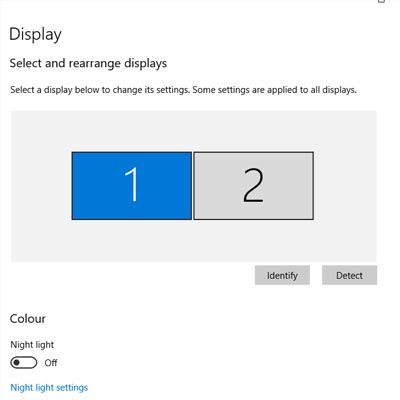
There are lots of options for changing your display settings. To access these settings, click on the Start menu and select the gear icon for Settings. The first option on the Settings screen is System, where the first option is Display, so you’ll have no problem checking it out. Here are some of the options:

Change Your Screen’s Brightness
With this option, you can change–get this–your screen’s brightness! This is critical if you want your device’s battery to stay under control. There is a slider that you can use to adjust the screen’s brightness. Underneath this, you’ll see another option to turn on the Night Light. This makes the device’s screen turn to warmer colors to make it easier on the eyes at night. You can even schedule the night light to turn on at a specific time.

Scale and Layout
Under this option, you can change the default size of text and applications, among other things. There are several dropdowns under this heading that give you dynamic control over several aspects of your display, including the display’s resolution and the screen orientation.

Multiple Displays
One of the best ways you can get the most out of your monitors is by using more of them. If you have multiple monitors connected to your device, your settings will give you options for what to do with them. You can connect to them wirelessly, detect connected devices, and so much more. Just click on the links in your settings to learn more about what you can do, or reach out to us to learn more about what the settings mean.

Before you change any settings for your devices, if you have any questions about what they mean or why, consult professionals at NuTech Services who know what they are doing. It’s better than making a change and not knowing how to change it back.

Overall, changing up your display can be great for both your device’s battery and your productivity. For more great tips and tricks about how you can get the most out of your monitors and displays, reach out to us at 810.230.9455.