email_envelopes_purple_400.jpg

Tip of the Week: How to Write a Better Email

email_envelopes_purple_400.jpg

Writing an email is one of the most prevalent methods of communication in the business world, but it’s not as easy as you might think. There are considerable details and intricacies to mastering this art, and we’re here to help. By the end of this blog article, you’ll be armed with five tips to write the most effective email that you can.

Keep It Short
Nobody wants to read a long message in their email. After all, they likely have more pressing matters to attend to, and many more messages that they have to read. Therefore, it makes sense that you get right to the point when you have to send an email. Try to include only information that’s absolutely critical. Remember, concision is the friend of any businessperson, as they only have so much time in a day to read and respond to messages that aren’t mission-critical.

Present a Clear Subject Line
Similarly, you want to use only the most clear and concise subject lines, as anything less could mislead the recipient into thinking that the message either isn’t important or doesn’t warrant immediate attention. Basically, you want to provide enough information in the subject line to give the recipient a reason to open it.

Personalize the Email
You shouldn’t be copying and pasting a catch-all message into an email. You should take the time to personalize each message that you send so that it looks as authentic and genuine as possible. You should always use your full name, as well as the organization you belong to–especially if you are sending messages to vendors or clients.

Perform a Spelling and Grammar Check
Nothing is more embarrassing than making a major spelling or grammar error in an important email. Thankfully, this can be avoided by giving your message a quick proofreading before hitting the Send button. Try to avoid statements in all caps, as they can create a subtext that you don’t necessarily want to convey.

Keep it Business-Friendly
If you’re going to send a bunch of memes or other fun things to your employees, it’s best not to do it through email. It’s one thing if you have a dedicated email thread designed for sharing information unrelated to work, but when you have your employees sending things that have no place in a professional environment, you get clutter (and a general lack of focus), both of which can create an unproductive workplace environment.

For more information on how to make the most of your email, reach out to us at 810.230.9455.

technology_2018_new_400.jpg

2018: What to Expect from Technology

technology_2018_new_400.jpg

2017 saw the rise of many great technology solutions for small business, including an explosion of popularity in business intelligence, artificial intelligence applications, and machine learning. Meanwhile, other established technologies have continued their domination of the industry. What can your organization look forward to seeing on the forefront of the small business technology race in 2018?

We’ll take a look at some of the upcoming and emerging technologies that your business may want to consider for future investment.

Artificial Intelligence
Artificial intelligence in terms of business use consists of analyzing data to create better outcomes, remake the customer experience, and completely change the way that organizations conduct themselves through the use of automation. Artificially intelligent technology can help to streamline operations and the customer experience through the implementation of chat bots and other machine-learning capabilities. However, researchers have recommended that AI be limited to specific roles rather than broad concepts, as too much of a lack of focus could lead to poor performance as a whole, deterring organizations from implementation in the future.

Even if businesses aren’t implementing artificial intelligence as soon as possible, 59% of businesses are still collecting information so that they can benefit as much as possible from such an integration. By taking this proactive stance on artificial intelligence, they are ensuring that they can hit the ground running when it comes time to do so.

Intelligent Analytics
Analytics have become an increasingly important part of doing business. This is because the availability of data, and software that allows for the analysis of said data, creates an environment where better decisions can be made using this analysis. By taking a carefully crafted deep dive into the numbers behind goods or services, organizations can make greater profits and eliminate inefficiencies in never before seen ways. Think of it like “trimming the fat,” so to speak.

Of course, these intelligent analytics can also be used to find new and more lucrative business ventures. Without proper analysis, though, these statistics and analytics are just empty numbers. Business intelligence apps aim to provide perspective and create insight for operational efficiency and effectiveness. Businesses that want to reap the most benefit from their data will invest in business intelligence strategies to glean important insights.

Cloud Technology
The cloud retains its importance as one of the best ways to take full advantage of modern technology. This is because no matter what type of business applications are released in the future, the cloud will remain one of the best ways to access them. The cloud offers dynamic access to business-critical computing constructs and applications that business owners will want to utilize because they offer cost-reduction and other benefits.

How does your business plan on using the cloud and these other technologies in 2018? To learn more about your options, reach out to NuTech Services at 810.230.9455.

purple_holiday_smartphone_400.jpg

These Smartphones Make an Excellent Gift (Even To Yourself!)

purple_holiday_smartphone_400.jpg

The holiday season is the ideal time to pick up your next best smartphone–especially since you might get something great as a gift from your loved ones! We’ll help you decide which type of smartphone is best for your specific needs by taking a close look at some of the great new devices on today’s market.

Since there are so many devices out there, we’ll be taking a deep dive into some of the most popular ones, while providing the specs and features of others so that you can make an educated decision for your big purchase.

The New iPhones: 8, 8 Plus, and X
With three iPhones on the market, it can be challenging to know what the big differences are between them. Compared to previous iterations of the iPhone, the 8 and 8 Plus models now have been constructed with a glass and aluminum casing. You might think that the iPhone 8 and 8 Plus are similar to the iPhone 6 in terms of how it feels in the hand.

The main differences between the iPhone 8/8 Plus and the iPhone X is the display. The iPhone X also features improvements to the camera and overall build quality. Due to the iPhone X being significantly more expensive, iPhone lovers may want to choose the iPhone 8 or 8 Plus to achieve a comparable experience.

iphone 8

Model: iPhone 8
Construction: Front/back glass & aluminum frame
Screen Size: 4.7-inch
Display: LED-backlit IPS LCD, 16M Colors, 1,334 x 759 (~326 ppi)
SIM: Nano-SIM
Chipset: Apple A11 Bionic
CPU-GPU: Hexa-core (2x Monsoon + 4x Mistral) – Apple GPU
Operating System: iOS 11

Memory

Internal: 64GB or 246 GB models; 2GB of RAM
Expandable: None

Cameras

Primary: 12 MP, f/1.8, 28mm, phase detection autofocus, OIS, quad-LED flash
Front-Facing: 7 MP, f/2.2, face detection

Audio: Built-in stereo speakers, No 3.5mm headphone jack
Sensors: Fingerprint, accelerometer, gyro, proximity, compass, barometer
Features: Fast charging, Qi Wireless charging, Siri commands and dictation, iCloud integration
Battery size-life: 1,821 mAh battery – 66 hours
Available Colors: Silver, Space Grey, Gold
Price: $699.99-to-$899.99

iphone 8 plus

Model: iPhone 8 Plus
Construction: Front/back glass & aluminum frame
Screen Size: 5.5-inch
Display: LED-backlit IPS LCD, 16M Colors, 1920×1080 (~401 ppi)
SIM: Nano-SIM
Chipset: A11 Bionic
CPU-GPU: Hexa-core (2x Monsoon + 4x Mistral) – Apple GPU
Operating System: iOS 11

Memory

Internal: 64GB or 246 GB models; 3GB of RAM
Expandable: None

Cameras

Primary: Dual 12 MP, f/1.8, 28mm and f/2.8, 56mm) phase detection autofocus, 2x optical zoom, quad-LED flash
Front-Facing: 7 MP, f/2.2, face detection

Audio: Built-in stereo speakers, No 3.5mm headphone jack
Sensors: Fingerprint, accelerometer, gyro, proximity, compass, barometer
Features: Fast charging, Qi Wireless charging, Siri commands and dictation, iCloud integration
Battery size-life: 2,691 mAh battery – 81 hours
Available Colors: Silver, Space Grey, Gold
Price: $799.99-to-$999.99

iphone x

Model: Apple iPhone X
Construction: Front/back glass & stainless steel frame
Screen Size: 5.8-inch
Display: Super AMOLED, 16M Colors, 2,436×1,125 ( ~458 ppi)
SIM: Nano-SIM
Chipset: Apple A11 Bionic
CPU-GPU: Hexa-core 2.39 Ghz (2x Monsoon + 4x Mistral) – Apple GPU
Operating System: iOS 11.1

Memory

Internal: 64 and 256 GB models; 3GB RAM
Expandable: None

Cameras

Primary: Dual 12 MP, f/1.8, 28mm and f/2.4, 52mm) phase detection autofocus, 2x optical zoom, quad-LED flash
Front-Facing: 7 MP, f/2.2, face detection

Audio: Built-in stereo speakers, No 3.5mm headphone jack
Sensors: FaceID, accelerometer, gyro, proximity, compass, barometer
Features: Fast charging, Qi Wireless charging, Siri commands and dictation, iCloud integration
Battery size-life: 2,716 mAh battery – 74 hours
Available Colors: Silver, Space Grey
Price: $999.99-to-$1,149.99

Samsung Galaxy s8 and Note 8
There are more differences between the Samsung Galaxy and Note lines than you might think. The Note line has noticeably larger screens with higher quality, but you’ll find that the larger screen makes it a bit bulkier and more unwieldy compared to the smaller and more compact Galaxy line. Still, the extra screen space will make any entertainment lover jump for joy. Users can also appreciate that, just like the iPhones mentioned above, the phone is made out of a mix of aluminum and glass casing, allowing for water resistance.

Just like with the iPhones, however, you’ll see some notable differences that might make all of the difference to power users. In particular, the camera on the Note 8 offers optical image stabilization–a great way to take better videos or images. Furthermore, the Note 8 is considerably more powerful than the Galaxy s8, sporting 50% more RAM.

galaxy s8

Model: Samsung Galaxy s8
Construction: Front/back glass (Gorilla Glass 5) & aluminum frame.
Screen Size: 5.8-inch
Display: Super AMOLED, 16M Colors, 2,960 x 1,440 (~570 ppi)
SIM: Nano-SIM
Chipset: Qualcomm MSM8998 Snapdragon 835
CPU-GPU: Octa-core (4 x 2.35 GHz & 4 x 1.9 GHz Kyro) – Adreno 540
Operating System: Android 7.0, Touchwiz

Memory

Internal: 64 GB, 4 GB RAM
Expandable: microSD (up to 256)

Cameras

Primary: 12 MP, f/1.7, 26mm, OIS, LED flash
Front-Facing: 8 MP, f/1.7

Audio: Dual stereo speakers, 3.5 mm headphone jack
Sensors: Iris scanner, fingerprint reader, accelerometer, gyro, proximity, compass, barometer, heart rate, SpO2
Features: Samsung DeX, Fast battery charging, Qi/PMA wireless charging
Battery size-life: 3,000 mAh – 84 hours
Available Colors: Midnight Black, Orchid Gray, Arctic Silver, Coral Blue, Maple Gold
Price: $725.99-to-$825.99

galaxy s8 20171116 145741 1

Model: Samsung Galaxy s8 Plus
Construction: Front/back glass (Gorilla Glass 5) & aluminum frame.
Screen Size: 6.2-inch
Display: Super AMOLED, 16M Colors, 2,960 x 1,440 (~529 ppi)
SIM: Nano-SIM
Chipset: Qualcomm MSM8998 Snapdragon 835
CPU-GPU: Octa-core (4 x 2.35 GHz & 4 x 1.9 GHz Kryo) – Adreno 540
Operating System: Android 7.0

Memory

Internal: 64 GB, 4 GB RAM or 128 GB, 6 GB RAM
Expandable: microSD (up to 256)

Cameras

Primary: 12 MP, f/1.7, 26mm, OIS, LED flash
Front-Facing: 8 MP, f/1.7

Audio: Dual stereo speakers, 3.5 mm headphone jack
Sensors: Iris scanner, fingerprint reader, accelerometer, gyro, proximity, compass, barometer, heart rate, SpO2
Features: Samsung DeX, Fast battery charging, Qi/PMA wireless charging
Battery size-life: 3,000 mAh – 84 hours
Available Colors: Midnight Black, Orchid Gray, Arctic Silver, Coral Blue, Maple Gold
Price: $799.99-to-$899.99

galaxy note 8

Model: Samsung Galaxy Note 8
Construction: Front/back glass (Gorilla Glass 5) & aluminum frame
Screen Size: 6.3-inch
Display: Super AMOLED, 16m colors, 2,960 x 1,440 (~521 ppi)
SIM: Nano-SIM
Chipset: Qualcomm MSM8998 Snapdragon 835
CPU-GPU: Octa-core (4 x 2.34 GHz Kryo & 4 x 1.9 GHz Kryo)
Operating System: Android 7.1.1

Memory

Internal: 64, 128, 256 GB options, 6GB RAM
Expandable: microSD (up to 256GB)

Cameras

Primary: Dual 12 MP (26mm, f/1.7, PDAF & 52mm, f/2.4, AF) OIS, autofocus, 2x options zoom, LED flash.
Front-Facing: 8 MP, f/1.7, face detection

Audio: Dual stereo speakers, 3.5 mm
Sensors: Iris scanner, fingerprint scanner, accelerometer, gyro, proximity, compass, barometer, heart rate, SpO2
Features: Samsung Desktop Experience, Fast battery charging, Qi/PMA wireless charging, s-Pen integration
Battery size-life: 3,500 mAh battery – 88 hours
Available Colors: Midnight Black, Maple Gold, Orchid Grey, Deep Sea Blue
Price: $ 949.99-to-$1149.99

Google Pixel and Pixel XL 2
Google’s new flagship smartphone device, the Pixel, debuted in 2016, but the latest addition to the smartphone brand can make for a great gift this holiday season. Thanks to its impressive specs and the internal Snapdragon processors, the Pixel line of smartphones are quite powerful–moreso the Pixel 2 than the original Pixel.

Though there are only minor differences between the Pixel and Pixel 2, they are the ones that might matter for some users. The Pixel 2 doesn’t have a headphone jack, which means that you’ll need to purchase the external adapter if you plan on using the device for music (the front-loaded speakers are better for that anyway). Better yet is Google’s promise to support the Pixel 2’s operating system for a full three years, which makes it enticing for normal Pixel users to jump at the opportunity.

pixel 2

Model: Google Pixel 2
Construction: Aluminum unibody with hybrid coating, Gorilla Glass 5
Screen Size: 5.0-inches
Display: AMOLED, 16m, 1,920 x 1.080 (~441 ppi)
SIM: Nano-SIM
Chipset: Qualcomm MSM8998 Snapdragon 835
CPU-GPU: Octa-core (4 x 2.35 GHz Kryo, 4 x 1.9 GHZ Kryo) – Adreno 540
Operating System: Android 8.0

Memory

Internal: 64 and 128 GB options, 4GB RAM
Expandable: None

Cameras

Primary: 12.2 MP, f/1.8, laser autofocus, dual-LED flash
Front-Facing: 8 MP, f/2.4

Audio: Dual stereo speakers, no 3.5mm headphone jack
Sensors: Fingerprint, accelerometer, gyro, proximity, compass, barometer
Features: Fast charging
Battery size-life: 2,700 mAh – 75 hours
Available Colors: Kinda Blue, Just Back, Clearly White
Price: $649.99-to-$749.99

pixel 2 xl

Model: Google Pixel 2 Plus
Construction: Aluminum unibody with hybrid coating, Gorilla Glass 5
Screen Size: 6.0-inch
Display: P-OLED, 16m colors, 2,880 x 1,440 (~538 ppi)
SIM: Nano-SIM
Chipset: Qualcomm MSM8998 Snapdragon 835
CPU-GPU: Octa-core *4 x 2.35 GHz Kryo & 4 x 1.9 GHz Kryo) – Adreno 540
Operating System: Android 8.0

Memory

Internal: 64GB and 128 GB options, 4GB RAM
Expandable: None

Cameras

Primary: 12.2 MP, f/1.8, OIS, phase detection & laser autofocus, dual-LED flash
Front-Facing: 8 MP, f/2.4

Audio: Dual stereo speakers, no 3.5 mm headphone jack
Sensors: Fingerprint, accelerometer, gyro, proximity, compass, barometer
Features: Fast charging
Battery size-life: 3,520 mAh battery – 88 hours
Available Colors: Just Black, Black & White
Price: $849.99-to- $949.99

If these smartphones don’t quite pique your fancy, try taking a look at some of the specific details about these other notable smartphone brands:

motorola z 2

Model: Motorola Z2 Force
Construction: front plastic w/ Moto Shattershield, back plastic
Screen Size: 5.5-inch
Display: P-OLED, 16M colors, 2,560 x 1,440 (~534 ppi)
SIM: Nano-SIM
Chipset: Qualcomm MSM 8998 Snapdragon 835
CPU-GPU: Octa-core (4 x 2.35 MHz Kyro & 4 x 1.9 GHz Kryo) – Adreno 540
Operating System: Android 7.1.1

Memory

Internal: 128 GB, 6 GB RAM
Expandable: microSD (up to 256 GB)

Cameras

Primary: Dual 12 MP, f/2.0, laser autofocus, dual-LED flash
Front-Facing: 5 MP, f/2.2, dual LED flash

Audio: One front-facing speaker, no 3.5mm headphone jack
Sensors: Fingerprint, accelerometer, gyro, proximity, compass, barometer
Features: Fast charging, Motorola Mods (insta-share projector, 360 camera, gamepad, JBL SoundBoost 2, turbopower pack, style shell w/ wireless charging, power pack, Hasselblad True Zoom, vehicle dock)
Battery size-life: 2,730 mAh battery – 69 hours
Available Colors: Super Black, Fine Gold, Lunar Grey
Price: $720.00

lg v30

Model: LG V30
Construction: front/back glass, aluminum frame
Screen Size: 6.0-inch
Display: P-OLED, 16M colors, 2,880 x 1,440 (~537 ppi)
SIM: Nano-SIM
Chipset: Qualcomm MSM8998 Snapdragon 835
CPU-GPU: Octa-core (4 x 2.45 GHz Kyro & 4 1.9 GHz Kyro) – Adreno 540
Operating System: Android 7.1.2

Memory

Internal: 64 or 128 GB options, 4 GB RAM
Expandable: microsSD (Up to 256 GB)

Cameras

Primary: Dual 16 MP (f/1.6, OIS, 3-axis, laser & phase detection autofocus) _ 13 MP (g/1.9) LED flash
Front-Facing: 5 MP, f/2.2

Audio: Dual speaker stereo, 3.5mm headphone jack
Sensors: Fingerprint, accelerometer, gyro, proximity, compass, barometer, color spectrum
Features: Fast charging, wireless charging
Battery size-life: 3,300 mAh – 87 hours
Available Colors: Aurora Black, Cloud Silver, Moroccan Blue, Lavender Violet
Price: $819.99-to-$929.99
blackberry keyone

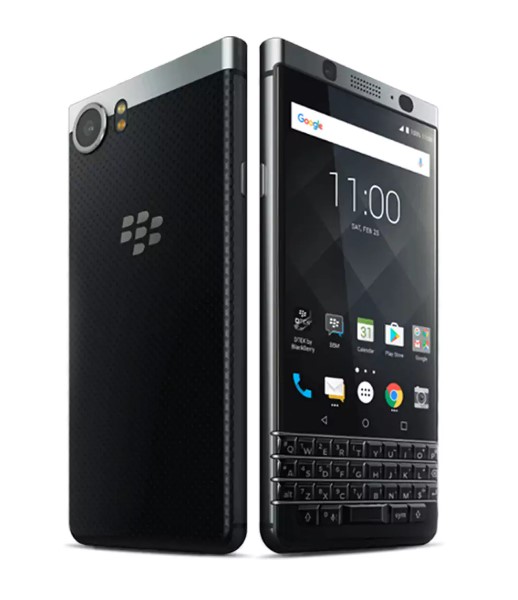
Model: BlackBerry KEYone
Construction: Aluminum, Gorilla Glass 4, with soft-touch plastic, physical keyboard
Screen Size: 4.5-inch
Display: IPS LCD, 16m colors, 1,620 x 1,080 (~433 ppi)
SIM: Nano-SIM
Chipset: Qualcomm MSM8953 Snapdragon 625
CPU-GPU: Octa-core 2.0 GHz Cortex-A53
Operating System: Android 7.1

Memory

Internal: 32 GB with 3 GB RAM or 64 GB with 4 GB RAM
Expandable: microSD (up to 256 GB)

Cameras

Primary: 12 MP, f/2.0, phase detection autofocus, dual-LED flash
Front-Facing:8 MP, f/2.2

Audio: Dual speaker stereo
Sensors: Fingerprint, Accelerometer, gyro, proximity, compass
Features: Full programmable keyboard, fast charging
Battery size-life: 3,505 mAh – 107 hours
Available Colors: Black & Silver, Black
Price: $499.99-to-$559.99

nokia 8

Model: Nokia 8
Construction: Glass Aluminum
Screen Size: 5.3-inch
Display: IPS LCD, 16m colors, 2,560 x 1,440 (~554 ppi)
SIM: Nano-SIM
Chipset: Qualcomm MSM8998 Snapdragon 835
CPU-GPU: Octa-core (4 x 2.5 GHz Kyro & 4 x 1.8 GHz Kyro) – Adreno 540
Operating System: Android 7.1.1

Memory

Internal: 64 GB, 4 GB RAM or 128 GB, 6 GB RAM
Expandable: microSD (up to 256 GB)

Cameras

Primary: Dual 13 MP, f/2/0, laser and phase detection autofocus, Carl Zeiss optics, OIS, LED flash
Front-Facing: 13 MP, f/2.0, phase detection autofocus

Audio: Two-speaker stereo, 3.5mm headphone jack
Sensors: Fingerprint, accelerometer, gyro, proximity, compass, barometer
Features: Fast charging
Battery size-life: 3,090 mAh – 78 hours
Available Colors:Tempered Blue, Polished Blue, Steel, Polished Copper
Price: $479.99-to-$559.99

What do you think? Do you have a pretty solid understanding of what type of smartphone you want for your organization? Let us know what you chose in the comments, and be sure to subscribe for more great technology articles.


social_engineer_earth_400.jpg

Would Your Users be Tricked by Social Engineering?

social_engineer_earth_400.jpg

The term social engineering may not seem nearly as intimidating as other cybersecurity terms like ransomware or denial of service. Don’t be deceived! Some of the biggest threats to your company’s data and network security use social engineering to manipulate targets into taking a specific action – like disclosing personal information that can be stolen and exploited.

Often overlooked by the media in favor of major data breach events, there are few types of social engineering hacks that have the capability to devastate a business.

  1. Vishing: Given the fact that the number of people who fall for phishing attacks and other email scams has declined significantly, it was only a matter of time before hackers found an alternative avenue to exploit their targets. After abandoning it a few years ago in favor to digital scams, vishing – a fraudulent voice call that seeks personal information – have once again returned as a favorite among hackers and thieves.
  2. HTTPS: SSL certificates used to ensure that a website was legitimate and secure enough to protect your personal information. Websites that have ‘https’ no longer signifies security, as hackers have begun using websites that give away SSL certificates for free and using them to lull victims into a false sense of security. To make sure a website is secure, you’ll want to look for indication of an extended validation SSL (EV-SSL) which are not offered for free! EV-SSLs are signified with a green bar.
  3. Website Copy-Cats: Scammers have become very skilled at making spoof websites that look and feel just like the authentic website but are actually littered with all typesof malware. For example, after the Equifax data loss event in June 2017, Equifax set up a website to help their clients who had their information compromised with the URL: equifaxsecurity2017.com. A spoof of that website, with the domain securityequifax2017.com, was so convincing – it even tricked Equifax themselves! A few things to keep an eye out for when trying to determine if a website is legitimate, include:
    1. Make sure the URL is correct.
    2. Avoid giving out information unless a site has an EV-SSL.
    3. Look for seals of trust from other IT security websites.
    4. Beware of misspellings, typos and broken English.
  4. Every Word Password Theft: There are a lot of hacking tools that will scan through databases – including every word in the dictionary. These tools significantly increase the likelihood that a password that includes an actual word will be cracked and exploited. The best practices are ones that mix numbers, letters and symbols that make no sense.

When it comes to digital threats, for every exploit or hack that is prevented, a few, more advanced ones are developed. The best way to keep your business, and it’s data, safe is to take proactive measures and execute safe internet practices all times – and that goes for your employees, as well! Would you like to learn more about how you can stay ahead of hackers? Call us at NuTech Services.

using_smartphone_tips_400.jpg

Tip of the Week: Using Your Smartphone More Effectively in Five Ways

using_smartphone_tips_400.jpg

It’s getting to the point where most people have a smartphone, even if they shouldn’t necessarily have one. If you go all-in on a device like this to boost your productivity and efficiency, then you know how difficult it can be at times. We’re here to provide you with some tips to help you better take advantage of your smart device.

Use Your Mobile Wireless Hotspot
Often times you’ll find yourself limited by not having a wireless connection for devices like your laptop or tablet. In instances like this, you can turn your smartphone into a mobile wireless hotspot to “piggyback” off of your cellular data plan, providing Internet access to other devices that may need it.

A Bring Your Own Device strategy can help your organization supply employees with a stipend to cover any costs of using the device as a mobile hotspot. On the other hand, you can simply provide them with company devices that have enough data to fulfill their needs.

Sort Your Home Screen
You don’t have to suffer from a cluttered home screen on your device. In fact, depending on your personal preferences, you can either sort your apps into folders, or distribute them across various screens so that you know where to locate each of them. You don’t want to lose track of your applications when you need them most.

Customize Your Email and Browser Options
If you’re using an iPhone or Android device, chances are that your device will default to a specific web browser or email management application. You don’t necessarily have to use these, though. As long as you can find an app for your preferred email application, or whichever application your organization uses to communicate, you can install it and achieve a comparable level of functionality regardless of your choice.

Of course, you’ll want to work with your IT department to ensure that you’re not downloading any malware-laden versions of applications–particularly email and web browsers, which you will be using often.

Use Your Shortcuts
Your device has a plethora of shortcuts available, so do your best to work with them whenever you can. The more you get used to these shortcuts, you’ll find yourself being more productive. Consider how much time you waste trying to figure out just what you’re doing with your device, and you’ll see the importance of understanding how these shortcuts work.

Of course, depending on the model of your phone, you’ll have different shortcuts at your disposal. This is because the software installed on them is likely to be different, so just play around a little bit to find the best shortcuts available for your device.

Research Insurance Options
What would you do if your mobile device fell out of your pocket or bag and smashed into a thousand pieces on the pavement? What about if you lost it while you were out and about? Whatever ill fortune may present itself, you’ll want to look into insurance to make sure that you’re covered in the event of a disastrous scenario.

What are your best smartphone tips? Do you have any that you think should have been on our list? Let us know in the comments.

bring_your_own_mobiles_400.jpg

Are You Prepared for Employees to Bring Their Own Devices?

bring_your_own_mobiles_400.jpg

Bring Your Own Device policies have helped many companies save money on technology by allowing employees to use their own devices, rather than taking on the cost of providing devices. However, as much as a BYOD approach can help a business financially, there are some potential drawbacks to adopting one that you should be prepared to deal with.

Managing These Mobile Devices
Whenever there is a Bring Your Own Device strategy enacted, there needs to be Mobile Device Management in action as well. Your MDM software also needs to be monitored, as this will inform you if someone without the proper authorization is accessing data that they shouldn’t be.

However, sufficient monitoring is a time-intensive task. It is even possible that it would require you to add an additional employee to properly make use of your MDM software. Before you commit to these measures, which are a must for successfully implementing BYOD, make sure you have (or can obtain) the resources to run them.

One great solution to mitigate your organization’s overall BYOD costs is the built-in automation that many of today’s Mobile Device Management platforms offer. This automation can be customized and run to allow your technicians to focus on the core aspects of your business’ technology rather than spend all of their time, and your money, monitoring employee smartphones.

Streamlining For Support
A major advantage to providing employees with work devices is the control you have over the devices you provide. By selecting a specific model for your employees to use, you can standardize your systems that much more, and make your IT administrator’s job that much easier. By reducing the variety of devices they need to be familiar with, IT can service them more quickly and effectively.

This can be a drawback to BYOD, as it makes support a more arduous task and–as a result–more costly. With a variety of devices and their specific issues, it becomes a more time-intensive task to identify and resolve any problems. Taking this into account, it may be a more cost-effective option to invest in standardized mobile devices for your company to use, rather than try to manage the variety of devices your workforce likely uses based on personal preference. This is a variable that you will need to consider based on your specific circumstances and abilities. Do you finance devices for your staff? Or, manage the varying devices your staff will bring?

Leaving Yourself Vulnerable
Not all devices are equally suited for use in a BYOD strategy–sometimes, a new feature can lead to a pretty severe vulnerability. Take, for example, any device with iOS 11 installed. Despite having switches in its control center to activate and deactivate Wi-Fi and Bluetooth, these switches don’t actually deactivate their connection. This leaves these devices vulnerable, and if they were a part of a BYOD implementation, your business becomes vulnerable, as well.

Wasted Resources
Often, the question isn’t if BYOD makes sense, it’s if BYOD makes sense for a particular employee to have access to. Some companies will reimburse their staff for the personal data that they use. However, if an employee’s responsibilities don’t really require the use of a mobile device, having them involved in a BYOD strategy is akin to paying for their personal use of the device; and, can hinder their overall productivity.

Don’t get us wrong–BYOD can be a great benefit to your business and its bottom line. You just shouldn’t dive in without considering the potential downsides and planning how you will go about solving these problems. The IT professionals at NuTech Services can help. To learn more, call us today at 810.230.9455.

small_business_tech_a_look_ahead_400.jpg

What to Expect from IT in 2018

small_business_tech_a_look_ahead_400.jpg

As one of the most famous head coaches in NFL history, Vince Lombardi has several quotes that can be applied to success. One particular statement to note is “If you are five minutes early, you are already ten minutes late.” As it turns out, this quote inadvertently refers to technology. The technology industry moves a mile-a-minute and businesses are always looking for ways to innovate and make significant improvements to technology.

In fact, it’s just one small way you can make a big change for your small business’ operations. Here are some of the best developments to look forward to for your business’ IT in 2018, as per some of the most notable IT professionals in the United States.

  • Emerging technology is important. Of all technology observed, security (81%), mobile device management (51%), and big data (49%) are likely to play a major role in future technology development.
    • What this means for the small business: The threat of a hacking attack or data loss should never be underestimated. In order to commit to keeping your business secure, it is best to proactively take steps to keep threats out of your network. Considering how popular mobile solutions have become, you need to include mobile device management in your maintenance strategy.
  • Network security is a focus. Businesses understand how crucial it is that their network data is properly protected. 70% say that securing this data will be their top priority in 2018.
    • What this means for the small business: While peer pressure isn’t usually a good thing, this statistic is the exception. When almost three-quarters of your industry contemporaries are taking steps to improve their security against cybercrime, it’s a good indication that you should as well.
  • Balancing in-house and outsourced solutions. 54% of survey respondents plan to combine internal and external IT support and administration to fulfill their needs.
    • What this means for the small business: Some positions are simply more difficult to fill as a part of an in-house staff. For example, there just aren’t enough security experts for all the vacancies in small businesses, especially when large businesses lure candidates away with more pay, better benefits, and other perks. Furthermore, not many small businesses would likely need a full-time security resource if best practices are followed.

      As a result, many businesses are looking externally for their cybersecurity needs. A managed service provider can provide an outsourced team of experienced IT professionals who will communicate and work with you to meet your organizational technology needs. This allows you to preserve your budget by eliminating the need to hire and train your own internal resources.

  • Increased use of a virtual environment. It is expected that using the cloud and virtualization technologies will lead to a 69% decline in utilizing installed applications on local systems.
    • What this means for the small business: Complicated infrastructures have no place in the digital climate of today, and relatedly, there is a need of scalability to meet the needs of your business and workforce. A virtual environment lends itself to that ability to change, and easily allows you to securely make necessary changes to your data–whether those changes are alterations to user access permissions, the addition of new user accounts, or scaling services.
  • Increase in SaaS. 61% of those surveyed predict that the operating system will gradually become irrelevant as applications move more and more to the browser.
    • What this means for the small business: The move from self-managed applications and software to fully-managed Software as a Service will allow business users to be productive from anywhere, with their solutions maintained for them by the hosting service. This includes installing updates and applying patches as they are released.

How do you plan to leverage these technologies in your business? Whatever your plans are, NuTech Services is here with the solutions and experience to help. For more information, give us a call at 810.230.9455.

wi-fi_router_tips_400.jpg

Tip of the Week: Improving Your Wi-Fi May Have Something To Do With Your Router

wi-fi_router_tips_400.jpg

While many may want their Internet to be faster, not many realize that their router may be contributing to the problem. For this week’s tip, we’ll discuss how to configure your router for a faster Internet connection.

Gaining Access to the Administration Console
Of course, before you can make any changes to your router, you need to access the place where those changes can be made. With your router connected to your device (either a wired or wireless connection is fine) access your web browser. In the address bar, enter your router’s IP address, which can be found in the router’s user manual. Alternatively, you can check for your router’s IP address by clicking into the Control Panel and then, under the Network and Internet category, View network status and tasks.

To make this easier, you should use the dropdown menu in the top-right corner of the window to view your options by category.

In the Network and Sharing Center, click into your current network connection. An Ethernet Status window will appear. Once you click on the Details… button, your router’s IP address will display under IPv4 Default Gateway.

Once you have the IP address of your router, enter it into your browser’s address bar. Before you can access your router, you will need to enter your username and password. This could actually be one of the factors causing your problems: if your router’s access credentials have been left to the factory defaults, anyone can access your Internet connection without your knowledge and eat up your bandwidth. This is why it is important to change your access credentials to something more secure.
Once you have secured your access to your router, you should also look for Wireless Settings or Advanced Wireless Settings. This is where the rest of the changes to help speed up your connection will be made.

Checking the Bands
Based on what gigahertz your routers use for their signal, they come in different types–also known as ‘bands.’ Today’s routers will often support multiple bands, identified by the letter at the end of the router’s protocol. Older routers will often have a ‘G’ denoted at the end, while new ones are denoted with an ‘N’ or ‘AC.’ Even newer ones might end their protocol with ‘AD.’

These bands will tell you what devices will play nice with your router, but the multi-band capabilities of many routers will allow a single router to support numerous devices with different protocols.

Selecting a Channel
A connection can also be made slower if the router is set to a channel with higher traffic. If set to the 2.4GHz frequency, for example, your router has to compete with common devices like cordless phones, Bluetooth speakers, and others. Switching to a less busy channel may improve your connection speed and overall quality.

You can check which channels are available to you with some utilities for Windows devices and applications for Android devices. After running your scan and identifying a promising channel, use your Administration Console to switch over and test for any improvements.

Optimizing the Security Settings
As referenced above, it is important that your router is secured for the sake of your network security, but even the way it is secured can influence the speed of your connection. Setting your router to WPA2 with AES should give you fast, yet secure, connection.

If this all seems like a bit much, don’t worry–the IT professionals at NuTech Services are ready and willing to help you with your networking. Reach out to us at 810.230.9455.

two-factor_authentication_400.jpg

Boosting Your Security Only Takes Another Layer of Authentication

two-factor_authentication_400.jpg

Data breaches are so common nowadays that you’re lucky not to see one in the breaking news section of any news outlet. How is your business preparing for the inevitable data breach of intellectual properly and sensitive information? You need to start considering preventative measures, like two-factor authentication, to keep your data secure.

The main issue that two-factor authentication can solve is the decreasing amount of security provided by passwords. Technology has become so advanced that even complex passwords that maximize security can be cracked under the right conditions. Users tend to use easy-to-remember passwords which come with their own set of complications, so we’ll talk about ways that your organization can use two-factor authentication to solve common password troubles.

It’s a best practice to change your password every so often, and users might scratch their heads at how to remember some of these more complex passwords. Passwords should be at least 12 characters long, and must use special characters, upper and lower-case letters, numbers, and symbols. All of this must be done in a seemingly random string of characters, but users might try to use these characters in a way which makes it easier to remember. In fact, they may just use a password for another account, or one that includes information from a social media account, like the name of their dog or first-born child.

Generally speaking, it’s best to keep information that could easily be found in public records out of your password fields. This includes the names of your children, parents, or other important individuals, as well as any information that you store on your social media accounts, like your favorite TV show or movie. Hackers have more tools than ever before to find out all sorts of information about you, so you have to be very careful about how you use this information in passwords. Plus, there’s always the chance that you’ll use this information for security questions, which doesn’t do you any favors when hackers can just find the information at their own leisure.

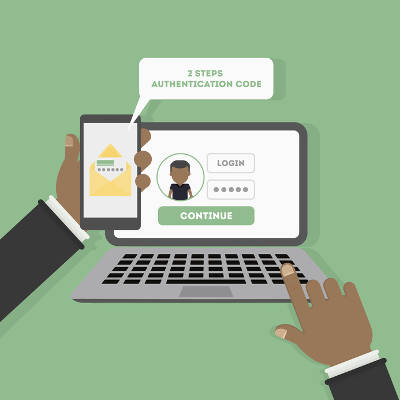
Although password managers do make passwords easier to remember, the primary problem with them remains the same. If a hacker can find out what that password is, they can access all of your accounts easily enough. Two-factor authentication makes things much more difficult for a hacker, requiring that they have a secondary credential to access any account associated with it. This acts as a secondary security level, and it’s one that requires the use of a mobile device, email account, or other access method. It’s a great way to take full advantage of next-level security, and since it’s easy to set up, you can do it quickly and efficiently.

Do you want to take full advantage of two-factor authentication? For more information about personal and network security, call us today at 810.230.9455.

explosion_computer_400.jpg

Google Is Increasing Security For High-Risk Users

explosion_computer_400.jpg

Wouldn’t it be great if you could take advantage of a built-in security feature that could lock down your Google services in the event of a potential data breach? Thanks to attacks on high-profile users, Google is now offering this service to those who are at considerable risk of having their accounts hacked. This type of advanced service, called the Advanced Protection Program, is only available to a select few, but it promises to assist in the challenge of protecting sensitive information.

Specifically, the Advanced Protection Program will be designed to help those who are most likely to experience troublesome hacking attacks, including those who work as election and campaign officials, those who are victims of domestic violence, and others who find themselves to be at risk. The service is marketed as greater security, while trading off some of the convenience that might be found with the base-level Google services.

Among the affected Google services are Gmail, Google Drive, and YouTube. Once someone has been onboarded into the Advanced Protection Program, their accounts will automatically be updated with all of the latest and greatest security solutions available for Google’s services. The implementation of this service is in light of the various high-profile hacking attacks associated with various officials during the 2016 United States presidential election. Google was forced to endure plenty of backlash in the aftermath of the John Podesta controversy in which his Gmail account was hacked via a phishing attempt. This new initiative by Google is an attempt to ensure that they don’t have to deal with this backlash again.

The tactic used by Google’s Advanced Protection Program is a security key. While a USB key is generally considered a better two-factor authentication practice, Google is also equipping users with a Bluetooth key verification process that can be used on both a smartphone or a laptop.

At the moment, Google’s Advanced Protection Program blocks access to information on your Google account by any third-party source–that is, any program that’s not developed by Google itself. Furthermore, it implements a slower account recovery process that’s more difficult for a hacker to replicate. While it takes away from some of the ease of recovery that Google users know and love, it makes for a more secure experience overall.

Would you take advantage of this new service from Google if need be? Let us know in the comments section below.

chrome_extensions_400.jpg

Tip of the Week: Seven Extensions to Add to Chrome

chrome_extensions_400.jpg

Google Chrome is the most popular web browser in the world, and for good reason. The browser has many useful features, largely due to the user’s ability to install ‘extensions’–applications that add to the browser’s functionality or the user’s experience. Once an extension is added to the browser’s toolbar, it is ready for the user to use whenever they need.

Here are a few examples of Chrome extensions that offer a user a useful function.

Select and Speak (SpeakIt!)
By leveraging the human-quality text-to-speech abilities of iSpeech, Select and Speak (SpeakIt!) can read out any text that has been selected in the browser. The user can select a language from a considerable list and adjust the voice and speed of the program to make the best use of the reader for their needs. However, this extension is clearly annotated as being for personal use, so make sure to contact the developer to obtain a license to use it in any other fashion.

Download Select and Speak (SpeakIt!) here:
https://chrome.google.com/webstore/detail/select-and-speak-text-to/gfjopfpjmkcfgjpogepmdjmcnihfpokn?hl=en

Readism
It isn’t uncommon for many jobs to require an employee to read articles online. It also isn’t uncommon for a user to suddenly realize that the article they’ve committed to reading is considerably longer than first estimated. Readism takes the guesswork out of the user’s hands by scanning a page for content and delivering an estimated reading time.

Download Readism here:
https://chrome.google.com/webstore/detail/readism-article-reading-t/bmiolhceebkeljaikojgcoeefblcihje

Honey
How often do you do your shopping online? If you’re like many people, it’s fairly frequently. Honey gives you an added bonus as you shop online by providing you with coupon codes for the site you’re browsing. Honey currently supports retail sites in the U.S., Canada, Australia, the United Kingdom and India, plus global websites–and more websites are always being added to their databases. For the avid online shopper, Honey helps keep money in your pocket and the balance on your credit card down.

Download Honey here:
https://chrome.google.com/webstore/detail/honey/bmnlcjabgnpnenekpadlanbbkooimhnj?hl=en-US

Unshorten.Link
Shortened URLs can be a double-edged sword. On the one hand, they make it more convenient to browse the Internet, but they can also be used to hide URLs that could put you and your system at risk. This extension, as its name states, will un-shorten shortened URLs and check them for malware, giving you a clearer picture of exactly where the link will send you. This extension even removes known tracking cookies from the URL, keeping you that much safer.

Download Unshorten.Link here:
https://chrome.google.com/webstore/detail/unshortenlink/gbobdaaeaihkghbokihkofcbndhmbdpd

ColorZilla
ColorZilla is a comprehensive tool for analyzing the color of web content, giving you the code for the precise shade and hue you find. With a color picker, eyedropper and gradient generator included in the same tool, ColorZilla gives you a clearer view of what you’re looking at, without taking up too many of your resources.

Download ColorZilla here:
https://chrome.google.com/webstore/detail/colorzilla/bhlhnicpbhignbdhedgjhgdocnmhomnp?hl=en

SessionBuddy
As a session and bookmark manager, SessionBuddy helps to avoid browser clutter and frees up your computer’s memory. By saving open tabs, this extension allows you to restore your tabs after a crash or unexpected shutdown.

Download SessionBuddy here:
https://chrome.google.com/webstore/detail/session-buddy/edacconmaakjimmfgnblocblbcdcpbko?hl=en

MightyText – SMS from PC & Text from Computer
This extension effectively turns your Chrome browser into another means of sending SMS and MMS messages. Any messages and texts you send will still be transmitted using your phone, and therefore, its number. What makes this extension different is the fact that you can still use your smartphone to text as well.

Download MightyText – SMS from PC & Text from Computer here:
https://chrome.google.com/webstore/detail/mightytext-sms-from-pc-te/dkfhfaphfkopdgpbfkebjfcblcafcmpi?hl=en

Google Chrome is constantly improving with each new extension that is added to help its users. Which extensions do you feel are most valuable? Which ones should have made our list? Leave a comment to let us know!

voip_headset_laptop_400.jpg

For Better Business Communications, Choose VoIP

voip_headset_laptop_400.jpg

VoIP, or Voice over Internet Protocol, has become the only practical choice for a forward-focused business’ telephony needs. Any one of those who have adopted it could share a reason that they leverage it. But what is VoIP, really? How does it work, and why is it so popular among businesses? Read on to find out.

To understand VoIP, it may help to understand how the traditional telephone operates. When someone speaks into the receiver, the vibrations from the sound energy hit a part of the phone called the diaphragm and are converted to electrical energy. This energy is transferred through the phone lines to its destination: the recipient’s telephone handset. Once the energy is there, it is reverted to sound, and the first person’s voice can be heard.

VoIP works in a similar way, albeit more advanced. There are actually multiple methods to using VoIP, but we’ll focus on using VoIP through an IP phone.

Just as with the traditional telephone, the process begins when someone speaks into a receiver. However, instead of being converted into electrical energy, the sound of your voice is compressed and compiled into digital packets, which are then sent to the recipient via the Internet. By sending it over the Internet in this way, there is no longer a need to pay the phone company additional funds, lending VoIP its first benefit of cost savings through consolidation.

VoIP phones also allow you a better means of control over your telephony as a whole. With a plethora of features included that would only be available from a phone service provider for a premium price, you have considerable management capabilities. From voicemail to contact lists to conference calling to so much more, the right VoIP solution can lend you advanced business communicative abilities without the advanced prices.

Clearly, there are cost savings to be enjoyed through a VoIP system, but the benefits don’t stop there. Reach out to us at 810.230.9455 to learn about some other ways that VoIP can augment your business operations.

adults_only_website_400.jpg

“It Redirected Where?” — A Case Study in Security Precautions

adults_only_website_400.jpg

Imagine what it would be like to discover that your website was suddenly redirecting to content that was decidedly more… adult... than what should be representing your business. For a company in Phoenix, Arizona, this was the unfortunate reality after they had let their IT administrator go.

The administrator, Tavis Tso, created a web in which he attempted to snare a client in an extortion scam. After lying to the client, claiming that he didn’t have their credentials to login to their GoDaddy domain registrar account, Tso changed the credentials to the GoDaddy accounts and created a separate Microsoft account that gave him considerable power over his target. His first steps were to block employees from accessing their email accounts and to redirect the company’s home page to a blank webpage. Tso then demanded $10,000 from the company to fix the problem that he had caused.

The company did not comply with his demands.

Once it was clear that the company wasn’t going to cooperate with Tso, the cybercriminal upped the ante. Rather than just redirecting the company’s home page to a blank site, Tso redirected all of the website’s traffic to a pornographic website. This redirect took several days to resolve.

Tso was ultimately sentenced to four years of probation, in addition to $9,145 as restitution for a count of wire fraud. While it is nice that a cybercriminal has been brought to justice, the damage done will be hard to undo, as he had considerable access to his company’s systems.

Would your business be able to recover from an incident like this? A good first step is to ensure your recovery is to reconsider the permissions of the users on your network–and more importantly, the permissions of former users. There is no reason to grant access to your IT where it is not needed, and there is no reason to keep an IT resource on your system once they are no longer part of your organization.

NuTech Services can help you to make these changes, as well as many others that will benefit your IT and your network security. Reach out to us at 810.230.9455 to start a discussion.

table_of_contents_400.jpg

Tip of the Week: Use Google Doc Tables to Organize Your Writing

table_of_contents_400.jpg

Do you use Google Docs for your business’ word processor? It functions in largely the same way as Microsoft Word, and as such, there are various features that carry over between programs. One of these features is the table of contents, which can help you organize and sort your documents into consumable sections.

To use the table of contents, you’ll need to use the preset heading and formatting options that are located in the toolbar next to the font options. Take note that anything formatted as the title won’t be included in the table of contents.

Title Heading

You can use Heading 1 for major divisions of subject matter, including phases, chapters, and sections.

They are set to use a predetermined heading size and font, but you can change that yourself by clicking on the arrow next to the selection in the table of contents dropdown. You just have to select Update Heading to Match.

Heading 1

Once you’ve updated the heading information, you’ll see that the drop-down menu has also updated the heading options for your selection.

 Heading 1 Update 2

Just repeat the two previous steps for your other subheadings.

Header 2

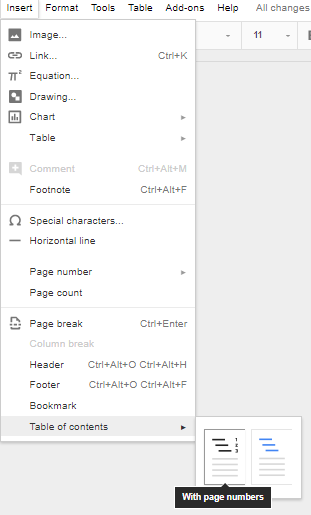
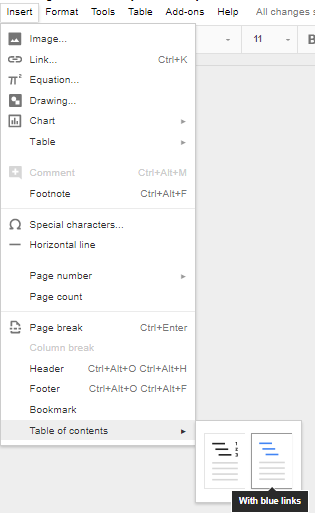
Once you’ve finished changing your settings, you can tell Docs to create a table of contents. You can use Insert > Table of Contents to select a table that fits your specific needs. You can pick an option with page numbers:

Page Numbers

Page Populated

And one with hyperlinks:

Anchor Links

Anchor Links Populated

Once you’ve selected the formatting, you’ll have a simple and easy table of contents in your document.

For more great tips and tricks, subscribe to NuTech Services’s blog.

unified_communication_collaboration400.jpg

9 Ingredients to Creating a Winning UCC Strategy

unified_communication_collaboration400.jpg

If there is one thing that supports everything a successful business does, it has to be communication. Any company relies on its communications to ensure that its clients are satisfied with their services, and as communications have improved, it has only become easier for a unified communication and collaboration, or UCC, strategy to take form.

With these strategies, businesses have been able to expand upon their capabilities to enter and embrace the digital age. What follows are ten elements that a UCC would commonly feature in a business setting.

Collaborative Software
It is essentially guaranteed that you have some experience with collaborative software in this day and age, even if you haven’t personally used it to its full potential. With Microsoft Office and the G Suite available almost anywhere, the idea of collaborative software is not a new one. However, there are many more solutions out there that allow for many people to pool their skills and talents into a particular project in real time, regardless of how far away they are from each other. Many of these solutions also enable video conferencing and instant messaging, which will be discussed in greater depth later.

Podcasts
Imagine giving a presentation where the audience could pause you and wait until a more opportune time to listen to the rest of what you had to say. This is exactly what a podcast delivers–an on-demand lecture on a topic that an audience can listen to at their own convenience. Podcasts are also a more personal method of communication, as many listen through the intimate channel that is the headphone. If you are considering delivering your own podcast, you should be sure that you have these five needs planned out beforehand:

  1. Topic
  2. Length
  3. Frequency
  4. Format
  5. Distribution

Instant Messaging
When it comes to rapid communication, you don’t get much faster than ‘instant.’ Businesses have picked up on this and now leverage instant messaging as a communications method. With utility as a communication device between individuals as well as among groups of people, instant messaging lives up to its name with the capability for near-instantaneous response times as individuals communicate with each other. In addition, companies that have used instant messaging in the workplace have seen increased efficiency and collaboration, as well as a reduction in email.

Video Conferencing
While it is certainly not a new technology, the practicality of video conferencing has increased significantly over the past few years. Better technology and improved Internet speeds mean that communications can happen in real time from almost anywhere in the world. Not to mention that, according to the IDG Enterprise Video Conferencing Trends in 2016, 96 percent of those surveyed agreed that video conferencing improves productivity and can reduce travel costs by 30 percent.

Discussion Forums
Sometimes a user would rather crowdsource their answers from their fellow users than bother the original source. Providing these users with an outlet to share their issues with each other allows them to identify their most pressing concerns, and also tells you what needs to be resolved or addressed first. You and your team can also step in and provide a solution to these issues, establishing yourselves as thought leaders.

Another benefit of discussion forums is that you are able to collect demographic information from your visitors here as well, enabling you to create a more complete idea of who your visitors are, and which groups seek information on which topics.

Email
While email may have once been seen solely as a means of sending and receiving messages with an individual or group, it is now relied upon as the primary record for over three-quarters of business correspondence. Archived emails help businesses keep track of their transactions, and incomplete email records have been the downfall of some companies in legal matters.

Clearly, email needs to be a component of your UCC. However, you will want to ensure that your selected email solution is properly secured, has searchable archives, is mobile-friendly, and integrates with your other solutions as much as is possible.

Enterprise Social Networking
While social media may have a less-than-shining reputation as a distraction in a workplace setting, Enterprise Social Networking works to the opposite effect. A company can leverage social media to help develop external business opportunities and to promote internal collaboration and communication. Furthermore, employees can be encouraged to act as brand ambassadors, using social media to share company culture posts and boost audience engagement–a strategy that more and more businesses are adopting.

With a UCC, a business has a variety of collaborative and communicative solutions to choose from, and many line-of-business applications incorporate enterprise social media platforms.

ChatBots
ChatBots can serve as a very helpful communication tool for the modern business and its website. Often structured in a way that is similar to an instant message, a ChatBot combines AI and human intelligence to improve the customer’s experience through a few common features.

  1. Engagement – One of a business website’s key roles is to engage with its visitors so they will interact with the website. A ChatBot is an always-present opportunity to engage, with the benefit of providing your site visitor with information and assistance.
  2. Personalization – As one of your visitors uses your ChatBot, they will likely give you a pretty good idea of why they are visiting. This allows you to customize your sales approach for their company, as well as to track and evaluate user behavior to deem which types of content are the most impactful to your strategy.
  3. User Experience – Most businesses have an unofficial list of the questions that everyone asks. ChatBots can make that list official, with set responses that are activated by certain keywords in your visitor’s inquiry.

Project Management Software
In order for a business to be successful, it needs to be successfully managed. This is why 77 percent of businesses leverage project management software, as it encourages collaboration among team members, improved organization, and an overall boost to performance. This variety of software is also used by 66 percent of organizations to communicate with their clients.

UCC has grown significantly in popularity as the technology that supports it has developed. For more information on Unified Communication and Collaboration solutions and their place in your business, call us at 810.230.9455.

voip_sunshine400.jpg

Cost Savings Are Just The Start of VoIP’s Benefits

voip_sunshine400.jpg

Business owners and managers are always looking to save a buck. Since the cost of doing business continues to climb, looking to the cloud for their business-critical applications is one way to spread computing costs out over time. The cloud offers several solutions to help the modern business keep their costs down, and nowhere can these costs be mitigated more than with a business’ communications.

Voice over Internet Protocol (VoIP), specifically hosted VoIP, can help you reduce your communications costs in many ways, including:

Hardware Costs
A hosted VoIP solution makes it possible to get a powerful business phone system without having to go through the headaches and expense associated with installing new phone lines. Anyone who has ever run telephone wire from a distribution hub through the walls of a building knows that, in certain cases, it’s an arduous job. By hooking directly into your company’s broadband network, you can easily add and remove VoIP users on demand.

Additionally, deploying a hosted VoIP system removes the need for PBX hardware altogether. As the major expense in any traditional business telephone system, a PBX system can have huge costs, even thousands of dollars, per user. Even for a smaller PBX roll out, you are looking at a substantial capital investment that is transformed immediately into an operational expense once you choose to introduce a hosted VoIP solution.

Fee Structures
The largest expense for any telephone system is the minutes the phone is being used. Every traditional phone bill will feature costs for long distance calling, which the way it is set up most of the time, are calls that can often be local. Getting rid of this recurring expense is one of the most effective ways hosted VoIP is able to present any business with cost savings.

Broadband Internet is relatively inexpensive, basically mandatory, and available through multiple regional carriers, allowing your organization to buy the resources you need, again, as operational expense, not capital outlays. Moreover, the VoIP service rates are very competitive with the rates that you’d pay if utilizing a traditional phone system, without the need for constant management and maintenance of the system as a whole. A VoIP subscription is typically paid per user, which also provides efficient scalability and organizational flexibility in regards to your telephone system.

Mobility
Another way VoIP helps the modern business stretch its dollar is by adding a mobile aspect to their phone system. Many VoIP systems have mobile applications available through the Android or Apple App Stores. This provides organizations the mobile flexibility they need from their business phone system without paying a pretty penny for individual phones and service plans. Since these applications can be run over Wi-Fi, or through the organization’s virtual private network (VPN), it can save plenty of financial resources normally spent on the deployment of a typical mobile strategy.

VoIP provides all of the most important options that traditional phone systems provide, while adding mobility, and removing the enormous upfront capital costs, long distance fees, and operational maintenance that traditional business telephone systems bring. If your business is looking to cut costs, considering a VoIP system is a good place to start. For more information about VoIP or for to learn more on how to leverage other enterprise communications systems for your business, call the IT professionals at NuTech Services today at 810.230.9455.

laptop_toolbox400.jpg

Tip of the Week: Give Your Desktop Some TLC

laptop_toolbox400.jpg

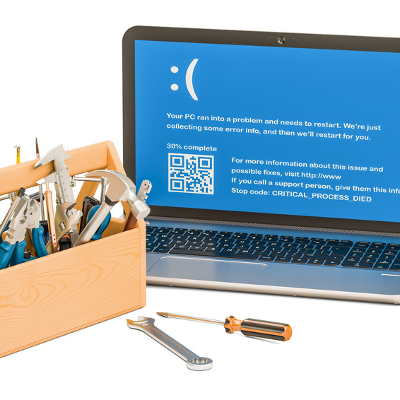
Maintaining a network of PCs can be a lot of work. We wouldn’t blame you for having trouble keeping your business’ computers up-to-date–especially if you don’t have a dedicated IT department on-site. It doesn’t have to feel impossible, though. With proactive technology maintenance and the following tips, you’ll be sure to stay productive throughout the workday.

Update Your Devices
Microsoft issues updates that are meant to improve the performance and security of its operating systems. It’s recommended that you implement these updates as soon as possible so that they can do what they were designed to do: help your computer’s performance. To check if your device has potential updates, just hit the Windows key and navigate through Settings > Update & Security > Windows Update > Check for Updates. If your device needs an update, this page will tell you. Once you’ve done this, all you need to do is restart your computer and complete the installation process.

Restart Your Device
One of the best ways you can improve the performance of your computer is to restart it completely. This gives your computer a moment to catch its breath. It’s just like trying to push your body too hard–sooner or later, you’ll crash and need to take a break. If you don’t, you run the risk of working your technology too hard, which could result in your technology breaking down prematurely. To restart your PC, click on the Start menu or press the Windows key. Next, select Power and click Restart.

Disable Startup Apps
Some programs will start as soon as you power up your computer. A couple examples might be Microsoft Office, antivirus, Spotify, or anything else that is set to do so. If your computer takes too long to start up, you can disable applications so that they don’t run automatically when you turn your computer on. To do this, open your task manager by using the Ctrl+Alt+Delete keyboard shortcut. Select More Details for the option Startup and Disable any programs that you don’t want to initiate on startup. Just be careful of the ones you actually disable, as some of them might be required to keep your computer running properly.

Have these three tips helped out your PC performance? To learn more, reach out to us at 810.230.9455.

debit_card_lock400.jpg

Swipe With Care: Your ATM Might Be Controlled By A Hacker

debit_card_lock400.jpg

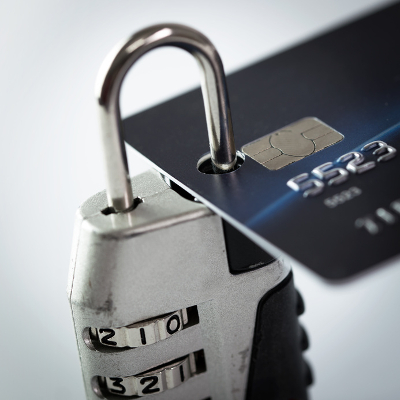
One of the most enticing credentials that hackers desire is your credit card number, along with its expiration date and the code on the back. Hackers are also willing to go great lengths to achieve their goal of stealing these credentials, even so far as to make physical changes to automatic teller machines (ATMs) to do so. In fact, hackers will often install skimming devices on ATMs that are so subtle that they can be difficult to detect.

Take, for example, this news article from July 2017 that showcases a rather specific case of ATM skimming. The device in question simply slips over the ATM card reader in a discreet way to give the user the impression that they are using a legitimate machine. Any unsuspecting user could accidentally throw their credentials right to a hacker.

Furthermore, there have been cases of hackers implementing custom hardware into ATMs designed to harvest credentials. These devices are often installed onto ATMs so that they can wirelessly transmit credentials, to perpetrators lurking nearby. Either way, the result is the same; stolen credentials and upset victims.

Imagine waking up, checking your bank account, and noticing that you’re missing the entirety of your checking account balance. Or, even worse, finding out that your account has sunk into the red because someone in a foreign country has purchased your information and used it for their own purposes. How can you keep this from happening to you? The easiest way is to be wary of ATM skimmers in the first place. You should keep the following in mind when using an ATM.

  • Cameras surrounding the machine: If you are in an area where there are plenty of cameras, there will be less of a chance that the ATM will have been tampered with. In fact, most ATMs actually have built-in cameras, but it helps to have some extra caution to take a look around whenever you want to use one.
  • Tampering with the device: Examine the device before you use it. Are there any issues with the way it looks? Are any faceplates removed or devices plugged into it? If there are, you know that it’s not a machine that you can trust.
  • Additional “testing”: Before you insert your card into the device, try jostling the slot to see if it’s something that was artificially placed over the actual reader. Carefully inspect the machine before you insert your card. Spending a few moments to check the device before using it can save you a whole lot of pain in the long run.

What are your thoughts on ATM skimmers? Are you confident that you can identify one that has been tampered with? Leave your thoughts in the comments.

ransomware_school400.jpg

TheDarkOverlord Solutions Is at It Again! This Time the Hacker Group Is Targeting Schools

ransomware_school400.jpg

While many youngsters enjoy it when their school shuts down, this was likely not the case in Flathead Valley, Montana, where the cybercriminal group ‘TheDarkOverlord Solutions’ targeted the entire Columbia Falls school district. This attack caused the three-day closure and otherwise disrupted over 30 schools, and the personal information of teachers, students, and school administrators was supposedly to be released if the group didn’t receive a ransom payment.

Furthermore, and more alarmingly, parents received reportedly graphic death threats against their children from the group. These threats alluded to an infamous, and still painfully recent, school shooting. This is the first time that TheDarkOverlord Solutions have gone to these lengths as far as is known.

The district server for Columbia Falls was ultimately targeted; records detailing the addresses, medical history, behavioral history, and other pieces of information valuable to cybercriminals were accessed that detailed the personal data of current and former students, their parents, and the school’s staff members. As a result, the 30 schools closed (as referenced above) and weekend events and activities were cancelled. With a heightened security presence, students returned to classes on Tuesday, September 19th.

TheDarkOverlord is no stranger to the news, or to targeting vulnerable individuals. In July of 2017, there was an online sale for a tantalizing data set that would allow cybercriminals to leverage information harvested from healthcare providers, just weeks after putting almost nine and a half million records for sale. These records came from a clinic, a healthcare provider, and a health insurance provider.

Somewhat less threateningly, the same group also took credit for releasing the fifth season of the Netflix hit series Orange is the New Black before its official release date, despite receiving about $50,000 worth of cryptocurrency in ransom from an audio post-production studio.

This piece of history shows why the Columbia Falls school district is right in their decision to not pay the ransom, as it in no way guarantees that the cybercriminal (or group) responsible will hold up their end of the bargain. Even if they do, it only proves that the victims are willing to pay, designating themselves as the perfect target for repeated attacks.

The key to your safety is to ensure your data is secure against the entire spectrum of threats. NuTech Services can help you to do so. Call us at 810.230.9455 to get started.

recovering_tabs_browser400.jpg

Tip of the Week: Closed A Tab On Accident? Here’s How To Restore It

recovering_tabs_browser400.jpg

Have you ever accidentally closed a tab before you were done with it? It’s a classic case of clicking just a little too close to the X. We’ll walk you through how you can open up Google Chrome tabs, not just on your ordinary desktop web browser, but your Android device as well. It’s a lot easier than searching for the same web pages as before!

For the Chrome web browser, it’s as simple as right-clicking in the space that you would ordinarily click if you were to open a brand new tab. You will then click on Reopen Closed Tab. You can also use the keyboard shortcut for Ctrl+Shift+T.

But what if you want to access any recently closed tabs on your Android device? There’s a very simple way to do this, as well. You can start by opening up the Google Chrome app. Next, tap the three-dot menu in the top right corner of your screen. A couple selections down on the menu, you’ll see the option for Recent tabs. From this screen, you’ll be able to see all of the recent tabs that you have closed out of.

The cool thing about this screen is that you can even see the tabs of your other devices that are synced with your mobile device. To restore a closed tab, all you have to do is tap the title of the page you want reopened.

As for other browsers like Mozilla Firefox, you’ll see the option to restore your last browsing session the next time you open the web browser. All you have to do is click the Restore Previous Session. Right-clicking on the tab in Microsoft Edge will also present a similar function compared to Google Chrome.

For more great tips and tricks, visit NuTech Services’s blog today.