new_petya_friend_400.jpg

For This Ransomware, “Yes or No” Really Means “Yes or Yes”

new_petya_friend_400.jpg

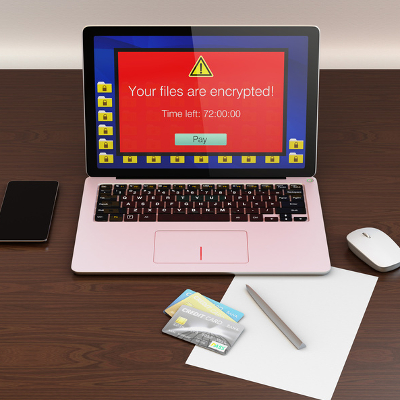
The ransomware Petya (previously thought to have been eradicated) has unfortunately resurfaced, and it’s brought a friend to the party. Petya was delivered via an email containing an invitation to apply for a job, including the virus in an executable file that was disguised as a PDF job resume. When a hepless user clicked the file, Petya would get to work.

The original version of the ransomware operated by restricting access to the master boot record, allowing access only to a dark web payment portal that may (or may not) fix the problem. Since Petya required administrative privileges to do so, a savvy user could render it useless by denying them. Unfortunately, its developers have come up with an unpleasant way to work around this Achilles heel.

The malware now comes bundled together with a second ransomware program, a more traditionally operating one known as Mischa. Mischa blocks access to files until the user pays a ransom, providing the user with links to TOR payment sites and authentication codes to utilize there as well. The kicker is, Mischa also encrypts executable files, leaving the Windows folder and browser folders untouched. Once the computer has been sufficiently infected, Mischa leaves two files for the user with their payment instructions.

Just as when Petya was originally distributed, an email is delivered containing a file appearing to be a job application, which would ask to run an .exe file. Selecting “yes” will download Petya, and selecting “no” used to foil the attack. Not anymore – now selecting “no” will install Mischa.

The payment site for Mischa works in a very similar manner to Petya’s. After inputting the authentication code, the user is ordered to purchase enough Bitcoins to pay the ransom, currently set to the general equivalence of $875. The user is then provided with the Bitcoin address where they are to send the ransom.

Unlike Petya, there is no known way to recover files affected by Mischa without paying the Bitcoin ransom, but there are tools available online to remove the virus.

However, also to be found online are the rumblings of upcoming copycats of Petya and Mischa. Malwarebytes.com posted a threat analysis of another dual-horned ransomware called Satana. Just like the Petya and Mischa bundle, Satana has the capability to lock the master boot record and the complete file record. The main difference is, while Petya and Mischa would only run one of the two malware options depending on the user’s actions, Satana goes right ahead and runs both, sequentially.

While Malwarebytes reports that Satana is currently flawed and appears to still be in the early stages of development, this news is still unsettling. Imagine how frustrating it would be to have no fighting chance after downloading a virus – and now consider that we could be approaching that point.

However, we will continue to monitor the situation and keep you in the loop with any updates that arise. Keep visiting the NuTech Services blog to check in for the latest news and security updates.
android_malware_400.jpg

Alert: New Malware Can Download 200 Malicious Apps in a Few Short Hours

android_malware_400.jpg

You don’t often hear about mobile operating systems being vulnerable to security threats (desktop vulnerabilities usually hog the spotlight), but when you do, they’re usually major problems that you need to be aware of. One such threat is called “Hummer,” a trojan that has installed unwanted apps and malware to more than a million phones all over the world.

About the Hummer Malware Family
The Hummer family of malware has increased in reach and scope since earlier this year. Cheetah Mobile reports that, at its peak, Hummer infected as many as 1.4 million devices daily. Thought to originate in China, Hummer infected over 63,000 devices daily in China alone. While the number of infections has begun to drop off, there still remain an astounding number of infected devices: about 1,190,000.

As reported by TechRepublic, here are the top five countries that are infected by the Hummer malware family:

  • India: 154,248
  • Indonesia: 92,889
  • Turkey: 63,906
  • China: 63,285
  • Mexico: 59,192

What It Does
The Hummer trojan roots the device that it infects, effectively unlocking the operating system and allowing for administrator privileges. Once it has done this, it begins to install malware and unwanted applications, games, pornographic applications, and other dangerous, if not annoying, programs. Since the Hummer trojan gains root access, traditional antivirus and other preventative measures aren’t capable of eliminating it from your device.

Perhaps the most annoying part of this malware is the fact that you can’t even uninstall the unwanted apps. The trojan will reinstall them continuously, which is both frustrating and cause for concern. Cheetah Mobile ran a test on the Hummer trojan and came to some shocking results: “In several hours, the trojan accessed the network over 10,000 times and downloaded over 200 APKs, consuming 2 GB of network traffic.” In other words, you can bet that you don’t want this trojan installed on your device.

How to Fix It
If you think that wiping your device will get rid of the trojan, think again. Cheetah Mobile claims that even a factory reset won’t remove it from your device. However, Cheetah Mobile’s Killer app is capable of removing the trojan. Alternatively, users can flash their device, but this is a complicated procedure that may not be worth the effort.

Hummer is just one of the many mobile threats out there that users of smartphones and other devices need to worry about. To learn more about how you can secure your organization’s mobile devices from Hummer and other threats, reach out to us at 810.230.9455.

7zip_vulnerability_400.jpg

Alert: 7-Zip Software Can Leave Your System Vulnerable

7zip_vulnerability_400.jpg

Software vulnerabilities can cause major issues for individuals and businesses. Cisco’s Talos Security Intelligence and Research Group, which is designed as an organization to “protect consumers from known and emerging threats,” has found such a vulnerability with 7zip.

The 7zip software is an open-sourced file archiver and decompressor, and has many software developers scrambling to patch their products. Since 7zip is freeware, it is naturally used in the development of other applications’ code; and that is making this particular vulnerability more than your run-of-the-mill code malfunction. Currently there are two discovered vulnerabilities with the software. ZDNet explains the issues in stark detail:

  • “The first vulnerability, CVE-2016-2335, is an out-of-bounds security flaw caused by the way 7zip handles Universal Disk Format (UDF) files. When partition maps are scanned to find objects within the file system, there is a lack of proper checking which can cause a read-out-of-bounds problem. If exploited, cyberattackers could use the vulnerability to execute code remotely.”
  • “The second security flaw, CVE-2016-2234 , is an exploitable heap overflow vulnerability found within the Archive::NHfs::CHandler::ExtractZlibFile method functionality of 7zip. In the software’s HFS+ system, files can be stored in a compressed format using zlib, and depending on the size of the data, this information may be stored in blocks.”

In layman’s terms, the vulnerabilities affected the way that many programs utilizing 7zip function. In particular, software programs like antivirus solutions are affected. The vulnerabilities change the way that files are compressed and decrypted; and, since the 7zip code was used as a part of so many other pieces of software, the opportunities are real and prevalent. While this vulnerability may not present network administrators with as much fear as 2014’s Heartbleed vulnerability, the potential for data and network breaches is concerning.

Working with Talos, the 7zip developers have patched the problems, with their latest offering, 7zip v. 16.00, being free of these vulnerabilities. Any other version of the software needs to be updated immediately to ensure that users are not subject to data breaches as a result of this vulnerability. Any other software that has the 7zip code needs to be patched as well.

For more information on the latest security vulnerabilities, as well as information on how to protect your organization from potential threats, call us today at 810.230.9455.

microsoft_end_of_life_400.jpg

A Checklist of 40 Microsoft Software Titles Reaching End of Life/Extended Support in July 2016

microsoft_end_of_life_400.jpg

What kind of Microsoft products does your business use on a regular basis? If you can’t answer this question, you could be in trouble when it comes time to update your crucial applications and operating systems. This is a necessary part of working with technology; if your software can’t be considered secure, you need to upgrade to a more recent, better-functioning tool, or find yourself in a dangerous situation.

Microsoft in particular has a very specific way of handling support for their products. The software giant will provide what’s called “mainstream support,” which involves accepting requests for new features and hotfixes for key issues. Once mainstream support ends, the product enters an “extended support” period, where all warranties end, and the only support your product receives is security updates and patches.

Both of these periods last for five years, meaning that the lifespan of a piece of software is effectively ten years. Once extended support ends, the product reaches its “end of life,” in which Microsoft no longer supports the software at all.

Below, you’ll find a list of all Microsoft products that will reach their end of support date on July 12th, 2016. If your organization is currently using any of this software, you should seriously consider upgrading before it becomes a security discrepancy.

Service Packs Reaching End of Support

  • Microsoft Dynamics CRM 2013
  • Microsoft Dynamics SL 2011 Service Pack 2
  • Microsoft SQL Server 2014 Business Intelligence
  • Microsoft SQL Server 2014 Developer
  • Microsoft SQL Server 2014 Enterprise
  • Microsoft SQL Server 2014 Enterprise Core
  • Microsoft SQL Server 2014 Express
  • Microsoft SQL Server 2014 Standard
  • Microsoft SQL Server 2014 Web
  • Microsoft System Center 2012 Configuration Manager Service Pack 1
  • Microsoft System Center 2012 Endpoint Protection Service Pack 1
  • Microsoft System Center 2012 R2 Configuration Manager
  • Microsoft System Center 2012 R2 Endpoint Protection
  • Microsoft System Center 2012 R2 Endpoint Protection for Linux
  • Microsoft System Center 2012 R2 Endpoint Protection for Mac

Products Moving from Mainstream to Extended Support
Products marked with * expire on July 10th, 2016, rather than July 12th, 2016.

  • * Microsoft Dynamics Retail Management System Headquarters 2.0
  • * Microsoft Dynamics Retail Management System Store Operations 2.0
  • Microsoft Project Server 2010 July 12, 2016
  • Microsoft Dynamics SL 2011
  • Microsoft SQL Server Compact 4.0
  • Windows MultiPoint Server 2011 Premium
  • Windows MultiPoint Server 2011 Standard

Products Moving to End of Support

  • Microsoft ActiveSync 4.2
  • Microsoft BizTalk Server 2006 Developer Edition
  • Microsoft BizTalk Server 2006 Enterprise Edition
  • Microsoft BizTalk Server 2006 R2 Branch Edition
  • Microsoft BizTalk Server 2006 R2 Developer Edition
  • Microsoft BizTalk Server 2006 R2 Enterprise Edition
  • Microsoft BizTalk Server 2006 R2 Standard Edition
  • Microsoft BizTalk Server 2006 Standard Edition
  • Microsoft Commerce Server 2007 Developer Edition
  • Microsoft Commerce Server 2007 Enterprise Edition
  • Microsoft Commerce Server 2007 Standard Edition
  • Microsoft Connected Services Framework Billing Standard Business Event 3.0
  • Microsoft Connected Services Framework Order Handling Standard Business Event 3.0
  • Microsoft Connected Services Framework Server 3.0
  • Microsoft Connected Services Framework Standard Server 3.0
  • Microsoft Connected Services Framework Standard Server with Standard Business Events 3.0
  • Microsoft Visual J# Version 2.0 Redistributable Package
  • Microsoft Visual Studio 2005 Team Foundation Server

Is your organization is facing an end-of-life event for any of these technologies? If so, contact NuTech Services. We’ll work with you to determine the best course of action for replacing your dying software. To learn more, reach out to us at 810.230.9455.

b2ap3_thumbnail_ransomware_hostage_400.jpg

Alert: New CryptoJoker Ransomware May Be the Worst Ransomware Yet

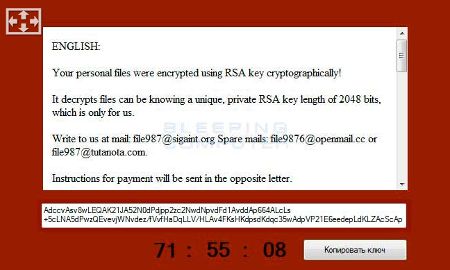
b2ap3_thumbnail_ransomware_hostage_400.jpgModern ransomware is exceptionally dangerous, even by malware standards. Ransomware is capable of locking down important files on a victim’s computer, displaying a massive threat to both business professionals and their networks, as well as the average PC user. While other types of ransomware like CryptoLocker and CryptoWall are somewhat manageable, a new variant called CryptoJoker makes it borderline impossible to recover your files.

Similar to other types of ransomware, CryptoJoker locks down the victim’s files through encryption, and will only decrypt the files once the ransom has been paid to the hacker in full. The ransom is generally paid in Bitcoin to preserve the anonymity of the crook holding your data. The idea is to strike fear into the hearts of their victims, and play on this fear to extort money from them for the safe return of their files. Ransomware like CryptoJoker is typically spread through email phishing scams, but in this case, CryptoJoker infects users through a phony PDF file.

ib cryptojoker

After the user has been infected by CryptoJoker and the ransomware has installed, it will scan all drives connected to the infected device. This includes all network drives connected to it. CryptoJoker then proceeds to encrypt specific file extensions, most of which are absolutely critical to your business’s continued functionality:

  • .txt
  • .doc
  • .docx
  • .xls
  • .xlsx
  • .ppt
  • .pptx
  • .odt
  • .jpg
  • .png
  • .csv
  • .sql
  • .mdb
  • .sln
  • .php
  • .asp
  • .aspx
  • .html
  • .xml
  • .psd
  • .java
  • .jpeg
  • .pptm
  • .pptx
  • .xlsb
  • .xlsm
  • .db
  • .docm
  • .sql
  • .pdf

CryptoJoker isn’t widely distributed, so you can breathe easy knowing that you probably won’t run into it anytime soon. Still, what would happen if you were to get infected? CryptoJoker isn’t something to laugh at; the quality of its encryption is military-grade AES-256 encryption, which makes it impossible, in most cases, to crack. Users are often left with no choice but to pay the ransom to CryptoJoker’s developers. Thus, the key to preventing ransomware from destroying your data is to prevent it from infiltrating your computer in the first place. If you do get infected by CryptoJoker, you better hope that you have a data backup solution that’s ready to work overtime.

If you don’t have a backup of your data available, you’re out of luck. Even in the worst case, though, you shouldn’t be paying criminals for the decryption key if you can help it. Just because they claim that they’ll give you the key in exchange for payment, doesn’t mean that they’ll stick to their word. There’s nothing stopping them from taking your money and leaving you high and dry. Other ransomware is notorious for taking payments and not decrypting your files, so it’s safe to say that you shouldn’t trust CryptoJoker either.

If you aren’t sure whether or not your security solution has what it takes to protect your organization from CryptoJoker, NuTech Services can help. We can arm your business with solutions that are designed to protect your systems from CryptoJoker and other ransomware before you get infected. In most cases, this is the best thing we can do for you; recovering your encrypted files is often borderline impossible.

For more information about cybersecurity best practices and how to protect your organization from ransomware, give NuTech Services a call at 810.230.9455.

b2ap3_thumbnail_malware_lock_up_400.jpg

Alert: How Hackers are Scamming Users With Fake IT Support Hotline

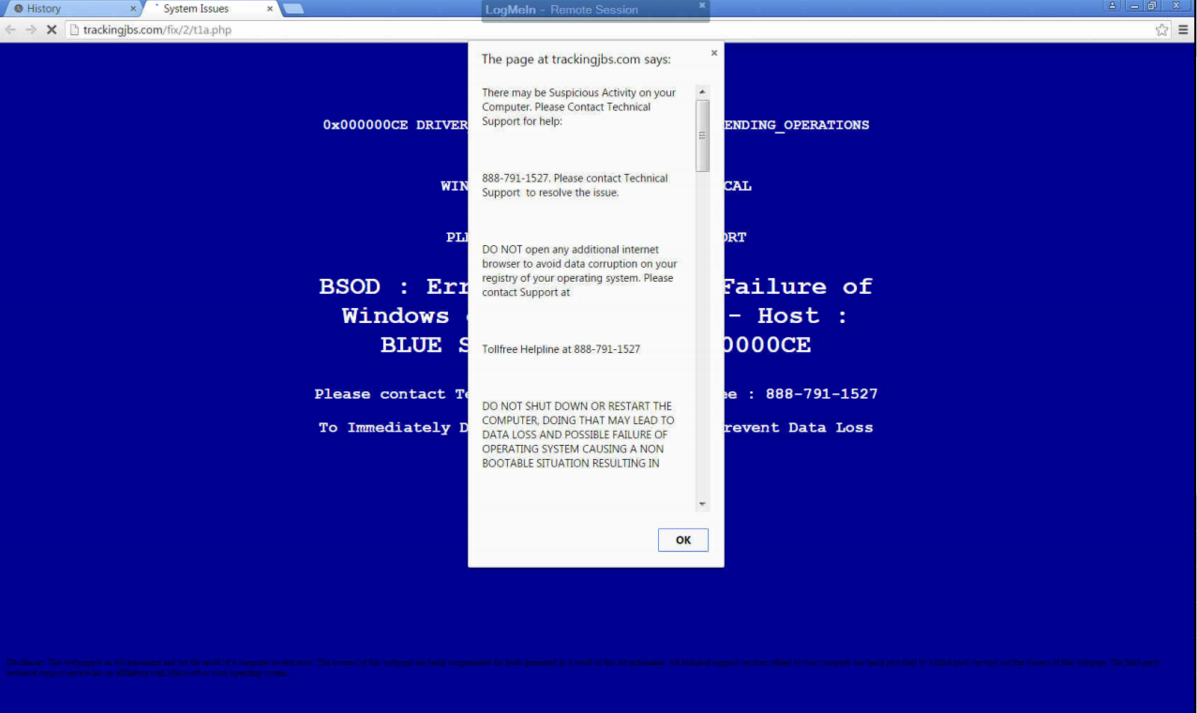
b2ap3_thumbnail_malware_lock_up_400.jpgThere’s a wicked string of malware on the Internet that locks users out of their browser and directs them to call a phone number. That phone number reaches hackers who have set up a subterfuge as an IT support company. If this happens to you, even if you are in the middle of something important, do not call the phone number.

This particular piece of malware startles the user by blocking their progress within their web browser, suggesting them to contact a fake tech support hotline to “fix” their computer. It will show a screen that’s similar to the Windows fatal system error blue screen, along with a fake technical support message that pops up, informing the user of the “problem.” As you can see by the provided screenshot, this blue screen of death is deceptive because it’s only displayed within the browser, instead of taking up the entire screen like Microsoft’s real blue screen of death.

blue screen

Whatever you do, DON’T CALL THE PROVIDED PHONE NUMBER. The blog Delete Malware explains: “If you call [the number] they won’t actually remove adware from your computer. They will hijack your computer and steal all of your bank information and passwords. They are crooks, don’t call them!”

Fortunately, this error isn’t as critical as what it seems. In fact, this is a common tactic of social engineering: make the problem seem much worse than it is, causing the victim to flip out and do something rash–like call the fake IT support phone number.

What then are you supposed to do? You can make the issue go away simply by closing the browser via task manager (Ctrl + Alt + Delete), or rebooting the PC. However, it’s still annoying to deal with because you’ll lose any unsaved data, along with any progress made to whatever project you’re working on. Plus, rebooting your system won’t technically solve the problem; the malware will still be embedded in your system, waiting for another chance to strike.

Therefore, to get down to the root of this problem, you’re going to want to isolate and properly delete the malicious file. For this level of real IT support, you’re going to want to call the trained professionals at NuTech Services. We’ve got the tools needed to find and eliminate such threats, and even block them from hitting your system in the first place with a Unified Threat Management solution.

Lastly, we’d like to point out that the perpetrators of this hack are relying on the fact that the user doesn’t know who to call for IT support in a crisis situation. It’s reasons like this why you and your staff need to be familiar with who to call in an emergency IT situation, like NuTech Services at 810.230.9455. When it comes to taking care of IT issues, we’re the real deal, and we take offense that hackers these days are posing as trustworthy IT technicians in order to get at a user’s personal data. It’s an unsettling trend that will only be brought down by companies being vigilant about their network security.

To that end, NuTech Services can help. Call us today to find out how we can protect you from the worst of the web.

b2ap3_thumbnail_windows_10_email_scam_400.jpg

This Windows 10 Email Scam Isn’t The Upgrade You’re Looking For

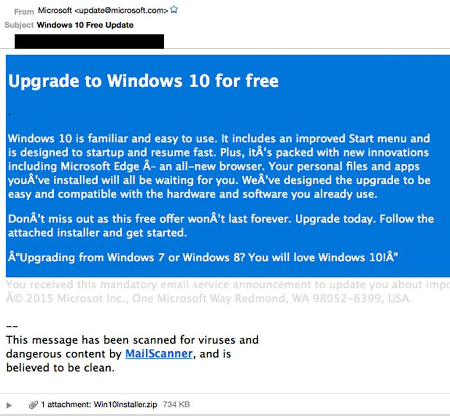
b2ap3_thumbnail_windows_10_email_scam_400.jpgFor those of you who don’t yet have Windows 10, don’t panic. It’s not going anywhere, and you’ll get it soon enough. In the meantime, it’s important that you don’t get impatient and hastily open suspicious emails containing what appears to be a launcher for your Windows 10 download. Hackers are using ransomware to extort money from unsuspecting users who just want their new operating system already.

For some, the fault might lie with Microsoft because of the way they’ve decided to deploy Windows 10. Making people wait even more for a product that already exists is somewhat maddening, and hackers are taking advantage of this impatience to strike. CTB-Locker is a ransomware similar to Cryptolocker, in which it encrypts information locally on your PC, and offers a decryption key in exchange for a hefty price.

This ransomware spreads via email. Victims will receive a message in their inbox which appears to be from Microsoft detailing how they can bypass the wait for Windows 10, and prompts them to download what appears to be a launcher for the new operating system. Once the user downloads the executable file, the malware starts encrypting data on the PC. The user is locked out of their PC until they pay the ransom.

Furthermore, if the user wants to regain access to their files, the ransom must be paid in Bitcoin, a cryptocurrency which is known for its anonymity and difficulty to trace. Adding to the difficulty is that the hackers are using the Tor anonymity network to communicate, which makes catching the clowns behind this act difficult at best. Ransomware is an increasingly popular problem, and according to ZDNet, it can cost users anywhere from $200 to $10,000 for each occurrence, leading to ultimate costs of up to $18 million. That’s a lot of cash that’s been extorted from some 1,000 users in 2015 alone.

windows10scam

Of course, with a good email solution you won’t be receiving this message. A powerful spam blocking solution is capable of keeping spam messages out of your inbox almost indefinitely, meaning that you have little to worry about from the average phishing attack. Still, if a hacker wants to scam you bad enough, they’ll find a way to get through your security measures and attack you directly, in the form of a targeted spear phishing attack.

Therefore, the best way you can protect yourself from threats like CTB-Locker is to keep an eye on your inbox for any suspicious messages, and to never, ever, download attachments from unknown senders. Augment caution with a powerful spam filter and you’ll have all you need to keep phishing attacks at bay. Give NuTech Services a call at 810.230.9455 to learn more.

b2ap3_thumbnail_windows_logo_400.jpg

Windows Server 2003 End of Support Date Looms on the Horizon

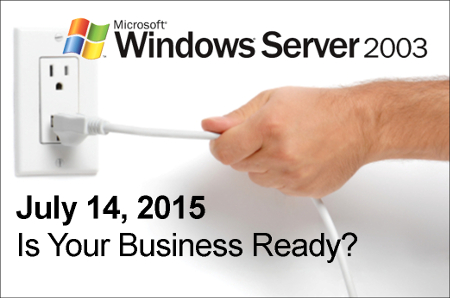
b2ap3_thumbnail_windows_logo_400.jpgThe next major operating system to get the ax from Microsoft is Windows Server 2003. Slated to have its mainstream support ended on July 14th, businesses that currently use the software need to begin making plans to upgrade their system as soon as possible. With this server operating system no longer being supported by Microsoft, your data will be vulnerable to the latest online threats.

end of support windows server 2003It’s best practice to upgrade your server’s OS (and all of your software for that matter) every time a new version is released–not every twelve years. One reason to upgrade is that the latest software is built to handle the demands of modern businesses, which gives you a competitive edge over companies running older software. Security is another big part of why you should upgrade, and in the case of Windows Server 2003, the need to upgrade by July 14th is urgent because Microsoft ending mainstream support means that they will no longer be providing security updates and patches to protect you from the latest threats.

If you want to dig in your heels and hang on to your precious Windows Server 2003, you have the option to purchase custom support from Microsoft. However, this isn’t a tangible option for the small business. According to Processor magazine, Microsoft is charging upwards of $200,000 for this service. Your business is better off just upgrading to the latest OS for your server, especially if you’re working in a field like health care that requires your technology to be up-to-date in order to comply with strict security standards.

Upgrading from Windows Server 2003 isn’t difficult, but it does require you to take an accurate assessment of your applications to find out if they can transfer to your new system. For example, you may run into some issues when attempting to move older applications that run off a 32-bit operating system to a newer OS. Issues like this can be worked around, but it requires the skills of a knowledgeable professional, which is time and expense that must be factored into the upgrading cost. When upgrading your server to a new OS, it’s best to go about it with a well-thought-out plan so that your upgrading process won’t run into any surprises that will take your server offline any longer than it needs to be.

NuTech Services can work with your business to make the upgrading process as quick, easy, and affordable as possible. We can come up with a time-saving plan that accounts for any discrepancies that might hinder the upgrading process of an older system, and we can migrate your data to a temporary server that your business can operate from while we equip your server with the latest OS. This way, the productivity of your business won’t skip a beat.

It may be that upgrading the software on an older server unit isn’t the most efficient option for your business. A lot has changed in twelve years, and your old server units have likely experienced some wear and tear and require more maintenance. Technologies like server virtualization and cloud computing may be a better data-hosting option for your business than trying to update your old system.

Whatever the best route is for your business, NuTech Services will guide you in it so that your organization isn’t stuck using older software that leaves your data vulnerable and your business inept. Call us today at 810.230.9455 to learn more.