Free Attack Unsecured vector and picture

What Is Push-Bombing & How Can You Prevent It?

Cloud account takeover has become a major problem for organizations. Think about how much work your company does that requires a username and password. Employees end up having to log into many different systems or cloud apps.

Hackers use various methods to get those login credentials. The goal is to gain access to business data as a user. As well as launch sophisticated attacks, and send insider phishing emails.

How bad has the problem of account breaches become? Between 2019 and 2021, account takeover (ATO) rose by 307%.

Doesn’t Multi-Factor Authentication Stop Credential Breaches?

Many organizations and individuals use multi-factor authentication (MFA). It’s a way to stop attackers that have gained access to their usernames and passwords. MFA is very effective at protecting cloud accounts and has been for many years.

But it’s that effectiveness that has spurred workarounds by hackers. One of these nefarious ways to get around MFA is push-bombing.

How Does Push-Bombing Work?

When a user enables MFA on an account, they typically receive a code or authorization prompt of some type. The user enters their login credentials. Then the system sends an authorization request to the user to complete their login.

The MFA code or approval request will usually come through some type of “push” message. Users can receive it in a few ways:

  • SMS/text
  • A device popup
  • An app notification

Receiving that notification is a normal part of the multi-factor authentication login. It’s something the user would be familiar with.

With push-bombing, hackers start with the user’s credentials. They may get them through phishing or from a large data breach password dump.

They take advantage of that push notification process. Hackers attempt to log in many times. This sends the legitimate user several push notifications, one after the other.

Many people question the receipt of an unexpected code that they didn’t request. But when someone is bombarded with these, it can be easy to mistakenly click to approve access.

Push-bombing is a form of social engineering attack designed to:

  • Confuse the user
  • Wear the user down
  • Trick the user into approving the MFA request to give the hacker access

Ways to Combat Push-Bombing at Your Organization

Educate Employees

Knowledge is power. When a user experiences a push-bombing attack it can be disruptive and confusing. If employees have education beforehand, they’ll be better prepared to defend themselves.

Let employees know what push-bombing is and how it works. Provide them with training on what to do if they receive MFA notifications they didn’t request.

You should also give your staff a way to report these attacks. This enables your IT security team to alert other users. They can then also take steps to secure everyone’s login credentials.

Reduce Business App “Sprawl”

On average, employees use 36 different cloud-based services per day. That’s a lot of logins to keep up with. The more logins someone has to use, the greater the risk of a stolen password.

Take a look at how many applications your company uses. Look for ways to reduce app “sprawl” by consolidating. Platforms like Microsoft 365 and Google Workspace offer many tools behind one login. Streamlining your cloud environment improves security and productivity.

Adopt Phishing-Resistant MFA Solutions

You can thwart push-bombing attacks altogether by moving to a different form of MFA. Phishing-resistant MFA uses a device passkey or physical security key for authentication.

There is no push notification to approve with this type of authentication. This solution is more complex to set up, but it’s also more secure than text or app-based MFA.

Enforce Strong Password Policies

For hackers to send several push-notifications, they need to have the user’s login. Enforcing strong password policies reduces the chance that a password will get breached.

Standard practices for strong password policies include:

  • Using at least one upper and one lower-case letter
  • Using a combination of letters, numbers, and symbols
  • Not using personal information to create a password
  • Storing passwords securely
  • Not reusing passwords across several accounts

Put in Place an Advanced Identity Management Solution

Advanced identity management solutions can also help you prevent push-bombing attacks. They will typically combine all logins through a single sign-on solution. Users, then have just one login and MFA prompt to manage, rather than several.

Additionally, businesses can use identity management solutions to install contextual login policies. These enable a higher level of security by adding access enforcement flexibility. The system could automatically block login attempts outside a desired geographic area. It could also block logins during certain times or when other contextual factors aren’t met.

Do You Need Help Improving Your Identity & Access Security?

Multi-factor authentication alone isn’t enough. Companies need several layers of protection to reduce their risk of a cloud breach.

Are you looking for some help to reinforce your access security? Give us a call today to schedule a chat.


Featured Image Credit

This Article has been Republished with Permission from The Technology Press.
Free Office Computer illustration and picture

Is It Time to Ditch the Passwords for More Secure Passkeys?

Passwords are the most used method of authentication, but they are also one of the weakest. Passwords are often easy to guess or steal. Also, many people use the same password across several accounts. This makes them vulnerable to cyber-attacks.

The sheer volume of passwords that people need to remember is large. This leads to habits that make it easier for criminals to breach passwords. Such as creating weak passwords and storing passwords in a non-secure way.

61% of all data breaches involve stolen or hacked login credentials.

In recent years a better solution has emerged – passkeys. Passkeys are more secure than passwords. They also provide a more convenient way of logging into your accounts.

What is Passkey Authentication?

Passkeys work by generating a unique code for each login attempt. This code is then validated by the server. This code is created using a combination of information about the user and the device they are using to log in.

You can think of passkeys as a digital credential. A passkey allows someone to authenticate in a web service or a cloud-based account. There is no need to enter a username and password.

This authentication technology leverages Web Authentication (WebAuthn). This is a core component of FIDO2, an authentication protocol. Instead of using a unique password, it uses public-key cryptography for user verification.

The user’s device stores the authentication key. This can be a computer, mobile device, or security key device. It is then used by sites that have passkeys enabled to log the user in.

Advantages of Using Passkeys Instead of Passwords

More Secure

One advantage of passkeys is that they are more secure than passwords. Passkeys are more difficult to hack. This is true especially if the key generates from a combination of biometric and device data.

Biometric data can include things like facial recognition or fingerprint scans. Device information can include things like the device’s MAC address or location. This makes it much harder for hackers to gain access to your accounts.

More Convenient

Another advantage of passkeys over passwords is that they are more convenient. With password authentication, users often must remember many complex passwords. This can be difficult and time-consuming.

Forgetting passwords is common and doing a reset can slow an employee down. Each time a person has to reset their password, it takes an average of three minutes and 46 seconds.

Passkeys erase this problem by providing a single code. You can use that same code across all your accounts. This makes it much easier to log in to your accounts. It also reduces the likelihood of forgetting or misplacing your password.

Phishing-Resistant

Credential phishing scams are prevalent. Scammers send emails that tell a user something is wrong with their account. They click on a link that takes them to a disguised login page created to steal their username and password.

When a user is authenticating with a passkey instead, this won’t work on them. Even if a hacker had a user’s password, it wouldn’t matter. They would need the device passkey authentication to breach the account.

Are There Any Disadvantages to Using Passkeys?

Passkeys are definitely looking like the future of authentication technology. But there are some issues that you may run into when adopting them right now.

Passkeys Aren’t Yet Widely Adopted

One of the main disadvantages is that passkeys are not yet widely adopted. Many websites and cloud services still rely on passwords. They don’t have passkey capability yet.

This means that users may have to continue using passwords for some accounts. At least until passkeys become more widely adopted. It could be slightly awkward to use passkeys for some accounts and passwords for others.

Passkeys Need Extra Hardware & Software

One thing about passwords is that they’re free and easy to use. You simply make them up as you sign up for a site.

Passkeys need extra hardware and software to generate and validate the codes. This can be costly for businesses to put in place at first. But there is potential savings from improved security and user experience. These benefits can outweigh the cost of passkeys.

Prepare Now for the Future of Authentication

Passkeys are a more secure and convenient alternative to passwords. They are more difficult to hack, and they provide a more convenient way of logging into your accounts. But passkeys are not yet widely adopted. Additionally, businesses may need to budget for implementation.

Despite these challenges, passkeys represent a promising solution. Specifically, to the problem of weak passwords. They have the potential to improve cybersecurity. As well as boost productivity for businesses and individuals alike.

Need Help Improving Your Identity & Account Security?

Take advantage of the new passkey authentication by exploring it now. It’s the perfect time to ease in and begin putting it in place for your organization.

Give us a call today to schedule a consultation.


Featured Image Credit

This Article has been Republished with Permission from The Technology Press.
Free Security Cyber illustration and picture

7 Smart Ways to Secure Your Wireless Printer & Keep Your Home Network Safe

Many people worry about someone hacking their computer. But they’re not really thinking about their wireless printer getting breached. It’s a tool that most individuals use sporadically. For example, when you want to print out tax forms or mailing labels.

Printers tend to be out of sight, out of mind. That is until you need to print something and run out of ink. Well, they’re not out of the mind of hackers. In fact, unsecured printers are a classic way for criminals to gain access to a home network.

To illustrate this point, Cybernews purposely hacked printers. It hijacked nearly 28,000 unsecured printers globally. The success rate was 56%. What did it do once it gained access? Ironically, it made the printers print out a guide on printer security.

Are you wondering how exposed your network is from your printer? We’ve got some security tips below to help. These tips can enable you to better secure your network, which keeps data on all devices more secure.

1. Change the Default Login Credentials

When you buy a new printer, it will likely have included default information. Manufacturers give you a way to connect and set up your device. This usually involves default login information.

Immediately change that information during set up. Hackers use a master list of all these defaults. They plug it into an automated script and just keep trying them all until they get a hit. Change these, and make sure you create a strong password.

2. Keep Printer Firmware Updated

Keeping firmware updated is vital to keeping your printer secure. Hardware needs updating just like computers, software, and apps do. Those updates often contain important security patches.

Firmware updates aren’t usually as visible as software updates. Software and OS updates usually give you a popup notification. But updates to the drivers and firmware that run printers, aren’t so visible.

Some of the places you can check for firmware updates are:

  • The PC manufacturer’s utility app on a connected device
  • The printer’s information panel
  • The printer manufacturer’s app installed on a PC

3. Use a Network Firewall

A network firewall is important to ensure the monitoring of traffic. Firewalls can block suspicious activity to keep hackers out of your network. You should configure the firewall to watch incoming and outgoing printer traffic.

4. Put Your Printer on a Guest Network

Most of today’s home routers allow you to set up a guest network. This is a separate Wi-Fi that runs from the same router you use for your main network. It’s harder for hackers to get from one network to another.

Keeping a less secure device separated from computers and phones improves security. You can still print to your printer from devices on another network. You just need to have things configured correctly. If you need help with that, just let us know.

5. Disable Unused Ports or Services

IoT devices, like printers, often have many ways to connect. You may not need all the ports or services that come with your printer. These ports are risk areas where hackers could find a way in.

It’s best to disable any ports and sharing features that you don’t need. This reduces the risk of a breach.

6. Unplug It When Not in Use

Most home printers aren’t used as much as work printers. People may only use them once a month or a few times a year. If you’re not using your printer constantly, unplug it when not in use.

One surefire way to cut off a hacker’s access is to unplug the device. When it’s shut down, no access is available at all.

7. Teach Your Family Cybersecurity Best Practices

Your printer is one device on your network. Most families connect several devices to their home Wi-Fi. In 2022, the average number of connected devices per U.S. household was 22.

Families need to know and adopt good cyber habits. This keeps everyone’s data more secure. It also helps you avoid costly identity theft breaches. Or the takeover of things like baby monitors.

Some standard best practices to follow for good cyber hygiene are:

  • Always use strong passwords. (at least 10-12 characters & include a mix of letters, numbers, and symbols)
  • Keep software & firmware on devices updated
  • Use multi-factor authentication wherever possible
  • Enable device firewalls & other protections
  • All devices that should have a good antivirus installed
  • Never login to an account from a link you receive via email or text
  • Learn how to identify phishing & get a second opinion before clicking
  • Get a security checkup from a pro at least every year or two

Get Some Help Keeping Your Family’s Data Secure

IT pros don’t only work with businesses. We also help families ensure their data is safe & devices are running smoothly. Give us a call today to schedule a home security checkup.


Featured Image Credit

This Article has been Republished with Permission from The Technology Press.

Free Person Holding a Remote Control Stock Photo

6 Immediate Steps You Should Take If Your Netflix Account is Hacked

Netflix is one of the most popular and well-known streaming services. It has nearly 231 million subscribers around the world. It has been growing steadily for almost a decade.

The platform has become an essential part of many people’s daily entertainment routines. They fire up their devices, log in, and pick right back up on their favorite shows.

Unfortunately, like any online service, Netflix accounts can be vulnerable to hacking. It’s a baked-in risk when you have a service that is only protected by a username and password.

If you experience an account hack, it can be shocking, confusing, and infuriating. You may not know exactly what to do and may react without thinking first. This is a dangerous space to be in because it can cause you to do things that only make things worse.

In this article, we’ll give you the steps to take when you suspect someone has hacked your Netflix account. Let’s first cover how hackers typically operate when deploying an account takeover.

How Does a Netflix Hack Typically Work?

Phishing overload is a problem that hackers take advantage of in these types of breaches. People receive fake emails all the time that spoof brands like Netflix. One common phishing ploy is an email stating, “There has been suspicious activity on your account.” It will include a link to log in to a spoofed site that looks like the brand’s normal login page. This is a classic trick to steal your login credentials.

Hacked Netflix accounts typically go for $12 each on the dark web.

People get numb to these emails because they get so many of them. They tend to tune them out, knowing that clicking on them could be dangerous. Hackers take advantage of this, hoping you’ll ignore the real ones from Netflix that warn you of a suspicious login (theirs!).

They lay low and don’t take any action yet that will lock you out. They wait for you to receive a few more of these emails, so you’ll completely ignore them. Then they attempt a takeover.

Accounts hacks can go in various ways. Here is one typical scenario of a Netflix hack:

  • The account owner gets an email about a suspicious login. Often it will be from a different country.
  • They may log into their Netflix account to see if there are any unknown devices logged in. Usually, none will show yet. The hacker logs back out. The goal is to get you to check and see that nothing is wrong, and assume the real notice is phishing.
  • This same scenario may happen 2-4 more times in the span of a month.
  • Once the hacker feels the user is ignoring the Netflix warnings, they’ll make their move.
  • They add their credit card to your account. This is so they can call Netflix and give them a method of verification.
  • They may increase your subscription plan to a higher level.
  • They also usually replace any user profile names on your account with numbers (1, 2, 3, etc.)
  • At this point, the account owner will typically receive an email. It will note a change in account information. This could be the account email, password, phone number, etc.
  • The hacker is now trying to lock the account owner out of their account.

What Do You Do If Someone Has Hacked Your Netflix Account?

1. Go to the Netflix site & try to log in.

If you suspect a hacked account, visit the Netflix site directly from your browser. Do not go through a link you received via email, DM, or SMS.

See if you can log in using your password. You may be able to if you caught the hacker before they’ve locked you out. If not, then skip to Step 4 below, calling Netflix support.

2. If you can log in, change your password immediately.

If you can log into your account, change the password right away. Ensure it’s a strong password that is at least 10-12 characters in length. It should also include a combination of letters, numbers, and symbols.

Do not use a variation of the breached password. You should not use any part of your old password to create the new one.

3. If you can log in, remove any strange payment methods

If you can still access your account and settings, go to the payment methods area. Often hackers will add another payment card to your account. They use it to verify the account to Netflix support.

Remove any strange payment method that is not yours. But if you remove your own payment card, you will need another way to verify your account with Netflix. So, at this point, you may want to call before you do that.

4. Call Netflix support. (Don’t skip this step)

Everyone’s experience may be different. Some users that have gone through a hack have praised the fast and helpful support from Netflix.

Contact Netflix support whether you have or have not succeeded in logging in. There may be things the hacker has done that you aren’t aware of. They may have changed subscription information.

Let the support representative know you think you’re the victim of an account hack. They’ll walk you through the process of undoing what the hacker has done.

5. Watch your bank statements.

Continue to watch your bank statements for any unusual charges. You should do this after any account hack.

6. Change the password for other accounts that used the same one as your Netflix account.

People often use the same or the nearly same password for several accounts. Make sure to change the password for any accounts that used the one that was just hacked.

Get Help Securing Your Passwords & Accounts

Don’t wait until a hack happens to you. Give us a call today to schedule a chat about our password security solutions.


Featured Image Credit

This Article has been Republished with Permission from The Technology Press.

person using black smartphone with gray and pink case

What Is App Fatigue & Why Is It a Security Issue?

The number of apps and web tools that employees use on a regular basis continues to increase. Most departments have about 40-60 different digital tools that they use. 71% of employees feel they use so many apps that it makes work more complex.

Many of the apps that we use every day have various alerts. We get a “ping” when someone mentions our name on a Teams channel. We get a notification popup that an update is available. We get an alert of errors or security issues.

App fatigue is a very real thing and it’s becoming a cybersecurity problem. The more people get overwhelmed by notifications, the more likely they are to ignore them.

Just think about the various digital alerts that you get. They come in:

  • Software apps on your computer
  • Web-based SaaS tools
  • Websites where you’ve allowed alerts
  • Mobile apps and tools
  • Email banners
  • Text messages
  • Team communication tools

Some employees are getting the same notification on two different devices. This just adds to the problem. This leads to many issues that impact productivity and cybersecurity.

Besides alert bombardment, every time the boss introduces a new app, that means a new password. Employees are already juggling about 191 passwords. They use at least 154 of them sometime during the month.

How Does App Fatigue Put Companies at Risk?

Employees Begin Ignoring Updates

When digital alerts interrupt your work, you can feel like you’re always behind. This leads to ignoring small tasks seen as not time-sensitive. Tasks like clicking to install an app update.

Employees overwhelmed with too many app alerts, tend to ignore them. When updates come up, they may quickly click them away. They feel they can’t spare the time right now and aren’t sure how long it will take.
Ignoring app updates on a device is dangerous. Many of those updates include important security patches for found vulnerabilities. When they’re not installed, the device and its network are at a higher risk. It becomes easier to suffer a successful cyberattack.

Employees Reuse Passwords (and They’re Often Weak)

Another security casualty of app fatigue is password security. The more SaaS accounts someone must create, the more likely they are to reuse passwords. It’s estimated that passwords are typically reused 64% of the time.

Credential breach is a key driver of cloud data breaches. Hackers can easily crack weak passwords. The same password used several times leaves many accounts at risk.

Employees May Turn Off Alerts

Some alerts are okay to turn off. For example, do you really need to know every time someone responds to a group thread? Or just when they @name you? But, turning off important security alerts is not good.

There comes a breaking point when one more push notification can push someone over the edge. They may turn off all the alerts they can across all apps. The problem with this is that in the mix of alerts are important ones. Such as an anti-malware app warning about a newly found virus.

What’s the Answer to App Fatigue?

It’s not realistic to just go backward in time before all these apps were around. But you can put a strategy in place that puts people in charge of their tech, and not the other way around.

Streamline Your Business Applications

From both a productivity and security standpoint, fewer apps are better. The fewer apps you have, the less risk. Also, the fewer passwords to remember and notifications to address.

Look at the tools that you use to see where redundancies may be. Many companies are using two or more apps that can do the same function.

Consider using an umbrella platform like Microsoft 365 or Google Workspace. These platforms include several work tools, but users only need a single login to access them.

Have Your IT Team Set up Notifications

It’s difficult for users to know what types of notifications are the most important. Set up their app notifications for them. This ensures they aren’t bombarded yet are still getting the important ones.

Automate Application Updates

A cybersecurity best practice is to automate device and software updates. This takes the process out of employees’ hands. It enhances productivity by removing unnecessary updates from their view.

Automating device updates through a managed services solution improves security. It also mitigates the chance there will be a vulnerable app putting your network at risk.

Open a Two-Way Communication About Alerts

Employees may never turn off an alert because they’re afraid they might get in trouble. Managers may not even realize constant app alert interruptions are hurting productivity.

Communicate with employees and let them know they can communicate with you. Discuss how to use alerts effectively. As well as the best ways to manage alerts for a better and more productive workday.

Need Help Taming Your Cloud App Environment?

Today, it’s easy for cloud tools to get out of hand. Get some help consolidating and optimizing your cloud app environment. Give us a call today.


Featured Image Credit

This Article has been Republished with Permission from The Technology Press.

Free Side View of a Woman Using a Laptop Stock Photo

These Everyday Objects Can Lead to Identity Theft

You wouldn’t think a child’s toy could lead to a breach of your personal data. But this happens all the time. What about your trash can sitting outside? Is it a treasure trove for an identity thief trolling the neighborhood at night?

Many everyday objects can lead to identity theft. They often get overlooked because people focus on their computers and cloud accounts. It’s important to have strong passwords and use antivirus on your PC. But you also need to be wary of other ways that hackers and thieves can get to your personal data.

Here are six common things that criminals can use to steal your information.

Old Smart Phones

People replace their smartphones about every two and a half years. That’s a lot of old phones laying around containing personal data.

Just think of all the information our mobile phones hold. We have synced connections with cloud services. Phones also hold banking apps, business apps, and personal health apps. These are all nicely stored on one small device.

As chip technology has advanced, smartphones have been able to hold more “stuff.” This means documents and spreadsheets can now be easily stored on them. Along with reams of photos and videos.

A cybercriminal could easily strike data theft gold by finding an old smartphone. They often end up at charity shops or in the trash. Make sure that you properly clean any old phones by erasing all data. You should also dispose of them properly. You shouldn’t just throw electronics away like normal garbage.

Wireless Printers

Most printers are wireless these days. This means they are part of your home or work network. Printing from another room is convenient. But the fact that your printer connects to the internet can leave your data at risk.

Printers can store sensitive documents, such as tax paperwork or contracts. Most people don’t think about printers when putting data security protections in place. This leaves them open to a hack. When this happens, a hacker can get data from the printer. They could also leverage it to breach other devices on the same network.

Protect printers by ensuring you keep their firmware updated. Always install updates as soon as possible. You should also turn it off when you don’t need it. When it’s off it’s not accessible by a hacker.

USB Sticks

Did you ever run across a USB stick laying around? Perhaps you thought you scored a free removable storage device. Or you are a good Samaritan and want to try to return it to the rightful owner. But first, you need to see what’s on it to find them.

You should never plug a USB device of unknown origin into your computer. This is an old trick in the hacker’s book. They plant malware on these sticks and then leave them around as bait. As soon as you plug it into your device, it can infect it.

Old Hard Drives

When you are disposing of an old computer or old removable drive, make sure it’s clean. Just deleting your files isn’t enough. Computer hard drives can have other personal data stored in system and program files.

Plus, if you’re still logged into a browser, a lot of your personal data could be at risk. Browsers store passwords, credit cards, visit history, and more.

It’s best to get help from an IT professional to properly erase your computer drive. This will make it safe for disposal, donation, or reuse.

Trash Can

Identity theft criminals aren’t only online. They can also be trolling the neighborhood on trash day. Be careful what you throw out in your trash.

It’s not unusual for garbage to enable identity theft. It can include pre-approved credit card offers that you considered “junk mail.” Your trash can also hold voided checks, old bank statements, and insurance paperwork. Any of these items could have the information thieves need to commit fraud or pose as you.

A shredder can be your best friend in this case. You should shred any documents that contain personal information. Do this before you throw them out. This extra step could save you from a costly incident.

Children’s IoT Devices

Electronic bears, smart kid watches, Wi-Fi-connected Barbies… all toys that hackers love. Mattel’s Hello Barbie was found to enable the theft of personal information. A hacker could also use its microphone to spy on families.

These futuristic toys are often what kids want. Parents might think they’re cool, but don’t consider their data security. After all, these are children’s toys. But that often means they can be easier to hack. Cybercriminals also zero in on these IoT toys, knowing they aren’t going to be as hard to breach.

You should be wary of any new internet-connected devices you bring into your home. That includes toys! Install all firmware updates. Additionally, do your homework to see if a data breach has involved the toy.

Schedule a Home IT Security Audit & Sleep Better at Night

Don’t let the thought of identity theft keep you up at night. Give us a call today and schedule a home IT security audit. You’ll be glad you did.


Featured Image Credit

This Article has been Republished with Permission from The Technology Press.
Free Cyber Security Information Security illustration and picture

6 Things You Should Do to Handle Data Privacy Updates

Once data began going digital, authorities realized a need to protect it. Thus, the creation of data privacy rules and regulations to address cyber threats. Many organizations have one or more data privacy policies they need to meet.

Those in the U.S. healthcare industry and their service partners need to comply with HIPAA. Anyone collecting payment card data must worry about PCI-DSS. GDPR is a wide-reaching data protection regulation. It impacts anyone selling to EU citizens.

Industry and international data privacy regulations are just the tip of the iceberg. Many state and local jurisdictions also have their own data privacy laws. Organizations must be aware of these compliance requirements. But they also need to know about updates to these rules.

By the end of 2024, about 75% of the population will have its data protected by one or more privacy regulations.

Authorities enact new data privacy regulations all the time. For example, in 2023, four states will have new rules. Colorado, Utah, Connecticut, and Virginia will begin enforcing new data privacy statutes.

Businesses must stay on top of their data privacy compliance requirements. Otherwise, they can suffer. Many standards carry stiff penalties for a data breach. And if security was lacking, fines can be even higher.

The Health Insurance Portability and Accountability Act (HIPAA) uses a sliding scale. Violators can be fined between $100 to $50,000 per breached record. The more negligent the company is, the higher the fine.

Does all that sound scary?

Don’t worry, we have some tips below for you. These can help you keep up with data privacy updates coming your way.

Steps for Staying On Top of Data Privacy Compliance

1. Identify the Regulations You Need to Follow

Does your organization have a list of the different data privacy rules it falls under? There could be regulations for:

  • Industry
  • Where you sell (e.g., if you sell to the EU)
  • Statewide
  • City or county
  • Federal (e.g., for government contractors)

Identify all the various data privacy regulations that you may be subject to. This helps ensure you’re not caught off guard by one you didn’t know about.

2. Stay Aware of Data Privacy Regulation Updates

Don’t get blindsided by a data privacy rule change. You can stay on top of any changes by signing up for updates on the appropriate website. Look for the official website for the compliance authority.

For example, if you are in the healthcare field you can sign up for HIPAA updates at HIPAA.gov. You should do this for each of the regulations your business falls under.

You should have updates sent to more than one person. Typically, your Security Officer or equal, and another responsible party. This ensures they don’t get missed if someone is on vacation.

3. Do an Annual Review of Your Data Security Standards

Companies are always evolving their technology. This doesn’t always mean a big enterprise transition. Sometimes you may add a new server or a new computer to the mix.

Any changes to your IT environment can mean falling out of compliance. A new employee mobile device added, but not properly protected is a problem. One new cloud tool an employee decides to use can also cause a compliance issue.

It’s important to do at least an annual review of your data security. Match that with your data privacy compliance requirements to make sure you’re still good.

4. Audit Your Security Policies and Procedures

Something else you should audit at least annually is your policies and procedures. These written documents that tell employees what’s expected from them. They also give direction when it comes to data privacy and how to handle a breach.

Audit your security policies annually. Additionally, audit them whenever there is a data privacy regulation update. You want to ensure that you’re encompassing any new changes to your requirements.

5. Update Your Technical, Physical & Administrative Safeguards As Needed

When you receive a notification that a data privacy update is coming, plan ahead. It’s best to comply before the rule kicks in, if possible.

Look at three areas of your IT security:

  • Technical safeguards – Systems, devices, software, etc.
  • Administrative safeguards – Policies, manuals, training, etc.
  • Physical safeguards – Doors, keypads, building security, etc.

6. Keep Employees Trained on Compliance and Data Privacy Policies

Employees should be aware of any changes to data privacy policies that impact them. When you receive news about an upcoming update, add this to your ongoing training.

Good cybersecurity practice is to conduct ongoing cybersecurity training for staff. This keeps their anti-breach skills sharp and reminds them of what’s expected.
Include updates they need to know about so they can be properly prepared.

Remember to always log your training activities. It’s a good idea to log the date, the employees educated, and the topic. This way, you have this documentation if you do suffer a breach at some point.

Get Help Ensuring Your Systems Meet Compliance Needs

Data privacy compliance can be complex. But you don’t have to figure it all out yourself. Our team is well-versed in compliance needs. Give us a call today to schedule a chat.


Featured Image Credit

This Article has been Republished with Permission from The Technology Press.

Free Iphone Smartphone photo and picture

Why You Need to Think Twice Before Using Lensa AI & Other Self-Portrait Apps

It’s a common theme. You begin seeing these amazing CGI images of your friends on Facebook or Instagram. You think, “How can I make one?”

Filters and self-portrait apps have come a long way. You can now make yourself look like Hollywood’s version of a character in the next hit animated film. It still kind of looks like you, only a dream version with “perfect” hair, skin, and facial features.

The latest of these modern vanity marvels to make the rounds is Lensa AI. You upload about 10 photos so the app can feed that data into its AI algorithm. Then, once it maps your facial features, it generates several fantasy selfies of you.

These magical avatars don’t come for free though. While you can download the app for free and use it in a limited fashion, you need to pay to do more. To get unlimited access for one week, it’s $2.99. There are several pricing tiers for its avatar packs and membership access. These range from $3.99 for Avatars Pack 1 to $35.99 for full membership.

It sounds like a little harmless digital fun, right? That’s what many companies making apps like this like you to think. Vanity is an easy sell, and who doesn’t want to have a fabulous profile pic?

But for Lensa AI and several similar self-portrait apps, you’re paying more than you know. The cost comes from the data privacy rights you’re giving up. And these can go far beyond the app itself.

Why Worry About Data Privacy with Lensa AI & Similar Apps?

Thanks to laws like GDPR, software and app developers need to tell you what they do with your data. Looking at the app at the Mac App Store, a few alarming things jump out.

Data Used to Track You

Once you download the Lensa AI app, it can track your phone activity. The app store states that the app may use purchases and unique identifiers to track you. And this doesn’t mean only tracking you while in Lensa AI. It can track you across websites and apps owned by other companies.

Data Collected

Lensa AI scours your device for a lot of different data points. By downloading it, you permit it to do this. Some of the tracking links to you personally (such as linked to your name, IP address, or phone number). It collects a lot of other data, but not with your name or another identifier on it.

Data collected and linked to you:

  • User content (such as the images you upload)

Data collected, but not linked to you:

  • Purchases you make on websites or apps
  • Usage data for apps, etc.
  • Identifiers (this isn’t specified, but could mean things like city or gender)
  • Diagnostics from your device

Loss of Rights to Your Uploaded Images

What apps like Lensa AI do with your data is a grey area. Many tech companies, such as Facebook, have been known to act irresponsibly with user data. Many are purposely vague in their terms and conditions, leaving the door open.

One section from the Lensa AI Terms that users agree to states the following:

“…solely for the purposes of operating or improving Lensa, you grant us a time-limited, revocable, non-exclusive, royalty-free, worldwide, fully-paid, transferable, sub-licensable license to use, reproduce, modify, distribute, create derivative works of your User Content, without any additional compensation to you…”

For the sole purpose of “operating” Lensa, could mean anything. It could mean that to make more money to operate the business, the company needs to use your images. Note that it also states it can modify, distribute, etc. YOUR user content.

Things You Can Do to Protect Your Data Privacy

Don’t Immediately Jump on Every Fad

This one may be hard when you see all your friends using a new app. It’s natural to want to be a part of that. But try waiting a week. Most likely those avatar images from the latest selfie app won’t be blowing up your feed anymore.

Read App Terms & Conditions

Take the time to read an app’s terms. You are often giving up more data privacy rights than you realize. This includes giving an app the ability to track just about everything you do on your device. Be aware of what’s at risk before you download a new app.

Restrict Data Collection

If you can’t resist an app’s charms, at least make it as secure as possible. This includes taking the time to restrict its data collection features, where possible.

Use your phone’s privacy and security settings to turn off data sharing. For the Lensa AI app, you can also contact the company to request that it delete your data from its servers. Its privacy policy states to email privacy@lensa-ai.com for questions and concerns.

Get a Device Privacy Checkup

The more apps you use, the more complicated data privacy can get. Don’t leave it to chance. We’ll be happy to help. Give us a call today to schedule a device privacy checkup.


Featured Image Credit

This Article has been Republished with Permission from The Technology Press.
Free Security Computer Science photo and picture

Data Backup Is Not Enough, You Also Need Data Protection

The need to back up data has been around since floppy disks. Data loss happens due to viruses, hard drive crashes, and other mishaps. Most people using any type of technology have experienced data loss at least once.

There are about 140,000 hard drive crashes in the US weekly. Every five years, 20% of SMBs suffer data loss due to a major disaster. This has helped to drive a robust cloud backup market that continues to grow.

But one thing that’s changed with data backup in the last few years is security. Simply backing up data so you don’t lose it, isn’t enough anymore. Backing up has morphed into data protection.

What does this mean?

It means that backups need more cybersecurity protection. They face threats such as sleeper ransomware and supply chain attacks. Cloud-based backup has the benefit of being convenient, accessible, and effective. But there is also a need for certain security considerations with an online service.

Companies need to consider data protection when planning a backup and recovery strategy. The tools used need to protect against the growing number of threats.

Some of the modern threats to data backups include:

  • Data Center Outage: The “cloud” basically means data on a server. That server is internet accessible. Those servers can crash. Data centers holding the servers can also have outages.
  • Sleeper Ransomware: This type of ransomware stays silent after infecting a device. The goal is to have it infect all backups. Then, when it’s activated, the victim doesn’t have a clean backup to restore.
  • Supply Chain Attacks: Supply chain attacks have been growing. They include attacks on cloud vendors that companies use. Those vendors suffer a cyberattack that then spreads throughout their clients.
  • Misconfiguration: Misconfiguration of security settings can be a problem. It can allow attackers to gain access to cloud storage. Those attackers can then download and delete files as they like.

What to Look for in a Data Protection Backup System

Just backing up data isn’t enough. You need to make sure the application you use provides adequate data protection. Here are some of the things to look for when reviewing a backup solution.

Ransomware Prevention

Ransomware can spread throughout a network to infect any data that exists. This includes data on computers, servers, and mobile devices. It also includes data in cloud platforms syncing with those devices.

95% of ransomware attacks also try to infect data backup systems.

It’s important that any data backup solution you use have protection from ransomware. This type of feature restricts automated file changes that can happen to documents.

Continuous Data Protection

Continuous data protection is a feature that will back up files as users make changes. This differs from systems that back up on a schedule, such as once per day.

Continuous data protection ensures that the system captures the latest file changes. This mitigates data loss that can occur if a system crashes before the next backup. With the speed of data generation these days, losing a day’s worth of data can be very costly.

Threat Identification

Data protection incorporates proactive measures to protect files. Look for threat identification functions in a backup service. Threat identification is a type of malware and virus prevention tool.

It looks for malware in new and existing backups. This helps stop sleeper ransomware and similar malware from infecting all backups.

Zero-Trust Tactics

Cybersecurity professionals around the world promote zero-trust security measures. This includes measures such as multi-factor authentication and application safelisting.

A zero-trust approach holds that all users and applications need ongoing authentication. So, just because a user is logged into the system today, doesn’t mean they are completely trusted.

Some of the zero-trust features to look for include:

  • Multi-factor authentication
  • Distinct file and folder permissions
  • Contextual authentication
  • Verification of permissions for file changes

Backup Redundancy

If you back up to a USB drive or CD, you have one copy of those files. If something happens to that copy, you could experience data loss.

Cloud backup providers should have backup redundancy in place. This means that the server holding your data mirrors that data to another server. This prevents data loss in the case of a server crash, natural disaster, or cyberattack.

Air Gapping for More Sensitive Data

Air gapping is a system that keeps a copy of your data offline or separated in another way. This would entail making a second backup copy of your data. Then, putting it on another server. A server disconnected from external sources.

This is a feature that you may want to seek out if you deal with highly sensitive data. It helps to ensure that you have at least one other copy of your backup. A copy walled off from common internet-based attacks.

Need Help With Secure Backup & Data Protection Solutions?

Have you updated your backup process for today’s threats? Give us a call today to schedule a chat about data backup and protection.


Featured Image Credit

This Article has been Republished with Permission from The Technology Press.
red padlock on black computer keyboard

6 Steps to Effective Vulnerability Management for Your Technology

Technology vulnerabilities are an unfortunate side effect of innovation. When software companies push new updates, there are often weaknesses in the code. Hackers exploit these. Software makers then address the vulnerabilities with a security patch. The cycle continues with each new software or hardware update.

It’s estimated that about 93% of corporate networks are susceptible to hacker penetration. Assessing and managing these network weaknesses isn’t always a priority for organizations. Many suffer breaches because of poor vulnerability management.

61% of security vulnerabilities in corporate networks are over 5 years old.

Many types of attacks take advantage of unpatched vulnerabilities in software code. This includes ransomware attacks, account takeover, and other common cyberattacks.

Whenever you see the term “exploit” when reading about a data breach, that’s an exploit of a vulnerability. Hackers write malicious code to take advantage of these “loopholes.” That code can allow them to elevate privileges. Or to run system commands or perform other dangerous network intrusions.

Putting together an effective vulnerability management process can reduce your risk. It doesn’t have to be complicated. Just follow the steps we’ve outlined below to get started.

Vulnerability Management Process

Step 1. Identify Your Assets

First, you need to identify all the devices and software that you will need to assess. You’ll want to include all devices that connect to your network, including:

  • Computers
  • Smartphones
  • Tablets
  • IoT devices
  • Servers
  • Cloud services

Vulnerabilities can appear in many places. Such as the code for an operating system, a cloud platform, software, or firmware. So, you’ll want a full inventory of all systems and endpoints in your network.

This is an important first step, so you will know what you need to include in the scope of your assessment.

Step 2: Perform a Vulnerability Assessment

Next will be performing a vulnerability assessment. This is usually done by an IT professional using assessment software. This could also include penetration testing.

During the assessment, the professional scans your systems for any known vulnerabilities. The assessment tool matches found software versions against vulnerability databases.

For example, a database may note that a version of Microsoft Exchange has a vulnerability. If it detects that you have a server running that same version, it will note it as a found weakness in your security.

Step 3: Prioritize Vulnerabilities by Threat Level

The assessment results provide a roadmap for mitigating network vulnerabilities. There will usually be several, and not all are as severe as others. You will next need to rank which ones to address first.

At the top of the list should be those experts consider severe. Many vulnerability assessment tools will use the Common Vulnerability Scoring System (CVSS). This categorizes vulnerabilities with a rating score from low to critical severity.

You’ll also want to rank vulnerabilities by your own business needs. If a software is only used occasionally on one device, you may consider it a lower priority to address. While a vulnerability in software used on all employee devices, you may rank as a high priority.

Step 4: Remediate Vulnerabilities

Remediate vulnerabilities according to the prioritized list. Remediation often means applying an issued update or security patch. But it may also mean upgrading hardware that may be too old for you to update.

Another form of remediation may be ringfencing. This is when you “wall off” an application or device from others in the network. A company may do this if a scan turns up a vulnerability for which a patch does not yet exist.

Increasing advanced threat protection settings in your network can also help. Once you’ve remediated the weaknesses, you should confirm the fixes.

Step 5: Document Activities

It’s important to document the vulnerability assessment and management process. This is vital both for cybersecurity needs and compliance.

You’ll want to document when you performed the last vulnerability assessment. Then document all the steps taken to remediate each vulnerability. Keeping these logs will be vital in the case of a future breach. They also can inform the next vulnerability assessment.

Step 6. Schedule Your Next Vulnerability Assessment Scan

Once you go through a round of vulnerability assessment and mitigation, you’re not done. Vulnerability management is an ongoing process.

In 2022, there were over 22,500 new vulnerabilities documented. Developers continue to update their software continuously. Each of those updates can introduce new vulnerabilities into your network.

It’s a best practice to have a schedule for regular vulnerability assessments. The cycle of assessment, prioritization, mitigation, and documentation should be ongoing. This fortifies your network against cyberattacks. It removes one of the main enablers of hackers.

Get Started with a Vulnerability Assessment

Take the first step towards effective vulnerability management. We can help you fortify your network against attacks. Give us a call today to schedule a vulnerability assessment to get started.


Featured Image Credit

This Article has been Republished with Permission from The Technology Press.
Free Shinjuku Ward Building photo and picture

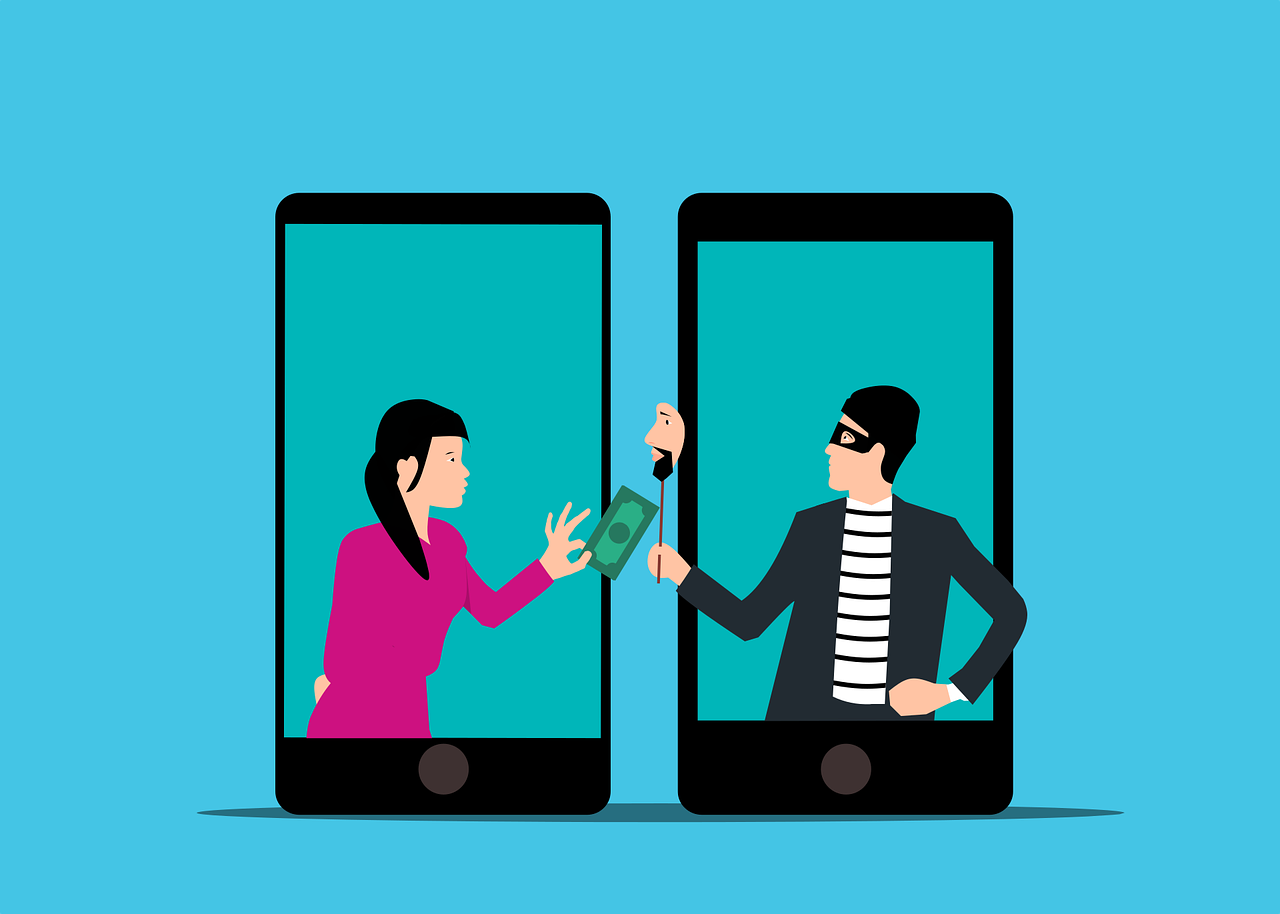
Is That Really a Text from Your CEO… or Is It a Scam?

Imagine you’re going about your day when suddenly you receive a text from the CEO. The head of the company is asking for your help. They’re out doing customer visits and someone else dropped the ball in providing gift cards. The CEO needs you to buy six $200 gift cards and text the information right away.

The message sender promises to reimburse you before the end of the day. Oh, and by the way, you won’t be able to reach them by phone for the next two hours because they’ll be in meetings. One last thing, this is a high priority. They need those gift cards urgently.

Would this kind of request make you pause and wonder? Or would you quickly pull out your credit card to do as the message asked?

A surprising number of employees fall for this gift card scam. There are also many variations. Such as your boss being stuck without gas or some other dire situation that only you can help with.

This scam can come by text message or via email. What happens is that the unsuspecting employee buys the gift cards. They then send the numbers back. They find out later that the real company CEO wasn’t the one that contacted them. It was a phishing scammer.

The employee is out the cash.

Without proper training, 32.4% of employees are prone to fall for a phishing scam.

Why Do Employees Fall for Phishing Scams?

Though the circumstances may be odd, many employees fall for this gift card scam. Hackers use social engineering tactics. They manipulate emotions to get the employee to follow through on the request.

Some of these social engineering tactics illicit the following:

  • The employee is afraid of not doing as asked by a superior
  • The employee jumps at the chance to save the day
  • The employee doesn’t want to let their company down
  • The employee may feel they can advance in their career by helping

The scam’s message is also crafted in a way to get the employee to act without thinking or checking. It includes a sense of urgency. The CEO needs the gift card details right away. Also, the message notes that the CEO will be out of touch for the next few hours. This decreases the chance the employee will try to contact the real CEO to check the validity of the text.

Illinois Woman Scammed Out of More Than $6,000 from a Fake CEO Email

Variations of this scam are prevalent and can lead to significant financial losses. A company isn’t responsible if an employee falls for a scam and purchases gift cards with their own money.

In one example, a woman from Palos Hills, Illinois lost over $6,000. This was after getting an email request from who she thought was her company’s CEO.

The woman received an email purporting to be from her boss and company CEO. It stated that her boss wanted to send gift cards to some selected staff that had gone above and beyond.

The email ended with “Can you help me purchase some gift cards today?” The boss had a reputation for being great to employees, so the email did not seem out of character.

The woman bought the requested gift cards from Target and Best Buy. Then she got another request asking to send a photo of the cards. Again, the wording in the message was very believable and non-threatening. It simply stated, “Can you take a picture, I’m putting this all on a spreadsheet.”

The woman ended up purchasing over $6,500 in gift cards that the scammer then stole. When she saw her boss a little while later, her boss knew nothing about the gift card request. The woman realized she was the victim of a scam.

Tips for Avoiding Costly Phishing Scams

Always Double Check Unusual Requests

Despite what a message might say about being unreachable, check in person or by phone anyhow. If you receive any unusual requests or one relating to money, verify it. Contact the person through other means to make sure it’s legitimate.

Don’t React Emotionally

Scammers often try to get victims to act before they have time to think. Just a few minutes of sitting back and looking at a message objectively is often all that’s needed to realize it’s a scam. Don’t react emotionally, instead ask if this seems real or is it out of the ordinary.

Get a Second Opinion

Ask a colleague, or better yet, your company’s IT service provider, to take look at the message. Getting a second opinion keeps you from reacting right away. It can save you from making a costly judgment error.

Need Help with Employee Phishing Awareness Training?

Phishing keeps getting more sophisticated all the time. Make sure your employee awareness training is up to date. Give us a call today to schedule a training session to shore up your team’s defenses.


Featured Image Credit

This Article has been Republished with Permission from The Technology Press.
Free Lock Padlock illustration and picture

6 Ways to Prevent Misconfiguration (the Main Cause of Cloud Breaches)

Misconfiguration of cloud solutions is often overlooked when companies plan cybersecurity strategies. Cloud apps are typically quick and easy to sign up for. The user often assumes that they don’t need to worry about security because it’s handled.

This is an incorrect assumption because cloud security is a shared model. The provider of the solution handles securing the backend infrastructure. But the user is responsible for configuring security settings in their account properly.

The problem with misconfiguration is huge. It’s the number one cause of cloud data breaches. It’s also an unforced error. Misconfiguration means that a company has made a mistake. It hasn’t adequately secured its cloud application.

Perhaps they gave too many employees administrative privileges. Or, they may have neglected to turn on a security function. One that prevented the downloading of cloud files by an unauthorized user.

Misconfiguration covers a wide range of negligent behavior. It all has to do with cloud security settings and practices. A finding in The State of Cloud Security 2021 report shed light on how common this issue is. 45% of organizations experience between 1 and 50 cloud misconfigurations per day.

Some of the main causes of misconfiguration are:

  • Lack of adequate oversight and controls
  • A team lacking security awareness
  • Too many cloud APIs to manage
  • No adequate cloud environment monitoring
  • Negligent insider behavior
  • Not enough expertise in cloud security

Use the tips below to reduce your risk of a cloud data breach and improve cloud security.

Enable Visibility into Your Cloud Infrastructure

Do you know all the different cloud apps employees are using at your business? If not, you’re not alone. It’s estimated that shadow IT use is approximately 10x the size of known cloud use.

When an employee uses a cloud app without authorization, it’s considered “shadow IT.” This is because the app is in the shadows so to speak, outside the purview of the company’s IT team.

How can you protect something you don’t know about? This is why shadow cloud applications are so dangerous. And why they often result in breaches due to misconfiguration.

Gain visibility into your entire cloud environment, so you know what you need to protect. One way you can do this is through a cloud access security application.

Restrict Privileged Accounts

The more privileged accounts you have, the higher the risk of a misconfiguration. There should be very few users that can change security configurations. You don’t want someone that doesn’t know better to accidentally open a vulnerability. Such as removing a cloud storage sharing restriction. It could leave your entire environment a sitting duck for hackers.

Audit privileged accounts in all cloud tools. Then, reduce the number of administrative accounts to a least needed to operate.

Put in Place Automated Security Policies

Automation helps mitigate human error. Automating as many security policies as possible helps prevent cloud security breaches.

For example, if you use a feature like sensitivity labels in Microsoft 365, you can set a “do not copy” policy. It will follow the file through each supported cloud application. Users don’t need to do anything to enable it once you put the policy in place.

Use a Cloud Security Audit Tool (Like Microsoft Secure Score)

How secure is your cloud environment? How many misconfigurations might there be right now? It’s important to know this information so you can correct issues to reduce risk.

Use an auditing tool, like Microsoft Secure Score. You want a tool that can scan your cloud environment and let you know where problems exist. It should also be able to provide recommended remediation steps.

Set Up Alerts for When Configurations Change

Once you get your cloud security settings right, they won’t necessarily stay that way. Several things can cause a change in a security setting without you realizing it. These include:

  • An employee with elevated permissions accidentally changes them
  • A change caused by an integrated 3rd party plug-in
  • Software updates
  • A hacker that has compromised a privileged user credential

Be proactive by setting up alerts. You should have an alert for any significant change in your cloud environment. For example, when the setting to force multi-factor authentication gets turned off.

If an alert is set up, then your team knows right away when a change occurs to an important security setting. This allows them to take immediate steps to research and rectify the situation.

Have a Cloud Specialist Check Your Cloud Settings

Business owners, executives, and office managers aren’t cybersecurity experts. No one should expect them to know how to configure the best security for your organization’s needs.

It’s best to have a cloud security specialist from a trusted IT company check your settings. We can help ensure that they’re set up to keep your data protected without restricting your team.

Improve Cloud Security & Lower Your Chances for a Data Breach

Most work is now done in the cloud, and companies store data in these online environments. Don’t leave your company at risk by neglecting misconfiguration. Give us a call today to set up a cloud security assessment.


Featured Image Credit

This Article has been Republished with Permission from The Technology Press.
Free Online Banking Banking Operations illustration and picture

Smart Tips to Stop Money From Being Stolen Through Online Banking

There are a lot of things that have changed since the invention of the internet. One of these is how we bank and access our accounts. You used to have to go into a local bank branch to make deposits and withdrawals. Now, you can take a picture of a check and deposit it from your phone.

Approximately 73% of people around the world use some form of online banking at least once a month. People have never had such convenient account access. But that convenience can come at a cost.

In 2021, account takeover fraud increased by 90%. New account fraud jumped a whopping 109%. As the ease of online banking has increased, so has banking-related cybercrime.

If someone breaches your Facebook account, it can be a real pain. But, if a hacker breaches your bank account, it can be devastating. It can mean significant losses. Losses that you may not be able to recoup from your financial institution.

In this article, we’ll take a look at the mistakes people make that leave their accounts at risk. Then, we’ll go over some important tips on how to keep your bank account better protected.

Mistakes That Allow Criminals to Access Your Account

Not Enabling Two-factor Authentication

Two-factor authentication (2FA) is a simple process that packs a big punch. When you enable this setting in an online account, it requires an extra step to gain access. That step usually consists of receiving a one-time passcode (OTP) by SMS and entering that at login.

Many people make the mistake of leaving this disabled. They either don’t know it’s there or they think it’s too inconvenient. But leaving this setting off makes it much easier for a bad actor to breach your account.

Falling for a Phishing Scam

There are several types of phishing scams that target online banking. Cyber criminals send emails that look like they come from your bank. They’ll even promise incredibly low rates on credit cards.

Other scams can involve warning you of unauthorized account activity. But when you click the link to log in, you’re actually on a fake page. One designed to look just like your normal bank website.

These are just a few ways that scammers can get your online banking login details. Once they have them, they’ll act immediately to get whatever they can.

Using Easy-to-Guess Passwords

If your account password is easy to remember, it’s also often easy to guess. Using weak passwords is a common mistake that enables many cyber criminals.

Some best practices for passwords include:

  • Make them at least 10 characters long
  • Include at least one number
  • Include at least one symbol
  • Include at least one upper-case letter
  • Don’t make them personal (e.g., don’t use your birthdate, etc.)

Downloading Unsafe Mobile Apps

Banking trojans are often hidden in malicious mobile apps. These apps can look like something as innocent as a task manager. But, once installed, banking trojans seek out any details they can find. They are looking for banking and wallet apps.

Logging Into Online Banking While on Public Wi-Fi

One surefire way to give away your online banking password is to log in while on public Wi-Fi. Hackers hang out on public hot spots and spy on the activity of others. You should never type in a password or other sensitive details when connected to public Wi-Fi.

Tips for Improving Online Banking Security

Turn On Two-Factor Authentication

Enable two-factor authentication in your online banking account. This is also known as multi-factor authentication or two-step verification. According to Microsoft, it can block 99.9% of fraudulent account login attempts.

Set Up Banking Alerts

Time is of the essence when an intruder breaches your account. The faster you can notify your bank of the breach, the better. You could reduce the impact on you by having your account locked down immediately.

Set up banking alerts through your online banking. These can include things like low-balance alerts and login alerts.

Install an Antivirus & DNS Filtering On Your PC & Mobile Device

It’s important to have reliable antivirus software on your PC and mobile device. Many people don’t think about protecting their phones in this way. Yet, they shop online and bank via mobile devices.

It’s also good to use a DNS filter. This is a filter that protects you from going to dangerous phishing sites by blocking them.

Take Phishing Training Classes

Do you know how to identify phishing? Are you up on all the newest scams? You can make yourself less vulnerable by taking some phishing awareness classes. There are many of these for free online. You can also contact us for more personalized training options.

Knowing how to spot phishing via text, email, and phone can help you avoid becoming a scam victim.

Get Help Protecting Your Family from Scams

There are some key digital solutions we can put in place to keep your family safer from online threats. Give us a call today to schedule a chat about online security.


Featured Image Credit

This Article has been Republished with Permission from The Technology Press.

Free Crop man paying with American dollars Stock Photo

4 Proven Ways to Mitigate the Costs of a Data Breach

No business wants to suffer a data breach. But unfortunately, in today’s environment, it’s difficult to completely avoid them. Approximately 83% of organizations have experienced more than one data breach. (IBM Security 2022 Cost of a Data Breach Report)

These breaches hurt businesses in many ways. First, there is the immediate cost of remediating the breach. Then, there are the lost productivity costs. You can add lost business on top of that, and lost customer trust. A business could also have extensive legal costs associated with a breach.

According to IBM Security’s report, the cost of a data breach climbed again in 2022. The global cost of one breach is now $4.35 million, up 2.6% from last year. If your business is in the U.S., the cost rises to $9.44 million. In Canada, the average data breach costs companies $5.64 million.

Costs for smaller companies tend to be a little lower. But breaches are often more devastating to SMBs. They don’t have the same resources that larger companies do to offset all those costs.

It’s estimated that 60% of small companies go out of business within six months of a cybersecurity breach.

Companies don’t need to resign themselves to the impending doom of a data breach. There are some proven tactics they can take to mitigate the costs. These cybersecurity practices can limit the damage of a cyberattack.

All these findings come from the IBM Security report. They include hard facts on the benefits of bolstering your cybersecurity strategy.

Cybersecurity Tactics to Reduce the Impact of a Breach

Use a Hybrid Cloud Approach

Most organizations use the cloud for data storage and business processes. Researchers found that 45% of all data breaches happen in the cloud. But all cloud strategies are not created equally.

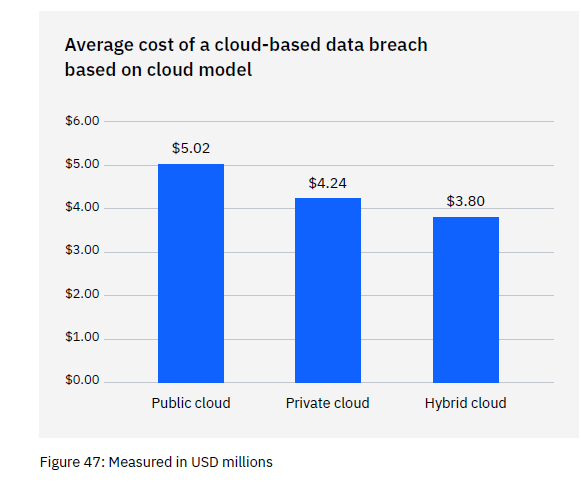
Breaches in the public cloud cost significantly more than those in a hybrid cloud. What is a hybrid cloud? It means that some data and processes are in a public cloud, and some are in a private cloud environment.

What some may find surprising is that using a hybrid cloud approach was also better than a private cloud.

Cost of a Data Breach Report
Graph from: IBM Security/Ponemon Institute 2022 Cost of a Data Breach Report

Put in Place an Incident Response Plan & Practice It

You don’t need to be a large enterprise to create an incident response (IR) plan. The IR plan is simply a set of instructions. It’s for employees to follow should any number of cybersecurity incidents occur.

Here is an example. In the case of ransomware, the first step should be disconnecting the infected device. IR plans improve the speed and effectiveness of a response in the face of a security crisis.

Having a practiced incident response plan reduces the cost of a data breach. It lowers it by an average of $2.66 million per incident.

Adopt a Zero Trust Security Approach

Zero trust is a collection of security protocols that work together to fortify a network. An example of a few of these are:

  • Multi-factor authentication
  • Application safelisting
  • Contextual user authentication

Approximately 79% of critical infrastructure organizations haven’t adopted zero trust. Doing so can significantly reduce data breach costs. Organizations that don’t deploy zero trust tactics pay about $1 million more per data breach.

Use Tools with Security AI & Automation

Using the right security tools can make a big difference in the cost incurred during a data breach. Using tools that deploy security AI and automation brought the biggest cost savings.

Data breach expense lowered by 65.2% thanks to security AI and automation solutions. These types of solutions include tools like advanced threat protection (ATP). They can also include applications that hunt out threats and automate the response.

How to Get Started Improving Your Cyber Resilience

Many of these ways to lower data breach costs are simply best practices. You can get started by taking them one at a time and rolling out upgrades to your cybersecurity strategy.

Working with a trusted IT provider, put together a roadmap. Address the “low-hanging fruit” first. Then, move on to longer-term projects.

As an example, “low-hanging fruit” would be putting multi-factor authentication in place. It’s low-cost and easy to put in place. It also significantly reduces the risk of a cloud breach.

A longer-term project might be creating an incident response plan. Then, you would set up a schedule to have your team drill on the plan regularly. During those drills, you could work out any kinks.

Need Help Improving Your Security & Reducing Risk?

Working with a trusted IT partner takes a lot of the security burden off your shoulders. Give us a call today to schedule a chat about a cybersecurity roadmap.


Featured Image Credit

This Article has been Republished with Permission from The Technology Press.
Free Unrecognizable hacker with smartphone typing on laptop at desk Stock Photo

Mobile Malware Has Increased 500% – What Should You Do?

Cybersecurity researchers uncovered an alarming mobile statistic. During the first few months of 2022, mobile malware attacks surged by 500%. This is alarming both in scale and because many people aren’t yet protecting smartphones.

For years, mobile phones have become more powerful. They now do many of the same functions as a computer – just with a much smaller screen. Yet, people tend to secure their computers better than they do their smartphones.

This is a behavior that needs to change. Over 60% of digital fraud now occurs through mobile devices. That makes them highly risky if proper safeguards aren’t followed.

Many of these are the same types of protections you have on your computer. It’s time to start thinking about your smartphone as a mini-computer and keeping it just as secure.

Tips to Improve the Security of Your Smartphone

Use Mobile Anti-malware

Yes, your mobile phone needs antivirus/anti-malware too! Malware can and does infect smartphones and tablets. You need to ensure you have a reliable mobile anti-malware app installed.

And beware of those freebies. Freebies are great when you’re talking about food, but not security apps. Malware is often hidden inside free apps. These apps are ironically supposed to make you more secure.

Don’t Download Apps from Unknown Sources

Only download mobile apps from trusted sources. Do not download outside a main app store. Trusted app stores include places like:

  • Apple App Store
  • Google Play
  • The Microsoft Store
  • Amazon Appstore

You also should research the app developer online. Make sure they have a good reputation. Once you download a dangerous app to your phone, it can infect it with malware. That malware can remain behind even if you delete the app later.

Don’t Assume Email is Safe

Many people prefer checking email on their phone rather than PC because it’s so handy. But they have a false sense of security about the safety of emails when viewed on a mobile device.

You can’t assume an email is safe just because you’re not on your computer. Be just as wary about unexpected emails and scam emails masquerading as legitimate.

It’s difficult to hover over a link without clicking when on a smartphone. If you see something questionable and want to check the link, open the email on your PC where you can do that.

Beware of SMS Phishing (aka “Smishing”)

In March of 2022, text spam outpaced robocalls. Unwanted text messages rose by 30%, ten percent higher than robocalls. Many of those spam texts are smishing.

Smishing is the text version of phishing. These texts usually contain malicious links. A hacker can potentially breach your device if you click them. The message may also ask you to text back personal information.

Be on the lookout for text messages that don’t quite make sense. For example, getting a shipping notification when you haven’t ordered anything. Also, beware of texts from unknown sources.

Phishing via text message is a growing concern. It’s also one that most people aren’t aware of yet, so they often get caught in its trap.

Remove Old Apps You No Longer User

Approximately 2.6 million apps haven’t had an update in a year or more. Apps are often abandoned by the developer. This can leave security vulnerabilities on your device. Hackers seek out these types of vulnerabilities to exploit. If they aren’t addressed, then they remain a danger.

Go through your device and remove old applications that you are no longer using. There is no reason to keep them around, potentially leaving your device at risk.

Additionally, look at the time of the last update. If it’s over a year, then you may want to consider replacing that app with something more current. App updates often include security-related items. It’s not good when a year or more goes by without the developer making any type of update to the app.

Keep Your Device Updated

Speaking of updates, you also need to keep your device’s operating system updated. Are you using the current version of Android or iOS? Not installing updates can mean your phone has vulnerabilities. These vulnerabilities allow hackers to breach your data.

Automate updates as possible. If you have a company with several devices, then it’s a good idea to include your phones on a managed IT services plan.

Use a VPN When on Public Wi-Fi

Public Wi-Fi is dangerous. Most people understand that, but many connect to it out of necessity anyhow. You may worry about going over your data plan allotment. Or your mobile carrier reception may be slow. Both cases are reasons people opt to connect to unsecured public hot spots.

You can connect to public Wi-fi with less risk if you use a VPN application. VPNs stand between your device and the internet. They route your data through a secure server. This keeps it away from prying eyes that may be lurking on that public Wi-Fi.

Mobile Security Solutions to Prevent a Data Breach

Don’t wait until your phone is infected with malware to secure it properly. We can help you with automated solutions that protect your device, accounts, and data. Contact us to schedule a consultation.


Featured Image Credit

This Article has been Republished with Permission from The Technology Press.
Have You Had Data Exposed in One of These Recent Data Breaches

There’s a reason that browsers like Edge have added breached password notifications. Data breaches are an unfortunate part of life. And can have costly consequences for individuals. Hackers can steal identities and compromise bank accounts, just to name a couple.

Cybercriminals breach about 4,800 websites every month with form jacking code. It has become all too common to hear of a large hotel chain or social media company exposing customer data.

Hackers can breach your personal information and passwords without you knowing it. And the time from breach to notification of the breach can be lengthy. One example is the data breach of CafePress. This is a popular online retailer that prints personalized items.

CafePress suffered a data breach in February 2019. That breach exposed millions of names and addresses, security questions, and more. Hackers also breached social security numbers that weren’t encrypted.

As mentioned, the breach happened in February. But many consumers weren’t notified until late summer. The FTC recently took action against the company. This was due to its careless security practices.

The point is that months or years can go by without you knowing about compromised data. Unless you happen to look at the right website, you may not even realize it. Those breached password features in browsers are helpful. But what if you have other information beyond a password compromised?

It’s best to protect yourself with some knowledge. We’ll help by listing several recent breaches. If you’ve interacted with any of these companies, you’ll want to take steps to protect yourself from the fallout.

Recent Breaches of Personal Information That May Impact You

Microsoft Customer Data Breach

On October 19, 2022, Microsoft announced a breach that exposed customer data. A misconfigured server was to blame. The breach exposed certain business transaction data. It’s thought that this breach could have affected more than 65,000 entities worldwide.

2.5 Million Records Exposed in a Student Loan Breach

Did you get a student loan from EdFinancial and the Oklahoma Student Loan Authority (OSLA)? If so, you could be in trouble. The organizations notified impacted individuals by letter in July 2022.

The personal information at risk included:

  • Social security numbers
  • Email addresses
  • Home addresses
  • Phone numbers.

The breach compromised the data of over 2.5 million loan recipients.

U-Haul Data Breach of 2.2 Million Individuals’ Data

Large rental firm U-Haul is a household name. It also just had a major data breach. It notified clients in August of 2022 of a compromise of some rental contracts. The contacts in question were between November 5, 2021, and April 5, 2022.

The breach exposed names, driver’s license numbers, and state identification numbers. It affected over 2.2 million individuals that rented vehicles from the company.

Neopets Breach May Have Compromised 69 Million Accounts

You wouldn’t suspect a cute site like Neopets to be a cybersecurity risk. But users of the platform got a rude awakening due to a breach of the service. An estimated 69 million accounts may have had emails and passwords leaked.

The full stolen Neopet database and copy of the source code were being offered for sale for about $94,500.

One Employee Computer Causes a Marriott Breach

Hotel giant Marriott suffered another breach in July 2022. It blamed a single unsecured employee computer. About 300-400 individuals had data leaked. This data included credit card numbers and other confidential information.

Unfortunately, the company shows a pattern of poor cybersecurity. Within the last four years, it has suffered three separate breaches. That’s enough to want to pay in cash or use a pre-paid card if you stay there.

Shield Health Care Group Exposes Up to 2 Million Records

In March of 2022, Shield Health Care Group detected a breach. This Massachusetts-based company found that hackers breached up to 2 million customer records. This includes medical records, social security numbers, and other sensitive personal data.

Flagstar Bank Takes 6 Months to Identify Individuals Affected in a Breach

In December of 2021, Flagstar Bank suffered a breach. It wasn’t until 6 months later that it identified the individuals affected. And the impact was large. It included exposed social security numbers. The hack impacted about 1.5 million customers.

8.2 million Current and Former Customers of Block Compromised

Block was formerly known as Square, a popular payment processing platform. It announced in April of 2022 that it was breached the previous December. A former employee accessed customer names and brokerage account numbers. Some accounts also had other stock trading information accessed.

About 8.2 million current and former customers had their data exposed.

Crypto.com Breach Nets Hackers Over $30 Million

Cryptocurrency may be hot at the moment, but it’s very susceptible to cyberattacks. In January 2022, over 483 users had their Crypto.com wallets breached.

The criminals made it past two-factor authentication, which is usually quite effective. They stole about $18 million in bitcoin and $15 million in Ethereum and other cryptocurrencies.

How Secure Are Your Passwords?

There are many solutions that can help you better manage and secure your passwords. Give us a call to learn more about protecting your personal data from a breach.


Featured Image Credit

This Article has been Republished with Permission from The Technology Press.
Free illustrations of Security

2023 Trends in Data Privacy That Could Impact Your Compliance

Data privacy has been a growing requirement ever since the internet age began. So much personal information is flying around through computer networks. Protecting it has become a mandate.

Most companies must follow HIPAA, GDPR, or another industry or locality-based privacy rule. By the end of 2024, 75% of the world’s population will have their personal data protected. It will fall under one or more privacy regulations.

You don’t need to be a large enterprise organization to have data privacy compliance at the top of your mind. It goes hand in hand with cybersecurity. Additionally, privacy requirements hit all sized companies.

Between July 2020 and July 2021, GDPR violations rose by 113.5%. The number of associated fines also jumped, by 124.92%. When it comes to HIPAA violations, each incident can carry a penalty between $100 to $25,000.

It’s important to make data privacy a priority and factor it into all your data collection processes. When companies collect, send, or store personally identifiable information (PII) it needs protection. This means putting adequate safeguards in place.

To stay on top of your privacy compliance obligations, you should also keep up with trends in this area. Next up, we’ve documented the biggest data privacy trends happening in 2023 that you should be aware of.

What’s Happening in Data Privacy Compliance?

AI Governance

Approximately 40% of privacy compliance technology needs artificial intelligence (AI) to operate. AI has certainly made its way into many of the applications we use on a daily basis.

When you’re typing in MS Word and text just springs up as a suggestion, that’s AI predicting what you’ll type next. When working on a photograph in Photoshop, you can now click a button to give a frowning face a smile. This is also the work of AI.

So, it’s no surprise that AI is running many of the algorithms responsible for keeping data protected. But what happens when there is a problem with the AI?

This is the question that AI governance is working to address. This is a new trend in data privacy because AI has never been so prevalent throughout the data journey as it is now.

Whenever AI is used in the data protection area, organizations need to govern it properly. This helps ensure that automated processes aren’t accidentally exposing sensitive data.

Consumer Privacy UX

A trend that we’ve seen over the last several months is putting more privacy power into the consumer’s hands. Many privacy regulations require that apps and websites provide data transparency. They need to tell people what data they’re collecting, how they’re collecting it, and what they do with it. People also need an “out” to get their data back.

These needs have led to consumer privacy UX becoming a “thing.” You can think of this as a centralized privacy portal. A place people can access privacy-related settings in various apps. This gives better visibility into how their data is being used.

Increased Scrutiny of Remote Employee Monitoring

The pandemic has forever changed the global workforce. Many organizations are now running completely remote offices. Or may be using a mix of remote and in-office staff. The dramatic increase in people working from home has led to data collection changes. Companies are ramping up their monitoring of those employees working off-site.

But this type of monitoring opens a can of worms when it comes to data privacy. Organizations need to ensure that they aren’t encroaching on the rights of their staff. This is most pertinent when putting monitoring in place on employee devices.

For example, approximately 49% of remote employees use their personal computers for work. Companies often put endpoint device monitoring in place for security reasons. They need to ensure they are not gathering or backing up any personal data. That would be data owned by the employee and not the company.

Data Localization

One of the concerns when the social app TikTok became popular relates to location. With the firm being a China-based company, people worried about the privacy of their data. The data was originally stored on servers governed by the Chinese government. A country with very different data privacy rules than the US and other countries.

Data localization is going to become more prevalent. Increasingly organizations look at where their cloud data is being stored. Where a server resides governs the privacy rules and regulations that it may fall under. Thus, companies and governments are now asking a question of cloud providers. This is, “Where is my data stored?” Many want their data to be as close to home as possible.

Privacy-Enhancing Computation (PEC)

Data privacy by design is a fairly new term. Using privacy-enhancing computation is a way that AI is helping cybersecurity. By using PEC as a built-in component of software and apps, developers provide value to clients. They address privacy concerns by making data protection more automated.

Look for PEC components in data analytics when shopping for business tools.

When Is the Last Time You Had a Compliance Check?

How are your data privacy protections? Are you risking a penalty due to lax controls? Give us a call! We can help with a compliance checkup.


Featured Image Credit

This Article has been Republished with Permission from The Technology Press.
MacBook Pro, white ceramic mug,and black smartphone on table

8 Tech Checks to Make Before You Travel

Our technology inevitably comes with us when we travel. Most of us won’t even travel to the end of the block without our smartphones. When you go on a trip, not having your technology there when you need it can ruin your day.

Travel smarter and more securely by doing several checks before you go. Use our handy tech travel checklist. It can save you from suffering from lost devices, missing chargers, or a data breach.

1. Check Your Apps

Have you ever sat at an airport gate wondering why it looked so empty? You then found out that your gate had changed, and you had no idea. You go rushing to the other end of the concourse, hoping you’re not too late.

How did everyone else know about the gate change? They most likely had the app for the airline and received a notification.

Before you leave for a trip, make sure to download any apps you may need. It’s better to download them when you’re at home on your own Wi-Fi. If you wait until you’re at the airport, reception may be an issue.

Some of the apps you may want to grab or update before your trip are:

  • Airline app
  • Train app
  • Hotel app
  • Theme park app
  • Camping ground app
  • Weather app
  • City tourism app

2. Check Your Cords & Adapters

People leave behind countless chargers and adapters every day. They litter airports, restaurants, and train stations around the world. Make sure to bring a backup charger for your laptop, tablet, or phone. Otherwise, you may find yourself paying a premium for a new charger in a gift shop. Your device could also go black if you lose its charger and can’t quickly get a new one.

3. Check Your Power

A great way to ensure you have the power you need is to buy a small charging battery. You can find these in most major retailers or online. They are small “blocks” that hold a charge and can power up a cell phone in a pinch.

Having this extra backup also helps you avoid potential juice-jacking ports. These are fake or compromised public USB charging ports. Hackers use them to steal your data when you plug in.

4. Check Your Mobile Plan

If you’re traveling out of the country, you’ll want to check your mobile plan. If you don’t have the ability to call internationally, then you may not be able to text or call home.

Carriers can add an international capability to your plan, but ask about pricing. It can get expensive if you’re on long calls or using mobile data. An alternative is to set up a VoIP app you can use with your office, friends, or family while you’re traveling. These enable both calls and SMS, but you do need an internet connection.

5. Check or Add a VPN

Free Wi-Fi may be a welcome site when you’re on the road, but it can also be dangerous. You don’t know who else is using that Wi-Fi. A hacker hanging out on the connection can easily steal your data if you’re not protected.

It’s better to use either your mobile carrier connection or a virtual private network (VPN) app. VPN plans are inexpensive and will keep your data encrypted, even if you’re on public Wi-Fi.

6. Check Your Backup

Unfortunately, mishaps occur when traveling. You may leave your phone behind on a boat, have your luggage lost, or get your device stolen while in a crowded area.

10% of all laptop thefts happen in airports.

Don’t lose all your data with the device! Back up your devices to the cloud or local storage before you travel. This ensures that you won’t lose the valuable information on your device. You also won’t need to think twice about enacting a remote “wipe my device” command if necessary.

7. Check Your Device Security

Make your devices as secure as possible before you hit the road. When we’re traveling, our minds are occupied by other things. So, you may not think to check your antivirus or avoid suspicious phishing links.

Protect your devices before you go using:

  • Antivirus/anti-malware
  • DNS filtering
  • Screen lock with passcode
  • Sharing features turned off
  • VPN application
  • Find-My-Device feature turned on

8. Check Your Double-Checks

What do we mean by checking your double-checks? Use the buddy system as a backup. When the family is getting off a plane, each should check with the other that they have all their devices.

If you’re traveling alone, have a friend or family member check up by text. Did you grab your charger? Is your VPN turned on?

Those little reminders can go a long way toward avoiding digital travel nightmares.

Improve the Security of Your Devices Now

Don’t leave your devices unprotected. This could mean a breach of your banking app or personal data. Contact us for device security solutions to reduce your risk.


Featured Image Credit

This Article has been Republished with Permission from The Technology Press.

Free A Paper beside a Person Typing on a Laptop Stock Photo

What’s Changing in the Cybersecurity Insurance Market?

Cybersecurity insurance is still a pretty new concept for many SMBs. It was initially introduced in the 1990s to provide coverage for large enterprises. It covered things like data processing errors and online media.

Since that time, the policies for this type of liability coverage have changed. Today’s cyber insurance policies cover the typical costs of a data breach. Including remediating a malware infection or compromised account.

Cybersecurity insurance policies will cover the costs for things like:

  • Recovering compromised data
  • Repairing computer systems
  • Notifying customers about a data breach
  • Providing personal identity monitoring
  • IT forensics to investigate the breach
  • Legal expenses
  • Ransomware payments

Data breach volume and costs continue to rise. 2021 set a record for the most recorded data breaches on record. And in the first quarter of 2022, breaches were up 14% over the prior year.

No one is safe. Even small businesses find they are targets. They often have more to lose than larger enterprises as well. About 60% of small businesses close down within 6 months of a cyber incident.

The increase in online danger and rising costs of a breach have led to changes in this type of insurance. The cybersecurity insurance industry is ever evolving. Businesses need to keep up with these trends to ensure they can stay protected.

Here are some of the cyber liability insurance trends you need to know about.

Demand is Going Up

The average cost of a data breach is currently $4.35 million (global average). In the U.S., it’s more than double that, at $9.44 million. As these costs continue to balloon, so does the demand for cybersecurity insurance.

Companies of all types are realizing that cyber insurance is critical. It’s as important as their business liability insurance. Without that protection, they can easily go under in the case of a single data breach.

With demand increasing, look for more availability of cybersecurity insurance. This also means more policy options, which is good for those seeking coverage.

Premiums are Increasing

With the increase in cyberattacks has come an increase in insurance payouts. Insurance companies are increasing premiums to keep up. In 2021, cyber insurance premiums rose by a staggering 74%.

The costs from lawsuits, ransomware payouts, and other remediation have driven this increase. Insurance carriers aren’t willing to lose money on cybersecurity policies. Thus, those policies are getting more expensive. This is at the same time as they are more necessary.

Certain Coverages are Being Dropped

Certain types of coverage are getting more difficult to find. For example, some insurance carriers are dropping coverage for “nation-state” attacks. These are attacks that come from a government.

Many governments have ties to known hacking groups. So, a ransomware attack that hits consumers and businesses can very well be in this category.

In 2021, 21% of nation-state attacks targeted consumers, and 79% targeted enterprises. So, if you see that an insurance policy excludes these types of attacks, be very wary.

Another type of attack payout that is being dropped from some policies is ransomware. Between Q1 and Q2 of 2022, ransomware attacks increased by 24%.

Insurance carriers are tired of unsecured clients relying on them to pay the ransom. So many are excluding ransomware payouts from policies. This puts a bigger burden on organizations. They need to ensure their backup and recovery strategy is well planned.

It’s Harder to Qualify

Just because you want cybersecurity insurance, doesn’t mean you’ll qualify for it. Qualifications are becoming stiffer. Insurance carriers aren’t willing to take chances. Especially on companies with poor cyber hygiene.

Some of the factors that insurance carriers look at include:

  • Network security
  • Use of things like multi-factor authentication
  • BYOD and device security policies
  • Advanced threat protection
  • Automated security processes
  • Backup and recovery strategy
  • Administrative access to systems
  • Anti-phishing tactics
  • Employee security training

You’ll often need to fill out a lengthy questionnaire when applying for insurance. This includes several questions about your cybersecurity situation. It’s a good idea to have your IT provider help you with this.

This can seem like a lot of work that you have to do to qualify for cyber insurance. As you review the questions, your IT partner can identify security enhancements. Just like other forms of insurance, if you take steps to reduce risk, it can often reduce your premiums.

So, it pays to do a cybersecurity review before applying for cyber insurance. You can save yourself time and money. It can also fortify your defenses against cyberattacks.

Need Help Making Sense of Cybersecurity Policies?

Cybersecurity coverage and insurance applications can be complex. If you answer wrong on a question, it can mean paying hundreds more in premiums than you should.

If you’re considering cybersecurity insurance, don’t go it alone. Give us a call and schedule a consultation. We can explain the policy details and provide guidance.


Featured Image Credit

This Article has been Republished with Permission from The Technology Press.
Free photos of Cyber

What Cybersecurity Attack Trends Should You Watch Out for in 2023?

The new year has just begun and it’s a time of renewal as we plan for the possibilities to come in 2023. It’s also a time when you need to plan for resiliency in the face of ever-present cyberattacks.

Sixty-eight percent of surveyed business leaders feel that cybersecurity risks are getting worse. They have a good reason. Attacks continue to get more sophisticated. They are also often perpetrated by large criminal organizations. These criminal groups treat these attacks like a business.

In 2021, the average number of global cyberattacks increased by 15.1%.

To protect your business in the coming year, it’s important to watch the attack trends. What new methods are hackers using? What types of attacks are increasing in volume? Knowing these things is important. It helps you better update your IT security to mitigate the risk of a data breach or malware infection.

We’ve pulled out the security crystal ball for the upcoming year. And we’ve researched what cybersecurity experts are expecting. Here are the attack trends that you need to watch out for.

Attacks on 5G Devices

The world has been buzzing about 5G for a few years. It is finally beginning to fulfill the promise of lightning-fast internet. As providers build out the infrastructure, you can expect this to be a high-attack area.

Hackers are looking to take advantage of the 5G hardware used for routers, mobile devices, and PCs. Anytime you have a new technology like this, it’s bound to have some code vulnerabilities. This is exactly what hackers are looking to exploit.

You can prepare by being aware of the firmware security in the devices you buy. This is especially true for those enabled for 5G. Some manufacturers will build better firmware security into their designs than others. Make sure to ask about this when purchasing new devices.

One-time Password (OTP) Bypass

This alarming new trend is designed to get past one of the best forms of account security. Multi-factor authentication (MFA) is well-known as very effective at preventing fraudulent sign-in attempts. It can stop account takeovers even in cases where the criminal has the user’s password.

There are a few different ways that hackers try to bypass MFA. These include:

  • Reusing a token: Gaining access to a recent user OTP and trying to reuse it
  • Sharing unused tokens: The hacker uses their own account to get an OTP. Then attempts to use that OTP on a different account.
  • Leaked token: Using an OTP token leaked through a web application.
  • Password reset function: A hacker uses phishing to fool the user into resetting a password. They then trick them into handing over their OTP via text or email.

Attacks Surrounding World Events

During the pandemic, the cyberattack volume increased by approximately 600%. Large criminal hacking groups have realized that world events and disasters are lucrative.

They launch phishing campaigns for world events. Attacks come for everything from the latest hurricane or typhoon to the war in Ukraine. Unsuspecting people often fall for these scams. This is because they are often distracted by the crisis.

People need to be especially mindful of scams surrounding events like these. They will often use social engineering tactics, such as sad photos, to play on the emotions.

Smishing & Mobile Device Attacks

Mobile devices go with us just about everywhere these days. This direct connection to a potential victim is not lost on cybercriminals. Look for more mobile device-based attacks, including SMS-based phishing (“smishing”).

Many people aren’t expecting to receive fake messages to their personal numbers. But cell numbers are no longer as private as they once were. Hackers can buy lists of them online. They then craft convincing fake texts that look like shipping notices or receipts. One wrong click is all it takes for an account or data breach.

Mobile malware is also on the rise. During the first few months of 2022, malware targeted to mobile devices rose by 500%. It’s important to ensure that you have good mobile anti-malware. As well as other protections on your devices, such as a DNS filter.

Elevated Phishing Using AI & Machine Learning

These days, phishing emails are not so easy to spot. It used to be that they nearly always had spelling errors or grainy images. While some still do, most don’t.

Criminal groups elevate today’s phishing using AI and machine learning. Not only will it look identical to a real brand’s emails, but it will also come personalized. Hackers use these tactics to capture more victims. They also allow hackers to send out more targeted phishing messages in less time than in years past.

Schedule a Cybersecurity Check-Up Today

Is your business prepared for the cyber threats coming in 2022? Don’t wait to find out the hard way! Give us a call and schedule a cybersecurity check-up to stay one step ahead of the digital criminals.


Featured Image Credit

This Article has been Republished with Permission from The Technology Press.