business-people-and-architects-collaborating-on-TFP643Y_collaboration_400.jpg

Collaboration Tools for SMBs

business-people-and-architects-collaborating-on-TFP643Y_collaboration_400.jpg

Useful collaboration tools can alter a business significantly by enabling cooperation that is impossible without them. How exactly these tools fit into your business is a whole other matter.  Today, we’re going to talk about how you can integrate some pretty great collaboration tools without turning your business upside down. 

Cloud Productivity

One option a business can take is by adding in a cloud productivity suite. Options like Google’s G Suite and Microsoft’s Office 365 can bring a business a lot of value, without the typically massive capital outlay the yearly software license would command. Besides, you probably already need licenses for a word processor and spreadsheet app anyway. Inside the software there are integrated collaboration options that allow your team to work on documents, spreadsheets, and presentations together in real time.

Communication

Efficient collaboration is not possible without strong communications. Today, there are options out there where an organization doesn’t necessarily need to invest huge sums in replacing their normal communications strategy to get the benefits that innovations made in the solutions can bring. By utilizing instant messaging, web-based conferencing, and cloud-based email companies can improve their top-to-bottom communication without taking on a lot of extra cost.

Collaboration Apps

New innovations in communication software are now available that provide advanced collaboration options. Developed like a forum, but with direct communication options, and integrations with third-party applications, collaboration apps like Slack and Microsoft Teams have a lot of options to help drive team productivity forward.

If you are looking for ways to improve your organizational productivity, call the IT experts at NuTech Services today at 810.230.9455. 

234259279_cloud_400.jpg

Determining Your Organization’s Cloud Needs

234259279_cloud_400.jpg

The cloud is one of the most valuable tools available to modern businesses, but the extent to which organizations utilize it will vary depending on their specific needs. For example, some organizations might be fine with the limited control offered by the public cloud, but others might need more dynamic features and control over their data with a private cloud. We’ll help you determine which is right for you, as well as some of the specific considerations needed for a private cloud solution.

Public vs Private

The public cloud is typically used by businesses that don’t have the infrastructure, or the budget to acquire said infrastructure, for hosting cloud-based applications or services. Public cloud solutions are those which are hosted by the provider and accessed remotely through an Internet browser, mobile client, and associated account. They are particularly valuable for businesses that don’t have the means to reliably host their own solutions.

On the other hand, a private cloud solution is used by small businesses that have a means of affording and maintaining the solution. This means administering maintenance to the software and hardware associated with the system, as well as monitoring it for security purposes. Basically, when you go with a private cloud solution, it’s much more involved than a simple public cloud system, so you should be prepared to deal with plenty of issues that wouldn’t be an issue if the solution was hosted elsewhere.

What to Consider

When considering the implementation of a private cloud infrastructure, be sure to consider the following:

  • Security: You’ll have more control over your solution if you host it privately onsite, but you’ll also need to adequately protect it.
  • Access: Will employees have access to your organization’s cloud solution while out of the office? Hint: They better, otherwise there isn’t a reason to have a cloud. Since your cloud-based applications are stored on your in-house infrastructure, you’ll need to make sure accounts are set up properly and protected.
  • Management: Managing a cloud solution is no joke, and since you’re hosting it on your own private server, it comes with all the annoyances and benefits. You can customize your cloud solution to suit your needs, so be sure to understand what you need beforehand so you can leverage it to the best of your ability.
  • Maintenance: Taking care of a cloud solution is also a major responsibility, so expect any in-house IT technicians to have a lot more on their plate than they already do.

NuTech Services can help you mitigate the issues of a private cloud infrastructure by hosting your private cloud on our own servers, thereby removing the burden it places on your organization. To learn more about this cloud strategy, reach out to us at 810.230.9455.

ofice_threat_400.jpg

Microsoft Launches Office 365 Advanced Threat Protection

ofice_threat_400.jpg

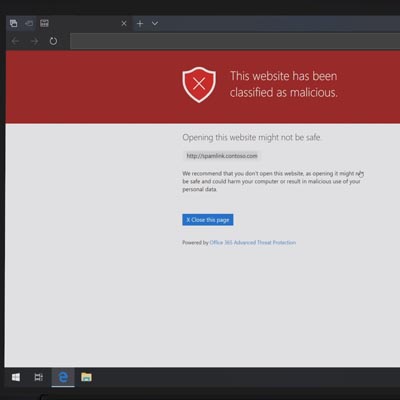
Microsoft has been at the forefront of security through their numerous operating systems for decades. As the security of computing systems and communication gets more important, and with threats to that security growing exponentially, the world’s leading software company has made it a point to introduce a new security platform to help people in many walks of life keep their endeavors secure. Today we’ll look at the new security & compliance services that are bundled with the Microsoft 365 cloud platform.

Microsoft’s Dedication to Security

Microsoft has as good of a handle on the nature of cybersecurity as any other major software company. The sustainability of their business and the effectiveness of their products are dependent on it. If their security software didn’t work well, there is no way they could sustain their place as the world’s most important software company, right?

One problem they are running into is that their security is SO effective, that hackers had to shift the ways they tried to infiltrate networks and steal data. The establishment of phishing is a social engineering term for duping a victim into downloading software that’s only purpose is to gain access to their personal data, which leads to data and identity theft, and in the case of business computing, access to much more.

Businesses Have Trouble with Security

Today’s business has to deal with a lot of different security issues. First, they are responsible for having the technology protections connected to each part of their computing infrastructure. This can be as simple as having the router-supplied firewall and an antimalware program loaded on their server. It’s likely, however, that the average business will need more coverage over their network to secure it, and the data stored behind those security platforms.

Next, and maybe most crucially, it is the business’ responsibility to train its staff on what kind of issues to look out for. Today, most malware infections and other infiltrations are the result of a mistake made by a person that has credentials and access to data. If your organization doesn’t properly train your staff on how to eliminate these threats, there is a fair chance that your network will be inundated with some type of malware at some point.

Microsoft 365 Security and Compliance

Microsoft, acknowledging the need for an enterprise product that combines the power of their Windows 10 operating system, the productivity options presented from Office 365, and powerful security and compliance controls, has launched Microsoft Office 365. The cloud-based solution presents the core computing resources that any business could use in a product that is available right now from NuTech Services.

Our knowledgeable technicians can help you find the right security platform for any of your business’ computing needs. Call us today at 810.230.9455.
cloud_solutions_business_400.jpg

How to Get the Right Cloud Solution for Your Business

cloud_solutions_business_400.jpg

As technology has become a greater part of today’s working environment, the need for a business to have somewhere to procure the requisite devices from has increased. This is why many businesses serve as vendors, the go-between for the producers of these devices and the businesses looking to purchase them. For obvious reasons, these vendors are essential to the success of many businesses.

There are a few kinds of vendors, offering various things to businesses like assorted supplies, equipment, and services. One kind of vendor that has grown increasingly crucial in particular, is that which delivers cloud services to businesses. Due to the expansion of the cloud’s utility in all kinds of business purposes, the choice of a vendor has also expanded in importance.

How to Select the Right Vendor, for Cloud Services and Otherwise
This is going to require some preemptive research and consideration of your own goals. Once you’ve determined your priorities in both the short and long-term, you and your IT resources should examine your available options to see which vendor is most compatible – and that’s in more ways than one.

Not only should your vendor offer what you need at a reasonable rate, there should be some consistency in the goals that your organization and theirs have. You also need to be able to trust your vendor to attend to the services agreed upon, whether that’s a managed agreement or a simple equipment procurement.

How Cloud Services are Different
However, your vendors for your cloud services should be held to a somewhat higher standard – after all, your data is going to be at stake. Therefore, it is important that they be graded differently than your other vendors would be.

Before committing to a cloud service provider; or a cloud strategy in earnest, there are two considerations that must be examined. First, what data is your vendor going to be able to access, and second, what applications can your vendor access as well?

After this initial consideration, you need to also take other factors into account, like how business-critical a said process is, how compliant they are to certain policies, and how much risk is involved in a given action. From there, you can establish if a particular cloud vendor is a good fit or not.

At NuTech Services, we can technically be considered a vendor ourselves, as we provide our managed services to other businesses. As such, we’d like you to consider us a candidate for your IT needs. Give us a call at 810.230.9455 for more information.

it_wish_list_400.jpg

Your IT Wish List: How to Improve Your Business

it_wish_list_400.jpg

The holiday season is upon us, and with it comes the spirit of gift giving. Your IT department would certainly appreciate receiving a few gifts of their own to dabble with over the next business year. We’ve compiled a list of the best technology you can get your IT department to save them both time and resources.

Wish One: Security Awareness
Some IT professionals feel like their job never ends, particularly in the realm of cybersecurity. They might feel that training employees to be aware of their actions is an uphill battle that just never stops. Increasing awareness of security is one of the key roles that an IT department plays for your organization, and if you can make their lives easier by shifting any of this responsibility from them, they’ll greatly thank you for it.

Wish Two: More of the Cloud
The cloud is a great way for organizations to get more out of their technology as it allows them to access services that might be exceptionally time-consuming to manage in-house. Saving this time is something that your IT department would relish, as they likely have their hands full with their current responsibilities. The cloud alleviates many of these pains, as it improves operations by enabling your business’ employees to access solutions on any device they want. The cloud gives your organization the opportunity to eliminate waste and deliver assets in a much more convenient and accessible way.

Wish Three: Improved Working Relationships
IT often has to deal with much more than just keeping your business running; it also involves communicating with other workers in your office. To put it in simple terms, the IT department is going to be on the receiving end of all your employees’ frustrations. You can give your IT the gift of a policy in which they must hear IT out. This gives them the ability to learn a little bit about the process, and it could potentially save several contacts with the IT department, meaning more time for them to spend on other initiatives. An outside perspective is helpful for helping people understand each other.

Does your business need the gift of managed IT? NuTech Services can help. To learn more, reach out to us at 810.230.9455.

success_work_remote_400.jpg

Tip of the Week: How to Find Success With Remote Workers

success_work_remote_400.jpg

Thanks to mobile devices and remote access, businesses around the world are freeing their employees from the tethers of their desks and allowing them to work remotely. Some companies have employees that work remotely all of the time, which presents the question of how you keep them connected to the workplace, productive with their time, and part of your business’ culture. This week we’ll go over some tips to help your remote employees be as successful with their time as possible.

Accessible Solutions
Communication technology is important for your in-house workers, but it’s practically essential for your remote workers. Think about the following solutions before you implement any sort of remote work for your business:

  • Virtual private networks: If your employees need to access sensitive information while out of the office, a virtual private network is the best way to do it. A VPN provides an encrypted connection to keep prying eyes away.
  • Voice over Internet Protocol: A phone system makes communication much easier, but it’s a little messy to have employees use their personal phone numbers while they make calls to clients or contacts. Instead, you can have them use VoIP, a software-based phone system that can be used on desktops, mobile devices, or laptops.
  • Remote desktop software: Sometimes you have employees who only work remotely half the time. These employees likely still have computers on-premise, so they can use a remote desktop software to access important data and files on their work computers while out of the office.
  • Cloud-based applications: Applications hosted in the cloud are great for employees both in and out of the office, as they can be accessed on any approved device–not just the workplace’s desktops.

Ensure Proper Documentation
Project management is one of the keys to get the most out of your remote workers, as they aren’t always there to witness all developments on a project as they happen. Breakthrough moments happen all the time in the workplace, and the remote worker doesn’t get to witness these or be aware of them as they occur. This makes proper project management incredibly important, as without documenting all of the progress on a project, tasks could be repeated unknowingly and resources might not be available. Smart project management makes it easier to get work done while staying connected to the workplace.

Be Inclusive
Even if they aren’t in your office, you need to remember that remote employees are still a major part of your team. Since you don’t see them every day, it can be easy to forget they exist. Be sure to check up on them once in a while, as remote workers don’t receive the social aspect of the traditional workplace. They’re sure to appreciate the human interaction, and it will help them feel valued by your organization.

NuTech Services can help your business’ remote employees stay connected to your workplace. To learn more, reach out to us at 810.230.9455.

totw_cloud-sharing_400.jpg

Tip of the Week: Cloud Software for File Sharing

totw_cloud-sharing_400.jpg

Businesses have a lot to gain by personal file storage and sharing, but then again, so does the individual user. After all, even the most ambitious business owner has a personal life and people to share information with. How can you share files with people without leaving them vulnerable to data theft and worse? Here are some options that you can use for your personal file sharing solution.

 While there are a lot of products on the market for this purpose, some of the best are those that can also be utilized for business purposes. Most of these file sharing services take advantage of the cloud so they can be used more readily for collaboration or sharing. Here are some of the most popular storage systems at a consumer level.

Google Drive
Google Drive is an extremely helpful tool that can be used by both businesses and personal users alike. It makes it very easy to share files and collaborate in a cloud-based interface. You can share documents, spreadsheets, images, videos, and just about any other file you want to share with other people. You can control permissions for these files as well, controlling who can do what with it. This includes sharing and editing, among other things.

As far as pricing goes, the average user with a Google account can take advantage of Google Drive free of charge, with the option for increasing storage space for a modest fee.

Microsoft OneDrive
Just like Google Drive, Microsoft’s flagship cloud storage system OneDrive is a great solution that integrates Microsoft office applications with their OneDrive cloud storage. The neat thing about Microsoft OneDrive is that it can sync with your Microsoft Office to always update files that you might have stored locally on the device you’re accessing it from. Just like Drive, OneDrive can be an excellent tool for both a business and individual user, with many different plans available for both power users and casual users alike.

Ultimately, the choice is yours on how to proceed with a cloud service for your personal needs. Let us know which one you decide on in the comments below.

consider_hosted_voip_telephony_400.jpg

Why You’ll Want to Consider Hosted VoIP Telephony

consider_hosted_voip_telephony_400.jpg

Today, communications are an important part of business, and with nearly every organization looking to reduce redundancies, a lot of businesses are starting to take advantage of Voice over Internet Protocol (VoIP) solutions, using the resources they already have in place to avoid paying twice over.

With today’s ISPs delivering faster and faster speeds to businesses, much of the bandwidth a business uses is lost. By choosing to utilize a VoIP telephony solution, your company gets more for less. You are paying for access to massive amounts of bandwidth anyway, why not cut your communications costs while you are at it? Today we will take a look at the various types of VoIP that are available and why the switch may be just the thing your organization needs.

What is VoIP?
Voice over Internet Protocol is just that. The ability to make calls, and have a feature-rich platform that provides all the services that your traditional phone system offers, for a fraction of the cost per user. If this seems too good to be true, consider that the VoIP market is growing rapidly (over 15 percent per year). It works through your organization’s Internet connection rather than through dedicated phone lines. So, instead of having to pay for a separate system or add expensive hardware, VoIP provides an organization the immediate cost reduction without a discernible shift in functionality.

Hosted VoIP technology can be hosted either onsite or in the cloud, but since you won’t have to pay for and maintain hardware with the cloud-based platform, the cloud-hosted version will save you money. It is still a completely managed and maintained PBX server, but instead of having the system in your office, your organization can access it through web-based applications typically available on both desktops and mobile devices.

Benefits of VoIP
We’ve already outlined the cost reduction that’s possible with VoIP, but there are some other benefits as well. They include:

  • Easier to Manage: If anything else, switching to VoIP eliminates a vendor that you have to manage. More than that though, VoIP doesn’t need special hardware, it can use the same wiring and switches as your LAN.
  • Unified Communications: Installing a VoIP platform likely means that you are able to unify your organization’s communications platform, giving your staff the option to communicate multiple ways at the click of a button.
  • Functionality: A VoIP platform can integrate with all types of business-management software to provide easy access to the communication capabilities that often make business run better. VoIP also has innovative features like Voicemail-to-email transcription, interactive voice recognition, and integrated chat.
  • Scalability: When you need another user, it’s as simple as adding a line to your VoIP plan.

VoIP makes a lot of sense for the growing business and the established enterprise, alike. If you would like more information, contact our professional consultants today at 810.230.9455.

cloud_money_costing_you_400.jpg

Is Your Cloud Solution Actually a Money Pit?

cloud_money_costing_you_400.jpg

The cloud has proven to be an extremely useful tool for the modern business. Not only does it provide anywhere-anytime access to applications, processing, storage, et al; it also delivers those products as a service, allowing you to budget for recurring costs rather than major upfront ones. This provides your organization with functional, supported, and secure computing environments that eliminate a lot of the support costs that traditional computing environments require. It sounds like a perfect scenario for small and large businesses alike, but things aren’t always what they seem, as a lot of cloud users have found that they have incurred several hidden costs by using cloud platforms. Today, we take a look at these hidden costs.

A study from Research In Action polled 468 CIOs about their cloud usage and the costs associated with them. Many admitted that cloud investment was one of the largest expenses their organization would have from a technology point of view. The study went on to find that while a majority of CIOs considered the “hidden” costs of this technology, much of the concern is alleviated by the reputation of their vendors. Some of the potential problems they considered include:

  • Having to put forth more effort to properly manage vendors, and their corresponding Service Level Agreements (SLAs).
  • Bottlenecking and the impact poor cloud performance could have on brand perception, productivity, and customer support.
  • The increased cost of solving complex problems inside cloud environments.

Are these concerns justified? Sure, but they are hard to measure. Many businesses just haven’t developed a system to properly quantify the perceived loss in revenue tied to cloud inefficiency. In fact, most companies don’t have updated, automated methods in use to track and manage their cloud performance.

Costs of Scalability
Many organizations also run into cloud cost overruns when dealing with the scale of their cloud platforms. Costs associated with over-provisioning (buying too much), under-provisioning (buying too little), management, and administration of cloud hosted environments present costs that may not look significant up front, but over time can have negative effects on the overall profitability of a business. Understanding the amount of space/processing you’ll need to meet your organization’s needs is almost always going to be a fluid situation, but understanding how they affect your business’ bottom line is crucial to mitigate unwanted monetary responsibilities or cost overruns associated with the cloud platforms you utilize.

Going Too Far
Cloud platforms are nice, but you don’t have to look much further than your personal situation to see how the ease of use these platforms provide can get expensive pretty quick. For the individual, costs add up quick thanks to cloud-based streaming media and other platforms that come in a subscription model. You’ve got Netflix, Spotify, Hulu, and many, many more that are relatively cheap. Microsoft Office 365 is exceptionally useful and affordable, providing unparalleled value for about any computer user. The more you subscribe to, the more costs add up, which is why you’ll want to design, and stick to a dedicated plan to avoid overextending yourself, or your organization.

Utility computing in the cloud, whether it be applications, storage, processing, or some other form, is extraordinarily valuable, but only if you understand how to avoid paying more than you should for your cloud assets. The knowledgeable technicians at NuTech Services can help you come up with cloud deployment strategy, while also helping you avoid cost overruns typically associated with these assets. Call us today at 810.230.9455 to learn more.

cloud_computing_security_400.jpg

Four Questions to Have About Cloud Services

cloud_computing_security_400.jpg

Can you think of a more revolutionary technology in today’s modern age than cloud computing? Companies are now able to implement solutions that are both flexible and scalable enough to suit the needs of both small and large organizations. To this end, the same cloud won’t work for every type of organization. Here are four questions that you’ll need to ask in order to get the best service from your specific cloud provider.

What Are Your Business’ Responsibilities?
You will have to work with your cloud provider to determine who is responsible for what functions and tasks. For example, your cloud provider might be responsible for security, but other types of responsibilities might fall under the umbrella of your organization. Knowing what specific details your company is responsible for is the first step toward achieving success with your cloud solution. Whenever you implement a new cloud service, the best way to start off on the right foot is by clearly outlining any and all responsibilities between the two of you.

What Kind of Cloud Security Do You Need?
There are several different kinds of cloud-based services that your organization can leverage. Cloud services range from intensive and sprawling solutions such as Infrastructure as a Service, all the way to simple productivity suites through Software as a Service. Depending on the extent to which you use the cloud, your security will need to adapt and change.

Does the Cloud Provider Offer Training?
While it’s beneficial that your managers and supervisors know how to use your business’ cloud solution, you’ll need all employees to be on board with your efforts to get the most out of it. Of course, training all of your employees is costly and time-consuming, so if you can avoid doing it yourself, all the better. Cloud providers will often provide their own specialized training procedures both during and after the implementation process, so try to take advantage of it if you can.

How Much Visibility Do You Get?
Visibility is important for a business. In this case, it’s defined as insight into how your organization’s data is being stored, managed, and secured within your cloud environment. Cloud visibility varies between providers and services, though. A small business using the public cloud may have limited cloud visibility, but a large organization with a dedicated private cloud service may have much greater visibility as a whole.

Do you know what you need in a cloud solution? NuTech Services can help. To learn more, reach out to us at 810.230.9455.

virtualize_and_save_400.jpg

Virtualization Has A Place Everywhere In Your Business

virtualize_and_save_400.jpg

Virtualization is a key player in today’s efficient workplace. Businesses of all kinds are looking to expand and enhance the way that they function on a fundamental level, and virtualization offers never before seen opportunities to cut down redundancies and implement new methods to improve operations.

First, an explanation of what exactly virtualization is. In essence, virtualization is taking a service or solution and abstracting it to the point where it can be run or accessed through the cloud or another centralized location. Examples of virtualization include digitizing servers or workstations, eliminating the need to manage and maintain hardware; storing applications or data in the cloud to allow for more efficient and dynamic access; and so much more. How can your business benefit from this new way of working with business technology?

Here are some of the most effective ways to utilize virtualization for your organization.

Virtualized Cloud Hardware
Businesses often virtualize servers so that they don’t necessarily have to provide the same maintenance and management required of a physical server unit. Virtualizing servers through a service provider like NuTech Services lets your organization store its servers on our infrastructure so that we can directly administer maintenance and management as needed. You can access your information remotely through the cloud. Other benefits include the ability to create specific environments for legacy applications and reducing the overall costs of operations due to fewer resources spent on air conditioning or electricity.

Virtualized Desktops
Just like servers, your desktop infrastructure can also be virtualized in order to preserve energy and assets for your organization. For example, let’s say that you replace all of your business’s workstations with thin clients. Thin clients are sort of like basic desktops that call their resources and applications from a virtualized infrastructure. Thin clients consume far less electricity than an ordinary workstation, allowing you to invest these resources elsewhere. This means a user’s desktop and applications are all processed centrally on a server or in the cloud. If your user needs to access their desktop environment from a laptop or another computer, they can typically do so securely without skipping a beat.

Virtualized Software
Storing software solutions in the cloud is a great way to improve their versatility. If you store them in the cloud, you provide access to any approved device through a mobile app or web browser. This can help your employees stay productive both in and out of the office by staying connected to a number of different software solutions, including your productivity suite, email, and even your phone system.

If you can imagine virtualizing a solution, chances are that it’s a possibility for your business. The only way to know for sure is to call NuTech Services. To learn more about virtualization, reach out to us at 810.230.9455.
drive_backup_400.jpg

Tip of the Week: Google Offers Personal Users A Backup Solution

drive_backup_400.jpg

Let’s say that you are a consumer looking to take advantage of data backup in an affordable way. You want a way to keep your data safe in the event of a disaster. For the average PC user, Google Drive now allows users to take backups of specific files and folders via the Backup and Sync application on their desktop PC.

Keep in mind that we are only discussing the possibility of Google Drive as an adequate backup solution for the average PC user. For businesses that want to ensure minimal downtime and maximum data recovery, your best chance is to implement an enterprise-level backup and disaster recovery solution. If you want a powerful backup solution, be sure to reach out to us and ask about your options.

In essence, Backup and Sync is the latest version of Google Drive, and allows users to back up specific files or folders on their desktop PC, and send them to Google Drive. This is particularly great for consumers who want to keep backups of their photos, videos, and other media. Google understands that this feature is primarily meant for consumer use, and encourages their G-Suite customers to wait patiently until their Drive File Stream feature is available.

In terms of availability, Backup and Sync can be implemented by users using Google Drive for PC, as well as for Mac. Just keep in mind that using Backup and Sync to store your videos and photos will likely result in your exceeding the free Drive space offered by Google.

One thing to think about as a business owner though; you shouldn’t let employees store company data directly on their workstations. Files should be stored centrally on the server where you back it up. If your workstations have a lot of sensitive company data on them, a disgruntled employee could easily set up Google Drive Backup to grab and steal all of your data. It doesn’t hurt to be a little paranoid over your data and where it’s stored.

As always, you can count on NuTech Services to inform you about the latest and greatest business technology solutions for your organization’s needs. If you need help with managing data backup and recovery, you’ll find no one better suited to the task than us. To learn more about your business’s data backup options, reach out to us at 810.230.9455.
cloud_stroage_400.jpg

Why Cloud Storage is Knocking Flash Storage Out of the Picture

cloud_stroage_400.jpg

You need to quickly move documents from one computer to another. Do you reach for a USB Thumb drive? You may want to think twice and entrust the cloud to your data. Let’s talk about why.

A Brief History of Recent Data Storage Methods
Throughout the 1990s, NAND flash memory–which is what stores the data on a USB flash drive–was progressively becoming more and more affordable. The first company to sell a USB Flash Drive was a Singaporean company Trek 2000 International, who released their proprietary ThumbDrive at the beginning of 2000. Later that year, IBM became the first producer to sell USB flash drives in the United States with their product, DiskOnKey.

The cloud, believe it or not, was thought up in 1969 by J.C.R. Licklider. His idea was an online storage system that could be accessed from an Internet connection anywhere in the world–an idea that had to wait until the technology was there to support it. Once it was, many well-known companies (like Google and Amazon) were quick to leverage the cloud to provide utilities, including data storage capabilities.

Comparing the Two…
…however, there isn’t much of a comparison. The biggest benefit that a usb flash drive has to offer is the fact that it doesn’t rely on an Internet connection to access files. Otherwise, there isn’t much to be said about them that’s positive other than the convenience of portability. They’re easily infected by malicious programs, easy to lose, and easily stolen. Plus, they don’t offer near the collaborative abilities that the cloud does.

Cloud storage is, first and foremost, very secure against threats and malware, and backed up to protect your data against any circumstances that might put it at risk. Security mostly includes AES-256 encryption and superior access control through multi-factor authentication. As far as collaboration goes, the cloud offers much more utility than passing around a USB drive ever could.

The cloud allows you to work on your documents and data from any device with an Internet connection (we recommend that you make sure your connection is secure), sharing access with any other user by sharing a simple link. Also unlike the USB device, which only allows a single person to work on a file at a time, multiple users can manipulate the data simultaneously, simplifying any responsibilities that require collaboration.

While the USB thumb drive had its moment in computing history to be the star of data storage and sharing, that title has moved on to the cloud. Has your business done the same?

NuTech Services can help you make the move to the cloud. Call us at 810.230.9455 for more details.

private_cloud_is_best_400.jpg

Can Your Cloud Provider Provide a Personal Touch?

private_cloud_is_best_400.jpg

Cloud technology has become an integral part of doing business today. This has led to a need for, and subsequent availability of, cloud services from a variety of sources to be able to meet the needs of a business. These services aren’t all created equally, however, and as a result, the source of cloud services is a critical consideration to take into account when choosing a provider.

The vast majority of these public cloud services come from one of two sources. First, there are cloud solutions that are provided by the well-known, multinational technology companies. These cloud services include the likes of Google Drive, Microsoft OneDrive, and Dropbox, to name a few. Alternatively, there is also the prospect of utilizing hosted solutions that are delivered through a managed service provider.

Consider the service that one could expect to receive from a big box solution provider. While the products are excellent, it is extremely unlikely that–should you ever require support–these providers will offer the in-depth insight and dedicated attention to resolve your issue efficiently and effectively. After all, chances are slim that these providers would feel much impact from losing one client thanks to their size and scope. Therefore, major providers will almost certainly be considerably less involved in providing the attention that your business would benefit from. What’s more, since these providers have to serve the lowest common denominator, there is the chance that the cloud solutions they have available simply aren’t suited to meet your business’ specific needs.

This is not the case when it comes to what a managed service provider can deliver.

When an MSP offers a cloud solution, that offer is made with the promise of personalized service and attentiveness to the needs of their clients. With the more personal business relationship that is formed between you and the MSP, their services are more focused upon providing you with a solution that fits your needs, instead of the one-size-fits-most approach that larger firms and corporations take. The MSP will always be there if you ever need assistance in managing your cloud solution, and is willing to help you optimize your service level so that you will receive the attention and resources that you need… without breaking the bank on a service package filled with things you don’t.

If you’d rather your cloud computing experience be one that is personally handled by a resource that’s invested in your business and its success, reach out to NuTech Services. Give us a call at 810.230.9455.
cloud_concerns_400.jpg

3 Reasons Why it’s High Time to Give the Cloud a Chance

cloud_concerns_400.jpg

If you haven’t implemented cloud computing for your business yet… why? We understand that you can’t throw caution to the wind, but it’s really in your best interest to invest in the cloud. Doing so can allow your organization to experience unprecedented periods of enhanced operations and growth in the future. We’ll dispel three of the most common misconceptions about the cloud so that you can make the best decision possible for your business.

Misconception 1: Your Data Isn’t Secure in the Cloud
If you think that security is a problem for the cloud, we understand why you might think that way; especially in light of the many major hacking attacks suffered by organizations far larger than your own. However, in many cases, it’s actually safer to store data in the cloud than on your in-house infrastructure. In a study by Schneider Electric, it was found that 40 percent of participants host their security solution in the cloud, and another 45 percent of participants claim that they will move their security to the cloud in the near future.

Granted, you still need to be careful when you’re considering a cloud platform for your organization’s data. You, or a trusted IT consultant, should take the time to perform a quality analysis of the various risks versus the rewards–particularly in regard to the costs, opportunities, and risk factors. To get a second opinion about various cloud providers, you can look at vendors who might use their services. You’ll be able to see how great their services are from who they associate themselves with.

Misconception 2: The Cloud is Too Expensive
The cloud may have been a rather expensive investment in the past, but that’s not so much the case anymore. The cloud is so varied and commonplace in today’s workplace environment that you will likely encounter different rates for different cloud providers. Furthermore, since the cloud has grown much more common over the past few years, its costs have decreased, allowing more organizations to afford it than before.

There are still other expenses to keep in mind, though, including the cloud migration fees and any other costs associated with doing so. This includes opportunity costs, like time to market, disaster recovery savings, and customer satisfaction. You also need to consider just how much it will take to run an on-site cloud, as well as the maintenance that it would require, like resolving problems, installing new hardware, upgrading applications, and so on.

Misconception 3: You Can’t Get Flexibility from the Cloud
If you’ve made the decision to host data and applications on your in-house infrastructure, then you know that it takes a significant amount of time and resources to make this type of situation work for you. Usually an IT department would handle this responsibility, but it’s not always easy for small organizations to achieve the same level of care as larger enterprises. This is why a lot of organizations choose to host their network resources, like server/desktop infrastructures and data storage, in the cloud. This saves your organization a considerable amount of time and money, and all it takes is a talk with a trusted cloud provider like NuTech Services to make it reality.

Are you ready to invest in cloud computing? If so, reach out to us at 810.230.9455.

cloud_computing_400.jpg

Tip of the Week: 3 Ways the Cloud Streamlines Operations for SMBs

cloud_computing_400.jpg

The cloud is a great asset that your business can use to your business’ operational efficiency, but only if you’ve put plenty of thought into the implementation process. Since the same cloud solution likely won’t work in the same way for two different organizations, you’ll need to intimately know what your business needs so that you can build and deliver a cloud solution to meet these demands. This week’s tip is all about helping you determine the best cloud solution for your organization.

Here are three factors that you need to consider when seeking out a cloud solution.

Hosting and Maintenance
It’s likely that hosting complicated technology solutions isn’t your organization’s forte. Not only is it a time-consuming endeavor, but it’s also technical and challenging. Plus, your organization may not have anyone dedicated to the task. In this case, it’s ideal to simply outsource this responsibility so that a cloud provider can host your solution and maintain it for you.

There are three types of cloud solutions that allow your organization to adapt to its specific needs: public, private, and hybrid. Public clouds allow your organization to store data in a shared online space that’s managed by the provider. Private clouds, on the other hand, can be hosted on-site on your own network, or virtually by an outside provider. Hybrid clouds are designed in a way which allows for the convenience of a public cloud while retaining the privacy and functionality of a private cloud.

Flexibility
Since your business will inevitably grow, you’ll be likely to add new users and implement new technologies. You’ll obtain more clients, and in doing so, your workload will increase to the point where your previous infrastructure might not be able to handle it properly. Therefore, if you want your cloud solution to be a valuable asset in the future, you’ll need to think about growth.

The cloud allows organizations of all shapes and sizes the flexibility to adapt to changes in their workforce or the number of devices accessing company data. You will have complete control over how many user accounts and how much data storage your organization has. The main difference, however, is that the public cloud makes it a bit less expensive to expand. If you choose a private cloud solution, it is sure to require a substantial investment on your part, as you will have to secure the resources. The main benefit of the private cloud is that you will have full control over the management and maintenance of the computing infrastructure, providing complete situational flexibility.

Security
When it comes to running a business, there are few things more important than security. Considering how cloud storage is based in the Internet, you have to worry more about hackers. There are security solutions designed to keep breaches from occurring, but not all cloud solutions offer the same level of protection.

What’s the major difference between these cloud solutions in regard to security? The public cloud generally allows for a set level of protection, with the potential for increased levels of service depending on how much you’re willing to pay. The good news is that the public cloud is relatively safe, the reason being that these cloud providers generally have trained IT teams that are dedicated to keeping your data safe. Of course, this is just to keep their own organization safe, but it’s nice to know that you can count on them. The same can be said for any managed service provider who offers a private cloud hosting service. If you host your own private cloud, you can implement whatever measures you desire.

Do you need a hand choosing a cloud solution for your business? If so, reach out to us at 810.230.9455.
cloud_software_deployment_400.jpg

Moving to the Cloud? Be Wary of These Hidden Costs

cloud_software_deployment_400.jpg

Efficient utility software deployment has been a priority for businesses for much of the past three decades, but today’s software developers are beginning to more frequently offer their titles as a service, giving end users the ability to utilize powerful software solutions from anywhere, for what is often a reasonable monthly payment. The dissemination of useful computing resources from the cloud, whether it’s a private cloud server, or a public cloud platform through a reputable cloud provider, can be of great benefit to your business.

In a recent study, it was predicted that 59 percent of the cloud computing workload will be generated from SaaS offerings by 2018. This figure correlates with the trend of more and more businesses hosting their software in the cloud. To successfully move your company to the cloud, it first has to navigate the process of virtualization, while remaining mindful of several other variables. Here are two major factors you must consider if your business is looking to implement a cloud solution.

Integration Considerations
You cannot assume that your company’s mission-critical applications will automatically integrate with every cloud service that’s on the market. Connecting an existing service that you rely on every day with a new cloud service requires testing and special considerations to be made regarding integration requirements. By not first doing your homework about what your new cloud service requires, you’ll put your company at risk of downtime and lost resources from encountering an issue like incompatibility.

The Need for a Reliable Connection
If your business plans on relying on cloud services, you’re going to need a reliable connection. This includes making sure your in-house network has enough bandwidth to support accessing your cloud services at peak hours, as well as a consistent Internet service from your ISP. Often times, companies that make the move to the cloud will upgrade their Internet package before officially switching over, seeing as cloud services are more data-intensive than typical Internet activity. Another component to look into is the connection and uptime of your potential cloud service provider.

Both of these factors must work together flawlessly in order to provide you with a cloud service that enhances the operations of your business. To ensure that your company gets the most out of the cloud and experiences an issue-free adoption of cloud services, give NuTech Services a call at 810.230.9455 for professional IT assistance.

i_choose_the_cloud_400.jpg

Study Finds that 45% of Virtual Machines Would Run More Efficiently in the Cloud

i_choose_the_cloud_400.jpg

By now you’ve surely heard about the benefits of cloud computing, but a new survey by TSO Logic might be just the proof you need to make the leap to the cloud. The survey analyzed 10,000 physical servers and 25,000 virtual machines, and the results are quite revealing!

At the end of the survey, TSO Logic found that 45 percent of virtual machines would run more proficiently if they were managed in the cloud. At 45 percent, this is a pretty significant chunk of servers. The reasons why cloud servers outshone their hardware-based counterparts varies. In 26 percent of the inspected machines, both on-premise and virtual machines suffered from a critical problem called over-provisioning. Basically, this means that the machines were set up in a way which caused them to use more resources than they have to work with.

InformationWeek reported that TSO Logic’s CEO Aaron Rallo came to the following conclusion: “Migrating them to the cloud and right-sizing them there would result in a 36 percent savings over their current operating cost.”

While any amount of savings is welcome in business, a large figure like 36 percent is particularly impressive. The expenses of implementing cloud solutions can be easily covered by the cost savings, and this efficiency only serves to further reduce cost savings. This cloud migration scenario also makes for the perfect time to upgrade older server units as well, since you can save money and reduce the odds of hardware failure with a hardware refresh. InformationWeek reports: “A secondary finding was that merely upgrading systems to the latest generation of servers, whether on premises or in the cloud, would also result in considerable savings. Twenty-five percent of the physical servers surveyed were more than three years old, meaning they dated back into the Intel Nehalem chip era of 2013 and its predecessors.”

Yet, this prompts the question, “Do I really need to take these measures when everything seems to work just fine?” Inefficiencies might not be an immediate problem, but if there are enough of them, they will begin to accumulate and create problems for your organization. Instead, It’s best to use these proactive measures to keep problems from happening in the future. That’s what this study seems to predict, anyway, and it makes sense.

If your business is ready to get the most out of its cloud solutions, reach out to NuTech Services. We can host your servers in the cloud so that you don’t have to worry about their management and maintenance. Furthermore, we can offer a complete and thorough IT assessment so that you know exactly what your organization needs to accomplish with the cloud. To learn more, reach out to us at 810.230.9455.

introducing_cloud_computing_400.jpg

3 Compelling Reasons Why Your Business Should Move to the Cloud

introducing_cloud_computing_400.jpg

Businesses are turning to the cloud because it’s designed to make operations easier and save them money. In light of these benefits, organizations that have yet to move to the cloud may be missing out on some serious advantages by continuing to do IT the hard way. If you’re still unsure about the cloud, then consider how these three features of cloud computing can change how you do business.

The Cloud Takes the Burden Off of Running an In-House Network
A business that hosts their data and IT infrastructure in-house is in charge of overseeing every aspect of maintaining their network. This includes everything from putting out fires when things go wrong to procuring new equipment. For many SMBs, what makes this responsibility challenging is the obvious fact that they’re not an IT company. However, by owning all of this equipment an SMB essentially has to take on some very technical responsibilities requiring professional knowledge.

The advantage of hosting your data and applications in the cloud is that you’re essentially outsourcing this responsibility to a cloud provider whose sole job is to oversee and protect your data. This frees up resources to better invest in your business goals, and gives you peace of mind that your data is being handled by professionals so that nothing is being overlooked.

Cloud Offers Flexibility
Today’s business environment makes accessing your work while on the go practically a necessity, and hosting your data can prove to be a complex endeavor when sharing files and information internationally. ITProPortal explains, “Global expansion has increased the need for international data centers, especially as security and privacy concerns lead to strict regulations that vary from country to country… Cloud computing with an established cloud partner with physical data centers across multiple geographies means your data can ‘live’ in just about any jurisdiction, and mitigates this problem.”

Plus, providing your workforce with anytime, anywhere access to their important files along with the ability to collaborate on projects in real-time is a huge bonus that will boost the productivity efforts of your business.

The Cloud is Secure
In the early years of cloud computing, one of the loudest arguments against the cloud was that it couldn’t be trusted because you’re essentially handing over sensitive data to a third party provider with unproven security protocols. However, with the rise of cloud computing in recent years, the public cloud option has undergone security upgrades by leaps and bounds and the data centers hosting your data have vast resources to commit to the security of your data–resources that SMBs lack. Therefore, today’s cloud options give users the security they need without having to sacrifice flexibility.

When all three of these features are considered, going with the cloud allows businesses to do much more for less. This allows SMBs to better distribute their resources toward profit-making initiates, while enjoying the benefits of a professionally maintained IT infrastructure, without having to pay for an in-house IT staff. To get started with cloud computing for your business, call NuTech Services at 810.230.9455.
the_cloud_rundown_400.jpg

Educate Yourself About the Cloud Before Choosing a Cloud Provider

the_cloud_rundown_400.jpg

As a business owner, you’ve probably heard plenty about how the cloud can improve operations and make your life easier. While it’s certainly capable of doing both, it’s important to understand what, exactly, the cloud is. How do you select the proper solution for your organization’s specific needs?

What is the Cloud?
The cloud is a way of computing that allows your business to store and access data in an online environment. To put it simply, you’re using someone else’s computer for the purposes of storing data. This computer or server is managed and secured, either by your business’s IT department or by security professionals within public cloud providers. As long as you have an Internet connection, you can access your data from anywhere at any time, and scale resources to match your particular needs at any given moment. This flexibility is the greatest benefit that the cloud offers businesses.

By using a cloud solution, you can cut your costs and increase mobile productivity substantially. The cloud can also improve internal collaboration across departments through shared storage space. In general, cloud computing is such a solid investment that you’d be hard-pressed to find a business that doesn’t utilize the cloud in some way, shape, or form.

We’ll discuss the three types of cloud solutions in detail so you can make an educated decision regarding your business’s cloud investment.

Public Cloud
The public cloud is a place where the general public can store data within a cloud environment. It’s set up in a way which allows users to access only their own part of the cloud. Of course, this also depends on the provider, but it can be either a free or paid service for however many resources you use. For a good example of how the public cloud works, look at G-Suite (Google’s cloud services), Microsoft Office 365, and Dropbox.

Granted, the public cloud still has its downsides. If you lose your Internet connection or you’re traveling without access to the Internet, you’ll have problems accessing your data. Plus, some providers are known to change the locations of stored data without informing you of the change, which could become problematic. Another major concern is that you won’t have complete and total control over your security standards.

While the services work for their price and are good for consumers, the public cloud might fall short of business expectations. A more customized solution can be found in the private or hybrid cloud.

Private Cloud
When we talk about the private cloud, we usually refer to one of two setups. Sometimes a company has the resources to host their own cloud solution, but in other cases, providers might offer an isolated section of their infrastructure for exclusive use by your organization. The provided solution is based on resource usage, while the private cloud that’s hosted on-site tends to be a bit more costly due to hiring IT staff to maintain it. Either way, the private cloud offers substantial improvements in terms of security, while requiring a bit more loving maintenance.

Hybrid Cloud
The hybrid cloud is a solution designed to utilize qualities of both the public and private cloud to achieve a similar level of service to both. By reaching through an infrastructure’s firewall to access resources, it effectively allows for a similar level of service as a public cloud with exceptionally more powerful security solutions. The hybrid cloud is ideally for use by organizations that need the customization it offers.

Which type of cloud are you interested in? To learn more about your options, give us a call at 810.230.9455.